Telegram Trade and Pattern Tool

Telegram Trade and Pattern Tool


Full-functionality demo account with all features


Telegram Trade and Pattern Tool is a candlestick-pattern and margin monitoring panel with remote trading control through Telegram. It scans charts across multiple symbols and timeframes at once, sends alerts with screenshots — down to a real-time signal for an abnormally large candle — and lets you react right there, in the same chat: open a trade, close a position, set or move a stop, all without opening the terminal.

Who it's for

For traders who can't keep the terminal open all day but want to: - not miss a forming pattern or a sudden volatility spike — and act on it right from their phone if they decide to; - not miss an approaching margin call; - close a position or move a stop from their phone in 10 seconds, without opening MetaTrader; - lock exposure quickly before news, without fumbling with volumes on the go.

Pattern monitoring — the core of the product

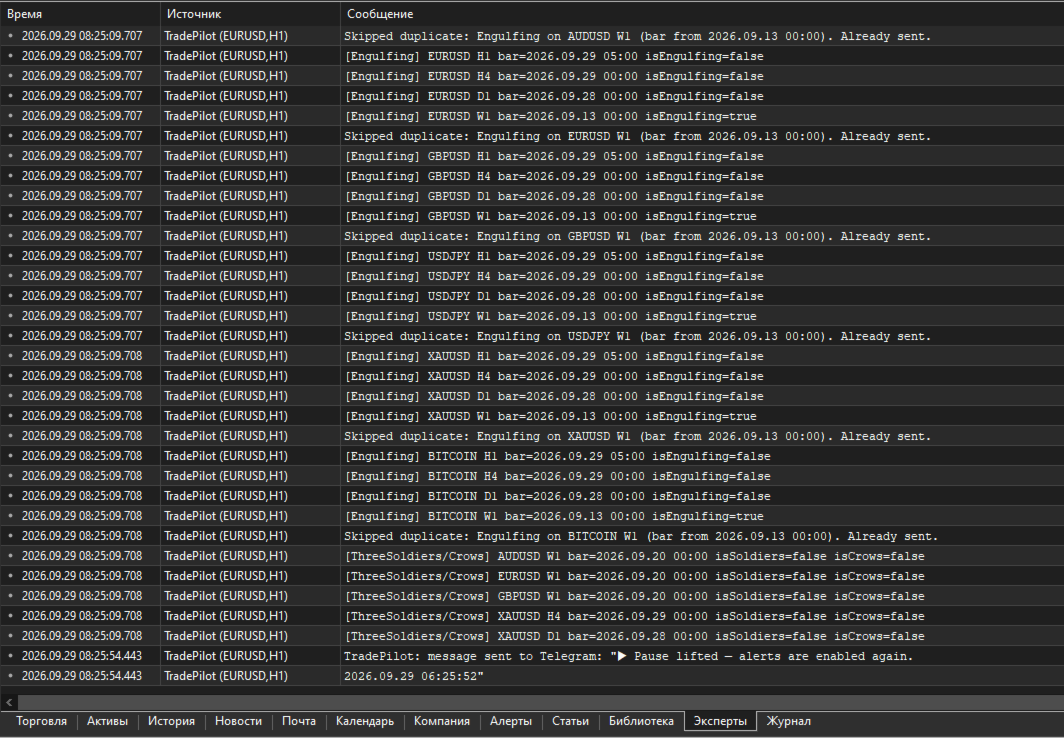
The EA scans charts whether or not you're looking at the terminal, and sends a Telegram alert with a ready-made chart screenshot. It runs in one of two modes:

  • "Monitor" ( Inp_EnablePatternMonitoring = true ) — full mode: pattern scanning, margin control, accepting trading commands. Only ONE copy in this mode is allowed per terminal at a time (protects against a second copy accidentally duplicating alerts or competing for Telegram commands).
  • "Screenshoter" ( Inp_EnablePatternMonitoring = false ) — lightweight mode, no pattern scanning and no trading commands, just screenshots on demand ( /screenshot , /swing , /marginview ). You can run as many copies as you like — handy to keep one per symbol chart you want screenshot access to, without touching the main "Monitor". If the hidden service chart isn't available in this mode, some features honestly fall back to a text report instead of failing.

Which patterns it looks for

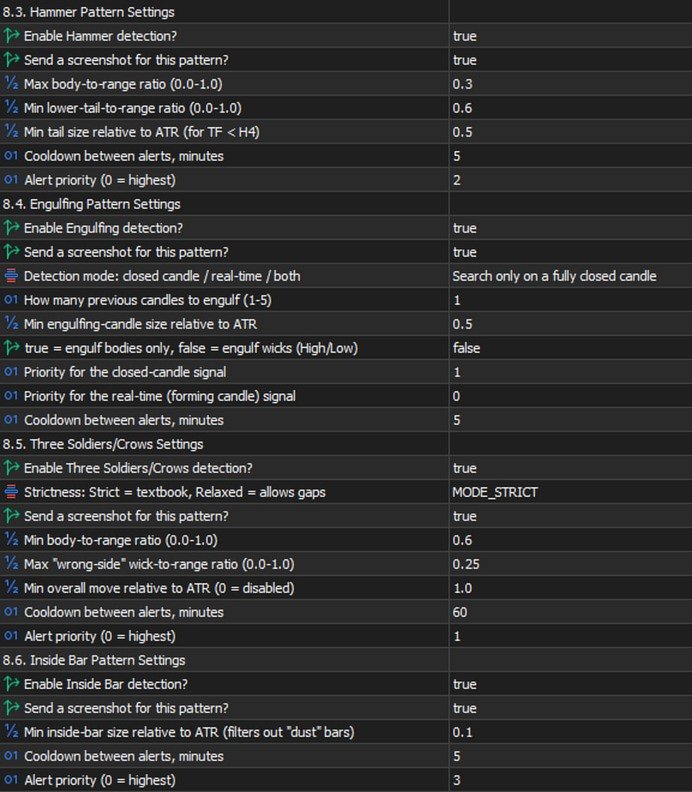
  • Doji — body close to zero relative to the candle's range (the threshold is configurable), both wicks noticeable — a sign of market indecision.
  • Pin Bar — small body, one long "tail" — price refusing to go further in one direction.
  • Hammer — small body near the top of the range, a long lower wick — a reversal signal.
  • Engulfing — a candle fully covers one or more previous candles (how many is configurable). There's a mode to search on a CLOSED candle, in REAL TIME on a still-forming one, or both — the real-time mode fires earlier, before the bar closes, at the cost of somewhat more false positives.
  • Inside Bar — a candle entirely within the previous candle's range — volatility compression before a possible breakout.
  • Three Soldiers / Crows — three candles in a row moving the same direction with no significant wicks — a strong impulse.

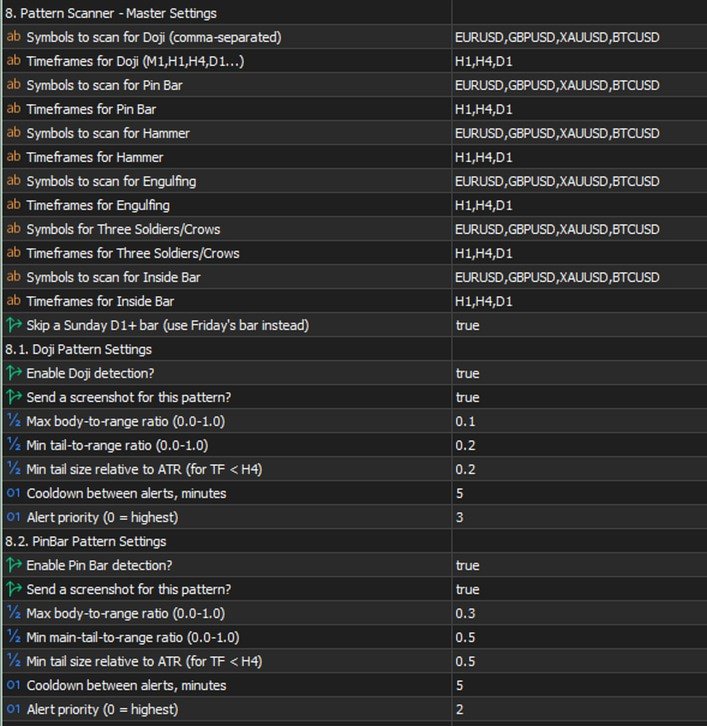
Each pattern has its own settings: which symbols and timeframes to scan, whether it's enabled at all, whether to send a screenshot along with the text, geometric thresholds (body/wick share of the candle's range), a minimum size relative to ATR (so it doesn't react to "dust" in a quiet market), a cooldown between repeat alerts for the same symbol/timeframe, and a priority in the shared send queue (0 is highest; critical margin alerts always jump the queue).

Multi-timeframe confluence

If the same pattern type fires independently on SEVERAL timeframes within a short time window (configurable), that's a confirming, stronger signal, and the EA automatically raises its priority. Not a fresh check from scratch — just cross-referencing detections that were already found, at essentially no extra cost.

⚡ Emergency signal — an abnormally large candle

Separate from the candlestick patterns: a real-time candle-size scanner. If the CURRENT, still-forming candle on a chosen timeframe has already grown more than N times (configurable) the normal candle size (measured by ATR), the alert fires IMMEDIATELY — it doesn't wait for the bar to close. If the candle keeps growing, a follow-up alert with the updated size arrives, so you can see the move is still going, not that it stalled.

This is exactly where "monitoring + trading in one chat" pays off fully: you get a signal about a sharp spike, decide to act, and right in the same chat, without switching apps, type /buy SYMBOL RISK 1% SL ... and you're in the trade while the move is still relevant. No need to run to the terminal to check what happened and then separately open a position — it's all in one place.

On-chart summary

A compact panel directly on the terminal chart — the most recent signals across every watched symbol/timeframe at a glance, no need to scroll back through the chat history ( Inp_EnableOnChartSummary ).

Margin control

  • Configurable levels: margin call, stop out, breakeven, full liquidation, profit target — calculated from the account's current state and drawn as lines directly on the chart, with alerts as price approaches them.
  • /marginview CUR|SYMBOL ( /mv ) — on demand, sends a screenshot with an automatically chosen scale so ALL levels and the current price fit into one picture. Works not just for the symbol of the chart the EA runs on, but for any symbol with an open position. For a fully locked symbol (BUY=SELL, zero net volume) it honestly explains that no levels exist, because there's nothing for price movement to act on — instead of returning silent emptiness.

Two-way control through Telegram

Commands split into informational and trading ones. Several commands have short forms — faster to type when a decision needs to happen in seconds (for example, right after a sharp-candle signal).

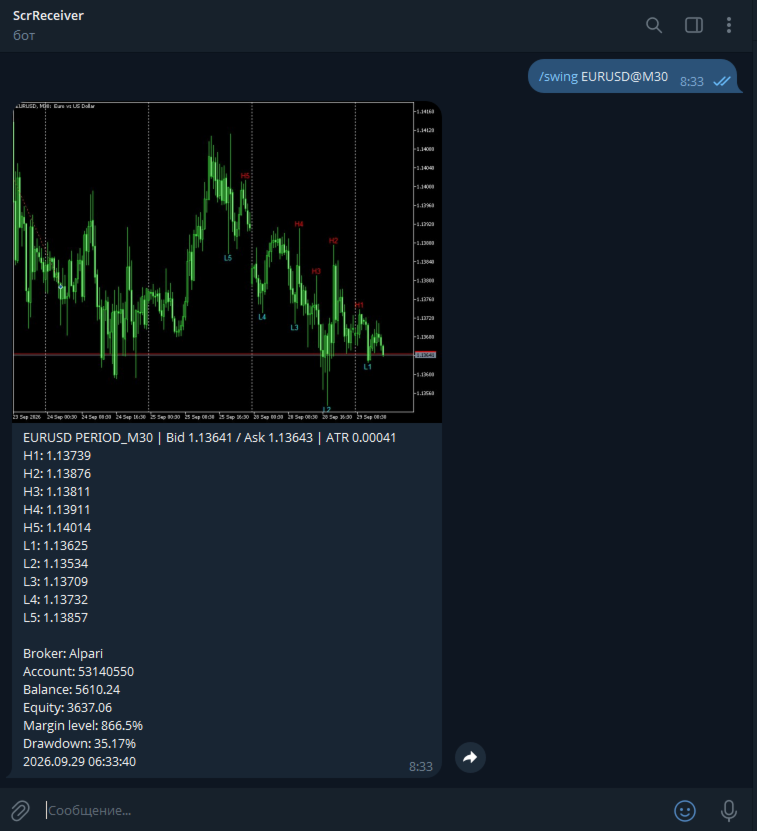
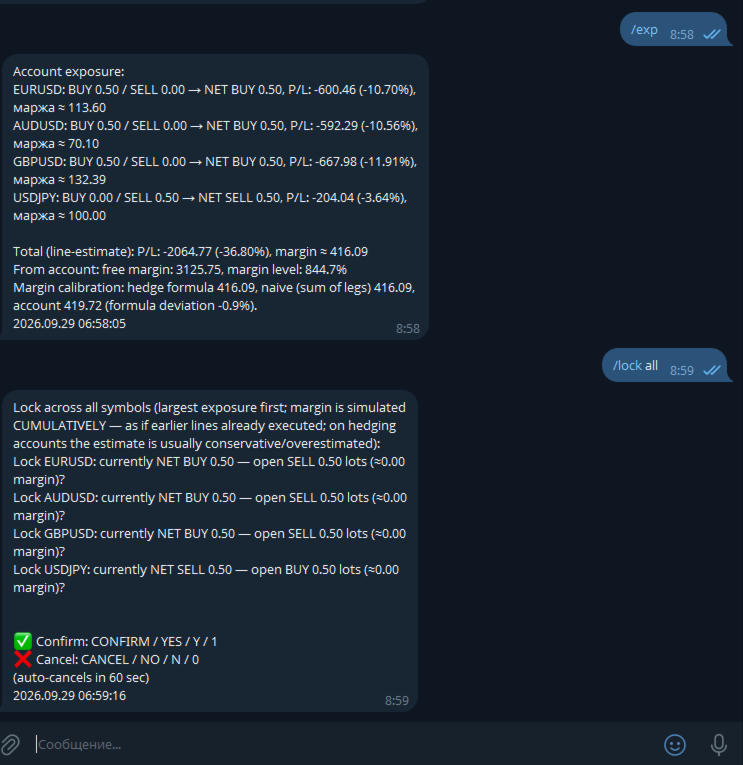
Informational (always available): - /status ( /st ) — account status. - /positions [FILTER] ( /pos ) — open positions, with short reference numbers N1, N2... for use in other commands. - /pending [FILTER] ( /pnd ) — pending orders, numbers P1, P2... - /exposure ( /exp ) — net volume and margin load per symbol. - /swing SYMBOL [depth] ( /sw ) — a screenshot with the last 5 swing highs and 5 swing lows labeled on the chart. - /marginview CUR|SYMBOL ( /mv ) — see the margin section above. - /screenshot ( /ss ) — a screenshot of the current chart on demand. - /pause , /pause N ( /pa ) / /resume ( /re ) — pause automatic alerts without touching trading commands. - /help ( /h ) — command list; tap any specific command with no arguments for detailed help on it.

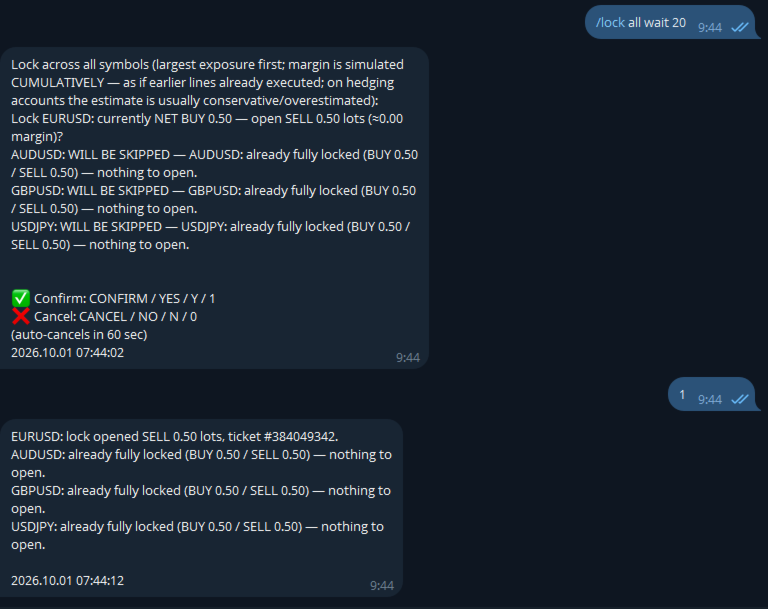
Trading (require a separate opt-in in settings): - /close ( /cl ) — close position(s). - /set SL|TP|BE <ref> <price or expression> — set or remove a stop/take-profit, or move to breakeven. - /shift SL|TP <ref> UP|DOWN <points> ( /sh ) — moves an ALREADY-SET stop/take-profit by N points relative to its current value (unlike /set , which sets an absolute price) — no need to check where the stop currently sits yourself. With a filter, each position shifts from its OWN current level — handy for grids/martingale. - /del SL|TP|PENDING <ref> — remove a stop/take-profit or delete a pending order. - /buy / /sell — a market entry or a pending order. - /lock SYMBOL / /lock ALL — instantly opens an opposite position, zeroing net volume. The spread check is deliberately not applied to /lock — locking is a defensive action taken precisely because the market is stressed, and spread widens in exactly those moments. - /undo — reverts the last command that changed an SL/TP ( /set , /shift , /del , moving to breakeven), within 10 minutes of it. One step back, requires its own confirmation with an explicit irreversibility warning. Closing positions and opening new trades are not reversible. - /enable <password> / /disable — emergency toggle for trading and bulk commands even if they're disabled in settings. Scenario: you forgot to enable Inp_EnableTelegramTrading , stepped away from your computer, and now urgently need to adjust trades remotely. The password is a separate setting ( Inp_EmergencyPassword , empty by default — the feature is off), the override is session-only (resets on restart), three wrong attempts in a row trigger a 5-minute lockout.

Shared command language: - A reference to a position/order — a short N/P-number (from /positions / /pending ) or a filter ( ALL , PROFIT , LOSS , BUY , SELL , VOL>x , a symbol name) — one command can touch several positions. - A price is a number or an expression like LOW1-1.5ATR / HIGH2+50P (a swing level with an ATR or point buffer). - Volume is a number or RISK 1% (the lot size is calculated from the risk % and the distance to the stop, with the calculation shown in the preview before confirmation). - Every operation: preview → confirm/cancel word → execution, with an auto-cancel timeout. Confirmation words are configurable ( Inp_ConfirmKeywordYes/No , defaulting to only CONFIRM / YES and CANCEL / NO — no short Y / N / 1 / 0 ).

Usage examples

⚡ EMERGENCY: XAUUSD H1 — abnormally large candle (3.4x ATR)! → while the move is still relevant, right in the same chat: /buy XAUUSD RISK 1% SL LOW1-0.5ATR → the bot calculates volume from 1% risk and the distance to the stop, shows the calculated lot size in the preview, waits for confirmation /pos PROFIT → lists only profitable positions, numbered N1, N2... /close N1 → preview "close #12345 XAUUSD BUY 0.10, P/L +42.10?" → confirm → closed /set TP N1 HIGH1+20P → take-profit 20 points above the last swing high /lock XAUUSD → instantly opens an opposite position, zeroing net volume on gold /shift SL N1 UP 50 → pulls an already-set stop 50 points up (manual trailing) /undo → "Undo: SET SL by filter 'XAUUSD': ... THIS ACTION CANNOT BE UNDONE" → confirm → stops revert to their values from before the command /mv → a chart screenshot with an auto-picked scale, showing the current price and all margin levels at once

Settings — by group

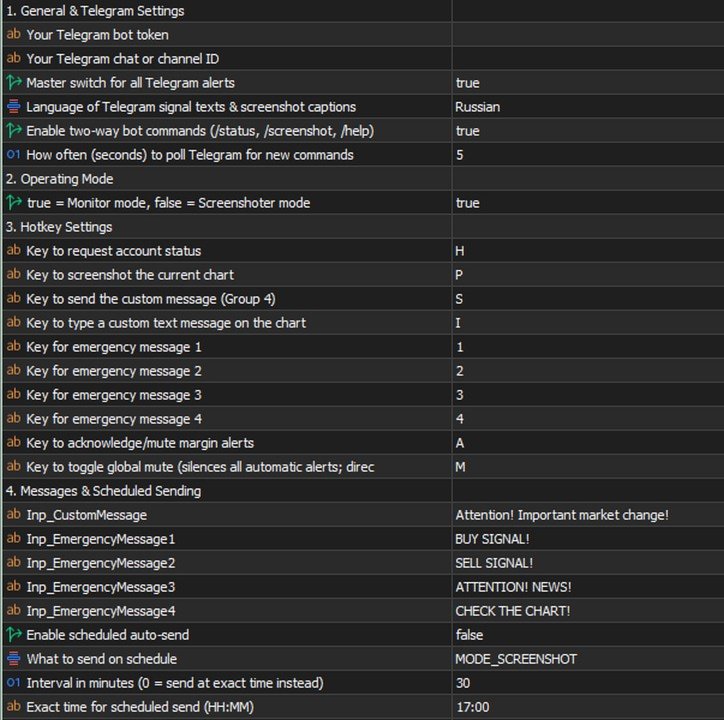
  • Telegram — General: bot token, chat ID, the master alert switch.
  • Mode: "Monitor" vs "Screenshoter" ( Inp_EnablePatternMonitoring ).
  • Emergency messages: 4 configurable template phrases with chart hotkeys in the terminal — if the bot is connected to a channel/group with subscribers, one keypress, no typing needed, instantly broadcasts a ready-made warning to the whole audience (each phrase's text is whatever you want — "closing everything", "news coming, don't enter", "re-entry", etc.).
  • Margin control: on/off, which of the five levels to calculate and show, line colors and styles.
  • Per-pattern groups (Doji/Pin Bar/Hammer/Engulfing/Inside Bar/Three Soldiers): for each — symbols and timeframes, enabled, screenshot yes/no, geometric thresholds, minimum ATR, cooldown, priority.
  • Emergency signal: enabled, the ATR multiplier for an "abnormal" candle, timeframe, ATR period, priority.
  • Confluence: time window, minimum number of confirming timeframes, how much to raise priority.
  • Shared geometric thresholds: minimum body/wick share of the candle's range — a "flat line" candle filter applied before all the detectors.
  • Chart appearance: arrow and label colors per pattern, the summary panel.
  • Screenshots: quality, mode (candles/bars), delays before capturing.
  • Alert pause: the default duration for /pause .
  • Telegram commands: enable reading commands, poll interval.
  • Telegram trading: master switch, bulk commands, operation confirmation, confirm/cancel words, timeout, the /undo window, the /enable emergency password.
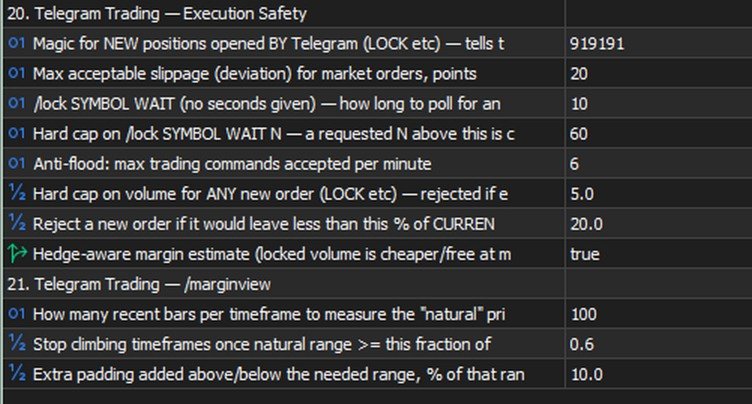
  • Execution safety: magic number for new positions, slippage, minimum free margin left after a trade, a per-order volume cap.
  • /marginview : how many bars to use for scale-fitting, the "natural range" threshold, padding around the picture's edges.

Tips and recommendations

  • Start with Inp_ConfirmTradingOperations = true (the default) — so every operation requires explicit confirmation, giving you time to catch a typo before it actually executes.
  • Check LOW/HIGH ± ATR expressions with /swing SYMBOL before using them in a real trading command.
  • For grids/martingale, use VOL>x filters in /close / /set , or a plain symbol filter in /shift / /undo .
  • Keep Inp_EnableBulkTradingCommands off until you've tested single-position operations.
  • Tune the emergency signal ( Inp_EmergencyCandleSizeATR ) to your instruments' real volatility — too low an ATR multiplier floods you with false positives, too high and you'll miss genuinely sharp moves.
  • If you set Inp_EmergencyPassword for /enable , pick something that can't be guessed in three tries.

Cautions

  • /undo is irreversible on its own — if something ELSE changed the same SL/TP after your command (another command, a manual edit in the terminal), the preview will warn you, but the revert will still restore the value from BEFORE your command, not undo that later change.
  • /enable lifts TWO safeguards at once — the general trading ban and the bulk-commands ban. Treat it as an emergency exit, not a way to bypass Inp_EnableTelegramTrading=false just because you haven't decided on the setting yet.
  • /lock doesn't check the spread — a deliberate trade-off, a lock needs to work even with a wide spread ahead of news; at an extreme gap it will execute at whatever price is available.
  • Bulk operations ( ALL , a symbol filter) affect several trades with one command — the preview shows the exact list before execution, check it.

Known limitations (honestly, no hiding)

  • Market /buy / /sell and pending orders are already supported; some rare parameter combinations may not be covered yet.
  • WebRequest to Telegram is a synchronous call (a limitation of MQL5 itself), so a brief delay in the alert queue is possible when the Telegram API is unavailable.
  • With several copies of the EA on one terminal, only the one in "Monitor" mode accepts commands (Telegram delivers updates to a single requester — the offset cursor is shared per bot).
  • There's no automatic trailing yet (the EA moving a stop on its own, on a timer) — only manual /shift . A version with a choice of algorithm (fixed step / ATR / fractals / Fibonacci) is being worked out.
推荐产品
Crystal Trade Manager – Advanced MT5 Risk and Trade Control Utility Overview Crystal Trade Manager (CTM) is a professional MetaTrader 5 utility designed for risk management, trade automation, and instant execution control. It provides traders with an integrated system for protecting equity, managing daily drawdowns, controlling lot sizes, and applying automation features such as automatic SL/TP, break-even, and trailing stop. The tool is suitable for manual traders, prop-firm challenge particip
Manual Trade Panel PRO for MT5 Product name **Manual Trade Panel PRO for MT5** Short description Advanced manual trading panel for MetaTrader 5 with BUY/SELL and BUY LIMIT/SELL LIMIT execution, balance-based lot sizing, automatic SL/TP, Break Even, trailing stop, partial close, candle timer, and open position pips counter. Full sales description **Manual Trade Panel PRO for MT5** is an advanced Expert Advisor designed for manual and semi-automatic trading in MetaTrader 5. The EA creates a c
TAQ Magic Keys v6.0 Auto Trade Manager is an advanced trade management tool for MetaTrader 5 (MT5) , featuring one-click trade management functions and an integrated Position Size Calculator . New Feature In V6.0 — FNR1R1 Function Key The new FNR1R1 Function Key provides an automated 1:3 Risk Reward trade management system , allowing traders to manage an open position through three predefined profit targets. Set your initial Stop Loss, and the system automatically calculates: TP1 = 1:1 Risk R
ZyloFx Partial Close Manager
Rosa Lina Martinez Jimenez
IMPORTANT: After purchasing this product, please send me a private message to receive the installation guide, setup instructions, and direct product support. ZyloFx Partial Close Manager is a professional trade management Expert Advisor for MetaTrader 5, designed to help traders manage open positions with automatic partial closes and optional break-even protection. This EA does not open trades automatically. Its main purpose is to manage existing positions according to the user’s selected sett
Time in Trade
Denis Diakonov
Time in Trade Expert Advisor 採用在指定時間開掛單的策略,也使用自動切換的冬夏時間。 出現信號時,交易機器人會打開等量的掛單進行買賣。 用於交易的時間範圍為 5 分鐘。 掛單的觸發因素是價格急劇變化,具體取決於: 開/關交易時段; 發布重要經濟指標; 交易者數量最多的時間間隔。 用戶可以使用以下設置: Open Price —根據 BID 和 AKS 價格設置訂單開倉水平; Stop Loss - 價格出現意外變動時的止損水平; Trailing - 浮動止損水平; Volume - 固定交易量(僅對 RISK = 0 有效); RISK - 風險水平百分比: 0 - 無風險設置。 將應用固定量; 1 及以上 - 自由資金的風險水平百分比。 HOUR_n - 在指定時間(服務器時間)啟用/禁用交易: true - 允許; false - 禁用。 測試以 3 毫秒的延遲、1/40 的槓桿和 70 的風險水平進行。 初始存款 - 3000 RUB 輸入參數 EUR/USD : Open Price - 120; Stop Loss - 140; Trailing
Horizontal Line Trade Assistant EA  Semi-Automated Trading Assistant      IMPORTANT :     On the main/purchased program a user can click on the Horizontal line and change it to Buy or Sell, and drag by double clicking on it. Please keep in mind that this option is not available on demo version, due to some restrictions/limitations of Strategy Tester, some Object related operations are not available in the  Strategy Tester. But, it will not prevent you from Testing, please drop an Object to chart
SPICA CLICK TRADE CONTROL MT5 Spica Click Trade Control is a complete one-click trading panel for MT5 — built for traders who want speed without giving up control. Every trade shows you the exact lot size, dollar risk, and reward before you click Buy or Sell. Manage open positions with breakeven, trailing stops, and partial closes. Protect your whole account with automatic equity-based shutoffs. All from a clean, tabbed panel that stays out of your way until you need it. KEY FEATURES Trading
Trade Assistant MT4/MT5 PRO 使用说明 Trade Assistant MT4/MT5 PRO 是一款面向 MetaTrader 4/5 的专业交易面板,适合需要快速、方便、直观地控制交易流程的交易者。该产品可以减少重复性的手动操作,加快订单开立和管理速度,标准化风险管理流程,并让手动交易更加有纪律。 这个工具不会替代交易者寻找信号,也不会承诺神奇的结果。它的任务更实际,也更有价值:在图表上为你提供一个方便的交易执行和管理环境。你自己决定入场点、交易思路和市场逻辑,而 Trade Assistant MT4/MT5 PRO 帮助你快速把这个想法转化为清晰的交易计划:风险、仓位大小、Stop Loss、Take Profit、Break Even、Trailing Stop 以及持仓管理。 如果你已经厌倦了每次都手动计算仓位大小、打开终端标准下单窗口、检查止损距离、移动保护位、删除挂单、进行部分平仓,并反复确认每笔交易是否符合你的交易系统规则,那么这个助手正是为你设计的。 使用说明: 点击打开 Trade Assistant MT4/MT5 PRO 使用说明
该智能交易顾问(EA)会在 MetaTrader 5 中监控所有交易品种上的所有持仓。一旦在任意持仓上 手动设置或调整 了止损(SL)或止盈(TP),EA 会将该值 自动应用于其他所有未平仓头寸 ,无论是买单还是卖单、哪个交易品种。这确保整个账户的 SL 和 TP 水平始终保持同步。 非常适合通过平板或智能手机进行移动交易!    ......................................................................................................................................................
MQL5 Trading Panel SL TP — это мощный инструмент, призванный помочь трейдерам эффективно управлять своими позициями на платформе MetaTrader 5. Эта торговая панель предоставляет простой в использовании интерфейс для установки уровней Stop Loss (SL) и Take Profit (TP) для открытых позиций. MQL5 Trading Panel SL TP обладает широкими возможностями настройки и может быть адаптирована к конкретным потребностям отдельных трейдеров. Панель можно изменять в размере, перемещать и настраивать с помощью ра
* Super Assistant is an useful management tool that helps traders perform management tasks on MT4/MT5 account remotely via Telegram such as: - Get info (account, details of positions, pending orders, floating PL, price, economic news, etc) - Open trade (open instantly with preset parameters) - Manage trade (set SLTP automatically, break-even mode, max risk, close time every day, etc) - Close trade (close all, buy, sell, win positions by one click, set awaiting close by PL, time) - Set up notifi
GS trade report
Aleksander Gladkov
5 (1)
Lock and Peel Pro Advanced Risk Manager
Muhammad Hassan Muhammad Ahmad Atiyah
Advanced Breakeven & Partial Close Manager MT5 脚本 – 一键交易管理 概述 Advanced Breakeven & Partial Close Manager 是一个用于 MetaTrader 5 的交易管理脚本。 它 仅作用于已打开的仓位 ,并严格按照用户设定的规则执行操作。 该脚本在加载到图表时 只执行一次 ,仅执行在参数中明确启用的操作。 不会后台运行,不会自动交易,也不会生成交易信号。 核心功能 该脚本提供严格的保本止损和部分平仓管理,并包含多重安全检查。 保本止损管理 当达到最小盈利条件时,可将止损移动到计算后的保本位置。 支持在入场价基础上增加可选的利润缓冲。 买单保本设置在入场价之上,卖单设置在入场价之下。 部分平仓管理 每次执行仅允许一次部分平仓,按固定百分比减少仓位。 系统会确保剩余手数不低于最小允许值。 默认情况下,仅对盈利仓位执行部分平仓。 重要说明 本产品为 脚本 ,非 EA。 不负责开仓、不分析市场方向、不生成信号。 所有操作需由用户明确配置。
TradePilot Dashboard
Augusto Martins Lopes
TradePilot Dashboard 摘要 适用于 MT5 的图形面板,包含订单管理按钮(买入/卖出/平仓/止损/止盈)、保证金检查和日志控制。易于使用,可在模拟账户中测试。不承诺盈利。 详细说明 TradePilot Dashboard 是一个具有图形界面的专家顾问(Controls),用于在 MetaTrader 5 中进行手动和半自动订单管理。该产品提供一个可视化面板,包含按钮、可编辑字段和安全检查(自由保证金),帮助交易者直接在图表上快速操作。 主要功能 • 响应式图形面板,包含 40 多个按钮和多个输入字段(交易量、点数、追踪止损、反向止损等) • 使用 Trade.mqh(CTrade)库开设市价和挂单订单(Buy、Sell、BuyStop、SellStop) • 在发送订单前检查自由保证金(使用 ACCOUNT_MARGIN_FREE) • 可配置的日志控制(enableLogging、maxLogsPerMinute),防止消息泛滥 • 面板上显示价格(Ask/Bid)、余额和基本指标 • 集成 Controls 库(Dialog/Label/Button/Edi
Bring the TradingView experience to your MetaTrader 5! Magic Entry Pro is a professional visual trading assistant designed for manual traders, scalpers, and Prop Firm funded traders. It allows you to execute trades with lightning speed, calculate risk automatically, and visually project your Stop Loss and Take Profit zones directly on the chart before you open a position. Tired of manually calculating lot sizes or guessing your Risk-to-Reward (RR) ratio? Magic Entry does it all in seconds! KE
This is a utility designed to automatically set the stop loss levels of orders according to the specified condition. Two price levels serve as the condition for setting stop loss: Trigger level - when this level is reached, an order is placed. The stop loss value of an order. It is possible to enable or disable traling stop loss. Input parameters Order type for execution - type of orders to be processed by the expert. It can either be BUY, SELL or auto-select. Trigger Level Points - level to pl
Risk calculator for MetaTrader 5. Precision Position Calculator is a MetaTrader 5 utility that helps calculate trade volume based on the risk configured by the user. The panel allows the user to work with Entry, Stop Loss and up to three Take Profit levels directly on the chart. Main description Precision Position Calculator is a utility for MetaTrader 5 designed to help calculate the volume of a trade before opening it. The panel allows the user to configure risk, select the order type, set th
FREE
Risk Control Utility MT5 designed for manual trading. It helps to calculate and control your risks, transfer transactions to breakeven and accompany positions with trailing stop. Easy to set up and use. It can be used for calculating a trading lot, calculating stop loss and take profit levels. Works with currency pairs, CFDs, stocks, indices, futures, cryptocurrencies Displays   volume,   potential loss and profit before   placing an order Ability to set the expiration time of a pending order Tr
Algosphere Terminal是MetaTrader 5平台上的专业一键交易面板,专为追求高效率和快速执行的交易者精心设计打造。使用预定义的止损和止盈点数即时执行买入和卖出订单,完全无需繁琐复杂的操作步骤。强大功能包括可调整手数与快速预设按钮方便快捷选择、实时点差监控与智能颜色警报提示让您随时掌握市场状况、可配置激活条件的追踪止损保护您的利润、一键保本功能锁定盈利和全面完善的仓位管理工具。面板提供四种优雅专业主题供您个性化选择:Obsidian深邃黑色主题、Emerald翡翠绿色主题、Frost冰霜蓝色主题和Neon霓虹紫色主题。所有交易设置在会话之间自动保存,下次启动终端时自动恢复您的偏好配置。广泛适用于外汇货币对、股票指数和差价合约等多种交易品种。界面设计简洁直观,帮助您专注于交易决策而非复杂操作。
Hello, Every one  Close All Button A script to close all market positions and/or pending orders. ----------------------------------------------------------------------------------- This is Close All    market positions and/or pending orders button  You can close all orders in 1 second by one click  Download for Demo Account: Download on Demo Account:  Close All in 1s v1.4 Only Demo.ex5 - Google Drive Free version:  https://www.mql5.com/en/market/product/74159 For send Trade notification to Your
This utility provides the ability to use hot keys in manual trading instantly responding to the current market situation. You can assign hot keys to open/close positions by their type, open/close all positions on the current chart and remove all orders on the current chart. You can also assign hot keys for five predefined trade volumes and switch between them if necessary with no need to change the volume manually from time to time. It is also possible to set the auto calculation of a trade volu
AKCAP Hotkey Tool
AK Capital Markets Limited
5 (3)
Special offer for the next 10 copies Are you tired of manually navigating through menus and inputting data every time you want to execute a trade or open an order on Meta Trader? Our hotkey tool is here to make your life easier and boost your trading efficiency. Our tool is natively coded for lightning-fast performance and comes loaded with all the features you could possibly want. From pending orders and OCO orders to trailing and multiple buckets, it has everything a scalper could need. And
Trade Panel MetaTrader 5 - feature-rich tool that adds the desired and highly-demanded functions to the terminal to enhance trading experience. Orders execution with one click You can open and close orders easily, using the panel. Buttons to open Market, Limit and Stop orders in both buy and sell directions are located on the Main tab, while there are multiple options to close already existing positions and cancel orders: Close/cancel all Close/cancel buy and sell positions/orders separately Clo
SmartRiskManager
Juergen Josef Wonke
One click. Everything under control. SmartTradePanel is a lightweight, fast trade panel for MT5. You trade and manage risk in USD (not pips), place pending orders with visual confirmation, start trailing only when your trigger is activated – and keep your chart clean. The panel always stays in the foreground, is DPI-friendly, and remembers your settings for each symbol. Main functions • One-click trading & closing BUY / SELL Close all BUY / SELL Close only winners / only losers Close HAL
Spread and Swap monitor
Hennadii Stanilevych
5 (1)
本指标的目的是判断点差和利率大小,以及按照存款货币每一个点的风险,设置从当前价位计算的止损距离。 本指标告知交易者有关金融工具在每个时段之间转换时可能的额外费用和利润。它还告知有关的点差和挂单的距离,从当前价位的尾随止损位。此外,指标告知交易者有关存款货币每一个点的风险。 信息被显示在图表下方的单独子窗口里。它可以避免图表被不同的信息塞满。点差和利率监控指标适合任何自定义模板。
Session Breakout Executor 是一款确定性 MetaTrader 5 自动交易程序,用于执行预先定义的交易时段区间突破流程,并通过 OCO 挂单管理双向候选订单。策略、风险门槛和生命周期状态均显示在专业面板中,默认情况下自动入场处于关闭状态。 主要功能 • 可配置的交易时段区间构建 • 下单前需要明确手动解锁 • 经纪商规则感知的挂单验证 • 一侧触发后自动取消另一侧 OCO 订单 • 点差、交易权限和时段安全检查 • 保本管理和基于 ATR 的移动止损 • 一次性部分平仓 • 持久化生命周期与恢复状态 • 多页面监控、风险和审计面板 本 EA 用于自动执行基于规则的突破计划,不保证突破成功或交易盈利。实盘使用前,应针对所选品种、周期和参数进行回测与模拟测试。交易存在风险,经纪商条件可能显著影响执行和结果。
Managing every trade manually can be stressful and often leads to errors. Smart Pro Manager MT5 is a utility designed to simplify and automate trade management directly from the chart, allowing you to focus solely on entry decisions. Once you open a position with a simple click on   BUY   or   SELL , the system automatically takes care of all the management: Automatically sets   Stop Loss   and   Take Profit   Moves   Stop Loss to   BreakEven   (with buffer) Dynamically manages   Traili
Quantum Breakout System
Joshua Johnathan Chung
Quantum Breakout System: Algorithmic Trading Utility for Gold (XAUUSD) The Quantum Breakout System is an automated trading utility built for MetaTrader 5, designed specifically to assist traders in managing breakout strategies on Gold (XAUUSD). Utilizing core elements from the SwingMaster architecture, the Quantum Breakout System focuses on dynamic order placement at key market support and resistance levels. Rather than relying solely on market orders, the EA places calculated pending limit
FREE
Tired of manually adjusting stop-loss and take-profit levels for multiple positions across different pairs? The Manage Multiple Positions Expert Advisor is your solution. MT4 Version -  https://www.mql5.com/en/market/product/120916/ This powerful tool streamlines your trading experience by allowing you to manage multiple positions on a single pair with ease. Modify stop-loss and take-profit levels for all open positions on a specific pair with a single click. Plus, the EA provides clear visibili
Virtual TP SL TS
Andrei Sviatlichny
使經紀人看不到您的止盈,止損和追踪止損水平! 主要選項: 隱身模式 虛擬尾隨止損 虛擬獲利 虛擬盈虧平衡點 虛擬止損 虛擬訂單生命週期 警告: EA交易本身不會下訂單。 您必須自己打開訂單(包括通過“專家”面板),或在同一貨幣對的另一張圖表上使用第三方專家。 請在專家設置中指定魔術數字“ -1”,以便專家處理這些訂單。 用於測試使用視覺模式!!! 工作算法 當您(或其他EA交易)打開買/賣定單,或觸發掛單或圖表上可能已經有未平倉頭寸/定單時,專家將安裝控制面板並開始跟踪v-StopLoss, v-BreakEven,v-TakeProfit參數。 提醒: 當您使用“ -1”以外的幻數時,專家將僅跟踪通過其面板開立的訂單/頭寸。 使用的縮寫:v-SL =虛擬止損,v-BR =虛擬收支平衡,v-BRD =虛擬收支平衡距離,v-TS =虛擬尾隨停止,UP =刷新尾隨停止。 看圖片 “OPTIONS HELP CHART” 用於視覺感知算法. 當價格達到[v-SL]水平時,頭寸將被平倉。 當價格達到[v-BR + v-BRD]水平時,v-BR標記將設置為[v-BR]水平。 如果價格接近v-BR
该产品的买家也购买
Trade Assistant MT5
Evgeniy Kravchenko
4.43 (216)
它有助于计算每笔交易的风险,容易安装新的订单,具有部分关闭功能的订单管理, 7 种类型的追踪止损和其他有用的功能。   附加材料和说明 安装说明   -   应用程序说明   -   模拟账户应用程序的试用版 线条功能  - 在图表上显示开仓线、止损线、止盈线。 有了这个功能,就可以很容易地设置一个新的订单,并在开仓前看到它的附加特性。   风险管理  - 风险计算功能在考虑到设定的风险和止损单的大小的情况下,计算新订单的成交量。它允许你设置任何大小的止损,同时观察设定的风险。 批量计算按钮 - 启用 / 禁用风险计算。 在 " 风险 " 一栏中设置必要的风险值,从 0 到 100 的百分比或存款的货币。 在 " 设置 " 选项卡上选择风险计算的变量: $ 货币, % 余额, % 资产, % 自由保证金, % 自定义, %AB 前一天, %AB 前一周, %AB 前一个月。   R/TP 和 R/SL - 设置止盈和止损的关系。 这允许你设置相对于损失的利润大小。 例如, 1 : 1 - 这决定了 TP = SL 的大小。 2 : 1 - 这意味着 TP 是 SL 的两倍。 RR -
欢迎来到 Trade Manager EA——这是一个终极风险管理工具,旨在使交易变得更直观、精准和高效。它不仅仅是一个下单工具,而是一个用于无缝交易计划、仓位管理和风险控制的全面解决方案。不论您是新手交易员、资深交易员,还是需要快速执行的剥头皮交易员,Trade Manager EA 都可以满足您的需求,适用于外汇、指数、大宗商品、加密货币等各种市场。 借助 Trade Manager EA,复杂的计算已成过去。只需分析市场,在图表上用水平线标记入场、止损和止盈,设置您的风险水平,Trade Manager 就会立即计算出理想的头寸规模,并实时显示以点、账户货币计价的止损和止盈。每笔交易都得以轻松管理。 主要功能: 头寸规模计算器 :根据定义的风险瞬间确定交易规模。 简单的交易计划 :在图表上用可拖动的水平线直接计划交易,设置入场、止损和止盈。 实时显示 SL 和 TP :以账户货币、点或分显示止损和止盈,便于分析。 高级保护工具 盈亏平衡选项 : 基本盈亏平衡 :当您的交易达到设定水平时自动保护利润。 多级盈亏平衡 :设置多达 4 个级别以逐步保护利润。 尾随止损选项 : 基本尾随
Telegram to MT5 Multi-Channel Copier   可将您 Telegram 频道中的交易信号自动复制到 MetaTrader 5。无需机器人、无需浏览器扩展、无需手动复制。信号一到 Telegram,EA 几秒内就在您的终端开仓。 在复制某个频道之前,内置回测器还能告诉您该频道在您的账户上会有怎样的表现。 产品包含两个组件:一个监听您 Telegram 频道的 Windows 应用程序,以及在 MT5 终端执行信号的本 EA。同时提供 MT4 版本   点此 . 设置指南与应用下载:   https://www.mql5.com/en/blogs/post/768988 了解如何 回测任何 Telegram 信号频道 。 当前价格将来会上调。 工作原理 应用通过您自己的 Telegram 账号连接,因此能看到您关注的所有频道、群组、话题和机器人,包括私密和 VIP 频道。信号到达时,应用读取它,EA 按您的手数和设置在终端中开仓。 整个过程全自动,无需守在电脑前。专为 24/7 无人值守运行设计:Telegram 连接断开时,应用会自动重连。 打开应用并登录
================================================================================ POC BREAKOUT - V20.72. Full Professional Grade Toolkit ================================================================================ POC Breakout is a full MetaTrader 5 trading dashboard for discretionary traders who want breakout signals, Point of Control (POC) context, volume profiles, order flow, market structure, news, alerts, and advanced trade planning in one professional workspace. Attached directly to you
TradePanel MT5
Alfiya Fazylova
4.88 (170)
交易面板是一款多功能交易助手。该应用包含超过50种手动交易功能,并允许您自动执行大多数交易任务。 应用程序说明 : https://www.mql5.com/zh/blogs/post/761102 用于模拟账户的应用程序试用版: https://www.mql5.com/zh/blogs/post/762579 如何安装应用程序: https://www.mql5.com/zh/blogs/post/762580 如何在可视化模式下测试应用程序: https://www.mql5.com/zh/blogs/post/770278 如何在VPS MetaTrader上安装应用程序: https://www.mql5.com/zh/blogs/post/770196 贸易. 只需单击一下即可执行交易操作: 打開掛單和頭寸,並自動計算風險。 一鍵打開多個訂單和頭寸。 打開訂單網格。 按組別關閉掛單和頭寸。 反轉頭寸方向(關閉買入>打開賣出,關閉賣出>打開買入)。 鎖定頭寸(通過開啟缺少的頭寸,使買入和賣出頭寸的數量相等)。 一鍵部分關閉所有頭寸。 將所有頭寸的止盈和止損設置在同一價格水平。
按照自己的交易规则复制 Telegram 信号 Telegram to MT5 Signal Trader 可将 Telegram 公开及私密频道和群组中的文字交易信号自动复制到 MetaTrader 5。通过一个桌面应用管理多个信号提供者和 MT5 账户,并为 每个提供者单独设置风险和交易参数 。 复制信号无需 Telegram 机器人,也无需配置 API。 只需通过手机号或二维码登录您自己的 Telegram 账户,然后选择您已加入的频道或群组。您无需创建机器人,也无需提供 Telegram API 令牌、API ID 或 API hash。 自行选择仓位大小,将平仓分配到多个止盈价位,并自动执行保本止损和移动止损。在跟随信号提供者的同时,掌握信号的实际交易方式。 本产品由这款 MT5 EA 和必须配合使用的 Windows 桌面应用组成。请参阅 安装指南及应用下载 。 管理多个信号提供者和账户 为每个提供者单独设置: 为每个频道设置专属的仓位计算方式、入场规则、止损、止盈和交易管理参数。 灵活分配至不同账户: 将同一提供者的信号复制到多个已连接的 MT5 账户,并为每个账户使用不
Farmed Hedge Yield Farming | All Markets (Manual - Hybrid - Semi/Automated EA) VERIFIED TRADING RESULTS - Farmed Hedge Yield Axi Copy:  https://www.mql5.com/en/signals/2356376 - Farmed Hedge Yield Exn Copy:   https://www.mql5.com/en/signals/2356404 - Farmed Hedge Yield V Copy:  https://www.mql5.com/en/signals/2357156 IMPORTANT NOTICE: FarmedHedge is a MANUAL-FOCUSED TRADING UTILITY ,not a fully automated EA. Results shown on this Signal include manual trades and overall strategic management.
Exp COPYLOT CLIENT for MT5
Vladislav Andruschenko
3.97 (35)
适用于 MetaTrader 5 的专业交易复制器 快速、专业、稳定可靠的 交易复制器 ,适用于 MetaTrader 。 COPYLOT 可在 MT4 和 MT5 终端之间复制 Forex 交易,并支持 Hedge 和 Netting 账户。 COPYLOT 的 MT5 版本支持: - MT5 Hedge → MT5 Hedge - MT5 Hedge → MT5 Netting - MT5 Netting → MT5 Hedge - MT5 Netting → MT5 Netting - MT4 → MT5 Hedge - MT4 → MT5 Netting MT4 版本 完整说明 + DEMO + PDF 如何购买 如何安装 如何获取日志文件 如何测试和优化 Expforex 的所有产品 您也可以将交易复制到 MT4 终端(MT4 → MT4,MT5 → MT4): COPYLOT CLIENT for MT4 COPYLOT 是一款专业的交易和持仓复制器,可同时与 2、3 甚至 10 个终端协同工作。 支持从 模拟账户和投资者账户 复制,也支持同时在多个终端上运行。 您可以使
Footprint Chart Pro — Professional OrderFlow EA for MetaTrader 5 Version 6.34 | Professional tool for real traders | Institutional-Grade Visualization DEMO USERS - PLEASE SELECT EVERY TICK / REAL TICK WHEN TESTING AND YOU HAVE DOWNLOADED HISTORICAL DATA. IF YOU SEE A WAITING SCREEN AND IT IS NOT DOWNLOADING, IT MEANS YOU HAVE LOW HISTORICAL DATA. TRY 1 MIN AND 5 MIN FIRST ON 1 DAY DATA. ONE DAY DATA SHOULD BE THE NEWEST AND MOST CURRENT DATE. PLEASE WAIT UNTIL THE MARKET HAS ROLLED OVER PERIOD.
Power Candles 策略扫描器——自优化多符号设置查找器 Power Candles策略扫描器 采用与Power Candles指标相同的自优化引擎,可同时扫描您“市场观察”中的所有交易品种。一个面板即可显示当前哪些品种在统计上具备交易价值、每种策略的最佳应用方向、最优止损/止盈组合,并在新信号触发时立即向您发送提醒。 本工具是 Stein Investments 生态系统的一部分 - 18+ 款工具,加上 Max,您的一对一 AI 交易导师。  随时在线,深入了解每一款指标,在您需要梳理思路的那一刻就在那里。  立即认识他: https://stein.investments 您的全面市场监控。每个交易品种超过3,000次自动优化。2种警报类型。一键切换图表并采取行动。 为何您需要此工具 大多数多标的扫描器仅展示价格 波动 。每只股票的波动率、百分比变化、RSI。您仍需自行摸索正确的策略、合适的止损位以及理想的入场阈值。Power Candles策略扫描器针对每只股票自动解答这些问题,仅在数学验证过的交易设置中触发实际入场信号时才会向您发出提示。这就是全部卖点。 自动
Grid Manual MT5
Alfiya Fazylova
4.73 (22)
Grid Manual是一个交易面板,用于处理订单网格。 该实用程序是通用的,具有灵活的设置和直观的界面。 它不仅可以在亏损方向上设置订单网格,还可以在盈利方向上设置订单网格。 交易者不需要创建和维护订单网格,实用程序会这样做。 打开一个订单就足够了,Grid manual会自动为它创建一个订单网格,并伴随它直到非常关闭。 完整说明和演示版 此處 。 该实用程序的主要特性和功能: 伴隨以任何方式打開的訂單,包括從移動終端打開的訂單。 適用於兩種類型的網格:“限制”和“停止”。 使用兩種方法計算網格間距:固定和動態(基於 ATR 指標)。 允許您更改未結訂單網格的設置。 顯示圖表上每個網格的盈虧平衡水平。 顯示每個網格的利潤率。 允許您一鍵關閉網格中的盈利訂單。 讓您一鍵關閉每個訂單網格。 允許您對訂單網格應用追踪止損功能。 允許您在訂單網格上應用將訂單網格的止損轉移到盈虧平衡水平的功能。 相對於訂單網格的盈虧平衡水平自動重新排列止盈(僅在限價網格模式下,距離取決於所選的計算類型:“保守”或“激進”)。 最多可管理 20 個訂單網格,每個網格最多可包含 100 個訂單。 計算初始手數時,
HINN MagicEntry Extra
ALGOFLOW OÜ
4.74 (19)
HINN MAGIC ENTRY – the ultimate tool for entry and position management! SIMPLE. FASTEST. INTUITIVE. MAX AUTOMATED. Place orders by selecting a level directly on the chart! full description   ::  demo-version  :: 60-sec-video-description Key features: - Market, limit, and pending orders - Automatic lot size calculation - Automatic spread and commission accounting - Unlimited partitial take-profits  - Breakeven and trailing stop-loss and take-profit  functions - Invalidation leves - Intuitive, a
Signal TradingView to MT5 Pro Automator TradingView 与 MetaTrader 5 之间的即时专业执行 使用最强大的桥梁,将 TradingView 警报与 MT5 中的实际执行连接起来,实现交易策略的自动化。这款 Expert Advisor 专为要求速度、灵活性和完美风险管理的交易者设计,可将任何警报消息转化为精确的市价或限价订单。 优势与特点 通用解析引擎(专有): 先进技术,能够自动识别并提取任何警报格式中的数据。您不再受限于单一的死板格式;系统会自动理解交易品种(Symbol)、操作(Action)、价格(Price)、止损(SL)和止盈(TP)。 实时执行: 极速轮询技术(低于 1 秒),经过优化可将延迟降至最低。接收到信号后,订单将在毫秒内执行。 机构级风险管理: 基于以下方式自动精确计算手数: 净值/余额百分比(% of Equity/Balance): 每笔交易承担固定账户百分比的风险。 风险金额(Risk Amount): 设定在触发止损时损失的固定货币金额(例如:100 美元)。 固定手数(Static Lots)
The News Filter MT5
Leolouiski Gan
4.78 (23)
这个产品在新闻时间过滤所有的专家顾问和手动图表,因此您不必担心突然的价格波动会破坏您的手动交易设置或其他专家顾问输入的交易。此产品还带有完整的订单管理系统,可在任何新闻发布前处理您的持仓和挂单。一旦您购买了   The News Filter ,您将不再需要依赖以后的专家顾问内置的新闻过滤器,因为这个产品可以从此过滤它们所有。 新闻选择 新闻来源于Forex Factory的经济日历。 选择可以基于任何一种货币,如USD,EUR,GBP,JPY,AUD,CAD,CHF,NZD和CNY等。 选择也可以基于关键识别,例如Non-Farm (NFP),FOMC,CPI等。 能够选择新闻影响级别的筛选,从低、中、到高影响。 自动模式只选择与图表相关的新闻。 新闻来源每小时自动刷新,以确保最新的新闻数据。 为每个新闻影响级别提供单独的输入,以确定您要过滤掉的新闻发布前后的分钟数。 订单管理选项 在新闻发布前关闭未平仓头寸的选项,并在新闻发布后恢复它们。 在新闻发布前删除挂单的选项,并在新闻发布后恢复它们。 在新闻发布前移除止损和止盈水平的选项,并在新闻发布后恢复它们。 在新闻发布前移动止损和
Copy your MT5 trades to Interactive Brokers You keep using MT5. Every order you open or close is sent to your IB account. In real time. No coding. No changes to your strategy or EA. Try it first Rent 1 month: $30. Test on a live or paper account. What it does Real-time copying: same direction, reverse, or one side only. Map any MT5 symbol to any IB symbol. Set a lot ratio for each. Forex, Futures, Stocks, CFDs, Metals and Crypto. Position sync: both accounts checked, any difference fixed. Optio
Welcome to ENTRY IN THE ZONE AND SMC MULTI TIMEFRAME  SPECIAL BENEFIT FOR OUR MQL5 CUSTOMERS  FREE ACCESS TO THE NEW TOOL —COMING SOON —   Learn More on Our Official Website : https://www.fableedge.net Entry In The Zone and SMC Multi Timeframe is a real-time market analysis tool based on Smart Money Concepts (SMC), designed to analyze market structure, price direction, and key trading zones. It supports both Single-Timeframe Analysis and Multi-Timeframe Analysis, providing a clearer view of the
Premium Trade Manager - 内置交易导师的图表面板 Premium Trade Manager 将一位交易导师嵌入您的图表,并在其下搭载完整的执行引擎。像往常一样建立交易,然后让您的 AI 交易导师 Max 读取这笔具体的交易,结合您的实时账户给出直接判断,再由您决定是否下单:止损是否符合纪律化交易的要求、风险规模是否合理、高影响新闻事件是否即将发布、您是否接近资金盘限额。其下是完整的执行引擎,负责点击之后的一切:一键按风险下单、您在图表上拖动规划且交易进行中仍可随时调整的计划、最多四个分批止盈级别、七种移动止损方式、实时资金盘合规检查、新闻屏蔽保护,以及对自身成本进行评级的点差功能。决策由您做出。Max 给出第二次审视。面板负责此后的一切。 购买前先亲手体验。 直接在浏览器中点击实时面板,这是在购买前感受其工作方式的最快途径。 stein.investments/products/premium-trade-manager Max 是您的一对一 AI 交易导师,他直接内置于面板之中。  他了解您的账户、您的设置和您的规则,用您自己的语言回答,并在每笔交易下单前进
Anchor Trade Manager
Kalinskie Gilliam
5 (9)
Your EAs cannot see each other, but Anchor can. Anchor gives you one place to coordinate your EAs, manage risk, and decide when trading is allowed. It works alongside the trading bots you already use without any changes to them. The Problem One EA opens a trade. Then another starts trading. The next thing you know, you wake up to multiple grids built across your account. Each EA may be doing exactly what it was designed to do, but together they can place far more risk on your account than you in
Trade Indicator Assistant   is a powerful MT5 utility designed to turn indicators into automated trading systems. Its main feature is the ability to automatically detect an indicator’s   BUY and SELL signal buffers , without requiring you to know the buffer numbers, search through indicator settings, or modify the indicator source code. Bonus Indicator:   After purchasing Trade Indicator Assistant, contact me to receive   Trade Signal Pro   completely free as a bonus indicator. [Download Demo V
Quant Panel
Kevin Craig E Gittins
量化面板专业版 量化交易者的终极多EA性能仪表盘 无需再在多个图表或外部工具之间切换来监控您的算法策略!Quant Panel Pro 通过一个简洁专业的界面,为您提供机构级的投资组合监控体验。 核心功能 触手可及的量化分析 所有智能交易顾问(EA)的实时盈亏汇总 带有交易频率指标的胜率统计分析 高级回撤跟踪(已实现和未实现) 风险回报分析——最佳盈利与最大亏损对比 连续亏损监控及警报 专业量化界面 无限滚动——同时监控无限制策略 彩色编码性能矩阵——即时可视化投资组合健康状况 完全可定制布局——适应您的分析流程 现代金融风格设计——专为专业交易者打造 机构级功能 实时数据流——毫秒级精准更新 魔术编号策略筛选——按算法类型组织 多品种性能跟踪——跨市场分析 投资组合级统计——全面的绩效总结 完全可定制 专业配色方案和排版 可调整的刷新率和显示行数 可配置的列布局和指标 个性化仪表盘偏好 改变您的交易操作方式 之前: 手动表格、分散的MT4窗口、延迟分析 之后: 实时投资组合仪表盘、自动化分析、专业报告 “我的量化交易系统中缺失的一环——终于有了机构级的监控工具!” 简单设置流程 将
MT5 to Telegram Signal Provider 是一个易于使用且完全可自定义的工具,它允许向 Telegram 的聊天室、频道或群组发送 指定 的信号,将您的账户变为一个 信号提供商 。 与大多数竞争产品不同,它不使用 DLL 导入。 [ 演示 ] [ 手册 ] [ MT4 版本 ] [ Discord 版本 ] [ Telegram 频道 ]  New: [ Telegram To MT5 ] 设置 提供了逐步的 用户指南 。 不需要了解 Telegram API;开发者提供了您所需的一切。 关键特性 能够自定义发送给订阅者的订单详情 您可以创建分层的订阅模型,例如铜、银、金。其中金订阅获得所有信号等。 通过 id、符号或评论过滤订单 包括执行订单的图表截图 在发送的截图上绘制已关闭的订单,以便额外核实 延迟发送新订单消息的可能性,以便在发送前对位置进行调整 订单详情完全透明: 新的市场订单*带截图 订单修改(止损、获利) 已关闭的订单*带截图 部分关闭的订单** 新的挂单 修改的挂单(进场价格) 挂单激活(作为新的市场订单附加) 已删除的挂单 历史订单报告
YuClusters
Yury Kulikov
4.93 (43)
Attention: You can view the program operation in the free version  YuClusters DEMO .  YuClusters is a professional market analysis system. The trader has unique opportunities to analyze the flow of orders, trade volumes, price movements using various charts, profiles, indicators, and graphical objects. YuClusters operates on data based on Time&Sales or ticks information, depending on what is available in the quotes of a financial instrument. YuClusters allows you to build graphs by combining da
DrawDown Limiter
Haidar Lionel Haj Ali
5 (23)
DrawDown Limiter v5.0 — 高级账户保护控制器 DrawDown Limiter v5.0 是一款运行于客户端的交易账户保护控制器,用于监控您的交易账户,并在达到您所设定的风险、盈利、新闻、时间计划、Rollover 或持仓数量限制时自动采取相应措施。 它可以通过一个独立图表监控 手动交易、自动化策略、多个 EA、挂单以及浮动持仓 。它既可以保护整个交易账户,也可以通过 Magic Number 仅监控特定 EA 或一组 EA。 DrawDown Limiter 的目的不仅仅是显示回撤,而是 主动执行您设定的交易规则 ,并在保护条件保持有效期间持续执行这些规则。 DrawDown Limiter v5.0 不仅用于监控您的亏损程度,还用于控制策略何时可以继续运行、哪些风险敞口可以保留、何时必须停止交易,以及自动化交易环境何时可以安全恢复运行。 需要帮助或有任何问题?  请查看   DrawDown Limiter 用户指南 我是  Lio ,欢迎随时联系我!  我们始终愿意为您解答问题、提供帮助并持续改进产品。 统一的保护系统 DrawDown Limiter v
MetaTrader 5 专业交易面板 —— 图表与键盘一键交易的高效控制中心 一款面向主动交易者的专业 Trading Panel,可让您比标准 MetaTrader 操作方式更快、更直观地完成开仓、平仓、修改、管理与控制。 这不是一个普通的小工具,而是一个为高频手动操作、仓位管理、挂单控制与利润管理而设计的完整交易工作台。 通过这套面板,您可以直接在图表上一键执行交易,通过键盘快速触发核心操作,并借助自动参数计算、图形提示、信息标签以及可视化管理功能,大幅减少重复性操作,让整个交易流程更加流畅、高效且专业。 使用我们的交易面板,您可以直接从图表上一键下单,执行交易操作的速度可比标准 MetaTrader 控件快约 30 倍。 全新高级版本现已推出: 使用 VirtualTradePad PRO SE 升级您的交易流程 — 适用于 MetaTrader 5 和 MetaTrader 4 的新一代专业交易面板。 MT4 版本 | 完整说明 + DEMO + PDF | 如何购买 | 如何安装 | 如何获取日志文件 | 如何测试与优化 | Expforex 的所有产品 为什么交易者会
Smart Stop Scanner – 多品种结构化止损扫描系统 概述 Smart Stop Scanner 为交易者提供跨市场的专业止损结构监控。系统基于真实市场结构、关键突破点以及价格行为逻辑,自动识别最有意义的止损区域,并在统一的、高度清晰、DPI 自适应面板中展示所有信息。 适用于 Forex、黄金、指数、金属、加密货币等多种资产。 止损如何计算 本系统并未使用传统指标或任意公式,而是通过纯价格行为识别 突破、更高高点、更低低点 等结构事件。 止损位置基于这些结构节点生成,因此更加真实、自然,并与实际市场行为紧密吻合。 核心功能亮点 • 多品种精准兼容 完整支持外汇、黄金、指数、金属、加密资产及其他工具,自动处理不同的点值和小数位。 • 即时结构识别 实时检测新的、失效的和当前有效的止损结构,并提供方向、形成时间、距离等关键信息。 • SL %ADR – 自适应止损质量评估 每个止损都会与该品种历史的结构性止损事件进行统计对比。 自适应颜色区间清晰显示止损是 极紧、紧、适中、宽、非常宽 。 基于真实波动率,而非固定阈值。 • Dist % – 实时止损距离
Trade Dashboard MT5
Fatemeh Ameri
4.94 (135)
疲于复杂的订单下达和手动计算?Trade Dashboard 是您的解决方案。凭借其用户友好的界面,订单下达变得轻而易举,只需点击一下,您就可以开设交易、设置止损和止盈水平、管理交易手数,并计算风险回报比,让您只需专注于您的策略。告别手动计算,使用 Trade Dashboard 简化您的交易体验。 立即下载演示版本 。 您可以在这里找到仪表盘功能和特性的详细信息 。 加入 Telegram 频道 。 购买后请给我发消息以获取支持。如果您需要添加更多功能,可以在产品的评论区留下您的想法,我愿意听取任何建议,希望您能在使用我的产品时获得最佳体验 。 这是 MT4 版本。 风险管理:使用 Trade Dashboard,可以将您的风险设置为账户余额或权益的百分比,或将风险设置为总金额。在图表上直观地定义您的止损,让工具准确计算每个货币对的适当手数。该工具还可以根据您期望的风险回报比自动设置止盈水平。它甚至可以在手数计算中涵盖佣金和点差费用。此外,您的止损和止盈可以转变为虚拟水平,隐藏于经纪商。通过 Trade Dashboard 的高级风险管理功能,掌控风险,保护您的资本。 交易线
Binance Quotes Updater
Andrey Khatimlianskii
5 (1)
This service is designed to stream online cryptocurrency quotes   from the Binance exchange to your MetaTrader 5 terminal. You will find it perfectly suitable if you want to see the quotes of cryptocurrencies in real time — in the Market watch window and on the MetaTrader 5 charts. After running the service, you will have fully featured and automatically updated  cryptocurrency charts in your MetaTrader 5. You can apply templates, color schemes, technical indicators and any non-trading tools to
News Filter EA
Rashed Samir
5 (2)
News Filter EA: Advanced Algo Trading Assistant News Filter EA is an advanced algo trading assistant designed to enhance your trading experience. By using the News Filter EA , you can integrate a Forex economic news filter into your existing expert advisor, even if you do not have access to its source code. In addition to the news filter, you can also specify trading days and hours for your expert. The News Filter EA also includes risk management  and equity protection features. MT4 Version Ma
Prop Guardian Risk Manager MT5 – Drawdown, Risk & Hedge Protection for Prop Firm and Managed Accounts Prop Guardian Risk Manager is a professional risk-control utility for MetaTrader 5, designed for prop firm traders, money managers and anyone who wants strict account-level risk protection. It does not generate trading signals, strategy entries or trading decisions. Instead, it runs in the background, monitors your account risk and can automatically block new exposure, close managed positions or
Mentfx Mmanage mt5
Anton Jere Calmes
4.25 (8)
The added video will showcase all functionality, effectiveness, and uses of the trade manager. Drag and Drop Trade Manager. Draw your entry and have the tool calculate the rest. Advanced targeting and close portions of a trade directly available in tool (manage trades while you sleep). Market order or limit order on either side with factored spread. Just draw the entry, the tool does the rest. Hotkey setup to make it simple. Draw where you want to enter, and the stop loss, the tool calculates al
作者的更多信息
Pivot Points MTF — Multi-Method Multi-Timeframe Pivot Panel **Four pivot systems. Three timeframes. One draggable, collapsible panel. Switch on the fly, right on the chart, without touching Inputs.** Pivot points are one of the oldest tools in trading — originally used by floor traders to plan their session before the open, still used today by day traders, prop desks, and algo systems alike as objective, non-repainting reference levels: everyone looking at the same OHLC data arrives at the s
FREE
MarginVisualizer
Vladimir Ershov
5 (2)
I s a professional visual radar for your trading account. The indicator calculates and displays the key mathematical levels of your open positions directly on the chart in real-time (fully accounting for commissions and swaps). No more blind spots or mental math: you will clearly see exactly where your desired profit will be reached and where the broker will forcefully close your account. Key Features Complete Margin Level Map: Automatic calculation and drawing of Margin Call, Stop Out, "Loc
FREE
LockMaster
Vladimir Ershov
LockMaster — See Every Outcome Before You Touch a Locked Position Do you love untangling complex locks — or are you forced to? Either way, this tool is for you! Managing a hedge lock (opposing Buy and Sell positions on the same pair) is one of the trickiest situations in manual trading. Which leg do you close first? What happens to your Break-Even, Margin Call and Stop Out levels if you unwind one side now — or wait for a Take Profit to hit? Guessing wrong costs money. LockMaster removes the gue
FREE
MRM Bot PRO
Vladimir Ershov
MRM Combine v2.10 — торговая станция для тех, кто торгует на грани Ознакомительная версия для демо-счетов с полным функционалом Видим линии маржин-колла и стоп-аута заранее! Еще не открыли сделку, а уже видим, где сольемся! Не верите??? Большинство risk-менеджеров для MT5 умеют одно: показать текущий margin call и stop out по факту открытых позиций. Это прошлое время. Вы уже в сделке, уже несёте риск, и единственное, что вам остаётся — реагировать. MRM Combine устроен иначе: он считает будущее
筛选:
无评论
回复评论