MRM Bot PRO

MRM Combine v2.10 — торговая станция для тех, кто торгует на грани

Ознакомительная версия для демо-счетов с полным функционалом


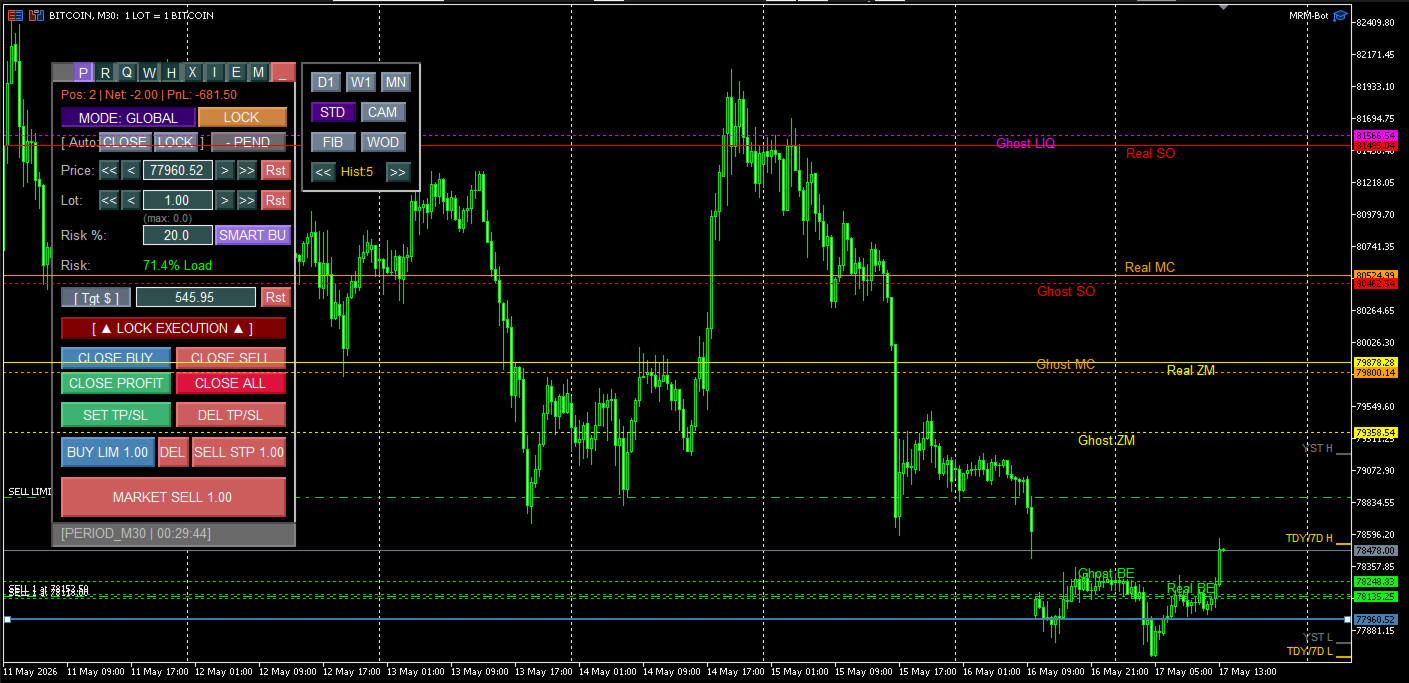
Видим линии маржин-колла и стоп-аута заранее! Еще не открыли сделку, а уже видим, где сольемся! Не верите???

Большинство risk-менеджеров для MT5 умеют одно: показать текущий margin call и stop out по факту открытых позиций. Это прошлое время. Вы уже в сделке, уже несёте риск, и единственное, что вам остаётся — реагировать. MRM Combine устроен иначе: он считает будущее состояние счёта ещё до того, как вы нажали кнопку входа. Не "что происходит сейчас", а "что произойдёт, если...".

Это разница между приборной панелью, которая показывает скорость, и той, что показывает, во что превратится авария через 3 секунды при таком повороте руля.


## Центральная фишка: прогноз ликвидации до входа в сделку


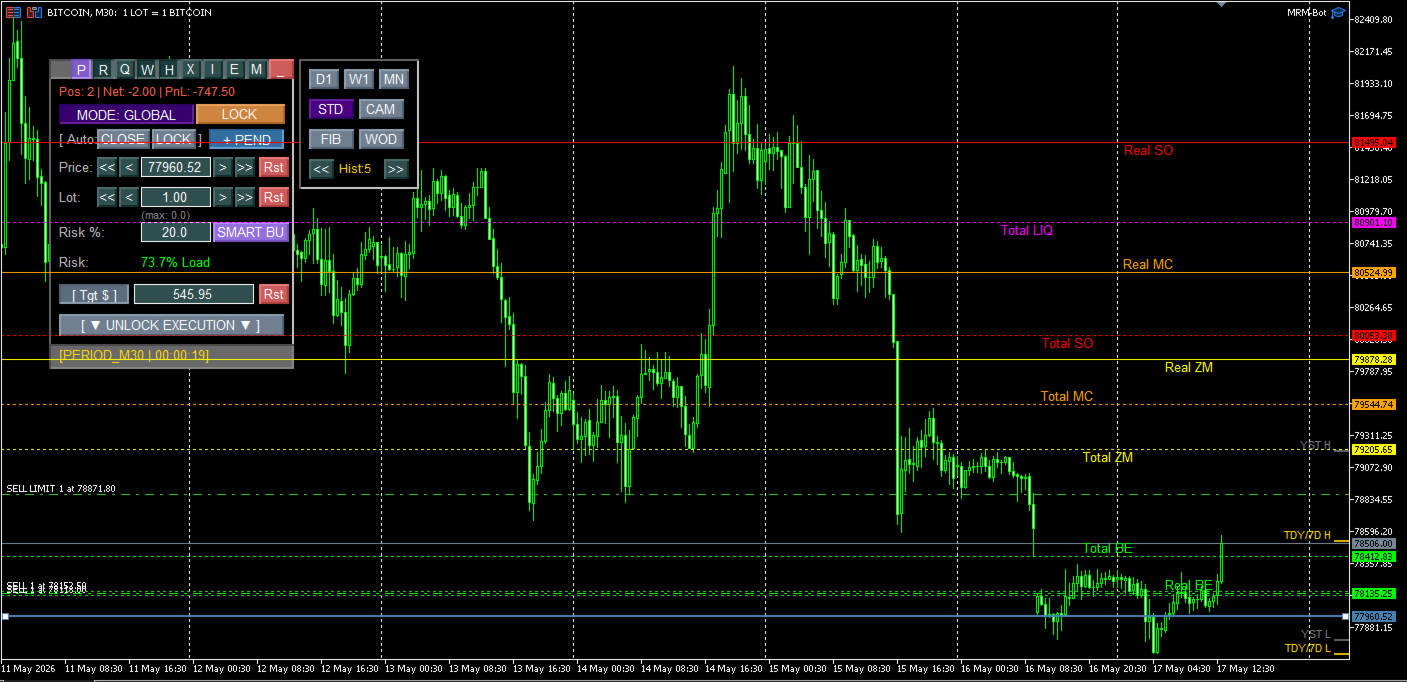
Вы вводите гипотетический лот в поле `Lot`, включаете `+ PEND` — и на графике рядом с текущими сплошными линиями появляются пунктирные: `Fut BE`, `Fut ZM`, `Fut MC`, `Fut SO`. Это не "текущий" margin call — это margin call, который у вас БУДЕТ, если сделка исполнится прямо сейчас указанным объёмом.


Ключевое отличие от всего, что есть на рынке: расчёт учитывает **три источника риска одновременно**, а не по одному:


1. **Уже открытые позиции** — базовый нетто-объём и текущая маржа.

2. **Отложенные ордера** (лимиты и стопы) — их потенциальное исполнение включено в прогноз, если включён учёт отложек.

3. **Планируемую новую сделку** — тот самый лот, который вы вводите прямо сейчас.


Двигаете Magic Line — пунктирные линии двигаются вместе с ней в реальном времени. Видите, что `Fut SO` оказался в 12 пунктах от текущей цены — вы физически не можете не заметить, что следующий откат вас выносит. Ни расчётов на бумажке, ни переключения на калькулятор, ни "потом посмотрю в терминале", когда уже поздно.


На счетах с локом (хедж) точность прогноза в v2.10 выведена на новый уровень: маржа считается не грубым суммированием обеих ног, а по настоящей брокерской формуле хеджирования (`SYMBOL_MARGIN_HEDGED`) — так, как её реально видит ваш брокер, а не как её видел бы линейный калькулятор.


## Как устроена станция — по слоям


### Слой 1: Magic Line — один якорь на все операции

Синяя горизонтальная линия на графике — это цена входа, уровень TP/SL, точка частичного закрытия и опорная точка для прогноза одновременно. Перетащили мышкой — пересчиталось всё, что от неё зависит. Не нужно помнить пять разных интерфейсов для пяти разных операций.


### Слой 2: Поля ввода, которые считают друг за друга

Ввели `Lot` — пересчитался `Target` (ожидаемая прибыль). Ввели сумму в `Target` при пустом `Lot` — бот сам подберёт нужный объём с учётом доступной маржи и запишет его в `Lot`. Двигаете линию — `Target` обновляется на лету, отображая P&L для текущей нетто-позиции плюс планируемую сделку.


### Слой 3: Глобальный режим — счёт целиком как один организм

`MODE: GLOBAL` заставляет бота видеть не один инструмент, а весь портфель: все позиции и отложки по всем символам сворачиваются в единый нетто, и общий безубыток проецируется на график ЛЮБОГО инструмента, который вы сейчас смотрите. Хотите вытащить просевший портфель золотом, пока EURUSD и GBPUSD сидят в минусе — переключитесь на график золота, и `Fut BE` покажет вам ровно тот сценарий, который нужен, чтобы весь счёт вышел в ноль или в плюс.


### Слой 4: Симметричный лок (новое в v2.10)

Лок в MRM Combine — не заглушка "открыли встречную и забыли". Обе ноги (BUY и SELL часть) управляются полностью независимо:

- у каждой стороны свой трейлинг-стоп, своя точка отсчёта, свой триггер активации;

- частичное закрытие срезает процент **одновременно с обеих сторон** — лок уменьшается пропорционально, а не разбалансируется в одну сторону;

- маржа считается по реальной формуле брокера, а не приблизительно.


### Слой 5: Каскадное частичное закрытие

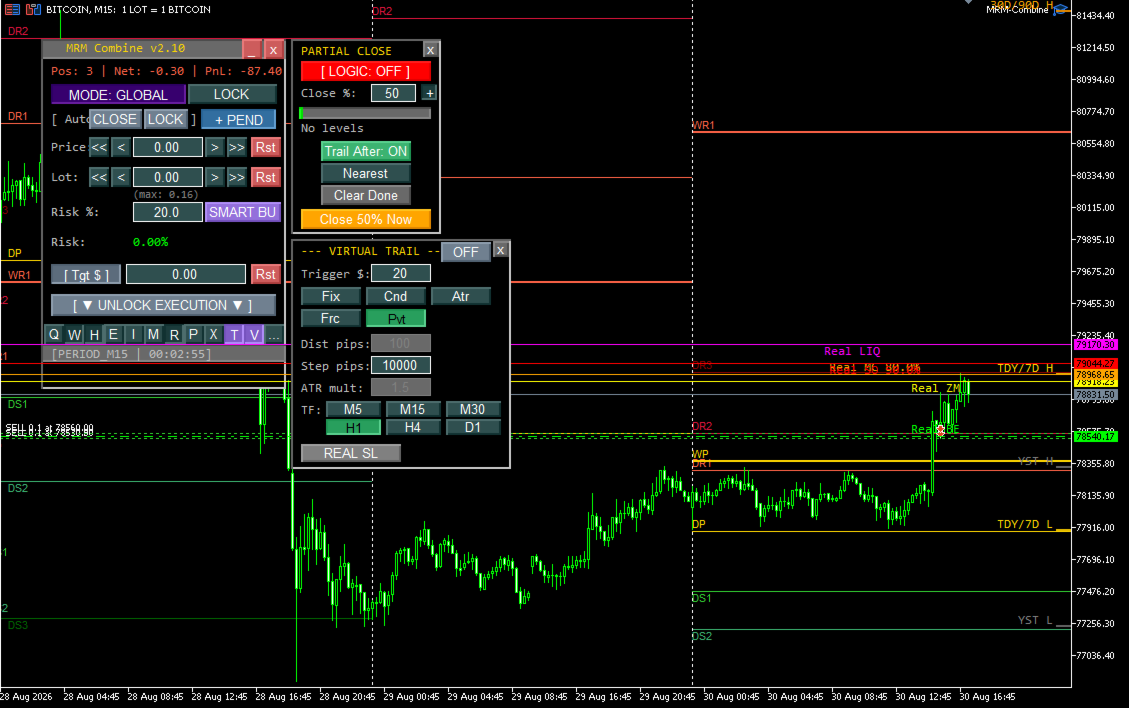
Ставите один или несколько ценовых уровней — при касании ценой бот закрывает заданный процент от **оставшегося** объёма (не от исходного), классическая пирамида фиксации прибыли без ручного пересчёта лотов на каждом шаге. Выполненные уровни становятся серыми, не мешают — очистить одной кнопкой.


### Слой 6: Трейлинг — пять методов

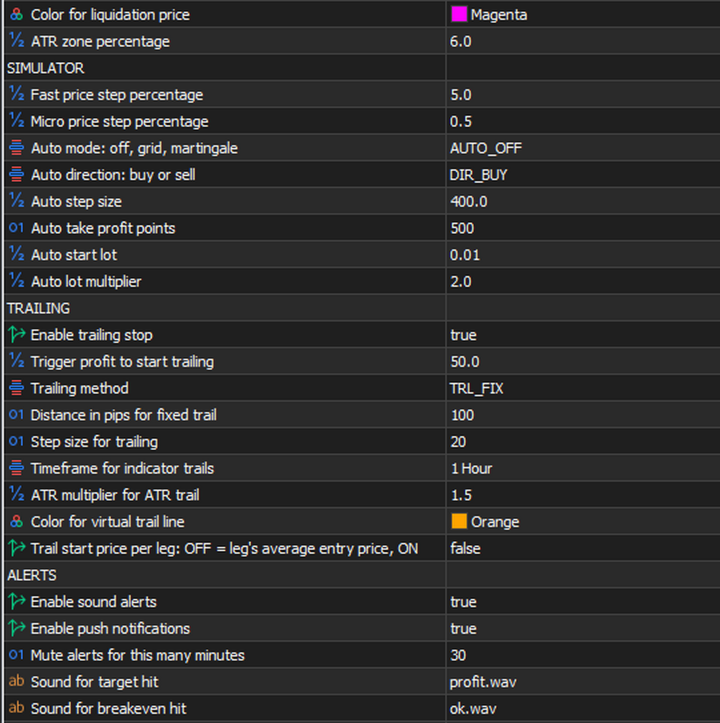
FIX (фиксированная дистанция), CANDLE (по экстремумам свечей), ATR (адаптируется к волатильности), FRACTAL (по структуре рынка), PIVOT (по уровням поддержки/сопротивления). Два режима исполнения: VIRTUAL (логика внутри бота, гибко, но зависит от работающего терминала) и REAL SL (настоящий стоп на сервере брокера — переживает разрыв связи, переживает закрытие терминала). В v2.10 REAL SL реально подтягивается к цене на каждом тике, а не выставляется постфактум.


### Слой 7: Аналитика прямо на графике, без переключения индикаторов

Пивоты четырёх методов (Standard/Camarilla/Fibonacci/Woodie) на трёх таймфреймах, дневные свечи в разрезе текущего графика, ATR-зоны волатильности от цены открытия месяца, ключевые экстремумы за сутки/неделю/месяц/квартал/год. Всё — точки, на которые можно поставить Magic Line одним кликом и тут же выставить TP, SL или уровень частичного закрытия.


### Слой 8: SMART BU — лот от процента свободной маржи

Не "сколько лотов я обычно беру", а "какой лот займёт ровно 5% моей свободной маржи прямо сейчас". Считает не от баланса, а от реально доступных денег в моменте.


## Кому это нужно


Внутридневным трейдерам, работающим с сеткой или усреднением, где риск ликвидации растёт с каждой доливкой и его невозможно держать в голове. Трейдерам, которые управляют локами не как экстренным тормозом, а как рабочим инструментом хеджирования. Всем, кто хочет принимать решение о входе, видя его последствия для margin call заранее — а не постфактум разбираться, почему брокер закрыл позиции.


MRM Combine не торгует за вас. Он делает риск видимым — до, а не после.


Вы принимаете решения, глядя на линии MC/SO, а не гадая на кофейной гуще.

Я, автор, ярый разгонщик и сеточник, потратил 13 лет, чтобы понять: побеждает не тот, кто угадывает направление, а тот, кто контролирует риск. Этот бот — моя попытка сделать контроль риска наглядным для каждого.

## Разобранные сценарии


### 1. Обычный вход со страховкой от неожиданного margin call


Задача: открыть сделку, заранее убедившись, что она не приведёт к опасному

уровню маржи.


1. Введите планируемый объём в `Lot`.

2. Перетащите Magic Line на желаемую цену входа.

3. Включите `+ PEND`, если хотите учесть в прогнозе ещё и отложенные ордера.

4. Посмотрите на пунктирные `Fut MC` / `Fut SO` — оцените зазор до текущей

   цены.

5. Если зазор устраивает — `MARKET BUY/SELL` (или `LIMIT/STOP` для

   отложенного входа на этой же цене).


**Пример:** торгуете на сетке, текущая позиция 0.5 лота BUY уже в

небольшом минусе. Хотите долить ещё 0.5 лота. Вводите 0.5 в `Lot`,

включаете `+ PEND` — видите, что `Fut SO` теперь всего в 18 пунктах от

цены. Пара часов такой волатильности, и вас выносит принудительно. Вместо

доливки — сокращаете позицию или ждёте более выгодной цены.


### 2. Сопровождение открытой сделки


1. Двигайте Magic Line вручную для контроля TP/SL — `SET TP/SL` ставит

   оба сразу по текущей цене линии.

2. Либо включите трейлинг (`T`) — панель сама подтянет стоп по мере

   движения цены, без вашего участия.

3. `DEL TP/SL` — если нужно снять оба уровня разом (например, перед

   `LOCK`).


### 3. Частичная фиксация прибыли (каскад)


1. Откройте панель Part Close (`V`).

2. Задайте `Close %` — например, 30.

3. Переместите Magic Line на первый целевой уровень, нажмите `+`.

4. Повторите для второго уровня (например, ещё 50% от того, что останется

   после первого).

5. Включите `Trail After: ON`, чтобы после отработки всех уровней

   остаток позиции автоматически перешёл под трейлинг-стоп.


**Пример:** позиция 1.0 лот BUY в хорошем плюсе.

- Уровень 1 (ближе к цене): 30% → закроет 0.30 лота, останется 0.70.

- Уровень 2 (дальше): 50% → закроет 50% от оставшихся 0.70 = 0.35,

  останется 0.35.

- После второго уровня `Trail After` подхватывает оставшиеся 0.35 лота

  и ведёт их трейлингом без вашего участия.


**Экстренный вариант:** если уровень ждать некогда — кнопка "Close X%

Now" закрывает заданный процент немедленно, без привязки к цене.


### 4. Локирование позиции при развороте рынка


1. Перед локом снимите TP/SL кнопкой `DEL TP/SL` (иначе встречная сделка

   может исполниться некорректно относительно уже выставленных уровней).

2. Нажмите `LOCK` — появится `CONFIRM?`. Нажмите ещё раз, чтобы

   подтвердить (защита от случайного клика — лок необратим без ручного

   разлока).

3. С версии 2.10: обе ноги лока (исходная и встречная) трейлятся и

   частично закрываются **независимо друг от друга**. Настраивайте

   трейлинг и партиал-уровни как обычно — они автоматически применятся

   к каждой стороне отдельно, срезая объём у обеих пропорционально.


**Важно:** на Netting-счетах (фьючерсный режим неттинга) лок физически

невозможен — брокер не может держать одновременно BUY и SELL по одному

символу. Кнопки `LOCK`/`AUTO LOCK` на таких счетах не сработают. Тип

счёта виден в INFO-панели (`I`) — проверьте заранее, а не в момент, когда

лок уже нужен.


### 5. Вывод просевшего счёта через глобальный режим


Развёрнутый сценарий: у вас просели EURUSD/GBPUSD, но есть сильное

движение на другом инструменте (золото, нефть, биткоин).


1. Переключите бот в `MODE: GLOBAL`.

2. `LOCK` на убыточных позициях — фиксируете текущий убыток, дальше не

   растёт.

3. Переключитесь на график инструмента-спасателя.

4. Введите предполагаемый лот в `Lot`, начните двигать Magic Line.

5. Следите за пунктирной `Fut BE` — это будущий ОБЩИЙ безубыток

   (по всему портфелю) после открытия этой сделки заданным объёмом.

6. Двигайте линию, пока `Fut BE` не окажется в реалистично достижимой

   ценовой зоне. Идеал — когда она совпадает с текущей ценой.

7. Хотите не просто выйти в ноль, а заработать — впишите сумму в

   `Target`. Линия сама сдвинется на уровень "общий безубыток + эта

   сумма".

8. Открывайте сделку. Включите `AUTO CLOSE`, если хотите, чтобы бот сам

   закрыл всё портфолио по достижении цели.

9. Для защиты результата — панель Trailing, триггер `0`, любой метод.

   Бот поведёт стоп от текущего общего безубытка.


Это не "угадать направление" — это точный расчёт объёма и цены, которые

нужны именно вашему текущему портфелю, чтобы выйти в ноль или в плюс.


### 6. Работа с аналитикой


- Пивоты (`P`): выставьте Magic Line на уровень R1/S1 и сразу `SET

  TP/SL` — тейк на сопротивлении без ручного подсчёта.

- Дневные свечи (`D`): видите вчерашний максимум как явную границу на

  текущем таймфрейме — логичное место для частичного закрытия или

  переноса стопа.

- ATR-зоны (`A`): вход цены в зону от открытия месяца — сигнал повышенной

  вероятности волатильности или разворота, фиксируйте часть прибыли

  заранее.

- Экстремумы (`R`): пробой годового максимума — сигнал на увеличенный

  лот; подход к годовому минимуму — сигнал зафиксировать часть позиции.


### 7. Тестирование сценариев с локом без единого клика (headless-тестер)


Новое в 2.10: если хотите прогнать историю в Strategy Tester и проверить,

как поведут себя трейлинг и партиал-клоуз именно на локе — не нужно

вручную кликать BUY и SELL в визуальном режиме.


1. Включите `InpAutoTestLockMode`.

2. Задайте `InpAutoTestLockRatio` — объём встречной ноги в % от основной

   стороны (например, 60 — лок с явным перевесом в пользу первой ноги).

3. Задайте `InpAutoTestLockDelaySec` — через сколько секунд симулируемого

   времени после первой сделки откроется встречная.

4. Направление основной стороны берётся из `InpAutoDir` (BUY/SELL).

5. Запускайте прогон в любом режиме — headless или визуальном. В логе

   увидите точку, где бот сам открыл встречную сделку и создал лок, и

   дальше — как трейлинг/партиал отработали на обеих ногах.


## Честные предостережения


Читайте это не как список недостатков, а как список вещей, о которых

лучше знать заранее — потому что молчать о них было бы нечестно.


- **LOCK и AUTO LOCK не работают на Netting-счетах.** Это ограничение

  платформы MT5, не продукта — на неттинге физически нельзя держать две

  противоположные позиции по одному символу. Проверяйте тип счёта в

  INFO-панели.

- **VIRTUAL трейлинг существует только внутри работающего советника.**

  Разрыв связи, закрытие терминала, перезапуск — виртуальный стоп

  теряется вместе с этим. Если нужна защита, которая переживёт отключение

  терминала — используйте REAL SL, а не VIRTUAL.

- **REAL SL модифицирует ордер на сервере брокера** — сохраняется даже

  при отключении советника. Обратная сторона: слишком частые модификации

  стопа (например, очень короткий шаг трейлинга на волатильном рынке)

  теоретически могут привести к троттлингу или блокировке со стороны

  некоторых брокеров. Не выставляйте экстремально малый шаг трейлинга

  без необходимости.

- **Future-линии — прогноз, а не гарантия.** Округление лота до

  минимального шага, плавающий спред, своп и комиссия могут дать

  расхождение в один-два пункта с реальностью. Используйте как ориентир

  для решения, не как точную цифру для отчётности.

- **В глобальном режиме общий BE — синтетический расчёт**, не цена

  какого-либо реального инструмента. Не пытайтесь выставить на неё

  реальный лимитный ордер — используйте как ориентир для планирования.

- **SMART BU считает от свободной, а не от полной маржи.** При открытых

  позициях свободная маржа меньше баланса — рассчитанный лот будет меньше,

  чем если бы считался от полного депозита. Это осознанное поведение, не

  ошибка.

- **Ввод суммы в `Target` при пустом `Lot`** — бот подбирает лот,

  округлённый до шага объёма брокера, поэтому фактическая сумма может

  чуть отличаться от введённой. Незначительное расхождение — норма.

- **Не вводите нулевой лот с большой целью** — расчёт будущих уровней

  становится некорректным при таком сочетании. Всегда указывайте реальный

  планируемый объём, даже если сделку открывать не собираетесь прямо

  сейчас (для одной лишь оценки риска можно ввести минимальный лот).

- **Аналитические слои (пивоты, экстремумы, ATR-зоны) могут накладываться

  друг на друга** визуально при одновременном включении всех сразу —

  отключайте то, что не используете в моменте, чтобы график оставался

  читаемым.

- **Файл состояния сохраняется только при штатном удалении советника** с

  графика. Аварийное завершение терминала (сбой питания, зависание) может

  привести к потере последних несохранённых изменений настроек панели

  (сами открытые позиции на счёте это не затрагивает — это касается только

  сохранённых настроек панели).

- **Торговые кнопки блокируются на время выполнения операции.** Не

  кликайте повторно, пока не вернулся исходный текст кнопки — повторный

  клик во время выполнения может вызвать ошибку "Trade blocked" на

  стороне терминала.

- **При резком перетаскивании линии мышкой** поле `Target` может на долю

  секунды показать промежуточное некорректное значение — это визуальный

  артефакт быстрого перерасчёта, после остановки линии значение всегда

  верное.

- **Для криптовалютных инструментов** максимальный доступный лот иногда

  отображается некорректно из-за особенностей контрактной спецификации у

  брокера — если видите странные значения, укажите реальный процент

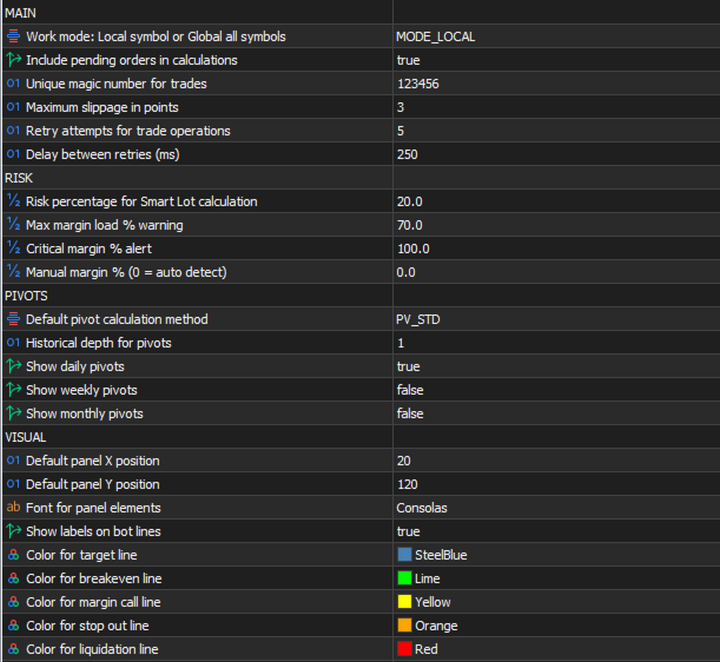
  маржи вручную через `InpManualMarginPercent` (например, 0.75 для

  Bitcoin — уточняйте фактическое значение у своего брокера).

- **В невизуальном (headless) тестере графические линии не отображаются**

  — это ожидаемо, отрисовка объектов графика в headless-режиме не

  поддерживается платформой. Все расчёты и торговая логика при этом

  работают полноценно; для отладки используйте лог терминала или

  `ObjectGetDouble` по именам объектов (например, `MRM_Bot_Line_BE`),

  если тестируете в визуальном режиме.

- **Только демо-счёт для первого запуска.** Это осознанная защита от

  случайного использования на реальных деньгах, а не баг и не ограничение

  лицензии — переносить на боевой счёт нужно осознанно, после того как вы

  полностью освоились с логикой панели на демо.


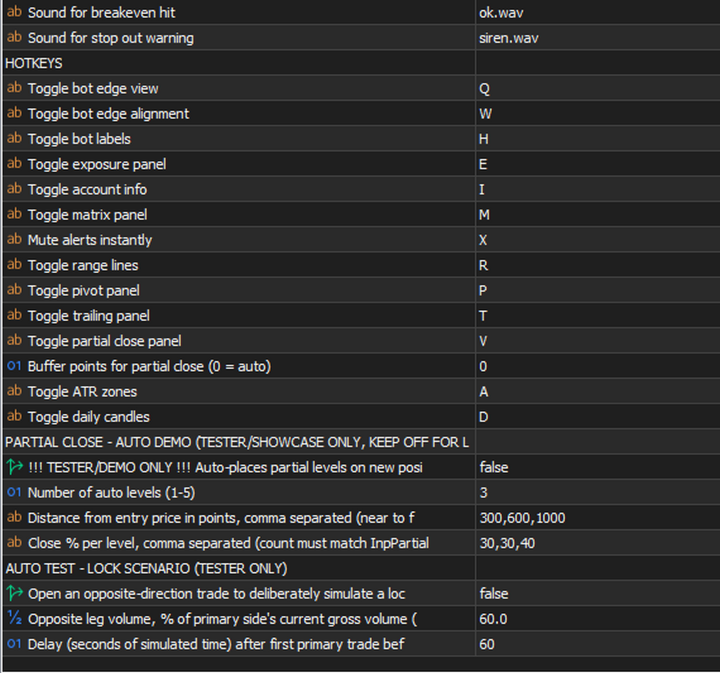
Горячие клавиши


| `Q` | переключение вида линий (край графика / обычные) |

| `W` | привязка линий слева/справа |

| `H` | показать/скрыть подписи линий |

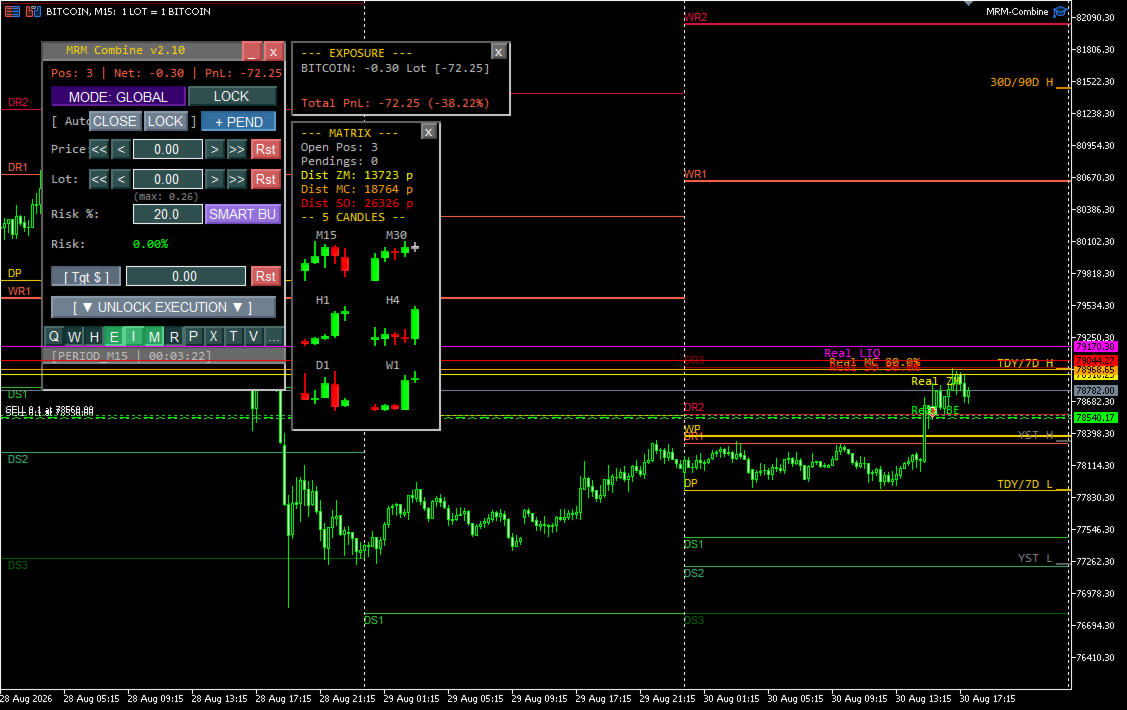
| `E` | панель Exposure (риск по всем инструментам) |

| `I` | информация о счёте |

| `M` | матрица тренда (5 свечей MTF) |

| `P` | панель Пивотов |

| `R` | экстремумы (Ranges) |

| `X` | без звука на 30 минут |

| `T` | панель Трейлинга |

| `V` | панель Частичного закрытия |

| `A` | дневные ATR-зоны |

| `D` | дневные свечи |

Recommended products
Trade Manager Pro Guardian
Tochukwu Joseph Unaegbu
Trade Manager Pro A complete discretionary trade-management cockpit for MetaTrader 5 — direction-aware position planning, prop-firm rule enforcement, a live correlation heat map, a pre-trade checklist gate, and one-click execution, all in a single on-chart panel. Overview Trade Manager Pro is not a signal-generating "black box" EA. It does not predict market direction and makes no profitability promises. Instead, it is a risk and execution management tool built for discretionary traders — partic
SPECIAL LAUNCH OFFER: $30 (1-Month Rent) Limited time offer to build our community and gather feedback! AmbM GOLD Institutional Scalper A high-precision M5 algorithm for XAUUSD (Gold) , engineered to trade exclusively at Institutional Liquidity Levels ($5/$10 psychological marks). PERFORMANCE DATA (BUY ONLY) • Win Rate: 87.09%. • Safe Growth: +$4,113 profit on $10k (13.75% Max Drawdown). • Extreme Stress Test: Successfully generated +$22,997 in a 5-year stress test (2020-2026), proving
Trade Manger
Israr Hussain Shah
Here   our more valuable tools SMC Trend Trading   ,  Easy SMC Trading  ,  Institutional SMC Architect Volume Analysis Tools  ,  Volume flow Profile  ,  Market volume profile  , FVG with Volume  , Liquidity Heatmap Profile  ,  Volume Spread Analysis You Give an Instruction: When you run the script, a window pops up with a dropdown menu. You choose exactly what you want it to do from the list (e.g., "Close Profit Only" or "Delete Pending Orders"). It Scans Your Positions: The script then reads
Gold SK
Manthar Ali
Key Features & Advantages Multi-Timeframe Trend Filtering: Evaluates overall market direction using the 30-minute (M30) and 15-minute (M15) timeframes to ensure trades align with the dominant trend . Precise EMA Pullback Entries: Monitors price touches across standard EMA levels (21, 34, 55, and 89) on the 5-minute chart to identify low-risk entry opportunities . Robust Risk Controls: Incorporates account protection settings including maximum daily profit targets, daily loss limits, and a limit
BTC Trend Scalper MT5 Trend Capture Edition — Precision Momentum Trading for BTCUSD Hello, traders! I am BTC Trend Scalper MT5 — an intelligent Bitcoin trading Expert Advisor engineered to capture momentum moves with disciplined risk management. I am not a martingale. I am not a grid system. I am not a gambling robot. I am a trend-following scalper built specifically for traders who understand that protecting capital is more important than chasing every candle. My specialty? Bitcoin (BTCUSD)
Enhance your trading decisions with the News Analysis Tool—an advanced plugin designed to keep you fully informed about the latest economic events, right from your chart. This expert tool overlays current-week news directly on your charts, so you can stay on top of market-moving events without needing to switch screens. With an intuitive, user-friendly GUI, you can effortlessly browse through news and access comprehensive details such as Actual, Predicted, Last values and the change in percent.
Trading Journal pro
Israr Hussain Shah
Here   our more valuable tools SMC Trend Trading   ,  Easy SMC Trading  ,  Institutional SMC Architect Volume Analysis Tools  ,  Volume flow Profile  ,  Market volume profile  , FVG with Volume  , Liquidity Heatmap Profile  ,  Volume Spread Analysis Key Features 1.  Total Immersion UI (The "Blackout") Chart Masking:   Upon loading, the tool turns the background, grid, and candles pitch black. This hides the noise of the market ticks, allowing you to focus purely on your performance data withou
Wyckoff VSA Double Barrier is an automated MetaTrader 5 Expert Advisor that combines H1 Wyckoff and Volume Spread Analysis context with M5 confirmation and structured basket management. MAIN FEATURES • H1 directional analysis with M5 entry confirmation. • Integrated Wyckoff sequence, VSA confirmation, Dow structure and wave analysis. • Double-barrier take-profit logic based on H1 swing highs and lows. • Minimum risk-to-reward filter, set to 1:2 by default. • Configurable initial stop loss and
Imagine flying a real aircraft without ever stepping into a flight simulator. That's what trading is like. You have to simulate your strategy before you can take it to a live market. It is good if you can simulate things speedily before even stepping into any live market, or before coming up with an automated system.  People don't have all day to stare at a higher timeframe chart until the entry signal finally arrives. That's why I built this so that you can simulate your strategy with speed. Th
FREE
Bastion is a monitor-and-close-only risk manager for prop-firm traders. It watches your account against your firm's daily-loss and maximum-drawdown limits in real time and force-closes your open positions BEFORE you cross a line. It never opens a trade of its own, so it stays fully within the tools allowed by FTMO, FundedNext, The5ers, FTUK and FXIFY. Why traders fail challenges A large share of failed evaluations end on a single daily-loss breach: a moment of inattention, a news spike, one tra
BTC Master Pro
Farzad Saadatinia
4.58 (12)
BTC Master Pro – Your trusted partner in disciplined Bitcoin trading. The new version is now enhanced with OpenAI artificial intelligence , delivering smarter execution and improved trade filtering in volatile crypto conditions. This professional Expert Advisor is built specifically for Bitcoin (BTCUSD) trading on MetaTrader 5 , focusing on structured execution, controlled exposure, and intelligent risk management. Price: $699  →  Next: $999  →  Final: $999 LIVE SIGNAL HERE OpenAI-Powered Exec
New Bar Close Helper Auto Stop-Loss & New Candle Auto-Close for Manual Orders This EA is a risk management utility for manual traders. It does not open trades automatically. Features: - Auto-detects manual orders (Magic Number = 0) - Sets Stop-Loss at previous candle extreme (Low for Buy, High for Sell) - Auto-closes all managed positions when next new candle opens - Supports all timeframes and trading symbols Risk Warning: Forex trading involves significant risk of loss. Past performance d
SmartRAL
Jemy Yeferson Dimu Ludji
SmartRAL (Smart Risk Auto-Lot EA) SmartRAL: The Ultimate Risk & Lot Management Expert Advisor (EA) SmartRAL is an essential tool for traders who demand precise risk management and automated position sizing in MetaTrader 5. Stop guessing your lot size and let the algorithm handle the calculations. This EA allows you to trade with confidence by guaranteeing your risk exposure on every single trade, while offering absolute flexibility in setting your Stop Loss (SL). Key Features & Benefits Guarante
The Telegram Blue Chili Alerter is still in full development. Many more options are still being programmed. Signals for trades will be added next. I am also happy to respond to customer requests. The only thing you need to do is create a Telegram bot and enter the bot token and chat ID in the presets. If you have any questions or want to know which features are still to come, just get in touch with me. I will be happy to help you and answer your questions as quickly as possible. Quick guide: 1:
Optch Gold
Oh Cheonghun
Designed to pass the FTMO Challenge. I recommend using under 0.2 lots for a $10K account and under 1 lot for a $100K account. The settings are RSI Length 26, Signal Length 10, RMA, HLCC4. Algorithm Introduction Strategy Description A rules-based XAUUSD trading system that combines key price level detection with trend-following execution. Core Logic: Identifies structural support/resistance zones and confirms directional entries using momentum and ATR volatility filters to control noise during
Rulekeeper
Timurbek Yusupov
Rulekeeper is a professional risk-management utility for MetaTrader 5, built for prop-firm traders (FTMO, FundedNext, The5ers, Apex, Topstep and any ECN account). It removes the human factor: tilt, overtrading and accidental rule violations. WHAT IT DOES 1. Daily Loss Limit — measures the day result from the balance at the close of the PREVIOUS trading day (configurable: day-start balance / day-start equity). When the limit is hit it closes all positions, removes pending orders and locks trad
MACD Sniper Pro
Noppawat Tumjai
MACD Sniper Pro is an advanced automated trading system designed for traders seeking high-precision entries and robust risk management. By combining the classic momentum of MACD Crossover with a strict ADX Volatility Filter and Dynamic ATR Management , this EA completely eliminates emotional trading and filters out dangerous flat/sideways markets. Unlike standard MACD indicators that suffer during consolidation, MACD Sniper Pro verifies trend strength before entering and protects your capital us
Protect your funded accounts and personal capital with military-grade precision. This utility continuously monitors your floating equity against your daily starting balance. The moment your custom drawdown threshold is breached, it instantly liquidates all open positions, deletes pending orders, and completely unloads from the chart. Stop revenge trading and never fail a prop firm evaluation due to a margin breach again.
FREE
EA auto take profit, auto buy/sell, volume manager, sideway trade, trailing open point 1 – Auto open buy/sell EA automatically opens buy or sell according to settings: profit, stoploss, volume. Volume management: total number of orders and fixed size 2 – Auto take profit: take profit with min profit according to settings, take profit button according to min and max profit 3 – Order processing: there are 3 levels of stoploss of position, according to the number of pips set in EA 4 – Side way tra
Royal Sterling Intel – Expert Advisor Overview Royal Sterling Intel (RSI) is an automated trading system designed around the Relative Strength Index (RSI), one of the most widely recognized momentum indicators in technical analysis. The strategy is primarily configured to operate on the H4 (4-hour) timeframe by default, allowing it to analyze broader market movements while reducing exposure to short-term price fluctuations commonly found on lower timeframes. The core objective of the system is t
Supply Demand Volume Zones
Alejandro Matias Pingaro
Supply Demand Volume Zones is an Expert Advisor for MetaTrader 5 that trades supply and demand zones calculated from volume, not drawn by hand. HOW IT WORKS The EA splits the price range of the last N bars into horizontal bands and distributes the volume of each bar into them. The upper bands that accumulate the chosen share of total volume form the supply zone. The lower ones form the demand zone. A reference midline sits exactly between them. The idea is simple: where a lot of volume was t
If you've ever stared at a gold chart, done the math in your head three times, and still second-guessed your lot size right before entry - this tool was built for you. Current price: $39 - increases by $10 after every 20 purchases until reaching the final price of $89 . Next price: $49 . Complete Buyer Kit: 34 Professional Resources included at no additional cost. MT5 Presets, PDF Guides, Checklists, Mindmaps, Reference Cards, and Excel Workbooks - built from 8 years of developing structured XAU
DRS Semi Automated
Enrique Alexander Madera Pimentel
DRS Semi Automated: Fair Value Gap Trading Inspired by the DRS strategy made by SMT FX. To learn more, visit their website. Key Features: 1. Fair Value Gap Detection: Identifies bullish and bearish Fair Value Gaps on the 5-minute timeframe. 2. Customizable Trading Sessions: Trade London, New York, or both sessions with adjustable start times. 3. Risk Management: Set risk percentage and choose between equity-based or fixed balance risk calculation. 4. Bias Selection: Manually select bullish or
Prop Firm Simulator
Abdeljalil El Kedmiri
Master prop firm challenges before risking real money!   Our advanced simulator recreates authentic prop firm trading environments, helping you practice, strategize, and pass challenges with confidence.   Using our Simulator, you can simulate any prop firm challenge using demo or live accounts, supports both manual trading strategies and automated trading via EAs ,  create personalized challenges for customized periods, and challenge yourself to develop the discipline needed for consistent profi
VENIQOR Dual Edge PRO uses the same trading logic in live trading and backtests — with no hidden historical filters, no date-based exclusions and no backtest-only logic. VENIQOR Dual Edge PRO is a two-pair automated trading system for AUDUSD and NZDCAD , designed around mean reversion, controlled recovery, dynamic money management and account protection. Main features Trades only AUDUSD and NZDCAD M5 mean-reversion logic Multi-layer recovery management Fixed lot, auto scaling or auto scaling wit
Easy GOLD Scalper – M1 High-Speed Momentum Scalper for XAUUSD "Harness the Explosive Volatility of Gold. Non-Martingale, Ultra-Fast M1 Scalper: Easy GOLD Scalper" Key Highlights: 100% Clean Single-Position Strategy – Absolutely NO Martingale, NO Grid. Smart 15-Pip Dynamic Trailing Stop – Turns rapid price surges and drops into locked-in profits. Accessible to Everyone – Fully compatible with small accounts (starting from 0.01 lot). Fully Compliant with Strict MQL5 Market Validation Standards. K
Prop Firm Os
Gayathiri Gopalakrishnan
5 (1)
PROP FIRM OS Structured Trading Assistant for MetaTrader 5 PROP FIRM OS is a structured trading assistant designed for MetaTrader 5 users who prefer rule-based market analysis and organized trading workflows. The Expert Advisor combines market analysis tools, scanner functions, dashboard monitoring, alerts, risk-control settings, and trade management features inside one system. PROP FIRM OS is designed to help traders follow selected rules, filters, and monitoring conditions during trading activ
Awesome Oscillator by Bill Williams with the ability to fine-tune and replace the averaging algorithms of the indicator, which significantly expands the possibilities of using this oscillator in algorithmic trading and brings it closer in its properties to such an indicator as the MACD. To reduce price noise, the final indicator is processed with an additional Smooth averaging. The indicator has the ability to give alerts, send mail messages and push signals when the direction of movement of th
!! BLACK FRIDAY !!  FOR LIFETIME !! ================== == 35$ ONLY !! == ================== BOOK YOURS NOW !! The Position Manager Contains A Lot of Functions such as; (How to Operate) 1. Adjustable Volume per Trade (You could change the volume as you wish per trade). 2. Adjustable Risk : Reward Ratio (1RR means sacrifice 1 Risk : 1 Reward, 1.5RR, 2RR etc. as you wish) 3. Adjustable Stop Loss Points (Calculated Points as Stop Loss and Automatically adjusted the Risk Reward Ratio) 4. Buy Button
StrategyDeck — a cockpit for manual, discretionary trading. StrategyDeck draws and measures. It does not decide, and it never sends an order on its own. What it draws on the chart Opening range boxes for the Asia, Europe and US sessions, a linear regression channel, previous-day high and low with the day's open, and key candlestick patterns. Each drawing layer can be turned off, set to drawing only, or set to signal — and the signal position exists only where a measured scope is available.
Buyers of this product also purchase
Trade Assistant MT5
Evgeniy Kravchenko
4.43 (216)
It helps to calculate the risk per trade, the easy installation of a new order, order management with partial closing functions, trailing stop of 7 types and other useful functions. Additional materials and instructions Installation instructions - Application instructions - Trial version of the application for a demo account Line function -   shows on the chart the Opening line, Stop Loss, Take Profit. With this function it is easy to set a new order and see its additional characteristics bef
Forex Trade Manager MT5
InvestSoft
4.98 (685)
Trade Manager MT5 is an advanced position size calculator and trade management tool for MetaTrader 5, designed to help traders plan trades faster, control risk more precisely, and manage open positions directly from the chart. It combines order placement, risk based lot calculation, Stop Loss and Take Profit management, Break Even, Trailing Stop, Partial Close, Equity Protection, and external trade management in one panel. Whether you trade forex, indices, metals, commodities, crypto, or future
Telegram to MT5 MultiChannel Copier
Sergio Marquez Uroz
4.61 (18)
Telegram to MT5 Multi-Channel Copier   automatically copies trading signals from your Telegram channels straight to MetaTrader 5. No bots, no browser extensions, no manual copying. A signal arrives in Telegram and the EA opens the trade in your terminal within seconds. And before you copy a channel, the built-in backtester shows you what that channel would have done in your account. The product has two components: a Windows application that listens to your Telegram channels, and this Expert Advi
================================================================================ POC BREAKOUT - V20.72. Full Professional Grade Toolkit ================================================================================ POC Breakout is a full MetaTrader 5 trading dashboard for discretionary traders who want breakout signals, Point of Control (POC) context, volume profiles, order flow, market structure, news, alerts, and advanced trade planning in one professional workspace. Attached directly to you
TradePanel MT5
Alfiya Fazylova
4.88 (170)
Trade Panel is a multi-functional trading assistant. The app contains over 50 trading functions for manual trading and allows you to automate most trading tasks. Application instructions: https://www.mql5.com/en/blogs/post/756482 Trial version of the application for a demo account: https://www.mql5.com/en/blogs/post/750865 How to install the application: https://www.mql5.com/en/blogs/post/756239 How to test the application in visual mode: https://www.mql5.com/en/blogs/post/770277 How to install
Copy Telegram signals with your own trading rules Telegram to MT5 Signal Trader automatically copies text-based trading signals from public and private Telegram channels and groups into MetaTrader 5. Manage multiple providers and MT5 accounts from one desktop app, with individual risk and trade settings for each provider . No Telegram bot or API setup needed for copying. Simply sign in with your own Telegram account by phone or QR code and select the channels or groups you have already joined. Y
FarmedHedge Pair Trading Dashboard
Tanapisit Tepawarapruek
5 (5)
Farmed Hedge Yield Farming | All Markets (Manual - Hybrid - Semi/Automated EA) VERIFIED TRADING RESULTS - Farmed Hedge Yield Axi Copy:  https://www.mql5.com/en/signals/2356376 - Farmed Hedge Yield Exn Copy:   https://www.mql5.com/en/signals/2356404 - Farmed Hedge Yield V Copy:  https://www.mql5.com/en/signals/2357156 IMPORTANT NOTICE: FarmedHedge is a MANUAL-FOCUSED TRADING UTILITY ,not a fully automated EA. Results shown on this Signal include manual trades and overall strategic management.

Exp COPYLOT CLIENT for MT5
Vladislav Andruschenko
3.97 (35)
Professional Trade Copier for MetaTrader 5 Fast, professional, and reliable trade copier for MetaTrader . COPYLOT allows you to copy Forex trades between MT4 and MT5 terminals with support for Hedge and Netting accounts. COPYLOT MT5 version supports: - MT5 Hedge to MT5 Hedge - MT5 Hedge to MT5 Netting - MT5 Netting to MT5 Hedge - MT5 Netting to MT5 Netting - MT4 to MT5 Hedge - MT4 to MT5 Netting MT4 version Full Description +DEMO +PDF How To Buy How To Install How to get Log Files H
Footprint Chart Pro — Professional OrderFlow EA for MetaTrader 5 Version 6.34 | Professional tool for real traders | Institutional-Grade Visualization DEMO USERS - PLEASE SELECT EVERY TICK / REAL TICK WHEN TESTING AND YOU HAVE DOWNLOADED HISTORICAL DATA. IF YOU SEE A WAITING SCREEN AND IT IS NOT DOWNLOADING, IT MEANS YOU HAVE LOW HISTORICAL DATA. TRY 1 MIN AND 5 MIN FIRST ON 1 DAY DATA. ONE DAY DATA SHOULD BE THE NEWEST AND MOST CURRENT DATE. PLEASE WAIT UNTIL THE MARKET HAS ROLLED OVER PERIOD.
Power Candles Strategy Scanner - Self-Optimizing Multi-Symbol Setup Finder Self-optimizing settings work one chart at a time, and finding where they pay off right now means opening chart after chart. Power Candles Strategy Scanner runs the same self-optimizing engine as the Power Candles indicator on every symbol in your Market Watch, side by side. One panel ranks where it pays off: the winning strategy per symbol, its optimized Stop Loss and Take Profit. An alert fires the moment a fresh signal
Grid Manual MT5
Alfiya Fazylova
4.73 (22)
Grid Manual is a trading panel for working with grid strategies. The utility is universal, has flexible settings and an intuitive interface. It works with a grid of orders not only in the direction of averaging losses, but also in the direction of increasing profits. The trader does not need to create and maintain a grid of orders, the utility will do it. It is enough to open an order and the "Grid manual" will automatically create a grid of orders for it and will accompany it until the close. F
Signal Trading View to MT5 Pro
Mirel Daniel Gheonu
4.5 (2)
Signal TradingView to MT5 Pro  Instant professional execution between TradingView and MetaTrader 5 Automate your trading strategy with the most robust communication bridge between TradingView alerts and real execution in MT5. Designed for traders who demand speed, flexibility, and impeccable risk management, this Expert Advisor transforms any alert message into a precise market or limit order.   Install and TEST the TRIAL version HERE STRENGTHS AND ADVANTAGES Universal Parsing Engine (Propriet
The News Filter MT5
Leolouiski Gan
4.78 (23)
This product filters   all expert advisors and manual charts   during news time.  It is able to remove any of your EA during news and automatically reattach them after news ends. This product also comes with a complete  order management system   that can handle your open positions and pending orders before the release of any news. Once you purchase   The News Filter , you will no longer need to rely on built-in news filters for future expert advisors, as this product can filter them all from her
Copy your MT5 trades to Interactive Brokers You keep using MT5. Every order you open or close is sent to your IB account. In real time. No coding. No changes to your strategy or EA. Try it first Rent 1 month: $30. Test on a live or paper account. What it does Real-time copying: same direction, reverse, or one side only. Map any MT5 symbol to any IB symbol. Set a lot ratio for each. Forex, Futures, Stocks, CFDs, Metals and Crypto. Position sync: both accounts checked, any difference fixed. Optio
Welcome to ENTRY IN THE ZONE AND SMC MULTI TIMEFRAME  SPECIAL BENEFIT FOR OUR MQL5 CUSTOMERS  FREE ACCESS TO THE NEW TOOL —COMING SOON —   Learn More on Our Official Website : https://www.fableedge.net Entry In The Zone and SMC Multi Timeframe is a real-time market analysis tool based on Smart Money Concepts (SMC), designed to analyze market structure, price direction, and key trading zones. It supports both Single-Timeframe Analysis and Multi-Timeframe Analysis, providing a clearer view of the
Premium Trade Manager - The Trade Panel With a Coach Built In Premium Trade Manager puts a trading coach inside your chart, with a full execution engine underneath it. Set the trade up the way you always do, then let Max, your AI trading coach, read that exact setup against your live account and give you a straight verdict before you commit: is the stop disciplined, is the risk sane, is a high-impact release minutes away, are you near a prop-firm limit. Below sits the engine that runs everything
Anchor Trade Manager
Kalinskie Gilliam
5 (9)
Your EAs cannot see each other, but Anchor can. Anchor gives you one place to coordinate your EAs, manage risk, and decide when trading is allowed. It works alongside the trading bots you already use without any changes to them. The Problem One EA opens a trade. Then another starts trading. The next thing you know, you wake up to multiple grids built across your account. Each EA may be doing exactly what it was designed to do, but together they can place far more risk on your account than you in
Trade Indicator Assistant   is a powerful MT5 utility designed to turn indicators into automated trading systems. Its main feature is the ability to automatically detect an indicator’s   BUY and SELL signal buffers , without requiring you to know the buffer numbers, search through indicator settings, or modify the indicator source code. Bonus Indicator:   After purchasing Trade Indicator Assistant, contact me to receive   Trade Signal Pro   completely free as a bonus indicator. [Download Demo V
Quant Panel
Kevin Craig E Gittins
QUANT PANEL Independent per-algo analytics, protected MT5 history and professional PDF reporting Quant Panel is built for traders who run several Expert Advisors or strategies on one MT5 account and need to know how each algo is actually performing. Instead of treating the terminal as one combined portfolio, Quant Panel groups closed positions by EA comment or magic number and calculates every strategy independently. It gives you one clear dashboard for comparing algos, finding weak systems and
MT5 to Telegram Signal Provider turns your trading account into a signal provider. Every trade action, whether manual, by EA or from your phone, is instantly sent as a message to Telegram. You can fully customize the format or use a ready-made template for quick setup. [ Demo ] [ Manual ] [ MT4 Version ] [ Discord Version ]     New: [ Telegram To MT5 ] Setup A step by step user guide is available. Key Features Ability to customize order details sent to subscribers You can create a tiered subs
YuClusters
Yury Kulikov
4.93 (43)
Attention: You can view the program operation in the free version  YuClusters DEMO .  YuClusters is a professional market analysis system. The trader has unique opportunities to analyze the flow of orders, trade volumes, price movements using various charts, profiles, indicators, and graphical objects. YuClusters operates on data based on Time&Sales or ticks information, depending on what is available in the quotes of a financial instrument. YuClusters allows you to build graphs by combining da
DrawDown Limiter
Haidar Lionel Haj Ali
5 (23)
DrawDown Limiter v5.0 — Advanced Account Protection Controller DrawDown Limiter v5.0 is a client-side account protection controller designed to supervise your trading account and automatically react when configured risk, profit, news, schedule, rollover, or position limits are reached. It can monitor manual trades, automated strategies, multiple Expert Advisors, pending orders and floating positions from one dedicated chart. It can protect the complete account or be configured to supervise a spe
VirtualTradePad One Click Trading Panel
Vladislav Andruschenko
4.59 (74)
Trading Panel for MetaTrader 5 — professional one-click trading from chart and keyboard A powerful trading panel for active manual trading, designed to open, manage, and close trades far faster and more efficiently than the standard MetaTrader interface. This panel is built for traders who want full control over positions, pending orders, profit management, and trading execution inside one professional workspace. This is not just another utility. It is a complete trading cockpit for MetaTrader
Smart Stop Scanner – Multi-Asset Stop-Loss Intelligence for Modern Traders Overview The Smart Stop Scanner brings professional stop-loss monitoring to every chart. It analyzes market structure, detects meaningful breakouts, and identifies the most relevant protective levels across Forex, Gold, Indices, Metals, Crypto, and more. All results appear inside one clean, DPI-aware dashboard designed for clarity, speed, and instant decision-making. This tool is part of the Stein Investments ecosystem
Binance Quotes Updater
Andrey Khatimlianskii
5 (1)
This service is designed to stream online cryptocurrency quotes   from the Binance exchange to your MetaTrader 5 terminal. You will find it perfectly suitable if you want to see the quotes of cryptocurrencies in real time — in the Market watch window and on the MetaTrader 5 charts. After running the service, you will have fully featured and automatically updated  cryptocurrency charts in your MetaTrader 5. You can apply templates, color schemes, technical indicators and any non-trading tools to
Prop Guardian Risk Manager MT5 – Drawdown, Risk & Hedge Protection for Prop Firm and Managed Accounts Prop Guardian Risk Manager is a professional risk-control utility for MetaTrader 5, designed for prop firm traders, money managers and anyone who wants strict account-level risk protection. It does not generate trading signals, strategy entries or trading decisions. Instead, it runs in the background, monitors your account risk and can automatically block new exposure, close managed positions or
Mentfx Mmanage mt5
Anton Jere Calmes
4.25 (8)
The added video will showcase all functionality, effectiveness, and uses of the trade manager. Drag and Drop Trade Manager. Draw your entry and have the tool calculate the rest. Advanced targeting and close portions of a trade directly available in tool (manage trades while you sleep). Market order or limit order on either side with factored spread. Just draw the entry, the tool does the rest. Hotkey setup to make it simple. Draw where you want to enter, and the stop loss, the tool calculates al
Timeless Charts
Samuel Manoel De Souza
5 (8)
Timeless Charts is an all-in-one trading utility for professional traders. It combines custom chart types such as Seconds Charts and Renko with advanced order flow analysis using Footprints , Clusters , Volume Profiles , VWAP studies, and anchored analysis tools for deeper market insight. Trading and position management are handled directly from the chart through an integrated trade management panel , while Market Replay and Virtual Accounts provide environments for practicing trading skills and
The product will copy all telegram signal to MT5 ( which you are member) , also it can work as remote copier.  Easy to set up, copy order instant, can work with almost signal formats, image signal,  s upport to translate other language to English Work with all type of channel or group, even channel have "Restrict Saving Content", work with  multi channel, multi MT5 Work as remote copier: with signal have ticket number, it will copy exactly via ticket number. Support to backtest signal. How to s
Trade Manager DashPlus
Henry Lyubomir Wallace
4.85 (13)
DashPlus is an advanced trade management tool designed to enhance your trading efficiency and effectiveness on the MetaTrader 5 platform. It offers a comprehensive suite of features, including risk calculation, order management, advanced grid systems, chart-based tools, and performance analytics. Key Features 1. Recovery Grid Implements an averaging and flexible grid system to manage trades during adverse market conditions. Allows for strategic entry and exit points to optimize trade recovery
More from author
Pivot Points MTF — Multi-Method Multi-Timeframe Pivot Panel **Four pivot systems. Three timeframes. One draggable, collapsible panel. Switch on the fly, right on the chart, without touching Inputs.** Pivot points are one of the oldest tools in trading — originally used by floor traders to plan their session before the open, still used today by day traders, prop desks, and algo systems alike as objective, non-repainting reference levels: everyone looking at the same OHLC data arrives at the s
FREE
MarginVisualizer
Vladimir Ershov
5 (2)
I s a professional visual radar for your trading account. The indicator calculates and displays the key mathematical levels of your open positions directly on the chart in real-time (fully accounting for commissions and swaps). No more blind spots or mental math: you will clearly see exactly where your desired profit will be reached and where the broker will forcefully close your account. Key Features Complete Margin Level Map: Automatic calculation and drawing of Margin Call, Stop Out, "Loc
FREE
LockMaster
Vladimir Ershov
LockMaster — See Every Outcome Before You Touch a Locked Position Do you love untangling complex locks — or are you forced to? Either way, this tool is for you! Managing a hedge lock (opposing Buy and Sell positions on the same pair) is one of the trickiest situations in manual trading. Which leg do you close first? What happens to your Break-Even, Margin Call and Stop Out levels if you unwind one side now — or wait for a Take Profit to hit? Guessing wrong costs money. LockMaster removes the gue
FREE
Telegram Trade and Pattern Tool Full-functionality demo account with all features Telegram Trade and Pattern Tool is a candlestick-pattern and margin monitoring panel with remote trading control through Telegram. It scans charts across multiple symbols and timeframes at once, sends alerts with screenshots — down to a real-time signal for an abnormally large candle — and lets you react right there, in the same chat: open a trade, close a position, set or move a stop, all without opening the ter
Filter:
No reviews
Reply to review