Telegram Trade and Pattern Tool

Telegram Trade and Pattern Tool


Full-functionality demo account with all features


Telegram Trade and Pattern Tool is a candlestick-pattern and margin monitoring panel with remote trading control through Telegram. It scans charts across multiple symbols and timeframes at once, sends alerts with screenshots — down to a real-time signal for an abnormally large candle — and lets you react right there, in the same chat: open a trade, close a position, set or move a stop, all without opening the terminal.

Who it's for

For traders who can't keep the terminal open all day but want to: - not miss a forming pattern or a sudden volatility spike — and act on it right from their phone if they decide to; - not miss an approaching margin call; - close a position or move a stop from their phone in 10 seconds, without opening MetaTrader; - lock exposure quickly before news, without fumbling with volumes on the go.

Pattern monitoring — the core of the product

The EA scans charts whether or not you're looking at the terminal, and sends a Telegram alert with a ready-made chart screenshot. It runs in one of two modes:

  • "Monitor" ( Inp_EnablePatternMonitoring = true ) — full mode: pattern scanning, margin control, accepting trading commands. Only ONE copy in this mode is allowed per terminal at a time (protects against a second copy accidentally duplicating alerts or competing for Telegram commands).
  • "Screenshoter" ( Inp_EnablePatternMonitoring = false ) — lightweight mode, no pattern scanning and no trading commands, just screenshots on demand ( /screenshot , /swing , /marginview ). You can run as many copies as you like — handy to keep one per symbol chart you want screenshot access to, without touching the main "Monitor". If the hidden service chart isn't available in this mode, some features honestly fall back to a text report instead of failing.

Which patterns it looks for

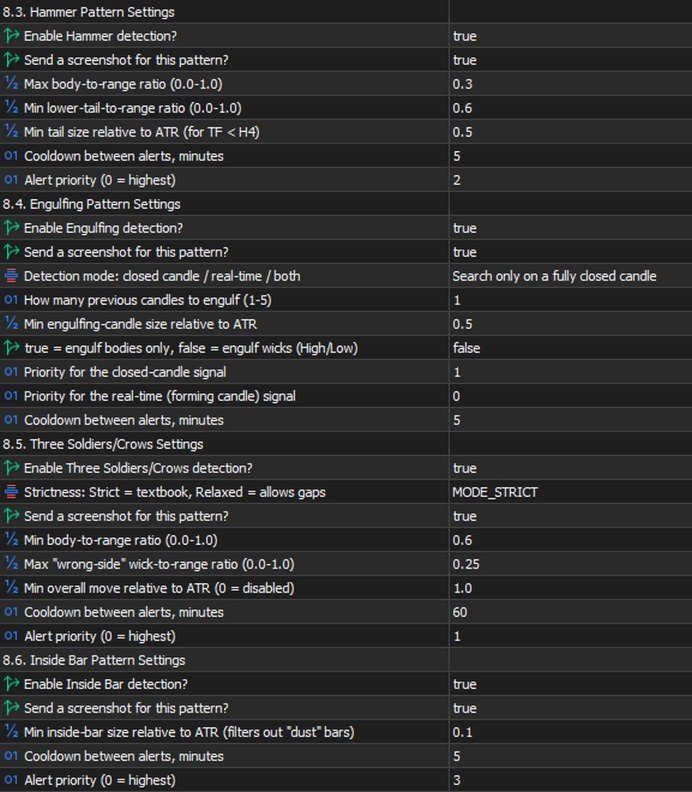
  • Doji — body close to zero relative to the candle's range (the threshold is configurable), both wicks noticeable — a sign of market indecision.
  • Pin Bar — small body, one long "tail" — price refusing to go further in one direction.
  • Hammer — small body near the top of the range, a long lower wick — a reversal signal.
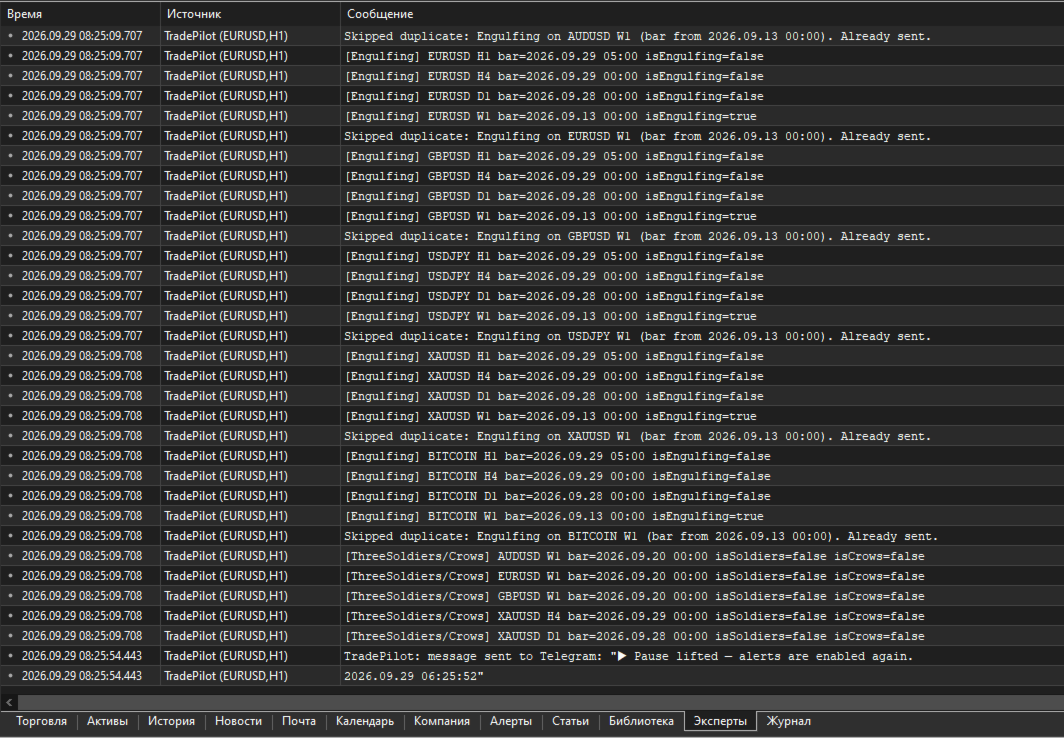
  • Engulfing — a candle fully covers one or more previous candles (how many is configurable). There's a mode to search on a CLOSED candle, in REAL TIME on a still-forming one, or both — the real-time mode fires earlier, before the bar closes, at the cost of somewhat more false positives.
  • Inside Bar — a candle entirely within the previous candle's range — volatility compression before a possible breakout.
  • Three Soldiers / Crows — three candles in a row moving the same direction with no significant wicks — a strong impulse.

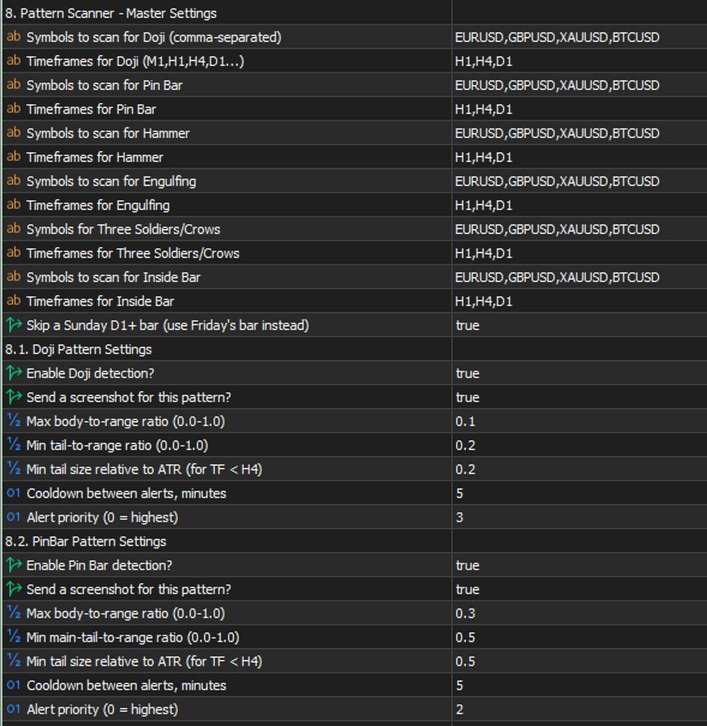
Each pattern has its own settings: which symbols and timeframes to scan, whether it's enabled at all, whether to send a screenshot along with the text, geometric thresholds (body/wick share of the candle's range), a minimum size relative to ATR (so it doesn't react to "dust" in a quiet market), a cooldown between repeat alerts for the same symbol/timeframe, and a priority in the shared send queue (0 is highest; critical margin alerts always jump the queue).

Multi-timeframe confluence

If the same pattern type fires independently on SEVERAL timeframes within a short time window (configurable), that's a confirming, stronger signal, and the EA automatically raises its priority. Not a fresh check from scratch — just cross-referencing detections that were already found, at essentially no extra cost.

⚡ Emergency signal — an abnormally large candle

Separate from the candlestick patterns: a real-time candle-size scanner. If the CURRENT, still-forming candle on a chosen timeframe has already grown more than N times (configurable) the normal candle size (measured by ATR), the alert fires IMMEDIATELY — it doesn't wait for the bar to close. If the candle keeps growing, a follow-up alert with the updated size arrives, so you can see the move is still going, not that it stalled.

This is exactly where "monitoring + trading in one chat" pays off fully: you get a signal about a sharp spike, decide to act, and right in the same chat, without switching apps, type /buy SYMBOL RISK 1% SL ... and you're in the trade while the move is still relevant. No need to run to the terminal to check what happened and then separately open a position — it's all in one place.

On-chart summary

A compact panel directly on the terminal chart — the most recent signals across every watched symbol/timeframe at a glance, no need to scroll back through the chat history ( Inp_EnableOnChartSummary ).

Margin control

  • Configurable levels: margin call, stop out, breakeven, full liquidation, profit target — calculated from the account's current state and drawn as lines directly on the chart, with alerts as price approaches them.
  • /marginview CUR|SYMBOL ( /mv ) — on demand, sends a screenshot with an automatically chosen scale so ALL levels and the current price fit into one picture. Works not just for the symbol of the chart the EA runs on, but for any symbol with an open position. For a fully locked symbol (BUY=SELL, zero net volume) it honestly explains that no levels exist, because there's nothing for price movement to act on — instead of returning silent emptiness.

Two-way control through Telegram

Commands split into informational and trading ones. Several commands have short forms — faster to type when a decision needs to happen in seconds (for example, right after a sharp-candle signal).

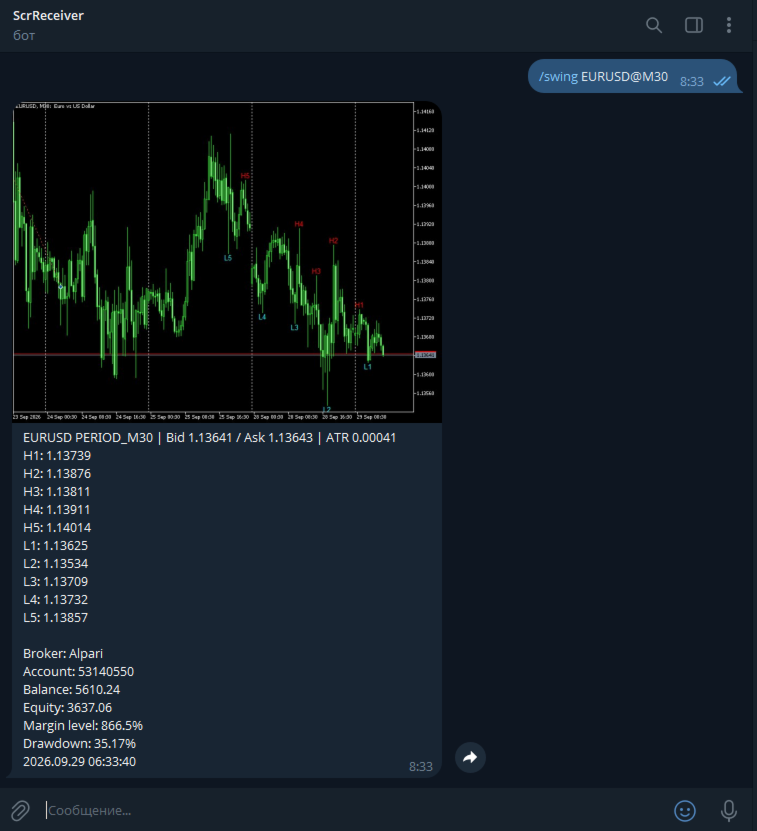
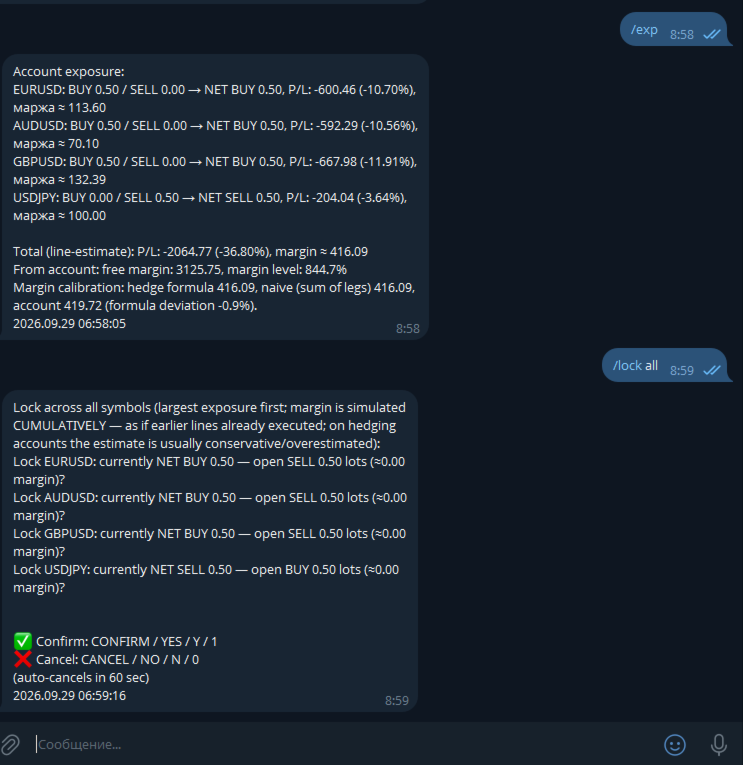
Informational (always available): - /status ( /st ) — account status. - /positions [FILTER] ( /pos ) — open positions, with short reference numbers N1, N2... for use in other commands. - /pending [FILTER] ( /pnd ) — pending orders, numbers P1, P2... - /exposure ( /exp ) — net volume and margin load per symbol. - /swing SYMBOL [depth] ( /sw ) — a screenshot with the last 5 swing highs and 5 swing lows labeled on the chart. - /marginview CUR|SYMBOL ( /mv ) — see the margin section above. - /screenshot ( /ss ) — a screenshot of the current chart on demand. - /pause , /pause N ( /pa ) / /resume ( /re ) — pause automatic alerts without touching trading commands. - /help ( /h ) — command list; tap any specific command with no arguments for detailed help on it.

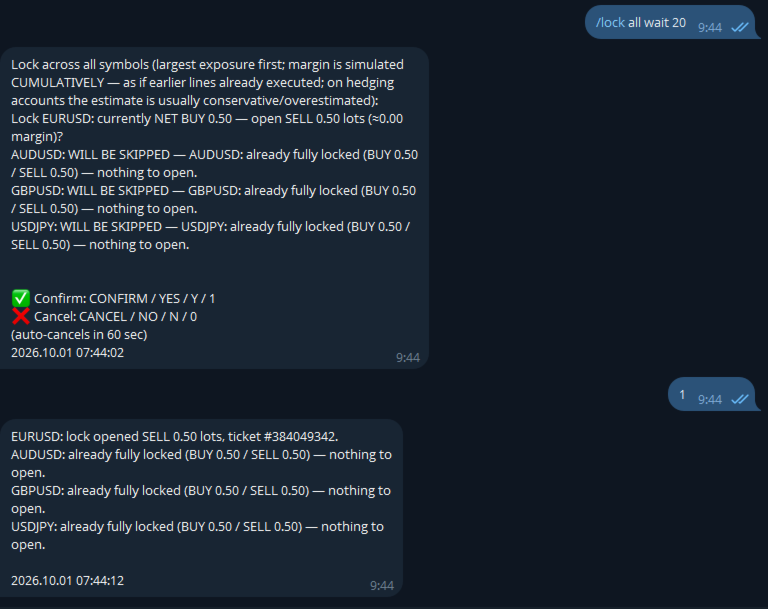
Trading (require a separate opt-in in settings): - /close ( /cl ) — close position(s). - /set SL|TP|BE <ref> <price or expression> — set or remove a stop/take-profit, or move to breakeven. - /shift SL|TP <ref> UP|DOWN <points> ( /sh ) — moves an ALREADY-SET stop/take-profit by N points relative to its current value (unlike /set , which sets an absolute price) — no need to check where the stop currently sits yourself. With a filter, each position shifts from its OWN current level — handy for grids/martingale. - /del SL|TP|PENDING <ref> — remove a stop/take-profit or delete a pending order. - /buy / /sell — a market entry or a pending order. - /lock SYMBOL / /lock ALL — instantly opens an opposite position, zeroing net volume. The spread check is deliberately not applied to /lock — locking is a defensive action taken precisely because the market is stressed, and spread widens in exactly those moments. - /undo — reverts the last command that changed an SL/TP ( /set , /shift , /del , moving to breakeven), within 10 minutes of it. One step back, requires its own confirmation with an explicit irreversibility warning. Closing positions and opening new trades are not reversible. - /enable <password> / /disable — emergency toggle for trading and bulk commands even if they're disabled in settings. Scenario: you forgot to enable Inp_EnableTelegramTrading , stepped away from your computer, and now urgently need to adjust trades remotely. The password is a separate setting ( Inp_EmergencyPassword , empty by default — the feature is off), the override is session-only (resets on restart), three wrong attempts in a row trigger a 5-minute lockout.

Shared command language: - A reference to a position/order — a short N/P-number (from /positions / /pending ) or a filter ( ALL , PROFIT , LOSS , BUY , SELL , VOL>x , a symbol name) — one command can touch several positions. - A price is a number or an expression like LOW1-1.5ATR / HIGH2+50P (a swing level with an ATR or point buffer). - Volume is a number or RISK 1% (the lot size is calculated from the risk % and the distance to the stop, with the calculation shown in the preview before confirmation). - Every operation: preview → confirm/cancel word → execution, with an auto-cancel timeout. Confirmation words are configurable ( Inp_ConfirmKeywordYes/No , defaulting to only CONFIRM / YES and CANCEL / NO — no short Y / N / 1 / 0 ).

Usage examples

⚡ EMERGENCY: XAUUSD H1 — abnormally large candle (3.4x ATR)! → while the move is still relevant, right in the same chat: /buy XAUUSD RISK 1% SL LOW1-0.5ATR → the bot calculates volume from 1% risk and the distance to the stop, shows the calculated lot size in the preview, waits for confirmation /pos PROFIT → lists only profitable positions, numbered N1, N2... /close N1 → preview "close #12345 XAUUSD BUY 0.10, P/L +42.10?" → confirm → closed /set TP N1 HIGH1+20P → take-profit 20 points above the last swing high /lock XAUUSD → instantly opens an opposite position, zeroing net volume on gold /shift SL N1 UP 50 → pulls an already-set stop 50 points up (manual trailing) /undo → "Undo: SET SL by filter 'XAUUSD': ... THIS ACTION CANNOT BE UNDONE" → confirm → stops revert to their values from before the command /mv → a chart screenshot with an auto-picked scale, showing the current price and all margin levels at once

Settings — by group

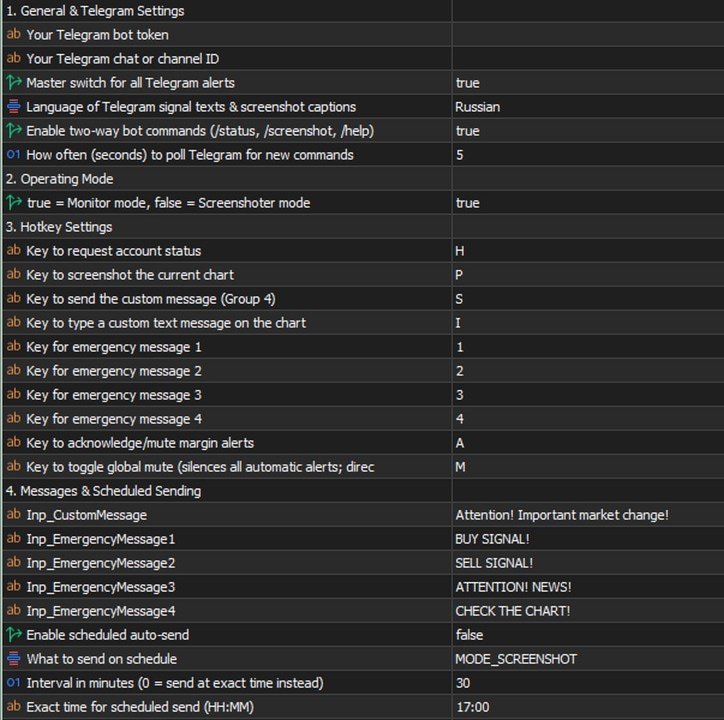
  • Telegram — General: bot token, chat ID, the master alert switch.
  • Mode: "Monitor" vs "Screenshoter" ( Inp_EnablePatternMonitoring ).
  • Emergency messages: 4 configurable template phrases with chart hotkeys in the terminal — if the bot is connected to a channel/group with subscribers, one keypress, no typing needed, instantly broadcasts a ready-made warning to the whole audience (each phrase's text is whatever you want — "closing everything", "news coming, don't enter", "re-entry", etc.).
  • Margin control: on/off, which of the five levels to calculate and show, line colors and styles.
  • Per-pattern groups (Doji/Pin Bar/Hammer/Engulfing/Inside Bar/Three Soldiers): for each — symbols and timeframes, enabled, screenshot yes/no, geometric thresholds, minimum ATR, cooldown, priority.
  • Emergency signal: enabled, the ATR multiplier for an "abnormal" candle, timeframe, ATR period, priority.
  • Confluence: time window, minimum number of confirming timeframes, how much to raise priority.
  • Shared geometric thresholds: minimum body/wick share of the candle's range — a "flat line" candle filter applied before all the detectors.
  • Chart appearance: arrow and label colors per pattern, the summary panel.
  • Screenshots: quality, mode (candles/bars), delays before capturing.
  • Alert pause: the default duration for /pause .
  • Telegram commands: enable reading commands, poll interval.
  • Telegram trading: master switch, bulk commands, operation confirmation, confirm/cancel words, timeout, the /undo window, the /enable emergency password.
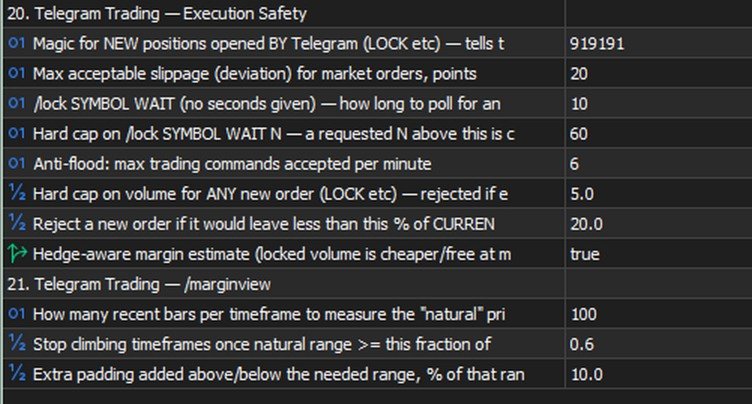
  • Execution safety: magic number for new positions, slippage, minimum free margin left after a trade, a per-order volume cap.
  • /marginview : how many bars to use for scale-fitting, the "natural range" threshold, padding around the picture's edges.

Tips and recommendations

  • Start with Inp_ConfirmTradingOperations = true (the default) — so every operation requires explicit confirmation, giving you time to catch a typo before it actually executes.
  • Check LOW/HIGH ± ATR expressions with /swing SYMBOL before using them in a real trading command.
  • For grids/martingale, use VOL>x filters in /close / /set , or a plain symbol filter in /shift / /undo .
  • Keep Inp_EnableBulkTradingCommands off until you've tested single-position operations.
  • Tune the emergency signal ( Inp_EmergencyCandleSizeATR ) to your instruments' real volatility — too low an ATR multiplier floods you with false positives, too high and you'll miss genuinely sharp moves.
  • If you set Inp_EmergencyPassword for /enable , pick something that can't be guessed in three tries.

Cautions

  • /undo is irreversible on its own — if something ELSE changed the same SL/TP after your command (another command, a manual edit in the terminal), the preview will warn you, but the revert will still restore the value from BEFORE your command, not undo that later change.
  • /enable lifts TWO safeguards at once — the general trading ban and the bulk-commands ban. Treat it as an emergency exit, not a way to bypass Inp_EnableTelegramTrading=false just because you haven't decided on the setting yet.
  • /lock doesn't check the spread — a deliberate trade-off, a lock needs to work even with a wide spread ahead of news; at an extreme gap it will execute at whatever price is available.
  • Bulk operations ( ALL , a symbol filter) affect several trades with one command — the preview shows the exact list before execution, check it.

Known limitations (honestly, no hiding)

  • Market /buy / /sell and pending orders are already supported; some rare parameter combinations may not be covered yet.
  • WebRequest to Telegram is a synchronous call (a limitation of MQL5 itself), so a brief delay in the alert queue is possible when the Telegram API is unavailable.
  • With several copies of the EA on one terminal, only the one in "Monitor" mode accepts commands (Telegram delivers updates to a single requester — the offset cursor is shared per bot).
  • There's no automatic trailing yet (the EA moving a stop on its own, on a timer) — only manual /shift . A version with a choice of algorithm (fixed step / ATR / fractals / Fibonacci) is being worked out.
Önerilen ürünler
Risk Panel - Click to Trade Risk Panel - Click to Trade is a manual trade execution utility for MetaTrader 5. It provides a chart-based interface for preparing and placing buy and sell orders with risk-based position sizing. Features Adjustable risk percentage based on account equity. ATR-based stop-loss calculation. Take-profit calculation using a configurable risk-to-reward ratio. Buy and Sell trade controls. Order placement through a dedicated trade button. Spread limit and trade deviation se
Position Sizer: the exact lot size, every single time. Most blown accounts start with the wrong position size, not the wrong trade. Position Sizer is an on-chart panel for MetaTrader 5 that does the math for you: choose how much you want to risk, drag the Stop Loss to your level, read the exact lot size, and send the order with one click. After that it helps you manage the trade until it is closed. It is a trade-management tool, not a robot: it never opens trades by itself and gives no signals.
Crystal Trade Manager – Advanced MT5 Risk and Trade Control Utility Overview Crystal Trade Manager (CTM) is a professional MetaTrader 5 utility designed for risk management, trade automation, and instant execution control. It provides traders with an integrated system for protecting equity, managing daily drawdowns, controlling lot sizes, and applying automation features such as automatic SL/TP, break-even, and trailing stop. The tool is suitable for manual traders, prop-firm challenge particip
Maria Trade Manager, manuel işlem yapan trader'lar için doğrudan MetaTrader 5 grafiğinizde çalışan bir işlem masasıdır. BUY ya da SELL'e tıklamadan önce panel işlem planını grafiğe çizer: giriş, stop loss ve take profit bölgeleri; riske edilen tutar, hedeflenen kazanç ve risk:ödül oranı ile birlikte. Planı değiştirmek için bir çizgiyi sürükleyin, ardından emri tek tıkla açın. İşlem açıldıktan sonra panel onu başabaş, trailing stop, kısmi take profit ve günlük koruma ile korumaya devam eder. Pane
Manual Trade Panel PRO for MT5 Product name **Manual Trade Panel PRO for MT5** Short description Advanced manual trading panel for MetaTrader 5 with BUY/SELL and BUY LIMIT/SELL LIMIT execution, balance-based lot sizing, automatic SL/TP, Break Even, trailing stop, partial close, candle timer, and open position pips counter. Full sales description **Manual Trade Panel PRO for MT5** is an advanced Expert Advisor designed for manual and semi-automatic trading in MetaTrader 5. The EA creates a c
ZyloFx Partial Close Manager
Rosa Lina Martinez Jimenez
IMPORTANT: After purchasing this product, please send me a private message to receive the installation guide, setup instructions, and direct product support. ZyloFx Partial Close Manager is a professional trade management Expert Advisor for MetaTrader 5, designed to help traders manage open positions with automatic partial closes and optional break-even protection. This EA does not open trades automatically. Its main purpose is to manage existing positions according to the user’s selected sett
Time in Trade
Denis Diakonov
Time in Trade Expert Advisor, bekleyen emirleri belirtilen saatte açma stratejisini uygular ve ayrıca otomatik geçiş ile kış ve yaz saatini kullanır. Bir sinyal oluştuğunda, ticaret robotu alış ve satış için eşit hacimli bekleyen emirleri açar. Ticaret için kullanılan zaman çerçevesi 5 dakikadır. Bekleyen bir emir için tetikleyici, aşağıdakilere bağlı olarak keskin bir fiyat değişikliğidir: işlem seanslarının açılışı / kapanışı; önemli ekonomik göstergelerin yayınlanması; maksimum tüccar sayısın
TAQ Magic Keys v6.0 Auto Trade Manager is an advanced trade management tool for MetaTrader 5 (MT5) , featuring one-click trade management functions and an integrated Position Size Calculator . New Feature In V6.0 — FNR1R1 Function Key The new FNR1R1 Function Key provides an automated 1:3 Risk Reward trade management system , allowing traders to manage an open position through three predefined profit targets. Set your initial Stop Loss, and the system automatically calculates: TP1 = 1:1 Risk R
Horizontal Line Trade Assistant EA  Semi-Automated Trading Assistant      IMPORTANT :     On the main/purchased program a user can click on the Horizontal line and change it to Buy or Sell, and drag by double clicking on it. Please keep in mind that this option is not available on demo version, due to some restrictions/limitations of Strategy Tester, some Object related operations are not available in the  Strategy Tester. But, it will not prevent you from Testing, please drop an Object to chart
Trade Assistant MT4/MT5 PRO , MetaTrader 4/5 için geliştirilmiş profesyonel bir trading panelidir. İşlemleri hızlı, pratik ve görsel olarak net şekilde kontrol etmek isteyen traderlar için tasarlanmıştır. Ürün, tekrarlayan manuel işlemleri azaltmaya, emir açma ve yönetme sürecini hızlandırmaya, risk yönetimini standartlaştırmaya ve manuel trading’i daha disiplinli hale getirmeye yardımcı olur. Bu araç trader yerine sinyal aramaz ve sihirli sonuçlar vaat etmez. Görevi çok daha pratik ve faydalıdı
MQL5 Trading Panel SL TP — это мощный инструмент, призванный помочь трейдерам эффективно управлять своими позициями на платформе MetaTrader 5. Эта торговая панель предоставляет простой в использовании интерфейс для установки уровней Stop Loss (SL) и Take Profit (TP) для открытых позиций. MQL5 Trading Panel SL TP обладает широкими возможностями настройки и может быть адаптирована к конкретным потребностям отдельных трейдеров. Панель можно изменять в размере, перемещать и настраивать с помощью ра
* Super Assistant is an useful management tool that helps traders perform management tasks on MT4/MT5 account remotely via Telegram such as: - Get info (account, details of positions, pending orders, floating PL, price, economic news, etc) - Open trade (open instantly with preset parameters) - Manage trade (set SLTP automatically, break-even mode, max risk, close time every day, etc) - Close trade (close all, buy, sell, win positions by one click, set awaiting close by PL, time) - Set up notifi
GS trade report
Aleksander Gladkov
5 (1)
3 in 1 : Report + monitoring + sending messages (Telegram, ...) to optimize trading and use of advisors. Monitoring: Panel on the chart Sending messages to Telegram Sending messages to Email Sending Notifications Sending pop-up messages Sound notifications when the established Profit/Loss levels are exceeded Monitoring is activated by pressing the Start button. Profit for the period by currency pairs, hours and Magic number for the current account. Forms four tables: by symbols, by magic number
This Expert Advisor monitors all open positions across all symbols in MetaTrader 5. Whenever a Stop Loss (SL) or Take Profit (TP) is manually set or adjusted on any position, the EA automatically applies that value to all other open positions , regardless of symbol or order type (Buy/Sell). This ensures consistent and synchronized SL and TP levels across your account. Perfect for mobile trading via tablet or smartphone!
FREE
Advanced Breakeven & Partial Close Manager MT5 Script – One-Click Trade Management Overview Advanced Breakeven & Partial Close Manager is a trade management script for MetaTrader 5. It works only on existing open positions and applies actions strictly based on user-defined rules. The script runs once per attachment and performs only the actions explicitly enabled in the inputs. It does not run in the background, does not trade automatically, and does not generate signals. Core Functionality The
TradePilot Dashboard
Augusto Martins Lopes
TradePilot Dashboard Özet MT5 için grafik paneli: emir yönetim düğmeleri (Buy/Sell/Close/SL/TP), serbest marj kontrolü ve log yönetimi içerir. Kullanımı kolaydır, demo hesapta test edilebilir. Kâr garantisi verilmez. Açıklama TradePilot Dashboard, MetaTrader 5 üzerinde manuel ve yarı otomatik emir yönetimi için grafik arayüze (Controls) sahip bir Uzman Danışmandır (Expert Advisor). Grafik üzerinden doğrudan işlem yapmayı kolaylaştıran düğmeler, düzenlenebilir alanlar ve güvenlik kontrolleri (se
GTM Panel Pro , MetaTrader 5 için manuel bir işlem yöneticisidir. Tek bir grafikte dört ayrı işlem grubu (A, B, C, D) ve dört bekleyen emir yuvası (L1 - L4) yönetmenizi sağlar; her birinin kendi lotu, stopu, hedefi, başabaşı, takip eden stopu ve sihirli numarası vardır. CLOSE tuşuna basın, yalnızca işaret ettiğiniz grup etkilenir. 2.53 sürümü; kendi API anahtarınızı kullanan isteğe bağlı bir yapay zekâ asistanı, Telegram sesli mesajları, 14 dilde HELP kutusu, giriş kontrol listesi, fiyat alarmla
Bring the TradingView experience to your MetaTrader 5! Magic Entry Pro is a professional visual trading assistant designed for manual traders, scalpers, and Prop Firm funded traders. It allows you to execute trades with lightning speed, calculate risk automatically, and visually project your Stop Loss and Take Profit zones directly on the chart before you open a position. Tired of manually calculating lot sizes or guessing your Risk-to-Reward (RR) ratio? Magic Entry does it all in seconds! KE
This is a utility designed to automatically set the stop loss levels of orders according to the specified condition. Two price levels serve as the condition for setting stop loss: Trigger level - when this level is reached, an order is placed. The stop loss value of an order. It is possible to enable or disable traling stop loss. Input parameters Order type for execution - type of orders to be processed by the expert. It can either be BUY, SELL or auto-select. Trigger Level Points - level to pl
Close exactly the trades you want, in one click. Smart Close Panel puts six buttons on your chart: close all, only the winners, only the losers, only buy, only sell, or delete pending orders. Each button shows how many trades it will close and their profit, before you click. When the market turns fast, closing trades one by one in the Trade tab is slow and easy to get wrong. With this panel you take the profit of all winning trades, or cut all losing trades, in one second. THE SIX BUTTONS Close
Risk Control Utility MT5 designed for manual trading. It helps to calculate and control your risks, transfer transactions to breakeven and accompany positions with trailing stop. Easy to set up and use. It can be used for calculating a trading lot, calculating stop loss and take profit levels. Works with currency pairs, CFDs, stocks, indices, futures, cryptocurrencies Displays   volume,   potential loss and profit before   placing an order Ability to set the expiration time of a pending order Tr
Algosphere Terminal, MetaTrader 5 icin profesyonel tek tikla islem panelidir. Onceden tanimlanmis Stop Loss ve Take Profit ile BUY ve SELL emirlerini aninda gerceklestirin. Ozellikler arasinda hizli on ayarlarla ayarlanabilir lot boyutlari, renkli uyarilarla canli spread izleme, yapilandirabilir aktivasyonlu trailing stop, breakeven fonksiyonu ve pozisyon yonetim araclari bulunur. Dort elegant tema arasindan secim yapin: Obsidian, Emerald, Frost ve Neon. Ayarlar oturumlar arasinda kaydedilir. Fo
Hello, Every one  Close All Button A script to close all market positions and/or pending orders. ----------------------------------------------------------------------------------- This is Close All    market positions and/or pending orders button  You can close all orders in 1 second by one click  Download for Demo Account: Download on Demo Account:  Close All in 1s v1.4 Only Demo.ex5 - Google Drive Free version:  https://www.mql5.com/en/market/product/74159 For send Trade notification to Your
This utility provides the ability to use hot keys in manual trading instantly responding to the current market situation. You can assign hot keys to open/close positions by their type, open/close all positions on the current chart and remove all orders on the current chart. You can also assign hot keys for five predefined trade volumes and switch between them if necessary with no need to change the volume manually from time to time. It is also possible to set the auto calculation of a trade volu
AKCAP Hotkey Tool
AK Capital Markets Limited
5 (3)
Special offer for the next 10 copies Are you tired of manually navigating through menus and inputting data every time you want to execute a trade or open an order on Meta Trader? Our hotkey tool is here to make your life easier and boost your trading efficiency. Our tool is natively coded for lightning-fast performance and comes loaded with all the features you could possibly want. From pending orders and OCO orders to trailing and multiple buckets, it has everything a scalper could need. And
XAU Symmetry Protocol MT5 Sabit, kurala dayalı yürütme ve durum bazlı koruma yönetimi sunan disiplinli bir XAUUSD sistemi. Tek bir amacı var: altına her seansta aynı tekrarlanabilir mantığı uygulamak; takdir kullanmadan ve riski büyütmeden. Tek grafikte çalışır, gösterge kurulumu gerektirmez ve mum kapanışına değil tick'lere tepki verdiği için her zaman diliminde aynı davranır. Kapsam bilinçli olarak dardır: martingale ile lot katlama, grid biriktirme ve zarar eden pozisyonu ortalama yoktur. Poz
Lotwise Risk Console works out the lot size from the risk you choose and the stop loss line you drag on the chart. You click Buy or Sell, and the manager can then look after the open position: break-even, partial closes, trailing, time exit. It never opens a trade by itself. It takes the lot calculation off your hands for every order. Example on a 10,000 USD account: 1 % risk and a stop of 191 points give 0.51 lot on EURUSD. The panel shows the money at risk (97.41 USD) and the possible gain at
OneClick Risk Manager — Manual Trading Assistant OneClick Risk Manager is a manual trading panel for MetaTrader 5. It does not trade on its own — you stay in control and open, close and manage every position with one click. Its job is to do the math for you: position size, risk, partial take-profits, break-even and trailing, so you can trade fast and precisely without manual calculations. Works on any symbol — XAUUSD (gold), US100/NAS100, US30/DJ30, FX pairs and more. The panel is fully scalable
SmartRiskManager
Juergen Josef Wonke
One click. Everything under control. SmartTradePanel is a lightweight, fast trade panel for MT5. You trade and manage risk in USD (not pips), place pending orders with visual confirmation, start trailing only when your trigger is activated – and keep your chart clean. The panel always stays in the foreground, is DPI-friendly, and remembers your settings for each symbol. Main functions • One-click trading & closing BUY / SELL Close all BUY / SELL Close only winners / only losers Close HAL
The indicator is intended for determining the spread and swap size, the distance for setting stop orders and stop losses from the current price allowed and the risk per 1 point in the deposit currency. The indicator informs a trader about possible additional expenses and profits connected with transferring a position to the next trade session of the financial instrument. It also informs about the spread size and the distance of pending orders, stop loss and trailing from the current price. In ad
Bu ürünün alıcıları ayrıca şunları da satın alıyor
Trade Assistant MT5
Evgeniy Kravchenko
4.43 (216)
It helps to calculate the risk per trade, the easy installation of a new order, order management with partial closing functions, trailing stop of 7 types and other useful functions. Additional materials and instructions Installation instructions - Application instructions Line function -   shows on the chart the Opening line, Stop Loss, Take Profit. With this function it is easy to set a new order and see its additional characteristics before opening.   Risk management  - The risk calculation
Farmed Hedge Yield Farming | All Markets (Manual - Hybrid - Semi/Automated EA) VERIFIED TRADING RESULTS - Farmed Hedge Yield Axi Copy:  https://www.mql5.com/en/signals/2356376 - Farmed Hedge Yield Exn Copy:   https://www.mql5.com/en/signals/2356404 - Farmed Hedge Yield V Copy:  https://www.mql5.com/en/signals/2357156 IMPORTANT NOTICE: FarmedHedge is a MANUAL-FOCUSED TRADING UTILITY ,not a fully automated EA. Results shown on this Signal include manual trades and overall strategic management.
Trade Manager EA’ye hoş geldiniz! Ticaretin daha sezgisel, hassas ve verimli hale gelmesi için tasarlanmış nihai risk yönetim aracı ile tanışın. Bu sadece bir emir verme aracı değil; ticaret planlaması, pozisyon yönetimi ve risk kontrolü için kapsamlı bir çözüm. İster yeni başlayan bir yatırımcı olun, ister deneyimli bir trader ya da hızlı emir gerektiren bir scalper, Trade Manager EA ihtiyaçlarınıza uyum sağlar ve forex, endeksler, emtialar ve kripto paralar dahil tüm piyasalarda esneklik sunar
Telegram to MT5 Multi-Channel Copier   , Telegram ve Discord kanallarınızdaki alım-satım sinyallerini doğrudan MetaTrader 5'e otomatik kopyalar. Bot yok, tarayıcı uzantısı yok, elle kopyalama yok. Sinyal Telegram'a veya Discord'a düşer ve EA birkaç saniye içinde terminalinizde işlemi açar. Ve bir kanalı kopyalamadan önce, yerleşik backtester o kanalın hesabınızda ne yapmış olacağını gösterir. Ürün iki bileşenden oluşur: Telegram kanallarınızı dinleyen bir Windows uygulaması ve sinyalleri MT5 ter
EA Overfitter
Stephen J Martret
5 (4)
That backtest looks great. But will it still be making money tomorrow, next week, next month? EA Overfitter re-runs your EA on 100 price histories it has never seen. One score tells you if the edge is real. A backtest tells you what an EA did on one price history — the one that happened to occur. What you cannot tell from it is how much of that result was the strategy and how much was the particular path. EA Overfitter answers that. It builds up to 100 synthetic price histories your EA has n
TradePanel MT5
Alfiya Fazylova
4.89 (174)
Trade Panel, çok işlevli bir ticaret asistanıdır. Uygulama, manuel ticaret için 50'den fazla ticaret fonksiyonu içerir ve çoğu ticaret görevini otomatikleştirmeyi mümkün kılar. Uygulama talimatları: https://www.mql5.com/en/blogs/post/756482 Demo hesabı için uygulamanın deneme sürümü: https://www.mql5.com/en/blogs/post/750865 Uygulamayı nasıl kurulur: https://www.mql5.com/en/blogs/post/756239 Uygulamayı görsel modda nasıl test edilir: https://www.mql5.com/en/blogs/post/770277 Uygulamayı VPS MetaT
News Trade EA MT5
Konstantin Kulikov
4.55 (11)
Birkaç yıldır kullandığım çok yararlı bir robotu tanıtıyorum. Hem yarı otomatik hem de tam otomatik modlarda kullanılabilir. >>> Chat <<< Program, ekonomik takvim haberlerinde esnek ticaret ayarlarını içeriyor. Stratejiler test cihazında kontrol edilemez. Sadece gerçek bir iş. Ayarların en son arşivini indirin: https://www.mql5.com/en/blogs/post/747929 Sinyal izleme: https://www.mql5.com/en/signals/author/test-standart Bu bilirkişi için kendi ayarlar setinizi oluştururken, blogdaki tüm paramet
Telegram sinyallerini kendi işlem kurallarınızla kopyalayın Telegram to MT5 Signal Trader , herkese açık ve özel Telegram kanallarındaki ve gruplarındaki metin tabanlı işlem sinyallerini otomatik olarak MetaTrader 5'e kopyalar. Tek bir masaüstü uygulamasından birden fazla sinyal sağlayıcısını ve MT5 hesabını yönetin; her sağlayıcı için ayrı risk ve işlem ayarları belirleyin. Sinyal kopyalamak için Telegram botu veya API kurulumu gerekmez. Kendi Telegram hesabınızla telefon numarası veya QR kod k
================================================================================ POC BREAKOUT - V20.72. Full Professional Grade Toolkit ================================================================================ POC Breakout is a full MetaTrader 5 trading dashboard for discretionary traders who want breakout signals, Point of Control (POC) context, volume profiles, order flow, market structure, news, alerts, and advanced trade planning in one professional workspace. Attached directly to you
The product will copy all telegram signal to MT5 ( which you are member) , also it can work as remote copier.  Easy to set up, copy order instant, can work with almost signal formats, image signal,  s upport to translate other language to English Work with all type of channel or group, even channel have "Restrict Saving Content", work with  multi channel, multi MT5 Work as remote copier: with signal have ticket number, it will copy exactly via ticket number. Support to backtest signal. How to s
Sonraki Güncelleme — Sürüm 2.52 Çok Yakında! [YENİ] Piyasa Analizinizi ve İşlem Sürecinizi Geliştirmek İçin Tasarlanmış 4 Büyük Yeni Özelliğe Hazır Olun İşlem ihtiyaçlarınızı karşılamak üzere tasarlanmış 4 yeni özellikle piyasa analizini bir üst seviyeye taşıyoruz. İşte yeni özellikler: TRADE OVERVIEW DASHBOARD CONFLUENCE AT ZONE STRONG & WEAK HIGH/LOW OTE 1. TRADE OVERVIEW DASHBOARD Piyasanın genel görünümünü daha kolay anlamanıza yardımcı olan, işlem kararlarınızı desteklemek için rehberlik s
EA Auditor
Stephen J Martret
5 (7)
EA Auditor is an independent analysis tool for traders evaluating Expert Advisors and trading signals on MetaTrader 5. It audits backtest reports, reviews posted developer signals, and cross-verifies the two against each other to help traders assess strategies before committing capital. The MQL5 market offers a wide range of Expert Advisors from many developers, with varying approaches, quality, and transparency. EA Auditor provides a consistent, data-driven framework for reviewing them, answer
EA Portfolio Control & Cloud Monitoring for MetaTrader 5 Your EAs manage trades. KONTROL_01 manages your EAs. A control system for traders running multiple Expert Advisors on the same account. Coordinate EA activity, manage trading risks and monitor your setup remotely. A detailed User Manual is available via DM after purchase. IN PRACTICE Multiple EAs. No coordination. Your EAs trade independently, unaware of each other's activity. KONTROL_01 coordinates them, limits simultaneous activity a
News Filter EA: Advanced Algo Trading Assistant News Filter EA is an advanced algo trading assistant designed to enhance your trading experience. By using the News Filter EA , you can integrate a Forex economic news filter into your existing expert advisor, even if you do not have access to its source code. In addition to the news filter, you can also specify trading days and hours for your expert. The News Filter EA also includes risk management  and equity protection features. MT4 Version Ma
MT5 to Telegram Signal Provider , hesabınızı bir sinyal sağlayıcı haline getirerek belirtilen sinyalleri Telegram'ın sohbetine, kanalına veya grubuna göndermeyi sağlayan kullanımı kolay, tamamen özelleştirilebilir bir araçtır. Rakip ürünlerin çoğunun aksine, DLL içe aktarması yapmaz. [ Demo ] [ Kılavuz ] [ MT4 Versiyonu ] [ Discord Versiyonu ] [ Telegram Kanalı ]  New: [ Telegram To MT5 ] Kurulum Adım adım bir kullanıcı kılavuzu mevcuttur. Telegram API'si hakkında bilgi gerekmemektedir; ihtiyac
Trader Evolution
Siarhei Vashchylka
5 (7)
" Trader Evolution " - A utility designed for traders who use wave and technical analysis in their work. One tab of the utility is capable of money management and opening orders, and the other can help in making Elliott wave and technical analysis. Manual (Be sure to read before purchasing) | Version for MT4 Advantages 1. Trading in a few clicks. Immediate and pending orders are available in the panel 2. Money management. The program automatically selects the appropriate lot size 3. Simplifies
VirtualTradePad PRO SE MT5 — MetaTrader 5 için profesyonel işlem kontrol merkezi VirtualTradePad PRO SE , MetaTrader 5 için grafik tabanlı premium bir işlem paneli ve trade yönetim çalışma alanıdır. Daha hızlı emir yürütme, daha net pozisyon kontrolü, yapılandırılmış trade yönetimi, görsel seviye planlama ve doğrudan grafik üzerinden profesyonel bir çalışma akışı isteyen traderlar için tasarlanmıştır. Bu yalnızca basit bir BUY / SELL paneli değildir. PRO SE; manuel işlem, bekleyen emirler, pozis
AW Trade Manager
AW Trading Software Limited
AW Trade Manager, grafikte risk/ödül aracı bulunan bir MetaTrader 5 işlem panelidir. İşlem, fareyle sürüklenen Entry, Stop Loss ve Take Profit çizgileriyle planlanır: etiketler fiyatı, mesafeyi ve para tutarını, bölgeler kârı ve zararı gösterir, hacim ise riske göre hesaplanır. Gönderimden önce onay penceresi işlemin tamamını risk, teminat ve pozisyon kurallarıyla birlikte gösterir. Kılavuz ve talimat -> BURADA / Ücretsiz LIVE demo -> BURADA Girişten sonra pozisyonu yönetmek için panelde başabaş
Local Trade Copier EA , bir MAM veya PAMM hesabına ihtiyaç duymadan, harici kaynaklardan ticaret sinyalleri yürütmesi veya aynı anda birkaç hesabı yönetmesi gereken bireysel tüccarlar veya hesap yöneticileri için bir çözümdür. 8 ana hesaptan sınırsız bağımlı hesaba kopyalar [ Kurulum Kılavuzu | Güncelleme Kılavuzu | Sorun Giderme | SSS | Tüm Ürünler ] %100 kendi kendine barındırılan Kurulumu ve kullanımı kolay Hiçbir yükleyici, yapılandırma dosyası, sunucu, bellek kanalı veya DLL kullanılmadı E
RETAILBERG FOOTPRINT CHART PRO — Order-Flow Workspace for MetaTrader 5 Version 7.00  |  Professional System  |  31 tools  |  One chart A full 150-page illustrated User Manual is included. Please read the full manual to understand this feature packed footprint chart elements and ui. https://www.mql5.com/en/blogs/post/777982 DEMO / STRATEGY TESTER — PLEASE READ FIRST
Power Candles Strategy Scanner: Kendini Optimize Eden Çoklu Sembol Kurulum Bulucu Her kıpırtıda öten bir tarayıcı, size onu görmezden gelmeyi öğretir. Hareketli tek bir mum kapanışı, peş peşe uyarılar ve gerçekten işlem yaptığınız o tek kurulum gürültünün içinde kaybolur. Power Candles Strategy Scanner , kendini optimize eden Power Candles motorunu Market Watch'unuzdaki her sembolde çalıştırır ve yalnızca kendi filtrelerinizden geçen durumlar için uyarır: son kapanan mumun gücü, kurulumun ödül/r
AW Shepherd Safety MT5
AW Trading Software Limited
5 (5)
AW Shepherd Safety EA, açık pozisyonları yönetmek için tasarlanmış bir Uzman Danışmandır. İlk emri yatırımcı panelden açar, sepeti bundan sonra EA kendisi yönetir: trend filtresiyle kurtarma emirleri ekler, tarafı TakeProfit, trailing veya stop ile kapatır ve kapanış seviyelerini grafikte gösterir. Alımlar ve satımlar ayrı ayrı yönetilir, iki taraf aynı anda açık olabilir. Kurtarma emri yalnızca fiyat adımına göre değil, Parabolic SAR, iki MA veya mum rengine göre pozisyon yönünde bir dönüş gerç
Dealer's Panel No signal decides anything here — a hand does. One click, and the panel calculates what's underneath: lot size from risk, target from a 30-step balance ladder that remembers exactly how far an account has climbed. Toggle between market and pending without touching an input field. Set a stop, and the take-profit can write itself — a fixed share of the balance, translated into price with no arithmetic left for the trader to get wrong. One trade live at a time; it won't let a seco
Hello friends. I wrote this utility specifically for use in my profile with a large number of Expert Advisors and sets ("Joint_profiles_from_grid_sets"   https://www.mql5.com/en/blogs/post/747929 ). Now, in order to limit losses on the account, there is no need to change the "Close_positions_at_percentage_of_loss" parameter on each chart. Just open   one   additional chart, attach this utility and set the desired percentage for closing all trades on the account. The utility has the following fu
25% discount on the release of the tool: only for the next 3 buyers Send a message to receive a demo version. AstroTrade Trading Assistant AstroTrade is a comprehensive multi-functional trading utility developed for the MetaTrader 5 platform. It integrates essential tools for trade execution, risk management, and technical monitoring into a single unified interface. The application is designed to assist traders in managing their daily operations through a visual and structured environment. Vi
Bneu Prop Firm Pass System
Marvinson Salavia Caballero
5 (1)
BNEU PROP FIRM PASS SYSTEM v2.37 PRODUCT OVERVIEW Bneu Prop Firm Pass System is a professional risk management and account protection utility for MetaTrader 5. Attach to any chart and configure your account rules. The system monitors daily loss, maximum drawdown, profit target, trading days, open risk, margin usage, news events, pending orders, weekend restrictions, and rollover restrictions from one dashboard. It includes a 5-tab premium dashboard, prop firm presets, custom rules, Risk Sentine
Your EAs cannot see each other, but Anchor can. Anchor gives you one place to coordinate your EAs, manage risk, and decide when trading is allowed. It works alongside the trading bots you already use without any changes to them. The Problem One EA opens a trade. Then another starts trading. The next thing you know, you wake up to multiple grids built across your account. Each EA may be doing exactly what it was designed to do, but together they can place far more risk on your account than you in
REVDEN AI Desk: Trading'inizi Kendi Yapay Zekanızla Tek Bir Sohbetten Yönetin, REVDEN'in Piyasa Bağlamıyla Trading'inizi tek bir sohbetten yönettiğinizi düşünün. REVDEN AI Desk bunu MetaTrader 5'e getiriyor: kendi yapay zekanıza piyasayı nasıl okuduğunu sorarsınız, o da işlem yaptığınız semboller hakkında REVDEN'in tam bağlamından, yani durumlarından, risk görünümlerinden ve yaklaşan açıklamalardan yanıt verir. Önerileri giriş, stop, hedef ve riskle gelir; uygun olanları siz onaylarsınız. Kurall
Bugünkü zarar sınırınıza ne kadar kaldı? RiskGuard’ı tek bir grafiğe ekleyerek günlük zararı, belirlediğiniz sınırı ve kalan tutarı görebilirsiniz. Hem elle açtığınız işlemleri hem de diğer robotların işlemlerini izler. İlk açılışta yalnızca izleme yapar. Demo hesapta ilk kurulum RiskGuard’ı tek bir grafiğe ekleyin. İlk çalıştırmada pozisyon kapatmadan hesabı izler. Günlük sınırınızı belirleyin. Korumayı önizle ile kapsama giren pozisyon ve bekleyen emir sayılarını kontrol edin. Seçim doğruysa M
AW Equity Protection MT5
AW Trading Software Limited
3.5 (2)
Yardımcı programın görevi, mevduatta bir düşüşün önlenmesine yardımcı olmak için diğer danışmanların tüm enstrümanlar üzerindeki çalışmalarını analiz etmektir. Belirtilen parametrelerin ötesine geçildiğinde, "Equity Protection" bir pozisyonu kilitleyebilir, kapatabilir ve bu konuda bir bildirim gönderebilir.   "Eşitlik Koruması   "   mevcut sembol üzerinde veya tüm semboller üzerinde çalışabilir; yerleşik işlevsellik, bekleyen pozisyonları kaldırmanıza ve ayrıca hesabınızda çalışan diğer danışma
Yazarın diğer ürünleri
MarginVisualizer
Vladimir Ershov
5 (2)
I s a professional visual radar for your trading account. The indicator calculates and displays the key mathematical levels of your open positions directly on the chart in real-time (fully accounting for commissions and swaps). No more blind spots or mental math: you will clearly see exactly where your desired profit will be reached and where the broker will forcefully close your account. Key Features Complete Margin Level Map: Automatic calculation and drawing of Margin Call, Stop Out, "Loc
FREE
MTF Pult
Vladimir Ershov
MTF Pult is a "timeframe remote control" for MetaTrader 4. A transparent panel with mini-charts of all other timeframes appears right on top of your chart. Trade on M15 and you instantly see M1, M5, M30, H1, H4, D1 and more, without switching the chart. Drag the panel anywhere, stretch it to any size, collapse it to a thin strip and switch between four view modes. The indicator never trades: it does not open, close or modify orders. Who it's for Traders who work with several timeframes at once a
FREE
Pivot Points MTF — Multi-Method Multi-Timeframe Pivot Panel **Four pivot systems. Three timeframes. One draggable, collapsible panel. Switch on the fly, right on the chart, without touching Inputs.** Pivot points are one of the oldest tools in trading — originally used by floor traders to plan their session before the open, still used today by day traders, prop desks, and algo systems alike as objective, non-repainting reference levels: everyone looking at the same OHLC data arrives at the s
FREE
LockMaster
Vladimir Ershov
LockMaster — See Every Outcome Before You Touch a Locked Position Do you love untangling complex locks — or are you forced to? Either way, this tool is for you! Managing a hedge lock (opposing Buy and Sell positions on the same pair) is one of the trickiest situations in manual trading. Which leg do you close first? What happens to your Break-Even, Margin Call and Stop Out levels if you unwind one side now — or wait for a Take Profit to hit? Guessing wrong costs money. LockMaster removes the gue
FREE
MRM Combine v2.10 — торговая станция для тех, кто торгует на грани Ознакомительная версия для демо-счетов с полным функционалом Видим линии маржин-колла и стоп-аута заранее! Еще не открыли сделку, а уже видим, где сольемся! Не верите??? Большинство risk-менеджеров для MT5 умеют одно: показать текущий margin call и stop out по факту открытых позиций. Это прошлое время. Вы уже в сделке, уже несёте риск, и единственное, что вам остаётся — реагировать. MRM Combine устроен иначе: он считает будущее
Filtrele:
Değerlendirme yok
Değerlendirmeye yanıt