Telegram Trade and Pattern Tool

Telegram Trade and Pattern Tool


Full-functionality demo account with all features


Telegram Trade and Pattern Tool is a candlestick-pattern and margin monitoring panel with remote trading control through Telegram. It scans charts across multiple symbols and timeframes at once, sends alerts with screenshots — down to a real-time signal for an abnormally large candle — and lets you react right there, in the same chat: open a trade, close a position, set or move a stop, all without opening the terminal.

Who it's for

For traders who can't keep the terminal open all day but want to: - not miss a forming pattern or a sudden volatility spike — and act on it right from their phone if they decide to; - not miss an approaching margin call; - close a position or move a stop from their phone in 10 seconds, without opening MetaTrader; - lock exposure quickly before news, without fumbling with volumes on the go.

Pattern monitoring — the core of the product

The EA scans charts whether or not you're looking at the terminal, and sends a Telegram alert with a ready-made chart screenshot. It runs in one of two modes:

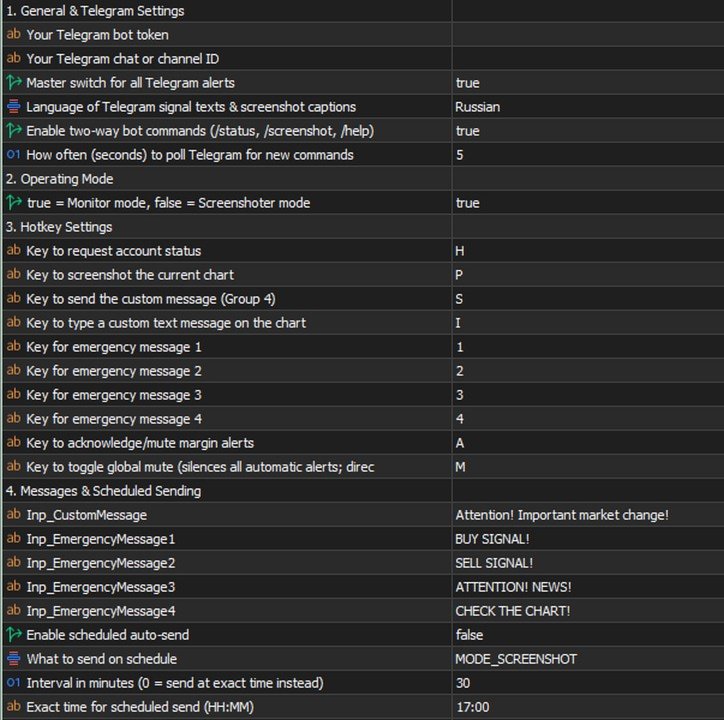
  • "Monitor" ( Inp_EnablePatternMonitoring = true ) — full mode: pattern scanning, margin control, accepting trading commands. Only ONE copy in this mode is allowed per terminal at a time (protects against a second copy accidentally duplicating alerts or competing for Telegram commands).
  • "Screenshoter" ( Inp_EnablePatternMonitoring = false ) — lightweight mode, no pattern scanning and no trading commands, just screenshots on demand ( /screenshot , /swing , /marginview ). You can run as many copies as you like — handy to keep one per symbol chart you want screenshot access to, without touching the main "Monitor". If the hidden service chart isn't available in this mode, some features honestly fall back to a text report instead of failing.

Which patterns it looks for

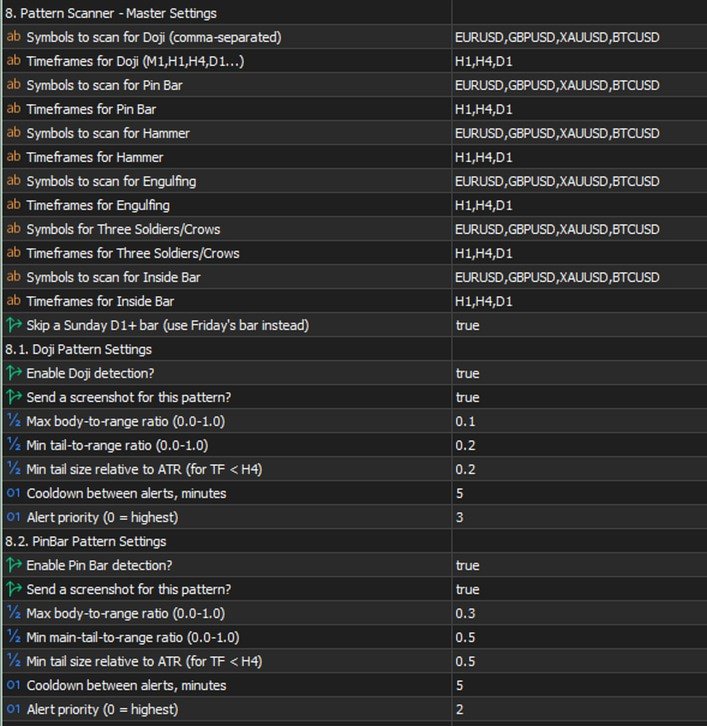
  • Doji — body close to zero relative to the candle's range (the threshold is configurable), both wicks noticeable — a sign of market indecision.
  • Pin Bar — small body, one long "tail" — price refusing to go further in one direction.
  • Hammer — small body near the top of the range, a long lower wick — a reversal signal.
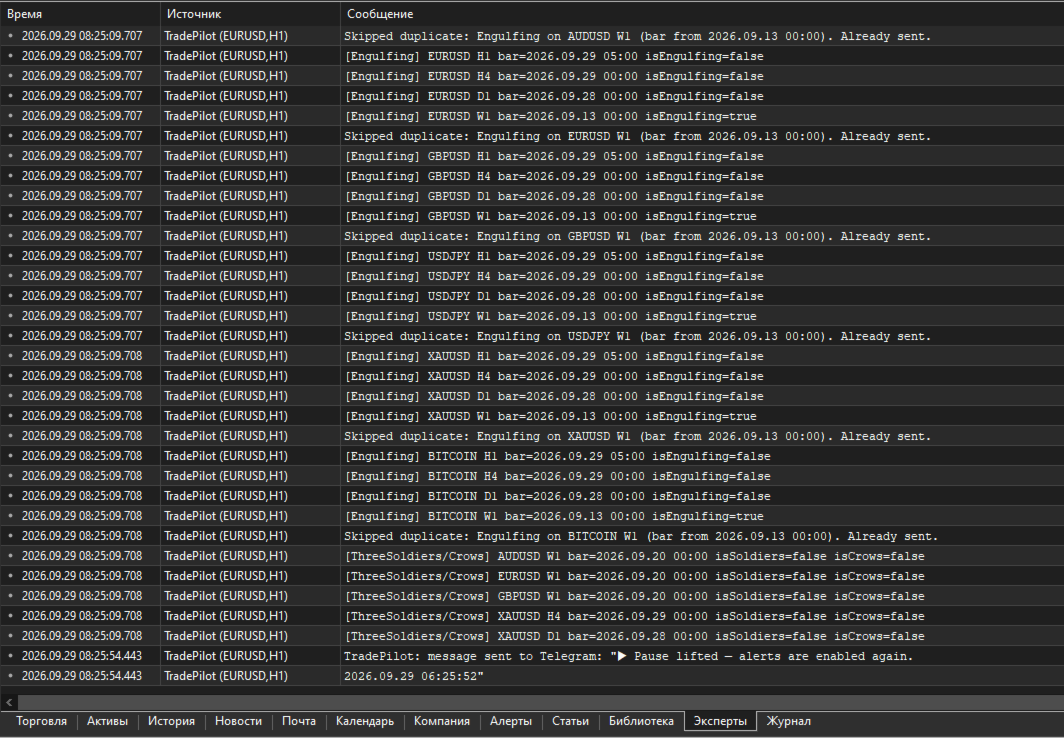
  • Engulfing — a candle fully covers one or more previous candles (how many is configurable). There's a mode to search on a CLOSED candle, in REAL TIME on a still-forming one, or both — the real-time mode fires earlier, before the bar closes, at the cost of somewhat more false positives.
  • Inside Bar — a candle entirely within the previous candle's range — volatility compression before a possible breakout.
  • Three Soldiers / Crows — three candles in a row moving the same direction with no significant wicks — a strong impulse.

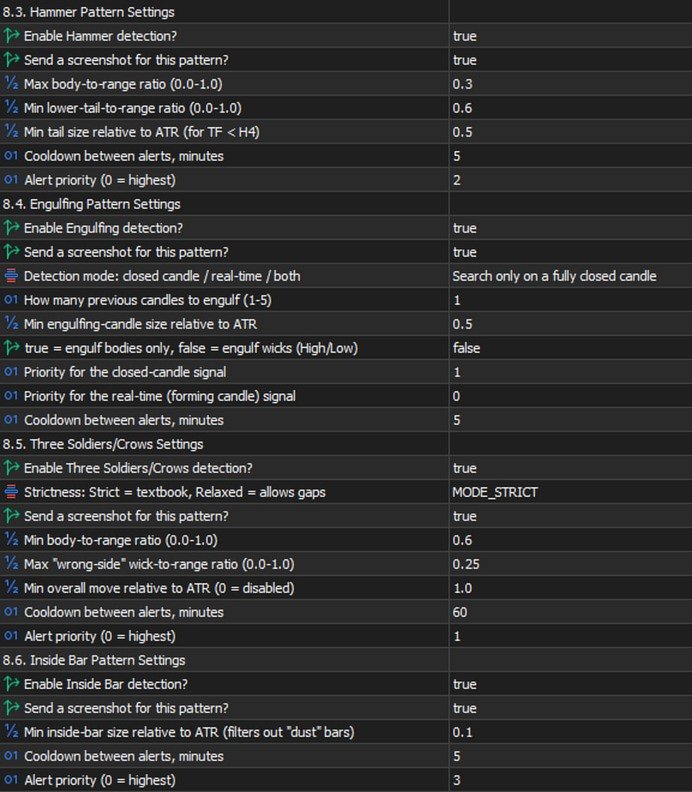
Each pattern has its own settings: which symbols and timeframes to scan, whether it's enabled at all, whether to send a screenshot along with the text, geometric thresholds (body/wick share of the candle's range), a minimum size relative to ATR (so it doesn't react to "dust" in a quiet market), a cooldown between repeat alerts for the same symbol/timeframe, and a priority in the shared send queue (0 is highest; critical margin alerts always jump the queue).

Multi-timeframe confluence

If the same pattern type fires independently on SEVERAL timeframes within a short time window (configurable), that's a confirming, stronger signal, and the EA automatically raises its priority. Not a fresh check from scratch — just cross-referencing detections that were already found, at essentially no extra cost.

⚡ Emergency signal — an abnormally large candle

Separate from the candlestick patterns: a real-time candle-size scanner. If the CURRENT, still-forming candle on a chosen timeframe has already grown more than N times (configurable) the normal candle size (measured by ATR), the alert fires IMMEDIATELY — it doesn't wait for the bar to close. If the candle keeps growing, a follow-up alert with the updated size arrives, so you can see the move is still going, not that it stalled.

This is exactly where "monitoring + trading in one chat" pays off fully: you get a signal about a sharp spike, decide to act, and right in the same chat, without switching apps, type /buy SYMBOL RISK 1% SL ... and you're in the trade while the move is still relevant. No need to run to the terminal to check what happened and then separately open a position — it's all in one place.

On-chart summary

A compact panel directly on the terminal chart — the most recent signals across every watched symbol/timeframe at a glance, no need to scroll back through the chat history ( Inp_EnableOnChartSummary ).

Margin control

  • Configurable levels: margin call, stop out, breakeven, full liquidation, profit target — calculated from the account's current state and drawn as lines directly on the chart, with alerts as price approaches them.
  • /marginview CUR|SYMBOL ( /mv ) — on demand, sends a screenshot with an automatically chosen scale so ALL levels and the current price fit into one picture. Works not just for the symbol of the chart the EA runs on, but for any symbol with an open position. For a fully locked symbol (BUY=SELL, zero net volume) it honestly explains that no levels exist, because there's nothing for price movement to act on — instead of returning silent emptiness.

Two-way control through Telegram

Commands split into informational and trading ones. Several commands have short forms — faster to type when a decision needs to happen in seconds (for example, right after a sharp-candle signal).

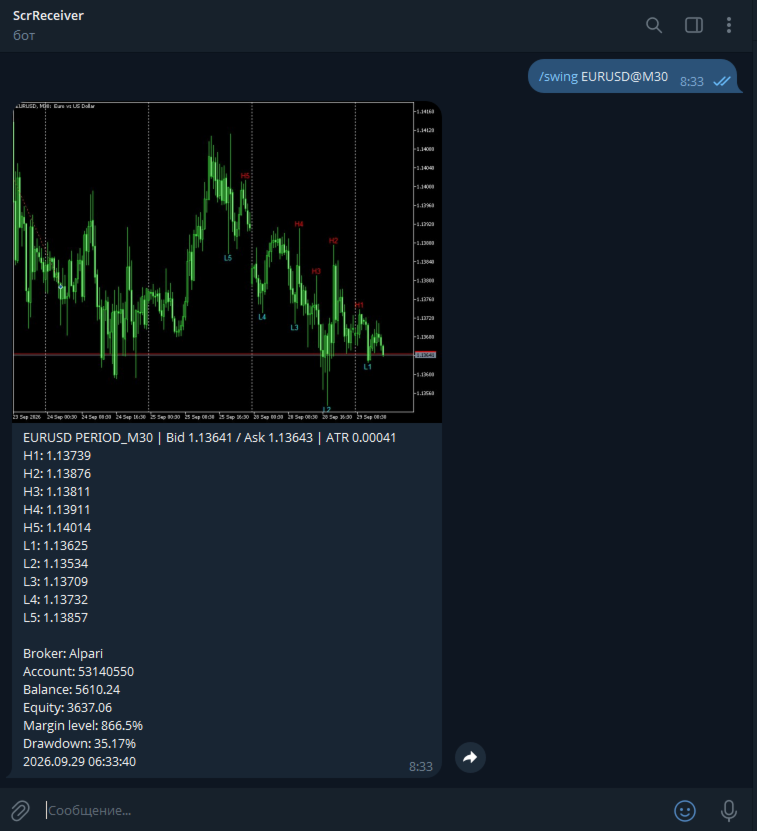
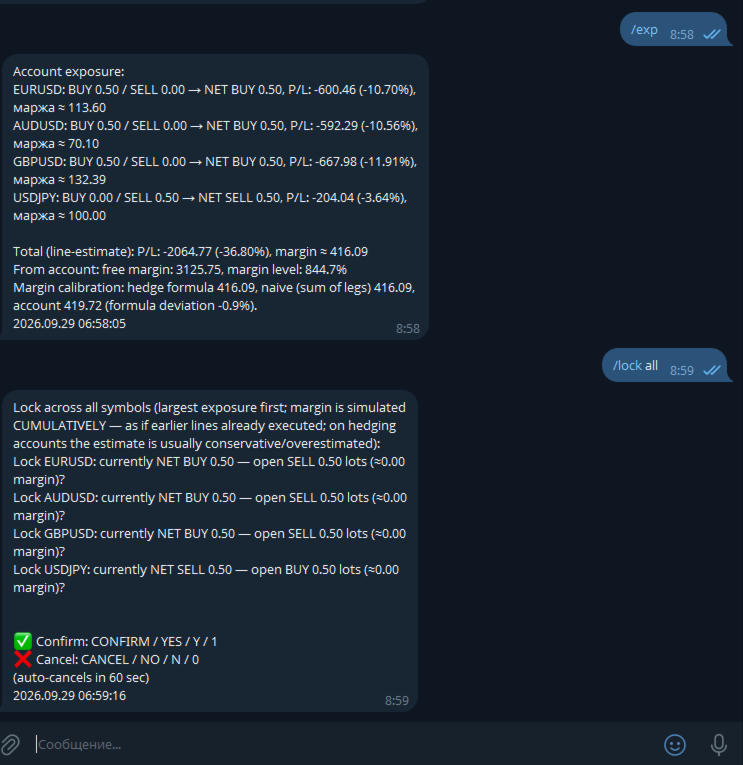
Informational (always available): - /status ( /st ) — account status. - /positions [FILTER] ( /pos ) — open positions, with short reference numbers N1, N2... for use in other commands. - /pending [FILTER] ( /pnd ) — pending orders, numbers P1, P2... - /exposure ( /exp ) — net volume and margin load per symbol. - /swing SYMBOL [depth] ( /sw ) — a screenshot with the last 5 swing highs and 5 swing lows labeled on the chart. - /marginview CUR|SYMBOL ( /mv ) — see the margin section above. - /screenshot ( /ss ) — a screenshot of the current chart on demand. - /pause , /pause N ( /pa ) / /resume ( /re ) — pause automatic alerts without touching trading commands. - /help ( /h ) — command list; tap any specific command with no arguments for detailed help on it.

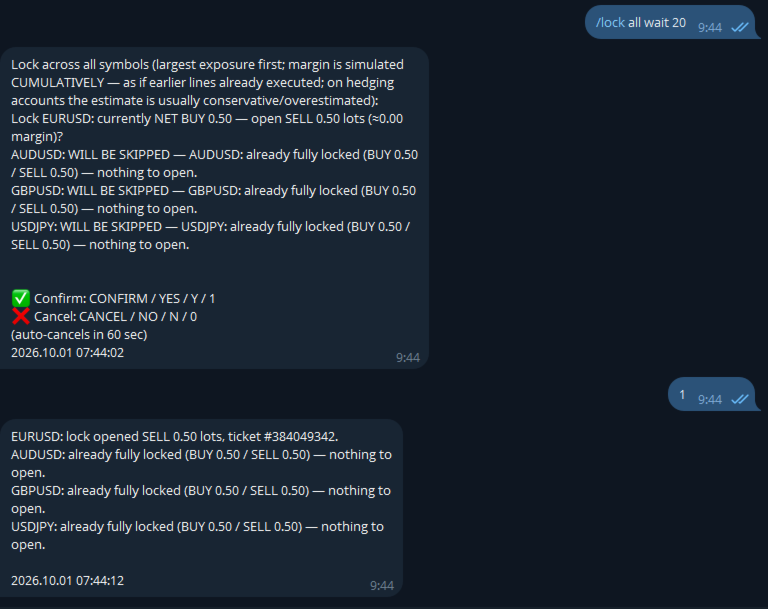
Trading (require a separate opt-in in settings): - /close ( /cl ) — close position(s). - /set SL|TP|BE <ref> <price or expression> — set or remove a stop/take-profit, or move to breakeven. - /shift SL|TP <ref> UP|DOWN <points> ( /sh ) — moves an ALREADY-SET stop/take-profit by N points relative to its current value (unlike /set , which sets an absolute price) — no need to check where the stop currently sits yourself. With a filter, each position shifts from its OWN current level — handy for grids/martingale. - /del SL|TP|PENDING <ref> — remove a stop/take-profit or delete a pending order. - /buy / /sell — a market entry or a pending order. - /lock SYMBOL / /lock ALL — instantly opens an opposite position, zeroing net volume. The spread check is deliberately not applied to /lock — locking is a defensive action taken precisely because the market is stressed, and spread widens in exactly those moments. - /undo — reverts the last command that changed an SL/TP ( /set , /shift , /del , moving to breakeven), within 10 minutes of it. One step back, requires its own confirmation with an explicit irreversibility warning. Closing positions and opening new trades are not reversible. - /enable <password> / /disable — emergency toggle for trading and bulk commands even if they're disabled in settings. Scenario: you forgot to enable Inp_EnableTelegramTrading , stepped away from your computer, and now urgently need to adjust trades remotely. The password is a separate setting ( Inp_EmergencyPassword , empty by default — the feature is off), the override is session-only (resets on restart), three wrong attempts in a row trigger a 5-minute lockout.

Shared command language: - A reference to a position/order — a short N/P-number (from /positions / /pending ) or a filter ( ALL , PROFIT , LOSS , BUY , SELL , VOL>x , a symbol name) — one command can touch several positions. - A price is a number or an expression like LOW1-1.5ATR / HIGH2+50P (a swing level with an ATR or point buffer). - Volume is a number or RISK 1% (the lot size is calculated from the risk % and the distance to the stop, with the calculation shown in the preview before confirmation). - Every operation: preview → confirm/cancel word → execution, with an auto-cancel timeout. Confirmation words are configurable ( Inp_ConfirmKeywordYes/No , defaulting to only CONFIRM / YES and CANCEL / NO — no short Y / N / 1 / 0 ).

Usage examples

⚡ EMERGENCY: XAUUSD H1 — abnormally large candle (3.4x ATR)! → while the move is still relevant, right in the same chat: /buy XAUUSD RISK 1% SL LOW1-0.5ATR → the bot calculates volume from 1% risk and the distance to the stop, shows the calculated lot size in the preview, waits for confirmation /pos PROFIT → lists only profitable positions, numbered N1, N2... /close N1 → preview "close #12345 XAUUSD BUY 0.10, P/L +42.10?" → confirm → closed /set TP N1 HIGH1+20P → take-profit 20 points above the last swing high /lock XAUUSD → instantly opens an opposite position, zeroing net volume on gold /shift SL N1 UP 50 → pulls an already-set stop 50 points up (manual trailing) /undo → "Undo: SET SL by filter 'XAUUSD': ... THIS ACTION CANNOT BE UNDONE" → confirm → stops revert to their values from before the command /mv → a chart screenshot with an auto-picked scale, showing the current price and all margin levels at once

Settings — by group

  • Telegram — General: bot token, chat ID, the master alert switch.
  • Mode: "Monitor" vs "Screenshoter" ( Inp_EnablePatternMonitoring ).
  • Emergency messages: 4 configurable template phrases with chart hotkeys in the terminal — if the bot is connected to a channel/group with subscribers, one keypress, no typing needed, instantly broadcasts a ready-made warning to the whole audience (each phrase's text is whatever you want — "closing everything", "news coming, don't enter", "re-entry", etc.).
  • Margin control: on/off, which of the five levels to calculate and show, line colors and styles.
  • Per-pattern groups (Doji/Pin Bar/Hammer/Engulfing/Inside Bar/Three Soldiers): for each — symbols and timeframes, enabled, screenshot yes/no, geometric thresholds, minimum ATR, cooldown, priority.
  • Emergency signal: enabled, the ATR multiplier for an "abnormal" candle, timeframe, ATR period, priority.
  • Confluence: time window, minimum number of confirming timeframes, how much to raise priority.
  • Shared geometric thresholds: minimum body/wick share of the candle's range — a "flat line" candle filter applied before all the detectors.
  • Chart appearance: arrow and label colors per pattern, the summary panel.
  • Screenshots: quality, mode (candles/bars), delays before capturing.
  • Alert pause: the default duration for /pause .
  • Telegram commands: enable reading commands, poll interval.
  • Telegram trading: master switch, bulk commands, operation confirmation, confirm/cancel words, timeout, the /undo window, the /enable emergency password.
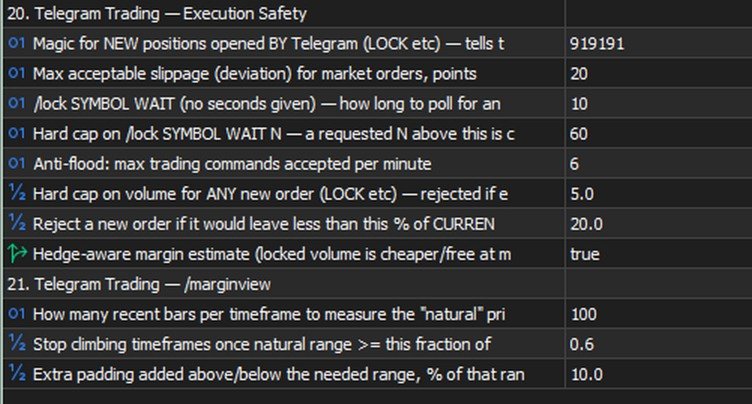
  • Execution safety: magic number for new positions, slippage, minimum free margin left after a trade, a per-order volume cap.
  • /marginview : how many bars to use for scale-fitting, the "natural range" threshold, padding around the picture's edges.

Tips and recommendations

  • Start with Inp_ConfirmTradingOperations = true (the default) — so every operation requires explicit confirmation, giving you time to catch a typo before it actually executes.
  • Check LOW/HIGH ± ATR expressions with /swing SYMBOL before using them in a real trading command.
  • For grids/martingale, use VOL>x filters in /close / /set , or a plain symbol filter in /shift / /undo .
  • Keep Inp_EnableBulkTradingCommands off until you've tested single-position operations.
  • Tune the emergency signal ( Inp_EmergencyCandleSizeATR ) to your instruments' real volatility — too low an ATR multiplier floods you with false positives, too high and you'll miss genuinely sharp moves.
  • If you set Inp_EmergencyPassword for /enable , pick something that can't be guessed in three tries.

Cautions

  • /undo is irreversible on its own — if something ELSE changed the same SL/TP after your command (another command, a manual edit in the terminal), the preview will warn you, but the revert will still restore the value from BEFORE your command, not undo that later change.
  • /enable lifts TWO safeguards at once — the general trading ban and the bulk-commands ban. Treat it as an emergency exit, not a way to bypass Inp_EnableTelegramTrading=false just because you haven't decided on the setting yet.
  • /lock doesn't check the spread — a deliberate trade-off, a lock needs to work even with a wide spread ahead of news; at an extreme gap it will execute at whatever price is available.
  • Bulk operations ( ALL , a symbol filter) affect several trades with one command — the preview shows the exact list before execution, check it.

Known limitations (honestly, no hiding)

  • Market /buy / /sell and pending orders are already supported; some rare parameter combinations may not be covered yet.
  • WebRequest to Telegram is a synchronous call (a limitation of MQL5 itself), so a brief delay in the alert queue is possible when the Telegram API is unavailable.
  • With several copies of the EA on one terminal, only the one in "Monitor" mode accepts commands (Telegram delivers updates to a single requester — the offset cursor is shared per bot).
  • There's no automatic trailing yet (the EA moving a stop on its own, on a timer) — only manual /shift . A version with a choice of algorithm (fixed step / ATR / fractals / Fibonacci) is being worked out.
おすすめのプロダクト
Crystal Trade Manager – Advanced MT5 Risk and Trade Control Utility Overview Crystal Trade Manager (CTM) is a professional MetaTrader 5 utility designed for risk management, trade automation, and instant execution control. It provides traders with an integrated system for protecting equity, managing daily drawdowns, controlling lot sizes, and applying automation features such as automatic SL/TP, break-even, and trailing stop. The tool is suitable for manual traders, prop-firm challenge particip
Manual Trade Panel PRO for MT5 Product name **Manual Trade Panel PRO for MT5** Short description Advanced manual trading panel for MetaTrader 5 with BUY/SELL and BUY LIMIT/SELL LIMIT execution, balance-based lot sizing, automatic SL/TP, Break Even, trailing stop, partial close, candle timer, and open position pips counter. Full sales description **Manual Trade Panel PRO for MT5** is an advanced Expert Advisor designed for manual and semi-automatic trading in MetaTrader 5. The EA creates a c
TAQ Magic Keys v6.0 Auto Trade Manager is an advanced trade management tool for MetaTrader 5 (MT5) , featuring one-click trade management functions and an integrated Position Size Calculator . New Feature In V6.0 — FNR1R1 Function Key The new FNR1R1 Function Key provides an automated 1:3 Risk Reward trade management system , allowing traders to manage an open position through three predefined profit targets. Set your initial Stop Loss, and the system automatically calculates: TP1 = 1:1 Risk R
IMPORTANT: After purchasing this product, please send me a private message to receive the installation guide, setup instructions, and direct product support. ZyloFx Partial Close Manager is a professional trade management Expert Advisor for MetaTrader 5, designed to help traders manage open positions with automatic partial closes and optional break-even protection. This EA does not open trades automatically. Its main purpose is to manage existing positions according to the user’s selected sett
Time in Trade Expert Advisor は、指定された時間に未決注文をオープンする戦略を適用し、自動切り替えで冬時間と夏時間も使用します。 シグナルが発生すると、取引ロボットは売買の等量で未決注文を開きます。 取引に使用される時間枠は 5 分です。 指値注文のトリガーは、以下に応じた急激な価格変動です。 取引セッションの開始/終了; 重要な経済指標の発表; トレーダーの最大数の時間間隔。 ユーザーは次の設定を使用できます。 Open Price - BID および AKS 価格に基づいて注文の始値レベルを設定します。 Stop Loss - 望ましくない価格変動の場合のストップレベル; Trailing - フローティング ストップ ロス レベル; Volume - 固定取引量 (リスク = 0 の場合のみ有効); RISK - リスク レベル (%): 0 - リスクが設定されていません。 固定ボリュームが適用されます。 1 以上 - 無料資金のリスク レベル %。 HOUR_n - 指定された時間 (サーバー時間) に取引を有効/無効にします。 true - 許可
Horizontal Line Trade Assistant EA  Semi-Automated Trading Assistant      IMPORTANT :     On the main/purchased program a user can click on the Horizontal line and change it to Buy or Sell, and drag by double clicking on it. Please keep in mind that this option is not available on demo version, due to some restrictions/limitations of Strategy Tester, some Object related operations are not available in the  Strategy Tester. But, it will not prevent you from Testing, please drop an Object to chart
SPICA CLICK TRADE CONTROL MT5 Spica Click Trade Control is a complete one-click trading panel for MT5 — built for traders who want speed without giving up control. Every trade shows you the exact lot size, dollar risk, and reward before you click Buy or Sell. Manage open positions with breakeven, trailing stops, and partial closes. Protect your whole account with automatic equity-based shutoffs. All from a clean, tabbed panel that stays out of your way until you need it. KEY FEATURES Trading
Trade Assistant MT4/MT5 PRO は、MetaTrader 4/5 用のプロフェッショナルなトレードパネルです。素早く、便利で、視覚的に分かりやすく取引を管理したいトレーダーのために作られています。この製品は、日常的な手作業を減らし、注文の発注と管理を速くし、リスク管理を標準化し、手動トレードをより規律あるものにします。 このツールは、トレーダーの代わりにシグナルを探すものではありません。また、魔法のような結果を約束するものでもありません。その目的はもっと実用的です。チャート上に便利なトレードインフラを提供することです。エントリーポイント、取引アイデア、市場ロジックはあなたが決めます。そして Trade Assistant MT4/MT5 PRO は、そのアイデアを明確なリスク、ポジションサイズ、Stop Loss、Take Profit、Breakeven、Trailing Stop、ポジション管理を含む正確なトレードプランへ素早く変換する手助けをします。 毎回ポジションサイズを手動で計算し、標準の注文ウィンドウを開き、Stop Loss までの距離を確認し、保
This Expert Advisor monitors all open positions across all symbols in MetaTrader 5. Whenever a Stop Loss (SL) or Take Profit (TP) is manually set or adjusted on any position, the EA automatically applies that value to all other open positions , regardless of symbol or order type (Buy/Sell). This ensures consistent and synchronized SL and TP levels across your account. Perfect for mobile trading via tablet or smartphone!
MQL5 Trading Panel SL TP — это мощный инструмент, призванный помочь трейдерам эффективно управлять своими позициями на платформе MetaTrader 5. Эта торговая панель предоставляет простой в использовании интерфейс для установки уровней Stop Loss (SL) и Take Profit (TP) для открытых позиций. MQL5 Trading Panel SL TP обладает широкими возможностями настройки и может быть адаптирована к конкретным потребностям отдельных трейдеров. Панель можно изменять в размере, перемещать и настраивать с помощью ра
* Super Assistant is an useful management tool that helps traders perform management tasks on MT4/MT5 account remotely via Telegram such as: - Get info (account, details of positions, pending orders, floating PL, price, economic news, etc) - Open trade (open instantly with preset parameters) - Manage trade (set SLTP automatically, break-even mode, max risk, close time every day, etc) - Close trade (close all, buy, sell, win positions by one click, set awaiting close by PL, time) - Set up notifi
GS trade report
Aleksander Gladkov
5 (1)
3 in 1 : Report + monitoring + sending messages (Telegram, ...) to optimize trading and use of advisors. Monitoring: Panel on the chart Sending messages to Telegram Sending messages to Email Sending Notifications Sending pop-up messages Sound notifications when the established Profit/Loss levels are exceeded Monitoring is activated by pressing the Start button. Profit for the period by currency pairs, hours and Magic number for the current account. Forms four tables: by symbols, by magic number
Advanced Breakeven & Partial Close Manager MT5 Script – One-Click Trade Management Overview Advanced Breakeven & Partial Close Manager is a trade management script for MetaTrader 5. It works only on existing open positions and applies actions strictly based on user-defined rules. The script runs once per attachment and performs only the actions explicitly enabled in the inputs. It does not run in the background, does not trade automatically, and does not generate signals. Core Functionality The
TradePilot Dashboard 概要 MT5用のグラフィカルパネルで、注文管理ボタン(Buy/Sell/Close/SL/TP)、マージンチェック、ログ制御を搭載。使いやすく、デモ口座でのテストが可能。利益の保証はありません。 詳細説明 TradePilot Dashboardは、MetaTrader 5での手動および半自動の注文管理を目的としたグラフィカルインターフェース(Controls)付きのエキスパートアドバイザーです。ボタンや入力フィールド、安全性チェック(自由マージン)を備えた視覚的なパネルを提供し、トレーダーがチャート上から直接素早く操作できるようにします。 主な機能 • 40以上のボタンと複数の入力フィールド(ロット、pips、トレーリング、逆SLなど)を備えたレスポンシブなパネル • Trade.mqh(CTrade)ライブラリを使用して、成行注文および指値注文(Buy, Sell, BuyStop, SellStop)を実行 • 注文送信前に自由マージンをチェック(ACCOUNT_MARGIN_FREEを使用) • ログ制御機能(enableLoggin
Bring the TradingView experience to your MetaTrader 5! Magic Entry Pro is a professional visual trading assistant designed for manual traders, scalpers, and Prop Firm funded traders. It allows you to execute trades with lightning speed, calculate risk automatically, and visually project your Stop Loss and Take Profit zones directly on the chart before you open a position. Tired of manually calculating lot sizes or guessing your Risk-to-Reward (RR) ratio? Magic Entry does it all in seconds! KE
This is a utility designed to automatically set the stop loss levels of orders according to the specified condition. Two price levels serve as the condition for setting stop loss: Trigger level - when this level is reached, an order is placed. The stop loss value of an order. It is possible to enable or disable traling stop loss. Input parameters Order type for execution - type of orders to be processed by the expert. It can either be BUY, SELL or auto-select. Trigger Level Points - level to pl
Risk calculator for MetaTrader 5. Precision Position Calculator is a MetaTrader 5 utility that helps calculate trade volume based on the risk configured by the user. The panel allows the user to work with Entry, Stop Loss and up to three Take Profit levels directly on the chart. Main description Precision Position Calculator is a utility for MetaTrader 5 designed to help calculate the volume of a trade before opening it. The panel allows the user to configure risk, select the order type, set th
FREE
Risk Control Utility MT5 designed for manual trading. It helps to calculate and control your risks, transfer transactions to breakeven and accompany positions with trailing stop. Easy to set up and use. It can be used for calculating a trading lot, calculating stop loss and take profit levels. Works with currency pairs, CFDs, stocks, indices, futures, cryptocurrencies Displays   volume,   potential loss and profit before   placing an order Ability to set the expiration time of a pending order Tr
Algosphere TerminalはMetaTrader 5用のプロフェッショナルなワンクリック取引パネルです。効率を求めるトレーダーのために設計されました。事前定義されたストップロスとテイクプロフィットをポイント単位で設定し、BUYとSELL注文を即座に実行できます。複雑な操作は必要ありません。機能には、クイックプリセットボタン付きの調整可能なロットサイズ、カラーアラート付きのライブスプレッド監視、設定可能なアクティベーション条件付きトレーリングストップ、ワンクリックブレイクイーブン機能、包括的なポジション管理ツールが含まれます。4つのエレガントなプロフェッショナルテーマから選択可能:Obsidian、Emerald、Frost、Neon。すべての設定はセッション間で自動保存され、次回起動時に復元されます。FX通貨ペア、株価指数、CFDなど様々な取引商品に対応しています。
Hello, Every one  Close All Button A script to close all market positions and/or pending orders. ----------------------------------------------------------------------------------- This is Close All    market positions and/or pending orders button  You can close all orders in 1 second by one click  Download for Demo Account: Download on Demo Account:  Close All in 1s v1.4 Only Demo.ex5 - Google Drive Free version:  https://www.mql5.com/en/market/product/74159 For send Trade notification to Your
This utility provides the ability to use hot keys in manual trading instantly responding to the current market situation. You can assign hot keys to open/close positions by their type, open/close all positions on the current chart and remove all orders on the current chart. You can also assign hot keys for five predefined trade volumes and switch between them if necessary with no need to change the volume manually from time to time. It is also possible to set the auto calculation of a trade volu
AKCAP Hotkey Tool
AK Capital Markets Limited
5 (3)
Special offer for the next 10 copies Are you tired of manually navigating through menus and inputting data every time you want to execute a trade or open an order on Meta Trader? Our hotkey tool is here to make your life easier and boost your trading efficiency. Our tool is natively coded for lightning-fast performance and comes loaded with all the features you could possibly want. From pending orders and OCO orders to trailing and multiple buckets, it has everything a scalper could need. And
Trade Panel MetaTrader 5 - feature-rich tool that adds the desired and highly-demanded functions to the terminal to enhance trading experience. Orders execution with one click You can open and close orders easily, using the panel. Buttons to open Market, Limit and Stop orders in both buy and sell directions are located on the Main tab, while there are multiple options to close already existing positions and cancel orders: Close/cancel all Close/cancel buy and sell positions/orders separately Clo
One click. Everything under control. SmartTradePanel is a lightweight, fast trade panel for MT5. You trade and manage risk in USD (not pips), place pending orders with visual confirmation, start trailing only when your trigger is activated – and keep your chart clean. The panel always stays in the foreground, is DPI-friendly, and remembers your settings for each symbol. Main functions • One-click trading & closing BUY / SELL Close all BUY / SELL Close only winners / only losers Close HAL
The indicator is intended for determining the spread and swap size, the distance for setting stop orders and stop losses from the current price allowed and the risk per 1 point in the deposit currency. The indicator informs a trader about possible additional expenses and profits connected with transferring a position to the next trade session of the financial instrument. It also informs about the spread size and the distance of pending orders, stop loss and trailing from the current price. In ad
Session Breakout Executor is a deterministic MetaTrader 5 Expert Advisor for executing a defined session-range breakout workflow with OCO pending orders. The strategy, risk gates and lifecycle states are visible in a professional dashboard, while automatic entry is disabled by default. MAIN FEATURES • Configurable session range construction • Guarded manual arming before order placement • Broker-aware pending-order validation • OCO sibling cancellation after one side activates • Spread, permiss
Managing every trade manually can be stressful and often leads to errors. Smart Pro Manager MT5 is a utility designed to simplify and automate trade management directly from the chart, allowing you to focus solely on entry decisions. Once you open a position with a simple click on   BUY   or   SELL , the system automatically takes care of all the management: Automatically sets   Stop Loss   and   Take Profit   Moves   Stop Loss to   BreakEven   (with buffer) Dynamically manages   Traili
Quantum Breakout System: Algorithmic Trading Utility for Gold (XAUUSD) The Quantum Breakout System is an automated trading utility built for MetaTrader 5, designed specifically to assist traders in managing breakout strategies on Gold (XAUUSD). Utilizing core elements from the SwingMaster architecture, the Quantum Breakout System focuses on dynamic order placement at key market support and resistance levels. Rather than relying solely on market orders, the EA places calculated pending limit
FREE
Tired of manually adjusting stop-loss and take-profit levels for multiple positions across different pairs? The Manage Multiple Positions Expert Advisor is your solution. MT4 Version -  https://www.mql5.com/en/market/product/120916/ This powerful tool streamlines your trading experience by allowing you to manage multiple positions on a single pair with ease. Modify stop-loss and take-profit levels for all open positions on a specific pair with a single click. Plus, the EA provides clear visibili
テイクプロフィット、ストップロス、トレーリングストップのレベルをブローカーに見えないようにします! 主なオプション:   ステルスモード バーチャルトレーリングストップ バーチャルテイクプロフィット バーチャルブレイクイーブン 仮想ストップロス 仮想注文の有効期間 警告:   エキスパートアドバイザーは、それ自体では注文を行いません。 自分で注文を開くか(エキスパートパネルを介して含む)、同じ通貨ペアの別のチャートでサードパーティのエキスパートを使用する必要があります。 エキスパートがこれらの注文を処理するには、エキスパート設定でマジックナンバー「-1」を指定してください。 テストにはビジュアルモードを使用してください!!! 作業アルゴリズム あなた(または別のエキスパートアドバイザー)が買い/売り注文を開くか、保留中の注文がトリガーされるか、チャートにすでに開いているポジション/注文がある場合、エキスパートはコントロールパネルをインストールしてv-StopLossの追跡を開始します。 v-BreakEven、v-TakeProfitパラメーター。 注意:     「-1」以外のマジ
このプロダクトを購入した人は以下も購入しています
Trade Assistant MT5
Evgeniy Kravchenko
4.43 (216)
取引 ごとのリスクの 計算、新規注文 の 簡単 な 設置、部分的 な 決済機能 を 持 つ 注文管理、 7 種類 のトレーリングストップなど 、便利 な 機能 を 備 えています 。 追加の資料と説明書 インストール手順   -   アプリケーションの手順   -   デモアカウント用アプリケーションの試用版 ライン機能 チャート上にオープニングライン、ストップロス、テイクプロフィットを表示します。この機能により、新規注文を簡単に設定することができ、注文を出す前にその特徴を確認することができます。   リスク計算 リスク計算機能は、設定されたリスクとストップロス注文のサイズを考慮して、新規注文のボリュームを計算します。ストップロスの大きさを自由に設定できると同時に、設定したリスクを守ることができます。 Lot calc ボタン - リスク 計算 を 有効 / 無効 にします 。 Risk フィールドでは 、必要 なリスクの 値 を 0 から 100 までのパーセンテージまたは 預金通貨 で 設定 します 。 設定」 タブで 、 リスク 計算 の 種類 を 選択 します :「 $ 通
Trade Manager EAへようこそ。これは、取引をより直感的、正確、そして効率的にするために設計された究極の リスク管理ツール です。これは単なるオーダー実行ツールではなく、包括的な取引計画、ポジション管理、リスク管理のためのソリューションです。初心者から上級者、迅速な実行を必要とするスキャルパーまで、Trade Manager EAはあらゆるニーズに対応し、為替、指数、商品、暗号通貨などさまざまな市場で柔軟に対応します。 Trade Manager EAを使用すると、複雑な計算が過去のものになります。市場を分析し、エントリーポイント、ストップロス、テイクプロフィットのレベルをチャート上のラインでマークし、リスクを設定するだけで、Trade Managerが最適なポジションサイズを即座に計算し、SLとTPをピップ、ポイント、口座通貨でリアルタイムに表示します。すべての取引が簡単かつ効果的に管理されます。 主な機能: ポジションサイズ計算機 :定義されたリスクに基づいて取引サイズを瞬時に決定します。 簡単な取引計画 :エントリー、ストップロス、テイクプロフィットを設定するためのド
Telegram to MT5 Multi-Channel Copier   は、Telegram チャンネルのトレードシグナルを MetaTrader 5 へ自動コピーします。ボット不要、ブラウザ拡張不要、手動コピー不要。Telegram にシグナルが届くと、EA が数秒であなたのターミナルに注文を出します。 さらに、チャンネルをコピーする前に、内蔵バックテスターでそのチャンネルがあなたの口座でどう動いたかを確認できます。 製品は 2 つのコンポーネントで構成されます:Telegram チャンネルを監視する Windows アプリと、MT5 ターミナルでシグナルを執行する本 EA です。MT4 版もあります   こちら . セットアップガイドとアプリのダウンロード:   https://www.mql5.com/en/blogs/post/768988 Telegramのシグナルチャンネルをバックテストする方法 をご覧ください。 現在の価格は今後値上げされます。 仕組み アプリはあなた自身の Telegram アカウントで接続するため、フォローしているすべてのチャンネル、グループ、ト
================================================================================ POC BREAKOUT - V20.72. Full Professional Grade Toolkit ================================================================================ POC Breakout is a full MetaTrader 5 trading dashboard for discretionary traders who want breakout signals, Point of Control (POC) context, volume profiles, order flow, market structure, news, alerts, and advanced trade planning in one professional workspace. Attached directly to you
TradePanel MT5
Alfiya Fazylova
4.88 (170)
Trade Panelは多機能なトレーディングアシスタントです。アプリには手動取引用の50以上のトレーディング機能が搭載されており、ほとんどの取引作業を自動化することができます。 アプリの説明書: https://www.mql5.com/en/blogs/post/756482 デモ口座用アプリの試用版: https://www.mql5.com/en/blogs/post/750865 アプリのインストール方法: https://www.mql5.com/en/blogs/post/756239 アプリをビジュアルモードでテストする方法: https://www.mql5.com/en/blogs/post/770277 VPSのMetaTraderにアプリをインストールする方法: https://www.mql5.com/en/blogs/post/770190 取引。 ワンクリックで取引操作を行うことができます: リスクを自動計算して指値注文やポジションを開く。 複数の注文やポジションをワンクリックで開く。 注文のグリッドを開く。 保留中の注文やポジションをグループごとに閉じる
自分の取引ルールで Telegram のシグナルをコピー Telegram to MT5 Signal Trader は、Telegram の公開・非公開チャンネルやグループから、テキスト形式の取引シグナルを MetaTrader 5 へ自動でコピーします。1つのデスクトップアプリで複数の配信者と MT5 口座を管理し、 配信者ごとにリスクと取引設定を個別に指定 できます。 シグナルのコピーに Telegram ボットや API 設定は必要ありません。 電話番号または QR コードでご自身の Telegram アカウントにログインし、すでに参加しているチャンネルやグループを選ぶだけです。ボットの作成や、Telegram API トークン、API ID、API hash の入力は不要です。 ポジションサイズを選び、複数の利確水準に分けて決済し、建値へのストップ移動やトレーリングストップを自動化できます。配信者のシグナルを受け取りながら、実際の取引方法は自分で管理できます。 本製品は、この MT5 エキスパートアドバイザ(EA)と、必須の Windows 連携アプリで構成されます。 インス
Power Candles Strategy Scanner - 自動最適化型マルチシンボル設定ファインダー パワーキャンドル・ストラテジー・スキャナーは 、パワーキャンドル・インジケーターを駆動するのと全く同じ自己最適化エンジンを、マーケットウォッチに登録されているすべての銘柄に対して並行して実行します。1つのパネルで、現在統計的に取引可能な銘柄、各銘柄で勝率の高い戦略、最適なストップロス/テイクプロフィットの組み合わせが表示され、新たなシグナルが発生した瞬間に通知が届きます。 このツールは、Stein Investmentsのエコシステムの一部です。  18種類以上のツールをすべて閲覧し、AIを活用したセットアップの推奨を受け取り、  https://stein.investments でコミュニティに参加しましょう 市場動向を網羅。銘柄ごとに3,000件以上の自動最適化。2種類のアラート。ワンクリックでチャートを切り替えて即座にアクション。 なぜこれが必要なのか 多くのマルチ銘柄スキャナーは、 価格の動き (ボラティリティ、変動率、銘柄ごとのRSI)を表示するだけです。それ
Farmed Hedge Yield Farming | All Markets (Manual - Hybrid - Semi/Automated EA) VERIFIED TRADING RESULTS - Farmed Hedge Yield Axi Copy:  https://www.mql5.com/en/signals/2356376 - Farmed Hedge Yield Exn Copy:   https://www.mql5.com/en/signals/2356404 - Farmed Hedge Yield V Copy:  https://www.mql5.com/en/signals/2357156 IMPORTANT NOTICE: FarmedHedge is a MANUAL-FOCUSED TRADING UTILITY ,not a fully automated EA. Results shown on this Signal include manual trades and overall strategic management.
Exp COPYLOT CLIENT for MT5
Vladislav Andruschenko
3.97 (35)
MetaTrader 5 用のプロフェッショナル取引コピー機 MetaTrader 向けの高速・高性能・信頼性の高い 取引コピー機 です。 COPYLOT は、MT4 と MT5 のターミナル間で Forex 取引をコピーでき、 Hedge 口座と Netting 口座の両方に対応しています。 COPYLOT MT5 版の対応構成: - MT5 Hedge → MT5 Hedge - MT5 Hedge → MT5 Netting - MT5 Netting → MT5 Hedge - MT5 Netting → MT5 Netting - MT4 → MT5 Hedge - MT4 → MT5 Netting MT4 版 完全な説明 + DEMO + PDF 購入方法 インストール方法 ログファイルの取得方法 テストと最適化の方法 Expforex のすべての製品 MT4 ターミナルへのコピーも可能です(MT4 → MT4、MT5 → MT4): COPYLOT CLIENT for MT4 COPYLOT は、2台、3台、さらには10台のターミナル間で同時に動作できる、プロフェッ
Grid Manual MT5
Alfiya Fazylova
4.73 (22)
「Grid Manual」は、注文のグリッドを操作するための取引パネルです。 ユーティリティはユニバーサルで、柔軟な設定と直感的なインターフェイスを備えています。 それは、損失を平均化する方向だけでなく、利益を増やす方向でも注文のグリッドで機能します。 トレーダーは注文のグリッドを作成して維持する必要はありません。 すべてが「Grid Manual」によって行われます。 注文を開くだけで十分であり、「Grid Manual」は注文のグリッドを自動的に作成し、非常に閉じるまでそれに付随します。 完全な説明とデモバージョン ここ。 ユーティリティの主な機能と機能 ユーティリティは、モバイル端末から開かれた注文を含め、あらゆる方法で開かれた注文を処理します。 「制限」と「停止」の2種類のグリッドで機能します。 グリッド間隔の計算には、固定と動的(ATRインジケーターに基づく)の2つの方法で機能します。 オープンオーダーグリッドの設定を変更できます。 チャート上の各注文グリッドの損益分岐点を表示します。 各注文グリッドの利益率を表示します。 ワンクリックでグリッドから収益性の高い注文を閉じるこ
Footprint Chart Pro — Professional OrderFlow EA for MetaTrader 5 Version 6.34 | Professional tool for real traders | Institutional-Grade Visualization DEMO USERS - PLEASE SELECT EVERY TICK / REAL TICK WHEN TESTING AND YOU HAVE DOWNLOADED HISTORICAL DATA. IF YOU SEE A WAITING SCREEN AND IT IS NOT DOWNLOADING, IT MEANS YOU HAVE LOW HISTORICAL DATA. TRY 1 MIN AND 5 MIN FIRST ON 1 DAY DATA. ONE DAY DATA SHOULD BE THE NEWEST AND MOST CURRENT DATE. PLEASE WAIT UNTIL THE MARKET HAS ROLLED OVER PERIOD.
HINN MAGIC ENTRY – the ultimate tool for entry and position management! SIMPLE. FASTEST. INTUITIVE. MAX AUTOMATED. Place orders by selecting a level directly on the chart! full description   ::  demo-version  :: 60-sec-video-description Key features: - Market, limit, and pending orders - Automatic lot size calculation - Automatic spread and commission accounting - Unlimited partitial take-profits  - Breakeven and trailing stop-loss and take-profit  functions - Invalidation leves - Intuitive, a
Signal TradingView to MT5 Pro Automator TradingViewとMetaTrader 5間の即時プロフェッショナル実行 TradingViewのシグナル(アラート)とMT5での実際の約定を繋ぐ、最も強固なコミュニケーションブリッジで、取引戦略を自動化します。スピード、柔軟性、そして完璧なリスク管理を求めるトレーダー向けに設計されたこのExpert Advisorは、あらゆるアラートメッセージを正確な成行または指値注文に変換します。 強みと利点 ユニバーサルパーシングエンジン(独自技術): あらゆるアラート形式からデータを自動的に認識し、抽出できる高度なテクノロジー。単一の固定フォーマットに制限されることはありません。システムはシンボル(銘柄)、アクション、価格、SL(ストップロス)、TP(テイクプロフィット)を自動的に理解します。 リアルタイム実行: レイテンシ(遅延)を最小限に抑えるよう最適化された、1秒未満の超高速ポーリング技術。シグナルを受信してから数ミリ秒以内に注文が実行されます。 機関投資家レベルのリスク管理: 以下に基づく自動かつ正確
MT5 to Telegram Signal Provider は、Telegramのチャット、チャンネル、またはグループに 指定された シグナルを送信することができる、完全にカスタマイズ可能な簡単なユーティリティです。これにより、あなたのアカウントは シグナルプロバイダー になります。 競合する製品とは異なり、DLLのインポートは使用していません。 [ デモ ] [ マニュアル ] [ MT4版 ] [ Discord版 ] [ Telegramチャンネル ]  New: [ Telegram To MT5 ] セットアップ ステップバイステップの ユーザーガイド が利用可能です。 Telegram APIの知識は必要ありません。必要な全ては開発者から提供されます。 主な特長 購読者に送信する注文の詳細をカスタマイズする機能 例えば、Bronze、Silver、Goldといった階層型のサブスクリプションモデルを作成できます。Goldサブスクリプションでは、すべてのシグナルが提供されます。 id、シンボル、またはコメントによって注文をフィルターできます 注文が実行されたチャート
Premium Trade Manager - コーチ内蔵型トレードパネル Premium Trade Manager は、AIトレーディングコーチをあなたのチャートの中に置き、その下に完全な執行エンジンを備えたツールです。いつも通りにトレードをセットアップし、あなた専任のAIトレーディングコーチ Max にそのセットアップをそのまま読み取らせて、発注前に率直な見解を伝えてもらいましょう。ストップの幅が規律あるアプローチに合っているか、リスクサイズは適切か、高影響のニュースイベントが数分後に迫っていないか、プロップファームの制限に近づいていないか。その下には、クリックの後をすべて処理するエンジンが備わっています。ワンクリックのリスクサイズ計算による発注、チャート上でドラッグして組み立て、発注後も動かせるプラン、最大4段階の分割利確、7種類のトレール方式、リアルタイムのプロップファームコンプライアンス、ニュースガード、そしてコストを自ら採点するスプレッド機能。判断はあなたが下す。Max がもう一度確認する。後のことはすべてパネルが担う。 購入前に実際に触れて試せます。 ブラウザ上でライブ
Your EAs cannot see each other, but Anchor can. Anchor gives you one place to coordinate your EAs, manage risk, and decide when trading is allowed. It works alongside the trading bots you already use without any changes to them. The Problem One EA opens a trade. Then another starts trading. The next thing you know, you wake up to multiple grids built across your account. Each EA may be doing exactly what it was designed to do, but together they can place far more risk on your account than you in
Trade Indicator Assistant   is a powerful MT5 utility designed to turn indicators into automated trading systems. Its main feature is the ability to automatically detect an indicator’s   BUY and SELL signal buffers , without requiring you to know the buffer numbers, search through indicator settings, or modify the indicator source code. Bonus Indicator:   After purchasing Trade Indicator Assistant, contact me to receive   Trade Signal Pro   completely free as a bonus indicator. [Download Demo V
Quant Panel
Kevin Craig E Gittins
QUANT PANEL Independent per-algo analytics, protected MT5 history and professional PDF reporting Quant Panel is built for traders who run several Expert Advisors or strategies on one MT5 account and need to know how each algo is actually performing. Instead of treating the terminal as one combined portfolio, Quant Panel groups closed positions by EA comment or magic number and calculates every strategy independently. It gives you one clear dashboard for comparing algos, finding weak systems and
YuClusters
Yury Kulikov
4.93 (43)
Attention: You can view the program operation in the free version  YuClusters DEMO .  YuClusters is a professional market analysis system. The trader has unique opportunities to analyze the flow of orders, trade volumes, price movements using various charts, profiles, indicators, and graphical objects. YuClusters operates on data based on Time&Sales or ticks information, depending on what is available in the quotes of a financial instrument. YuClusters allows you to build graphs by combining da
Trade Manager は、リスクを自動的に計算しながら、取引を迅速に開始および終了するのに役立ちます。 過剰取引、復讐取引、感情的な取引を防止する機能が含まれています。 取引は自動的に管理され、アカウントのパフォーマンス指標はグラフで視覚化できます。 これらの機能により、このパネルはすべてのマニュアル トレーダーにとって理想的なものとなり、MetaTrader 5 プラットフォームの強化に役立ちます。多言語サポート。 MT4バージョン  |  ユーザーガイド + デモ Trade Manager はストラテジー テスターでは機能しません。 デモについてはユーザーガイドをご覧ください。 危機管理 % または $ に基づくリスクの自動調整 固定ロットサイズを使用するか、ボリュームとピップに基づいた自動ロットサイズ計算を使用するオプション RR、Pips、または価格を使用した損益分岐点ストップロス設定トレーリングストップロス設定 目標に達したときにすべての取引を自動的に終了するための 1 日あたりの最大損失 (%)。 過度のドローダウンからアカウントを保護し、オーバートレードを防ぎます
DrawDown Limiter
Haidar Lionel Haj Ali
5 (23)
DrawDown Limiter v5.0 — 高度な口座保護コントローラー DrawDown Limiter v5.0 は、取引口座を監視し、設定されたリスク、利益、ニュース、スケジュール、ロールオーバー、またはポジション数の制限に達した際に自動的に対応する、クライアント側で動作する口座保護コントローラーです。 1つの専用チャートから、 手動取引、自動売買戦略、複数のExpert Advisor、指値・逆指値注文、保有ポジション を監視できます。口座全体を保護することも、Magic Numberを使用して特定のEAまたは複数のEAのみを監視することもできます。 DrawDown Limiter の目的は、単にドローダウンを表示することではありません。 設定した取引ルールを積極的に適用し 、保護条件が有効である限り、そのルールを継続的に実行することを目的としています。 DrawDown Limiter v5.0 は、損失額だけを監視するのではなく、戦略がいつ取引を継続できるのか、どのエクスポージャーを維持できるのか、いつ取引を停止すべきか、そして自動売買環境をいつ安全に再開できるのかま
この製品は、ニュースタイム中にすべてのエキスパートアドバイザーと手動チャートをフィルタリングするため、急激な価格変動によるマニュアルトレードのセットアップの破壊や他のエキスパートアドバイザーによって入力された取引について心配する必要はありません。この製品には、ニュースのリリース前にオープンポジションとペンディングオーダーを処理できる完全な注文管理システムも付属しています。 The News Filter  を購入すると、将来のエキスパートアドバイザーのためにビルトインのニュースフィルターに頼る必要はなく、今後はすべてのエキスパートアドバイザーをここからフィルタリングできます。 ニュース選択 ニュースソースは、Forex Factoryの経済カレンダーから取得されます。 USD、EUR、GBP、JPY、AUD、CAD、CHF、NZD、CNYなど、任意の通貨数に基づいて選択できます。 Non-Farm(NFP)、FOMC、CPIなどのキーワード識別に基づいて選択することもできます。 影響レベルによってフィルタリングするニュースを選択することができ、低、中、高の影響範囲から選択できます。
MetaTrader 5 用トレーディングパネル — チャートとキーボードから行うプロフェッショナルなワンクリック取引 アクティブトレーダーのために設計された高機能 Trading Panel。標準の MetaTrader 操作よりも、はるかに速く、直感的に、そして効率的に取引を実行できます。 本パネルは、ポジション管理、未決注文管理、利益コントロール、執行スピードをひとつのプロフェッショナルなワークスペースに集約した実践的なソリューションです。 これは単なる補助ツールではありません。MetaTrader 5 のための本格的な trading cockpit です。チャートから直接操作し、キーボードで素早くコマンドを実行し、自動計算や視覚的なガイドを活用することで、手動トレードをより速く、より明確に、より快適にします。 このパネルを使えば、チャート上からワンクリックで注文を実行でき、標準の MetaTrader コントロールと比べて最大 30 倍速く取引操作を行うことができます。 新しいプレミアム版が利用可能です: VirtualTradePad PRO SE で取引ワークフローを強
Smart Stop Scanner – マルチアセット対応の市場構造型ストップロス分析システム 概要 Smart Stop Scanner は、複数の市場にわたるストップロス構造をプロフェッショナル品質で監視するために設計されたツールです。 実際の市場構造、重要なブレイクアウト、価格アクションロジックに基づいて最も意味のあるストップゾーンを自動的に検出し、 高精細(DPI対応)で見やすい統一パネルに表示します。 Forex、ゴールド、インデックス、メタル、暗号資産など幅広い市場に対応しています。 ストップレベルの算出方法 従来型のインジケーターや任意の計算式は使用していません。 代わりに、 ブレイクアウト、より高い高値、より低い安値 といった実際の市場構造イベントを検出します。 ストップレベルはこれらの構造ポイントから直接生成されるため、より自然で信頼性が高く、 実際の市場動向に即したストップ設定が可能になります。 主なハイライト • 高精度のマルチアセット対応 Forex、メタル、ゴールド、インデックス、暗号資産など、幅広い銘柄をサポートし、桁数やティックサイズを自動処
Trade Dashboard simplifies how you open, manage, and control your trades, with built-in lot size calculation. It allows you to execute trades, manage risk, and control positions directly on the chart, with tools such as partial close, breakeven, and trailing stop. Designed to reduce manual work and help you stay focused on your trading decisions. A demo version is available for testing. Detailed explanations of features are provided within the MQL5 platform. Installation instructions are include
This service is designed to stream online cryptocurrency quotes   from the Binance exchange to your MetaTrader 5 terminal. You will find it perfectly suitable if you want to see the quotes of cryptocurrencies in real time — in the Market watch window and on the MetaTrader 5 charts. After running the service, you will have fully featured and automatically updated  cryptocurrency charts in your MetaTrader 5. You can apply templates, color schemes, technical indicators and any non-trading tools to
The Expert Advisor will help you forward all alert from  MetaTrader 5 to Telegram channel/ group.  All alert must save to folder <Data folder>MQL5\Files\Alerts\ , text file with format *.txt and screenshot with format *.gif or *.png. Parameters: - Telegram Bot Token: - create bot on Telegram and get token. - Telegram Chat ID:  - input your Telegram user ID,  group / channel ID - Forward Alert: - default true, to forward alert. - Send message as caption of Screenshot: - default false, set true t
Timeless Charts
Samuel Manoel De Souza
5 (8)
Timeless Charts is an all-in-one trading utility for professional traders. It combines custom chart types such as Seconds Charts and Renko with advanced order flow analysis using Footprints , Clusters , Volume Profiles , VWAP studies, and anchored analysis tools for deeper market insight. Trading and position management are handled directly from the chart through an integrated trade management panel , while Market Replay and Virtual Accounts provide environments for practicing trading skills and
News Filter EA: Advanced Algo Trading Assistant News Filter EA is an advanced algo trading assistant designed to enhance your trading experience. By using the News Filter EA , you can integrate a Forex economic news filter into your existing expert advisor, even if you do not have access to its source code. In addition to the news filter, you can also specify trading days and hours for your expert. The News Filter EA also includes risk management  and equity protection features. MT4 Version Ma
作者のその他のプロダクト
Pivot Points MTF — Multi-Method Multi-Timeframe Pivot Panel **Four pivot systems. Three timeframes. One draggable, collapsible panel. Switch on the fly, right on the chart, without touching Inputs.** Pivot points are one of the oldest tools in trading — originally used by floor traders to plan their session before the open, still used today by day traders, prop desks, and algo systems alike as objective, non-repainting reference levels: everyone looking at the same OHLC data arrives at the s
FREE
I s a professional visual radar for your trading account. The indicator calculates and displays the key mathematical levels of your open positions directly on the chart in real-time (fully accounting for commissions and swaps). No more blind spots or mental math: you will clearly see exactly where your desired profit will be reached and where the broker will forcefully close your account. Key Features Complete Margin Level Map: Automatic calculation and drawing of Margin Call, Stop Out, "Loc
FREE
LockMaster — See Every Outcome Before You Touch a Locked Position Do you love untangling complex locks — or are you forced to? Either way, this tool is for you! Managing a hedge lock (opposing Buy and Sell positions on the same pair) is one of the trickiest situations in manual trading. Which leg do you close first? What happens to your Break-Even, Margin Call and Stop Out levels if you unwind one side now — or wait for a Take Profit to hit? Guessing wrong costs money. LockMaster removes the gue
FREE
MRM Combine v2.10 — торговая станция для тех, кто торгует на грани Ознакомительная версия для демо-счетов с полным функционалом Видим линии маржин-колла и стоп-аута заранее! Еще не открыли сделку, а уже видим, где сольемся! Не верите??? Большинство risk-менеджеров для MT5 умеют одно: показать текущий margin call и stop out по факту открытых позиций. Это прошлое время. Вы уже в сделке, уже несёте риск, и единственное, что вам остаётся — реагировать. MRM Combine устроен иначе: он считает будущее
フィルタ:
レビューなし
レビューに返信