Front Row Castlist Strategy Manager

Castlist — Turn Your EA Portfolio into a Management Worklist

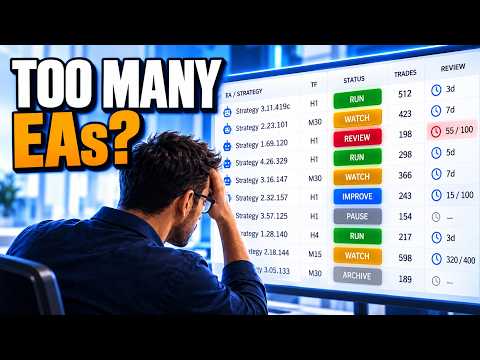
Running several Expert Advisors creates a different challenge from running one EA: knowing which strategy needs attention and remembering what you decided about it.

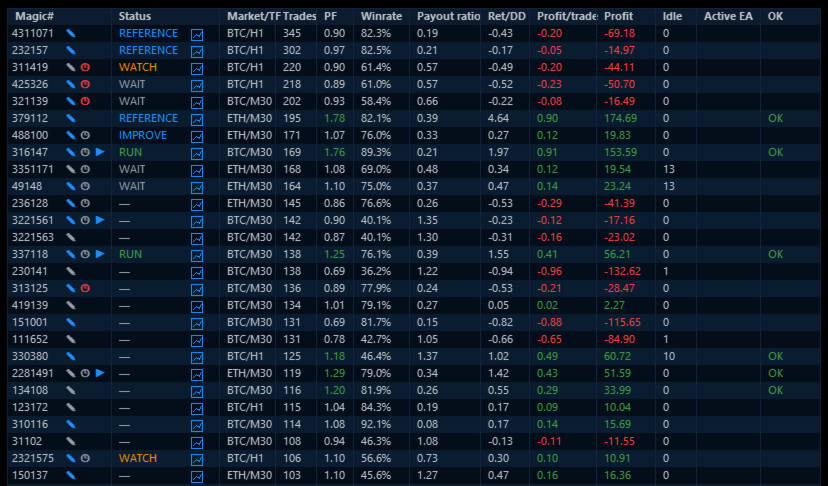
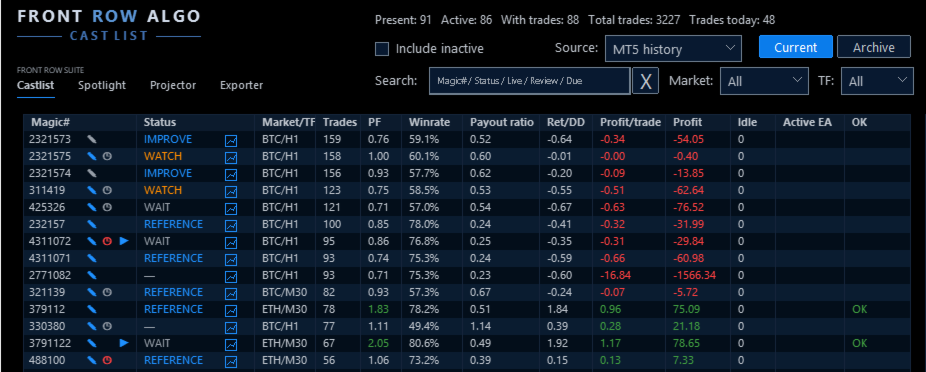
Castlist brings strategy identity, recent activity, performance and management context together in one MT5 workspace. It helps you move from a large portfolio to a short, practical worklist without changing or controlling the EAs themselves.

Castlist is available free of charge and can be used as a complete standalone management tool.

Documentation and Quick Start

  • Castlist Quick Start Manual — install Castlist, find one known strategy and save your first management action.
  • Front Row User Guide 1.0 — understand the complete Castlist, Spotlight and Backstage workflow.
  • Support — see the Support section below for product questions and technical issues.

Start with One Trader Question

Open Castlist and ask a concrete question:

  • Which Live strategies need attention today?
  • Which active EA has been idle unusually long?
  • Which strategies are due for review?
  • Which Magic# variants should be investigated together?

Search, filters and sorting turn the complete portfolio into the worklist required for that question.

What You Can Do with Castlist

  • Group and recognise strategies by Magic# and see active, inactive, Live, Current and archived strategies in context.
  • Search by Magic#, status, Live state, idle or review information and filter by market and timeframe.
  • Read Trades, Profit Factor, Win Rate, Pay-out ratio, Return/Drawdown and Profit per Trade together.
  • Record Status, Notes and Reviews and schedule reassessment after new trades, total trades or days.
  • Preserve older strategies in Archive without deleting their management context.
  • Open the relevant strategy context in Spotlight when deeper analysis is needed.

A Practical First Workflow

  1. Attach Castlist to one docked MT5 chart.
  2. Start with MT5 History and the broadest view.
  3. Find one strategy by its known Magic#.
  4. Verify its EA identity, market, timeframe, trade count and latest activity.
  5. Save one Status, Note or Review.
  6. Reopen the panel and verify that the management action was restored.

Castlist needs one management chart, not one chart for every EA. The chart symbol and timeframe do not limit the account history shown.

More Than a Performance Table

A high Profit Factor does not automatically make a strategy the next priority. A strategy can be Live but paused, active but idle, profitable but due for review, or retained only as a reference.

Castlist deliberately keeps three concepts separate:

  • Status describes the current management phase.
  • Live describes the strategy's portfolio role.
  • Archive determines whether it remains in the current work area.

This separation helps the trader record a decision without confusing it with performance or EA activity.

Notes and Reviews That Do Not Depend on Memory

Use a Note to record why a strategy needs attention. Use a Review to define when enough new evidence should be available to assess it again.

For example:

Review after 100 new trades: check whether average loss is still increasing.

Notes and Reviews are shared with Spotlight, keeping analysis and daily management connected.

Data Sources and Continuity

Castlist can start directly from MT5 History. Backstage is not required for the first result.

Add Backstage early when you want persistent CSV history that remains available for Castlist, Spotlight or other read-only analysis even when broker-held MT5 history changes. When MT5 and CSV both include today's trades, switching between them provides a practical continuity check.

Strategy Identity

Castlist manages strategies by Magic#. Use unique, non-zero Magic Numbers and maintain a clear relationship between the EA name visible in MT5 Navigator and the Magic# used in its trades. A hedging account is preferred for the clearest multi-EA attribution.

Using Castlist with a VPS

Castlist works normally in your local MT5 terminal while your trading EAs continue running on MetaQuotes VPS. Connect the local terminal to the same trading account and allow MT5 history to synchronise. The trading EAs do not also need to run locally.

An EA that runs only on MetaQuotes VPS is not visible to Castlist as a locally active EA. Its historical performance can still be analysed, but current chart context such as market and timeframe may require saved context or a corresponding local chart.

MetaQuotes VPS and a Windows VPS are different file environments. Files created in the MetaQuotes virtual terminal are not synchronised back to the local terminal. A Windows VPS supports the complete interactive Castlist workflow through Remote Desktop and keeps its settings, Notes, Status, Live, Archive and Review files on that VPS. Include the relevant Front Row files in your backup policy.

Important Operating Notes

  • Castlist does not start or stop EAs, close positions or make trading decisions.
  • Keep Front Row product charts docked inside MT5 for reliable Suite Selector operation.
  • Saved settings and workspace choices are restored in the same terminal after restart, update or reattachment.
  • A new PC, VPS or terminal requires deliberate restoration and verification of relevant Front Row files.

Use Castlist on Its Own or as the Front Row Entry Point

Use Castlist independently for daily multi-EA management. Add Spotlight for trade-by-trade comparison and add Backstage for persistent reusable history. The practical complete workflow is:

Castlist → Backstage → Spotlight → Note, Review and next management action

Support

Have a question about what Castlist does, how a feature works or whether it is suitable for a particular workflow? Post your question in the Comments section. The answer may also help other users.

Is something not working as expected in your installation? Hover over the seller name at the top of this page and click Send message.

Please use a private message for:

  • Errors or unexpected behaviour
  • Installation or configuration problems
  • Questions about your specific setup
  • Screenshots, log messages or data files
  • Information involving an account, broker, terminal or trading history

When reporting a technical issue, please include:

  • Castlist version
  • MetaTrader 5 build number
  • What you were trying to do
  • What you expected to happen
  • What happened instead
  • Steps to reproduce the issue
  • Selected data source and Magic#
  • Current and expected workflow status
  • Active filters and relevant Experts/Journal log messages
  • A screenshot of the affected row or dialog where useful

Never publish account credentials or sensitive trading information in the Comments section.

If you are unsure which option to use, send a private message.

For questions concerning purchases, downloads, payments, activations or your MQL5 account, contact the MQL5 Service Desk.
Recommended products
Symbol Cost Monitor is a professional analytical utility for MetaTrader 5 designed to provide fast control over trading costs across multiple instruments simultaneously. Spread and swap directly affect the final trading result. This is especially important for scalping, active intraday trading, holding positions for several days, and working with multiple symbols at the same time. The standard MetaTrader 5 interface does not provide a convenient way to compare all these parameters in one window,
FREE
这款专为MetaTrader 5设计的EA(Expert Advisor),能够在加载后自动关闭所有图表,并立即从当前图表中自行移除。它适合那些希望快速清理所有图表,并避免手动关闭每个图表的用户。 功能特点: 一次性清理: 加载后立即关闭所有打开的图表。 自动移除: 执行完毕后,EA自动从当前图表中移除,无需手动操作。 快速高效: 适用于快速清理交易环境,特别适合在需要快速重置或结束交易日的情境。 使用说明: 只需将此EA添加到任何一个图表上,它将自动执行关闭所有图表的操作并自行移除。使用前,请确保已保存所有重要的图表数据和设置。 风险提示: 请谨慎使用此EA,以防不小心关闭重要图表。 适用于MetaTrader 5平台。 技术支持: 如有任何技术问题或需求,请联系我以获得帮助。
FREE
MMTrader Manager
Mateusz Makarewicz
Welcome to my MMTrader Manager product. EA that allows You for simple managing trades and positions. Key Features: Position Opening – Open trades quickly with customizable Take Profit (TP), Stop Loss (SL), and lot size settings. Position Closing – Close trades with one click. Grid System – Automatically create a grid of orders. Recovery Mode – Loss recovery lot calculation. Trade History Data – Acces data to historical positions. User-Friendly Interface – A clear and simple panel designed. This
FREE
AK Capital Backtest panel
AK Capital Markets Limited
5 (3)
backtester buttons for testing strategies in the MT5 strategy tester.  load up strategy tester then click on visual test and once visual tester opened apply any chart template you'd like. To update the chart pause the visual tester and apply templates, colors and such like the normal chart. On the settings you can choose lot size and take profit and stop loss.  Enjoy
FREE
MultiTradeNews
Leeank Andres Fernandez Molano
This script is designed for traders who need to quickly place trades across multiple currency pairs during critical news releases, where every second counts. With this tool, you can pre-select your desired currency pairs and assign independent volumes for each one. When a major news event hits, such as Non-Farm Payroll (NFP) or PMI data releases, the script allows you to execute all your trades instantly without the need to open each pair manually. Key Features: Customizable Pairs : Choose from
FREE
Coming soon: short GIFs showing how to use every part of this manager. I am working on them - please bear with me, they are on the list right after "put the kettle on". Trade manually, manage automatically. Break even, trailing stops, partial closes and an equity guard - all from one clean panel. Free - no DLL, no internet, no subscription. A ton of work has gone into this to make it the best I can make it, and it is free - not a trial, not a lite version - and it always will be. I am still d
FREE
AQ RiskOptimizer MT5
HIT HYPERTECH INNOVATIONS LTD
4 (1)
Risk Optimizer is the absolute solution for applying risk management on your account. Bad risk management is the main reason that causes traders to lose money. Risk Optimizer calculates and suggests the correct lot size for each position according to your personal, customized risk profile. You can give directly your preferred risk as percentage (%) for each position or you can trust our algorithms to calculate and optimize according to your risk category selection. But it is not only that! Selec
FREE
HB Trading Bot
Khalil Adnan Wakim
HB Trading Bot – Professional Risk & Trade Management for MT5 HB Trading Bot is a professional risk management and trade management Expert Advisor designed for MetaTrader 5 . It does not open trades . Instead, it manages already opened positions with strict, rule-based logic to help traders protect their capital and remove emotional decision-making from trading. Most trading losses are caused by psychology, not poor analysis. HB Trading Bot was built to solve this problem by enforcing discipline
FREE
RegularExpressionsExamples — is an expert, which contains the graphical interface for running examples from the " RegularExpressions in MQL5 " library. The codes of these examples can be found in the library itself. These examples are for demonstration purposes only. They serve only to evaluate the library operation and its capabilities. They can also be found on the official Microsoft‎ website, in the descriptions of classes in the System.Text.RegularExpressions namespace. Each example can be
FREE
Slippage Monitor MT5
Ziheng Zhuang
4.33 (3)
This EA is designed to monitor the slippage of opening and closing orders, and save the records in csv file. It is useful to record the slippage and evaluate brokers. The record files are saved in the folder  MT5_Data_Folder\MQL5\Files.  Go to   "File " --> "Open Data Folder"   . Warning :   Do NOT open the files directly, otherwise it will affect the exectution of EA, just copy them to another folder and open them. Usage: Open a chart and load the EA on it, just need only one EA to run, it mo
FREE
The CloseByPercentLossOrProfit Expert Advisor closes all positions as the total profit of loss for the entire account reaches a specified value. The profit or loss is specified as percentage of the account balance. In addition, the Expert Advisor can delete pending orders. Allow AutoTrading before running the Expert Advisor. Instructions: Run the Expert Advisor on the chart. Input parameters: Language of messages displayed (EN, RU, DE, FR, ES) - the language of output messages (English, Russian,
FREE
This Expert advisor trades any Asset class, Try it on any market, When you download PM so you can be added to my channel for all support related issues. There are three trading strategies available  * The Wyckoff trading strategy, Channel trading and trend trading.  Input Parameters Lots   - the volume of position to open; Stop Loss BUY (in points)   - the stop loss of BUY positions; Stop Loss SELL (in points)   - the stop loss of SELL positions; Take Profit BUY (in points)   - the take profit o
FREE
Reverse
Konstantin Chernov
1 (1)
A script for quick reversing positions and/or orders. If you need to reverse a position with the same volume, open an opposite position of a different volume, this script will save you from routine! Allow AutoTrading before running the script. Instructions: Run the script on the chart. This script is a limited version of the market product https://www.mql5.com/en/market/product/638 and allows reversing only positions. Input parameters are not required. Parameters such as changing the type of exi
FREE
Quick Close 1S
Tan Au Phuong
5 (8)
Quick Close 1S is a utility designed for fast and organized trade management. It provides a clean control panel to open or close orders instantly, apply flexible SL/TP settings, manage basket targets, and control overall profit or loss. Suitable for traders who value precision, efficiency, and clear execution in their daily trading routine. Main Features Streamlined Trade Control: Manage positions from an intuitive panel with options to open or close specific types of orders, or all at once. Fle
FREE
This indicator will mirror the assets in use in another metatrader, being able to choose the timeframe and a template. This is the Metatrader 5 Client, it needs the Metatrader 4 or 5 Server versions: Metatrader 4 Mirror Chart Server:   https://www.mql5.com/en/market/product/88644 Metatrader 5 Mirror Chart Server: https://www.mql5.com/en/market/product/88652 Details of how it works in the video.
FREE
Stamina HUD
Michele Todesco
STAMINA HUD – Advanced Market & Trend Dashboard (MT5) STAMINA HUD   is a professional   market information panel   designed for traders who want   clarity, speed, and control   directly on the chart. It provides a   clean heads-up display (HUD)   with essential market data and   multi-timeframe trend direction , without cluttering the chart or generating trading signals. What STAMINA HUD Shows   Current Price   Spread (in real pips)   Today High–Low range (pips)   Average D
FREE
Simple Trading Controller
Pierpaolo De Nicolo
4.67 (3)
The "Simple Trading Controller" for MetaTrader 5 sets a new standard for speed and efficiency in opening and closing market positions. Crafted with a clean and intuitive design, this tool is a response to the specific needs of traders, ensuring a seamless and rapid trading experience. All it provides is: Quick BUY and SELL Buttons Open multiple operations at the same time Set Trade Size Set Stop Loss Take Profit Points Close All Positions Let's go and see the advantages of using "Simple Trading
FREE
Market book player
Aliaksandr Hryshyn
Playback of previously saved data from the order book. Key features: Historical data navigation Adjusting the playback speed with the "---" and "+++" buttons, as well as with the mouse, you can by scrolling the wheel over the area of ​​these buttons and between them Turning Price Centering On and Off Time display accurate to thousandths of a second Attention: This product also needs a utility to save data: https://www.mql5.com/en/market/product/71642
FREE
This indicator allows to hide Volume (on all MT5 timeframes) from a date define by the user with a vertical line (Alone) or a panel (with "Hidden Candles").  The color of each bar depends if this one is higher or lower of the previous bar. Indicator Inputs: No inputs for this indicator Information on "Volume" indicator is available in this post:   https://www.mql5.com/en/forum/134260 ************************************************************* Hey traders!!  Give me your feeds!  We are a commun
FREE
VoiceEscort
Nikolai Karetnikov
Features: The Expert Advisor pronounces current prices at a set interval.  It speaks Russian and English.  The file voice_dict.csv contains the rules of pronunciation (language, other rules). See an example below  The Google cloud server is used for pronunciation, so the expert should be allowed to go to "https://texttospeech.googleapis.com" (see Tools\Options\Expert Advisors Allow WebRequest for...) Restrictions: Only 2 symbols Example of a pronunciation rule (voice_dict.csv file in the Files
FREE
ARMOR Risk Calculator Trade with a plan. Calculate your risk before you enter the market. ARMOR Risk Calculator is a professional and easy-to-use risk management tool for MetaTrader 5, designed to help traders calculate their position size and potential trade risk before placing a trade. Instead of manually calculating lot sizes and risk values, ARMOR Risk Calculator provides a clean and intuitive dashboard where you can enter your trade parameters and instantly review the calculated results. Ke
FREE
Morning Range Breakout (Free Version) Morning Range Breakout (Free Version) is a straightforward trading advisor that implements a breakout strategy based on the morning range. It identifies the high and low within a specified time interval (e.g., 08:00–10:00 UTC) and opens a trade on a breakout upward or downward. The free version includes core functionality without restrictions. All parameters and messages are in English, per MQL5 Market requirements. Key Features Detects morning range based
FREE
Position Manager Pro v1.0 (MT5) Dual Magic Number Independent Group Manager with Live P&L Dashboard Overview Position Manager Pro   is a powerful trade management Expert Advisor for MetaTrader 5 that operates as an   overlay manager   — it does not open positions itself, but instead manages and monitors positions opened by other EAs or manually by the trader. The core concept is   two fully independent groups , each identified by a unique   Magic Number . Each group has its own Take Profit, Stop
FREE
- وصف المنتج - مؤشر احترافي متكامل لا يعد KING Fusion MACD-Vol من KING TRADING EA مجرد MACD آخر — فهو عبارة عن مجموعة أدوات تداول كاملة تجمع بين مؤشرات احترافية متعددة في نافذة فرعية واحدة أنيقة. لم تعد بحاجة إلى تحميل مخططك بأدوات منفصلة. يجمع هذا المؤشر بين: MACD مع خطوط مزدوجة ورسم بياني مكبر رسم بياني ملون ومثبت بالحجم ملصقات ديناميكية مع قيم المؤشرات في الوقت الفعلي (ATR، ADX، RSI، Volume) عداد تنازلي للبار التنبيهات المتقاطعة (مرئية + صوتية) كل ما تحتاجه من الوضوح والسرعة والدقة -
FREE
Wolf Countdown
Tiziano Zambelli Sopalu
Wolf Countdown helps you not to waste the right amount of time, it gives you back the time remaining until the candle closes. How to use: Download and install the  Wolf Countdown Indicator on your MetaTrader 5. Apply the indicator to your favorite chart. this works on any timeframe... Thanks to this indicator you will never miss the right moment to enter your trades.
FREE
Broker Quality Monitor is a free utility that measures the real quality of your broker for trading. What it measures: - Live spread (current, average, min and max) - Real slippage from your own fills, separated by BUY and SELL - Execution latency - Broker Quality Score (0-100) - Suitability verdict for gold scalping Features: - Live panel with all metrics and color-coded status - Per-session spread averages (Asia, London, London+NY, NY close) - Alerts when spread or slippage exceed your configur
FREE
Assistant_for_Reopen - an Expert Advisor that helps to re-set pending orders. Many brokers force the order to expire at the end of the trading session or at the end of the trading day. Therefore, a trader has to restore all pending orders manually every time at the beginning of a new trading session. Assistant_for_Reopen frees the trader from this routine work. It controls expiration by the order expiration time and resets it if the trader ticked the checkbox. The maximum number of orders the EA
FREE
Always Know When the Candle Closes!The countdown is right there on the chart, updating every second. If you find this indicator useful, please leave a review How It Works The indicator displays up to three independent candle close countdowns on your chart, each set to any MT5 timeframe. Monitor your chart timeframe, a higher timeframe, and a lower timeframe simultaneously — all without switching charts. Slot 1 defaults to your current chart timeframe. Set slots 2 and 3 to any timeframe you want
FREE
Ultimate Risk Manager for MT5 Every trader knows the feeling: a promising setup appears, but fear of a large loss prevents you from pulling the trigger. You hesitate, overthink, and often miss the opportunity. The root cause is not a lack of strategy – it is the absence of guaranteed loss control. The Ultimate Risk Manager solves this problem completely. This tool lets you trade exactly how you want – any style, any frequency, any risk per trade – while ensuring that your total loss over a ch
FREE
GDS Renko Gold Dollar XAUUSD Renko Macro Pressure Context for MetaTrader 5 GDS Renko Gold Dollar is a premium MetaTrader 5 indicator designed for traders who analyze XAUUSD with Renko charts and want to compare gold movement with US dollar pressure. The indicator does not give buy or sell signals. It does not predict gold price movement. It provides a visual context layer that helps the trader understand whether gold-side pressure or dollar-side pressure appears more dominant in the current mark
Buyers of this product also purchase
Trade Assistant MT5
Evgeniy Kravchenko
4.43 (216)
It helps to calculate the risk per trade, the easy installation of a new order, order management with partial closing functions, trailing stop of 7 types and other useful functions. Additional materials and instructions Installation instructions - Application instructions - Trial version of the application for a demo account Line function -   shows on the chart the Opening line, Stop Loss, Take Profit. With this function it is easy to set a new order and see its additional characteristics bef
Forex Trade Manager MT5
InvestSoft
4.98 (684)
Trade Manager MT5 is an advanced position size calculator and trade management tool for MetaTrader 5, designed to help traders plan trades faster, control risk more precisely, and manage open positions directly from the chart. It combines order placement, risk based lot calculation, Stop Loss and Take Profit management, Break Even, Trailing Stop, Partial Close, Equity Protection, and external trade management in one panel. Whether you trade forex, indices, metals, commodities, crypto, or future
Local Trade Copier EA MT5
Juvenille Emperor Limited
4.94 (149)
Local Trade Copier EA MT5 is a fast and flexible trade copier for copying and managing trades between multiple MetaTrader 5 accounts on the same Windows computer or Windows VPS. It combines local trade synchronization with Receiver-side controls for lot sizing, risk management, trade filtering, symbol mapping, trade management and account protection. Set up your Transmitter and Receiver terminals in about 1 minute and copy manual or EA trades between accounts at the same or different brokers. U
================================================================================ POC BREAKOUT - V20.72. Full Professional Grade Toolkit ================================================================================ POC Breakout is a full MetaTrader 5 trading dashboard for discretionary traders who want breakout signals, Point of Control (POC) context, volume profiles, order flow, market structure, news, alerts, and advanced trade planning in one professional workspace. Attached directly to you
Telegram to MT5 MultiChannel Copier
Sergio Marquez Uroz
4.59 (17)
Telegram to MT5 Multi-Channel Copier   automatically copies trading signals from your Telegram channels straight to MetaTrader 5. No bots, no browser extensions, no manual copying. A signal arrives in Telegram and the EA opens the trade in your terminal within seconds. And before you copy a channel, the built-in backtester shows you what that channel would have done in your account. The product has two components: a Windows application that listens to your Telegram channels, and this Expert Advi
Strategy Ledger Pro
Abdullah Uygar Tuna
5 (7)
Strategy Ledger Pro is a read-only account analysis panel for MetaTrader 5. It separates account results by Expert Advisor, strategy, symbol, and magic number, so you can see what each one really contributes. The panel is available in 11 languages: English, Français, Deutsch, Español, Italiano, Português, Русский, Türkçe, 中文, 日本語 and 한국어. Before you download the demo. The Market runs the demo of any paid product in the Strategy Tester only. This panel analyses the trades on your own account, and
TradePanel MT5
Alfiya Fazylova
4.88 (170)
Trade Panel is a multi-functional trading assistant. The app contains over 50 trading functions for manual trading and allows you to automate most trading tasks. Application instructions: https://www.mql5.com/en/blogs/post/756482 Trial version of the application for a demo account: https://www.mql5.com/en/blogs/post/750865 How to install the application: https://www.mql5.com/en/blogs/post/756239 How to test the application in visual mode: https://www.mql5.com/en/blogs/post/770277 How to install
Copy Telegram signals with your own trading rules Telegram to MT5 Signal Trader automatically copies text-based trading signals from public and private Telegram channels and groups into MetaTrader 5. Manage multiple providers and MT5 accounts from one desktop app, with individual risk and trade settings for each provider . No Telegram bot or API setup needed for copying. Simply sign in with your own Telegram account by phone or QR code and select the channels or groups you have already joined. Y
FarmedHedge Pair Trading Dashboard
Tanapisit Tepawarapruek
5 (5)
Farmed Hedge Yield Farming | All Markets (Manual - Hybrid - Semi/Automated EA) VERIFIED TRADING RESULTS - Farmed Hedge Yield Axi Copy:  https://www.mql5.com/en/signals/2356376 - Farmed Hedge Yield Exn Copy:   https://www.mql5.com/en/signals/2356404 - Farmed Hedge Yield V Copy:  https://www.mql5.com/en/signals/2357156 IMPORTANT NOTICE: FarmedHedge is a MANUAL-FOCUSED TRADING UTILITY ,not a fully automated EA. Results shown on this Signal include manual trades and overall strategic management.
Exp COPYLOT CLIENT for MT5
Vladislav Andruschenko
3.97 (35)
Professional Trade Copier for MetaTrader 5 Fast, professional, and reliable trade copier for MetaTrader . COPYLOT allows you to copy Forex trades between MT4 and MT5 terminals with support for Hedge and Netting accounts. COPYLOT MT5 version supports: - MT5 Hedge to MT5 Hedge - MT5 Hedge to MT5 Netting - MT5 Netting to MT5 Hedge - MT5 Netting to MT5 Netting - MT4 to MT5 Hedge - MT4 to MT5 Netting MT4 version Full Description +DEMO +PDF How To Buy How To Install How to get Log Files H
Trade copier MT5
Alfiya Fazylova
4.61 (56)
Trade Copier is a professional utility designed to copy and synchronize trades between trading accounts. Copying occurs from the account / terminal of the supplier to the account / terminal of the recipient, which are installed on the same computer or VPS . Before buying, you can test the demo version on a demo account. Demo version here . Full instruction here . Main functionality and benefits: Supports copying MT5> MT5, MT4> MT5, MT5> MT4, including MT5 netting accounts. * Supports copying Dem
Power Candles Strategy Scanner - Self-Optimizing Multi-Symbol Setup Finder Self-optimizing settings work one chart at a time, and finding where they pay off right now means opening chart after chart. Power Candles Strategy Scanner runs the same self-optimizing engine as the Power Candles indicator on every symbol in your Market Watch, side by side. One panel ranks where it pays off: the winning strategy per symbol, its optimized Stop Loss and Take Profit. An alert fires the moment a fresh signal
Signal Trading View to MT5 Pro
Mirel Daniel Gheonu
4.5 (2)
Signal TradingView to MT5 Pro  Instant professional execution between TradingView and MetaTrader 5 Automate your trading strategy with the most robust communication bridge between TradingView alerts and real execution in MT5. Designed for traders who demand speed, flexibility, and impeccable risk management, this Expert Advisor transforms any alert message into a precise market or limit order.   Install and TEST the TRIAL version HERE STRENGTHS AND ADVANTAGES Universal Parsing Engine (Propriet
Footprint Chart Pro — Professional OrderFlow EA for MetaTrader 5 Version 6.34 | Professional tool for real traders | Institutional-Grade Visualization DEMO USERS - PLEASE SELECT EVERY TICK / REAL TICK WHEN TESTING AND YOU HAVE DOWNLOADED HISTORICAL DATA. IF YOU SEE A WAITING SCREEN AND IT IS NOT DOWNLOADING, IT MEANS YOU HAVE LOW HISTORICAL DATA. TRY 1 MIN AND 5 MIN FIRST ON 1 DAY DATA. ONE DAY DATA SHOULD BE THE NEWEST AND MOST CURRENT DATE. PLEASE WAIT UNTIL THE MARKET HAS ROLLED OVER PERIOD.
MT5 to Telegram Signal Provider turns your trading account into a signal provider. Every trade action, whether manual, by EA or from your phone, is instantly sent as a message to Telegram. You can fully customize the format or use a ready-made template for quick setup. [ Demo ] [ Manual ] [ MT4 Version ] [ Discord Version ]     New: [ Telegram To MT5 ] Setup A step by step user guide is available. Key Features Ability to customize order details sent to subscribers You can create a tiered subs
Premium Trade Manager - The Trade Panel With a Coach Built In Premium Trade Manager puts a trading coach inside your chart, with a full execution engine underneath it. Set the trade up the way you always do, then let Max, your AI trading coach, read that exact setup against your live account and give you a straight verdict before you commit: is the stop disciplined, is the risk sane, is a high-impact release minutes away, are you near a prop-firm limit. Below sits the engine that runs everything
HINN MagicEntry Extra
ALGOFLOW OÜ
4.74 (19)
HINN MAGIC ENTRY – the ultimate tool for entry and position management! SIMPLE. FASTEST. INTUITIVE. MAX AUTOMATED. Place orders by selecting a level directly on the chart! full description   ::  demo-version  :: 60-sec-video-description Key features: - Market, limit, and pending orders - Automatic lot size calculation - Automatic spread and commission accounting - Unlimited partitial take-profits  - Breakeven and trailing stop-loss and take-profit  functions - Invalidation leves - Intuitive, a
Grid Manual MT5
Alfiya Fazylova
4.73 (22)
Grid Manual is a trading panel for working with grid strategies. The utility is universal, has flexible settings and an intuitive interface. It works with a grid of orders not only in the direction of averaging losses, but also in the direction of increasing profits. The trader does not need to create and maintain a grid of orders, the utility will do it. It is enough to open an order and the "Grid manual" will automatically create a grid of orders for it and will accompany it until the close. F
EA Overfitter
Stephen J Martret
5 (1)
That backtest looks great. But will it still be making money tomorrow, next week, next month? EA Overfitter re-runs your EA on 100 price histories it has never seen. One score tells you if the edge is real. A backtest tells you what an EA did on one price history — the one that happened to occur. What you cannot tell from it is how much of that result was the strategy and how much was the particular path. EA Overfitter answers that. It builds up to 100 synthetic price histories your EA has n
Message me after purchase to receive the complete manual kit + 3-day OpenAI API trial to test the AI features + Another bonus gift The current price is a limited discount for August Relaunch Update — secure your edition now before price go up. Next Price: $340 This is completely different from any trading panel you’ve tried or seen on the market. It’s one of the most innovative AI-powered trading panels available in the retail market right now. Imagine connecting   AI directly to your chart   —
Telegram To MT5 Ultra
Mirel Daniel Gheonu
5 (5)
Telegram To MT5 — Signal Copier Turn the trading calls from your Telegram channels into real MT5 orders — automatically, on as many accounts as you like, with risk and rules fully under your control. Telegram To MT5 connects the VIP / signal channels you already follow on Telegram to your MetaTrader 5 terminal. A free companion desktop app reads the messages (even from channels that block bots), and this Expert Advisor executes them on your account — applying your own risk settings, symbol mappi
Trade Manager DaneTrades
Levi Dane Benjamin
4.23 (30)
DaneTrades Trade Manager is a professional trade panel for MetaTrader 5, designed for fast, accurate execution with built‑in risk control. Place market or pending orders directly from the chart while the panel automatically calculates position size from your chosen risk, helping you stay consistent and avoid emotional decision‑making. The Trade Manager is built for manual traders who want structure: clear risk/reward planning, automation for repeatable management, and safeguards that help reduc
Dynamic Fibonacci Grid
Tsvetan Tsvetanov
5 (1)
Introducing the latest version of the Dynamic Fibonacci Grid Dashboard for MT5. Now packed with many new features, this new dashboard transforms your trading experience and allows you to see the market and the price action from a completely different perspective. Discover new possibilities with simultaneous analysis of multiple timeframes covering multiple symbols. User-friendly interface for manual trading and management of positions and an expanded ability to apply predefined automated strate
Trade Indicator Assistant   is a powerful MT5 utility designed to turn indicators into automated trading systems. Its main feature is the ability to automatically detect an indicator’s   BUY and SELL signal buffers , without requiring you to know the buffer numbers, search through indicator settings, or modify the indicator source code. Bonus Indicator:   After purchasing Trade Indicator Assistant, contact me to receive   Trade Signal Pro   completely free as a bonus indicator. [Download Demo V
Welcome to ENTRY IN THE ZONE AND SMC MULTI TIMEFRAME Entry In The Zone and SMC Multi Timeframe is a real-time market analysis tool based on Smart Money Concepts (SMC), designed to analyze market structure, price direction, and key trading zones. It supports both Single-Timeframe Analysis and Multi-Timeframe Analysis, providing a clearer view of the overall market structure across multiple timeframes, with real-time BUY / SELL signals that do not repaint. It is designed to help filter trading opp
DrawDown Limiter
Haidar Lionel Haj Ali
5 (22)
DrawDown Limiter v5.0 — Advanced Account Protection Controller DrawDown Limiter v5.0 is a client-side account protection controller designed to supervise your trading account and automatically react when configured risk, profit, news, schedule, rollover, or position limits are reached. It can monitor manual trades, automated strategies, multiple Expert Advisors, pending orders and floating positions from one dedicated chart. It can protect the complete account or be configured to supervise a spe
EA Slipstream
Stephen J Martret
5 (1)
Your backtest filled every order at the price it asked for. Your account does not. EA Slipstream measures what execution costs your EA, using your own fills, slippages and spreads to show you the true performance of your EA. A backtest prices every trade at the level the EA named. In live trading a pending order fills at whatever price is available when it triggers, a stop closes wherever the market is when it is hit, and the spread at that moment is whatever the account was quoting. The differ
Exp5 Duplicator
Vladislav Andruschenko
4.78 (9)
Duplicator for MetaTrader 5 — professional position duplicator inside one terminal A reliable Expert Advisor for traders who want to automatically duplicate already opened positions in MetaTrader 5, increase volume, apply custom lot settings, and manage duplicates with precise rules. It is a practical tool for manual trading, algorithmic systems, and flexible management of existing positions inside one terminal. Duplicator for MT5 does not open positions by its own trading strategy. Its role is
Seconds Chart MT5
Boris Sedov
4.61 (18)
Seconds Chart is a unique tool for creating second-based charts in MetaTrader 5 . With Seconds Chart , you can construct charts with timeframes set in seconds, providing unparalleled flexibility and precision in analysis that is unavailable with standard minute or hourly charts. For example, the S15 timeframe indicates a chart with candles lasting 15 seconds. You can use any indicators and Expert Advisors that support custom symbols. Working with them is just as convenient as on standard charts.
Multi Account Local Trade Copier is a fast local trade copier for MetaTrader: copy trades between MT4/MT5 terminals running on the same Windows PC or VPS, from one master account to multiple receiver accounts — your own real, demo and prop firm accounts, at the same broker or at different ones. It is event-driven : the master publishes every trade the instant it happens, and the receiver measures and logs the real copy latency of every single trade — typically 50-150 ms . No DLLs, no internet br
More from author
Spotlight — Compare Strategy Development Trade by Trade A final result tells you where a strategy ended. It does not show how the result developed, where behaviour started to change or whether Demo, Live and Retest still follow a comparable path. Spotlight turns trading history into a visual trade-by-trade comparison workspace. It helps the trader begin with one validated baseline, add one controlled comparison and record what the evidence does—and does not—show. Documentation and Quick Start Sp
Backstage — Preserve the History Behind Your Strategy Decisions MT5 analysis depends on the account history still available from the terminal and broker. When older history disappears, it cannot be reconstructed later simply by choosing an earlier date. Backstage turns the closed-trade history currently available in MT5 into a persistent local CSV source. It maintains the corresponding progress state and daily backup so Castlist, Spotlight and read-only analytical tools can reuse the same histor
Filter:
No reviews
Reply to review