
Overview | Castlist | Spotlight | Backstage
Front Row User Guide 1.0 — Manual for Multi-EA Traders
This is the starting point for the Front Row manual. Use the route below for a first working result or open the relevant manual article for exact steps, verification and troubleshooting.
Castlist is available free on the MQL5 Market and is a complete standalone management tool. Backstage adds persistent history; Spotlight adds deeper trade-by-trade comparison.
Manual contents
- Castlist Quick Start Manual
- Castlist Management Workflow
- Castlist Settings Reference
- Spotlight Quick Start Manual
- Spotlight Metrics Manual
- Spotlight VS, Impact and Settings
- Backstage Quick Start Manual
- Backstage Settings and Recovery
Choose your route
- Fastest start: Castlist with MT5 History.
- Recommended continuity: add Backstage early.
- Analysis: add Spotlight after one baseline is verified.
- Complete practical system: Castlist + Spotlight + Backstage.
Front Row helps multi-EA traders decide which strategy needs attention, preserve the history behind that decision and compare strategy development trade by trade. Start with Castlist for immediate portfolio overview. Add Backstage early for persistent history and use Spotlight when a management signal requires deeper comparison.
About automatic MQL5 demos
The automatic MQL5 demo is restricted to the isolated Strategy Tester. Spotlight and Backstage are designed for use in a normally running MT5 terminal, so their tester demos are not functional trials and should not be used to assess normal operation. Please use the product videos and documentation for a representative overview.
Questions are always welcome. If the Comments section is available to you, please ask your question there. Otherwise, hover over the seller name and choose Send message. I am happy to help with any questions.
Castlist is distributed as a complete free product and is not the restricted tester demo of a paid product.
How to use this manual
Begin with the Quick Start for the product you have installed. Perform the steps in MT5, compare the screen with the illustrated result and complete the verification checklist before moving on. Use the settings article when the visible result differs or when you move to another terminal, PC or VPS. The articles explain operation and interpretation; they do not replace the trader’s responsibility for strategy decisions and independent backups.
Three products, three trader questions
| Product | First question | Immediate result |
|---|---|---|
| Castlist | Which strategy needs my attention now? | Find one Magic# and record a management action from MT5 History. |
| Backstage | How do I reduce dependence on broker-held history? | Preserve currently available closed-trade history in a persistent CSV source. |
| Spotlight | Does current development still resemble another source or strategy variant? | Build one baseline and add one controlled comparison. |
Castlist and Spotlight can both produce a first result without Backstage. Starting Backstage early is still recommended because history that has already disappeared from MT5 or the broker cannot be reconstructed later.
The recommended user route
Castlist creates the first management worklist → Backstage preserves the available history for continuity → Spotlight compares development trade by trade → notes and reviews return the conclusion to daily management.
Castlist: management continuity
Castlist is not an automatic ranking engine. It groups strategies by Magic# and helps the trader separate Status, Live and Archive decisions. Notes record why a strategy needs attention; reviews define when enough trades or days have passed to assess it again.

Castlist keeps identity, management signals and performance together.
Backstage: data continuity
Backstage is the sole Front Row writer of the active historical CSV and matching state. It records export progress and creates a daily backup pair. Castlist, Spotlight and external analysis tools remain readers.

Backstage manages the persistent CSV and matching state as one pair.
Spotlight: evidence continuity
Spotlight compares MT5 History, persistent Demo/Live CSV and standard SQX Retest data on a shared trade sequence. It helps identify where development agrees or begins to diverge without automatically claiming why.
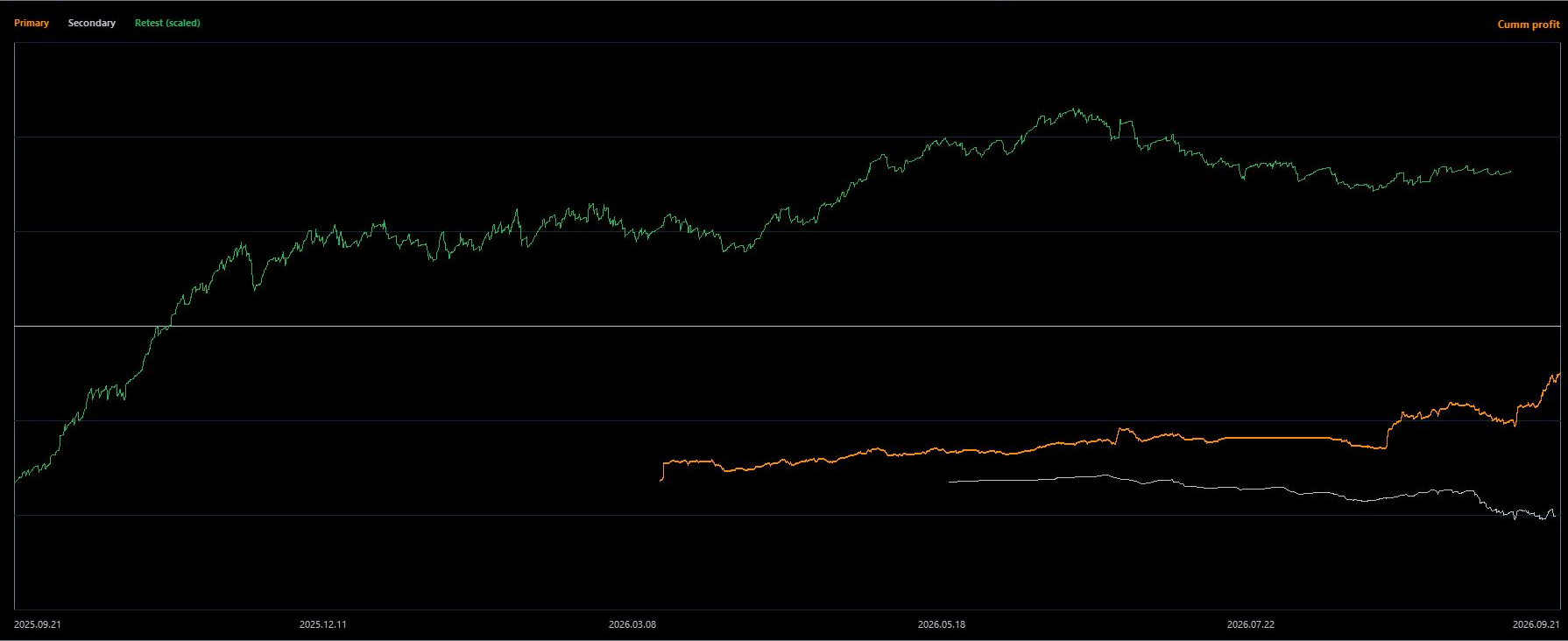
Spotlight synchronises sources on a shared trade sequence.
Why the combination matters
CSV export, Magic# statistics and backtest-versus-live comparison all exist as separate product categories. Front Row is designed around the hand-off between them: the same strategy identity moves from management attention to preserved data, controlled comparison and a recorded next review.
The trader remains responsible for validating sources, interpreting observations, making operational decisions and maintaining an independent disaster backup.
Using Front Row with a VPS
You can use Front Row normally in local MT5 while your trading EAs continue running on MetaQuotes VPS. Connect the local terminal to the same trading account and allow account history to synchronise. Do not start the trading EAs locally as well merely to use Front Row; doing so could create duplicate trading activity.
MetaQuotes VPS and Windows VPS are different file environments. MetaQuotes VPS runs a separate virtual terminal and does not synchronise its working files back to local MT5. A Windows VPS is a normal Windows environment: Front Row files remain accessible there and Castlist, Spotlight and Backstage can share the same MT5 Common\Files location when installed on that same VPS.
- Castlist: local historical analysis and management continue to work, but an EA running only on MetaQuotes VPS is not recognised as a locally active EA.
- Spotlight: use local MT5 History, local Backstage CSV files and local SQX Retest files for the interactive comparison workflow.
- Backstage: while local MT5 is open, the local instance catches up from closed-trade history still supplied by the broker. It updates its own local CSV/state pair and does not download files from MetaQuotes VPS.
For continuous accessible file storage and a fully interactive remote workspace, use a Windows VPS and include its Front Row files in an independent backup policy. See each product manual for the exact workflow and limitations.
Recommended first session
- Open Castlist with MT5 History .
- Find one known strategy by Magic#.
- Record one meaningful status, note or review.
- Add Backstage and verify the first persistent export.
- Open Spotlight for one baseline and one comparison.
- Record the observation and next review.
First-session completion check
You are ready to continue when one known Magic# is visible in Castlist, one management action has been restored after reopening, Backstage has a verified CSV export if installed, and Spotlight can explain one baseline plus one controlled comparison. If identity, source or trade count is unclear, stop at that product’s troubleshooting section.
If you are unsure where to start
Start with Castlist from MT5 History. It is available free, works without the other products and teaches the EA-name/Magic# relationship used throughout the suite. Add Backstage early when continuity and broker independence matter. Open Spotlight when you have one specific comparison question rather than enabling every line at once.
Continue through the manual
Next: Castlist Quick Start Manual — begin with the standalone management entry point.
Other useful follow-ups:
- Spotlight Quick Start Manual — start directly with one trade-by-trade comparison.
- Backstage Quick Start Manual — preserve currently available MT5 history early.
- Castlist Management Manual — see how the first result develops into a repeatable workflow.



