Front Row Castlist Strategy Manager
- Утилиты
- Версия: 1.11
- Обновлено: 1 октября 2026

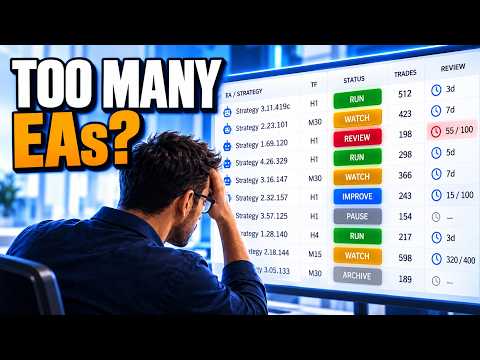
Castlist — Turn Your EA Portfolio into a Management Worklist
Running several Expert Advisors creates a different challenge from running one EA: knowing which strategy needs attention and remembering what you decided about it.
Castlist brings strategy identity, recent activity, performance and management context together in one MT5 workspace. It helps you move from a large portfolio to a short, practical worklist without changing or controlling the EAs themselves.
Castlist is available free of charge and can be used as a complete standalone management tool.
Documentation and Quick Start
- Castlist Quick Start Manual — install Castlist, find one known strategy and save your first management action.
- Front Row User Guide 1.0 — understand the complete Castlist, Spotlight and Backstage workflow.
- Support — see the Support section below for product questions and technical issues.
Start with One Trader Question
Open Castlist and ask a concrete question:
- Which Live strategies need attention today?
- Which active EA has been idle unusually long?
- Which strategies are due for review?
- Which Magic# variants should be investigated together?
Search, filters and sorting turn the complete portfolio into the worklist required for that question.
What You Can Do with Castlist
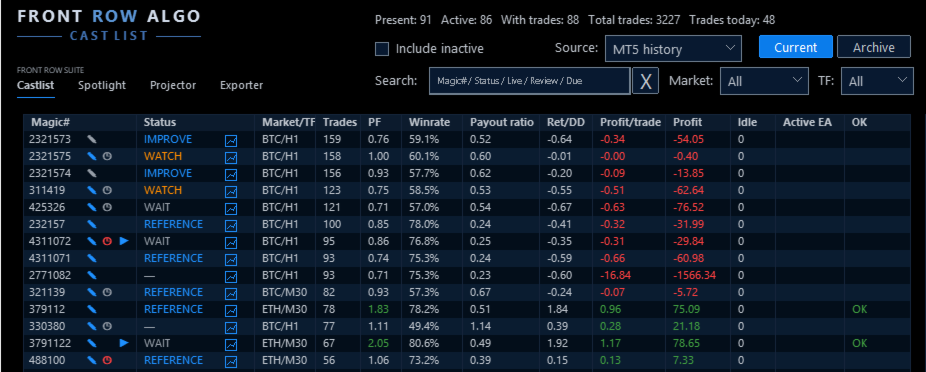
- Group and recognise strategies by Magic# and see active, inactive, Live, Current and archived strategies in context.
- Search by Magic#, status, Live state, idle or review information and filter by market and timeframe.
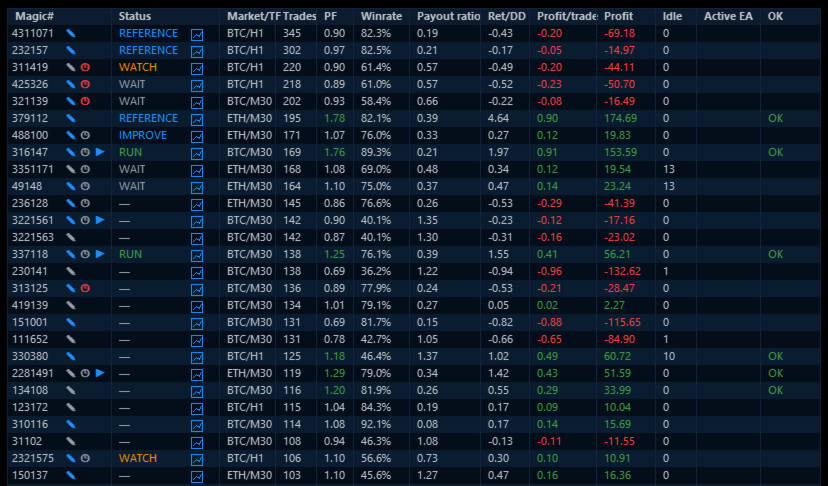
- Read Trades, Profit Factor, Win Rate, Pay-out ratio, Return/Drawdown and Profit per Trade together.
- Record Status, Notes and Reviews and schedule reassessment after new trades, total trades or days.
- Preserve older strategies in Archive without deleting their management context.
- Open the relevant strategy context in Spotlight when deeper analysis is needed.
A Practical First Workflow
- Attach Castlist to one docked MT5 chart.
- Start with MT5 History and the broadest view.
- Find one strategy by its known Magic#.
- Verify its EA identity, market, timeframe, trade count and latest activity.
- Save one Status, Note or Review.
- Reopen the panel and verify that the management action was restored.
Castlist needs one management chart, not one chart for every EA. The chart symbol and timeframe do not limit the account history shown.
More Than a Performance Table
A high Profit Factor does not automatically make a strategy the next priority. A strategy can be Live but paused, active but idle, profitable but due for review, or retained only as a reference.
Castlist deliberately keeps three concepts separate:
- Status describes the current management phase.
- Live describes the strategy's portfolio role.
- Archive determines whether it remains in the current work area.
This separation helps the trader record a decision without confusing it with performance or EA activity.
Notes and Reviews That Do Not Depend on Memory
Use a Note to record why a strategy needs attention. Use a Review to define when enough new evidence should be available to assess it again.
For example:
Review after 100 new trades: check whether average loss is still increasing.
Notes and Reviews are shared with Spotlight, keeping analysis and daily management connected.
Data Sources and Continuity
Castlist can start directly from MT5 History. Backstage is not required for the first result.
Add Backstage early when you want persistent CSV history that remains available for Castlist, Spotlight or other read-only analysis even when broker-held MT5 history changes. When MT5 and CSV both include today's trades, switching between them provides a practical continuity check.
Strategy Identity
Castlist manages strategies by Magic#. Use unique, non-zero Magic Numbers and maintain a clear relationship between the EA name visible in MT5 Navigator and the Magic# used in its trades. A hedging account is preferred for the clearest multi-EA attribution.
Using Castlist with a VPS
Castlist works normally in your local MT5 terminal while your trading EAs continue running on MetaQuotes VPS. Connect the local terminal to the same trading account and allow MT5 history to synchronise. The trading EAs do not also need to run locally.
An EA that runs only on MetaQuotes VPS is not visible to Castlist as a locally active EA. Its historical performance can still be analysed, but current chart context such as market and timeframe may require saved context or a corresponding local chart.
MetaQuotes VPS and a Windows VPS are different file environments. Files created in the MetaQuotes virtual terminal are not synchronised back to the local terminal. A Windows VPS supports the complete interactive Castlist workflow through Remote Desktop and keeps its settings, Notes, Status, Live, Archive and Review files on that VPS. Include the relevant Front Row files in your backup policy.
Important Operating Notes
- Castlist does not start or stop EAs, close positions or make trading decisions.
- Keep Front Row product charts docked inside MT5 for reliable Suite Selector operation.
- Saved settings and workspace choices are restored in the same terminal after restart, update or reattachment.
- A new PC, VPS or terminal requires deliberate restoration and verification of relevant Front Row files.
Use Castlist on Its Own or as the Front Row Entry Point
Use Castlist independently for daily multi-EA management. Add Spotlight for trade-by-trade comparison and add Backstage for persistent reusable history. The practical complete workflow is:
Castlist → Backstage → Spotlight → Note, Review and next management action
Support
Have a question about what Castlist does, how a feature works or whether it is suitable for a particular workflow? Post your question in the Comments section. The answer may also help other users.
Is something not working as expected in your installation? Hover over the seller name at the top of this page and click Send message.
Please use a private message for:
- Errors or unexpected behaviour
- Installation or configuration problems
- Questions about your specific setup
- Screenshots, log messages or data files
- Information involving an account, broker, terminal or trading history
When reporting a technical issue, please include:
- Castlist version
- MetaTrader 5 build number
- What you were trying to do
- What you expected to happen
- What happened instead
- Steps to reproduce the issue
- Selected data source and Magic#
- Current and expected workflow status
- Active filters and relevant Experts/Journal log messages
- A screenshot of the affected row or dialog where useful
Never publish account credentials or sensitive trading information in the Comments section.
If you are unsure which option to use, send a private message.
For questions concerning purchases, downloads, payments, activations or your MQL5 account, contact the MQL5 Service Desk.