Quantum Monster D
- Experts
-
Daniele Fughelli
 Hi! I'm Daniele. I've been developing trading EAs for more than 4 years. Everything I create is based upon years of data and stress-tested by me. I always use out-of-sample data for final validation. For any questions, message me, and I'll answer you as soon as possible. Making EAs takes effort and
 - Version: 1.0
- Activations: 10
Welcome to one of my best LIVE performing EAs!
This EA uses a carefully calculated trend following strategy made to be resistent and stable over years of high quality data. The backtest results already show valid returns with little drawdowns. The out of sample of more than 2 years confirms that, and the LIVE performance consolidates the results shown in the backtest.
Only 3 copies left at this price!
Backtest results:
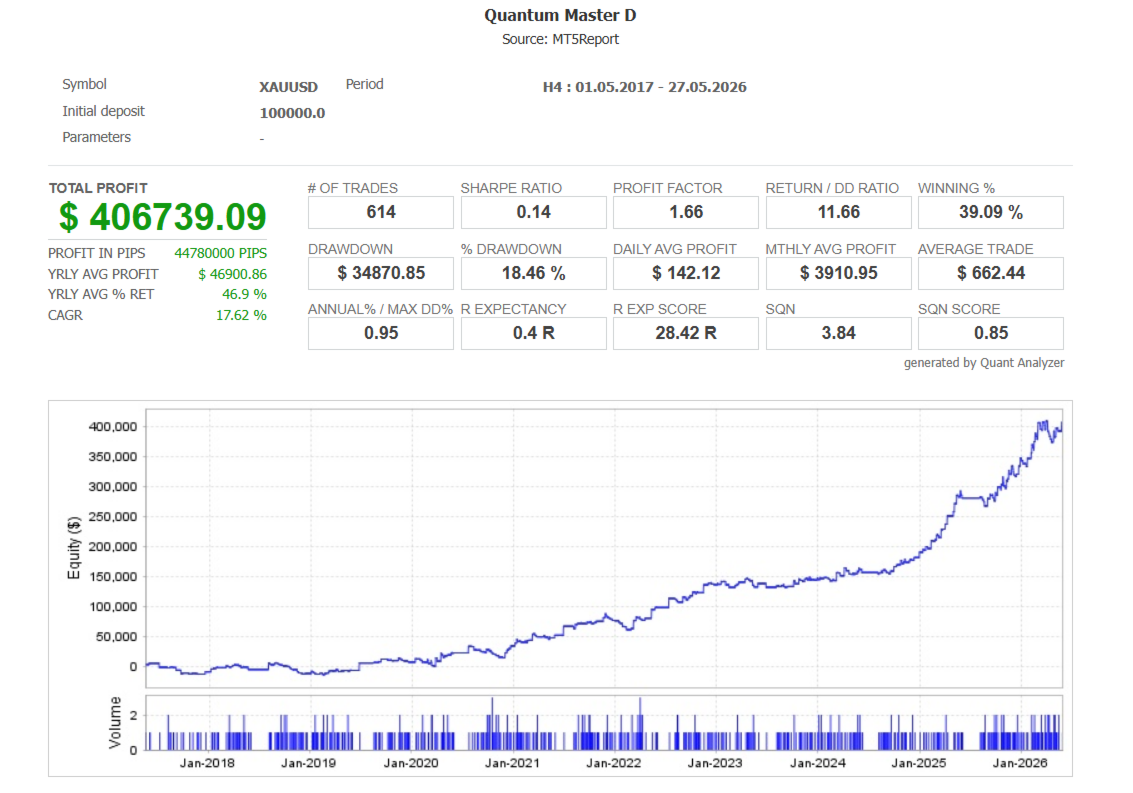
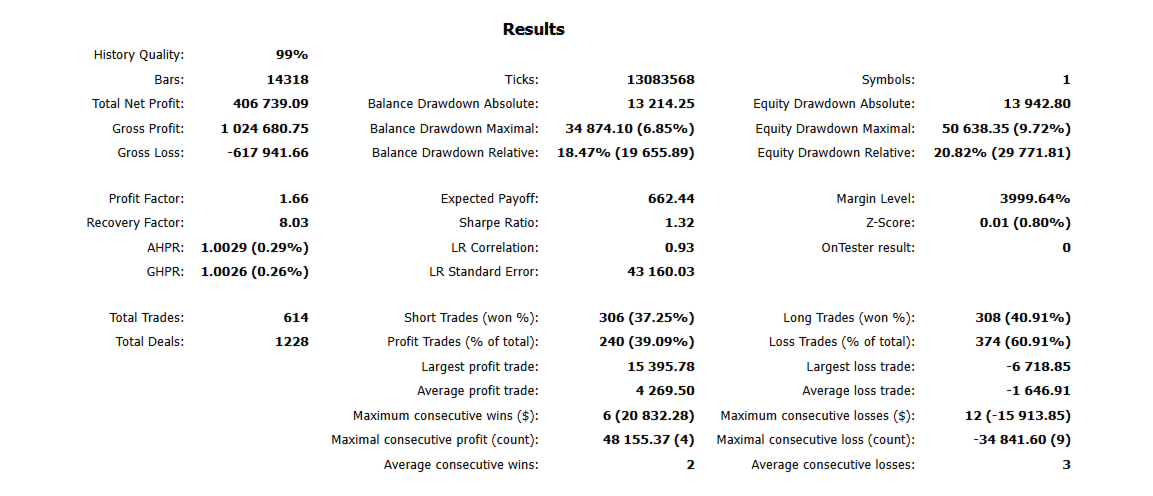
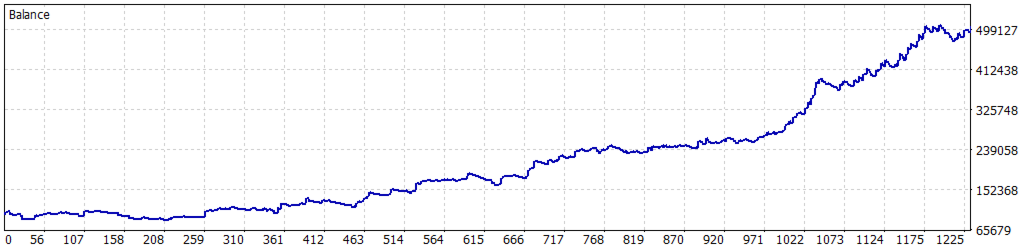
- Over 406% profit, trading 1 lot per trade on a $100,000 initial balance.
- 614 trades over more than 9 years of historical data, with the last 2 years kept fully out-of-sample to prevent overfitting.
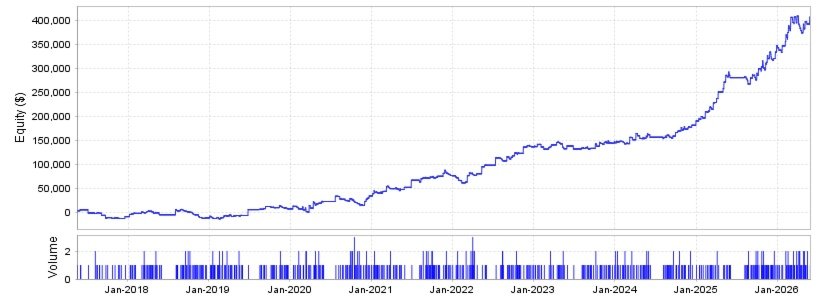
- Performance has accelerated further on out-of-sample data: since the start of 2024, the EA returned more than 180% by the end of 2025.
- LIVE performance from February 2026 to July 2026 has generated more than 27% REAL PROFITS in one of my clients' accounts.
- Maximum drawdown under 35% compared to the initial balance, which is solid and necessary to avoid overfitting, delivering the robustness I was looking for.
All data shown in the pictures below is from IC Markets, using GMT+2 broker time. Always run your own backtest to confirm these settings work equally well on your broker's historical data — fine-tune if needed. I also backtested the EA with dukascopy data with the same settings and still had solid results.
How to run the EA
Attach the EA to a Gold (XAUUSD) chart and set the timeframe to 4H. Leave the default parameters to have similar backtest to the one shown below.
Versatility
The EA can be adapted to any financial market (commodities, forex, etc.). The default settings are calibrated specifically for Gold (XAUUSD) — adjust the parameters accordingly if testing on a different instrument.
Backtesting tip
Since the EA only evaluates candle opens, you can use "1 Minute OHLC" modelling for backtests instead of tick data. This runs significantly faster while producing nearly identical results — worth verifying for yourself. This EA also contains a trend reversal strategy that does the exact opposite of the trend following one: set Version=2 if you want to test the reversal strategy (parameters' changes will certainly be needed though).
Lot sizing
Lot size is fixed, not percentage-based. I intentionally avoided account-percentage sizing, since it can amplify losses after a winning streak. You're free to adjust the lot size manually at any time.
Input Parameters
- SIZE — default: 0.01. Lot size parameter. Be very careful when changing it. Do not use negative numbers.
- GMT — default: 2. Timezone parameter. Change it according to your broker's timezone. Do not use negative numbers or decimals.
- Magic Number — default: 1. This MUST be different from any other EA's magic number on each specific chart to prevent conflicts (especially if you use this EA with different settings on the same instrument, as recommended). Do not use negative numbers or decimals.
- EuroDST — default: true. Daylight saving time change for European brokers. Test it on "true" and "false" to see which solution works better for you.
- EMP — default: 10. Moving average period. Do not use negative numbers or decimals.
- x — default: 0.1. Internal parameter: the higher it is, the less trades the EA will do. If set to zero, it nullifies the filter. Do not use negative numbers.
- starttime — Trading starting hour: you can set numbers from 0 to 2400 using multiples of 100 (e.g. 100, 200, 300, ..., 1000, 1100, ...). For European brokers, make sure this value is lower than "endtime." Do not use negative numbers or decimals.
- endtime — Trading ending hour: you can set numbers from 0 to 2400 using multiples of 100 (e.g. 100, 200, 300, ..., 1000, 1100, ...). IMPORTANT: if you set 2400, the parameter "CloseAtEnd" will not work properly when set to "true." Do not use negative numbers or decimals.
- CloseAtEnd — default: false. This parameter closes the currently open trade when the time of the last closed bar is equal to or greater than "endtime." Set to "true" if you don't want to keep trades open overnight (the EA's performance will change completely — test it if you want to create something new).
- Version — default: 1. Allowed numbers: 1 or 2. If set to 1, it will use the trend following logic, trying to follow the trend. If set to 2, it will use the reversal logic, capitalizing on reversals. Do not use negative numbers or decimals. Do not use any number other than 1 or 2 (no trades will happen otherwise).
- stopPercent — default: false. This parameter lets you choose the stop loss and take profit as a percentage (%) of the last closed bar's closing price. I created it specifically for Gold, since its value has changed so much over time. It can be used for any other instrument, but the difference from a normal price-based stop loss and take profit will be smaller, since the forex market moves more slowly. If set to "false," stop loss and take profit will be set in absolute price value (e.g. 0.005$).
- Mfilter, Mfilter1, Mfilter2 — default: 2 true, 1 false. These three are monthly filters. If set to true, the EA will not trade in the selected months (these can be very powerful).
- Dfilter — default: false. This is the daily filters. If set to true, the EA will not trade on the selected day (e.g. all Mondays, all Fridays, ...).
- OnePerDay — default: false. If set to true, the EA will only trade once per trading day (not used in my settings).
- Month, Month1, Month2 — These three are monthly filters. Each number from 1 to 12 corresponds to a specific month (1: January, 2: February, ...). Do not use negative numbers or decimals. Do not use numbers higher than 12.
- Day — This is the daily filter. Each number from 0 to 6 corresponds to a day of the week (0: Sunday, 1: Monday, ..., 6: Saturday). Do not use negative numbers or decimals. Do not use numbers higher than 6.
- mystop — Stop loss parameter. Do not use negative numbers. Decimals can be used.
- myprofit — Take profit parameter. Do not use negative numbers. Decimals can be used.
Exit logic:
The EA closes a position only if stop loss or take profit is triggered, if the time of the last bar is equal to or greater than "endtime" (when CloseAtEnd is set to true), or if the conditions to reverse the position are met (in which case the EA closes the current open position and immediately opens another one in the opposite direction).
Be careful when changing "myprofit" and "mystop": stop loss and take profit are the two most overfitting-prone parameters of this EA.
Leave a comment on the EA's page if you need help setting any parameter, or for any other question. I'll answer as soon as possible.
TimeFrame: 4 Hours. You may change it but further backtests will be needed (as well as parameters fine-tuning).
Minimum suggested capital: 1000$. You may go as low as 500$, but you may have trouble with margin.
Account type needed: Any.
If you are new to lot sizing, modify SIZE in backtest and check the largest and average profits and losses at the end of it. This way you'll understand how much risk you are taking before actually trading with the new lot size you decided.
No martingale, no grid trading or stuff like that. The EA opens only one position at a time.
Please, be aware that drawdowns can happen and are part of the process. This is not a get rich quick scheme (even though the backtest results are truly good). Always test the algorithm in a demo account first.
Past performance is not indicative of future results. Trading involves risk, and you should only trade with capital you can afford to lose.