Stochastic Pro Expert
- Experts
-
Steve Zoeger
 Hello to my Fx friends. Forex is so diverse that you can't really single out any particular indicator or strategy. The ever-changing market and the ever-changing economic conditions around the world mean that there are many different ways to trade, so I have developed many different robots. These
 - Version: 1.1
- Activations: 20
Stochastic Pro
-
Primary Entry Signal – Stochastic Cross
The EA uses a Stochastic (5,3,3) crossover as the main trigger. A buy signal occurs when %K crosses above %D; a sell signal when %K crosses below %D. -
Stochastic Zone Selection
The user can choose to only allow signals when the cross happens in the oversold zone (buy) or overbought zone (sell), in any zone, or disable this requirement. -
Multiple Confirmatory Filters
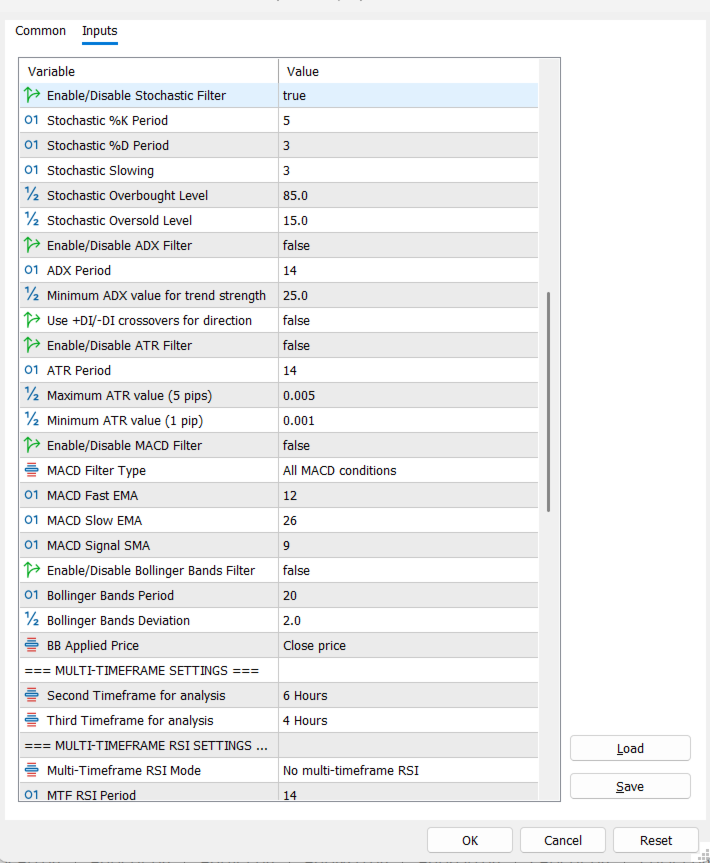
Optional filters can be applied before a trade is taken: Trend MA, RSI, Stochastic, ADX, ATR, MACD, and Bollinger Bands. Each can be enabled/independently configured. -
Multi-Timeframe RSI Confirmation
RSI can be checked on up to three timeframes (current, second, third) with various confirmation modes (e.g., all must agree, any two, etc.). -
Multi-Timeframe Stochastic Confirmation
Similarly, Stochastic readings can be verified across multiple timeframes with selectable modes to strengthen signal validity. -
ADX Trend Strength Filter
When enabled, trades are only allowed if ADX is above a minimum threshold (e.g., 25) and optionally +DI/-DI crossovers confirm direction. -
ATR Volatility Filter
The EA can block entries if the ATR is too low (slippage risk) or too high (excessive volatility), based on user-defined min/max values. -
MACD Momentum Filter
MACD conditions (histogram direction, zero‑line cross, signal‑line cross, or all) can be required to align with the trade direction. -
Bollinger Bands Position Filter
The EA can require price to be below the middle band for buys, or above it for sells, to ensure mean‑reversion entries. -
Time Filter
Trading can be restricted to a specific time window (e.g., 08:00–16:00) to avoid low‑liquidity or high‑impact periods. -
Spread Filter
A trade will not be taken if the current spread exceeds a user‑defined maximum (in pips). -
Account‑Growth Lot Increase
The base lot size automatically increases by 0.01 for every $20 growth in account balance (starting from the initial balance). A maximum base lot size can be set. -
Martingale System with Six Types
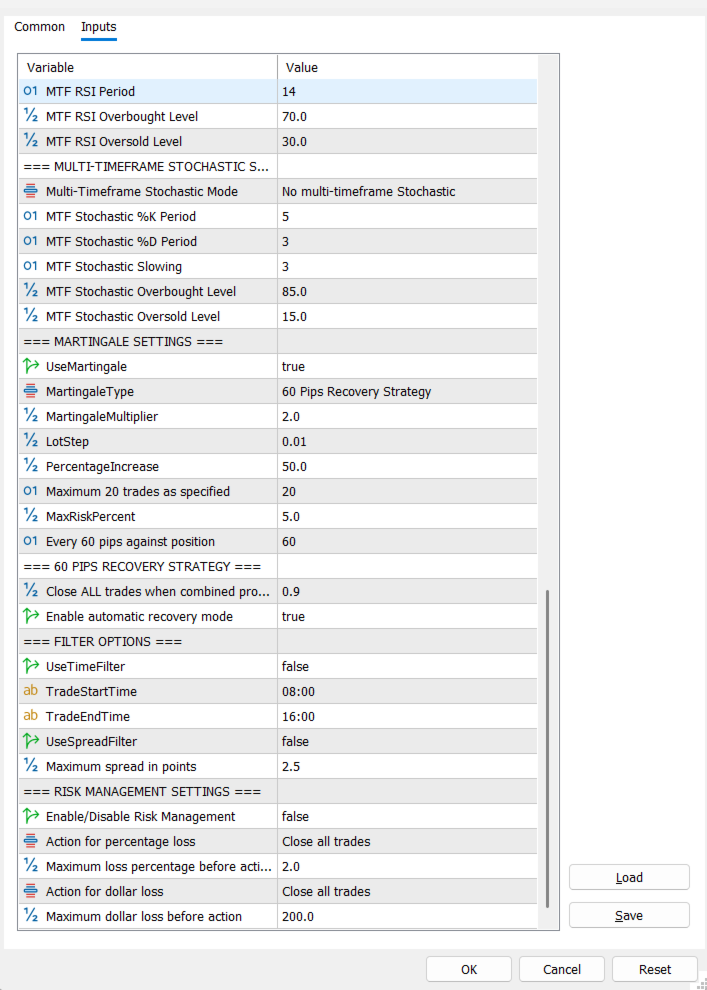
Six martingale modes are available: simple multiplier, fixed step, percentage increase, Fibonacci, safe risk limit (with % risk cap), and the dedicated 60‑pips recovery strategy. -
60‑Pips Recovery Strategy
When the price moves 60 pips against the initial position, a new trade is opened. This continues up to a maximum of 20 trades. The EA tracks the last martingale price to trigger additional trades every 60 pips. -
Recovery Target – Close All at Profit
Once the combined profit of all open trades reaches a user‑defined target (e.g., $0.90), the EA closes every position automatically, resetting the martingale cycle. -
Separate Take‑Profit for Initial vs Martingale Trades
The initial trade uses a dedicated TP value (e.g., $10.20), while subsequent martingale trades use a smaller, standard TP (e.g., $10.11). -
Risk Management Based on Drawdown
If enabled, the EA monitors account drawdown in percent or absolute dollars. It can either close all trades or stop trading entirely when a threshold is breached. -
Chart Grid Control
The EA can automatically disable the chart grid when active and restore it on deinitialization, providing a cleaner visual display. -
Real‑Time License & Trade Info Display
On‑chart labels show days remaining (if license enabled), number of open trades, and current total profit/loss (updated every second). -
Position Counting and Magic Number
All trades are tagged with a unique magic number to ensure the EA only manages its own positions. Open positions are counted per symbol and magic number. -
Lot Normalization and Margin Check
Before opening a trade, the lot size is rounded to the broker‑allowed step and a margin check is performed to avoid margin‑call situations. -
Cooldown Mechanism for Close Attempts
To prevent excessive closing attempts, the EA enforces a short cooldown (5 seconds) and a maximum retry count when trying to close all positions after a recovery target is hit. -
New‑Bar Processing
Signal checks are performed only on the opening of a new bar, reducing CPU load and preventing repainting. -
Indicator Handles Created on Init
All indicator handles are created once during EA initialization and released on deinitialization, ensuring efficient operation. -
Trade Comments for Easy Identification
Each order includes a comment: “Moving Average Pro Initial” for the first trade, and “Moving Average Pro Martingale#X” for subsequent ones. -
Periodic Status Printing
The EA prints a status update every minute (equity, drawdown, loss) when risk management is active, keeping the trader informed. -
Dynamic Base Lot Adjustment
The base lot used for the first trade and martingale calculations is updated in real‑time based on account growth, ensuring it always reflects current balance. -
Flexible Martingale Step Definition
The distance in pips required to trigger a martingale trade is user‑definable (e.g., 60 pips). This applies both to the 60‑pips strategy and other martingale types. -
Maximum Martingale Trades Cap
The EA stops adding new martingale trades once a user‑defined maximum (default 20) is reached, preventing unlimited risk exposure. -
Dedicated to Current Symbol Only
The EA operates exclusively on the chart symbol it is attached to, scanning only positions with the correct magic number for that symbol.