MAFX Trading Manager

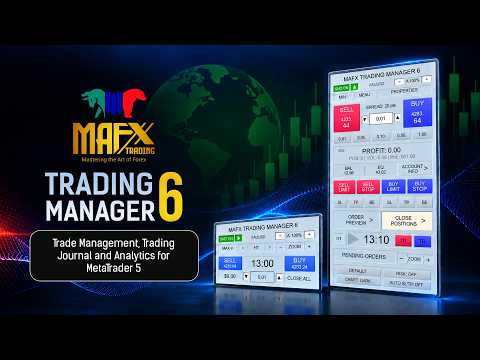
MAFX TRADING MANAGER 6

Trade Management, Trading Journal and Analytics for MetaTrader 5

MAFX Trading Manager 6 is an integrated trading workspace for MetaTrader 5 that combines manual and semi-automated trade management with visual order planning, risk-management tools, a built-in Trading Journal, and detailed Trade Analytics.

It is designed for traders who prefer to make their own trading decisions while using dedicated tools to plan orders, manage positions, review trading history, record observations, and analyze performance directly inside MetaTrader 5.

MAFX Trading Manager 6 does not generate trading signals and does not automatically decide when to enter the market. The trader remains responsible for market analysis, trade direction, entries, and risk decisions.

Version 6 is a major expansion of the original MAFX Trading Manager, introducing a redesigned trading workspace and additional tools for trade planning, position management, journaling, analytics, and performance review.

Integrated Trading Journal

The built-in Trading Journal allows traders to review their trading activity and maintain journal information without leaving MetaTrader 5.

The Journal combines historical trading data with tools for reviewing individual trading days and recording additional observations about trading activity.

It includes four main areas: P&L Calendar, Day Journal, Analytics, and Export Data.

P&L Calendar

Review trading performance through an integrated profit-and-loss calendar.

The Journal provides different historical views including:

  • Week
  • Month
  • Year
  • All Time

Individual trading days can be selected for a closer review of their results and associated journal information.

This provides a visual way to review profitable and losing periods and observe trading consistency over time.

Day Journal

The Day Journal allows additional information and observations to be recorded for individual trading days.

This provides context beyond the numerical trading result and allows traders to maintain their own review of trading activity alongside the corresponding account history.

Goals and Progress

The Journal includes tools for setting monetary goals and comparing them with recorded trading performance.

Overall P&L and journal information can also be reviewed to help monitor trading activity and journaling consistency.

Trade Analytics

MAFX Trading Manager 6 includes an integrated analytics workspace that converts available MT5 trading history into structured performance information.

Instead of evaluating trading activity only through account balance or total profit and loss, traders can review multiple aspects of their historical performance.

Depending on the available account history, analytics can include:

  • Net trading P&L
  • Total completed trades
  • Winning and losing trades
  • Win rate
  • Average Win
  • Average Loss
  • Gross Profit
  • Gross Loss
  • Profit Factor
  • Expectancy
  • Best and Worst Trades
  • Trading results in pips where available
  • Average Trade Duration
  • Long and Short performance
  • Trading volume
  • Symbol-based performance information
  • Historical account and balance information

Completed positions are analyzed as trades rather than simply treating every individual deal as a separate trade. This is particularly useful when positions contain partial exits or multiple transaction records.

Analytics describe historical trading activity and do not predict future trading results.

Risk of Ruin Analysis

The integrated Risk of Ruin tool provides an additional statistical view of historical trading risk.

It evaluates the available historical trading profile against specified levels of account loss to provide another perspective on trading risk.

Risk of Ruin is a statistical estimate based on available historical trading information. It is not a forecast or guarantee of future performance.

Advanced Order Preview

The Advanced Order Preview workspace allows traders to visually plan pending orders directly on the MT5 chart before sending them to the broker.

Instead of relying only on manually entered prices, Order Preview displays the planned trade structure on the chart so that important levels can be reviewed and adjusted visually.

Supported preview order types include:

  • Buy Stop
  • Sell Stop
  • Buy Limit
  • Sell Limit
  • Buy Stop Limit
  • Sell Stop Limit

Depending on the selected order type, the preview can display the Entry, Stop-Limit price, Stop Loss, Take Profit, lot size, and related trade information.

Drag-and-Adjust Trade Levels

Entry, Stop Loss, Take Profit, and applicable Stop-Limit levels can be adjusted directly on the chart.

This allows a trader to position levels around the chart structure and review the planned setup before placing the pending order.

The preview updates as levels are moved.

Multi-Level Exit Planning

Order Preview also integrates with the multi-level position-management system.

Additional partial-exit levels can be prepared as part of the trade plan, including:

  • TP1
  • TP2
  • TP3
  • SL1
  • SL2
  • Final Take Profit
  • Final Stop Loss

These levels provide a visual way to prepare a more detailed position-management plan before the trade is placed.

Order Validation and Confirmation

The Trade Manager validates the preview structure and applicable trading levels before placement.

Symbol and broker requirements still apply, including tick size, minimum stop distance, minimum volume, spread, and other trading conditions.

The preview remains a planning tool until the trader confirms the order.

The general workflow is:

Select Order Type → Plan → Adjust → Review → Place

Order Preview does not determine where a trade should be entered. The trader chooses the order type, direction, and levels.

Continued Visual Management

Visual management can continue after an order has been placed.

Pending-order Entry, Stop Loss, and Take Profit levels can remain available for management on the chart. When a tracked pending order is triggered and becomes an active position, the visual management system can transition to the active trade.

This provides continuity between trade planning, pending-order management, and active position management.

The Order Preview workspace also provides dedicated chart controls including chart zoom, timeframe navigation, label visibility, and full-label display.

Trade Execution

MAFX Trading Manager 6 provides direct controls for executing and managing trades from the chart without repeatedly opening the standard MT5 order window.

Available order workflows include:

  • Market Buy and Sell
  • Buy Stop and Sell Stop
  • Buy Limit and Sell Limit
  • Buy Stop Limit and Sell Stop Limit
  • Adjustable lot size
  • Risk-based position sizing
  • Pending-order management
  • Symbol-specific position management

Stop Loss and Take Profit Management

Several methods are available for managing protective and target levels.

These include:

  • Manual Stop Loss and Take Profit
  • Automatic SL/TP
  • Break Even with configurable offset
  • Trailing Stop
  • Chart-based SL/TP adjustment
  • Visual trade-level information

Default distances and behavior can be configured through the EA settings.

Multi-Level Position Management

Active positions can use additional software-managed scale-out levels.

Available levels include:

  • TP1
  • TP2
  • TP3
  • SL1
  • SL2
  • Final broker-managed Stop Loss and Take Profit

The system takes available position volume and broker volume requirements into account when managing partial exits.

This allows traders to structure positions with multiple management levels while retaining a final broker-managed Stop Loss and Take Profit.

Partial Close and Position Controls

Active positions can be managed directly from the chart.

Position-management tools include partial closing, Break Even, trailing management, individual trade controls, and symbol-specific closing functions.

Trade information for active positions and pending orders can also be displayed directly on the chart.

Risk Management

MAFX Trading Manager 6 supports manual lot-size control and configurable risk-based position sizing.

Risk-management tools are designed to assist with trade planning and position management. Traders remain responsible for selecting risk levels appropriate for their account size and trading approach.

Trading Calculators

The integrated Calculator workspace provides additional tools for trade and risk planning.

Calculator functions are read-only planning tools. Using a calculator does not automatically send, modify, or close an order.

This allows calculations to be performed from within the Trade Manager environment while keeping actual trade execution under the trader's control.

Reports and Data Export

MAFX Trading Manager 6 includes reporting and export tools for reviewing trading information outside the main Trade Manager interface.

Reports can contain account information, trading statistics, analytics, Risk of Ruin information, and historical performance data.

Monthly reporting can include information such as:

  • Net P&L
  • Starting and ending balance
  • Number of trades
  • Wins and losses
  • Win rate
  • Weekly performance breakdowns

These tools provide an additional way to maintain and review historical trading records.

Forex Sessions

The integrated Forex Sessions workspace provides trading-session information within the Trade Manager interface.

This allows traders to reference market-session information without requiring an additional session panel on the chart.

Interface and Chart Workspace

MAFX Trading Manager 6 uses a scalable interface designed for different chart sizes and display configurations.

Interface and workspace features include:

  • Panel scaling and zoom controls
  • Compact trading interface
  • Chart zoom controls
  • Theme options
  • Active and pending trade visualization
  • Account and P&L information
  • Trade labels
  • Label visibility controls
  • Timeframe navigation

The interface is designed to keep frequently used trading and management controls accessible while reducing unnecessary obstruction of the chart.

Managing Manual Trades

MAFX Trading Manager 6 can also work with compatible manual trades on the current chart symbol.

This allows positions initiated manually through MetaTrader to be subsequently monitored and managed from the Trade Manager interface when applicable.

Default Settings

Default trade-management distances have been configured primarily around Gold trading conventions used during development and testing.

The Trade Manager can be used with other MetaTrader 5 symbols, but users should review each symbol's contract specifications, point size, tick size, minimum trade volume, stop levels, spread, and other broker requirements before using the default settings.

Important Information

MAFX Trading Manager 6 is a trade-management and trading-analysis utility, not a trading strategy.

The application does not provide Buy or Sell signals, automatically determine market direction, guarantee profitable trades, or guarantee future trading performance.

Journal statistics, Trade Analytics, Risk of Ruin calculations, and reports are based on available historical trading information and should not be interpreted as predictions of future results.

Execution prices, spreads, slippage, minimum volume, stop levels, and other trading conditions are determined by the broker and the trading environment.

Users should become familiar with the controls and settings and consider testing their intended configuration on a demo account before using the application for live trading.

Support and Updates

MAFX Trading Manager is actively maintained. Product updates are distributed through the MQL5 Market and can be installed through MetaTrader 5.

Version 6 represents a major expansion of the original MAFX Trading Manager, adding advanced visual order planning, multi-level position management, an integrated Trading Journal, Trade Analytics, Risk of Ruin analysis, reporting and export tools, calculators, session information, and an expanded trading interface.

Version History

Version 5.40 — January 1, 2026
Initial MQL5 Market release.

Version 5.50 — February 2, 2026
Stability improvements and enhanced panel performance.

Version 6.165 — September 25, 2026
Major update introducing the Version 6 trading workspace, Advanced Order Preview, multi-level position management, integrated Trading Journal, P&L Calendar, Trade Analytics, Risk of Ruin analysis, reporting and export tools, Trading Calculators, Forex Sessions, expanded chart visualization, interface scaling, and additional trade-management functionality.

This release also includes faster analytics processing and report generation for larger account histories, improved label restoration when switching panels or resizing charts, refined HUD alignment, and updated metric help descriptions. The product name is standardized as MAFX TRADING MANAGER 6, with the displayed build and file version aligned to 6.165. The naming and version update does not change trading logic.

Risk Disclaimer

Trading financial instruments involves risk. Past trading results do not guarantee future results. Use appropriate risk management and trade only with funds you can afford to lose.
Recommended products
INTRODUCTORY LAUNCH OFFER: $139 • Exclusive introductory price for the first 10 copies only. • Price will be permanently adjusted to $279 after the first 10 activations. • Next price step: $199 -> Final price: $279. Fortress Risk Manager is an institutional-grade, all-in-one Capital Protection and Risk Management Cockpit built natively for MetaTrader 5. Engineered specifically for prop firm challenge accounts, funded trader programs, and discipl
Advance Trade Manager
Jose Rodrgues Chaves
ADVANCE TRADE MANAGER A complete, tabbed trade-management dashboard for MetaTrader 5 that puts every routine trade operation on one compact panel. No more hunting through menus — open, protect, scale and manage positions from a single interface. The panel is a pure GUI overlay . It never touches your existing chart objects, indicators, arrows or manual lines. All chart objects it creates use the dedicated EGF_Z_ (zones) prefix, and trigger lines use the panel's own object names — so nothing else
TradeControl Pro – Advanced Trade Manager for MetaTrader TradeControl Pro is a trade management tool for MetaTrader that enables structured and efficient management of trading positions directly on the chart. The application combines a clearly designed user interface with automated calculations and flexible control options for different trading approaches. The integrated on-chart panel is organized in a tabular layout and divided into three main sections (tabs): Execution , Close , and Info . Th
Talents ATR Scalper Utility (MT5) The Talents ATR Scalper Utility is a professional-grade trade execution and management tool built for MetaTrader 5. Inspired by the Biblical Parable of the Talents , this utility is designed to help traders multiply their potential with precision risk control, one-click simplicity, and advanced automation. Whether you’re scalping forex, gold, or indices, this tool delivers speed, consistency, and confidence. Key Features One-Click Trade Preview Click below price
DDKiller Pro
Njaratahiry Michael Randrianiaina
Stop Blowing Your Account. Once and For All. DDKiller Pro is the MT5 risk guardian that runs silently on your chart and shuts down trading the moment you hit a limit — whether you're grinding a prop firm challenge or managing your own CFD account. The problem every trader knows: You set your rules. You break them anyway. One revenge trade. One overleveraged position. One session that erases a month of gains. DDKiller Pro removes that decision from your hands entirely. What it does: The second yo
Advanced Risk Return Tool
Felipe Monteiro Rodrigues
Advanced Risk Return Tool is a visual Risk/Return planning and management utility for MetaTrader 5. The tool allows you to create and manage Buy and Sell structures directly on the chart, visually positioning Entry, Target and Stop levels while displaying information such as the Risk/Return ratio, distance in pips, volume and financial values. The structures are interactive and can be adjusted directly with the mouse, making trade planning and visual monitoring easier. Main Features Visual Risk/
FREE
Headline ShikaaTraders Gold Grid Pro is a high-performance trade management utility designed specifically for XAUUSD (Gold) and high-volatility pairs. It allows traders to execute complex grid-layering strategies with a single click, ensuring you never miss an entry during fast market moves. Why Choose Gold Grid Pro? Manual trading on Gold requires speed. Manually calculating distances and opening multiple positions takes too much time. This utility automates the "Scaling-In" process, allowing y
GGP Trade Copier MT5
Mohammadmahmood Pirayeh
GGP Trade Copier  EA is an automatic trading bot that can help traders automatically replicate the trading strategies and operations from one trading terminal to others by experiencing exceptionally fast trade copying system. Its easy-to-use setup allows you to copy trades between multiple MetaTrader terminals on the same Windows computer or Windows VPS with lightning-fast copying speeds of under 0.5 seconds. The software supports multiple trading varieties, including Forex, commodities, stocks
Take control of your trading with ChartMaster TradePad – a powerful all-in-one trading panel designed to simplify order execution, risk management, and market analysis. Whether you’re a scalper, day trader, or swing trader, ChartMaster TradePad gives you the speed, clarity, and precision you need to maximize your trading performance. Key Features Market Dashboard Real-time Market Data : Symbol, spread, RSI(14), ATR(14), trend direction, volume, and trading signals at a glance. Clear Trend & S
TradingManagement
Christian Ishmael Calienta Magallon
TradingManager is a comprehensive trading panel designed to streamline your trading workflow in MetaTrader 5. It combines order management, risk controls, and market analysis into one intuitive interface. Key Features 1. Trading Panel Market Order Entry   - One-click BUY/SELL with automatic SL and TP line placement on chart Fib Limit Orders   - Draw Fibonacci-based limit orders with visual SL and TP levels Risk Management   - Choose between Lots, % Risk, or $ Risk modes Take Profit Split   - Dis
Range Volume Hybrid Generator
Trade The Volume Waves Single Member P.C.
1. Introduction Range Volume Hybrid (RVH) is a MetaTrader 5 Expert Advisor that creates custom chart symbols using a unique dual-condition bar formation method. Unlike traditional charts where bars close based on a single criterion (time, range, or volume), RVH bars close only when BOTH a minimum price range AND a minimum volume threshold are met simultaneously.  Download also and install RVH Monito r Indicator - to control the EA from the custom charts (it's Free)  https://www.mql5.com/en/marke
Noize Absorption Index - is the manual trading system that measures the difference of pressure between bears forces and bulls forces. Green line - is a noize free index that showing curent situation. Zero value of index shows totally choppy/flat market.Values above zero level shows how powerfull bullish wave is and values below zero measures bearish forces.Up arrow appears on bearish market when it's ready to reverse, dn arrow appears on weak bullish market, as a result of reverse expectation.
Product Name: Smart Switch Dashboard STOP WASTING SECONDS. SECONDS COST MONEY. Are you losing trades because you're fumbling through the Market Watch? Is your workspace messy and slowing you down? In trading, Speed is everything. If you aren't organized, you are losing money to traders who are. Smart Switch Dashboard is not just a tool—it is your COMMAND CENTER . Designed for serious Scalpers and Day Traders who demand Speed, Precision, and Zero Lag. DOMINATE YOUR WORKFLOW 1. ULTRA-FAST SY
YuClusters
Yury Kulikov
4.93 (43)
Attention: You can view the program operation in the free version  YuClusters DEMO .  YuClusters is a professional market analysis system. The trader has unique opportunities to analyze the flow of orders, trade volumes, price movements using various charts, profiles, indicators, and graphical objects. YuClusters operates on data based on Time&Sales or ticks information, depending on what is available in the quotes of a financial instrument. YuClusters allows you to build graphs by combining da
Gold Live Position Executor
Paul Cervin Mitch Villarin
Gold Live Position Executor Category: Utilities (Order management, Risk management, Panels) "The disciplined trader's shortcut — proper position sizing, every single trade, without doing the math yourself." A risk-management and order-execution utility , not an autonomous robot. Drag from entry to stop-loss and it calculates your exact lot size, risk, and reward — then places the trade with one click, exactly when and how you decide. No spreadsheets, no mental math under pressure. This is a uti
CoPilot dashboard MT5
Frederic Jacques Collomb
CoPilot — Daily Trading Dashboard Know your numbers. Trade with clarity. MT4 version What is CoPilot? CoPilot is a professional-grade trading assistant that displays in real time all your daily performance statistics directly on the chart — with a live equity curve that updates trade by trade. Designed for active traders who need instant visibility into their session without leaving the chart, CoPilot aggregates every closed trade of the day across all symbols and presents them in a clean, color
## Product Title ``` SuperDOM — Advanced Depth of Market Trading Panel ``` --- ## Short Description  ``` Professional SuperDOM panel for MT5. Interactive price grid with one-click BUY/SELL/FLAT, pending orders on any level, Trailing Stop (ATR or fixed), and 5 draggable info panels. Works with US Stocks, CFDs, Metals, Indices and B3. Auto-detects resolution (4K/2K/FHD/HD). ``` --- ## Full Description  ### Overview SuperDOM is a professional Depth of Market trading panel for MetaTrader 5.
Trading Assistent is a multifunctional trading panel that combines all necessary tools for professional trading. The panel provides complete control over positions, in-depth risk analysis, and fast order execution. MAIN FUNCTIONAL BLOCKS Position Management: - Real-time viewing of all open positions - Sorting by symbol, profit, volume, and type - Visual indication of profitable and losing positions - Bulk closing operations - Breakeven function for profit protection Trading Operations: - I
Truvana Trend Campaign Manager EA (TCM) Advanced Basket Management & Profit Locking Tool for Trend Traders Short Description Turn strong trends into managed campaigns. Truvana TCM is a professional trade management EA designed for traders who already know how to identify trends and execute entries. The EA automatically manages basket expansion, validates risk before adding positions, and locks profits using a broker-side Basket Stop Price (BSP). No martingale. No grid recovery. No signal genera
Bastion is a monitor-and-close-only risk manager for prop-firm traders. It watches your account against your firm's daily-loss and maximum-drawdown limits in real time and force-closes your open positions BEFORE you cross a line. It never opens a trade of its own, so it stays fully within the tools allowed by FTMO, FundedNext, The5ers, FTUK and FXIFY. Why traders fail challenges A large share of failed evaluations end on a single daily-loss breach: a moment of inattention, a news spike, one tra
JMM Trade Panel MT5
Sarah Joyce Walker
JMM Trade Panel MT5 JMM Trade Panel MT5 is a practical chart- based trading utility for MetaTrader 5. Execute Buy and Sell orders directly from the chart, adjust the displayed lot size quickly, monitor basket performance, and manage trades using configurable Magic Number and symbol- management rules. Full   User   Manual: DOWNLOAD Key Features On- chart Buy, Sell, and Close All buttons. Close all trades managed by the EA with one click. Optional management of all open trades regardless of Magi
DR Trade and Risk Manager: The Foundational Algorithmic Risk Console for MT5 For the discretionary trader, the greatest adversary is not the market; it is the undisciplined self. You have a solid strategy, but in moments of high pressure, do you follow your rules with perfect consistency? Do you cut losses without hesitation? Do you let winners run without cutting them short out of fear? For most, the answer is no. This gap between strategy and execution is where profits are lost. DR Trade and R
Passband Filter Pro Passband Filter Pro is a trend and cycle oscillator for MetaTrader 5. It is built on the Ehlers Super Passband Filter, a band pass filter that removes long term trend drift and short term noise so that only the dominant market cycle remains. The result is a clean oscillator with a color cloud that shows overbought and oversold conditions, cycle turns, and momentum on forex, gold, indices, stocks and crypto. Most traders enter too early or too late. Simple moving averages la
HedgeSafe Trade Assistant A risk-first manual trading panel for MetaTrader 5. HedgeSafe helps you prepare, validate and manage a trade directly on the chart before you press BUY or SELL. HedgeSafe is not a signal service, market predictor, AI bot or automatic strategy. It does not choose trade direction and does not promise profit. You remain in control of every trading decision. Main capabilities Lot calculation from a percentage of account balance or a fixed amount in account currency. Stop Lo
CYGNIX RISK GLADIATOR — Professional Trade Manager & Risk Guardian for MT5 Guard every position. Manage every trade. Sleep at night. Cygnix Risk Gladiator is a professional-grade position management Expert Advisor that watches every open trade on your account and automatically applies institutional-level risk controls in real time. It does not generate signals — it protects, manages, and exits trades opened by you, your strategies, or any other EA. Built for IC Markets and fully compatible w
Key Features: 200+ Fully Implemented Patterns   across all categories Advanced Market Structure Analysis Smart Money Integration   (Wyckoff, Order Blocks, Liquidity) Professional Risk Management Multi-Timeframe Analysis AI-Powered Confidence Scoring Advanced Visualization Real-time Alerts Pattern Categories: Single Candle Patterns (Hammer, Doji, Marubozu, etc.) Multi-Candle Patterns (Engulfing, Stars, Harami, etc.) Chart Patterns (Head & Shoulders, Cup & Handle, Triangles, etc.) Harmonic Pattern
FREE
Trade Assistant 38 in 1
Makarii Gubaydullin
4.91 (23)
Multifunctional tool: Lot Calculator, Grid Orders, R/R ratio, Trade Manager, Supply and Demand zones, Price Action and much more Demo version   |   User manual Trade Assistant   doesn't work in the strategy tester : you can download the   Demo Version HERE  to test the utility . Contact me   for any questions  / ideas for improvement / in case of a bug found If you need a MT4 version, it is available here Simplify, speed up and automate your trading   process . Expand the standard terminal capa
NRP Risk Manager Pro Institutional-Grade Trade Management & Prop Firm Protection Get the MetaTrader 4 Version Here: https://www.mql5.com/en/market/product/179888 Get the MetaTrader 5 Version Here: https://www.mql5.com/en/market/product/179885 Trading isn't just about finding the right entry; it is about flawlessly executing your edge while fiercely protecting your capital. NRP Risk Manager Pro is not an automated trading robot—it is a comprehensive, institutional-grade trade terminal d
Local Copy Trader Utility - Professional Copy Trading System Overview Local Copy Trader Utility is the complete solution for mirroring trades between MetaTrader 5 accounts. With both Master and Slave functionality in one powerful Expert Advisor, it delivers reliable, lightning-fast trade copying with zero external dependencies. Perfect for managing multiple accounts, following trading signals, or transferring trades between brokers, this system ensures your positions stay perfectly synchronized
Buyers of this product also purchase
Trade Assistant MT5
Evgeniy Kravchenko
4.43 (216)
It helps to calculate the risk per trade, the easy installation of a new order, order management with partial closing functions, trailing stop of 7 types and other useful functions. Additional materials and instructions Installation instructions - Application instructions - Trial version of the application for a demo account Line function -   shows on the chart the Opening line, Stop Loss, Take Profit. With this function it is easy to set a new order and see its additional characteristics bef
Forex Trade Manager MT5
InvestSoft
4.98 (686)
Trade Manager MT5 is an advanced position size calculator and trade management tool for MetaTrader 5, designed to help traders plan trades faster, control risk more precisely, and manage open positions directly from the chart. It combines order placement, risk based lot calculation, Stop Loss and Take Profit management, Break Even, Trailing Stop, Partial Close, Equity Protection, and external trade management in one panel. Whether you trade forex, indices, metals, commodities, crypto, or future
Telegram to MT5 MultiChannel Copier
Sergio Marquez Uroz
4.63 (19)
Telegram to MT5 Multi-Channel Copier   automatically copies trading signals from your Telegram and Discord channels straight to MetaTrader 5. No bots, no browser extensions, no manual copying. A signal arrives in Telegram or Discord and the EA opens the trade in your terminal within seconds. And before you copy a channel, the built-in backtester shows you what that channel would have done in your account. The product has two components: a Windows application that listens to your Telegram channel
================================================================================ POC BREAKOUT - V20.72. Full Professional Grade Toolkit ================================================================================ POC Breakout is a full MetaTrader 5 trading dashboard for discretionary traders who want breakout signals, Point of Control (POC) context, volume profiles, order flow, market structure, news, alerts, and advanced trade planning in one professional workspace. Attached directly to you
TradePanel MT5
Alfiya Fazylova
4.88 (170)
Trade Panel is a multi-functional trading assistant. The app contains over 50 trading functions for manual trading and allows you to automate most trading tasks. Application instructions: https://www.mql5.com/en/blogs/post/756482 Trial version of the application for a demo account: https://www.mql5.com/en/blogs/post/750865 How to install the application: https://www.mql5.com/en/blogs/post/756239 How to test the application in visual mode: https://www.mql5.com/en/blogs/post/770277 How to install
Copy Telegram signals with your own trading rules Telegram to MT5 Signal Trader automatically copies text-based trading signals from public and private Telegram channels and groups into MetaTrader 5. Manage multiple providers and MT5 accounts from one desktop app, with individual risk and trade settings for each provider . No Telegram bot or API setup needed for copying. Simply sign in with your own Telegram account by phone or QR code and select the channels or groups you have already joined. Y
Floor Watch
Syed Tauqeer Hussain Shah
Floor Watch One number, watched every thirty seconds: how far equity has fallen since the day began — or since its highest point, if it's told to trail the peak instead of the open. Cross the line and it doesn't argue. Every open position closes, every pending order vanishes, and anything that slips through afterward gets shut the moment it appears. Not asked. Removed. The floor holds until the clock turns 5 AM Pakistan time — then, and only then, does the day start over. One rule. No except
Buy once. Get all my MT4 and MT5 indicators - available now and released in the future - at no extra cost. Contact me after purchase for instructions to receive them. The price is planned to rise by 50$ after every 10 purchases, up to 999$. The Market price at checkout applies. Keep the indicator you trust. Automate the work around it. Your signal. Your rules. Your execution. Already have an MT5 indicator you rely on, but still need to watch the chart, wait for a signal, calculate the lot, plac
Power Candles Strategy Scanner - Self-Optimizing Multi-Symbol Setup Finder Self-optimizing settings work one chart at a time, and finding where they pay off right now means opening chart after chart. Power Candles Strategy Scanner runs the same self-optimizing engine as the Power Candles indicator on every symbol in your Market Watch, side by side. One panel ranks where it pays off: the winning strategy per symbol, its optimized Stop Loss and Take Profit. An alert fires the moment a fresh signal
Grid Manual MT5
Alfiya Fazylova
4.73 (22)
Grid Manual is a trading panel for working with grid strategies. The utility is universal, has flexible settings and an intuitive interface. It works with a grid of orders not only in the direction of averaging losses, but also in the direction of increasing profits. The trader does not need to create and maintain a grid of orders, the utility will do it. It is enough to open an order and the "Grid manual" will automatically create a grid of orders for it and will accompany it until the close. F
MT5 to Telegram Signal Provider turns your trading account into a signal provider. Every trade action, whether manual, by EA or from your phone, is instantly sent as a message to Telegram. You can fully customize the format or use a ready-made template for quick setup. [ Demo ] [ Manual ] [ MT4 Version ] [ Discord Version ]     New: [ Telegram To MT5 ] Setup A step by step user guide is available. Key Features Ability to customize order details sent to subscribers You can create a tiered subs
Welcome to ENTRY IN THE ZONE with SMC MULTI TIMEFRAME SPECIAL BENEFIT / FOR OUR MQL5 CUSTOMERS FREE ACCESS TO THE NEW TOOL  — COMING SOON — Learn more on our official website  : https://www.fableedge.net Entry In The Zone with SMC Multi Timeframe is a real-time market analysis tool based on Smart Money Concepts (SMC), designed to analyze market structure, price direction, and key trading zones. It supports both Single-Timeframe and Multi-Timeframe Analysis, providing a clearer view of overall ma

Footprint Chart Pro — Professional OrderFlow EA for MetaTrader 5 Version 6.34 | Professional tool for real traders | Institutional-Grade Visualization DEMO USERS - PLEASE SELECT EVERY TICK / REAL TICK WHEN TESTING AND YOU HAVE DOWNLOADED HISTORICAL DATA. IF YOU SEE A WAITING SCREEN AND IT IS NOT DOWNLOADING, IT MEANS YOU HAVE LOW HISTORICAL DATA. TRY 1 MIN AND 5 MIN FIRST ON 1 DAY DATA. ONE DAY DATA SHOULD BE THE NEWEST AND MOST CURRENT DATE. PLEASE WAIT UNTIL THE MARKET HAS ROLLED OVER PERIOD.
Signal Trading View to MT5 Pro
Mirel Daniel Gheonu
4.5 (2)
Signal TradingView to MT5 Pro  Instant professional execution between TradingView and MetaTrader 5 Automate your trading strategy with the most robust communication bridge between TradingView alerts and real execution in MT5. Designed for traders who demand speed, flexibility, and impeccable risk management, this Expert Advisor transforms any alert message into a precise market or limit order.   Install and TEST the TRIAL version HERE STRENGTHS AND ADVANTAGES Universal Parsing Engine (Propriet
VirtualTradePad PRO SE MT5 — professional trading control center for MetaTrader 5 VirtualTradePad PRO SE is a premium chart-based trading panel and trade-management workspace for MetaTrader 5 . It is designed for traders who want faster execution, clearer position control, structured trade management, visual level planning and a professional workflow directly from the chart. This is not only a BUY / SELL panel. PRO SE combines manual trading, pending orders, position management, partial exits, b
Trading Chaos Expert
Hennadii Stanilevych
5 (11)
This software has no equals in the world and represents a universal trade "console" covering trading signals, automated market entry, setting of Stop Loss and Take Profit, as well as Trailing Profit for multiple trades at the same time in a single open window. Intuitive control of the Expert Advisor in "three clicks" ensures a comprehensive use of all its functions on different computers, including tablets PCs. Interacting with additional signal indicators that mark the chart to give a real mark
The News Filter MT5
Leolouiski Gan
4.78 (23)
This product filters   all expert advisors and manual charts   during news time.  It is able to remove any of your EA during news and automatically reattach them after news ends. This product also comes with a complete  order management system   that can handle your open positions and pending orders before the release of any news. Once you purchase   The News Filter , you will no longer need to rely on built-in news filters for future expert advisors, as this product can filter them all from her
Copy your MT5 trades to Interactive Brokers You keep using MT5. Every order you open or close is sent to your IB account. In real time. No coding. No changes to your strategy or EA. Try it first Rent 1 month: $30. Test on a live or paper account. What it does Real-time copying: same direction, reverse, or one side only. Map any MT5 symbol to any IB symbol. Set a lot ratio for each. Forex, Futures, Stocks, CFDs, Metals and Crypto. Position sync: both accounts checked, any difference fixed. Optio
Exp COPYLOT CLIENT for MT5
Vladislav Andruschenko
3.97 (35)
Professional Trade Copier for MetaTrader 5 Fast, professional, and reliable trade copier for MetaTrader . COPYLOT allows you to copy Forex trades between MT4 and MT5 terminals with support for Hedge and Netting accounts. COPYLOT MT5 version supports: - MT5 Hedge to MT5 Hedge - MT5 Hedge to MT5 Netting - MT5 Netting to MT5 Hedge - MT5 Netting to MT5 Netting - MT4 to MT5 Hedge - MT4 to MT5 Netting MT4 version Full Description +DEMO +PDF How To Buy How To Install How to get Log Files H
Trade Indicator Assistant   is a powerful MT5 utility designed to turn indicators into automated trading systems. Its main feature is the ability to automatically detect an indicator’s   BUY and SELL signal buffers , without requiring you to know the buffer numbers, search through indicator settings, or modify the indicator source code. Bonus Indicator:   After purchasing Trade Indicator Assistant, contact me to receive   Trade Signal Pro   completely free as a bonus indicator. [Download Demo V
Premium Trade Manager - The Trade Panel With a Coach Built In Premium Trade Manager puts a trading coach inside your chart, with a full execution engine underneath it. Set the trade up the way you always do, then let Max, your AI trading coach, read that exact setup against your live account and give you a straight verdict before you commit: is the stop disciplined, is the risk sane, is a high-impact release minutes away, are you near a prop-firm limit. Below sits the engine that runs everything
EA Overfitter
Stephen J Martret
5 (1)
That backtest looks great. But will it still be making money tomorrow, next week, next month? EA Overfitter re-runs your EA on 100 price histories it has never seen. One score tells you if the edge is real. A backtest tells you what an EA did on one price history — the one that happened to occur. What you cannot tell from it is how much of that result was the strategy and how much was the particular path. EA Overfitter answers that. It builds up to 100 synthetic price histories your EA has n
Trade Manager DaneTrades
Levi Dane Benjamin
4.23 (30)
DaneTrades Trade Manager is a professional trade panel for MetaTrader 5, designed for fast, accurate execution with built‑in risk control. Place market or pending orders directly from the chart while the panel automatically calculates position size from your chosen risk, helping you stay consistent and avoid emotional decision‑making. The Trade Manager is built for manual traders who want structure: clear risk/reward planning, automation for repeatable management, and safeguards that help reduc
Anchor Trade Manager
Kalinskie Gilliam
5 (9)
Your EAs cannot see each other, but Anchor can. Anchor gives you one place to coordinate your EAs, manage risk, and decide when trading is allowed. It works alongside the trading bots you already use without any changes to them. The Problem One EA opens a trade. Then another starts trading. The next thing you know, you wake up to multiple grids built across your account. Each EA may be doing exactly what it was designed to do, but together they can place far more risk on your account than you in
Astro Trade MT5
Indra Maulana
5 (8)
25% discount on the release of the tool: only for the next 3 buyers Send a message to receive a demo version. AstroTrade Trading Assistant AstroTrade is a comprehensive multi-functional trading utility developed for the MetaTrader 5 platform. It integrates essential tools for trade execution, risk management, and technical monitoring into a single unified interface. The application is designed to assist traders in managing their daily operations through a visual and structured environment. Vi
VirtualTradePad One Click Trading Panel
Vladislav Andruschenko
4.59 (74)
Trading Panel for MetaTrader 5 — professional one-click trading from chart and keyboard A powerful trading panel for active manual trading, designed to open, manage, and close trades far faster and more efficiently than the standard MetaTrader interface. This panel is built for traders who want full control over positions, pending orders, profit management, and trading execution inside one professional workspace. This is not just another utility. It is a complete trading cockpit for MetaTrader
Daily Trading Limiter
AL MOOSAWI ABDULLAH JAFFER BAQER
5 (8)
• Please test the product in the Strategy Tester before purchasing to understand how it works. • If you face any issues, contact me via private message—I’m always available to help. • After purchase, send me a screenshot of your order to receive a FREE EA as a gift. Daily Trading Limiter — the rule you cannot break Every trader knows the number. Three trades. Two percent. One bad day and stop. And every trader has watched themselves take the fourth trade anyway. The problem was never knowing th
FarmedHedge Pair Trading Dashboard
Tanapisit Tepawarapruek
5 (5)
Farmed Hedge Yield Farming | All Markets (Manual - Hybrid - Semi/Automated EA) VERIFIED TRADING RESULTS - Farmed Hedge Yield Axi Copy:  https://www.mql5.com/en/signals/2356376 - Farmed Hedge Yield Exn Copy:   https://www.mql5.com/en/signals/2356404 - Farmed Hedge Yield V Copy:  https://www.mql5.com/en/signals/2357156 IMPORTANT NOTICE: FarmedHedge is a MANUAL-FOCUSED TRADING UTILITY ,not a fully automated EA. Results shown on this Signal include manual trades and overall strategic management.
Take a Break MT5
Eric Emmrich
4.76 (25)
Take a Break pauses your Expert Advisors when trading is a bad idea: before news, after a daily loss, outside your trading hours, or when a rule you wrote yourself says so. When the pause is over, your EAs simply continue. Account protection for all your EAs in one tool: news filter, drawdown and equity protection, time filter and custom rules. One EA on one chart protects the whole account, the free indicator gives every chart its own rules on top. Free demo | What is new in 26.09 | Support Ass
FUTURES ORDERFLOW FOOTPRINT CHART Professional OrderFlow EA for MetaTrader 5 Version 1.01| Professional tool for real traders | Institutional-Grade Visualization STRATEGY TESTER USERS - PLEASE SELECT EVERY REAL TICK WHEN TESTING AND YOU HAVE DOWNLOADED HISTORICAL DATA. IF YOU SEE A WAITING SCREEN AND IT IS NOT DOWNLOADING, IT MEANS YOU HAVE LOW HISTORICAL DATA. TRY 1 MIN AND 5 MIN FIRST ON 1 DAY DATA. ONE DAY DATA SHOULD BE THE NEWEST AND MOST CURRENT DATE. PLEASE WAIT UNTIL THE MARKET HAS ROL
Filter:
Athanog
14
Athanog 2026.01.14 14:14 

User didn't leave any comment to the rating

Mark Anthony Noblefranca Nazarrea
798
Reply from developer Mark Anthony Noblefranca Nazarrea 2026.01.14 18:04
Thank you for your kind review.
ADSanti630
14
ADSanti630 2026.01.11 03:36 

User didn't leave any comment to the rating

Mark Anthony Noblefranca Nazarrea
798
Reply from developer Mark Anthony Noblefranca Nazarrea 2026.01.11 03:45
Thank you. We'll make improvements on this panel in future updates
fjayvaliente
14
fjayvaliente 2026.01.11 03:34 

User didn't leave any comment to the rating

Mark Anthony Noblefranca Nazarrea
798
Reply from developer Mark Anthony Noblefranca Nazarrea 2026.01.11 03:46
Thank for the review.
MatMonrine
25
MatMonrine 2026.01.05 03:12 

User didn't leave any comment to the rating

Mark Anthony Noblefranca Nazarrea
798
Reply from developer Mark Anthony Noblefranca Nazarrea 2026.01.05 03:16
Hopefully soon. Thanks
lmco0620
15
lmco0620 2026.01.05 02:57 

User didn't leave any comment to the rating

Mark Anthony Noblefranca Nazarrea
798
Reply from developer Mark Anthony Noblefranca Nazarrea 2026.01.05 03:01
You’re welcome sir.
Mark Genber Escartin
221
Mark Genber Escartin 2026.01.02 17:08 

User didn't leave any comment to the rating

Mark Anthony Noblefranca Nazarrea
798
Reply from developer Mark Anthony Noblefranca Nazarrea 2026.01.02 17:12
Thanks sir for the review. Rest assured that I will keep on developing and updating this tool to help traders. Thanks so much!
Reply to review