Telegram Alert With Emoji

Telegram Alert With Emoji Description and User Manual

EA Description

Purpose:The Telegram Alert With Emoji sends real-time trading notifications to a Telegram chat or group for all trading activities in MT5, including new Positions (BUY/SELL), Pending Orders (BUY LIMIT, SELL LIMIT, BUY STOP, SELL STOP), Stop Loss/Take Profit (SL/TP) triggers, and closed Positions with profit/loss details. It includes a Rainbow Display on the chart and uses Global Variables to prevent duplicate notifications.

[MT4 Version ---> click.]

Key Features

  1. Telegram Notifications:

    • Sends messages for:

      • New Positions (BUY/SELL)

      • Benefits

        • Real-time trade monitoring via Telegram

        • Prevents duplicate notifications

        • Visually appealing Rainbow Display

        • Compatible with all symbols and MT5 brokers

        Limitations

        • Requires correct BotToken and ChatID

        • Needs https://api.telegram.org in MT5's Allowed URLs

        • MT5-specific (needs conversion for MT5)

        User Manual

        Requirements

        • Platform: MetaTrader 5 (MT5), latest version

        • Telegram Account:

          • Telegram Bot and chat/group for notifications

          • BotToken (e.g., 7717084123:YOUR_ACTUAL_TOKEN)

          • ChatID (e.g., -1002450008123 for "Auto Trade EA Community")

        • Internet Connection: For WebRequests to Telegram API

        • MT5 Settings: Enable WebRequest and AutoTrading

        New Pending Orders (BUY LIMIT, SELL LIMIT, BUY STOP, SELL STOP)

      • SL/TP triggers

      • Closed Positions (TP, SL, or manual)

    • Supports emojis: 🟢 (BUY), 🔴 (SELL), 💰 (Take Profit), 💥 (Stop Loss), 🛑 (Manual Close), ⚡ (New Position), 📋 (New Order), 📊 (Closed Position)

    • Includes details: Ticket, trade type, lot size, open price, SL, TP, symbol, close reason, profit/loss, timestamp

  2. Duplicate Notification Prevention:

    • Uses Global Variables and array tracking to send notifications only once per ticket

    • Cleans up Global Variables older than 1 hour

  3. Rainbow Display:

    • Displays "Telegram Alert for all orders ...." at the top-left corner of the chart

    • Changes text color every second (red, orange, yellow, green, aqua, blue, magenta)

    • Black chart background for clarity

  4. UTF-8 Support:

    • Supports UTF-8 encoding for correct emoji display

    • Uses parse_mode: HTML for formatted messages

  5. Debugging:

    • Logs information in MT5's Experts/Journal tab (e.g., order counts, tickets, WebRequest results)

    • Helps diagnose issues like incorrect BotToken/ChatID or WebRequest failures


Benefits

  • Real-time trade monitoring via Telegram

  • Prevents duplicate notifications

  • Visually appealing Rainbow Display

  • Compatible with all symbols and MT5 brokers


Limitations


User Manual

Requirements

  • Platform: MetaTrader 5 (MT5), latest version

  • Telegram Account:

    • Telegram Bot and chat/group for notifications

    • BotToken (e.g., 7717084123:YOUR_ACTUAL_TOKEN)

    • ChatID (e.g., -1002450008123 for "Auto Trade EA Community")

  • Internet Connection: For WebRequests to Telegram API

  • MT5 Settings: Enable WebRequest and AutoTrading


    Installation Steps

    1. Obtain EA File:

      • Download TelegramAlert.mq5 or TelegramAlert.ex5

      • Copy to MQL5/Experts folder (e.g., C:\Program Files\MetaTrader 5\MQL5\Experts)

    2. Set Up Telegram Bot:

      • Create a Bot via @BotFather:

        • Send /start and /newbot

        • Set name and get BotToken (e.g., 7717084534:YOUR_ACTUAL_TOKEN)

      • Add Bot to a Telegram group

      • Get ChatID using @GetIDsBot or https://api.telegram.org/bot<BotToken>/getUpdates

    3. Update input:

      • Open TelegramAlert.mq5 in MetaTrader 5

      • Update:

        input string BotToken = "YOUR_BOT_TOKEN_HERE"; input string ChatID = "YOUR_CHAT_ID_HERE";

        Example:

        input string BotToken = "7717084534:YOUR_ACTUAL_TOKEN"; input string ChatID = "-1002450008211";

    4. Configure MT5:

      • Go to Tools > Options > Expert Advisors

      • Check:

        • Allow automated trading

        • Allow DLL imports (if needed)

        • Allow WebRequest for listed URL

      • Add: https://api.telegram.org

      • Click OK

    5. Attach EA to Chart:

      • Open a chart (e.g., GOLD, M5)

      • Drag TelegramAlert.ex5 to the chart or right-click > Attach to Chart

      • Verify BotToken/ChatID, check Allow live trading, and click OK

      • Confirm smiley face icon at top-right corner


    Usage

    1. Starting the EA:

      • Sends four test messages to Telegram:

        Test Simple: Hello Telegram

        Test Emoji (HTML): 🟢 💰 📊

        Test Emoji (MarkdownV2): 😊 ✅ 🚀

        Test Emoji (Plain): 🟢 💰 📊

      • Verify receipt and emoji display

    2. Notifications:

      • New Position:

        ⚡ New Position Alert!

        -------------------------

        Ticket: 123456

        Type: 🟢 BUY

        Lot: 0.10

        Price: 1800.12345

        SL: 1795.00000

        TP: 1805.00000

        Symbol: GOLD

        Time: 2025.09.21 02:30:00

        -------------------------

      • New Pending Order:

        📋 New Order Alert!

        -------------------------

        Ticket: 123457

        Type: 🟢 BUY LIMIT

        Lot: 0.10

        Price: 1795.00000

        SL: 1790.00000

        TP: 1800.00000

        Symbol: GOLD

        Time: 2025.09.21 02:30:00

        -------------------------

      • SL/TP Trigger:

        💰 TAKE PROFIT Alert!

        -------------------------

        Ticket: 123456

        Type: BUY

        Symbol: GOLD

        TAKE PROFIT Price: 1805.00000

        Close Price: 1805.00010

        Time: 2025.09.21 02:35:00

        -------------------------

      • Closed Position:

        📊 Position Closed Alert!

        -------------------------

        Ticket: 123456

        Type: BUY

        Lot: 0.10

        Symbol: GOLD

        Price: 1805.00010

        SL: 1795.00000

        TP: 1805.00000

        Reason: 💰 TAKE PROFIT

        Profit: 50.00 USD

        Time: 2025.09.21 02:35:00

        -------------------------

    3. Rainbow Display:

      • Displays "Telegram Alert for all orders ...." at top-left

      • Color changes every second (red, orange, yellow, green, aqua, blue, magenta)

      • Black chart background

    4. Debugging:

      • Check Experts/Journal tab for logs, e.g.:

        • EA Initialized, OrdersTotal: X, OrdersHistoryTotal: Y

        • New Position Alert Sent, Ticket: 123456, Message: [full message]

        • Telegram response: {"ok":true,...}, Sent message: [message]

    Troubleshooting

    1. No Notifications:

    2. Incorrect Emoji Display:

      • Confirm parse_mode: HTML or MarkdownV2

      • Test with initial messages

      • Try parse_mode: "" (Plain)

    3. EA Not Working:

      • Check smiley face icon

      • Ensure Allow automated trading is enabled

      • Test with new Position/Order

    4. MetaEditor Warnings:

      • For warnings like possible loss of data due to type conversion:

        • Use string ticketStr = IntegerToString(ticket)

        • Warnings do not affect functionality


    Recommended products
    Signals for Telegram
    Elidio Xavier Guimaraes
    It is a utility that posts customized messages on Telegram based on account trading activity. Once the utility is on the chart, with each new position opened from the same chart symbol the utility is added, a customized message will be sent to the Telegram group defined in the input parameters. The utility will post to the Telegram group if a new position is opened and if it is the same symbol as the chart the utility is running on. If you are using an Expert Advisor for Buy and Sell and want to
    Rubberband
    Pablo Maruk Jaguanharo Carvalho Pinheiro
    This expert advisor works on price volatility, it scans the market every single tick trying to find great opportunities for day trading. it has alarms, analisys and much more to provide great trades for you, give it a try. It is a cross-over alarm which bips when standard deviation goes from low to very high so that you can surf the movement. It is all about volatility and high flow.
    Caicai L&S Yield Histogram Important Notice: This indicator is an integral tool of the automated EA Caicai Long and Short Pair Trading . This indicator visually displays the percentage deviation (Yield %) of a pair's current spread relative to its own historical mean. It is an excellent tool for quickly visualizing the gross financial potential of a market distortion in Long & Short operations. Main Features: Percentage Visualization: Understand the size of the distortion in palpable percentage
    LT Support Resistance - Identify Support and Resistance Levels 100% Automatically Are you tired of wasting time drawing support and resistance lines manually? Or frustrated because you always miss that one crucial level? LT Support Resistance was developed to eliminate this chore by automatically identifying and plotting the most relevant zones for your asset across multiple timeframes simultaneously. == INTELLIGENT AUTOMATION OF CRITICAL LEVELS == Instead of drawing lines manually (which is sub
    Hybrid Assisted Trading Engine Manual Trading. Machine Discipline. The Hybrid Assisted Trading Engine is an institutional-grade manual trade management system designed to protect traders from emotional mistakes — without taking control away from them. You decide when to enter . The engine decides how the trade is managed . What It Does This system continuously monitors your manual trades and enforces professional-level trade management rules in real time: Smart Breakeven logic R-based trai
    Multiple Positions
    Emanuel Reynard Phillips
    Need to open multiple positions/trades all at once?  We've created your easy solution. You can now enter multiple positions at one time. You can set you Lot size, Number of positions, Take profit, and stop loss. For example: You want to buy 3, 5, 10 or any number of positions with a certain lot size. You can now do so by simply tapping the "Buy" button.  Or  For Example: You want to sell 3, 5, 10 or any number of positions with a certain lot size. You can do so by simply clicking the "Sell" bu
    Advanced MT5 Indicator: Precision-Powered with Pivot Points, MAs & Multi-Timeframe Logic Unlock the full potential of your trading strategy with this precision-engineered MetaTrader 5 indicator —an advanced tool that intelligently blends Pivot Points , Adaptive Moving Averages , and Multi-Timeframe Analysis to generate real-time Buy and Sell signals with high accuracy.    If you want to test on Real Market, Let me know. I will give the Demo file to run on Real Account.    Whether you're a scal
    Advisor for hedging trading or pair trading. A convenient panel allows you to open positions on the necessary trading instruments and lots. Automatically determines the type of trading account - netting or hedging. Advisor can close all its positions upon reaching profit or loss (determined in the settings). A negative value is required to control losses (for example, -100, -500, etc.). If the corresponding fields are 0, the EA will not use this function.   Settings: Close profit (if 0 here

    HedgeSafe Trade Assistant is a risk-first MT5 trade panel for manual traders. It helps you prepare a trade before clicking Buy or Sell , validate the setup against broker and symbol constraints, and manage the position after entry. This product does not predict direction and does not promise profitability. Its job is to make manual trade execution more structured, safer, and easier to understand. What the panel helps you do Define Entry , Stop , and Target directly on the chart Calculate lot siz
    Awesome Oscillator by Bill Williams with the ability to fine-tune and replace the averaging algorithms of the indicator, which significantly expands the possibilities of using this oscillator in algorithmic trading and brings it closer in its properties to such an indicator as the MACD. To reduce price noise, the final indicator is processed with an additional Smooth averaging. The indicator has the ability to give alerts, send mail messages and push signals when the direction of movement of th
    Total Trade Manager SL BE TP
    Izzet Deniz Erpolat
    3 (2)
    Total trade manager allows you to manage your trade to maximise your profits and minimise your losses. This is an essential for traders that are looking for consistency within their trading.  The features: Partial Stop Loss: This feature allows you to close a partial percentage of your trade once it goes into negative. So if your stop loss is 20 pips, you could close 75% of your trade at 10 pips and let the remainder of the position to continue running. Auto Stop Loss: This means that once you p
    Stop guessing and start executing with precision. Learning complex trading methodologies takes years of screen time—until now. The Propfolio Strategy Mentor OS is an elite, on-chart analytical dashboard that acts as your live digital trading mentor. It doesn't just draw lines on your chart; it actively scans the market, identifies high-probability setups across 8 different institutional strategies, and tells you exactly what to look for in real-time via the Live Mentorship Terminal. Whether you
    Forex Trade Manager Pro MT5 Trade Manager MT5 is a comprehensive trade management utility for MetaTrader 5 that gives you complete control over every aspect of your position from the moment you plan a trade to the moment you close it. It is built for traders who take risk seriously, from the beginner building discipline to the professional scalper who needs instant execution across multiple positions. The tool attaches to any chart and presents a clean, compact panel. You mark your intended entr
    Donchian Breakout And Rsi
    Mattia Impicciatore
    4.5 (2)
    General Description This indicator is an enhanced version of the classic Donchian Channel , upgraded with practical trading functions. In addition to the standard three lines (high, low, and middle), the system detects breakouts and displays them visually with arrows on the chart, showing only the line opposite to the current trend direction for a cleaner view. The indicator includes: Visual signals : colored arrows on breakout Automatic notifications : popup, push, and email RSI filter : to val
    FREE
    SPECIAL LAUNCH OFFER: $30 (1-Month Rent) Limited time offer to build our community and gather feedback! AmbM GOLD Institutional Scalper A high-precision M5 algorithm for XAUUSD (Gold) , engineered to trade exclusively at Institutional Liquidity Levels ($5/$10 psychological marks). PERFORMANCE DATA (BUY ONLY) • Win Rate: 87.09%. • Safe Growth: +$4,113 profit on $10k (13.75% Max Drawdown). • Extreme Stress Test: Successfully generated +$22,997 in a 5-year stress test (2020-2026), proving
    Weekday Stats
    Elidio Xavier Guimaraes
    Weekday Stats Overview: A Price Analysis Indicator by weekday. A quantitative technical analysis indicator developed for statistical analysis of price variations, with data classified by weekday. This indicator processes candle data and displays statistical results based on user input parameters. The input parameters allow defining the type and frequency of the statistics to be calculated. This indicator provides a quantitative basis for identifying market patterns. Output Data: The indicator c
    PZ Mean Reversion MT5
    PZ TRADING SLU
    3 (2)
    Outperform traditional strategies: effective mean reversion for savvy traders Unique indicator that implements a professional and quantitative approach to mean reversion trading. It capitalizes on the fact that the price diverts and returns to the mean in a predictable and measurable fashion, which allows for clear entry and exit rules that vastly outperform non-quantitative trading strategies. [ Installation Guide | Update Guide | Troubleshooting | FAQ | All Products ] Clear trading signals Ama
    Reverse Position
    Nindita Giwangkara
    A simple Reverse Position tool. Just a simple tool to make you reverse your position from e.g long position to short position. This tool also allow you to set SL and Risk to Reward Ratio, so you are safe while reversing your position. Also calculates your all volume order in current open position and reverse all of the open position to make opposite position. works on any symbol, just load the EA and add to your symbol you want to trade.
    News Dashboard Pro
    Beatrice Bernard Mgaya
    2 (1)
    Certainly! Let me provide descriptions for the News Filter tools available on both MetaTrader 4 (MT4) and MetaTrader 5 (MT5) platforms: News Filter for MT4 : Description : The News Filter for MT4 is an expert advisor (EA) template that allows traders to manage their positions during news events. It downloads news data from investing.com without using any external DLLs (Dynamic Link Libraries). Traders can customize their actions based on news releases. Features : Automatic News Detection : The
    Santa Donchian
    Marco Aurelio Cestari
    4.5 (2)
    Santa Donchian Indicator  is an efficient way to detect support, resistence and break outs in any market. The Donchian channel measures the high and the low of a previously defined range.  Typically, a trader would look for a well-defined range and then wait for the price to break out to either one side for a trade entry trigger. Advantages Never repaints, never backpaints, never recalculates. Works in all symbols and all timeframes. Perfect trend filter for any strategy or expert advisor. Full
    FREE
    Aussenstab Markttechnik
    Alexander Josef Zeidler
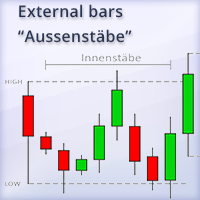
    This indicator shows external bars ("Aussenstäbe") in the chart in candle form. The colors of the candles can be set individually. Also different colors for bearish and bullish bars are possible. In addition, the color of the wicks or outlines is also adjustable. Outside bars are mentioned e.g. by Michael Voigt in the book "Das große Buch der Markttechnik". All other candles are inner bars.
    PivotMT5
    Iketut Sudiasa
    This EA is designed to calculate and draw Pivot Point, Support and Resistance for your selected time frame on the chart. Works on all currency pair and on any time frames available on MT5. To make sure the EA works, you need to select the pivot time frame as well as the candle shift that you want to calculate the pivot. 0 = Current candle on chart 1 = Previous 1 candle on the chart
    Divergent Stochastic Filter II Catch Reversals Early, Filter Noise, Trade with Confidence The Edge: Why This Stochastic is Different  Every trader knows the Stochastic oscillator. But knowing when to trust its signals, that's the real challenge. The Divergent Stochastic Filter II transforms this classic indicator into a precision reversal detection system by adding critical elements: divergence intelligence, signal filtering and exhaustion detection.  While standard Stochastic oscillators fire s
    Set TP & SL by Price – Auto Order Modifier for MT5 Automatically set precise TP and SL price levels on any trade ️ Works with all pairs and EAs, filter by symbol or magic number This Expert Advisor lets you define and apply exact Take Profit (TP) and Stop Loss (SL) levels to your trades using direct price values (e.g., 1.12345 on EURUSD). No points, no pips. Just clean, accurate trade management across all orders or filtered by chart or magic number. Key Features: Instantly modify T
    CosmiCLab SMC FIBO CosmiCLab SMC FIBO is a professional trading indicator designed for traders who use Smart Money Concepts (SMC), market structure analysis and Fibonacci retracement levels. The indicator automatically detects market swings and builds Fibonacci levels based on the latest impulse movement. It also identifies market structure changes such as BOS (Break of Structure) and CHOCH (Change of Character), helping traders understand the current market direction. CosmiCLab SMC FIBO also pr
    Launch Pad GOLD Indicator v1.7 Launch Pad GOLD Indicator is a multi-timeframe technical analysis tool for MetaTrader 5. The indicator uses EMA-based market structure analysis together with momentum monitoring, trend alignment tools, and configurable filtering functions. The system is designed to assist with chart analysis across multiple timeframes. Features EMA Trend Analysis The indicator uses EMA calculations to display trend structure and directional movement. Functions include: Buy and sel
    Smart Hedge MT5
    Francesco Baldi
    Worried about weekend price crashes wiping your account? Tired of adverse news releases stopping your positions? Trade with peace of mind with Smart Hedge. Smart Hedge protects your positions from weekend gaps and news spikes. MT4 version: https://www.mql5.com/en/market/product/113290 Description : Have you ever feared that some breaking news during the weekend could wipe your account? Did you ever have your positions stopped by an adverse news release during the market open hours? I did, and
    Auto Stop Loss MT5
    Nabil Oukhouma
    5 (1)
    The "Set & Forget" Risk Manager for Multi-Asset Trading Never Leave a Trade Unprotected. Auto Stop Loss (MT5 Manager) is the ultimate background utility for traders who prioritize safety. Unlike standard panels, this tool works tirelessly behind the scenes to instantly secure every trade you place. Whether you open trades manually or via another EA, this manager ensures every position has a hard Stop Loss, Take Profit, and dynamic Trailing Stop attached immediately. The Game Changer:  Manage yo
    PROMETHEUS TECHNICAN VERSION Free | By THE SONS A gift from The Sons — no strings, no trial, no expiry. Every trader deserves access to professional-grade market intelligence. That belief is why Prometheus Technical Version exists, and why it costs nothing. Consider it our handshake to the trading community. What You're Getting This is not a simplified tool dressed up as a gift. Prometheus Technican Version is a fully built, institutional-quality technical analysis indicator running a dual-model
    FREE
    Buyers of this product also purchase
    Trade Assistant MT5
    Evgeniy Kravchenko
    4.42 (212)
    It helps to calculate the risk per trade, the easy installation of a new order, order management with partial closing functions, trailing stop of 7 types and other useful functions. Additional materials and instructions Installation instructions - Application instructions - Trial version of the application for a demo account Line function -   shows on the chart the Opening line, Stop Loss, Take Profit. With this function it is easy to set a new order and see its additional characteristics bef
    Forex Trade Manager MT5
    InvestSoft
    4.98 (661)
    Welcome to Trade Manager MT5 - the ultimate risk management tool designed to make trading more intuitive, precise, and efficient. This is not just an order placement tool; it's a comprehensive solution for seamless trade planning, position management, and enhanced control over risk. Whether you're a beginner taking your first steps, an advanced trader, or a scalper needing rapid executions, Trade Manager MT5 adapts to your needs, offering flexibility across all markets, from forex and indices t
    Local Trade Copier EA MT5
    Juvenille Emperor Limited
    4.96 (140)
    Experience exceptionally fast trade copying with the   Local Trade Copier EA MT5 . With its easy 1-minute setup, this trade copier allows you to copy trades between multiple MetaTrader terminals on the same Windows computer or Windows VPS with lightning-fast copying speeds of under 0.5 seconds. Whether you're a beginner or a professional trader, the   Local Trade Copier EA MT5   offers a wide range of options to customize it to your specific needs. It's the ultimate solution for anyone looking t
    Beta Release The Telegram to MT5 Signal Trader is nearly at the official alpha release. Some features are still under development and you may encounter minor bugs. If you experience issues, please report them, your feedback helps improve the software for everyone. Telegram to MT5 Signal Trader is a powerful tool that automatically copies trading signals from Telegram channels or groups directly to your MetaTrader 5 account. It supports both public and private Telegram channels, and you can conn
    TradePanel MT5
    Alfiya Fazylova
    4.87 (156)
    Trade Panel is a multi-functional trading assistant. The app contains over 50 trading functions for manual trading and allows you to automate most trading tasks. Before making a purchase, you can test the demo version on a demo account. Download the trial version of the application for a demonstration account: https://www.mql5.com/en/blogs/post/750865 . Full instructions here . Trade. Allows you to perform trading operations in one click: Open pending orders and positions with automatic risk cal
    AI Agents Supervisor
    Ho Tuan Thang
    5 (1)
    AI Agent Supervisor is NOT an Expert Advisor. AI Agent Supervisor   is a   multi-agent AI risk & portfolio supervisor   that watches every EA on your account and intervenes in real time.  WANT AN AI PORTFOLIO MANAGER WATCHING YOUR FLEET 24/7?   Run your fleet on the same brokers I do:   IC MARKETS , IC TRADING   .  Unlike the centralized stock market, Forex has no single, unified price feed.  Every broker sources liquidity from different providers, creating unique data streams. The Supervisor r
    Quant AI Agents
    Ho Tuan Thang
    5 (1)
    Quant AI Agents are independent trading Expert Advisors. Instead of trading using a fixed strategy like other conventional EAs, Quant AI Agents   is a   multi-agent AI trading framework   that turns natural-language strategy prompts into live.  WANT THE SAME RESULTS AS MY LIVE SIGNAL?   Use the exact same brokers I do:   IC MARKETS , IC TRADING   .  Unlike the centralized stock market, Forex has no single, unified price feed.  Every broker sources liquidity from different providers, creating un
    FarmedHedge Pair Trading Dashboard
    Tanapisit Tepawarapruek
    5 (3)
    Farmed Hedge Yield Farming | All Markets (Manual - Hybrid - Semi/Automated EA) MULTI-ASSET SUPPORT Trade any asset available on your broker - Forex: Major, Minor, Exotic pairs - Crypto: BTC, ETH, XRP, SOL, BNB - Stocks: Apple, Tesla, Amazon, Google, etc. - Commodities: Gold, Silver, Oil, Gas - Indices: US30, NAS100, SPX500, DAX40 - Any CFD your broker offers VERIFIED TRADING RESULTS - Farmed Hedge Yield Axi Copy:  https://www.mql5.com/en/signals/2356376 - Farmed Hedge Yield Exn Copy:   https:/
    Trade Dashboard MT5
    Fatemeh Ameri
    4.95 (129)
    Trade Dashboard simplifies how you open, manage, and control your trades, with built-in lot size calculation. It allows you to execute trades, manage risk, and control positions directly on the chart, with tools such as partial close, breakeven, and trailing stop. Designed to reduce manual work and help you stay focused on your trading decisions. A demo version is available for testing. Detailed explanations of features are provided within the MQL5 platform. Installation instructions are include
    Power Candles Strategy Scanner - Self-Optimizing Multi-Symbol Setup Finder Power Candles Strategy Scanner runs the same self-optimizing engine that powers the Power Candles indicator - on every symbol in your Market Watch, side by side. One panel tells you which symbols are statistically tradable right now, which strategy wins on each, the optimal Stop Loss / Take Profit pair, and pings you the moment a fresh signal fires. This tool is part of the Stein Investments ecosystem - 18+ tools plus Max
    Exp COPYLOT CLIENT for MT5
    Vladislav Andruschenko
    3.91 (33)
    Professional Trade Copier for MetaTrader 5 Fast, professional, and reliable trade copier for MetaTrader . COPYLOT allows you to copy Forex trades between MT4 and MT5 terminals with support for Hedge and Netting accounts. COPYLOT MT5 version supports: - MT5 Hedge to MT5 Hedge - MT5 Hedge to MT5 Netting - MT5 Netting to MT5 Hedge - MT5 Netting to MT5 Netting - MT4 to MT5 Hedge - MT4 to MT5 Netting MT4 version Full Description +DEMO +PDF How To Buy How To Install How to get Log Files H
    Premium Trade Manager - Fast, Disciplined Trade Management for MetaTrader 5 Premium Trade Manager is for traders who want their focus on the decision while the panel runs the routine: sizing, placement, partials, trailing, news and prop-firm limits, handled the same disciplined way on every trade. It is a fast on-chart panel for MetaTrader 5 that takes the mechanical work out of every trade. You decide direction, symbol and timing; the panel sizes the position to your risk, places the order with
    The product will copy all telegram signal to MT5 ( which you are member) , also it can work as remote copier.  Easy to set up, copy order instant, can work with almost signal formats, image signal,  s upport to translate other language to English Work with all type of channel or group, even channel have "Restrict Saving Content", work with  multi channel, multi MT5 Work as remote copier: with signal have ticket number, it will copy exactly via ticket number. Support to backtest signal. How to s
    AntiOverfit PRO MT5
    Enrique Enguix
    5 (6)
    Before you buy an EA, check whether it really holds up or just got lucky in a backtest. Most robots are sold with a beautiful backtest. Rising equity curve. Good profit factor. Very few doubts. And yet, many of those EAs fall apart as soon as the market stops moving the way it did in that historical run. Why? Because a backtest only proves one thing: that the strategy worked on one specific price path. It does not prove it will hold up under different paths. It does not prove it is robust. And i
    ================================================================================ POC BREAKOUT - V20.72. Full Professional Grade Toolkit ================================================================================ POC Breakout is a full MetaTrader 5 trading dashboard for discretionary traders who want breakout signals, Point of Control (POC) context, volume profiles, order flow, market structure, news, alerts, and advanced trade planning in one professional workspace. Attached directly to you
    Timeless Charts
    Samuel Manoel De Souza
    5 (6)
    Timeless Charts is an all-in-one trading utility for professional traders. It combines custom chart types such as Seconds Charts and Renko with advanced order flow analysis using Footprints , Clusters , Volume Profiles , VWAP studies, and anchored analysis tools for deeper market insight. Trading and position management are handled directly from the chart through an integrated trade management panel , while Market Replay and Virtual Accounts provide environments for practicing trading skills and
    Trade copier MT5
    Alfiya Fazylova
    4.56 (45)
    Trade Copier is a professional utility designed to copy and synchronize trades between trading accounts. Copying occurs from the account / terminal of the supplier to the account / terminal of the recipient, which are installed on the same computer or VPS . PROMOTION - If you have already purchased the "Trade Copier MT5," you can receive the "Trade Copier MT4" for free (for copying MT4 > MT5 and MT4 < MT5). For more detailed information about the conditions, please contact us via private message
    The News Filter MT5
    Leolouiski Gan
    4.78 (23)
    This product filters   all expert advisors and manual charts   during news time.  It is able to remove any of your EA during news and automatically reattach them after news ends. This product also comes with a complete  order management system   that can handle your open positions and pending orders before the release of any news. Once you purchase   The News Filter , you will no longer need to rely on built-in news filters for future expert advisors, as this product can filter them all from her
    Footprint Chart Pro — Professional OrderFlow EA for MetaTrader 5 Version 6.34 | Professional tool for real traders | Institutional-Grade Visualization DEMO USERS - PLEASE SELECT EVERY TICK / REAL TICK WHEN TESTING AND YOU HAVE DOWNLOADED HISTORICAL DATA. IF YOU SEE A WAITING SCREEN AND IT IS NOT DOWNLOADING, IT MEANS YOU HAVE LOW HISTORICAL DATA. TRY 1 MIN AND 5 MIN FIRST ON 1 DAY DATA. ONE DAY DATA SHOULD BE THE NEWEST AND MOST CURRENT DATE. PLEASE WAIT UNTIL THE MARKET HAS ROLLED OVER PERIOD.
    Prop Firm Os
    Gayathiri Gopalakrishnan
    5 (1)
    PROP FIRM OS Structured Trading Assistant for MetaTrader 5 PROP FIRM OS is a structured trading assistant designed for MetaTrader 5 users who prefer rule-based market analysis and organized trading workflows. The Expert Advisor combines market analysis tools, scanner functions, dashboard monitoring, alerts, risk-control settings, and trade management features inside one system. PROP FIRM OS is designed to help traders follow selected rules, filters, and monitoring conditions during trading activ
    Working Demo Download Copy Cat More Trade Copier MT5 is a local trade copier and a complete risk management and execution framework designed for today’s trading challenges. From prop firm challenges to personal portfolio management, it adapts to every situation with a blend of robust execution, capital protection, flexible configuration, and advanced trade handling. The copier works in both Master (sender) and Slave (receiver) modes, with real-time synchronization of market and pending orders,
    RiskGuard Management
    MONTORIO MICHELE
    5 (22)
    ATTENTION For a free trial version, visit my website. Manual QUANTUM RiskGuard Management — Your ultimate ally for uncompromising trading. Lot Calculator — Automatic lot size calculation. Quantum — Automatic risk to maximize profits and reduce drawdowns. Automatic Journal — Included and freely downloadable from my website. Automatic Screenshot — Two screenshots: one at entry and one at exit. Partial Profit — Smartly managed partial exits. Smartphone Trading — Place orders from your mobile, mana
    Entry In The Zone with SMC Multi Timeframe is a real-time 2-in-1 market analysis tool that combines market structure analysis and a No Repaint BUY / SELL signal system into a single indicator, built on Smart Money Concepts (SMC) — a widely adopted framework used by professional traders to understand market structure. This indicator helps you see the market more clearly, make decisions based on structure rather than guesswork, and focus on high-probability zones where price is more likely to reac
    YuClusters
    Yury Kulikov
    4.93 (42)
    Attention: You can view the program operation in the free version  YuClusters DEMO .  YuClusters is a professional market analysis system. The trader has unique opportunities to analyze the flow of orders, trade volumes, price movements using various charts, profiles, indicators, and graphical objects. YuClusters operates on data based on Time&Sales or ticks information, depending on what is available in the quotes of a financial instrument. YuClusters allows you to build graphs by combining da
    Signal TradingView to MT5 Pro  Instant professional execution between TradingView and MetaTrader 5 Automate your trading strategy with the most robust communication bridge between TradingView alerts and real execution in MT5. Designed for traders who demand speed, flexibility, and impeccable risk management, this Expert Advisor transforms any alert message into a precise market or limit order.   Install and TEST the TRIAL version HERE STRENGTHS AND ADVANTAGES Universal Parsing Engine (Propriet
    HINN MagicEntry Extra
    ALGOFLOW OÜ
    4.73 (15)
    HINN MAGIC ENTRY – the ultimate tool for entry and position management! Place orders by selecting a level directly on the chart! full description   ::  demo-version  :: 60-sec-video-description Key features: - Market, limit, and pending orders - Automatic lot size calculation - Automatic spread and commission accounting - Unlimited partitial take-profits  - Breakeven and trailing stop-loss and take-profit  functions - Invalidation leves - Intuitive, adaptive, and customizable interface - Works
    Touch of MIDAS
    Carl Gustav Johan Ekstrom
    5 (1)
    Automated MIDAS Trading for MT5 Touch of MIDAS  combines automatic level detection, one-click curve arming, and a full prop-firm protection layer into one seamless workflow. The EA draws institutional-grade MIDAS curves on every chart, watches the levels you select across every symbol and timeframe, and fires trades the moment price reaches them — with the stop-loss attached, the lot size calculated, and fifteen safety checks already cleared. Built for prop firm traders and serious retail trader
    Trade Manager DaneTrades
    Levi Dane Benjamin
    4.28 (29)
    DaneTrades Trade Manager is a professional trade panel for MetaTrader 5, designed for fast, accurate execution with built‑in risk control. Place market or pending orders directly from the chart while the panel automatically calculates position size from your chosen risk, helping you stay consistent and avoid emotional decision‑making. The Trade Manager is built for manual traders who want structure: clear risk/reward planning, automation for repeatable management, and safeguards that help reduc
    PZ Trade Pad Pro MT5
    PZ TRADING SLU
    1 (1)
    Effortlessly calculate lot sizes and manage trades to save time and avoid costly errors The Trade Pad Pro EA is a tool for the Metatrader Platform that aims to help traders manage their trades more efficiently and effectively. It has a user-friendly visual interface that allows users to easily place and manage an unlimited number of trades, helping to avoid human errors and enhance their trading activity. [ Installation Guide | Update Guide | Troubleshooting | FAQ | All Products ] One of the k
    EA Portfolio Analyzer
    Jimmy Peter Eriksson
    4 (1)
    Installation Guide:  Click Here! Analyze Multiple Expert Advisors Together Compare EA Results By Magic Number Track Profitability And Drawdowns Filter Results By Date Range Visual Equity Curve And Detailed Metrics Ready To Use In Under One Minute EA Portfolio Analyzer EA Portfolio Analyzer is a professional analytics tool designed to monitor the live performance of multiple Expert Advisors in a clear and structured way. When running several EAs on the same account, it can be difficult to unders
    More from author
    EA Close All Set TPSL All  Panel EA Close All Set TPSL All MT5 is a professional utility tool for MetaTrader 5 that helps traders manage orders quickly and efficiently. With a clean on-chart control panel, you can close trades or set Take Profit / Stop Loss levels for all orders with just one click.       [MT4 Version --->  click . ] Key Features On-Chart Control Panel   – Light gray background with simple and intuitive design. Close All Orders   – Instantly close all active Buy, Sell, and
    FREE
    EA Close All Set TPSL All  Panel MT4 EA Close All Set TPSL All MT4 is a professional utility tool for MetaTrader 4 that helps traders manage orders quickly and efficiently. With a clean on-chart control panel, you can close trades or set Take Profit / Stop Loss levels for all orders with just one click.       [MT5 Version --->  click . ] Key Features On-Chart Control Panel – Light gray background with simple and intuitive design. Close All Orders – Instantly close all active Buy, Sell, and Pe
    FREE
    MA Gold Happy
    Thannawut Khankhat
    MA Gold Happy – Automated Gold Trading EA (XAUUSD M30) MA Gold Happy is an Expert Advisor (EA) designed for trading gold (XAUUSD) on the M30 timeframe . It captures short-to-medium term trends using a 3 EMA system  combined with Fixed SL/TP and Trailing Stop for high winrate and easy risk management. This EA is suitable for both professional traders and beginners who want fully automated trading on MT4 without constant monitoring. - Download set file , [ Click ] Trading System 3 EMA Setup:
    Telegram Alert With Emoji Description and User Manual EA Description Purpose:The Telegram Alert With Emoji sends real-time trading notifications to a Telegram chat or group for all trading activities in MT4, including new Positions (BUY/SELL), Pending Orders (BUY LIMIT, SELL LIMIT, BUY STOP, SELL STOP), Stop Loss/Take Profit (SL/TP) triggers, and closed Positions with profit/loss details. It includes a Rainbow Display on the chart and uses Global Variables to prevent duplicate notifications. [
    Fund Trading Ultimate
    Thannawut Khankhat
    Fund Trading Ultimate MT5 - Expert Advisor Elevate your trading experience with Fund Trading Ultimate MT5 ! A powerful Expert Advisor designed for traders of all levels Optimized for MetaTrader 5 , combining efficient strategies with robust risk management Usage Details Main Currency Pair : EUR/USD or USD/JPY ️ Timeframe : M15 Starting Lot Size : 0.01 (for $200 capital) | 0.05 (for $1,000 capital) Prop Firm Compatible : Proven performance on Prop Firm accounts Recommende
    Filter:
    No reviews
    Reply to review