 MetaTrader 5
 Experts
 Indicators
 Libraries
 Utilities
 Widgets
 Rules
Rules
Watch the Market tutorial videos on YouTube
How to buy а trading robot or an indicator
Run your EA on
virtual hosting
virtual hosting
Test аn indicator/trading robot before buying
Want to earn in the Market?
How to present a product for a sell-through
Free Expert Advisors and Indicators for MetaTrader 4 - 65
 Trading robots perform market transactions automatically, while indicators allow you to better analyze quotes and predict the price behavior.
With these applications, you will be able to perform deals in MetaTrader 4 in a more informed manner, while capturing more opportunities.
Trading robots perform market transactions automatically, while indicators allow you to better analyze quotes and predict the price behavior.
With these applications, you will be able to perform deals in MetaTrader 4 in a more informed manner, while capturing more opportunities. 
IntradayMagic прогнозирует характер ATR и тиковых объёмов на 1 сутки вперёд. Индикатор не перерисовывается и не отстаёт. Используя Intraday Magic вы можете значительно повысить качество торговли и избежать излишних рисков. По его показаниям можно детектировать кризисные состояния рынка и моменты разворота тренда, уточнять моменты и направления входов. Это бесплатная ознакомительная версия ограничена символами (парами) включающими GBP. Никаких иных ограничений нет. Для других пар вы можете исполь
FREE

The utility is designed to close and delete positions when the specified loss/profit values are reached in the currency/percentage of the Deposit. The chart displays a panel with information: profit/loss on the account, the number of open positions, and total positions in lots. Parameters: SHOW THE DASHBOARD - TRUE - Yes, FALSE - No. CURRENCY PAIRS - TRUE - All, FALSE-Current. STOP PROFIT IN $ OF THE DEPOSIT - Profit value in the Deposit currency. STOP LOSS IN $ OF THE DEPOSIT - Loss value in
FREE

Советник Time Line Auto Close (TLAC) позволит вам создавать вертикальные линии (Time Lines, линии времени), которые будут автоматически закрывать все или некоторые из ваших открытых ордеров. Вы можете создавать и управлять несколькими линиями, настроить для каждой из них закрываемые ордера и оповещения. Ордера можно фильтровать по валюте, магическому номеру, номеру ордера и типу ордера. Также можно настроить отправку уведомлений перед активацией линий.
Как она работает? С помощью TLAC вы сможет
FREE
This indicator is a tool to show history orders on chart. Indicator show open time and price, close time and price and profit in pips on chart. It can to help the trader to see all history orders which are opened either manually or by an automated system.
You can to use indicator on any symbol and any time frame.
You can to get the source code from here .
Parameters
Delete Objects If Terminated Indicator - Delete objects of chart if terminate indicator. Size Fonts Of Info On Chart - Size of
FREE
The VR Orders History script is designed to upload a trade report to a csv file. This format is intended for additional analysis of trading history in programs such as EXCEL, Openoffice, and Libreoffice. Thanks to the script, it is now much easier for a trader to analyze their trading history. The program facilitates the analysis of the trading history for the MetaTrader 5 terminal. The trader sees structured trading. The entire report is based on the following principle: Position > Order on the
FREE

This is a Demo version of PipsFactoryInd it is works only NZD/USD but full version is works on all currency pair.
This indicator is a collection of three indicators, it is 3 in 1: PipsFactoryDaily Click Here PipsFactoryWeekly Click Here PipsFactoryMonthly Click Here
This indicator depends on High and Low price of currency in the (Last day / Last week / Last Month) depends on user input, and then I made some secret equations to draw 10 lines.
Features:
You will know what exactly price you shoul
FREE

The utility displays information about performed trades on the current chart. The account history as well as a separate file can be used as a data source. The file format is set manually or selected from available templates.
Settings: Source - where to take data from, from_History - account history, from_File - csv file. File Name - file name. The file has to be located at ..\MQL4\Files\ directory of the terminal. File Format - select the file format from the list: MQ_Signals - file of trades f
FREE

Laboratory.Money EUR/CAD M30 Автоматическая Торговая Система из серии Energy Drive EUR/CAD M30 Вся активность эксперта проявляется только на реальной торговле. Его нет толку проверять в тестере стратегий. Запрещается бонус от брокера к вашему депозиту. Эксперт торгует с теми деньгами которые могут уйти в просадок, бонус в просадке не участвует, это приведёт к потере всего вашего депозита. Данный эксперт очень подходит для программы "Rebate" от вашего брокера. Все изменения в на
FREE

Saved your Account Margin for multiple Trades Trading Robot Closing all second open Trades automatic Closing Trades that reached max. Lot Trading Robot built to avoid:
-Stop multiple Trades -Save overtrading -Hold Strategy -max. Lot -Prop conform
-long Account holding -Prop Firm Account holder - Robot allow one Trade per Symbol -Stop loosing by click multiple Times Trade Button -Robot needs to be Set on every Symbol that will be saved - no Settings configure OneRule OneFunktion Set on Chart
FREE

What is a tool ? Used for monitoring profit by magic number, From parameter magic number and profit target. The tool will automatically close orders to the same magic number. When your profits meet the target set. How to use Place the tool on any pair any timeframe and set input your parameter. Pair : Any Timeframe : Any Input Parameter Magic Number (0 for manual order) Meaning : Input your magic number here, Set 0 for manual order. Summary profit of this magic number ($) Meaning :
FREE
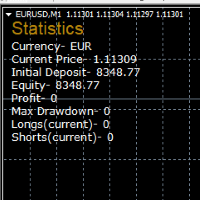
STATISTICS OSD
Statistics OSD (On Screen Display) Is very Helpful and easy to use. Download Today! ENJOY! :) On Screen Display -Currency -Current Price -Initial Deposit -Equity -Profit -Max Drawdown -Longs(Current) -Shorts(Current)
*Very useful in configuring EA's or Strategies, because you can visually see when its having a lot of shorts or longs. Then you can go back and tweak accordingly.
FREE

This is an Expert Adviser use for manual trading as a background EA or combine with external EA to open orders. Loss Recovery Trading is one of your options to handle the lose positions instead of using stop loss by setting a zone recovery area and target to exit the turn rounds sequence.
How It Work? If the market goes against your first positions direction at the specific of losing points, the EA will open an opposite direction position with calculated larger lot size and also keep the first
FREE

Tele Notify can help you send notifications for opened & closed trades to a Telegram channel or your personal Telegram. (see Master Notify for more options of notifications: price, equity, profit, etc. Get more EAs here ) Update: Now you can check your account info anytime from your Telegram by simple command: /check. This option is only valid when you use your Telegram User ID on EA inputs
******************************************************************************************** HOW TO SET U
FREE

You can use comercial or free AG version.
In comercial version you can trade all 28 pairs in your basket.
For free version for testing you can trade only 7 pairs for free
In version 1.20 change the indicator from CCFp to CSS -CurrencySlopeStrength
In algorithm release the construction of Baskets Differencial - 4 baskets
Signal algoritm AG for 28 pairs you can rent in mql5 shop
https://www.mql5.com/ru/market/product/94278
Signal algoritm AG for 7 pairs FREE version you can upload free
htt
FREE

Elevate your trading with this Breakeven and Trailing Stop Manager, an Expert Advisor (EA) built for MetaTrader 4 to streamline risk management by automating breakeven and trailing stop strategies. This EA helps secure profits and minimize losses without requiring constant manual intervention, giving you more time to focus on market analysis and strategy.
### Key Features:
- **Automatic Breakeven Adjustment:** Automatically move the Stop Loss to the breakeven level once your position reac
FREE
BOSSTESTER (Binary Option Super System Tester) indicator is a simple tester for BOSS binary options trading system. Its objective is constructing a balance line on history data during CALL and PUT transactions performed by BOSS trading system. The tester requires at least 50 bars in history.
Inputs Initial Balance - initial balance. Investment Rate - investment rate. Losses Cover Ratio - loss coverage ratio. Payout - payout in %. Loss - loss in %. Trading Style - trading style: Super_Conservati
FREE

Discover our all-in-one monitoring and notifications EA for MetaTrader. Designed to ensure traders’ security and peace of mind, this unique EA offers a full range of advanced features that will allow you to stay informed and control your account activity, anytime and anywhere. Key Features : Continuous server monitoring: real-time notification on server availability and performance (Cpu, Ram, disk), connectivity, latency and more Advanced account management: live tracking of margin calls,
FREE

This is a Bot which send notifications every hour at your MT4 platform. The notification consists of four part. <<Clock>> + Your Message + Symbols + profit + Total # of Orders + Total profit Here is an example : 21:00 Hodor: #US30 $+40.31 GOLD $-5.31 Total 5 Orders $+35.00 If there is no order : 21:00 Hodor: HODOR signals: https://www.mql5.com/en/signals/977796
There is a private message parameter where you can enter your own message also. Hodor_Comment_OnOff_Flag removes the "Hodor i
FREE

The indicator displays the current server time and the time until the current bar closes on the chart. The information can be very useful at the moments of news release, when traders are waiting for the candle to close, to start a trading session. The font size and color can be adjusted to your chart template. Settings:
Text color - the color of the display text Text size - the size of the display text Add me as a friend so as not to miss updates and releases of new robots -> Dmitrii Korchagi
FREE

JVH Protection – Universal Prop Firm Risk Manager (MT4) Broker-Time Reset | Daily Max Loss | Overall Drawdown | Trailing Lock | Full Account Guard JVH Protection is a professional-grade equity protection system designed for serious traders using prop firms, automated strategies, or high-risk environments. This tool acts as a real-time risk firewall for your entire trading account. Key Features Full Account Protection Monitors all symbols Covers all magic numbers Works with manual trading
FREE

EA Name: MultiTrade+ButtonEA Function: This EA only works on the MetaTrader4 platform, and its features are:
- Open orders in both buy and sell automatically using the Buy and Sell buttons.
- Close all open orders with the CloseAll Button.
- Decide the number of orders to open and the size of the lot through the input section in the EA settings.
- Automatically set the TakeProfit at the first order of 10 pips, and the following orders will have the TakeProfits at a distance of 10 pips from
FREE

Msg2Line sends free text and captures from a text box to "LINE Messenger".
If you write lines, marks or comments on the graph, the image will be sent.
You can address it to yourself or to a group.
A very useful and simple tool.
- Sending Free Messages
1. enter free text in the EDIT box.
2. Press the SEND button.
- Sending a free message + image capture
1. enter text in the EDIT box. 2.
2. press the w/img button.
- Sending a Captured Image
1. simply press the w/IMG button.
*Requires LINE
FREE

In order to make it easier for novice traders to understand, I made a trading platform account information panel, which does not charge any fees. First of all, you must understand the platform before trading. The quotations and commodity specifications of each platform are not the same as the account trading rules. You can adjust the color and size of the panel, and if you try to press, the panel may move. The panel will not place an order, load EXPERTS with confidence If I upgrade a free produ
FREE

This script is designed to evaluate weights in various window functions. An indicator built on these window functions can be downloaded at https://www.mql5.com/ru/market/product/72160 Input parameters: iPeriod – indicator period. iPeriod >= 2 iCenter is the index of the reference where the center of the window function will be located. By default, this parameter is 0 - the center of the window coincides with the center of the indicator. With 1 <= iCenter <= iPeriod, the center of the window fun
FREE

Titan Smart Layer Assistant Powerful Trading Assistant for Professional Trade Management Most trading robots try to replace the trader . Titan Smart Layer Assistant does the opposite. It is designed to empower traders , not replace them. Built for the MetaTrader 4 platform, Titan acts as a professional trading assistant that helps traders manage positions with precision, discipline, and structured execution. Instead of blindly opening trades, Titan focuses on what matters most: intelligent trade
FREE

Simple script to analyze posibility of profit for whole market all Symbols. You can specify minimum and maximum profit in percent and number of steps for each period. Script will found most interesting symbols depend on your configuration. You will get a quick and current analyze of whole market which can help you to make right choice of trades, you never miss oportunity again.
FREE

The script opens 5 sell orders with 1 stop loss and 5 different take profits. And places 4 limit orders (sell). The following parameters are set by default: Stop loss for all open orders - 120 pips Take profit for 1 order (lot 0.1) - 30 pips take profit for other 4 orders (lot 0.04) - 50, 90, 140, 200 pips.
Stop loss for limit orders is 135-140 pips from the current price (at the time of placing orders). The distance of each limit order is 20 pips. Lot size with micro-martingale - 0.04, 0.05,
FREE

The indicator shows the maximum and minimum number of lots, as well as the size of the symbol spread. This information is needed to make a quick market entry decision based on the deposit maximum. The calculation considers free funds and funds sufficient for opening one lot. Such situations are common when you participate in various forex contests or trade in the market using your funds to the maximum, as well as during periods of increased or decreased volatility. The indicator provides the nec
FREE

OvertradeShield – Utility EA to Prevent Overtrading in Discretionary Trading Have you ever regretted making “just one more” trade in discretionary trading? OvertradeShield is a utility-type EA that automatically limits and alerts entries based on realized profit and loss, supporting your trading rules and mental discipline. It is ideal for traders who want to keep daily profits and losses in mind, prevent overtrading, and enforce profit and loss rules systematically. Since entries are discretion
FREE

Please note this is a Free version and will only work on EURUSD pair. If you like this product please buy the full EA (FXA Local Trade Copier Pro). FXA LTC is a trade copier for MT4 terminal. This is a fantastic tool for coping trades from one MT4 terminal to many others running on the same PC/VPS. It is extremely easy to setup with minimal settings you can be coping trades in minutes. FXA LTC also caters for Brokers that use different symbol names. FXA LTC will copy trades in 0.5 seconds or le
FREE

Price Alert EA for MT4 – Customizable Alert System with Intuitive Chart Interface The CFN Price Alerts EA is a powerful yet easy-to-use Expert Advisor designed for traders who want full control over price level alerts directly from their MT4 charts. No need to manually set alerts through MT4’s native system – this EA gives you an on-chart interface to quickly set, view, and remove price alerts with flexibility. Key Features: Set unlimited price alerts directly on your chart. Visual display
FREE

This script is designed so that the trader can determine the average duration of trade transactions, at which the ratio of possible profits and losses will be optimal. First, let's look at the general approach to determining the optimal duration of trade transactions. We introduce the following variables: R - the result of the transaction; T - the time during which the transaction was open; W - the time between the closing of the previous transaction and the opening of the next one. Every tr
FREE

Binary Options Receiver Free is a free tool to copy binary options trades from other traders at different locations over internet, who use Remote Binary Options Copier to send. To start copying via this tool, provider must add a free license in his list first. That means you can use this free tool to copy binary options trades from a provider, who authorized you to do so and issued a free license. Reference : If you need both sending and receiving features, please check Remote Binary Options Cop
FREE

Please visit = https://www.mql5.com/en/market/product/186079 for slave EA
MT5 Version = https://www.mql5.com/en/market/product/186048 Free Demo Version = https://c.mql5.com/6/1028/COPYTRADE_BIN7D.zip User Manual : download here Best EA Trade Copier for MT4. EA Trade Copier is a powerful and reliable trade copying solution that transfers trades from one Master account to multiple Slave accounts in real time. Whether you manage multiple trading accounts, investor accounts, VPS terminals, or p
FREE

This is the Free version of the product: https://www.mql5.com/en/market/product/19928 Free version limitations: Only EURUSD trades are copied. Trade Copier Global: The name speaks for itself. This copier allows you to copy orders between MT4 terminals even if they are not installed on the same computer.
Features Copying trades between MT4 terminals around the world with a short delay. Automatically recognizes symbol prefixes. Can connect many Slaves to the same Master. Supports pending and mark
FREE

Hello everyone, this is another utility that I wrote specifically for users using my profile with a large number of experts and sets ( https://www.mql5.com/en/blogs/post/750723 ) . This utility is useful for working with a profile using grid strategies (averaging and martingale). As we know, such strategies periodically fall into a large drawdown and you need to be careful when opening averaging positions (do not open too many). In my profile, I use a limit of 3 positions for each EA, if this w
FREE

EXTERNAL EA MANAGER is a programme designed to help manage trading.
If you want any EAs to stop trading at a certain point (for example on FRIDAY in the evening) and you would like to do it remotely and automatically...
EXTERNAL EA MANAGER is a programme for you.
It will deinitialize the whole MT4 terminal and all EAs running.
During deinitializiation process there is an option to kill all trades. It means all opened trades as well as all pending orders will be terminated. You can use a maximum
FREE

RiskMaster Unified Panel (MT4) — On-Chart Risk & Execution This free light version is functionally limited with a maximum risk of 20 account-currency units per trade, a maximum lot size of 0.05, and a limited number of trading operations. Instant Lot Size from Stop Loss — across any symbol. RiskMaster Unified Panel solves the #1 problem in fast discretionary trading: accurate position sizing in seconds. Drag your Entry / SL / TP lines on the chart → the panel recalculates Target vs Actual risk
FREE
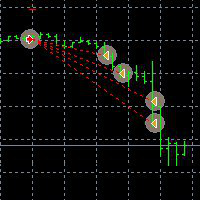
This Demo Version will only work with CHFJPY
For the full version :
For English go here: https://www.mql5.com/en/market/product/41117
For Spanish go here: https://www.mql5.com/en/market/product/41141
This EA does partial close to your positions every certain pips, and can move your Stop Loss to Break Even (Open Proce + 1 pip) when one of the partial close is made. The EA handles all trades of the chart symbol. It can be used with any pair or instrument on MT4. This EA will remember the sta
FREE

This Expert Advisor sends an email notification, generates an alert or outputs a message to the journal (depending on the settings) every time a new order is opened (buy, sell, limit, stop). It also sends a similar message about closure of orders. The EA can be useful for those who want to always be informed of which orders had been opened/closed on the account. Limitations: In this demo version, notifications are available only for the GBPCHF currency pair. To use notifications on all currency
FREE

Overview The script displays information about the trade account: Account - account number and type (Real or Demo); Name - name of the account owner; Company - name of a company that provide the access to trading; Server - trade server name; Connection State - connection state; Trade Allowed - shows whether trading is allowed on the account at the moment; Balance - account balance; Equity - account equity; Credit - amount of credit; Profit - profit size; Free Margin - free margin on the account;
FREE

This Expert Advisor alerts users when the price crosses the chart lines. Horizontal and trend lines can be processed. Number of lines is not limited. Parameters prefix of signal line – prefix for the names of the objects (lines) processed by the indicator. If left empty, all horizontal and trend lines are processed. price Mode – bid or ask. timeout – crossing alert timeout. number of repeats – number of crossing alert repeats. number of comment lines – self-explanatory.
FREE

Are you an intraday trader or do you want to close your open positions at a certain time each day? Problems with the time zone? use our tools and after specifying the time we will close the order for you.
How to use it:
1) Just insert our tools into your chart.
2) Enable auto trading
3) Expert Options enter TIMECLOSE (time to close operations)
If you need more information, do not hesitate to contact us privately.
FREE

This indicator is a plug-in for Controladora Expert Adviser , which allows you to set a specific area, and the Controladora will open a buy or a sell, if the candle closes inside this area. To make it work in a chart with the Controladora installed, add the Act Inside indicator, then add a rectangle shape into the chart and re-size it to cover only the area where the close of a candle should be in order to send the buy or sell order. Rename the rectangle as AI and in it's description write buy,
FREE

"TradeALot" is a plug-in for the Expert Advisor Control-adora . It allow you to place programmed orders without the need to write the name of the order in the Arrow (like bs, ss, bl, sl, sl1, sl2, etc). Just drag and drop the button for "Programmed Buys" or "Programmed Sells" over the candles-zone at the place where you want to program the order and TradeALot will compare the bid price with the position where you dropped the button and will decide if the order need to be "Stop" or "Limit". With
FREE
This is a technical indicator that works as a plug-in for "Control adora" - the Expert Advisor that helps you to calculate, place and control positions on the chart. When run on a chart with Control adora EA, this plug-in allows setting entry levels that send orders at contact, while you have StopCloseOnly (OCO in Comments) = 1 settled in Control adora (meaning that without this, the indicator will send the order only when the price Close crosses the arrow level). This indicator only works if yo
FREE

This is a MetaTrader 4 script. It helps to summarize all trades into every symbol.
Input Select Period: This is 7-option input. It includes Last Month, This Month, Last Week, This Week, Today, All History, and Date Specified. Specify Starting Date: Enter a date if you selected Date Specified in "Select Period" input. Specify Ending Date: Enter a date if you selected Date Specified in "Select Period" input. The summary is saved into a file in MQL4\Files folder. Also, there is pop-up window for a
FREE
如果产品有任何问题或者您需要在此产品上添加功能,请联系我 Contact/message me if you encounter any issue using the product or need extra feature to add on the base version.
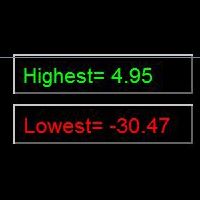
Indicator Floating Highest Lowest provides you an intuitive, and user-friendly method to monitor the floating highest (profit) and lowest (loss) that all your trades together ever arrive. For example, I opened 3 orders, which arrived at $4.71 floating profit when trade following trend. Later when the trend is against me, these 3 orders arrive $30 in loss
FREE

This script is to be used with the Market Patroller indicator as a constructor for a specialized list of symbols based in all the available symbols listed in your MT4's Market Watch window. You can reduce the list depending upon several considerations: List only some symbols that have some instrument, for example, if your broker have 5 EUR pairs (EURXXX or XXXEUR). Exclude some symbols, for example, if you do not want to trade today GBP related pairs, this will avoid any GBPXXX or XXXGBP symbol
FREE

The trade cost caused by spreads is an important indicator when formulating trade profit-loss ratios. Spread costs info is particularly important for short-term traders, especially scalping traders. This tool can output the spread cost of all Forex currencies (including XAU and XAG) in the platform in different account types (USD account, EUR account, etc.).
Calculation and code See articles: THE TRADE COST OF FOREX CURRENCY Part1 THE TRADE COST OF FOREX CURRENCY Part2 THE TRADE COST OF FOREX C
FREE
The Order Info Box utility is designed to conveniently control the orders placed. If there are orders, the utility builds graphical informers for each order, indicating
- the order type (position direction);
- the order volume;
- the profit (if the order is in the market);
- optionally the order magic;
- optionally the order comment.
In addition, the utility builds informers for TakeProfits and StopLosses of orders, indicating the profit or loss that will occur when this TakeProfit or StopLoss i
FREE

### Program Overview
**RemoteBatchClose EA** is an automated closing tool designed for forex traders, aimed at assisting users in managing open positions when they are away from their computers. By automatically monitoring specified pending order prices and currency pairs, this program can execute closing operations when conditions are met, thereby reducing the user's operational burden and ensuring effective implementation of trading strategies. Its primary purpose is to address the inconveni
FREE
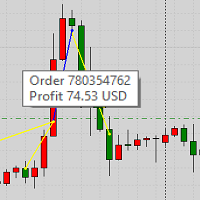
This product displays closed trades from history and current open trades on a chart. The product has many visual settings, as well as filtering settings for displayed transactions, which allows you to analyze the effectiveness of advisors and/or trading strategies. You can filter by comments or by the advisor's magic number. Without using this product, how else will you see your trading and understand its effectiveness?
FREE
Your trading life will be easier with the Forex Control Panel. This control panel, which has many features, is very easy and simple to use.
With this control panel, you will have 3 different ea features. You can learn how to use it from the special video I prepared for you.
You can buy this product, whose normal price is $125, at a much cheaper price than its current discounted price.
You can also try all its features in the strategy test.
A pdf file explaining its detailed features will be
FREE
This indicator is to be used in bot connectors for automation of Pct Multi indicator entries.
How to use: Configure the bot connector with the following information: Indicator name: pctmultibot Call buffer: 0 Put buffer: 1
Do not add this indicator to the chart, just configure it in the bot connector!
Pct Multi indicator:
https://www.mql5.com/en/market/product/73054
FREE

Informing the user about the size of the current spread.
A simple and convenient informant. You can place it anywhere on the chart (configurable in the input parameters).
Input parameters:
- text color
- text size
- text style
- binding to the corner of the graph
- horizontal offset from the anchor point
- vertical offset from the anchor point
- enabling (disabling) the "Show as background" function
Have a good trade to everyone!
FREE

Martingala Assistance, as its name says ... It is an assistant, an expert advisor that monitors all the orders for the asset in which it has been placed, no matter if that order was by some other expert advisor or by the trader placed on the Manually, he will start his work after each order that is negative.
See more products on: https://www.mql5.com/en/users/joaquinmetayer/seller .
FREE

Garfield Equity Loss Closer is an expert advisor who will stay in control of the equity / float of the account, when the negative float reaches the amount defined from the inputs, he will close all existing orders.
Only one input, it is the negative amount in the currency of your account that you must reach to start closing all positions.
Its use is recommended for those expert advisors who use a volume increase system, either hedging (recovery zone) or martingale since sometimes without real
FREE
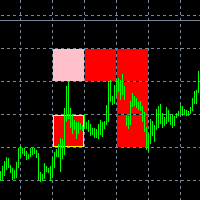
The new version of the game "Snake".
Added setting for the distance of the target (vertical + horizontal), which greatly enlivens the game.
The snake moves in the background, along the grid layout.
Control:
Ctrl - pause, W - up, A - left, S - down, D - right.
In the input parameters, you can set the time in milliseconds between movements.
The snake increases by one division upon reaching the goal, and so on, until it occupies the entire field.
The comment displays the size of the field a
FREE

The panel for the MT4 terminal is designed to help the trader quickly set pending orders for a breakout of the previous bar.
The utility calculates the order lot itself at the specified stop loss price and maximum loss percentage.
The panel also has a button for converting to breakeven. When you click, the stop loss of an open position is converted to the order opening price.
FREE

The ZZ Snake indicator is a small entertainment utility and does not have any benefit for trading. Made on the indicator ZigZag, so the parameters will be easy to figure out. If you set it on a graph, you can see a serpent monster that moves across the screen, changing the dimensions of the head and torso in movement. Just connect it to the schedule and let yourself crawling. Careful, he can bite! )
P.S. For a more dynamic movement of the snake, it is recommended to run it in the strategy teste
FREE

The script analyzes the history of quotes and gives recommendations on the minimum deposit. The calculations take into account the variability of prices and the standard deviation. Margin requirements for the instrument are also taken into account. The result of the script is the minimum recommended deposit for trading the given currency pair.
FREE

The Week7D indicator helps traders identify the day of the week on a price chart. It simply marks each period or each candle as the day of the week at the start of a new trading day. This allows traders to watch how prices move on any given day.
The Week7D indicator has several customization options that traders can use to change the visual representation of the indicator.
The variable "BarCount" changes the number of days during which the indicator will indicate the day of the week in each d
FREE

CloseProfit is a utility created to automate the process of setting a stop-loss and closing orders when a certain percentage of profit is reached.
The utility also has two Buy and Sell buttons on the chart for opening orders.
The utility can be used to close orders opened by other advisors, with a stop-loss or a percentage of the increase in the deposit. To do this, you need to set in the settings a magic number that matches the one that is installed in the advisor when opening a transaction.
FREE
This indicator collects and organizes spread data. It is an organic add-on to my news robot, ExpertNews , which can be downloaded here .
You can also watch a video about news trading using the ExpertNews robot. It is available on youtube .
Unfortunately, it is not possible to place the robot in the mql5.com store, because the automatic validation of ExpertNews by the mql5 service ends in failure. In reality, there are no errors in the robot.
Testing fails due to the fact that the advisor is
FREE

The SyncAllCharts indicator streamlines trading by automatically aligning all open MetaTrader 4 charts to the symbol of the chart where it’s applied, saving traders time and effort when analyzing a single asset across multiple timeframes or setups. With a customizable "Main Sync" label to identify the lead chart, it ensures a clear, clutter-free workspace, enhancing workflow efficiency and consistency for traders monitoring one currency pair or symbol.
FREE

Indicador que calcula e exibe dois níveis de preço: o preço médio das posições atualmente abertas e o preço de cobertura, definido como o preço necessário para zerar ou manter o lucro acumulado em determinado período. O cálculo do preço médio considera o volume e o preço de entrada das operações abertas, enquanto o preço de cobertura é ajustado dinamicamente conforme o lucro ou prejuízo realizado e não realizado no período analisado.
Versão MT5: https://www.mql5.com/pt/market/product/139405
FREE

PositiveSwap
Легкий, бесплатный скрипт на языке MQL4, который выводит на график, в виде простой таблицы, все торговые пары с положительным свопом и указывает направление (покупка или продажа).
Скрипт автоматически просматривает все доступные торговые пары из окна "Обзор рынка". Поэтому, чтобы увидеть все возможные пары с положительным свопом, рекомендуется включить показ всех символов.
FREE

This Program will not execute any trades!
Works on any chart and any time frame!
This is the MT4 version.
MT5 version: https://www.mql5.com/en/market/product/125600?source=Site+Market+My+Products+Page
This Program will produce a comment box at the top left of the chart and show you your equity % difference throughout the day. Updating constantly in real time.
The daily resets back to zero on open of a new market open day. Using new current equity at start of day as reference for future calc
FREE

Important!!! Auto Trading must be activated! If you need to act quickly and all positions need to be closed or deleted. You drag this tool onto the chart where all open and pending orders are closed and deleted. When it has finished closing and deleting, it counts 20 ticks and the Expert Advisor automatically uninstalls itself from the chart.
Best regards and happy trading
FREE
The MetaTrader Market is the only store where you can download a free demo trading robot for testing and optimization using historical data.
Read the application overview and reviews from other customers, download it right to your terminal and test a trading robot before you buy. Only on the MetaTrader Market you can test an application absolutely free of charge.

You are missing trading opportunities:
- Free trading apps
- Over 8,000 signals for copying
- Economic news for exploring financial markets
Registration
Log in
You agree to website policy and terms of use
If you do not have an account, please register