

Building a Trade Analytics System (Part 3): Storing MetaTrader 5 Trades in SQLite
 1 273
1 273
 0
0

Introduction
At this stage, the MetaTrader 5 Expert Advisor reliably detects closed trades and sends them to the Flask API, which acknowledges each request. However, these incoming events are not persisted. The backend returns a successful response, but no records are written to the SQLite database.
This prevents verification of the pipeline. There is no way to retrieve stored trades through the API, confirm that data is being preserved, or build any form of analysis on top of it.
In this part, the backend is extended to ensure that each trade sent by the EA is stored as a durable record in SQLite. The implementation focuses on establishing a clear, testable API behaviour. The system will:
- Accept only valid JSON payloads at POST /api/v1/trades and return 4xx responses for malformed requests.
- Validate required fields such as symbol, order_ticket, deal_ticket, position_ticket, position_type, lot_size, entry_price, profit, open_time, and close_time.
- Convert incoming values to the correct types, including parsing time values using the format YYYY.MM.DD HH:MM:SS and converting numeric fields.
- Create a Trade record in SQLite using transactional commits, with db.session.rollback() applied on failure;
- Return 201 Created with a generated trade_id on success, and 5xx responses for unexpected server errors.
By the end of this part, a closed trade sent from MetaTrader 5 will result in a stored record that can be retrieved through the API, completing the core data pipeline.
Prerequisites
To follow along effectively, the following prerequisites are recommended:
- A working knowledge of Python programming basics. You should be comfortable with variables, functions, and basic control flow.
- Familiarity with Flask at a basic level. You should understand how routes are defined and how requests and responses are handled.
- A basic understanding of MetaTrader 5 and MQL5. You should be comfortable attaching Expert Advisors to charts and monitoring the Experts and Journal tabs.
- Familiarity with MetaEditor. You should be able to open, edit, compile, and debug MQL5 source files.
- A general understanding of the system built in the previous parts of the series. Reviewing Part 1 and Part 2 will help you understand how trade data is generated and transmitted to the backend.
These prerequisites are not strict requirements, but they will make it easier to follow the implementation and understand the reasoning behind each step.
Recap of the System
On the MetaTrader side, the Expert Advisor monitors trade activity. Whenever a position closes, it gathers the trade information, converts it into JSON, and sends it to the backend through an HTTP request. The backend receives these requests through a versioned Flask API. It already contains the database model describing how trade records should look, and SQLite is initialized automatically when the application starts. So at this point, the connection itself already works: MetaTrader successfully sends trade data, and the Flask server successfully receives it. The missing piece is persistence. The backend currently acknowledges incoming requests, but the data never reaches the database.
In this section, we will complete that final step by implementing the logic that processes incoming trade data and stores it inside SQLite.
Understanding the JSON Payload
It is important to understand what the backend receives from MetaTrader 5. The Expert Advisor sends trade data as a JSON payload. This payload contains all the relevant details of a closed trade in a structured format. Each piece of information is represented as a key and its corresponding value.
A typical JSON payload sent by the EA is:
{
  "symbol": "XAUUSD",
  "order_ticket": 370171325,
  "deal_ticket": 270524399,
  "position_ticket": 370071966,
  "position_type": "SELL",
  "position_reason": "CLIENT",
  "lot_size": 0.10,
  "entry_price": 4709.96,
  "stop_loss": 0.00,
  "take_profit": 0.00,
  "profit": -161.90,
  "open_time": "2026.04.24 15:18:55",
  "close_time": "2026.04.24 16:31:18",
  "magic_number": 0
}
Each field in this payload represents a specific attribute of the trade. The values include strings, numeric types, and time values represented as formatted strings.
This structure directly maps the database model defined in the backend. Each key in the JSON payload corresponds to a field in the database model. This alignment ensures that the incoming data can be mapped and stored without ambiguity.
Maintaining a consistent payload structure is essential. The backend relies on this format to correctly interpret and process the data. Any mismatch in field names or data types may lead to errors during processing.
Mapping Data to Model
The backend uses the Trade database model to represent how each trade is stored in the database. For the system to work correctly, each field in the incoming JSON payload must correspond to a field in this model.
The mapping is straightforward because the JSON payload was designed to mirror the structure of the Trade model. This allows us to take each value from the request and assign it directly to the appropriate field when creating a new record.
For example:
- symbol maps to Trade.symbol
- order_ticket maps to Trade.order_ticket
- deal_ticket maps to Trade.deal_ticket
- position_ticket maps to Trade.position_ticket
- position_type maps to Trade.position_type
- position_reason maps to Trade.position_reason
- lot_size maps to Trade.lot_size
- entry_price maps to Trade.entry_price
- stop_loss maps to Trade.stop_loss
- take_profit maps to Trade.take_profit
- profit maps to Trade.profit
- open_time maps to Trade.open_time
- close_time maps to Trade.close_time
- magic_number maps to Trade.magic_number
This one-to-one relationship simplifies the process of creating database records. Instead of transforming or renaming fields, we can directly pass the values into the model.
This design also reduces the risk of errors. When the payload and the model follow the same naming convention, the backend logic becomes easier to implement and maintain.
Validating Incoming Data
The backend should not assume that every request contains complete or correct information. Without validation, invalid data may be stored in the database, making future processing unreliable.
Validation ensures that only well-formed and meaningful trade records are accepted. At a minimum, the system should confirm that the request contains all required fields and that the payload itself is valid JSON.
In this section, we begin extending the backend logic. Open the app.py file where the server-side code is defined and locate the route responsible for receiving trade data.
Find the following endpoint in your code:
# 3. Create Trade (Core Endpoint)
@app.route("/api/v1/trades", methods=["POST"])
def create_trade():
    return jsonify({
        "message": "Trade endpoint ready. Logic will be implemented later."
    })
This is the route that receives data from the Expert Advisor. Currently, it only returns a placeholder response. We will now replace this with actual logic to process incoming requests. The first step is to extract the JSON payload from the request. This payload contains the trade data sent by the Expert Advisor.
Add the following line inside the create_trade function:
data = request.get_json()
Once the payload is retrieved, we must ensure that it is valid. If the request does not contain JSON data, the backend should reject it immediately.
if not data:
    return jsonify({"error": "Invalid or missing JSON payload"}), 400
Next, we define the fields that must be present for a trade to be processed correctly. These fields represent the minimum data required to construct a valid trade record.
To achieve this, we use a Python list to define the required fields. It is similar to an array in MQL5, but lists are dynamic and can store a range of values from different data types.
In this case, the list is used to group all required field names in a single structure. This makes it easy to iterate over them and check whether each field exists in the incoming payload.
required_fields = [
    "symbol",
    "order_ticket",
    "deal_ticket",
    "position_ticket",
    "position_type",
    "lot_size",
    "entry_price",
    "profit",
    "open_time",
    "close_time"
]
We then check whether any of these fields are missing from the payload.
missing_fields = [field for field in required_fields if field not in data]

if missing_fields:
    return jsonify({
        "error": "Missing required fields",
        "fields": missing_fields
    }), 400
This ensures that only complete and well-formed trade data is processed further. At this stage, validation focuses on structure and completeness. Type conversion and database storage will be handled in the next sections.
Updated Route:
After applying these changes, your create_trade route should now look as follows:
@app.route("/api/v1/trades", methods=["POST"])
def create_trade():
    data = request.get_json()

    if not data:
        return jsonify({"error": "Invalid or missing JSON payload"}), 400

    required_fields = [
        "symbol",
        "order_ticket",
        "deal_ticket",
        "position_ticket",
        "position_type",
        "lot_size",
        "entry_price",
        "profit",
        "open_time",
        "close_time"
    ]

    missing_fields = [field for field in required_fields if field not in data]

    if missing_fields:
        return jsonify({
            "error": "Missing required fields",
            "fields": missing_fields
        }), 400

    return jsonify({
        "message": "Payload validated successfully"
    }), 200
You can now copy this block directly into your app.py file and replace the previous placeholder route.
Converting Time Values
Everything is now arriving correctly from MetaTrader 5, but the time fields still need special handling before they can be stored in the database.
The Expert Advisor sends open_time and close_time as text values inside the JSON payload. However, our Trade model defines these fields as datetime columns. For that reason, the backend must convert the incoming text into Python datetime objects before creating the database record.
The time format coming from the EA looks like this:
"open_time": "2026.04.24 15:18:55",
"close_time": "2026.04.24 16:31:18"
Python cannot store these values as proper datetime objects until we tell it how to interpret the format. We do this using datetime.strptime.
Add the following conversion inside the create_trade route, after the validation step:
open_time = datetime.strptime(data["open_time"], "%Y.%m.%d %H:%M:%S")
close_time = datetime.strptime(data["close_time"], "%Y.%m.%d %H:%M:%S")
The format string tells Python how to read the incoming time:
%Y  full year
%m  month
%d  day
%H  hour
%M  minute
%S  second
Since the EA sends the date using dots between year, month, and day, the format string must also use dots:
"%Y.%m.%d %H:%M:%S" If the format string does not match the incoming value, Python will raise an error. This is useful because it prevents wrongly formatted timestamps from being stored silently. After adding the conversion, the route should contain this part:
try:
    open_time = datetime.strptime(data["open_time"], "%Y.%m.%d %H:%M:%S")
    close_time = datetime.strptime(data["close_time"], "%Y.%m.%d %H:%M:%S")

except ValueError:
    return jsonify({
        "error": "Invalid time format",
        "expected_format": "YYYY.MM.DD HH:MM:SS"
    }), 400
This keeps the backend strict and predictable. If the EA sends time in the expected format, the values are converted successfully. If not, the backend returns a clear error response. At this point, the backend can receive the payload, validate the required fields, and convert the time values into a database-ready format.
After adding validation and time conversion, your create_trade route should now look like this:
@app.route("/api/v1/trades", methods=["POST"])
def create_trade():
    data = request.get_json()

    if not data:
        return jsonify({"error": "Invalid or missing JSON payload"}), 400

    required_fields = [
        "symbol",
        "order_ticket",
        "deal_ticket",
        "position_ticket",
        "position_type",
        "lot_size",
        "entry_price",
        "profit",
        "open_time",
        "close_time"
    ]

    missing_fields = [field for field in required_fields if field not in data]

    if missing_fields:
        return jsonify({
            "error": "Missing required fields",
            "fields": missing_fields
        }), 400

    # Convert time values
    try:
        open_time = datetime.strptime(data["open_time"], "%Y.%m.%d %H:%M:%S")
        close_time = datetime.strptime(data["close_time"], "%Y.%m.%d %H:%M:%S")

    except ValueError:
        return jsonify({
            "error": "Invalid time format",
            "expected_format": "YYYY.MM.DD HH:MM:SS"
        }), 400

    return jsonify({
        "message": "Payload validated and time converted successfully"
    }), 200
Writing Data to the Database
At this point, the backend can receive the JSON payload, check that the required fields are present, and convert the time values into Python datetime objects. The next step is to create a Trade object from the validated data and save it to the SQLite database.
Since we are using Flask-SQLAlchemy, we do not need to write raw SQL insert statements. Instead, we create an instance of the Trade model and pass the incoming values into it. Flask-SQLAlchemy then translates that object into a database record when we add it to the session and commit the transaction.
Inside the create_trade route, after the time conversion block, create the trade record as follows:
trade = Trade(
    symbol=data["symbol"],
    order_ticket=data.get("order_ticket"),
    deal_ticket=data.get("deal_ticket"),
    position_ticket=data.get("position_ticket"),
    position_type=data["position_type"],
    position_reason=data.get("position_reason"),
    lot_size=float(data["lot_size"]),
    entry_price=float(data["entry_price"]),
    stop_loss=float(data.get("stop_loss", 0.0)),
    take_profit=float(data.get("take_profit", 0.0)),
    profit=float(data["profit"]),
    open_time=open_time,
    close_time=close_time,
    magic_number=data.get("magic_number")
)
The data.get() method is used for fields that may be optional or may not always be present. This is useful for values such as position_reason, stop_loss, take_profit, and magic_number. For required fields, direct access such as data["symbol"] is acceptable because we already checked that those fields exist.
After creating the Trade object, we add it to the database session:
db.session.add(trade)
This prepares the record for insertion, but it does not permanently save it yet. To complete the operation, we call:
db.session.commit()
The commit step writes the pending change to the SQLite database. Without it, the object remains pending and will not be stored permanently.
To make the route safer, we wrap the database operation in a try block. If something fails during conversion or insertion, we roll back the session. This prevents the database session from remaining in a failed state.
try:
    trade = Trade(
        symbol=data["symbol"],
        order_ticket=data.get("order_ticket"),
        deal_ticket=data.get("deal_ticket"),
        position_ticket=data.get("position_ticket"),
        position_type=data["position_type"],
        position_reason=data.get("position_reason"),
        lot_size=float(data["lot_size"]),
        entry_price=float(data["entry_price"]),
        stop_loss=float(data.get("stop_loss", 0.0)),
        take_profit=float(data.get("take_profit", 0.0)),
        profit=float(data["profit"]),
        open_time=open_time,
        close_time=close_time,
        magic_number=data.get("magic_number")
    )

    db.session.add(trade)
    db.session.commit()

except Exception as error:
    db.session.rollback()
    return jsonify({
        "error": "Failed to store trade record",
        "details": str(error)
    }), 500
Once the trade is stored successfully, the backend should return a response that confirms the operation. It is useful to include the generated trade.id because it proves that the database created a record.
return jsonify({
    "message": "Trade stored successfully",
    "trade_id": trade.id
}), 201
The status code 201 means that a new resource has been created. This is more accurate than returning 200, because the endpoint receiving data and creating a new trade record.
Final Form of the create_trade Route
After adding validation, time conversion, and database insertion, the complete route should now look like this:
@app.route("/api/v1/trades", methods=["POST"])
def create_trade():
    data = request.get_json()

    if not data:
        return jsonify({"error": "Invalid or missing JSON payload"}), 400

    required_fields = [
        "symbol",
        "order_ticket",
        "deal_ticket",
        "position_ticket",
        "position_type",
        "lot_size",
        "entry_price",
        "profit",
        "open_time",
        "close_time"
    ]

    missing_fields = [field for field in required_fields if field not in data]

    if missing_fields:
        return jsonify({
            "error": "Missing required fields",
            "fields": missing_fields
        }), 400

    try:
        open_time = datetime.strptime(data["open_time"], "%Y.%m.%d %H:%M:%S")
        close_time = datetime.strptime(data["close_time"], "%Y.%m.%d %H:%M:%S")

        trade = Trade(
            symbol=data["symbol"],
            order_ticket=data.get("order_ticket"),
            deal_ticket=data.get("deal_ticket"),
            position_ticket=data.get("position_ticket"),
            position_type=data["position_type"],
            position_reason=data.get("position_reason"),
            lot_size=float(data["lot_size"]),
            entry_price=float(data["entry_price"]),
            stop_loss=float(data.get("stop_loss", 0.0)),
            take_profit=float(data.get("take_profit", 0.0)),
            profit=float(data["profit"]),
            open_time=open_time,
            close_time=close_time,
            magic_number=data.get("magic_number")
        )

        db.session.add(trade)
        db.session.commit()

        return jsonify({
            "message": "Trade stored successfully",
            "trade_id": trade.id
        }), 201

    except ValueError as error:
        return jsonify({
            "error": "Invalid numeric or time value",
            "details": str(error)
        }), 400

    except Exception as error:
        db.session.rollback()
        return jsonify({
            "error": "Failed to store trade record",
            "details": str(error)
        }), 500
With this route in place, the backend no longer returns a placeholder response. It now receives a closed trade payload from MetaTrader 5, validates the request, converts the time values, creates a Trade record, and commits it to the SQLite database.
Updating the Remaining API Endpoints
At this stage, the backend is already capable of receiving and storing trade data through the create_trade route. However, the remaining endpoints are still placeholders. These endpoints are important because they allow us to retrieve and inspect the data that has been stored in the database.
Open your app.py file and scroll to the section where the remaining routes are defined. We will now replace the placeholder logic in each of these routes with working implementations.
Retrieving All Trades:
Locate the get_trades route. This route is responsible for returning all stored trade records. Replace the existing placeholder with the following implementation:
@app.route("/api/v1/trades", methods=["GET"])
def get_trades():
    trades = Trade.query.all()

    results = []
    for trade in trades:
        results.append({
            "id": trade.id,
            "symbol": trade.symbol,
            "position_type": trade.position_type,
            "lot_size": trade.lot_size,
            "profit": trade.profit,
            "open_time": trade.open_time.strftime("%Y.%m.%d %H:%M:%S"),
            "close_time": trade.close_time.strftime("%Y.%m.%d %H:%M:%S")
        })

    return jsonify(results), 200
The route fetches records with Trade.query.all() . Because ORM objects are not JSON-serializable, it converts each record to a dictionary of selected fields.
Time values are converted back into string format using strftime so that they can be safely included in the JSON response. The final result is a list of trade records that can be accessed through the API.
Retrieving a Single Trade:
Next, locate the get_trade route. This endpoint allows the user to retrieve a specific trade using its unique identifier. Replace the existing placeholder with the following:
@app.route("/api/v1/trades/<int:trade_id>", methods=["GET"])
def get_trade(trade_id):
    trade = Trade.query.get(trade_id)

    if not trade:
        return jsonify({"error": "Trade not found"}), 404

    result = {
        "id": trade.id,
        "symbol": trade.symbol,
        "order_ticket": trade.order_ticket,
        "deal_ticket": trade.deal_ticket,
        "position_ticket": trade.position_ticket,
        "position_type": trade.position_type,
        "position_reason": trade.position_reason,
        "lot_size": trade.lot_size,
        "entry_price": trade.entry_price,
        "stop_loss": trade.stop_loss,
        "take_profit": trade.take_profit,
        "profit": trade.profit,
        "open_time": trade.open_time.strftime("%Y.%m.%d %H:%M:%S"),
        "close_time": trade.close_time.strftime("%Y.%m.%d %H:%M:%S"),
        "magic_number": trade.magic_number
    }

    return jsonify(result), 200
In this case, we use Trade.query.get(trade_id) to retrieve a single record from the database. If no matching record is found, the route returns a 404 response to indicate that the requested resource does not exist.
If the trade is found, its details are converted into a dictionary and returned as a JSON response. This provides a complete view of a single trade record.
Summary Endpoint:
Finally, locate the analytics_summary route. At this stage of the project, we do not yet perform advanced analytics, but it is still useful to return a simple overview of the stored data.
Replace the placeholder with the following:
@app.route("/api/v1/analytics/summary", methods=["GET"])
def analytics_summary():
    trades = Trade.query.all()

    total_trades = len(trades)
    total_profit = sum(trade.profit for trade in trades)

    summary = {
        "total_trades": total_trades,
        "total_profit": total_profit
    }

    return jsonify(summary), 200
This implementation retrieves all trades and computes basic aggregate values. The total number of trades is determined by counting the records, while the total profit is calculated by summing the profit field across all trades. Although this is a simple summary, it demonstrates how stored data can be queried and processed inside the backend.
After applying these changes, the backend is no longer limited to receiving data. It can now return stored records and provide basic insight into trading activity. This completes the core backend functionality required for storing and retrieving trade data.
Testing Data Persistence and Retrieval
The system is ready for an end-to-end test. The EA sends closed-trade payloads, and the backend validates, converts, and stores them.. The next step is to verify that this entire pipeline works as expected.
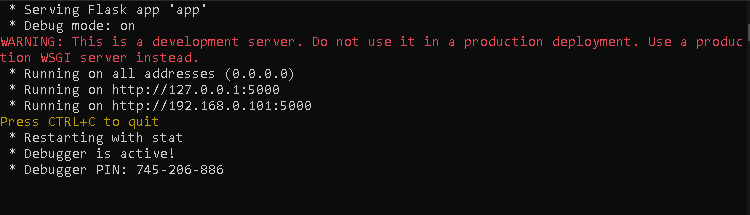
We begin by starting the backend server. Navigate to the backend project directory and ensure that the virtual environment is activated. Once the environment is ready, run the Flask application using the command:
flask --app app run --host 0.0.0.0 --debug
This command starts the server in debug mode and allows it to listen for incoming requests on the local machine. If the server starts successfully, a message indicating that the application is running should appear in the terminal.
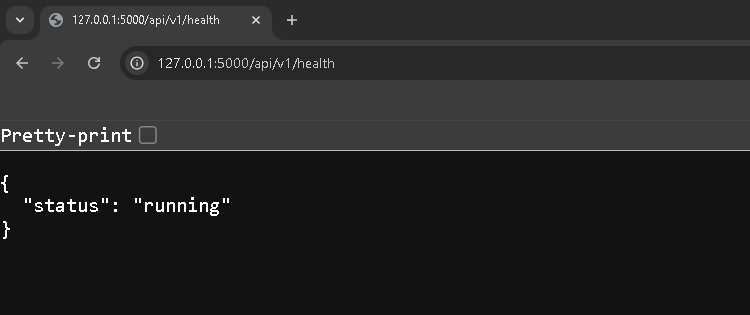
To confirm that the backend is ready, open a web browser and access the health check endpoint:
http://127.0.0.1:5000/api/v1/health A JSON response indicating that the system is running confirms that the backend is ready to receive data.
With the backend running, we now move to MetaTrader 5. Attach the bridge Expert Advisor to a single chart. It is important to attach the EA to only one chart because it listens to account-level trade events. Attaching it to multiple charts may result in duplicate data transmissions.
Once the EA is attached, open a new trade and allow it to run briefly. After that, manually close the position. This action triggers the OnTradeTransaction event, which the EA listens to in order to detect closed trades.
After closing the trade, open the Experts tab in the Toolbox panel. You should observe log messages showing the JSON payload that was generated, followed by a server response code and response body.
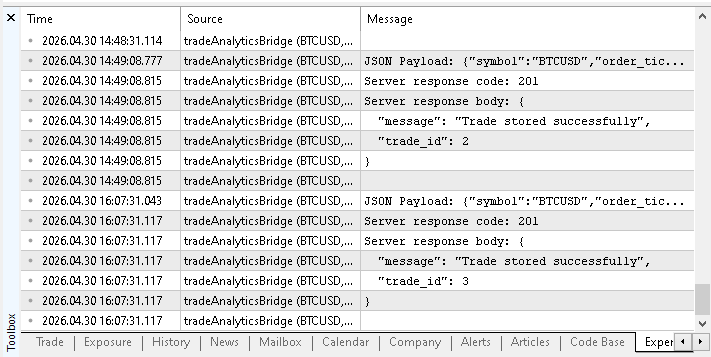
These messages confirm that the EA successfully transmitted the trade data to the backend. At this point, the backend should have received the request and stored the trade in the database. To verify this, we can now use the retrieval endpoints that were implemented earlier.
Open your browser and access the following endpoint:
http://127.0.0.1:5000/api/v1/trades This endpoint returns all stored trades in JSON format. If the system is working correctly, the recently closed trade should appear in the response. Each record should contain the fields defined in the Trade model, including symbol, position type, volume, profit, and timestamps.
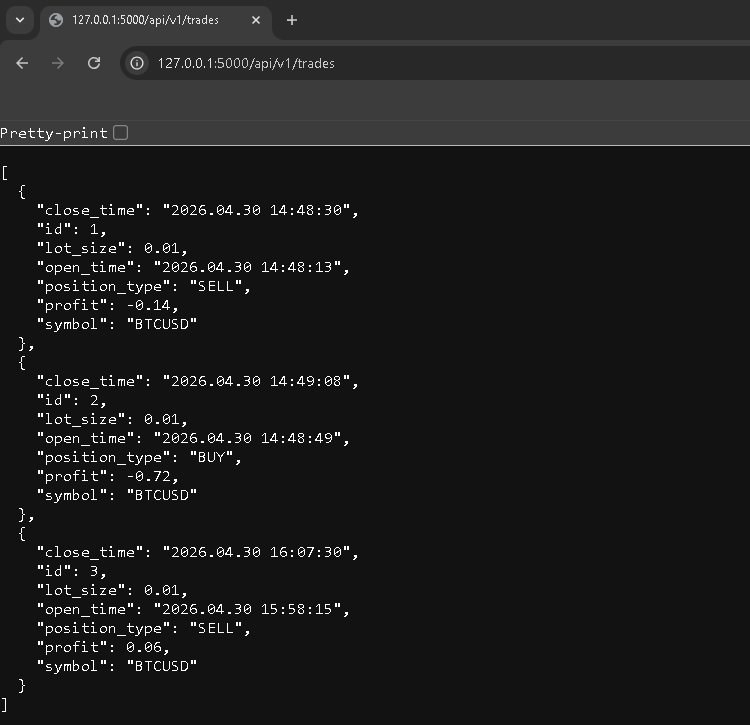
To inspect a specific trade in more detail, use the single trade endpoint:
http://127.0.0.1:5000/api/v1/trades/1
Replace the identifier with the appropriate value returned from the previous request. This endpoint provides a complete view of the stored record.
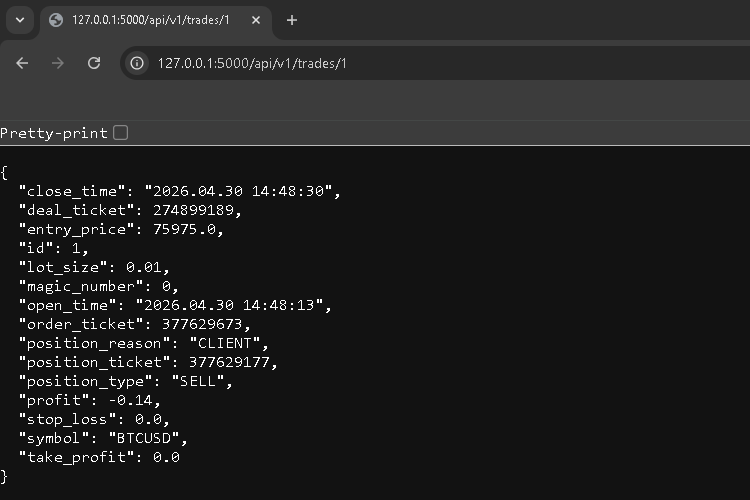
For confirmation, open instance/data.db and inspect the trades table with any SQLite viewer. Verify that the stored values match the EA payload.
This completes the validation of the system. The trade is detected in MetaTrader 5, transmitted as JSON, received by the backend, stored in the database, and finally retrieved through the API.
Current Limitations
The following limitations apply:
- The Expert Advisor must be attached to only one chart. Since OnTradeTransaction listens to account-level events, attaching the EA to multiple charts may result in duplicate trade transmissions.
- There is no retry mechanism for failed HTTP requests. If the backend server is unavailable or the request fails, the trade data is not resent and may be lost.
- The backend performs only basic validation. It checks for the presence of required fields but does not enforce strict type validation or value constraints beyond what is implemented.
- There is no authentication or security layer. Any client capable of sending a POST request to the endpoint can submit data to the backend.
- The system processes only closed trades. It does not track open positions, trade modifications, or partial position closures.
- There is no local persistence or queuing on the Expert Advisor side. Data is sent immediately after detection without buffering, which may not be reliable in unstable network conditions.
- The analytics capabilities are minimal. The backend currently provides only basic retrieval and summary endpoints without more profound performance analysis.
Conclusion
In this part, the backend was extended to ensure that trade data received from MetaTrader 5 is validated, processed, and stored in the SQLite database. The system now supports a complete flow from data reception to persistence.
The following behavior is implemented and can be verified:
- POST /api/v1/trades accepts trade data in JSON format, validates required fields, converts timestamps using the format "YYYY.MM.DD HH:MM:SS", converts numeric fields, and stores the record in SQLite; on success, it returns 201 Created with a JSON response containing the generated trade_id.
- 4xx responses are returned for invalid input, including missing fields and conversion errors.
- 5xx responses are returned for unexpected server or database failures, with proper transaction rollback.
The result can be verified using the following steps:
- Run the Flask application.
- Attach the bridge Expert Advisor to a single MetaTrader 5 chart;
- Open and close a position to trigger a trade event; Confirm that the request to POST /api/v1/trades returns 201 with a trade_id.
- Retrieve the stored record using GET /api/v1/trades and GET /api/v1/trades/<trade_id>;
- Inspect the SQLite database file (instance/data.db) to confirm that the stored record matches the transmitted payload.
At this point, the backend reliably receives, validates, and stores closed trade data. This establishes a stable foundation for further analysis and visualization in the next part of the series.
Attached Files
To help you follow along and replicate the results shown in this article, the complete source files used in this implementation are provided below. These files contain both the backend logic and the Expert Advisor responsible for transmitting trade data.
| File Name | Description |
|---|---|
| app.py | Backend source file implementing the Flask application, API routes, data validation, and database storage logic using SQLite. |
| tradeAnalyticsBridge.mq5 | Expert Advisor source file that detects closed trades in MetaTrader 5, extracts their details, formats them as JSON, and sends them to the backend API. |
These files can be used directly to reproduce the system described in this article.
Warning: All rights to these materials are reserved by MetaQuotes Ltd. Copying or reprinting of these materials in whole or in part is prohibited.
This article was written by a user of the site and reflects their personal views. MetaQuotes Ltd is not responsible for the accuracy of the information presented, nor for any consequences resulting from the use of the solutions, strategies or recommendations described.

 Adaptive Malaysian Engulfing Indicator (Part 2): Optimized Retest Bar Range
 Manual Backtesting with On-Chart Buttons in the MetaTrader 5 Strategy Tester
 MQL5 Trading Tools (Part 31): Creating an Interactive Tools Palette in MQL5
 Biogeography-Based Optimization (BBO)

- Free trading apps
- Over 8,000 signals for copying
- Economic news for exploring financial markets
You agree to website policy and terms of use