

Creating Custom Indicators in MQL5 (Part 3): Multi-Gauge Enhancements with Sector and Round Styles
 3 414
3 414
 0
0

Introduction
In our previous article (Part 2), we developed a Gauge-Style Relative Strength Index Display in MetaQuotes Language 5 (MQL5) utilizing canvas and needle mechanics that visualized Relative Strength Index values through a circular gauge with a dynamic needle, color-coded ranges indicating overbought and oversold levels, and customizable legends, integrating traditional line plotting for comprehensive momentum analysis. In Part 3, we develop Multi-Gauge Enhancements with Sector and Round Styles version. This model supports multiple oscillators, such as the Relative Strength Index (RSI), the Commodity Channel Index (CCI), and the Money Flow Index (MFI), through user-selectable combinations. It introduces derived classes for sector and round gauge designs, with improved case rendering using arcs, polygons, and relative positioning, resulting in a polished multi-indicator display. We will cover the following topics:
By the end, you will have a functional MQL5 indicator for enhanced visualization of the multi-gauge oscillator. It will be ready for further customization—let’s dive in!
Multi-Gauge Framework with Sector and Round Styles
The multi-gauge framework builds on a base class for customizable gauges, introducing derived classes for round and sector styles to visualize oscillators like the Relative Strength Index, the Commodity Channel Index, and the Money Flow Index, where we select single or combined displays via an enumeration for flexible momentum analysis across indicators. The round style maintains circular casing with filled circles, while the sector style enhances visuals with arc-based sectors, rounding arcs, connecting lines, and polygons for partial dial shapes, adapting to angle ranges and supporting relative positioning to align multiple gauges horizontally on the chart. This idea sprouted from the fact that at some instance, you might require just a small section of a gauge to display some information, and thus we thought it was a great idea to sub-divide the full round gauge into a half and a quarter, so you can choose whichever fits your style, but in our case, we are going to do the 3, conditionally.
To achieve that, we plan to extend the base gauge class with pure virtual methods for case calculation and drawing, allowing overrides in derived classes for style-specific logic. We will add an enumeration for gauge selection to conditionally initialize and position instances for the Relative Strength Index (round), the Commodity Channel Index (sector), and the Money Flow Index (sector), integrating their handles and buffers for data copying. We need these to get visual data, but in your case, you can use anything else, like displaying profits, indicator flow, and progress, or even account metrics, not limited to some other indicator data. The architecture separates layers for scale (with enhanced mark population for zero positions) and needle (with adjustable tail multipliers), ensuring efficient redraws and relative anchoring based on previous gauges. In brief, here is a visual representation of our objectives.

Implementation in MQL5
To begin the enhancements implementation, we will first need to adjust the indicator plots and buffers and add more indicator properties for the extra indicators that we want to add, specifically the CCI and MFI indicators. Here is how we redo that.
#property indicator_buffers 3
#property indicator_plots 3
#property indicator_type1 DRAW_LINE
#property indicator_color1 clrDodgerBlue
#property indicator_style1 STYLE_SOLID
#property indicator_width1 2
#property indicator_label1 "RSI"
#property indicator_type2 DRAW_LINE
#property indicator_color2 clrGreen
#property indicator_style2 STYLE_SOLID
#property indicator_width2 2
#property indicator_label2 "CCI"
#property indicator_type3 DRAW_LINE
#property indicator_color3 clrBlue
#property indicator_style3 STYLE_SOLID
#property indicator_width3 2
#property indicator_label3 "MFI"
#property indicator_minimum 0
#property indicator_maximum 100
#property indicator_level1 30
#property indicator_level2 70
#property indicator_level3 -100
#property indicator_level4 100
#property indicator_level5 0
#property indicator_levelcolor clrGray
#property indicator_levelstyle STYLE_DOT
First, we redefine the indicator's metadata with #property directives, allocating 3 buffers using "indicator_buffers" for data storage and configuring 3 plots with indicator_plots, since we are now dealing with 3 indicators. For the first plot, we set its type to DRAW_LINE, color to dodger blue, solid style, width 2, and label "RSI", just as it was. The second plot is a green solid line with width 2 labeled "CCI", and the third is a blue solid line with width 2 labeled "MFI".
We establish the vertical scale from 0 to 100 via "indicator_minimum" and "indicator_maximum", and add five dotted gray levels at 30, 70, -100, 100, and 0 using "indicator_level1" through "indicator_level5", "indicator_levelcolor", and "indicator_levelstyle" to reference thresholds across the oscillators. These properties will enable simultaneous line visualizations for the Relative Strength Index, the Commodity Channel Index, and the Money Flow Index in a separate window.
To allows us to customize which gauges (RSI, CCI, MFI, or combinations) are displayed via the indicator inputs dialog to make the indicator more flexible and resource-efficient and support advanced scale rendering, especially for indicators like CCI (which can have negative values and zero in the middle), we will need to declare some enumerations to help determine where the "null" (zero) mark is placed, improving accuracy for non-positive scales.
//+------------------------------------------------------------------+
//| Gauge Selection Enum                                             |
//+------------------------------------------------------------------+
enum ENUM_GAUGE_SELECTION {                // Define gauge selection enum
   RSI_ONLY,                               // RSI Only
   CCI_ONLY,                               // CCI Only
   MFI_ONLY,                               // MFI Only
   RSI_CCI,                                // RSI CCI
   RSI_MFI,                                // RSI MFI
   CCI_MFI,                                // CCI MFI
   ALL                                     // All
};

// Inputs
input ENUM_GAUGE_SELECTION inpGaugeSelection = ALL; // Gauge Selection


//+------------------------------------------------------------------+
//| Null Mark Position Enum                                          |
//+------------------------------------------------------------------+
enum ENUM_NULLMARK_POS {                   // Define null mark position enum
   NULLMARK_NONE=0,                        // None
   NULLMARK_LEFT=1,                        // Left
   NULLMARK_MIDDLE=2,                      // Middle
   NULLMARK_RIGHT=3                        // Right
};
We define the "ENUM_GAUGE_SELECTION" enumeration to provide options for selecting which gauges to display, including individual choices like "RSI_ONLY", "CCI_ONLY", or "MFI_ONLY", combinations such as "RSI_CCI", "RSI_MFI", or "CCI_MFI", and "ALL" for showing everything. We declare an input parameter "inpGaugeSelection" of type "ENUM_GAUGE_SELECTION" with a default value of "ALL", allowing users to choose the gauge configuration directly from the indicator settings. Next, we create the "ENUM_NULLMARK_POS" enumeration to specify positions for the zero or null mark on the scale, with values "NULLMARK_NONE" set to 0, "NULLMARK_LEFT" to 1, "NULLMARK_MIDDLE" to 2, and "NULLMARK_RIGHT" to 3, supporting flexible handling of scale layouts, especially for indicators with negative ranges. We thought this is important just to cover all the possible scenarios.
The next thing that we will do is expand the case structure so that it supports the new sector or partial, as you would like to call it, circles or gauges, and also expand the gauge input parameters to include the needle tail multiplier that we need. Let us start with the case structure.
Old case structure:
//+------------------------------------------------------------------+
//| Case Structure                                                   |
//+------------------------------------------------------------------+
struct Struct_Case {                       // Define case structure
   bool display;                           // Store display flag
   Struct_Circle circle;                   // Store circle structure
};
New case structure:
//+------------------------------------------------------------------+
//| Case Structure                                                   |
//+------------------------------------------------------------------+
struct Struct_Case {                       // Define case structure
   bool display;                           // Store display flag
   Struct_Circle circle;                   // Store circle structure
   int mode;                               // Store mode
   Struct_Arc mainArc;                     // Store main arc
   Struct_Arc secondaryArc;                // Store secondary arc
   Struct_Arc centerArc;                   // Store center arc
   Struct_Arc leftRoundingArc;             // Store left rounding arc
   Struct_Arc rightRoundingArc;            // Store right rounding arc
   Struct_Line leftConnectLine;            // Store left connect line
   Struct_Line rightConnectLine;           // Store right connect line
   Struct_Dot fillDot;                     // Store fill dot
};
Here, we enhance the "Struct_Case" structure to support more sophisticated gauge casing, particularly for sector styles, by including a display flag and an embedded "Struct_Circle" for basic circular elements. We add an integer "mode" to determine the casing configuration based on angle ranges, along with "Struct_Arc" instances for the main arc, secondary arc (for larger angles), center arc, left and right rounding arcs to smooth edges. Additionally, we incorporate "Struct_Line" for left and right connecting lines to bridge components, and a "Struct_Dot" for a fill point to ensure complete coverage in polygon fillings during rendering. As for the parameters stucture, we add just the multiplier tail input as below. We have highlighted it for clarity.
//+------------------------------------------------------------------+
//| Gauge Input Parameters Structure                                 |
//+------------------------------------------------------------------+
struct Struct_GaugeInputParams {           // Define gauge input parameters structure
   int xOffset;                            // Store x offset
   int yOffset;                            // Store y offset
   int anchorCorner;                       // Store anchor corner
   int relativeMode;                       // Store relative mode
   string relativeObjectName;              // Store relative object name
   int scaleAngleRange;                    // Store scale angle range
   int rotationAngle;                      // Store rotation angle
   color scaleColor;                       // Store scale color
   int scaleStyle;                         // Store scale style
   bool displayScaleArc;                   // Store display scale arc flag
   double minScaleValue;                   // Store minimum scale value
   double maxScaleValue;                   // Store maximum scale value
   int scaleMultiplier;                    // Store scale multiplier
   int tickStyle;                          // Store tick style
   int tickSize;                           // Store tick size
   double majorTickInterval;               // Store major tick interval
   int mediumTicksPerMajor;                // Store medium ticks per major
   int minorTicksPerInterval;              // Store minor ticks per interval
   int tickFontSize;                       // Store tick font size
   string tickFontName;                    // Store tick font name
   bool tickFontItalic;                    // Store tick font italic flag
   bool tickFontBold;                      // Store tick font bold flag
   color tickFontColor;                    // Store tick font color
   Struct_RangeParams ranges[4];           // Store ranges array
   color caseColor;                        // Store case color
   int borderStyle;                        // Store border style
   color borderColor;                      // Store border color
   int borderGapSize;                      // Store border gap size
   Struct_GaugeLegendParams description;   // Store description
   Struct_GaugeLegendParams units;         // Store units
   Struct_GaugeLegendParams multiplier;    // Store multiplier
   Struct_GaugeLegendParams value;         // Store value
   int needleCenterStyle;                  // Store needle center style
   color needleCenterColor;                // Store needle center color
   color needleColor;                      // Store needle color
   int needleFillStyle;                    // Store needle fill style
   double needleTailMultiplier;            // Store needle tail multiplier
};
The variable that we have added for the multiplier will allow customizing the needle's tail length (e.g., shorter for sector gauges), improving visual aesthetics, and fitting different gauge shapes. We will now redo the classes in a major overhaul so that we support polymorphism and inheritance for a better fit, classification, and future customization. We add two derived classes with private helpers as follows.
//+------------------------------------------------------------------+ //| Base Gauge Class | //+------------------------------------------------------------------+ class CGaugeBase // Define base gauge class { private: int relativeX; //--- Store relative X int relativeY; //--- Store relative Y int centerX; //--- Store center X int centerY; //--- Store center Y double currentValue; //--- Store current value bool initializationComplete; //--- Store initialization complete flag void Draw(); //--- Declare draw method void CalculateNeedle(); //--- Declare calculate needle method void RedrawNeedle(double value); //--- Declare redraw needle method void CalculateAndDrawLegends(); //--- Declare calculate and draw legends method void CalculateAndDrawLegendString(Struct_GaugeLegendString &legendString); //--- Declare calculate and draw legend string method void RedrawScaleMarks(Struct_Case &internalCase, Struct_Arc &scaleArc, int borderGap); //--- Declare redraw scale marks method void CalculateRanges(int borderGap); //--- Declare calculate ranges method bool IsValidRange(int index); //--- Declare check valid range method void NormalizeRangeValues(double &minValue, double &maxValue, double val0, double val1); //--- Declare normalize range values method void CalculateRangePie(Struct_Range &range, int innerRadius, int radialGap, int outerRadius, double rangeStart, double rangeEnd, color rangeClr, color caseClr); //--- Declare calculate range pie method void DrawRanges(); //--- Declare draw ranges method void DrawRange(Struct_Range &range); //--- Declare draw range method void CalculateInnerOuterRadii(int &innerRadius, int &outerRadius, int baseRadius, int tickLength, int tickStyle); //--- Declare calculate inner outer radii method bool DrawTick(double angle, int length, Struct_Arc &scaleArc); //--- Declare draw tick method double CalculateAngleDelta(double angle1, double angle2, int direction); //--- Declare calculate angle delta method bool GetLabelAreaSize(Struct_LabelAreaSize &areaSize, Struct_GaugeLegendString &legendString); //--- Declare get label area size method bool EraseLegendString(Struct_GaugeLegendString &legendString, color eraseClr); //--- Declare erase legend string method bool RedrawValueDisplay(double value); //--- Declare redraw value display method void SetLegendStringParams(Struct_GaugeLegendString &legendString, Struct_GaugeLegendParams ¶m, int minRadius, int radiusDelta); //--- Declare set legend string params method protected: Struct_GaugeInputParams inputParams; //--- Store input parameters Struct_ScaleLayer scaleLayer; //--- Store scale layer Struct_NeedleLayer needleLayer; //--- Store needle layer int m_radius; //--- Store radius virtual void CalculateCaseElements(Struct_Case &externalCase, Struct_Case &internalCase, int borderSize, int borderGap) = 0; //--- Declare calculate case elements method virtual void DrawCaseElements(Struct_Case &externalCase, Struct_Case &internalCase) = 0; //--- Declare draw case elements method public: bool Create(string name, int x, int y, int size, string relativeObjectName, int relativeMode, int corner, bool background, uchar scaleTransparency, uchar needleTransparency); //--- Declare create method bool CalculateLocation(); //--- Declare calculate location method void Redraw(); //--- Declare redraw method void NewValue(double value); //--- Declare new value method void Delete(); //--- Declare delete method void SetScaleParameters(int angleRange, int rotation, double minValue, double maxValue, int multiplier, int style, color scaleClr, bool displayArc = false); //--- Declare set scale parameters method void SetTickParameters(int style, int size, double majorInterval, int mediumPerMajor, int minorPerInterval); //--- Declare set tick parameters method void SetTickLabelFont(int fontSize, string fontName, bool italic, bool bold, color fontClr = clrBlack); //--- Declare set tick label font method void SetCaseParameters(color caseClr, int borderStyle, color borderClr, int borderGapSize); //--- Declare set case parameters method void SetLegendParameters(int legendType, bool enable, string text, int radius, double angle, uint fontSize, string fontName, bool italic, bool bold, color textClr = clrDarkGray); //--- Declare set legend parameters method void SetLegendParam(Struct_GaugeLegendParams &legendParam, bool enable, string text, int radius, double angle, uint fontSize, string fontName, bool italic, bool bold, color textClr = clrDarkGray); //--- Declare set legend param method void SetRangeParameters(int index, bool enable, double start, double end, color rangeClr); //--- Declare set range parameters method void SetNeedleParameters(int centerStyle, color centerClr, color needleClr, int fillStyle, double tailMultiplier = 2.0); //--- Declare set needle parameters method }; //+------------------------------------------------------------------+ //| Round Gauge Class | //+------------------------------------------------------------------+ class CRoundGauge : public CGaugeBase // Define round gauge class { protected: void CalculateCaseElements(Struct_Case &externalCase, Struct_Case &internalCase, int borderSize, int borderGap) override //--- Override calculate case elements { if(borderSize > 0) { //--- Check border size externalCase.circle.centerX = scaleLayer.scaleArc.centerX; //--- Set external center X externalCase.circle.centerY = scaleLayer.scaleArc.centerY; //--- Set external center Y externalCase.circle.radius = m_radius; //--- Set external radius externalCase.circle.clr = inputParams.borderColor; //--- Set external color externalCase.display = true; //--- Set display flag } else //--- Handle no border externalCase.display = false; //--- Set display flag false internalCase.circle.centerX = scaleLayer.scaleArc.centerX; //--- Set internal center X internalCase.circle.centerY = scaleLayer.scaleArc.centerY; //--- Set internal center Y internalCase.circle.radius = m_radius - borderSize; //--- Set internal radius internalCase.circle.clr = inputParams.caseColor; //--- Set internal color internalCase.display = true; //--- Set display flag } void DrawCaseElements(Struct_Case &externalCase, Struct_Case &internalCase) override //--- Override draw case elements { if(externalCase.display) //--- Check external display scaleLayer.obj_Canvas.FillCircle(externalCase.circle.centerX, externalCase.circle.centerY, externalCase.circle.radius, ColorToARGB(externalCase.circle.clr, scaleLayer.transparency)); //--- Fill external circle if(internalCase.display) //--- Check internal display scaleLayer.obj_Canvas.FillCircle(internalCase.circle.centerX, internalCase.circle.centerY, internalCase.circle.radius, ColorToARGB(internalCase.circle.clr, scaleLayer.transparency)); //--- Fill internal circle } }; //+------------------------------------------------------------------+ //| Sector Gauge Class | //+------------------------------------------------------------------+ class CSectorGauge : public CGaugeBase // Define sector gauge class { private: void CaseCalculateSector(Struct_Case &caseStruct, int gap) //--- Declare calculate sector method { double fi0,fi1,fi2; //--- Declare angles double sa; //--- Declare scale range Struct_Arc referenceArc = scaleLayer.scaleArc; //--- Set reference arc if(referenceArc.endAngle > referenceArc.startAngle) //--- Check end > start sa = NormalizeRadians(referenceArc.endAngle - referenceArc.startAngle); //--- Set sa else //--- Handle wrap sa = NormalizeRadians(referenceArc.endAngle + (2 * M_PI - referenceArc.startAngle)); //--- Set sa if(sa > M_PI) //--- Check > PI caseStruct.mode = 1; //--- Set mode 1 else //--- Handle <= PI caseStruct.mode = 0; //--- Set mode 0 if(sa > M_PI) { //--- Check > PI caseStruct.mainArc.centerX = referenceArc.centerX; //--- Set main center X caseStruct.mainArc.centerY = referenceArc.centerY; //--- Set main center Y caseStruct.mainArc.radius = referenceArc.radius + gap; //--- Set main radius caseStruct.mainArc.startAngle = NormalizeRadians(referenceArc.startAngle); //--- Set main start angle caseStruct.mainArc.endAngle = NormalizeRadians(referenceArc.startAngle + sa * 0.55); //--- Set main end angle caseStruct.mainArc.clr = clrNONE; //--- Set main color caseStruct.secondaryArc.display = true; //--- Set secondary display caseStruct.secondaryArc.centerX = referenceArc.centerX; //--- Set secondary center X caseStruct.secondaryArc.centerY = referenceArc.centerY; //--- Set secondary center Y caseStruct.secondaryArc.radius = referenceArc.radius + gap; //--- Set secondary radius caseStruct.secondaryArc.startAngle = NormalizeRadians(referenceArc.endAngle - sa * 0.55); //--- Set secondary start angle caseStruct.secondaryArc.endAngle = NormalizeRadians(referenceArc.endAngle); //--- Set secondary end angle caseStruct.secondaryArc.clr = clrNONE; //--- Set secondary color } else { //--- Handle <= PI caseStruct.mainArc.centerX = referenceArc.centerX; //--- Set main center X caseStruct.mainArc.centerY = referenceArc.centerY; //--- Set main center Y caseStruct.mainArc.radius = referenceArc.radius + gap; //--- Set main radius caseStruct.mainArc.startAngle = NormalizeRadians(referenceArc.startAngle); //--- Set main start angle caseStruct.mainArc.endAngle = NormalizeRadians(referenceArc.endAngle); //--- Set main end angle caseStruct.mainArc.clr = clrNONE; //--- Set main color } caseStruct.leftRoundingArc.radius = gap; //--- Set left rounding radius caseStruct.leftRoundingArc.centerX = (int)(referenceArc.centerX - referenceArc.radius * MathCos(M_PI - referenceArc.endAngle)); //--- Set left rounding center X caseStruct.leftRoundingArc.centerY = (int)(referenceArc.centerY - referenceArc.radius * MathSin(M_PI - referenceArc.endAngle)); //--- Set left rounding center Y if(caseStruct.mode == 1) //--- Check mode 1 fi1 = referenceArc.endAngle + (2 * M_PI - sa) / 2; //--- Set fi1 else //--- Handle mode 0 fi1 = referenceArc.endAngle + M_PI * 0.5; //--- Set fi1 caseStruct.leftRoundingArc.startAngle = referenceArc.endAngle; //--- Set left start angle caseStruct.leftRoundingArc.endAngle = NormalizeRadians(fi1); //--- Set left end angle caseStruct.leftRoundingArc.clr = clrNONE; //--- Set left color caseStruct.rightRoundingArc.radius = gap; //--- Set right rounding radius caseStruct.rightRoundingArc.centerX = (int)(referenceArc.centerX - referenceArc.radius * MathCos(M_PI - referenceArc.startAngle)); //--- Set right rounding center X caseStruct.rightRoundingArc.centerY = (int)(referenceArc.centerY - referenceArc.radius * MathSin(M_PI - referenceArc.startAngle)); //--- Set right rounding center Y if(caseStruct.mode == 1) //--- Check mode 1 fi0 = referenceArc.startAngle - (2 * M_PI - sa) / 2; //--- Set fi0 else //--- Handle mode 0 fi0 = referenceArc.startAngle - M_PI * 0.5; //--- Set fi0 caseStruct.rightRoundingArc.startAngle = NormalizeRadians(fi0); //--- Set right start angle caseStruct.rightRoundingArc.endAngle = referenceArc.startAngle; //--- Set right end angle caseStruct.rightRoundingArc.clr = clrNONE; //--- Set right color caseStruct.centerArc.centerX = referenceArc.centerX; //--- Set center arc center X caseStruct.centerArc.centerY = referenceArc.centerY; //--- Set center arc center Y caseStruct.centerArc.radius = needleLayer.needleCenter.radius + gap; //--- Set center arc radius fi2 = MathArcsin(((double)caseStruct.leftRoundingArc.radius / (double)caseStruct.centerArc.radius)); //--- Calculate fi2 fi1 = NormalizeRadians(referenceArc.endAngle + fi2); //--- Set fi1 caseStruct.centerArc.startAngle = fi1; //--- Set center start angle fi1 = NormalizeRadians(referenceArc.startAngle - fi2); //--- Set fi1 caseStruct.centerArc.endAngle = fi1; //--- Set center end angle caseStruct.centerArc.clr = clrNONE; //--- Set center color if(caseStruct.mode == 1) { //--- Check mode 1 double angleOffset = M_PI - (sa / 2); //--- Calculate offset caseStruct.leftConnectLine.startX = (int)(caseStruct.leftRoundingArc.centerX + caseStruct.leftRoundingArc.radius * MathSin((caseStruct.secondaryArc.endAngle + angleOffset) - M_PI * 1.5)); //--- Set left start X caseStruct.leftConnectLine.startY = (int)(caseStruct.leftRoundingArc.centerY + caseStruct.leftRoundingArc.radius * MathCos((caseStruct.secondaryArc.endAngle + angleOffset) - M_PI * 1.5)); //--- Set left start Y caseStruct.leftConnectLine.endX = (int)(caseStruct.rightRoundingArc.centerX + caseStruct.rightRoundingArc.radius * MathSin((caseStruct.mainArc.startAngle - angleOffset) - M_PI * 1.5)); //--- Set left end X caseStruct.leftConnectLine.endY = (int)(caseStruct.rightRoundingArc.centerY + caseStruct.rightRoundingArc.radius * MathCos((caseStruct.mainArc.startAngle - angleOffset) - M_PI * 1.5)); //--- Set left end Y caseStruct.leftConnectLine.clr = clrNONE; //--- Set left color } else { //--- Handle mode 0 caseStruct.leftConnectLine.startX = (int)(caseStruct.leftRoundingArc.centerX + caseStruct.leftRoundingArc.radius * MathSin(caseStruct.leftRoundingArc.startAngle - M_PI)); //--- Set left start X caseStruct.leftConnectLine.startY = (int)(caseStruct.leftRoundingArc.centerY + caseStruct.leftRoundingArc.radius * MathCos(caseStruct.leftRoundingArc.startAngle - M_PI)); //--- Set left start Y fi2 = MathArcsin(((double)caseStruct.leftRoundingArc.radius / (double)caseStruct.centerArc.radius)); //--- Calculate fi2 fi1 = NormalizeRadians(caseStruct.mainArc.endAngle + fi2); //--- Set fi1 caseStruct.leftConnectLine.endX = (int)(referenceArc.centerX - caseStruct.centerArc.radius * MathCos(M_PI - fi1)); //--- Set left end X caseStruct.leftConnectLine.endY = (int)(referenceArc.centerY - caseStruct.centerArc.radius * MathSin(M_PI - fi1)); //--- Set left end Y caseStruct.leftConnectLine.clr = clrNONE; //--- Set left color caseStruct.rightConnectLine.startX = (int)(caseStruct.rightRoundingArc.centerX + caseStruct.rightRoundingArc.radius * MathSin(caseStruct.rightRoundingArc.endAngle)); //--- Set right start X caseStruct.rightConnectLine.startY = (int)(caseStruct.rightRoundingArc.centerY + caseStruct.rightRoundingArc.radius * MathCos(caseStruct.rightRoundingArc.endAngle)); //--- Set right start Y fi1 = NormalizeRadians(caseStruct.mainArc.startAngle - fi2); //--- Set fi1 caseStruct.rightConnectLine.endX = (int)(referenceArc.centerX - caseStruct.centerArc.radius * MathCos(M_PI - fi1)); //--- Set right end X caseStruct.rightConnectLine.endY = (int)(referenceArc.centerY - caseStruct.centerArc.radius * MathSin(M_PI - fi1)); //--- Set right end Y caseStruct.rightConnectLine.clr = clrNONE; //--- Set right color } fi1 = M_PI - NormalizeRadians(referenceArc.endAngle - (sa / 2)); //--- Set fi1 caseStruct.fillDot.x = (int)(referenceArc.centerX - caseStruct.centerArc.radius * MathCos(fi1)); //--- Set fill dot X caseStruct.fillDot.y = (int)(referenceArc.centerY - caseStruct.centerArc.radius * MathSin(fi1)); //--- Set fill dot Y caseStruct.fillDot.clr = clrNONE; //--- Set fill dot color } void RedrawSectorCase(Struct_Case &caseStruct) //--- Declare redraw sector case method { int polygonX[5]; //--- Declare polygon X int polygonY[5]; //--- Declare polygon Y scaleLayer.obj_Canvas.Pie(caseStruct.mainArc.centerX, caseStruct.mainArc.centerY, caseStruct.mainArc.radius, caseStruct.mainArc.radius, caseStruct.mainArc.startAngle, caseStruct.mainArc.endAngle, ColorToARGB(caseStruct.mainArc.clr, scaleLayer.transparency), ColorToARGB(caseStruct.mainArc.clr, scaleLayer.transparency)); //--- Draw main pie if(caseStruct.secondaryArc.display) //--- Check secondary display scaleLayer.obj_Canvas.Pie(caseStruct.secondaryArc.centerX, caseStruct.secondaryArc.centerY, caseStruct.secondaryArc.radius, caseStruct.secondaryArc.radius, caseStruct.secondaryArc.startAngle, caseStruct.secondaryArc.endAngle, ColorToARGB(caseStruct.secondaryArc.clr, scaleLayer.transparency), ColorToARGB(caseStruct.secondaryArc.clr, scaleLayer.transparency)); //--- Draw secondary pie scaleLayer.obj_Canvas.FillCircle(caseStruct.leftRoundingArc.centerX, caseStruct.leftRoundingArc.centerY, caseStruct.leftRoundingArc.radius, ColorToARGB(caseStruct.leftRoundingArc.clr, scaleLayer.transparency)); //--- Fill left rounding scaleLayer.obj_Canvas.FillCircle(caseStruct.rightRoundingArc.centerX, caseStruct.rightRoundingArc.centerY, caseStruct.rightRoundingArc.radius, ColorToARGB(caseStruct.rightRoundingArc.clr, scaleLayer.transparency)); //--- Fill right rounding if(caseStruct.mode == 0) //--- Check mode 0 scaleLayer.obj_Canvas.FillCircle(caseStruct.centerArc.centerX, caseStruct.centerArc.centerY, caseStruct.centerArc.radius, ColorToARGB(caseStruct.centerArc.clr, scaleLayer.transparency)); //--- Fill center arc if(caseStruct.mode == 0) { //--- Check mode 0 caseStruct.secondaryArc.display = false; //--- Set secondary display false polygonX[1] = caseStruct.leftConnectLine.startX; //--- Set polygonX1 polygonX[0] = caseStruct.leftConnectLine.endX; //--- Set polygonX0 polygonX[2] = caseStruct.leftRoundingArc.centerX; //--- Set polygonX2 polygonX[4] = caseStruct.mainArc.centerX; //--- Set polygonX4 polygonX[3] = caseStruct.fillDot.x; //--- Set polygonX3 polygonY[1] = caseStruct.leftConnectLine.startY; //--- Set polygonY1 polygonY[0] = caseStruct.leftConnectLine.endY; //--- Set polygonY0 polygonY[2] = caseStruct.leftRoundingArc.centerY; //--- Set polygonY2 polygonY[4] = caseStruct.mainArc.centerY; //--- Set polygonY4 polygonY[3] = caseStruct.fillDot.y; //--- Set polygonY3 scaleLayer.obj_Canvas.FillPolygon(polygonX, polygonY, ColorToARGB(caseStruct.leftConnectLine.clr, scaleLayer.transparency)); //--- Fill left polygon polygonX[3] = caseStruct.rightConnectLine.startX; //--- Set polygonX3 polygonX[4] = caseStruct.rightConnectLine.endX; //--- Set polygonX4 polygonX[2] = caseStruct.rightRoundingArc.centerX; //--- Set polygonX2 polygonX[0] = caseStruct.mainArc.centerX; //--- Set polygonX0 polygonX[1] = caseStruct.fillDot.x; //--- Set polygonX1 polygonY[3] = caseStruct.rightConnectLine.startY; //--- Set polygonY3 polygonY[4] = caseStruct.rightConnectLine.endY; //--- Set polygonY4 polygonY[2] = caseStruct.rightRoundingArc.centerY; //--- Set polygonY2 polygonY[0] = caseStruct.mainArc.centerY; //--- Set polygonY0 polygonY[1] = caseStruct.fillDot.y; //--- Set polygonY1 scaleLayer.obj_Canvas.FillPolygon(polygonX, polygonY, ColorToARGB(caseStruct.rightConnectLine.clr, scaleLayer.transparency)); //--- Fill right polygon } else { //--- Handle mode 1 polygonX[0] = caseStruct.leftConnectLine.endX; //--- Set polygonX0 polygonX[1] = caseStruct.leftConnectLine.startX; //--- Set polygonX1 polygonX[2] = caseStruct.leftRoundingArc.centerX; //--- Set polygonX2 polygonX[3] = caseStruct.fillDot.x; //--- Set polygonX3 polygonX[4] = caseStruct.rightRoundingArc.centerX; //--- Set polygonX4 polygonY[0] = caseStruct.leftConnectLine.endY; //--- Set polygonY0 polygonY[1] = caseStruct.leftConnectLine.startY; //--- Set polygonY1 polygonY[2] = caseStruct.leftRoundingArc.centerY; //--- Set polygonY2 polygonY[3] = caseStruct.fillDot.y; //--- Set polygonY3 polygonY[4] = caseStruct.rightRoundingArc.centerY; //--- Set polygonY4 scaleLayer.obj_Canvas.FillPolygon(polygonX, polygonY, ColorToARGB(caseStruct.leftConnectLine.clr, scaleLayer.transparency)); //--- Fill polygon } } protected: void CalculateCaseElements(Struct_Case &externalCase, Struct_Case &internalCase, int borderSize, int borderGap) override //--- Override calculate case elements { int totalGap = scaleLayer.externalScaleGap + scaleLayer.externalLabelArea + scaleLayer.borderGap; //--- Calculate total gap if(borderSize > 0) { //--- Check border size CaseCalculateSector(externalCase, totalGap + borderSize); //--- Calculate external sector externalCase.mainArc.clr = inputParams.borderColor; //--- Set main color externalCase.secondaryArc.clr = inputParams.borderColor; //--- Set secondary color externalCase.centerArc.clr = inputParams.borderColor; //--- Set center color externalCase.leftRoundingArc.clr = inputParams.borderColor; //--- Set left rounding color externalCase.rightRoundingArc.clr = inputParams.borderColor; //--- Set right rounding color externalCase.leftConnectLine.clr = inputParams.borderColor; //--- Set left connect color externalCase.rightConnectLine.clr = inputParams.borderColor; //--- Set right connect color externalCase.fillDot.clr = inputParams.borderColor; //--- Set fill dot color externalCase.display = true; //--- Set display flag } else //--- Handle no border externalCase.display = false; //--- Set display flag false CaseCalculateSector(internalCase, totalGap); //--- Calculate internal sector internalCase.mainArc.clr = inputParams.caseColor; //--- Set main color internalCase.secondaryArc.clr = inputParams.caseColor; //--- Set secondary color internalCase.centerArc.clr = inputParams.caseColor; //--- Set center color internalCase.leftRoundingArc.clr = inputParams.caseColor; //--- Set left rounding color internalCase.rightRoundingArc.clr = inputParams.caseColor; //--- Set right rounding color internalCase.leftConnectLine.clr = inputParams.caseColor; //--- Set left connect color internalCase.rightConnectLine.clr = inputParams.caseColor; //--- Set right connect color internalCase.fillDot.clr = inputParams.caseColor; //--- Set fill dot color internalCase.display = true; //--- Set display flag } void DrawCaseElements(Struct_Case &externalCase, Struct_Case &internalCase) override //--- Override draw case elements { if(externalCase.display) //--- Check external display RedrawSectorCase(externalCase); //--- Redraw external case if(internalCase.display) //--- Check internal display RedrawSectorCase(internalCase); //--- Redraw internal case } };
Here, we define the "CGaugeBase" class with private members for positions, current value, and initialization flag, along with declared methods for drawing, needle calculations, legends, scale marks, ranges, ticks, and labels as before, but leave "CalculateCaseElements" and "DrawCaseElements" as pure virtual to require implementation in subclasses, while providing default behavior for other setters and updates in public and protected sections. We create the "CRoundGauge" class inheriting from "CGaugeBase", overriding "CalculateCaseElements" to configure external and internal circles based on border size, centers from scale arc, radii adjustments, colors from inputs, and display flags; and overriding "DrawCaseElements" to fill these circles on the scale canvas with "FillCircle" using ARGB-converted colors if displayed.
For the "CSectorGauge" class, which also inherits from "CGaugeBase", we add a private "CaseCalculateSector" method to compute sector elements: determining mode based on angle range exceeding pi, setting main and secondary arcs for large angles, calculating left and right rounding arcs with trig functions like MathArcsin and "NormalizeRadians", center arc with offset, connecting lines with sine and cosine adjustments varying by mode, and a fill dot at mid-angle. We override "CalculateCaseElements" in "CSectorGauge" to compute total gap from external elements and border, call "CaseCalculateSector" for external (if border positive) and internal with appropriate gaps, assign border or case colors to all arc, line, and dot components, and enable displays.
Finally, we override "DrawCaseElements" to conditionally call "RedrawSectorCase" for external and internal if displayed, where "RedrawSectorCase" draws main and secondary pies with "Pie", fills rounding and center circles with "FillCircle", and constructs polygons for filling connections (using arrays for coordinates) with "FillPolygon" in ARGB colors, adapting arrays for mode 0 (separate left/right polygons) or mode 1 (single polygon).
Generally, what we get is that the pure virtual methods enable polymorphism: RSI uses a round gauge, CCI/MFI use sector for variety and better fit (e.g., CCI's symmetric scale around zero). Relative positioning in "Create" will allow gauges to align side-by-side automatically, and "RedrawScaleMarks" overhaul willsupports indicators with negative ranges (CCI) or inverted scales (MFI: 100 to 0), ensuring accurate tick placement and labeling. The "calc_digits" function will dynamically set decimals for a clean display. Here is the function implementation logic that we used.
//+------------------------------------------------------------------+
//| Calculate Digits                                                 |
//+------------------------------------------------------------------+
int calc_digits(double value) {
   int i, j, max_nulls = 0, nulls = 0;     //--- Declare variables
   if(value == 0) return(0);               //--- Return 0 if zero
   ulong v = ulong(MathAbs(value) * 100000000); //--- Calculate v
   ulong vtmp;                             //--- Declare vtmp
   for(j = -5; j <= 5; j++) {              //--- Loop j
      nulls = 0;                           //--- Reset nulls
      vtmp = v + (ulong)j;                 //--- Set vtmp
      for(i = 0; i < 8; i++) {             //--- Loop i
         if(vtmp % 10 == 0) {              //--- Check mod 10 == 0
            vtmp = vtmp / 10;              //--- Divide vtmp
            nulls++;                       //--- Increment nulls
         } else break;                     //--- Break else
      }
      if(max_nulls < nulls) max_nulls = nulls; //--- Update max nulls
   }
   return(8 - max_nulls);                  //--- Return digits
}
The "calc_digits" function determines the number of decimal digits required for displaying a value, handling floating-point precision issues. If the value is zero, we return 0 immediately. We compute an unsigned long "v" by taking the absolute value multiplied by 100,000,000 to shift the decimal part into the integer. We then loop over small offsets "j" from -5 to 5, adding each to "v" to create "vtmp", and count trailing zeros by repeatedly dividing by 10 while the remainder is zero, up to 8 times, tracking the maximum such count "max_nulls" across offsets. Finally, we return 8 minus "max_nulls" as the effective digit count. Finally, what we need to do is conditionally create the gauges during initialization. We will need to change the global variables first.
//+------------------------------------------------------------------+
//| Global Variables                                                 |
//+------------------------------------------------------------------+
CRoundGauge rsiGauge;                      //--- Declare RSI gauge
CSectorGauge cciGauge;                     //--- Declare CCI gauge
CSectorGauge mfiGauge;                     //--- Declare MFI gauge
int rsiHandle = INVALID_HANDLE;            //--- Initialize RSI handle
int cciHandle = INVALID_HANDLE;            //--- Initialize CCI handle
int mfiHandle = INVALID_HANDLE;            //--- Initialize MFI handle
double scaleMultipliers[9] = {10000, 1000, 100, 10, 1, 0.1, 0.01, 0.001, 0.0001}; //--- Define scale multipliers array
string scaleMultiplierStrings[9] = {"x10k", "x1k", "x100", "x10", " ", "/10", "/100", "/1k", "/10k"}; //--- Define multiplier strings array
double rsiBuffer[], cciBuffer[], mfiBuffer[]; //--- Declare buffers
Here, we declare global instances of the gauge classes: "rsiGauge" as "CRoundGauge" for the Relative Strength Index visualization using a circular style, "cciGauge" and "mfiGauge" as "CSectorGauge" for the Commodity Channel Index and Money Flow Index with sector designs. We initialize integer handles "rsiHandle", "cciHandle", and "mfiHandle" to INVALID_HANDLE to reference the respective technical indicators later. We define the "scaleMultipliers" double array with 9 scaling factors from 10000 down to 0.0001 for adjusting value displays on the gauges. The "scaleMultiplierStrings" string array provides corresponding labels for these multipliers, used in legends for visual indication. Finally, we declare double arrays "rsiBuffer", "cciBuffer", and "mfiBuffer" to store the calculated data from each indicator for plotting and gauge updates. We can now do the initialization of the gauges.
//+------------------------------------------------------------------+
//| Initialize Indicator                                             |
//+------------------------------------------------------------------+
int OnInit() {
   bool showRSI = (inpGaugeSelection == RSI_ONLY || inpGaugeSelection == RSI_CCI || inpGaugeSelection == RSI_MFI || inpGaugeSelection == ALL); //--- Set show RSI
   bool showCCI = (inpGaugeSelection == CCI_ONLY || inpGaugeSelection == RSI_CCI || inpGaugeSelection == CCI_MFI || inpGaugeSelection == ALL); //--- Set show CCI
   bool showMFI = (inpGaugeSelection == MFI_ONLY || inpGaugeSelection == RSI_MFI || inpGaugeSelection == CCI_MFI || inpGaugeSelection == ALL); //--- Set show MFI
   string prevName = "";                   //--- Initialize prev name
   int baseX = 30;                         //--- Set base X
   int baseY = 30;                         //--- Set base Y
   IndicatorSetInteger(INDICATOR_LEVELS, 5); //--- Set levels
   SetIndexBuffer(0, rsiBuffer, INDICATOR_DATA); //--- Set RSI buffer
   SetIndexBuffer(1, cciBuffer, INDICATOR_DATA); //--- Set CCI buffer
   SetIndexBuffer(2, mfiBuffer, INDICATOR_DATA); //--- Set MFI buffer
   PlotIndexSetDouble(0, PLOT_EMPTY_VALUE, EMPTY_VALUE); //--- Set RSI empty
   PlotIndexSetDouble(1, PLOT_EMPTY_VALUE, EMPTY_VALUE); //--- Set CCI empty
   PlotIndexSetDouble(2, PLOT_EMPTY_VALUE, EMPTY_VALUE); //--- Set MFI empty
   PlotIndexSetInteger(0, PLOT_DRAW_BEGIN, 14 - 1); //--- Set RSI draw begin
   PlotIndexSetInteger(1, PLOT_DRAW_BEGIN, 14 - 1); //--- Set CCI draw begin
   PlotIndexSetInteger(2, PLOT_DRAW_BEGIN, 14 - 1); //--- Set MFI draw begin
   if(showRSI) {                           //--- Check show RSI
      if(!rsiGauge.Create("rsi_gauge", baseX, baseY, 230, "", 0, 0, false, 0, 0)) return(INIT_FAILED); //--- Create RSI gauge
      rsiGauge.SetCaseParameters(clrMintCream, 1, clrLightSkyBlue, 3); //--- Set RSI case
      rsiGauge.SetScaleParameters(250, 0, 0, 100, 4, 0, clrBlack, false); //--- Set RSI scale
      rsiGauge.SetTickParameters(0, 2, 10, 1, 4); //--- Set RSI ticks
      rsiGauge.SetTickLabelFont(1, "Arial", false, false, clrBlack); //--- Set RSI font
      rsiGauge.SetRangeParameters(0, true, 0, 30, clrLimeGreen); //--- Set RSI range 0
      rsiGauge.SetRangeParameters(1, true, 70, 100, clrCoral); //--- Set RSI range 1
      rsiGauge.SetRangeParameters(2, true, 30, 70, clrYellow); //--- Set RSI range 2
      rsiGauge.SetRangeParameters(3, false, 0, 0, clrGray); //--- Set RSI range 3
      rsiGauge.SetLegendParameters(0, true, "RSI", 8, -180, 20, "Arial", false, false, clrBlueViolet); //--- Set RSI legend 0
      rsiGauge.SetLegendParameters(3, true, "2", 4, 180, 13, "Arial", true, false, clrRed); //--- Set RSI legend 3
      rsiGauge.SetNeedleParameters(1, clrBlack, clrDimGray, 1, 2.0); //--- Set RSI needle
      rsiGauge.Redraw();                   //--- Redraw RSI
      rsiGauge.NewValue(0);                //--- Set RSI value 0
      prevName = "rsi_gauge";              //--- Set prev name
      rsiHandle = iRSI(_Symbol, _Period, 14, PRICE_CLOSE); //--- Get RSI handle
      if(rsiHandle == INVALID_HANDLE) return(INIT_FAILED); //--- Check RSI handle
   }
   if(showCCI) {                           //--- Check show CCI
      string relName = prevName;           //--- Set rel name
      int relMode = (prevName != "") ? 1 : 0; //--- Set rel mode
      int posX = (prevName != "") ? 0 : baseX; //--- Set pos X
      int posY = baseY + 90;               //--- Set pos Y
      if(!cciGauge.Create("cci_gauge", posX, posY, 230, relName, relMode, 0, false, 0, 0)) return(INIT_FAILED); //--- Create CCI gauge
      cciGauge.SetCaseParameters(clrMintCream, 1, clrLightSkyBlue, 1); //--- Set CCI case
      cciGauge.SetScaleParameters(200, 0, -200, 200, 4, 0, clrBlack, false); //--- Set CCI scale
      cciGauge.SetTickParameters(0, 2, 100, 1, 4); //--- Set CCI ticks
      cciGauge.SetTickLabelFont(1, "Arial", false, false, clrBlack); //--- Set CCI font
      cciGauge.SetRangeParameters(0, true, -200, -100, clrCoral); //--- Set CCI range 0
      cciGauge.SetRangeParameters(1, true, -100, 100, clrDodgerBlue); //--- Set CCI range 1
      cciGauge.SetRangeParameters(2, true, 100, 200, clrLimeGreen); //--- Set CCI range 2
      cciGauge.SetRangeParameters(3, false, 0, 0, clrGray); //--- Set CCI range 3
      cciGauge.SetLegendParameters(0, true, "CCI", 4, 0, 16, "Arial", false, false, clrBlueViolet); //--- Set CCI legend 0
      cciGauge.SetLegendParameters(3, true, "1", 1, 0, 12, "Arial", true, false, clrRed); //--- Set CCI legend 3
      cciGauge.SetNeedleParameters(1, clrBlack, clrDimGray, 1, 1.5); //--- Set CCI needle
      cciGauge.Redraw();                   //--- Redraw CCI
      cciGauge.NewValue(0);                //--- Set CCI value 0
      prevName = "cci_gauge";              //--- Set prev name
      cciHandle = iCCI(_Symbol, _Period, 14, PRICE_TYPICAL); //--- Get CCI handle
      if(cciHandle == INVALID_HANDLE) return(INIT_FAILED); //--- Check CCI handle
   }
   if(showMFI) {                           //--- Check show MFI
      string relName = prevName;           //--- Set rel name
      int relMode = (prevName != "") ? 1 : 0; //--- Set rel mode
      int posX = (prevName != "") ? 0 : baseX; //--- Set pos X
      int posY = baseY + 90;               //--- Set pos Y
      if(!mfiGauge.Create("mfi_gauge", posX, posY, 250, relName, relMode, 0, false, 0, 0)) return(INIT_FAILED); //--- Create MFI gauge
      mfiGauge.SetCaseParameters(clrMintCream, 1, clrLightSkyBlue, 3); //--- Set MFI case
      mfiGauge.SetScaleParameters(120, -35, 100, 0, 3, 0, clrBlack, false); //--- Set MFI scale
      mfiGauge.SetTickParameters(0, 2, 10, 1, 4); //--- Set MFI ticks
      mfiGauge.SetTickLabelFont(0, "Arial", false, false, clrBlack); //--- Set MFI font
      mfiGauge.SetRangeParameters(0, true, 80, 100, clrRed); //--- Set MFI range 0
      mfiGauge.SetRangeParameters(1, true, 20, 80, clrMagenta); //--- Set MFI range 1
      mfiGauge.SetRangeParameters(2, true, 0, 20, clrGreen); //--- Set MFI range 2
      mfiGauge.SetRangeParameters(3, false, 0, 0, clrGray); //--- Set MFI range 3
      mfiGauge.SetLegendParameters(0, true, "MFI", 4, -15, 14, "Arial", false, false, clrBlueViolet); //--- Set MFI legend 0
      mfiGauge.SetLegendParameters(2, true, "", 4, -50, 10, "Arial", false, false, clrDimGray); //--- Set MFI legend 2
      mfiGauge.SetLegendParameters(3, true, "0", 3, -80, 16, "Arial", true, false, clrRed); //--- Set MFI legend 3
      mfiGauge.SetNeedleParameters(1, clrBlack, clrDimGray, 1, 1.2); //--- Set MFI needle
      mfiGauge.Redraw();                   //--- Redraw MFI
      mfiGauge.NewValue(0);                //--- Set MFI value 0
      mfiHandle = iMFI(_Symbol, _Period, 14, VOLUME_TICK); //--- Get MFI handle
      if(mfiHandle == INVALID_HANDLE) return(INIT_FAILED); //--- Check MFI handle
   }
   return(INIT_SUCCEEDED);                 //--- Return succeeded
}
In the OnInit event handler, we begin by determining visibility flags for each gauge based on the "inpGaugeSelection" input: "showRSI" is true for selections including Relative Strength Index, similarly for "showCCI" and "showMFI" to conditionally display the corresponding indicators. We initialize an empty string "prevName" for relative positioning, set base coordinates "baseX" and "baseY" to 30, configure five indicator levels with "IndicatorSetInteger", and bind buffers with "SetIndexBuffer" to index 0 for "rsiBuffer", 1 for "cciBuffer", and 2 for "mfiBuffer" as indicator data. We set empty plot values to EMPTY_VALUE using PlotIndexSetDouble for all three plots and specify the drawing start at bar 13 with PlotIndexSetInteger to align with the 14-period calculations. Your logic might change if you chose a different approach.
If "showRSI" is true, we create the "rsiGauge" instance with "Create" at base position and size 230, no relative, then configure it via "SetCaseParameters" with mint cream case, border style 1, light sky blue border, gap 3; "SetScaleParameters" for 250-degree range, 0 to 100 values, multiplier 4, black color, no arc; "SetTickParameters" style 0 size 2 major 10 medium 1 minor 4; "SetTickLabelFont" size 1 Arial no styles black; ranges with "SetRangeParameters" 0-30 lime green, 70-100 coral, 30-70 yellow, disabled gray; legends with "SetLegendParameters" description "RSI" at radius 8 angle -180 size 20 Arial no styles blue violet, value "2" radius 4 angle 180 size 13 Arial italic no bold red; "SetNeedleParameters" center 1 black dim gray fill 1 tail 2.0; call "Redraw" and "NewValue" 0; update "prevName" to "rsi_gauge"; initialize "rsiHandle" with iRSI on symbol period 14 close prices, returning INIT_FAILED if invalid.
If "showCCI" is true, we set relative name from "prevName" and mode 1 if not empty, position x 0 or base, y base+90; create "cciGauge" relatively; configure case same as RSI but gap 1; scale 200 degrees -200 to 200; ticks same; font same; ranges -200--100 coral, -100-100 dodger blue, 100-200 lime green, disabled; legends "CCI" radius 4 angle 0 size 16 Arial no styles blue violet, value "1" radius 1 angle 0 size 12 Arial italic no bold red; needle tail 1.5; redraw and initialize to 0; update prevName; get "cciHandle" with iCCI period 14 typical price, check invalid.
For "showMFI" if true, similar relative setup, position y base+90; create "mfiGauge" size 250; case gap 3; scale 120 degrees 100 to 0 (reversed) multiplier 3; ticks same; font size 0; ranges 80-100 red, 20-80 magenta, 0-20 green, disabled; legends "MFI" radius 4 angle -15 size 14 Arial no styles blue violet, multiplier empty radius 4 angle -50 size 10 dim gray, value "0" radius 3 angle -80 size 16 Arial italic no bold red; needle tail 1.2; redraw initialize to 0; get "mfiHandle" with iMFI period 14 tick volume, check invalid.
We return INIT_SUCCEEDED to complete initialization. Upon initialization, we get the following outcome.

We can see the buffers are empty and the indicators are not plotted but gauges are okay. What we need to do is do the calculations in the calculation event handler for the indicators that we have chosen, conditionally.
//+------------------------------------------------------------------+
//| Calculate Indicator                                              |
//+------------------------------------------------------------------+
int OnCalculate(const int ratesTotal,
                const int prevCalculated,
                const datetime &time[],
                const double &open[],
                const double &high[],
                const double &low[],
                const double &close[],
                const long &tickVolume[],
                const long &volume[],
                const int &spread[]) {
   bool showRSI = (inpGaugeSelection == RSI_ONLY || inpGaugeSelection == RSI_CCI || inpGaugeSelection == RSI_MFI || inpGaugeSelection == ALL); //--- Set show RSI
   bool showCCI = (inpGaugeSelection == CCI_ONLY || inpGaugeSelection == RSI_CCI || inpGaugeSelection == CCI_MFI || inpGaugeSelection == ALL); //--- Set show CCI
   bool showMFI = (inpGaugeSelection == MFI_ONLY || inpGaugeSelection == RSI_MFI || inpGaugeSelection == CCI_MFI || inpGaugeSelection == ALL); //--- Set show MFI
   static datetime lastBarTime = 0;        //--- Declare last bar time
   bool isNewBar = (ratesTotal > 0 && time[ratesTotal - 1] != lastBarTime); //--- Check new bar
   if(isNewBar) lastBarTime = time[ratesTotal - 1]; //--- Update last bar time
   if(showRSI) {                           //--- Check show RSI
      if(rsiHandle != INVALID_HANDLE && CopyBuffer(rsiHandle, 0, 0, ratesTotal, rsiBuffer) < 0) return(0); //--- Copy RSI buffer
   } else {                                //--- Handle no show
      ArrayFill(rsiBuffer, 0, ratesTotal, EMPTY_VALUE); //--- Fill RSI empty
   }
   if(showCCI) {                           //--- Check show CCI
      if(cciHandle != INVALID_HANDLE && CopyBuffer(cciHandle, 0, 0, ratesTotal, cciBuffer) < 0) return(0); //--- Copy CCI buffer
   } else {                                //--- Handle no show
      ArrayFill(cciBuffer, 0, ratesTotal, EMPTY_VALUE); //--- Fill CCI empty
   }
   if(showMFI) {                           //--- Check show MFI
      if(mfiHandle != INVALID_HANDLE && CopyBuffer(mfiHandle, 0, 0, ratesTotal, mfiBuffer) < 0) return(0); //--- Copy MFI buffer
   } else {                                //--- Handle no show
      ArrayFill(mfiBuffer, 0, ratesTotal, EMPTY_VALUE); //--- Fill MFI empty
   }
   if(isNewBar) {                          //--- Check new bar
      if(showRSI && rsiHandle != INVALID_HANDLE) { //--- Check RSI
         double val[1];                    //--- Declare val
         if(CopyBuffer(rsiHandle, 0, 0, 1, val) > 0) rsiGauge.NewValue(val[0]); //--- Set RSI value
      }
      if(showCCI && cciHandle != INVALID_HANDLE) { //--- Check CCI
         double val[1];                    //--- Declare val
         if(CopyBuffer(cciHandle, 0, 0, 1, val) > 0) cciGauge.NewValue(val[0]); //--- Set CCI value
      }
      if(showMFI && mfiHandle != INVALID_HANDLE) { //--- Check MFI
         double val[1];                    //--- Declare val
         if(CopyBuffer(mfiHandle, 0, 0, 1, val) > 0) mfiGauge.NewValue(val[0]); //--- Set MFI value
      }
   }
   return(ratesTotal);                     //--- Return rates total
}
In the OnCalculate event handler, we redefine the visibility flags "showRSI", "showCCI", and "showMFI" based on the "inpGaugeSelection" input to determine which indicators and gauges to process in this calculation cycle. We use a static "datetime" "lastBarTime" to detect new bars, setting "isNewBar" true if the latest timestamp differs, and update "lastBarTime" accordingly. If "showRSI" is true and the handle is valid, we copy the entire history from the Relative Strength Index buffer to "rsiBuffer" with CopyBuffer, returning 0 on failure; otherwise, fill "rsiBuffer" with EMPTY_VALUE using ArrayFill to hide the plot.
Similarly, for Commodity Channel Index, copy to "cciBuffer" or fill empty; and for Money Flow Index, copy to "mfiBuffer" or fill empty. On a new bar, if showing and handles are valid, we copy the latest single value to a temp array "val" with "CopyBuffer" shift 0 count 1, and if successful, update the corresponding gauge with "NewValue" passing "val[0]". We return "ratesTotal" to continue processing. Finally, do not forget to delete the gauges to avoid chart clutter.
//+------------------------------------------------------------------+
//| Deinitialize Indicator                                           |
//+------------------------------------------------------------------+
void OnDeinit(const int reason) {
   rsiGauge.Delete();                      //--- Delete RSI gauge
   cciGauge.Delete();                      //--- Delete CCI gauge
   mfiGauge.Delete();                      //--- Delete MFI gauge
   ChartRedraw();                          //--- Redraw chart
}
In the OnDeinit event handler, we invoke the "Delete" method on "rsiGauge", "cciGauge", and "mfiGauge" to clean up their scale and needle layer objects from the chart. We then call ChartRedraw to refresh the chart, ensuring no visual remnants remain after the indicator is deinitialized. Upon compilation, we get the following outcome.
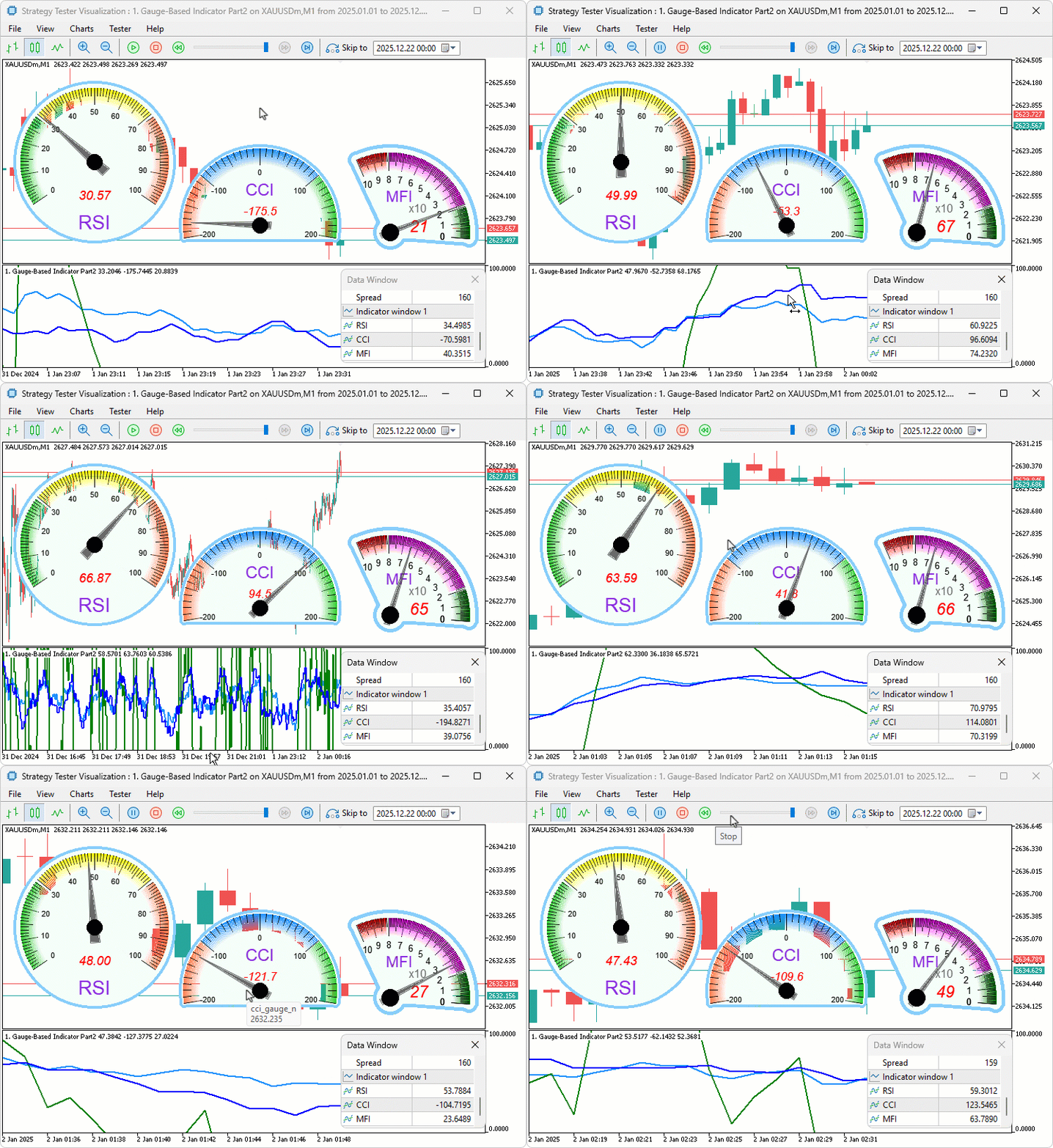
From the visualization, we can see that we calculate the indicators, draw the gauges, set parameters, and delete them when not needed, hence achieving our objectives. The thing that remains is backtesting the program, and that is handled in the next section.
Backtesting
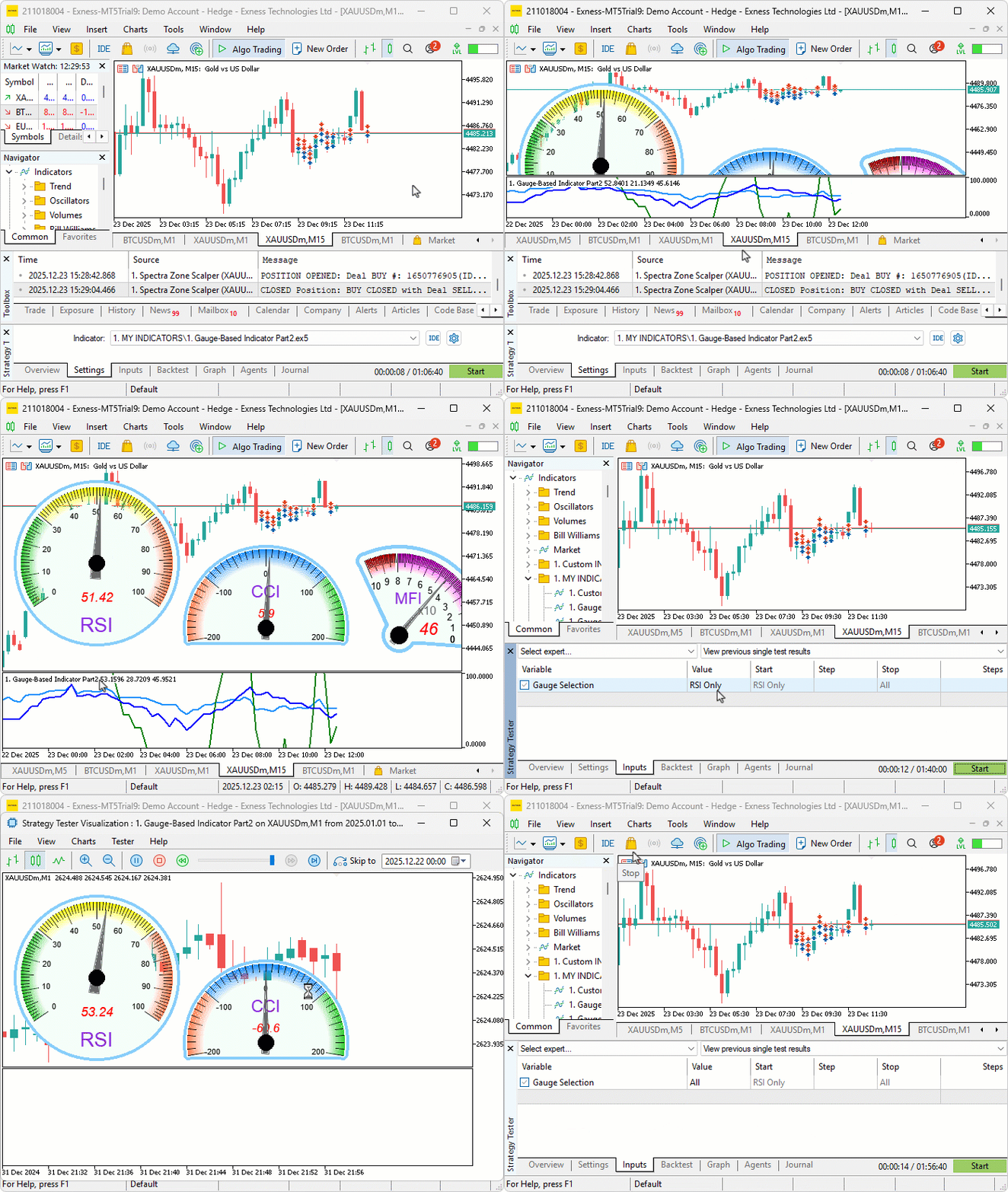
We did the testing, and below is the compiled visualization in a single Graphics Interchange Format (GIF) bitmap image format.
Conclusion
In conclusion, we’ve enhanced the gauge-based indicator in MQL5 to support multiple oscillators like the Relative Strength Index, the Commodity Channel Index, and the Money Flow Index through user-selectable combinations, introducing round and sector styles via derived classes with advanced case rendering using arcs, polygons, and relative positioning for aligned displays. This indicator offers a versatile tool for multi-oscillator analysis, with configurable scales, ranges, legends, and needles adapting to different value domains. You can advance it to include custom data indicators as you like.
Happy trading!
Warning: All rights to these materials are reserved by MetaQuotes Ltd. Copying or reprinting of these materials in whole or in part is prohibited.
This article was written by a user of the site and reflects their personal views. MetaQuotes Ltd is not responsible for the accuracy of the information presented, nor for any consequences resulting from the use of the solutions, strategies or recommendations described.

 Implementing Practical Modules from Other Languages in MQL5 (Part 06): Python-Like File IO operations in MQL5
 Data Science and ML (Part 47): Forecasting the Market Using the DeepAR model in Python
 Neural Networks in Trading: Multi-Task Learning Based on the ResNeXt Model (Final Part)
 Creating a mean-reversion strategy based on machine learning

- Free trading apps
- Over 8,000 signals for copying
- Economic news for exploring financial markets
You agree to website policy and terms of use