

Implementing Practical Modules from Other Languages in MQL5 (Part 06): Python-Like File IO operations in MQL5
 2 305
2 305
 0
0

Contents
- Introduction
- Understanding the Function for I/O Operations in Python
- Automatically selecting file flags
- Python-Like Open method in MQL5
- Reading Data/Information from Files
- Writing Data/Information In the Files
- Additional Methods
- Conclusion
Introduction
File operations are essential for any programming language. They help our programs interact with external files through code, helping us import and export bits of information. With hundreds, if not thousands, of file types available in modern software, we need better and more effective ways of handling (reading and writing) information to and from these files.

The MQL5 programming language comes loaded with various built-in ways of reading and writing to countless types of files, but they aren't always sufficient.
Unlike in MQL5, where file operations are more explicit and flag-driven, this can make simple and very common tasks, such as reading CSV files, feel complicated and error-prone. In the Python programming language, file I/O is simple and highly flexible, thanks to a rich standard library that abstracts away many low-level details that MQL5 developers have to face. See the example below on reading the same TEXT file in both MQL5 and Python:
In MQL5:
void OnStart()
  {
//---

    string filename = "readme.txt";
    int handle = FileOpen(filename,FILE_READ|FILE_TXT|FILE_ANSI, "", CP_UTF8);
    if (handle == INVALID_HANDLE)
      {
         printf("Failed to open '%s' Error = %d",filename,GetLastError());
         return;
      }

    while (!FileIsEnding(handle))
      {
         string data = FileReadString(handle);
         Print(data);
      }
  }
In Python:
with open(f"{files_path}\\readme.txt", "r") as file:
    for line in file:
        print(line.rstrip())
Reading the same file in Python was effortless and much more effective, giving users control over lines obtained from the file, unlike in MQL5.
In this article, we will explore how file I/O works in MQL5 compared to Python and how we can design higher-level (Python-like abstractions on top of the native API. The goal is to provide a simplistic yet effective and safer approach for I/O operations in the MQL5 programming language.
Understanding the Function for I/O Operations in Python
For us to create a function for I/O operation in MQL5, as in Python, we have to understand the inner working of a function named open.
The built-in open() function in Python is used to open a file and return a corresponding file object. This function allows you to read from or write to files, with various options for file modes (e.g., text/binary) and encoding.
Function signature.
open(
    file,
    mode="r",
    buffering=-1,
    encoding=None,
    errors=None,
    newline=None,
    closefd=True,
    opener=None
)
Arguments.
| Argument | Description | Default Value |
|---|---|---|
| file | A path-like object giving the pathname of the file to be opened. | Required. |
| mode | A string for specifying the mode in which to open the file (e.g., 'r', 'w', 'b', etc.). | 'r'. |
| buffering | An integer used to set the buffering policy. | -1 |
| encoding | The name of the encoding method used to encode or decode the file. | None. |
| newline | A string that determines how to parse new characters from the stream. | None. |
| closefd | A boolean value that defines whether to close a file descriptor. | True. |
| opener | A callable used as a custom opener for the target file. | None. |
In our equivalent MQL5 function, there are a couple of variables that might be handy.
int CFileIO::open(const string filename,
                  const string mode,
                  uint cp_encoding = CP_UTF8,
                  const bool common = false,
                  const string newline = "",
                  bool is_unicode=false);
Additional variables such as common (for selecting whether the file is under the common directory of under the MQL5 data path), and the variable is_unicode (for selecting whether the file is a unicode (has strings of UNICODE type (two byte symbols)) when set to true and (it has strings of ANSI type (one byte symbols)) when set to false.
The most interesting argument of the function open is mode.
The file mode tells Python what kind of operations (read, write, etc.) you want to perform on the file.
| Mode | Description |
|---|---|
| 'r' | Read-only. Raises I/O error if the file doesn't exist. |
| 'r+' | Read and write. Raises I/O error if the file does not exist. |
| 'w' | Write-only. Overwrites file if it exists; else, it creates a new one. |
| 'w+' | Read and write. Overwrites the file or creates a new one. |
| 'a' | Append-only. Adds data to the end. Creates a file if it doesn't exist. |
| 'a+' | Read and append. Pointer at the end. Creates a file if it doesn't exist. |
| 'rb' | Read in binary mode. A file must exist. |
| 'rb+' | Read and write in binary mode. File must exist. |
| 'wb' | Write in binary. Overwrites or creates new. |
| 'wb+' | Read and write in binary. Overwrites or creates new. |
| 'ab' | Append in binary. Creates a file if it does not exist. |
| 'ab+' | Read and append in binary. Creates a file if it does not exist. |
Now, to get our MQL5 function behave like its Python counterpart when it comes to opening any file regardless of what it takes, we need a function to help us generate the flags automatically depending on the mode of a file.
Automatically Selecting File Flags
Since MQL5 built-in function FileOpen relies heavily on the so-called file flags, we need a way to generate them automatically according to the given file mode(s) discussed above.
int CFileIO::flagsgen(const string file_mode, bool &is_append)
  {
//--- default flag(s) for txt files

   int flags = 0;
   string mode = file_mode;
   StringToLower(mode);

   for(int i = 0; i < (int)mode.Length(); i++)
     {
      switch(StringGetCharacter(mode, i))
        {
         case 'r':
            flags |= (FILE_READ | FILE_SHARE_READ);
            break;
         case 'w':
            flags |= (FILE_WRITE | FILE_SHARE_WRITE);
            break;
         case 'a':
           {
            flags |= FILE_WRITE;
            is_append = true;
            break;
           }
         case '+':
            flags |=  FILE_READ | FILE_WRITE | FILE_SHARE_READ | FILE_SHARE_WRITE;
            break;
         case 'b':
            flags |= FILE_BIN;
            break;
         case 'x':
            flags |= (FILE_REWRITE | FILE_WRITE | FILE_SHARE_WRITE);
            break;
        }
     }

   return flags;
  }
A variable, is_append is useful for calling the method FileSeek in appending the information at the end of a file.
Notice that, we have FILE_SHARE_READ whenever there is a FILE_READ flag, and FILE_SHARE_WRITE whenever there is FILE_WRITE flag.
This is to reinforce the process of reading and writing to a file in use by other programs.
To make this even better we can have an optional variable shared_IO (when set to true it means we can perform I/O operation on files in use by other programs, and other programs can do the same if a file is opened in MetaTrader 5).
int CFileIO::flagsgen(const string file_mode, bool &is_append, bool shared_IO=true)
  {
//--- default flag(s) for txt files

   int flags = 0;
   string mode = file_mode;
   StringToLower(mode);

   for(int i = 0; i < (int)mode.Length(); i++)
     {
      switch(StringGetCharacter(mode, i))
        {
         case 'r':
            flags |= FILE_READ;

            if (shared_IO)
               flags |= FILE_SHARE_READ;
            break;
         case 'w':
            flags |= FILE_WRITE;

            if (shared_IO)
               flags |= FILE_SHARE_WRITE;
            break;
         case 'a':
           {
            flags |= FILE_WRITE;
            is_append = true;
            break;
           }
         case '+':
            flags |=  FILE_READ | FILE_WRITE;

            if (shared_IO)
               flags |= FILE_SHARE_READ | FILE_SHARE_WRITE;
            break;
         case 'b':
            flags |= FILE_BIN;
            break;
         case 'x':
            flags |= FILE_REWRITE | FILE_WRITE;

            if (shared_IO)
               flags |= FILE_SHARE_WRITE;
            break;
        }
     }

   return flags;
  }
The value is passed directly from the function named open.
   static int        open(const string filename,
                          const string mode,
                          uint cp_encoding = CP_UTF8,
                          const bool common = false,
                          const string newline = "",
                          bool is_unicode=false,
                          bool shared_IO=true);
Python-Like Open Method in MQL5
Using the flags generated depending on the mode of a file, we can now open any file at hand.
int CFileIO::open(const string filename,
                  const string mode,
                  uint cp_encoding = CP_UTF8,
                  const bool common = false,
                  const string newline = "",
                  bool is_unicode=false,
                  bool shared_IO=true)
  {
//---

   bool is_append = false;
   int flags = flagsgen(mode, is_append, shared_IO);
   string file_extension = getFileExtension(filename);

//---

   if (file_extension=="")
     return INVALID_HANDLE;

//--- we add select a file from the common folder if commo=true

   if(common)
      flags |= FILE_COMMON;

//---

   bool is_binary = (flags & FILE_BIN) != 0;
   if (!is_binary) //Avoid unicode and ANSI flags during a binary mode
    {
      if (is_unicode)
         flags |= FILE_UNICODE;
      else
         flags |= FILE_ANSI;
    }

//--- Open a file for either reading or writing

   int h = FileOpen(filename, flags, newline, cp_encoding);
   if(h == INVALID_HANDLE)
     {
      printf("Failed to read '%s', Error = %s", filename, fileErrorsDescription(GetLastError()));
      return INVALID_HANDLE;
     }

//---

   if(is_append)
      FileSeek(h, 0, SEEK_END);

   return h;
  }
Generating flags depending on the file mode isn't enough; we have to append some very useful flags to the primary ones. These flags help in:
01: Identifying where the file is located (either in the MQL5 datapath or under the common folder)
   if(common)
      flags |= FILE_COMMON;
02: Deciding whether to read ANSI or UNICODE for reading byte symbols.
   bool is_binary = (flags & FILE_BIN) != 0;
   if (!is_binary) //Avoid unicode and ANSI flags during a binary mode
    {
      if (is_unicode)
         flags |= FILE_UNICODE;
      else
         flags |= FILE_ANSI;
    }
It seems that when there is a binary flag FILE_BIN, MQL5 treats a file as a byte stream; there is no need to worry much about UNICODE and ANSI flags.
Now we can use this universal function to open different types of files in MetaTrader 5.
#include <PyMQL5\\fileIO\\fileIO.mqh>
//+------------------------------------------------------------------+
//| Script program start function                                    |
//+------------------------------------------------------------------+
void OnStart()
  {
//---

    CFileIO::open("readme.txt", "r+"); //open the file in read/write mode
    CFileIO::open("MT5.log", "r"); //readonly
    CFileIO::open("mydata.csv", "r+"); //read/write mode for a CSV file
    CFileIO::open("mydata.xlsx", "r"); //A less common filetype
    CFileIO::open("tiny-cat.jpg", "rb"); //an image file, readonly binary file mode
    CFileIO::open("array.bin", "w+b"); //Read and write mode for a binary file
 }
All files were opened successfully in MetaTrader 5, as no error(s) were displayed in the terminal, as expected if the function fails.
The function open returns a handle to a file it has opened. You can still manipulate it using native MQL5 functions for file handling, including closing the file after you are done using it.
However, returning a handle means that we still have to manage it manually; it would be ideal to have it return a class containing all properties and methods about a particular file.
The CFile class (object)
class CFile
  {
protected:

   int               m_handle;
   string            m_filename;
   int               m_flags;

   bool              isHandleOk(string func)
     {
      if(m_handle == INVALID_HANDLE)
        {
         printf("%s Invalid file handle received", func);
         return false;
        }
      return true;
     }

public:
                     CFile(void)
     {
      m_handle = INVALID_HANDLE;
      m_flags  = 0;
      m_filename = "";
     };

                    ~CFile(void)
     {

     };

   //--- configurations

   void              Config(const string filename, const int handle, const int flags)
     {
      m_filename = filename;
      m_handle = handle;
      m_flags = flags;
     }

   void              close();
};
This should now give us a smooth way of handling and manipulating the opened file.
void OnStart()
  {
//---

    CFile f = CFileIO::open("readme.txt", "r"); //open the file in read-only mode
    f.close(); //closing after you are done with it

    f = CFileIO::open("MT5.log", "r"); //readonly
    f.close();

    f = CFileIO::open("mydata.csv", "r+"); //read/write mode for a CSV file
    f.close();

    f = CFileIO::open("array.bin", "wb+");
    f.close();
  }
Reading Data/Information from Files
The coolest thing about file operations in Python is that they grant users control over reading and interpreting the information received from the files.
import csv

files_path = r"C:\Users\omega\AppData\Roaming\MetaQuotes\Terminal\FB9A56D617EDDDFE29EE54EBEFFE96C1\MQL5\Files"

with open(f"{files_path}\\readme.txt", "r") as file:
    for line in file: # reading a file line by line
        print(line.rstrip())


with open(f"mydata.csv", "r", encoding="utf-8-sig", newline='') as csvfile:
    csvreader = csv.reader(csvfile, delimiter=',')
    for row in csvreader: # reading a csv file row by row
        print(row)
Outputs.
hello, this is a readme file with plenty of information to read from.

This is a third line after a space.
['DateTime', 'Open', 'High', 'Low', 'Close']
['12/27/2023 19:00', '2081.72', '2082.53', '2079.52', '2081.94']
['12/27/2023 18:00', '2078.97', '2082.41', '2076.73', '2081.69']
['12/27/2023 17:00', '2070.29', '2081.88', '2069.01', '2078.93']
['12/27/2023 16:00', '2068.33', '2071.62', '2066.6', '2070.3']
While MQL5 also provides us a way to track the information through lines of a file within a while loop that goes through all lines of a file, the code in Python feels way better. Let's implement a similar functionality in MQL5.
Since MQL5 has several functions for reading data from files, such as FileReadString, FileReadDouble, FileReadLong, etc, we can use a template to get the function to work with all supported data types, making the user worry about the type of variable they pass by reference because they will get the resulting data type based on such variable type.
template <typename T>
T CFile::__readline__()
  {
   T datatype = T(0);

// string
   if(typename(T) == typename(string))
      datatype = (T)FileReadString(m_handle);

// int
   if(typename(T) == typename(int))
      datatype = (T)FileReadInteger(m_handle);

// long
   if(typename(T) == typename(long))
      datatype = (T)FileReadLong(m_handle);

// double
   if(typename(T) == typename(double))
      datatype = (T)FileReadDouble(m_handle);

// float (read as double and cast)
   if(typename(T) == typename(float))
      datatype = (T)FileReadDouble(m_handle);

// bool (read as int and cast)
   if(typename(T) == typename(bool))
      datatype = (T)FileReadInteger(m_handle);

// datetime (read as long and cast)
   if(typename(T) == typename(datetime))
      datatype = (T)FileReadLong(m_handle);

   return datatype;
  }
This function can then be inherited within a public function called readline.
template <typename T>
bool CFile::readline(T &line)
  {

   if(!isHandleOk(__FUNCTION__))
      return false;

//---

   while(!FileIsEnding(m_handle))
     {
      line = __readline__<T>();
      return true;
     }

   return false;
  }
Example usage:
#include <PyMQL5\\fileIO\\fileIO.mqh>
#include <PyMQL5\\fileIO\\csv.mqh>
//+------------------------------------------------------------------+
//| Script program start function                                    |
//+------------------------------------------------------------------+
void OnStart()
  {
//--- Reading a text file

    CFile f = CFileIO::open("readme.txt", "r"); //open the file in read-only mode

    string text;
    while(f.readline(text))
       Print(text);

    f.close(); //closing after you are done with it
 }
Outputs.
ND      0       22:34:35.591    Test file IO (EURUSD,H1)        hello, this is a readme file with a plenty of information to read from.
DD      0       22:34:35.591    Test file IO (EURUSD,H1)
GG      0       22:34:35.591    Test file IO (EURUSD,H1)        This is a third line after a space.
This function is even capable of reading binary files.
void OnStart()
  {
    f = CFileIO::open("array.bin", "wb+");

    int value, count = 0;
    while (f.readline(value))
     {
       printf("array[%d]: %d",count,value);
       count++;
     }

    f.close();
 }
Outputs.
PI      0       17:27:44.966    Test file IO (EURUSD,H1)        array[0]: 1
RR      0       17:27:44.966    Test file IO (EURUSD,H1)        array[1]: 2
PK      0       17:27:44.966    Test file IO (EURUSD,H1)        array[2]: 3
ND      0       17:27:44.966    Test file IO (EURUSD,H1)        array[3]: 4
PM      0       17:27:44.966    Test file IO (EURUSD,H1)        array[4]: 5
RF      0       17:27:44.966    Test file IO (EURUSD,H1)        array[5]: 6
This function, readline, works like a charm for various file types. When working with CSV files, we need some specific functions for parsing the lines and extracting contents from all rows safely.
In Python, there is a small module called csv, responsible for reading and writing from and to CSV files,s respectively.
import csv

with open(f"mydata.csv", "r", encoding="utf-8-sig", newline='') as csvfile:
    csvreader = csv.reader(csvfile, delimiter=',')
    for row in csvreader: # reading a csv file row by row
        print(row)
Outputs.
['DateTime', 'Open', 'High', 'Low', 'Close']
['12/27/2023 19:00', '2081.72', '2082.53', '2079.52', '2081.94']
['12/27/2023 18:00', '2078.97', '2082.41', '2076.73', '2081.69']
['12/27/2023 17:00', '2070.29', '2081.88', '2069.01', '2078.93']
['12/27/2023 16:00', '2068.33', '2071.62', '2066.6', '2070.3']
['12/27/2023 15:00', '2067.68', '2069.73', '2066.15', '2068.38']
Notice how Python reads all values from every row in a CSV file as strings?
This is great because, out of all variables, strings are the safest to typecast into other variables, not to mention CSV files usually contain different data types. It's a great idea to store them altogether in a string-formatted array.
We can create a similar class in MQL5.
#include "fileIO.mqh"
//+------------------------------------------------------------------+
//|                                                                  |
//+------------------------------------------------------------------+
class CSVReader
  {
protected:
   int               m_handle;
   string            m_delimiter;
   char              m_quote;
   bool              m_doublequote;
   bool              m_skipinitialspace;
   char              m_escape;
   uint              cols_found;

   string StringTrim(string s)
     {
       StringTrimLeft(s);
       StringTrimRight(s);
       return s;
     }

   void ParseCSVLine(string line, string &fields[]);

public:
                     CSVReader(CFile &file,
                               const string delimiter = ",",
                               const char quotechar = '"',
                               const char escapechar = '\\',
                               const bool doublequote = true,
                               const bool skipinitialspace = false
                              );

                    ~CSVReader(void);
                    bool readRow(string &row[]);
  };
To prevent opening some huge files, we can add some checks in place.
We check whether a file size exceeds some pre-defined size.
#define MAX_FILE_SIZE_MB 200
//--- Getting the file size in MegaBytes

   double file_size_MB = (double)FileSize(m_handle) / (double)1e6;
   printf("%s Filesize in ~ MB [%.3f]", __FUNCTION__, file_size_MB);

   if((uint)file_size_MB > MAX_FILE_SIZE_MB)
     {
      printf("%s Failed, CSV filesize [%.3f] in MBs is greater than the maximum file size accepted [%I64u] in MBs. To pass this limit, change the variable 'MAX_FILE_SIZE_MB'",
             __FUNCTION__, file_size_MB, MAX_FILE_SIZE_MB);
      return;
     }
We also check whether there is enough memory to store the file we are trying to open.
//--- Ensuring the CSV file size doesn't exceed available memory for the Terminal

   ulong free_ram_MB = (ulong)TerminalInfoInteger(TERMINAL_MEMORY_AVAILABLE);
   printf("Free Terminal RAM ~ %I64u MB", free_ram_MB);

//--- The CSV file isn't supposed to be greater in size than half of the available memory

   if(file_size_MB >= free_ram_MB)
     {
      printf("Filesize in MB [%.3f] is greater than available memory [%I64u] in the Terminal", file_size_MB, free_ram_MB);
      return;
     }
All these checks are located within a class constructor.
CSVReader::CSVReader(CFile &file,
                     const string delimiter = ",",
                     const char quotechar = '"',
                     const char escapechar = '\\',
                     const bool doublequote = true,
                     const bool skipinitialspace = false)
  {
//---

   m_handle = file.getHandle();
   m_delimiter = delimiter;
   m_quote = quotechar;
   m_doublequote = doublequote;
   m_skipinitialspace = skipinitialspace;
   m_escape = escapechar;

//--- Getting the file size in MegaBytes

   double file_size_MB = (double)FileSize(m_handle) / (double)1e6;
   printf("%s Filesize in ~ MB [%.3f]", __FUNCTION__, file_size_MB);

   if((uint)file_size_MB > MAX_FILE_SIZE_MB)
     {
      printf("%s Failed, CSV filesize [%.3f] in MBs is greater than the maximum file size accepted [%I64u] in MBs. To pass this limit, change the variable 'MAX_FILE_SIZE_MB'",
             __FUNCTION__, file_size_MB, MAX_FILE_SIZE_MB);
      return;
     }

//--- Ensuring the CSV file size doesn't exceed available memory for the Terminal

   ulong free_ram_MB = (ulong)TerminalInfoInteger(TERMINAL_MEMORY_AVAILABLE);
   printf("Free Terminal RAM ~ %I64u MB", free_ram_MB);

//--- The CSV file isn't supposed to be greater than half of the available memory

   if(file_size_MB >= free_ram_MB)
     {
      printf("Filesize in MB [%.3f] is greater than available memory [%I64u] in the Terminal", file_size_MB, free_ram_MB);
      return;
     }
  }
Constructor Arguments
| Argument | Description | Default |
|---|---|---|
| csv_handle | A valid CSV file handle returned by FileOpen(). It refers to an already opened CSV file. The reader operates directly on this handle and does not manage the opening or closing of the file. | Req |
| delimiter | A string character used to separate fields within a row. Common values include "," (comma) ";" (semicolon), and "\t" (tab). | "," |
| quotechar | The character used to quote fields that contain delimiters, or special characters. Everything inside matching quote characters is treated as literal data. | ' " ' |
| escapechar | The character used to escape special characters inside a quoted field. For example, \" allows a quote character to appear inside a quoted value. | '\\' |
| doublequote | It controls how quotes inside quoted fields are handled. When true. Two consecutive quote characters ("") are interpreted as a single literal quote, which matches standard CSV behavior. | "" |
| skipinitialspace | If enabled, whitespace immediately following the delimiter is ignored. This is useful for parsing loosely formatted CSV files such as "A,B,C" instead of "A, B, C". | false |
After opening a CSV file, we will create a CSVReader object and assign it to a variable called reader. Then create an array called row[], and all rows from a CSV file will be iteratively stored into this array.
void OnStart()
  {
    int csv_file = CFileIO::open("mydata.csv", "r+"); //read/write mode for a CSV file

    CSVReader reader(csv_file, ",");

    string row[];
    while(reader.readRow(row))
      ArrayPrint(row);

    CFileIO::close(csv_file);
  }
Outputs.
CP      0       00:51:24.810    Test file IO (EURUSD,H1)        CSVReader::CSVReader Filesize in ~ MB [0.001]
CD      0       00:51:24.815    Test file IO (EURUSD,H1)        Free Terminal RAM ~ 32245 MB
IJ      0       00:51:24.816    Test file IO (EURUSD,H1)        "ÿDateTime"      "Open"           "High"           "Low"            "Close"          "Strings Column"
HS      0       00:51:24.816    Test file IO (EURUSD,H1)        [0] "12/27/2023 19:00"                       "2081.72"                                "2082.53"
GJ      0       00:51:24.816    Test file IO (EURUSD,H1)        [3] "2079.52"                                "2081.94"                                "Yes, this column has text with commas."
DM      0       00:51:24.816    Test file IO (EURUSD,H1)        "12/27/2023 18:00" "2078.97"          "2082.41"          "2076.73"          "2081.69"          "None"
DQ      0       00:51:24.816    Test file IO (EURUSD,H1)        "12/27/2023 17:00" "2070.29"          "2081.88"          "2069.01"          "2078.93"          "None"
DH      0       00:51:24.816    Test file IO (EURUSD,H1)        "12/27/2023 16:00" "2068.33"          "2071.62"          "2066.6"           "2070.3"           "Some value"
PK      0       00:51:24.816    Test file IO (EURUSD,H1)        [0] "12/27/2023 15:00"          "2067.68"                   "2069.73"
NE      0       00:51:24.816    Test file IO (EURUSD,H1)        [3] "2066.15"                   "2068.38"                   "Another value, with comma"
PI      0       00:51:24.816    Test file IO (EURUSD,H1)        "12/27/2023 14:00" "2068.21"          "2070.29"          "2064.37"          "2067.69"          "None"
CM      0       00:51:24.816    Test file IO (EURUSD,H1)        "12/27/2023 13:00" "2064.73"          "2068.87"          "2064.62"          "2068.19"          "None"
EL      0       00:51:24.816    Test file IO (EURUSD,H1)        "12/27/2023 12:00" "2068.38"          "2068.72"          "2061.51"          "2064.75"          "Some value"
HE      0       00:51:24.816    Test file IO (EURUSD,H1)        "12/27/2023 11:00" "2067.39"          "2069.28"          "2067.31"          "2068.38"          "None"
DH      0       00:51:24.816    Test file IO (EURUSD,H1)        "12/27/2023 10:00" "2066.09"          "2068.31"          "2065.85"          "2067.38"          "None"
CM      0       00:51:24.816    Test file IO (EURUSD,H1)        "12/27/2023 9:00" "2065.06"         "2066.38"         "2064.81"         "2066.09"         "None"
KO      0       00:51:24.816    Test file IO (EURUSD,H1)        "12/27/2023 8:00" "2064.7"          "2067.43"         "2064.44"         "2065.07"         "None"
GR      0       00:51:24.816    Test file IO (EURUSD,H1)        "12/27/2023 7:00" "2065.88"         "2066.26"         "2064.42"         "2064.7"          "None"
KE      0       00:51:24.816    Test file IO (EURUSD,H1)        "12/27/2023 6:00" "2064.6"          "2066"            "2064.11"         "2065.88"         "None"
NI      0       00:51:24.816    Test file IO (EURUSD,H1)        "12/27/2023 5:00" "2065.44"         "2066.59"         "2064.44"         "2064.62"         "None"
CK      0       00:51:24.816    Test file IO (EURUSD,H1)        "12/27/2023 4:00" "2066.74"         "2067.28"         "2064.8"          "2065.44"         "None"
HO      0       00:51:24.816    Test file IO (EURUSD,H1)        "12/27/2023 3:00" "2065.58"         "2067.89"         "2064.95"         "2066.74"         "None"
RQ      0       00:51:24.816    Test file IO (EURUSD,H1)        "12/27/2023 2:00" "2066.2"          "2066.52"         "2063.97"         "2065.63"         "None"
RD      0       00:51:24.816    Test file IO (EURUSD,H1)        "12/27/2023 1:00" "2068.08"         "2068.62"         "2066.05"         "2066.2"          "None"
Writing Data/Information In the Files
Writing data into the files takes a slightly different approach from reading.
We can use a method called FileWrite, which takes variables of any data type.
template <typename T>
static bool CFileIO::write(int file_handle, T info)
  {
   if(FileWrite(file_handle, info) == 0)
     {
      printf("%s failed to write to a file. Error = %s", __FUNCTION__, fileErrorsDescription(GetLastError()));
      return false;
     }

   return true;
  }
Let us try to write new data at the end of an existing file.
In file mode: r is for reading + is for reading and writing and a is for inserting (appending) new information at the end of a file.
void OnStart()
  {
    CFile f = CFileIO::open("readme.txt", "r+a");
    f.write("Newly added data | "+string(TimeLocal()));
    f.close();
  }
After running the script several times, below was the file readme.txt, with new rows of data.
hello, this is a readme file with a plenty of information to read from.

This is a third line after a space.
Newly added data | 2025.12.22 06:32:35
Newly added data | 2025.12.22 06:33:05
Newly added data | 2025.12.22 06:33:19
The method FileWrite when given a dynamic (template variable) can work with all, but array variables.
To write arrays with data into a file we can use the function FileWriteArray.
template <typename T>
bool  CFile::write(T &info[])
  {
   if(!isHandleOk(__FUNCTION__))
      return false;

//---

   if(FileWriteArray(m_handle, info) == 0)
     {
      printf("%s failed to write an array to a file. Error = %s", __FUNCTION__, fileErrorsDescription(GetLastError()));
      return false;
     }

   return true;
  }
Despite the function FileWriteArray being meant for Binary files, we can force our way through and write an array to a text file.
void OnStart()
  {
    CFile f = CFileIO::open("array.txt", "wt");

    string data[] = {"data01", "data02", "data03", "data04"};
    f.write( data);
    f.close();
 }
Outputs.
2025.12.22 06:46:16.324 Test file IO (EURUSD,H1) CFile::write<string> failed to write an array to a file. Error = The file must be opened as a text
We are getting an error saying that our file should be opened as a text file.
This is because, even though we were able to read and write from and to text files, we never actually opened them with a FILE_TXT flag; we are yet to have a way of handling this in the file mode argument.
We have to accept the letter 't' for text files, which then triggers the flag FILE_TXT.
int CFileIO::flagsgen(const string file_mode, bool &is_append, bool shared_IO = true)
  {
//--- default flag(s) for txt files

   int flags = 0;
   string mode = file_mode;
   StringToLower(mode);

   for(int i = 0; i < (int)mode.Length(); i++)
     {
      switch(StringGetCharacter(mode, i))
        {
         case 'r':
            flags |= FILE_READ;

            if(shared_IO)
               flags |= FILE_SHARE_READ;
            break;
         case 'w':
            flags |= FILE_WRITE;

            if(shared_IO)
               flags |= FILE_SHARE_WRITE;
            break;

         //--- other cases

         case 't': //Additional text mode
            flags |= FILE_TXT;
            break;
        }
     }

   return flags;
  }
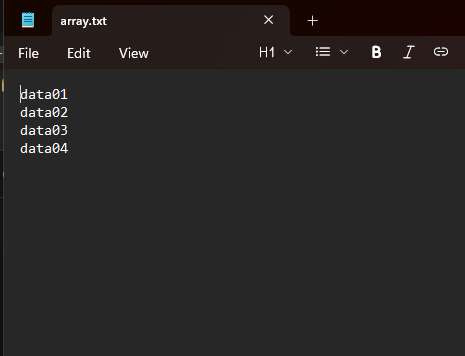
So, to bypass errors like the one above, all you have to do is specify the t when opening a text or text-based file.
void OnStart()
  {
    CFile f = CFileIO::open("array.txt", "wt");

    string data[] = {"data01", "data02", "data03", "data04"};
    f.write( data);
    f.close();
 }
Outputs.
Writing to a CSV file
Since a CSV has a 2-dimensional data storage approach, we have to handle it differently when it comes to writing new data to it. We used a CSV reader when reading such a file; this time we'll use a CSV writer.
The class takes similar arguments as the CSV reader.
class CSVWriter
{
protected:
   int    m_handle;
   string m_delimiter;
   char   m_quote;
   char   m_escape;
   bool   m_doublequote;

   string EscapeField(const string value);

public:

   CSVWriter(CFile &file,
             const string delimiter = ",",
             const char quotechar = '"',
             const char escapechar = '\\',
             const bool doublequote = true);

   bool writeRow(const string &row[]);
};
//+------------------------------------------------------------------+
//|                                                                  |
//+------------------------------------------------------------------+
CSVWriter::CSVWriter(CFile &file,
                     const string delimiter,
                     const char quotechar,
                     const char escapechar,
                     const bool doublequote)
{
   m_handle      = file.getHandle();
   m_delimiter   = delimiter;
   m_quote       = quotechar;
   m_escape      = escapechar;
   m_doublequote = doublequote;
}
We have to escape all the entries (fields) received before safely writing them to a CSV file.
string CSVWriter::EscapeField(const string value)
{
   bool must_quote = false;
   string out = "";

   int len = StringLen(value);
   for(int i = 0; i < len; i++)
   {
      char ch = (char)StringGetCharacter(value, i);

      // Detect if quoting is needed
      if(ch == m_quote ||
         ch == '\n' ||
         ch == '\r' ||
         CharToString(ch) == m_delimiter)
      {
         must_quote = true;
      }

      // Quote escaping
      if(ch == m_quote)
      {
         if(m_doublequote)
            out += CharToString(m_quote) + CharToString(m_quote); // ""
         else
            out += CharToString(m_escape) + CharToString(m_quote); // \"
      }
      else
      {
         out += CharToString(ch);
      }
   }

   if(must_quote)
      return CharToString(m_quote) + out + CharToString(m_quote);

   return out;
}
The function writeRow is responsible for writing values to a CSV file.
bool CSVWriter::writeRow(const string &row[])
{
   string line = "";
   int cols = ArraySize(row);

   for(int i = 0; i < cols; i++)
   {
      if(i > 0)
         line += m_delimiter;

      line += EscapeField(row[i]);
   }

   FileWriteString(m_handle, "\n"+line);
   return true;
}
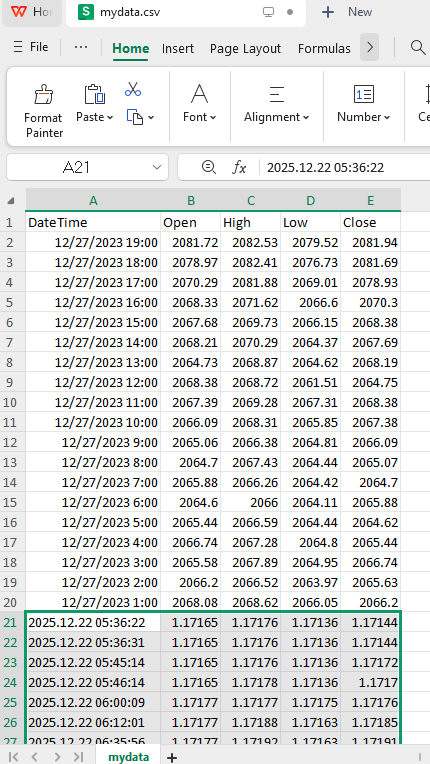
Let's try inserting new rows into the mydata.csv file.
void OnStart()
  {
   CFile f = CFileIO::open("mydata.csv","w+a");
   CSVWriter writer(f, ",");

   double open = iOpen(Symbol(), Period(), 0);
   double high = iHigh(Symbol(), Period(), 0);
   double low = iLow(Symbol(), Period(), 0);
   double close = iClose(Symbol(), Period(), 0);

   string row[] = {string(TimeCurrent()), (string)open, (string)high, (string)low, (string)close};

   writer.writeRow(row);
   f.close();
  }
Outputs.
Additional Methods
There are several useful methods present in Python's built-in I/O mechanism that make reading and writing effortless.
For the record, not all methods listed down here and in the entire article are imitated from Python; some are inspired by the MQL5 language itself.
01: The read() Method
This method is used for reading everything inside a file as a string.
with open(f"{files_path}\\readme.txt", "r") as file:
    print(file.read())
Outputs.
(venv) python main.py
hello, this is a readme file with a plenty of information to read from.

This is a third line after a space.
In MQL5, we read all data from a text file (by default), appending the values into a huge string separated by a new line code ("\n").
string CFile::read(int size = -1)
  {
   if(!isHandleOk(__FUNCTION__))
      return "";

//---

   string result = "";
   if(size < 0) // read entire file
     {
      while(!FileIsEnding(m_handle))
        {
         result += FileReadString(m_handle);

         if(FileIsLineEnding(m_handle))
            result += "\n";
        }
     }
   else
     {
      result = FileReadString(m_handle, size);
     }

   return result; //but not here
  }
Example usage.
void OnStart()
  {
   CFile f = CFileIO::open("readme.txt", "rt");
   Print(f.read());

   f.close();
 }
Outputs.
NQ      0       08:32:45.949    Test file IO (EURUSD,H1)        hello, this is a readme file with a plenty of information to read from.
DQ      0       08:32:45.949    Test file IO (EURUSD,H1)
GJ      0       08:32:45.949    Test file IO (EURUSD,H1)        This is a third line after a space.
02: The tell() method
This function returns the current position of the file descriptor in bytes from the beginning of the file.
int CFile::tell()
  {
   if(!isHandleOk(__FUNCTION__))
      return -1;

   return (int)FileTell(m_handle);
  }
03: The flush() method
Writes to a disk all data remaining in the input/output file buffer.
void CFile::flush()
  {
   if(!isHandleOk(__FUNCTION__))
      return;

   FileFlush(m_handle);
  }
04: The seek() method
The function moves the position of the file pointer by a specified number of bytes relative to the specified position.
void CFile::seek(const long offset, const ENUM_FILE_POSITION origin)
  {
   //--- check handle
   if (!isHandleOk(__FUNCTION__))
     return;

   FileSeek(m_handle,offset,origin);
  }
05: checking whether the file is readable and writable
These two little functions might help us before deciding to read or write some information(s) from and into the files.
For isreadable(), we check if the flag FILE_READ is present among file flags.
bool isreadable() { return (m_flags & FILE_READ) != 0; }
For iswritable(), we check whether the flag FILE_WRITE is present among file flags.
bool iswritable() { return (m_flags & FILE_WRITE) != 0; }
Example usage.
void OnStart()
  {
    CFile f = CFileIO::open("readme.txt", "r"); //open the file in read-only mode

    printf("Reading a text file line by line....");
    string text;
    while(f.readline(text))
       Print(text);

    Print("is writable: ", f.iswritable());
    Print("is readable: ", f.isreadable());

    f.close(); //closing after you are done with it
  }
Outputs.
CG      0       16:54:21.159    Test file IO (EURUSD,H1)        is writable: false
FQ      0       16:54:21.159    Test file IO (EURUSD,H1)        is readable: true
Final Thoughts
File I/O operations do not always need to be as complicated as they often appear in MQL5. This article demonstrates that, with careful abstraction and a clear design goal, it is possible to build a clean, reliable, and Python-like approach to reading from and writing to files while still respecting the constraints of the MetaTrader 5 environment.
We covered the fundamentals of file I/O for common use cases such as text and CSV files, explored file modes, encoding considerations, append behavior, and safe read/write patterns, and showed how higher-level constructs can be layered on top of the native MQL5 file functions. By encapsulating these details inside a reusable module, we reduce boilerplate, minimize common mistakes, and make file operations easier to reason about and maintain.
Best regards.
Attachments Table
| Filename | Description & Usage |
|---|---|
| Include\PyMQL5\fileIO\fileIO.mqh | Contains both CFile and CFileIO classes for working with all file types in MetaTrader 5. |
| Include\PyMQL$\fileIO\csv.mqh | It has two classes, CSVReader and CSVWriter, for reading and writing CSV files, respectively. |
| Test file IO.mq5 | A final script (playground) for all methods discussed in this article. |
| Files\* | It has all files to be used for testing our code. |
Warning: All rights to these materials are reserved by MetaQuotes Ltd. Copying or reprinting of these materials in whole or in part is prohibited.
This article was written by a user of the site and reflects their personal views. MetaQuotes Ltd is not responsible for the accuracy of the information presented, nor for any consequences resulting from the use of the solutions, strategies or recommendations described.

 Neural Networks in Trading: Multi-Task Learning Based on the ResNeXt Model (Final Part)
 Creating Custom Indicators in MQL5 (Part 3): Multi-Gauge Enhancements with Sector and Round Styles
 Successful Restaurateur Algorithm (SRA)
 Data Science and ML (Part 47): Forecasting the Market Using the DeepAR model in Python

- Free trading apps
- Over 8,000 signals for copying
- Economic news for exploring financial markets
You agree to website policy and terms of use