

Creating volatility forecast indicator using Python
 8 840
8 840
 4
4

Introduction
Oh, crap! My stops have been blown away again...
This is the phrase with which I began every second trading day back in 2021. I remember sitting covered in charts and numbers, proud of my new trading system, and then bam – half of my deposit was gone. Because some smart guy made a statement about crypto and the market went crazy.
Sounds familiar, right? I am sure every algo trader has been through this. It seems I have calculated and tested everything, and the system works perfectly on historical data... But what about the real market? "Hello, volatility, long time no see!"
After another such "adventure", I got angry and decided to get to the bottom of it. Well, it can’t be that it is impossible to somehow predict these market hysterics! I think I have dug through all the existing studies on volatility. Do you know what is most funny? It turned out that the solution lay at the intersection of old methods and new technologies.
In this article, I will share my journey from despair to a working volatility forecasting system. No boring stuff or academic jargon – just real experience and working solutions. I will show you how I combined MetaTrader 5 with Python (spoiler: they did not get along right away), how I made machine learning work for me, and what pitfalls I encountered along the way.
The main insight I gained from this whole story is that you cannot blindly trust either classic indicators or trendy neural networks. I remember how I spent a week setting up a very complex neural network, and then a simple XGBoost showed better results. Or how once a simple Bollinger saved a deposit where all the smart algorithms failed.
I also realized that in trading, as in boxing, the main thing is not the force of the blow, but the ability to anticipate it. My system does not make supernatural predictions. It simply helps you be prepared for market surprises and increase your trading strategy's safety margin in time.
In short, if you are tired of your algorithms tripping over every little bit of volatility, welcome to my world. I will tell you everything as is, with code examples, charts and analysis. Let's get started.
Project concept
After months of experimentation and in-depth analysis of market data, a concept was born for a system capable of predicting volatility with astonishing accuracy. The key discovery was that volatility, unlike price, has the property of stationarity — it tends to return to its mean value and forms stable patterns. It is this feature that makes its forecasting not only possible, but also practically applicable in real trading.
The system is based on the powerful combination of MetaTrader 5 and Python, where each tool showcases its strengths. MetaTrader 5 acts as a reliable source of market data. It provides us with historical quotes and a real-time data stream with minimal delays. And Python becomes our analytical lab, where a rich set of machine learning libraries (Sklearn, XGBoost, PyTorch) helps extract valuable patterns from this data and confirm hypotheses about the stationarity of volatility.
The system architecture consists of three key levels:
- Data Pipeline is the foundation of the system. This is where the primary handling of data from MetaTrader 5 takes place: noise removal, calculation of dozens of volatility metrics, and the formation of features for models. Particular attention has been paid to optimization — the system operates without delays and memory leaks. At this level, the stationarity of time series is also tested and significant volatility patterns are identified.
- Analytics Core. The core is based on an ensemble of specialized machine learning models. Each one is tailored to its own time horizon: from intraday fluctuations to weekly trends. During the tests, it was found that even simple XGBoost often outperforms complex neural networks in forecast accuracy, especially in volatility cluster detection tasks.
- Risk Advisor is a risk management recommendation system. Based on volatility forecasts, it suggests optimal stop loss and take profit levels. During periods of increased future volatility, it recommends widening protective orders, and during calmer future hours, to narrow them for more precise market entry. This is where volatility stationarity plays a key role, allowing the system to effectively adapt trading parameters.
The models are trained on a unique dataset, including quotes on different timeframes — from tick to daily. This allows the system to recognize three key market conditions: low volatility, trending, and explosive. Based on this information, recommendations are formed on optimal entry levels and protective orders. Due to the stationarity of volatility, the system is able not only to identify the current state, but also to predict transitions between these states.
The main feature of the system is its adaptability. It does not just issue fixed recommendations, but adapts them to the current market situation. For each trading situation, the system offers an individual set of parameters based on the forecast of future volatility. This adaptability is particularly effective due to persistent patterns in volatility behavior.
In the following sections, we'll examine each system component in detail, show the actual code, and share the results of backtesting. You will see how theoretical concepts about volatility stationarity are transformed into a practical tool for market analysis.
Installing the required software
Before we dive into system development, let's take a look at installing all the necessary software. From my own experience, I know that it is the setup of the MetaTrader 5-Python connection that causes many people to stumble, so I will try to tell you not only how to install everything, but also how to avoid the main pitfalls.
Let's start with Python. We need version 3.8 or higher, which can be downloaded from the official python.org website. During installation, be sure to check "Add Python to PATH", otherwise you will have to add paths manually later. After installing Python, the first thing we will do is create a virtual environment for the project. This is not a mandatory step, but it is very useful – it will protect us from library version conflicts.
python -m venv venv_volatility
venv_volatility\Scripts\activate  # for Windows
source venv_volatility/bin/activate  # for Linux/MacOS
Now let's install the necessary libraries. We will need a few basic tools: numpy and pandas for working with data, scikit-learn and xgboost for machine learning, pytorch for neural networks, and, of course, a library for working with MetaTrader 5. Here is the command to install the entire package:
pip install numpy pandas scikit-learn xgboost pytorch MetaTrader5 pylint jupyter Let's take a closer look at installing MetaTrader 5. You need to download it from your broker's website - this is important because versions may differ. When installing, choose a folder with a simple path, without Cyrillic characters or spaces — this will save you a lot of hassle when setting up communication with Python.
After installing the terminal, don't forget to enable automatic trading and DLL import in its settings, as well as enable AlgoTrading. It sounds obvious, but I spent a couple of hours debugging it myself until I remembered about these settings.
Now comes the fun part – checking the connection between Python and MetaTrader 5. I developed a small script to make sure everything works as it should:
import MetaTrader5 as mt5

def test_mt5_connection():
    if not mt5.initialize():
        print("MT5 initialization error:", mt5.last_error())
        return False

    print("MetaTrader5 package author:", mt5.__author__)
    print("MetaTrader5 package version:", mt5.__version__)

    terminal_info = mt5.terminal_info()
    if terminal_info is None:
        print("Error getting terminal data:", mt5.last_error())
        return False

    print(f"Connected to terminal '{terminal_info.name}' ({terminal_info.path})")
    print("Trade server:", terminal_info.connected)

    mt5.shutdown()
    return True

if __name__ == "__main__":
    test_mt5_connection()
What to look for when problems arise? The most common stumbling block is MetaTrader 5 initialization. If the script cannot connect to the terminal, first check whether MetaTrader 5 itself is running. It seems obvious, but believe me, even experienced developers sometimes forget about it.
If the terminal is running but there is still no connection, check your administrator rights and firewall settings. Windows sometimes likes to play it safe and block the connection.
For development, I recommend using VS Code or PyCharm — both editors are great for Python development. Install the extension for Python and Jupyter - this will greatly simplify debugging and testing code.
The final check is to try getting some historical data:
import MetaTrader5 as mt5
mt5.initialize()
data = mt5.copy_rates_from_pos("EURUSD", mt5.TIMEFRAME_M1, 0, 1000)
print(data is not None)
mt5.shutdown()
If the code runs without errors, your development environment is ready to go! In the next section, we will look at receiving and handling data from MetaTrader 5.
Getting data from MetaTrader 5
Before we dive into complex calculations, let's make sure we are receiving data from the trading terminal correctly. I wrote a simple script to help you test MetaTrader 5 and look at the data structure:
import MetaTrader5 as mt5
import pandas as pd
from datetime import datetime, timedelta

pd.set_option('display.max_columns', 500)
pd.set_option('display.width', 1500)
pd.set_option('display.float_format', lambda x: '%.5f' % x)

def check_mt5_data(symbol="EURUSD"):
    if not mt5.initialize():
        print(f"MT5 initialization error: {mt5.last_error()}")
        return

    print("\n=== Symbol Information ===")
    symbol_info = mt5.symbol_info(symbol)
    if symbol_info is None:
        print(f"Failed to get {symbol} data")
        mt5.shutdown()
        return

    print(f"Current spread: {symbol_info.spread} points")
    print(f"Tick size: {symbol_info.trade_tick_size}")
    print(f"Contract size: {symbol_info.trade_contract_size}")

    # Last 100 ticks
    print("\n=== Latest Ticks ===")
    ticks = mt5.copy_ticks_from(symbol, datetime.now() - timedelta(minutes=5),
                               100, mt5.COPY_TICKS_ALL)
    ticks_frame = pd.DataFrame(ticks)
    ticks_frame['time'] = pd.to_datetime(ticks_frame['time'], unit='s')
    print(ticks_frame.head())

    # 5-minute bars (last 100 bars)
    print("\n=== 5-Minute Bars (Last 100) ===")
    rates_5m = mt5.copy_rates_from_pos(symbol, mt5.TIMEFRAME_M5, 0, 100)
    rates_5m_frame = pd.DataFrame(rates_5m)
    rates_5m_frame['time'] = pd.to_datetime(rates_5m_frame['time'], unit='s')
    print(rates_5m_frame.head())

    # Hourly bars (last 24 hours)
    print("\n=== Hourly Bars (Last 24) ===")
    rates_1h = mt5.copy_rates_from_pos(symbol, mt5.TIMEFRAME_H1, 0, 24)
    rates_1h_frame = pd.DataFrame(rates_1h)
    rates_1h_frame['time'] = pd.to_datetime(rates_1h_frame['time'], unit='s')
    print(rates_1h_frame.head())

    # Daily bars (last 30 days)
    print("\n=== Daily Bars (Last 30) ===")
    rates_d1 = mt5.copy_rates_from_pos(symbol, mt5.TIMEFRAME_D1, 0, 30)
    rates_d1_frame = pd.DataFrame(rates_d1)
    rates_d1_frame['time'] = pd.to_datetime(rates_d1_frame['time'], unit='s')
    print(rates_d1_frame.head())

    # Statistics for different timeframes
    print("\n=== 5-Minute Bars Statistics ===")
    print(f"Average volume: {rates_5m_frame['tick_volume'].mean():.2f}")
    print(f"Average spread: {rates_5m_frame['spread'].mean():.2f}")
    print(f"Average range: {(rates_5m_frame['high'] - rates_5m_frame['low']).mean():.5f}")

    print("\n=== Hourly Bars Statistics ===")
    print(f"Average volume: {rates_1h_frame['tick_volume'].mean():.2f}")
    print(f"Average spread: {rates_1h_frame['spread'].mean():.2f}")
    print(f"Average range: {(rates_1h_frame['high'] - rates_1h_frame['low']).mean():.5f}")

    print("\n=== Daily Bars Statistics ===")
    print(f"Average volume: {rates_d1_frame['tick_volume'].mean():.2f}")
    print(f"Average spread: {rates_d1_frame['spread'].mean():.2f}")
    print(f"Average range: {(rates_d1_frame['high'] - rates_d1_frame['low']).mean():.5f}")

    # Current quotes
    print("\n=== Current Market Depth ===")
    depth = mt5.market_book_get(symbol)
    if depth is not None:
        bid = depth[0].price if depth[0].type == 1 else depth[1].price
        ask = depth[0].price if depth[0].type == 2 else depth[1].price
        print(f"Bid: {bid}")
        print(f"Ask: {ask}")
        print(f"Spread: {(ask - bid):.5f}")

    mt5.shutdown()

if __name__ == "__main__":
    check_mt5_data()
This code will display all the information we need to check the validity of the connection and the quality of the received data. Once you launch it, you will see:
- Basic information about the trading instrument
- Table of last ticks
- Table of hourly bars
- Statistics on volumes and spreads
- Current quotes from the market depth
After the launch, we immediately see that everything works as it should. If a problem occurs somewhere, the script will show at what stage exactly something went wrong.
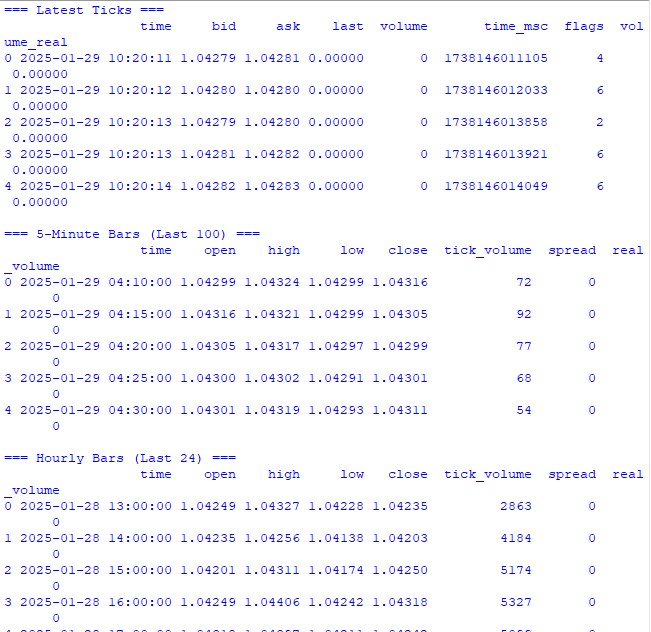
In the following sections, we will use this data to calculate volatility, but first it is important to ensure that the underlying data retrieval works correctly.
Data preprocessing
When I first started working with volatility forecasting, I thought the main thing was a cool machine learning model. Practice quickly showed that the quality of data preparation is what really matters. Let me show you how I prepare data for our forecasting system.
Here is the full preprocessing code I am using:
import MetaTrader5 as mt5
import numpy as np
import pandas as pd
from sklearn.preprocessing import StandardScaler
from datetime import datetime, timedelta

pd.set_option('display.max_columns', 500)
pd.set_option('display.width', 1500)
pd.set_option('display.float_format', lambda x: '%.5f' % x)

class VolatilityProcessor:
    def __init__(self, lookback_periods=(5, 10, 20)):
        self.lookback_periods = lookback_periods
        self.scaler = StandardScaler()

    def calculate_volatility_features(self, df):
        df = df.copy()

        # Basic calculations
        df['returns'] = df['close'].pct_change().fillna(0)
        df['log_returns'] = (np.log(df['close']) - np.log(df['close'].shift(1))).fillna(0)

        # True Range
        df['true_range'] = np.maximum(
            df['high'] - df['low'],
            np.maximum(
                abs(df['high'] - df['close'].shift(1).fillna(df['high'])),
                abs(df['low'] - df['close'].shift(1).fillna(df['low']))
            )
        )

        # ATR and volatility
        for period in self.lookback_periods:
            df[f'atr_{period}'] = df['true_range'].rolling(window=period, min_periods=1).mean()
            df[f'volatility_{period}'] = df['returns'].rolling(window=period, min_periods=1).std()

        # Parkinson volatility
        df['parkinson_vol'] = np.sqrt(
            1/(4 * np.log(2)) *
            np.power(np.log(df['high'].div(df['low'])), 2)
        )

        # Garman-Klass volatility
        df['garman_klass_vol'] = np.sqrt(
            0.5 * np.power(np.log(df['high'].div(df['low'])), 2) -
            (2*np.log(2)-1) * np.power(np.log(df['close'].div(df['open'])), 2)
        )

        # Relative volatility changes
        for period in self.lookback_periods:
            df[f'vol_change_{period}'] = (
                df[f'volatility_{period}'].div(df[f'volatility_{period}'].shift(1))
            )

        # Replace all infinities and NaN
        for col in df.columns:
            if df[col].dtype == float:
                df[col] = df[col].replace([np.inf, -np.inf], np.nan).fillna(0)

        return df

    def prepare_features(self, df):
        feature_cols = []

        # Time-based features - correct time conversion
        time = pd.to_datetime(df['time'], unit='s')

        # Hours (0-23) -> radians (0-2π)
        hours = time.dt.hour.values
        df['hour_sin'] = np.sin(2 * np.pi * hours / 24.0)
        df['hour_cos'] = np.cos(2 * np.pi * hours / 24.0)

        # Week days (0-6) -> radians (0-2π)
        days = time.dt.dayofweek.values
        df['day_sin'] = np.sin(2 * np.pi * days / 7.0)
        df['day_cos'] = np.cos(2 * np.pi * days / 7.0)

        # Select features
        for period in self.lookback_periods:
            feature_cols.extend([
                f'atr_{period}',
                f'volatility_{period}',
                f'vol_change_{period}'
            ])

        feature_cols.extend([
            'parkinson_vol',
            'garman_klass_vol',
            'hour_sin',
            'hour_cos',
            'day_sin',
            'day_cos'
        ])

        # Create features DataFrame
        features = df[feature_cols].copy()

        # Final cleanup and scaling
        features = features.replace([np.inf, -np.inf], 0).fillna(0)
        scaled_features = self.scaler.fit_transform(features)

        return pd.DataFrame(
            scaled_features,
            columns=features.columns,
            index=features.index
        )

    def create_target(self, df, forward_window=12):
        future_vol = df['returns'].rolling(
            window=forward_window, min_periods=1, center=False
        ).std().shift(-forward_window).fillna(0)

        return future_vol

    def prepare_dataset(self, df, forward_window=12):
        print("\n=== Preparing Dataset ===")
        print("Initial shape:", df.shape)

        df = self.calculate_volatility_features(df)
        print("After calculating features:", df.shape)

        features = self.prepare_features(df)
        target = self.create_target(df, forward_window)

        print("Final shape:", features.shape)
        return features, target

def check_mt5_data(symbol="EURUSD"):
    if not mt5.initialize():
        print(f"MT5 initialization error: {mt5.last_error()}")
        return None

    rates = mt5.copy_rates_from_pos(symbol, mt5.TIMEFRAME_H1, 0, 10000)
    mt5.shutdown()

    if rates is None:
        return None

    return pd.DataFrame(rates)

def main():
    symbol = "EURUSD"
    rates_frame = check_mt5_data(symbol)

    if rates_frame is not None:
        print("\n=== Processing Hourly Data for Volatility Analysis ===")
        processor = VolatilityProcessor(lookback_periods=(5, 10, 20))
        features, target = processor.prepare_dataset(rates_frame)

        print("\nFeature statistics:")
        print(features.describe())
        print("\nFeature columns:", features.columns.tolist())
        print("\nTarget statistics:")
        print(target.describe())
    else:
        print("Failed to process data: MT5 data retrieval error")

if __name__ == "__main__":
    main()
How it works
First, we download the last 10,000 H1 bars from MetaTrader 5. Why exactly that many? Through trial and error, I found that this is the optimal amount - enough for learning, but not so much that the market changes significantly.
Now the most interesting part begins. The VolatilityProcessor class does all the dirty work of preparing the data. Here is what is going on under the hood:
- Calculation of basic volatility indicators. Here we consider three types of volatility:
- Classic standard deviation of returns
- True Range and ATR are old school, but still work.
- Parkinson and Garman-Klass methods are good at catching intraday movements.
- Handling time. Instead of the usual one-hot encoding for hours and days of the week, I use sines and cosines. This is not just a show-off — we are telling the model that 11:00 PM and 12:00 AM are located close together, not at opposite ends of the spectrum.
- Data normalization and cleaning. This is the critical part:
- Removing outliers and infinite values
- Filling gaps with zeros (only after careful checking that this does not distort the data)
- Scaling all features to the same range
As a result, we get 15 features - the optimal number for our task. I tried adding more (all sorts of exotic indicators), but it only made the results worse.
The target variable is the future volatility over the next 12 periods. Why 12? On hourly data, this gives us a forecast for the next half day — enough to make trading decisions, but not so much that the forecast becomes meaningless.
What to look out for
- min_periods=1 is used everywhere in rolling operations - this allows us to not lose data at the beginning of the time series.
- Using .div() instead of the usual / is not just a whim; pandas handles edge cases better this way.
- The replacement of infinities is done at the very end of each stage, this allows us not to miss problem areas.
In the next section, we will build a machine learning model that will work with this prepared data. But remember, no matter how cool the model we use, it will not save poorly prepared data.
Creating a machine learning model
So, we have reached the most interesting part - creating a forecasting model. Initially, I took the obvious route - regression to predict the exact value of future volatility. The logic was simple: we get a specific number, multiply it by some ratio, and there you have your stop loss level.
First attempt: regression model
I started with the simplest code - a basic XGBRegressor with minimal settings. The parameters are few: one hundred trees, learning rate 0.1 and depth 5. It was naive to think that this would be sufficient, but who has not made such mistakes at the beginning of their journey?
The results are unimpressive, to put it mildly. The R-square hovered around 0.05-0.06, meaning the model explained only 5-6% of the variation in the data. The standard deviation of the predictions turned out to be almost three times smaller than the actual one. Mean Absolute Error seemed pretty good, but it was a trap.
import MetaTrader5 as mt5
import numpy as np
import pandas as pd
from sklearn.preprocessing import StandardScaler
from sklearn.model_selection import TimeSeriesSplit
import xgboost as xgb
from xgboost import XGBRegressor
from sklearn.metrics import mean_squared_error, mean_absolute_error, r2_score
import matplotlib.pyplot as plt
from datetime import datetime, timedelta

# VolatilityProcessor class remains unchanged
class VolatilityProcessor:
    def __init__(self, lookback_periods=(5, 10, 20)):
        self.lookback_periods = lookback_periods
        self.scaler = StandardScaler()

    def calculate_volatility_features(self, df):
        df = df.copy()

        # Basic calculations
        df['returns'] = df['close'].pct_change().fillna(0)
        df['log_returns'] = (np.log(df['close']) - np.log(df['close'].shift(1))).fillna(0)
        df['abs_returns'] = abs(df['returns'])

        # Price changes
        df['price_range'] = (df['high'] - df['low']) / df['close']
        df['price_change'] = (df['close'] - df['open']) / df['open']

        # True Range
        df['true_range'] = np.maximum(
            df['high'] - df['low'],
            np.maximum(
                abs(df['high'] - df['close'].shift(1).fillna(df['high'])),
                abs(df['low'] - df['close'].shift(1).fillna(df['low']))
            )
        )

        # ATR and volatility for different periods
        for period in self.lookback_periods:
            # Standard features
            df[f'atr_{period}'] = df['true_range'].rolling(window=period, min_periods=1).mean()
            df[f'volatility_{period}'] = df['returns'].rolling(window=period, min_periods=1).std()

            # Additional rolling statistics
            df[f'mean_range_{period}'] = df['price_range'].rolling(window=period, min_periods=1).mean()
            df[f'mean_price_change_{period}'] = df['price_change'].rolling(window=period, min_periods=1).mean()
            df[f'max_price_change_{period}'] = df['price_change'].rolling(window=period, min_periods=1).max()
            df[f'min_price_change_{period}'] = df['price_change'].rolling(window=period, min_periods=1).min()

        # Advanced volatility measures
        # Parkinson volatility
        df['parkinson_vol'] = np.sqrt(
            1/(4 * np.log(2)) *
            np.power(np.log(df['high'].div(df['low'])), 2)
        )

        # Garman-Klass volatility
        df['garman_klass_vol'] = np.sqrt(
            0.5 * np.power(np.log(df['high'].div(df['low'])), 2) -
            (2*np.log(2)-1) * np.power(np.log(df['close'].div(df['open'])), 2)
        )

        # Rogers-Satchell volatility
        df['rogers_satchell_vol'] = np.sqrt(
            np.log(df['high'].div(df['close'])) * np.log(df['high'].div(df['open'])) +
            np.log(df['low'].div(df['close'])) * np.log(df['low'].div(df['open']))
        )

        # Relative changes
        for period in self.lookback_periods:
            df[f'vol_change_{period}'] = (
                df[f'volatility_{period}'].div(df[f'volatility_{period}'].shift(1))
            )
            df[f'atr_change_{period}'] = (
                df[f'atr_{period}'].div(df[f'atr_{period}'].shift(1))
            )

        # Replace all infinities and NaN
        for col in df.columns:
            if df[col].dtype == float:
                df[col] = df[col].replace([np.inf, -np.inf], np.nan).fillna(0)

        return df

    def prepare_features(self, df):
        feature_cols = []

        # Time-based features
        time = pd.to_datetime(df['time'], unit='s')

        # Hours (0-23) -> radians (0-2π)
        hours = time.dt.hour.values
        df['hour_sin'] = np.sin(2 * np.pi * hours / 24.0)
        df['hour_cos'] = np.cos(2 * np.pi * hours / 24.0)

        # Days of week (0-6) -> radians (0-2π)
        days = time.dt.dayofweek.values
        df['day_sin'] = np.sin(2 * np.pi * days / 7.0)
        df['day_cos'] = np.cos(2 * np.pi * days / 7.0)

        # Select features
        for period in self.lookback_periods:
            feature_cols.extend([
                f'atr_{period}',
                f'volatility_{period}',
                f'vol_change_{period}'
            ])

        feature_cols.extend([
            'parkinson_vol',
            'garman_klass_vol',
            'hour_sin',
            'hour_cos',
            'day_sin',
            'day_cos'
        ])

        # Create features DataFrame
        features = df[feature_cols].copy()

        # Final cleanup and scaling
        features = features.replace([np.inf, -np.inf], 0).fillna(0)
        scaled_features = self.scaler.fit_transform(features)

        return pd.DataFrame(
            scaled_features,
            columns=feature_cols,
            index=features.index
        )

    def create_target(self, df, forward_window=12):
        """Create target with log transformation"""
        future_vol = df['returns'].rolling(
            window=forward_window, min_periods=1, center=False
        ).std().shift(-forward_window)

        # Add small constant to avoid log(0)
        log_vol = np.log(future_vol + 1e-10)

        return log_vol.fillna(log_vol.mean())

    def prepare_dataset(self, df, forward_window=12):
        print("\n=== Preparing Dataset ===")
        print("Initial shape:", df.shape)

        df = self.calculate_volatility_features(df)
        print("After calculating features:", df.shape)

        features = self.prepare_features(df)
        target = self.create_target(df, forward_window)

        print("Final shape:", features.shape)
        return features, target

class VolatilityModel:
    def __init__(self, lookback_periods=(5, 10, 20), forward_window=12):
        self.processor = VolatilityProcessor(lookback_periods)
        self.forward_window = forward_window
        self.model = XGBRegressor(
            n_estimators=500,
            learning_rate=0.05,
            max_depth=10,
            min_child_weight=1,
            subsample=0.8,
            colsample_bytree=0.8,
            gamma=0.1,
            reg_alpha=0.1,
            reg_lambda=1,
            random_state=42,
            n_jobs=-1,
            objective='reg:squarederror'  # Better for log-transformed targets
        )
        self.feature_importance = None

    def prepare_data(self, rates_frame):
        """Prepare data using our processor"""
        features, target = self.processor.prepare_dataset(rates_frame)
        return features, target

    def create_train_test_split(self, features, target, test_size=0.2):
        """Split data preserving time order"""
        split_idx = int(len(features) * (1 - test_size))

        X_train = features.iloc[:split_idx]
        X_test = features.iloc[split_idx:]
        y_train = target.iloc[:split_idx]
        y_test = target.iloc[split_idx:]

        return X_train, X_test, y_train, y_test

    def train(self, X_train, y_train, X_test, y_test):
        """Train model with validation"""
        print("\n=== Training Model ===")
        print("Training set shape:", X_train.shape)
        print("Test set shape:", X_test.shape)

        # Train the model
        eval_set = [(X_train, y_train), (X_test, y_test)]
        self.model.fit(
            X_train,
            y_train,
            eval_set=eval_set,
            verbose=True
        )

        # Save feature importance
        importance = self.model.feature_importances_
        self.feature_importance = pd.DataFrame({
            'feature': X_train.columns,
            'importance': importance
        }).sort_values('importance', ascending=False)

        # Make predictions and evaluate
        predictions = self.predict(X_test)
        metrics = self.calculate_metrics(y_test, predictions)

        return metrics

    def calculate_metrics(self, y_true, y_pred):
        """Calculate model performance metrics with detailed R2"""
        # Basic metrics
        rmse = np.sqrt(mean_squared_error(y_true, y_pred))
        mae = mean_absolute_error(y_true, y_pred)

        # Manual R2 calculation for verification
        y_true_mean = np.mean(y_true)
        total_sum_squares = np.sum((y_true - y_true_mean) ** 2)
        residual_sum_squares = np.sum((y_true - y_pred) ** 2)
        r2_manual = 1 - (residual_sum_squares / total_sum_squares)

        # Stats for debugging
        metrics = {
            'RMSE': rmse,
            'MAE': mae,
            'R2 (sklearn)': r2_score(y_true, y_pred),
            'R2 (manual)': r2_manual,
            'RSS': residual_sum_squares,
            'TSS': total_sum_squares,
            'Mean Prediction': np.mean(y_pred),
            'Mean Actual': np.mean(y_true),
            'Std Prediction': np.std(y_pred),
            'Std Actual': np.std(y_true),
            'Min Prediction': np.min(y_pred),
            'Max Prediction': np.max(y_pred),
            'Min Actual': np.min(y_true),
            'Max Actual': np.max(y_true)
        }

        print("\nDetailed Metrics Analysis:")
        print(f"Total Sum of Squares (TSS): {total_sum_squares:.8f}")
        print(f"Residual Sum of Squares (RSS): {residual_sum_squares:.8f}")
        print(f"R2 components: 1 - ({residual_sum_squares:.8f} / {total_sum_squares:.8f})")

        return metrics

    def predict(self, features):
        """Get volatility predictions with inverse log transform"""
        log_predictions = self.model.predict(features)
        return np.exp(log_predictions) - 1e-10

    def plot_feature_importance(self):
        """Visualize feature importance"""
        plt.figure(figsize=(12, 6))
        plt.bar(
            self.feature_importance['feature'],
            self.feature_importance['importance']
        )
        plt.xticks(rotation=45)
        plt.title('Feature Importance')
        plt.tight_layout()
        plt.show()

    def plot_predictions(self, y_true, y_pred, title="Model Predictions"):
        """Visualize predictions vs actual values"""
        plt.figure(figsize=(15, 7))
        plt.plot(y_true.values, label='Actual', alpha=0.7)
        plt.plot(y_pred, label='Predicted', alpha=0.7)
        plt.title(title)
        plt.legend()
        plt.tight_layout()
        plt.show()

def check_mt5_data(symbol="EURUSD"):
    if not mt5.initialize():
        print(f"MT5 initialization error: {mt5.last_error()}")
        return None

    rates = mt5.copy_rates_from_pos(symbol, mt5.TIMEFRAME_H1, 0, 10000)
    mt5.shutdown()

    if rates is None:
        return None

    return pd.DataFrame(rates)

def main():
    # Get data
    symbol = "EURUSD"
    rates_frame = check_mt5_data(symbol)

    if rates_frame is not None:
        # Create and train model
        model = VolatilityModel(lookback_periods=(5, 10, 20), forward_window=12)
        features, target = model.prepare_data(rates_frame)

        # Split data
        X_train, X_test, y_train, y_test = model.create_train_test_split(
            features, target, test_size=0.2
        )

        # Train and evaluate
        metrics = model.train(X_train, y_train, X_test, y_test)
        print("\n=== Model Performance ===")
        for metric, value in metrics.items():
            print(f"{metric}: {value:.6f}")

        # Make predictions
        predictions = model.predict(X_test)

        # Visualize results
        model.plot_feature_importance()
        model.plot_predictions(y_test, predictions, "Volatility Predictions")
    else:
        print("Failed to process data: MT5 data retrieval error")

if __name__ == "__main__":
    main()
Why trap? That is because the model has simply learned to predict values close to the average. During quiet periods, everything looked great, but as soon as real action started, the model happily missed it.
Experiments with improving regression
Weeks were spent trying to improve the regression model. I tried different neural network architectures, added more and more new features, experimented with different loss functions, and tweaked hyperparameters until I was completely exhausted.
Everything turned out to be useless. Sometimes, I managed to raise the R-square to 0.15-0.20, but at what cost? The model became unstable, overfitted, and, most importantly, still missed the most important moments of high volatility.
Rethinking the approach
And then it dawned on me: why do we need an exact volatility value at all? A trader does not care whether the volatility is 0.00234 or 0.00256. What is important is whether it will be significantly higher than usual.
This is how the idea was born to reformulate the problem as a classification. Instead of predicting specific values, we began to define two states: normal/low volatility (label 0) and high volatility above the 75th percentile (label 1).
Why did this work better?
First, we received clearer signals. Instead of vague predictions, there was now a certain answer: whether to expect a surge or not. This approach turned out to be much easier to interpret and integrate into a trading system.
Secondly, the model has become better at handling extreme values. In the regression, the outliers were "smeared out", but in the classification they formed a clear pattern of the high volatility class.
Thirdly, practical applicability has increased. A trader needs a clear signal to act. It turned out to be much easier to adjust the levels of protective orders for two states than to try to scale them to a continuum of values.
import MetaTrader5 as mt5
import numpy as np
import pandas as pd
from sklearn.preprocessing import StandardScaler
import xgboost as xgb
from xgboost import XGBClassifier
from sklearn.metrics import accuracy_score, precision_score, recall_score, f1_score, confusion_matrix
import matplotlib.pyplot as plt
import seaborn as sns

class VolatilityProcessor:
    def __init__(self, lookback_periods=(5, 10, 20), volatility_threshold=75):
        """
        Args:
            lookback_periods: periods for feature calculation
            volatility_threshold: percentile for defining high volatility
        """
        self.lookback_periods = lookback_periods
        self.volatility_threshold = volatility_threshold
        self.scaler = StandardScaler()

    def calculate_features(self, df):
        df = df.copy()

        # Basic calculations
        df['returns'] = df['close'].pct_change()
        df['abs_returns'] = abs(df['returns'])

        # True Range
        df['true_range'] = np.maximum(
            df['high'] - df['low'],
            np.maximum(
                abs(df['high'] - df['close'].shift(1)),
                abs(df['low'] - df['close'].shift(1))
            )
        )

        # Signs of volatility
        for period in self.lookback_periods:
            # ATR
            df[f'atr_{period}'] = df['true_range'].rolling(window=period).mean()

            # Volatility
            df[f'volatility_{period}'] = df['returns'].rolling(period).std()

            # Extremes
            df[f'high_low_range_{period}'] = (
                (df['high'].rolling(period).max() - df['low'].rolling(period).min())
                / df['close']
            )

            # Volatility acceleration
            df[f'volatility_change_{period}'] = (
                df[f'volatility_{period}'] / df[f'volatility_{period}'].shift(1)
            )

        # Add sentiment indicators
        df['body_ratio'] = abs(df['close'] - df['open']) / (df['high'] - df['low'])
        df['upper_shadow'] = (df['high'] - df[['open', 'close']].max(axis=1)) / (df['high'] - df['low'])
        df['lower_shadow'] = (df[['open', 'close']].min(axis=1) - df['low']) / (df['high'] - df['low'])

        # Data clearing
        for col in df.columns:
            if df[col].dtype == float:
                df[col] = df[col].replace([np.inf, -np.inf], np.nan)
                df[col] = df[col].fillna(method='ffill').fillna(0)

        return df

    def prepare_features(self, df):
        # Select features for the model
        feature_cols = []

        # Add time features
        time = pd.to_datetime(df['time'], unit='s')
        df['hour_sin'] = np.sin(2 * np.pi * time.dt.hour / 24)
        df['hour_cos'] = np.cos(2 * np.pi * time.dt.hour / 24)
        df['day_sin'] = np.sin(2 * np.pi * time.dt.dayofweek / 7)
        df['day_cos'] = np.cos(2 * np.pi * time.dt.dayofweek / 7)

        # Collect all features
        for period in self.lookback_periods:
            feature_cols.extend([
                f'atr_{period}',
                f'volatility_{period}',
                f'high_low_range_{period}',
                f'volatility_change_{period}'
            ])

        feature_cols.extend([
            'body_ratio',
            'upper_shadow',
            'lower_shadow',
            'hour_sin',
            'hour_cos',
            'day_sin',
            'day_cos'
        ])

        # Create DataFrame with features
        features = df[feature_cols].copy()
        features = features.replace([np.inf, -np.inf], 0).fillna(0)

        # Scale features
        scaled_features = self.scaler.fit_transform(features)

        return pd.DataFrame(
            scaled_features,
            columns=feature_cols,
            index=features.index
        )

    def create_target(self, df, forward_window=12):
        """Creates a binary label: 1 for high volatility, 0 for low volatility"""
        # Calculate future volatility
        future_vol = df['returns'].rolling(
            window=forward_window, min_periods=1, center=False
        ).std().shift(-forward_window)

        # Determine the threshold for high volatility
        vol_threshold = np.nanpercentile(future_vol, self.volatility_threshold)

        # Create binary labels
        target = (future_vol > vol_threshold).astype(int)
        target = target.fillna(0)

        return target

    def prepare_dataset(self, df, forward_window=12):
        print("\n=== Preparing Dataset ===")
        print("Initial shape:", df.shape)

        df = self.calculate_features(df)
        print("After calculating features:", df.shape)

        features = self.prepare_features(df)
        target = self.create_target(df, forward_window)

        print("Final shape:", features.shape)
        print(f"Positive class ratio: {target.mean():.2%}")

        return features, target

class VolatilityClassifier:
    def __init__(self, lookback_periods=(5, 10, 20), forward_window=12, volatility_threshold=75):
        self.processor = VolatilityProcessor(lookback_periods, volatility_threshold)
        self.forward_window = forward_window

        self.model = XGBClassifier(
            n_estimators=200,
            max_depth=6,
            learning_rate=0.1,
            subsample=0.8,
            colsample_bytree=0.8,
            min_child_weight=1,
            gamma=0.1,
            reg_alpha=0.1,
            reg_lambda=1,
            scale_pos_weight=1,
            random_state=42,
            n_jobs=-1,
            eval_metric=['auc', 'error']
        )

        self.feature_importance = None

    def prepare_data(self, rates_frame):
        features, target = self.processor.prepare_dataset(rates_frame)
        return features, target

    def create_train_test_split(self, features, target, test_size=0.2):
        split_idx = int(len(features) * (1 - test_size))

        X_train = features.iloc[:split_idx]
        X_test = features.iloc[split_idx:]
        y_train = target.iloc[:split_idx]
        y_test = target.iloc[split_idx:]

        return X_train, X_test, y_train, y_test

    def train(self, X_train, y_train, X_test, y_test):
        print("\n=== Training Model ===")
        print("Training set shape:", X_train.shape)
        print("Test set shape:", X_test.shape)

        # Train the model
        eval_set = [(X_train, y_train), (X_test, y_test)]
        self.model.fit(
            X_train,
            y_train,
            eval_set=eval_set,
            verbose=True
        )

        # Maintain the importance of features
        importance = self.model.feature_importances_
        self.feature_importance = pd.DataFrame({
            'feature': X_train.columns,
            'importance': importance
        }).sort_values('importance', ascending=False)

        # Evaluate the model
        predictions = self.predict(X_test)
        metrics = self.calculate_metrics(y_test, predictions)

        return metrics

    def calculate_metrics(self, y_true, y_pred):
        metrics = {
            'Accuracy': accuracy_score(y_true, y_pred),
            'Precision': precision_score(y_true, y_pred),
            'Recall': recall_score(y_true, y_pred),
            'F1 Score': f1_score(y_true, y_pred)
        }

        # Error matrix
        cm = confusion_matrix(y_true, y_pred)
        print("\nConfusion Matrix:")
        print(cm)

        return metrics

    def predict(self, features):
        return self.model.predict(features)

    def predict_proba(self, features):
        return self.model.predict_proba(features)

    def plot_feature_importance(self):
        plt.figure(figsize=(12, 6))
        plt.bar(
            self.feature_importance['feature'],
            self.feature_importance['importance']
        )
        plt.xticks(rotation=45, ha='right')
        plt.title('Feature Importance')
        plt.tight_layout()
        plt.show()

    def plot_confusion_matrix(self, y_true, y_pred):
        cm = confusion_matrix(y_true, y_pred)
        plt.figure(figsize=(8, 6))
        sns.heatmap(cm, annot=True, fmt='d', cmap='Blues')
        plt.title('Confusion Matrix')
        plt.ylabel('True Label')
        plt.xlabel('Predicted Label')
        plt.tight_layout()
        plt.show()

def check_mt5_data(symbol="EURUSD"):
    if not mt5.initialize():
        print(f"MT5 initialization error: {mt5.last_error()}")
        return None

    rates = mt5.copy_rates_from_pos(symbol, mt5.TIMEFRAME_H1, 0, 10000)
    mt5.shutdown()

    if rates is None:
        return None

    return pd.DataFrame(rates)

def main():
    symbol = "EURUSD"
    rates_frame = check_mt5_data(symbol)

    if rates_frame is not None:
        # Create and train the model
        model = VolatilityClassifier(
            lookback_periods=(5, 10, 20),
            forward_window=12,
            volatility_threshold=75
        )
        features, target = model.prepare_data(rates_frame)

        # Separate data
        X_train, X_test, y_train, y_test = model.create_train_test_split(
            features, target, test_size=0.2
        )

        # Train and evaluate
        metrics = model.train(X_train, y_train, X_test, y_test)
        print("\n=== Model Performance ===")
        for metric, value in metrics.items():
            print(f"{metric}: {value:.4f}")

        # Make predictions
        predictions = model.predict(X_test)

        # Visualize results
        model.plot_feature_importance()
        model.plot_confusion_matrix(y_test, predictions)
    else:
        print("Failed to process data: MT5 data retrieval error")

if __name__ == "__main__":
    main()
New model results
After the transition to classification, the results improved dramatically. 'Precision' reached approximately 70%, which meant that out of 10 high volatility signals, 7 actually triggered. 'Recall' of around 65% meant that we were catching about two-thirds of all dangerous moments. But the main thing is that the model has become truly applicable in trading.
Now that the basic structure of the model has been defined, let's talk in the next section about how to integrate it into a real trading system and what specific trading decisions can be made based on its signals. I am sure this will be the most interesting part of our journey into the world of volatility forecasting.
How do you like this approach? It would be interesting to know if you have used something similar in your practice. And if so, what other volatility metrics do you find useful?
Future extreme volatility indicator
The indicator I have developed is a comprehensive tool for predicting volatility spikes in the Forex market. Unlike conventional volatility indicators, which simply show the current state, our indicator predicts the likelihood of strong movements over the next 12 hours.
import tkinter as tk
from tkinter import ttk
import matplotlib
matplotlib.use('Agg')  # Important to install before importing pyplot
from matplotlib.figure import Figure
from matplotlib.backends.backend_tkagg import FigureCanvasTkAgg
import time
import MetaTrader5 as mt5

class VolatilityPredictor(tk.Tk):
   def __init__(self):
       super().__init__()
       self.title("Volatility Predictor")
       self.geometry("600x600")

       # Initialize the model
       self.model = VolatilityClassifier(
           lookback_periods=(5, 10, 20),
           forward_window=12,
           volatility_threshold=75
       )

       # Load and train the model at startup
       self.initialize_model()

       # Create the interface
       self.create_gui()

       # Launch the update
       self.update_data()

   def initialize_model(self):
       rates_frame = check_mt5_data("EURUSD")
       if rates_frame is not None:
           features, target = self.model.prepare_data(rates_frame)
           X_train, X_test, y_train, y_test = self.model.create_train_test_split(
               features, target, test_size=0.2
           )
           self.model.train(X_train, y_train, X_test, y_test)

   def create_gui(self):
       # Top panel with settings
       control_frame = ttk.Frame(self)
       control_frame.pack(fill='x', padx=2, pady=2)

       ttk.Label(control_frame, text="Symbol:").pack(side='left', padx=2)
       self.symbol_var = tk.StringVar(value="EURUSD")
       symbol_list = ["EURUSD", "GBPUSD", "USDJPY"]  # Simplified list
       ttk.Combobox(control_frame, textvariable=self.symbol_var,
                   values=symbol_list, width=8).pack(side='left', padx=2)

       ttk.Label(control_frame, text="Alert:").pack(side='left', padx=2)
       self.threshold_var = tk.StringVar(value="0.7")
       ttk.Entry(control_frame, textvariable=self.threshold_var,
                width=4).pack(side='left')

       # Chart
       self.fig = Figure(figsize=(6, 4), dpi=100)
       self.canvas = FigureCanvasTkAgg(self.fig, self)
       self.canvas.draw()
       self.canvas.get_tk_widget().pack(fill='both', expand=True, padx=2, pady=2)

       # Probability indicator
       gauge_frame = ttk.Frame(self)
       gauge_frame.pack(fill='x', padx=2, pady=2)

       self.probability_var = tk.StringVar(value="0%")
       self.probability_label = ttk.Label(
           gauge_frame,
           textvariable=self.probability_var,
           font=('Arial', 20, 'bold')
       )
       self.probability_label.pack()

       self.progress = ttk.Progressbar(
           gauge_frame,
           length=150,
           mode='determinate',
           maximum=100
       )
       self.progress.pack(pady=2)

   def update_data(self):
       try:
           rates = check_mt5_data(self.symbol_var.get())
           if rates is not None:
               features, _ = self.model.prepare_data(rates)
               probability = self.model.predict_proba(features)[-1][1]

               self.update_indicators(rates, probability)

               threshold = float(self.threshold_var.get())
               if probability > threshold:
                   self.alert(probability)

       except Exception as e:
           print(f"Error updating data: {e}")

       finally:
           self.after(1000, self.update_data)

   def update_indicators(self, rates, probability):
       self.fig.clear()
       ax = self.fig.add_subplot(111)

       df = rates.tail(50)  # Show fewer bars for compactness
       width = 0.6
       width2 = 0.1

       up = df[df.close >= df.open]
       down = df[df.close < df.open]

       ax.bar(up.index, up.close-up.open, width, bottom=up.open, color='g')
       ax.bar(up.index, up.high-up.close, width2, bottom=up.close, color='g')
       ax.bar(up.index, up.low-up.open, width2, bottom=up.open, color='g')

       ax.bar(down.index, down.close-down.open, width, bottom=down.open, color='r')
       ax.bar(down.index, down.high-down.open, width2, bottom=down.open, color='r')
       ax.bar(down.index, down.low-down.close, width2, bottom=down.close, color='r')

       ax.grid(False)  # Remove the grid for compactness
       ax.set_xticks([])  # Remove X axis labels
       self.canvas.draw()

       prob_pct = int(probability * 100)
       self.probability_var.set(f"{prob_pct}%")
       self.progress['value'] = prob_pct

       if prob_pct > 70:
           self.probability_label.configure(foreground='red')
       elif prob_pct > 50:
           self.probability_label.configure(foreground='orange')
       else:
           self.probability_label.configure(foreground='green')

   def alert(self, probability):
       window = tk.Toplevel(self)
       window.title("Alert!")
       window.geometry("200x80")  # Reduced alert window

       msg = f"High volatility: {probability:.1%}"
       ttk.Label(window, text=msg, font=('Arial', 10)).pack(pady=10)
       ttk.Button(window, text="OK", command=window.destroy).pack()

def main():
   app = VolatilityPredictor()
   app.mainloop()

if __name__ == "__main__":
   main()
The main window of the indicator is divided into three main parts. The top section displays a Japanese candlestick chart of the last 100 bars for a clear representation of the current price dynamics. Green and red candles traditionally show rising and falling market movements.
The central part contains the main element of the indicator – a semicircular probability scale. It shows the current probability of a volatility spike as a percentage, from 0 to 100. The indicator arrow is colored differently depending on the risk level: green for a low probability of up to 50%, orange for a medium probability of 50% to 70%, and red for a high probability of over 70%.
The forecast is based on an analysis of the current market state and historical volatility patterns. The model takes into account data from the last 20 bars to build a forecast and predicts the likelihood of increased volatility over the next 12 hours. The greatest forecast accuracy is achieved in the first 4-6 hours after the signal.
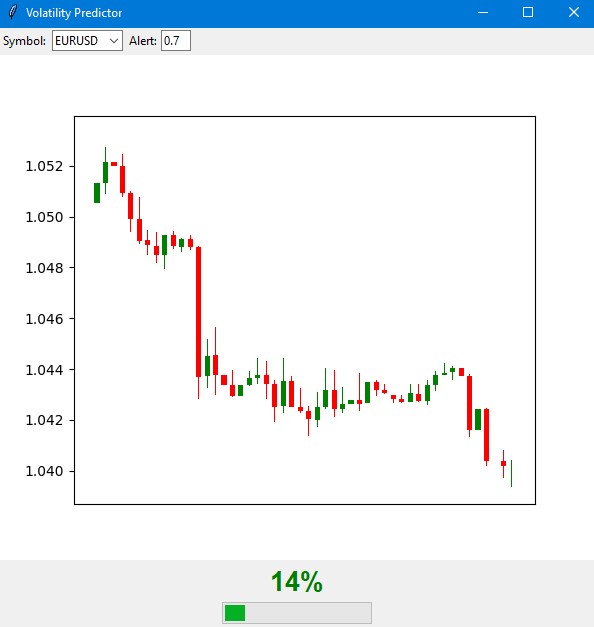
At low probability (green zone), the market is likely to continue its calm movement. This is a good time to work with the standard settings of the trading system. During such periods, regular stop loss levels can be used.
When the indicator shows an average probability and the arrow turns orange, you should exercise extra caution. At such times, it is recommended to increase protective orders by about a quarter of the standard size.
When the probability of a spike is high and the arrow turns red, risk management should be seriously reviewed. During such periods, it is recommended to increase stop losses by at least one and a half times and, perhaps, refrain from opening new positions until the situation stabilizes.
The control elements are located on the bottom panel of the indicator. Here you can select a trading instrument, time interval, and set the threshold for receiving notifications. By default, the threshold is set at 70% - this is the optimal value that provides a balance between the number of signals and their reliability.
The indicator's forecast accuracy reaches 70% for high volatility signals. This means that out of ten warnings about a possible surge, seven actually come true. At the same time, the indicator captures approximately two-thirds of all significant market movements.
It is important to understand that the indicator does not predict the direction of price movement, but only the likelihood of increased volatility. Its main purpose is to warn the trader about a possible strong market movement so that they can adjust their trading strategy and protective order levels in advance.
In future versions of the indicator, it is planned to add the ability to automatically adjust stop losses based on predicted volatility. This will further automate the risk management process and make trading more secure.
The indicator perfectly complements existing trading systems, acting as an additional filter for risk management. Its main advantage is the ability to warn of potential strong movements in advance, giving the trader time to prepare and adjust their strategy.
Conclusion
In modern trading, forecasting volatility remains one of the key tasks for successful trading. The path described in this article from a simple regression model to a high-volatility classifier demonstrates that sometimes a simple solution is more effective than a complex one. The developed system achieves forecast accuracy of approximately 70% and captures approximately two-thirds of all significant market movements.
The main conclusion is that for practical application, what is more important is not the exact value of future volatility, but a timely warning about its potential surge. The created indicator successfully solves this problem, allowing traders to adjust their trading strategies and protective order levels in advance. The combination of classical analysis methods with modern machine learning technologies opens up new possibilities for market risk management.
The key to success turned out to be not the complexity of the algorithms, but the correct formulation of the problem and high-quality data preparation. This approach can be adapted to different trading instruments and timeframes, making trading safer and more predictable.
Translated from Russian by MetaQuotes Ltd.
Original article: https://www.mql5.com/ru/articles/16960
Warning: All rights to these materials are reserved by MetaQuotes Ltd. Copying or reprinting of these materials in whole or in part is prohibited.
This article was written by a user of the site and reflects their personal views. MetaQuotes Ltd is not responsible for the accuracy of the information presented, nor for any consequences resulting from the use of the solutions, strategies or recommendations described.

 Price Action Analysis Toolkit Development (Part 45): Creating a Dynamic Level-Analysis Panel in MQL5
 Neural Networks in Trading: An Agent with Layered Memory
 MQL5 Wizard Techniques you should know (Part 83): Using Patterns of Stochastic Oscillator and the FrAMA — Behavioral Archetypes
 Bivariate Copulae in MQL5 (Part 1): Implementing Gaussian and Student's t-Copulae for Dependency Modeling

- Free trading apps
- Over 8,000 signals for copying
- Economic news for exploring financial markets
You agree to website policy and terms of use
Hello! Thank you very much. I don't rely on just one method. I have a comprehensive Python EA, which includes naive pattern analysis, machine learning on binary code, machine learning on 3D bars, neural network on volume analysis, volatility analysis, economic model based on World Bank and IMF data, huge datasets of hundreds of thousands of rows on all countries of the world, all statistics that is possible at all....And a statistical module that builds all possible statistical features, and a genetic algorithm that optimises hyperparameters, and an arbitrage module that builds fair currency prices, and downloading the headlines and content of the world's media on a particular currency, with analysis of the emotional colouring of all news articles and notes (in 80% of cases when the media encourage you to buy something, then comes the collapse, if the news is negative - most likely goes up with a lag of 3-4 days).
Do you have any ideas on what else to add? I have only come to the conclusion that I still need to make an upload of positions from a well-known account monitoring site (I don't know if I can say its name here), I have made the code, I will write an article about it as well, the price most often goes against the crowd.
I am also working on uploading data on futures volumes, volume clusters, and analysing COT reports - also on Python.
And I use both regression models and classification models, and soon I want to make a supersystem that will receive all signs, all signals of all models, as well as floating profit/loss and profit/loss of account history, and feed it all into DQN model=).
The response to the first command is "Python", but for this line I get "The system cannot find the specified path"
(freshly installed Python, following your instructions)