EMA sniper
- Эксперты
-
Noel Anjao Alube
 Dedicated to developing smart, data-driven trading solutions with a strong focus on performance, risk management, and innovation. Committed to transforming trading ideas into automated strategies.
 - Версия: 1.10
- Обновлено: 15 июля 2026
- Активации: 5
EMA Sniper Pro — Triple EMA Crossover Expert Advisor with RR Trailing Stop and Drawdown Protection
EMA Sniper Pro is a professional-grade Expert Advisor built entirely on Exponential Moving Average crossovers and candle close confirmation. The strategy is transparent, rule-based, and free of complex indicators, neural networks, or martingale mechanics. Every trade decision follows a strict logical sequence that can be audited, backtested, and understood without ambiguity. The goal is to capture trending moves early, manage risk with precision at every stage of the trade, and protect the account from runaway losses through automated drawdown control.
This EA was designed with three types of traders in mind: systematic traders who want a clean EMA-based engine they can trust; prop firm traders who need hard risk controls built into the automation; and algorithmic beginners who want a well-structured EA they can study, optimize, and build upon.
THE STRATEGY
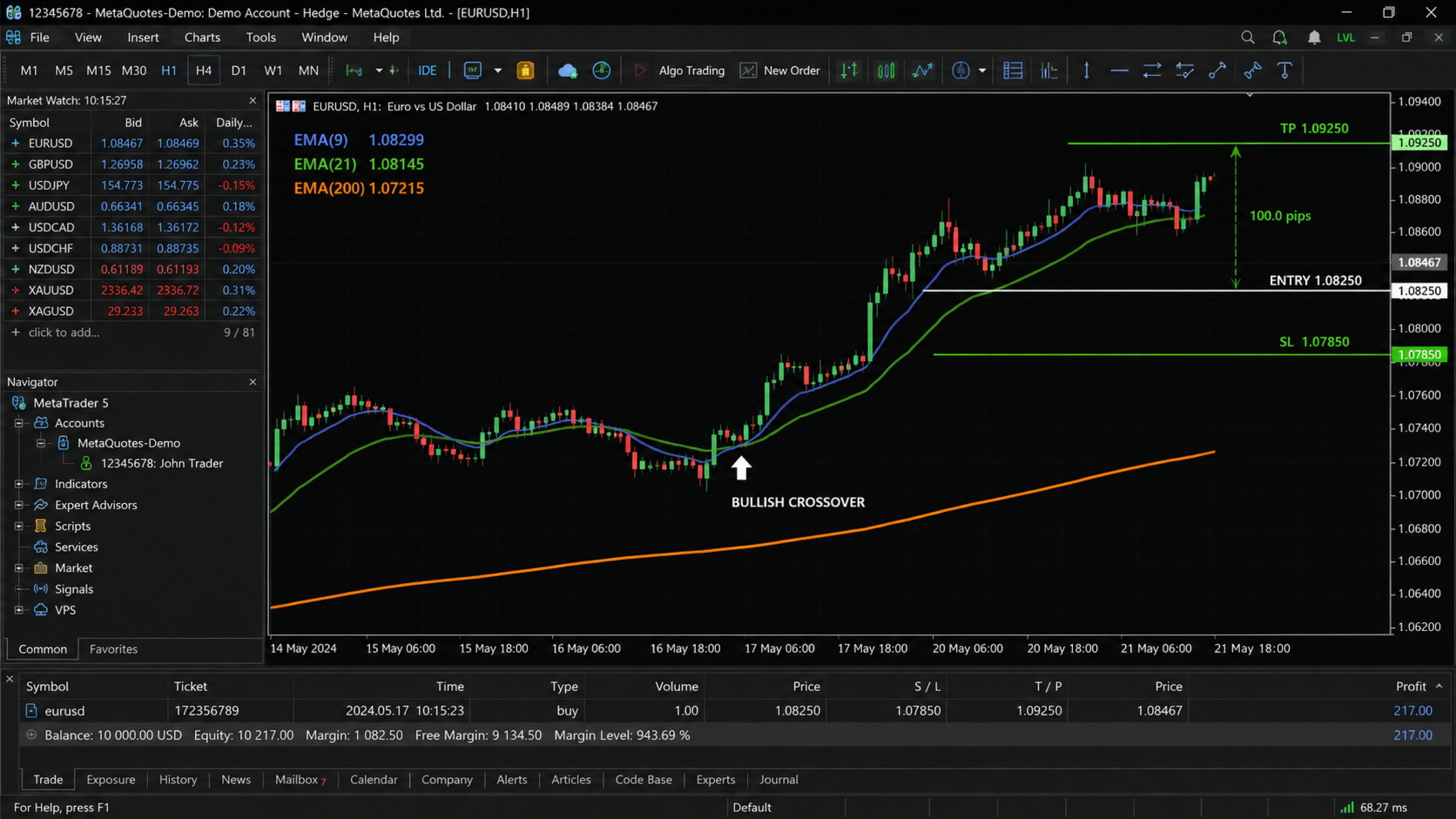
The core logic revolves around three Exponential Moving Averages operating simultaneously on the same chart: a Fast EMA to capture short-term momentum, a Slow EMA to define the medium-term trend direction, and a Trend EMA to filter trades against the dominant macro structure. All three periods are fully configurable in the input panel, giving the trader complete control over the sensitivity and timeframe character of the system.
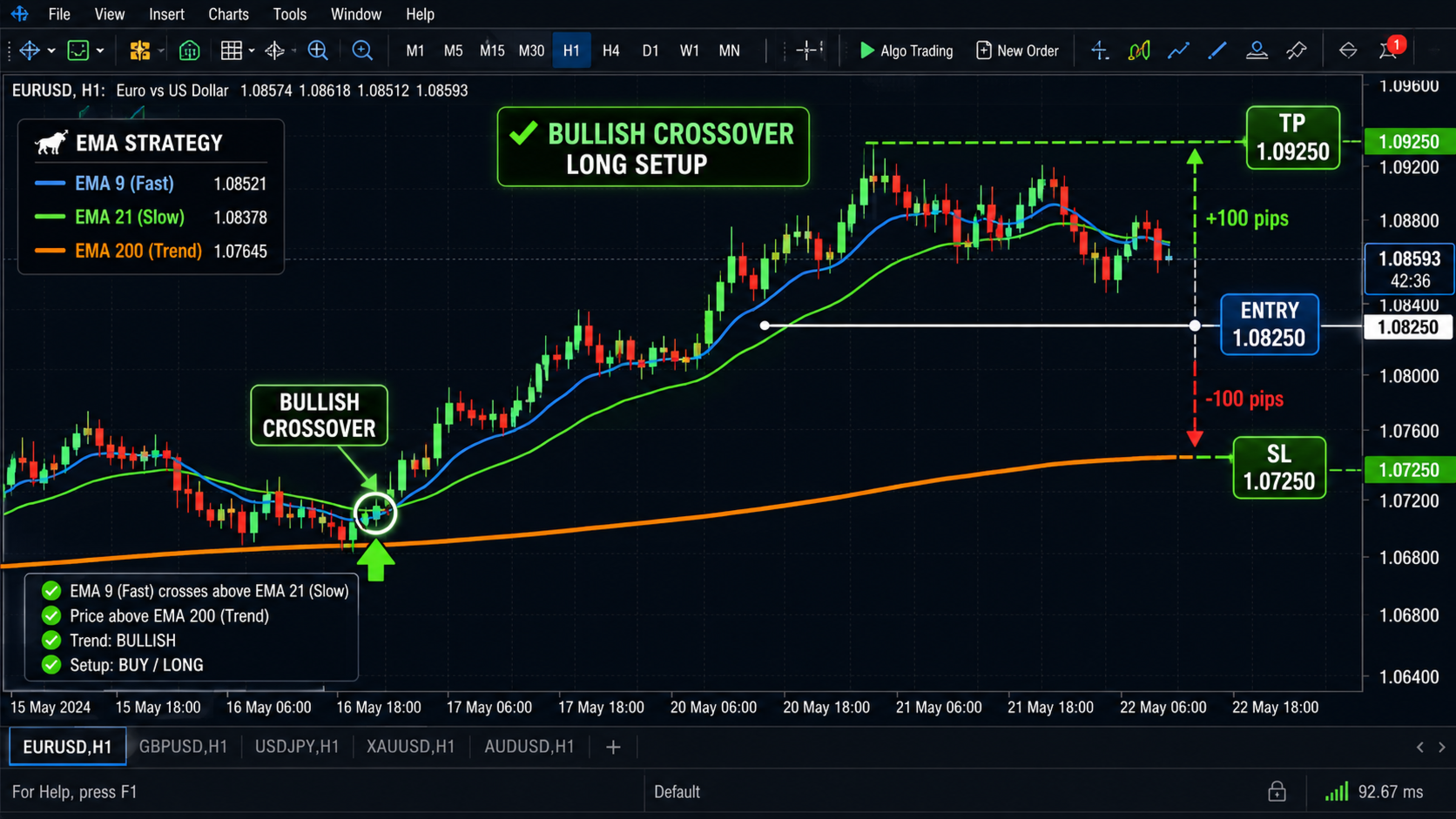
A trade signal is generated when the Fast EMA crosses the Slow EMA. However, the EA does not act on the crossover alone. It waits for the current candle to close, and only enters if the closing price confirms the direction of the cross. For a long trade, the Fast EMA must cross above the Slow EMA and the candle must close above the Fast EMA. For a short trade, the Fast EMA must cross below the Slow EMA and the candle must close below the Fast EMA. This candle close filter eliminates false signals driven by intrabar wicks and noise, ensuring the EA only acts on confirmed momentum rather than real-time tick fluctuations.
An optional trend filter uses the Trend EMA as a directional gate. When enabled, long trades are only taken when price is above the Trend EMA, and short trades are only taken when price is below it. This keeps the EA aligned with the dominant market direction and reduces counter-trend exposure on longer timeframes.
ENTRY LOGIC IN DETAIL
Long Entry Conditions (all must be true on the closed candle):
- Fast EMA crosses above Slow EMA on the current bar
- The closed candle closes above the Fast EMA
- Price is above the Trend EMA (if trend filter is enabled)
Short Entry Conditions (all must be true on the closed candle):
- Fast EMA crosses below Slow EMA on the current bar
- The closed candle closes below the Fast EMA
- Price is below the Trend EMA (if trend filter is enabled)
The EA processes signals only on new bar open, meaning it evaluates the completed previous candle. This prevents multiple entries on the same signal and ensures consistent behavior across both live trading and strategy tester environments.
EXIT LOGIC
The primary exit condition mirrors the entry logic. A long position is closed when a candle closes below the Fast EMA, signaling that short-term momentum has shifted. A short position is closed when a candle closes above the Fast EMA. This keeps the EA responsive to actual price structure rather than arbitrary fixed targets, allowing it to ride extended trends while exiting cleanly when momentum deteriorates.
Secondary exit conditions include the fixed Take Profit level in pips, the account percentage Take Profit target, and the RR-based step trailing stop. All exit conditions run simultaneously, and whichever is triggered first closes the trade.
RE-ENTRY AND PULLBACK LOGIC
When a position is closed by the EMA exit condition, the EA does not simply wait for the next full crossover signal. If the underlying trend remains intact at the time of exit, meaning the Fast EMA is still on the same side of the Slow EMA as the original trade direction, the EA monitors for a re-entry opportunity. A re-entry is triggered when price pulls back across the Fast EMA and then closes back in the original trend direction. This logic captures continuation moves that would otherwise be missed after normal pullbacks in a strong trend, keeping the EA active and engaged throughout trending market conditions without requiring manual intervention.
Re-entry logic resets automatically when a new crossover in the opposite direction is detected, preventing re-entries against a genuine trend reversal.
MONEY MANAGEMENT
Two lot sizing modes are available and can be switched via a single input toggle.
Fixed Lot Mode places a user-defined lot size on every trade regardless of account balance or stop loss distance. This mode is suitable for traders who prefer manual control over position sizing or who are operating under specific lot-based prop firm rules.
Auto Lot Mode calculates the position size dynamically before each trade. The calculation uses the defined risk percentage, the current account balance, the instrument's tick value, and the initial stop loss distance in pips to derive the exact lot size that risks the specified percentage on the trade. This ensures that every trade carries the same proportional risk regardless of stop loss distance, account fluctuations, or instrument volatility. Lot size is automatically clamped to the broker's minimum and maximum volume limits and normalized to the broker's required lot step precision.
TAKE PROFIT SYSTEM
Take Profit can be fully disabled, in which case exits are governed entirely by the EMA exit logic and the trailing stop. When enabled, two modes are available.
Pips Mode sets a fixed price distance target from the entry price. The distance is defined in pips and is automatically converted to points internally, ensuring correct behavior on both 4-digit and 5-digit brokers without any manual adjustment.
Account Percentage Mode monitors the floating profit of the open position in real time. When the unrealized profit reaches the defined percentage of the account balance at the time of trade entry, the position is closed automatically. This mode is particularly useful for prop firm traders working toward a daily or phase profit target, or for any trader who prefers to define their reward in monetary terms relative to account size rather than in price distance.
RR-BASED STEP TRAILING STOP
The trailing stop system in EMA Sniper Pro is not a standard pip-trailing mechanism. It operates on a Risk/Reward zone stepping model that advances the stop loss only at meaningful profit milestones defined by multiples of the initial risk.
The initial stop loss distance entered in pips defines 1R, which is the base risk unit for the trade. As the trade moves into profit, the stop loss advances according to the following schedule:
When the trade reaches 1R in profit, the stop loss is moved to breakeven, eliminating the risk of a losing trade.
When the trade reaches 2R in profit, the stop loss is moved to lock in 1R of profit.
When the trade reaches 3R in profit, the stop loss is moved to lock in 2R of profit.
This pattern continues for each additional R level the trade achieves. The stop loss only ever moves forward in the direction of the trade, never backward, ensuring that locked profits cannot be reduced. This approach balances trade longevity with capital protection, giving strong trends room to develop while guaranteeing that profitable trades do not reverse into losses at any milestone after breakeven is reached.
MAXIMUM DRAWDOWN PROTECTION
A real-time equity drawdown monitor runs on every tick. The reference equity is recorded when the EA initializes. If the current account equity falls below the reference equity by the defined drawdown percentage threshold, the EA immediately closes all open positions carrying its magic number and sets itself to a halted state for the remainder of the trading session. No new trades are opened after a halt is triggered until the EA is reloaded or restarted.
This feature is designed for prop firm accounts operating under daily drawdown rules, live accounts where capital preservation is the primary concern, and any trading environment where a hard maximum loss ceiling must be enforced automatically without relying on manual monitoring.
The drawdown threshold is fully adjustable in the input panel and can be set to match any specific prop firm rule or personal risk tolerance.
BROKER AND ACCOUNT COMPATIBILITY
EMA Sniper Pro is compatible with all standard MetaTrader 5 brokers. It handles 4-digit and 5-digit pricing automatically by detecting the symbol's digit count and applying the correct pip-to-point conversion internally. No manual adjustment is needed when switching between brokers or instruments.
The EA is compatible with both hedging and netting account modes. All position management operations use the standard CTrade library with magic number filtering, ensuring clean isolation from manually placed trades and other EAs running on the same account.
A unique magic number input allows multiple instances of the EA to run simultaneously on different symbols or timeframes without interference.
STRATEGY TESTER COMPATIBILITY
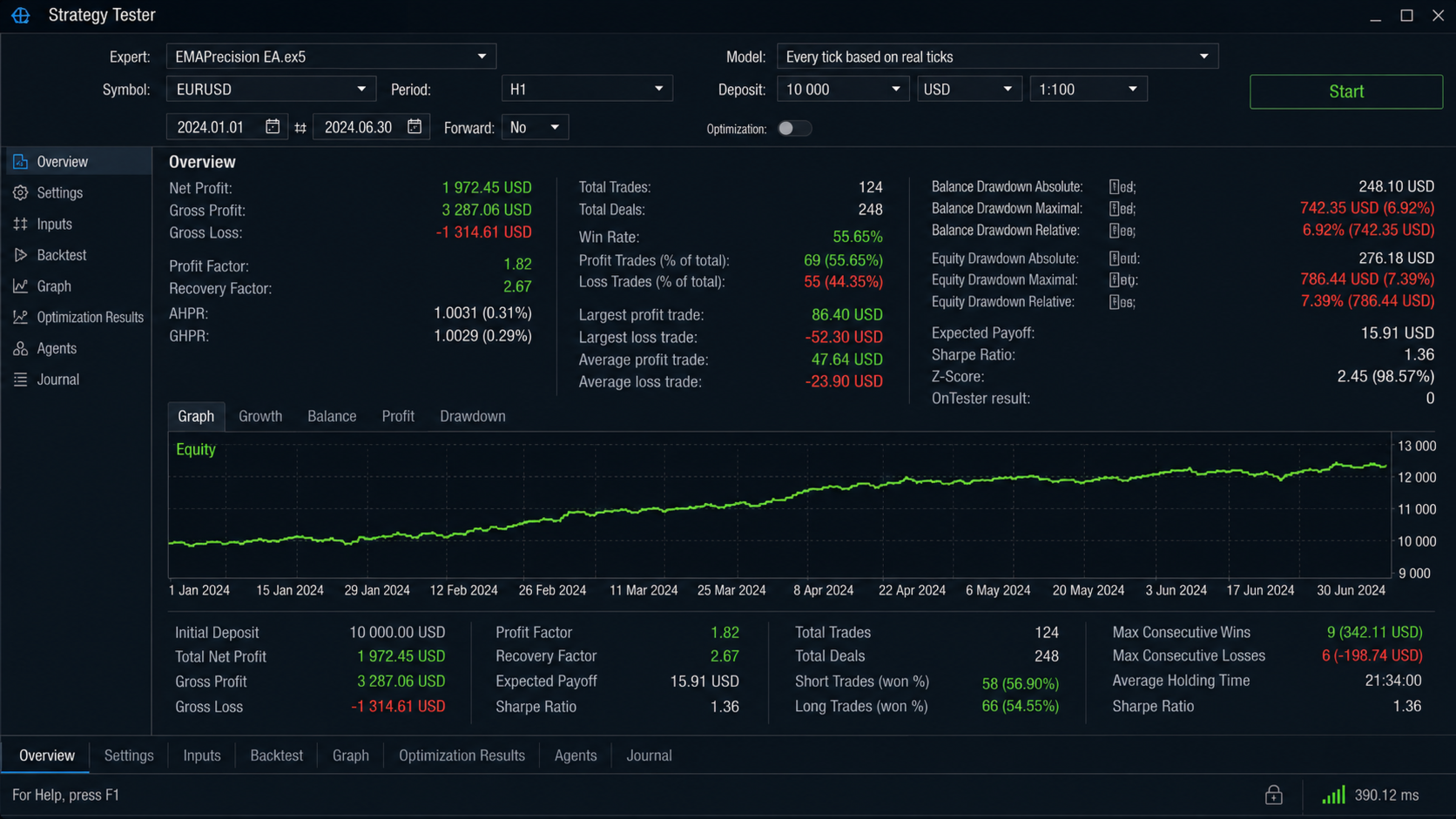
EMA Sniper Pro is fully compatible with the MetaTrader 5 Strategy Tester in all modes including single pass, optimization, and visual mode. No external files, DLLs, or network connections are required. The EA initializes correctly on historical data and releases all indicator handles cleanly on deinitialization, ensuring stable and accurate backtesting results.
For optimization, all key parameters including EMA periods, risk percentage, stop loss distance, take profit values, and drawdown threshold are exposed as inputs and can be used directly in the tester's optimization grid.
RECOMMENDED SETTINGS AND INSTRUMENTS
EMA Sniper Pro is designed for trending market conditions and performs best on instruments with consistent directional character. Recommended instruments include major forex pairs such as EURUSD, GBPUSD, and USDJPY, gold (XAUUSD), and major indices. The EA is suitable for timeframes from H1 upward. Lower timeframes increase signal frequency but require tighter risk settings and a broker with low spread and fast execution.
Default EMA settings of 9, 21, and 200 provide a well-tested baseline configuration. The 200 EMA trend filter is recommended on H1 and H4 timeframes to reduce counter-trend exposure during consolidating markets.
A minimum of 200 candles of historical data must be available on the chart before the EA will begin trading, ensuring that the Trend EMA is fully calculated and valid prior to any entry.
INPUT PARAMETERS SUMMARY
EMA Settings: Fast EMA period, Slow EMA period, Trend EMA period, MA method, applied price, trend filter on/off.
Money Management: Auto lot on/off, fixed lot size, risk percentage per trade, initial stop loss in pips.
Take Profit: Take profit on/off, TP mode selection (pips or account percentage), TP distance in pips, TP account percentage target.
Risk Management: Maximum drawdown percentage, RR trailing stop on/off.
Trade Settings: Magic number, trade comment, slippage in points.
WHAT THIS EA IS NOT
EMA Sniper Pro does not use martingale or grid mechanics. It does not average down losing positions. It does not use tick scalping or latency arbitrage. It does not rely on news events, session filters, or time-based restrictions. It does not use any indicator other than Exponential Moving Averages. There are no hidden parameters, no adaptive algorithms, and no optimization curves fitted to historical data. The logic is the same in live trading as it is in backtesting.
SUPPORT AND DOCUMENTATION
Full input parameter documentation is included with every purchase. Buyers receive guidance on recommended settings for common instruments and timeframes, an explanation of the RR trailing stop mechanics with worked examples, and direct support from the seller for setup questions and configuration assistance. Contact is available through the MQL5 profile page.
SELLER
Developed and sold by Noel. Profile and full product catalog available at https://www.mql5.com/en/users/noelanjao/seller