Gold Quantum Matrix

------------------------------

## 👑 Gold Quantum Matrix : Gold Only : TF H4

— Smart Grid System Based on SMC H4 and Volatility Mechanics

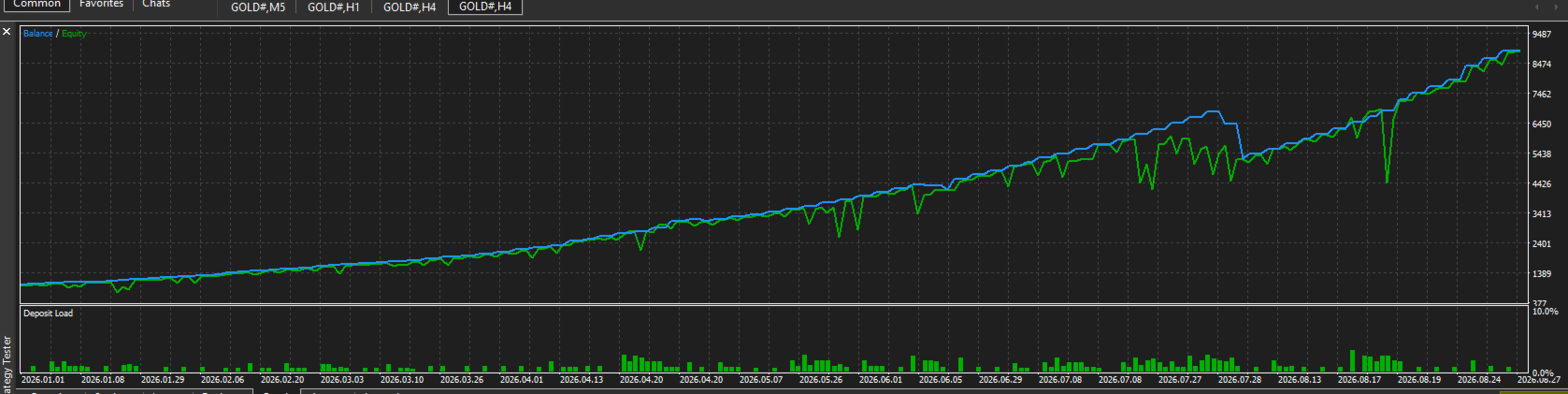
Gold Quantum Matrix is an advanced Expert Advisor (EA) designed for professional traders (source: 1). It prioritizes high precision, strict risk management, and capital protection .

The EA is built on the core pillars of Smart Money Concepts (SMC) on the H4 timeframe (source: 1). It combines institutional volume tracking with mathematical daily volatility calculations (source: 1). It also features a proprietary 3-tier safety guard against Non-Farm Payroll (NFP) news (source: 1).

------------------------------

## 🚀 Professional Features## 1. Institutional SMC H4 Structure Matrix

The EA automatically detects structural trend shifts and Break of Structure (BOS) on the H4 timeframe (source: 1). This ensures you only trade in alignment with true market directions driven by major institutions .


## 2. Precision Order Block & FVG Layering

This feature eliminates the guesswork in finding reversal points (source: 1). Quantum Matrix Queen calculates precise institutional Order Blocks (OB) (source: 1). It filters for high-probability entries using Fair Value Gaps (FVG) (source: 1). Orders are sent as a Limit Grid inside liquidity zones where big institutions accumulate positions .


## 3. NFP Smart Guard — 3-Tier Edition

While other bots often suffer heavy losses during high-impact news, this EA activates a top-tier safety mechanism to protect your account during Non-Farm Payroll (NFP) releases .

* Tier 1 (MQL5 Calendar API): Tracks live news events from a highly accurate system.

* Tier 2 (Local CSV Fallback): Pulls data directly from your local folder (nfp_dates.csv) for flawless offline protection.

* Tier 3 (Hardcoded First-Friday Logic): A mathematical backup system that stands by automatically if all external data links fail .

* How it works: The EA automatically deletes pending orders and closes all running positions during news hours (source: 1). This avoids slippage and dangerous market volatility .


## 4. DD-Aware Lot Scaling

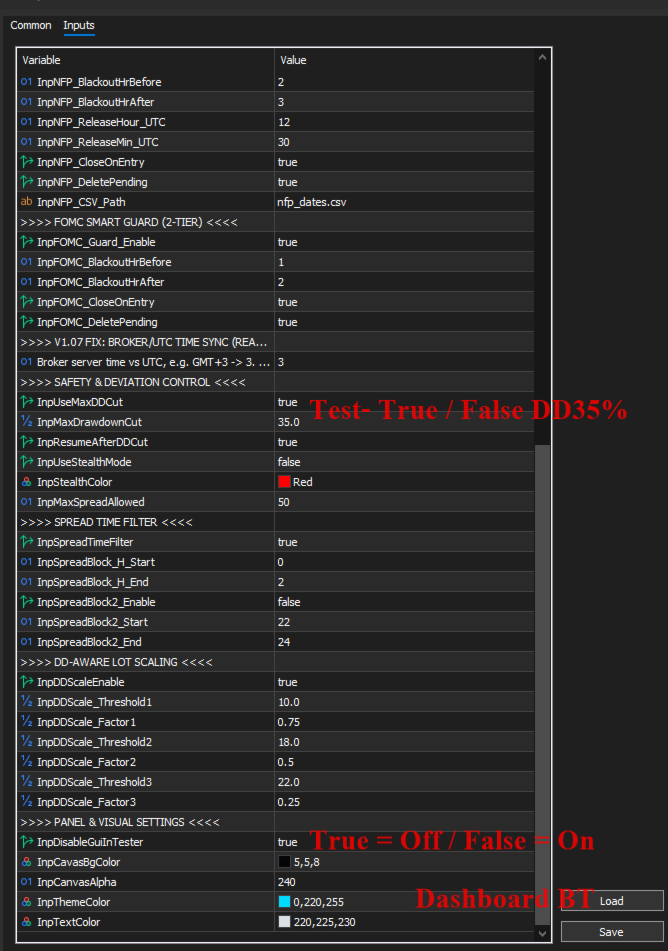
You do not need to worry about market anomalies blowing up your account (source: 1). The EA actively monitors your portfolio (source: 1). When the Drawdown (DD) hits your set limit, the system automatically scales down the lot size in steps (75% ➔ 50% ➔ 25%) to preserve your capital.

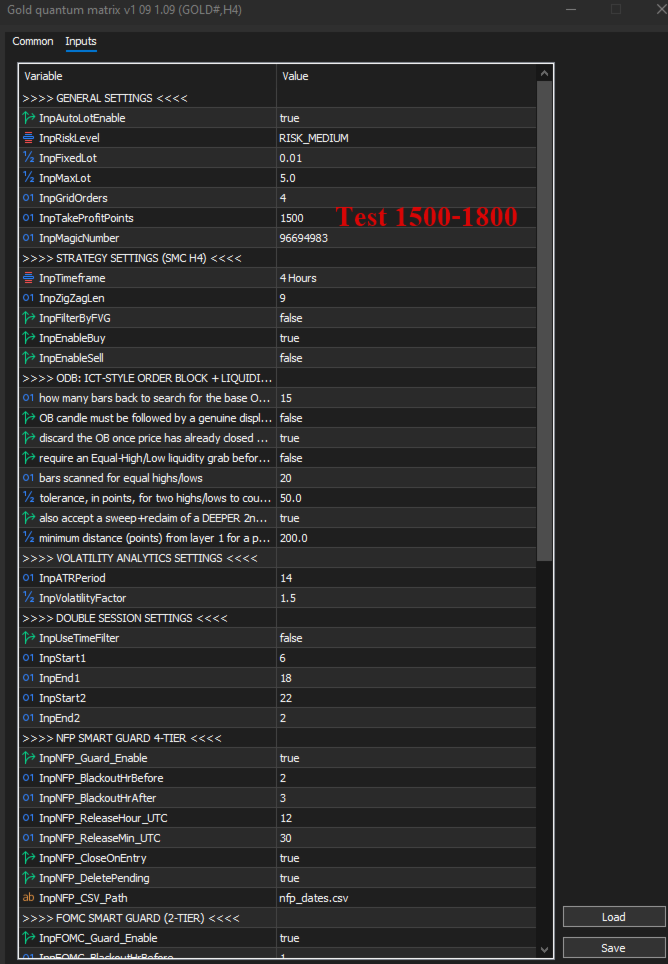
***** The EA is ready with its default settings, which include the 25% DD limit turned ON . Disabling this limit will bring higher profits, but it also means taking on more risk. Personally, I prefer to turn it OFF because I trade on the H4 timeframe with Daily trend control , making it hard to get stuck. Plus, during high volatility or NFP days, the EA will simply stop opening new orders .


## 5. Spread Time Filter

This filter protects your account from low-liquidity conditions and toxic spreads (source: 1). The EA uses a UTC hour blacklist to block trading during high-spread periods, such as market rollovers and session transitions .

## 6. Interactive HUD Dashboard & Manual Overrides

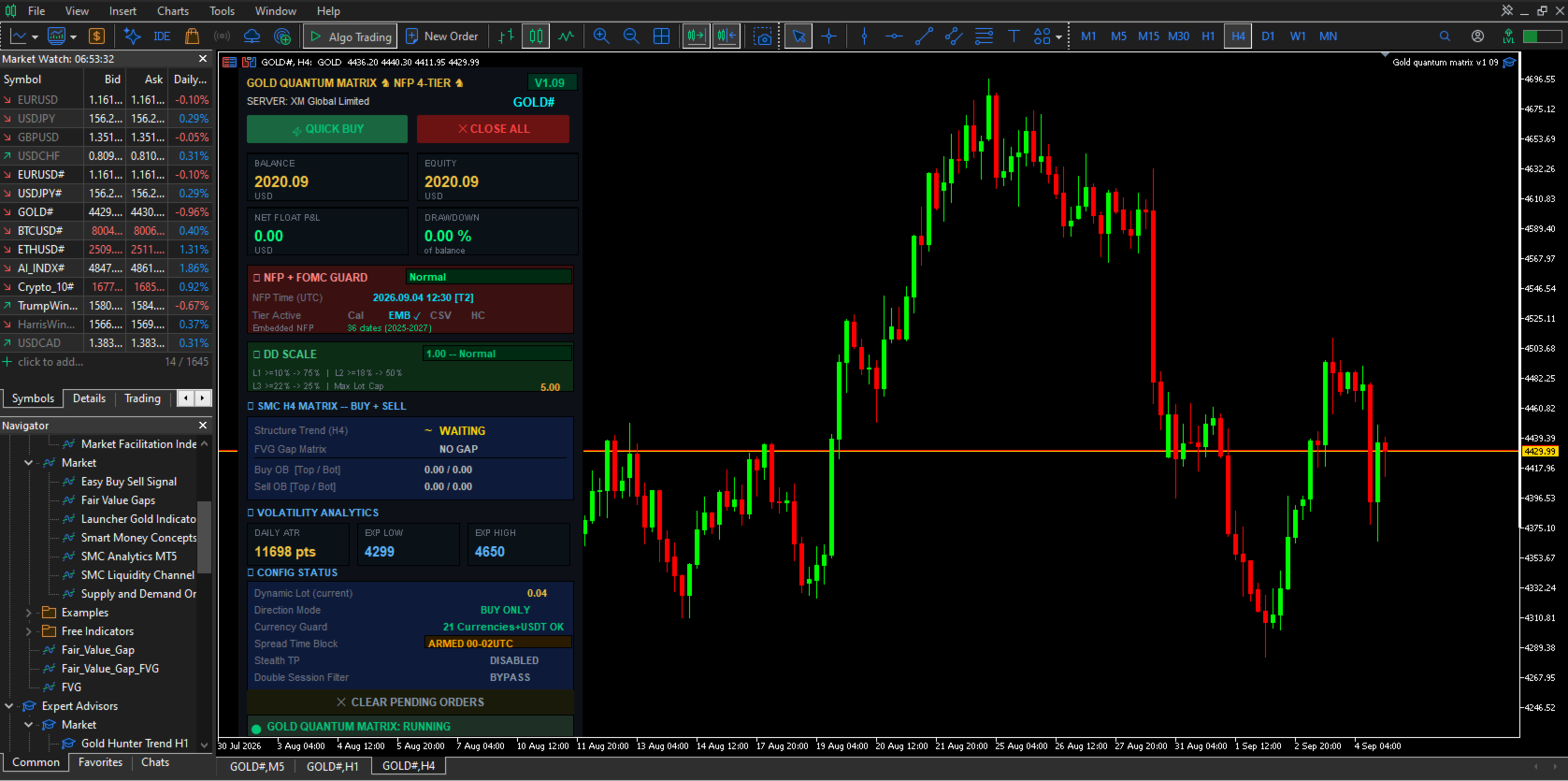
The EA features a beautiful, borderless on-chart control panel (source: 1). You can view live stats including Balance, Equity, current Drawdown, NFP countdown, and the Average True Range (ATR) (source: 1). It also includes quick buttons for Quick Buy, Close All, and Clear Pending Orders for semi-manual trading .

------------------------------

## ⚙️ Recommended Settings


* Timeframe: H4 (optimized specifically for market structure geometry) 

* Supported Pairs: XAUUSD (Gold)

* Account Type: Hedging account with low spreads and fast execution (Raw/ECN recommended) 

* Minimum Balance:

* Standard Account: $1,000 (for grid safety) 

   * Cent Account: $100 


------------------------------

## 📂 Package Contents


   1.Gold Quantum Matrix Expert Advisor file (.ex5) 

   2. Complete user manual and installation guide 

   3. Access to pre-optimized preset files (.set) for three risk levels: Conservative, Moderate, and Aggressive 


(Note: To activate the Tier 2 NFP safety guard, simply place the provided nfp_dates.csv file into the MQL5\Files\ or Common\Files\ folder of your MT5 terminal .

------------------------------

## InpNFP_CSV_Path ( nfp_dates.csv ): Database file for monthly NFP release dates (source: 1).## How to Create and Save the File Using Notepad .

1. Copy the Text:

Highlight the text block below and press Ctrl + C (or right-click and select Copy) 


# NFP Dates for QMQ EA — UTC time 12:30 (= 08:30 ET)

# Format: YYYY.MM.DD,HH:MM

# Source: BLS / tradingcalendar.com  (updated Jun 2026)

# Note: Oct/Nov/Dec 2025 rescheduled due to gov shutdown

# Place this file at: MQL5\Files\nfp_dates.csv

#

# ---- 2024 ----

2024.01.05,13:30

2024.02.02,13:30

2024.03.08,13:30

2024.04.05,13:30

2024.05.03,13:30

2024.06.07,12:30

2024.07.05,12:30

2024.08.02,12:30

2024.09.06,12:30

2024.10.04,12:30

2024.11.01,12:30

2024.12.06,13:30

# ---- 2025 ----

2025.01.10,13:30

2025.02.07,13:30

2025.03.07,13:30

2025.04.04,12:30

2025.05.02,12:30

2025.06.06,12:30

2025.07.03,12:30

2025.08.01,12:30

2025.09.05,12:30

# Oct 2025 CANCELLED (gov shutdown)

2025.11.20,13:30

2025.12.16,13:30

# ---- 2026 ----

2026.01.09,13:30

2026.02.11,13:30

2026.03.06,13:30

2026.04.03,12:30

2026.05.08,12:30

2026.06.05,12:30

2026.07.02,12:30

2026.08.07,12:30

2026.09.04,12:30

2026.10.02,12:30

2026.11.06,13:30

2026.12.04,13:30

# ---- 2027 ----

2027.01.08,13:30

2027.02.05,13:30

2027.03.05,13:30

2027.04.02,12:30

2027.05.07,12:30

2027.06.04,12:30

2027.07.02,12:30

2027.08.06,12:30

2027.09.03,12:30

2027.10.01,12:30

2027.11.05,13:30

2027.12.03,13:30


2. Open Notepad:

Press the Windows key, type Notepad, and press Enter .

3. Paste the Text:

Press Ctrl + V inside the Notepad window .

4. Save the File:


* Go to the top menu and select File > Save As... 

* In the Save as type: dropdown, change it from Text Documents (.txt)* to All Files (.) (source: 1). This prevents Windows from adding an accidental ".txt" extension 

* Name the file exactly as required: nfp_dates.csv 

* Crucial: Save the file into the correct MT5 system directory 

C:\Users\[Your_Username]\AppData\Roaming\MetaQuotes\Terminal\[Terminal_ID]\MQL5\Files 

* Click Save 

⚡ Fastest Way to Open the Destination Folder

If you cannot find the path, use this MetaTrader 5 shortcut 


   1. Open MetaTrader 5 

   2. Click File in the top-left corner (

   3. Click Open Data Folder 

   4. Double-click the MQL5 folder 

   5. Double-click the Files folder 

   6. Save or drop your Notepad file directly into this folder (


Note: The EA requires a .csv format (source: 1). Always make sure you select "All Files" and add .csv at the end of the filename so the system can read the news schedule properly .

------------------------------

Thai Description.

------------------------------

## 👑 Gold Quantum Matrix — ระบบ Grid อัจฉริยะตามแนวคิด SMC H4 และกลไกความผันผวน

Gold Quantum Matrix เป็นระบบเทรดอัตโนมัติ (EA) ขั้นสูงที่พัฒนาขึ้นสำหรับเทรดเดอร์มืออาชีพ ที่ให้ความสำคัญกับความแม่นยำ การบริหารความเสี่ยงอย่างเข้มงวด และการรักษาเงินทุนเป็นอันดับแรก
บอทตัวนี้พัฒนาขึ้นบนเสาหลักของแนวคิด Smart Money Concepts (SMC) บนไทม์เฟรม H4 โดยผสมผสานการแกะรอยตามปริมาณซื้อขายของสถาบันการเงิน ร่วมกับกลไกคำนวณความผันผวนรายวันทางคณิตศาสตร์ และเกราะป้องกันความปลอดภัยจากข่าว Non-Farm Payroll (NFP) ลิขสิทธิ์เฉพาะแบบ 3 ชั้น
------------------------------
## 🚀 คุณสมบัติเด่นระดับมืออาชีพ## 1. ระบบตรวจจับโครงสร้างตลาดสถาบัน SMC H4 (Institutional SMC H4 Structure Matrix)

บอทจะตรวจจับการเปลี่ยนแนวโน้มเชิงโครงสร้างและการทะลุผ่านโครงสร้างตลาด (BOS - Break of Structure) บนไทม์เฟรมใหญ่อย่าง H4 โดยอัตโนมัติ เพื่อให้มั่นใจว่าคุณจะเทรดตามทิศทางตลาดที่แท้จริงที่ขับเคลื่อนโดยสถาบันการเงินรายใหญ่เท่านั้น

## 2. การวางโซนออเดอร์ Order Block & FVG อย่างแม่นยำ (Precision Order Block & FVG Layering)

หมดปัญหาการคาดเดาจุดกลับตัว บอท Quantum Matrix Queen จะคำนวณพื้นที่ Order Blocks (OB) ของสถาบันอย่างแม่นยำ และกรองสัญญาณเข้าเทรดที่มีความน่าจะเป็นสูงด้วยช่องว่างราคา Fair Value Gaps (FVG) โดยออเดอร์จะถูกส่งไปดักรอในรูปแบบตาราง (Limit Grid) ภายในโซนสภาพคล่องที่กลุ่มทุนใหญ่มักใช้สะสมสถานะ

## 3. เกราะป้องกันข่าว NFP 3 ชั้น — ระบบความปลอดภัยขั้นสุด (NFP Smart Guard - 3-Tier Edition)
ในขณะที่บอทตัวอื่นมักจะเสียหายในช่วงที่ข่าวแรงออก แต่บอทตัวนี้จะเปิดใช้งานกลไกป้องกันตัวระดับสูงสุดถึง 3 ชั้น เพื่อปกป้องพอร์ตของคุณในช่วงประกาศตัวเลขจ้างงานนอกภาคเกษตร (NFP):

* ชั้นที่ 1 (MQL5 Calendar API): ติดตามเหตุการณ์ข่าวสารสดจากระบบที่มีความแม่นยำสูง
* ชั้นที่ 2 (Local CSV Fallback): ดึงข้อมูลโดยตรงจากโฟลเดอร์ในเครื่องของคุณ (nfp_dates.csv) เพื่อการป้องกันแบบออฟไลน์ที่ไม่มีวันผิดพลาด
* ชั้นที่ 3 (Hardcoded First-Friday Logic): ระบบคำนวณทางคณิตศาสตร์สแตนด์บายอัตโนมัติ แม้ว่าระบบข้อมูลภายนอกทั้งหมดจะล่ม
* การทำงาน: บอทจะลบออเดอร์ที่ตั้งรอ (Pending) และปิดสถานะที่กำลังวิ่งอยู่ทั้งหมดในช่วงเวลาที่มีข่าวโดยอัตโนมัติ เพื่อหลีกเลี่ยงปัญหาค่าสเปรดถ่าง (Slippage) และความผันผวนที่เป็นอันตรายต่อพอร์ต

## 4. ระบบปรับขนาด Lot ตามค่า Drawdown (DD-Aware Lot Scaling)

หมดกังวลเรื่องตลาดเกิดความผิดปกติจนพอร์ตแตก บอทมีระบบตรวจสอบพอร์ตโฟลิโอเชิงรุก เมื่อระดับ Drawdown แตะเพดานที่ตั้งไว้ ระบบจะลดขนาด Lot ลงโดยอัตโนมัติเป็นขั้นบันได (75% ➔ 50% ➔ 25%) เพื่อลดความเสี่ยงและประคองพอร์ตจนกว่าตลาดจะกลับสู่สภาวะปกติ

****EA ตัวนี้ตั้งค่าพื้นฐานมาให้พร้อมใช้งานแล้ว ซึ่งจะเปิดระบบคุม DD ไว้ที่ 25% การปิดระบบนี้จะช่วยให้ได้กำไรสูงขึ้น แต่ก็ต้องแลกกับการรับความเสี่ยงที่มากขึ้นด้วย ส่วนตัวแล้วผมเลือกที่จะปิดมัน (False) เพราะเทรดบนไทม์เฟรม H4 โดยมีแนวโน้ม Day คุมอยู่ ทำให้พอร์ตลากหรือติดดอยได้ยาก แถมในช่วงที่ตลาดเหวี่ยงแรงๆ หรือวันที่มีข่าว NFP ตัว EA ก็จะไม่เปิดออเดอร์ใหม่เพิ่มด้วยครับ

## 5. ระบบกรองเวลาสเปรดสูง (Spread Time Filter)

ปกป้องบัญชีของคุณจากสภาวะตลาดที่มีสภาพคล่องต่ำและสเปรดเป็นพิษ บอทจะใช้ระบบบัญชีดำชั่วโมงเวลา UTC เพื่อบล็อกการเทรดในช่วงที่สเปรดมักจะถ่างตัวสูง เช่น ช่วงเปลี่ยนวัน (Market Rollover) และช่วงรอยต่อตลาด

## 6. หน้าจอแดชบอร์ด HUD แบบโต้ตอบและระบบควบคุมด้วยมือ (Interactive HUD Dashboard & Manual Overrides)
โดดเด่นด้วยแผงควบคุมบนชาร์ตที่ปรับแต่งสีสันมาอย่างสวยงามและไม่มีขอบขาวกวนสายตา สามารถดูยอดเงินบาลานซ์, อีควิตี้, Drawdown ที่กำลังเกิดขึ้น, เวลานับถอยหลังข่าว NFP และระยะความผันผวนรายวัน (ATR Range) ได้แบบสดๆ พร้อมปุ่มคำสั่ง Quick Buy, Close All, และ Clear Pending Orders ที่ตอบสนองไว สำหรับใช้ควบคุมในกรณีที่อยากเทรดมือร่วมด้วย
------------------------------
## ⚙️ การตั้งค่าที่แนะนำ

* ไทม์เฟรม (Timeframe): H4 (ปรับแต่งมาเพื่อรูปทรงโครงสร้างตลาดระดับ Geometry เท่านั้น)
* คู่เงินที่รองรับ (Supported Pairs): XAUUSD (ทองคำ) 
* ประเภทบัญชี (Account Type): บัญชีประเภท Hedging ที่มีสเปรดต่ำและส่งคำสั่งไว (แนะนำ Raw/ECN)
* ทุนขั้นต่ำ (Minimum Balance):
* บัญชี Standard: $1,000 (เพื่อความปลอดภัยในการวิ่งของตาราง Grid)
   * บัญชี Cent: $100

------------------------------
## 📂 สิ่งที่มีให้ภายในแพ็กเกจ

   1. ไฟล์บอทเทรดอัตโนมัติ Gold Quantum Matrix นามสกุล .ex5
   2. คู่มือการใช้งานและขั้นตอนการติดตั้งฉบับสมบูรณ์
   3. สิทธิ์เข้าถึงไฟล์ตั้งค่าสำเร็จรูป (.set) ที่ปรับแต่งมาแล้วสำหรับระดับความเสี่ยงแบบ: ปลอดภัย (Conservative), ปานกลาง (Moderate) และดุดัน (Aggressive)

(หมายเหตุ: ในการเปิดใช้งานระบบป้องกันข่าว NFP ชั้นที่ 2 เพียงแค่นำไฟล์ nfp_dates.csv ที่ให้ไป วางไว้ในโฟลเดอร์ MQL5\Files\ หรือ Common\Files\ ของโปรแกรม MT5 ของคุณ)
------------------------------
InpNFP_CSV_Path ( nfp_dates.csv ): ไฟล์ฐานข้อมูลวันที่ข่าว NFP จะประกาศในแต่ละเดือน

### ขั้นตอนการสร้างและบันทึกไฟล์ด้วยโปรแกรม Notepad

1. คัดลอกข้อความ (Copy):
ใช้เมาส์ลากคลุมดำไฮไลต์ข้อความที่ต้องการ จากนั้นกดปุ่ม Ctrl + C บนคีย์บอร์ด (หรือคลิกขวาแล้วเลือก Copy)

*******************************************************************

# NFP Dates for QMQ EA — UTC time 12:30 (= 08:30 ET)

# Format: YYYY.MM.DD,HH:MM

# Source: BLS / tradingcalendar.com  (updated Jun 2026)

# Note: Oct/Nov/Dec 2025 rescheduled due to gov shutdown

# Place this file at: MQL5\Files\nfp_dates.csv

#

# ---- 2024 ----

2024.01.05,13:30

2024.02.02,13:30

2024.03.08,13:30

2024.04.05,13:30

2024.05.03,13:30

2024.06.07,12:30

2024.07.05,12:30

2024.08.02,12:30

2024.09.06,12:30

2024.10.04,12:30

2024.11.01,12:30

2024.12.06,13:30

# ---- 2025 ----

2025.01.10,13:30

2025.02.07,13:30

2025.03.07,13:30

2025.04.04,12:30

2025.05.02,12:30

2025.06.06,12:30

2025.07.03,12:30

2025.08.01,12:30

2025.09.05,12:30

# Oct 2025 CANCELLED (gov shutdown)

2025.11.20,13:30

2025.12.16,13:30

# ---- 2026 ----

2026.01.09,13:30

2026.02.11,13:30

2026.03.06,13:30

2026.04.03,12:30

2026.05.08,12:30

2026.06.05,12:30

2026.07.02,12:30

2026.08.07,12:30

2026.09.04,12:30

2026.10.02,12:30

2026.11.06,13:30

2026.12.04,13:30

# ---- 2027 ----

2027.01.08,13:30

2027.02.05,13:30

2027.03.05,13:30

2027.04.02,12:30

2027.05.07,12:30

2027.06.04,12:30

2027.07.02,12:30

2027.08.06,12:30

2027.09.03,12:30

2027.10.01,12:30

2027.11.05,13:30

2027.12.03,13:30

******************************
2. เปิดโปรแกรม Notepad:

กดปุ่ม Windows บนคีย์บอร์ด พิมพ์คำว่า Notepad จากนั้นกดปุ่ม Enter

3. วางข้อความ (Paste):
กดปุ่ม Ctrl + V ภายในหน้าต่างโปรแกรม Notepad เพื่อวางข้อความที่คัดลอกมา

4. บันทึกไฟล์ (Save):
+ไปที่เมนูด้านบนเลือก File > Save As... (ไฟล์ > บันทึกเป็น...)
+ตรงช่องแถบตัวเลือก Save as type: (บันทึกเป็นชนิด) ให้เปลี่ยนจาก Text Documents (.txt)* ให้เป็น All Files (.) (ไฟล์ทั้งหมด) เพื่อป้องกันไม่ให้ไฟล์มีนามสกุลคำว่า ".txt" ต่อท้ายเพิ่มขึ้นมา
+ตั้งชื่อไฟล์ให้ตรงตามที่บอท EA กำหนดทุกตัวอักษร คือคำว่า: nfp_dates.csv
+สำคัญมาก: ตรวจสอบให้แน่ใจว่าคุณได้เลือกบันทึกไฟล์ลงในที่อยู่โฟลเดอร์ที่ถูกต้องตามในภาพหน้าจอ ซึ่งก็คือพาธนี้:
C:\Users\[ชื่อผู้ใช้งานของคุณ]\AppData\Roaming\MetaQuotes\Terminal\[รหัส Terminal ID]\MQL5\Files
+กดปุ่ม Save (บันทึก) เป็นอันเสร็จสิ้นขั้นตอนครับ

⚡ วิธีที่เร็วที่สุดในการเปิดโฟลเดอร์ปลายทาง

หากคุณไม่แน่ใจว่าโฟลเดอร์ปลายทางข้างต้นตั้งอยู่ที่ไหน คุณสามารถใช้ทางลัดผ่านตัวโปรแกรม MetaTrader 5 ได้โดยตรงตามนี้ครับ:

1.เปิดโปรแกรม MetaTrader 5 ขึ้นมา
2.ไปที่เมนู File (ไฟล์) บริเวณมุมบนซ้ายสุดของหน้าจอ
3.คลิกเลือก Open Data Folder (เปิดโฟลเดอร์ข้อมูล)
4.ดับเบิลคลิกเข้าโฟลเดอร์ชื่อ MQL5
5.ดับเบิลคลิกเข้าโฟลเดอร์ชื่อ Files
6.คุณสามารถบันทึกหรือวางไฟล์จาก Notepad ลงในโฟลเดอร์นี้ได้ทันทีครับ

**หมายเหตุ: เนื่องจากบอท EA จำเป็นต้องอ่านข้อมูลจากไฟล์นามสกุล .csv โปรดตรวจสอบอีกครั้งในขั้นตอน "Save As" (บันทึกเป็น) ว่าคุณได้พิมพ์จุดตามด้วยซีเอสวี .csv ไว้ที่ท้ายชื่อไฟล์ และเลือกชนิดไฟล์เป็น "All Files" เรียบร้อยแล้ว เพื่อให้ตัวโปรแกรมระบบสามารถอ่านข้อมูลข่าวได้อย่างถูกต้องครับ


Другие продукты этого автора
QUANTUM MATRIX QUEEN V3.72 FULL : GOLD ONLY : H4 Quantum Matrix Queen V3.72 — Smart SMC H4 Grid & Volatility Engine Quantum Matrix Queen V3.72 is an advanced, fully automated trading system engineered for professional traders who prioritize precision, rigorous risk management, and capital preservation. Built upon the core pillars of Smart Money Concepts (SMC) on the H4 timeframe, this Expert Advisor (EA) combines institutional order flow tracking with a mathematical daily volatility engine and a
Фильтр:
worldofhunger
1237
worldofhunger 2026.06.11 20:51 
 

Пользователь не оставил комментарий к оценке

Ответ на отзыв