
Konoha
- Experts
- Versão: 4.2
- Atualizado: 7 outubro 2026
- Ativações: 10

Konoha é um EA (Expert Advisor) simples de rompimento para XAUUSD.
Ao especificar uma determinada quantidade de velas, o EA coloca ordens pendentes Stop na máxima e na mínima compreendidas entre a vela atual no momento da abertura da ordem e a vela situada o número especificado de barras para trás.
Por padrão, o parâmetro está configurado como 180. Isso significa que as ordens Stop serão colocadas na máxima e na mínima do período compreendido entre o momento da abertura da ordem e as 180 velas anteriores.
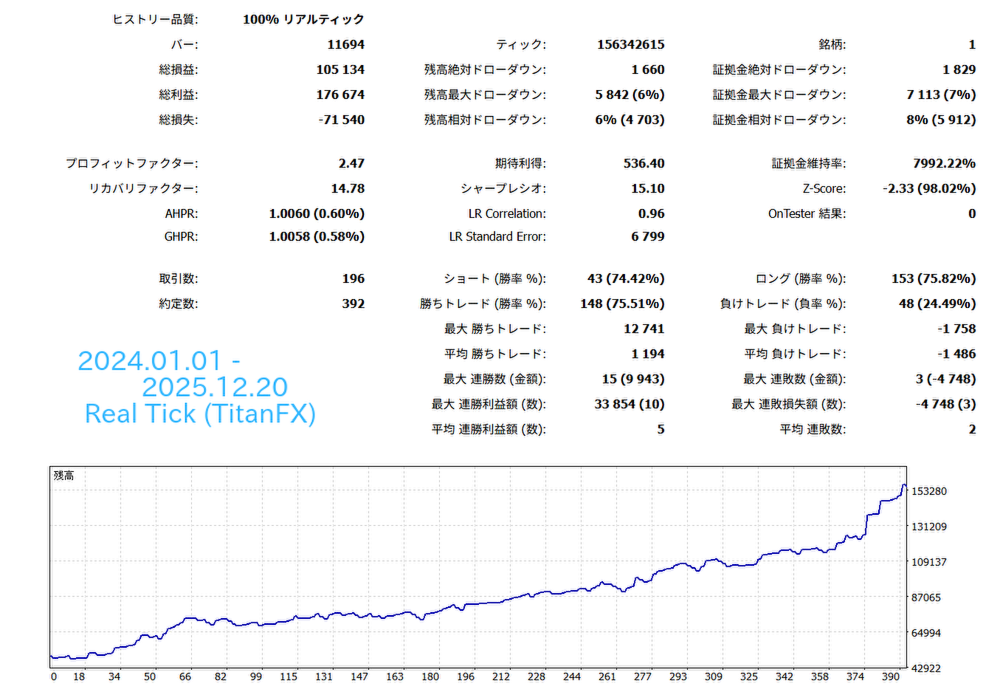
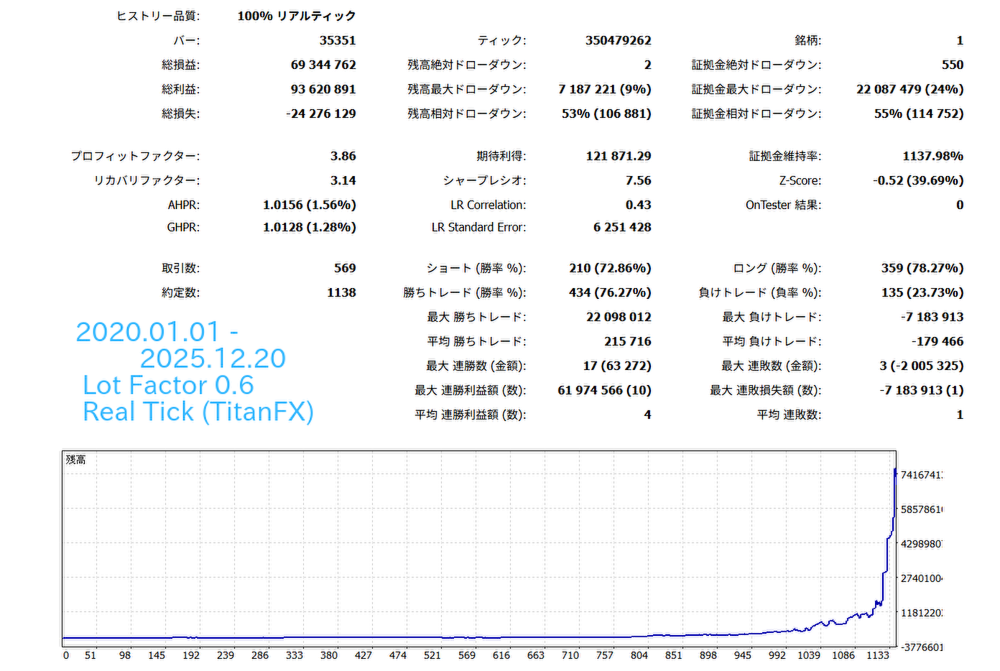
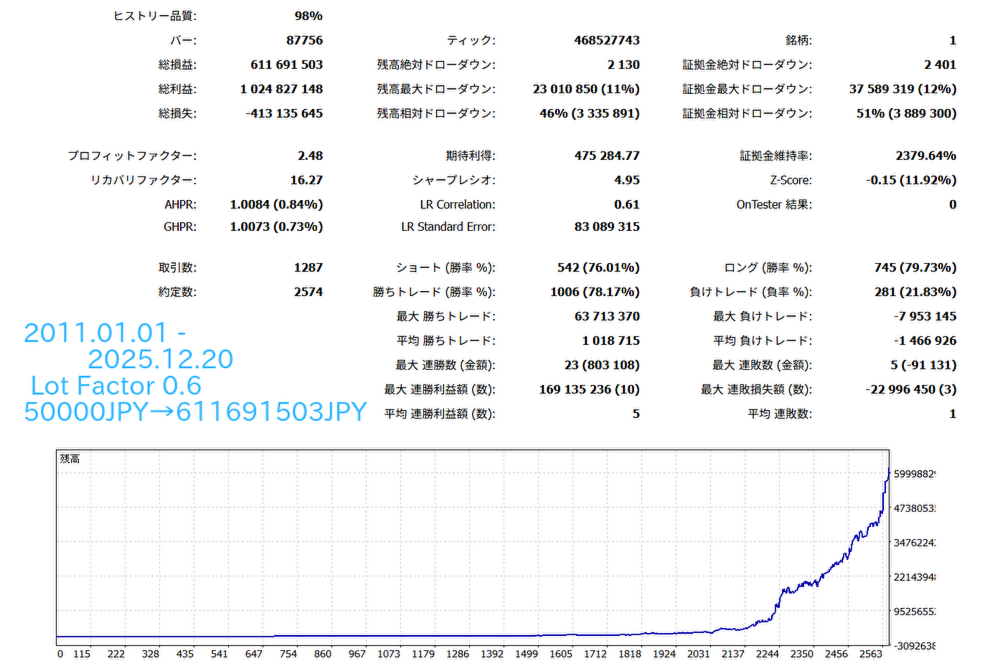
Observação: Os resultados dos testes históricos não garantem resultados futuros.
■Inclui funcionalidades compatíveis com prop firms.
■Descrição dos parâmetros
■ChooseStrategy --- Permite escolher uma estratégia entre BuyAndSell, Buy_Only e Sell_Only.
■TIMEFLAME --- O EA será executado com base no período gráfico selecionado aqui. Dependendo do período escolhido, o comportamento de parâmetros como BreakOutBars, médias móveis do trailing stop e barras utilizadas no cálculo será diferente.
■TakeProfit --- Take Profit. A unidade é pontos.
■StopLoss --- Stop Loss. A unidade também é pontos.
■BreakOutBarsBuy, BreakOutBarsSell --- Período utilizado para determinar as máximas e mínimas de rompimento. Por exemplo, se configurado como 100, as ordens Stop serão colocadas na máxima e na mínima do período correspondente às 100 velas anteriores (no período gráfico selecionado em TIMEFLAME) a partir do momento da abertura da ordem. Em geral, quanto menor esse valor, maior será o número de operações, mas menor será a taxa de acerto. Quanto maior o valor, menor será o número de operações, mas maior será a taxa de acerto.
■DynamicAutoTP --- Quando definido como true, o Take Profit será calculado automaticamente com base na volatilidade do mercado.
■DynamicAutoTPFactor --- Valor utilizado no cálculo do DynamicAutoTP. Quanto maior esse valor, maior será o Take Profit calculado.
■TrailingStop --- Quando definido como true, ativa o trailing stop.
■TrailingType --- Tipo de trailing stop. Selecionado através de um menu suspenso. Normal: utiliza o número de pontos definido em TrailingStopLevel. Bar: move o Stop Loss para a máxima ou mínima das velas definidas em TrailingBars. MA: utiliza uma Média Móvel para encerrar posições com lucro. SuperTrend: utiliza o indicador SuperTrend para realizar o trailing stop.
■TrailingStopLevel --- Quando TrailingType for Normal, o Stop Loss seguirá o preço atual mantendo a distância em pontos definida aqui.
■TrailingStart --- Quando TrailingType for Normal, o trailing stop será iniciado quando a posição atingir o lucro especificado em pontos.
■TrailingBars --- Quando TrailingType for Bar, define quantas velas para trás serão utilizadas para determinar a máxima ou mínima para onde o Stop Loss será movido.
■StopLoss Offset Point --- Quando TrailingType for Bar, especifica a distância em pontos entre o Stop Loss e a máxima ou mínima da vela.
■MA period --- Quando TrailingType for MA, define o período da Média Móvel utilizada para a realização de lucro. Dependendo do período gráfico selecionado em TIMEFRAME, serão utilizadas: TF_1min e TF_5min: MA de 1 minuto. TF_15min: MA de 2 minutos. TF_30min: MA de 3 minutos. TF_h1: MA de 5 minutos. TF_h4: MA de 15 minutos.
■Minimum Profit --- Quando TrailingType for MA, define o lucro mínimo que será garantido quando o sistema considerar improvável a continuação da expansão dos ganhos.
■TimeFrame Of SuperTrend --- Quando o tipo de trailing for SuperTrend, define qual período gráfico do indicador SuperTrend será utilizado.
■BreakEven --- Quando definido como true, ativa a função Break Even.
■BreakEvenTrigger --- Quando BreakEven for true e o preço se mover a favor da posição pelo número de pontos especificado a partir do preço de entrada, o Stop Loss será movido para o preço de entrada acrescido do valor definido em BreakEvenOffset.
■BreakEvenOffset --- Define a quantidade de pontos utilizada para posicionar o Stop Loss após a ativação do Break Even.
■OrderOpenTime --- Horário de abertura das ordens. Por exemplo, se configurado como 11, as ordens serão abertas exatamente às 11:00 no horário do MT5. Se UseDaylightSavingTime estiver definido como true, durante o horário de verão será adicionada automaticamente 1 hora e as ordens serão abertas às 12:00.
■OrderOpenMinute --- Se configurado com um valor diferente de 0, permite especificar os minutos do OrderOpenTime.
■OrderDeleteTime --- Horário em que as ordens pendentes não executadas serão canceladas. Se UseDaylightSavingTime for true, uma hora será adicionada automaticamente durante o horário de verão.
■OrderDeleteMinute --- Se configurado com um valor diferente de 0, permite especificar os minutos do OrderDeleteTime.
■WeekEndClose --- Determina se as posições devem ser encerradas antes do fim de semana. Se configurado como true, as posições serão fechadas.
■WeekEndCloseTime --- Horário de fechamento antes do fim de semana. As posições abertas serão encerradas nesse horário na sexta-feira, de acordo com o horário do MT5. Se UseDaylightSavingTime for true, uma hora será adicionada durante o horário de verão.
■WeekEndCloseMinute --- Permite especificar os minutos para o fechamento antes do fim de semana.
■UseDaylightSavingTime --- Quando definido como true, parâmetros como OrderOpenTime serão ajustados automaticamente em +1 hora durante o horário de verão.
■DST_Style --- Quando UseDaylightSavingTime for true, permite selecionar o padrão de horário de verão utilizado pela corretora. US_DST corresponde ao horário de verão dos Estados Unidos e EU_DST ao horário de verão europeu.
■MaxSpread --- Define o spread máximo permitido para abrir uma operação. Por exemplo, se configurado como 60, nenhuma ordem será aberta quando o spread ultrapassar 60 pontos.
■slippage --- Deslizamento máximo permitido para a execução das operações.
■MagicNumber --- Número identificador do EA. Este EA identifica suas posições pela combinação do símbolo em execução e do MagicNumber. Se vários EAs deste tipo forem utilizados no mesmo instrumento, utilize valores de MagicNumber diferentes.
■OrderComment --- Comentário que será adicionado às posições.
■LotManagement --- Quando definido como true, ativa a função de gerenciamento de lote composto.
■LotFactor --- Quando LotManagement for true, o tamanho do lote será calculado com base neste valor.
■FixedLot --- Quando LotManagement for false, este valor será utilizado como lote fixo.
■MaxLot --- Tamanho máximo de lote permitido. Operações acima desse valor não serão executadas.
■MiniLot --- Tamanho mínimo de lote permitido. Operações abaixo desse valor não serão executadas.
■RecoveryMode --- Quando definido como true, ativa o modo de recuperação (Recovery Mode). Neste modo, o EA memoriza o saldo original da conta. Caso o saldo diminua devido a operações perdedoras, o tamanho do lote será aumentado gradualmente conforme o número de operações cresce, até que o saldo original seja recuperado.
O tamanho do lote no modo de recuperação é calculado da seguinte forma:
(Lote base × RecoveryCount × RecoveryLotMultiplier)
O RecoveryCount aumenta em 1 após cada operação até que o saldo original seja recuperado.
O saldo-alvo da conta será exibido no gráfico como RecoveryGoalBalance. Esse valor não é reiniciado ao reiniciar o MT5, mas será redefinido juntamente com o RecoveryCount ao alterar o MagicNumber ou pressionar o botão "Reset RecoveryMode" no gráfico.
■MaxRecoveryCount --- Permite definir o limite máximo para o RecoveryCount.
■RecoveryLotMultiplier --- Valor multiplicador aplicado ao tamanho do lote sempre que o RecoveryCount aumenta em 1.
■Reset RecoveryMode On Profit --- Quando definido como True, se o RecoveryMode estiver ativo e uma operação lucrativa for realizada, o RecoveryCount e o RecoveryGoalBalance serão redefinidos.
■TradeEveryTime --- Ignora horários definidos por parâmetros como OrderOpenTime e realiza operações continuamente.
■OrderIntervalTime --- Quando TradeEveryTime for true, especifica a cada quantos minutos os preços das ordens Stop pendentes serão atualizados.
■DisplayTextOnChart --- Quando definido como true, exibe informações em texto no gráfico. Durante testes, definir como false pode tornar a execução um pouco mais rápida.
■NewsFilterON --- Quando definido como true, ativa o filtro de notícias.
■NewsMinuteBefore --- Número de minutos antes da notícia em que o filtro será ativado.
■NewsMinuteAfter --- Número de minutos após a notícia em que o filtro será desativado.
■InpNewsCurrency --- Define para qual moeda ou país o filtro de notícias será aplicado. Por exemplo, USD corresponde às notícias dos Estados Unidos. Para XAUUSD, recomenda-se utilizar USD.
■InpCloseNewsBreforeEvent --- Quando definido como true, ordens abertas ou pendentes serão fechadas ou canceladas quando o filtro de notícias estiver ativo.
■InpMaxDailyLossPercent --- Por exemplo, se configurado como 5.0, quando a perda diária atingir 5,0%, todas as posições serão fechadas e o sistema interromperá as operações até o dia seguinte. Para levar em consideração fatores como deslizamento, a avaliação do percentual utiliza um critério ligeiramente mais rigoroso.
Devido a fatores como horário de verão e GMT, a configuração dos horários no MT5 pode ser um pouco complicada.
Atualmente, para corretoras que utilizam GMT+2 durante o horário de inverno, os horários dentro do MT5 são os seguintes:
Abertura do mercado de Tóquio --- 02:00 no inverno, 03:00 no verão
Abertura do mercado de Xangai --- 03:30 no inverno, 04:30 no verão
Pré-abertura do mercado dos EUA --- 15:00 tanto no inverno quanto no verão (porque o horário do MT5 é configurado com base no mercado de Nova York)
Abertura do mercado de Nova York --- 16:30 tanto no inverno quanto no verão
Portanto, se desejar operar de acordo com a abertura dos mercados de Tóquio ou Xangai, recomenda-se definir UseDaylightSavingTime como true. Para operar de acordo com a abertura do mercado de Nova York, basta definir esse parâmetro como false.



































很不错的ea,回撤很小但是利润足够。