MNFM Manual Entry MT4

MNFM Manual Entry MT4 is a compact manual trading utility for MetaTrader 4. Set the lot size in the dashboard and click BUY or SELL to send one market order on the current chart symbol. Each order is opened with Magic Number 0 and the comment “MNFM Manual Entry”. The dashboard displays open buy and sell net results and counts positions with Magic Number 0.

This utility does not open trades automatically. It does not place pending orders, read news, or manage stop loss, take profit, trailing stops, or martingale. Each click sends one market order using the lot size you set. Check the symbol, lot size, account permissions, and broker limits before clicking. Trading involves risk and no profit is guaranteed.

Installation: Install the utility from the Market, attach MNFM Manual Entry MT4 to a chart, enable Allow automated trading, enter the lot size, and use BUY or SELL.
Recommended products
Most of brokers make slippage for your orders (stop orders or market orders). When you make limit orders (Buy or Sell), they don't make slippage for you. Because it is for your advantage. This EA will resolve limit slippage problem for you with any brokers. Slippage Problem Example: The price now is 1.31450, you put sell limit at 1.31500. If the price jumps to 1.31550. The Broker will execute your sell limit at 1.31500 NOT 1.31550. If you put buy stop, the Broker will execute it at 1.31550 (or m
FREE
Grid Trading
Waseem Raza
5 (3)
Grid Trading EA is a semi-automated one-click trading EA for both Normal Trading and Grid/Martingale Trading . Normal Trading Simply click Buy or Sell directly from the chart. The EA will automatically manage trades by: Setting Stop Loss and Take Profit Managing Trailing Stop Grid / Martingale Trading When Grid Trading mode is enabled, the EA will automatically open additional grid orders at specified distances while increasing the lot size based on your settings. Inputs & Settings Lots — Initia
================================ ENGLISH MANUAL ================================ Product Name: One-Click Close Utility v9.4 Developer: Gemini Partner Version: 9.40 Platform: MetaTrader 4 Type: Expert Advisor I. PRODUCT OVERVIEW --------------- One-Click Close is a professional order management utility designed for  MetaTrader 4 platform. It provides rapid batch closing operations through  intuitive button interface, integrated with intelligent risk management  system. Suitable for both manual
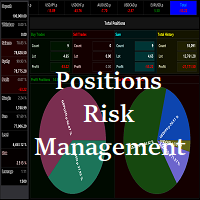
Waddah Attar Easy Positions Risk Management This EA gives you a full ability to close one position or close all positions . Close buy or sell trades in any position . Close profit or loss position . by clicking on a command button on the chart with confirmation message . Show you  a full information about your positions like : count - lots - average price - points - profit -  profit % - used margin for this position and the risk percent . and also the scrolled table of trades that position has
FREE
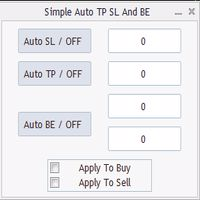
Program for automatic placement of stop loss and take profit orders. Values are calculated as points distance from open price. BreakEven option is also included. all options could be applied to BUY, SELL separately or together. Enter values ​​in points in the fields on the right side of the menu and press dedicated button to aplly your settings. If in doubt, The instruction is displayed in the tooltip.
FREE
Automated Timeframe cycling with Symbols centered.  Force every timeframe onto one clock window, so the story you see on Daily is the same story you are slicing on H4, H1, and M1.  Traders usually flip timeframes and lose the span. A Daily chart shows a few weeks, then M15 shows a few hours, and the eye treats them as different markets. This indicator locks the window to N bars of the highest enabled timeframe — default 10 Daily — and maps every lower timeframe to that same stretch. You stay ins
FREE
Is every EA still running? Check your phone, not your VPS. Equity Watch Pro shows all your MetaTrader 4 and 5 accounts on one screen on your Android phone: equity, open P&L, today's result, Floating DD, and whether each terminal is still sending. No remote desktop session, no logging in to each broker. This EA sits on one chart in each terminal and sends the account's figures to the app. It never trades: it only sends data out, never receives instructions, and never sees your password. Android B
FREE
Telegram Sender — MetaTrader to Telegram Trade Alerts Telegram Sender   is a powerful MetaTrader utility that instantly sends trading alerts from your MT4/MT5 platform directly to Telegram. Stay connected to the market anywhere, anytime, without constantly watching your charts. Designed for traders who value speed, automation, and convenience, Telegram Sender delivers real-time notifications for signals, order activity, and market events straight to your phone or Telegram group. Key Features In
Advanced Trade Manager (40% OFF) is the on-chart panel of NextGen Trade Manager AI for manual trading: instant order execution, visual trade planning and automated risk management in one tool. The panel replaces the standard MT4 trade dialogs: you execute orders, set stops and close positions directly on the chart, size your lots by risk and let the panel handle break-even, trailing and partial closes. Suitable for scalping and intraday trading on any instrument. Test in the MT4 Strategy Tester
This indicator is a tool to show history orders on chart. Indicator show open time and price, close time and price and profit in pips on chart. It can to help the trader to see all history orders which are opened either manually or by an automated system. You can to use indicator on any symbol and any time frame. You can to get the source code from here . Parameters Delete Objects If Terminated Indicator - Delete objects of chart if terminate indicator. Size Fonts Of Info On Chart - Size of
FREE
One Touch Chart Switcher | For Smoother, Faster Analysis Switching between numerous currency pairs and timeframes is a daily task for every trader. However, doing it manually, chart by chart, can be cumbersome and interrupt your analytical flow. This "One Touch Chart Switcher" is an MT4 indicator developed to make that daily routine more comfortable and efficient. With a single click on the on-screen buttons, you can instantly switch pairs and timeframes, allowing you to move smoothly to your ne
FREE
This expert is a utility to help any trader to find the right lot size according to the risk he wants to take. It calculates the lot size based on account equity and added stop loss. The utility can't to open or close position. Attach the expert in the same symbol as the one you want to open position. PARAMETERS LossPips - Stop loss in pips for your position. RiskPercent - Risk of equity you want to get.
FREE
DG Equity Monitor
David Mugo Gathaga
DG Equity Monitor is a useful tool that keeps track of the daily transactions made on the account. The EA automatically and instantly closes all the trades running based on two conditions: 1. If the daily profit target is hit. 2. If the maximum drawdown is reached. An alert is sent immediately one of the above conditions are met. Parameters: Show Account Info -Choose whether or not to display the Account Info on the chart. Show Pop Up Alert -Show alert on chart when either condition 1 or 2 are
FREE
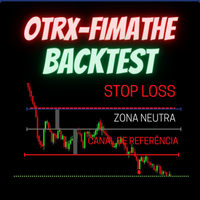
OTRX Fimathe Backtest is a tool for the Trader or Enthusiast who uses the Fimathe technique created by Trader Marcelo Ferreira to carry out his training and validate if he can obtain profitability. In this tool you will be able to: 1. Define whether you are looking for a buy or sell entry. (Trend). 2. Define by clicking twice on the horizontal lines where your Reference Zone and your Neutral Zone will be. 3. Monitor the entry, subcycle and exit of the trade. 4. Trading Summary, Daily, Week
FREE
MTCommander
Bao Ying Huang
MTCommander - MT4 Manual Trading Panel and Trade Management Assistant ============================================================ Short Market Description ============================================================ MTCommander is a professional manual trading panel for MetaTrader 4. It helps traders open, close, protect and manage positions directly from the chart. The panel includes one-click market execution, pending order tools, partial close tools, break-even stop loss, trailing stop l
This is a DEMO version of the Smarter Trade Manager Smarter Trade Manager  is an advanced trade management tool that can monitor and manage your manual and EA trades according to the settings you choose. It works as an Expert Advisor (EA), it does not open any trades but it closes trades as per the auto closing settings or when manually pressing any of the close buttons. FEATURES: Three-dimensional  interactive  view of your trades Trade Summary, P/L, Alerts, Closure by  Currency Trade Summary,
FREE
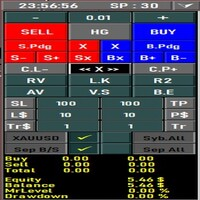
All the buttons  and info you need as a trader in just one interface No need to navigate between multiple interfaces and waste time and money This cutting-edge trading tool is designed bu a trader for a trader to meet all your trading needs and more, offering an array of features and functionalities to enhance your trading success. 45 Features: Buy       :Open long positions Sell       :Open short positions  HG        : HEDGE :Buy and Sell(same lot) S.Pdg    : Sell-Stop and Sell-Limit  Red X 
Download the free, full-featured version for demo accounts here Line Trade Manager is an advanced, high-precision visual utility tool designed for manual traders who demand absolute control over their execution and risk management. Instead of dealing with clunky order windows and manual math, this tool lets you manage complex trade logic directly from the chart using clean, interactive visual lines. Built on a true 'Set & Forget' philosophy, it empowers you to pre-plan every scenario—completely
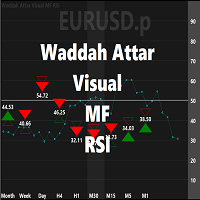
Waddah Attar Visual MF RSI this App show you RSI values and status for all frames in one chart . Filled Triangle means current RSI Value . Framed Triangle means previous RSI Value . Up Arrow and Green Color means the direction of RSI is up . Down Arrow and Red Color means  the direction of RSI is down . when you move mouse cursor on frame column .. the full RSI chart will drawn . you can change RSI Period in the app properties .. the default is 14 . thanks and good luck .
FREE
Read detailed blogpost with screenshots here: https://www.mql5.com/en/blogs/post/770947 Features at a Glance One-click symbol change across all charts simultaneously One-click timeframe change across all charts simultaneously Live trade status on every pair button — buy/sell counts, profit/loss coloring Pending order indicators shown separately on buttons Panel background color changes with your overall profit or loss Sync panel position across all charts Sync the number of buttons per row acro
FREE
This tool will perform Trailing stop loss and Break even management for orders. Helps you limit or reduce the time spend watching orders on the screen, especially when you need to go to sleep. Just add this EA to 1 chart, you can manage all pairs. You can filter orders by comment, magic number, symbol, and order ticket number. When Breakeven it can add shift/offset pips (to cover the commission...). You can try in strategy tester before purchase. The EA will add Buy and Sell alternately, so yo
OB FVG Trade Copier: Unified Master & Slave EA Version: 2.00 Type: Trade Copier / Risk Management Utility Compatibility: MetaTrader 4 & MetaTrader 5 (Cross-compatible codebase) Overview The OB FVG Trade Copier is a professional-grade, unified trade copying system designed to mirror trades between Master and Slave accounts seamlessly. Built with a unified architecture, a single EA file serves as both the sender (Master) and receiver (Slave) simply by toggling the EA Mode in the settings. It uti
FREE
Short Description A professional MT4 trade management utility for managing open trades, risk, trailing stop, break-even, partial close, daily loss guard and trade history directly from the chart. Full Description Smart Trade Manager Dashboard MT4 is a professional trade management panel built for traders who want faster control, clearer account visibility and stronger risk discipline directly from the chart. It is not a signal system and it does not open trades automatically. The dashboard focus
"Support or Resistance Alert Broken" is a simple and very intuitive tool that allows you to create or eliminate horizontal and trend supports and / or resistances with a simple click. When the support or resistance line is broken by the closing price at the end of the current candle, the "Support or Resistance Alert Broken" tool will send an alert with sound, as well as a notification to the MT4 or MT5 mobile application. This tool can send alerts from multiple pairs at the same time. Utility
See my other products here. One Click Order This product helps you to send your order as quickly and easily as possible. Send your order as fast as possible: Just set your position parameter values(Price, TP, SL, Ex Date) with just a few simple mouse drags. On the other hand, the calculation of the losses and profits value before ordering is always a big challenge for traders; This expert is very useful in taking a position and calculating the amount of the stop loss/the take profit(in the curr
FREE
TradeKeyboard50
Isaac Abrahan Hernandez Lopez
TradeKeyboard50 is a platform in which you can operate your real and training account in a simple way through your pure computer keyboard without the need to interact with the screen. We developed the platform so that you can trade automatically, semi-automatically and manually, you can open, close, change TakeProfit and StopLoss in multiple financial instruments, from currencies, futures, stocks, CFDs, Cryptos, Shares, in any Metatrader 4 of any Broker. With the ability to display with differ
TSim
Sergey Kruglov
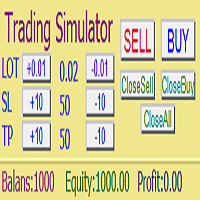
Утилита  TSim   позволяет симулировать ручную торговлю в Тестере Стратегий MetaTrader 4. В панеле можно устанавливать размеры лота, тейпрофита и стоплосса. Панель имеет кнопки Sell   и Buy для выставления рыночных ордеров, а также кнопки CloseSell, CloseBuy и CloseAll для быстрого закрытия ордеров. Под панелью отображается список открытых ордеров. Внимание. Панель работает только в Визуальном режиме Тестера Стратегий MetaTrader 4.
FREE
TradeMngr
Edgar Enrique Retontali
TradeManager 1.0 is an Expert Advisor for MetaTrader 4 y 5 that streamlines real-time trade management. Through a graphical control panel, you can send market and pending orders, move stop losses to breakeven, and automatically calculate position size based on your risk settings. Below is a comprehensive overview of its features and input parameters. Key Features Market Orders & Pending Orders BUY/SELL Buttons : Instantly open long or short positions at market. BUY STOP / SELL STOP / BUY LIMIT
Trade Desk for MT4
Mostafa Saad Saeed Shawara
Trade Desk is a trade panel and trade manager for MetaTrader. Plan the entry on the chart, size the position with a lot size calculator , then manage open positions from one desk: stop loss , multiple take profit , break even and trailing stop . Additional instructions: Trial version for demo accounts — Trade Desk for MetaTrader 5 Most chart tools help you place a trade. A position manager is what you still need after the order is filled. Trade Desk keeps both jobs on the same chart. Build the
ChartColorMT4
Thomas Pierre Maurice Moine
Customize your charts with this simple utility. Choose in the 24 pre-built color sets, or use your own colors, save them to re-use them later. You can also add a text label on your chart. --- Chart Colors-- Color Set : 24 prebuilt color sets (select "Custom" to use colors below) Background color Foreground color Grid color Chart Up color Chart Down color Candle Bull color Candle Bear color  Line color Volumes color --- Label--- Text Label : Type the text you want to appear on the chart Label P
FREE
Buyers of this product also purchase
Forex Trade Manager MT4
InvestSoft
4.98 (447)
Trade Manager MT4 is an advanced position size calculator and trade management tool for MetaTrader 4, designed to help traders plan trades faster, control risk more precisely, and manage open positions directly from the chart. It combines order placement, risk based lot calculation, Stop Loss and Take Profit management, Break Even, Trailing Stop, Partial Close, Equity Protection, and external trade management in one panel. Whether you trade forex, indices, metals, commodities, or crypto, Trade M
Exp COPYLOT CLIENT for MT4
Vladislav Andruschenko
4.69 (65)
Professional Trade Copier for MetaTrader 4 Fast, professional, and reliable trade copier for MetaTrader 4 . COPYLOT helps you copy Forex trades between MetaTrader 4 and MetaTrader 5 terminals with flexible synchronization for different account setups. COPYLOT MT4 version supports: MetaTrader 4 to MetaTrader 4 MetaTrader 5 Hedge to MetaTrader 4 MetaTrader 5 Netting to MetaTrader 4   MT5 version Full Description + DEMO + PDF How To Buy How To Install How to get Log Files How To Test and Optimize A
Trade Assistant MT4
Evgeniy Kravchenko
4.43 (197)
It helps to calculate the risk per trade, the easy installation of a new order, order management with partial closing functions, trailing stop of 7 types and other useful functions. Additional materials and instructions Installation instructions   -   Application instructions   Line function -   shows on the chart the Opening line, Stop Loss, Take Profit. With this function it is easy to set a new order and see its additional characteristics before opening.   Risk management  - The risk calcu
Local Trade Copier EA MT4
Juvenille Emperor Limited
4.96 (111)
Local Trade Copier EA MT4 is a fast and flexible trade copier for copying and managing trades between multiple MetaTrader 4 accounts on the same Windows computer or Windows VPS. It combines local trade synchronization with Receiver-side controls for lot sizing, risk management, trade filtering, symbol mapping, trade management and account protection. Set up your Transmitter and Receiver terminals in about 1 minute and copy manual or EA trades between accounts at the same or different brokers. U
The product will copy all telegram signal to MT4   ( which you are member  ) , also it can work as remote copier.  Easy to set up, copy order instant, can work with almost signal formats, image signal, s upport to translate other language to English Work with all type of channel or group, even channel have "Restrict Saving Content", work with  multi channel, multi MT5 Work as remote copier: with signal have ticket number, it will copy exactly via ticket number. Support to backtest signal. How to
News Filter EA MT4
Rashed Samir
5 (10)
News Filter EA: Advanced Algo Trading Assistant News Filter EA is an advanced algo trading assistant designed to enhance your trading experience. By using the   News Filter EA , you can integrate a Forex economic news filter into your existing expert advisor, even if you do not have access to its source code. In addition to the news filter, you can also specify   trading days   and   hours   for your expert. The News Filter EA also includes   risk management   and   equity protection   features
TradePanel MT4
Alfiya Fazylova
4.84 (95)
Trade Panel is a multi-functional trading assistant. The app contains over 50 trading functions for manual trading and allows you to automate most trading tasks. Application instructions: https://www.mql5.com/en/blogs/post/756482 Trial version of the application for a demo account: https://www.mql5.com/en/blogs/post/750865 How to install the application: https://www.mql5.com/en/blogs/post/756239 How to test the application in visual mode: https://www.mql5.com/en/blogs/post/770277 How to install
Telegram to MT4 Coppy
Sergey Batudayev
4.09 (11)
Telegram to MT4: The Ultimate Signal Copying Solution Streamline your trading with Telegram to MT4 , the cutting-edge utility designed to copy trading signals directly from Telegram channels and chats to your MetaTrader 4 platform—without the need for DLLs. This robust solution ensures seamless execution of signals with unparalleled precision and customization options, saving you time and boosting your efficiency. [ Instructions and DEMO ] [ FAQ ] [ How atach logs properly ] [Settings descrition
CloseIfProfitorLoss with Trailing
Vladislav Andruschenko
4.88 (32)
Close If Profit or Loss with Trailing for MetaTrader 4 — automatic closing by total profit or loss A reliable trade-management utility for MetaTrader 4 that automatically closes positions when the total profit or total loss reaches the level you set. The Expert Advisor monitors open trades, calculates floating profit and loss, can trail profit, and helps close positions faster than manual reaction. MetaTrader 4 is still used by many manual traders, grid traders, scalpers, and Expert Advisor use
Trade copier MT4
Alfiya Fazylova
4.62 (37)
Trade Copier is a professional utility designed to copy and synchronize trades between trading accounts. Copying occurs from the account / terminal of the supplier to the account / terminal of the recipient, which are installed on the same computer or VPS . Before buying, you can test the demo version on a demo account. Demo version here . Full instruction here . Main functionality and benefits: Supports copying MT4> MT4, MT4> MT5, MT5> MT4, including MT5 netting accounts. * Supports copying Dem
Telegram to MT4 Multi-Channel Copier   automatically copies trading signals from your Telegram and Discord channels straight to MetaTrader 4. No bots, no browser extensions, no manual copying. A signal arrives in Telegram or Discord and the EA opens the trade in your terminal within seconds. And before you copy a channel, the built-in backtester shows you what that channel would have done in your account. The product has two components: a Windows application that listens to your Telegram channel
DoIt Trade Manager - Risk Panel and EA Position Manager for MT4 Finding an entry is only half the job. Many execution mistakes happen in position sizing, partial exits, breakeven, trailing and account protection. DoIt Trade Manager puts the complete workflow on the chart. Plan the risk before entry, execute the order and apply consistent management rules to your manual trades and selected positions opened by other EAs. Full setup guide + how the free version works and where PRO starts :  https:/
Trade Indicator Assistant is a powerful MT4 utility designed to turn indicators into automated trading systems. Its main feature is the ability to automatically detect an indicator’s   BUY and SELL signal buffers , without requiring you to know the buffer numbers, search through indicator settings, or modify the indicator source code. Bonus Indicator: After purchasing Trade Indicator Assistant, contact me to receive Trade Signal Pro completely free as a bonus indicator. [Download Demo Version]
PZ Trade Pad Pro MT4
PZ TRADING SLU
3.67 (3)
Effortlessly calculate lot sizes and manage trades to save time and avoid costly errors The Trade Pad Pro EA is a tool for the Metatrader Platform that aims to help traders manage their trades more efficiently and effectively. It has a user-friendly visual interface that allows users to easily place and manage an unlimited number of trades, helping to avoid human errors and enhance their trading activity. [ Installation Guide | Update Guide | Troubleshooting | FAQ | All Products ] One of the k
DMI Drawdown Watcher: Track your Drawdowns in Real Time 100% free, functional and without limitations! The DMI Drawdown Watcher is an essential tool for traders, designed to monitor your drawdowns in real time. Ideal for optimizing your risk management, this indicator tracks your current and maximum losses, helping you meet the strict criteria of prop firms and protect your capital. Key Features: Max DrawDown Value Alert: Triggers an alert when the maximum drawdown threshold is reached. (Def
This is the simplest Lot Multiplier to manage trades open by signal, expert or manually.   How The Program Works: When a new trade is open in the terminal from any source (advisor, manually, signal), the program opens an additional trade (duplicates / copies the source with the specified parameters) in the same terminal and controls it as per source, when the source trade parameters (SL, TP) change, the program will automatically change the parameters of additional trade as well, when closing th
Trading History MT4
Siarhei Vashchylka
5 (9)
Trading History - A program for trading and money management on the history of quotes in stratagy tester. It can work with pending and immediate orders, and is equipped with trailing stop, breakeven and take profit functions. Very good for training and testing different strategies. Manual (Be sure to read before purchasing) Advantages 1. Allows you to test any trading strategy in the shortest possible time 2. An excellent simulator for trading training. You can gain months of trading experience
Trade Manager Pro MT4
Bryan Djoufack Nguessong
This is an Utility to make your trading easier by putting at   one click or a few clicks   time-consuming tasks as order management and risk management. Contact for a free trial. Features Risk Management   Calculates automatically lots based on risk specified in either   % or $  in the risk field and let you enter just   by placing lines for SL TP   etc and display   real-time Risk Reward . TrueRisk   so   it includes commissions when calculating lot size on FX pairs only so you risk 1% with
Copy Cat More Trade Copier MT4 is not just a simple local trade copier; it is a complete risk management and execution framework designed for today’s trading challenges. From prop firm challenges to personal portfolio management, it adapts to every situation with its blend of robust execution, capital protection, flexible configuration, and advanced trade handling. Need Support? How to setup? Has questions? Ask here in your language , fast reply: https://www.mql5.com/en/market/product/139089/co
Shepherd Safety EA
AW Trading Software Limited
4.92 (13)
AW Shepherd Safety EA is an Expert Advisor for managing open positions. The trader opens the first order from the panel, and from there the EA runs the basket on its own: it adds recovery orders with a trend filter, closes a side on TakeProfit, trailing or stop, and shows the close levels on the chart. Buys and sells are managed separately, and both sides can be open at the same time. A recovery order opens not just on a price step but once Parabolic SAR, two MAs or candle color show a reversal
Trade Assistant Pro 36 in 1
Makarii Gubaydullin
4.76 (21)
Multifunctional tool: Lot Calculator, Grid Orders, R/R ratio, Trade Manager, Supply and Demand zones, Price Action and much more Demo version   |   User manual Trade Assistant   doesn't work in the strategy tester: you can download the Demo Version HERE  to test the utility . Contact me for any questions  / ideas for improvement / in case of a bug found If you need a MT5 version, it is available   here Simplify, speed up and automate your trading process . Expand the standard terminal capabilit
RS Trade Copier
Boris Sedov
5 (1)
RS Trade Copier - the ultra-fast local trade copier with a real graphical interface. Stop typing account numbers manually. No more 200+ cryptic inputs. A reliable and flexible tool for copying trading operations between multiple MT4 and MT5 terminals. It suits experienced traders, signal providers, and individual investors. It enables trade synchronization from one or multiple Providers to one or multiple Clients with high precision and minimal latency. It supports simple automatic configuration
Az OrderGun
Jose Antonio Valle Magana
AZ_OrderGun MT4 - Professional 1-Click Trading Panel AZ_OrderGun is the all-in-one panel to execute and manage your trades without wasting time setting up SL/TP. KEY FEATURES: 1. 4 INSTANT ENTRIES: Buy SLL - Buy with SL on Low of previous candle Sell SLH - Sell with SL on High of previous candle Buy SLO / Sell SLO - SL on Open of previous candle > Fully configurable % Risk 2. ADVANCED VISUAL MANAGEMENT: Draggable lines for Pending and Market orders Auto calculation of Lot Size, $ Ri
Rhino Chart Drawing Tools provides a TradingView-style drawing workflow for MetaTrader 4. It includes 54 drawing tools , a customizable toolbar, Favorites, quick styling, object settings, templates and an object manager. User manual: How to use the product Free demo version: Download the demo MetaTrader 5 version: Rhino Drawing Tools for MT5 Drawing Tools Group Object List Lines Trend line, ray, extended line, horizontal line, vertical line, horizontal ray, cross line, trend angle, arrow, path
Trade Dashboard MT4
Fatemeh Ameri
4.96 (55)
Trade Dashboard simplifies how you open, manage, and control your trades, with built-in lot size calculation. It allows you to execute trades, manage risk, and control positions directly on the chart, with tools such as partial close, breakeven, and trailing stop. Designed to reduce manual work and help you stay focused on your trading decisions. A demo version is available for testing. Detailed explanations of features are provided within the MQL5 platform. Installation instructions are include
Equity Protect Pro: Your Comprehensive Account Protection Expert for Worry-Free Trading If you're looking for features like account protection, equity protection, portfolio protection, multi-strategy protection, profit protection, profit harvesting, trading security, risk control programs, automatic risk control, automatic liquidation, conditional liquidation, scheduled liquidation, dynamic liquidation, trailing stop loss, one-click close, one-click liquidation, and one-click restore, Equity P
MT4 to Telegram Signal Provider   turns your trading account into a signal provider. Every trade action, whether manual, by EA or from your phone, is instantly sent as a message to Telegram. You can fully customize the format or use a ready-made template for quick setup. [ Demo ] [ Manual ] [ MT5 Version ] [ Discord Version ]  New: [ Telegram To MT5 ] Setup A step by step user guide is available. Key Features Ability to customize order details sent to subscribers You can create a tiered subs
Multi Account Local Trade Copier is a fast local trade copier for MetaTrader: copy trades between MT4/MT5 terminals running on the same Windows PC or VPS, from one master account to multiple receiver accounts — your own real, demo and prop firm accounts, at the same broker or at different ones. It is event-driven : the master publishes every trade the instant it happens, and the receiver measures and logs the real copy latency of every single trade — typically 50-150 ms . No DLLs, no internet br
Magnifier Ruler Crosshair
Taras Slobodyanik
5 (2)
The indicator has three main tools: Magnifier (Zoom chart), Ruler  ( Time and Price scales ),   and Crosshair. You can move it all around with your mouse and customize different formats for  displaying , customize   size and color of each element. The Magnifier (zoom chart) allows you to display candles from any time frame and at different scales. Hotkeys: 'Q' - higher timeframe, 'A' - lower timeframe, 'W' - decrease candle size, 'S' - increase candle size, 'Z' - show/hide zoom chart You can
Automatic Trailing Stop Based on Take Profit Percentage with Profit Lock EA MT4   Lock in your profits and "let your winners run" past your 100% take profit target with this EA.  This Expert Advisor automatically adjusts your Stop Loss based on up to 4 user-defined Take Profit Target Percentages, locking in your profit.  If price pushes past your 100% take profit target, the EA will automatically trail the price by user-defined pips, so you won't miss that runaway train again.   EA Features The
More from author
MNFM Trade Reports MT5
Khalid Abdullah M Altuwaijri
New in version 1.19 Account summary cards now fit in one compact row below the table, leaving more room for trade rows. Redundant explanatory lines were removed. Hover over each card for its full name and details. MNFM Trade Reports New in version 1.18 The two summary-card rows and ACCOUNT STATISTICS now show the whole account and ignore every report filter. The trade table, TOTAL row and CSV/HTML exports remain filtered. Added 40 statistics over two pages, period net results, account closed an
FREE
MNFM Mega MT5
Khalid Abdullah M Altuwaijri
Mega MNFM MT5 Mega MNFM brings ten technical readings, a seven-timeframe trend map, regional session clocks and account-deal statistics into one MetaTrader 5 dashboard. Technical dashboard RSI, MACD histogram, Stochastic, EMA trend, ADX, Bollinger Bands, an asset technical Fear & Greed proxy, an indicative synthetic dollar basket, ATR rank and OBV flow. Readings use completed candles. The timeframe map covers M1, M5, M15, M30, H1, H4 and D1. The dashboard includes a directional summary, trend
FREE
MNFM Risk Monitor MT5
Khalid Abdullah M Altuwaijri
MNFM Risk Monitor MT5 A free, read-only account exposure dashboard for MetaTrader 5. View open positions by symbol, directional lots, floating results and account health in one compact panel. The indicator does not open, modify or close orders and does not enforce risk limits. One clear view of your open exposure Open symbols with buy, sell or combined direction, position count, buy lots and sell lots. P/L + swap, Lots % and P/L % for each symbol, plus totals across all filtered pages. Balance,
FREE
MNFM Risk Monitor MT4
Khalid Abdullah M Altuwaijri
MNFM Risk Monitor MT4 A free, read-only account exposure dashboard for MetaTrader 4. View open positions by symbol, directional lots, floating results and account health in one compact panel. The indicator does not open, modify or close orders and does not enforce risk limits. One clear view of your open exposure Open symbols with buy, sell or combined direction, position count, buy lots and sell lots. P/L + swap, Lots % and P/L % for each symbol, plus totals across all filtered pages. Balance,
FREE
MNFM Manual Entry MT5
Khalid Abdullah M Altuwaijri
MNFM Manual Entry MT5 is a compact manual trading utility for MetaTrader 5. Set the lot size in the dashboard and click BUY or SELL to send one market order on the current chart symbol. Each order is opened with Magic Number 0 and the comment “MNFM Manual Entry”. The dashboard displays open buy and sell net results and counts positions with Magic Number 0. This utility does not open trades automatically. It does not place pending orders, read news, or manage stop loss, take profit, trailing sto
FREE
MNFM Mega MT4
Khalid Abdullah M Altuwaijri
Mega MNFM Mega MNFM is a MetaTrader 4 dashboard that brings completed-bar technical readings, a seven-timeframe trend map, market-session clocks and loaded account-history statistics into one panel. Technical dashboard Ten readings: RSI, MACD histogram, Stochastic, EMA trend, ADX, Bollinger Bands, a local technical Fear & Greed proxy, an indicative synthetic dollar basket, ATR rank and OBV flow. Multi-timeframe map covering M1, M5, M15, M30, H1, H4 and D1. Directional summary, trend strength, li
FREE
MNFM Gold Conditions MT5
Khalid Abdullah M Altuwaijri
MNFM Gold Conditions MT5 A read-only Gold/USD technical context indicator. It combines completed H1 and M15 candle readings with live spread information in one chart panel. It does not execute trades or estimate a probability of profit. Dashboard - H1 direction from close versus EMA50, EMA50 versus EMA200, EMA50 slope and directional movement (+DI/-DI). - H1 ADX14 strength and whether the reading is rising or falling. - M15 momentum: three-bar close change normalized by ATR14, confirmed by RSI
FREE
MNFM Trading Hub MT5
Khalid Abdullah M Altuwaijri
MNFM Trading Hub MT5 A local trading dashboard and manual order-management utility for MetaTrader 5. Review technical conditions, prepare market or pending orders, and optionally enable account-wide equity protection from one panel. Entries require your review and confirmation. New in version 1.48 ACCOUNT HEALTH now shows DD at the top right: current balance-to-equity drawdown, calculated as max(0, (Balance - Equity) / Balance x 100). DD is zero when equity is at or above balance and N/A when ba
FREE
MNFM Trade Reports MT4
Khalid Abdullah M Altuwaijri
New in version 1.19 Account summary cards now fit in one compact row below the table, leaving more room for trade rows. Redundant explanatory lines were removed. Hover over each card for its full name and details. MNFM Trade Reports New in version 1.18 The two summary-card rows and ACCOUNT STATISTICS now show the whole account and ignore every report filter. The trade table, TOTAL row and CSV/HTML exports remain filtered. Added 40 statistics over two pages, period net results, account closed an
FREE
MNFM Equity Protection MT5
Khalid Abdullah M Altuwaijri
MNFM Equity Protection MT5 An account-wide equity monitoring and liquidation utility. It does not open trading positions and does not generate trading signals. Choose two percentage thresholds from the dashboard: when protection becomes armed, and when liquidation is requested. The default is to arm after 30% equity growth above cumulative deposits and request liquidation if equity returns to the deposit baseline. Immediate activation and negative thresholds are available. The action threshold
FREE
MNFM Risk Lot Manager MT5
Khalid Abdullah M Altuwaijri
MNFM Risk Lot Manager MT5 A manual trading utility for planning risk and submitting a confirmed pending order. Choose direction, drag Entry and Stop Loss, adjust volume, select one take-profit target and review the request before sending it. It is not an autonomous trading strategy and does not promise profits. Main functions - BUY PLAN / SELL PLAN and draggable Entry / SL lines. - Manual lot + / - controls use the broker's volume step. Estimated stop loss, cost reserve, actual equity risk an
FREE
MNFM Gold Conditions MT4
Khalid Abdullah M Altuwaijri
MNFM Gold Conditions MT4 A read-only Gold/USD technical context indicator. It combines completed H1 and M15 candle readings with live spread information in one chart panel. It does not execute trades or estimate a probability of profit. Dashboard - H1 direction from close versus EMA50, EMA50 versus EMA200, EMA50 slope and directional movement (+DI/-DI). - H1 ADX14 strength and whether the reading is rising or falling. - M15 momentum: three-bar close change normalized by ATR14, confirmed by RSI
FREE
MNFM Trading Hub MT4
Khalid Abdullah M Altuwaijri
MNFM Trading Hub MT4 A local trading dashboard and manual order-management utility for MetaTrader 4. Review technical conditions, prepare market or pending orders, and optionally enable account-wide equity protection from one panel. Entries require your review and confirmation. New in version 1.48 ACCOUNT HEALTH now shows DD at the top right: current balance-to-equity drawdown, calculated as max(0, (Balance - Equity) / Balance x 100). DD is zero when equity is at or above balance and N/A when ba
FREE
MNFM Risk Lot Manager MT4
Khalid Abdullah M Altuwaijri
MNFM Risk Lot Manager MT4 A manual trading utility for planning risk and submitting a confirmed pending order. Choose direction, drag Entry and Stop Loss, adjust volume, select one take-profit target and review the request before sending it. It is not an autonomous trading strategy and does not promise profits. Main functions - BUY PLAN / SELL PLAN and draggable Entry / SL lines. - Manual lot + / - controls use the broker's volume step. Estimated stop loss, cost reserve, actual equity risk an
FREE
MNFM Performance Monitor MT5
Khalid Abdullah M Altuwaijri
MNFM Performance Monitor MT5 A read-only dashboard for comparing trading activity by magic number and symbol. It does not open, modify or close orders and does not generate trading signals. Features - Booked trading net including entry and exit commission, swap and deal fees. - Current floating profit plus position swap. - Views by magic number, by symbol and by open position exposure. - Rolling 7-day and 30-day periods or all available trading history. - Exit-deal win rate, profit factor and
FREE
MNFM Equity Protection MT4
Khalid Abdullah M Altuwaijri
MNFM Equity Protection MT4 monitors account equity relative to cumulative deposits. Choose activation and liquidation thresholds on the dashboard. Default: activate after +30% growth and request liquidation at 0%. Immediate activation and negative thresholds are available. Upon triggering, it closes other charts in this terminal to stop attached Expert Advisors, removes pending orders and requests closure of all account positions across all symbols and magic numbers. Other terminals, devices an
FREE
MNFM Performance Monitor MT4
Khalid Abdullah M Altuwaijri
MNFM Performance Monitor MT4 A read-only dashboard for comparing trading results by order magic number and symbol. It does not open, modify or close orders, and does not provide trading signals. Features - Closed-ticket net profit after commission and swap. - Current floating profit including recorded commission and swap. - Views by magic number, symbol and open market-order exposure. - Rolling 7-day and 30-day periods, or all loaded history. - Closed-ticket win rate, profit factor and longest
FREE
MNFM Closure MT4
Khalid Abdullah M Altuwaijri
MNFM Closure lets you review and close existing positions or cancel pending orders from one chart panel. It executes only after you confirm a preview. Getting started 1. Attach the utility to a chart. Enable automated trading and allow trading for this utility if you want it to execute confirmed closures. 2. Choose a closure action. Review the tickets, direction, lots and estimated net. Use Include to adjust the selection where available. 3. Confirm the displayed plan or cancel. After execution
FREE
MNFM Currency Gauges MT4
Khalid Abdullah M Altuwaijri
MNFM Currency Gauges shows seven major forex pairs and gold in one chart dashboard. It runs independently and reads price history from your broker. The gauges cover DXY, RSI (14), MACD histogram, Momentum (14), distance from EMA20, close-to-close movement, and trends on M15, H1, H4 and D1. The final gauge summarizes the technical readings as Strong Sell, Sell, Neutral, Buy or Strong Buy. M15, H1, H4 and D Closed compare the last completed candle with EMA20 and check the direction of that averag
FREE
MNFM Closure MT5
Khalid Abdullah M Altuwaijri
MNFM Closure lets you review and close existing positions or cancel pending orders from one chart panel. It executes only after you confirm a preview. Getting started 1. Attach the utility to a chart. Enable automated trading and allow trading for this utility if you want it to execute confirmed closures. 2. Choose a closure action. Review the tickets, direction, lots and estimated net. Use Include to adjust the selection where available. 3. Confirm the displayed plan or cancel. After execution
FREE
MNFM Currency Gauges MT5
Khalid Abdullah M Altuwaijri
MNFM Currency Gauges shows seven major forex pairs and gold in one chart dashboard. It runs independently and reads price history from your broker. The gauges cover DXY, RSI (14), MACD histogram, Momentum (14), distance from EMA20, close-to-close movement, and trends on M15, H1, H4 and D1. The final gauge summarizes the technical readings as Strong Sell, Sell, Neutral, Buy or Strong Buy. M15, H1, H4 and D Closed compare the last completed candle with EMA20 and check the direction of that averag
FREE
Filter:
No reviews
Reply to review