MQLTeam Gann Timer
- Indicators
- Version: 1.0
- Activations: 5

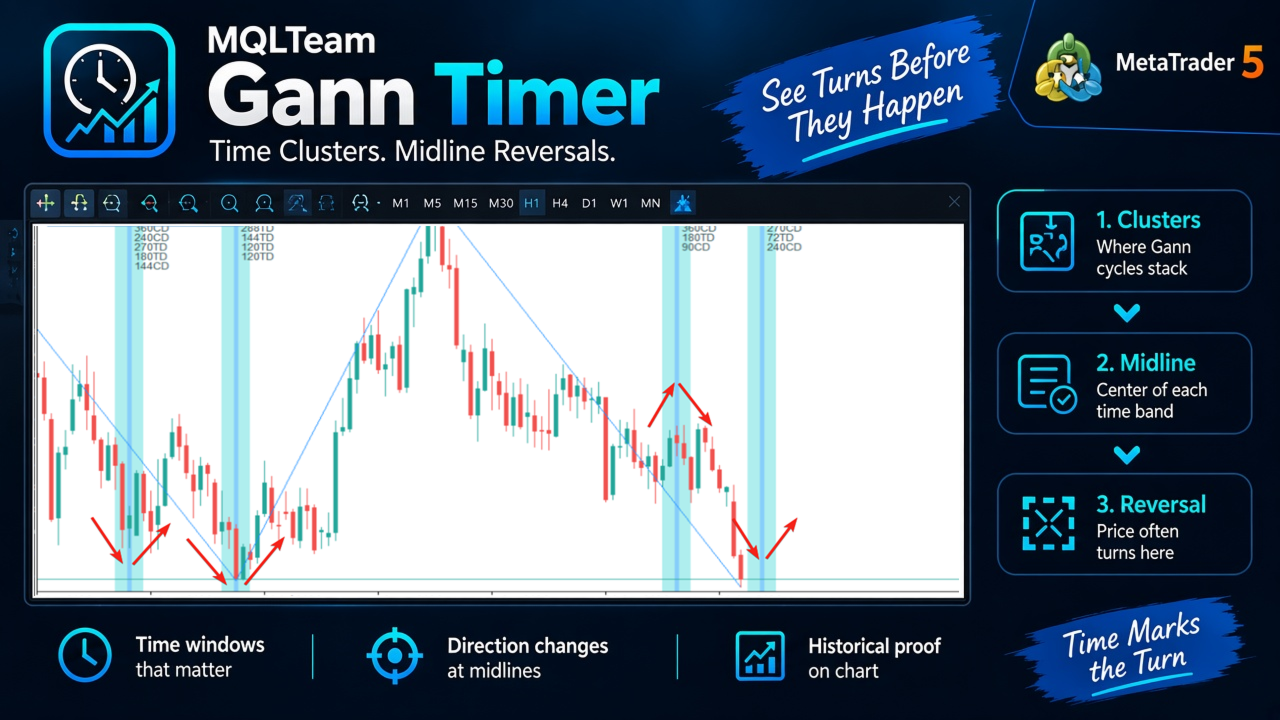
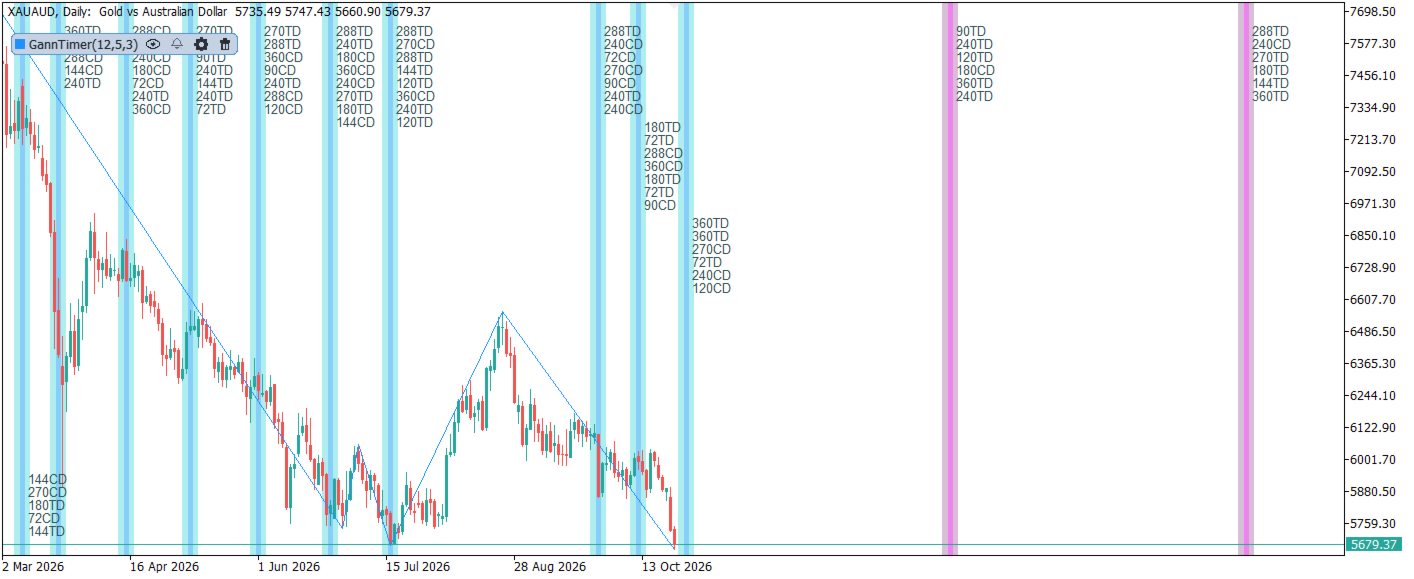
MQLTeam Gann Timer maps Gann-style time cycles from swing highs and lows onto the MetaTrader 5 price chart. When several period counts land near the same date, they form a time cluster — a vertical band you can watch as price approaches it. Historical clusters and future windows use different colors, so past structure and upcoming dates stay easy to tell apart.
How to read the clusters: Reading time clusters on the chart
Follow MQLTeam: MQL5 channel — notes and product updates on MQL5.com.
Counts use Trading Days (TD) and Calendar Days (CD). Classic periods such as 72, 90, 120, 144, 180, 240, 270, 288, and 360 can be switched on or off in the inputs. Aggregation tolerance groups nearby hits into one cluster; minimum cluster size filters weak groups.
The ZigZag plot is drawn for reading swings on the Daily chart. Cluster objects (lines, windows, labels) can appear on other timeframes while the engine still builds cycles from daily swing structure.
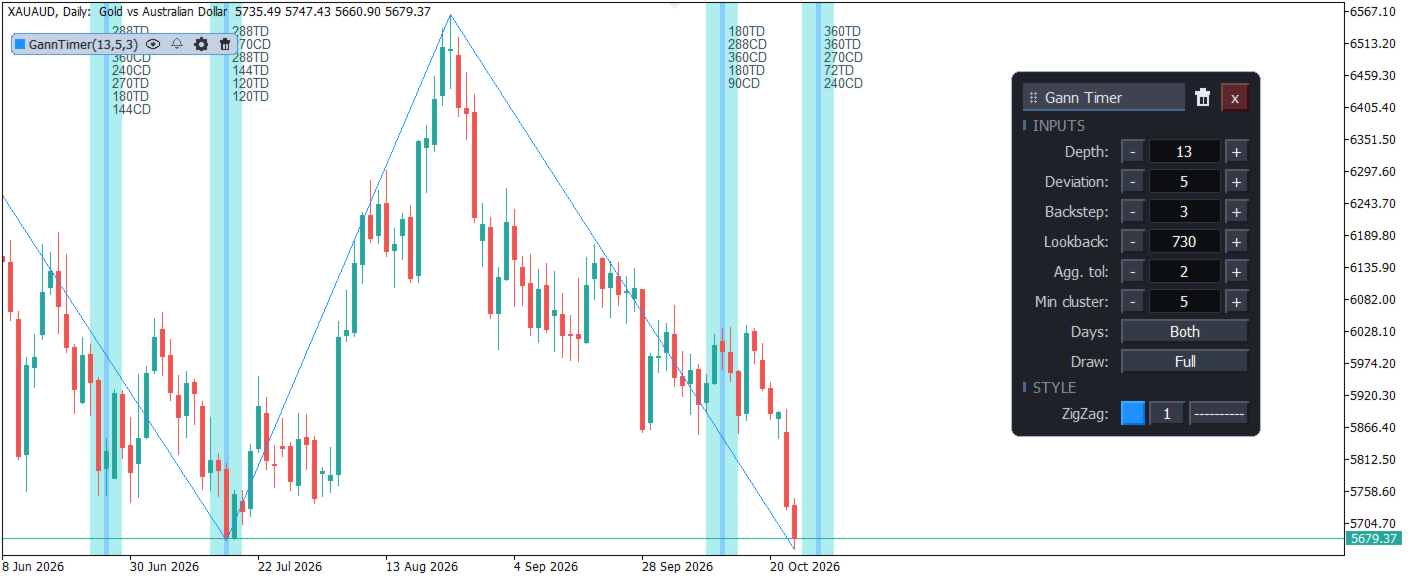
Settings are changed on the chart, in a TradingView style panel. Depth, Deviation, Backstep, Lookback, aggregation, minimum cluster, Days, and Draw update while you watch. A copy you do not need right now can be hidden. Its settings stay until you show it again.
This is a time map for chart reading. It is not an automated trading robot and it does not claim that every midline must reverse. Use it to ask whether time is stacking at a date — then confirm with your own price method.
Key Features
- Time clusters on the chart: Vertical bands where TD and/or CD period counts meet. Labels show which periods share that zone.
- Midline focus: Each cluster has a center line. Many readers watch how price behaves as it reaches that line.
- Past vs future colors: Entered history and future windows use separate colors so the right edge of the chart stays clear.
- Days mode: Choose Trading Days, Calendar Days, or Both from the panel (Days).
- Draw mode: Full, Lines, Windows, Labels, or Minimal — match how much detail you want on the chart.
- ZigZag swings: Depth, Deviation, and Backstep set the swing map. Lookback limits how far back cycles are built. The chip title shows Depth, Deviation, and Backstep.
- Aggregation and size: Agg. tol groups nearby dates. Min cluster drops thin stacks.
- Period set: Enable or disable each classic period in the inputs (72 through 360).
- Live panel: Open it from the chip. Change the main ZigZag and cluster controls there. Drag the panel. Delete that copy from the panel only when you want it gone.
- Hide without deleting: The eye hides that copy and leaves its settings in place.
- Optional alerts: Alert on a cluster date and/or when price enters a time window. The chip bell follows the master alert switch.
- Inputs and the panel: The inputs are the saved settings. Editing in the panel updates the chart immediately. Closing the panel writes those settings back into the inputs.
- Panel off: Turn Show panel off and the objects still draw, without the chip or the panel.
- History limit: Max bars to calculate caps how far back work is done. The default is 5000.
- Platform: MetaTrader 5.
=================== Arabic Description - الوصف باللغة العربية ===================
MQLTeam Gann Timer يرسم دورات زمنية بأسلوب غان من قمم التأرجح وقيعانه على شارت ميتاتريدر 5. حين تلتقي عدة عدّات قرب التاريخ نفسه يتكوّن عنقود زمني — شريط عمودي يمكنك متابعته والسعر يقترب منه. العناقيد التاريخية والنوافذ المستقبلية بألوان مختلفة، فتميّز ما مضى عمّا لا يزال أمام السعر.
كيف تقرأ العناقيد: قراءة العناقيد الزمنية على الشارت
تابع MQLTeam: قناة MQL5 — ملاحظات وتحديثات المنتجات على MQL5.com.
العدّ يكون بـأيام التداول والأيام التقويمية. فترات كلاسيكية مثل 72 و90 و120 و144 و180 و240 و270 و288 و360 يمكن تشغيلها أو إيقافها من المدخلات. تسامح التجميع يجمع الإصابات المتقاربة في عنقود واحد، والحد الأدنى لحجم العنقود يستبعد المجموعات الضعيفة.
رسم الزيج زاج لقراءة التأرجحات أوضح على الشارت اليومي. أما كائنات العناقيد (خطوط ونوافذ وتسميات) فيمكن أن تظهر على إطارات أخرى بينما يبني المحرك الدورات من بنية التأرجح اليومية.
الإعدادات تُغيَّر من لوحة على الشارت بأسلوب منصات الرسوم الشائعة. العمق والانحراف والخطوة إلى الخلف ومدى البحث والتجميع والحد الأدنى للعنقود وخيار الأيام وخيار الرسم تتحدّث وأنت تشاهد. إن لم تحتج إلى نسخة الآن يمكنك إخفاءها، وتبقى إعداداتها إلى أن تُظهرها مرة أخرى.
هذه خريطة زمنية لقراءة الشارت. ليست روبوت تداول آلي، ولا تدّعي أن كل خط منتصف يجب أن ينعكس. استخدمها لتسأل هل اصطفّ الزمن عند تاريخ معيّن — ثم أكّد بطريقتك في السعر.
أبرز المميزات
- عناقيد زمنية على الشارت: أشرطة عمودية حيث تلتقي عدّات أيام التداول و/أو الأيام التقويمية. التسميات تبيّن أي الفترات تشترك في تلك المنطقة.
- التركيز على المنتصف: لكل عنقود خط مركز. كثير من القرّاء يراقبون سلوك السعر وهو يصل إلى هذا الخط.
- ألوان الماضي والمستقبل: ما دخل التاريخ والنوافذ القادمة بلونين منفصلين ليبقى يمين الشارت واضحاً.
- وضع الأيام: أيام التداول أو التقويم أو الاثنان من اللوحة.
- وضع الرسم: كامل أو خطوط أو نوافذ أو تسميات أو مختصر — بما يناسب تفاصيل الشارت.
- تأرجحات الزيج زاج: العمق والانحراف والخطوة إلى الخلف تضبط خريطة التأرجح. مدى البحث يحدّ كم يُبنى للخلف. اسم البطاقة يعرض العمق والانحراف والخطوة.
- التجميع والحجم: تسامح التجميع يجمع التواريخ المتقاربة. الحد الأدنى للعنقود يستبعد التكديس الخفيف.
- مجموعة الفترات: شغّل أو أوقف كل فترة كلاسيكية من المدخلات (من 72 إلى 360).
- لوحة حية: تُفتح من البطاقة. منها تغيّر أهم إعدادات الزيج زاج والعناقيد. اسحب اللوحة. احذف النسخة من اللوحة فقط حين تريد إزالتها.
- إخفاء من غير حذف: زر العين يخفي هذه النسخة ويبقي إعداداتها.
- تنبيهات اختيارية: تنبيه عند تاريخ عنقود و/أو عند دخول نافذة زمنية. جرس البطاقة يتبع مفتاح التنبيه الرئيسي.
- المدخلات واللوحة: مدخلات المؤشر هي الإعدادات المحفوظة. التعديل من اللوحة يحدّث الشارت فوراً. إغلاق اللوحة يعيد كتابة هذه الإعدادات في المدخلات.
- إخفاء اللوحة: إذا أوقفت إظهار اللوحة تبقى الكائنات مرسومة، من غير بطاقة ومن غير لوحة.
- عدد الشموع المحسوبة: أقصى عدد شموع للحساب يحدّد مدى العمل للخلف. الافتراضي خمسة آلاف.
- المنصة: ميتاتريدر 5.