Precision Volume Profile
- Indicators
- Version: 1.0

Precision Volume Profile with VWAP and Value Area
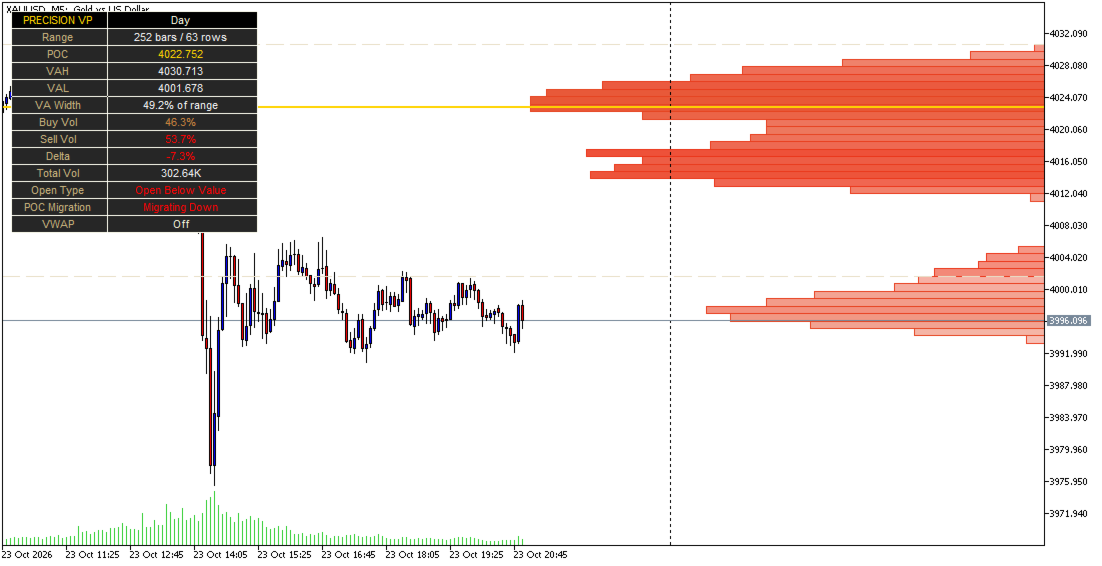
Precision Volume Profile with VWAP and Value Area is an advanced volume-distribution and market-structure indicator for MetaTrader 5. It analyzes how trading volume is distributed across price levels and identifies the most important areas of market acceptance, balance, rejection, and potential reaction.
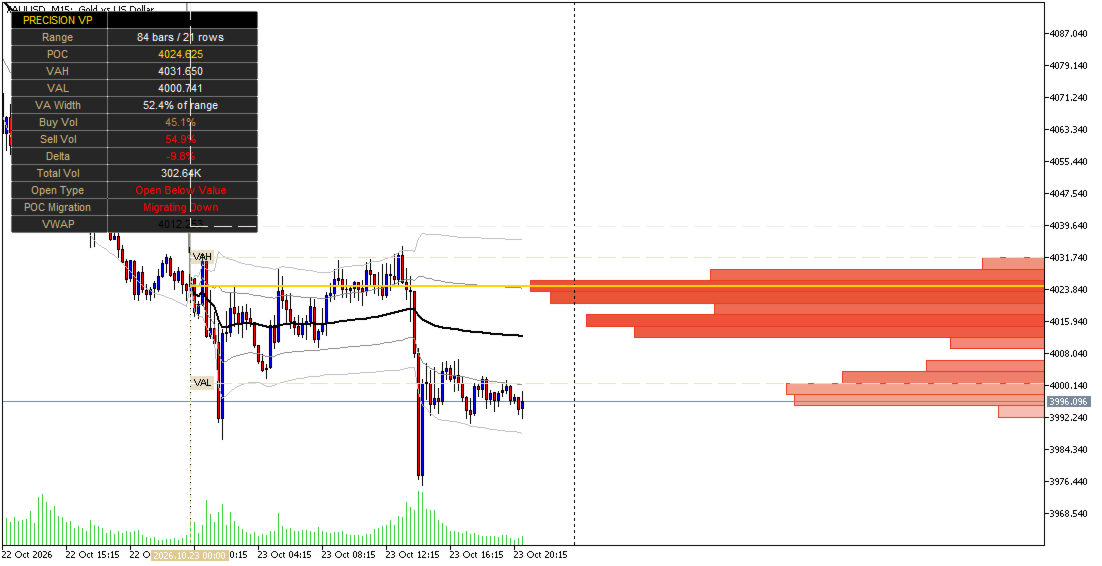
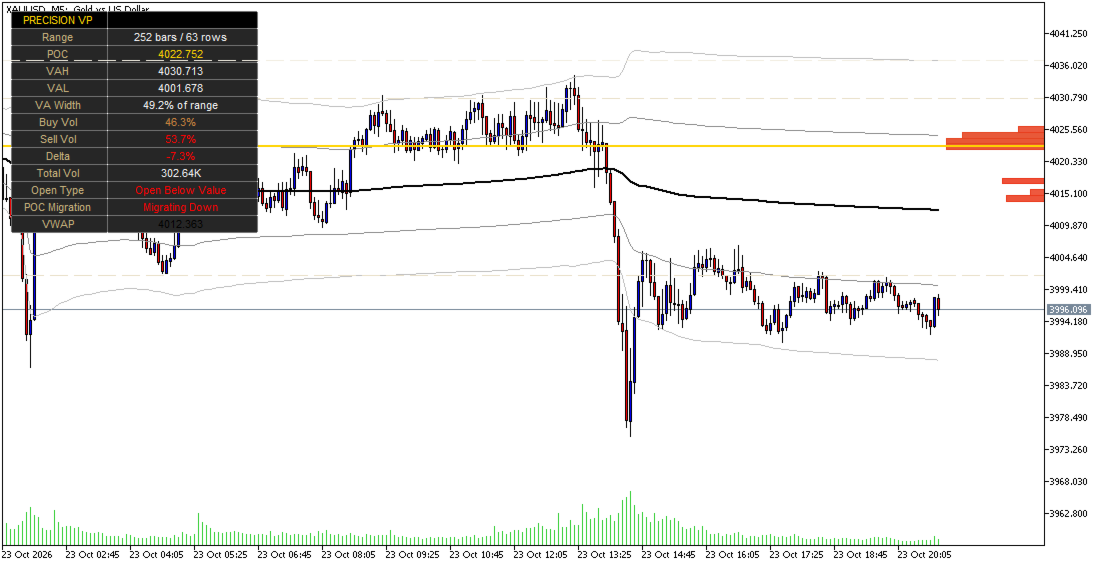
The indicator combines dynamic Volume Profile analysis, Point of Control, Value Area High, Value Area Low, estimated buy and sell volume, volume delta, session VWAP, standard-deviation bands, prior-period Value Area, opening location, and POC migration into one visual trading tool.
MAIN FEATURES
- Builds a dynamic Volume Profile across the selected analysis range.
- Identifies the Point of Control, the price level with the highest volume concentration.
- Calculates Value Area High and Value Area Low.
- Supports customizable Value Area percentage.
- Estimates buy-volume and sell-volume distribution across each price row.
- Calculates estimated volume delta from the buy-volume and sell-volume split.
- Supports Visible Range, Fixed Bars, Day, Week, Month, and custom Session profiles.
- Detects the current session or period's volume structure.
- Displays the selected profile range and number of price rows.
- Supports automatic or manual row resolution.
- Displays the previous daily or weekly Value Area.
- Classifies the current open as Above Value, Inside Value, or Below Value.
- Tracks POC migration as Up, Down, Flat, or First Period.
- Includes optional session VWAP.
- Includes optional one-standard-deviation and two-standard-deviation VWAP bands.
- Displays total volume and buy/sell volume percentages.
- Provides an on-chart statistics dashboard.
- Supports optional alerts when price crosses the POC.
- Supports optional alerts when price enters or exits the Value Area.
- Allows profile placement beside price or over the analyzed range.
- Supports customizable profile width and bar-growth direction.
- Dims volume rows outside the Value Area for improved visual clarity.
- Provides customizable colors for buy volume, sell volume, POC, VAH, VAL, VWAP, and the statistics panel.
- Includes a selectable light or dark watermark theme.
- Provides a maximum stored-bars setting to help manage calculation performance.
HOW TO USE
Precision Volume Profile displays the distribution of volume across price levels for the selected range.
- POC: The price level with the highest calculated volume concentration.
- VAH: The upper boundary of the Value Area.
- VAL: The lower boundary of the Value Area.
- Value Area: The price region containing the selected percentage of the profile's total volume.
- Buy Volume: The estimated bullish portion of volume assigned to each price row.
- Sell Volume: The estimated bearish portion of volume assigned to each price row.
- Delta: The difference between the estimated buy-volume percentage and sell-volume percentage.
- VWAP: The volume-weighted average price for the current reset period.
- Prior Value Area: The previous daily or weekly Value Area displayed for comparison with the current market.
- POC Migration: The movement of the previous period's POC relative to the preceding period.
The profile can be used to study whether price is trading inside value, accepting a new price area, rejecting a level, rotating around the POC, or moving away from an established volume zone.
Volume Profile levels should be used as decision-support information rather than standalone entry or exit signals. Always combine the indicator with your trading plan, market context, price action, confirmation tools, and risk-management rules.
PROFILE RANGE AND RESOLUTION
Anchor
- Visible Range: Builds the profile from the bars currently visible on the chart.
- Fixed Bars: Builds the profile from a user-defined number of historical candles.
- Day: Builds the profile from the current calendar day.
- Week: Builds the profile from the current calendar week.
- Month: Builds the profile from the current calendar month.
- Session: Builds the profile from a custom trading session.
Resolution
The indicator supports automatic row calculation based on the selected range or manual row configuration. Increasing the number of rows provides greater price resolution but may require additional processing.
INPUT PARAMETERS
Profile Range and Resolution
- Anchor: Selects the range used to build the current Volume Profile.
- Fixed Bars Lookback: Number of candles included when the Fixed Bars anchor is selected.
- Session Time: Custom session window used when the Session anchor is selected.
- Session Timezone: Timezone used to interpret the custom session.
- Reset VWAP At: Selects whether VWAP resets at Midnight or at the Session Open.
- Max Bars Stored: Maximum number of candles retained for profile rebuilding and historical calculations.
- Row Count: Selects Automatic or Manual profile row calculation.
- Manual Rows: Number of price rows used when Manual row calculation is selected.
- Value Area %: Percentage of total volume included in the Value Area.
Prior Period Value Area
- Show Prior Period VA, Open Type and POC Migration: Displays the previous period's Value Area, opening classification, and POC migration.
- Period: Selects Day or Week as the prior-period reference.
VWAP
- Show Session VWAP: Displays the running volume-weighted average price.
- Show Standard Deviation Bands: Displays VWAP deviation bands.
- Band 1: Standard-deviation multiplier for the inner VWAP band.
- Band 2: Standard-deviation multiplier for the outer VWAP band.
- VWAP Color: Sets the color of the VWAP and its bands.
Style
- Profile Width: Controls the horizontal width of the Volume Profile.
- Placement: Displays the profile to the right of price or overlaps it with the analyzed range.
- Grow Bars Toward Price: Controls the direction in which profile bars expand.
- Buy Volume Color: Sets the color representing estimated buy volume.
- Sell Volume Color: Sets the color representing estimated sell volume.
- Dim Rows Outside Value Area: Fades rows located outside the Value Area.
- POC Color: Sets the Point of Control color.
- VAH / VAL Color: Sets the Value Area boundary colors.
- Anchor Line Color: Sets the color of the profile starting-point line.
Statistics Panel
- Show Stats Panel: Displays or hides the on-chart statistics dashboard.
- Position: Sets the dashboard position to Top Right, Top Left, Bottom Right, or Bottom Left.
- Panel Label Color: Sets the color of dashboard labels.
- Panel Value Color: Sets the default color of dashboard values.
Alerts
- Alert: Price Crosses POC: Generates an alert when price crosses the current Point of Control.
- Alert: Enter / Exit Value Area: Generates an alert when price enters or exits the current Value Area.
STATISTICS DASHBOARD
The optional dashboard displays the current profile information, including:
- Profile anchor;
- Number of bars in the selected range;
- Number of price rows;
- POC;
- VAH;
- VAL;
- Value Area width as a percentage of the total range;
- Estimated buy-volume percentage;
- Estimated sell-volume percentage;
- Estimated delta;
- Total volume;
- Current open type;
- POC migration;
- VWAP value or VWAP status.
UNDERSTANDING THE MAIN LEVELS
Point of Control
The POC represents the price row with the highest calculated volume. It can be used as a reference for market acceptance, price rotation, and potential support or resistance.
Value Area High and Low
VAH and VAL define the upper and lower boundaries of the Value Area. Price trading above, below, or inside these boundaries may provide useful context when evaluating market structure.
Volume Distribution
Wide and highly concentrated profile areas may indicate stronger acceptance, while thin or low-volume areas may indicate weaker participation or faster price movement. These areas should be interpreted together with volatility, trend direction, session behavior, and price action.
VWAP and Deviation Bands
The optional VWAP module calculates a running volume-weighted average price and resets according to the selected reset mode.
The deviation bands show price levels positioned one or two standard deviations from VWAP. They may help traders analyze intraday extension, potential mean-reversion areas, and the relationship between current price and volume-weighted value.
VWAP and its bands are analytical references and are not guaranteed reversal or continuation signals.
PRIOR-PERIOD ANALYSIS
The indicator can calculate and display the previous daily or weekly Value Area. At the beginning of a new reference period, it evaluates the current opening price relative to the previous Value Area and classifies it as:
- Open Above Value.
- Open Inside Value.
- Open Below Value.
The indicator also compares the current completed period's POC with the previous period's POC and classifies the result as:
- Migrating Up.
- Migrating Down.
- Flat.
- First Period.
This helps traders monitor changes in volume acceptance and developing market structure across sessions or trading periods.
SUGGESTED USES
Precision Volume Profile can be used for:
- Identifying high-volume acceptance zones;
- Locating potential support and resistance areas;
- Studying price rotation around the POC;
- Analyzing breakouts from the Value Area;
- Monitoring acceptance above VAH or below VAL;
- Evaluating rejection from prior-period value;
- Combining VWAP with Volume Profile analysis;
- Studying intraday market balance and imbalance;
- Comparing current and previous-period volume structure;
- Monitoring estimated buy/sell volume pressure;
- Building discretionary trading setups around volume-based levels;
- Supporting scalping, day trading, swing trading, and market-structure analysis.
IMPORTANT NOTICE
Precision Volume Profile with VWAP and Value Area is an analytical indicator and does not guarantee profitable results. The buy-volume and sell-volume values are estimates derived from candle data and should not be interpreted as exchange-provided bid-and-ask order-flow data.
Volume readings may differ between symbols, brokers, data feeds, and market conditions. Profile levels can change as new candles form, as the selected range changes, or as the chart is scrolled or resized.
The indicator does not execute trades and should not be used as an automated guarantee of future price direction. Test it on historical data and a demo account before using it in live trading. Always apply appropriate position sizing, stop-loss rules, and risk management.