Market Gravity
- Indicators
- Version: 1.10

Market Gravity is an advanced liquidity and market-gravity indicator for MetaTrader 5. It identifies important liquidity pools, evaluates their strength and accessibility, and ranks the most significant upside and downside price levels.
The indicator helps traders understand where price may be attracted, rejected, swept, or accepted. It combines swing analysis, equal highs and lows, rejection structures, previous-day levels, previous-week levels, ATR-based zones, trend conditions, volume evidence, and liquidity ageing into one visual dashboard.
Main Features
- Detects swing highs and swing lows as potential liquidity levels.
- Identifies equal highs and equal lows.
- Detects major isolated swings using ATR-based significance.
- Recognizes repeated rejection structures.
- Tracks previous-day high and low.
- Tracks previous-week high and low.
- Groups nearby liquidity levels into zones using ATR-based clustering.
- Calculates a Liquidity Strength score from 0 to 100.
- Calculates a dynamic Gravity score from 0 to 100.
- Ranks the primary, secondary, and tertiary liquidity levels on both sides of price.
- Classifies each liquidity pool as Forming, Active, Approaching, Sweeping, Rejected, Accepted, or Retired.
- Displays bullish and bearish market-gravity pressure in a dashboard.
- Shows price levels using color-coded horizontal lines and optional glow effects.
- Marks lifecycle events such as liquidity sweeps, rejections, and acceptance.
- Provides optional popup and push alerts.
- Uses ATR, EMA, ADX, relative volume, distance, freshness, and market regime information to adjust the gravity calculation.
- Supports customizable colors, dashboard position, level visibility, zone width, detection sensitivity, and alert thresholds.
How to Use
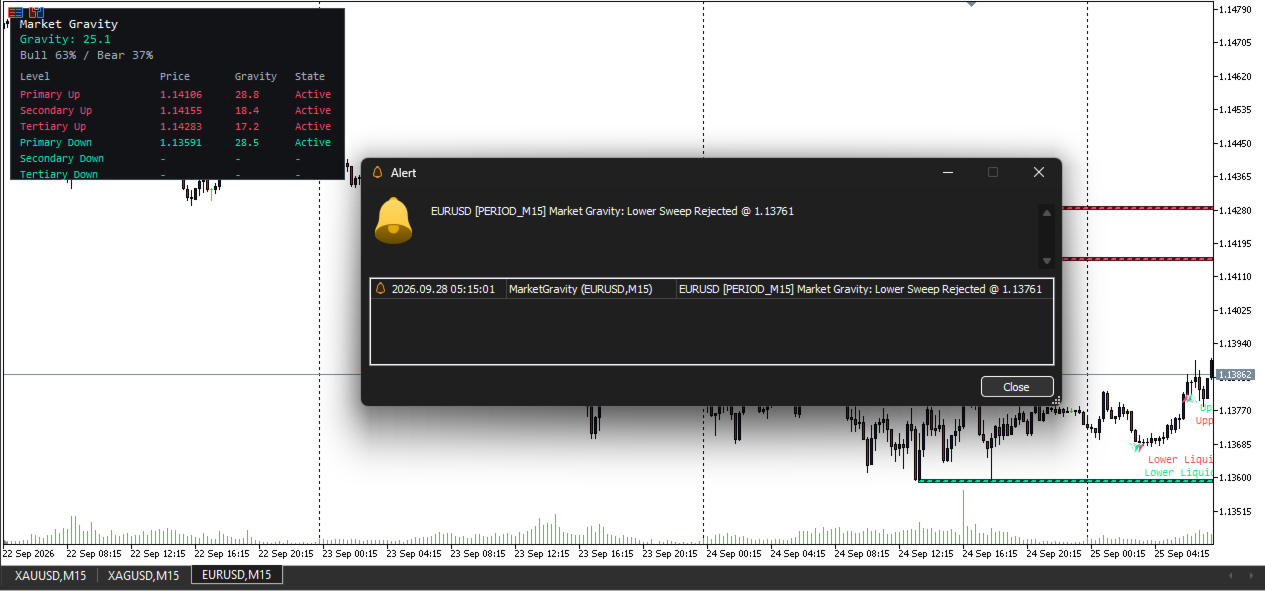
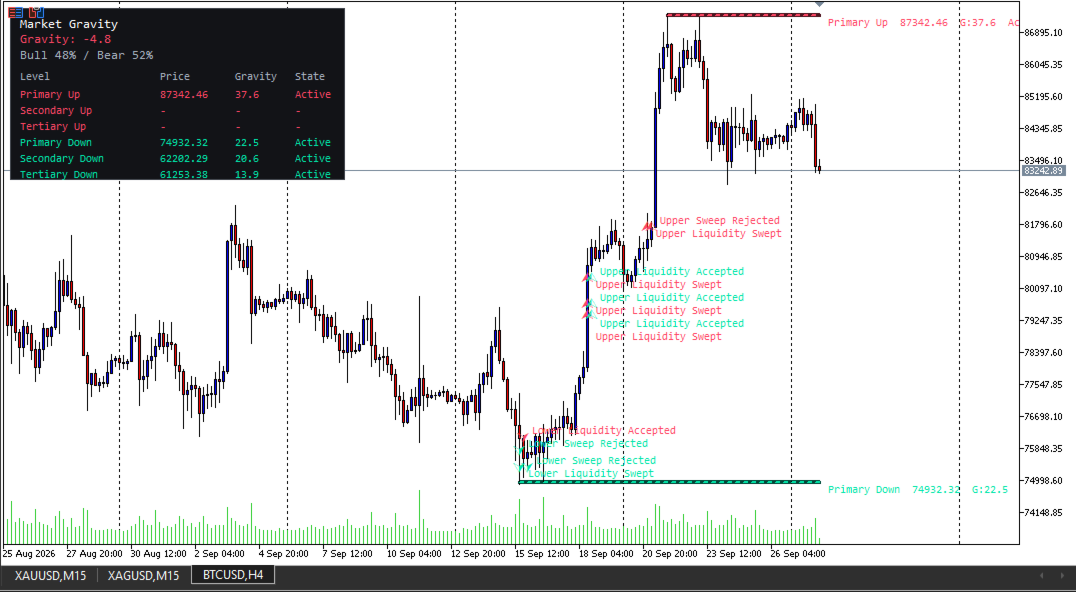
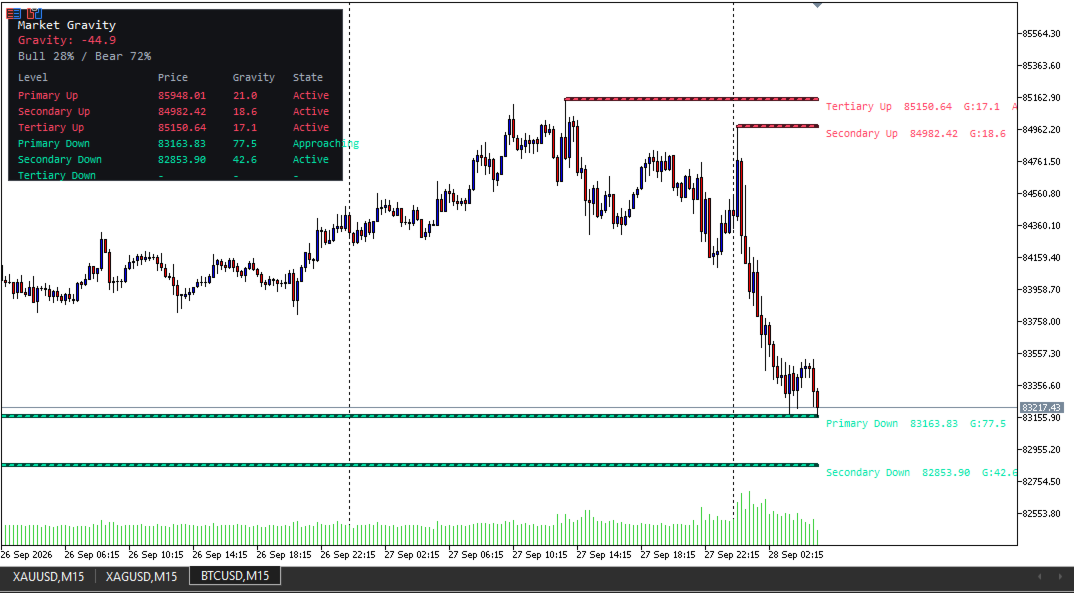
Market Gravity displays the strongest liquidity levels above and below the current market price.
- Primary Up: The highest-ranked liquidity target above the current price.
- Secondary Up: The second-ranked upside liquidity level.
- Tertiary Up: The third-ranked upside liquidity level.
- Primary Down: The highest-ranked liquidity target below the current price.
- Secondary Down: The second-ranked downside liquidity level.
- Tertiary Down: The third-ranked downside liquidity level.
The dashboard shows the current Net Gravity value together with the estimated bullish and bearish pressure. Positive Net Gravity indicates stronger upside liquidity pressure, while negative Net Gravity indicates stronger downside liquidity pressure.
Liquidity levels should be used as decision-support information rather than as standalone entry or exit signals. Always combine the indicator with your trading plan, risk-management rules, market context, and confirmation from price action.
Input Parameters
Liquidity Detection
- InpPivotLeft : Number of candles to the left used for swing confirmation.
- InpPivotRight : Number of candles to the right required to confirm a swing.
- InpClusterATR : ATR-based tolerance used to group nearby liquidity levels.
- InpSweepATR : ATR buffer used to determine whether a level has been swept.
- InpMaxAgeBars : Maximum age of a liquidity pool before it is removed.
- InpMaxStoredLevels : Maximum number of stored liquidity pools per side.
Liquidity Sources
- InpUseSwing : Enables swing-high and swing-low detection.
- InpUseEqual : Enables equal-high and equal-low detection.
- InpEqualTolATR : ATR tolerance for identifying equal highs and lows.
- InpUseMajorSwing : Enables detection of major isolated swings.
- InpMajorSwingATR : Minimum ATR-based movement required to classify a swing as major.
- InpUsePrevDay : Enables previous-day high and low levels.
- InpUsePrevWeek : Enables previous-week high and low levels.
- InpUseRejection : Enables repeated rejection-structure detection.
- InpRejectionWickRatio : Minimum wick-to-range ratio required for a rejection structure.
- InpRejectionSeparation : Minimum candle separation between repeated rejection structures.
- InpRecentPivotMemory : Number of recent pivots retained for equal-level and rejection analysis.
Pool Engine
- InpTouchSeparationBars : Minimum distance between independent touches of the same liquidity pool.
- InpZonePaddingATR : ATR padding added around clustered liquidity levels.
- InpIsolatedHalfWidthATR : Half-width of zones formed from isolated levels.
- InpMaxZoneWidthATR : Maximum permitted liquidity-zone width in ATR units.
Gravity Model
- InpATRLength : ATR calculation period.
- InpFastEMALength : Fast EMA period used for trend analysis.
- InpSlowEMALength : Slow EMA period used for trend analysis.
- InpRelVolumeLength : Lookback period used to calculate relative volume.
- InpApproachingATR : Distance in ATR units used to classify an approaching liquidity level.
- InpRankWeight1 : Weight assigned to the primary level.
- InpRankWeight2 : Weight assigned to the secondary level.
- InpRankWeight3 : Weight assigned to the tertiary level.
- InpAccessibilityK : Controls how distance affects liquidity accessibility.
- InpHalfLifeSwing : Freshness half-life for ordinary swing liquidity.
- InpHalfLifeCluster : Freshness half-life for clustered liquidity.
- InpHalfLifePrevDay : Freshness half-life for previous-day liquidity.
- InpHalfLifePrevWeek : Freshness half-life for previous-week liquidity.
Liquidity Lifecycle
- InpActiveStrengthThresh : Minimum Liquidity Strength required for an active pool.
- InpRejectionWindowBars : Number of candles used to confirm rejection after a sweep.
- InpAcceptanceCloseCount : Number of closes beyond a liquidity zone required for acceptance.
- InpResolvedHoldBars : Number of candles a resolved level remains visible before retirement.
Display
- InpLevelsPerSide : Number of ranked levels displayed above and below price.
- InpLineHistoryBars : Maximum historical length of level lines.
- InpShowGlow : Enables or disables glow lines.
- InpShowTable : Enables or disables the dashboard.
- InpShowLifecycleEvents : Displays sweep, rejection, and acceptance markers.
- InpTablePosition : Sets the dashboard corner.
Alerts
- InpEnableAlerts : Enables or disables alerts.
- InpPrimaryGravityAlert : Gravity score required for a high-primary-gravity alert.
- InpNetGravityAlert : Net Gravity value required for a strong directional alert.
- InpAlertPopup : Enables terminal popup alerts.
- InpAlertPush : Enables MetaTrader push notifications.
Colors
- InpBullColor : Color used for bullish or accepted upside liquidity.
- InpBearColor : Color used for bearish or accepted downside liquidity.
- InpNeutralColor : Color used for neutral dashboard information.
- InpGlowBullColor : Glow color for bullish levels.
- InpGlowBearColor : Glow color for bearish levels.
Important Notice
Market Gravity is an analytical indicator and does not guarantee profitable results. Liquidity levels can be invalidated by news events, volatility expansion, spread changes, and unexpected market conditions. Test the indicator on historical and demo accounts before using it in live trading, and apply appropriate risk management.
The description above is based on the indicator’s implemented liquidity detection, pool-management, gravity-ranking, lifecycle, dashboard, drawing, and alert features.