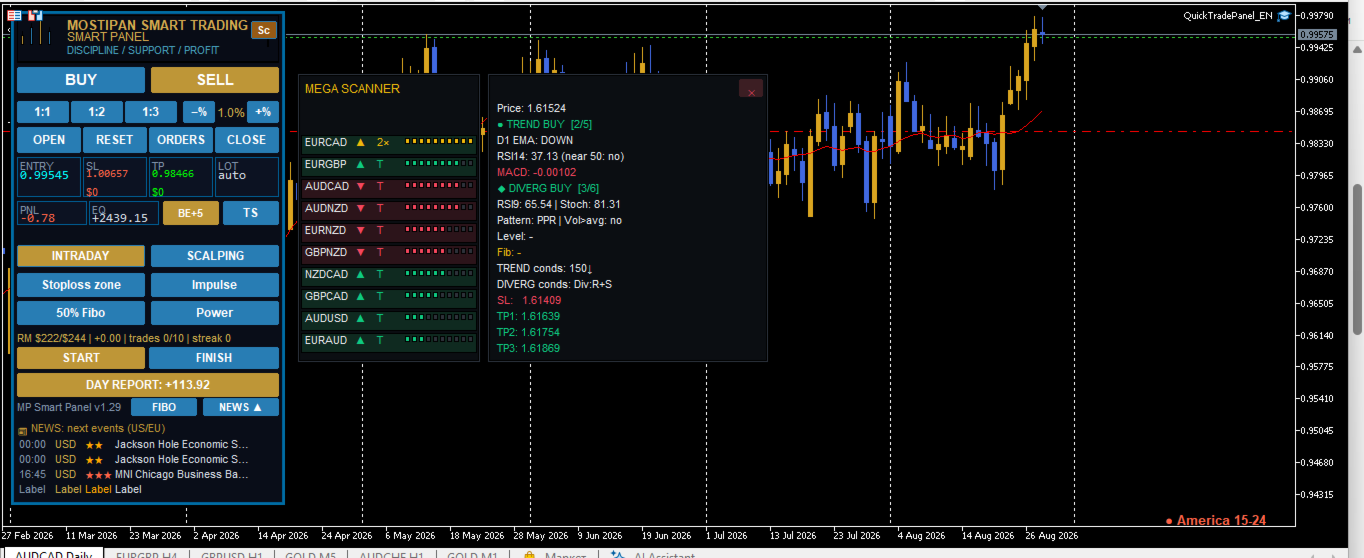
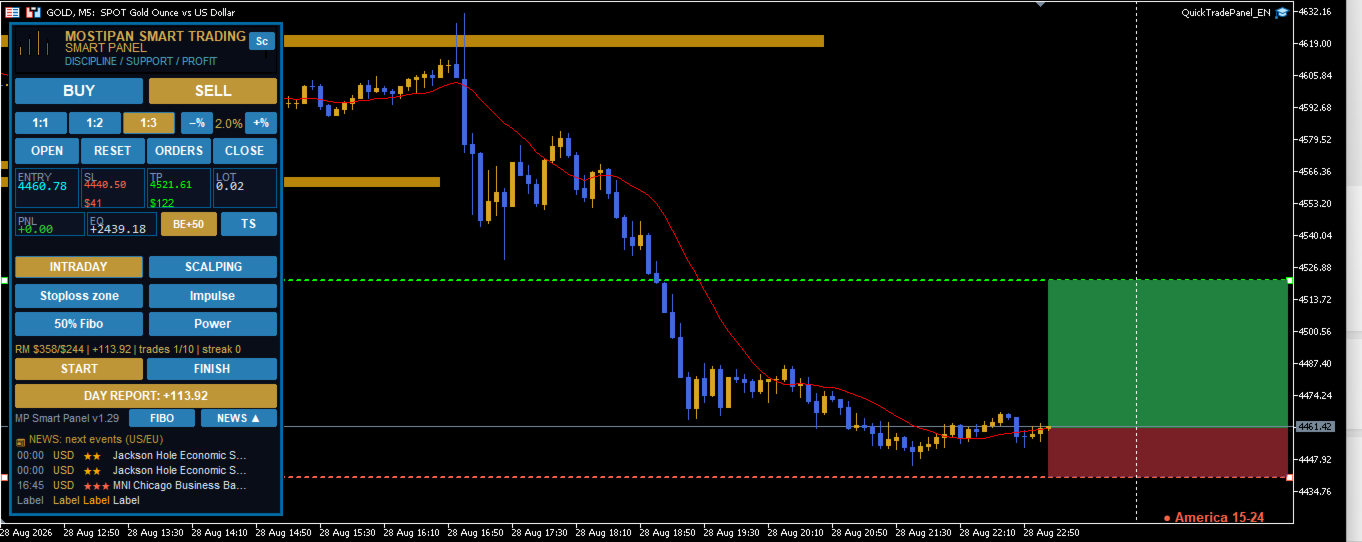
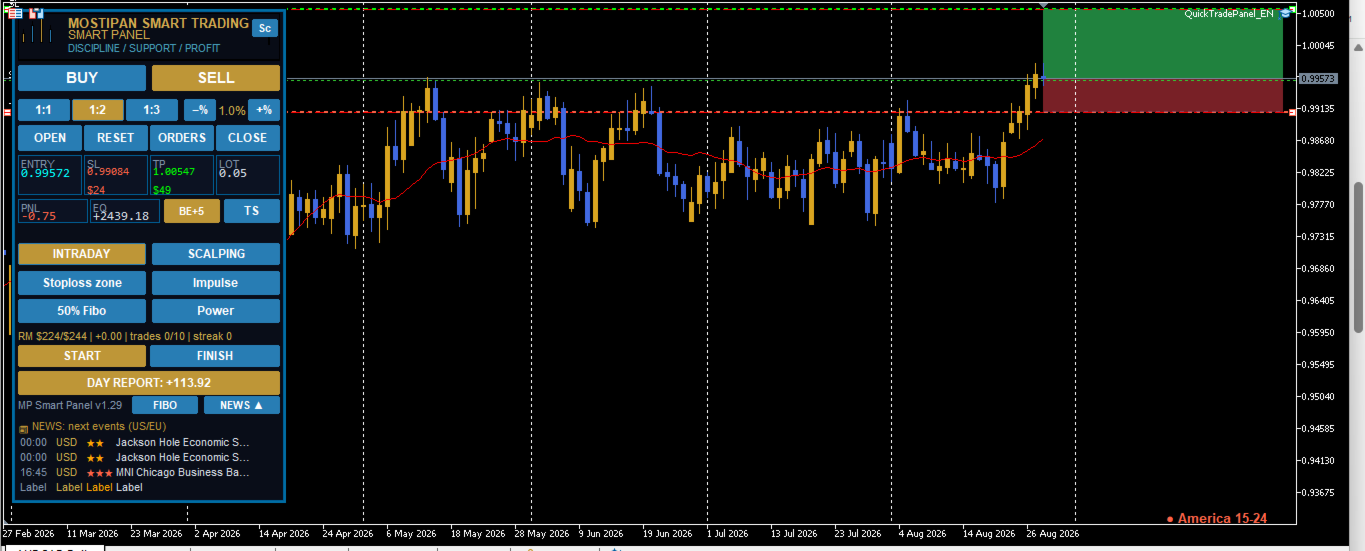
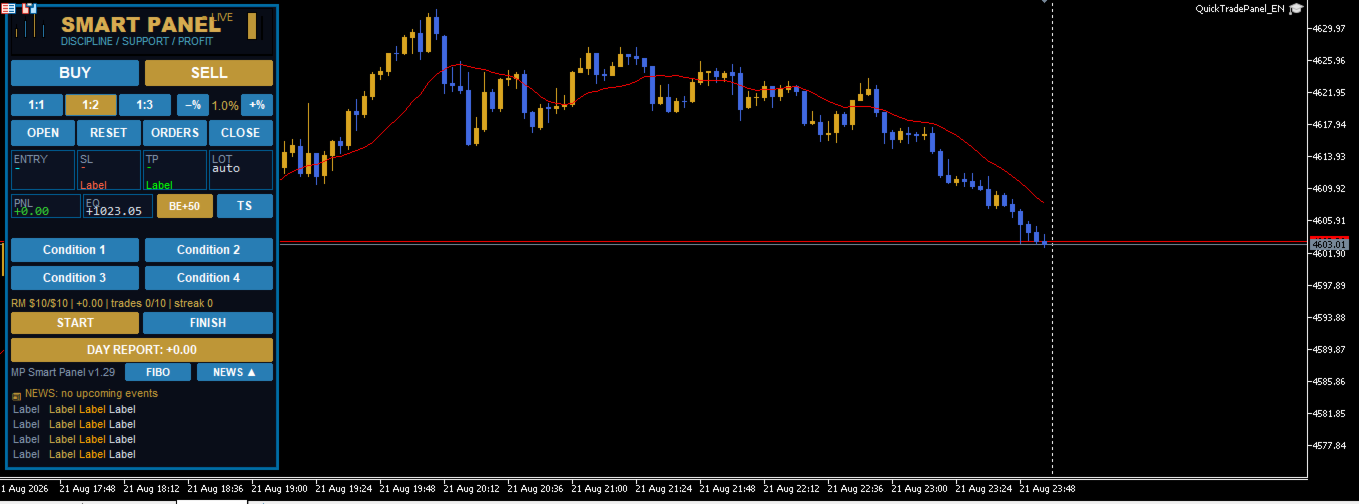
MP Smart Panel

🛡️ MPSmartPanel — your reliable trading assistant

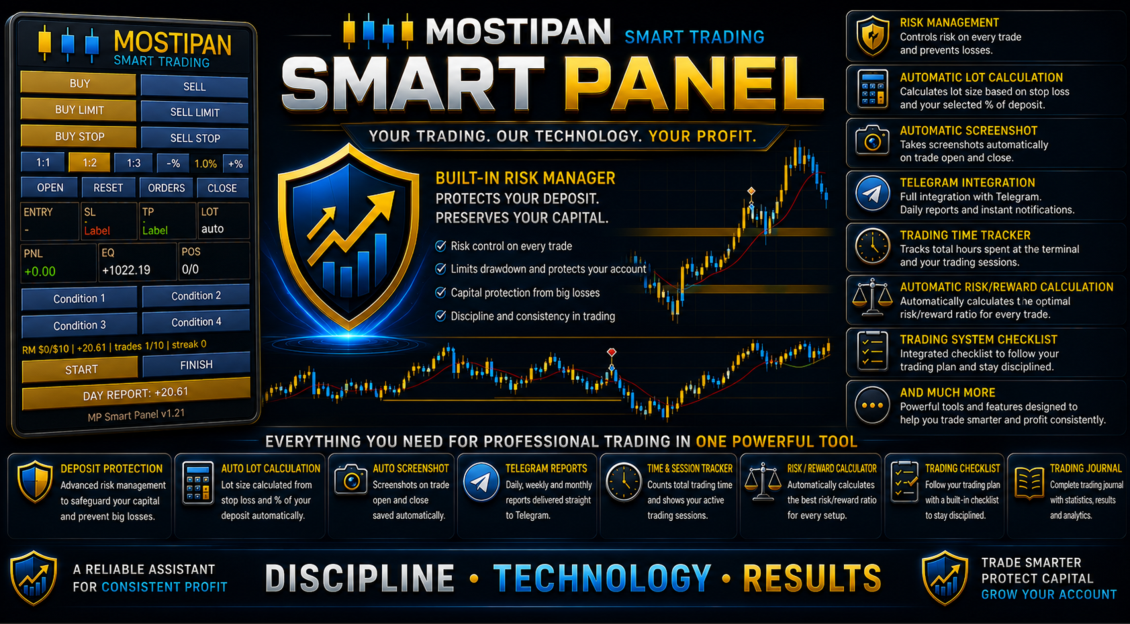
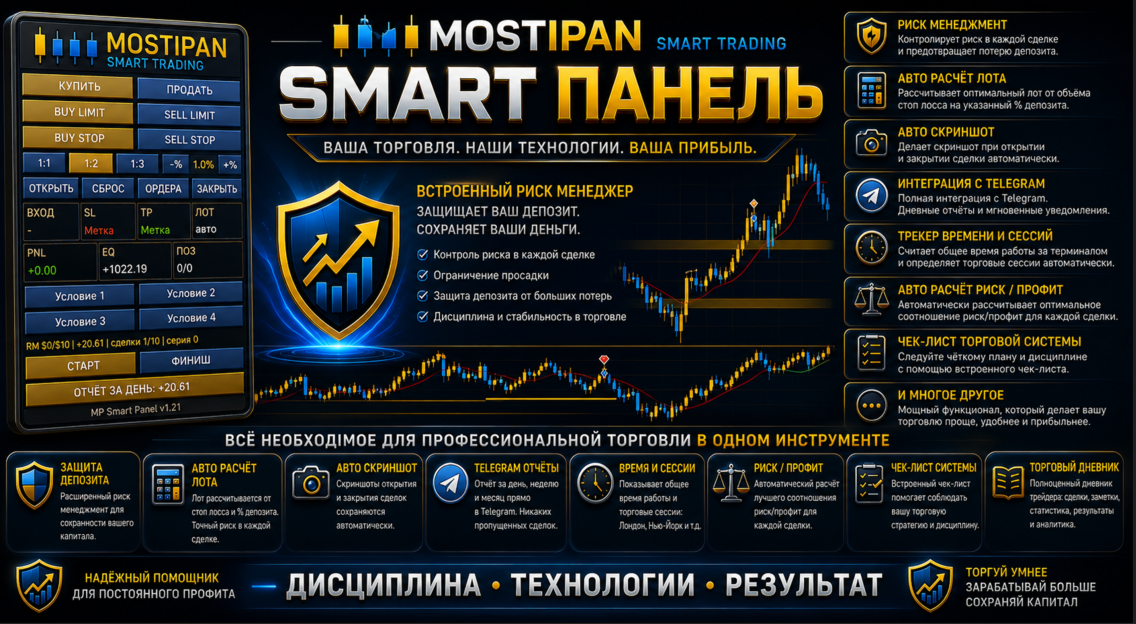
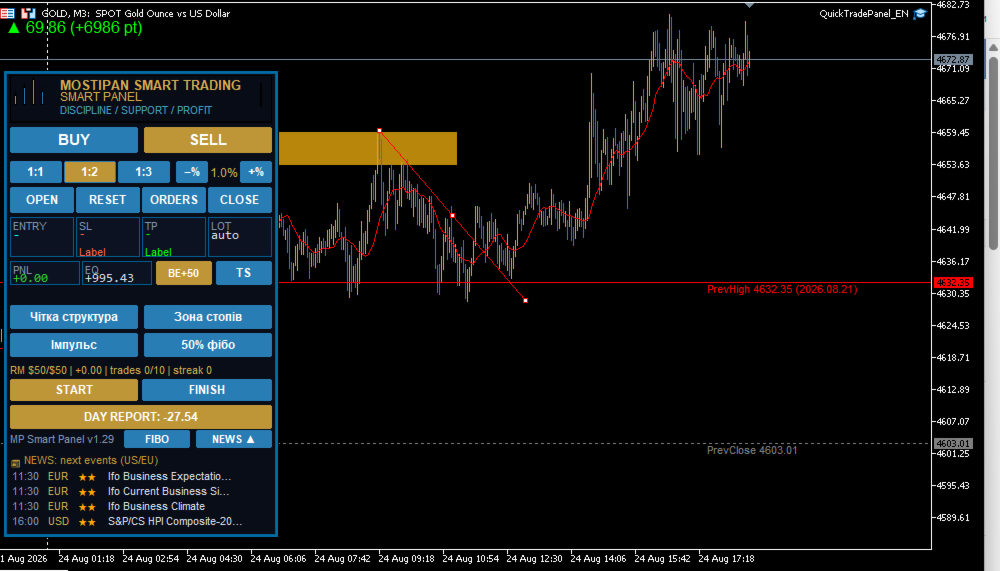
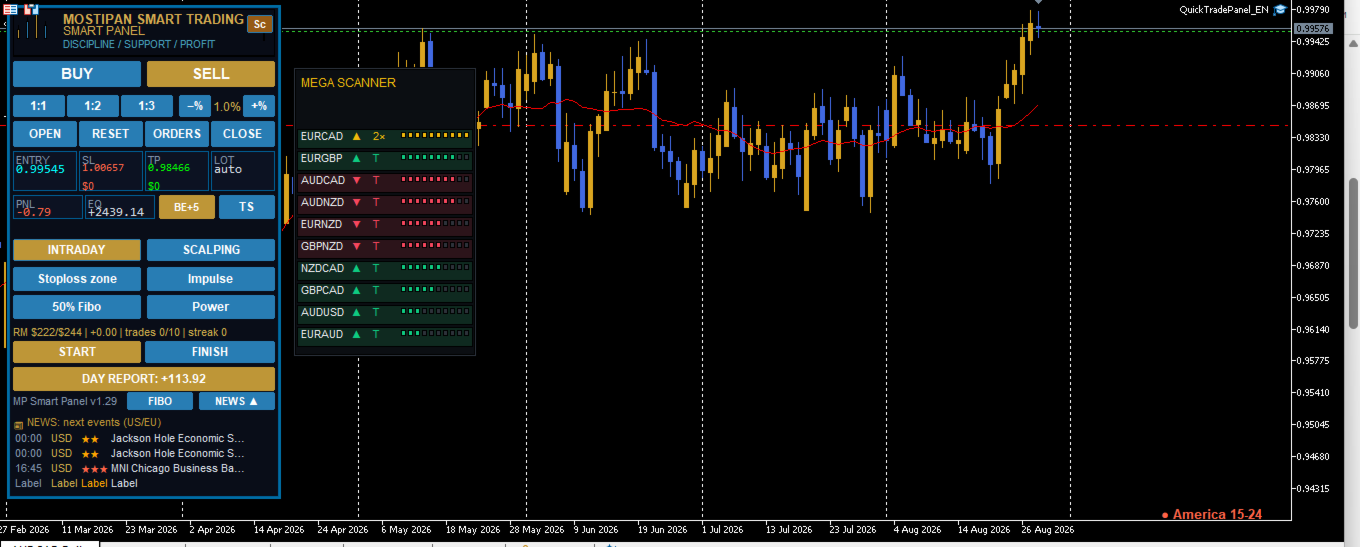
MPSmartPanel is a compact trading panel for MetaTrader 5 that combines the convenience and efficiency of manual trading with strict discipline and full risk control. The panel protects your deposit from losses and helps you trade consciously, following your own system.

✅ Trading-system checklist (program-controlled)

You fill in your own checklist yourself (4 condition tiles, e.g.: trend, news, pattern, signal), and the panel automatically controls it before every trade — unless all conditions are confirmed, you cannot open a position. This eliminates impulsive and random trades.

🛡️ Risk Manager — deposit protection

The built-in Risk Manager automatically blocks new trades when at least one condition is breached:

  • 📉 Daily loss reached the set limit (e.g. $500)
  • 📈 Daily profit reached the target level
  • 🔢 Daily number of trades exceeded the limit (e.g. 10)
  •  Consecutive losses exceeded the allowed limit (e.g. 3)
  • 💰 Total daily risk of open trades exceeded the limit (daily risk limit)

It also keeps daily risk accounting: the panel shows how much risk has been used and how much is left, preventing you from exceeding the set limit.

⏱️ Time and trading-session control

The built-in trading timer (START/FINISH buttons) records your working time, automatically distributes it across trading sessions (Asia, Europe, America) and provides reports and progress monitoring — so you can see how long and how efficiently you trade.

📊 Daily risk report

The panel generates a daily report of used risk volume, number of trades and day results — so you always know how well you follow your limits.

📱 Telegram integration and full reporting

Built-in Telegram integration provides full reports on every trade (open, close, SL/TP, PnL), screenshots, START/FINISH messages, daily reports — and the ability to send trading signals directly to a chat/channel.

⚡ Efficient one-click trading

  • BUY / SELL / LIMIT / STOP with a single touch
  • Automatic lot calculation from the stop (fixed amount or % of balance)
  • RR 1:1 / 1:2 / 1:3 ratio
  • Draggable Entry / SL / TP lines

All this makes MPSmartPanel a convenient and effective tool that controls risk, disciplines trading and preserves your deposit.

🚀 Quick Start

  1. Attach the Expert Advisor to any symbol chart (currency, gold, indices, etc.).
  2. Configure the main inputs in the "Inputs" tab (see "Settings" section).
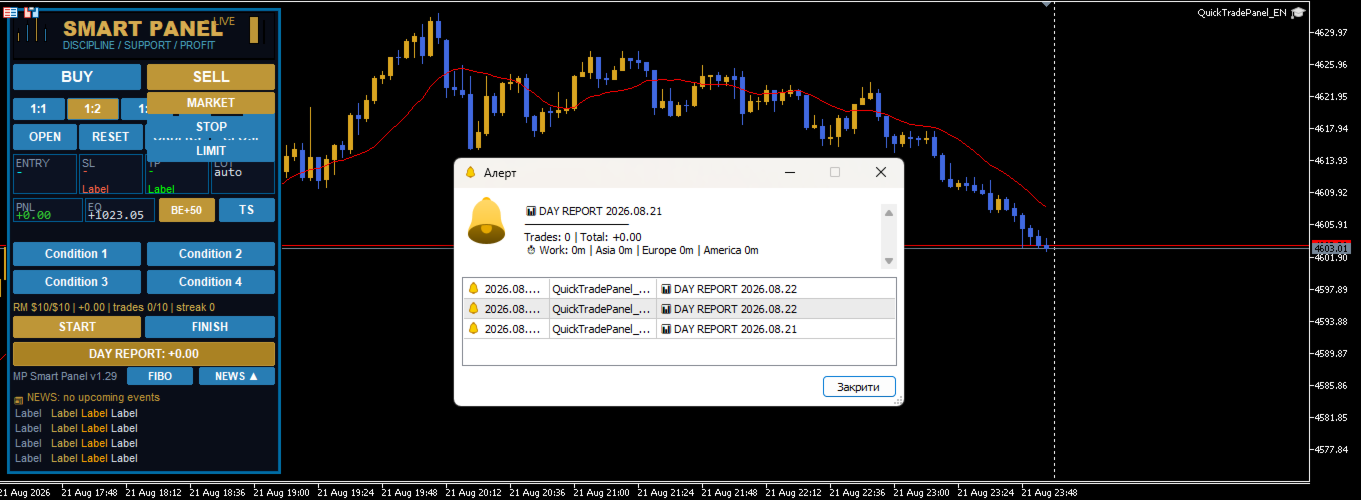
  3. The panel appears in the upper-left corner of the chart.
  4. Choose direction — press BUY / SELL / LIMIT / STOP button.
  5. Drag the lines Entry, SL, TP to the desired levels.
  6. Complete the checklist — press all 4 condition tiles (see "Checklist" section).
  7. Press OPEN — the trade is opened with automatic lot calculation.

🎛️ Settings (Inputs)

📊 "Trading" section

Parameter Type Default Description
InpMagic int 20260815 Unique magic number of panel trades
InpDefaultLots double 0.01 Base lot (if auto lot is disabled)
InpDefSL double 45.0 Initial SL/TP distance from entry (in points)
InpEntryPts int 20 Initial entry distance for limit/stop orders
InpDefRR double 2.0 Risk/reward ratio (1:1 / 1:2 / 1:3)
InpDeviation int 20 Maximum price slippage (points)
InpTheme string "dark" Panel theme:  dark  or  light
InpLang string "EN" Panel language:  UA  /  EN  /  RU

💰 "Risk (auto lot)" section

Parameter Type Default Description
InpRiskMoney double 50.0 Risk per trade, $
InpRiskPercent double 1.0 Risk, % of balance

🛡️ "Risk Manager" section

Parameter Type Default Description
InpRM_Enabled bool true Enable risk manager
InpRM_MaxDailyLoss double 500.0 Condition 1: max daily loss, $ (0 = off)
InpRM_MaxDailyProfit double 0.0 Condition 2: max daily profit, $ (0 = off)
InpRM_MaxTradesDay int 10 Condition 3: max trades per day (0 = no limit)
InpRM_MaxConsLoss int 3 Condition 4: max consecutive losses (0 = off)
InpRM_DayRiskMoney double 300.0 Max daily risk cap, $ (0 = no cap)
InpRM_DayRiskPct double 0.0 Daily risk, % of balance (0 = like trade risk)
InpRM_ResetDay bool false Reset day now (set true and press OK)

📱 "Telegram" section

Parameter Type Default Description
InpTG_Enabled bool false Send to Telegram (screenshots + text)
InpTG_Token string "" Bot token (from BotFather)
InpTG_ChatID string "" Channel ID (e.g. @channel or -100...)
InpStartMsg string ... START button text (empty = panel language)
InpFinishMsg string ... FINISH button text (empty = panel language)

🔑 "License" section

Parameter Type Default Description
InpLicKey string "" License key/password (provided separately)

✅ "Condition Buttons" section (checklist)

Parameter Type Default Description
InpCondEnabled bool true Enable checklist (4 condition tiles)
InpCond1 string "Condition 1" Tile 1 label (editable)
InpCond2 string "Condition 2" Tile 2 label (editable)
InpCond3 string "Condition 3" Tile 3 label (editable)
InpCond4 string "Condition 4" Tile 4 label (editable)

✅ Checklist — Trading Discipline

What is it for?

MPSmartPanel is designed primarily for trader self-discipline. Successful trading is not just pressing buttons, but strictly following your own trading system. To avoid opening trades on emotions or gut feeling, the panel forces you to go through all the steps of your strategy before each trade.

The 4 condition tiles are a kind of checklist of your trading system. They remind you of the key points of your strategy that you must verify before opening a position.

How they work

  • The panel has 4 tiles (buttons) placed in one row:  Condition 1 ,  Condition 2 ,  Condition 3 ,  Condition 4 .
  • Initially the tiles are gray (not pressed).
  • After pressing, a tile turns green and a checkmark ✅ appears before its label.
  • The trade is BLOCKED until you press all 4 tiles at the same time.
  • The OPEN button turns green only when all conditions are met and the trade is ready.
  • After a successful trade opening, all tiles are automatically reset (turn gray), so before the next trade you go through the checklist again.

Usage example

You can configure the tiles to match your trading system, for example:

Tile Example label What you verify
1 Trend Confidence in the trend direction
2 Level Confirmation of a key level/zone
3 Risk Risk matches your rules (RR, % of deposit)
4 Signal Your strategy signal is present

How to edit the tile labels

Tile labels are entirely up to you. You edit them in the Expert Advisor settings:

  1. Open the Expert Advisor properties (double-click the EA in the Navigator, or press  F7  on the chart).
  2. Go to the "Inputs" tab.
  3. Find the Condition Buttons section.
  4. Change the fields:
    • InpCond1  — label of tile 1
    • InpCond2  — label of tile 2
    • InpCond3  — label of tile 3
    • InpCond4  — label of tile 4
  5. Enter your own text (for example: "Trend", "News", "Risk 1%", "Signal").
  6. Press OK — the labels on the panel update.

💡 If the field is left empty, the tile shows the automatic  Condition N  label in the panel language.

⏱ Trading Time Control (START / FINISH)

What is it for?

One of the key aspects of self-discipline is controlling the time spent trading. The panel helps you track how much time you actually spend trading and structures it by trading sessions.

How it works

  • START button — starts the work timer. Press it when you sit down to trade.
  • FINISH button — stops the timer. Press it when you end your trading session.
  • The time between START and FINISH is added to the daily work-time accounting.

Time distribution by sessions

The time elapsed between START and FINISH is automatically distributed across trading sessions:

Session Time window
🌏 Asia 00:00 – 07:00
🌍 Europe 07:00 – 13:00
🌎 America 13:00 – 24:00

So if you traded from 08:00 to 11:00, this time is counted in the Europe session. If a trading session spans several time zones, the time is distributed across the corresponding sessions automatically.

Where to see the result

Press the DAY REPORT button — the report shows:

  • ⏱ Work — total trading time for the day
  • breakdown by sessions: Asia | Europe | America
  • list of closed trades and total PnL

💡 If you pressed START but forgot to press FINISH — time is only added up to the moment the session ends. Always finish your work with the FINISH button so the time accounting is accurate.

🖥️ Panel elements

Logo

At the top of the panel, the MOSTIPAN / SMART TRADING logo is displayed in the "candles in M shape" style.

Trading buttons

Button Action
BUY Prepares opening a buy at market price
SELL Prepares opening a sell at market price
BUY LIMIT Prepares a buy limit order (below price)
SELL LIMIT Prepares a sell limit order (above price)
BUY STOP Prepares a buy stop order (above price)
SELL STOP Prepares a sell stop order (below price)

RR ratios (risk/reward)

Button Value Description
1:1 1.0 TP equals the distance to SL
1:2 2.0 TP is twice the distance to SL
1:3 3.0 TP is three times the distance to SL

Manually dragging the TP line turns off RR (value becomes 0). To restore, press the RR button again.

Risk (%)

  • −% — decrease risk by 0.2%
  • +% — increase risk by 0.2%
  • Range: 0.2% – 10%

Actions

Button Action
OPEN Opens the trade/order (green button = everything ready and checklist completed)
RESET Cancels the preparation, hides lines
CLOSE Closes all panel positions
DEL ORD Deletes all panel pending orders

Information fields (tiles)

Field Description
ENTRY Entry price
SL Stop loss price (+ risk amount in $)
TP Take profit price (+ profit amount in $)
LOT Calculated order volume (auto/manual)
PNL Total profit/loss of open positions
EQ Current equity (balance + floating profit)
POS Number of positions / orders

DAY REPORT

Shows daily report: list of closed trades, total PnL, trade count and work time by sessions.

Version

At the bottom of the panel — MP Smart Panel v1.21.

🎯 Chart lines

When a direction is selected, 3 dashed lines appear on the chart:

Line Color Draggable
Entry Blue Yes
SL Red Yes
TP Green Yes

Dragging behavior:

  • Dragging Entry → SL and TP move together (distances preserved)
  • Dragging SL → TP is recalculated by the selected RR
  • Dragging TP manually → RR is turned off

🧮 Automatic lot calculation

Lot is calculated by the formula:

Lot = Risk ($) / (Distance to SL × Contract size)

  • Risk is taken from  InpRiskMoney  (if > 0) or  InpRiskPercent  of balance
  • Lot is rounded by broker volume step and limited to min/max values

🛡️ Risk manager logic

Blocks new trades if at least one condition is met:

  1. Daily loss   InpRM_MaxDailyLoss
  2. Daily profit   InpRM_MaxDailyProfit
  3. Number of trades per day   InpRM_MaxTradesDay
  4. Consecutive losses   InpRM_MaxConsLoss

Separately — daily risk limit ( InpRM_DayRiskMoney  or % of balance): if the total risk of open trades exceeds the limit, new trades are blocked.

📱 Telegram notifications

When  InpTG_Enabled  is on and token/chat are correct, the panel sends:

  • 🟢 Position opening (type, volume, symbol, price, SL, TP)
  • 🔴 Position closing (type, symbol, close price, PnL, reason: SL/TP/manual)
  • 📌 Pending order placement
  • 📷 Screenshots of open/close/orders
  • ⏱ START/FINISH messages
  • 📊 Daily report

⚠️ Important: add  https://api.telegram.org  to allowed URLs:  Tools → Options → Expert Advisors → Allow WebRequest for listed URL

⚙️ Notes

  • The panel automatically fits the window height (lower rows always visible)
  • For gold (GOLD/XAU) SL/TP distances are automatically increased ×10
  • All panel chart objects have the  QT_  prefix (Entry, SL, TP, bg, btn...)
  • The panel is designed as a self-discipline tool: the condition checklist and trading time control help you stick to your chosen strategy and avoid impulsive trades
Recommended products
Candlestick Pattern Scanner is a multi-timeframe and multi-symbol dashboard and alert system that checks all timeframes and currency pairs for different candlestick patterns that are formed in them. Scanner is integrated   with support and resistance zones so you can check the candlestick patterns in most important areas of the chart to find breakout and reversal patterns in the price chart. Download demo version   (works on M4,M6,M12,H3,H8 timeframes and 20 symbols of Market Watch window) Read
Scan a fixed list of assets (Ibovespa) in the chosen timeframe (TimeFrame). For each pair and for various periods. Calculate a regression model between the two assets (and, if desired, using the bova11 index as a normalizer). Generate the spread of this relationship, its mean, standard deviation, speculative deviation, and betas (B1 and B2). Apply an ADF test without exclusion (cointegration/stationarity). Calculate the Z-score of the current exclusion (how many standard deviations are away from
FREE
Inverted_Chart_EA Utility Expert Advisor Inverted_Chart_EA creates and maintains a mirror-inverted chart of any symbol and timeframe. It automatically generates a custom instrument (e.g. US30_INV ) and keeps its price history updated in real time, with bars mirrored around a chosen pivot. This utility gives traders a new way to analyze the market from a different perspective by flipping the chart upside down. Why use an inverted chart? Highlight hidden patterns – price formations that look ordin
TradePilotmt5
Hossein Khalil Alishir
TradePilot Expert Advisor (EA) for MetaTrader 5 TradePilot is a professional and user-friendly Expert Advisor (EA) for MetaTrader 5 (MT5) . It simplifies automated trading , risk management , and trade execution with a smart trading panel . Perfect for beginners and experienced traders looking for a reliable trade manager EA with automated lot size calculation and smart position management. Key Advantages User-Friendly Trading Panel: Customizable panel with buttons and hotkeys for fast ex
Overview Mirror Signals Service EA (Text only)   is a powerful monitoring Expert Advisor that automatically sends   real-time Telegram notifications   for all important trade events on your MetaTrader 5 account. It is engineered specifically for   signal providers ,   trade-copier operators ,   auditors ,   educators , and   professional trading services   that require immediate, detailed, and reliable reporting. Everything from   entries, exits, SL/TP changes, comment changes, trailing sto
CosmiCLab SMC FIBO CosmiCLab SMC FIBO is a professional trading indicator designed for traders who use Smart Money Concepts (SMC), market structure analysis and Fibonacci retracement levels. The indicator automatically detects market swings and builds Fibonacci levels based on the latest impulse movement. It also identifies market structure changes such as BOS (Break of Structure) and CHOCH (Change of Character), helping traders understand the current market direction. CosmiCLab SMC FIBO also pr
RSI Currency Strength Meter is a powerful and elegant multi-currency indicator that measures the real-time relative strength of the 8 major currencies using RSI logic. By calculating the smoothed performance of each currency across its major pairs and applying the RSI formula, it delivers clean and responsive strength lines that make it easy to spot which currencies are truly strong or weak at any moment. This indicator is particularly useful for visualizing currency correlations and divergence
Premium level is a unique indicator with more than 80% accuracy of correct predictions! This indicator has been tested for more than two months by the best Trading Specialists! The author's indicator you will not find anywhere else! From the screenshots you can see for yourself the accuracy of this tool! 1 is great for trading binary options with an expiration time of 1 candle. 2 works on all currency pairs, stocks, commodities, cryptocurrencies Instructions: As soon as the red arrow app
"Impulses and Corrections 5" is created to help traders navigate the market situation. The indicator shows multi-time frame upward and downward "Impulses" of price movements. These impulses are the basis for determining the "Base" , which is composed of zones of corrections of price movements, as well as "Potential" zones for possible scenarios of price movement. Up and down impulses are determined based on a modified formula of Bill Williams' "Fractals" indicator. The last impulse is always "U
Trading Utility for Forex Currency Pairs Only not for Gold  Functions Auto Lot Calculation based on Risk Auto stoploss  Auto TakeProfit Breakeven Auto Close Half % Close in percentage with respect to the PIPs Pending Orders BuyLimit Sell Limit with distances BuyStop Sell Stop    with distances Trading Informations Risk in percentage For Multiple trades Combine Takeprofit and Combine Stoplosses
Bastion is a monitor-and-close-only risk manager for prop-firm traders. It watches your account against your firm's daily-loss and maximum-drawdown limits in real time and force-closes your open positions BEFORE you cross a line. It never opens a trade of its own, so it stays fully within the tools allowed by FTMO, FundedNext, The5ers, FTUK and FXIFY. Why traders fail challenges A large share of failed evaluations end on a single daily-loss breach: a moment of inattention, a news spike, one tra
Noize Absorption Index - is the manual trading system that measures the difference of pressure between bears forces and bulls forces. Green line - is a noize free index that showing curent situation. Zero value of index shows totally choppy/flat market.Values above zero level shows how powerfull bullish wave is and values below zero measures bearish forces.Up arrow appears on bearish market when it's ready to reverse, dn arrow appears on weak bullish market, as a result of reverse expectation.
TradePad
Ruslan Khasanov
5 (1)
TradePad is a tool for both manual and algorithmic trading. We present you a simple solution for fast trading operations and control of positions on several trading instruments. Attention, the application does not work in the strategy tester! Trial version of the application for a demo account and a description of all the tools The application interface is adapted for high-resolution monitors, simple and intuitive. For comfortable work, the trader is offered the following set of tools: A hot ke
Universal Soul Reaper
Pieter Gerhardus Van Zyl
Universal Soul Reaper is an atmospheric market-flow oscillator designed to interpret price behavior as a cycle of spiritual energy. Instead of reacting to raw price alone, it visualizes the state of the market’s soul —revealing when momentum is awakening, stabilizing, or fading. The indicator operates in a separate window and presents three interwoven entities: the Ectoplasmic Veil , the Spirit Boundary , and the Soul Core . Together, they form a living framework that helps traders sense pressu
Trade History By Magic Indicator Unlock Your Trading Insights with Trade History By Magic! Enhance your MetaTrader 5 experience with this powerful indicator designed for traders who demand precision and clarity. Trade History By Magic provides a clear, real-time display of your trading history, organized by magic numbers, directly on your chart. Perfect for both automated and manual traders, this tool helps you track performance effortlessly. Key Features: Organized Trade Tracking : Displays tra
*****The main trading is XAUUSD. If testing, it is recommended to adjust to XAUUSD. Other trading targets cannot guarantee profitability********* If you need to test, please leave a message (I will reply as soon as I see it). In order to protect the work results, specific parameters need to be entered. The default parameters of the system cannot achieve the effect shown in the screenshot pullback! If you need to test, please leave a message (I will reply as soon as I see it). In order to prot
Welcome to ENTRY IN THE ZONE WITH SMC MULTI TIMEFRAME Entry In The Zone and SMC Multi Timeframe is a real-time market analysis tool based on Smart Money Concepts (SMC), designed to analyze market structure, price direction, and key trading zones. It supports both Single-Timeframe Analysis and Multi-Timeframe Analysis, providing a clearer view of the overall market structure across multiple timeframes, with real-time BUY / SELL signals that do not repaint. It is designed to help filter trading op
GoldPro Max
Taher Ahmed Mohamed Taha Elshafei
GOLDPRO MAX Advanced Multi-Timeframe and Smart Money Market Analysis for MetaTrader 5 GoldPro Max is a professional market analysis indicator for MetaTrader 5 designed to help traders study market direction, price structure, liquidity, market imbalance and potential trading areas from multiple perspectives. The indicator combines Multi-Timeframe Analysis, Smart Money Concepts, Market Structure, Liquidity Analysis, Order Blocks, Fair Value Gaps, Premium and Discount analysis, Smart Analytical Eng
Net Exposure & Net Average Price is a lightweight utility Expert Advisor for MetaTrader 5 hedge accounts . This tool helps traders instantly understand their true market exposure when multiple Buy and Sell positions are open on the same symbol. What the EA Does The EA displays a clear on-chart panel showing: Total Buy Trades Total Buy Lots Total Sell Trades Total Sell Lots Net Lots (Net Exposure) Net Average Price (hedge-adjusted breakeven) The Net Average Price represents the true breakeven
Expert TP SL v04
Mikhail Ostashov
Expert TP SL v04 - Professional Trading Assistant with AI Motivation System Advanced manual trading tool with automatic risk management, overtrading protection, and intelligent psychological support for disciplined trading. PRODUCT OVERVIEW Expert TP SL v04 is a comprehensive trading assistant designed for manual traders who want to maintain emotional discipline while automating risk calculations. This isn't just another order placement tool - it's a complete trading psychology system that pr
BTC Trading Assistant EA (MT5) Manual trading assistant that helps place and manage trades with automated risk and stop management. Overview BTC Trading Assistant EA is a utility Expert Advisor for MetaTrader 5 intended for manual traders. It provides a chart interface to execute BUY/SELL/CLOSE actions and automates selected trade management functions such as position sizing, initial SL/TP placement, break-even, trailing stop and optional partial profit taking. This EA does not generate trade si

Overview Mirror Signals EA is a powerful monitoring Expert Advisor that automatically sends real-time Telegram notifications for all important trade events on your MetaTrader 5 account. It is engineered specifically for signal providers , trade-copier operators , auditors , educators , and professional trading services that require immediate, detailed, and reliable reporting. Everything from entries, exits, SL/TP changes, comment changes, trailing stop activations, pending order modifications
Universal Trend
Maryna Shulzhenko
The Universal Trend indicator was created to detect trends in price movement and allows you to quickly determine not only the direction of the trend, but also understand the levels of interaction between buyers and sellers. The indicator works on all timeframes and currency pairs. The indicator gives fairly accurate signals and it is customary to use it both in trending and flat markets. It is advisable to use the indicator in combination with other tools for more reliable signals and making a
Trade Copilot - Semi-Automatic Risk Management Panel for Gold (XAUUSD) and any instrument Trade Copilot is a semi-automatic trading panel built for manual traders who want an EA's discipline without giving up control of their own entries. You decide the direction and the level - the panel handles risk sizing, stop-loss placement, take-profit management, and trade protection automatically. KEY FEATURES - Risk-based lot sizing - choose Risk %, Risk $, or Fixed Lot; the panel calculates positio
RBreaker
Zhong Long Wu
RBreaker Gold Indicators is a short-term intraday trading strategy for gold futures that combines trend following and intraday reversal approaches. It not only captures profits during trending markets but also enables timely profit-taking and counter-trend trading during market reversals. This strategy has been ranked among the top ten most profitable trading strategies by the American magazine   Futures Truth   for 15 consecutive years. It boasts a long lifecycle and remains widely used and st
Margin Call Shield – Defend Your Margin on Your Terms Margin Call Shield is a tool for MetaTrader 5 traders who want to decide for themselves which open positions are closed during margin call situations before the platform does so automatically based on its internal rules. By default, the broker or platform decides which positions to close, often using undisclosed algorithms. Margin Call Shield lets you set this order according to your own strategy. Why Was Margin Call Shield Created? In a mar
Exp5 Duplicator
Vladislav Andruschenko
4.78 (9)
Duplicator for MetaTrader 5 — professional position duplicator inside one terminal A reliable Expert Advisor for traders who want to automatically duplicate already opened positions in MetaTrader 5, increase volume, apply custom lot settings, and manage duplicates with precise rules. It is a practical tool for manual trading, algorithmic systems, and flexible management of existing positions inside one terminal. Duplicator for MT5 does not open positions by its own trading strategy. Its role is
# Equity Monitor Pro  ## Short Description Equity Monitor Pro is a professional equity p**Equity Monitor Pro** is a powerful risk management tool that automatically protects your trading account by monitoring equity levels and enforcing prop firm style rules. Whether you're taking an FTMO challenge, trading a funded account, or just want to protect your capital, this EA runs silently alongside your trading strategy and takes action when it matters most. Protection tool designed for prop firm
CyberTradeTHxAI Gold Sniper MT5 Professional Gold Trading Signal Indicator for MetaTrader 5 CyberTradeTHxAI Gold Sniper MT5 is a professional-grade Gold (XAUUSD) trading indicator developed to identify high-probability Buy and Sell opportunities using trend analysis, pullback confirmation, and intelligent market structure detection. Designed for both beginner and advanced traders, the indicator automatically calculates optimal Entry Zones, Stop Loss, and multiple Take Profit levels while provid
ShreeFx Trade Manager
Dhiraj Shivprabhu Pattewar
️ 1. Interactive User Interface (UI) Dual-Tab System: Cleanly separates execution tools (TRADE) from configuration (️ SETTINGS) to keep the chart clutter-free. Dark/Light Mode: Instantly switch between themes using the ️/ emoji button to match your chart background. Live P&L Dashboard: Real-time display of Account Balance, Equity, Floating Profit/Loss (in USD and %), Total Positions (Buys/Sells), Total Lot Exposure, and current Spread. On-Chart Direct Editing: Change any setting (Lot Size,
Buyers of this product also purchase
FarmedHedge Pair Trading Dashboard
Tanapisit Tepawarapruek
5 (3)
Farmed Hedge Yield Farming | All Markets (Manual - Hybrid - Semi/Automated EA) MULTI-ASSET SUPPORT Trade any asset available on your broker - Forex: Major, Minor, Exotic pairs - Crypto: BTC, ETH, XRP, SOL, BNB - Stocks: Apple, Tesla, Amazon, Google, etc. - Commodities: Gold, Silver, Oil, Gas - Indices: US30, NAS100, SPX500, DAX40 - Any CFD your broker offers VERIFIED TRADING RESULTS - Farmed Hedge Yield Axi Copy:  https://www.mql5.com/en/signals/2356376 - Farmed Hedge Yield Exn Copy:   https:/
Custom Alerts AIO: All-in-One Market Scanner – No Setup Required Overview Custom Alerts AIO is the fastest and easiest way to monitor multiple markets for real-time trading signals—without any setup or extra licenses. It comes with all required Stein Investments indicators already embedded, making it the perfect plug-and-play solution for traders who value simplicity and performance. Just load it to any chart and start receiving alerts across Forex, Metals, Crypto, and Indices. Shares can be a
YuClusters
Yury Kulikov
4.93 (43)
Attention: You can view the program operation in the free version  YuClusters DEMO .  YuClusters is a professional market analysis system. The trader has unique opportunities to analyze the flow of orders, trade volumes, price movements using various charts, profiles, indicators, and graphical objects. YuClusters operates on data based on Time&Sales or ticks information, depending on what is available in the quotes of a financial instrument. YuClusters allows you to build graphs by combining da
Quant AI Agents
Ho Tuan Thang
5 (1)
Quant AI Agents are independent trading Expert Advisors. Instead of trading using a fixed strategy like other conventional EAs, Quant AI Agents   is a   multi-agent AI trading framework   that turns natural-language strategy prompts into live.  WANT THE SAME RESULTS AS MY LIVE SIGNAL?   Use the exact same brokers I do:   IC MARKETS , IC TRADING   .  Unlike the centralized stock market, Forex has no single, unified price feed.  Every broker sources liquidity from different providers, creating un
EasyInsight AIO MT5
Alain Verleyen
4.92 (12)
EASY Insight AIO – All-In-One Power for AI-Driven Trading Want to skip the setup and start scanning the entire market – Forex, Gold, Crypto, Indices, and even Stocks – in seconds? EASY Insight AIO is the complete plug-and-play solution for AI-powered trade analysis. It includes all core Stein Investments indicators built-in and automatically exports clean, structured CSV files – perfect for backtesting, AI prompts, and live market decision-making. No need to install or configure indicators manu
AI Agents Supervisor
Ho Tuan Thang
5 (1)
AI Agent Supervisor is NOT an Expert Advisor. AI Agent Supervisor   is a   multi-agent AI risk & portfolio supervisor   that watches every EA on your account and intervenes in real time.  WANT AN AI PORTFOLIO MANAGER WATCHING YOUR FLEET 24/7?   Run your fleet on the same brokers I do:   IC MARKETS , IC TRADING   .  Unlike the centralized stock market, Forex has no single, unified price feed.  Every broker sources liquidity from different providers, creating unique data streams. The Supervisor r
FUTURES ORDERFLOW FOOTPRINT CHART Professional OrderFlow EA for MetaTrader 5 Version 1.01| Professional tool for real traders | Institutional-Grade Visualization STRATEGY TESTER USERS - PLEASE SELECT EVERY REAL TICK WHEN TESTING AND YOU HAVE DOWNLOADED HISTORICAL DATA. IF YOU SEE A WAITING SCREEN AND IT IS NOT DOWNLOADING, IT MEANS YOU HAVE LOW HISTORICAL DATA. TRY 1 MIN AND 5 MIN FIRST ON 1 DAY DATA. ONE DAY DATA SHOULD BE THE NEWEST AND MOST CURRENT DATE. PLEASE WAIT UNTIL THE MARKET HAS ROL
The product will copy all  Discord  signal   to MT5   ( which you are member  ) , also it can work as remote copier.  Easy to set up. Work with almost signal formats, support to translate other language to English Work with multi channel, multi MT5. Work with Image signal. Copy order instant, auto detect symbol. Work as remote copier: with signal have ticket number, it will copy exactly via ticket number. How to setup and guide: Let read all details about setup and download Discord To MetaTrader
Unlimited Trade Copier Pro MT5 is a tool to copy trade remotely to multiple MT4, MT5 and cTrader accounts at different computers/locations over internet. This is an ideal solution for you if you are a signal provider and want to copy your trades to other receivers globally on your own rules. One provider can copy trades to multiple receivers and one receiver can get trade from multiple providers as well. The provider can even set the subscription expiry for each receiver, so that receiver will n


Adam FTMO MT5
Vyacheslav Izvarin
5 (2)
ADAM EA Special Version for FTMO Please use ShowInfo= false for backtesting ! Our 1st EA created using ChatGPT technology Trade only GOOD and checked PROP FIRMS  Default parameters for Challenge $100,000 Tested on EURUSD and GBPUSD only  Use 15MIN Time Frame Close all deals and Auto-trading  before Weekend at 12:00 GMT+3  Friday For Prop Firms MUST use special Protector  https://www.mql5.com/en/market/product/94362 --------------------------------------------------------------------------------
ManHedger MT5
Peter Mueller
4.83 (6)
THIS EA IS A SEMI-AUTO EA, IT NEEDS USER INPUT. Manual & Test Version Please TEST this product before BUYING  and watch my video about it. The price of the ManHedger will increase to 250$ after 20 copies sold. Contact me for user support or bug reports or if you want the MT4 version! MT4 Version  I do not guarantee any profits or financial success using this EA. With this Expert Advisor, you can: Implement your own Zone Recovery strategy to capitalize on trending markets. Create Grid trading s
Latency Arbitrage
Heri Yusufu Kaniugu
Latency Arbitrage – Ultra Fast Execution & Price Inefficiency Capture Latency Arbitrage  utility tool is designed to exploit short-term price inefficiencies between fast and slow price feeds. Instead of predicting market direction, the EA focuses on execution speed and price deviation opportunities, allowing traders to capture micro-movements before the market fully adjusts. With built-in risk controls and smart filtering, it ensures precise and disciplined trading performance. Price increases b
Check EA performance  https://www.mql5.com/en/signals/2376164?source=Site +Profile+Seller Spot vs Future Arbitrage EA for MT5 Spot vs Future Arbitrage EA is an automated Expert Advisor designed for MetaTrader 5 that operates using price differences between Gold spot and Gold futures instruments. The strategy opens positions on both instruments simultaneously to take advantage of temporary differences between spot and futures prices. Requirements The trading account must provide both Gold spot
Features   With MT5 to Interactive Brokers(IB) Trader, you can: 1. Load chart data from IB to MT5, and Analyze with all standard or customer Indicators. 2. Place Orders to IB Account Directly in MT5. 3. Make your Own EAs upon IB Securities by only making minus changes of the trading function. Usage 1) Installation Copy the "Mt5ToIBTraderEn.ex4" and sample files to [MT5 Data Folder]->MQL5->Experts.  2)  MT5 Settings Add the IP Address to the MT5 Allowed URLs in 'Tools->Options->Expert Adviso
HINN Lazy Trader
ALGOFLOW OÜ
5 (1)
LIMITED SUMMER SALE -40% ! ONLY $470 insead of $790!  Maximum real discount! ONLY UNTIL 08/22 The core idea: using the user interface, you configure the parameters the chart must meet before entering a position (or positions), choose which entry models to use, and set the rules for when trading and planning should end. Lazy Trader  handles the rest: it  takes over all the routine chart watching and execution! full description  :: 3 key videos [1] ->  [2]   ->  [3] What can it do? - Understand
Telegram to mt5 pro
Janet Abu Khalil
4 (4)
Telegram to MT5 Pro — Advanced Telegram Signal Copier with Auto-Fix, Multi-TP, Risk Control and Full Trade Management Telegram to MT5 Pro — Professional Telegram Signal Copier Telegram to MT5 Pro is a high-performance trade copier that automatically executes signals from Telegram directly into your MetaTrader 5 account, with full control over risk, execution, and trade management. The system consists of two components: • The Expert Advisor (EA) running inside MetaTrader 5 • A companion desktop
Crystal Trade Manager – Advanced MT5 Risk and Trade Control Utility Overview Crystal Trade Manager (CTM) is a professional MetaTrader 5 utility designed for risk management, trade automation, and instant execution control. It provides traders with an integrated system for protecting equity, managing daily drawdowns, controlling lot sizes, and applying automation features such as automatic SL/TP, break-even, and trailing stop. The tool is suitable for manual traders, prop-firm challenge particip
Prop Firm Os
Gayathiri Gopalakrishnan
5 (1)
PROP FIRM OS Structured Trading Assistant for MetaTrader 5 PROP FIRM OS is a structured trading assistant designed for MetaTrader 5 users who prefer rule-based market analysis and organized trading workflows. The Expert Advisor combines market analysis tools, scanner functions, dashboard monitoring, alerts, risk-control settings, and trade management features inside one system. PROP FIRM OS is designed to help traders follow selected rules, filters, and monitoring conditions during trading activ
Mt5 To InterativeBrokers Copier allows you to copy deals from MT5 account to Interactive Brokers. With this, you can run your EA strategy on a MT5 Demo/Real Account, then copy all the deals to Interactive Brokers account real time. Features: 1. Copy or Invert-Copy deals Realtime from MT5 to IB Account. 2. Synchronizing positions of both accounts periodicaly, in case any missing copying. 3. You can choose only Buy position or Sell position. Symbols Setup: General Format:  {MT Symbol} -> {IB S
MT5 Trading Deck
Manuel Michiels
5 (2)
One button. One trade. MT5 Trading Deck is a hotkey trading panel for MetaTrader 5 that turns the platform into a keyboard-driven execution cockpit. Stop loss, take profit and lot size are pre-calculated for every key; the moment you press, a market order is live on the broker. A complete technical user manual is attached in the product Comments section. It documents every input parameter, the full hotkey map, the recommended Stream Deck XL layout, and the advanced workflows for Pre-Limit orders
RiskGuard Management
MONTORIO MICHELE
5 (22)
ATTENTION For a free trial version, visit my website. Manual QUANTUM RiskGuard Management — Your ultimate ally for uncompromising trading. Lot Calculator — Automatic lot size calculation. Quantum — Automatic risk to maximize profits and reduce drawdowns. Automatic Journal — Included and freely downloadable from my website. Automatic Screenshot — Two screenshots: one at entry and one at exit. Partial Profit — Smartly managed partial exits. Smartphone Trading — Place orders from your mobile, mana
Forex Analyzer Pro MT5 Trading Account Analytics Dashboard Forex Analyzer Pro is a web-based trading analytics platform designed for Meta Trader 5 users. Forex Analyzer Pro synchronizes account activity from Meta Trader 5 and organizes trading information into analytics, reporting, monitoring, and journaling tools through a structured dashboard. The platform allows users to access their trading dashboard through supported desktop and mobile web browsers. Forex Analyzer Pro connects with your MT5
# If you have any other requirements or are interested in collaboration, please contact  dev.quantech.london@gmail.com . Flash Trade (FT) Most friendly manual trading tool. Easy operation to secure your funds. Features of FT Click the chart to trade fast FT supports market orders and pending orders Click twice to complete the order and set SL and TP Click trice to complete the pending order and set SL and TP Automatically set the stop-loss amount of each order to a fixed percentage of the bala
Hedge Trimmer EA
Michael Sipho Bhiya
Hedge Trimmer & Roll-Over EA Managing a hedged position means carrying two opposing trades simultaneously. Over time, the losing side grows while the profitable side offsets it. The standard problem is that closing the loser costs money you may not have sitting in cash — it has to come from somewhere. Hedge Trimmer EA solves this by using the floating profit on your winning trades as the funding source to progressively close down the losing side. It identifies which trades are in profit, uses a


Royal Copier
Janet Abu Khalil
5 (1)
Royal Copier — Professional MT5 Trade Copier Royal Copier is a professional real-time local trade copier for MetaTrader 5. It now includes both functions inside one single MT5 Expert Advisor. From the inputs, you simply choose whether the EA will run in Master Mode or Client Mode . This means the same EA can be used on the source account or on the receiving account, while preserving the original copier behavior. Royal Copier supports copying between accounts in all common combinations: MT5 to MT
EA Performance Logger Telegram
Abdulqudus Tomiwa Akande-owoo
The Performance Logger is a utility for MetaTrader 5 designed to track and report account metrics. It identifies trades based on specific criteria and provides summaries of account activity. Main Functions Automated Reporting : Generates summaries of account performance and sends them to specified communication channels (Telegram or Discord) on a weekly, monthly, or yearly basis. Strategy Analysis : Organizes performance data based on the specific Expert Advisor or strategy used for each trade.
Global Investing FX Terminal
Santiago Nicolas Pla Casuriaga
The Global Investing FX Terminal is an all-in-one FX dashboard for MetaTrader 5 — CB policy rates, CFTC COT positioning, carry rankings, economic surprises, options skew, retail sentiment, and correlations, thirteen panels in total — rendered on a single zero-flicker canvas overlay and refreshing every 10 seconds from one attached EA. No external software required. Professional FX analysis requires simultaneous access to data that normally lives in separate platforms: rate derivatives, governmen
Gamma Edge Pro MT5
Xuan Nam Diep
1 (1)
Gamma Edge Pro MT5 — GexBot Classic API Integration Gamma Edge Pro   brings institutional-grade   Gamma Exposure (GEX) data   directly onto your MetaTrader 5 chart — the same data used by professional options traders to anticipate price magnets, hedging flows, and dealer positioning. Powered by the   GexBot Classic API , this indicator automatically maps options market data from US-listed instruments onto any   MT5 CFD instrument   — Forex pairs, Gold, indices, and more — with intelligent price
QCML Assistant
Maxime Turcotte-lafreniere
QCML Assistant MT5 Your Trading. Our Assistant. Your Edge. Looking for a tool that completely transforms your experience on MetaTrader 5? QCML Assistant is the all-in-one solution built by traders, for traders. Just one tool installed on your chart, and you get access to an ultra-complete, ultra-fast, and ultra-simple trading platform. No more hours wasted setting up your workspace. No more complicated trade entries. With QCML Assistant, everything becomes simple, smooth, and efficient right fro
ENGLISH VERSION tg @eeevleee TICK CHART SERVICE - Professional Tick Ch
Filter:
No reviews
Reply to review