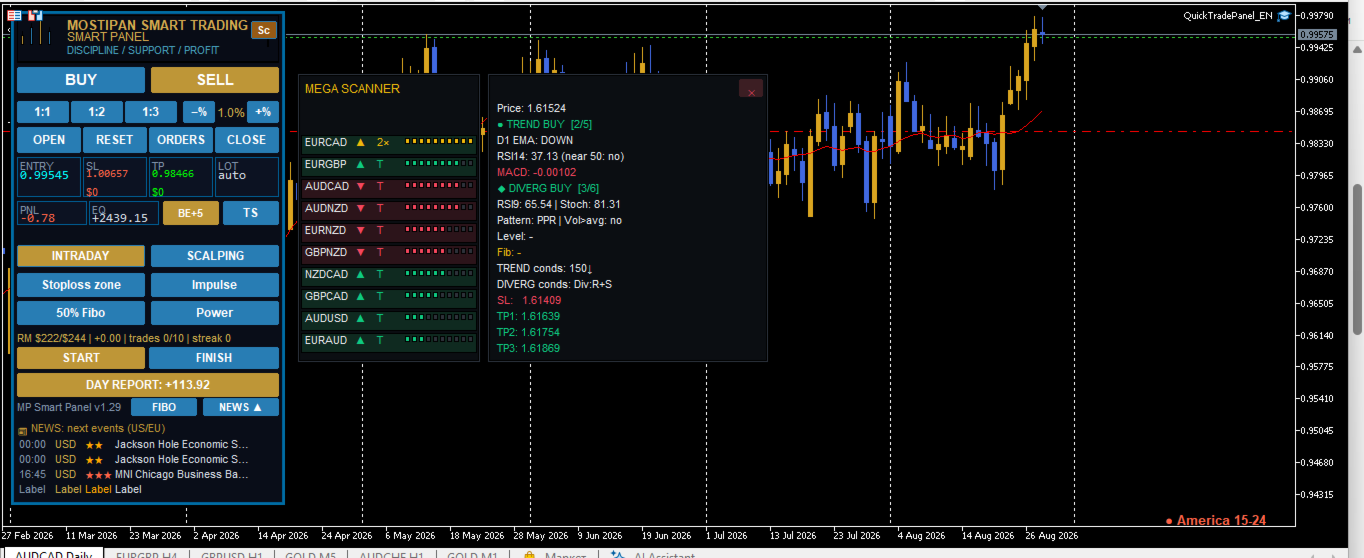
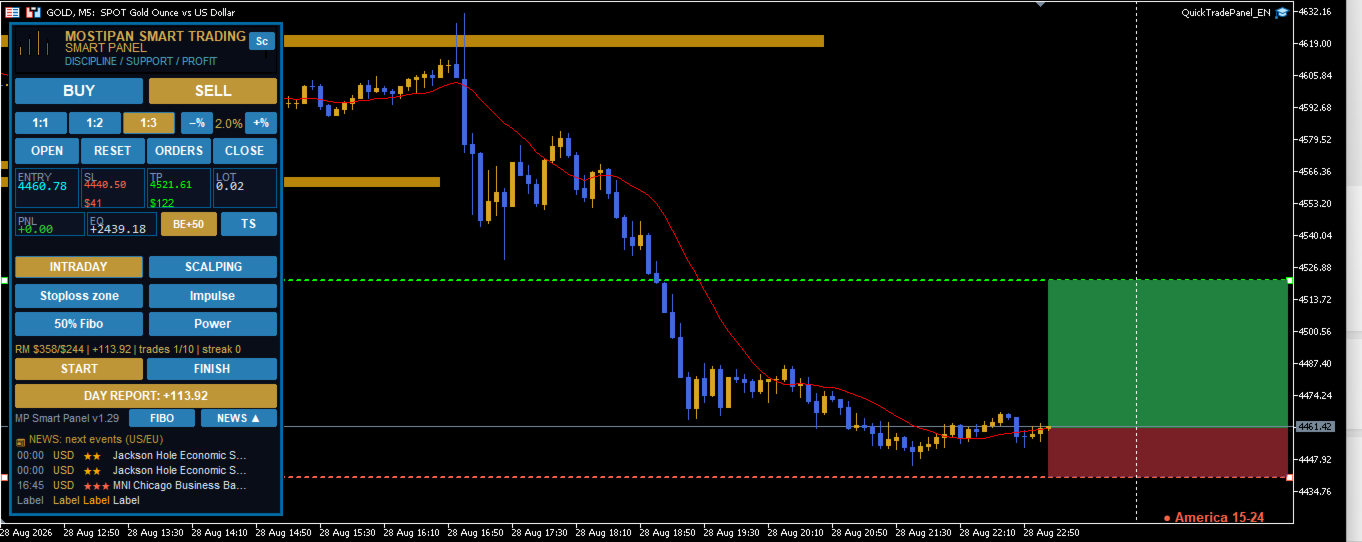
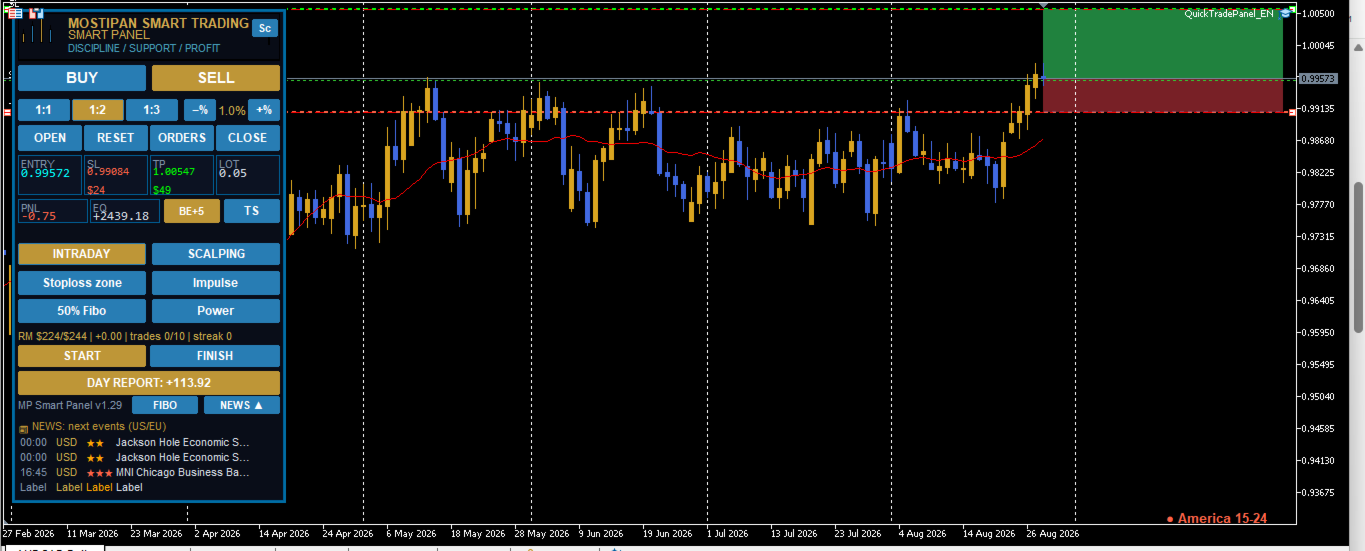
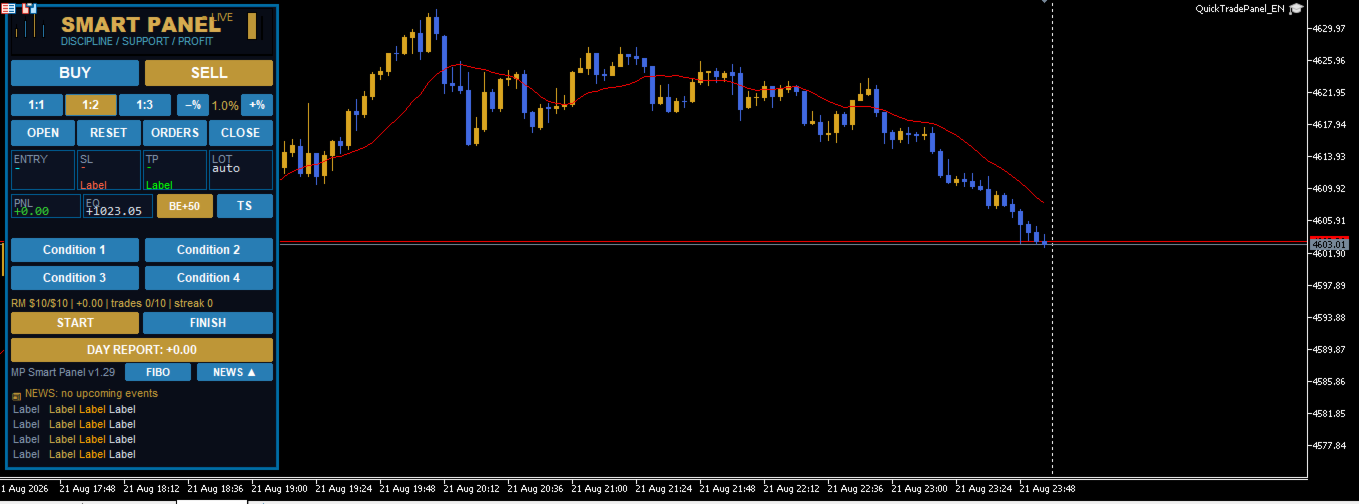
MP Smart Panel

🛡️ MPSmartPanel — your reliable trading assistant

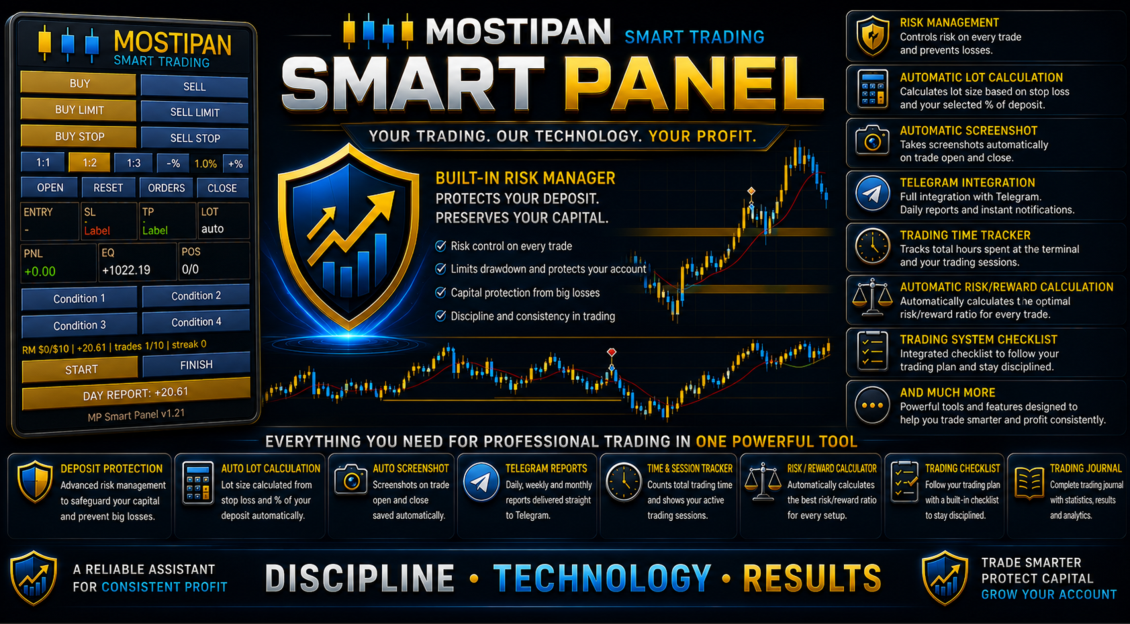
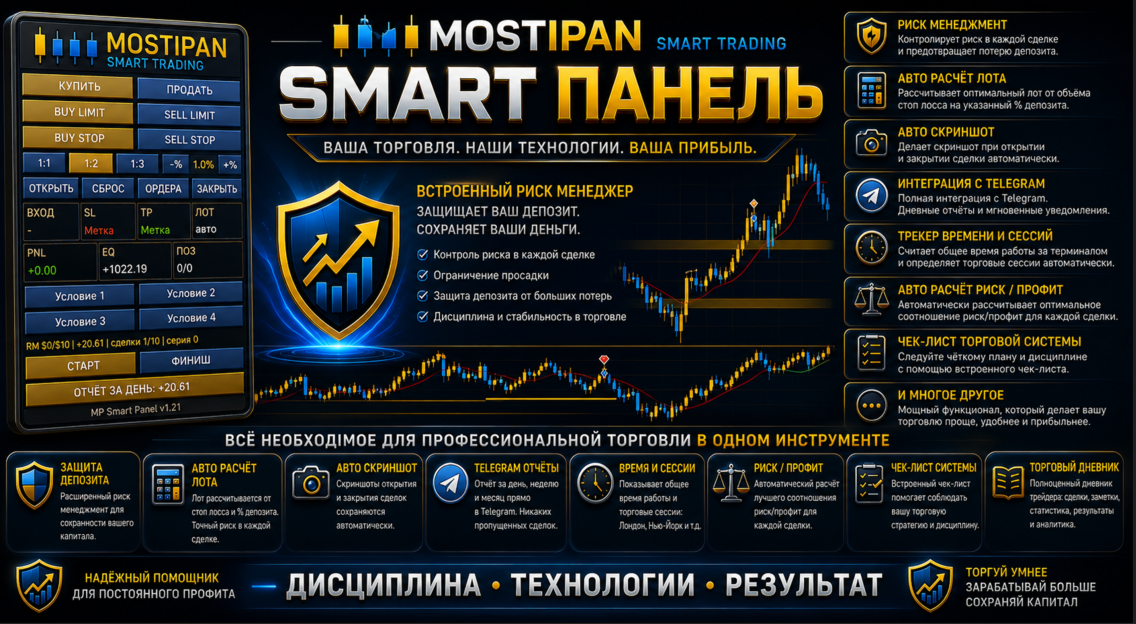
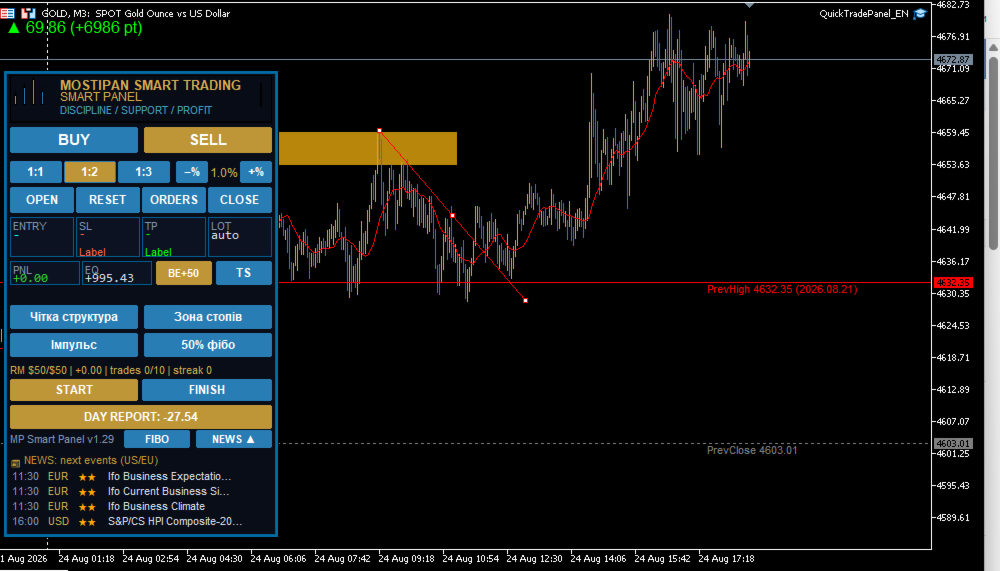
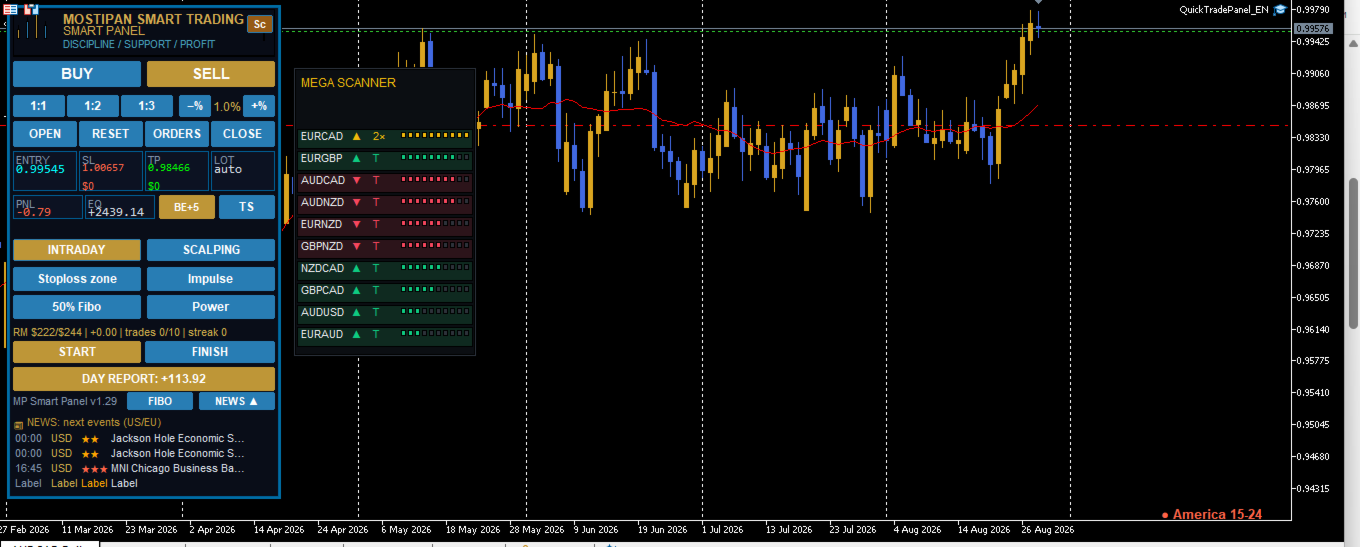
The trading panel includes a Risk Manager with trade blocking when the daily risk limit is exceeded, a trading system with checklists and templates, all types of orders, break-even, one-click trailing stop, Fibonacci levels, news, and full Telegram integration

MPSmartPanel is a compact trading panel for MetaTrader 5 that combines the convenience and efficiency of manual trading with strict discipline and full risk control. The panel protects your deposit from losses and helps you trade consciously, following your own system.

✅ Trading-system checklist (program-controlled)

You fill in your own checklist yourself (4 condition tiles, e.g.: trend, news, pattern, signal), and the panel automatically controls it before every trade — unless all conditions are confirmed, you cannot open a position. This eliminates impulsive and random trades.

🛡️ Risk Manager — deposit protection

The built-in Risk Manager automatically blocks new trades when at least one condition is breached:

  • 📉 Daily loss reached the set limit (e.g. $500)
  • 📈 Daily profit reached the target level
  • 🔢 Daily number of trades exceeded the limit (e.g. 10)
  • ❌ Consecutive losses exceeded the allowed limit (e.g. 3)
  • 💰 Total daily risk of open trades exceeded the limit (daily risk limit)

It also keeps daily risk accounting: the panel shows how much risk has been used and how much is left, preventing you from exceeding the set limit.

⏱️ Time and trading-session control

The built-in trading timer (START/FINISH buttons) records your working time, automatically distributes it across trading sessions (Asia, Europe, America) and provides reports and progress monitoring — so you can see how long and how efficiently you trade.

📊 Daily risk report

The panel generates a daily report of used risk volume, number of trades and day results — so you always know how well you follow your limits.

📱 Telegram integration and full reporting

Built-in Telegram integration provides full reports on every trade (open, close, SL/TP, PnL), screenshots, START/FINISH messages, daily reports — and the ability to send trading signals directly to a chat/channel.

⚡ Efficient one-click trading

  • BUY / SELL / LIMIT / STOP with a single touch
  • Automatic lot calculation from the stop (fixed amount or % of balance)
  • RR 1:1 / 1:2 / 1:3 ratio
  • Draggable Entry / SL / TP lines

All this makes MPSmartPanel a convenient and effective tool that controls risk, disciplines trading and preserves your deposit.

🚀 Quick Start

  1. Attach the Expert Advisor to any symbol chart (currency, gold, indices, etc.).
  2. Configure the main inputs in the "Inputs" tab (see "Settings" section).
  3. The panel appears in the upper-left corner of the chart.
  4. Choose direction — press BUY / SELL / LIMIT / STOP button.
  5. Drag the lines Entry, SL, TP to the desired levels.
  6. Complete the checklist — press all 4 condition tiles (see "Checklist" section).
  7. Press OPEN — the trade is opened with automatic lot calculation.

🎛️ Settings (Inputs)

📊 "Trading" section

Parameter Type Default Description
InpMagic int 20260815 Unique magic number of panel trades
InpDefaultLots double 0.01 Base lot (if auto lot is disabled)
InpDefSL double 45.0 Initial SL/TP distance from entry (in points)
InpEntryPts int 20 Initial entry distance for limit/stop orders
InpDefRR double 2.0 Risk/reward ratio (1:1 / 1:2 / 1:3)
InpDeviation int 20 Maximum price slippage (points)
InpTheme string "dark" Panel theme:  dark  or  light
InpLang string "EN" Panel language:  UA  /  EN  /  RU

💰 "Risk (auto lot)" section

Parameter Type Default Description
InpRiskMoney double 50.0 Risk per trade, $
InpRiskPercent double 1.0 Risk, % of balance

🛡️ "Risk Manager" section

Parameter Type Default Description
InpRM_Enabled bool true Enable risk manager
InpRM_MaxDailyLoss double 500.0 Condition 1: max daily loss, $ (0 = off)
InpRM_MaxDailyProfit double 0.0 Condition 2: max daily profit, $ (0 = off)
InpRM_MaxTradesDay int 10 Condition 3: max trades per day (0 = no limit)
InpRM_MaxConsLoss int 3 Condition 4: max consecutive losses (0 = off)
InpRM_DayRiskMoney double 300.0 Max daily risk cap, $ (0 = no cap)
InpRM_DayRiskPct double 0.0 Daily risk, % of balance (0 = like trade risk)
InpRM_ResetDay bool false Reset day now (set true and press OK)

📱 "Telegram" section

Parameter Type Default Description
InpTG_Enabled bool false Send to Telegram (screenshots + text)
InpTG_Token string "" Bot token (from BotFather)
InpTG_ChatID string "" Channel ID (e.g. @channel or -100...)
InpStartMsg string ... START button text (empty = panel language)
InpFinishMsg string ... FINISH button text (empty = panel language)

🔑 "License" section

Parameter Type Default Description
InpLicKey string "" License key/password (provided separately)

✅ "Condition Buttons" section (checklist)

Parameter Type Default Description
InpCondEnabled bool true Enable checklist (4 condition tiles)
InpCond1 string "Condition 1" Tile 1 label (editable)
InpCond2 string "Condition 2" Tile 2 label (editable)
InpCond3 string "Condition 3" Tile 3 label (editable)
InpCond4 string "Condition 4" Tile 4 label (editable)

✅ Checklist — Trading Discipline

What is it for?

MPSmartPanel is designed primarily for trader self-discipline. Successful trading is not just pressing buttons, but strictly following your own trading system. To avoid opening trades on emotions or gut feeling, the panel forces you to go through all the steps of your strategy before each trade.

The 4 condition tiles are a kind of checklist of your trading system. They remind you of the key points of your strategy that you must verify before opening a position.

How they work

  • The panel has 4 tiles (buttons) placed in one row:  Condition 1 ,  Condition 2 ,  Condition 3 ,  Condition 4 .
  • Initially the tiles are gray (not pressed).
  • After pressing, a tile turns green and a checkmark ✅ appears before its label.
  • The trade is BLOCKED until you press all 4 tiles at the same time.
  • The OPEN button turns green only when all conditions are met and the trade is ready.
  • After a successful trade opening, all tiles are automatically reset (turn gray), so before the next trade you go through the checklist again.

Usage example

You can configure the tiles to match your trading system, for example:

Tile Example label What you verify
1 Trend Confidence in the trend direction
2 Level Confirmation of a key level/zone
3 Risk Risk matches your rules (RR, % of deposit)
4 Signal Your strategy signal is present

How to edit the tile labels

Tile labels are entirely up to you. You edit them in the Expert Advisor settings:

  1. Open the Expert Advisor properties (double-click the EA in the Navigator, or press  F7  on the chart).
  2. Go to the "Inputs" tab.
  3. Find the Condition Buttons section.
  4. Change the fields:
    • InpCond1  — label of tile 1
    • InpCond2  — label of tile 2
    • InpCond3  — label of tile 3
    • InpCond4  — label of tile 4
  5. Enter your own text (for example: "Trend", "News", "Risk 1%", "Signal").
  6. Press OK — the labels on the panel update.

💡 If the field is left empty, the tile shows the automatic  Condition N  label in the panel language.

⏱ Trading Time Control (START / FINISH)

What is it for?

One of the key aspects of self-discipline is controlling the time spent trading. The panel helps you track how much time you actually spend trading and structures it by trading sessions.

How it works

  • START button — starts the work timer. Press it when you sit down to trade.
  • FINISH button — stops the timer. Press it when you end your trading session.
  • The time between START and FINISH is added to the daily work-time accounting.

Time distribution by sessions

The time elapsed between START and FINISH is automatically distributed across trading sessions:

Session Time window
🌏 Asia 00:00 – 07:00
🌍 Europe 07:00 – 13:00
🌎 America 13:00 – 24:00

So if you traded from 08:00 to 11:00, this time is counted in the Europe session. If a trading session spans several time zones, the time is distributed across the corresponding sessions automatically.

Where to see the result

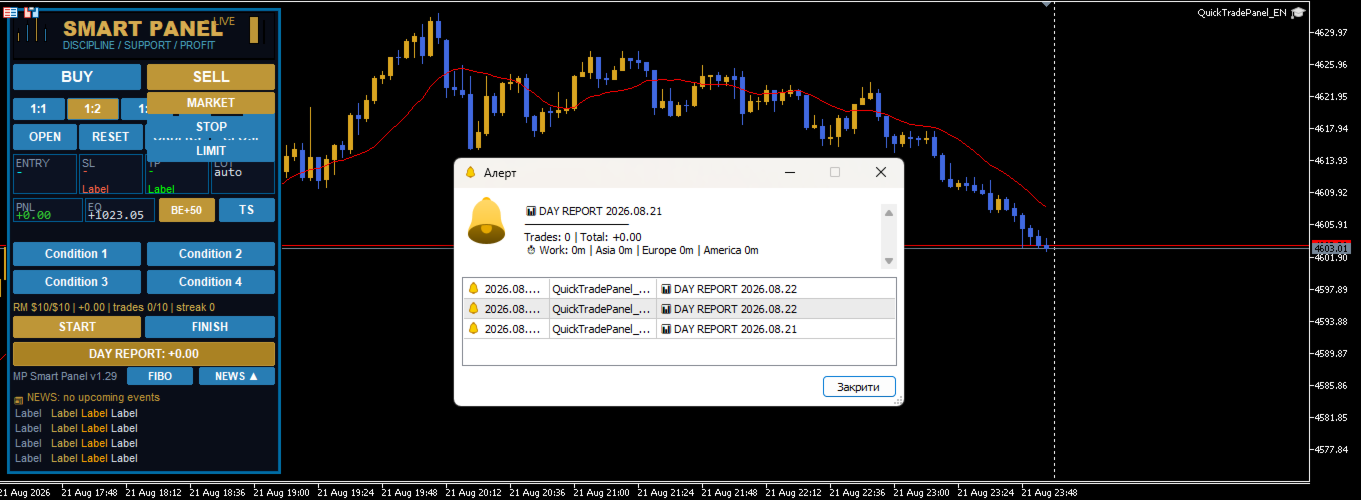
Press the DAY REPORT button — the report shows:

  • ⏱ Work — total trading time for the day
  • breakdown by sessions: Asia | Europe | America
  • list of closed trades and total PnL

💡 If you pressed START but forgot to press FINISH — time is only added up to the moment the session ends. Always finish your work with the FINISH button so the time accounting is accurate.

🖥️ Panel elements

Logo

At the top of the panel, the MOSTIPAN / SMART TRADING logo is displayed in the "candles in M shape" style.

Trading buttons

Button Action
BUY Prepares opening a buy at market price
SELL Prepares opening a sell at market price
BUY LIMIT Prepares a buy limit order (below price)
SELL LIMIT Prepares a sell limit order (above price)
BUY STOP Prepares a buy stop order (above price)
SELL STOP Prepares a sell stop order (below price)

RR ratios (risk/reward)

Button Value Description
1:1 1.0 TP equals the distance to SL
1:2 2.0 TP is twice the distance to SL
1:3 3.0 TP is three times the distance to SL

Manually dragging the TP line turns off RR (value becomes 0). To restore, press the RR button again.

Risk (%)

  • −% — decrease risk by 0.2%
  • +% — increase risk by 0.2%
  • Range: 0.2% – 10%

Actions

Button Action
OPEN Opens the trade/order (green button = everything ready and checklist completed)
RESET Cancels the preparation, hides lines
CLOSE Closes all panel positions
DEL ORD Deletes all panel pending orders

Information fields (tiles)

Field Description
ENTRY Entry price
SL Stop loss price (+ risk amount in $)
TP Take profit price (+ profit amount in $)
LOT Calculated order volume (auto/manual)
PNL Total profit/loss of open positions
EQ Current equity (balance + floating profit)
POS Number of positions / orders

DAY REPORT

Shows daily report: list of closed trades, total PnL, trade count and work time by sessions.

Version

At the bottom of the panel — MP Smart Panel v1.21.

🎯 Chart lines

When a direction is selected, 3 dashed lines appear on the chart:

Line Color Draggable
Entry Blue Yes
SL Red Yes
TP Green Yes

Dragging behavior:

  • Dragging Entry → SL and TP move together (distances preserved)
  • Dragging SL → TP is recalculated by the selected RR
  • Dragging TP manually → RR is turned off

🧮 Automatic lot calculation

Lot is calculated by the formula:

Lot = Risk ($) / (Distance to SL × Contract size)

  • Risk is taken from  InpRiskMoney  (if > 0) or  InpRiskPercent  of balance
  • Lot is rounded by broker volume step and limited to min/max values

🛡️ Risk manager logic

Blocks new trades if at least one condition is met:

  1. Daily loss ≤  InpRM_MaxDailyLoss
  2. Daily profit ≥  InpRM_MaxDailyProfit
  3. Number of trades per day ≥  InpRM_MaxTradesDay
  4. Consecutive losses ≥  InpRM_MaxConsLoss

Separately — daily risk limit ( InpRM_DayRiskMoney  or % of balance): if the total risk of open trades exceeds the limit, new trades are blocked.

📱 Telegram notifications

When  InpTG_Enabled  is on and token/chat are correct, the panel sends:

  • 🟢 Position opening (type, volume, symbol, price, SL, TP)
  • 🔴 Position closing (type, symbol, close price, PnL, reason: SL/TP/manual)
  • 📌 Pending order placement
  • 📷 Screenshots of open/close/orders
  • ⏱ START/FINISH messages
  • 📊 Daily report

⚠️ Important: add  https://api.telegram.org  to allowed URLs:  Tools → Options → Expert Advisors → Allow WebRequest for listed URL

⚙️ Notes

  • The panel automatically fits the window height (lower rows always visible)
  • For gold (GOLD/XAU) SL/TP distances are automatically increased ×10
  • All panel chart objects have the  QT_  prefix (Entry, SL, TP, bg, btn...)
  • The panel is designed as a self-discipline tool: the condition checklist and trading time control help you stick to your chosen strategy and avoid impulsive trades
Produtos recomendados
Advanced Account Dashboard & Risk Monitor (MT5) This script provides a real-time on-chart dashboard for monitoring account performance, risk exposure, and execution conditions in MetaTrader 5. It is designed for traders who want clear visibility of account health and risk awareness during live trading or VPS operation. The script does not open trades and does not interfere with any strategy logic . Key Features Account Metrics Live equity, balance, and floating profit/loss Open position count an
FREE
Quick Trade Panel Pro
Nicolas Olivier Menetrey
5 (1)
Painel de trading one-click com gestão automática de lote e risco Quick Trade Panel Pro é um painel de trading intuitivo projetado para traders que querem executar ordens rapidamente mantendo controle total sobre seu risco. Funcionalidades principais Cálculo automático do tamanho do lote baseado em uma porcentagem da sua margem disponível Stop Loss configurável em pontos, aplicado automaticamente a cada trade Tamanho do lote bloqueado durante uma série de trades para garantir tamanho de posição
FREE
Core function Intelligent transaction management one-click opening and closing operation, which supports user-defined lots to set multiple closing modes: all closing, closing by direction and closing by profit and loss status. Professional risk control, real-time risk monitoring and spread control to avoid high-cost trading environment. Visual control panel has an intuitive graphical interface, and all functions can be operated with one button to display position information, profit and loss sta
FREE
Trade Panel by RWBTradeLab Trade Panel is an on-chart panel for MetaTrader 5 that places market, pending and straddle orders and manages the open trades of the chart symbol. Overview The panel sits on the chart and has six tabs: Trade, Manage, Settings, Account, Help and About. Every value you set is saved for each symbol, so a chart keeps its own lot, stop loss, take profit and switches after a restart. The panel can be dragged anywhere on the chart and minimised to its title bar. The pane

FREE
NHK Local Time Scale NHK Local Time Scale displays your PC/local time directly on the MT5 chart , alongside the broker's native chart time. The trader can easily compare both time zones for any candle. Benefits for Traders: Quickly convert Broker Time ↔ Local/PC Time . Helps accurately set News Stop/News Filter times. Makes London, New York, Asian and other trading sessions easier to identify in your local time. Helps verify that EA session and news time settings are correct. Reduces mistakes ca
FREE
DDKiller Pro
Njaratahiry Michael Randrianiaina
Stop Blowing Your Account. Once and For All. DDKiller Pro is the MT5 risk guardian that runs silently on your chart and shuts down trading the moment you hit a limit — whether you're grinding a prop firm challenge or managing your own CFD account. The problem every trader knows: You set your rules. You break them anyway. One revenge trade. One overleveraged position. One session that erases a month of gains. DDKiller Pro removes that decision from your hands entirely. What it does: The second yo
Guardian Magic GT
Carlos Eduardo Rivas Istacuy
Guardian Magic GT - Risk Management Expert Advisor for MetaTrader 5 PROTECT YOUR TRADING CAPITAL WITH INTELLIGENT RISK MANAGEMENT Guardian Magic GT is a professional-grade Expert Advisor designed to safeguard your trading operations by implementing sophisticated risk control mechanisms. Whether you run a single bot or manage multiple automated trading systems simultaneously, Guardian Magic GT provides real-time monitoring and automatic position management to ensure your account stays within your
Grid Manager — Assistente Manual de Grid Multi-Cesta para MT5 O Grid Manager é um painel de controle para montar e gerenciar "cestas" de grid direto no gráfico. Você decide a direção e o momento; a ferramenta abre o grid, gerencia cada perna e protege a posição com controles de risco em dólar, linhas de breakeven/SL/TP no gráfico e ações de um clique. É um assistente de execução e gestão — rápido, visual e totalmente sob o seu comando. O que é — e o que não é O Grid Manager é um assistente manua
Click Trading
Jawad Tauheed
5 (2)
One Click Trading – Auto TP SL Developer TraderLinkz Version 1.00 Category Utility What it does Adds missing TP and SL to your manual trades and pending orders Sets them once per ticket Lets you move TP and SL afterward Works on hedging and netting accounts Scans on every tick and reacts on trade events Why you want it You place faster entries You get consistent risk and exit targets You reduce fat finger errors You keep full manual control Quick start Attach the EA to any chart Keep TP and SL e

FREE
Global Stop Loss and Take Profit Manager Drag Lines Auto Apply Already using my free Global Stop Loss and Take Profit Setter? This is the always on version. Instead of setting levels once, you drag two lines on the chart and every manual position on that symbol — plus every new one you open — instantly inherits the Stop Loss and Take Profit. No clicking into each order. No forgetting a stop. Global Stop Loss and Target Manager is a drag-and-drop risk tool for manual traders on MetaTrader 5. Pu
Introducing   Order Blocks Breaker , a brand-new way to identify and leverage order blocks in your trading strategy. After developing multiple order block tools with unique concepts, I’m proud to present this tool that takes things to the next level. Unlike previous tools,   Order Blocks Breaker   not only identifies order blocks but also highlights   Breaker Order Blocks —key areas where the price is likely to retest after a breakout. MT4 -  https://www.mql5.com/en/market/product/124101/ This t
Easy and simple tool which close all trades in defined point of time. It can also close all open trades when opened positions reach defined target profit or stop loss. For all pairs, indexes etc. Works with all instruments. All types of orders. All charts. Users inputs: - close time (hour,min,sec) - take profit (in users currency) - stop loss (in users currency) Save & Load settings option. Fast, simple and reliable. Check out other tools provided by our team!

FREE
CosmiCLab SMC FIBO CosmiCLab SMC FIBO is a professional trading indicator designed for traders who use Smart Money Concepts (SMC), market structure analysis and Fibonacci retracement levels. The indicator automatically detects market swings and builds Fibonacci levels based on the latest impulse movement. It also identifies market structure changes such as BOS (Break of Structure) and CHOCH (Change of Character), helping traders understand the current market direction. CosmiCLab SMC FIBO also pr
FX Info Spread MT5
Pedro Fernandez
3 (1)
Minimalist and fully customizable info panel. It works on any chart and timeframe, with 2 - 4 digits brokers and with 3 - 5 digits ones. It can show: Current Spread in pips (1 decimal digit if you are on a 3 - 5 digits broker) ATR (Average True Range) in pips Current Server Time Current GMT Time Important Account Info: Current Leverage and Stop-out Level (%) Time left for the current bar. Very useful on 4 h charts All info labels have a tooltip with the same data Available customizations : Ena
FREE
* This product was converted using  "BRiCK Convert4To5 MT 5 "  based on the MQL4 source file of  "BRiCK TradeByArrow MT4 Free" . BRiCK is a simple and versatile utility.   By combining Experts, Indicators and utilities like the Lego block, various trading styles can be realized. "TradeByArrow" is Utility that executes order processing when an arrow object is created on the chart. Combined with Indicator which outputs arrow object, it can be used like Expert. Parameter [ArrowName] EntryBuy: A
FREE
Este EA é usado principalmente para scalping de XAUUSD. Propósito   Remove a emoção da gestão de operações — protege automaticamente posições e realiza lucros para que você não precise tomar decisões difíceis sob pressão. O que faz   ️ Stop Loss automático   Define SL com base em máximos/mínimos recentes + buffer   Nada mais de estresse ao posicionar manualmente   Lucros parciais automáticos   Dois modos:   Movimento fixo: Fecha 50% após X de movimento de preço   R-Relação: Fecha 50% no
Breakeven Bot
Gabriel Paul Ange Perrin
Optimize your trading management with Breakeven Bot, the essential tool for active traders managing multiple positions at once. No more wasting time manually adjusting your stops—one click is all it takes to secure your profits! Main Feature: ️ "BREAKEVEN" Button – Instantly set all profitable positions to breakeven and protect your gains quickly. ️ Customization Options: Set breakeven in pips or currency, depending on your preference. Choose whether breakeven should be at the entr
FREE
"Clean Pending Orders" Exclua todas as ordens pendentes no símbolo atual em segundos! Este script simples, mas eficaz, foi projetado para traders que valorizam rapidez e conveniência. Basta executá-lo, e ele excluirá instantaneamente todas as ordens pendentes de compra e venda no símbolo atual. Vantagens: Remoção instantânea: Todas as ordens são excluídas em segundos. Foco apenas no símbolo atual: Outros instrumentos não são afetados. Facilidade de uso: Um clique, e seu terminal estará limpo. R
FREE
Ao executara ordem, seja ela pela boleta do metatrader no computador ou pelo metatrader no celular, seja ordem manual ou pendente, o Easy Trade irá posicionar os níveis de take profit e stop loss, bem como uma ordem limit e seus respectivos take profit e stop loss de forma automática. Seguindo a estratégia de negociação para abertura de Bolsa (us30, us100,us500) porém, pode ser ultilizada em quaisquer ativo do mercado.
GDS RiskLab TradeDesk Free Manual Trading Desk and Risk-Control Utility for MetaTrader 5 GDS RiskLab TradeDesk is a free chart-based utility for traders who want a cleaner manual trading workspace in MetaTrader 5. It is designed as a simple execution-support and risk-control panel. The goal is to keep the trading process more organized: review the chart, plan the trade, keep risk visible and execute manually with more structure. This tool does not generate buy or sell signals. It does not predic
FREE
Lot by Risk MT5
Sergey Vasilev
4.88 (16)
O painel de negociação Lot by Risk é projetado para negociação manual. Este é um meio alternativo para enviar ordens. A primeira característica do painel é a colocação conveniente de ordens usando linhas de controle. A segunda característica é o cálculo do volume da transação de acordo com um determinado risco, se houver uma linha stop loss. As linhas de controle são definidas usando as teclas de atalho: take profit-tecla T padrão; price-tecla padrão P; stop loss - tecla padrão S; Você mesmo
FREE
Equity monitor This is a simple means change informer. I wrote it for myself, maybe someone will need it... 1. Displays the change in funds for the day. Every day, when the terminal is first launched, it remembers the current funds and monitors changes throughout the day. 2. The first day of the month, well remembers the money and, within months, to monitor changes. 3. Well, it displays the profit of the open position. To work, you need to create 4 global variables: gvarEqityDay , gvarEq
FREE
Risk Manager – Account Protection Tool Risk Manager is an Expert Advisor for MetaTrader 5 designed to protect your trading account by applying automatic risk management rules. This tool does not open trades . It continuously monitors your account and enforces predefined limits to help prevent excessive losses and maintain disciplined trading. Risk Manager works in the background and can manage positions opened by manual trading or other Expert Advisors. It is particularly useful for: • Manual tr


FREE
O Robô Gerenciador de Ordens Manuais, é uma ferramenta que lhe permite incluir de forma automática o Stop Loss, Breakeven, Take Profit e parciais   nas operações abertas. Sejam ela uma ordem a mercado ou uma ordem limitada. Além disso, ele conduzir sua operação de forma automática, movendo o seu stop ou encerrando operações, de acordo com os parâmetros que você escolher. Para tornar suas as operações mais efetivas o Robô Gerenciador de Ordens Manuais conta com diversos indicadores que podem ser
Important! Demo version will work only on EURGBP. One Click Trader  is a tool designed for MetaTrader 4 platform, which enables you to take your trading to the next level. It enables you to open, manage and close your trades in simple an efficient way by just one click of your mouse button. "-"   ,  "+"  change OCT window size  Up arrow minimizes the OCT panel Down arrow maximizes the OCT panel Right arrow displays the next panel with additional features Left arrow hides the panel with additiona
FREE
Total trade manager allows you to manage your trade to maximise your profits and minimise your losses. This is an essential for traders that are looking for consistency within their trading.  The features: Partial Stop Loss: This feature allows you to close a partial percentage of your trade once it goes into negative. So if your stop loss is 20 pips, you could close 75% of your trade at 10 pips and let the remainder of the position to continue running. Auto Stop Loss: This means that once you p
Equitypanel
Timo Mario Hoffmann
5 (1)
Equity Panel for MT5 Equity Panel is a free MT5 indicator that gives you a fast and convenient live overview of your account directly from the chart. Monitor balance, equity, floating P/L, drawdown, daily performance, margin data, and warning levels in one compact dashboard. Built for traders who want better control, faster risk awareness, and clearer account monitoring in live market conditions. Equity Panel is a lightweight and practical account monitoring indicator for MetaTrader 5 that helps
FREE
Symbol Manager for MT5
Taras Slobodyanik
5 (3)
Symbol Manager or Grid Manager, designed to group orders into one position (by Symbol or by Magic Number). This utility will be useful to multi-currency traders (many EAs), who can have multiple orders on several pairs. You will be able to see the total number of lots, the total profit, and set virtual stop loss and virtual take profit. To set a real TP (or SL), you must first set the virtual value, and then enter the command in this cell: "set". If you want to set real TP/SL for all orders at
Os compradores deste produto também adquirem
Trade Assistant MT5
Evgeniy Kravchenko
4.43 (216)
Ajuda a calcular o risco por comércio, a fácil instalação de uma nova encomenda, gestão de encomendas com funções de fecho parcial, trailing stop de 7 tipos e outras funções úteis. Materiais e instruções adicionais Instruções de instalação   -   Instruções para a aplicação   -   Versão de teste da aplicação para uma conta de demonstração Função de linha Mostra no gráfico a linha de Abertura, Stop Loss, Take Profit. Com esta função é fácil definir uma nova ordem e ver as suas características ad
Bem-vindo ao Trade Manager EA—uma ferramenta de gestão de risco criada para tornar o trading mais intuitivo, preciso e eficiente. Não é apenas uma ferramenta para executar ordens, mas uma solução abrangente para planejamento de operações, gerenciamento de posições e controle de risco. Seja você um iniciante, trader avançado ou scalper que precisa de execução rápida, o Trade Manager EA adapta-se às suas necessidades, oferecendo flexibilidade em todos os mercados, desde forex e índices até commodi
================================================================================ POC BREAKOUT - V20.72. Full Professional Grade Toolkit ================================================================================ POC Breakout is a full MetaTrader 5 trading dashboard for discretionary traders who want breakout signals, Point of Control (POC) context, volume profiles, order flow, market structure, news, alerts, and advanced trade planning in one professional workspace. Attached directly to you
O Telegram to MT5 Multi-Channel Copier copia automaticamente os sinais de trading dos seus canais de Telegram diretamente para o MetaTrader 5. Sem bots, sem extensões de navegador, sem copiar à mão. O sinal chega ao Telegram e o EA abre a operação no seu terminal em poucos segundos. E antes de copiar um canal, o backtester integrado mostra o que esse canal teria feito na sua conta. O produto inclui dois componentes: um aplicativo de Windows que escuta os seus canais de Telegram, e este Expert Ad
TradePanel MT5
Alfiya Fazylova
4.88 (170)
Trade Panel é um assistente de negociação multifuncional. O aplicativo contém mais de 50 funções de negociação para trading manual e permite automatizar a maioria das tarefas de negociação. Instruções para o aplicativo: https://www.mql5.com/pt/blogs/post/762435 Versão de teste do aplicativo para conta demo: https://www.mql5.com/pt/blogs/post/762547 Como instalar o aplicativo: https://www.mql5.com/pt/blogs/post/762548 Como testar o aplicativo no modo visual: https://www.mql5.com/pt/blogs/post/770
Copie sinais do Telegram com suas próprias regras de negociação Telegram to MT5 Signal Trader copia automaticamente sinais de negociação em texto de canais e grupos públicos e privados do Telegram para o MetaTrader 5. Gerencie vários provedores e contas MT5 em um único aplicativo para desktop, com configurações individuais de risco e de negociação para cada provedor . Você não precisa de um bot do Telegram nem configurar uma API para copiar sinais. Basta entrar com sua própria conta do Telegram
Grid Manual MT5
Alfiya Fazylova
4.73 (22)
"Grid Manual" é um painel comercial para trabalhar com uma grade de ordens. O utilitário é universal, possui configurações flexíveis e uma interface intuitiva. Ele trabalha com uma grade de ordens não apenas na direção da média das perdas, mas também na direção do aumento dos lucros. O trader não precisa criar e manter uma grade de ordens, tudo será feito pelo ""Grid Manual". Basta abrir um orden e o "Grid manual" criará automaticamente uma grade de ordens para ele e trabalhará com ele até que s
Power Candles Strategy Scanner - Localizador de configurações multissímbolo com auto-otimização O Power Candles Strategy Scanner utiliza o mesmo motor de auto-otimização que alimenta o indicador Power Candles — em todos os símbolos da sua lista de observação, lado a lado. Um painel indica-lhe quais os símbolos que são estatisticamente negociáveis neste momento, qual a estratégia vencedora para cada um, o par ideal de Stop Loss / Take Profit, e avisa-o assim que um novo sinal é emitido. Esta ferr
Footprint Chart Pro — Professional OrderFlow EA for MetaTrader 5 Version 6.34 | Professional tool for real traders | Institutional-Grade Visualization DEMO USERS - PLEASE SELECT EVERY TICK / REAL TICK WHEN TESTING AND YOU HAVE DOWNLOADED HISTORICAL DATA. IF YOU SEE A WAITING SCREEN AND IT IS NOT DOWNLOADING, IT MEANS YOU HAVE LOW HISTORICAL DATA. TRY 1 MIN AND 5 MIN FIRST ON 1 DAY DATA. ONE DAY DATA SHOULD BE THE NEWEST AND MOST CURRENT DATE. PLEASE WAIT UNTIL THE MARKET HAS ROLLED OVER PERIOD.
Exp COPYLOT CLIENT for MT5
Vladislav Andruschenko
3.97 (35)
Copiador profissional de operações para MetaTrader 5 Um copiador de operações rápido, profissional e confiável para MetaTrader . COPYLOT permite copiar operações de Forex entre terminais MT4 e MT5 com suporte para contas Hedge e Netting . A versão MT5 do COPYLOT oferece suporte a: - MT5 Hedge → MT5 Hedge - MT5 Hedge → MT5 Netting - MT5 Netting → MT5 Hedge - MT5 Netting → MT5 Netting - MT4 → MT5 Hedge - MT4 → MT5 Netting Versão MT4 Descrição completa + DEMO + PDF Como comprar Como instalar Como
HINN MagicEntry Extra
ALGOFLOW OÜ
4.74 (19)
HINN MAGIC ENTRY – the ultimate tool for entry and position management! SIMPLE. FASTEST. INTUITIVE. MAX AUTOMATED. Place orders by selecting a level directly on the chart! full description   ::  demo-version  :: 60-sec-video-description Key features: - Market, limit, and pending orders - Automatic lot size calculation - Automatic spread and commission accounting - Unlimited partitial take-profits  - Breakeven and trailing stop-loss and take-profit  functions - Invalidation leves - Intuitive, a
Signal TradingView to MT5 Pro Automator Execução profissional instantânea entre TradingView e MetaTrader 5 Automatize a sua estratégia de trading com a ponte de comunicação mais robusta entre os alertas do TradingView e a execução real no MT5. Concebido para traders que exigem velocidade, flexibilidade e uma gestão de risco impecável, este Expert Advisor transforma qualquer mensagem de alerta numa ordem de mercado ou de limite precisa. PONTOS FORTES E VANTAGENS Motor de Parsing Universal (Propri
MT5 to Telegram Signal Provider é uma utilidade fácil de usar e totalmente personalizável que permite o envio de sinais especificados para o chat, canal ou grupo do Telegram, tornando sua conta um fornecedor de sinais . Ao contrário da maioria dos produtos concorrentes, ele não usa importações de DLL. [ Demonstração ] [ Manual ] [ Versão MT4 ] [ Versão Discord ] [ Canal do Telegram ]  New: [ Telegram To MT5 ] Configuração Um guia do usuário passo a passo está disponível. Não é necessário conhec
Farmed Hedge Yield Farming | All Markets (Manual - Hybrid - Semi/Automated EA) VERIFIED TRADING RESULTS - Farmed Hedge Yield Axi Copy:  https://www.mql5.com/en/signals/2356376 - Farmed Hedge Yield Exn Copy:   https://www.mql5.com/en/signals/2356404 - Farmed Hedge Yield V Copy:  https://www.mql5.com/en/signals/2357156 IMPORTANT NOTICE: FarmedHedge is a MANUAL-FOCUSED TRADING UTILITY ,not a fully automated EA. Results shown on this Signal include manual trades and overall strategic management.
Copy your MT5 trades to Interactive Brokers You keep using MT5. Every order you open or close is sent to your IB account. In real time. No coding. No changes to your strategy or EA. Try it first Rent 1 month: $30. Test on a live or paper account. What it does Real-time copying: same direction, reverse, or one side only. Map any MT5 symbol to any IB symbol. Set a lot ratio for each. Forex, Futures, Stocks, CFDs, Metals and Crypto. Position sync: both accounts checked, any difference fixed. Optio
Trading Chaos Expert
Hennadii Stanilevych
5 (11)
Não existe software igual no mundo e que represente um "console" universal de negociação informando sinais para operar, entrada automatizada do mercado, configurando o Stop Loss e o Take Profit, assim como o Trailling Profit para diversas negociações em apenas uma janela aberta. O controle intuitivo do Expert Advisor em "três cliques" garante um uso abrangente de todas as suas funções em diferentes computadores, incluindo tablets. Interagindo com indicadores de sinal adicionais que marcam o gráf
Anchor Trade Manager
Kalinskie Gilliam
5 (9)
Your EAs cannot see each other, but Anchor can. Anchor gives you one place to coordinate your EAs, manage risk, and decide when trading is allowed. It works alongside the trading bots you already use without any changes to them. The Problem One EA opens a trade. Then another starts trading. The next thing you know, you wake up to multiple grids built across your account. Each EA may be doing exactly what it was designed to do, but together they can place far more risk on your account than you in
The News Filter MT5
Leolouiski Gan
4.78 (23)
Este produto filtra todos os consultores especializados e gráficos manuais durante o horário das notícias, para que você não precise se preocupar com picos de preços repentinos que possam destruir suas configurações de negociação manuais ou negociações realizadas por outros consultores especializados. Este produto também vem com um sistema de gerenciamento de pedidos completo que pode lidar com suas posições abertas e ordens pendentes antes do lançamento de qualquer notícia. Depois de comprar o
Mantenha o indicador em que você confia. Automatize o trabalho ao redor dele. Você já tem um indicador MT5 em que confia, mas ainda precisa acompanhar o gráfico, esperar um sinal, calcular o lote, enviar a ordem e gerenciar cada posição manualmente? O Stratiora Signal Engine MT5 foi criado para conectar essas etapas. Ele pode transformar sinais Buy e Sell de buffers compatíveis em um fluxo automatizado completo: entrada, cálculo de volume, Stop Loss, Take Profit, filtros, gestão de posições e p
Trade Copier Ultimate
Janitha Sandaruwan Amaradasa Wickramasingha Arachchilage
5 (5)
Trade Copier Ultimate - Telegram to MT5 Signal Copier Trade Copier Ultimate automatically copies Telegram trading signals into MetaTrader 5. The EA can read signal messages, detect the symbol, order type, entry price, Stop Loss, Take Profit levels and selected update commands, then execute or manage the trade in MT5 using your lot and risk settings. It is more than a basic Telegram to MT5 copier. TCU also supports Bot API and user-account Bridge workflows, Discord signal routing, local MT5 to MT
EA Overfitter
Stephen J Martret
5 (1)
That backtest looks great. But will it still be making money tomorrow, next week, next month? EA Overfitter re-runs your EA on 100 price histories it has never seen. One score tells you if the edge is real. A backtest tells you what an EA did on one price history — the one that happened to occur. What you cannot tell from it is how much of that result was the strategy and how much was the particular path. EA Overfitter answers that. It builds up to 100 synthetic price histories your EA has n
Trade Indicator Assistant   is a powerful MT5 utility designed to turn indicators into automated trading systems. Its main feature is the ability to automatically detect an indicator’s   BUY and SELL signal buffers , without requiring you to know the buffer numbers, search through indicator settings, or modify the indicator source code. Bonus Indicator:   After purchasing Trade Indicator Assistant, contact me to receive   Trade Signal Pro   completely free as a bonus indicator. [Download Demo V
Welcome to ENTRY IN THE ZONE AND SMC MULTI TIMEFRAME  SPECIAL BENEFIT / FOR OUR MQL5 CUSTOMERS FREE ACCESS TO THE NEW TOOL  — COMING SOON — Learn more on our official website  : https://www.fableedge.net Entry In The Zone and SMC Multi Timeframe is a real-time market analysis tool based on Smart Money Concepts (SMC), designed to analyze market structure, price direction, and key trading zones. It supports both Single-Timeframe Analysis and Multi-Timeframe Analysis, providing a clearer view of th
Quant Panel
Kevin Craig E Gittins
Quant Panel Pro O Painel Definitivo de Desempenho Multi-EA para Traders Quantitativos Pare de alternar entre múltiplos gráficos ou ferramentas externas para monitorar suas estratégias algorítmicas! O Quant Panel Pro oferece monitoramento de portfólio em nível institucional em uma interface profissional e elegante. Principais Recursos Análise Quantitativa ao Seu Alcance Agregação de lucros/perdas (P&L) em tempo real para todos seus Expert Advisors Análise estatística de taxa de acerto com métric
YuClusters
Yury Kulikov
4.93 (43)
Atenção: A versão demo para revisão e teste está aqui . YuClusters é um sistema profissional de análise de mercado. O trader tem oportunidades únicas para analisar o fluxo de pedidos, volumes de negociação, movimentos de preços usando vários gráficos, perfis, indicadores e objetos gráficos. O YuClusters opera com base em dados de Tempos e Negócios ou informações de ticks, dependendo do que está disponível nas cotações de um instrumento financeiro. O YuClusters permite que você crie gráficos com
Trade Dashboard MT5
Fatemeh Ameri
4.94 (135)
Trade Dashboard simplifies how you open, manage, and control your trades, with built-in lot size calculation. It allows you to execute trades, manage risk, and control positions directly on the chart, with tools such as partial close, breakeven, and trailing stop. Designed to reduce manual work and help you stay focused on your trading decisions. A demo version is available for testing. Detailed explanations of features are provided within the MQL5 platform. Installation instructions are include
Premium Trade Manager - O Painel de Operações com um Coach Integrado Premium Trade Manager coloca um coach de trading dentro do seu gráfico, com um motor de execução completo por baixo. Configure a operação da forma que sempre faz e deixe o Max, seu coach de trading com IA, ler exatamente esse setup em relação à sua conta ao vivo e dar um veredicto direto antes de confirmar: se o stop é disciplinado, se o risco faz sentido, se há um evento de alto impacto a minutos de distância, se você está pró
Painel de Trading para MetaTrader 5 — controle profissional de trading em um clique a partir do gráfico e do teclado Um painel de trading avançado para traders ativos, criado para abrir, gerenciar e fechar operações muito mais rápido do que com a interface padrão do MetaTrader. Esta solução foi desenvolvida para quem deseja controlar posições, ordens pendentes, lucro total e execução em um único espaço de trabalho profissional. Não se trata apenas de mais um utilitário. É um verdadeiro cockpit
Smart Stop Scanner – Sistema multiactivo de análise de stops baseado em estrutura de mercado Visão geral O Smart Stop Scanner oferece aos traders um monitoramento profissional de níveis de stop-loss em múltiplos mercados. O sistema identifica automaticamente as zonas de stop mais relevantes com base na estrutura real do mercado, rupturas significativas e lógica de price action — tudo apresentado em um painel unificado, claro e totalmente compatível com telas de alta resolução (DPI-aware). Func
Binance Quotes Updater
Andrey Khatimlianskii
5 (1)
This service is designed to stream online cryptocurrency quotes   from the Binance exchange to your MetaTrader 5 terminal. You will find it perfectly suitable if you want to see the quotes of cryptocurrencies in real time — in the Market watch window and on the MetaTrader 5 charts. After running the service, you will have fully featured and automatically updated  cryptocurrency charts in your MetaTrader 5. You can apply templates, color schemes, technical indicators and any non-trading tools to
Mais do autor
MP Trend Scanner
Pavlo Mostipan
5 (1)
TREND SCANNER Stay With the Trend. Trade With Confidence. Trend Scanner analyzes the market to determine trend direction and strength using a combination of technical indicators. The system combines EMA 150/365, EMA 9/21, RSI, MA to confirm market direction and filter out weak or sideways conditions. Key Features: Bullish and bearish trend detection; EMA 150/365 and EMA 9/21 analysis; RSI confirmation; MACD momentum analysis; ️ ADX ranging-market filter; Trend strength measur
FREE
️ SMART PANEL TESTER — TESTE A SUA ESTRATÉGIA. CONTROLE O SEU RISCO. SMART PANEL TESTER é uma versão simplificada do SMART PANEL principal, criada especialmente para testar estratégias de trading de forma prática e eficiente no Strategy Tester . O principal foco do painel é o Gerenciamento de Risco . Uma estratégia não depende apenas de boas entradas — o seu desempenho a longo prazo também depende da forma como o risco é controlado em cada operação. ️ RISK MANAGER INTEGRADO Defina o risco co
FREE
MP Risk Manager
Pavlo Mostipan
5 (1)
️ RISK MANAGER — Risk Management Indicator Indicator version:   1.70 ·   Style:   QuikTrade ·   Position:   bottom-left corner of the chart 1. What it is Risk Manager   is an informational indicator for MetaTrader 5 that shows the   daily risk budget   in real time and helps calculate the   recommended lot , taking into account: risk per single trade (% of balance); daily risk (% of balance); losses and profits already realized today; risk of open positions (based on their Stop Loss); distance
FREE
MPDirection Strength
Pavlo Mostipan
5 (1)
DIRECTION STRENGTH is an indicator designed to analyze the current market movement. It helps you understand not only where the price is moving , but also how strong the movement is, how long the current series has lasted, and how likely it is to continue based on historical matches. What do you see on one screen? DIRECTION → where the market is moving STRENGTH 0–100 → how strong the movement is SERIES → how many candles the movement has continued TIME → how long the current series has lasted H
FREE
DIVERGENCE SCANNER Find Divergences Faster. See What Others May Miss. Divergence Scanner is a specialized tool designed to automatically identify potential divergences across multiple trading instruments. It analyzes Stochastic and RSI , detects bullish and bearish divergences, and presents the results in a clear, structured table. Key Features: Automatic divergence detection; Stochastic analysis; RSI analysis; Bullish divergences; Bearish divergences; MOSTIPAN SMART TRADING
FREE
MegaScanner — see the market with two eyes A universal multi-symbol scanner that combines two analytical systems in one panel. ️ Functionality Finds entry points   in the market and   shows the MEGA TRADER — Complete User Guide Version:   1.05   Type:   Expert Advisor for MetaTrader 5   Purpose:   automated trading of DIVERG divergence signals with a sideways-market filter, deposit-based risk management, ATR-based SL/TP and a trailing stop. ️   Important:   this is a fully automated Expert
One click to open. One click to protect. SMART PANEL is a minimalist panel for disciplined trading:   no extra noise   — only what a trader really needs every day: order placement, risk control and profit protecti 1. Fast order placement BUY / SELL   buttons with   MARKET / LIMIT / STOP   menu. Entry, stop and take-profit   lines — draggable right on the chart. Ready ratios   1:1 · 1:2 · 1:3   — one click, risk is already set. −% / +%   buttons — risk per trade adjusted in a second. 2. Built-in
MP TGAlert
Pavlo Mostipan
One job, maximum flexibility:   the expert watches all activity on your trading account and sends you a Telegram message and/or chart screenshot for any chosen event type. Every event, message template and filter is user-configurable. What it is for You trade manually and want to   know instantly about your trades   in Telegram (openings, closings, TP/SL, trailing, breakeven, partial close). You run   EAs   — have a single notification channel for every trade on the account without opening t
SMART PANEL FULL A versão mais completa do painel de trading, reunindo em uma única solução o gerenciamento de operações, o controle de risco, a análise da atividade de trading, um diário automatizado e ferramentas profissionais para encontrar oportunidades de mercado. O painel oferece controle completo sobre todos os tipos de ordens e posições. As operações podem ser abertas, modificadas e encerradas diretamente pelo painel, mantendo todas as funções essenciais em um único ambiente de trabalho.
Filtro:
Filimon
97
Filimon 2026.09.21 18:07 
 

O usuário não deixou nenhum comentário para sua avaliação

Responder ao comentário