MP MegaScanner

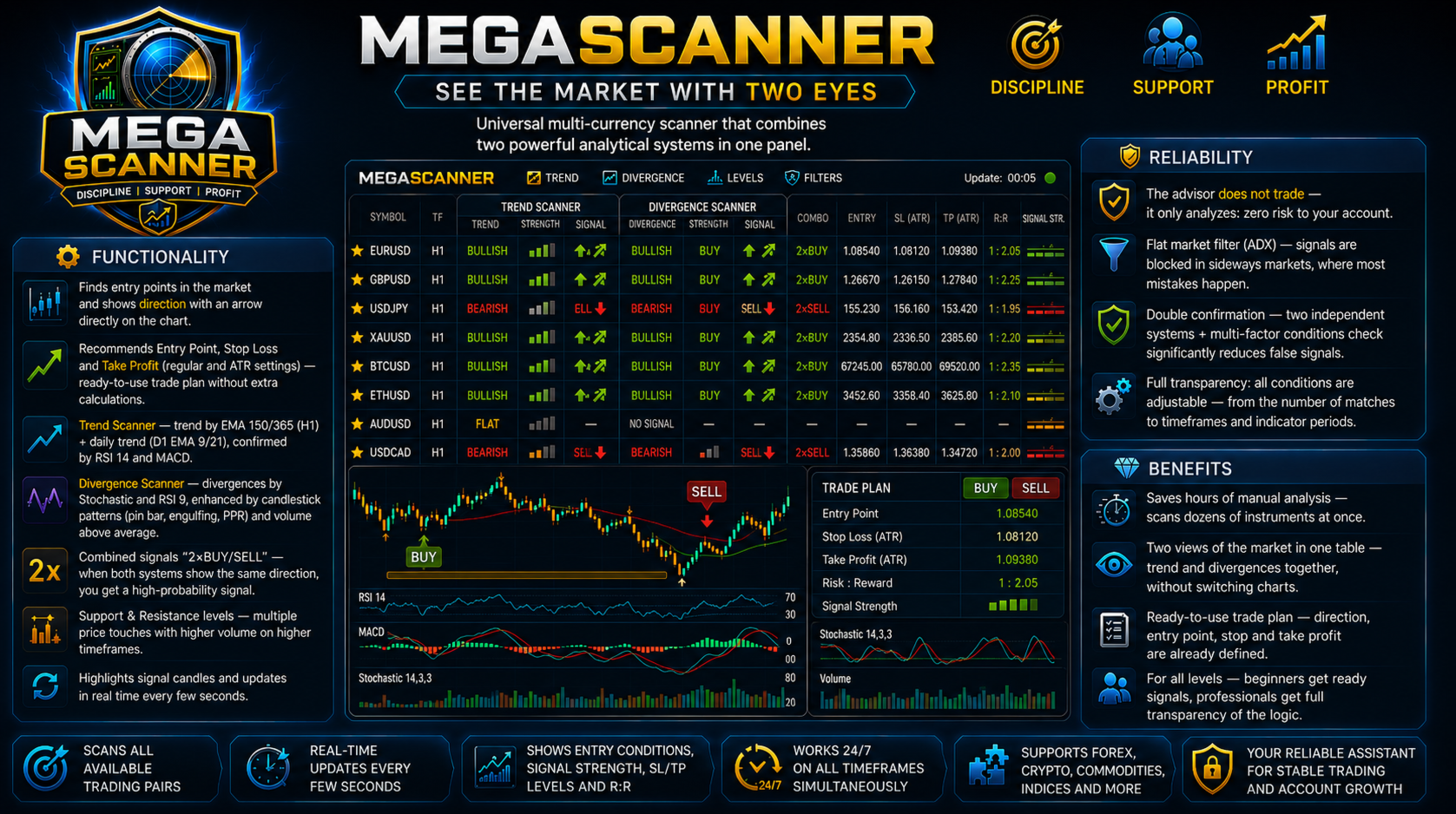
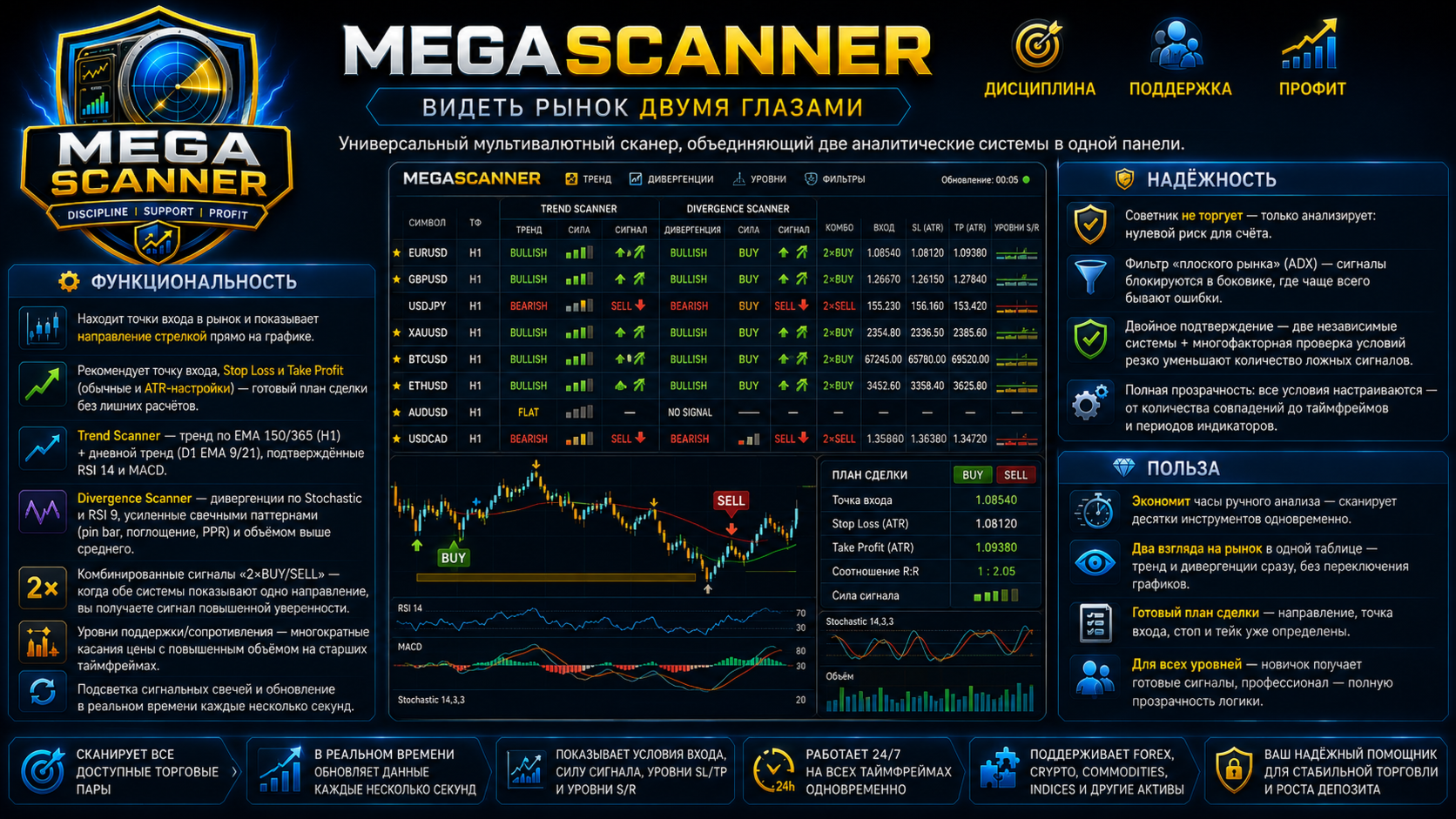
📡 MegaScanner — see the market with two eyes

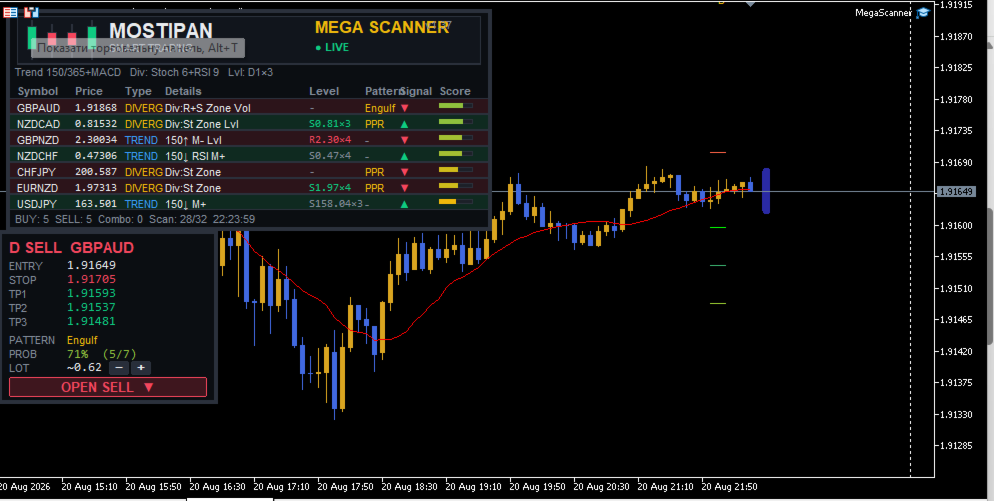
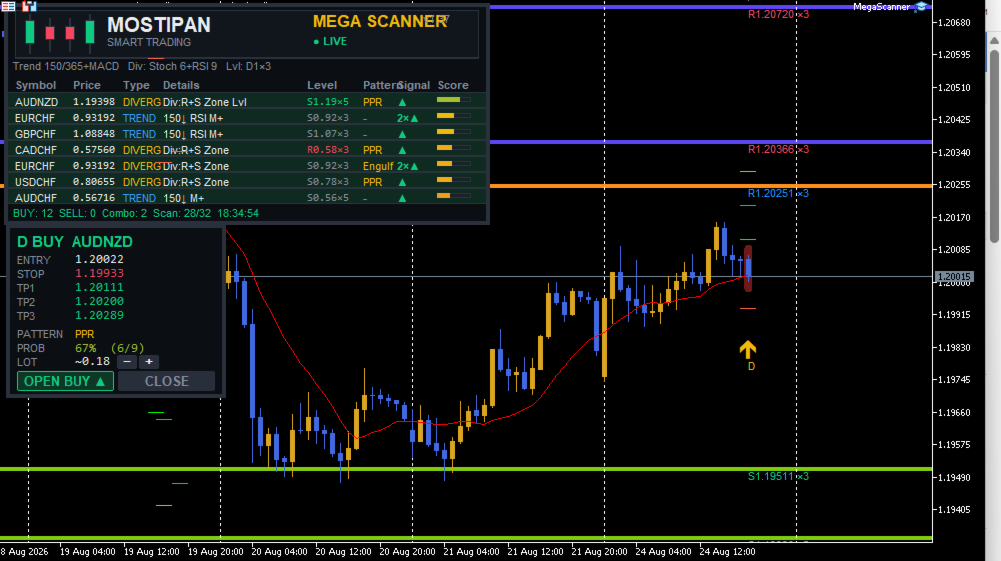
A universal multi-symbol scanner that combines two analytical systems in one panel.

⚙️ Functionality

  • Finds entry points in the market and shows the MEGA TRADER — Complete User Guide

    Version: 1.05 Type: Expert Advisor for MetaTrader 5 Purpose: automated trading of DIVERG divergence signals with a sideways-market filter, deposit-based risk management, ATR-based SL/TP and a trailing stop.

    ⚠️ Important: this is a fully automated Expert Advisor. It opens, modifies and closes trades on its own. Always test on a demo account first and make sure the risk settings match your strategy before using it on a live account.

    1. What It Is

    MegaTrader is the trading "little brother" of the MegaScanner indicator: it uses the same signal logic, but instead of displaying signals on a panel, it opens trades itself according to strict rules.

    Key principles of the system:

    Principle Implementation
    Sideways only The system is counter-trend (divergence-based) — it trades only when EMA150 is nearly flat and ADX is below the flat threshold
    Fixed risk Lot size is calculated so that the SL loss equals a set % of the account balance
    ATR-based SL/TP Stop and target scale with current volatility (ATR multipliers)
    TP 1:2 Take profit = 2 stop distances — the classic risk/reward ratio
    Trailing stop Profitable positions are managed with a trailing stop (SL follows price)
    Breakeven After the first target is hit, the position moves to breakeven

    2. The DIVERG Signal System

    The EA trades signals from the DIVERG system — reversal divergences and patterns:

    Component What it uses
    Divergences RSI(9) and Stochastic — price/oscillator divergence
    Candlestick patterns Pin bar, engulfing, PPR (pindi-push-reverse), tweezer
    Volume Signal confirmation by increased volume
    Scoring Each fulfilled condition = 1 point; entry threshold — InpMinCond (recommended 2)

    Entry filters

    Filter Parameter Purpose
    Sideways (EMA slope) InpFlatEma Blocks entries if EMA150 is tilted more than 0.10% over 20 bars — market in a trend
    Flat (ADX) InpFlatFilter / InpFlatAdx Blocks entries when ADX(14) is below 25 — too weak movement
    Max spread InpMaxSpreadPts Skips trades with widened spread (>30 points)
    Position limit InpMaxTrades / InpMaxPosPerSym One position at a time, max 1 per symbol

    💡 Why the sideways filter is critical: divergences are a counter-trend tool. In a trend they produce losing streaks; in a sideways market they produce steady profit. The EMA slope filter removes trending regimes.

    3. Risk Management

    Lot calculation

    risk money = balance × InpRiskPct / 100 loss per 1 lot = (|entry − SL| / tickSize) × tickValue lot = risk money / loss per 1 lot

    So regardless of stop width, the loss per trade ≈ the set % of the deposit:

    • narrow SL → larger lot;
    • wide SL → smaller lot.

    Protection

    Protection Parameter Description
    Max lot InpMaxLot Insurance against over-risking (default 5.0)
    Margin check — Lot is automatically reduced if free margin is insufficient
    Min lot — If the calculated lot is below the minimum — the trade is skipped
    Normalization — Lot is rounded down to the step (lotStep)

    📌 Example: deposit 10,000 USD, risk 3% = 300 USD per trade. If SL = 50 pips → lot ≈ 0.6. If SL = 15 pips → lot ≈ 2.0. The loss is ≈ 300 USD in both cases.

    4. SL / TP / Trailing

    Stop loss (ATR)

        SL = low/high ± max(10 points, ATR(14) × InpSLATRMult)
    

    The stop is placed beyond the signal bar's extreme with an ATR offset. If a support/resistance level is nearby, the stop is moved beyond it.

    Take profit 1:2

    TP = entry ± 2.0 × ATR(14) (1:2 ratio to the stop)

    Trailing stop

    Parameter Value Description
    InpTrailStart 0.5 ATR Trailing activates after +0.5 ATR profit
    InpTrailDist 1.0 ATR SL is kept 1.0 ATR from price

    Breakeven

    After the first target (1.0 ATR) is reached, SL moves to breakeven (+5 points).

    5. Installation & Setup

    1. Copy  MegaTrader.mq5  to the  MQL5\Experts\  folder.
    2. MetaEditor → Compile (F7) → should show  0 errors, 0 warnings .
    3. In MetaTrader 5, drag the EA onto a chart (e.g., EURUSD H1).
    4. Enable algorithmic trading (the "Algo Trading" button).
    5. Set  InpTradeEnable=true , configure risk and press OK.

    📌 The EA trades one symbol — the one it is attached to. The default timeframe is H1.

    6. Recommended Settings (validated on 2023–2024)

    Parameter Value Comment
    InpUseTrend false TREND branch adds noise — disabled
    InpUseDiverg true Main system
    InpMinCond 2 Optimal score threshold
    InpUseRisk / InpRiskPct true / 3.0 3% risk per trade
    InpFlatEma / Slope true / 0.10 Sideways filter
    InpFlatFilter / Adx true / 25 Flat filter
    InpTPLevel / TP2 2 / 2.0 ATR TP 1:2
    InpTrailSL / Start / Dist true / 0.5 / 1.0 Trailing stop
    InpSLATRMult 1.5 Stop multiplier

    Backtest results (EURUSD H1, deposit 10,000, risk 3%)

    Year Result
    2024 +14.6% (11,458 USD)
    2023 −40.6% (5,938 USD)

    7. Important Warnings

    1. ⚠️ The system works only in a sideways market. In trending years (like 2023) it loses money. This is normal for divergence strategies — but keep it in mind when planning.
    2. ⚠️ 3% risk is aggressive. With a 10,000 deposit that is ~300 USD per trade. In a bad year the drawdown can reach 40%+. For conservative trading, lower it to 0.5–1%.
    3. ⚠️ Past results do not guarantee future returns. Parameters were fitted on 2023–2024. A forward test and periodic review are recommended.
    4. ✅ The EA uses  InpMagic  to identify its own trades — it does not conflict with other EAs.
    5. ✅ Check your broker's conditions: minimum lot, lot step, leverage and commissions.

    8. Main Input Parameters (reference)

    Parameter Type Default Description
    InpMagic int 951357 Unique trade identifier
    InpTradeEnable bool true Trading allowed
    InpTF ENUM_TF PERIOD_H1 Working timeframe
    InpMinCond int 2 Minimum score for a signal
    InpLotFixed double 0.01 Fixed lot (if risk is off)
    InpUseRisk bool true Lot by risk % of balance
    InpRiskPct double 3.0 Risk per trade, %
    InpMaxLot double 5.0 Maximum lot
    InpTPLevel int 2 TP level (2 = double)
    InpBreakeven bool true Breakeven after TP1
    InpTrailSL bool true Trailing stop
    InpTrailStart double 0.5 Trailing start, ATR
    InpTrailDist double 1.0 Trailing distance, ATR
    InpMaxSpreadPts double 30.0 Max spread, points
    InpMaxTrades int 1 Max simultaneous positions
    InpMaxPosPerSym int 1 Max positions per symbol
    InpUseTrend bool false Trade TREND signals
    InpUseDiverg bool true Trade DIVERG signals
    InpFlatEma bool true Sideways filter (EMA slope)
    InpFlatEmaBars int 20 Slope measurement period
    InpFlatEmaSlope double 0.10 Max EMA slope, %
    InpFlatFilter bool true Flat filter (ADX)
    InpFlatAdx int 25 ADX threshold
    InpSLATRMult double 1.5 SL = ATR × multiplier
    InpTP1ATRMult double 1.0 First target, ATR
    InpTP2ATRMult double 2.0 Second target (TP), ATR
    InpATRPeriod int 14 ATR period
    direction with an arrow
     right on the chart;
  • Recommends entry point, Stop Loss and Take Profit (standard and ATR-based settings) — a ready-made trade plan without extra calculations;
  • Trend Scanner — trend by EMA 150/365 (H1) + daily trend (D1 EMA 9/21), confirmed by RSI 14 and MACD;
  • Divergence Scanner — divergences by Stochastic and RSI 9, reinforced by candlestick patterns (pin bar, engulfing, PPR) and above-average volume;
  • Combo signals "2×BUY/SELL" — when both systems point in the same direction, you get a high-confidence signal;
  • Support/Resistance levels — multiple price touches with above-average volume on higher timeframes;
  • Signal bar highlighting and real-time updates every few seconds.

🛡️ Reliability

  • The EA does NOT trade — it only analyzes: zero risk to your account;
  • Flat market filter (ADX) — signals are blocked in a sideways market, where mistakes are most common;
  • Double confirmation — two independent systems + multi-factor condition checks drastically reduce false signals;
  • Full transparency: all conditions are configurable — from the number of matches to timeframes and indicator periods.

💎 Benefits

  • Saves hours of manual analysis — scans dozens of instruments at once;
  • Two views of the market in one table — trend and divergences at a glance, no chart switching;
  • A ready trade plan — direction, entry point, stop and take are already determined;
  • For all skill levels — beginners get ready signals, professionals get full logic transparency.
Recommended products
EA Pause Manager
David Enrique Barrera Moncayo
4.33 (6)
EA Pause Manager — Your Smart Risk Guard & Scheduler (MT5) What It Does Stops conflicting trades before they happen , based on active market positions and, optionally, pending orders. Pauses or resumes your EAs automatically based on: A simple leader rule : the first EA to trade becomes the leader and blocks the rest. A time schedule you define — now configurable per EA. For example, you can run one EA during the day session and another EA overnight. Optionally cleans up after simultaneous openi
A Simple Moving Average (SMA) is a statistical indicator used in time series analysis. This indicator represents the arithmetic mean of a sequence of values over a specific period of time. SMA is used to smooth short-term fluctuations in data, helping to highlight the overall trend or direction of changes. This aids analysts and traders in better understanding the general dynamics of the time series and identifying potential trends or changes in direction.  More information you can find in Wiki 
The only drawdown guardian that stops your other EAs from digging you deeper. PropMarshal monitors your account equity in real time and instantly closes all positions the moment a drawdown or profit target threshold is breached. But it doesn't stop there — it closes every chart on your platform too, cutting off any other Expert Advisors before they can open new trades and compound the damage. The Problem PropMarshal Solves Most prop firm traders run multiple EAs across multiple charts. When a dr
FREE
COPYLATOR – MT5 Trade Copier Key Highlights Multi-Sender / Multi-Receiver Trade Replication – supports one-to-many, many-to-one, and many-to-many configurations, with complete real-time copying of market orders, pending orders, SL, and TP. Advanced drawdown protection – closing, blocking, pending-order deletion, manual and automatic reset mechanisms. Automatic symbol mapping – finds correct symbols, alerts if missing, allows manual override. Hedging & Netting support – auto-detected, no manual s
Welcome to Smart Algo Trade Panel Manager MT5 - the ultimate   risk management tool designed to make trading more effective based on user needs.  It is a comprehensive solution for seamless trade planning, position management, and enhanced control over risk. It does not matter weather you a beginner or an advanced trader, or a scalper needing rapid executions, SmartAlgo Trade Panel  adapts to your needs offering flexibility across all markets of your choice. You can put SL, Lot and TP of choice
A ticker that shows the average bitcoin price of the selected currency and keeps updating it at regular intervals. PRO version updates more often and displays details about the price change! Make sure you have added the API address http://metakod.com/mk/api in the list of allowed URLs on tab Tools → Options → Expert Advisors. All of the supported currencies and the API address are listed in the screenshots below. Inputs Logging level - Controls the amount of details written to the log (default:
GoldCrusher V7 - Orbital Adaptive Breakout Grid Engine GoldCrusher V7 is an institutional-grade, high-precision automated breakout trading system specifically engineered for GOLD (XAUUSD) on MetaTrader 5. Powered by an advanced Orbital Channel Lookback Algorithm, GoldCrusher V7 dynamically identifies high-probability breakout boundaries and couples them with an Accelerating Fluid Sweep Trailing Engine to capture explosive market moves while strictly safeguarding capital. Key Performance & Arc
Smart UI Pro — Intelligent Manual Trading Assistant Smart UI Pro is an intelligent trading assistant designed for ALL traders — beginners and professionals alike. Every essential function is packed into ONE single control panel: modern, beautiful, easy to use and highly efficient. KEY FEATURES Beautiful & Easy Dashboard Modern interface with customizable color themes Real‑time info: Bid / Ask, Balance, Equity, Spread, Local Time Multi‑Timeframe Signals Trend analysis across M1, M5, M1
MQL5 Blogs : https://www.mql5.com/en/blogs/post/761446 MT4 Version : https://www.mql5.com/en/market/product/136790 MT5 Version : https://www.mql5.com/en/market/product/136791 Time Wizard is a professional trading assistant built for traders who need speed, timing, and execution control in one clean dashboard. This Expert Advisor is designed for event-based trading, scheduled execution, and fast semi-automatic order management. It allows you to prepare your orders in advance, define the exact
Telegram to MT5 Coppy
Sergey Batudayev
5 (10)
Telegram to MT5: The Ultimate Signal Copying Solution Simplify your trading with Telegram to MT5, the modern tool that copies trading signals directly from Telegram channels and chats to your MetaTrader 5 platform, without the need for DLLs. This powerful solution ensures precise signal execution, extensive customization options, saves time, and boosts your efficiency. [ Instructions and DEMO ] [ FAQ ] [ How atach logs properly ] [ Settings descrition ] Key Features Direct Telegram API Integrati

Binance Quotes Updater
Andrey Khatimlianskii
5 (1)
This service is designed to stream online cryptocurrency quotes   from the Binance exchange to your MetaTrader 5 terminal. You will find it perfectly suitable if you want to see the quotes of cryptocurrencies in real time — in the Market watch window and on the MetaTrader 5 charts. After running the service, you will have fully featured and automatically updated  cryptocurrency charts in your MetaTrader 5. You can apply templates, color schemes, technical indicators and any non-trading tools to
Gold Scalping Matrix MT5
Mohamed Abdulmohsen Mohamed Saeed Ali
The Gold Scalping Matrix is an advanced trading algorithm designed to capitalize on market action and price reversals in the gold market. This innovative bot employs real time market behavior trading strategy, intelligently placing buy and sell orders at predetermined intervals around the current market price.  All Configuration Set Files for back-test and live accounts   All Experts for back-Test find the new free versions before change to paid Recommended Broker Support group   or DM for any
Limiter Drawdown EA – Automatic Account Protection for MetaTrader 5 Description Limiter Drawdown EA is a lightweight risk management tool for MetaTrader 5. It monitors your account drawdown in real time and will automatically close all open trades once the threshold you define is reached. This provides a reliable safeguard for any trading strategy. Main Functions Monitors equity versus balance continuously Closes all positions when your chosen drawdown percentage is reached Optionally removes
FREE
TerminatorTrades
Uriel Alfredo Evia Canche
"Terminator Trades " EA robot, built on the powerful MQ5 code,  is designed to simplify the process of closing your positions and pending orders. You can adjust if you want close all the trades or by specific symbols. With just a single click on a button, you can efficiently manage your current positions, ensuring that you never miss an opportunity to terminate a trade.  Close Trades , Delete Pending Orders with Terminator Trades. 
FREE
ProTrade Control MT5 Buy this product and get a chance to win one of our other products! https://www.mql5.com/tr/users/bilisimprofesoru/seller Your Complete Trade Control Center ProTrade Control MT5 is a comprehensive trade management panel developed for traders who use manual and semi-automated trading methods. It allows you to manage order placement, risk calculation, position management, trailing stop, break-even, partial closing, scheduling, and many other functions through a single profes
Trading Calendar — See Your Most Profitable Trading Days Turn your trading history into clear daily performance insights with Trading Calendar . Trading Calendar is a powerful MT5 analytics tool designed to help traders visualize their profitability day by day using an interactive profit and loss heatmap. Instead of scrolling through endless trade history, you can instantly identify your best days, worst days, winning streaks, and losing patterns. Analyze your performance by day, week, or month
FREE
Trading Calendar — See Your Most Profitable Trading Days Turn your trading history into clear daily performance insights with   Trading Calendar . Trading Calendar is a powerful MT5 analytics tool designed to help traders visualize their profitability day by day using an interactive profit and loss heatmap. Instead of scrolling through endless trade history, you can instantly identify your best days, worst days, winning streaks, and losing patterns. Analyze your performance by day, week, or mont
Telegram EA Manager
Ebunoluwa Abimb Owodunni
All in one Multipurpose Telegram Trade Management , Manage and Copy Trades on the go From Telegram Pro Version MT5:  www.mql5.com/en/market/product/95742 Pro Version MT4:  www.mql5.com/en/market/product/85691 Execute Trades on mobile with fast execution When away from desktop MT5, or scalping the market with mobile device, or needed to copy trades from telegram groups while away, or doing some other activities, Telegram EA Manager is an effective tool to perform any trade operation with swift
FREE
Binance Futures Risk Calculator Binance Futures Risk Calculator is a free utility for calculating position size and trade risk for Binance USD-M Futures. The calculator helps you estimate the key parameters of a futures trade before opening a position manually. Binance Futures Risk Calculator — Setup and Usage Guide Main Features Long and Short trade calculation Position size calculation Risk calculation in USDT or percentage Entry, Stop Loss and Take Profit planning Risk/Reward calculation Adj
FREE
News With Sessions
Muhammad Jawad Shabir
News With Sessions Professional Session Tracker with Integrated Economic Calendar for MT5 News With Sessions is a professional trading intelligence indicator for MetaTrader 5 that combines live market session tracking with the MT5 economic calendar on a single chart. It shows when institutional sessions are active and which news events are driving price , without external websites, manual time-zone work, or extra tools. Built for traders who rely on time, liquidity, and fundamentals , this indic
Teaching TINN
Andriy Sydoruk
1 (1)
The Teaching T-INN utility was created to train architecture neural networks (T-INN) Target-IntelNeuroNet adapted to the currency market. The utility file must be placed in the scripts folder and run on the chart and timeframe on which you want to train the neural network. The result of the training will be recorded in a file, and the entire training process is displayed in the console on the chart and an additional log file. Before starting the script, it is necessary to download all the stori
FREE
DAX Quant Range MT5
Manuel De Huerta De La Cruz
DAX Quant Range MT5 is a fully automated Expert Advisor for MetaTrader 5 , specifically designed to trade the DAX index (GER40) during the European session , targeting institutional volatility at market open. The EA combines two professional trading strategies : Opening Range Breakout and EMA Pullback continuation , enhanced with volatility, momentum, and ATR-based risk management. This system is built for traders who value discipline, risk control, and consistency , avoiding aggressive or depen
The Institutional Flow Sentinel (Net Sentiment Volume AKA NSV) SEE VOLUME HAPPENING ON THE GO!!!!!!! Overview Retail traders look at price. Institutions look at order flow . The Institutional Flow Sentinel is a high-precision algorithmic system designed to decode the hidden battle between buyers and sellers. By analyzing real-time volume delta and identifying supply/demand imbalances, this system allows you to stop guessing and start trading with the "Smart Money." Why Order Flow? Price charts
Quant Signal Indicator Panel The Indicator Panel displays the internal state of the system in real time. It allows the user to monitor how signals are generated, filtered, and validated before execution. Important Notice Before using the system, make sure to correctly configure the input symbols according to your broker specifications. The default symbol names in the inputs are examples only You must replace them with the exact symbol names used by your broker Symbols must also be added and visi
Institutional Structure Pro is a MetaTrader 5 indicator focused on market structure, Order Blocks, Fair Value Gaps, and multi-timeframe confluence. Institutional Structure Pro was developed to help traders read market structure with greater clarity. The indicator works with institutional price action concepts such as BOS, CHoCH, Order Blocks, Fair Value Gaps, Premium and Discount zones, Equal Highs and Equal Lows, RSI divergence, HMA trend context, market sessions, and Volume Profile reference
Market View MT5
Kyra Nickaline Watson-gordon
Definition : Market View is a dashboard (scanner) to view price graphs of all symbols and all timeframes at a glance. The utility is designed user friendly and added a wide range of customization options. Main features of Market View : Visual settings window on the chart Customizable list of symbols and timeframes Different shapes : Real Candles, Schematic Candles, Arrows Customizable number of candles Changeable size of dashboard (scanner) Highlight timeframes with gaps on candles Open approp
Risk Manager Optimum
Freedom Uzochukwu Nnadi
5 (1)
RiskManagerOptimum for MetaTrader 5 – Your Ultimate Trading Safety Net! RiskManagerOptimum is the most advanced and professional trade and account risk management Expert Advisor for MetaTrader 5. It does not open trades. It monitors and manages existing positions in real time to control risk, drawdown, and exposure across all symbols. The EA is designed for manual traders, algorithmic traders, and portfolio traders who require strict and automated risk control across Forex, metals, crypto, indi
SMG Guard Pro
Tanawut Wongmanee
Smart Money Guardian The Ultimate Trade Manager & Equity Protection Expert Transform your manual trading with professional-grade discipline. Smart Money Guardian is not just a tool; it is your "Digital CEO" that manages every trade with mathematical precision, protecting your capital from emotional decisions and unexpected market volatility. ️ Why Choose Smart Money Guardian? Most manual traders fail due to a lack of exit discipline and poor risk management. This EA solves that by automating
Smart Murrey Math Octave Map is a professional-grade institutional indicator that brings the legendary T.H. Murrey Math trading system into the modern era — enhanced with an intelligent Frozen Octave engine , real-time Exhaustion State Machine , and a sleek HUD dashboard . Unlike conventional Murrey Math indicators that redraw every tick and make extension levels impossible to reach, this indicator introduces a dual-mode engine that solves the classic "chasing levels" problem — allowing traders
Effortlessly take control of your trading routine with the revolutionary Trades Time Manager. This potent tool automates order execution at designated times, transforming your trading approach. Craft personalized task lists for diverse trading actions, from buying to setting orders, all without manual intervention. Trades Time Manager Installation & Inputs Guide If you want to get notifications about the EA add our URL to MT4/MT5 terminal (see screenshot). MT4 Version   https://www.mql5.com/en/m
Buyers of this product also purchase
Trade Assistant MT5
Evgeniy Kravchenko
4.43 (216)
It helps to calculate the risk per trade, the easy installation of a new order, order management with partial closing functions, trailing stop of 7 types and other useful functions. Additional materials and instructions Installation instructions - Application instructions - Trial version of the application for a demo account Line function -   shows on the chart the Opening line, Stop Loss, Take Profit. With this function it is easy to set a new order and see its additional characteristics bef
Forex Trade Manager MT5
InvestSoft
4.98 (686)
Trade Manager MT5 is an advanced position size calculator and trade management tool for MetaTrader 5, designed to help traders plan trades faster, control risk more precisely, and manage open positions directly from the chart. It combines order placement, risk based lot calculation, Stop Loss and Take Profit management, Break Even, Trailing Stop, Partial Close, Equity Protection, and external trade management in one panel. Whether you trade forex, indices, metals, commodities, crypto, or future
Telegram to MT5 MultiChannel Copier
Sergio Marquez Uroz
4.63 (19)
Telegram to MT5 Multi-Channel Copier   automatically copies trading signals from your Telegram and Discord channels straight to MetaTrader 5. No bots, no browser extensions, no manual copying. A signal arrives in Telegram or Discord and the EA opens the trade in your terminal within seconds. And before you copy a channel, the built-in backtester shows you what that channel would have done in your account. The product has two components: a Windows application that listens to your Telegram channel
================================================================================ POC BREAKOUT - V20.72. Full Professional Grade Toolkit ================================================================================ POC Breakout is a full MetaTrader 5 trading dashboard for discretionary traders who want breakout signals, Point of Control (POC) context, volume profiles, order flow, market structure, news, alerts, and advanced trade planning in one professional workspace. Attached directly to you
TradePanel MT5
Alfiya Fazylova
4.88 (170)
Trade Panel is a multi-functional trading assistant. The app contains over 50 trading functions for manual trading and allows you to automate most trading tasks. Application instructions: https://www.mql5.com/en/blogs/post/756482 Trial version of the application for a demo account: https://www.mql5.com/en/blogs/post/750865 How to install the application: https://www.mql5.com/en/blogs/post/756239 How to test the application in visual mode: https://www.mql5.com/en/blogs/post/770277 How to install
Copy Telegram signals with your own trading rules Telegram to MT5 Signal Trader automatically copies text-based trading signals from public and private Telegram channels and groups into MetaTrader 5. Manage multiple providers and MT5 accounts from one desktop app, with individual risk and trade settings for each provider . No Telegram bot or API setup needed for copying. Simply sign in with your own Telegram account by phone or QR code and select the channels or groups you have already joined. Y
Floor Watch
Syed Tauqeer Hussain Shah
Floor Watch One number, watched every thirty seconds: how far equity has fallen since the day began — or since its highest point, if it's told to trail the peak instead of the open. Cross the line and it doesn't argue. Every open position closes, every pending order vanishes, and anything that slips through afterward gets shut the moment it appears. Not asked. Removed. The floor holds until the clock turns 5 AM Pakistan time — then, and only then, does the day start over. One rule. No except
Buy once. Get all my MT4 and MT5 indicators - available now and released in the future - at no extra cost. Contact me after purchase for instructions to receive them. The price is planned to rise by 50$ after every 10 purchases, up to 999$. The Market price at checkout applies. Keep the indicator you trust. Automate the work around it. Your signal. Your rules. Your execution. Already have an MT5 indicator you rely on, but still need to watch the chart, wait for a signal, calculate the lot, plac
Power Candles Strategy Scanner - Self-Optimizing Multi-Symbol Setup Finder Self-optimizing settings work one chart at a time, and finding where they pay off right now means opening chart after chart. Power Candles Strategy Scanner runs the same self-optimizing engine as the Power Candles indicator on every symbol in your Market Watch, side by side. One panel ranks where it pays off: the winning strategy per symbol, its optimized Stop Loss and Take Profit. An alert fires the moment a fresh signal
Grid Manual MT5
Alfiya Fazylova
4.73 (22)
Grid Manual is a trading panel for working with grid strategies. The utility is universal, has flexible settings and an intuitive interface. It works with a grid of orders not only in the direction of averaging losses, but also in the direction of increasing profits. The trader does not need to create and maintain a grid of orders, the utility will do it. It is enough to open an order and the "Grid manual" will automatically create a grid of orders for it and will accompany it until the close. F
MT5 to Telegram Signal Provider turns your trading account into a signal provider. Every trade action, whether manual, by EA or from your phone, is instantly sent as a message to Telegram. You can fully customize the format or use a ready-made template for quick setup. [ Demo ] [ Manual ] [ MT4 Version ] [ Discord Version ]     New: [ Telegram To MT5 ] Setup A step by step user guide is available. Key Features Ability to customize order details sent to subscribers You can create a tiered subs
Welcome to ENTRY IN THE ZONE with SMC MULTI TIMEFRAME SPECIAL BENEFIT / FOR OUR MQL5 CUSTOMERS FREE ACCESS TO THE NEW TOOL  — COMING SOON — Learn more on our official website  : https://www.fableedge.net Entry In The Zone with SMC Multi Timeframe is a real-time market analysis tool based on Smart Money Concepts (SMC), designed to analyze market structure, price direction, and key trading zones. It supports both Single-Timeframe and Multi-Timeframe Analysis, providing a clearer view of overall ma
Footprint Chart Pro — Professional OrderFlow EA for MetaTrader 5 Version 6.34 | Professional tool for real traders | Institutional-Grade Visualization DEMO USERS - PLEASE SELECT EVERY TICK / REAL TICK WHEN TESTING AND YOU HAVE DOWNLOADED HISTORICAL DATA. IF YOU SEE A WAITING SCREEN AND IT IS NOT DOWNLOADING, IT MEANS YOU HAVE LOW HISTORICAL DATA. TRY 1 MIN AND 5 MIN FIRST ON 1 DAY DATA. ONE DAY DATA SHOULD BE THE NEWEST AND MOST CURRENT DATE. PLEASE WAIT UNTIL THE MARKET HAS ROLLED OVER PERIOD.
Signal Trading View to MT5 Pro
Mirel Daniel Gheonu
4.5 (2)
Signal TradingView to MT5 Pro  Instant professional execution between TradingView and MetaTrader 5 Automate your trading strategy with the most robust communication bridge between TradingView alerts and real execution in MT5. Designed for traders who demand speed, flexibility, and impeccable risk management, this Expert Advisor transforms any alert message into a precise market or limit order.   Install and TEST the TRIAL version HERE STRENGTHS AND ADVANTAGES Universal Parsing Engine (Propriet
VirtualTradePad PRO SE MT5 — professional trading control center for MetaTrader 5 VirtualTradePad PRO SE is a premium chart-based trading panel and trade-management workspace for MetaTrader 5 . It is designed for traders who want faster execution, clearer position control, structured trade management, visual level planning and a professional workflow directly from the chart. This is not only a BUY / SELL panel. PRO SE combines manual trading, pending orders, position management, partial exits, b
Trading Chaos Expert
Hennadii Stanilevych
5 (11)
This software has no equals in the world and represents a universal trade "console" covering trading signals, automated market entry, setting of Stop Loss and Take Profit, as well as Trailing Profit for multiple trades at the same time in a single open window. Intuitive control of the Expert Advisor in "three clicks" ensures a comprehensive use of all its functions on different computers, including tablets PCs. Interacting with additional signal indicators that mark the chart to give a real mark
The News Filter MT5
Leolouiski Gan
4.78 (23)
This product filters   all expert advisors and manual charts   during news time.  It is able to remove any of your EA during news and automatically reattach them after news ends. This product also comes with a complete  order management system   that can handle your open positions and pending orders before the release of any news. Once you purchase   The News Filter , you will no longer need to rely on built-in news filters for future expert advisors, as this product can filter them all from her
Copy your MT5 trades to Interactive Brokers You keep using MT5. Every order you open or close is sent to your IB account. In real time. No coding. No changes to your strategy or EA. Try it first Rent 1 month: $30. Test on a live or paper account. What it does Real-time copying: same direction, reverse, or one side only. Map any MT5 symbol to any IB symbol. Set a lot ratio for each. Forex, Futures, Stocks, CFDs, Metals and Crypto. Position sync: both accounts checked, any difference fixed. Optio
Exp COPYLOT CLIENT for MT5
Vladislav Andruschenko
3.97 (35)
Professional Trade Copier for MetaTrader 5 Fast, professional, and reliable trade copier for MetaTrader . COPYLOT allows you to copy Forex trades between MT4 and MT5 terminals with support for Hedge and Netting accounts. COPYLOT MT5 version supports: - MT5 Hedge to MT5 Hedge - MT5 Hedge to MT5 Netting - MT5 Netting to MT5 Hedge - MT5 Netting to MT5 Netting - MT4 to MT5 Hedge - MT4 to MT5 Netting MT4 version Full Description +DEMO +PDF How To Buy How To Install How to get Log Files H
HINN MagicEntry Extra
ALGOFLOW OÜ
4.74 (19)
HINN MAGIC ENTRY – the ultimate tool for entry and position management! SIMPLE. FASTEST. INTUITIVE. MAX AUTOMATED. Place orders by selecting a level directly on the chart! full description   ::  demo-version  :: 60-sec-video-description Key features: - Market, limit, and pending orders - Automatic lot size calculation - Automatic spread and commission accounting - Unlimited partitial take-profits  - Breakeven and trailing stop-loss and take-profit  functions - Invalidation leves - Intuitive, a
Trade Copier Ultimate
Janitha Sandaruwan Amaradasa Wickramasingha Arachchilage
5 (5)
Trade Copier Ultimate - Telegram to MT5 Signal Copier Trade Copier Ultimate automatically copies Telegram trading signals into MetaTrader 5. The EA can read signal messages, detect the symbol, order type, entry price, Stop Loss, Take Profit levels and selected update commands, then execute or manage the trade in MT5 using your lot and risk settings. It is more than a basic Telegram to MT5 copier. TCU also supports Bot API and user-account Bridge workflows, Discord signal routing, local MT5 to MT
Trade Indicator Assistant   is a powerful MT5 utility designed to turn indicators into automated trading systems. Its main feature is the ability to automatically detect an indicator’s   BUY and SELL signal buffers , without requiring you to know the buffer numbers, search through indicator settings, or modify the indicator source code. Bonus Indicator:   After purchasing Trade Indicator Assistant, contact me to receive   Trade Signal Pro   completely free as a bonus indicator. [Download Demo V
Premium Trade Manager - The Trade Panel With a Coach Built In Premium Trade Manager puts a trading coach inside your chart, with a full execution engine underneath it. Set the trade up the way you always do, then let Max, your AI trading coach, read that exact setup against your live account and give you a straight verdict before you commit: is the stop disciplined, is the risk sane, is a high-impact release minutes away, are you near a prop-firm limit. Below sits the engine that runs everything
EA Overfitter
Stephen J Martret
5 (1)
That backtest looks great. But will it still be making money tomorrow, next week, next month? EA Overfitter re-runs your EA on 100 price histories it has never seen. One score tells you if the edge is real. A backtest tells you what an EA did on one price history — the one that happened to occur. What you cannot tell from it is how much of that result was the strategy and how much was the particular path. EA Overfitter answers that. It builds up to 100 synthetic price histories your EA has n
Trade Manager DaneTrades
Levi Dane Benjamin
4.23 (30)
DaneTrades Trade Manager is a professional trade panel for MetaTrader 5, designed for fast, accurate execution with built‑in risk control. Place market or pending orders directly from the chart while the panel automatically calculates position size from your chosen risk, helping you stay consistent and avoid emotional decision‑making. The Trade Manager is built for manual traders who want structure: clear risk/reward planning, automation for repeatable management, and safeguards that help reduc
Anchor Trade Manager
Kalinskie Gilliam
5 (9)
Your EAs cannot see each other, but Anchor can. Anchor gives you one place to coordinate your EAs, manage risk, and decide when trading is allowed. It works alongside the trading bots you already use without any changes to them. The Problem One EA opens a trade. Then another starts trading. The next thing you know, you wake up to multiple grids built across your account. Each EA may be doing exactly what it was designed to do, but together they can place far more risk on your account than you in
Astro Trade MT5
Indra Maulana
5 (8)
25% discount on the release of the tool: only for the next 3 buyers Send a message to receive a demo version. AstroTrade Trading Assistant AstroTrade is a comprehensive multi-functional trading utility developed for the MetaTrader 5 platform. It integrates essential tools for trade execution, risk management, and technical monitoring into a single unified interface. The application is designed to assist traders in managing their daily operations through a visual and structured environment. Vi
Trade Dashboard MT5
Fatemeh Ameri
4.94 (135)
Trade Dashboard simplifies how you open, manage, and control your trades, with built-in lot size calculation. It allows you to execute trades, manage risk, and control positions directly on the chart, with tools such as partial close, breakeven, and trailing stop. Designed to reduce manual work and help you stay focused on your trading decisions. A demo version is available for testing. Detailed explanations of features are provided within the MQL5 platform. Installation instructions are include
VirtualTradePad One Click Trading Panel
Vladislav Andruschenko
4.59 (74)
Trading Panel for MetaTrader 5 — professional one-click trading from chart and keyboard A powerful trading panel for active manual trading, designed to open, manage, and close trades far faster and more efficiently than the standard MetaTrader interface. This panel is built for traders who want full control over positions, pending orders, profit management, and trading execution inside one professional workspace. This is not just another utility. It is a complete trading cockpit for MetaTrader
Daily Trading Limiter
AL MOOSAWI ABDULLAH JAFFER BAQER
5 (8)
• Please test the product in the Strategy Tester before purchasing to understand how it works. • If you face any issues, contact me via private message—I’m always available to help. • After purchase, send me a screenshot of your order to receive a FREE EA as a gift. Daily Trading Limiter — the rule you cannot break Every trader knows the number. Three trades. Two percent. One bad day and stop. And every trader has watched themselves take the fourth trade anyway. The problem was never knowing th
More from author
MP Smart Panel Tester
Pavlo Mostipan
5 (1)
️ SMART PANEL TESTER — TEST YOUR STRATEGY. CONTROL YOUR RISK. SMART PANEL TESTER is a simplified version of the main SMART PANEL , specially designed for convenient and efficient strategy testing in the Strategy Tester . The main focus of the panel is Risk Management . A trading strategy is not only about finding good entries — its long-term performance also depends on how effectively you control risk on every trade. ️ BUILT-IN RISK MANAGER Set your risk as a percentage of your account balan
FREE
MPDirection Strength
Pavlo Mostipan
5 (1)
DIRECTION STRENGTH is an indicator designed to analyze the current market movement. It helps you understand not only where the price is moving , but also how strong the movement is, how long the current series has lasted, and how likely it is to continue based on historical matches. What do you see on one screen? DIRECTION → where the market is moving STRENGTH 0–100 → how strong the movement is SERIES → how many candles the movement has continued TIME → how long the current series has lasted H
FREE
MP Divergence Scanner
Pavlo Mostipan
5 (1)
DIVERGENCE SCANNER Find Divergences Faster. See What Others May Miss. Divergence Scanner is a specialized tool designed to automatically identify potential divergences across multiple trading instruments. It analyzes Stochastic and RSI , detects bullish and bearish divergences, and presents the results in a clear, structured table. Key Features: Automatic divergence detection; Stochastic analysis; RSI analysis; Bullish divergences; Bearish divergences; MOSTIPAN SMART TRADING
FREE
MP Risk Manager
Pavlo Mostipan
5 (1)
️ RISK MANAGER — Risk Management Indicator Indicator version:   1.70 ·   Style:   QuikTrade ·   Position:   bottom-left corner of the chart 1. What it is Risk Manager   is an informational indicator for MetaTrader 5 that shows the   daily risk budget   in real time and helps calculate the   recommended lot , taking into account: risk per single trade (% of balance); daily risk (% of balance); losses and profits already realized today; risk of open positions (based on their Stop Loss); distance
FREE
MP Trend Scanner
Pavlo Mostipan
5 (1)
TREND SCANNER Stay With the Trend. Trade With Confidence. Trend Scanner analyzes the market to determine trend direction and strength using a combination of technical indicators. The system combines EMA 150/365, EMA 9/21, RSI, MA to confirm market direction and filter out weak or sideways conditions. Key Features: Bullish and bearish trend detection; EMA 150/365 and EMA 9/21 analysis; RSI confirmation; MACD momentum analysis; ️ ADX ranging-market filter; Trend strength measur
FREE
️ MPSmartPanel — your reliable trading assistant The trading panel includes a Risk Manager with trade blocking when the daily risk limit is exceeded , a trading system with checklists and templates , all types of orders , break-even , one-click trailing stop , Fibonacci levels , news , and full Telegram integration MPSmartPanel   is a compact trading panel for MetaTrader 5 that combines the convenience and efficiency of manual trading with strict discipline and full risk control. The panel   p
One click to open. One click to protect. SMART PANEL is a minimalist panel for disciplined trading:   no extra noise   — only what a trader really needs every day: order placement, risk control and profit protecti 1. Fast order placement BUY / SELL   buttons with   MARKET / LIMIT / STOP   menu. Entry, stop and take-profit   lines — draggable right on the chart. Ready ratios   1:1 · 1:2 · 1:3   — one click, risk is already set. −% / +%   buttons — risk per trade adjusted in a second. 2. Built-in
MP TGAlert
Pavlo Mostipan
One job, maximum flexibility:   the expert watches all activity on your trading account and sends you a Telegram message and/or chart screenshot for any chosen event type. Every event, message template and filter is user-configurable. What it is for You trade manually and want to   know instantly about your trades   in Telegram (openings, closings, TP/SL, trailing, breakeven, partial close). You run   EAs   — have a single notification channel for every trade on the account without opening t
SMART PANEL FULL The most complete version of the trading panel, combining trade management, risk control, trading activity analysis, automated trading journaling, and professional market scanning tools in one integrated solution. The panel provides full control over all types of orders and positions. Open, modify, and close trades directly from the panel, keeping all essential trading operations in one workspace. Full Telegram integration turns the panel into an automated trading journal. Scree
Filter:
Filimon
97
Filimon 2026.09.21 18:11 

User didn't leave any comment to the rating

Pavlo Mostipan
820
Reply from developer Pavlo Mostipan 2026.09.21 18:19
дякую за відгук, допрацюємо. в описі ж написано що мега сканер, ріск менеджер Тг інтеграція і решта радників і індикаторів, це складові панелі)
Oleksiy
76
Oleksiy 2026.09.18 17:03 

User didn't leave any comment to the rating

Reply to review