MP Smart Panel

🛡️ MPSmartPanel — your reliable trading assistant

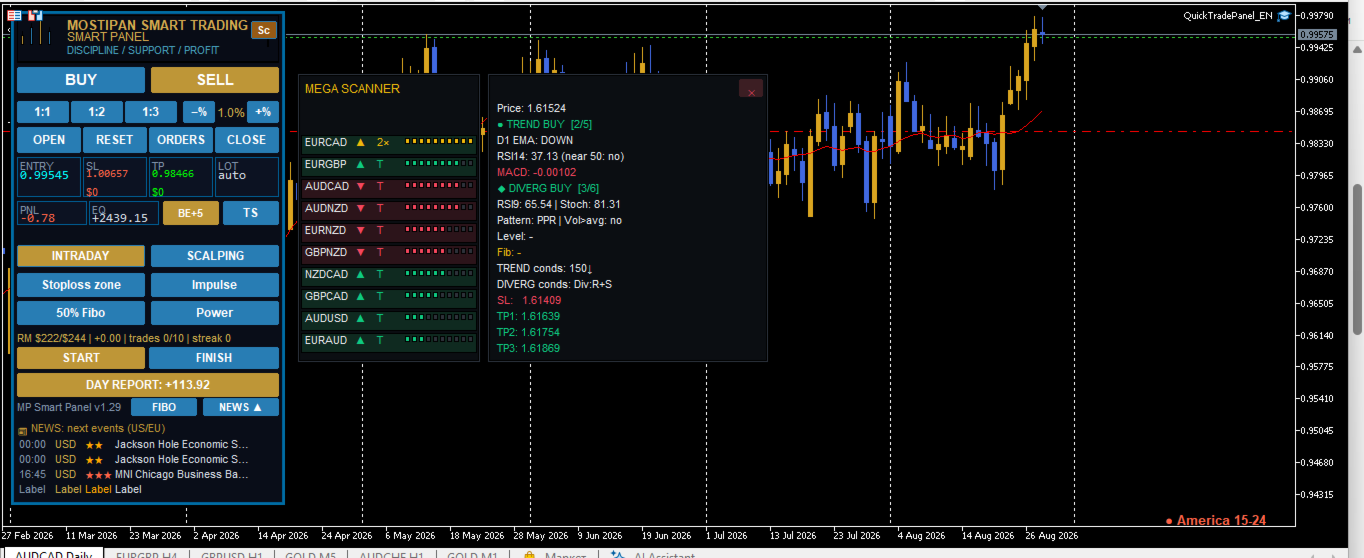
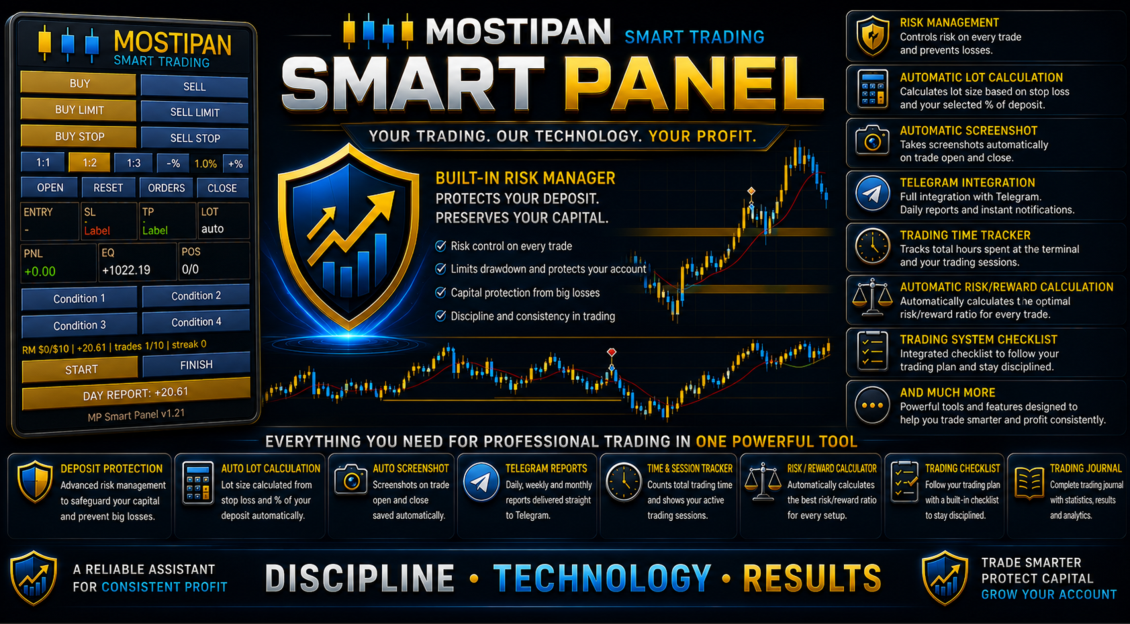
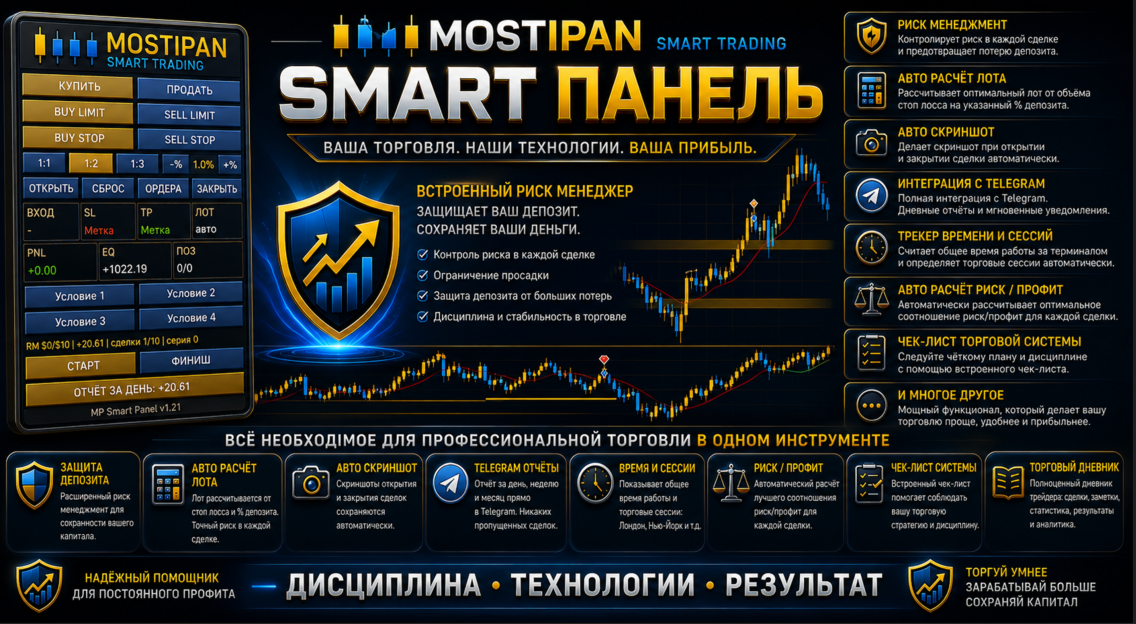
The trading panel includes a Risk Manager with trade blocking when the daily risk limit is exceeded, a trading system with checklists and templates, all types of orders, break-even, one-click trailing stop, Fibonacci levels, news, and full Telegram integration

MPSmartPanel is a compact trading panel for MetaTrader 5 that combines the convenience and efficiency of manual trading with strict discipline and full risk control. The panel protects your deposit from losses and helps you trade consciously, following your own system.

✅ Trading-system checklist (program-controlled)

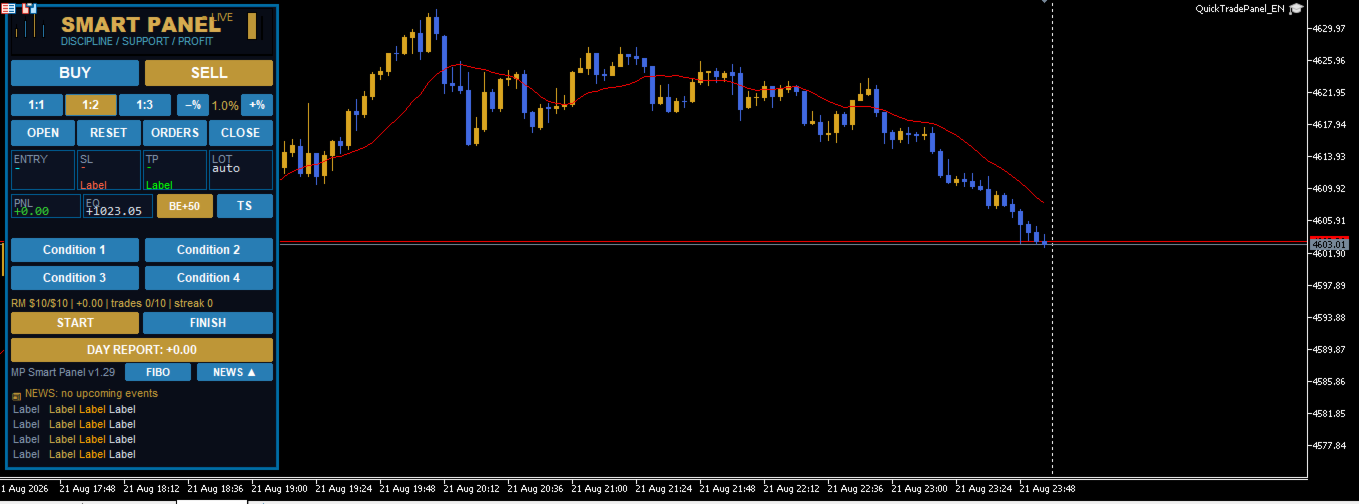
You fill in your own checklist yourself (4 condition tiles, e.g.: trend, news, pattern, signal), and the panel automatically controls it before every trade — unless all conditions are confirmed, you cannot open a position. This eliminates impulsive and random trades.

🛡️ Risk Manager — deposit protection

The built-in Risk Manager automatically blocks new trades when at least one condition is breached:

  • 📉 Daily loss reached the set limit (e.g. $500)
  • 📈 Daily profit reached the target level
  • 🔢 Daily number of trades exceeded the limit (e.g. 10)
  • ❌ Consecutive losses exceeded the allowed limit (e.g. 3)
  • 💰 Total daily risk of open trades exceeded the limit (daily risk limit)

It also keeps daily risk accounting: the panel shows how much risk has been used and how much is left, preventing you from exceeding the set limit.

⏱️ Time and trading-session control

The built-in trading timer (START/FINISH buttons) records your working time, automatically distributes it across trading sessions (Asia, Europe, America) and provides reports and progress monitoring — so you can see how long and how efficiently you trade.

📊 Daily risk report

The panel generates a daily report of used risk volume, number of trades and day results — so you always know how well you follow your limits.

📱 Telegram integration and full reporting

Built-in Telegram integration provides full reports on every trade (open, close, SL/TP, PnL), screenshots, START/FINISH messages, daily reports — and the ability to send trading signals directly to a chat/channel.

⚡ Efficient one-click trading

  • BUY / SELL / LIMIT / STOP with a single touch
  • Automatic lot calculation from the stop (fixed amount or % of balance)
  • RR 1:1 / 1:2 / 1:3 ratio
  • Draggable Entry / SL / TP lines

All this makes MPSmartPanel a convenient and effective tool that controls risk, disciplines trading and preserves your deposit.

🚀 Quick Start

  1. Attach the Expert Advisor to any symbol chart (currency, gold, indices, etc.).
  2. Configure the main inputs in the "Inputs" tab (see "Settings" section).
  3. The panel appears in the upper-left corner of the chart.
  4. Choose direction — press BUY / SELL / LIMIT / STOP button.
  5. Drag the lines Entry, SL, TP to the desired levels.
  6. Complete the checklist — press all 4 condition tiles (see "Checklist" section).
  7. Press OPEN — the trade is opened with automatic lot calculation.

🎛️ Settings (Inputs)

📊 "Trading" section

Parameter Type Default Description
InpMagic int 20260815 Unique magic number of panel trades
InpDefaultLots double 0.01 Base lot (if auto lot is disabled)
InpDefSL double 45.0 Initial SL/TP distance from entry (in points)
InpEntryPts int 20 Initial entry distance for limit/stop orders
InpDefRR double 2.0 Risk/reward ratio (1:1 / 1:2 / 1:3)
InpDeviation int 20 Maximum price slippage (points)
InpTheme string "dark" Panel theme:  dark  or  light
InpLang string "EN" Panel language:  UA  /  EN  /  RU

💰 "Risk (auto lot)" section

Parameter Type Default Description
InpRiskMoney double 50.0 Risk per trade, $
InpRiskPercent double 1.0 Risk, % of balance

🛡️ "Risk Manager" section

Parameter Type Default Description
InpRM_Enabled bool true Enable risk manager
InpRM_MaxDailyLoss double 500.0 Condition 1: max daily loss, $ (0 = off)
InpRM_MaxDailyProfit double 0.0 Condition 2: max daily profit, $ (0 = off)
InpRM_MaxTradesDay int 10 Condition 3: max trades per day (0 = no limit)
InpRM_MaxConsLoss int 3 Condition 4: max consecutive losses (0 = off)
InpRM_DayRiskMoney double 300.0 Max daily risk cap, $ (0 = no cap)
InpRM_DayRiskPct double 0.0 Daily risk, % of balance (0 = like trade risk)
InpRM_ResetDay bool false Reset day now (set true and press OK)

📱 "Telegram" section

Parameter Type Default Description
InpTG_Enabled bool false Send to Telegram (screenshots + text)
InpTG_Token string "" Bot token (from BotFather)
InpTG_ChatID string "" Channel ID (e.g. @channel or -100...)
InpStartMsg string ... START button text (empty = panel language)
InpFinishMsg string ... FINISH button text (empty = panel language)

🔑 "License" section

Parameter Type Default Description
InpLicKey string "" License key/password (provided separately)

✅ "Condition Buttons" section (checklist)

Parameter Type Default Description
InpCondEnabled bool true Enable checklist (4 condition tiles)
InpCond1 string "Condition 1" Tile 1 label (editable)
InpCond2 string "Condition 2" Tile 2 label (editable)
InpCond3 string "Condition 3" Tile 3 label (editable)
InpCond4 string "Condition 4" Tile 4 label (editable)

✅ Checklist — Trading Discipline

What is it for?

MPSmartPanel is designed primarily for trader self-discipline. Successful trading is not just pressing buttons, but strictly following your own trading system. To avoid opening trades on emotions or gut feeling, the panel forces you to go through all the steps of your strategy before each trade.

The 4 condition tiles are a kind of checklist of your trading system. They remind you of the key points of your strategy that you must verify before opening a position.

How they work

  • The panel has 4 tiles (buttons) placed in one row:  Condition 1 ,  Condition 2 ,  Condition 3 ,  Condition 4 .
  • Initially the tiles are gray (not pressed).
  • After pressing, a tile turns green and a checkmark ✅ appears before its label.
  • The trade is BLOCKED until you press all 4 tiles at the same time.
  • The OPEN button turns green only when all conditions are met and the trade is ready.
  • After a successful trade opening, all tiles are automatically reset (turn gray), so before the next trade you go through the checklist again.

Usage example

You can configure the tiles to match your trading system, for example:

Tile Example label What you verify
1 Trend Confidence in the trend direction
2 Level Confirmation of a key level/zone
3 Risk Risk matches your rules (RR, % of deposit)
4 Signal Your strategy signal is present

How to edit the tile labels

Tile labels are entirely up to you. You edit them in the Expert Advisor settings:

  1. Open the Expert Advisor properties (double-click the EA in the Navigator, or press  F7  on the chart).
  2. Go to the "Inputs" tab.
  3. Find the Condition Buttons section.
  4. Change the fields:
    • InpCond1  — label of tile 1
    • InpCond2  — label of tile 2
    • InpCond3  — label of tile 3
    • InpCond4  — label of tile 4
  5. Enter your own text (for example: "Trend", "News", "Risk 1%", "Signal").
  6. Press OK — the labels on the panel update.

💡 If the field is left empty, the tile shows the automatic  Condition N  label in the panel language.

⏱ Trading Time Control (START / FINISH)

What is it for?

One of the key aspects of self-discipline is controlling the time spent trading. The panel helps you track how much time you actually spend trading and structures it by trading sessions.

How it works

  • START button — starts the work timer. Press it when you sit down to trade.
  • FINISH button — stops the timer. Press it when you end your trading session.
  • The time between START and FINISH is added to the daily work-time accounting.

Time distribution by sessions

The time elapsed between START and FINISH is automatically distributed across trading sessions:

Session Time window
🌏 Asia 00:00 – 07:00
🌍 Europe 07:00 – 13:00
🌎 America 13:00 – 24:00

So if you traded from 08:00 to 11:00, this time is counted in the Europe session. If a trading session spans several time zones, the time is distributed across the corresponding sessions automatically.

Where to see the result

Press the DAY REPORT button — the report shows:

  • ⏱ Work — total trading time for the day
  • breakdown by sessions: Asia | Europe | America
  • list of closed trades and total PnL

💡 If you pressed START but forgot to press FINISH — time is only added up to the moment the session ends. Always finish your work with the FINISH button so the time accounting is accurate.

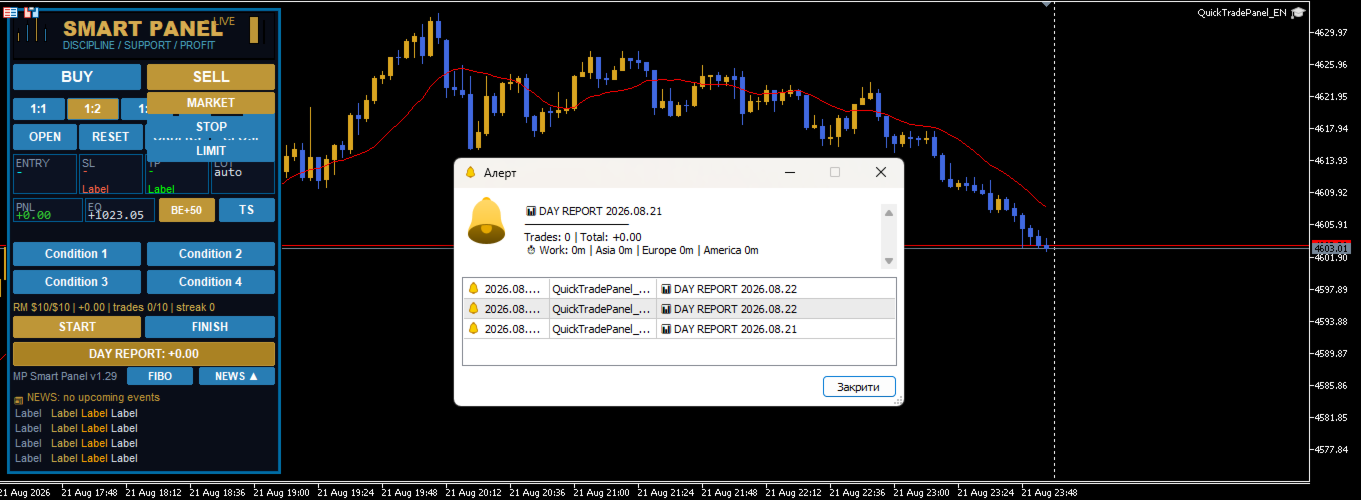
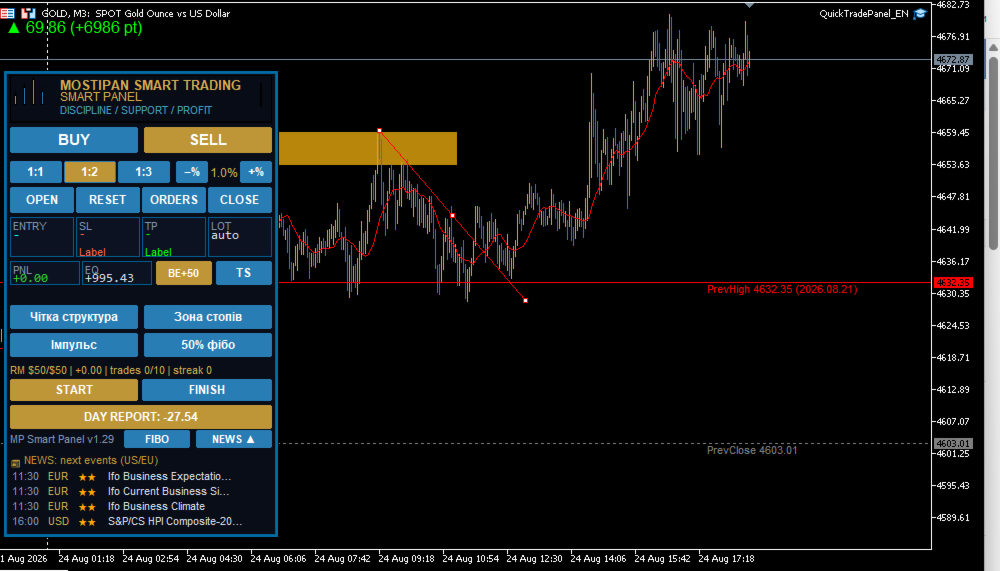
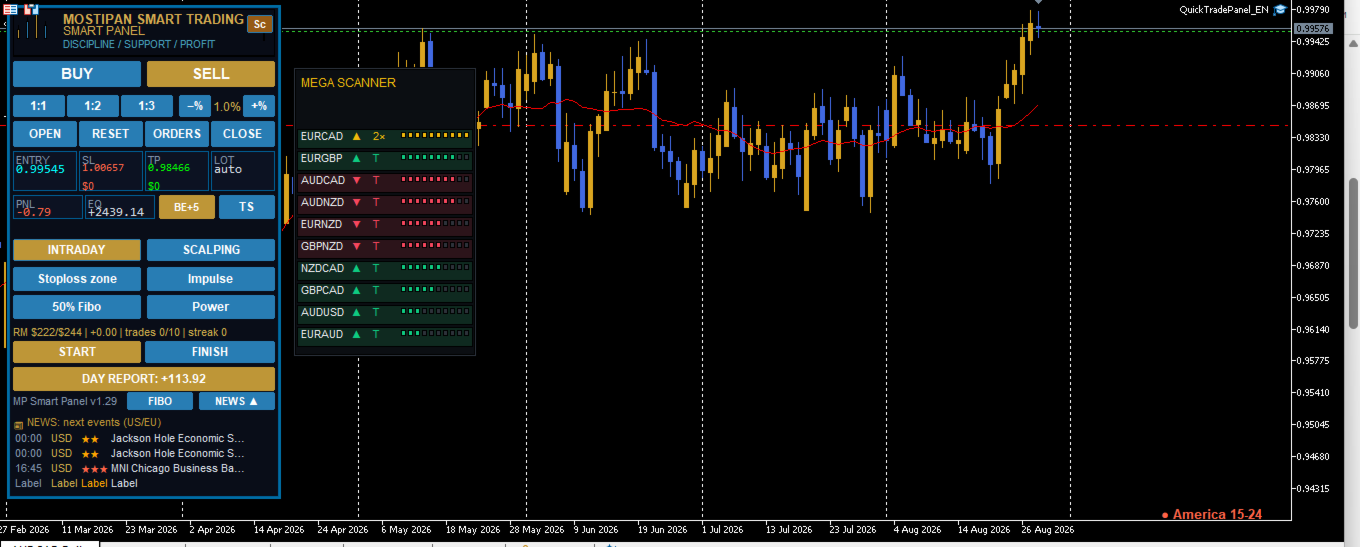
🖥️ Panel elements

Logo

At the top of the panel, the MOSTIPAN / SMART TRADING logo is displayed in the "candles in M shape" style.

Trading buttons

Button Action
BUY Prepares opening a buy at market price
SELL Prepares opening a sell at market price
BUY LIMIT Prepares a buy limit order (below price)
SELL LIMIT Prepares a sell limit order (above price)
BUY STOP Prepares a buy stop order (above price)
SELL STOP Prepares a sell stop order (below price)

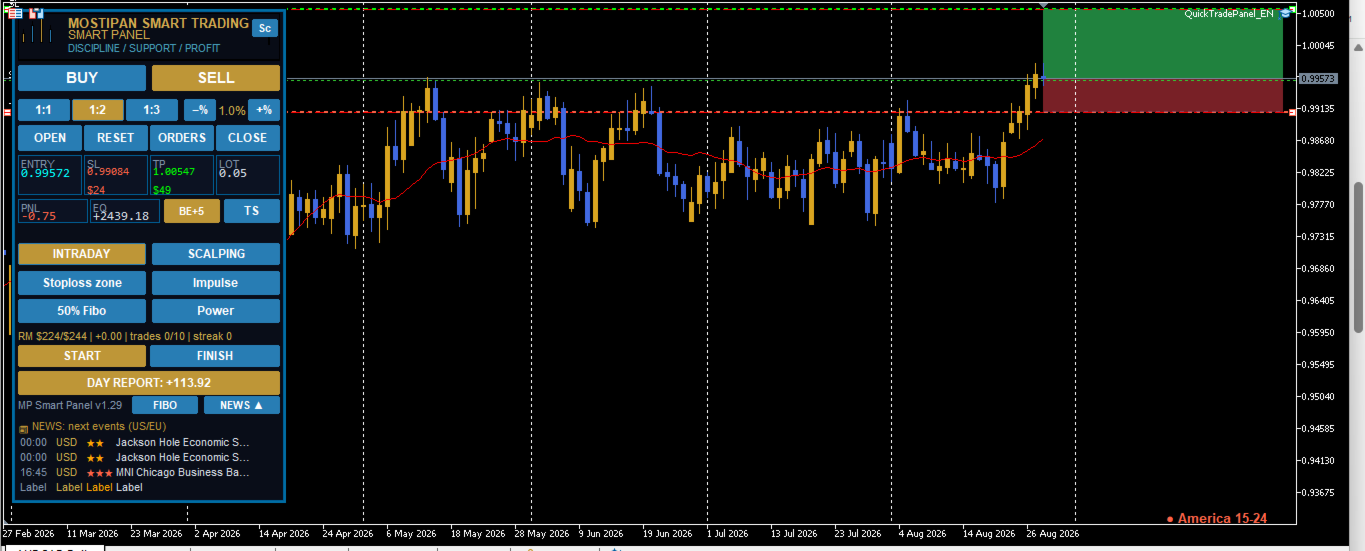
RR ratios (risk/reward)

Button Value Description
1:1 1.0 TP equals the distance to SL
1:2 2.0 TP is twice the distance to SL
1:3 3.0 TP is three times the distance to SL

Manually dragging the TP line turns off RR (value becomes 0). To restore, press the RR button again.

Risk (%)

  • −% — decrease risk by 0.2%
  • +% — increase risk by 0.2%
  • Range: 0.2% – 10%

Actions

Button Action
OPEN Opens the trade/order (green button = everything ready and checklist completed)
RESET Cancels the preparation, hides lines
CLOSE Closes all panel positions
DEL ORD Deletes all panel pending orders

Information fields (tiles)

Field Description
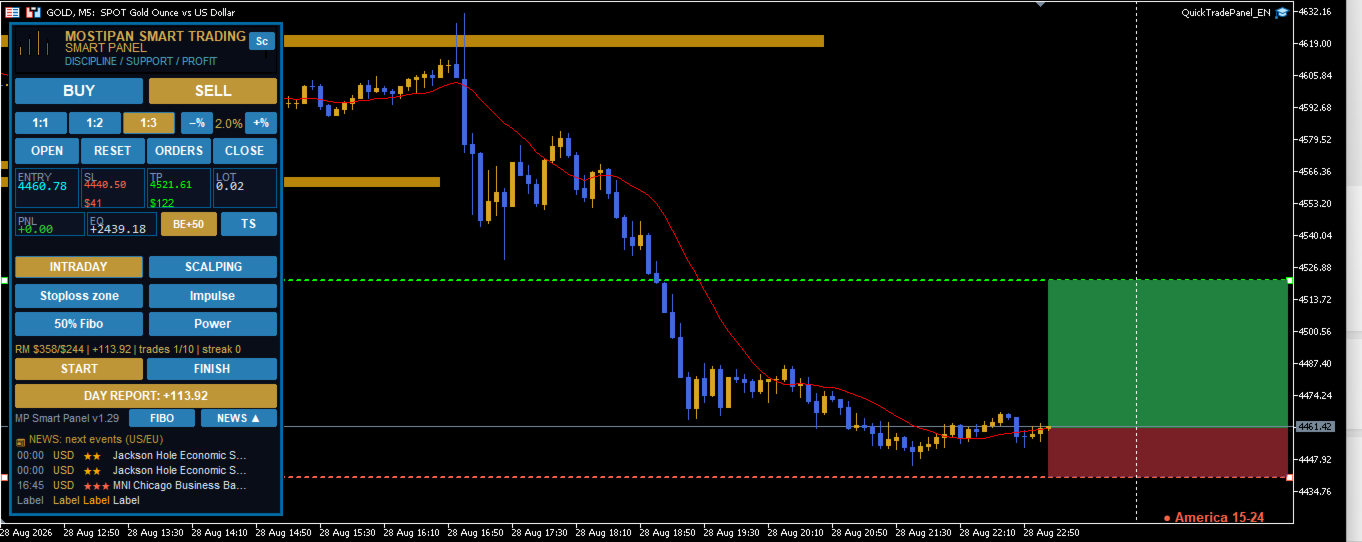
ENTRY Entry price
SL Stop loss price (+ risk amount in $)
TP Take profit price (+ profit amount in $)
LOT Calculated order volume (auto/manual)
PNL Total profit/loss of open positions
EQ Current equity (balance + floating profit)
POS Number of positions / orders

DAY REPORT

Shows daily report: list of closed trades, total PnL, trade count and work time by sessions.

Version

At the bottom of the panel — MP Smart Panel v1.21.

🎯 Chart lines

When a direction is selected, 3 dashed lines appear on the chart:

Line Color Draggable
Entry Blue Yes
SL Red Yes
TP Green Yes

Dragging behavior:

  • Dragging Entry → SL and TP move together (distances preserved)
  • Dragging SL → TP is recalculated by the selected RR
  • Dragging TP manually → RR is turned off

🧮 Automatic lot calculation

Lot is calculated by the formula:

Lot = Risk ($) / (Distance to SL × Contract size)

  • Risk is taken from  InpRiskMoney  (if > 0) or  InpRiskPercent  of balance
  • Lot is rounded by broker volume step and limited to min/max values

🛡️ Risk manager logic

Blocks new trades if at least one condition is met:

  1. Daily loss ≤  InpRM_MaxDailyLoss
  2. Daily profit ≥  InpRM_MaxDailyProfit
  3. Number of trades per day ≥  InpRM_MaxTradesDay
  4. Consecutive losses ≥  InpRM_MaxConsLoss

Separately — daily risk limit ( InpRM_DayRiskMoney  or % of balance): if the total risk of open trades exceeds the limit, new trades are blocked.

📱 Telegram notifications

When  InpTG_Enabled  is on and token/chat are correct, the panel sends:

  • 🟢 Position opening (type, volume, symbol, price, SL, TP)
  • 🔴 Position closing (type, symbol, close price, PnL, reason: SL/TP/manual)
  • 📌 Pending order placement
  • 📷 Screenshots of open/close/orders
  • ⏱ START/FINISH messages
  • 📊 Daily report

⚠️ Important: add  https://api.telegram.org  to allowed URLs:  Tools → Options → Expert Advisors → Allow WebRequest for listed URL

⚙️ Notes

  • The panel automatically fits the window height (lower rows always visible)
  • For gold (GOLD/XAU) SL/TP distances are automatically increased ×10
  • All panel chart objects have the  QT_  prefix (Entry, SL, TP, bg, btn...)
  • The panel is designed as a self-discipline tool: the condition checklist and trading time control help you stick to your chosen strategy and avoid impulsive trades
Prodotti consigliati
Account and Market Dashboard
Ezekiel Bronal Nyangweso
Advanced Account Dashboard & Risk Monitor (MT5) This script provides a real-time on-chart dashboard for monitoring account performance, risk exposure, and execution conditions in MetaTrader 5. It is designed for traders who want clear visibility of account health and risk awareness during live trading or VPS operation. The script does not open trades and does not interfere with any strategy logic . Key Features Account Metrics Live equity, balance, and floating profit/loss Open position count an

FREE
Quick Trade Panel Pro
Nicolas Olivier Menetrey
5 (1)
Pannello di trading one-click con gestione automatica del lotto e del rischio Quick Trade Panel Pro è un pannello di trading intuitivo progettato per i trader che vogliono eseguire ordini rapidamente mantenendo il pieno controllo sul rischio. Funzionalità principali Calcolo automatico della dimensione del lotto basato su una percentuale del margine disponibile Stop Loss configurabile in punti, applicato automaticamente a ogni trade Dimensione del lotto bloccata durante una serie di trade per ga
FREE
Core function Intelligent transaction management one-click opening and closing operation, which supports user-defined lots to set multiple closing modes: all closing, closing by direction and closing by profit and loss status. Professional risk control, real-time risk monitoring and spread control to avoid high-cost trading environment. Visual control panel has an intuitive graphical interface, and all functions can be operated with one button to display position information, profit and loss sta
FREE
Trade Panel by RWBTradeLab Trade Panel is an on-chart panel for MetaTrader 5 that places market, pending and straddle orders and manages the open trades of the chart symbol. Overview The panel sits on the chart and has six tabs: Trade, Manage, Settings, Account, Help and About. Every value you set is saved for each symbol, so a chart keeps its own lot, stop loss, take profit and switches after a restart. The panel can be dragged anywhere on the chart and minimised to its title bar. The pane

FREE
NHK Local Time Scale NHK Local Time Scale displays your PC/local time directly on the MT5 chart , alongside the broker's native chart time. The trader can easily compare both time zones for any candle. Benefits for Traders: Quickly convert Broker Time ↔ Local/PC Time . Helps accurately set News Stop/News Filter times. Makes London, New York, Asian and other trading sessions easier to identify in your local time. Helps verify that EA session and news time settings are correct. Reduces mistakes ca
FREE
DDKiller Pro
Njaratahiry Michael Randrianiaina
Stop Blowing Your Account. Once and For All. DDKiller Pro is the MT5 risk guardian that runs silently on your chart and shuts down trading the moment you hit a limit — whether you're grinding a prop firm challenge or managing your own CFD account. The problem every trader knows: You set your rules. You break them anyway. One revenge trade. One overleveraged position. One session that erases a month of gains. DDKiller Pro removes that decision from your hands entirely. What it does: The second yo
Guardian Magic GT
Carlos Eduardo Rivas Istacuy
Guardian Magic GT - Risk Management Expert Advisor for MetaTrader 5 PROTECT YOUR TRADING CAPITAL WITH INTELLIGENT RISK MANAGEMENT Guardian Magic GT is a professional-grade Expert Advisor designed to safeguard your trading operations by implementing sophisticated risk control mechanisms. Whether you run a single bot or manage multiple automated trading systems simultaneously, Guardian Magic GT provides real-time monitoring and automatic position management to ensure your account stays within your
Grid Manager — Manual Multi-Basket Grid Assistant for MT5 Grid Manager is a hands-on control panel for building and managing grid "baskets" directly on your chart. You decide the direction and the moment; the tool opens the grid, manages every leg, and protects the position with money-based risk controls, on-chart breakeven/SL/TP lines, and one-click actions. It is an execution and management assistant — fast, visual, and fully under your control. What it is — and what it is not Grid Manager is
Click Trading
Jawad Tauheed
5 (2)
One Click Trading – Auto TP SL Developer TraderLinkz Version 1.00 Category Utility What it does Adds missing TP and SL to your manual trades and pending orders Sets them once per ticket Lets you move TP and SL afterward Works on hedging and netting accounts Scans on every tick and reacts on trade events Why you want it You place faster entries You get consistent risk and exit targets You reduce fat finger errors You keep full manual control Quick start Attach the EA to any chart Keep TP and SL e

FREE
Global Stop Loss and Take Profit Manager Drag Lines Auto Apply Already using my free Global Stop Loss and Take Profit Setter? This is the always on version. Instead of setting levels once, you drag two lines on the chart and every manual position on that symbol — plus every new one you open — instantly inherits the Stop Loss and Take Profit. No clicking into each order. No forgetting a stop. Global Stop Loss and Target Manager is a drag-and-drop risk tool for manual traders on MetaTrader 5. Pu
Introducing   Order Blocks Breaker , a brand-new way to identify and leverage order blocks in your trading strategy. After developing multiple order block tools with unique concepts, I’m proud to present this tool that takes things to the next level. Unlike previous tools,   Order Blocks Breaker   not only identifies order blocks but also highlights   Breaker Order Blocks —key areas where the price is likely to retest after a breakout. MT4 -  https://www.mql5.com/en/market/product/124101/ This t
Easy and simple tool which close all trades in defined point of time. It can also close all open trades when opened positions reach defined target profit or stop loss. For all pairs, indexes etc. Works with all instruments. All types of orders. All charts. Users inputs: - close time (hour,min,sec) - take profit (in users currency) - stop loss (in users currency) Save & Load settings option. Fast, simple and reliable. Check out other tools provided by our team!


FREE
CosmiCLab SMC FIBO CosmiCLab SMC FIBO is a professional trading indicator designed for traders who use Smart Money Concepts (SMC), market structure analysis and Fibonacci retracement levels. The indicator automatically detects market swings and builds Fibonacci levels based on the latest impulse movement. It also identifies market structure changes such as BOS (Break of Structure) and CHOCH (Change of Character), helping traders understand the current market direction. CosmiCLab SMC FIBO also pr
FX Info Spread MT5
Pedro Fernandez
3 (1)
Minimalist and fully customizable info panel. It works on any chart and timeframe, with 2 - 4 digits brokers and with 3 - 5 digits ones. It can show: Current Spread in pips (1 decimal digit if you are on a 3 - 5 digits broker) ATR (Average True Range) in pips Current Server Time Current GMT Time Important Account Info: Current Leverage and Stop-out Level (%) Time left for the current bar. Very useful on 4 h charts All info labels have a tooltip with the same data Available customizations : Ena
FREE
* This product was converted using  "BRiCK Convert4To5 MT 5 "  based on the MQL4 source file of  "BRiCK TradeByArrow MT4 Free" . BRiCK is a simple and versatile utility.   By combining Experts, Indicators and utilities like the Lego block, various trading styles can be realized. "TradeByArrow" is Utility that executes order processing when an arrow object is created on the chart. Combined with Indicator which outputs arrow object, it can be used like Expert. Parameter [ArrowName] EntryBuy: A
FREE
Questo EA è utilizzato principalmente per lo scalping su XAUUSD. Scopo   Rimuove l’emozione dalla gestione delle operazioni — protegge automaticamente le posizioni e prende profitto così non devi prendere decisioni difficili sotto pressione. Cosa fa   ️ Stop Loss automatico   Imposta SL basandosi su recenti massimi/minimi + buffer   Niente più stress per la collocazione manuale   Profitti parziali automatici   Due modalità:   Movimento fisso: chiude il 50% dopo uno spostamento di prezzo
Breakeven Bot
Gabriel Paul Ange Perrin
Optimize your trading management with Breakeven Bot, the essential tool for active traders managing multiple positions at once. No more wasting time manually adjusting your stops—one click is all it takes to secure your profits! Main Feature: ️ "BREAKEVEN" Button – Instantly set all profitable positions to breakeven and protect your gains quickly. ️ Customization Options: Set breakeven in pips or currency, depending on your preference. Choose whether breakeven should be at the entr
FREE
Clean Pending Orders
Oleksandr Kashyrnyi
Clean Pending Orders Elimina tutti gli ordini pendenti sul simbolo corrente in pochi secondi! Questo script semplice ma efficace è progettato per i trader che apprezzano velocità e praticità. Basta eseguirlo e eliminerà immediatamente tutti gli ordini pendenti di acquisto e vendita sul simbolo corrente. Vantaggi: Eliminazione immediata: Tutti gli ordini vengono eliminati in pochi secondi. Focus solo sul simbolo corrente: Gli altri strumenti non vengono toccati. Facilità d'uso: Un clic e il term
FREE
When executing an order, whether through the Metatrader ticket on a computer or the Metatrader app on a mobile device, either manual or pending, Easy Trade will automatically set the take profit and stop loss levels, as well as a limit order with its respective take profit and stop loss levels. It follows the trading strategy for market open (US30, US100, US500), but it can be applied to any market asset.
GDS RiskLab TradeDesk Free Manual Trading Desk and Risk-Control Utility for MetaTrader 5 GDS RiskLab TradeDesk is a free chart-based utility for traders who want a cleaner manual trading workspace in MetaTrader 5. It is designed as a simple execution-support and risk-control panel. The goal is to keep the trading process more organized: review the chart, plan the trade, keep risk visible and execute manually with more structure. This tool does not generate buy or sell signals. It does not predic
FREE
Lot by Risk MT5
Sergey Vasilev
4.88 (16)
Il pannello di trading Lot by Risk è progettato per il trading manuale. È un mezzo alternativo per inviare ordini. La prima caratteristica del pannello è la comoda emissione di ordini utilizzando linee di controllo. La seconda caratteristica è il calcolo del volume della transazione per un determinato rischio in presenza di una linea stop loss. Le linee di controllo sono impostate utilizzando i tasti di scelta rapida: take profit-tasto T predefinito; price-tasto P predefinito; stop loss-tasto
FREE
Equity monitor
Vasiliy Pritchin
Equity monitor This is a simple means change informer. I wrote it for myself, maybe someone will need it... 1. Displays the change in funds for the day. Every day, when the terminal is first launched, it remembers the current funds and monitors changes throughout the day. 2. The first day of the month, well remembers the money and, within months, to monitor changes. 3. Well, it displays the profit of the open position. To work, you need to create 4 global variables: gvarEqityDay , gvarEq
FREE
Risk Manager – Account Protection Tool Risk Manager is an Expert Advisor for MetaTrader 5 designed to protect your trading account by applying automatic risk management rules. This tool does not open trades . It continuously monitors your account and enforces predefined limits to help prevent excessive losses and maintain disciplined trading. Risk Manager works in the background and can manage positions opened by manual trading or other Expert Advisors. It is particularly useful for: • Manual tr
FREE
Gerenciador de ordens manuais
Rodrigo Oliveira Malaquias
Robot Manual Order Manager is a tool that allows you to automatically include Stop Loss, Breakeven, Take Profit and partials in open trades. Be it a market order or a limit order. Besides, it automatically conducts your trade, moving your stop or ending trades, according to the parameters you choose. To make your operations more effective, the Manual Orders Manager Robot has several indicators that can be configured to work on your trade. Among the options you can count on the features: Conducti
Important! Demo version will work only on EURGBP. One Click Trader  is a tool designed for MetaTrader 4 platform, which enables you to take your trading to the next level. It enables you to open, manage and close your trades in simple an efficient way by just one click of your mouse button. "-"   ,  "+"  change OCT window size  Up arrow minimizes the OCT panel Down arrow maximizes the OCT panel Right arrow displays the next panel with additional features Left arrow hides the panel with additiona
FREE
Total Trade Manager SL BE TP
Izzet Deniz Erpolat
3 (2)
Total trade manager allows you to manage your trade to maximise your profits and minimise your losses. This is an essential for traders that are looking for consistency within their trading.  The features: Partial Stop Loss: This feature allows you to close a partial percentage of your trade once it goes into negative. So if your stop loss is 20 pips, you could close 75% of your trade at 10 pips and let the remainder of the position to continue running. Auto Stop Loss: This means that once you p
Equitypanel
Timo Mario Hoffmann
5 (1)
Equity Panel for MT5 Equity Panel is a free MT5 indicator that gives you a fast and convenient live overview of your account directly from the chart. Monitor balance, equity, floating P/L, drawdown, daily performance, margin data, and warning levels in one compact dashboard. Built for traders who want better control, faster risk awareness, and clearer account monitoring in live market conditions. Equity Panel is a lightweight and practical account monitoring indicator for MetaTrader 5 that helps
FREE
Symbol Manager for MT5
Taras Slobodyanik
5 (3)
Symbol Manager or Grid Manager, designed to group orders into one position (by Symbol or by Magic Number). This utility will be useful to multi-currency traders (many EAs), who can have multiple orders on several pairs. You will be able to see the total number of lots, the total profit, and set virtual stop loss and virtual take profit. To set a real TP (or SL), you must first set the virtual value, and then enter the command in this cell: "set". If you want to set real TP/SL for all orders at
Gli utenti di questo prodotto hanno anche acquistato
Trade Assistant MT5
Evgeniy Kravchenko
4.43 (216)
It helps to calculate the risk per trade, the easy installation of a new order, order management with partial closing functions, trailing stop of 7 types and other useful functions. Additional materials and instructions Installation instructions - Application instructions - Trial version of the application for a demo account Line function -   shows on the chart the Opening line, Stop Loss, Take Profit. With this function it is easy to set a new order and see its additional characteristics bef
Forex Trade Manager MT5
InvestSoft
4.98 (685)
Benvenuto a Trade Manager EA, lo strumento definitivo per la gestione del rischio , progettato per rendere il trading più intuitivo, preciso ed efficiente. Non è solo uno strumento per l'esecuzione degli ordini, ma una soluzione completa per la pianificazione delle operazioni, la gestione delle posizioni e il controllo del rischio. Che tu sia un principiante, un trader avanzato o uno scalper che necessita di esecuzioni rapide, Trade Manager EA si adatta alle tue esigenze, offrendo flessibilità s
================================================================================ POC BREAKOUT - V20.72. Full Professional Grade Toolkit ================================================================================ POC Breakout is a full MetaTrader 5 trading dashboard for discretionary traders who want breakout signals, Point of Control (POC) context, volume profiles, order flow, market structure, news, alerts, and advanced trade planning in one professional workspace. Attached directly to you
Telegram to MT5 MultiChannel Copier
Sergio Marquez Uroz
4.61 (18)
Telegram to MT5 Multi-Channel Copier   copia automaticamente i segnali di trading dai tuoi canali Telegram direttamente su MetaTrader 5. Niente bot, niente estensioni del browser, niente copia manuale. Il segnale arriva su Telegram e l'EA apre l'operazione nel tuo terminale in pochi secondi. E prima di copiare un canale, il backtester integrato ti mostra cosa avrebbe fatto quel canale sul tuo conto. Il prodotto include due componenti: un'applicazione Windows che ascolta i tuoi canali Telegram, e
TradePanel MT5
Alfiya Fazylova
4.88 (170)
Trade Panel è un assistente commerciale multifunzionale. L'applicazione contiene più di 50 funzioni di trading per il trading manuale e permette di automatizzare la maggior parte delle attività commerciali. Istruzioni per l'applicazione: https://www.mql5.com/it/blogs/post/762331 Versione di prova dell'applicazione per un conto demo: https://www.mql5.com/it/blogs/post/762419 Come installare l'applicazione: https://www.mql5.com/it/blogs/post/762362 Come testare l'applicazione in modalità visuale:
Copia i segnali Telegram con le tue regole di trading Telegram to MT5 Signal Trader copia automaticamente i segnali di trading testuali dai canali e gruppi Telegram pubblici e privati in MetaTrader 5. Gestisci più fornitori e conti MT5 da un'unica applicazione desktop, con impostazioni di rischio e di trading specifiche per ogni fornitore . Per copiare i segnali non servono bot Telegram né configurazioni API. Accedi semplicemente con il tuo account Telegram tramite numero di telefono o codice QR
Footprint Chart Pro — Professional OrderFlow EA for MetaTrader 5 Version 6.34 | Professional tool for real traders | Institutional-Grade Visualization DEMO USERS - PLEASE SELECT EVERY TICK / REAL TICK WHEN TESTING AND YOU HAVE DOWNLOADED HISTORICAL DATA. IF YOU SEE A WAITING SCREEN AND IT IS NOT DOWNLOADING, IT MEANS YOU HAVE LOW HISTORICAL DATA. TRY 1 MIN AND 5 MIN FIRST ON 1 DAY DATA. ONE DAY DATA SHOULD BE THE NEWEST AND MOST CURRENT DATE. PLEASE WAIT UNTIL THE MARKET HAS ROLLED OVER PERIOD.
Exp COPYLOT CLIENT for MT5
Vladislav Andruschenko
3.97 (35)
Copiatore professionale di trade per MetaTrader 5 Un copiatore di trade veloce, professionale e affidabile per MetaTrader . COPYLOT consente di copiare operazioni Forex tra terminali MT4 e MT5 con supporto per conti Hedge e Netting . La versione MT5 di COPYLOT supporta: - MT5 Hedge → MT5 Hedge - MT5 Hedge → MT5 Netting - MT5 Netting → MT5 Hedge - MT5 Netting → MT5 Netting - MT4 → MT5 Hedge - MT4 → MT5 Netting Versione MT4 Descrizione completa + DEMO + PDF Come acquistare Come installare Come ot
FarmedHedge Pair Trading Dashboard
Tanapisit Tepawarapruek
5 (5)
Farmed Hedge Yield Farming | All Markets (Manual - Hybrid - Semi/Automated EA) VERIFIED TRADING RESULTS - Farmed Hedge Yield Axi Copy:  https://www.mql5.com/en/signals/2356376 - Farmed Hedge Yield Exn Copy:   https://www.mql5.com/en/signals/2356404 - Farmed Hedge Yield V Copy:  https://www.mql5.com/en/signals/2357156 IMPORTANT NOTICE: FarmedHedge is a MANUAL-FOCUSED TRADING UTILITY ,not a fully automated EA. Results shown on this Signal include manual trades and overall strategic management.
Grid Manual MT5
Alfiya Fazylova
4.73 (22)
Grid Manual è un pannello di trading per lavorare con una griglia di ordini. L'utilità è universale, ha impostazioni flessibili e un'interfaccia intuitiva. Funziona con una griglia di ordini non solo nella direzione delle perdite, ma anche nella direzione dell'aumento dei profitti. Il trader non ha bisogno di creare e mantenere una griglia di ordini, lo farà l'utilità. È sufficiente aprire un ordine e il manuale di Grid creerà automaticamente una griglia di ordini per esso e lo accompagnerà fino
Power Candles Strategy Scanner - Strumento di ricerca configurazioni multi-simbolo con ottimizzazione automatica Power Candles Strategy Scanner utilizza lo stesso motore di auto-ottimizzazione che alimenta l'indicatore Power Candles, applicandolo a tutti i simboli presenti nel tuo Market Watch, uno accanto all'altro. Un unico pannello ti indica quali simboli sono statisticamente negoziabili in questo momento, quale strategia è vincente su ciascuno di essi, la coppia ottimale di Stop Loss / Take
HINN MagicEntry Extra
ALGOFLOW OÜ
4.74 (19)
HINN MAGIC ENTRY – the ultimate tool for entry and position management! SIMPLE. FASTEST. INTUITIVE. MAX AUTOMATED. Place orders by selecting a level directly on the chart! full description   ::  demo-version  :: 60-sec-video-description Key features: - Market, limit, and pending orders - Automatic lot size calculation - Automatic spread and commission accounting - Unlimited partitial take-profits  - Breakeven and trailing stop-loss and take-profit  functions - Invalidation leves - Intuitive, a
MT5 to Telegram Signal Provider è un'utilità facile da usare e completamente personalizzabile che consente l'invio di segnali specificati a una chat, canale o gruppo Telegram, rendendo il tuo account un fornitore di segnali. A differenza della maggior parte dei prodotti concorrenti, non utilizza importazioni DLL. [ Dimostrativo ] [ Manuale ] [ Versione MT4 ] [ Versione Discord ] [ Canale Telegram ]  New: [ Telegram To MT5 ] Configurazione Una guida utente passo-passo è disponibile. Nessuna cono
Anchor Trade Manager
Kalinskie Gilliam
5 (9)
Your EAs cannot see each other, but Anchor can. Anchor gives you one place to coordinate your EAs, manage risk, and decide when trading is allowed. It works alongside the trading bots you already use without any changes to them. The Problem One EA opens a trade. Then another starts trading. The next thing you know, you wake up to multiple grids built across your account. Each EA may be doing exactly what it was designed to do, but together they can place far more risk on your account than you in
Copy your MT5 trades to Interactive Brokers You keep using MT5. Every order you open or close is sent to your IB account. In real time. No coding. No changes to your strategy or EA. Try it first Rent 1 month: $30. Test on a live or paper account. What it does Real-time copying: same direction, reverse, or one side only. Map any MT5 symbol to any IB symbol. Set a lot ratio for each. Forex, Futures, Stocks, CFDs, Metals and Crypto. Position sync: both accounts checked, any difference fixed. Optio
Signal Trading View to MT5 Pro
Mirel Daniel Gheonu
4.5 (2)
Signal TradingView to MT5 Pro Automator Esecuzione professionale istantanea tra TradingView e MetaTrader 5 Automatizza la tua strategia di trading con il ponte di comunicazione più robusto tra gli alert di TradingView e l'esecuzione reale in MT5. Progettato per i trader che richiedono velocità, flessibilità e una gestione del rischio impeccabile, questo Expert Advisor trasforma qualsiasi messaggio di avviso in un preciso ordine a mercato o limite. PUNTI DI FORZA E VANTAGGI Motore di Parsing Univ
The News Filter MT5
Leolouiski Gan
4.78 (23)
Questo prodotto filtra tutti gli esperti consulenti e i grafici manuali durante il periodo delle notizie, così non dovrai preoccuparti di improvvisi picchi di prezzo che potrebbero distruggere le tue impostazioni di trading manuali o le negoziazioni effettuate da altri esperti consulenti. Questo prodotto viene fornito anche con un sistema completo di gestione degli ordini che può gestire le tue posizioni aperte e gli ordini in sospeso prima della pubblicazione di qualsiasi notizia. Una volta che
Trade Copier Ultimate
Janitha Sandaruwan Amaradasa Wickramasingha Arachchilage
5 (5)
Trade Copier Ultimate - Telegram to MT5 Signal Copier Trade Copier Ultimate automatically copies Telegram trading signals into MetaTrader 5. The EA can read signal messages, detect the symbol, order type, entry price, Stop Loss, Take Profit levels and selected update commands, then execute or manage the trade in MT5 using your lot and risk settings. It is more than a basic Telegram to MT5 copier. TCU also supports Bot API and user-account Bridge workflows, Discord signal routing, local MT5 to MT
Welcome to ENTRY IN THE ZONE AND SMC MULTI TIMEFRAME  SPECIAL BENEFIT FOR OUR MQL5 CUSTOMERS  FREE ACCESS TO THE NEW TOOL —COMING SOON —   Learn More on Our Official Website : https://www.fableedge.net Entry In The Zone and SMC Multi Timeframe is a real-time market analysis tool based on Smart Money Concepts (SMC), designed to analyze market structure, price direction, and key trading zones. It supports both Single-Timeframe Analysis and Multi-Timeframe Analysis, providing a clearer view of the
Continua a usare l'indicatore di cui ti fidi. Automatizza il lavoro che gli sta intorno. Hai già un indicatore MT5 di cui ti fidi, ma devi ancora controllare il grafico, attendere un segnale, calcolare i lotti, inviare l'ordine e gestire manualmente ogni posizione? Stratiora Signal Engine MT5 collega queste attività. Può trasformare i segnali Buy e Sell dei buffer compatibili in un flusso automatizzato completo: ingresso, calcolo del volume, Stop Loss, Take Profit, filtri, gestione delle posizi
Premium Trade Manager - Il pannello di trading con un coach integrato Premium Trade Manager porta un coach di trading direttamente nel tuo grafico, con un motore di esecuzione completo al di sotto. Imposta il trade come fai sempre, poi lascia che Max, il tuo coach di trading IA, legga esattamente quel setup rispetto al tuo conto live e ti dia un verdetto chiaro prima che tu confermi: lo stop rispetta un approccio disciplinato, il rischio è ragionevole, c'è un evento ad alto impatto tra pochi min
YuClusters
Yury Kulikov
4.93 (43)
Attention: You can view the program operation in the free version  YuClusters DEMO .  YuClusters is a professional market analysis system. The trader has unique opportunities to analyze the flow of orders, trade volumes, price movements using various charts, profiles, indicators, and graphical objects. YuClusters operates on data based on Time&Sales or ticks information, depending on what is available in the quotes of a financial instrument. YuClusters allows you to build graphs by combining da
EA Overfitter
Stephen J Martret
5 (1)
That backtest looks great. But will it still be making money tomorrow, next week, next month? EA Overfitter re-runs your EA on 100 price histories it has never seen. One score tells you if the edge is real. A backtest tells you what an EA did on one price history — the one that happened to occur. What you cannot tell from it is how much of that result was the strategy and how much was the particular path. EA Overfitter answers that. It builds up to 100 synthetic price histories your EA has n
Trade Indicator Assistant   is a powerful MT5 utility designed to turn indicators into automated trading systems. Its main feature is the ability to automatically detect an indicator’s   BUY and SELL signal buffers , without requiring you to know the buffer numbers, search through indicator settings, or modify the indicator source code. Bonus Indicator:   After purchasing Trade Indicator Assistant, contact me to receive   Trade Signal Pro   completely free as a bonus indicator. [Download Demo V
Quant Panel
Kevin Craig E Gittins
QUANT PANEL Independent per-algo analytics, protected MT5 history and professional PDF reporting Quant Panel is built for traders who run several Expert Advisors or strategies on one MT5 account and need to know how each algo is actually performing. Instead of treating the terminal as one combined portfolio, Quant Panel groups closed positions by EA comment or magic number and calculates every strategy independently. It gives you one clear dashboard for comparing algos, finding weak systems and
Trade Dashboard MT5
Fatemeh Ameri
4.94 (135)
Trade Dashboard simplifies how you open, manage, and control your trades, with built-in lot size calculation. It allows you to execute trades, manage risk, and control positions directly on the chart, with tools such as partial close, breakeven, and trailing stop. Designed to reduce manual work and help you stay focused on your trading decisions. A demo version is available for testing. Detailed explanations of features are provided within the MQL5 platform. Installation instructions are include
VirtualTradePad One Click Trading Panel
Vladislav Andruschenko
4.59 (74)
Pannello di trading per MetaTrader 5 — controllo professionale del trading in un clic dal grafico e dalla tastiera Un pannello di trading avanzato progettato per trader attivi, pensato per aprire, gestire e chiudere operazioni molto più velocemente rispetto all’interfaccia standard di MetaTrader. Questa soluzione è dedicata a chi desidera controllare posizioni, ordini pendenti, profitto totale ed esecuzione da un unico spazio di lavoro professionale. Non si tratta di un semplice utilitario. È u
Smart Stop Scanner – Analisi multi-asset degli stop-loss basata sulla reale struttura di mercato Panoramica Smart Stop Scanner offre un monitoraggio professionale dei livelli di stop-loss su più mercati. Il sistema identifica automaticamente le zone di stop più rilevanti basandosi sulla reale struttura di mercato, sulle rotture significative e sulla logica del price action, presentando tutte le informazioni in un pannello chiaro, coerente e ottimizzato per schermi ad alta risoluzione (DPI-awar
Binance Quotes Updater
Andrey Khatimlianskii
5 (1)
This service is designed to stream online cryptocurrency quotes   from the Binance exchange to your MetaTrader 5 terminal. You will find it perfectly suitable if you want to see the quotes of cryptocurrencies in real time — in the Market watch window and on the MetaTrader 5 charts. After running the service, you will have fully featured and automatically updated  cryptocurrency charts in your MetaTrader 5. You can apply templates, color schemes, technical indicators and any non-trading tools to
DrawDown Limiter
Haidar Lionel Haj Ali
5 (23)
DrawDown Limiter v5.0 — Controller avanzato per la protezione del conto DrawDown Limiter v5.0 è un controller di protezione del conto lato client, progettato per monitorare il tuo conto di trading e reagire automaticamente quando vengono raggiunti i limiti configurati relativi a rischio, profitto, notizie, pianificazione, rollover o numero di posizioni. Può monitorare operazioni manuali, strategie automatizzate, più Expert Advisor, ordini pendenti e posizioni aperte da un unico grafico dedicato.
Altri dall’autore
MP Trend Scanner
Pavlo Mostipan
5 (1)
TREND SCANNER Stay With the Trend. Trade With Confidence. Trend Scanner analyzes the market to determine trend direction and strength using a combination of technical indicators. The system combines EMA 150/365, EMA 9/21, RSI, MA to confirm market direction and filter out weak or sideways conditions. Key Features: Bullish and bearish trend detection; EMA 150/365 and EMA 9/21 analysis; RSI confirmation; MACD momentum analysis; ️ ADX ranging-market filter; Trend strength measur
FREE
MP Smart Panel Tester
Pavlo Mostipan
5 (1)
️ SMART PANEL TESTER — TESTA LA TUA STRATEGIA. CONTROLLA IL TUO RISCHIO. SMART PANEL TESTER è una versione semplificata del SMART PANEL principale, progettata appositamente per testare strategie di trading in modo pratico ed efficiente nello Strategy Tester . L'obiettivo principale del pannello è il Risk Management . Una strategia di trading non dipende solo da buoni punti di ingresso: le sue prestazioni nel lungo periodo dipendono anche da quanto efficacemente viene controllato il rischio in
FREE
MPDirection Strength
Pavlo Mostipan
5 (1)
DIRECTION STRENGTH is an indicator designed to analyze the current market movement. It helps you understand not only where the price is moving , but also how strong the movement is, how long the current series has lasted, and how likely it is to continue based on historical matches. What do you see on one screen? DIRECTION → where the market is moving STRENGTH 0–100 → how strong the movement is SERIES → how many candles the movement has continued TIME → how long the current series has lasted H
FREE
MP Risk Manager
Pavlo Mostipan
5 (1)
️ RISK MANAGER — Risk Management Indicator Indicator version:   1.70 ·   Style:   QuikTrade ·   Position:   bottom-left corner of the chart 1. What it is Risk Manager   is an informational indicator for MetaTrader 5 that shows the   daily risk budget   in real time and helps calculate the   recommended lot , taking into account: risk per single trade (% of balance); daily risk (% of balance); losses and profits already realized today; risk of open positions (based on their Stop Loss); distance
FREE
MP Divergence Scanner
Pavlo Mostipan
5 (1)
DIVERGENCE SCANNER Find Divergences Faster. See What Others May Miss. Divergence Scanner is a specialized tool designed to automatically identify potential divergences across multiple trading instruments. It analyzes Stochastic and RSI , detects bullish and bearish divergences, and presents the results in a clear, structured table. Key Features: Automatic divergence detection; Stochastic analysis; RSI analysis; Bullish divergences; Bearish divergences; MOSTIPAN SMART TRADING
FREE
MP MegaScanner
Pavlo Mostipan
MegaScanner — see the market with two eyes A universal multi-symbol scanner that combines two analytical systems in one panel. ️ Functionality Finds entry points   in the market and   shows the MEGA TRADER — Complete User Guide Version:   1.05   Type:   Expert Advisor for MetaTrader 5   Purpose:   automated trading of DIVERG divergence signals with a sideways-market filter, deposit-based risk management, ATR-based SL/TP and a trailing stop. ️   Important:   this is a fully automated Expert
One click to open. One click to protect. SMART PANEL is a minimalist panel for disciplined trading:   no extra noise   — only what a trader really needs every day: order placement, risk control and profit protecti 1. Fast order placement BUY / SELL   buttons with   MARKET / LIMIT / STOP   menu. Entry, stop and take-profit   lines — draggable right on the chart. Ready ratios   1:1 · 1:2 · 1:3   — one click, risk is already set. −% / +%   buttons — risk per trade adjusted in a second. 2. Built-in
MP TGAlert
Pavlo Mostipan
One job, maximum flexibility:   the expert watches all activity on your trading account and sends you a Telegram message and/or chart screenshot for any chosen event type. Every event, message template and filter is user-configurable. What it is for You trade manually and want to   know instantly about your trades   in Telegram (openings, closings, TP/SL, trailing, breakeven, partial close). You run   EAs   — have a single notification channel for every trade on the account without opening t
SMART PANEL FULL La versione più completa del pannello di trading, che riunisce in un'unica soluzione la gestione delle operazioni, il controllo del rischio, l'analisi dell'attività di trading, un diario automatizzato e strumenti professionali per la ricerca di opportunità di mercato. Il pannello consente una gestione completa di tutti i tipi di ordini e posizioni. Le operazioni possono essere aperte, modificate e chiuse direttamente dal pannello, mantenendo tutte le funzioni essenziali in un un
Filtro:
Filimon
97
Filimon 2026.09.21 18:07 
 

L'utente non ha lasciato alcun commento sulla valutazione.

Rispondi alla recensione