Smart Order Plus

Smart Order | Control Panel & Chart Trading [PLUS]

A multilingual quick-order and order-planning panel for MetaTrader 5.

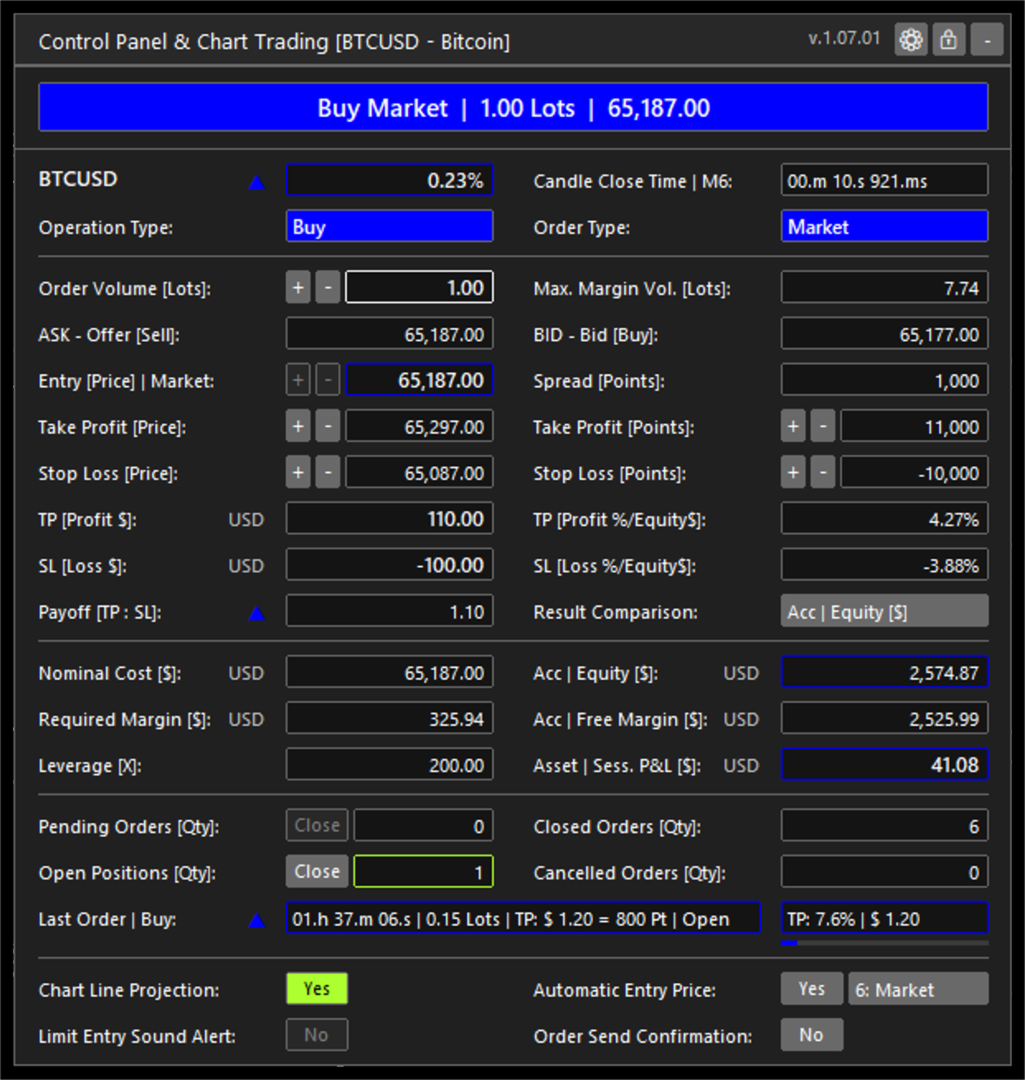
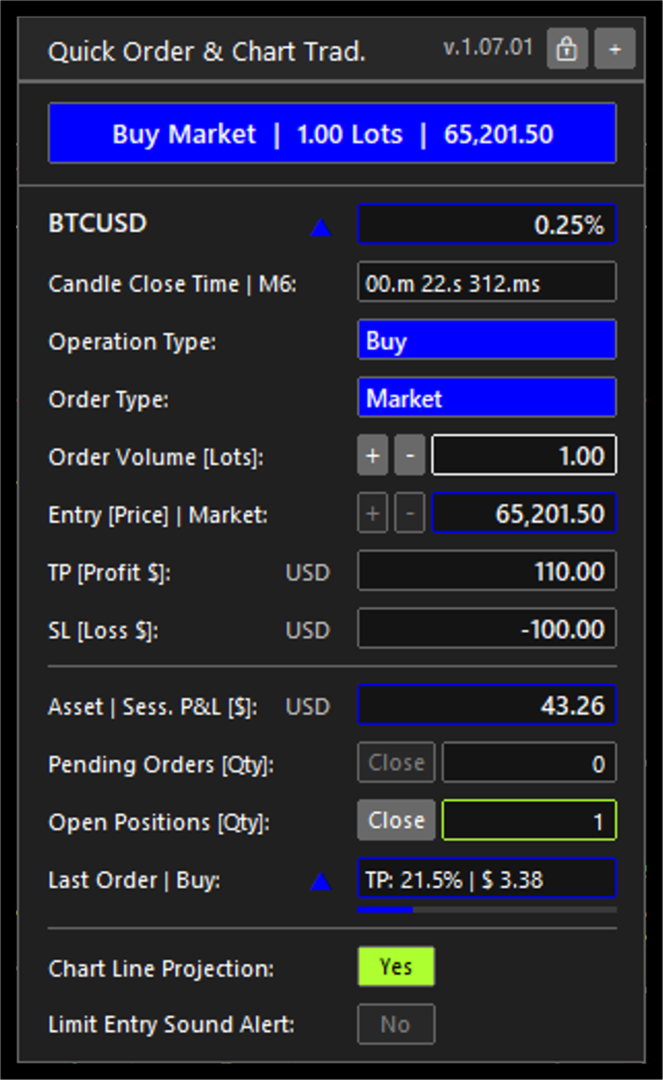
Control Panel & Chart Trading is an Expert Advisor for MetaTrader 5 that places a focused trading panel on the active chart. It brings together two complementary workflows: quick market-order preparation for active intraday use, and structured planning for market or limit orders.

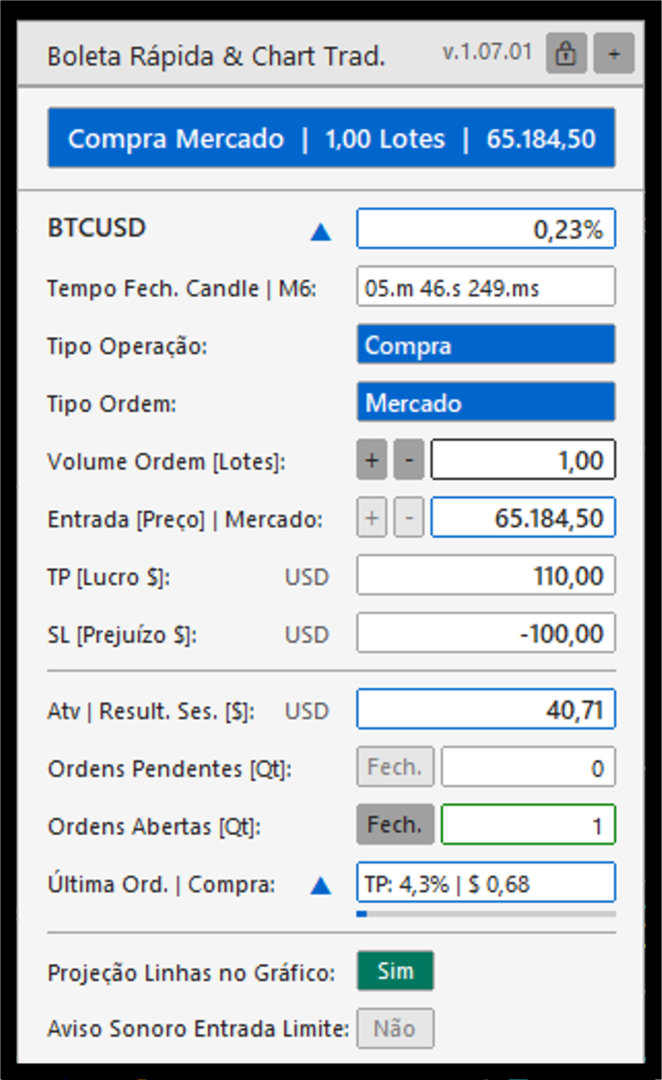
For day trading and scalping workflows, the compact panel keeps the essential order controls on the chart: operation type, order type, volume, entry and protective levels. This reduces screen navigation while preserving the trader's control over every order decision. It does not promise execution speed, fill quality or trading results.

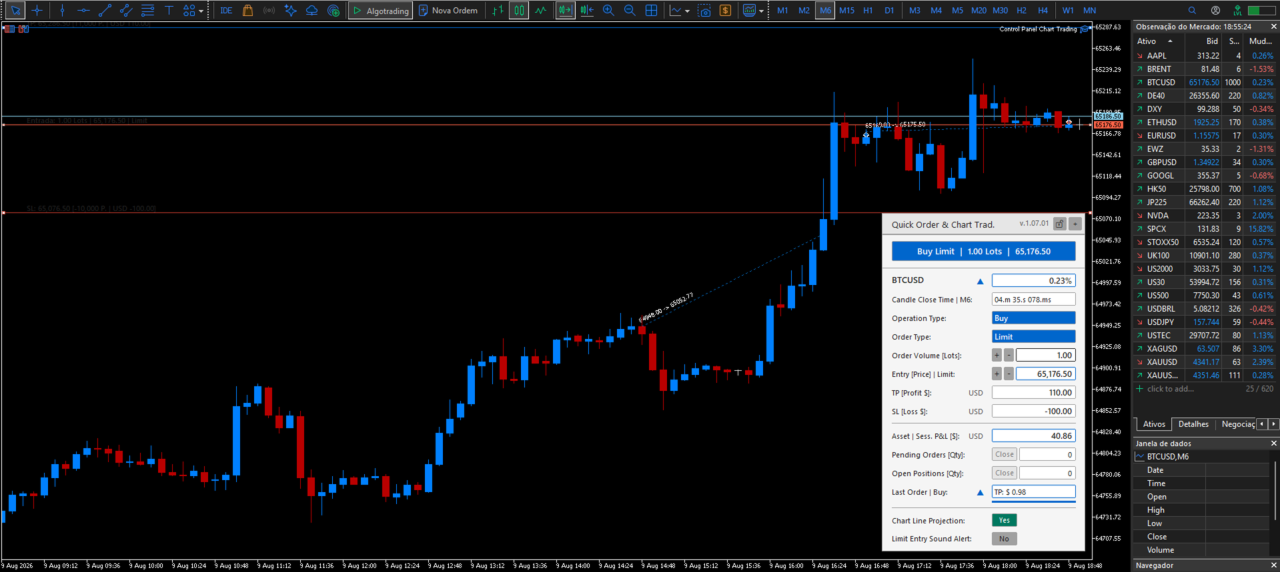
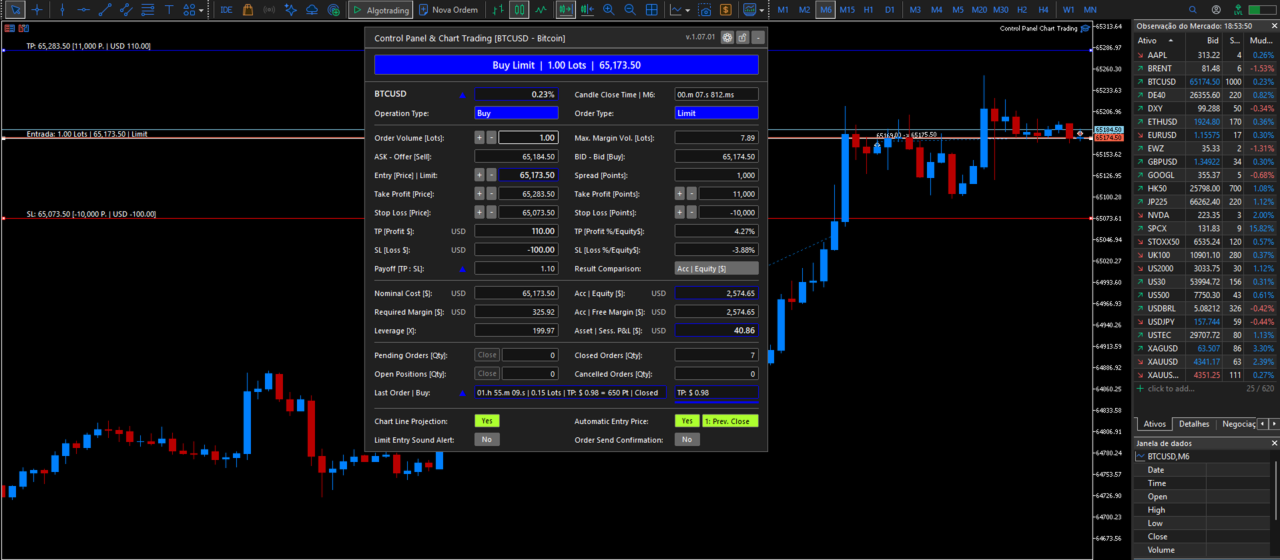
For planned trades, the panel visualizes entry, Take Profit and Stop Loss levels directly on the chart. It uses the active symbol and account data supplied by MetaTrader 5 to show projected order values in account currency, point distances, estimated margin and volume limits. This helps the trader review the relationship between the order parameters without manually calculating points, contract values or margin requirements.

The panel also updates operating context in real time, including spread, account equity, free margin, active-symbol session result, order counts and the latest order state. When a position is open, its progress toward the registered Take Profit or Stop Loss level is shown in a concise field.


Multilingual workflow and user configuration


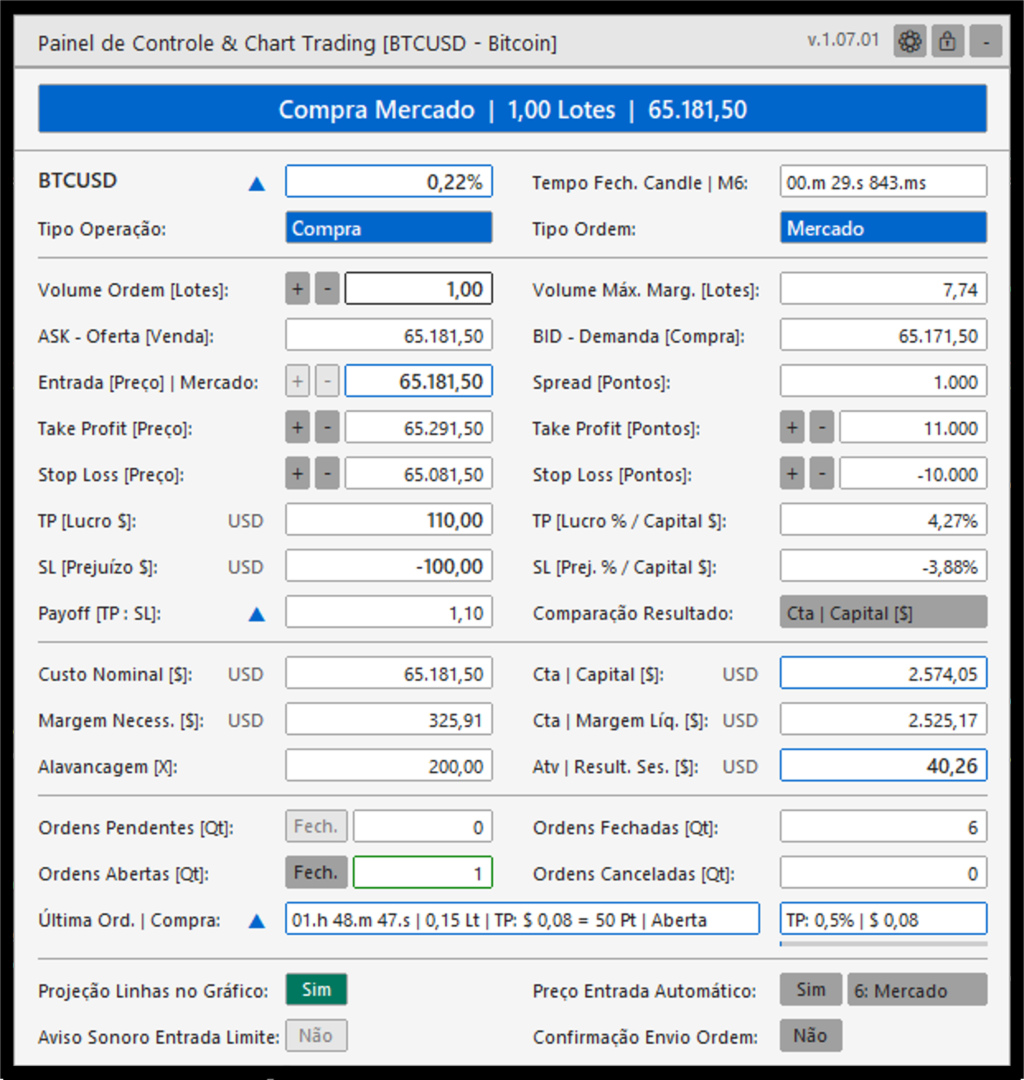
Control Panel & Chart Trading is designed for traders who operate MetaTrader 5 in different languages and need the same workflow across accounts and symbols. The on-chart panel can be displayed in Portuguese (Brazil), English, French, Spanish, German, Japanese, Simplified Chinese or Russian. Number formatting can follow the selected panel language or be selected independently, helping users read prices and account values in their preferred convention.

The user can also define the panel theme, compact or expanded layout, chart position, default order type, initial volume, Take Profit and Stop Loss distances, and the spread alert threshold. Chart-line color, style, width, information-text size and alignment are configurable. For limit-order planning, users can select automatic entry references based on the previous candle or adjust the entry manually. The standard MetaTrader 5 Inputs window remains in English in the Market build; the panel displayed on the chart is localized at runtime.


Alerts and operational awareness

The panel provides visual context before and during the order-preparation workflow. It highlights a spread that exceeds the configured proportion of the Take Profit distance, identifies relevant candle-close timing conditions and can show the presence of pending orders. An optional sound alert can notify the user when the current price reaches a configured limit-entry level. These functions are informational aids; they do not replace the trader's assessment or guarantee that an order will be executed.


Main functions

- Use a compact quick-order workflow to send configured buy or sell market orders from the chart.

- Prepare buy and sell market orders or limit orders with volume, entry price, Take Profit and Stop Loss levels in one panel.

- Display and adjust entry, Take Profit and Stop Loss lines directly on the chart.

- Use the previous candle close, high, low or open as an automatic limit-entry reference. Manual entry and current market price are also available.

- Check the broker's minimum stop distance and freeze distance before sending or changing an order.

- Check order volume limits, estimated margin and available margin before order submission.

- Display the current spread, risk and reward relationship, projected order values in account currency, account equity, free margin, order counts and active-symbol session information.

- Show a concise summary of the latest order, including its state and progress toward its registered Take Profit or Stop Loss level while the position remains open.

- Provide an optional sound alert when price reaches a limit-entry level.

- Display visual alerts for contextual conditions, including a spread above the configured limit and relevant candle-close timing.

- Close pending orders or open positions for the active symbol from the panel.


Interface and configuration

- Dark and light color themes.

- Compact and expanded panel formats, with selectable chart positions.

- Portuguese, English, French, Spanish, German, Japanese, Simplified Chinese and Russian interface options.

- Number formatting that can follow the selected language or be configured separately.

- Configurable default order type, initial volume, Take Profit and Stop Loss distances, and spread-alert threshold.

- Configurable limit-entry sound alert and audio files for buy and sell scenarios.

- Configurable chart-line colors, styles, widths, text size and alignment.


Order handling

The Expert Advisor reads the trading conditions of the active symbol before sending or modifying an order. It applies the broker stop and freeze distances to help avoid invalid price requests. For transient price or connection responses, it uses a limited retry policy and a duplicate-request guard instead of repeatedly sending orders.


Important information

Control Panel & Chart Trading is a trading tool. It does not provide investment advice, trading signals or a guarantee of execution or financial results. The trader remains responsible for verifying order parameters and understanding the risks of trading before sending an order.

Рекомендуем также
BuyLimit and SellLimit MQ5 buttons Продукт BuyLimit and SellLimit Buttons открывает любую комбинацию отложенных ордеров Buy Limit и Sell Limit и закрывает все имеющиеся отложенные ордера. Входные параметры DeleteAllPendings ; при true все отложенные ордера (для текущей валюты) могут быть удалены. BuyLimit ; при true могут быть открыты ордера Buy Stop. SellLimit ; при true могут быть открыты ордера Sell Stop. InitLot ; начальный размер лота. LotCoeff ; увеличить/уменьшить размер следующего лота
The utility is designed to save funds on your trading account. There is support for three levels of minimum equity and free margin. For each level, you can set partial (by a certain percentage) or complete closing of all market orders. The partial close percentage is applied for each order separately based on its current size (i.e. the size at the time the equity or free margin reaches the appropriate level). Upon reaching the last third level, the utility can close all charts, which will make i
Telegram Services
Ramesh Maharjan
5 (1)
Telegram Services — это торговое приложение, обеспечивающее связь между этим советником и вашим Telegram-каналом. Приложение генерирует отчеты, оповещает об открытии, закрытии и изменении сделок, открывает новые сделки, закрывает открытые сделки, изменяет существующие сделки, отображает историю сделок, делает скриншоты графиков, определяет значения стоп-лосса и тейк-профита. Оно также отображает текущие рыночные условия, получает новости рынка, анализирует лог-файлы и, что наиболее важно, позвол
Product Name: Anchor auto TP and SL Trade Manager Pro MT5 The ultimate manual assistant. Turns trades into auto-grids with Hedging, Zero-Loss Breakeven & Spread Detection. Your manual trade will be managed automatically. Anchor Auto TP and SL Trade Manager MT5 Pro is the advanced edition of our popular trade assistant. It transforms simple manual trades into sophisticated, professional-grade recovery grids. Unlike the free version, this PRO edition fully supports Hedging (simultaneous Buy & Sell
提供专业的EA编程服务,推出特色仪表盘EA编程,将您的交易策略自动化,可视化,一个图表管理多个交易货币对,详情查看: http://www.ex4gzs.com   Providing quick Developments and Conversion of MT4/MT5 EAs, Indicators, Scripts, and Tools. If you are looking for an Dashboard EA to turn your trading strategy into auto trading algo and to manage multi trades in one chart with visualizing tool, come and visit http://www.ex4gzs.com/en for more details. 如果产品有任何问题或者您需要在此产品上添加功能,请联系我 Contact/message me if you encounter any issue using the product or need extra feat
Global crosshair for spotting levels and positions on multiple chart (timeframes). Features: Toggle with middle click (replace default MT5 crosshair). Toggle with HotKey shortcut and on chart button. Multi instance feature. (every chart can draw separate instance). Customizable Display Style. (color / line style / ex.) Global crosshair for spotting levels and positions on multiple chart (timeframes).
Close Simple MT5
TRUONG DINH THANG Trương
This is an EA that supports simple order closing on MT5. EA Close MT5 (Homemade ) - EA closes orders when profit >= x$ - EA closes orders when loss >= -x$ - EA closes orders when Equity >= x$ - EA closes orders when Equity <= x$ - EA closes orders for all currency pairs or pairs using EA If you have any questions, please contact me: https://t.me/EAForexFree_Channel
Position Prime
Mariana Cordeiro Neves Fernandes
Скачайте бесплатную демо-версию прямо сейчас и протестируйте все функции управления рисками в вашем Strategy Tester, прежде чем совершить покупку! Position Prime — это визуальный помощник по исполнению ордеров и риск-менеджер институционального уровня для MetaTrader 5. Разработанный для трейдеров, которым важны скорость и точность, он избавляет от необходимости ручного расчета лота и превращает ваш график в настоящий торговый терминал. Планируйте, исполняйте и защищайте свои сделки за доли сек
**MT5 → Telegram & Discord Auto Post Bot** Want to automate your trading and stop wasting time on manual posting? This bot is for you. **What does it do?** It connects directly to MetaTrader 5 and automatically posts to Telegram & Discord: ️ Open trades ️ Closed trades ️ SL / TP levels ️ Profit and loss ️ Real-time signals **Advantages:** • Fully automated process • No delay – posts in real time • Perfect for signal groups and channels • Increases trust and transparency • Works
Chart Link
David Gitau Gakunga
4.83 (12)
Chart Link  allows you to control multiple charts from one chart or multiple charts from multiple charts. Features 1. Synchronised Scrolling :     Scrolling the master chart also scrolls all linked sub charts to the same position.     Sub charts inherit offset and auto-scroll settings from the master chart. 2. Synchronised Timeframe :     Switching the master chart timeframe also switches all linked sub charts. 3. Synchronised   Symbol   :     Switching the master chart symbol also switches all
FREE
Telegram to mt5 pro
Janet Abu Khalil
4 (4)
Telegram to MT5 Pro — Расширенный копировщик сигналов Telegram с Auto-Fix, Multi-TP, управлением риском и полным управлением сделками Telegram to MT5 Pro — профессиональный копировщик сигналов Telegram Telegram to MT5 Pro автоматически копирует торговые сигналы из Telegram прямо в ваш аккаунт MetaTrader 5 в реальном времени с полным контролем риска, исполнения и управления сделками. Система состоит из двух компонентов: • Expert Advisor (EA), работающий внутри MetaTrader 5 • Desktop bridge прило
Talents ATR Scalper Utility (MT5) The Talents ATR Scalper Utility is a professional-grade trade execution and management tool built for MetaTrader 5. Inspired by the Biblical Parable of the Talents , this utility is designed to help traders multiply their potential with precision risk control, one-click simplicity, and advanced automation. Whether you’re scalping forex, gold, or indices, this tool delivers speed, consistency, and confidence. Key Features One-Click Trade Preview Click below price
One Click Trader  is a tool designed for MetaTrader 4 platform, which enables you to take your trading to the next level. It enables you to open, manage and close your trades in simple an efficient way by just one click of your mouse button. "-"   ,  "+"  change OCT window size  Up arrow minimizes the OCT panel Down arrow maximizes the OCT panel Right arrow displays the next panel with additional features Left arrow hides the panel with additional features Red  SELL  button enables you to open s
This utility automatically places Stop Loss and Take Profit levels on newly opened positions. The Stop Loss and Take Profit values are specified in pips. The utility can also move Stop Loss to Break Even and trail the Stop Loss after a specified profit level is reached. Input Parameters SL and Trailing SL Stop Loss value in pips. If trailing is enabled, the same value is used as the trailing Stop Loss distance. Trailing Steps Distance in pips required before the Stop Loss is updated again while
InfoRisk
Andrej Nikitin
Информационная панель помогает оценить текущие риски по открытым позициям и ордерам. Есть возможность отдельного анализа рисков по позициям/отложенным ордерам, а также в режимах USD/Percentage. Раскладывает маржинальную нагрузку и долю участия в прибыли по отдельным позициям. Info tool helps to estimate the current risks of open positions and orders. It allows to analyze open positions or/and pending orders, also there are USD/Percentage modes. Expands the margin load and the share of profit par
Phoenix MT5 Telegram Notifier is a trading utility that integrates with both MetaTrader5 and Telegram. The utility publishes all your trades as signals in your channels or groups. This allows you to track in real time what is happening with your account via Telegram. Notifications for : Opened order Closed order Modified order Parameters : Telegram Bot Token - create a bot on Telegram and get a token Telegram Chat Id  - input your Telegram group/channel Id Notify for opened order - notifies wh
OrderShield MT5
Jose De Jesus Palomares Villasenor
OrderShield MT5 EA - Simple Description What is this product? This is an   automated trading tool (Expert Advisor) for MetaTrader 5   that manages your Stop Loss (SL) and Take Profit (TP) levels in a   hidden way   - the broker cannot see them. Main Advantages   1. Hidden Protection Levels Your SL/TP are   invisible to the broker The EA monitors prices and closes positions automatically when your levels are hit Brokers cannot see or interfere with your stop losses   2. Works With Everythin
This script is for changing all open tabs/charts at once on MetaTrader 5 using the drop-down box once the script has been initialized. It has all the standard timeframes available to be selected for MetaTrader 5. This is an individual script for all timeframes. You will need to select the timeframe you want all charts to go. Please watch the video for the installation instructions. 
Auto Screenshot Utility MT5
AL MOOSAWI ABDULLAH JAFFER BAQER
The trading limiter that stops you from breaking your own daily loss and trade limits. • Please test the product in the Strategy Tester before purchasing to understand how it works. • If you face any issues, contact me via private message—I’m always available to help. • After purchase, send me a screenshot of your order to receive a   FREE EA   as a gift. Auto Screenshot Utility - The Ultimate Trading Session Tracker & Screenshot Tool Revolutionize Your Trading Documentation with Precision Tim
Quick operation, quick purchase, sale, empty operation. Provide three buttons: Buy, Sell, empty. Buy: Quickly place more orders after clicking, default 1 hand, profit point and stop-loss point are 110 points, after successful order can be manually modified. Sell: Quickly place an empty order after clicking, default 1 hand, profit point and stop-loss point are 110 points, can be manually modified after the order is successful. Empty: Quickly clear all orders, including purchase and s
# Universal Smart Manual Trade Manager MT5 v1.00 ## What the EA does Universal Smart Manual Trade Manager MT5 is a protective and management Expert Advisor for manually opened trades. It does not open new entries by itself. It only adopts already open positions that pass the selected filters, and can add missing SL/TP, manage break-even, profit lock, ATR trailing, send Telegram notifications, and display status information on the chart. The default setup is intentionally safe: the EA manages
Make grid trading safe again | Built by a grid trader >> for grid traders.     Walkthrough Video  <==   Get Grid Rescue up and running in 5 minutes   This is MT5 version, click  here  for  BlueSwift GridRescue MT4     (settings and logics are same in both versions)   BlueSwift Grid Rescue   MT5    is a risk management   utility  MT5 EA  (used together with other grid trading experts) that can help you trade aggressive grid / averaging / martingale systems with manageable drawdown, therefore
Перестаньте позволять брокерам охотиться за вашими стоп-лоссами! Вы устали от того, что цена задевает ваш Stop Loss точно в пике и сразу же разворачивается в вашу пользу? Часто это результат рыночного шума или так называемой "охоты за стопами" (Stop Hunting). TrailGuardian — это профессиональный "стелс" менеджер сделок, разработанный для защиты вашей прибыли без раскрытия уровней выхода рынку. Он создает виртуальную (невидимую) линию стоп-лосса внутри терминала, скрывая вашу стратегию от брок
Этот инструмент поможет вам закрыть все открытые ордера одним щелчком мыши, просто нажмите «Закрыть все». Если вы хотите закрыть только прибыльные ордера, нажмите кнопку «Закрыть прибыльные», после нажатия все плавающие ордера будут закрыты; Если вы хотите закрыть только ордера с плавающими убытками, нажмите кнопку «Закрыть убыточные», после нажатия все ордера с плавающими убытками будут закрыты.
Global Stop Loss and Take Profit Manager Drag Lines Auto Apply Already using my free Global Stop Loss and Take Profit Setter? This is the always on version. Instead of setting levels once, you drag two lines on the chart and every manual position on that symbol — plus every new one you open — instantly inherits the Stop Loss and Take Profit. No clicking into each order. No forgetting a stop. Global Stop Loss and Target Manager is a drag-and-drop risk tool for manual traders on MetaTrader 5. Pu

Expert was built on the basis of Trap . EA can trade in automatic and semi-automatic mode. In automatic mode, it will place pending orders. However, in semi-automatic mode, it will wait for the first manually opened order. It will then go into automatic mode. Before starting work, the expert will download 28 currency pairs:         "AUDCAD","AUDCHF","AUDJPY","AUDNZD","AUDUSD","CADCHF","CADJPY",         "CHFJPY","EURAUD","EURCAD","EURCHF","EURGBP","EURJPY","EURNZD",         "EURUSD","GBPAUD","GBP
Mango Scalper
Mahmoud M A Alkhatib
Mango Scalper  is a fully automated scalping robot that uses a very Good and Smart breakout strategy, advanced money management and probabilistic analysis. Most effective in the price consolidation stages that occupy the bulk of the market time. Proven itself on real accounts with an excellent risk-to-reward ratio. Does not need forced optimization, which is the main factor of its reliability and guarantee of stable profit in the future. S uitable for both beginners and experienced traders.  
Auto Gold Signals Telegram Bot – French Edition Automatisez entièrement votre canal Telegram de signaux Gold Auto Gold Signals Telegram Bot – French Edition est un Expert Advisor MetaTrader 5 développé pour automatiser entièrement la publication de vos signaux de trading XAUUSD (Gold) sur Telegram. Conçu pour les traders, fournisseurs de signaux, influenceurs Trading et gestionnaires de communautés Telegram, le bot détecte automatiquement les opérations exécutées sur votre compte MetaTrader 5 et
Every panel tells you how much you're risking. This one tells you how much you have left. You didn't lose the challenge because your strategy failed. You lost it because one more trade pushed you past the daily limit while you were chasing the target. PropDesk is the desk that helps stop that from happening. 1. Size against your ROOM, not your equity. Every order shows "risk $X = Y% of your daily room left". You always know if the next trade fits inside what the firm allows today - before you
С этим продуктом покупают
Trade Assistant MT5
Evgeniy Kravchenko
4.43 (216)
Помогает рассчитать риск на сделку, простая установка нового ордера с помощью линий, управление ордерами с функциями частичного закрытия, 7 типов трейлинг-стопа и другие полезные функции. Дополнительные материалы и инструкции Инструкция по установке - Инструкция к приложению - Пробная версия приложения для демо счета Функция Линии   - отображает на графике линию открытия, стоп-лосс, тейк-профит. С помощью этой функции легко установить новый ордер и увидеть его дополнительные характеристики пе
Добро пожаловать в Trade Manager EA — лучший инструмент для управления рисками, предназначенный для упрощения, точности и эффективности торговли. Это не просто инструмент для размещения ордеров; это комплексное решение для удобного планирования торгов, управления позициями и усиленного контроля над рисками. Независимо от того, начинающий вы трейдер, опытный специалист или скальпер, нуждающийся в быстром исполнении, Trade Manager EA адаптируется к вашим потребностям и работает с любыми активами:
Telegram to MT5 Multi-Channel Copier   автоматически копирует торговые сигналы из ваших Telegram-каналов прямо в MetaTrader 5. Без ботов, без браузерных расширений, без ручного копирования. Сигнал приходит в Telegram — и советник открывает сделку в вашем терминале за считанные секунды. А перед тем как копировать канал, встроенный бэктестер покажет, что этот канал сделал бы на вашем счёте. Продукт состоит из двух компонентов: приложения для Windows, которое слушает ваши Telegram-каналы, и этого с
TradePanel MT5
Alfiya Fazylova
4.88 (169)
Trade Panel — это многофункциональный торговый помощник. Приложение содержит более 50 торговых функций для ручной торговли и позволяет автоматизировать большинство торговых операций. Инструкция к приложению + видео-инструкции: https://www.mql5.com/ru/blogs/post/771695 Пробная версия приложения для демо-счета: https://www.mql5.com/ru/blogs/post/750864 Как установить приложение: https://www.mql5.com/ru/blogs/post/750096 Как тестировать приложение в визуальном режиме: https://www.mql5.com/ru/blogs/
================================================================================ POC BREAKOUT - V20.72. Full Professional Grade Toolkit ================================================================================ POC Breakout is a full MetaTrader 5 trading dashboard for discretionary traders who want breakout signals, Point of Control (POC) context, volume profiles, order flow, market structure, news, alerts, and advanced trade planning in one professional workspace. Attached directly to you
Копируйте сигналы из Telegram по своим торговым правилам Telegram to MT5 Signal Trader автоматически копирует текстовые торговые сигналы из открытых и закрытых каналов и групп Telegram в MetaTrader 5. Управляйте несколькими поставщиками сигналов и счетами MT5 из одного приложения для компьютера, задавая индивидуальные параметры риска и торговли для каждого поставщика . Для копирования не нужны бот Telegram и настройка API. Просто войдите в свой аккаунт Telegram по номеру телефона или QR-коду и в
Farmed Hedge Yield Farming | All Markets (Manual - Hybrid - Semi/Automated EA) VERIFIED TRADING RESULTS - Farmed Hedge Yield Axi Copy:  https://www.mql5.com/en/signals/2356376 - Farmed Hedge Yield Exn Copy:   https://www.mql5.com/en/signals/2356404 - Farmed Hedge Yield V Copy:  https://www.mql5.com/en/signals/2357156 IMPORTANT NOTICE: FarmedHedge is a MANUAL-FOCUSED TRADING UTILITY ,not a fully automated EA. Results shown on this Signal include manual trades and overall strategic management.
Power Candles Strategy Scanner — самооптимизирующийся инструмент для поиска настроек по нескольким инструментам Power Candles Strategy Scanner использует тот же самооптимизирующийся движок, что и индикатор Power Candles — для всех символов в вашем Market Watch, одновременно. На одной панели отображается информация о том, какие символы в данный момент являются статистически торгуемыми, какая стратегия выигрывает на каждом из них, оптимальная пара Stop Loss / Take Profit, а также отправляется увед
Exp COPYLOT CLIENT for MT5
Vladislav Andruschenko
3.97 (35)
Профессиональный копировщик сделок для MetaTrader 5 Быстрый, профессиональный и надежный копировщик сделок для MetaTrader . COPYLOT позволяет копировать сделки Forex между терминалами MT4 и MT5 с поддержкой счетов Hedge и Netting . Версия COPYLOT для MT5 поддерживает: - MT5 Hedge → MT5 Hedge - MT5 Hedge → MT5 Netting - MT5 Netting → MT5 Hedge - MT5 Netting → MT5 Netting - MT4 → MT5 Hedge - MT4 → MT5 Netting Версия MT4 Полное описание + DEMO + PDF Как купить Как установить Как получить файлы жур
Signal TradingView to MT5 Pro Automator Мгновенное профессиональное исполнение между TradingView и MetaTrader 5 Автоматизируйте свою торговую стратегию с помощью самого надежного моста связи между алертами TradingView и реальным исполнением в MT5. Разработанный для трейдеров, которым требуются скорость, гибкость и безупречное управление рисками, этот советник (Expert Advisor) превращает любое сообщение с алертом в точный рыночный или лимитный ордер. ПРЕИМУЩЕСТВА И СИЛЬНЫЕ СТОРОНЫ Универсальный д
Premium Trade Manager - Торговая панель со встроенным коучем Premium Trade Manager помещает торгового коуча прямо в ваш график, а под ним работает полноценный движок исполнения. Настройте сделку так, как вы всегда это делаете, затем позвольте Max, вашему ИИ-наставнику по трейдингу, прочитать именно эту настройку с учётом вашего живого счёта и дать чёткое заключение до того, как вы входите: соответствует ли стоп дисциплинированному подходу, разумен ли риск, не выходит ли высоковолатильный релиз ч
MT5 to Telegram Signal Provider — это простой в использовании полностью настраиваемый инструмент, который позволяет отправлять определённые сигналы в чат, канал или группу Telegram, превращая вашу учётную запись в провайдера сигналов . В отличие от большинства конкурирующих продуктов, он не использует импорт DLL. [ Демо ]   [ Руководство ] [ Версия MT4 ] [ Версия для Discord ] [ Канал в Telegram ]  New: [ Telegram To MT5 ] Настройка Доступно пошаговое руководство пользователя . Никаких знаний A
HINN MAGIC ENTRY - лучший инструмент для входа и менеджмента позиций! ПРОСТО. БЫСТРО. ИНТУИТИВНО. МАКСИМАЛЬНО АВТОМАТИЗИРОВАНО. Выставляет ордера через выбор уровня на графике! полное описание    ::    demo-версия    ::   60-sec-video-description Основные функции: - Рыночные, лимитные и отложенные ордера -  Автоматический подсчет лоттажа  -  Автоматический учет спреда и комиссий -  Неограниченное количество промежуточных тейков для позиций - Перевод в безубыток и трейл стоп-лосса и тейк-проф
MT5 Trading Deck
Manuel Michiels
5 (2)
One button. One trade. MT5 Trading Deck is a hotkey trading panel for MetaTrader 5 that turns the platform into a keyboard-driven execution cockpit. Stop loss, take profit and lot size are pre-calculated for every key; the moment you press, a market order is live on the broker. A complete technical user manual is attached in the product Comments section. It documents every input parameter, the full hotkey map, the recommended Stream Deck XL layout, and the advanced workflows for Pre-Limit orders
EA Slipstream
Stephen J Martret
5 (1)
EA Slipstream — описание для MQL5 Маркета (русский) Ваш бэктест исполнил каждый ордер по той цене, которую запросил. Ваш счёт — нет. EA Slipstream измеряет, во что обходится исполнение вашему советнику, используя ваши собственные исполнения, проскальзывания и спреды, и показывает реальную результативность советника. В бэктесте каждая сделка рассчитывается по цене, которую назвал советник. В реальной торговле отложенный ордер исполняется по той цене, которая доступна в момент срабатывания, стоп з
Grid Manual MT5
Alfiya Fazylova
4.73 (22)
Grid Manual — это торговая панель для работы с сеточными стратегиями. Утилита универсальная, имеет гибкие настройки и понятный интерфейс. Работает с сеткой ордеров не только в сторону усреднения убытков, но и в сторону наращивания прибыли. Трейдеру не нужно создавать и сопровождать сетку ордеров, это сделает утилита. Достаточно открыть ордер и Grid manual автоматически создаст ему сетку ордеров и будет сопровождать его до самого закрытия. Полная инструкция и демо-версия здесь . Основные особенно
EA Overfitter
Stephen J Martret
5 (1)
Бэктест выглядит отлично. Но будет ли советник зарабатывать завтра, через неделю, через месяц? EA Overfitter прогоняет вашего советника по 100 историям цены, которых он никогда не видел. Одна оценка показывает, реально ли преимущество. Бэктест показывает, что советник сделал на одной истории цены — на той, которая случайно произошла. Из него невозможно понять, какая часть результата была заслугой стратегии, а какая — конкретного пути цены. EA Overfitter отвечает на этот вопрос. Он строит до 10
Trade Manager DaneTrades
Levi Dane Benjamin
4.23 (30)
Trade Manager, который поможет вам быстро входить и выходить из сделок, автоматически рассчитывая риск. Включает функции, которые помогут предотвратить чрезмерную торговлю, торговлю из мести и эмоциональную торговлю. Сделками можно управлять автоматически, а показатели эффективности счета можно визуализировать в виде графика. Эти функции делают эту панель идеальной для всех трейдеров, занимающихся ручной торговлей, и помогают улучшить платформу MetaTrader 5. Многоязычная поддержка. Версия для МТ
Trade Dashboard MT5
Fatemeh Ameri
4.94 (134)
Trade Dashboard simplifies how you open, manage, and control your trades, with built-in lot size calculation. It allows you to execute trades, manage risk, and control positions directly on the chart, with tools such as partial close, breakeven, and trailing stop. Designed to reduce manual work and help you stay focused on your trading decisions. A demo version is available for testing. Detailed explanations of features are provided within the MQL5 platform. Installation instructions are include
Представляем последнюю версию Dynamic Fibonacci Grid Dashboard для MT5. Теперь с множеством новых функций, этот обновлённый дашборд полностью меняет ваш торговый опыт и позволяет увидеть рынок и ценовое движение с совершенно иной перспективы. Откройте новые возможности благодаря одновременному анализу нескольких таймфреймов и множества инструментов. Удобный интерфейс для ручной торговли и управления позициями, а также расширенные возможности применения предопределённых автоматических стратегий.
Welcome to ENTRY IN THE ZONE AND SMC MULTI TIMEFRAME Entry In The Zone and SMC Multi Timeframe is a real-time market analysis tool based on Smart Money Concepts (SMC), designed to analyze market structure, price direction, and key trading zones. It supports both Single-Timeframe Analysis and Multi-Timeframe Analysis, providing a clearer view of the overall market structure across multiple timeframes, with real-time BUY / SELL signals that do not repaint. It is designed to help filter trading opp
The product will copy all telegram signal to MT5 ( which you are member) , also it can work as remote copier.  Easy to set up, copy order instant, can work with almost signal formats, image signal,  s upport to translate other language to English Work with all type of channel or group, even channel have "Restrict Saving Content", work with  multi channel, multi MT5 Work as remote copier: with signal have ticket number, it will copy exactly via ticket number. Support to backtest signal. How to s
Anchor Trade Manager
Kalinskie Gilliam
5 (9)
Your EAs cannot see each other, but Anchor can. Anchor gives you one place to coordinate your EAs, manage risk, and decide when trading is allowed. It works alongside the trading bots you already use without any changes to them. The Problem One EA opens a trade. Then another starts trading. The next thing you know, you wake up to multiple grids built across your account. Each EA may be doing exactly what it was designed to do, but together they can place far more risk on your account than you in
Footprint Chart Pro — Professional OrderFlow EA for MetaTrader 5 Version 6.34 | Professional tool for real traders | Institutional-Grade Visualization DEMO USERS - PLEASE SELECT EVERY TICK / REAL TICK WHEN TESTING AND YOU HAVE DOWNLOADED HISTORICAL DATA. IF YOU SEE A WAITING SCREEN AND IT IS NOT DOWNLOADING, IT MEANS YOU HAVE LOW HISTORICAL DATA. TRY 1 MIN AND 5 MIN FIRST ON 1 DAY DATA. ONE DAY DATA SHOULD BE THE NEWEST AND MOST CURRENT DATE. PLEASE WAIT UNTIL THE MARKET HAS ROLLED OVER PERIOD.
YuClusters
Yury Kulikov
4.93 (43)
Внимание: Ознакомиться с работой программы можно с помощью бесплатной версии  YuClusters DEMO . YuClusters это профессиональная система анализа рынка. Для трейдера открываются уникальные возможности анализа потока ордеров, объемов торговли, движения цены используя различные графики, профили, индикаторы, графические объекты. YuClusters оперирует данными на основе ленты сделок или тиковой информации, в зависимости от того, что доступно в котировках финансового инструмента.  YuClusters позволяет с
Торговая панель для MetaTrader 5 — профессиональная торговля в один клик с графика и клавиатуры Мощная торговая панель для активного ручного трейдинга, которая позволяет открывать, сопровождать и закрывать сделки значительно быстрее и удобнее, чем стандартными средствами MetaTrader. Панель создана для тех, кто хочет получить полный контроль над позициями, ордерами, прибылью и торговыми сценариями в одном рабочем пространстве. Это не просто вспомогательная утилита. Это полноценный торговый интер

FUTURES ORDERFLOW FOOTPRINT CHART Professional OrderFlow EA for MetaTrader 5 Version 1.01| Professional tool for real traders | Institutional-Grade Visualization STRATEGY TESTER USERS - PLEASE SELECT EVERY REAL TICK WHEN TESTING AND YOU HAVE DOWNLOADED HISTORICAL DATA. IF YOU SEE A WAITING SCREEN AND IT IS NOT DOWNLOADING, IT MEANS YOU HAVE LOW HISTORICAL DATA. TRY 1 MIN AND 5 MIN FIRST ON 1 DAY DATA. ONE DAY DATA SHOULD BE THE NEWEST AND MOST CURRENT DATE. PLEASE WAIT UNTIL THE MARKET HAS ROL
Timeless Charts
Samuel Manoel De Souza
5 (8)
Timeless Charts is an all-in-one trading utility for professional traders. It combines custom chart types such as Seconds Charts and Renko with advanced order flow analysis using Footprints , Clusters , Volume Profiles , VWAP studies, and anchored analysis tools for deeper market insight. Trading and position management are handled directly from the chart through an integrated trade management panel , while Market Replay and Virtual Accounts provide environments for practicing trading skills and
Trade Copier Ultimate
Janitha Sandaruwan Amaradasa Wickramasingha Arachchilage
5 (5)
Trade Copier Ultimate - Telegram to MT5 Signal Copier Trade Copier Ultimate automatically copies Telegram trading signals into MetaTrader 5. The EA can read signal messages, detect the symbol, order type, entry price, Stop Loss, Take Profit levels and selected update commands, then execute or manage the trade in MT5 using your lot and risk settings. It is more than a basic Telegram to MT5 copier. TCU also supports Bot API and user-account Bridge workflows, Discord signal routing, local MT5 to MT
The Expert Advisor will help you forward all alert from  MetaTrader 5 to Telegram channel/ group.  All alert must save to folder <Data folder>MQL5\Files\Alerts\ , text file with format *.txt and screenshot with format *.gif or *.png. Parameters: - Telegram Bot Token: - create bot on Telegram and get token. - Telegram Chat ID:  - input your Telegram user ID,  group / channel ID - Forward Alert: - default true, to forward alert. - Send message as caption of Screenshot: - default false, set true t

Фильтр:
Нет отзывов
Ответ на отзыв