PriceWave Signal Pro
- Indicators
- Version: 1.0
- Activations: 5

PriceWave Signal Pro
BUY/SELL Trading Signal Indicator Without Repainting for MetaTrader 5
What is it
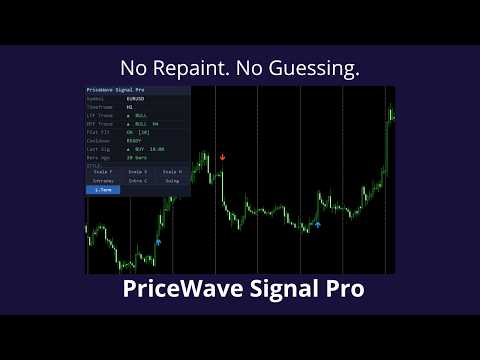
PriceWave Signal Pro is a technical indicator for MT5 that generates clear buy and sell signals directly on the chart. A signal appears only after the bar closes — the indicator does not repaint signals on history. What you see on closed bars will stay there forever.
The indicator is suitable for manual trading and for connecting to an Expert Advisor via iCustom() .
Key advantage — 7 presets directly on the chart
Most indicators require reloading when changing settings. PriceWave Signal Pro works differently: 7 trading styles switch with a single click directly on the panel, without opening settings, without restarting.
| Preset | Best for |
|---|---|
| Scalping Fast | Aggressive scalping, M1–M5 |
| Scalping Standard | Standard scalping |
| Scalping Smooth | Scalping with fewer signals |
| Intraday | Intraday trading — recommended |
| Intraday Conservative | Intraday, fewer signals, higher quality |
| Swing | Swing trading, H4–D1 |
| Long Term | Long-term positions |
The selected preset is saved automatically — it will be restored on the next terminal launch.
Built-in filters
To filter out weak signals, the indicator has three independent filters, each of which can be enabled or disabled:
Flat filter — blocks signals during periods of low volatility and sideways market movement. The sensitivity threshold is adjustable.
Multi-timeframe filter — a signal passes only if the higher timeframe confirms the direction. The timeframe is selected manually.
Cooldown — minimum pause between signals in bars. Eliminates series of signals in a row in the same direction.
Alerts
When a new signal appears, the indicator can:
- show a popup window in MT5
- send a Push notification to your phone
- send an email
Information panel
A compact panel is displayed on the chart showing the current state:
- symbol and timeframe
- trend direction on the current and higher timeframe
- filter status
- time and direction of the last signal
- preset switch buttons
Connecting to an Expert Advisor
Buffer 2 of the indicator returns the signal value for the EA:
- 1.0 — BUY signal
- -1.0 — SELL signal
- 0.0 — no signal
Parameters
Main settings
- Signal Preset — trading style at first launch. After that the active preset is saved automatically and controlled by the buttons on the panel. The value of this parameter after the first launch does not matter.
Flat filter
- Enable flat filter — enable/disable the flat filter
- Minimum trend strength — minimum trend strength level (15–50)
Multi-timeframe filter
- Enable MTF confirmation — enable/disable the MTF filter
- Higher timeframe — higher timeframe for confirmation
- MTF sensitivity — sensitivity on the higher timeframe (5–20)
- MTF multiplier — multiplier on the higher timeframe (1.0–5.0)
Cooldown
- Enable cooldown — enable/disable the pause between signals
- Minimum bars between signals — number of bars for the pause (1–50)
Appearance
- BUY signal color — buy signal color
- SELL signal color — sell signal color
- Arrow size — signal marker size (1–5)
- Arrow offset — marker offset from the bar (0.1–2.0)
Panel
- Show dashboard panel — show/hide the panel
- Chart corner — panel placement corner
- X offset / Y offset — panel position on the chart
- Font size — panel font size (7–20)
Alerts
- Enable alerts — enable/disable alerts
- Popup alert — popup window
- Push notification — phone notification
- Email notification — email
Compatibility
- MetaTrader 5 build 2755 and above
- All brokers, all symbols
- Works simultaneously on multiple charts and symbols
- Does not use DLL or external libraries
Recommended conditions
- Platform: MetaTrader 5
- Broker: any, preferably 5-digit quotes
- Timeframes: M15 and above (for scalping — M1/M5)
- Assets: currency pairs, indices, metals, cryptocurrencies
Disclaimer
The indicator is a technical analysis tool and does not guarantee profit. Any trading signal requires independent assessment of the market situation. Trading in financial markets involves the risk of loss of funds. The author is not responsible for the results of trading based on the indicator signals.
Before using on a live account, testing on a demo account is recommended.