CSM Vision Pro
- Indicators
- Version: 1.0
- Activations: 5

CSM Vision Pro — Know Which Currency Is Strong Right Now
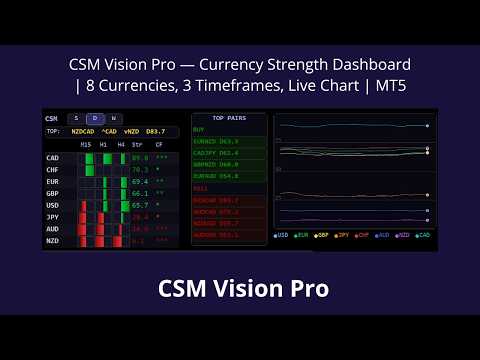
Most traders open positions by looking at just one chart. CSM Vision Pro shows the full picture: the strength of all eight major currencies at the same time — USD, EUR, GBP, JPY, CHF, AUD, NZD, CAD. You don’t just see price movement, you see its cause. This changes the quality of entries: instead of “it looks like EUR is rising” — “EUR is strengthening across all three timeframes, USD is weakening, the gap is 23 points — Top Pairs shows EURUSD at the top of the buy list”.
The indicator analyzes all 28 currency pairs simultaneously, works on any open chart, and requires no switching.
Panel: What You See
The eight currencies are ranked from strongest to weakest — strongest at the top, weakest at the bottom. For each currency, three timeframes are displayed simultaneously as visual bars growing from the center: to the right — strength, to the left — weakness. Next to them are the numerical strength value and the Confluence column.
Confluence represents agreement between timeframes, expressed in stars:
— one timeframe shows direction, while the others are neutral or conflicting. Weak signal, better to wait.
** — two timeframes agree. Entry can be considered.
*** — all three timeframes point in the same direction. Fully confirmed strong signal.
If there is a conflict (one timeframe up, another down), a single grey star is always shown — regardless of the others.
Top Pairs — Best Pairs Right Now
This block automatically selects pairs with the largest strength difference between currencies. Separate lists are shown for buys (strong currency vs weak currency) and sells.
By default, the CF filter is enabled: only pairs where the strong currency has a Confluence of at least two stars are included. This removes situations where strength exists only on one timeframe while others contradict it. The filter can be disabled in settings.
Customizable parameters: minimum strength difference between currencies, minimum level of the strong currency, maximum level of the weak currency. Clicking any pair switches the chart instantly.
Live Currency Strength Chart
The right side of the panel is a full multi-currency chart that records continuously while the indicator is running. Eight colored lines represent the strength history of each currency. The latest point is highlighted.
Key feature: this is not a standard MetaTrader timeframe. With a 60-second interval, each point equals one minute — you get an M1-like chart, but showing currency strength instead of price.
Examples of configuration:
60 seconds × 60 points = 1 hour history — day trading context
30 seconds × 60 points = 30 minutes
15 seconds × 60 points = 15 minutes
5 seconds × 60 points = 5 minutes — scalping, detailed impulse analysis
1 second × 60 points = last minute — maximum precision, news trading
History is preserved when switching instruments and restored after terminal restart.
Three Modes — For Three Trading Styles
S — Scalp: M1, M5, M15 — for short-term trading
D — Day: M15, H1, H4 — for intraday trading
W — Swing: H1, H4, D1 — for medium-term positions
Switch with one click directly on the panel. The selected mode is saved.
Four Types of Alerts
Alert 1 — exit from the neutral zone
Triggered when currency strength leaves the defined neutral range (“Neutral zone: center +/- N”). Default: 40–60. Signal: directional movement begins.
Alert 2 — reversal from extremes
A very strong currency (above 70) or very weak currency (below 30) starts changing direction. Useful for reversal detection and position closing.
Alert 3 — rapid gap expansion
The difference between the strongest and weakest currency increases quickly over a defined number of chart points. Parameters: “Minimum gap growth” and “Number of chart dots to look back”. Signal: momentum is accelerating.
Alert 4 — full confluence (***)
All three timeframes point in the same direction. This is the strongest signal.
Spam protection: alerts do not repeat until the state resets. Reset occurs when the value returns to the neutral zone and moves a sufficient distance from the previous trigger point. Controlled by “Ticks outside state before alert resets”. Higher values reduce repeated alerts.
Notification methods: popup, sound, and mobile push notifications. Each channel can be enabled separately.
Compatibility and Technical Features
Works on any chart and timeframe. The indicator automatically detects all 28 currency pairs in the terminal. It supports broker prefixes and suffixes (e.g., EURUSD.pro, EURUSDm).
Canvas rendering: no flickering during frequent updates, smooth anti-aliased lines. Update interval is configurable.
Full Parameter List
Panel position and appearance: coordinates, font size, font type, colors of all elements (background, border, text, headers, strength/weakness levels, Top Pairs).
Calculation modes: ROC and EMA periods separately configurable for Scalp, Day, and Swing.
Chart: point interval (1, 5, 15, 30, 60 seconds), number of points (10–60).
Neutral zone: defines the range around center (50). Affects Confluence, alerts 1 and 4, and Top Pairs filtering.
Top Pairs: minimum difference, strength thresholds, CF filter toggle, maximum number of pairs displayed.
Alerts: individual toggles, Alert 3 parameters, reset threshold, notification channels.