Countdown Utility

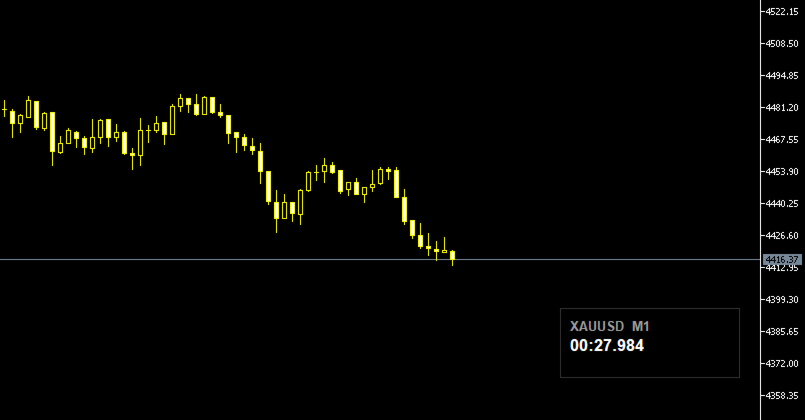
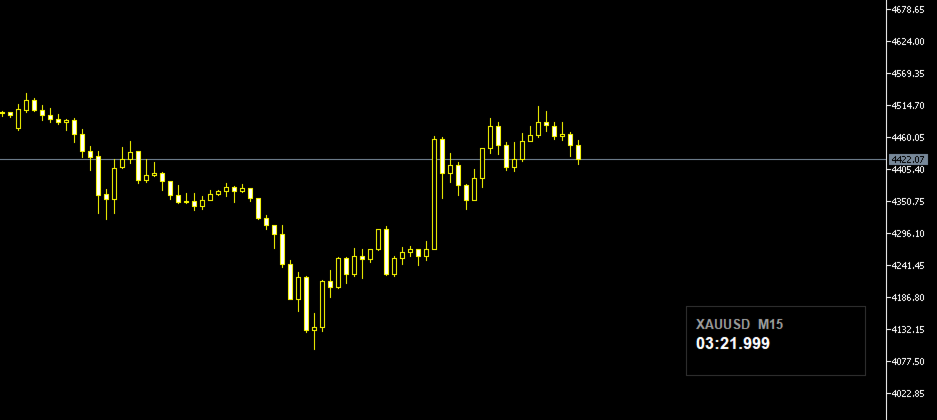
Candle Timer displays a real-time countdown to the next candle close, directly on your chart. Perfect for traders who need precise timing for entries, exits, or news events — without constantly watching the clock. ───────────────────────────────── FEATURES ─────────────────────────────────
• Millisecond precision countdown (100ms refresh via EventSetMillisecondTimer)
• Works on all timeframes: M1 through Monthly
• Colour warning system — timer changes colour as the candle nears close → Orange warning (configurable threshold, default 10s) → Red danger (configurable threshold, default 5s)
• Fully draggable panel — click and drag anywhere on the chart
• Auto-positions to bottom-right on attach and after chart resize
• Optional symbol name and timeframe display in panel header
• Fully customisable colours: background, border, text, labels, warning, danger
• Configurable font size
• Zero impact on performance — lightweight and non-intrusive
───────────────────────────────── INPUT PARAMETERS ─────────────────────────────────
Display → Font size, font name, show symbol, show timeframe, show milliseconds
Colours → Background, border, text, label, warning, danger
Thresholds → Warning seconds (default 10), Danger seconds (default 5)
Position → Fixed X/Y override, or right/bottom margins for auto-positioning
───────────────────────────────── HOW TO USE ─────────────────────────────────
1. Drag the EA onto any chart from the Navigator panel
2. Enable "Allow automated trading" if prompted
3. Adjust colours and font size in the Inputs tab to match your chart theme
4. Drag the panel to your preferred position Default theme: white text on black background — clean on any chart style.
───────────────────────────────── NOTES ─────────────────────────────────
• Milliseconds are interpolated between server ticks using GetTickCount() for a smooth visual experience — they do not represent real exchange millisecond data
• Compatible with all brokers and symbols
 ─────────────────────────────────
💬 Enjoying this tool? Please leave a rating and review — it takes 30 seconds and directly helps prioritise new features. Every review keeps development active. Thank you!

Recommended products
Stop Loss with Profit Free Version*. Complete Version here. This utility / expert for MetaTrader 5 modifies the stop loss of all your operations dynamically and automatically to ensure the minimum benefits you want, and be able to operate with or without Take Profit. Maximize your benefits, by being able to trade with Unlimited Take Profit. You will ensure the number of minimum points you want to earn in each operation and the stop loss will be adjusted as long as the benefit of the operatio
FREE
MT5 Quantum Gold Pro
Gaya Chibane
4.6 (5)
==================================================== 2. MT QUANTUM GOLD PRO ====================================================   MT QUANTUM GOLD PRO — The Ultimate Institutional Gold System Precision. Resilience. Verified Performance.   Important Information: After purchase, send a private message on MQL5 to receive optimized XAUUSD M1 setfiles, installation instructions, and personalized 24/7 support.   Limited Launch Promotion: $49 (Regular price $499 after 3 sales) The price will increase p
FREE
️ Limited Free Access ! ️ Ares Quantum EA is currently available for free as part of an early‑tester release. This phase is designed to gather real user feedback, performance reports, and honest reviews from traders who try the EA on their own accounts. After the first 100 downloads, the EA will switch to a lifetime price of $229.99, increasing automatically by $50 every 5 copies sold until reaching the final retail value of $1,029.99. Anyone who downloads now keeps permanent access to the cur

FREE
High Tide Health Monitor
Mark Christopher Small
High Tide Health Monitor Free dashboard that splits your account P/L by EA using magic numbers. See what each system has made, what it is down from its own best, and get told before a quiet drawdown becomes a loud one. Four EAs on one account. Which one is actually making money? Most people cannot answer that without exporting their history to a spreadsheet and sorting by magic number, which is why most people never do it, and why an EA that has quietly stopped working can run for months before
FREE
DataFeeder
Joao Paulo Euko
Hi you, I need your help! Be my Patron, let's make it possible! https://www.patreon.com/joaopeuko https://github.com/Joaopeuko/Mql5-Python-Integration Esse Expert Advisor copia os dados("symbol,last,bid,ask") dos ativos que foram colocados na lista e só funciona enquanto o mercado esta aberto. Esse EA não é um link DDE ou RTD, as informações não são passadas em tempo real ao excel. O EA tem um delay de 30 segundos e o Excel tem um delay de 1 minuto. A vantagem desse EA é que ele dispensa o
FREE
Gold Reversal Spike EA
Choawana Malaikitsanachalee
## Spike Hunter PRO Spike Hunter PRO is a fully automated Expert Advisor for MetaTrader 5, designed to capture profit from sudden high-velocity price movements on XAUUSD (Gold). The EA detects genuine spikes in real time and enters the market within milliseconds of detection. --- **How it works** The EA continuously monitors price movement speed on every tick. When price accelerates beyond the configured threshold, the EA opens a trade in the direction of the spike and immediately begins pr
FREE
Bawaba Grid Scalping
Zaky Hamdoun
5 (1)
New Release! Hello Everyone! I've just released Acronix, a new bot with live 2025 AND 2026 results. Find more about it here:  https://www.mql5.com/en/market/product/201513 . Introduction and Description Bawaba, from the Arabic word for "Grid", is a grid-based scalping robot for FOREX currency pairs. It has adjustable stoploss and takeprofits, as well as the possibility of having a fixed volume or adapting to the account balance. Grid scalping is when a grid of orders is created by increasing and
Bands Signal Trader is an Expert Advisor for MetaTrader 5 with Basic and Dark Bands signal modes. It trades confirmed closed-bar signals using server-side Stop Loss and Take Profit orders. You can open one, two or three positions from each signal and assign different Take Profit levels to split positions. Optional individual break-even management can protect the remaining positions after position 1 closes at its designated Take Profit. The default setup uses Basic mode, one position per signal,
FREE
VPOC Nexus Trader is a 100% fully automated Expert Advisor engineered to detect and execute high-probability institutional trading setups based on market liquidity and the Volume Point of Control (VPOC) . The markets are driven by institutional order flow and heavy transaction volumes. VPOC Nexus Trader completely bypasses traditional lagging indicators. Instead, it utilizes an advanced, built-in Volume Profile engine that maps market auction data in real-time, identifying the true "Fair Value
SomaNews
Andrii Soma
5 (1)
SomaNews is a free MetaTrader 5 utility that sends mobile push notifications before major US news events used by the Soma breakout EAs: Nonfarm Payrolls (NFP), Fed interest rate decisions, and CPI. Free for all traders using Soma EAs or anyone who wants reliable US news reminders. Companion product:   designed alongside   SomaOil ,   SomaGold , and   SomaBTC  and other my products. Attach SomaNews to any chart. It loads upcoming events from the built-in MT5 economic calendar (language-independen
FREE
NAS100 Auto Sl And TP MT5
Moustapha Boulouz
5 (2)
Introducing NAS100 Auto SL and TP Maker for MT5: Never miss setting StopLoss and TakeProfit again with our NAS100 Auto SL and TP Maker, an indispensable assistant for traders navigating the Nasdaq 100 market on MetaTrader 5. This tool is designed for those who seek a seamless solution to automate the management of StopLoss and TakeProfit levels. Key Features: Effortless Automation: Automatically monitors Nasdaq 100 trades without StopLoss and/or TakeProfit. Dynamically adjusts levels based on u
FREE
This product has been rebranded to PositionRelay Slave Subscriber. Install PositionRelay Slave Subscriber from the MQL5 Market. This TradeEcho listing is superseded and will be hidden. Market titles cannot be renamed. Same User ID and cloud API. Uninstall TradeEcho Slave Subscriber, then attach PositionRelay Slave Subscriber on each follower account. Companion product: PositionRelay Master Publisher. Keywords: copy trading, trade copier, PositionRelay, rebrand, slave PositionRelay Slave Sub
FREE
This product has been rebranded to PositionRelay TV Slave Subscriber. Install PositionRelay TV Slave Subscriber from the MQL5 Market. This TradeEcho listing is superseded and will be hidden. Market titles cannot be renamed. Same User ID and cloud API. Uninstall TradeEcho TV Slave Subscriber, then attach PositionRelay TV Slave Subscriber on each follower account. Companion product: PositionRelay Master Publisher. Keywords: copy trading, trade copier, PositionRelay, rebrand, slave PositionRel
FREE
This library returns the largest lot whose loss at your stop does not exceed the money you allow it to risk, correct for any volume step, tick size and tick value the symbol reports. I wrote it for the MQL5 developer who has pasted a lot-normalising block into every EA and can no longer say which copy is right. One import, one version, and a call that refuses rather than oversizing. WHAT IT DOES It refuses instead of oversizing: when the smallest lot the symbol accepts would risk more than your
FREE
Chart Pro Classic Dark v1.00 Chart Pro Classic Dark is a professional MT5 chart styling and customization tool designed to give your charts a clean, modern, and professional dark appearance. Key Features Dark Black Background — Applies a clean black background to the chart. ️ Candlestick Chart — Automatically configures the chart to use candlesticks. Bullish Candles — Green/Lime bullish candles. Bearish Candles — White bearish candles. Grid Removal — Hides the chart grid for a clean
FREE
Protect your account from a Stop Out. The EA warns you when the margin level gets low, then closes positions one by one, biggest loser first, until the margin level is safe again. Free, one chart, works with manual trades and with any Expert Advisor. When the margin level falls to the broker's Stop Out level, the broker closes your positions for you, at the worst moment and in its own order. Margin Level Protector acts earlier, at a level you choose, and closes only as much as needed. HOW IT WOR
FREE
Trendline Surge
Mansoor Ali P Cheriaottayil
Trendline Breakout Pro EA: Maximize Profits with Smart Grid Martingale Strategy Unlock the power of trendlines and advanced grid trading with the   Trendline Breakout Pro EA ! This expert advisor is engineered to trigger trades when price closes above/below dynamically drawn trendlines, with flexible options to trade trendline   follow-throughs   or   rejections . Combined with a robust   martingale grid system , it’s designed to amplify profitability while keeping risk manageable. Perfect
FREE
ConsistencyGuard
Vanessa Cristina Ribeiro Dos Anjos
Version 7.04 Major update focused on stronger day trading discipline and account protection. • Post-Session Review mode with configurable review time from 0 to 60 minutes. • Traders can keep MetaTrader 5 open after completing their allowed trades to review charts, take screenshots and complete their trading journal. • Any new trade attempted after the daily trade limit triggers Emergency Close protection. • Emergency Close closes open positions and cancels pending orders before locking and closi
FREE
Break Runner
Damaso Perez Moneo Suarez
BreakRunner - Automated Trading with Advanced Risk Management BreakRunner is an Expert Advisor designed for traders seeking to automate their operations with a Price Action scalping strategy and advanced risk control. The robot identifies price accumulations and executes buy or sell trades when key highs or lows are broken. Key Features Trading Strategy: Identifies price accumulation breakouts to execute scalping trades. Recommended for 5-minute timeframes, configurable. Risk Management: Variab
FREE
Gold Rush MT5 EA
Matthew Lewis Beedle
This EA was made for educational purposes.  You can find a full overview of how it was made in the YouTube video (Literally a step by step guide) We used AI and ML to create the whole thing, with no coding.  Can you trust this to make money? Possibly, but do so at your own risk.  It could be a nice addition to a large porfolio.  How to use: Add to H1 gold chart Make sure the subchart is correctly named to your broker name for Gold.  Big picture It’s a   trend + breakout system for buys , and a
FREE
Reversal Composite Candles
MetaQuotes Ltd.
3.69 (16)
The idea of the system is to indentify the reversal patterns using the calculation of the composite candle. The reversal patterns is similar to the "Hammer" and "Hanging Man" patterns in Japanese candlestick analysis. But it uses the composite candle instead the single candle and doesn't need the small body of the composite candle to confirm the reversal. Input parameters: Range - maximal number of bars, used in the calculation of the composite candle. Minimum - minimal size of the composite can
FREE
Long Waiting
Aleksandr Davydov
Expert description Algorithm optimized for Nasdaq trading The Expert Advisor is based on the constant maintenance of long positions with daily profit taking, if there is any, and temporary interruption of work during the implementation of prolonged corrections The Expert Advisor's trading principle is based on the historical volatility of the traded asset. The values of the Correction Size (InpMaxMinusForMarginCallShort) and Maximum Fall (InpMaxMinusForMarginCallLong) are set manually. Recomm
FREE
Free automatic Fibonacci is an indicator that automatically plots a Fibonacci retracement based on the number of bars you select on the BarsToScan setting in the indicator. The Fibonacci is automatically updated in real time as new highest and lowest values appears amongst the selected bars. You can select which level values to be displayed in the indicator settings. You can also select the color of the levels thus enabling the trader to be able to attach the indicator several times with differe
FREE
QuAI EA Preflight Check
Rui Fernando Pimentel De Oliveira
QuAI EA Preflight Check is a free MetaTrader 5 utility designed to answer one simple question before you run an Expert Advisor: Is this account, broker and symbol environment compatible with the EA settings you intend to use? Instead of showing only raw account information, the utility performs a practical preflight diagnostic and classifies the most important conditions as PASS, WARN or FAIL. The tool never opens, modifies or closes trades. Main checks - MetaTrader connection - Terminal A
FREE
Expert Advisor (EA) that utilizes the basic Dow Theory strategy along with RSI for take profit, and employs support and resistance levels from the Zigzag indicator as stop-loss and take-profit points, you can follow these guidelines: Dow Theory Strategy : This involves analyzing trends using the Dow Theory principles, mainly focusing on identifying primary trends (bullish or bearish) and secondary trends (corrections). You'll need to implement rules for identifying these trends based on price ac
FREE
CapGuard Risk Manager  Protect your capital, pass Prop Firm challenges, and eliminate emotional trading with CapGuard Risk Manager. Whether you are an algorithmic trader running multiple EAs, a manual trader struggling with discipline, or a Prop Firm challenger needing strict risk controls, CapGuard Risk Manager is your ultimate safety net. This professional utility runs on a single chart but protects your entire MT5 account. It continuously monitors your equity, open positions, and server stab
FREE
Automated Timeframe cycling with Symbols centered.  Force every timeframe onto one clock window, so the story you see on Daily is the same story you are slicing on H4, H1, and M1.  Traders usually flip timeframes and lose the span. A Daily chart shows a few weeks, then M15 shows a few hours, and the eye treats them as different markets. This indicator locks the window to N bars of the highest enabled timeframe — default 10 Daily — and maps every lower timeframe to that same stretch. You stay ins
FREE
One Click Close Pro
Naveen Raj R
1 (3)
OneClickClose-Pro EA allow users to easily close all positions at once with multiple options with simple UI. Options Includes::         1. Close All Positions         2. Close All Buy Positions         3. Close All Sell Positions         4. Close All Position GreaterThan or Equal to Profit         5. Close All Position LessThan or Equal to Profit         6. Close All Position By Symbol         7. Option to Set Deviation         8. Option to Set Maximum Retry (If position close fails) MT4 Versio
FREE
RSI & Moving Average Expert v1.0 A fully automated trading robot that combines the power of two classic indicators: Moving Averages and RSI, to identify strong, low-risk entries aligned with the market trend. How it works: Uses a Fast and Slow MA crossover on M15 timeframe for signal generation. Confirms trend direction using a higher timeframe EMA (default H1, 100-period). Applies RSI filtering to avoid false breakouts and extreme zones. Calculates lot size dynamically based on account risk
FREE
Buyers of this product also purchase
Trade Assistant MT5
Evgeniy Kravchenko
4.43 (216)
It helps to calculate the risk per trade, the easy installation of a new order, order management with partial closing functions, trailing stop of 7 types and other useful functions. Additional materials and instructions Installation instructions - Application instructions Line function -   shows on the chart the Opening line, Stop Loss, Take Profit. With this function it is easy to set a new order and see its additional characteristics before opening.   Risk management  - The risk calculation
Forex Trade Manager MT5
InvestSoft
4.98 (691)
Trade Manager MT5 is an advanced position size calculator and trade management tool for MetaTrader 5, designed to help traders plan trades faster, control risk more precisely, and manage open positions directly from the chart. It combines order placement, risk based lot calculation, Stop Loss and Take Profit management, Break Even, Trailing Stop, Partial Close, Equity Protection, and external trade management in one panel. Whether you trade forex, indices, metals, commodities, crypto, or future
FarmedHedge Pair Trading Dashboard
Tanapisit Tepawarapruek
5 (7)
Farmed Hedge Yield Farming | All Markets (Manual - Hybrid - Semi/Automated EA) VERIFIED TRADING RESULTS - Farmed Hedge Yield Axi Copy:  https://www.mql5.com/en/signals/2356376 - Farmed Hedge Yield Exn Copy:   https://www.mql5.com/en/signals/2356404 - Farmed Hedge Yield V Copy:  https://www.mql5.com/en/signals/2357156 IMPORTANT NOTICE: FarmedHedge is a MANUAL-FOCUSED TRADING UTILITY ,not a fully automated EA. Results shown on this Signal include manual trades and overall strategic management.
Local Trade Copier EA MT5
Juvenille Emperor Limited
4.94 (150)
Local Trade Copier EA MT5 is a fast and flexible trade copier for copying and managing trades between multiple MetaTrader 5 accounts on the same Windows computer or Windows VPS. It combines local trade synchronization with Receiver-side controls for lot sizing, risk management, trade filtering, symbol mapping, trade management and account protection. Set up your Transmitter and Receiver terminals in about 1 minute and copy manual or EA trades between accounts at the same or different brokers. U
Telegram to MT5 MultiChannel Copier
Sergio Marquez Uroz
4.71 (24)
Telegram to MT5 Multi-Channel Copier   automatically copies trading signals from your Telegram and Discord channels straight to MetaTrader 5. No bots, no browser extensions, no manual copying. A signal arrives in Telegram or Discord and the EA opens the trade in your terminal within seconds. And before you copy a channel, the built-in backtester shows you what that channel would have done in your account. The product has two components: a Windows application that listens to your Telegram channel
EA Overfitter
Stephen J Martret
5 (4)
That backtest looks great. But will it still be making money tomorrow, next week, next month? EA Overfitter re-runs your EA on 100 price histories it has never seen. One score tells you if the edge is real. A backtest tells you what an EA did on one price history — the one that happened to occur. What you cannot tell from it is how much of that result was the strategy and how much was the particular path. EA Overfitter answers that. It builds up to 100 synthetic price histories your EA has n
TradePanel MT5
Alfiya Fazylova
4.89 (174)
Trade Panel is a multi-functional trading assistant. The app contains over 50 trading functions for manual trading and allows you to automate most trading tasks. Application instructions: https://www.mql5.com/en/blogs/post/756482 Trial version of the application for a demo account: https://www.mql5.com/en/blogs/post/750865 How to install the application: https://www.mql5.com/en/blogs/post/756239 How to test the application in visual mode: https://www.mql5.com/en/blogs/post/770277 How to install
News Trade EA MT5
Konstantin Kulikov
4.55 (11)
Present to you the useful robot that I have been using for several years. It can be used in both semi-automatic mode and fully automatic mode. >>> Chat <<< The program contains flexible settings for trading on the news of the economic calendar. It cannot be checked in the strategy tester. Only real work. Download the latest archive of settings: https://www.mql5.com/en/blogs/post/747929 Signals monitoring: https://www.mql5.com/en/signals/author/test-standart When creating your own sets of setti
Exp COPYLOT CLIENT for MT5
Vladislav Andruschenko
3.97 (35)
Professional Trade Copier for MetaTrader 5 Fast, professional, and reliable trade copier for MetaTrader . COPYLOT allows you to copy Forex trades between MT4 and MT5 terminals with support for Hedge and Netting accounts. COPYLOT MT5 version supports: - MT5 Hedge to MT5 Hedge - MT5 Hedge to MT5 Netting - MT5 Netting to MT5 Hedge - MT5 Netting to MT5 Netting - MT4 to MT5 Hedge - MT4 to MT5 Netting MT4 version Full Description +DEMO +PDF How To Buy How To Install How to get Log Files H
Strategy Ledger Pro
Abdullah Uygar Tuna
5 (17)
Strategy Ledger Pro is a read-only account analysis panel for MetaTrader 5. It separates account results by Expert Advisor, strategy, symbol, and magic number, so you can see what each one really contributes. The panel is available in 11 languages: English, Français, Deutsch, Español, Italiano, Português, Русский, Türkçe, 中文, 日本語 and 한국어. Before you download the demo. The Market runs the demo of any paid product in the Strategy Tester only. This panel analyses the trades on your own account, and
Power Candles Strategy Scanner - Self-Optimizing Multi-Symbol Setup Finder Self-optimizing settings work one chart at a time, and finding where they pay off right now means opening chart after chart. Power Candles Strategy Scanner runs the same self-optimizing engine as the Power Candles indicator on every symbol in your Market Watch, side by side. One panel ranks where it pays off: the winning strategy per symbol, its optimized Stop Loss and Take Profit. An alert fires the moment a fresh signal
Copy Telegram signals with your own trading rules Telegram to MT5 Signal Trader automatically copies text-based trading signals from public and private Telegram channels and groups into MetaTrader 5. Manage multiple providers and MT5 accounts from one desktop app, with individual risk and trade settings for each provider . No Telegram bot or API setup needed for copying. Simply sign in with your own Telegram account by phone or QR code and select the channels or groups you have already joined. Y
================================================================================ POC BREAKOUT - V20.72. Full Professional Grade Toolkit ================================================================================ POC Breakout is a full MetaTrader 5 trading dashboard for discretionary traders who want breakout signals, Point of Control (POC) context, volume profiles, order flow, market structure, news, alerts, and advanced trade planning in one professional workspace. Attached directly to you
Telegram To MT5 Ultra
Mirel Daniel Gheonu
5 (5)
Telegram To MT5 — Signal Copier Turn the trading calls from your Telegram channels into real MT5 orders — automatically, on as many accounts as you like, with risk and rules fully under your control. Telegram To MT5 connects the VIP / signal channels you already follow on Telegram to your MetaTrader 5 terminal. A free companion desktop app reads the messages (even from channels that block bots), and this Expert Advisor executes them on your account — applying your own risk settings, symbol mappi
HINN MagicEntry Extra
ALGOFLOW OÜ
4.74 (19)
HINN MAGIC ENTRY – the ultimate tool for entry and position management! SIMPLE. FASTEST. INTUITIVE. MAX AUTOMATED. Place orders by selecting a level directly on the chart! full description   ::  demo-version  :: 60-sec-video-description Key features: - Market, limit, and pending orders - Automatic lot size calculation - Automatic spread and commission accounting - Unlimited partitial take-profits  - Breakeven and trailing stop-loss and take-profit  functions - Invalidation leves - Intuitive, a
Timeless Charts
Samuel Manoel De Souza
5 (9)
Timeless Charts is an all-in-one trading utility for professional traders. It combines custom chart types such as Seconds Charts and Renko with advanced order flow analysis using Footprints , Clusters , Volume Profiles , VWAP studies, and anchored analysis tools for deeper market insight. Trading and position management are handled directly from the chart through an integrated trade management panel , while Market Replay and Virtual Accounts provide environments for practicing trading skills and
Welcome to Entry In The Zone with SMC Multi Timeframe / Complete SMC Analysis System & Trading Tools — All in One Indicator Entry In The Zone with SMC Multi Timeframe An indicator designed for market analysis based on Smart Money Concepts (SMC), displaying Market Structure, Key Zones (Order Blocks, Supply & Demand Zones, and Fair Value Gaps), Liquidity, and real-time BUY / SELL signals. It supports both Single-Timeframe and Multi-Timeframe analysis, along with the Confluence at Zone feature, whi
Strategy Builder offers an incredible amount of functionality. It combines a trade panel with configurable automation (covert indicators into an EA), real-time statistics (profit & draw down) plus automatic optimization of SL, TP/exit, trading hours, indicator inputs. Multiple indicators can be combined into an single alert/trade signal and can include custom indicators, even if just have ex4 file or purchased from Market. The system is easily configured via a CONFIG button and associated pop-u
Trade copier MT5
Alfiya Fazylova
4.61 (57)
Trade Copier is a professional utility designed to copy and synchronize trades between trading accounts. Copying occurs from the account / terminal of the supplier to the account / terminal of the recipient, which are installed on the same computer or VPS . Before buying, you can test the demo version on a demo account. Demo version here . Full instruction here . Main functionality and benefits: Supports copying MT5> MT5, MT4> MT5, MT5> MT4, including MT5 netting accounts. * Supports copying Dem
EA Auditor
Stephen J Martret
5 (7)
EA Auditor is an independent analysis tool for traders evaluating Expert Advisors and trading signals on MetaTrader 5. It audits backtest reports, reviews posted developer signals, and cross-verifies the two against each other to help traders assess strategies before committing capital. The MQL5 market offers a wide range of Expert Advisors from many developers, with varying approaches, quality, and transparency. EA Auditor provides a consistent, data-driven framework for reviewing them, answer
Trade Dashboard MT5
Fatemeh Ameri
4.94 (135)
Trade Dashboard simplifies how you open, manage, and control your trades, with built-in lot size calculation. It allows you to execute trades, manage risk, and control positions directly on the chart, with tools such as partial close, breakeven, and trailing stop. Designed to reduce manual work and help you stay focused on your trading decisions. A demo version is available for testing. Detailed explanations of features are provided within the MQL5 platform. Installation instructions are include
Kontrol01 Manager
Andrei Koval
5 (2)
EA Portfolio Control & Cloud Monitoring for MetaTrader 5 Your EAs manage trades. KONTROL_01 manages your EAs. A control system for traders running multiple Expert Advisors on the same account. Coordinate EA activity, manage trading risks and monitor your setup remotely. A detailed User Manual is available via DM after purchase. IN PRACTICE Multiple EAs. No coordination. Your EAs trade independently, unaware of each other's activity. KONTROL_01 coordinates them, limits simultaneous activity a
News Filter EA
Rashed Samir
5 (2)
News Filter EA: Advanced Algo Trading Assistant News Filter EA is an advanced algo trading assistant designed to enhance your trading experience. By using the News Filter EA , you can integrate a Forex economic news filter into your existing expert advisor, even if you do not have access to its source code. In addition to the news filter, you can also specify trading days and hours for your expert. The News Filter EA also includes risk management  and equity protection features. MT4 Version Ma
Equity Protect Pro: Your Comprehensive Account Protection Expert for Worry-Free Trading If you're looking for features like account protection, equity protection, portfolio protection, multi-strategy protection, profit protection, profit harvesting, trading security, risk control programs, automatic risk control, automatic liquidation, conditional liquidation, scheduled liquidation, dynamic liquidation, trailing stop loss, one-click close, one-click liquidation, and one-click restore, Equity P
Trade Manager DaneTrades
Levi Dane Benjamin
4.13 (31)
DaneTrades Trade Manager is a professional trade panel for MetaTrader 5, designed for fast, accurate execution with built‑in risk control. Place market or pending orders directly from the chart while the panel automatically calculates position size from your chosen risk, helping you stay consistent and avoid emotional decision‑making. The Trade Manager is built for manual traders who want structure: clear risk/reward planning, automation for repeatable management, and safeguards that help reduc
The product will copy all telegram signal to MT5 ( which you are member) , also it can work as remote copier.  Easy to set up, copy order instant, can work with almost signal formats, image signal,  s upport to translate other language to English Work with all type of channel or group, even channel have "Restrict Saving Content", work with  multi channel, multi MT5 Work as remote copier: with signal have ticket number, it will copy exactly via ticket number. Support to backtest signal. How to s
VirtualTradePad PRO SE MT5 — professional trading control center for MetaTrader 5 VirtualTradePad PRO SE is a premium chart-based trading panel and trade-management workspace for MetaTrader 5 . It is designed for traders who want faster execution, clearer position control, structured trade management, visual level planning and a professional workflow directly from the chart. This is not only a BUY / SELL panel. PRO SE combines manual trading, pending orders, position management, partial exits, b
Effortlessly manage multiple trading accounts The Local Trade Copier EA is a solution for individual traders or account managers who need to execute trade signals from external sources or who need to manage several accounts at the same time, without the need for a MAM or a PAMM account. It copies from up to 8 master accounts to unlimited slave accounts . [ Installation Guide | Update Guide | Troubleshooting | FAQ | All Products  ] 100% self hosted Easy to install and use It can copy from MT4 t
Seconds Chart MT5
Boris Sedov
4.61 (18)
Seconds Chart is a unique tool for creating second-based charts in MetaTrader 5 . With Seconds Chart , you can construct charts with timeframes set in seconds, providing unparalleled flexibility and precision in analysis that is unavailable with standard minute or hourly charts. For example, the S15 timeframe indicates a chart with candles lasting 15 seconds. You can use any indicators and Expert Advisors that support custom symbols. Working with them is just as convenient as on standard charts.
VirtualTradePad One Click Trading Panel
Vladislav Andruschenko
4.59 (74)
Trading Panel for MetaTrader 5 — professional one-click trading from chart and keyboard A powerful trading panel for active manual trading, designed to open, manage, and close trades far faster and more efficiently than the standard MetaTrader interface. This panel is built for traders who want full control over positions, pending orders, profit management, and trading execution inside one professional workspace. This is not just another utility. It is a complete trading cockpit for MetaTrader
More from author
Basket TP Utility Pro
Leon Mackintosh
5 (1)
Basket Take-Profit Utility Pro   is the full-featured upgrade to the free Lite version A professional on-chart trade management tool for MetaTrader 5 that monitors and closes groups of trades the moment their   combined profit or loss target   is reached. All settings are configured directly from the interactive panel on your chart via dropdowns, toggle buttons, and keyboard input — no inputs window required. What's new in Pro vs Lite (free): Feature Lite (Free) Pro Single basket Panel-d
Floating Profit Dashboard   is a real-time on-chart P/L monitor for MetaTrader 5 — built for traders who want instant visibility of their account performance without constantly checking the Toolbox. The panel displays live floating profit and loss directly on the chart, updating on every tick and every second, with intelligent colour coding — green when you're in profit, red when in drawdown. Features:   Live Floating P/L   — Total profit displayed in your account currency (£, $, €, ¥ and mor
FREE
Precision Risk Manager and Multi-Order Controller for MT5 — Version 2 This utility provides risk-based lot size calculation, one-click order execution, and batch trade modification from a single collapsible panel. It is designed for manual traders who manage multiple entries on the same symbol. Features Lot Size Calculator: Enter a risk percentage and stop-loss price, then click Calculate Lot Size to receive the exact lot size for that risk amount. Order Execution: Click Buy or Sell to execute
FREE
Daily Drawdown Protector Lite   is a lightweight, zero-configuration prop firm safety utility for MetaTrader 5. Designed specifically for traders on FTMO, MyFundedFx, The Funded Trader, and all other prop firm challenges, it silently monitors your account in the background and acts the moment your daily loss limit is breached — closing all trades and disabling the EA automatically. Features: Configurable daily loss limit (% of balance) Floating equity stop loss protection Auto-closes all positio
FREE
Emergency Close All   is a one-click panic exit utility for MetaTrader 5 — designed for traders who need to exit the market instantly during volatile events, news shocks, or unexpected price moves. Drop it on any chart alongside your existing EA or manual strategy. It runs independently and never interferes with other scripts or advisors. Features:   Big Panic Button   — A large, high-visibility close button directly on the chart. One click (or two with confirmation enabled) closes all matchi
FREE
Basket Take-Profit Utility Lite   is a free on-chart trade management tool for MetaTrader 5 that lets you close groups of trades the moment their   combined profit target   is reached — something MetaTrader cannot do natively. All settings are controlled directly from the interactive panel on your chart. No need to detach and re-attach the EA to change your target. Features: Group trades   by: All open positions · Specific symbol · Magic number Three target types   selectable from the panel: - F
FREE
Trading Utility Panel – V3.00   Manual Trade Execution & Risk Management Panel for MetaTrader 5 Overview Trading Utility Panel is a lightweight, fully collapsible, on-chart control panel designed for manual traders who want fast, accurate trade execution with built-in risk management tools. No automated strategies — just a clean, responsive interface that puts the tools you actually need within one click. What's New in V3.00 V3 consolidates and upgrades the lot calculation system introduced in V
Reality Engine Standard | Live Spread · Slippage · Latency Monitor What is Reality Engine? Reality Engine is a non-invasive monitoring utility that simulates and logs the real-world execution conditions your algorithmic strategies actually face — spread widening, slippage, and network latency — in real time, on any symbol, for any EA running on your terminal. It does not place trades. It does not interfere with your existing strategies. It attaches silently to a separate chart and watches everyt
Reality Engine Pro   | Advanced Execution Quality Monitor for MetaTrader 5 Reality Engine Pro is a passive, zero-interference MQL5 utility that attaches to any chart and silently monitors every trade execution in real time. It simulates the true cost of trading — spread, slippage, and latency — using intelligent broker profile presets, a live economic event calendar, and directional slippage bias curves. Every deal is captured the moment it fills, analysed, costed in your account currency, and
Reality Engine Elite — v3.00 MQL5 Utility | Execution Intelligence Platform - HUGE UPGRADES Description Reality Engine Elite is the most advanced execution quality monitor available for MetaTrader 5. Built for traders who demand complete visibility into the hidden costs of every trade — spread, slippage, latency, and session-driven volatility — Elite goes beyond simple logging to deliver a full analytical intelligence layer directly on your chart. Whether you are a retail forex trader, a crypto
Daily Drawdown Protector Pro   is the complete prop firm risk enforcement suite for MetaTrader 5 — a significant upgrade over the free Lite version, built for serious funded traders who need precise, multi-layered protection across all market conditions. ️   Everything in the free Lite version, plus: ️ Advanced Risk Rules Trailing Drawdown Floor — automatically raises your protection floor as equity grows Daily Profit Target Lock — closes trading when your profit target is hit, locking in a w
TradeInfo Pro is a comprehensive, real-time account and trade management dashboard for MetaTrader 5. Displayed as a clean, draggable panel directly on your chart, it gives you instant visibility of everything that matters — without switching windows. Features include:   Account   — Balance, Equity, Margin, Free Margin, Leverage and Swap rates   Positions   — Live running P/L, Drawdown, Spread, Long/Short/Total breakdown with lots and profit   Range   — Today, Yesterday, This Week, Last
Trading Utility Panel Pro – V4.00 Live Risk Lot Calculator & Trade Manager for MetaTrader 5 Overview Trading Utility Panel is a lightweight, fully collapsible, on-chart control panel for manual traders who want fast, accurate trade execution with built-in risk management. There are no automated strategies, just a clean, responsive interface with the tools you actually need one click away. What’s New in V4.00 V4 makes lot sizing fully live. The Calculate button is gone: your lot size now updates
Analytics Window — Account Performance & Prop Limit Dashboard for MetaTrader 5 Overview Analytics Window is a clean, compact dashboard that sits in its own resizable window beneath your chart. It shows everything you need to manage an account at a glance: balance, equity, drawdown, open-trade risk, your prop firm or personal account limits, and a full performance history, without the clutter of traditional trade-info panels. It runs as an indicator, not an EA , so it works alongside any Expert A
Filter:
KankiXAU
25
KankiXAU 2026.10.13 00:09 

User didn't leave any comment to the rating

Reply to review