Volume Bubbles Order Flow Footprint

VOLUME BUBBLES ORDERFLOW FOOTPRINT PROFESSIONAL

Expert Advisor for MetaTrader 5

Complete Feature Documentation

Introduction:

Volume Bubbles OrderFlow Footprint Professional is an advanced order flow visualization tool designed for the MetaTrader 5 platform. It provides institutional-grade market analysis through real-time volume bubbles visualization, volume profiling, and sophisticated order flow analysis. This Expert Advisor transforms raw market data into actionable trading intelligence, helping traders identify high-probability trading opportunities by revealing the underlying market microstructure.

Main Interface Components:

Header Information Panel

The header panel displays critical market information at a glance, providing traders with essential data without cluttering the main chart area.

  • Symbol and Timeframe Display: Shows the current trading instrument and chart timeframe prominently in the top-left corner for quick reference.

  • Real-Time Price Information: Displays current Bid and Ask prices with color-coded directional indicators showing price movement.

  • Spread Monitor: Shows the current bid-ask spread in both points and pips, essential for scalping and high-frequency trading strategies.

  • Session Price Chart: A mini area chart displaying session price movement with gradient fill, providing visual context of the day's price action. Customizable bull and bear colors available.

  • Multi-Timeframe Trend Boxes: Color-coded boxes showing trend direction across M15, H1, H4, D1, and W1 timeframes, enabling traders to align with higher timeframe trends.


Volume Bubbles OrderFlow

The central volume bubbles is the core visualization tool, displaying order flow data in a bubble style format that reveals market liquidity and trading activity.

  • Real-Time Volume Visualization: Each cell represents volume traded at a specific price level during a time column, with color intensity indicating volume magnitude.

  • Configurable Columns: Supports up to 80 columns of historical data, configurable via InpHeatmapColumns parameter.

  • Price Level Resolution: Adjustable price levels (InpPriceLevels) and ticks per level (InpTicksPerLevel) for precise market depth visualization.

  • Column Update Frequency: Customizable update interval (InpColumnUpdateMs) allowing balance between detail and performance.

  • Auto-Scroll Feature: Automatically keeps current price centered in the visible area when enabled (InpAutoScroll), with configurable margin (InpScrollMargin).

  • Cell Background Coloring: Optional background coloring based on cumulative volume at each price level, showing areas of high trading activity.

  • Cell Flash Animation: Visual flash effect when trades occur at specific price levels, with configurable duration (InpCellFlashDuration) and intensity (InpCellFlashCount).


Volume Bubbles

Volume bubbles provide an intuitive visual representation of individual trades, with size proportional to trade volume.

  • Dynamic Sizing: Bubble size scales between minimum (InpBubbleMinSize) and maximum (InpBubbleMaxSize) based on trade volume relative to recent activity.

  • Volume Threshold: Only trades exceeding the minimum volume threshold (InpMinBubbleVolume) generate bubbles, filtering out noise.

  • Color Coding: Buy trades display in the theme's bull color; sell trades display in the bear color for instant directional recognition.

  • Transparency Control: Adjustable alpha transparency (InpBubbleAlpha) allows bubbles to overlay without obscuring underlying data.

  • Outline Enhancement: Configurable outline width (InpBubbleOutlineWidth) improves bubble visibility against varying backgrounds.

  • Flash Animation: New bubbles flash briefly when created (InpBubbleFlash), drawing attention to fresh market activity. Duration controlled by InpBubbleFlashDuration.

  • Smooth Scrolling: Bubbles scroll smoothly with sub-pixel positioning as new columns are added, maintaining visual continuity.


Big Order Detection and Alerts

Large institutional orders are highlighted with special visual treatments to help traders identify significant market participants.

  • Threshold Configuration: Define what constitutes a big order via InpBigOrderThreshold parameter, typically set based on the instrument's average trade size.

  • Visual Text Labels: Large orders display volume text directly on the chart when InpShowBigOrderText is enabled.

  • Flash Size Threshold: Separate threshold (InpBigOrderFlashSize) for triggering flash animations on medium-to-large orders.

  • Custom Font Settings: Big order labels use dedicated font (InpBigOrderFont) and size (InpBigOrderFontSize) for optimal visibility.

  • Large Buy/Sell Detection: System tracks when large buy or sell orders occur, displaying alerts in the DOM Info panel.


Depth of Market (DOM) Panel

The DOM panel provides a traditional order book view, showing pending orders and recent trading activity at each price level.

  • Price Ladder Display: Vertical price ladder showing configurable number of levels (InpDOMLevels) above and below current price.

  • Bid/Ask Volume Bars: Horizontal bars showing cumulative volume at each price level, with separate colors for bid and ask sides.

  • Volume Profile Integration: Mini volume profile bars overlaid on the DOM showing historical volume distribution.

  • Trade Flash Indication: Price levels flash briefly when trades occur (InpDOMFlashDuration), indicating active price levels.

  • Current Bid/Ask Highlighting: Special highlighting for the current bid and ask prices with horizontal separator line.

  • Panel Width Control: Adjustable panel width (InpDOMWidth) to balance detail with screen real estate.


DOM Information Panel

Positioned below the DOM, this panel provides real-time analysis of order book dynamics.

  • Bids Rising/Falling Indicator: Shows whether bid-side pressure is increasing or decreasing, with directional arrow and color coding.

  • Large Order Detection Display: Prominently displays when large buy or sell orders are detected in the market.

  • Market State Indicator: Shows current market conditions when no large orders are present.

Time and Sales Panel

The Time and Sales panel provides a real-time tape of all executed trades, essential for reading market momentum and identifying aggressive buyers or sellers.

  • Trade Tape Display: Scrolling list of recent trades showing time, price, and size with color coding for buy/sell direction.

  • Configurable Row Count: Adjustable number of visible trades (InpTimeSalesRows) to balance information density with readability.

  • Big Order Highlighting: Large trades are highlighted with special styling for quick identification.

  • Panel Width Control: Adjustable width (InpTimeSalesWidth) for optimal display on different screen sizes.

Time and Sales Information Panel

This panel summarizes Time and Sales data to show who currently controls the market.

  • Buyers/Sellers In Control: Displays whether buyers or sellers dominate recent trading activity, calculated from the last 20 trades using a rolling window for responsive updates.

  • Directional Arrow: Up arrow for buyer control, down arrow for seller control, with corresponding color coding.

  • Buy/Sell Volume Totals: Shows cumulative buy and sell volume from the Time and Sales data for the current session.


Bid and Ask Price Lines

Visual markers for current bid and ask prices help traders identify the current market spread and price location.

  • Bid Line: Horizontal line at current bid price, toggleable via InpShowBidLine.

  • Ask Line: Horizontal line at current ask price, toggleable via InpShowAskLine.

  • Line Thickness: Configurable line width (InpLineThickness) for visibility on different screen resolutions.

  • Theme-Based Colors: Lines automatically use the current theme's bull and bear colors.


Price Grid Overlay

Optional grid lines help with price level identification and chart readability.

  • Toggle Control: Grid can be enabled or disabled via InpShowGrid parameter.

  • Custom Color: Set a specific grid color (InpGridColor) or use clrNONE to use the theme default.

  • Alpha Transparency: Adjustable grid opacity (InpGridAlpha) to prevent grid lines from obscuring chart data.

  • Price Labels: Grid lines include price labels on the right side for easy reference.


Support and Resistance Zones

Automatically detected support and resistance zones based on high-volume price clusters.

  • Automatic Detection: Zones are identified by analyzing volume concentration at price levels.

  • Support Zones: Price areas below current market with significant historical buying interest.

  • Resistance Zones: Price areas above current market with significant historical selling interest.

  • Zone Flip Detection: System tracks when price breaks through a zone, potentially flipping support to resistance or vice versa.

  • Visual Display: Zones displayed as shaded areas with color indicating support (blue) or resistance (red) nature.

  • Toggle Control: Enable or disable via InpShowSRZones parameter.


Analysis and Signal Panels

Eight Indicator Dial Panel

Eight mini gauge dials provide quick visual reference for multiple technical indicators, showing bullish, bearish, or neutral conditions.

  • Triple Moving Average (3MA): Analyzes the alignment of fast (8), medium (21), and slow (50) period moving averages. Bullish when fast > medium > slow, bearish when reversed.

  • Standard Deviation (STD): Measures volatility breakout conditions. Shows stronger signals during high volatility periods.

  • SuperTrend (ST): ATR-based trend indicator. Bullish when price is above the upper band, bearish when below the lower band.

  • Average True Range (ATR): Shows volatility expansion or contraction combined with price direction.

  • Trend (TRD): Price action analysis comparing current price to H4 highs/lows and recent candle direction.

  • Relative Strength Index (RSI): Classic momentum oscillator. Bullish in oversold territory (<30), bearish in overbought (>70).

  • MACD (MCD): Moving Average Convergence Divergence. Analyzes histogram direction and MACD line position.

  • Commodity Channel Index (CCI): Momentum indicator. Strong signals above +100 or below -100.

  • Configurable Periods: Each indicator's period is adjustable via input parameters (InpMAPeriodFast, InpMAPeriodMid, InpMAPeriodSlow, InpRSIPeriod, etc.).

  • Needle Animation: Each dial features a needle that rotates based on signal strength, from -90 degrees (strong sell) to +90 degrees (strong buy).


Signal Analysis Panel

The signal panel synthesizes multiple data sources into a clear directional bias.

  • Overall Signal Display: Shows BULLISH, BEARISH, or NEUTRAL based on combined analysis of indicators, volume, and price action.

  • Confidence Arrows: Visual arrows below the signal meter indicating confidence level and direction.

  • Multi-Factor Analysis: Signal incorporates 8 indicator dials, volume pressure, price vs VWAP, and cumulative delta.


Market Advisor Panel

Text-based market analysis providing actionable trading guidance.

  • 5-Minute Delta Analysis: Shows recent delta trend with percentage change, indicating short-term buying or selling pressure.

  • Key Level Status: Reports price position relative to POC, VWAP, and Value Area boundaries.

  • Action Advice: Suggests trading actions based on current market conditions and indicator alignment.

  • Mini Volume Profile: Small volume profile display within the advisor panel showing recent volume distribution with POC line.


Bulls vs Bears Pressure Gauge

The bottom pressure bar provides a visual representation of the ongoing battle between buyers and sellers.

  • Real-Time Calculation: Calculates bull and bear pressure from visible heatmap columns' buy and sell volumes.

  • Percentage Display: Shows exact percentage of volume attributed to bulls (left side) and bears (right side).

  • Gradient Fill: Gradient color fill from bull color to bear color, with center marker showing the dividing line.

  • Control Indicator: Center text shows 'BULLS WINNING', 'BEARS WINNING', or 'BULLS vs BEARS' based on which side exceeds 55%.

  • Smoothed Movement: Gauge moves gradually based on order size - big orders cause bigger movement, small orders cause smaller movement. This prevents constant jittering and shows true control.


Themes and Visual Customization

Panel Theme

Choose between dark and light panel backgrounds to suit your trading environment and personal preference.

  • Dark Theme (PANEL_DARK): Dark background optimized for extended screen time, reducing eye strain during long trading sessions.

  • Light Theme (PANEL_LIGHT): Bright background suitable for well-lit environments or traders who prefer lighter interfaces.

Color Themes

Eight color themes provide different visual styles for bull and bear representation.

  • Classic: Traditional green for bullish, red for bearish.

  • Blue-Orange: Blue for bullish, orange for bearish.

  • Cyan-Magenta: Cyan for bullish, magenta for bearish.

  • Lime-Pink: Lime for bullish, pink for bearish.

  • Gold-Purple: Gold for bullish, purple for bearish.

  • Teal-Coral: Teal for bullish, coral for bearish.

  • Sky-Crimson: Sky blue for bullish, crimson for bearish.

  • Mint-Rose: Mint for bullish, rose for bearish.

Font Customization

Customize text appearance throughout the interface.

  • Font Name (InpFontName): Default is 'Segoe UI'. Any system-installed font can be used.

  • Font Size (InpFontSize): Base font size in points. Default is 9.

  • Font Color (InpFontColor): Override theme text color with a custom color, or use clrNONE for theme default.

Panel Layout

Control the size and position of the main panel.

  • Panel X Position (InpPanelX): Horizontal offset from chart left edge. Default is 10 pixels.

  • Panel Y Position (InpPanelY): Vertical offset from chart top edge. Default is 10 pixels.

  • Panel Width (InpPanelWidth): Total panel width in pixels. Default is 1500.

  • Panel Height (InpPanelHeight): Total panel height in pixels. Default is 850.


Session Management

Session Time Configuration

Configure the trading session boundaries for accurate volume profile and data analysis.

  • Session Start (InpSessionStart): Time when the trading session begins in HH:MM format. Default is '00:00'.

  • Session End (InpSessionEnd): Time when the trading session ends in HH:MM format. Default is '23:59'.

  • Automatic Reset: Volume Profile, session volumes, VWAP, cumulative delta, and Time and Sales tracking automatically reset at session start.


Technical Specifications

Performance Optimization

The Expert Advisor is optimized for efficient operation even on lower-specification hardware.

  • Rendering: Uses MQL5  library for efficient drawing, minimizing chart object overhead.

  • Strategy Tester Compatible:Functionality in Strategy Tester with manual indicator calculations when indicator handles are unavailable.

  • Memory Management: Efficient array management with configurable maximum sizes for bubbles, columns, and DOM levels.


Data Sources

The EA processes multiple data streams to generate its visualizations.

  • Tick Data: Real-time tick data for precise trade detection and price updates.

  • Trade Direction Detection: Analyzes tick flags and price movement to determine whether trades are buyer or seller initiated.

  • Volume Generation: Uses power-law distribution to generate realistic trade sizes from tick data when real volume is unavailable.


Calculated Metrics

The EA calculates numerous derived metrics for comprehensive market analysis.

  • Volume Weighted Average Price (VWAP): Session VWAP calculated from cumulative price-volume and total volume.

  • Cumulative Delta: Running total of buy volume minus sell volume for the session.

  • Delta Percentage: Five-minute delta as a percentage of total five-minute volume.

  • Value Area: Calculated as the price range containing 70% of session volume, centered on POC.


System Requirements

Platform Requirements

  • MetaTrader 5: Build 2500 or later recommended for full functionality.

  • Chart Mode: Works on any chart timeframe.

  • Allow DLL Imports: Not required - EA uses only native MQL5 functions.


Recommended Display

  • Minimum Resolution: 1920 x 1080 for full panel display at default size.

  • Optimal Resolution: 2560 x 1440 or higher for best visibility with additional chart space.

  • Panel Scaling: Adjust InpPanelWidth and InpPanelHeight for different screen sizes.

Strategy Tester Demo Download

Although the expert advisor works in strategy tester, it needs live data to perform and render as intended as seen in the videos and images. Please select every tick and have relevant historical data downloaded for your instrument or it might not load correctly. Also make sure its after market opens, optimal time when the markets opening times are in view and not in the rollover period in strategy tester. 


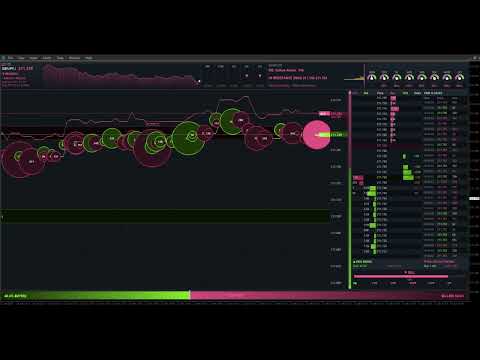
Videos available for EA in demonstration
Рекомендуем также
Painel Profit — это торговая панель для MetaTrader 5, созданная для упрощения ручного исполнения сделок и визуального управления ордерами прямо на графике. Принцип работы прост: трейдер выбирает инструмент, таймфрейм, объем, тип входа и стратегию выхода. На основе этих команд панель отправляет или организует сделку через интерфейс, отображая на графике уровни входа, take profit и stop loss для визуального контроля. Этот продукт не является сигнальным роботом и не принимает торговые решения за по
ClusterSecondForex
Rafil Nurmukhametov
4.67 (3)
Утилита позволяет строить различные виды графиков: Секундный график от 1 секунды до 86400 секунд Тиковый график от 1 тика и выше Объемный график Дельтовый график Ренко график Рендж график Демоверсия продукта  https://www.mql5.com/ru/channels/clustersecondforex Встроенные индикаторы для объемного анализа:  дневной профиль рынка и профиль рынка выбираемого таймфрейма, Cluster Search, Imbalance, VWAP, Dynamic POC, VAH, VAL профиль стакана цен вертикальный объем с различными вариантами отображения,
Capital Management EA – Smart Risk Management & Profit Optimization for MT5 Take control of your trading capital with smart, automated strategies — fully optimized for MetaTrader 5 (MT5). Looking to protect your capital and maximize profits through automated money management strategies ? Capital Management EA is the all-in-one Expert Advisor for MetaTrader 5 (MT5) that helps you trade smarter, not harder. Core Features: 5-in-1 Capital Management Strategies – Built-in versatility Gr
ClusterSecond
Rafil Nurmukhametov
4.78 (32)
Утилита позволяет строить различные виды графиков: Секундный график от 1 секунды до 86400 секунд Тиковый график от 1 тика и выше Объемный график Дельтовый график Ренко график Рендж график Демоверсия утилиты https://www.mql5.com/ru/channels/clustersecond Встроенные индикаторы для объемного анализа:  дневной профиль рынка и профиль рынка выбираемого таймфрейма, Cluster Search, Imbalance, VWAP, Dynamic POC, VAH, VAL профиль стакана цен вертикальный объем с различными вариантами отображения, дельта
Here   our more valuable tools SMC Trend Trading   ,  Easy SMC Trading  ,  Institutional SMC Architect Volume Analysis Tools  ,  Volume flow Profile  ,  Market volume profile  , FVG with Volume  , Liquidity Heatmap Profile  ,  Volume Spread Analysis 2. Key Features Dynamic Filtering : The core feature. As soon as the current price crosses a historical liquidity level, that level disappears. This reduces chart clutter and prevents you from trading off "dead" support/resistance. Liquidity Heatma
Trading Assistent - это многофункциональная торговая панель, которая объединяет все необходимые инструменты для профессиональной торговли. Панель предоставляет полный контроль над позициями, углубленный анализ рисков и быстрое исполнение ордеров. ОСНОВНЫЕ ФУНКЦИОНАЛЬНЫЕ БЛОКИ Управление позициями: - Просмотр всех открытых позиций в реальном времени - Сортировка по символу, прибыли, объему и типу - Визуальная индикация прибыльных и убыточных позиций - Групповые операции закрытия - Функция Brea
Индикатор строит текущие котировки, которые можно сравнить с историческими и на этом основании сделать прогноз ценового движения. Индикатор имеет текстовое поле для быстрой навигации к нужной дате. Параметры : Symbol - выбор символа, который будет отображать индикатор; SymbolPeriod - выбор периода, с которого индикатор будет брать данные; IndicatorColor - цвет индикатора; Inverse - true переворачивает котировки, false - исходный вид; Далее идут настройки текстового поля, в которое можно ввес
Trading Utility for Forex Currency Pairs Only not for Gold  Functions Auto Lot Calculation based on Risk Auto stoploss  Auto TakeProfit Breakeven Auto Close Half % Close in percentage with respect to the PIPs Pending Orders BuyLimit Sell Limit with distances BuyStop Sell Stop    with distances Trading Informations Risk in percentage For Multiple trades Combine Takeprofit and Combine Stoplosses
BoxChart MT5
Evgeny Shevtsov
5 (7)
Рынок несправедлив, хотя бы потому, что всего лишь 10% игроков управляют 90% капитала. У рядового трейдера мало шансов, чтобы противостоять этим «хищникам». Но выход есть, необходимо всего лишь перейти на другую сторону, необходимо находиться в числе этих 10% «акул», научиться распознавать их намерения и двигаться вместе с ними. Объем - это единственный опережающий фактор, который безупречно работает на любом периоде и любом торговом инструменте. Сначала зарождается и накапливается объем, и толь
TradePad
Ruslan Khasanov
5 (1)
TradePad - это инструмент как для ручной, так и алгоритмической торговли.  Представляем вам простое решение для быстрых торговых операций и контроля позиций на нескольких торговых инструментах. Внимание, приложение не работает в тестере стратегий! Пробная версия приложения для демо-счета и описание всех инструментов Интерфейс приложения адаптирован для мониторов с высоким разрешением, прост и интуитивно понятен. Для комфортной работы, трейдеру предлагается следующий набор инструментов: менеджер
You can see Binance Spot data instantly in Metatrader 5 and it allows you to use all the features that Metatrader has provided to you. You can access the data of all symbols listed on Binance Futures. Don't forget to set the timezone. Binance it's 00:00 UTC. You need to fix it according to your own country You need to install the free Binance Spot Symbol List plugin. https://www.mql5.com/tr/market/product/83507 After loading, it automatically downloads the data of the cryptos in the market obser
1. Overview If you are looking for a conditional trade entry functionality in metatrader 5, you found your solution now with the Smart Conditional Trader. The EA lets you define the price condition to automatically enter into the trade and takes over the position managements afterwards as well - fully customisable.  The Smart Conditional Trader is a manual-assistance Expert Advisor for MetaTrader 5. It automates trade execution based on price-level crossing conditions that you define visually o
Quick operation, quick purchase, sale, empty operation. Provide three buttons: Buy, Sell, empty. Buy: Quickly place more orders after clicking, default 1 hand, profit point and stop-loss point are 110 points, after successful order can be manually modified. Sell: Quickly place an empty order after clicking, default 1 hand, profit point and stop-loss point are 110 points, can be manually modified after the order is successful. Empty: Quickly clear all orders, including purchase and s
Order Book, известный также как Market Book, глубина рынка, стакан цен, Level 2, - это предоставляемая брокером динамически обновляемая таблица с данными по текущим объемам торговых заявок на покупку и продажу для различных уровней цен вблизи Bid и Ask конкретного финансового инструмента. MetaTrader 5 предоставляет возможность трансляции стакана цен , но только в реальном времени. Данный индикатор OrderBook Cumulative Indicator позволяет аккумулировать данные стакана онлайн и визуализировать их
LT Trade Panel Pro 2 — Профессиональное управление рисками и быстрое исполнение LT Trade Panel Pro   — это незаменимый инструмент для трейдеров, которым важна точность, скорость и безупречное управление рисками в MetaTrader 5. Разработанная для   скальперов   и   дейтрейдеров , эта панель превращает сложное исполнение ордеров в простую операцию в один клик. В новой   версии 2   система была полностью переработана для обеспечения максимальной производительности, устранения задержек и добавления э
Local Copy Trader Utility - Professional Copy Trading System Overview Local Copy Trader Utility is the complete solution for mirroring trades between MetaTrader 5 accounts. With both Master and Slave functionality in one powerful Expert Advisor, it delivers reliable, lightning-fast trade copying with zero external dependencies. Perfect for managing multiple accounts, following trading signals, or transferring trades between brokers, this system ensures your positions stay perfectly synchronized
You have 5 positions open on XAUUSD. Net floating is +$30 - looks fine. But look closer: 3 buys, 2 sells. The buys are carrying 0.60 lots, the sells only 0.20. One of those buys has been sitting underwater for 90 minutes. Margin level is at 390% and drifting down. Stress is building - quietly, invisibly - while the terminal just shows you a list of rows. This is exactly where traders get caught. Not by a single bad trade, but by a book that drifted into a dangerous shape while they were watching
EA Performance Monitor Утилита для MetaTrader 5, которая автоматически обнаруживает все активные советники на открытых графиках, сопоставляет каждый советник с его торговыми данными и отображает в одной панели просадку, прибыль, процент побед и метрики открытых позиций в режиме реального времени. EA Performance Monitor — это автоматизированная утилита мониторинга для MetaTrader 5. Она сканирует все открытые графики с настраиваемым интервалом, идентифицирует каждый работающий советник по магическ
FREE
NRP Risk Manager Pro Institutional-Grade Trade Management & Prop Firm Protection Get the MetaTrader 4 Version Here: https://www.mql5.com/en/market/product/179888 Get the MetaTrader 5 Version Here: https://www.mql5.com/en/market/product/179885 Trading isn't just about finding the right entry; it is about flawlessly executing your edge while fiercely protecting your capital. NRP Risk Manager Pro is not an automated trading robot—it is a comprehensive, institutional-grade trade terminal d
Here   our more valuable tools SMC Trend Trading   ,  Easy SMC Trading  ,  Institutional SMC Architect Volume Analysis Tools  ,  Volume flow Profile  ,  Market volume profile  , FVG with Volume  , Liquidity Heatmap Profile  ,  Volume Spread Analysis 1. What does this Terminal actually do? The   Guru Terminal   is designed to solve the "Retail Blindness" problem. Most traders only look at candles; this terminal gives you   Institutional Context . It helps you: Track Smart Money:   See what the l
FREE
Infinity Liquidity AI - Premium MT5 Liquidity & Smart Money  If you are interested in using a professional liquidity-based MT5 indicator at the lowest possible price, this is the best time to purchase. Once the early slots are gone, the price will not stay the same. Free Bonus Indicator Included After purchase, message us from your profile and you will receive 1 premium indicator completely free with Infinity Liquidity AI. This bonus is included for buyers who contact us after purchase. You wil
Boleta de negociação, adiciona automáticamente as ordens Take Profit e Stop Loss quando excutada uma ordem de compra ou venda. Ao apertar as teclas de atalho (A, D, ou TAB), serão inseridas duas linhas de pre-visualização, representando as futuras ordens de take profit (azul) e stop loss (vermelho), as quais irão manter o distanciamento especificado pelo usuário. Ditas ordens só serão adicionadas ao ser executada a ordem inicial. Ao operar a mercado, as ordens pendentes de take profit, e stop lo
TradeInfoDisplay – Risk/Reward Visualiser Visualises profit/loss zones, RR ratio, Risk% and Reward% for all pending orders and positions directly on the chart. CPU-optimised. FULL DESCRIPTION TradeInfoDisplay draws colour-coded zones on the chart for every pen
Trade Manger
Israr Hussain Shah
Here   our more valuable tools SMC Trend Trading   ,  Easy SMC Trading  ,  Institutional SMC Architect Volume Analysis Tools  ,  Volume flow Profile  ,  Market volume profile  , FVG with Volume  , Liquidity Heatmap Profile  ,  Volume Spread Analysis You Give an Instruction: When you run the script, a window pops up with a dropdown menu. You choose exactly what you want it to do from the list (e.g., "Close Profit Only" or "Delete Pending Orders"). It Scans Your Positions: The script then reads
Lock Bot
Artem Alekseev
Утилита предназначена для автоматической поддержки "локирующей" позиции и повторного её открытия при необходимости, что подходит для стратегий сопровождения и защиты позиции. Простая утилита (далее бот), который реализует стратегию локирования с бесконечным перезапуском локирующей сделки. Принцип работы бота: - при запуске необходимо выбрать ордер на buy или sell с заданным TP - задать параметр SL локирующей сделки - бот следит за расстоянием между ценой открытия первой сделки и текущей. Если ра
Tick Volume Chart - уникальный инструмент для создания графиков на основе тиковых объёмов в MetaTrader 5 . С помощью Tick Volume Chart вы можете строить графики, где каждая свеча формируется не по времени, а по заданному количеству тиков. Это дает вам идеальную точность анализа рыночной активности, недоступную на стандартных временных графиках. Вы можете использовать любые индикаторы и советники с поддержкой пользовательских символов. Работать с полученными графиками так же удобно, как и со стан
Overview Harmonic Patterns MT5 is a technical analysis indicator designed for the MetaTrader 5 platform. It identifies and displays harmonic price patterns, such as Butterfly, Cypher, Crab, Bat, Shark, and Gartley, in both bullish and bearish directions. The indicator calculates key price levels, including entry, stop loss, and three take-profit levels, to assist traders in analyzing market movements. Visual elements and customizable alerts enhance usability on the chart. Features Detects six ha
Simple Customizable Trade Panel — Простая и быстрая торговля в один клик Эта компактная и гибкая панель создана для тех, кто ценит   скорость ,   удобство   и   настройку под себя . Всего в один клик вы можете: Купить / Продать актив Закрыть все открытые позиции Разместить отложенный ордер по заданному расстоянию Удалить все отложенные ордера Настраиваемые параметры: • Объём лота • Стоп-лосс (в пунктах) • Тейк-профит (в пунктах) • Расстояние до цены для отложенного ордера Панель полно
Профиль Рынка (Market Profile) определяет ряд типов дней, которые помогают трейдеру распознать поведение рынка. Ключевая особенность - это область значений (Value Area), представляющая диапазон ценового действия, в котором произошло 70% торговли. Понимание области значений может помочь трейдерам вникнуть в направление рынка и установить торговлю с более высокими шансами на успех. Это отличное дополнение к любой системе, которую вы возможно используете. Blahtech Limited представляет сообществу Me
ALIEN DASHBOARD FULL EDITION – Professional ICT & Precision Trading Dashboard for MT5 ( HYBRID ENGINE ) Overview The   Alien Dashboard Full Edition   is a comprehensive, all‑in‑one technical indicator for MetaTrader 5 that merges the most powerful concepts from Inner Circle Trader (ICT) methodology with advanced precision‑entry logic, multi‑timeframe analysis, and an intuitive on‑chart dashboard. Designed for serious traders who want to visualise institutional order flow, identify high‑probabili
С этим продуктом покупают
Quant AI Agents
Ho Tuan Thang
5 (1)
Quant AI Agents are independent trading Expert Advisors. Instead of trading using a fixed strategy like other conventional EAs, Quant AI Agents   is a   multi-agent AI trading framework   that turns natural-language strategy prompts into live.  WANT THE SAME RESULTS AS MY LIVE SIGNAL?   Use the exact same brokers I do:   IC MARKETS , IC TRADING   .  Unlike the centralized stock market, Forex has no single, unified price feed.  Every broker sources liquidity from different providers, creating un
AI Agent Supervisor is NOT an Expert Advisor. AI Agent Supervisor   is a   multi-agent AI risk & portfolio supervisor   that watches every EA on your account and intervenes in real time.  WANT AN AI PORTFOLIO MANAGER WATCHING YOUR FLEET 24/7?   Run your fleet on the same brokers I do:   IC MARKETS , IC TRADING   .  Unlike the centralized stock market, Forex has no single, unified price feed.  Every broker sources liquidity from different providers, creating unique data streams. The Supervisor r
Farmed Hedge Yield Farming | All Markets (Manual - Hybrid - Semi/Automated EA) MULTI-ASSET SUPPORT Trade any asset available on your broker - Forex: Major, Minor, Exotic pairs - Crypto: BTC, ETH, XRP, SOL, BNB - Stocks: Apple, Tesla, Amazon, Google, etc. - Commodities: Gold, Silver, Oil, Gas - Indices: US30, NAS100, SPX500, DAX40 - Any CFD your broker offers VERIFIED TRADING RESULTS - Farmed Hedge Yield Axi Copy:  https://www.mql5.com/en/signals/2356376 - Farmed Hedge Yield Exn Copy:   https:/
The product will copy all telegram signal to MT5 ( which you are member) , also it can work as remote copier.  Easy to set up, copy order instant, can work with almost signal formats, image signal,  s upport to translate other language to English Work with all type of channel or group, even channel have "Restrict Saving Content", work with  multi channel, multi MT5 Work as remote copier: with signal have ticket number, it will copy exactly via ticket number. Support to backtest signal. How to s
Custom Alerts AIO: Универсальный сканер рынка — Без настройки Обзор Custom Alerts AIO — это самый быстрый и простой способ отслеживать рыночные сигналы в реальном времени на множестве инструментов без дополнительной настройки и без необходимости покупать другие продукты. В состав входят все необходимые индикаторы от Stein Investments, что делает этот инструмент идеальным решением «всё в одном» для трейдеров, ценящих простоту и эффективность. Просто установите на график и сразу получайте сигнал
Prop Firm Os
Gayathiri Gopalakrishnan
5 (1)
PROP FIRM OS Structured Trading Assistant for MetaTrader 5 PROP FIRM OS is a structured trading assistant designed for MetaTrader 5 users who prefer rule-based market analysis and organized trading workflows. The Expert Advisor combines market analysis tools, scanner functions, dashboard monitoring, alerts, risk-control settings, and trade management features inside one system. PROP FIRM OS is designed to help traders follow selected rules, filters, and monitoring conditions during trading activ
YuClusters
Yury Kulikov
4.93 (42)
Внимание: Ознакомиться с работой программы можно с помощью бесплатной версии  YuClusters DEMO . YuClusters это профессиональная система анализа рынка. Для трейдера открываются уникальные возможности анализа потока ордеров, объемов торговли, движения цены используя различные графики, профили, индикаторы, графические объекты. YuClusters оперирует данными на основе ленты сделок или тиковой информации, в зависимости от того, что доступно в котировках финансового инструмента.  YuClusters позволяет с
Touch of MIDAS
Carl Gustav Johan Ekstrom
Automated MIDAS Trading for MT5 Touch of MIDAS  combines automatic level detection, one-click curve arming, and a full prop-firm protection layer into one seamless workflow. The EA draws institutional-grade MIDAS curves on every chart, watches the levels you select across every symbol and timeframe, and fires trades the moment price reaches them — with the stop-loss attached, the lot size calculated, and fifteen safety checks already cleared. Built for prop firm traders and serious retail trader
FUTURES ORDERFLOW FOOTPRINT CHART Professional OrderFlow EA for MetaTrader 5 Version 1.01| Professional tool for real traders | Institutional-Grade Visualization STRATEGY TESTER USERS - PLEASE SELECT EVERY REAL TICK WHEN TESTING AND YOU HAVE DOWNLOADED HISTORICAL DATA. IF YOU SEE A WAITING SCREEN AND IT IS NOT DOWNLOADING, IT MEANS YOU HAVE LOW HISTORICAL DATA. TRY 1 MIN AND 5 MIN FIRST ON 1 DAY DATA. ONE DAY DATA SHOULD BE THE NEWEST AND MOST CURRENT DATE. PLEASE WAIT UNTIL THE MARKET HAS ROL
ManHedger MT5
Peter Mueller
4.83 (6)
THIS EA IS A SEMI-AUTO EA, IT NEEDS USER INPUT. Manual & Test Version Please TEST this product before BUYING  and watch my video about it. The price of the ManHedger will increase to 250$ after 20 copies sold. Contact me for user support or bug reports or if you want the MT4 version! MT4 Version  I do not guarantee any profits or financial success using this EA. With this Expert Advisor, you can: Implement your own Zone Recovery strategy to capitalize on trending markets. Create Grid trading s
Telegram to mt5 pro
Janet Abu Khalil
3.67 (3)
Telegram to MT5 Pro — Расширенный копировщик сигналов Telegram с Auto-Fix, Multi-TP, управлением риском и полным управлением сделками Telegram to MT5 Pro — профессиональный копировщик сигналов Telegram Telegram to MT5 Pro автоматически копирует торговые сигналы из Telegram прямо в ваш аккаунт MetaTrader 5 в реальном времени с полным контролем риска, исполнения и управления сделками. Система состоит из двух компонентов: • Expert Advisor (EA), работающий внутри MetaTrader 5 • Desktop bridge прило
EasyInsight AIO MT5
Alain Verleyen
4.92 (12)
EASY Insight AIO – Всё-в-одном для умного и простого трейдинга Обзор Представьте, что вы можете просканировать весь рынок — Форекс, золото, криптовалюты, индексы и даже акции — всего за несколько секунд, без ручного просмотра графиков, сложной установки или настройки индикаторов. EASY Insight AIO — это ваш идеальный инструмент экспорта для трейдинга с поддержкой искусственного интеллекта. Он предоставляет полный снимок рынка в одном аккуратном CSV-файле — готовом к мгновенному анализу в ChatGP
Суть: используя юзер-интерфейс вы настраиваете параметры, которым должен соответствовать график до входа в позицию(позиции), настраиваете какие входные модели использовать, настраиваете правила по которым надо завершать торговлю и планирование. А всю рутину по наблюдению за графиком и исполнению Lazy Trader берет на себя. полное описание  :: 3 ключевых видео [1] -> [2] -> [3]  :: [ ДЕМО-ВЕРСИЯ ] Что он умеет? - Понимает структуру рынка по Ларри Вильямсу - Понимает Swing-структуру рынка по Майк
MT5 Trading Deck
Manuel Michiels
5 (2)
One button. One trade. MT5 Trading Deck is a hotkey trading panel for MetaTrader 5 that turns the platform into a keyboard-driven execution cockpit. Stop loss, take profit and lot size are pre-calculated for every key; the moment you press, a market order is live on the broker. A complete technical user manual is attached in the product Comments section. It documents every input parameter, the full hotkey map, the recommended Stream Deck XL layout, and the advanced workflows for Pre-Limit orders
The product will copy all  Discord  signal   to MT5   ( which you are member  ) , also it can work as remote copier.  Easy to set up. Work with almost signal formats, support to translate other language to English Work with multi channel, multi MT5. Work with Image signal. Copy order instant, auto detect symbol. Work as remote copier: with signal have ticket number, it will copy exactly via ticket number. How to setup and guide: Let read all details about setup and download Discord To MetaTrader
Unlimited Trade Copier Pro - это мощный инструмент для удаленного копирования сделок между несколькими счетами MetaTrader 4/MetaTrader 5, расположенными удаленно друг от друга, по сети интернет. Это идеальное решение для провайдеров сигналов, которые хотят поделиться своей торговлей с другими трейдерами по всему миру. Один поставщик может копировать сделки на неограниченное количество счетов-получателей, а один получатель также может копировать сделки неограниченного количества провайдеров. Пост
Trend Cue Basket Manager
Mohammadreza Faghanimakrani
5 (1)
Trend Cue Basket Manager is a semi-automatic basket management utility for MT5 hedging accounts. After purchase, please send me a message.  I will send you the bonus package and basic setup guidance. The idea is very simple: You open the first trade manually. Trend Cue Basket Manager manages the basket after entry. It does not give buy or sell signals by itself. It does not choose the market direction for you. It does not open the first trade automatically. The first decision is always yours. Af
Crystal Trade Manager – Advanced MT5 Risk and Trade Control Utility Overview Crystal Trade Manager (CTM) is a professional MetaTrader 5 utility designed for risk management, trade automation, and instant execution control. It provides traders with an integrated system for protecting equity, managing daily drawdowns, controlling lot sizes, and applying automation features such as automatic SL/TP, break-even, and trailing stop. The tool is suitable for manual traders, prop-firm challenge particip
Gamma Edge Pro MT5 — GexBot Classic API Integration Gamma Edge Pro   brings institutional-grade   Gamma Exposure (GEX) data   directly onto your MetaTrader 5 chart — the same data used by professional options traders to anticipate price magnets, hedging flows, and dealer positioning. Powered by the   GexBot Classic API , this indicator automatically maps options market data from US-listed instruments onto any   MT5 CFD instrument   — Forex pairs, Gold, indices, and more — with intelligent price
The product will copy all WhatsApp signal to MT5 ( which you are member).  Easy to set up, copy order instant, can work with almost signal formats,  image signal. Work with all type of channel or group, work with  multi channel, multi MT5 Support to translate other language to English How to setup and guide: Let read all details about setup and download WhatsAppCopier apps   here Recommend to all: try install demo version from market to your PC/ VPS because some time you maybe have problem with
Telegram Broadcast MT5
Volodymyr Hrybachov
3.67 (3)
Утилита TELEGRAM BROADCAST помогает моментально публиковать Вашу торговлю в Телеграм-канал. Если Вы давно хотели создать свой Телеграм-канал с ФОРЕКС сигналами, то это то, что Вам нужно.  TELEGRAM BROADCAST может отправлять сообщения: Открытие и закрытие сделок; Выставление и удаление отложенных ордеров; Модификация стоп-лосс и тейк-провит (последний ордер); Срабатывание стоп-лосс и тейк-провит; Активация и удаление отложенного ордера: Отправка отчетов о торговле; Отправка сообщения при пополнен
EA Performance Logger Telegram
Abdulqudus Tomiwa Akande-owoo
The Performance Logger is a utility for MetaTrader 5 designed to track and report account metrics. It identifies trades based on specific criteria and provides summaries of account activity. Main Functions Automated Reporting : Generates summaries of account performance and sends them to specified communication channels (Telegram or Discord) on a weekly, monthly, or yearly basis. Strategy Analysis : Organizes performance data based on the specific Expert Advisor or strategy used for each trade.

EA price is reduced to 50% discount for limited time period. Spot vs Future Arbitrage EA for MT5 Spot vs Future Arbitrage EA is an automated Expert Advisor designed for MetaTrader 5 that operates using price differences between Gold spot and Gold futures instruments. The strategy opens positions on both instruments simultaneously to take advantage of temporary differences between spot and futures prices. Requirements The trading account must provide both Gold spot and Gold futures instruments
What Exactly Is A Smart Trading Tool? Smart Trading Tool   was developed for fast and comfortable trading of the financial markets especially for   ORDER BLOCKS TRADERS .   It provides traders functionalities, such as: A Drawing Tool One-Click Trading Panel Automated Lot Sizes Calculation   based on your risk appetite & Money Management ( Watch this video , how this tool can help manage your risk per trade better!) Built in PRICE LEVELS (Fibonacci, Round Numbers, Daily hi-low, etc) Shows Trading
******************************* ***************** ********************** ***************** ********************** ************************* GoldMine Train — советник по стратегии трендовой торговли для золота. Оператор определяет основное направление тренда и дает команду поезду двигаться. Поезд будет непрерывно КУПИТЬ/ПРОДАТЬ в этом направлении. Объем лота будет зависеть от баланса счета и заданного коэффициента кредитного плеча. Когда оператор меняет направление тренда, поезд останавливае
Mt5 To InterativeBrokers Copier allows you to copy deals from MT5 account to Interactive Brokers. With this, you can run your EA strategy on a MT5 Demo/Real Account, then copy all the deals to Interactive Brokers account real time. Features: 1. Copy or Invert-Copy deals Realtime from MT5 to IB Account. 2. Synchronizing positions of both accounts periodicaly, in case any missing copying. 3. You can choose only Buy position or Sell position. Symbols Setup: General Format:  {MT Symbol} -> {IB S

Introduction Our system is more than just a tool—it’s your personal guide in the dynamic trading landscape. Expertly developed and optimized using advanced strategies, this groundbreaking predictor gives traders a powerful edge. It’s not just about the features; it’s about a trading journey that stands out from the crowd. Get ready for an enhanced trading experience like never before! What It Does Next Candle Prediction: Imagine gaining insights into the market’s next move before it happens. Our

Here is the corrected, MQL5-compliant version of your second product description. I have removed the custom bullet point symbols, cleaned up the list formatting to use standard markdown, and organized the setup guide into clean, numbered steps. PropFolio Command Manager Pro is an advanced, multi-symbol execution terminal designed to automate your custom arrow indicators. Simply enter the name of your arrow indicator into the settings, and the Command Manager will monitor up to 30 currency pairs
SSFx Ultimate Hedge Manager EA Описание: SSFx Ultimate Hedge Manager EA — это вершина инструментов для управления сделками на платформе MT5. Объединяя расширенные функции управления сделками из SSFx Hedge Manager EA с комплексными возможностями тестирования стратегий из SSFx Manual Backtester, этот продукт предоставляет трейдерам неограниченные возможности для оптимизации и совершенствования своих торговых стратегий. Этот эксперт советник (EA) ориентирован на управление рисками с использованием
Reward Multiplier is a semi-automatic trade manager based on pyramid trading that opens additional orders with the running profit of your trades to maximize return exponentially without increasing the risk. Unlike other similar EAs, this tool shows potential profit/loss and reward to risk ratio before even entering the first trade! Download Demo here  (starting lot is fixed at 0.01) Contact me to get a 7 days trial version of the product with full functionality. Guide + tips here MT4 version  
Другие продукты этого автора
Footprint Chart Pro — Professional OrderFlow EA for MetaTrader 5 Version 6.34 | Professional tool for real traders | Institutional-Grade Visualization DEMO USERS - PLEASE SELECT EVERY TICK / REAL TICK WHEN TESTING AND YOU HAVE DOWNLOADED HISTORICAL DATA. IF YOU SEE A WAITING SCREEN AND IT IS NOT DOWNLOADING, IT MEANS YOU HAVE LOW HISTORICAL DATA. TRY 1 MIN AND 5 MIN FIRST ON 1 DAY DATA. ONE DAY DATA SHOULD BE THE NEWEST AND MOST CURRENT DATE. PLEASE WAIT UNTIL THE MARKET HAS ROLLED OVER PERIOD.
================================================================================ POC BREAKOUT - V20.72. Full Professional Grade Toolkit ================================================================================ POC Breakout is a full MetaTrader 5 trading dashboard for discretionary traders who want breakout signals, Point of Control (POC) context, volume profiles, order flow, market structure, news, alerts, and advanced trade planning in one professional workspace. Attached directly to you
FUTURES ORDERFLOW FOOTPRINT CHART Professional OrderFlow EA for MetaTrader 5 Version 1.01| Professional tool for real traders | Institutional-Grade Visualization STRATEGY TESTER USERS - PLEASE SELECT EVERY REAL TICK WHEN TESTING AND YOU HAVE DOWNLOADED HISTORICAL DATA. IF YOU SEE A WAITING SCREEN AND IT IS NOT DOWNLOADING, IT MEANS YOU HAVE LOW HISTORICAL DATA. TRY 1 MIN AND 5 MIN FIRST ON 1 DAY DATA. ONE DAY DATA SHOULD BE THE NEWEST AND MOST CURRENT DATE. PLEASE WAIT UNTIL THE MARKET HAS ROL
Фильтр:
Нет отзывов
Ответ на отзыв