Volume Bubbles Order Flow Footprint

VOLUME BUBBLES ORDERFLOW FOOTPRINT PROFESSIONAL

Expert Advisor for MetaTrader 5

Complete Feature Documentation

Introduction:

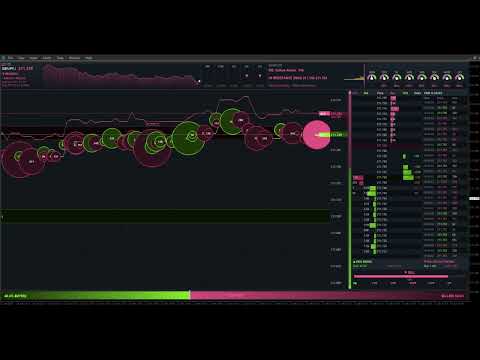
Volume Bubbles OrderFlow Footprint Professional is an advanced order flow visualization tool designed for the MetaTrader 5 platform. It provides institutional-grade market analysis through real-time volume bubbles visualization, volume profiling, and sophisticated order flow analysis. This Expert Advisor transforms raw market data into actionable trading intelligence, helping traders identify high-probability trading opportunities by revealing the underlying market microstructure.

Main Interface Components:

Header Information Panel

The header panel displays critical market information at a glance, providing traders with essential data without cluttering the main chart area.

  • Symbol and Timeframe Display: Shows the current trading instrument and chart timeframe prominently in the top-left corner for quick reference.

  • Real-Time Price Information: Displays current Bid and Ask prices with color-coded directional indicators showing price movement.

  • Spread Monitor: Shows the current bid-ask spread in both points and pips, essential for scalping and high-frequency trading strategies.

  • Session Price Chart: A mini area chart displaying session price movement with gradient fill, providing visual context of the day's price action. Customizable bull and bear colors available.

  • Multi-Timeframe Trend Boxes: Color-coded boxes showing trend direction across M15, H1, H4, D1, and W1 timeframes, enabling traders to align with higher timeframe trends.


Volume Bubbles OrderFlow

The central volume bubbles is the core visualization tool, displaying order flow data in a bubble style format that reveals market liquidity and trading activity.

  • Real-Time Volume Visualization: Each cell represents volume traded at a specific price level during a time column, with color intensity indicating volume magnitude.

  • Configurable Columns: Supports up to 80 columns of historical data, configurable via InpHeatmapColumns parameter.

  • Price Level Resolution: Adjustable price levels (InpPriceLevels) and ticks per level (InpTicksPerLevel) for precise market depth visualization.

  • Column Update Frequency: Customizable update interval (InpColumnUpdateMs) allowing balance between detail and performance.

  • Auto-Scroll Feature: Automatically keeps current price centered in the visible area when enabled (InpAutoScroll), with configurable margin (InpScrollMargin).

  • Cell Background Coloring: Optional background coloring based on cumulative volume at each price level, showing areas of high trading activity.

  • Cell Flash Animation: Visual flash effect when trades occur at specific price levels, with configurable duration (InpCellFlashDuration) and intensity (InpCellFlashCount).


Volume Bubbles

Volume bubbles provide an intuitive visual representation of individual trades, with size proportional to trade volume.

  • Dynamic Sizing: Bubble size scales between minimum (InpBubbleMinSize) and maximum (InpBubbleMaxSize) based on trade volume relative to recent activity.

  • Volume Threshold: Only trades exceeding the minimum volume threshold (InpMinBubbleVolume) generate bubbles, filtering out noise.

  • Color Coding: Buy trades display in the theme's bull color; sell trades display in the bear color for instant directional recognition.

  • Transparency Control: Adjustable alpha transparency (InpBubbleAlpha) allows bubbles to overlay without obscuring underlying data.

  • Outline Enhancement: Configurable outline width (InpBubbleOutlineWidth) improves bubble visibility against varying backgrounds.

  • Flash Animation: New bubbles flash briefly when created (InpBubbleFlash), drawing attention to fresh market activity. Duration controlled by InpBubbleFlashDuration.

  • Smooth Scrolling: Bubbles scroll smoothly with sub-pixel positioning as new columns are added, maintaining visual continuity.


Big Order Detection and Alerts

Large institutional orders are highlighted with special visual treatments to help traders identify significant market participants.

  • Threshold Configuration: Define what constitutes a big order via InpBigOrderThreshold parameter, typically set based on the instrument's average trade size.

  • Visual Text Labels: Large orders display volume text directly on the chart when InpShowBigOrderText is enabled.

  • Flash Size Threshold: Separate threshold (InpBigOrderFlashSize) for triggering flash animations on medium-to-large orders.

  • Custom Font Settings: Big order labels use dedicated font (InpBigOrderFont) and size (InpBigOrderFontSize) for optimal visibility.

  • Large Buy/Sell Detection: System tracks when large buy or sell orders occur, displaying alerts in the DOM Info panel.


Depth of Market (DOM) Panel

The DOM panel provides a traditional order book view, showing pending orders and recent trading activity at each price level.

  • Price Ladder Display: Vertical price ladder showing configurable number of levels (InpDOMLevels) above and below current price.

  • Bid/Ask Volume Bars: Horizontal bars showing cumulative volume at each price level, with separate colors for bid and ask sides.

  • Volume Profile Integration: Mini volume profile bars overlaid on the DOM showing historical volume distribution.

  • Trade Flash Indication: Price levels flash briefly when trades occur (InpDOMFlashDuration), indicating active price levels.

  • Current Bid/Ask Highlighting: Special highlighting for the current bid and ask prices with horizontal separator line.

  • Panel Width Control: Adjustable panel width (InpDOMWidth) to balance detail with screen real estate.


DOM Information Panel

Positioned below the DOM, this panel provides real-time analysis of order book dynamics.

  • Bids Rising/Falling Indicator: Shows whether bid-side pressure is increasing or decreasing, with directional arrow and color coding.

  • Large Order Detection Display: Prominently displays when large buy or sell orders are detected in the market.

  • Market State Indicator: Shows current market conditions when no large orders are present.

Time and Sales Panel

The Time and Sales panel provides a real-time tape of all executed trades, essential for reading market momentum and identifying aggressive buyers or sellers.

  • Trade Tape Display: Scrolling list of recent trades showing time, price, and size with color coding for buy/sell direction.

  • Configurable Row Count: Adjustable number of visible trades (InpTimeSalesRows) to balance information density with readability.

  • Big Order Highlighting: Large trades are highlighted with special styling for quick identification.

  • Panel Width Control: Adjustable width (InpTimeSalesWidth) for optimal display on different screen sizes.

Time and Sales Information Panel

This panel summarizes Time and Sales data to show who currently controls the market.

  • Buyers/Sellers In Control: Displays whether buyers or sellers dominate recent trading activity, calculated from the last 20 trades using a rolling window for responsive updates.

  • Directional Arrow: Up arrow for buyer control, down arrow for seller control, with corresponding color coding.

  • Buy/Sell Volume Totals: Shows cumulative buy and sell volume from the Time and Sales data for the current session.


Bid and Ask Price Lines

Visual markers for current bid and ask prices help traders identify the current market spread and price location.

  • Bid Line: Horizontal line at current bid price, toggleable via InpShowBidLine.

  • Ask Line: Horizontal line at current ask price, toggleable via InpShowAskLine.

  • Line Thickness: Configurable line width (InpLineThickness) for visibility on different screen resolutions.

  • Theme-Based Colors: Lines automatically use the current theme's bull and bear colors.


Price Grid Overlay

Optional grid lines help with price level identification and chart readability.

  • Toggle Control: Grid can be enabled or disabled via InpShowGrid parameter.

  • Custom Color: Set a specific grid color (InpGridColor) or use clrNONE to use the theme default.

  • Alpha Transparency: Adjustable grid opacity (InpGridAlpha) to prevent grid lines from obscuring chart data.

  • Price Labels: Grid lines include price labels on the right side for easy reference.


Support and Resistance Zones

Automatically detected support and resistance zones based on high-volume price clusters.

  • Automatic Detection: Zones are identified by analyzing volume concentration at price levels.

  • Support Zones: Price areas below current market with significant historical buying interest.

  • Resistance Zones: Price areas above current market with significant historical selling interest.

  • Zone Flip Detection: System tracks when price breaks through a zone, potentially flipping support to resistance or vice versa.

  • Visual Display: Zones displayed as shaded areas with color indicating support (blue) or resistance (red) nature.

  • Toggle Control: Enable or disable via InpShowSRZones parameter.


Analysis and Signal Panels

Eight Indicator Dial Panel

Eight mini gauge dials provide quick visual reference for multiple technical indicators, showing bullish, bearish, or neutral conditions.

  • Triple Moving Average (3MA): Analyzes the alignment of fast (8), medium (21), and slow (50) period moving averages. Bullish when fast > medium > slow, bearish when reversed.

  • Standard Deviation (STD): Measures volatility breakout conditions. Shows stronger signals during high volatility periods.

  • SuperTrend (ST): ATR-based trend indicator. Bullish when price is above the upper band, bearish when below the lower band.

  • Average True Range (ATR): Shows volatility expansion or contraction combined with price direction.

  • Trend (TRD): Price action analysis comparing current price to H4 highs/lows and recent candle direction.

  • Relative Strength Index (RSI): Classic momentum oscillator. Bullish in oversold territory (<30), bearish in overbought (>70).

  • MACD (MCD): Moving Average Convergence Divergence. Analyzes histogram direction and MACD line position.

  • Commodity Channel Index (CCI): Momentum indicator. Strong signals above +100 or below -100.

  • Configurable Periods: Each indicator's period is adjustable via input parameters (InpMAPeriodFast, InpMAPeriodMid, InpMAPeriodSlow, InpRSIPeriod, etc.).

  • Needle Animation: Each dial features a needle that rotates based on signal strength, from -90 degrees (strong sell) to +90 degrees (strong buy).


Signal Analysis Panel

The signal panel synthesizes multiple data sources into a clear directional bias.

  • Overall Signal Display: Shows BULLISH, BEARISH, or NEUTRAL based on combined analysis of indicators, volume, and price action.

  • Confidence Arrows: Visual arrows below the signal meter indicating confidence level and direction.

  • Multi-Factor Analysis: Signal incorporates 8 indicator dials, volume pressure, price vs VWAP, and cumulative delta.


Market Advisor Panel

Text-based market analysis providing actionable trading guidance.

  • 5-Minute Delta Analysis: Shows recent delta trend with percentage change, indicating short-term buying or selling pressure.

  • Key Level Status: Reports price position relative to POC, VWAP, and Value Area boundaries.

  • Action Advice: Suggests trading actions based on current market conditions and indicator alignment.

  • Mini Volume Profile: Small volume profile display within the advisor panel showing recent volume distribution with POC line.


Bulls vs Bears Pressure Gauge

The bottom pressure bar provides a visual representation of the ongoing battle between buyers and sellers.

  • Real-Time Calculation: Calculates bull and bear pressure from visible heatmap columns' buy and sell volumes.

  • Percentage Display: Shows exact percentage of volume attributed to bulls (left side) and bears (right side).

  • Gradient Fill: Gradient color fill from bull color to bear color, with center marker showing the dividing line.

  • Control Indicator: Center text shows 'BULLS WINNING', 'BEARS WINNING', or 'BULLS vs BEARS' based on which side exceeds 55%.

  • Smoothed Movement: Gauge moves gradually based on order size - big orders cause bigger movement, small orders cause smaller movement. This prevents constant jittering and shows true control.


Themes and Visual Customization

Panel Theme

Choose between dark and light panel backgrounds to suit your trading environment and personal preference.

  • Dark Theme (PANEL_DARK): Dark background optimized for extended screen time, reducing eye strain during long trading sessions.

  • Light Theme (PANEL_LIGHT): Bright background suitable for well-lit environments or traders who prefer lighter interfaces.

Color Themes

Eight color themes provide different visual styles for bull and bear representation.

  • Classic: Traditional green for bullish, red for bearish.

  • Blue-Orange: Blue for bullish, orange for bearish.

  • Cyan-Magenta: Cyan for bullish, magenta for bearish.

  • Lime-Pink: Lime for bullish, pink for bearish.

  • Gold-Purple: Gold for bullish, purple for bearish.

  • Teal-Coral: Teal for bullish, coral for bearish.

  • Sky-Crimson: Sky blue for bullish, crimson for bearish.

  • Mint-Rose: Mint for bullish, rose for bearish.

Font Customization

Customize text appearance throughout the interface.

  • Font Name (InpFontName): Default is 'Segoe UI'. Any system-installed font can be used.

  • Font Size (InpFontSize): Base font size in points. Default is 9.

  • Font Color (InpFontColor): Override theme text color with a custom color, or use clrNONE for theme default.

Panel Layout

Control the size and position of the main panel.

  • Panel X Position (InpPanelX): Horizontal offset from chart left edge. Default is 10 pixels.

  • Panel Y Position (InpPanelY): Vertical offset from chart top edge. Default is 10 pixels.

  • Panel Width (InpPanelWidth): Total panel width in pixels. Default is 1500.

  • Panel Height (InpPanelHeight): Total panel height in pixels. Default is 850.


Session Management

Session Time Configuration

Configure the trading session boundaries for accurate volume profile and data analysis.

  • Session Start (InpSessionStart): Time when the trading session begins in HH:MM format. Default is '00:00'.

  • Session End (InpSessionEnd): Time when the trading session ends in HH:MM format. Default is '23:59'.

  • Automatic Reset: Volume Profile, session volumes, VWAP, cumulative delta, and Time and Sales tracking automatically reset at session start.


Technical Specifications

Performance Optimization

The Expert Advisor is optimized for efficient operation even on lower-specification hardware.

  • Rendering: Uses MQL5  library for efficient drawing, minimizing chart object overhead.

  • Strategy Tester Compatible:Functionality in Strategy Tester with manual indicator calculations when indicator handles are unavailable.

  • Memory Management: Efficient array management with configurable maximum sizes for bubbles, columns, and DOM levels.


Data Sources

The EA processes multiple data streams to generate its visualizations.

  • Tick Data: Real-time tick data for precise trade detection and price updates.

  • Trade Direction Detection: Analyzes tick flags and price movement to determine whether trades are buyer or seller initiated.

  • Volume Generation: Uses power-law distribution to generate realistic trade sizes from tick data when real volume is unavailable.


Calculated Metrics

The EA calculates numerous derived metrics for comprehensive market analysis.

  • Volume Weighted Average Price (VWAP): Session VWAP calculated from cumulative price-volume and total volume.

  • Cumulative Delta: Running total of buy volume minus sell volume for the session.

  • Delta Percentage: Five-minute delta as a percentage of total five-minute volume.

  • Value Area: Calculated as the price range containing 70% of session volume, centered on POC.


System Requirements

Platform Requirements

  • MetaTrader 5: Build 2500 or later recommended for full functionality.

  • Chart Mode: Works on any chart timeframe.

  • Allow DLL Imports: Not required - EA uses only native MQL5 functions.


Recommended Display

  • Minimum Resolution: 1920 x 1080 for full panel display at default size.

  • Optimal Resolution: 2560 x 1440 or higher for best visibility with additional chart space.

  • Panel Scaling: Adjust InpPanelWidth and InpPanelHeight for different screen sizes.

Strategy Tester Demo Download

Although the expert advisor works in strategy tester, it needs live data to perform and render as intended as seen in the videos and images. Please select every tick and have relevant historical data downloaded for your instrument or it might not load correctly. Also make sure its after market opens, optimal time when the markets opening times are in view and not in the rollover period in strategy tester. 


Videos available for EA in demonstration
Produtos recomendados
Ultra Key
Naief R A A Banyan
Ultra key is a professional-grade MetaTrader 5 utilitie  that transforms your keyboard into a lightning-fast trading terminal. Designed for active traders who demand speed and precision, this utilitie  allows you to execute complex trading operations with single keystrokes while maintaining institutional-level risk management. Core Philosophy This utilitie  is built for traders who: Need  instant order execution  without clicking through menus Want  military-grade risk management  on every tr
Garner Trade Pad EA
Garner Edward Bennie
Garner Trade Pad EA is an MT5 Expert Advisor that brings trade planning and position sizing directly onto your chart. Position your Stop Loss and Take Profit, choose the amount you want to risk, and view the calculated lot size before placing an order.TP1 buy The dark navy panel with blue accents provides a clear view of your proposed trade. It is a manually operated calculator and order-entry tool: you choose the direction, levels and timing of every trade. ## Movable chart panel - Drag t
You can see Binance Spot data instantly in Metatrader 5 and it allows you to use all the features that Metatrader has provided to you. You can access the data of all symbols listed on Binance Futures. Don't forget to set the timezone. Binance it's 00:00 UTC. You need to fix it according to your own country You need to install the free Binance Spot Symbol List plugin. https://www.mql5.com/tr/market/product/83507 After loading, it automatically downloads the data of the cryptos in the market obser
O indicador cria cotações atuais, que podem ser comparadas com as históricas e, com base nisso, fazer uma previsão do movimento dos preços. O indicador possui um campo de texto para navegação rápida até a data desejada. Opções: Símbolo - seleção do símbolo que o indicador exibirá; SymbolPeriod - seleção do período do qual o indicador coletará dados; IndicatorColor - cor do indicador; HorisontalShift - deslocamento das cotações desenhadas pelo indicador pelo número especificado de barras; I
Quick operation, quick purchase, sale, empty operation. Provide three buttons: Buy, Sell, empty. Buy: Quickly place more orders after clicking, default 1 hand, profit point and stop-loss point are 110 points, after successful order can be manually modified. Sell: Quickly place an empty order after clicking, default 1 hand, profit point and stop-loss point are 110 points, can be manually modified after the order is successful. Empty: Quickly clear all orders, including purchase and s
Painel Nelogica ChartTrading
Tiago Silvano Souza Felipe
Painel Profit é um painel operacional para MetaTrader 5 criado para facilitar a execução manual e o gerenciamento visual de ordens diretamente no gráfico. O princípio de funcionamento é simples: o trader escolhe o ativo, o tempo gráfico, o volume, o tipo de entrada e a estratégia de saída. A partir desses comandos, o painel envia ou organiza a operação na interface, exibindo no gráfico os níveis de entrada, take profit e stop loss para acompanhamento visual. O produto não é um robô de sinais e n
BoxChart MT5
Evgeny Shevtsov
5 (7)
The market is unfair if only because 10% of participants manage 90% of funds. An ordinary trader has slim changes to stand against these "vultures". This problem can be solved. You just need to be among these 10%, learn to predict their intentions and move with them. Volume is the only preemptive factor that faultlessly works on any timeframe and symbol. First, the volume appears and is accumulated, and only then the price moves. The price moves from one volume to another. Areas of volume accumu
ClusterSecondForex
Rafil Nurmukhametov
4.67 (3)
The utility allows you to build different types of graphs: Seconds chart from 1 second to 86400 seconds Tick chart from 1 tick and above The volume chart Delta chart Renko chart Range chart Product demo https://www.mql5.com/ru/channels/clustersecondforex Built-in indicators for volumetric analysis: daily market profile and market profile of the selected timeframe, Cluster Search Imbalance VWAP Dynamic POC, VAH, VAL the profile depth of the market vertical volume with various display options, del
Veragonal Movement MT5 Free-floating charts at a click A Different Way to Navigate Your Charts Diagonal and Vertical Movement!!!!   Traditional MetaTrader 5 chart navigation can feel restrictive. Moving through historical price action, adjusting the chart scale and keeping track of individual candles often requires several separate actions. Veragonal Movement MT5 brings these controls together in one lightweight chart-navigation utility. Move horizontally and vertically, adjust the chart's horiz
Tick Volume Chart - uma ferramenta exclusiva para criar gráficos baseados no volume de ticks no MetaTrader 5 . Com o Tick Volume Chart , você pode construir gráficos onde cada candle é formado não por tempo, mas por uma quantidade definida de ticks. Isso oferece uma precisão ideal na análise da atividade do mercado, indisponível nos gráficos de tempo convencionais. Você pode utilizar quaisquer indicadores e robôs de negociação compatíveis com símbolos personalizados. Trabalhar com os gráficos ge
ClusterSecond
Rafil Nurmukhametov
4.78 (32)
The utility allows you to build different types of graphs: Seconds chart from 1 second to 86400 seconds Tick chart from 1 tick and above The volume chart Delta chart Renko chart Range chart Demo version of the utility https://www.mql5.com/ru/channels/clustersecond Built-in indicators for volumetric analysis: daily market profile and market profile of the selected timeframe, Cluster Search Imbalance VWAP Dynamic POC, VAH, VAL the profile depth of the market vertical volume with various display op
Trading Assistent is a multifunctional trading panel that combines all necessary tools for professional trading. The panel provides complete control over positions, in-depth risk analysis, and fast order execution. MAIN FUNCTIONAL BLOCKS Position Management: - Real-time viewing of all open positions - Sorting by symbol, profit, volume, and type - Visual indication of profitable and losing positions - Bulk closing operations - Breakeven function for profit protection Trading Operations: - I
TradeAQ
Guo Sheng Zhao
LuoMo Volume & Price Structure 8.98 A multi-function chart indicator for   MetaTrader 4 and MetaTrader 5 , designed to display key volume, volatility, sentiment, and price-structure information directly on the main chart. Main Features Volume and price-based Support & Resistance Volume spike and exhaustion signals ATR volatility expansion alerts Volume Profile with HVN and LVN Bullish and bearish sentiment distribution Developing or fixed POC VAH and VAL levels Supply and Demand zones Volume-wei
Capital Management EA – Smart Risk Management & Profit Optimization for MT5 Take control of your trading capital with smart, automated strategies — fully optimized for MetaTrader 5 (MT5). Looking to protect your capital and maximize profits through automated money management strategies ? Capital Management EA is the all-in-one Expert Advisor for MetaTrader 5 (MT5) that helps you trade smarter, not harder. Core Features: 5-in-1 Capital Management Strategies – Built-in versatility Gr
```html Console de Trading, Rendez Vos Transactions Confortables ! Cette application ne peut pas être testée sur le testeur de stratégie. Téléchargez la version de démonstration (pour compte de démo) ci-dessous et testez-la. Télécharger la version de démo 1. Fonctionnalités Utiles pendant la Transaction : (1) Affichage/Notification des Indicateurs Économiques : Quelques minutes avant l'annonce des indicateurs économiques, vous serez informé par des alertes, des notifications push et des e-mail

Swing Failure Hunter
Shingidzano Lesetedi
SFP Hunter — Swing Failure Pattern SFP Hunter is a MetaTrader 5 indicator that automatically detects Swing Failure Patterns (SFP) on any symbol and timeframe. The indicator identifies single-candle stop-hunt reversals where price wicks beyond a prior swing high or low and closes back inside on the same candle, signalling a potential reversal from that level. How the Pattern Works A Swing Failure Pattern occurs when price briefly breaches a prior swing high or swing low — triggering the stop orde
Bring institutional volume analysis directly to your MetaTrader 5 charts with Volume Profile Local Time ! This powerful indicator builds accurate volume profiles from trade-server bars, helping you identify where the heavy institutional volume is concentrated. Designed with built-in timezone auto-detection, it bridges the gap between trade-server time and your local PC time, making session analysis effortless. Key Features: Flexible Profile Ranges: Calculate profiles based on Last N Bars, Today
O Pulsar Panel MT5 é um gerenciador de operações no gráfico para o MetaTrader 5: planeje uma ordem com linhas arrastáveis de entrada, Stop Loss (SL) e Take Profit (TP), envie-a com até quatro níveis de TP, break-even e trailing stop, gerencie as posições, controle sua perda diária e revise suas estatísticas. O Pulsar Panel é um Expert Advisor (EA) que desenha seus painéis diretamente no gráfico. Não há aplicativo externo a instalar nem biblioteca de vínculo dinâmico (DLL). Importante - condições
RenkoFromRealTicks
Stanislav Korotky
4.67 (3)
This non-trading expert utilizes so called custom symbols feature ( available in MQL API as well) to build renko charts based on history of real ticks of selected standard symbol. RenkoFromRealTicks generates custom symbol quotes, thus you may open many charts to apply different EAs and indicators to the renko. It also transmits real ticks to update renko charts in real time. The generated renko chart uses M1 timeframe. It makes no sense to switch the renko chart to a timeframe other than M1. T
PNL MANAGER PRO —    Automatic Exit Manager with Smart Risk Control Set your entry, walk away. PNL Manager Pro sets your stop loss and take-profits automatically, locks in profit in stages, moves you to breakeven, and trails the rest — all while keeping your risk inside the limit you set. Try Before You Buy: You can download and test the Pnl MANAGER  free demo version  on a demo acc
LT Trade Panel Pro 2 - Gestão de Risco e Execução Profissional O   LT Trade Panel Pro   é a ferramenta definitiva para traders que buscam precisão, velocidade e uma gestão de risco impecável no MetaTrader 5. Projetado para   Scalpers   e   Day Traders , este painel transforma a complexidade da execução em uma experiência de um clique. Na nova   Versão 2  o sistema foi totalmente refatorado para oferecer máxima performance, eliminando latências e adicionando ferramentas exclusivas de proteção de
Was: $249  Now: $99   Market Profile defines a number of day types that can help the trader to determine market behaviour. A key feature is the Value Area, representing the range of price action where 70% of trading took place. Understanding the Value Area can give traders valuable insight into market direction and establish the higher odds trade. It is an excellent addition to any system you may be using. Inspired by Jim Dalton’s book “Mind Over Markets”, this indicator is designed to suit the
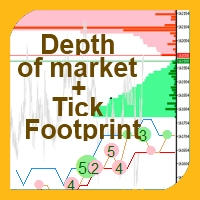

Este indicador permite-lhe desfrutar os dois produtos mais populares para analisar volumes de ofertas e das negociações no mercado a um preço favorável: Actual Depth of Market Chart Actual Tick Footprint Volume Chart Este produto combina o poder de ambos os indicadores e é fornecido como um único arquivo. Venda Anti-crise. Hoje com menor preço. Anda logo! A funcionalidade do COMBO Actual Depth of Market e Tick Volume Chart é totalmente idêntica aos indicadores originais. Você vai aproveitar o po
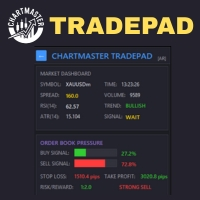
Take control of your trading with ChartMaster TradePad – a powerful all-in-one trading panel designed to simplify order execution, risk management, and market analysis. Whether you’re a scalper, day trader, or swing trader, ChartMaster TradePad gives you the speed, clarity, and precision you need to maximize your trading performance. Key Features Market Dashboard Real-time Market Data : Symbol, spread, RSI(14), ATR(14), trend direction, volume, and trading signals at a glance. Clear Trend & S
Order Book, known also as Market Book, market depth, Level 2, - is a dynamically updated table with current volumes of orders to buy and to sell specific financial instument at price levels near Bid and Ask. MetaTrader 5 provides the means for receiving market book from your broker, but in real time only, without access to its history. The indicator OrderBook Cumulative Indicator accumulates market book data online and visualizes them on the chart. In addition, the indicator can show the market
Layer Master: Professional Grid Trading Tool for MT5 Transform your grid trading with Layer Master - the most intuitive and powerful order management toolkit designed specifically for professional traders. MT4   Version:  https://www.mql5.com/en/market/product/79133 FREE - 7 Day Trial Version available. Please   contact  me to get your Free trial! Master Grid Trading with Precision Layer Master revolutionizes how you place and manage grid trades. With our visual interface, you can: Deploy hun
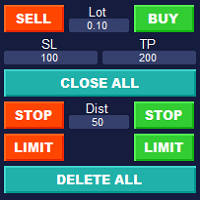
Simple Customizable Trade Panel — Fast and Easy One-Click Trading This lightweight and powerful panel is built for traders who value   speed ,   simplicity , and   full customization . With just one click, you can: Buy or Sell instantly Close all open positions Place pending orders with custom distance Delete all pending orders Adjustable parameters: • Lot size • Stop Loss (in points) • Take Profit (in points) • Distance to price for pending orders The panel is fully responsive and ad
Boleta de negociação, adiciona automáticamente as ordens Take Profit e Stop Loss quando excutada uma ordem de compra ou venda. Ao apertar as teclas de atalho (A, D, ou TAB), serão inseridas duas linhas de pre-visualização, representando as futuras ordens de take profit (azul) e stop loss (vermelho), as quais irão manter o distanciamento especificado pelo usuário. Ditas ordens só serão adicionadas ao ser executada a ordem inicial. Ao operar a mercado, as ordens pendentes de take profit, e stop lo
Gold News Quantum
Amijuddin Mollick
Gold News Quantum (Dynamic Reverse Trailing EA) is a high-performance automated trading system specifically developed for XAUUSD (Gold).  The strategy utilizes a dynamic price-tracking algorithm designed to excel during high-impact News Events and extreme market volatility. It follows momentum while simultaneously protecting your equity with a synchronized pending stop-loss mechanism. Key Features & Strengths: * High-Impact News Specialist: Specifically optimized to capture explosive price mo
**MT5 → Telegram & Discord Auto Post Bot** Want to automate your trading and stop wasting time on manual posting? This bot is for you. **What does it do?** It connects directly to MetaTrader 5 and automatically posts to Telegram & Discord: ️ Open trades ️ Closed trades ️ SL / TP levels ️ Profit and loss ️ Real-time signals **Advantages:** • Fully automated process • No delay – posts in real time • Perfect for signal groups and channels • Increases trust and transparency • Works
Os compradores deste produto também adquirem
Trade Assistant MT5
Evgeniy Kravchenko
4.43 (216)
Ajuda a calcular o risco por comércio, a fácil instalação de uma nova encomenda, gestão de encomendas com funções de fecho parcial, trailing stop de 7 tipos e outras funções úteis. Materiais e instruções adicionais Instruções de instalação   -   Instruções para a aplicação   Função de linha Mostra no gráfico a linha de Abertura, Stop Loss, Take Profit. Com esta função é fácil definir uma nova ordem e ver as suas características adicionais antes da abertura.   Gestão de risco A função de cálcul
Bem-vindo ao Trade Manager EA—uma ferramenta de gestão de risco criada para tornar o trading mais intuitivo, preciso e eficiente. Não é apenas uma ferramenta para executar ordens, mas uma solução abrangente para planejamento de operações, gerenciamento de posições e controle de risco. Seja você um iniciante, trader avançado ou scalper que precisa de execução rápida, o Trade Manager EA adapta-se às suas necessidades, oferecendo flexibilidade em todos os mercados, desde forex e índices até commodi
O Telegram to MT5 Multi-Channel Copier copia automaticamente os sinais de trading dos seus canais de Telegram e Discord diretamente para o MetaTrader 5. Sem bots, sem extensões de navegador, sem copiar à mão. O sinal chega ao Telegram ou ao Discord e o EA abre a operação no seu terminal em poucos segundos. E antes de copiar um canal, o backtester integrado mostra o que esse canal teria feito na sua conta. O produto inclui dois componentes: um aplicativo de Windows que escuta os seus canais de Te
Farmed Hedge Yield Farming | All Markets (Manual - Hybrid - Semi/Automated EA) VERIFIED TRADING RESULTS - Farmed Hedge Yield Axi Copy:  https://www.mql5.com/en/signals/2356376 - Farmed Hedge Yield Exn Copy:   https://www.mql5.com/en/signals/2356404 - Farmed Hedge Yield V Copy:  https://www.mql5.com/en/signals/2357156 IMPORTANT NOTICE: FarmedHedge is a MANUAL-FOCUSED TRADING UTILITY ,not a fully automated EA. Results shown on this Signal include manual trades and overall strategic management.
Copie sinais do Telegram com suas próprias regras de negociação Telegram to MT5 Signal Trader copia automaticamente sinais de negociação em texto de canais e grupos públicos e privados do Telegram para o MetaTrader 5. Gerencie vários provedores e contas MT5 em um único aplicativo para desktop, com configurações individuais de risco e de negociação para cada provedor . Você não precisa de um bot do Telegram nem configurar uma API para copiar sinais. Basta entrar com sua própria conta do Telegram
TradePanel MT5
Alfiya Fazylova
4.88 (170)
Trade Panel é um assistente de negociação multifuncional. O aplicativo contém mais de 50 funções de negociação para trading manual e permite automatizar a maioria das tarefas de negociação. Instruções para o aplicativo: https://www.mql5.com/pt/blogs/post/762435 Versão de teste do aplicativo para conta demo: https://www.mql5.com/pt/blogs/post/762547 Como instalar o aplicativo: https://www.mql5.com/pt/blogs/post/762548 Como testar o aplicativo no modo visual: https://www.mql5.com/pt/blogs/post/770
================================================================================ POC BREAKOUT - V20.72. Full Professional Grade Toolkit ================================================================================ POC Breakout is a full MetaTrader 5 trading dashboard for discretionary traders who want breakout signals, Point of Control (POC) context, volume profiles, order flow, market structure, news, alerts, and advanced trade planning in one professional workspace. Attached directly to you
REVDEN AI Desk: Conduza Seu Trading a Partir de Uma Conversa com Sua Própria IA, sobre o Contexto de Mercado do REVDEN Imagine conduzir seu trading a partir de uma única conversa. O REVDEN AI Desk traz isso para o MetaTrader 5: você pergunta à sua própria IA como ela lê o mercado, e ela responde a partir do contexto completo do REVDEN sobre os símbolos que você opera, com o estado de cada um, o quadro de risco e as divulgações que vêm pela frente. As propostas dela chegam com entrada, stop, alvo
News Trade EA MT5
Konstantin Kulikov
4.55 (11)
Apresento um robô útil que eu mesmo uso há vários anos. Pode ser usado nos modos semiautomático e totalmente automático. >>> Chat <<< O programa contém configurações flexíveis para negociação nas notícias do calendário econômico. Não pode ser verificado no testador de estratégia. Somente trabalho real. Descarregue o ficheiro mais recente de definições: https://www.mql5.com/en/blogs/post/747929 Monitorização de sinais: https://www.mql5.com/en/signals/author/test-standart Ao criar suas próprias
EA Portfolio Control & Cloud Monitoring for MetaTrader 5 Your EAs manage trades. KONTROL_01 manages your EAs. A control system for traders running multiple Expert Advisors on the same account. Coordinate EA activity, manage trading risks and monitor your setup remotely. A detailed User Manual is available via DM after purchase. IN PRACTICE Multiple EAs. No coordination. Your EAs trade independently, unaware of each other's activity. KONTROL_01 coordinates them, limits simultaneous activity a
RETAILBERG FOOTPRINT CHART PRO — Order-Flow Workspace for MetaTrader 5 Version 7.00  |  Professional System  |  31 tools  |  One chart A full 150-page illustrated User Manual is included. Please read the full manual to understand this feature packed footprint chart elements and ui. https://www.mql5.com/en/blogs/post/777982 DEMO / STRATEGY TESTER — PLEASE READ FIRST
The Patch
Mian Rameez Ali
The Patch It never opens a trade. It walks behind the ones that did. Every open position, every pending order — checked twice a second for the one thing that's easy to forget: a stop, a target. Found bare, it doesn't ask. It writes the missing number in, measured in points from wherever the position began, and moves on to the next. No strategy, no opinion on direction. Just the quiet assumption that nothing should ever sit on the market unprotected — not because someone decided it shouldn't,
Próxima Atualização — Versão 2.52 em Breve! [NOVO] Prepare-se para 4 Grandes Novos Recursos Projetados para Aprimorar sua Análise de Mercado e seu Fluxo de Trabalho de Trading Estamos levando a análise de mercado a um novo nível com 4 novos recursos desenvolvidos para atender às suas necessidades de trading. Apresentamos: 1. TRADE OVERVIEW DASHBOARD 2. CONFLUENCE AT ZONE 3. STRONG & WEAK HIGH/LOW 4. OTE 1. TRADE OVERVIEW DASHBOARD Um painel que ajuda você a compreender mais facilmente o panoram
The product will copy all telegram signal to MT5 ( which you are member) , also it can work as remote copier.  Easy to set up, copy order instant, can work with almost signal formats, image signal,  s upport to translate other language to English Work with all type of channel or group, even channel have "Restrict Saving Content", work with  multi channel, multi MT5 Work as remote copier: with signal have ticket number, it will copy exactly via ticket number. Support to backtest signal. How to s
Floor Watch
Syed Tauqeer Hussain Shah
Floor Watch One number, watched every thirty seconds: how far equity has fallen since the day began — or since its highest point, if it's told to trail the peak instead of the open. Cross the line and it doesn't argue. Every open position closes, every pending order vanishes, and anything that slips through afterward gets shut the moment it appears. Not asked. Removed. The floor holds until the clock turns 5 AM Pakistan time — then, and only then, does the day start over. One rule. No except
Power Candles Strategy Scanner - Localizador de configurações multissímbolo com auto-otimização O Power Candles Strategy Scanner utiliza o mesmo motor de auto-otimização que alimenta o indicador Power Candles — em todos os símbolos da sua lista de observação, lado a lado. Um painel indica-lhe quais os símbolos que são estatisticamente negociáveis neste momento, qual a estratégia vencedora para cada um, o par ideal de Stop Loss / Take Profit, e avisa-o assim que um novo sinal é emitido. Esta ferr
Grid Manual MT5
Alfiya Fazylova
4.73 (22)
"Grid Manual" é um painel comercial para trabalhar com uma grade de ordens. O utilitário é universal, possui configurações flexíveis e uma interface intuitiva. Ele trabalha com uma grade de ordens não apenas na direção da média das perdas, mas também na direção do aumento dos lucros. O trader não precisa criar e manter uma grade de ordens, tudo será feito pelo ""Grid Manual". Basta abrir um orden e o "Grid manual" criará automaticamente uma grade de ordens para ele e trabalhará com ele até que s
YuClusters
Yury Kulikov
4.93 (43)
Atenção: A versão demo para revisão e teste está aqui . YuClusters é um sistema profissional de análise de mercado. O trader tem oportunidades únicas para analisar o fluxo de pedidos, volumes de negociação, movimentos de preços usando vários gráficos, perfis, indicadores e objetos gráficos. O YuClusters opera com base em dados de Tempos e Negócios ou informações de ticks, dependendo do que está disponível nas cotações de um instrumento financeiro. O YuClusters permite que você crie gráficos com
DrawDown Limiter
Haidar Lionel Haj Ali
5 (23)
DrawDown Limiter v5.0 — Controlador Avançado de Proteção de Conta O DrawDown Limiter v5.0 é um controlador de proteção de conta executado no lado do cliente, desenvolvido para monitorar sua conta de trading e reagir automaticamente quando os limites configurados de risco, lucro, notícias, horário, rollover ou número de posições forem atingidos. Ele pode monitorar operações manuais, estratégias automatizadas, vários Expert Advisors, ordens pendentes e posições abertas a partir de um único gráfico
Master Your Trading Discipline   Stop losing your hard-earned gains to overtrading and emotional decisions. The Discipline Tool is your ultimate trading assistant, ensuring strict risk management in real-time. Key Protection Features: Advanced Drawdown Defense : Automatically halts trading if your daily drawdown exceeds a preset threshold (percentage or dollar amount). Real-Time Equity Lock : Safeguard profits by referencing peak equity, ensuring drawdown stays within control. Hard Profit Target
Dealer's Panel No signal decides anything here — a hand does. One click, and the panel calculates what's underneath: lot size from risk, target from a 30-step balance ladder that remembers exactly how far an account has climbed. Toggle between market and pending without touching an input field. Set a stop, and the take-profit can write itself — a fixed share of the balance, translated into price with no arithmetic left for the trader to get wrong. One trade live at a time; it won't let a seco
Auto DCA EA
Truong Giang Hoang
5 (1)
All new interface and function Add telegram notify (you have to get Telegram bot API and chat ID). With this ea, you can earn 10-40% even more profit/month! 1. This EA is used to automatically take profit or DCA your orders on MT5 according to the parameters you set. You can enter first order on your phone or MT5 terminal on your computer and it automatically take profit or DCA your orders. 2. Enter buy/sell limit-stop price * Buy limit price/ Sell limit price/ Buy stop price/ Sell stop price:
Precisa de suporte? Como configurar? Tem dúvidas? Pergunte aqui no seu idioma, resposta rápida: https://www.mql5.com/en/market/product/139088/comments Baixar demo funcional Copy Cat More (Gato Copião) — Copiador de Trades (Trade Copier) MT5 é um copiador local de trades e um completo framework de gerenciamento de risco e execução, projetado para os desafios de trading de hoje. De desafios de prop firm ao gerenciamento de portfólio pessoal, ele se adapta a cada situação com uma combinação de ex
Trade Indicator Assistant   is a powerful MT5 utility designed to turn indicators into automated trading systems. Its main feature is the ability to automatically detect an indicator’s   BUY and SELL signal buffers , without requiring you to know the buffer numbers, search through indicator settings, or modify the indicator source code. Bonus Indicator:   After purchasing Trade Indicator Assistant, contact me to receive   Trade Signal Pro   completely free as a bonus indicator. [Download Demo V
Uma única compra. Todos os meus indicadores e robôs de negociação (EAs) para MT4 e MT5, atuais e futuros, sem custo adicional. Após a compra, entre em contato comigo para saber como recebê-los. Está previsto aumentar o preço em 50$ a cada 10 compras, até 999$. Vale o preço do Market no momento do pagamento. Mantenha o indicador em que você confia. Automatize o trabalho ao redor dele. Seu sinal. Suas regras. Sua execução. Você já tem um indicador MT5 em que confia, mas ainda precisa acompanhar o
Quant AI Agents
Ho Tuan Thang
5 (1)
Quant AI Agents are independent trading Expert Advisors. Instead of trading using a fixed strategy like other conventional EAs, Quant AI Agents   is a   multi-agent AI trading framework   that turns natural-language strategy prompts into live.  WANT THE SAME RESULTS AS MY LIVE SIGNAL?   Use the exact same brokers I do:   IC MARKETS , IC TRADING   .  Unlike the centralized stock market, Forex has no single, unified price feed.  Every broker sources liquidity from different providers, creating un
EasyInsight AIO MT5
Alain Verleyen
4.92 (12)
EASY Insight AIO – A solução tudo-em-um para trading inteligente e sem esforço Visão geral Imagine analisar todo o mercado — Forex, Ouro, Cripto, Índices e até Ações — em segundos, sem precisar examinar gráficos manualmente, instalar indicadores ou lidar com configurações complicadas. EASY Insight AIO é sua ferramenta definitiva de exportação para trading com IA, pronta para usar. Ela oferece um panorama completo do mercado em um único arquivo CSV limpo — pronto para análise imediata no ChatGP
Daily Trading Limiter
AL MOOSAWI ABDULLAH JAFFER BAQER
5 (8)
• Please test the product in the Strategy Tester before purchasing to understand how it works. • If you face any issues, contact me via private message—I’m always available to help. • After purchase, send me a screenshot of your order to receive a FREE EA as a gift. Daily Trading Limiter — the rule you cannot break Every trader knows the number. Three trades. Two percent. One bad day and stop. And every trader has watched themselves take the fourth trade anyway. The problem was never knowing th
EA Overfitter
Stephen J Martret
5 (1)
That backtest looks great. But will it still be making money tomorrow, next week, next month? EA Overfitter re-runs your EA on 100 price histories it has never seen. One score tells you if the edge is real. A backtest tells you what an EA did on one price history — the one that happened to occur. What you cannot tell from it is how much of that result was the strategy and how much was the particular path. EA Overfitter answers that. It builds up to 100 synthetic price histories your EA has n
FUTURES ORDERFLOW FOOTPRINT CHART Professional OrderFlow EA for MetaTrader 5 Version 1.01| Professional tool for real traders | Institutional-Grade Visualization STRATEGY TESTER USERS - PLEASE SELECT EVERY REAL TICK WHEN TESTING AND YOU HAVE DOWNLOADED HISTORICAL DATA. IF YOU SEE A WAITING SCREEN AND IT IS NOT DOWNLOADING, IT MEANS YOU HAVE LOW HISTORICAL DATA. TRY 1 MIN AND 5 MIN FIRST ON 1 DAY DATA. ONE DAY DATA SHOULD BE THE NEWEST AND MOST CURRENT DATE. PLEASE WAIT UNTIL THE MARKET HAS ROL
Mais do autor
================================================================================ POC BREAKOUT - V20.72. Full Professional Grade Toolkit ================================================================================ POC Breakout is a full MetaTrader 5 trading dashboard for discretionary traders who want breakout signals, Point of Control (POC) context, volume profiles, order flow, market structure, news, alerts, and advanced trade planning in one professional workspace. Attached directly to you
RETAILBERG FOOTPRINT CHART PRO — Order-Flow Workspace for MetaTrader 5 Version 7.00  |  Professional System  |  31 tools  |  One chart A full 150-page illustrated User Manual is included. Please read the full manual to understand this feature packed footprint chart elements and ui. https://www.mql5.com/en/blogs/post/777982 DEMO / STRATEGY TESTER — PLEASE READ FIRST
FUTURES ORDERFLOW FOOTPRINT CHART Professional OrderFlow EA for MetaTrader 5 Version 1.01| Professional tool for real traders | Institutional-Grade Visualization STRATEGY TESTER USERS - PLEASE SELECT EVERY REAL TICK WHEN TESTING AND YOU HAVE DOWNLOADED HISTORICAL DATA. IF YOU SEE A WAITING SCREEN AND IT IS NOT DOWNLOADING, IT MEANS YOU HAVE LOW HISTORICAL DATA. TRY 1 MIN AND 5 MIN FIRST ON 1 DAY DATA. ONE DAY DATA SHOULD BE THE NEWEST AND MOST CURRENT DATE. PLEASE WAIT UNTIL THE MARKET HAS ROL
DELTA ATLAS Orderbook Order-Flow Visualization Dashboard for MetaTrader 5 Futures A unified, full-screen dashboard for discretionary futures traders that turns the raw order flow into one clear picture. Every executed trade is rendered as volume bubble scrolling across a live liquidity heatmap, read against a real depth-of- market ladder, a live footprint, the session volume profile and cumulative delta — the whole auction, drawn in real time. On top of the tape sits a graded Analyst and a fam
Filtro:
Sem comentários
Responder ao comentário