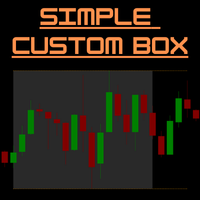
SimpleCustomBox
- Indicators
- Vincent Jose Proenca
- Version: 1.42
- Updated: 12 October 2025
- Activations: 5
SimpleCustomBox – MT5 Session Box & High/Low Lines Indicator
Overview:
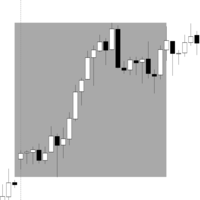
SimpleCustomBox is a powerful and easy-to-use trading indicator for MetaTrader 5 that allows you to visually highlight specific trading sessions on your chart. Define custom time ranges, instantly see the session's high and low, and make smarter trading decisions with clear visual boundaries. Perfect for day traders, scalpers, and anyone who relies on intraday price patterns.
Key Features:
-
Custom Time Sessions: Highlight any time range on your chart (e.g., 02:00 – 06:00) with a colored rectangle.
-
Dynamic Session Boxes: Automatically updates each day and supports displaying multiple past days for historical analysis.
-
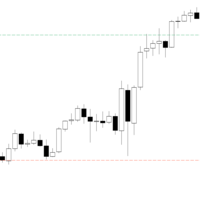
High/Low Lines: Draws the top and bottom of the session range as lines extending to a user-defined time (e.g., until 14:00).
-
Customizable Visuals: Adjust box color, line color, line width, and line style (solid, dashed, dotted).
-
Automatic Updates: Boxes and lines are updated in real-time, reflecting the latest price action without manual adjustments.
-
Clean Chart Management: When the indicator is removed, all session boxes and high/low lines are automatically deleted.
Benefits:
-
Quickly identify session ranges and volatility zones.
-
Enhance your day trading strategies with precise visual markers.
-
Simplify analysis with fully customizable visuals to suit your trading style.
-
Analyze multiple past days in seconds without manual plotting.
Settings Overview:
| Parameter | Description |
|---|---|
| StartHour , StartMinute | Start of the session box |
| EndHour , EndMinute | End of the session box |
| BoxColor | Color of the session rectangle |
| ShowPastDays | Enable display of previous sessions |
| ShowHighLowLines | Enable high/low lines of the session |
| LineEndHour | Hour until high/low lines extend |
| LineColor | Color of the high/low lines |
| LineWidth | Width of the high/low lines |
| Style of the lines (solid, dash, dot, etc.) |
New Features
Customizable Horizontal Segment
You can now display a horizontal segment to mark a key price level at a specific time of day.
-
Start Time: Defaults to 07:00, but fully configurable (hour and minute).
-
Duration: Define the duration of the segment in minutes.
-
Price Level: The segment is drawn at the opening price of the candle corresponding to the start time.
-
Style: Customize the color, thickness, and line style (dotted, solid, etc.).
You can find these options in the new “Horizontal Segment” input group.
Full Box Style Configuration
-
Box fill can now be enabled or disabled.
-
When the fill is disabled, only the borders are visible.
-
Fill color, border color, border thickness, and line style are now fully customizable in the “Box Styling” section.
-
Increased Reliability: The bar detection logic for session drawing has been reinforced to ensure that boxes and segments display reliably, even on charts with sparse data.
-
Overnight Session Handling: Improved accuracy for sessions that end the next day (e.g., 22:00 to 02:00).
-
Optimization: The code has been cleaned up and optimized to ensure smooth performance on your chart.
-
General Stability: Fixed several minor bugs that could prevent objects from displaying under certain conditions.