

Constructing a Trade Replay Engine in MQL5: Stepping Through Historical Trades Bar by Bar for Manual Review
 1 412
1 412
 0
0

Introduction
After running a strategy backtest, a developer typically ends up with two outputs: an equity curve and a list of closed trades. The equity curve shows whether the strategy made money. The trade list shows when and by how much. Neither shows the chart context at entry. Neither shows how price behaved during the holding period. Neither shows whether the stop-loss was triggered by a structural break or by a brief spike that immediately reversed.
Qualitative trade review examines individual trades in their original candlestick context. It moves the developer beyond aggregate statistics and toward deeper questions. Was the entry taken at a genuine chart pattern, or did the trigger fire on noise? Did price move cleanly toward the target, or did it chop for most of the hold period before eventually resolving? Was the stop placed at a structurally meaningful level, or was it too tight relative to normal price movement? These questions cannot be answered from a spreadsheet. They require looking at actual bars around each trade, trade by trade, in sequence.
Without a dedicated tool, this review means manually cross-referencing timestamps, scrolling to each entry by hand, and redrawing reference lines from memory. That process does not scale beyond a handful of trades, and most developers skip it entirely as a result.
This article builds a tool that removes that friction: an MQL5 script. It loads closed trade history, reconstructs each trade as chart objects, and lets the user step through trades with the arrow keys. The chart scrolls automatically to center each trade as it is selected. The implementation is divided into four files with clearly separated responsibilities, all wired together in a single runnable script.
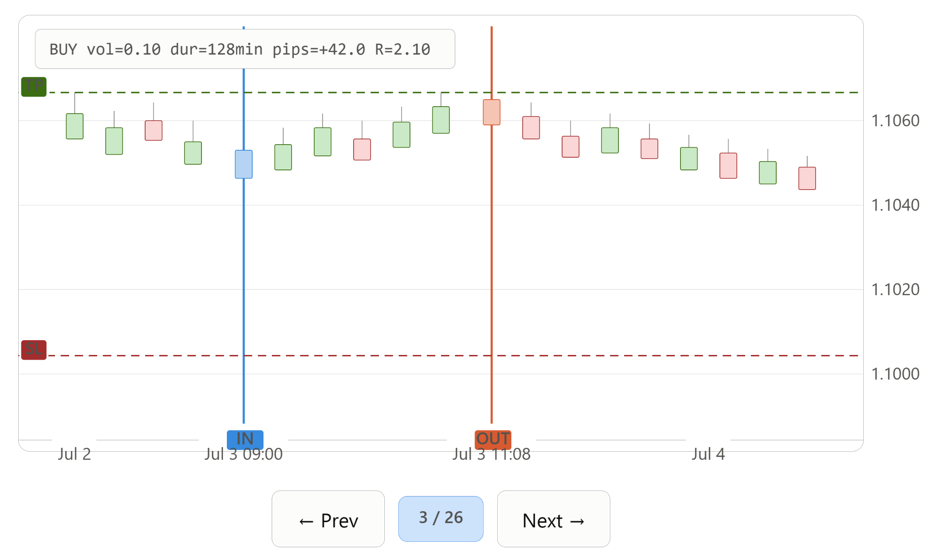
Figure 1: The Trade Replay Engine in operation. A single closed trade is rendered in its original candlestick context — the solid blue vertical line marks the entry, the solid orange line marks the exit, the dashed red horizontal line marks the stop-loss, and the dashed green line marks the take-profit. The annotation label in the upper-left corner displays the direction, volume, duration, pip result, and R-multiple for the displayed trade. The navigation controls at the bottom step backward and forward through the full trade history one trade at a time.
Section 1: The Gap Between Backtesting and Trade Review
Strategy tester output summarizes outcomes. Win rate, expectancy, maximum drawdown, and the equity curve all describe aggregate performance. They do not describe the market context of any individual decision.
Consider three specific questions that visual trade review answers. First: did the entry match the pattern the strategy claims to exploit? A breakout strategy that enters on a moving-average cross will sometimes fire in genuinely flat, directionless conditions where the cross is a statistical artifact rather than a real breakout. The trade list cannot distinguish this case from a clean breakout — both produce a row with an entry price and a timestamp.
Second: what did the price do immediately after entry? Two trades with identical profit and duration can have entirely different path behavior — one a clean directional move, the other a slow grind that happened to resolve favorably. This distinction matters for understanding how much of the system's edge comes from genuine directional prediction versus noise.
Third: was the stop placement structurally sound? A stop that is repeatedly clipped by single-bar spikes and not by genuine trend reversal is evidence that the stop distance is too tight. This finding is invisible in an aggregate win rate but obvious on a chart, where the spike and immediate reversal are plainly visible.
To answer these questions across dozens or hundreds of trades, you need an automatic step-through tool with consistent visual markers and no manual scrolling. That is what this engine provides.
Section 2: MQL5 Trade History and Deal Reconstruction
MQL5 does not store trades directly. Instead, it stores deals. A deal represents a single execution event — an entry, an exit, or a partial close. Reconstructing a round-trip trade requires identifying and joining the deals that belong to it.
HistorySelect() loads the deal history for a given time range into the terminal's cache. It must be called before any deal-property functions will return valid data. HistoryDealsTotal() then returns the count of deals in that cache.
Each deal is identified by a ticket retrieved via HistoryDealGetTicket(). Properties of that deal are then read using HistoryDealGetInteger() for integer fields (time, entry type, position id, order ticket) and HistoryDealGetDouble() for double fields (price, volume, profit, SL, TP).
Every deal carries a DEAL_ENTRY_IN or DEAL_ENTRY_OUT flag. The IN deal provides the entry time, entry price, direction, and volume. The OUT deal provides the exit time, exit price, and realized profit. The two deals are linked by DEAL_POSITION_ID, a shared identifier that connects all deals belonging to the same position.
When a position is closed in multiple steps, each partial close generates its own OUT deal sharing the same position id. The correct exit time is the time of the last OUT deal, and the correct total profit is the sum of profit across all OUT deals for that position.
A note on SL/TP retrieval: Many brokers do not populate DEAL_SL and DEAL_TP on the deal record. Read SL/TP from the deal first. If they are zero, read them from the order via HistoryOrderGetDouble() using ORDER_SL and ORDER_TP. The order ticket comes from DEAL_ORDER on the entry deal.
If HistorySelect() is called with a from_time after a position was actually opened, the cache will contain the OUT deal but not the IN deal. Such positions cannot be reconstructed into a complete trade and are discarded with a log message.
Section 3: Chart Objects, Naming, and Cleanup
Every visual marker this engine draws is a chart object. Objects are created with ObjectCreate() and configured with ObjectSetInteger(), ObjectSetDouble(), and ObjectSetString(). They are addressed by a unique string name.
The terminal does not namespace objects by script. Any script or indicator running on the same chart can see and collide with another's objects unless names are chosen carefully. This engine prefixes every object it creates with "TRE_" (Trade Replay Engine). This guarantees no collision with other tools, and it allows cleanup via ObjectsDeleteAll() called with that prefix, which removes exactly the engine's objects without touching anything else.
Three object types are used. OBJ_VLINE marks the entry and exit times as vertical lines anchored to a single datetime. OBJ_HLINE marks the SL and TP levels as horizontal lines anchored to a single price. OBJ_LABEL displays the annotation text. Labels use screen (pixel) coordinates rather than chart time/price coordinates, so the annotation stays in a fixed, readable position in the corner of the chart regardless of scrolling or zoom level.
Section 4: Keyboard Navigation in Scripts
MQL5 scripts do not receive OnChartEvent() callbacks. That handler is only available to indicators and Expert Advisors. A script's entire lifetime is the body of OnStart(), so keyboard input must be polled from inside that function.
The polling approach uses a while(!IsStopped()) loop. IsStopped() becomes true when the user removes the script from the chart. On each loop iteration, TerminalInfoInteger() is called with TERMINAL_KEYSTATE_RIGHT and TERMINAL_KEYSTATE_LEFT. These return a value whose high bit is set when the key is currently held down. Testing & 0x8000 gives a clean boolean.
Naive polling would advance dozens of trades for a single keypress, since the loop runs many times per second while a key is held. This is solved with debouncing. A boolean key_was_down per key tracks the previous iteration's state. The navigation action fires only on the transition from not-down to down — !key_was_down && key_is_down. Once triggered, key_was_down is set to true and no further action fires until the key is released and pressed again.
Between iterations the loop calls Sleep() for 50 milliseconds. This keeps CPU usage low while remaining responsive to a normal human keypress. Practical note: TerminalInfoInteger reflects key presses only when the chart has OS input focus. Click directly on the chart's candles before pressing the arrow keys.
R-multiple is defined as profit / risk_dollars, where risk_dollars is the dollar value of the distance from entry to stop loss, scaled by volume. It expresses a trade's outcome as a multiple of the initial risk. A trade that made twice its risk returns R = 2.0. A trade that lost half its risk returns R = -0.5. This metric normalizes across trades with different position sizes and stop distances, allowing direct comparison on a single scale.
Section 5: Implementation — TradeRecord.mqh
CTradeRecord is the plain data container that holds one fully reconstructed trade. It is defined as a struct rather than a class because it is a flat data record with no invariants to protect. Every field is written by CTradeLoader during reconstruction and read by CTradeRenderer during drawing. No encapsulation is needed. Three convenience methods compute derived statistics on demand rather than storing them, avoiding any risk of staleness.
//+------------------------------------------------------------------+
//|                                                  TradeRecord.mqh |
//+------------------------------------------------------------------+
#ifndef TRADERECORD_MQH
#define TRADERECORD_MQH

//+------------------------------------------------------------------+
//| Plain data container for one reconstructed closed trade          |
//+------------------------------------------------------------------+
struct CTradeRecord
  {
   ulong             position_id;
   string            symbol;
   ENUM_ORDER_TYPE   order_type;
   double            volume;
   datetime          entry_time;
   datetime          exit_time;
   double            entry_price;
   double            exit_price;
   double            stop_loss;
   double            take_profit;
   double            profit;
   long              magic;
   string            comment;
   //--- derived statistics
   double            RMultiple(void) const;
   int               DurationSeconds(void) const;
   double            PipsProfit(void) const;
  };
The struct declares thirteen fields covering identity, timing, pricing, risk levels, realized profit, EA origin, and trade comment. position_id is the join key from the terminal's deal history. order_type records direction as ORDER_TYPE_BUY or ORDER_TYPE_SELL. stop_loss and take_profit may be zero if no levels were recorded. Three method declarations appear at the bottom — RMultiple(), DurationSeconds(), and PipsProfit() — each implemented outside the struct body below.
//+------------------------------------------------------------------+
//| Compute the R-multiple: profit expressed as a multiple of the    |
//| dollar risk implied by the entry-to-stop distance                |
//+------------------------------------------------------------------+
double CTradeRecord::RMultiple(void) const
  {
   if(stop_loss == 0.0)
      return(DBL_MAX);

   double point_value = ::SymbolInfoDouble(symbol, SYMBOL_TRADE_TICK_VALUE);
   double point_size   = ::SymbolInfoDouble(symbol, SYMBOL_POINT);

   if(point_size == 0.0)
      return(DBL_MAX);

   double risk_points  = MathAbs(entry_price - stop_loss) / point_size;
   double risk_dollars = risk_points * point_value * volume;

   if(risk_dollars == 0.0)
      return(DBL_MAX);

   return(profit / risk_dollars);
  }
The method returns DBL_MAX as a sentinel in three cases: no stop was recorded, the symbol's point size could not be read, or the computed dollar risk rounds to zero. Callers that format this value for display check for DBL_MAX and print "N/A" instead of a number. When a valid stop exists, the entry-to-stop distance is converted to points, then to dollar risk using SymbolInfoDouble() for tick value and point size, scaled by volume. Dividing realized profit by that dollar risk yields the R-multiple.
//+------------------------------------------------------------------+
//| Compute trade duration in whole seconds                          |
//+------------------------------------------------------------------+
int CTradeRecord::DurationSeconds(void) const
  {
   return((int)(exit_time - entry_time));
  }
datetime values in MQL5 are stored as Unix-epoch seconds. Subtracting two datetime values yields a duration in seconds directly. This method gives that calculation a self-documenting name and centralizes the cast to int. By construction in CTradeLoader, exit_time is always greater than or equal to entry_time, so no edge-case handling is needed.
//+------------------------------------------------------------------+
//| Compute profit in pips, sign-adjusted for trade direction        |
//+------------------------------------------------------------------+
double CTradeRecord::PipsProfit(void) const
  {
   double point_size = ::SymbolInfoDouble(symbol, SYMBOL_POINT);

   if(point_size == 0.0)
      return(0.0);

   if(order_type == ORDER_TYPE_BUY)
      return((exit_price - entry_price) / point_size);
   else
      return((entry_price - exit_price) / point_size);
  }
For a buy, profit in price terms is exit − entry. For a sell it is reversed, since a sell profits when price falls. The sign adjustment ensures a positive return always means profitable and a negative return always means losing, regardless of direction. The point-size guard prevents division by zero for a symbol that is not subscribed or whose point size cannot be read.
Section 6: Implementation — TradeLoader.mqh
CTradeLoader is responsible for one thing: turning the terminal's deal history into an array of CTradeRecord values. It owns the HistorySelect() call, the deal-iteration loop, the IN/OUT matching logic, the SL/TP two-pass lookup, and the partial-close aggregation. Keeping this logic in its own class separates data reconstruction from drawing and navigation, so each concern can be modified independently.
//+------------------------------------------------------------------+
//|                                                  TradeLoader.mqh |
//+------------------------------------------------------------------+
#ifndef TRADELOADER_MQH
#define TRADELOADER_MQH

#include "TradeRecord.mqh"

//+------------------------------------------------------------------+
//| Loads and reconstructs closed trades from terminal history       |
//+------------------------------------------------------------------+
class CTradeLoader
  {
private:
   CTradeRecord      m_trades[];
   string            m_symbol;
   long              m_magic;

   int               FindOrAdd(ulong position_id);
   void              InsertionSortSwap(int i, int j);

public:
                     CTradeLoader(void);
                    ~CTradeLoader(void);

   int               Load(const string &symbol, long magic, datetime from_time, datetime to_time);
   bool              GetTrade(int idx, CTradeRecord &out_trade) const;
   int               GetCount(void) const;
   void              SortByEntryTime(void);
  };
m_trades[] accumulates reconstructed records. m_symbol and m_magic store the active filters. FindOrAdd() locates or creates an array slot for a given position id. InsertionSortSwap() supports the sort. On the public side, Load() performs the full reconstruction, GetTrade() copies a record out by index, GetCount() returns the current array size, and SortByEntryTime() orders the array chronologically.
Constructor
//+------------------------------------------------------------------+
//| Constructor                                                      |
//+------------------------------------------------------------------+
CTradeLoader::CTradeLoader(void)
  {
   m_symbol = "";
   m_magic  = 0;
   ArrayResize(m_trades, 0);
  }
The constructor initializes filter fields to empty/zero and explicitly sizes the array to zero, guaranteeing a known empty state before Load() is called.
Destructor
//+------------------------------------------------------------------+
//| Destructor                                                       |
//+------------------------------------------------------------------+
CTradeLoader::~CTradeLoader(void)
  {
   ArrayFree(m_trades);
  }
The destructor frees the backing memory explicitly. This is declared and defined even though MQL5 would reclaim the array automatically, keeping the object's lifecycle fully visible in the source.
FindOrAdd()
//+------------------------------------------------------------------+
//| Locate the array slot for a position id, or append a new one     |
//+------------------------------------------------------------------+
int CTradeLoader::FindOrAdd(ulong position_id)
  {
   int total = ArraySize(m_trades);

   for(int i = 0; i < total; i++)
     {
      if(m_trades[i].position_id == position_id)
         return(i);
     }

   ArrayResize(m_trades, total + 1);
   m_trades[total].position_id = position_id;
   m_trades[total].profit      = 0.0;
   m_trades[total].comment     = "";
   m_trades[total].entry_time  = 0;
   m_trades[total].exit_time   = 0;

   return(total);
  }
This helper performs a linear scan for a matching position id. For the trade counts typical in a single review session, a linear scan is fast enough. If no match is found, the array grows by one element. The new slot's numeric fields are zeroed and string fields are cleared so that aggregation in Load() starts from a known state, regardless of whether the IN or an OUT deal is encountered first for that position.
Load()
//+------------------------------------------------------------------+
//| Load closed trade history and reconstruct trades from deals      |
//+------------------------------------------------------------------+
int CTradeLoader::Load(const string &symbol, long magic, datetime from_time, datetime to_time)
  {
   m_symbol = symbol;
   m_magic  = magic;
   ArrayResize(m_trades, 0);

   if(!::HistorySelect(from_time, to_time))
     {
      ::Print("CTradeLoader::Load - HistorySelect failed, error ", ::GetLastError());
      return(0);
     }

   int deals_total = ::HistoryDealsTotal();

   for(int i = 0; i < deals_total; i++)
     {
      ulong ticket = ::HistoryDealGetTicket(i);
      if(ticket == 0)
         continue;

      string deal_symbol = ::HistoryDealGetString(ticket, DEAL_SYMBOL);
      if(symbol != "" && deal_symbol != symbol)
         continue;

      long deal_magic = ::HistoryDealGetInteger(ticket, DEAL_MAGIC);
      if(magic != 0 && deal_magic != magic)
         continue;

      ulong position_id = (ulong)::HistoryDealGetInteger(ticket, DEAL_POSITION_ID);
      long entry_type    = ::HistoryDealGetInteger(ticket, DEAL_ENTRY);
      int slot           = FindOrAdd(position_id);

      if(entry_type == DEAL_ENTRY_IN)
        {
         m_trades[slot].symbol      = deal_symbol;
         m_trades[slot].order_type  = (::HistoryDealGetInteger(ticket, DEAL_TYPE) == DEAL_TYPE_BUY)
                                      ? ORDER_TYPE_BUY : ORDER_TYPE_SELL;
         m_trades[slot].volume      = ::HistoryDealGetDouble(ticket, DEAL_VOLUME);
         m_trades[slot].entry_time  = (datetime)::HistoryDealGetInteger(ticket, DEAL_TIME);
         m_trades[slot].entry_price = ::HistoryDealGetDouble(ticket, DEAL_PRICE);
         m_trades[slot].magic       = deal_magic;
         m_trades[slot].comment     = ::HistoryDealGetString(ticket, DEAL_COMMENT);

         //--- read SL/TP from the deal record first
         double deal_sl = ::HistoryDealGetDouble(ticket, DEAL_SL);
         double deal_tp = ::HistoryDealGetDouble(ticket, DEAL_TP);

         //--- many brokers do not populate DEAL_SL/DEAL_TP on the deal record;
         //--- fall back to the order record that generated this deal
         if(deal_sl == 0.0 || deal_tp == 0.0)
           {
            ulong order_ticket = (ulong)::HistoryDealGetInteger(ticket, DEAL_ORDER);
            if(order_ticket > 0)
              {
               if(deal_sl == 0.0)
                  deal_sl = ::HistoryOrderGetDouble(order_ticket, ORDER_SL);
               if(deal_tp == 0.0)
                  deal_tp = ::HistoryOrderGetDouble(order_ticket, ORDER_TP);
              }
           }

         m_trades[slot].stop_loss   = deal_sl;
         m_trades[slot].take_profit = deal_tp;
        }
      else
         if(entry_type == DEAL_ENTRY_OUT)
           {
            datetime out_time = (datetime)::HistoryDealGetInteger(ticket, DEAL_TIME);

            if(out_time >= m_trades[slot].exit_time)
              {
               m_trades[slot].exit_time  = out_time;
               m_trades[slot].exit_price = ::HistoryDealGetDouble(ticket, DEAL_PRICE);
              }

            m_trades[slot].profit += ::HistoryDealGetDouble(ticket, DEAL_PROFIT);
           }
     }

//--- discard incomplete records: missing entry or missing exit
   int write_idx = 0;
   int total     = ArraySize(m_trades);

   for(int read_idx = 0; read_idx < total; read_idx++)
     {
      bool has_entry = (m_trades[read_idx].entry_time != 0);
      bool has_exit  = (m_trades[read_idx].exit_time  != 0);

      if(has_entry && has_exit)
        {
         if(write_idx != read_idx)
            m_trades[write_idx] = m_trades[read_idx];
         write_idx++;
        }
      else
        {
         ::Print("CTradeLoader::Load - skipping incomplete position ", m_trades[read_idx].position_id);
        }
     }

   ArrayResize(m_trades, write_idx);

   return(ArraySize(m_trades));
  }
Load() begins by storing the filters and resetting the array, then calls HistorySelect() to populate the terminal's history cache. If that call fails, the method logs the error code and returns zero.
The main loop iterates every deal by index, retrieving its ticket. Any deal with a zero ticket is skipped. Each deal is then filtered by symbol and by magic number. Deals that pass both filters have their position id and entry type extracted, and FindOrAdd() locates or creates the slot for that position.
For DEAL_ENTRY_IN deals, all entry-side fields are written: symbol, direction (derived from DEAL_TYPE), volume, entry time, entry price, magic, and comment. SL and TP are handled with a two-pass lookup. The deal record is checked first via DEAL_SL and DEAL_TP. If either field is zero — which is common on many broker platforms — the method retrieves the order ticket via DEAL_ORDER and reads ORDER_SL and ORDER_TP from that order using HistoryOrderGetDouble(). The order record is far more reliably populated with SL/TP across brokers, because those values are stored on the order at placement time.
For DEAL_ENTRY_OUT deals, the exit time is updated only if this deal's time is the latest seen so far for that position — implementing the "last OUT deal" rule for partial closes. The exit price is updated at the same time. The deal's profit is unconditionally added to the running total, correctly summing contributions from multiple partial closes.
After the loop, a compaction pass discards any record where either entry_time or exit_time is zero. These are positions for which only one side of the deal pair was available, typically because the history range was too narrow. Each discarded position is logged by id. The array is then resized to the count of valid records, and that count is returned.
GetTrade()
//+------------------------------------------------------------------+
//| Copy out a trade record by index                                 |
//+------------------------------------------------------------------+
bool CTradeLoader::GetTrade(int idx, CTradeRecord &out_trade) const
  {
   if(idx < 0 || idx >= ArraySize(m_trades))
      return(false);

   out_trade = m_trades[idx];
   return(true);
  }
This method bounds-checks the index before copying. An out-of-range index returns false and leaves out_trade unmodified. On success the struct is copied by value into the caller's out-parameter.
GetCount()
//+------------------------------------------------------------------+
//| Return the number of reconstructed trades                        |
//+------------------------------------------------------------------+
int CTradeLoader::GetCount(void) const
  {
   return(ArraySize(m_trades));
  }
A thin wrapper that gives the trade count a meaningful name without exposing the private array directly.
InsertionSortSwap()
//+------------------------------------------------------------------+
//| Swap two elements of the trades array                            |
//+------------------------------------------------------------------+
void CTradeLoader::InsertionSortSwap(int i, int j)
  {
   CTradeRecord temp = m_trades[i];
   m_trades[i] = m_trades[j];
   m_trades[j] = temp;
  }
A standard three-step swap using a temporary struct copy, factored out for readability inside SortByEntryTime().
SortByEntryTime()
//+------------------------------------------------------------------+
//| Sort trades by entry_time ascending using insertion sort         |
//+------------------------------------------------------------------+
void CTradeLoader::SortByEntryTime(void)
  {
   int total = ArraySize(m_trades);

   for(int i = 1; i < total; i++)
     {
      int j = i;
      while(j > 0 && m_trades[j - 1].entry_time > m_trades[j].entry_time)
        {
         InsertionSortSwap(j - 1, j);
         j--;
        }
     }
  }
MQL5's built-in ArraySort() only operates on arrays of primitive types. Sorting a struct array by a specific field requires a manual implementation. Insertion sort is chosen here because the input size is small — trade review sessions rarely involve hundreds of trades — and insertion sort is short, easy to verify, and stable. The outer loop walks the array from the second element onward. The inner loop shifts the current element backward until it reaches a position where the preceding element's entry_time is no longer greater than its own.
Section 7: Implementation — TradeRenderer.mqh
CTradeRenderer is responsible for the visual side only: drawing the chart objects representing a single trade and removing them again. It has no knowledge of trade history or navigation state. Its entire interface is "render this trade" and "clear what I drew." This separation means drawing logic and styling can be changed without touching either the loader or the controller.
//+------------------------------------------------------------------+
//|                                                TradeRenderer.mqh |
//+------------------------------------------------------------------+
#ifndef TRADERENDERER_MQH
#define TRADERENDERER_MQH

#include "TradeRecord.mqh"

//+------------------------------------------------------------------+
//| Draws and clears chart objects representing one trade            |
//+------------------------------------------------------------------+
class CTradeRenderer
  {
private:
   string            m_prefix;
   color             m_entry_color;
   color             m_exit_color;
   color             m_sl_color;
   color             m_tp_color;
   color             m_annotation_color;

   void              DrawVLine(const string &name, datetime dt, color clr, ENUM_LINE_STYLE style, int width);
   void              DrawHLine(const string &name, double price, color clr, ENUM_LINE_STYLE style, int width);
   void              DrawLabel(const string &name, int x, int y, const string &text);

public:
                     CTradeRenderer(void);
                    ~CTradeRenderer(void);

   void              Render(const CTradeRecord &trade, const string &symbol, ENUM_TIMEFRAMES tf);
   void              Clear(void);
   string            BuildAnnotation(const CTradeRecord &trade) const;
  };
The five private color fields hold the per-element drawing colors. m_prefix holds the object-naming prefix used both when creating and when clearing objects. Three private helpers wrap the raw object-creation calls for each type used. On the public side, Render() draws the full set of objects for one trade, Clear() removes everything the renderer has drawn, and BuildAnnotation() formats the annotation string.
Constructor
//+------------------------------------------------------------------+
//| Constructor                                                      |
//+------------------------------------------------------------------+
CTradeRenderer::CTradeRenderer(void)
  {
   m_prefix           = "TRE_";
   m_entry_color      = clrDodgerBlue;
   m_exit_color       = clrOrange;
   m_sl_color         = clrCrimson;
   m_tp_color         = clrLimeGreen;
   m_annotation_color = clrBlack;
  }
The constructor assigns the "TRE_" naming prefix and five element colors. The annotation text color is set to clrBlack, which provides clear readability against light-background chart themes. Centralizing these defaults here means color changes require editing one method only.
Destructor
//+------------------------------------------------------------------+
//| Destructor                                                       |
//+------------------------------------------------------------------+
CTradeRenderer::~CTradeRenderer(void)
  {
   Clear();
  }
The destructor calls Clear() so that if a CTradeRenderer instance is destroyed while objects are still on the chart, those objects are removed. This is a safety net in addition to the explicit cleanup performed by TradeReplayEngine.mq5 on script termination.
DrawVLine()
//+------------------------------------------------------------------+
//| Create a vertical line object at a given time                    |
//+------------------------------------------------------------------+
void CTradeRenderer::DrawVLine(const string &name, datetime dt, color clr, ENUM_LINE_STYLE style, int width)
  {
   ::ObjectDelete(0, name);
   ::ObjectCreate(0, name, OBJ_VLINE, 0, dt, 0);
   ::ObjectSetInteger(0, name, OBJPROP_COLOR, clr);
   ::ObjectSetInteger(0, name, OBJPROP_STYLE, style);
   ::ObjectSetInteger(0, name, OBJPROP_WIDTH, width);
   ::ObjectSetInteger(0, name, OBJPROP_BACK, false);
   ::ObjectSetInteger(0, name, OBJPROP_SELECTABLE, false);
   ::ObjectSetInteger(0, name, OBJPROP_HIDDEN, true);
  }
The helper deletes any existing object with the same name first, guarding against leftovers from a previous run. It then creates a new OBJ_VLINE anchored at dt. Every relevant property is set explicitly: color, line style, width, whether the line renders behind price bars (OBJPROP_BACK = false keeps it visible on top), whether the user can click-select it (OBJPROP_SELECTABLE = false prevents accidental drags), and whether it appears in the Objects List panel (OBJPROP_HIDDEN = true keeps the list uncluttered).
DrawHLine()
//+------------------------------------------------------------------+
//| Create a horizontal line object at a given price                 |
//+------------------------------------------------------------------+
void CTradeRenderer::DrawHLine(const string &name, double price, color clr, ENUM_LINE_STYLE style, int width)
  {
   ::ObjectDelete(0, name);
   ::ObjectCreate(0, name, OBJ_HLINE, 0, 0, price);
   ::ObjectSetInteger(0, name, OBJPROP_COLOR, clr);
   ::ObjectSetInteger(0, name, OBJPROP_STYLE, style);
   ::ObjectSetInteger(0, name, OBJPROP_WIDTH, width);
   ::ObjectSetInteger(0, name, OBJPROP_BACK, false);
   ::ObjectSetInteger(0, name, OBJPROP_SELECTABLE, false);
   ::ObjectSetInteger(0, name, OBJPROP_HIDDEN, true);
  }
Structurally identical to DrawVLine() except it creates OBJ_HLINE, which requires only a price coordinate. The same six properties are set for the same reasons. OBJ_HLINE is used for SL and TP rather than OBJ_TREND because a horizontal line needs only one price value and remains constant across all visible time automatically.
DrawLabel
//+------------------------------------------------------------------+
//| Create a screen-coordinate label object                          |
//+------------------------------------------------------------------+
void CTradeRenderer::DrawLabel(const string &name, int x, int y, const string &text)
  {
   ::ObjectDelete(0, name);
   ::ObjectCreate(0, name, OBJ_LABEL, 0, 0, 0);
   ::ObjectSetInteger(0, name, OBJPROP_CORNER, CORNER_LEFT_UPPER);
   ::ObjectSetInteger(0, name, OBJPROP_XDISTANCE, x);
   ::ObjectSetInteger(0, name, OBJPROP_YDISTANCE, y);
   ::ObjectSetInteger(0, name, OBJPROP_COLOR, m_annotation_color);
   ::ObjectSetInteger(0, name, OBJPROP_FONTSIZE, 9);
   ::ObjectSetString(0, name, OBJPROP_FONT, "Consolas");
   ::ObjectSetString(0, name, OBJPROP_TEXT, text);
   ::ObjectSetInteger(0, name, OBJPROP_SELECTABLE, false);
   ::ObjectSetInteger(0, name, OBJPROP_HIDDEN, true);
  }
OBJ_LABEL objects are positioned in screen pixel coordinates rather than chart time/price values. OBJPROP_CORNER anchors the offset to the chart's upper-left corner. OBJPROP_XDISTANCE and OBJPROP_YDISTANCE place the label that many pixels right and down from that corner. Because these are pixel offsets, the label stays in a fixed position regardless of chart scrolling or zoom. Font size, font name, text color, and text content are all set explicitly.
BuildAnnotation
//+------------------------------------------------------------------+
//| Format the annotation text for a trade                           |
//+------------------------------------------------------------------+
string CTradeRenderer::BuildAnnotation(const CTradeRecord &trade) const
  {
   string direction = (trade.order_type == ORDER_TYPE_BUY) ? "BUY" : "SELL";
   double pips      = trade.PipsProfit();
   double rmult     = trade.RMultiple();
   int    duration_min = trade.DurationSeconds() / 60;

   string rmult_str = (rmult == DBL_MAX) ? "N/A" : ::DoubleToString(rmult, 2);

   return(::StringFormat("%s  vol=%.2f  dur=%dmin  pips=%.1f  R=%s",
                         direction, trade.volume, duration_min, pips, rmult_str));
  }
This method assembles the annotation string from the trade's derived statistics. Direction is translated from order_type into a readable string. Duration is converted from seconds to whole minutes. The R-multiple sentinel DBL_MAX is detected and replaced with "N/A", since DBL_MAX signals that no stop was recorded rather than an actual numerical outcome. All values are formatted with fixed decimal precision for a consistent label width across trades.
Render
//+------------------------------------------------------------------+
//| Draw all chart objects representing one trade                    |
//+------------------------------------------------------------------+
void CTradeRenderer::Render(const CTradeRecord &trade, const string &symbol, ENUM_TIMEFRAMES tf)
  {
   string entry_name = m_prefix + "ENTRY";
   string exit_name   = m_prefix + "EXIT";
   string sl_name     = m_prefix + "SL";
   string tp_name     = m_prefix + "TP";
   string label_name  = m_prefix + "ANNOTATION";

   DrawVLine(entry_name, trade.entry_time, m_entry_color, STYLE_SOLID, 1);
   DrawVLine(exit_name, trade.exit_time, m_exit_color, STYLE_SOLID, 1);

   if(trade.stop_loss != 0.0)
      DrawHLine(sl_name, trade.stop_loss, m_sl_color, STYLE_DASH, 1);

   if(trade.take_profit != 0.0)
      DrawHLine(tp_name, trade.take_profit, m_tp_color, STYLE_DASH, 1);

   string annotation = BuildAnnotation(trade);
   DrawLabel(label_name, 10, 20, annotation);

   ::ChartRedraw(0);
  }
Render() builds five fixed object names by appending category suffixes to m_prefix. Because these names are fixed rather than index-based, each call to Render() overwrites the previous trade's objects by name. This keeps the chart clean without requiring an index-based cleanup step between trades. Entry and exit lines are drawn unconditionally. SL and TP lines are drawn only when the corresponding fields are nonzero — a trade with no recorded stop should not show a spurious line at price zero. The method ends with ChartRedraw(0) so all changes appear immediately.
Clear()
//+------------------------------------------------------------------+
//| Remove all chart objects created by this renderer                |
//+------------------------------------------------------------------+
void CTradeRenderer::Clear(void)
  {
   ::ObjectsDeleteAll(0, m_prefix);
   ::ChartRedraw(0);
  }
ObjectsDeleteAll() with the "TRE_" prefix deletes every matching object in a single call, leaving all other chart objects untouched. A ChartRedraw() call makes the removal immediately visible.
Section 8: Implementation — ReplayController.mqh
CReplayController owns the navigation state — specifically, which trade index is currently displayed — and coordinates the loader and renderer to act on that state. It is the only class that holds a concept of "current trade." The loader knows the full list; the renderer knows how to draw one trade. The controller bridges them.
//+------------------------------------------------------------------+
//|                                            ReplayController.mqh  |
//+------------------------------------------------------------------+
#ifndef REPLAYCONTROLLER_MQH
#define REPLAYCONTROLLER_MQH

#include "TradeRecord.mqh"
#include "TradeLoader.mqh"
#include "TradeRenderer.mqh"

//+------------------------------------------------------------------+
//| Manages navigation state and drives loader/renderer together     |
//+------------------------------------------------------------------+
class CReplayController
  {
private:
   int               m_current_idx;
   CTradeLoader      m_loader;
   CTradeRenderer    m_renderer;
   string            m_symbol;
   ENUM_TIMEFRAMES   m_tf;

   void              ScrollToTrade(const CTradeRecord &trade);

public:
                     CReplayController(void);
                    ~CReplayController(void);

   bool              Init(const string &symbol, ENUM_TIMEFRAMES tf, long magic,
                          datetime from_time, datetime to_time);
   void              ShowCurrent(void);
   void              Next(void);
   void              Previous(void);
   int               GetCount(void) const;
   int               GetCurrentIdx(void) const;
  };
m_current_idx is the single piece of mutable navigation state. m_loader and m_renderer are owned by value, so their lifetimes are tied to the controller's. When the controller is destroyed, both are destroyed automatically. m_symbol and m_tf record the active chart context so ScrollToTrade() can reference them without re-passing arguments on every call. ScrollToTrade() is private because it is an implementation detail of ShowCurrent().
Constructor
//+------------------------------------------------------------------+
//| Constructor                                                      |
//+------------------------------------------------------------------+
CReplayController::CReplayController(void)
  {
   m_current_idx = 0;
   m_symbol      = "";
   m_tf          = PERIOD_CURRENT;
  }
Initializes the index to zero and the symbol/timeframe to neutral defaults. m_loader and m_renderer are initialized by their own constructors as owned members.
Destructor
//+------------------------------------------------------------------+
//| Destructor                                                       |
//+------------------------------------------------------------------+
CReplayController::~CReplayController(void)
  {
  }
The destructor body is intentionally empty. It is declared explicitly per convention. m_loader and m_renderer are destroyed automatically as owned members, and the renderer's own destructor already clears the chart.
Init()
//+------------------------------------------------------------------+
//| Load trade history and validate at least one trade was found     |
//+------------------------------------------------------------------+
bool CReplayController::Init(const string &symbol, ENUM_TIMEFRAMES tf, long magic,
                             datetime from_time, datetime to_time)
  {
   m_symbol = symbol;
   m_tf     = tf;

   int count = m_loader.Load(symbol, magic, from_time, to_time);
   m_loader.SortByEntryTime();
   m_current_idx = 0;

   if(count == 0)
     {
      ::Print("CReplayController::Init - no trades found for symbol ", symbol);
      return(false);
     }

   ::Print("CReplayController::Init - loaded ", count, " trades for symbol ", symbol);
   return(true);
  }
Init() stores the symbol and timeframe, delegates reconstruction to CTradeLoader::Load(), then sorts the result chronologically. The current index resets to zero so navigation always starts from the earliest trade. If no trades are found, the method logs a diagnostic message and returns false. This signals to the script's OnStart() that there is nothing to navigate and the polling loop should not be entered.
ScrollToTrade()
//+------------------------------------------------------------------+
//| Compute and apply the chart scroll position to center a trade    |
//+------------------------------------------------------------------+
void CReplayController::ScrollToTrade(const CTradeRecord &trade)
  {
   ::ChartSetInteger(0, CHART_AUTOSCROLL, false);
   ::ChartSetInteger(0, CHART_SHIFT, true);

   int entry_bar = ::iBarShift(m_symbol, m_tf, trade.entry_time, false);
   if(entry_bar < 0)
     {
      ::Print("CReplayController::ScrollToTrade - no bar found for entry time, skipping scroll");
      return;
     }

   int visible_bars = (int)::ChartGetInteger(0, CHART_VISIBLE_BARS);
   int half_window   = visible_bars / 2;
   int target_offset = entry_bar - half_window;

   if(target_offset < 0)
      target_offset = 0;

   ::ChartNavigate(0, CHART_END, -target_offset);
  }
This method first disables autoscroll via ChartSetInteger(). With autoscroll left on, the chart would snap back to the most recent bar on the next tick, undoing the positioning. CHART_SHIFT is enabled to ensure empty space exists to the right of the most recent bar, giving the centering calculation room to work even for recent trades.
iBarShift() locates the bar index corresponding to the trade's entry time. If no bar is found — because the trade predates the chart's loaded history — the method logs the condition and returns without scrolling.
With a valid bar index, the method reads the visible bar count via ChartGetInteger() and halves it to compute the offset needed to place the entry bar in the middle of the viewport. ChartNavigate() is then called with CHART_END and the negated offset. Because visible_bars reflects the current zoom level, centering is correct regardless of how far in or out the chart is zoomed.
ShowCurrent()
//+------------------------------------------------------------------+
//| Render the current trade and scroll the chart to it              |
//+------------------------------------------------------------------+
void CReplayController::ShowCurrent(void)
  {
   CTradeRecord trade;
   if(!m_loader.GetTrade(m_current_idx, trade))
     {
      ::Print("CReplayController::ShowCurrent - invalid index ", m_current_idx);
      return;
     }

   m_renderer.Clear();
   m_renderer.Render(trade, m_symbol, m_tf);
   ScrollToTrade(trade);

   ::PrintFormat("Trade %d/%d  pos=%I64u  %s  entry=%s  pips=%.1f  R=%s",
                 m_current_idx + 1, m_loader.GetCount(), trade.position_id,
                 (trade.order_type == ORDER_TYPE_BUY ? "BUY" : "SELL"),
                 ::TimeToString(trade.entry_time, TIME_DATE | TIME_MINUTES),
                 trade.PipsProfit(),
                 (trade.RMultiple() == DBL_MAX ? "N/A" : ::DoubleToString(trade.RMultiple(), 2)));
  }
ShowCurrent() is the method that ties everything together for one navigation step. It retrieves the trade at m_current_idx, clears the previous objects, renders the new trade, scrolls the chart, and logs a one-line summary to the Experts tab.
Calling Clear() before Render() on every navigation step is what makes ShowCurrent() idempotent. Calling it repeatedly for the same index always clears and redraws from the same source data, producing identical chart state each time.
Next()
//+------------------------------------------------------------------+
//| Advance to the next trade, clamped to the last index             |
//+------------------------------------------------------------------+
void CReplayController::Next(void)
  {
   int count = m_loader.GetCount();
   if(count == 0)
      return;

   if(m_current_idx < count - 1)
      m_current_idx++;

   ShowCurrent();
  }
Next() increments m_current_idx only if doing so would not exceed the last valid index. If already at the last trade, pressing right again redraws the same trade rather than wrapping or erroring. ShowCurrent() is called regardless, so the user always gets visual and log confirmation that their keypress registered.
Previous()
//+------------------------------------------------------------------+
//| Move to the previous trade, clamped to index zero                |
//+------------------------------------------------------------------+
void CReplayController::Previous(void)
  {
   int count = m_loader.GetCount();
   if(count == 0)
      return;

   if(m_current_idx > 0)
      m_current_idx--;

   ShowCurrent();
  }
The mirror image of Next(). Decrements m_current_idx only when it is greater than zero, clamping at the first trade.
Accessors
//+------------------------------------------------------------------+
//| Return the total number of loaded trades                         |
//+------------------------------------------------------------------+
int CReplayController::GetCount(void) const
  {
   return(m_loader.GetCount());
  }

//+------------------------------------------------------------------+
//| Return the index of the currently displayed trade                |
//+------------------------------------------------------------------+
int CReplayController::GetCurrentIdx(void) const
  {
   return(m_current_idx);
  }
Two simple accessors. GetCount() passes through to the loader's count. GetCurrentIdx() returns the current navigation index. Both are exposed so the script can query state independently of ShowCurrent()'s own logging.
Section 9: Implementation — TradeReplayEngine.mq5
//+------------------------------------------------------------------+
//|                                            TradeReplayEngine.mq5 |
//+------------------------------------------------------------------+

#property script_show_inputs

#include <Trade_Replay_Engine/TradeRecord.mqh>
#include <Trade_Replay_Engine/TradeLoader.mqh>
#include <Trade_Replay_Engine/TradeRenderer.mqh>
#include <Trade_Replay_Engine/ReplayController.mqh>

//--- Inputs
input string            InpSymbol           = "";                    // Symbol
input ENUM_TIMEFRAMES   InpTimeframe        = PERIOD_CURRENT;        // Timeframe
input long              InpMagic            = 0;                     // Magic Number
input datetime          InpFromDate         = D'2020.01.01 00:00';   // Start Date
input datetime          InpToDate           = D'2030.01.01 00:00';   // End Date
input bool              InpAlertOnNoHistory = true;                  // Alert on no History

CReplayController g_controller;

//+------------------------------------------------------------------+
//| Script program start function                                    |
//+------------------------------------------------------------------+
void OnStart(void)
  {
   string symbol = (InpSymbol == "") ? _Symbol : InpSymbol;

   if(!g_controller.Init(symbol, InpTimeframe, InpMagic, InpFromDate, InpToDate))
     {
      if(InpAlertOnNoHistory)
         Alert("TradeReplayEngine: no closed trades found for the given filters.");
      return;
     }

   Print("TradeReplayEngine: loaded ", g_controller.GetCount(), " trades.");
   Print("Navigation: RIGHT ARROW = next trade, LEFT ARROW = previous trade, remove script to exit.");

   g_controller.ShowCurrent();

   bool right_was_down = false;
   bool left_was_down  = false;

   while(!IsStopped())
     {
      bool right_is_down = (TerminalInfoInteger(TERMINAL_KEYSTATE_RIGHT) & 0x8000) != 0;
      bool left_is_down  = (TerminalInfoInteger(TERMINAL_KEYSTATE_LEFT) & 0x8000) != 0;

      if(!right_was_down && right_is_down)
         g_controller.Next();

      if(!left_was_down && left_is_down)
         g_controller.Previous();

      right_was_down = right_is_down;
      left_was_down  = left_is_down;

      Sleep(50);
     }

   TradeRendererCleanup();
  }

//+------------------------------------------------------------------+
//| Explicitly clear chart objects on script termination             |
//+------------------------------------------------------------------+
void TradeRendererCleanup(void)
  {
   ObjectsDeleteAll(0, "TRE_");
   ChartRedraw(0);
   Print("TradeReplayEngine: stopped, chart objects cleared.");
  }
//+------------------------------------------------------------------+
The #property script_show_inputs directive causes the input dialog to appear when the script is dragged onto a chart. This lets the user set the symbol, timeframe, magic number, and date range before execution begins. g_controller is declared at file scope so its lifetime spans the entire script run and its destructor cascades cleanup automatically on exit.
OnStart() resolves the effective symbol. If InpSymbol is blank, _Symbol (the chart's current symbol) is used. Init() is then called; if it returns false, an optional Alert() popup fires and the function returns without entering the polling loop. On success, the trade count and navigation legend are printed to the Experts tab, and ShowCurrent() renders the first trade immediately.
The polling loop runs while IsStopped() is false. Arrow-key states are read via TerminalInfoInteger(). Debounce variables right_was_down and left_was_down track the previous iteration's state. Navigation fires only on the rising edge of each key's state — the transition from not-down to down — so holding a key down does not advance more than one trade per press-release cycle. The loop sleeps 50 milliseconds between iterations to limit CPU usage.
When IsStopped() becomes true, the loop exits and TradeRendererCleanup() runs. This function calls ObjectsDeleteAll() directly with the "TRE_" prefix as an explicit final cleanup guarantee, logs a confirmation message, and returns. The script then terminates.
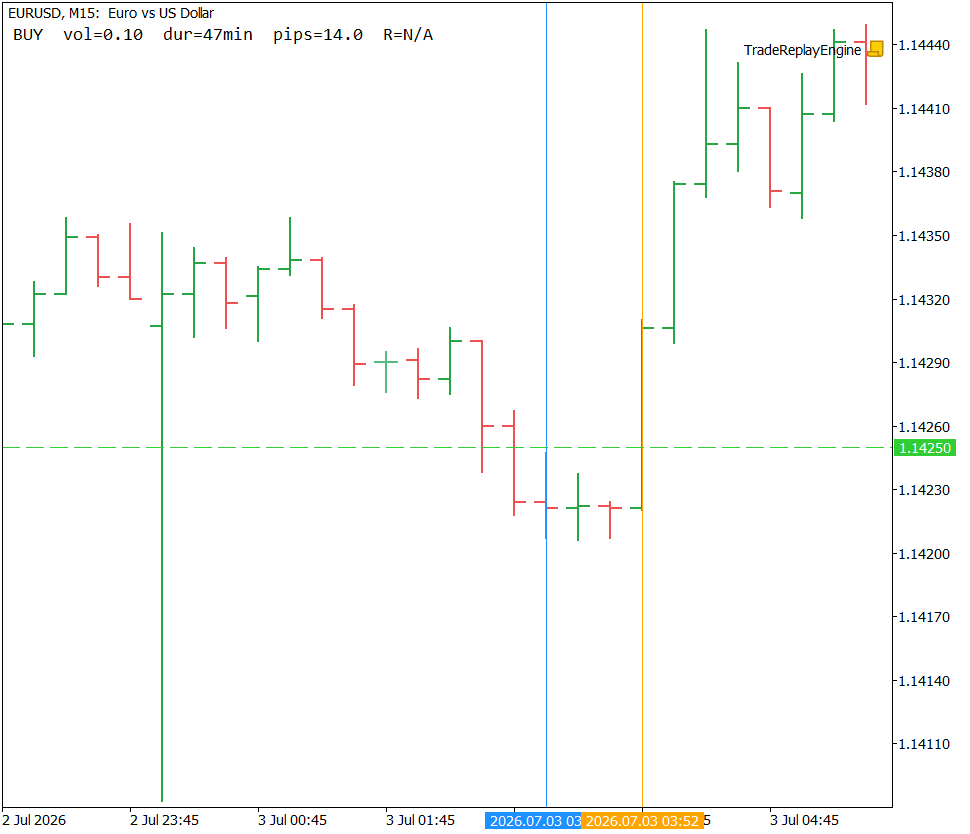
Figure 2: Trade Replay Engine rendering a BUY trade on EURUSD M15. The blue vertical line marks the entry and the orange line marks the exit, with the dashed horizontal line at 1.14250 confirming the take-profit level. The annotation reports 14.0 pips profit over 47 minutes, and R=N/A indicates no stop-loss was recorded.
Section 10: Verification — TestTradeLoader.mq5
//+------------------------------------------------------------------+
//|                                              TestTradeLoader.mq5 |
//+------------------------------------------------------------------+

#property script_show_inputs

#include <Trade_Replay_Engine/TradeRecord.mqh>

#define ASSERT(cond, label) \
   if(cond) Print("PASS: ", label); else Print("FAIL: ", label)

//+------------------------------------------------------------------+
//| Script program start function                                    |
//+------------------------------------------------------------------+
void OnStart(void)
  {
   CTradeRecord trade;
   trade.position_id = 1001;
   trade.symbol       = _Symbol;
   trade.order_type   = ORDER_TYPE_BUY;
   trade.volume       = 1.0;
   trade.entry_time   = D'2026.01.01 09:00';
   trade.exit_time    = D'2026.01.01 11:30';
   trade.entry_price  = 1.10000;
   trade.exit_price   = 1.10400;
   trade.stop_loss    = 1.09800;
   trade.take_profit  = 1.10500;
   trade.profit       = 400.0;
   trade.magic        = 0;
   trade.comment      = "test";

//--- DurationSeconds: 2.5 hours = 9000 seconds
   int expected_duration = 9000;
   ASSERT(trade.DurationSeconds() == expected_duration, "DurationSeconds == 9000");

//--- PipsProfit: buy, (1.10400 - 1.10000) / point_size
   double point_size    = SymbolInfoDouble(_Symbol, SYMBOL_POINT);
   double expected_pips  = (point_size > 0.0) ? (0.00400 / point_size) : 0.0;
   double actual_pips     = trade.PipsProfit();
   ASSERT(MathAbs(actual_pips - expected_pips) < 0.0001, "PipsProfit matches hand-computed value");

//--- RMultiple: profit / (risk_points * point_value * volume)
   double tick_value    = SymbolInfoDouble(_Symbol, SYMBOL_TRADE_TICK_VALUE);
   double risk_points    = MathAbs(trade.entry_price - trade.stop_loss) / point_size;
   double risk_dollars    = risk_points * tick_value * trade.volume;
   double expected_r       = (risk_dollars != 0.0) ? (trade.profit / risk_dollars) : DBL_MAX;
   double actual_r          = trade.RMultiple();
   ASSERT(MathAbs(actual_r - expected_r) < 0.0001, "RMultiple matches hand-computed value");

//--- RMultiple with zero stop_loss returns sentinel
   CTradeRecord no_stop_trade = trade;
   no_stop_trade.stop_loss = 0.0;
   ASSERT(no_stop_trade.RMultiple() == DBL_MAX, "RMultiple returns DBL_MAX when stop_loss is zero");

//--- PipsProfit sign flips correctly for a sell
   CTradeRecord sell_trade = trade;
   sell_trade.order_type  = ORDER_TYPE_SELL;
   sell_trade.entry_price = 1.10400;
   sell_trade.exit_price  = 1.10000;
   double expected_sell_pips = (point_size > 0.0) ? (0.00400 / point_size) : 0.0;
   ASSERT(MathAbs(sell_trade.PipsProfit() - expected_sell_pips) < 0.0001,
          "PipsProfit correct for sell direction");

   Print("TestTradeLoader: all assertions complete.");
  }
//+------------------------------------------------------------------+
This script constructs a CTradeRecord entirely by hand with field values chosen so all expected results can be computed independently, without needing actual closed trades on the account. The ASSERT macro prints PASS or FAIL with a descriptive label and allows every assertion to run even if an earlier one fails.
The first assertion checks DurationSeconds(): the entry and exit times are exactly 2.5 hours apart, giving 2.5 × 3600 = 9000 seconds. The second checks PipsProfit() for a buy: the expected pip count is 0.00400 divided by the symbol's actual point size, compared against the method's return value within a small tolerance for floating-point rounding. The third handcomputes the R-multiple using the same formula the method implements and compares against RMultiple()'s actual return. The fourth confirms the zero-stop-loss sentinel: zeroing stop_loss and calling RMultiple() must return exactly DBL_MAX. The fifth verifies the sell-direction sign flip: swapping entry and exit prices and changing direction to ORDER_TYPE_SELL must still report a positive pip count for a profitable trade.
Run this script on any actively-quoted forex pair. All five assertions should print PASS followed by TestTradeLoader: all assertions complete.
Section 11: Extending the Engine
Three natural extensions follow from this design without requiring changes to the existing code.
Multi-timeframe context: A second chart window could be opened at a higher timeframe using ChartOpen(), and the same CTradeRenderer logic applied against its chart id. This would show both the precise execution context and the broader trend context for the same trade simultaneously, without manually switching charts.
Setup tagging: An OBJ_BUTTON near the annotation label could, when clicked, append a categorical tag — "breakout," "reversal," "range-fade" — alongside the trade's position id to a CSV file in MQL5/Files/. Over a full review session this builds a categorized dataset suitable for later analysis by setup type, without requiring a separate spreadsheet.
Screenshot export: ChartScreenShot() called inside ShowCurrent() after each render would automatically save a PNG named by trade index and position id. This produces a complete set of annotated chart images for the entire trade history in a single pass, useful for building a written trade journal or sharing specific trades with others.
Section 12: Limitations
Symbol and timeframe scope: The script operates on the chart's currently loaded symbol and timeframe. It cannot switch either mid-session. Trades on other symbols are listed (if the symbol filter is left empty) but their entry bars will not be found on a chart showing a different instrument. ScrollToTrade() logs a skip message and leaves the viewport unchanged for those trades.
History depth: HistorySelect() is bound by the terminal's locally cached history. Trades from more than a year ago may not be returned without first extending the terminal's local history depth, which is a terminal-level setting outside this script's control.
SL/TP accuracy: Stop-loss and take-profit values are read from the order record at reconstruction time. They reflect the levels set when the position was originally opened. If a stop was moved during the trade — by a trailing stop mechanism or manual modification — the recorded value will be the original placement, not the level actually in effect when the stop was hit. This means R-multiple calculations for such trades will be based on the original risk, not the adjusted one.
Focus requirement for key detection: TerminalInfoInteger(TERMINAL_KEYSTATE_RIGHT/LEFT) only reflects physical key presses when the chart has OS input focus. Click directly on the chart's candles before pressing the arrow keys. If focus is on the Market Watch, Navigator, or any other panel, key states will not change and navigation will not advance.
Single-threaded polling: The polling loop occupies OnStart() for the script's entire runtime. While running, the script cannot process any other event. This is consistent with MQL5's execution model — other EAs and indicators continue to run normally — but the script itself is single-purposed for the duration of the session.
Conclusion
This article presents a complete, working trade replay tool built from four cooperating components. CTradeRecord is the plain data struct holding one reconstructed trade. CTradeLoader reads the terminal's deal history, matches IN and OUT deals by position id, applies the two-pass SL/TP lookup against both deal and order records, handles partial-close aggregation, and discards incomplete positions. CTradeRenderer draws and clears the five chart objects representing each trade's entry, exit, stop, target, and annotation. CReplayController holds the navigation index, coordinates the loader and renderer, centers the chart viewport on each trade, and logs a per-trade summary line. All four are wired together in TradeReplayEngine.mq5.
The engine provides three concrete operational guarantees. All chart objects are prefixed "TRE_" and fully removed on script termination, leaving no residue on the chart. Navigation is idempotent — rendering the same trade index always clears first and produces identical output. Chart centering reads the visible bar count on every navigation step, so positioning is correct regardless of the current zoom level.
The honest limitations are equally concrete. The script is bound to the chart's current symbol and timeframe. History depth depends on what the terminal has locally cached. SL/TP values reflect the original placement rather than any modifications made during the trade's life. And key detection requires the chart to have OS input focus at the time of the keypress. Within those bounds, the engine turns a list of closed-trade numbers into something a developer can step through trade by trade in the market context where each decision was originally made.
Programs used in the article:
| # | Name | Type | Description |
|---|---|---|---|
| 1 | TradeRecord.mqh | Include File | Holds the fully reconstructed data for one closed trade and computes its R-multiple, duration, and pip profit on demand. |
| 2 | TradeLoader.mqh | Include File | Reads closed deal history, joins IN and OUT deals by position id with a two-pass SL/TP lookup, and produces a sorted array of CTradeRecord values. |
| 3 | TradeRenderer.mqh | Include File | Draws the entry line, exit line, SL/TP lines, and annotation label for a single trade, and removes all such objects on request. |
| 4 | ReplayController.mqh | Include File | Owns the current trade index, coordinates the loader and renderer, and computes the chart scroll offset needed to center each trade. |
| 5 | TradeReplayEngine.mq5 | Script | The entry-point script that wires the four classes together, accepts user inputs, and runs the keyboard polling loop for navigation. |
| 6 | TestTradeLoader.mq5 | Script | A standalone verification script that hand-constructs a trade record and asserts the correctness of its three derived-statistic methods. |
| 7 | Trade_Replay_Engine.zip | Zip Archive | Zip archive containing all the attached files and their paths relative to the terminal's root folder. |
Warning: All rights to these materials are reserved by MetaQuotes Ltd. Copying or reprinting of these materials in whole or in part is prohibited.
This article was written by a user of the site and reflects their personal views. MetaQuotes Ltd is not responsible for the accuracy of the information presented, nor for any consequences resulting from the use of the solutions, strategies or recommendations described.

 Mapping Dealer Gamma Exposure (GEX) in MetaTrader 5: Walls, the Zero-Gamma Flip, and a Chart Overlay
 Dingo Optimization Algorithm (DOA)
 The MQL5 Standard Library Explorer (Part 14): Building a Dynamic Hedge EA with the ALGLIB Port (ap.mqh)
 Online Linear Regression with Recursive Least Squares in MQL5: A Parameter-Free Adaptive Trend Estimator

- Free trading apps
- Over 8,000 signals for copying
- Economic news for exploring financial markets
You agree to website policy and terms of use