

Using the MQL5 Economic Calendar for News Filter (Part 3): Surviving Terminal Restarts During News Window
 2 623
2 623
 0
0

Introduction
Problem: State Loss on Restart
We already have a news filter that temporarily removes SL/TP and restores them after a news window in Part 2 of this series. The existing implementation, however, keeps its state only in memory: savedStops[] and the newsSuspended flag. If a restart or recompile occurs between SuspendStops(true) and SuspendStops(false), that in-memory state is lost. The EA no longer identify which positions had their stops removed. The result: open positions may remain unprotected or never be restored, and without a recovery mechanism, the system cannot safely reconstruct its previous state.
To address this, we define a recovery contract. The system must persist trade state externally: ticket IDs, stop levels, and suspension status. Upon reinitialization, this data must be restored accurately, ensuring that the system resumes operation without prematurely restoring stops or leaving trades unprotected.
This article implements a persistent state layer using global variables of the terminal, ensuring that the system maintains continuity across interruptions and behaves deterministically under all restart conditions.
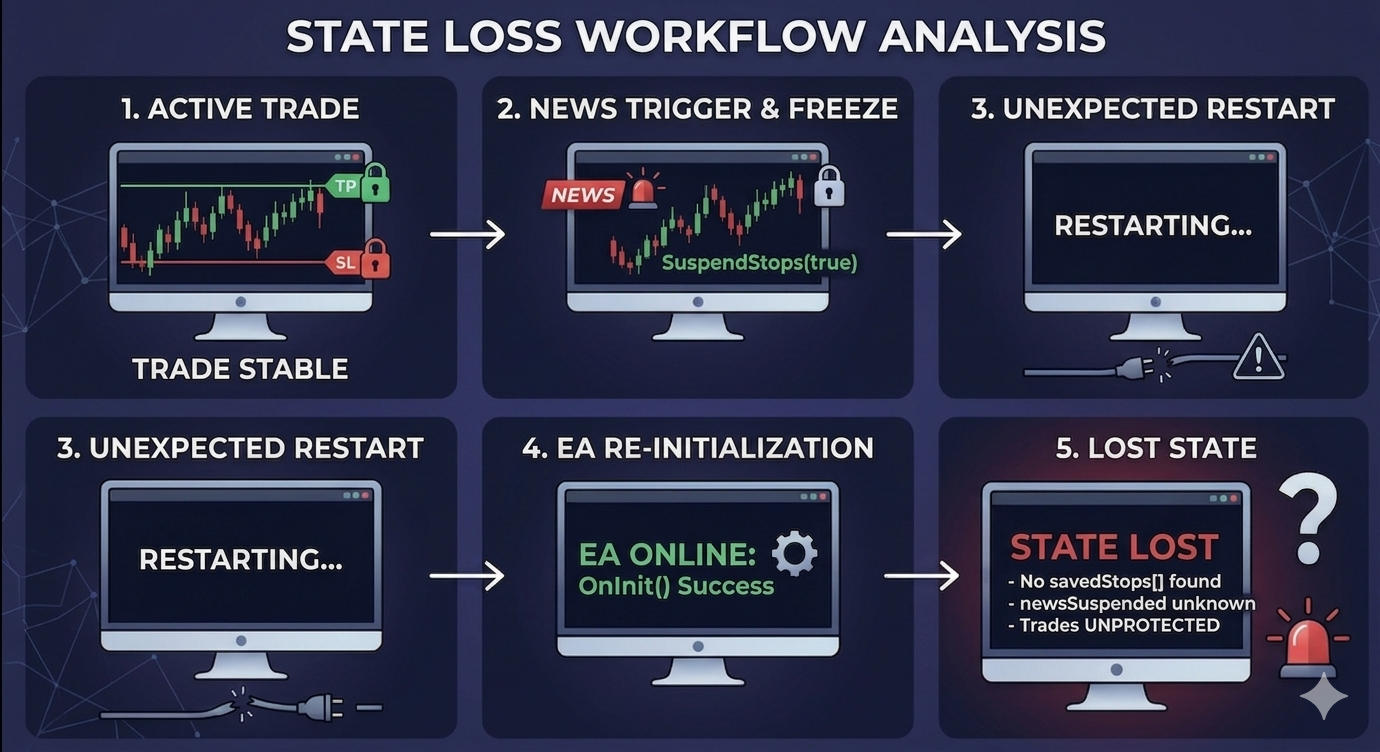
Solution: Persistent Storage Using Global Variables of the Terminal
To solve this, we must move the suspension state from volatile memory to persistent storage that survives a restart. MetaTrader 5 provides a simple but powerful mechanism: global variables of the terminal.
These are named double-valued variables stored by the terminal itself, accessible from any Expert Advisor, and they persist even after the terminal is closed and reopened. By using them, we can reconstruct the entire suspension state when the EA restarts.
Designing the Persistent Storage Model
Before implementing persistence, we must clearly define what needs to be stored, where it will be stored, and how it will be structured. The goal is not simply to save data, but to ensure that the EA can reconstruct its exact operational state after a restart.
Why Global Variables of the Terminal?
In MQL5, there are several ways to store data, such as using files, input parameters, or static/global variables in memory. For this implementation, however, we use a global variable of the terminal. These are special key-value pairs stored by the trading terminal itself.
They have important properties that make them good for storing critical runtime state: they persist even after a terminal restart, remain accessible across EA reloads, and do not require complex file handling.
What must be stored?
To fully recover a system after a restart, we must store three critical aspects: whether trades are suspended, which trades are affected, and the original stop-loss (SL) and take-profit (TP) values of the trade. Without all three, recovery will be incomplete.
For each trade whose stops have been suspended, we must preserve three pieces of data:
- The ticket number to identify the position.
- The original stop-loss to restore it later.
- The original take-profit to also restore later.
We also store the number of suspended trades and a flag that indicates an active suspension cycle (though this can be deduced from the saved data).
Storage Components
We break the persistent state into two parts:
- System State Flag: this tells the EA, "Were we inside a suspension window before the restart?" For example, we could use a code variable like Harbinger_NewsSuspended, where a value of 1 indicates the system is suspended, and 0 means normal operation.
- Per-Trade Stop Storage: Each suspended trade must store its ticket, SL, and TP. Since global variables store only double values, we will store each field separately.
We will use a structured and serialized naming scheme for the terminal global variables. For a trade index i (starting at 0), we create three variables:
Harbinger_Stop_<i>_Ticket

Harbinger_Stop_<i>_SL

Harbinger_Stop_<i>_TP
This approach ensures simple indexing, easy reconstruction, clear mapping between trades and stops, and requires no complex serialization.
Example:
If two trades are suspended, the structure maps out clearly:
// Trade 1
Harbinger_Stop_0_Ticket   = 123456
Harbinger_Stop_0_SL       = 1.08500
Harbinger_Stop_0_TP       = 1.09500

// Trade 2
Harbinger_Stop_1_Ticket   = 123789
Harbinger_Stop_1_SL       = 1.38500
Harbinger_Stop_1_TP       = 1.39500
All values are stored as double. The ticket, although an integer, can be safely cast to and from a double (MT5 global variables are double-precision, which can exactly represent up to 2^53—well above any ticket number).
Additionally, control variable:
To know how many trades are stored, we will also define an additional count variable:
Harbinger_Stop_Count
On restart, the EA reads Harbinger_Stop_Count and loops from i = 0 to count - 1 to reconstruct savedStops[].
Clarification: The "Harbinger" prefix
You may have noticed the prefix ''Harbinger_'' in the global variable names. This is simply a unique identifier to avoid name collisions with other Expert Advisors or scripts that might also use terminal global variables. You can replace Harbinger_ with any distinctive string, such as your EA's name, a random number, or even the magic number. In a multi-EA environment, a prefix ensures that each EA's saved state does not interfere with another EA's saved state.
Workflow with Persistence
The lifecycle of a news suspension now becomes:
News window active—SuspendStops(true) is called.- It clears the previously saved stops array,
- iterates through open positions, storing each ticket/SL/TP in savedStops[], and removing the stops, and
- immediately after, it calls a function—SaveStopsToGlobals()—to write the entire array to global variables of the terminal.
Terminal restarts during the news window—the EA is reloaded.
- In OnInit(), we call another function—LoadStopsFromGlobals().
- If the global count variable exists, we read back all saved stops into the savedStops[] array and set newsSuspended = true.
- The EA now knows exactly which trades are suspended and what their original stops were.
News window ends—SuspendStops(false) is called.
- It uses the savedStops[] array to restore each trade's stops via RestoreStops().
- After restoration, it clears the array and calls ClearSavedStopsFromGlobals() to delete all related global variables.
With this model, no matter when a restart occurs, the EA can resume exactly where it left off.
Why not use files for persistent storage?
Some developers might wonder why we chose global variables of the terminal over file-based storage (e.g., writing to a CSV or INI file). Files are a valid persistent method, but they introduce complexity that is unnecessary for our use case.
- Simplicity: Global variables are managed directly by the MetaTrader terminal. No need to handle the file paths, permission issues, or custom serialization formats.
- Speed: Reading and writing to global variables is significantly faster than file I/O, which is important because we perform these operations only during state transition (once per news window), but still we want minimal overhead.
- Automatic synchronization: The terminal ensures global variables are saved to disk automatically and survive a restart. With files, you must manually manage flushing, closing handles, and reopening after a restart.
- No external dependencies: The code remains self-contained.
If you need to scale to multiple instances of the same EA on different charts, you can easily extend the naming scheme to include a magic number (e.g., Harbinger_Stop_<magic>_<i>_Ticket). Global variables are still the right tool; files would only complicate that.
Limitations and Considerations
- Global variables are terminal-wide. If multiple instances of the same EA run on different charts, they will share the same global variables. This can be avoided by including a magic number in the variable names. In our implementation, we keep it simple, assuming one instance per symbol; you can easily extend it, e.g., Harbinger_Stops_<magic>_<i>_Ticket.
- Data type restriction: Global variables store only double. We store tickets as doubles—this is safe because ticket numbers are integers and fit precisely.
- Cleanup: Always delete global variables after the news window ends to avoid accumulating stale data. Our ClearSavedStopsFromGlobals() will handle this.
- Restoration on restart: When loading saved stops in OnInit(), we do not automatically restore them—we simply restore the EA's memory. The actual restoration still happens only when SuspendStops(false) is called after the news window ends. This is intentional, because we don't know if the news window is still active or not; the transition logic will handle it on the next tick.
These limitations highlight the need for a persistent layer that can reconstruct the system state after unexpected interruptions.
Scope of the Article
This article focuses solely on adding persistence to the stop-suspension system from Part 2. We will not modify the news detection, the transition logic, or the restoration rules. Our only additions are:
- three new functions: SaveStopsToGlobals(), LoadStopsFromGlobals(), and ClearSavedStopsFromGlobals().
- Calls to these functions at the appropriate points in SuspendStops() and OnInit().
- Minor adjustments to ensure the state flag (newsSuspended) is correctly restored.
All other parts of the EA remain unchanged.
Implementation
We will now implement these functions and integrating them into our News Filter system as another layer of protection. At this stage, we already defined and know what must be stored, where it is stored (global variables), and how it is structured (naming convention). Now we will begin creating each function step-by-step according to the scope of the article.
SaveStopsToGlobals() function
Step 1: Write data to global variables of the terminal
The first step is to store the suspension state and stop data at the moment trades are suspended. In MQL5, this is done by using
GlobalVariableSet(name, value); This function creates or updates a terminal-level variable that persists beyond EA execution.
Step 2: Saving the suspension state
Before storing individual trades, we first store the global system state. This tells the EA, after restart, "We were inside a suspension window."
GlobalVariableSet("Harbinger_NewsSuspended", 1);

// If the system is not suspended
GlobalVariableSet("Harbinger_NewsSuspended", 0);
Step 3: Save per-trade stop data and build the variable names
Now we store each trade's ticket, stop-loss, and take-profit. We iterate through the savedStops[] array (which was already built during SuspendStops(true)).
Since global variables require string keys, we dynamically construct names using the index.
Example:
string base = "Harbinger_Stop_" + IntegerToString(i);

// then
base + "_Ticket"
base + "_SL"
base + "_TP"
The build logic for SaveStopsToGlobals() was done in 3 steps. Now we combine everything into a structured function:
//+------------------------------------------------------------------+
//| Global Variable Management for Persistent Stops, Function 1/3    |
//+------------------------------------------------------------------+
void SaveStopsToGlobals()
  {
   int count = ArraySize(savedStops);

   GlobalVariableSet("Harbinger_Stop_Count", count);
   GlobalVariableSet("Harbinger_NewsSuspended", newsSuspended ? 1 : 0);

   for(int i = 0; i < count; i++)
     {
      string base = "Harbinger_Stop_" + IntegerToString(i);

      GlobalVariableSet(base + "_Ticket", (double)savedStops[i].ticket);
      GlobalVariableSet(base + "_SL", savedStops[i].sl);
      GlobalVariableSet(base + "_TP", savedStops[i].tp);
     }
     Print("Persistent stop state saved.");
  }
This function will be called immediately after stops are suspended (removed). This ensures that data is stored before any restart can occur, and the EA will always have a recovery snapshot. I will highlight the exact places to make these function calls later on in the article.
At this stage we are only creating a recovery checkpoint, and the system now has memory beyond runtime.
LoadStopsFromGlobals() function
Up to this point, we successfully solved half of the persistence problem. We can save the suspension state and trade data, but the system is still incomplete until we can recover that state after a restart.
Saving data alone does not make a system restart-safe. After a restart, and the EA runs OnInit(), in-memory variables are reset, so the EA loses historical context even though the terminal still holds the required:
Harbinger_Stop_Count
Harbinger_Stop_<i>_Ticket
Harbinger_Stop_<i>_SL
Harbinger_Stop_<i>_TP
Harbinger_NewsSuspended
The EA must explicitly read and rebuild its internal state. Without this step, stops will remain removed, the savedStops[] array will stay empty, and newsSuspended will default to false. Which brings us back to the original problem of state loss.
The LoadStopsFromGlobals() function will detect if saved data exists, rebuild the savedStops[] array, and prepare the EA to continue execution. Let's implement the following steps.
Step 1: Detecting existing persistent data
We first ask if there was an active suspension before restart. We do this using the count variable:
if(!GlobalVariableCheck("Harbinger_Stop_Count"))
  {
  Print("No persistent stop data found.");
  return;
  }
If this variable does not exist, then no suspension was active during restart, and nothing needs to be restored.
Step 2: Rebuilding the SavedStops[] array
First we have to read the stored count, and if the variable exists, we retrieve it. This tells us how many trades were affected and how many entries we must reconstruct. We then resize the array, loop through each stored trade, and rebuild the array in memory:
// Retrieve variable if it exists
int count = (int)GlobalVariableGet("Harbinger_Stop_Count");

// Resize the array
ArrayResize(savedStops, count);

// Loop through each stored trade and rebuild array
for (int i = 0; i < count; i++)
  {
  string base = "Harbinger_Stop_" + IntegerToString(i);

  savedStops[i].ticket = (ulong)GlobalVariableGet(base + "_Ticket");
  savedStops[i].sl = GlobalVariableGet(base + "_SL");
  savedStops[i].tp = GlobalVariableGet(base + "_TP");
  }
The EA has fully reconstructed all suspended trades, and each position is mapped back into memory.
Step 3: Restoring the suspension state
Lastly, we restore the system-level flag:
if (GlobalVariableCheck("Harbinger_NewsSuspended"))
  {
  newsSuspended = (GlobalVariableGet("Harbinger_NewsSuspended") == 1);
  }
The EA now knows whether it is still inside a suspension cycle. Now we combine everything into a structured implementation:
//+------------------------------------------------------------------+
//| Global Variable Management for Persistent Stops, Function 2/3    |
//+------------------------------------------------------------------+
void LoadStopsFromGlobals()
  {
   if(!GlobalVariableCheck("Harbinger_Stop_Count"))
     {
      Print("No persistent stop data found.");
      return;
     }

   int count = (int)GlobalVariableGet("Harbinger_Stop_Count");
   if(count <= 0)
     {
      Print("Persistent stop count is zero.");
      return;
     }

   ArrayResize(savedStops, count);
   for(int i = 0; i < count; i++)
     {
      string base = "Harbinger_Stop_" + IntegerToString(i);
      savedStops[i].ticket = (ulong)GlobalVariableGet(base + "_Ticket");
      savedStops[i].sl = GlobalVariableGet(base + "_SL");
      savedStops[i].tp = GlobalVariableGet(base + "_TP");
     }

   if(GlobalVariableCheck("Harbinger_NewsSuspended"))
      newsSuspended = (GlobalVariableGet("Harbinger_NewsSuspended") == 1);
   Print("Persistent stop state loaded. Count: ", count);
  }
This function will be called inside OnInit. We do not restore stops immediately after loading; we are only rebuilding memory and restoring system state because we don't know if the news window is still active, and immediate restoration could break the logic. Instead, the EA waits for the normal flow, and when the news window ends, SuspendStops(false) handles restoration. This keeps the system deterministic, consistent, and aligned with original live logic.
At the end of this step, the system can now survive terminal restarts, recover suspended trades accurately, and maintain logical continuity. We still have to clear persistent data (clean-up mechanism), where we will implement ClearSavedStopsFromGlobals()—a proper deletion of global variables.
ClearSavedStopsFromGlobals() function
At this stage, we have built a persistent cycle, saved suspension data before risk exposure, loaded data after a restart, and the EA now resumes correctly. However, if the stored global variables are not deleted, the EA may detect stale data even when no suspension is active. It may then rebuild an outdated savedStops[] and operate on non-existent positions. Global variables of a terminal persist indefinitely unless explicitly deleted. To prevent this, we must ensure that once stops are restored, all persistent data is removed immediately. This ensures that every suspension cycle is self-contained, with no leakage into the future.
We now implement the ClearSavedStopsFromGlobals() function in 3 steps that will delete all stored trade variables, remove the count variable, and reset the suspension flag.
Step 1: Retrieve the stored count
Before deleting anything, we must know how many entries exist. Just like in the loading step, we begin by checking the count variable.
void ClearSavedStopsFromGlobals()
  {
   if(!GlobalVariableCheck("Harbinger_Stop_Count"))
     {
      Print("No persistent data to clear.");
      return;
     }
If the variable does not exist, there will be nothing to clean, and we safely exit.
Step 2: Delete per-trade variables
Once we confirm data exists, we retrieve the count and iterate through all stored entries:
int count = (int)GlobalVariableGet("Harbinger_Stop_Count");

   for(int i = 0; i < count; i++)
     {
      string base = "Harbinger_Stop_" + IntegerToString(i);

      GlobalVariableDel(base + "_Ticket");
      GlobalVariableDel(base + "_SL");
      GlobalVariableDel(base + "_TP");
     }
Each trade entry is removed individually, ensuring no residual mapping remains in the terminal.
Step 3: Remove control variables
After clearing per-trade data, we must also remove the control variables that define the system state:
GlobalVariableDel("Harbinger_Stop_Count");
GlobalVariableDel("Harbinger_NewsSuspended");
This step is essential because Harbinger_Stop_Count determines where recovery is triggered, and Harbinger_NewsSuspended controls the system state. Leaving either behind would break the logical consistency.
Now we will combine every step into a complete function:
//+------------------------------------------------------------------+
//| Global Variable Management for Persistent Stops, Function 3/3    |
//+------------------------------------------------------------------+
void ClearSavedStopsFromGlobals()
  {
   if(!GlobalVariableCheck("Harbinger_Stop_Count"))
     {
      Print("No persistent data to clear.");
      return;
     }

   int count = (int)GlobalVariableGet("Harbinger_Stop_Count");

   for(int i = 0; i < count; i++)
     {
      string base = "Harbinger_Stop_" + IntegerToString(i);

      GlobalVariableDel(base + "_Ticket");
      GlobalVariableDel(base + "_SL");
      GlobalVariableDel(base + "_TP");
     }

   GlobalVariableDel("Harbinger_Stop_Count");
   GlobalVariableDel("Harbinger_NewsSuspended");

   Print("Persistent stop data cleared.");
  }
This function is not called arbitrarily; it is tied to a very specific moment in the lifecycle. It must be called only after stops have been successfully restored. With this third and final function, the persistent system is now complete. Now we move into putting it all together, where we will tie save, load, and clear functions into the news filter EA.
Integrating Persistence into News Filter
There are two points of integration.
- Update the SuspendStops() function with persistence.
- Add state reconstruction to the OnInit() function.
To update SuspendStops(), we inject SaveStopsToGlobals() after stops are removed and ClearSavedStopsFromGlobals() after restoration.
//+------------------------------------------------------------------+
//| Suspend Stops During News                                        |
//+------------------------------------------------------------------+
void SuspendStops(bool suspend)
  {
   if(suspend == newsSuspended)
      return; // Already in the desired state


   newsSuspended = suspend;
   if(suspend)
     {
      ArrayResize(savedStops, 0); // Clear previous list
      for(int i = PositionsTotal() - 1; i >= 0; i--)
        {
         ulong ticket = PositionGetTicket(i);
         if(PositionSelectByTicket(ticket))
           {
            // Save current SL/TP
            int idx = ArraySize(savedStops);
            ArrayResize(savedStops, idx + 1);
            savedStops[idx].ticket = ticket;
            savedStops[idx].sl = PositionGetDouble(POSITION_SL);
            savedStops[idx].tp = PositionGetDouble(POSITION_TP);

            // Remove stops from broker side
            if(trade.PositionModify(ticket, 0.0, 0.0))
              {
               PrintFormat("Suspended trade #%I64u: SL/TP removed for news.", ticket);
              }
           }
        }

      // PERSISTENT: SAVE STATE IMMEDIATELY AFTER SUSPENSION
      SaveStopsToGlobals();
     }
   else // Unfreeze
     {
      for(int k = 0; k < ArraySize(savedStops); k++)
        {
         RestoreStops(savedStops[k].ticket,
                      savedStops[k].sl,
                      savedStops[k].tp);
        }
      ArrayResize(savedStops, 0);

      // PERSISTENT: CLEAR SAVED STOPS AFTER RESTORATION
      ClearSavedStopsFromGlobals();
     }
  }
Next, we reconstruct the OnInit function by calling the LoadStopsFromGlobals() into it.
//+------------------------------------------------------------------+
//| Expert initialization function                                   |
//+------------------------------------------------------------------+
int OnInit()
  {
   Print("News Filter Part1 initialized");

   // LOAD PERSISTENT STATE AFTER RESTART
   LoadStopsFromGlobals();
   if(ArraySize(savedStops) > 0)
   {
      Print("Recovered suspended trades from previous session.");
   }

// Pre-load calendar if enabled to avoid lag on first tick
   if(EnableNewsFilter)
      LoadTodayCalendarEvents();
   return INIT_SUCCEEDED;
  }
After integration, the News Filter EA persists across terminal or EA restarts. for example:
News starts, if suspendStops(true)
- stops are removed,
- data is stored in memory, and
- in-memory data is persisted globally.
Terminal restarts,
- OnInit() LoadStopsFromGlobals(), and
- the system resumes with full size.
News ends, SuspendStops(false)
- stops are restored, and
- persistent data is deleted.
If EA is removed during suspension, the system state is preserved, and recovery is possible.
How edge cases are handled
A well-thought-out system must behave correctly even in unusual situations. Our persistent stop-suspension mechanism handles several edge cases:
- Multiple positions suspended: the savedStops[] array stores each trade separately. When saving, we loop through all positions; when loading, we rebuild the exact list.
- Trades manually closed while suspended: If a position is closed by the trader (or another EA) during the suspension window, it will no longer exist when we later try to restore its stops. Our RestoreStops() function first checks PositionSelectByTicket(); if the ticket is invalid, it simply skips that entry. After restoration, the savedStops[] array is cleared so stale references are not kept.
- Restart after the news window has already ended: If the EA restarts after the news window has ended, the global variable would have been deleted by ClearSavedStopsFromGlobals() at the end of the previous suspension cycle. Therefore, LoadStopsFromGlobals() will find no saved data, and the EA starts with newsSuspended = false—exactly as it should.
- Terminal crash mid-suspension: The implementation in this article directly handles this case.
- Price moves beyond the original stop before restoration: This is already handled inside RestoreStops()'s safety adjustment. If price has already crossed the saved SL/TP, the function places the stop at the nearest valid level in front of the price, respecting broker minimum distance rules.
Testing the implementation
Testing is essential to confirm that the persistent state survives a restart, because this implementation directly affects risk management and overall exposure. We will simulate a restart during an active news window and observe the log messages.
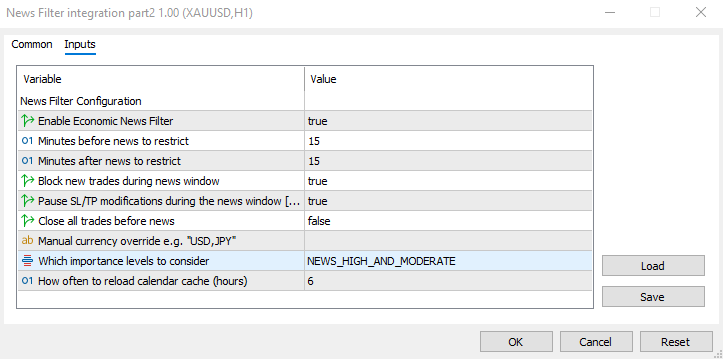
Attach the EA to a chart with EnableNewsFilter = true, SuspendStopsDuringNews = true, and a small news window (e.g., NewsMinutesBefore = 1, NewsMinutesAfter = 1 for quick testing; I used 15 minutes before and after to have enough window to evaluate the situation). Ensure that there is at least one open trade with visible stop-loss and take-profit levels from the EA.
The news filter EA gets initialized, then we wait for a relevant news event. The experts tab will show:
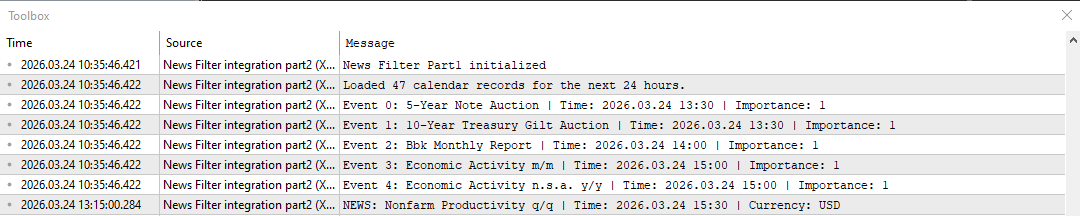
When a relevant news window begins, the SL/TP of any open trades gets suspended.
While the news window is active, we will simulate a restart by recompiling the EA (right-click EA in the navigator —> Modify —> Compile) or restart the terminal (I simply changed an input parameter, then allowed the EA to recompile). Below you can see in the image that stops were removed for the news window and the EA later reinitializes for the second time inside an active news window.
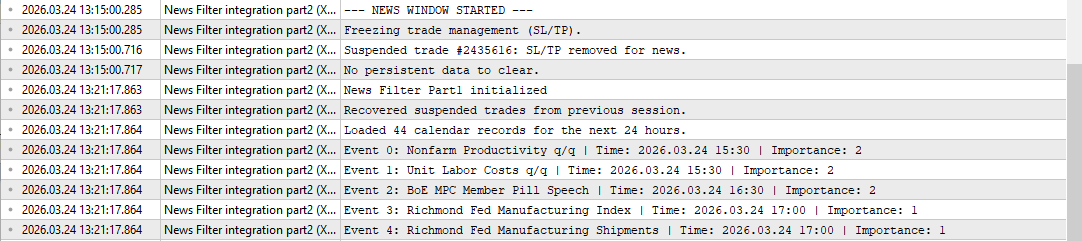
Wait for the end of the news window. The log will show the restored SL/TP, a behavior that wouldn't have occurred if we had not persisted the storage of stop values. Below is an image of restored stops:

For a complete overview, I will combine all the stages into one screenshot that shows the entire flow:
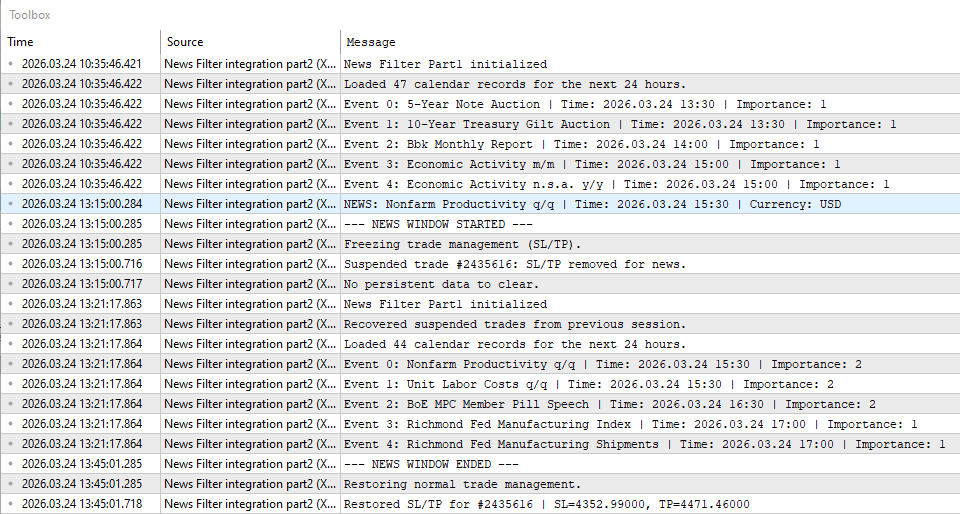
Immediately after the test, you can visually verify that the stop-loss and take-profit levels on the chart have been restored to their original values (or adjusted if necessary). This confirms that the persistent layer works as intended.
Conclusion
We solved the state-loss gap by persisting the suspension snapshot in terminal global variables. Recovery is defined as follows: SaveStopsToGlobals() writes state, LoadStopsFromGlobals() restores it, ClearSavedStopsFromGlobals() removes it after restoration. SaveStopsToGlobals() is called immediately after SuspendStops(true) completes, LoadStopsFromGlobals() runs in OnInit(), and ClearSavedStopsFromGlobals() runs after SuspendStops(false) restores SL/TP.
Practical result: you can restart the terminal, recompile, or reboot the VPS during an active news window and the EA will recover the exact list of suspended tickets and their original SL/TP. The EA does not auto-restore stops on load; it reconstructs state so the normal suspension lifecycle (and safety checks such as skipping closed tickets or adjusting invalid levels) proceeds deterministically. For reproducibility, verify the presence of the Harbinger_* globals in the terminal, the rebuilt savedStops[] on OnInit, and the final cleanup of globals after restoration.
The complete source code is available in the attached files, I recommend implementing the changes yourself, to better understand the EA and troubleshoot future issues. You can now integrate this news filter into your own Expert Advisors, knowing that it will help protect your trading edge even through terminal restarts.Warning: All rights to these materials are reserved by MetaQuotes Ltd. Copying or reprinting of these materials in whole or in part is prohibited.
This article was written by a user of the site and reflects their personal views. MetaQuotes Ltd is not responsible for the accuracy of the information presented, nor for any consequences resulting from the use of the solutions, strategies or recommendations described.

 Pair Trading: Algorithmic Trading with Auto Optimization Based on Z-Score Differences
 MQL5 Trading Tools (Part 26): Integrating Frequency Binning, Entropy, and Chi-Square in Visual Analyzer
 Market Simulation (Part 18): First Steps with SQL (I)
 Neuro-Structural Trading Engine — NSTE (Part II): Jardine's Gate Six-Gate Quantum Filter

- Free trading apps
- Over 8,000 signals for copying
- Economic news for exploring financial markets
You agree to website policy and terms of use