Multi Risk Manager Pro
- Yardımcı programlar
-
Rahman Pavaleh
 MQLEXP | Algorithmic Trading & MT5 Solutions
We build professional Expert Advisors, indicators, trading tools, and automated trading solutions for MetaTrader 5.
Our work combines MQL5, MT5, and Python to turn trading ideas into practical software for systematic and automated trading. - Sürüm: 1.2
- Güncellendi: 5 Kasım 2026
- Etkinleştirmeler: 10
Multi Risk Manager Pro
Risk management, trade execution, position control and connected trading tools for MetaTrader 5.
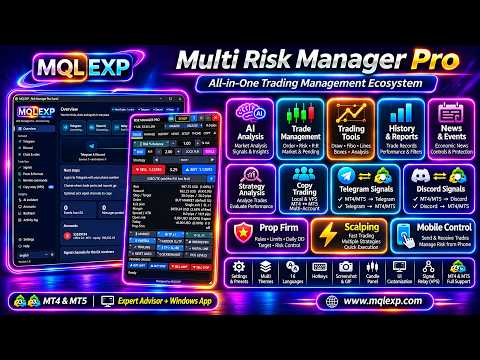
Multi Risk Manager Pro helps you calculate position size, prepare trades on the chart, manage open positions and review trading activity from one customizable interface.
Its eight modules—TRADE, MANAGE, HISTORY, NEWS, SETUP, COPY, AI and PHONE—bring together visual risk-to-reward planning, automated exit management, prop firm controls, economic news, trade copying and mobile-trade management.
A separate Windows companion extends the workflow with Telegram and Discord connections, authorized remote commands, AI-assisted reviews and historical signal backtesting.
The product is an execution and management utility. Trading decisions come from your own actions, configured copying or authorized instructions. The AI assistant provides analysis and does not independently execute trades.
Purchase this product on Black Friday and receive 1 free Expert Advisor of your choice.
Public channel : https://www.mql5.com/en/channels/mqlexp
Note: If you have any problems running it, please message me.
| Blogs | Discription | Link |
|---|---|---|
| 1 | A Complete Trade Management Toolkit for MetaTrader 5 / 4 | https://www.mql5.com/en/blogs/post/777677 |
| 2 | How to Use the 8 Money Management Methods in MetaTrader 5 / 4 | https://www.mql5.com/en/blogs/post/777683 |
| 3 | How to Use the Risk-to-Reward Box in MetaTrader 5 / 4 | https://www.mql5.com/en/blogs/post/777775 |
| 4 | How to Place and Manage Market and Pending Orders in MT5 / 4 | https://www.mql5.com/en/blogs/post/777776 |
| 5 | Take Profit, Stop Loss and Partial Exit Management in MT5 / 4 | https://www.mql5.com/en/blogs/post/777958 |
| 6 | Break-Even, Trailing Stop, Lock Profit and Secure | https://www.mql5.com/en/blogs/post/777960 |
| 7 | Daily Drawdown, Equity Limits and Profit Targets | https://www.mql5.com/en/blogs/post/778117 |
| 8 | Copy Trades Between MT5 / 4 Terminals, VPS and Remote Accounts | https://www.mql5.com/en/blogs/post/778118 |
| 9 | Forex Factory, MT5 Economic Calendar and Trading Restrictions | https://www.mql5.com/en/blogs/post/778120 |
| 10 | Visualizing Multiple Timeframes in MT5 / 4 | https://www.mql5.com/en/blogs/post/778343 |
| 11 | Trade History, Performance Reports and Strategy Journaling in Multi Risk Manager Pro | https://www.mql5.com/en/blogs/post/778344 |
| 12 | Themes, Languages, Hotkeys and Alerts | https://www.mql5.com/en/blogs/post/778345 |
| 13 | Daily Limits, Consecutive Losses, Equity Stop and Trading Sessions | https://www.mql5.com/en/blogs/post/778519 |
| 14 | Scalping Mode, Confirmation, Slippage and Broker Compatibility | https://www.mql5.com/en/blogs/post/778520 |
| 15 | Partial Close, Reverse, Close By and Hidden SL/TP | https://www.mql5.com/en/blogs/post/778627 |
| 16 | First-Time Setup, Settings, Presets and Backups | https://www.mql5.com/en/blogs/post/778630 |
| 17 | Scalping Mode - One-Click Trading, Automatic Break-Even, Trailing Stop and Time-Based Exits | https://www.mql5.com/en/blogs/post/778632 |
| 18 | The Complete Guide to Chart-Based Position Management, Smart Alerts and Advanced MT5 / 4 Tools | https://www.mql5.com/en/blogs/post/778642 |
| 19 | Multi Risk Manager Pro Windows App for MT4 and MT5: Download, Setup and Privacy | https://www.mql5.com/en/blogs/post/779394 |
| 20 | How to Send MT4 and MT5 Trade Updates to Telegram or Discord with Multi Risk Manager Pro | https://www.mql5.com/en/blogs/post/779395 |
| 21 | How to Copy Telegram and Discord Signals to MT4 or MT5 with Your Own Risk Settings | https://www.mql5.com/en/blogs/post/779396 |
| 22 | How to Monitor and Manage MT4 and MT5 Accounts from Telegram or Discord with Multi Risk Manager Pro | https://www.mql5.com/en/blogs/post/779397 |
| 23 | How to Use the AI Trading Journal and Review Trade Plans in MT4 and MT5 with Multi Risk Manager Pro | https://www.mql5.com/en/blogs/post/779398 |
| 24 | How to Manage Mobile Trades in MT4 and MT5 with the PHONE Module | https://www.mql5.com/en/blogs/post/779400 |
| 25 | How to Use Chart Drawing Tools in MT4 and MT5 with Multi Risk Manager Pro | https://www.mql5.com/en/blogs/post/779401 |
| 26 | How to Backtest Telegram and Discord Trading Signals with Multi Risk Manager Pro and Risk Lab | https://www.mql5.com/en/blogs/post/779403 |
| 27 | How to Use the AI Tab in Multi Risk Manager Pro for MT4 and MT5 | https://www.mql5.com/en/blogs/post/779404 |
1. Advanced Risk and Money Management
Choose from multiple position-sizing methods to calculate trade volume according to your preferred risk model:
-
Risk percentage based on balance, equity, or free margin
-
Fixed monetary risk
-
Fixed lot size
-
Balance-increment position sizing
-
Fixed Ratio method
-
Kelly Criterion
Plan trades using risk-to-reward levels and account for broker volume and margin restrictions. These tools help you apply a consistent position-sizing approach, although actual risk may differ because of slippage, gaps, execution conditions, and other market factors.
2. Position and Order Management
Manage trades and pending orders from one interface, with tools including:
-
Market and pending order execution
-
Stop Loss and Take Profit management
-
Partial position closing
-
Break-even management
-
Point-based, ATR-based, and candle-based trailing stops
-
Multiple Take Profit levels and staged Stop Loss management
-
Basket Take Profit and Stop Loss
-
Lock Profit and other position-management actions
-
Order confirmation and execution controls
Some order types and execution features depend on broker support and account conditions.
Hidden Stop Loss and Take Profit levels are managed by the Expert Advisor rather than being placed as ordinary protective levels on the broker's server. These functions require the terminal and Expert Advisor to remain operational.
3. Prop Firm Risk Controls
Configure account-level restrictions to help monitor common prop firm risk limits:
-
Daily and overall drawdown thresholds
-
Static and trailing drawdown controls
-
Profit targets
-
Restrictions on opening new trades
-
Optional closing of eligible positions when configured limits are reached
-
Daily, weekly, and monthly profit or loss limits
These controls can support a structured risk-management workflow. They do not guarantee compliance with every prop firm's rules. Each firm's calculation method, time zone, equity rules, and restrictions should be checked individually.
Protection coverage may depend on the selected feature and whether trades are managed by this Expert Advisor or by other tools.
4. Trade Copying and Telegram / Discord Connections - LOCAL / SERVER VPS
Connect trading accounts through sender and receiver configurations. Copy between compatible MT4 and MT5 builds using LOCAL connections on the same computer or SERVER / VPS connections through a configured relay.
Receiver controls include:
- Sender-volume, lot-multiplier, balance-ratio, fixed-lot and risk-based sizing.
- Symbol mapping for different broker naming conventions.
- Buy-only, sell-only and reverse-copy options.
- Market and supported pending-order copying.
- Synchronization of eligible modifications, partial closes and closures.
- Trade filters, volume restrictions and separate options for panel limits, protection and news filtering.
The Windows companion adds Telegram and Discord workflows:
- Publish eligible trade updates, reports and selected chart images.
- Parse supported incoming signal messages for the EA receiver.
- Configure message formats, destinations and signal sources.
- Process supported follow-up instructions, subject to the parser and receiver settings.
LOCAL requires participating terminals on the same machine. SERVER / VPS requires a reachable relay and matching connection settings. The relay does not provide built-in TLS encryption.
Telegram and Discord functions require the Windows companion and the appropriate service credentials and permissions. Discord webhooks support posting; reading channels requires a suitable bot connection.
Verify symbol mapping, resulting volume and management behavior on demo accounts before live copying.
5. Scalping and Trade Execution Tools
Use the scalping module to manage fast trade execution and predefined exit rules.
Features include:
-
One-click market execution
-
Configurable Quick, Runner, Tight, and Swing profiles
-
Break-even and trailing-stop management
-
Partial closing and time-based exits
-
Spread filtering
-
Entry cooldown settings
-
Maximum position limits
-
Consecutive-loss restrictions
-
Daily profit and loss limits
The available controls help organize an execution workflow. They do not generate a universal trading strategy or guarantee that a scalping approach will be profitable.
6. News Filters and Trading Restrictions
Configure trading restrictions around economic events and selected trading periods.
Depending on the selected calendar source and available data, the news module supports:
-
Forex Factory calendar integration
-
The MetaTrader 5 economic calendar
-
Currency and impact filters
-
Pre-event and post-event time windows
-
News alerts and entry restrictions
-
Optional closing of eligible positions
Forex Factory integration requires the appropriate WebRequest permissions in MetaTrader 5. Calendar availability and data quality may vary.
News-related closing actions have scope limitations and should not be assumed to cover every symbol, pending order, or trade managed by another Expert Advisor.
Additional account controls include trading-time restrictions, weekday and date filters, maximum open-risk settings, loss cooldowns, and equity protection tools.
7. Trading History and Reports
Review trading activity with built-in history and reporting tools.
Available information includes:
-
Profit and loss statistics
-
Trade volume and duration
-
Commissions and swaps
-
Filters by date, symbol, magic number, strategy, and trade source
-
Cumulative profit and loss
-
Equity curve
-
Trading journal
-
CSV and Excel-compatible exports
These tools help you review trading activity and maintain records for your own analysis.
With the Windows companion, selected reports can also be sent to configured Telegram or Discord destinations. AI review tools can help examine journal patterns, recent trades, strategy behavior and weekly performance.
Account reports describe recorded trading activity. Historical signal backtests are a separate simulated dataset and should not be presented as executed account results.
8. Interface, Chart Tools and Workspace Customization
Organize your workflow across eight tabs: TRADE, MANAGE, HISTORY, NEWS, SETUP, COPY, AI and PHONE.
Customize the workspace with:
- Multiple visual themes and configurable colors.
- Panel sizing, chart controls and hotkeys.
- Presets, scalp profiles and settings backup tools.
- Multi-timeframe side candles and candle-time information.
- Screenshot tools and animated GIF capture.
- Alerts and optional MetaTrader push or email notifications.
- Multiple interface languages.
The integrated drawing toolbar adds lines, Fibonacci and Gann tools, shapes, patterns, annotations and measurement tools directly to the MetaTrader chart. Use these alongside the R box to document and review your trade ideas.
Drawing objects are analysis tools; they do not submit orders. The toolbar works inside MetaTrader and does not require a TradingView connection.
Translation coverage and text rendering can vary between individual controls and platform builds.
9. AI - Assistant Trading Reviews
Use the AI tab to investigate trading activity and review plans with the help of a configured AI provider.
Available review topics include:
- Trading journal and performance evaluation.
- Strategy patterns, psychology and trading discipline.
- Open-position risk and exposure.
- Economic news and market context.
- Trade-plan checks before execution.
- Last-trade and weekly reviews.
- Signal-channel analysis.
- Chart-image analysis.
- Daily briefings and prop firm rule reviews.
You can also ask your own trading questions.
AI processing runs in the Windows companion. It requires a configured provider, model and API key. Chart-image analysis requires a model that supports image input. Provider availability and any API usage charges are separate.
AI responses may be incomplete or incorrect. They do not execute trades, enforce account limits or guarantee compliance with prop firm rules.
10.PHONE — Manage Mobile and Web Trades
The PHONE module monitors or manages eligible positions opened through MetaTrader mobile or web on the same trading account.
Choose between ignoring these trades, receiving notifications or applying panel management. Configure stop-loss, take-profit, breakeven, trailing and partial-close behavior according to your workflow.
Optional money management can adjust volume after the trade has opened. It may reduce existing exposure or add a same-direction trade after the required protective levels are available. Added volume uses the available market price and remains subject to broker restrictions.
PHONE is a desktop EA feature, not a separate mobile application. The desktop terminal and EA must remain connected and running.
11.Windows Companion and Remote Commands
The separate Windows companion connects the EA to external communication and analysis services.
Its workspace includes Telegram, Discord, chat roles, signal parsing, message templates, remote commands, copy-relay controls, account information, AI tools, backtesting and activity logs.
Authorized Telegram or Discord commands can request account status, positions, reports and chart images, or perform supported trading and management actions when the required permissions are enabled.
Select the intended account and configure permitted users, control chats and confirmation settings before enabling trading commands. Message delivery alone does not confirm that the broker executed an action.
The companion is provided separately as a Windows executable. Core panel functions operate in MetaTrader; connected social and AI workflows require the companion app to remain running alongside the compatible EA.
12.Historical Signal Backtesting and Risk Lab
The Windows companion can evaluate supported historical Telegram and Discord signals against available price data.
Configure the message sample, parsing rules, price source and simulation assumptions. Review individual simulated trades, management actions, trading costs and missing-data cases alongside the summary results.
Supported price-data workflows include terminal-exported bars and CSV data, with additional sources depending on configuration.
Risk Lab explores simulated drawdown, return ranges and simplified challenge scenarios using resampled historical outcomes. Results depend on the input sample, selected assumptions and model limitations.
These tools evaluate historical scenarios. They do not reproduce every broker execution condition or every prop firm's rules, and their results do not guarantee future performance.
13.TOOLS — Advanced Chart Drawing and Analysis
Analyze market structure and annotate trade ideas directly inside MetaTrader. Open TOOLS from the TRADE tab to access a drawing toolbar alongside your risk calculator and trade-planning controls.
The toolbar includes:
- Lines: trend lines, rays, horizontal and vertical levels, and arrows.
- Fibonacci tools: retracement, expansion, channels, time zones, fans and arcs.
- Gann tools: lines, fans and boxes.
- Shapes: rectangles, triangles, ellipses, freehand drawing and highlighting.
- Pattern annotations: Elliott waves, ABCD, XABCD and head-and-shoulders structures.
- Text and markers: notes, price labels, callouts and directional markers.
- Measurement tools: price ranges, date ranges and combined price/time measurements.
- Volume-related tools: Anchored VWAP, fixed-range volume profile and anchored volume profile.
Customize supported colors, line styles, labels and levels, and save named styles for repeated use. Magnet snapping, drawing visibility, locking, undo and redo help organize the chart.
Use drawings to mark your analysis, then prepare executable entry, Stop Loss and Take Profit levels separately with the R box or trade lines.
These tools operate inside MetaTrader and do not connect to TradingView. Pattern drawings are manual annotations, not automatic pattern detection or trading signals. Volume-related displays depend on the data available for the selected symbol.
Compatibility and Important Notes
- This listing is for the MetaTrader 5 Expert Advisor. MetaTrader 4 uses a separate compatible build.
- Netting and hedging behavior depends on the feature, account configuration and broker restrictions.
- Hidden SL/TP, trailing stops and other EA-managed actions require the terminal and Expert Advisor to remain active.
- PHONE management requires the desktop terminal to run on the same account used for mobile or web trading.
- Telegram, Discord, remote commands and AI processing require the separate Windows companion and their respective connection settings.
- Telegram user-account login requires API ID, API hash and account authentication. Bot-based functions use a bot token.
- AI requires a configured provider and API credentials. Relevant account data, questions and selected chart images may be sent to that provider for processing.
- External calendars and direct network connections may require WebRequest permissions.
- Running the Windows companion remotely requires a Windows environment that supports the executable and the necessary network connections.
- Test the intended workflows on demo accounts before live use. Verify account selection, position sizing, protective levels and the result of each management action.
Who Is This Product For?
Multi Risk Manager Pro may be useful for:
-
Manual traders who want centralized position management
-
Traders who need configurable risk and lot-sizing methods
-
Traders who use prop firm accounts and want additional risk controls
-
Users who copy trades between MetaTrader 5 terminals
-
Traders who need scalping execution and exit-management tools
-
Users who want trading history, reporting, and account-protection features in one interface
Important Risk Disclosure
Trading leveraged financial instruments involves substantial risk. Risk-management tools can help structure trading decisions, but they cannot eliminate market risk or guarantee a particular outcome. Users are responsible for checking their broker's trading conditions, testing the software, and verifying that their configuration meets their own requirements.
Multi Risk Manager Pro is a trade management and execution utility, not a guarantee of profitability.