Multi Risk Manager Pro
- ユーティリティ
-
Rahman Pavaleh
 MQLEXP | Algorithmic Trading & MT5 Solutions
We build professional Expert Advisors, indicators, trading tools, and automated trading solutions for MetaTrader 5.
Our work combines MQL5, MT5, and Python to turn trading ideas into practical software for systematic and automated trading. - バージョン: 1.0
- アクティベーション: 10
A comprehensive trade management, risk control, and trade copying utility for MetaTrader 5.
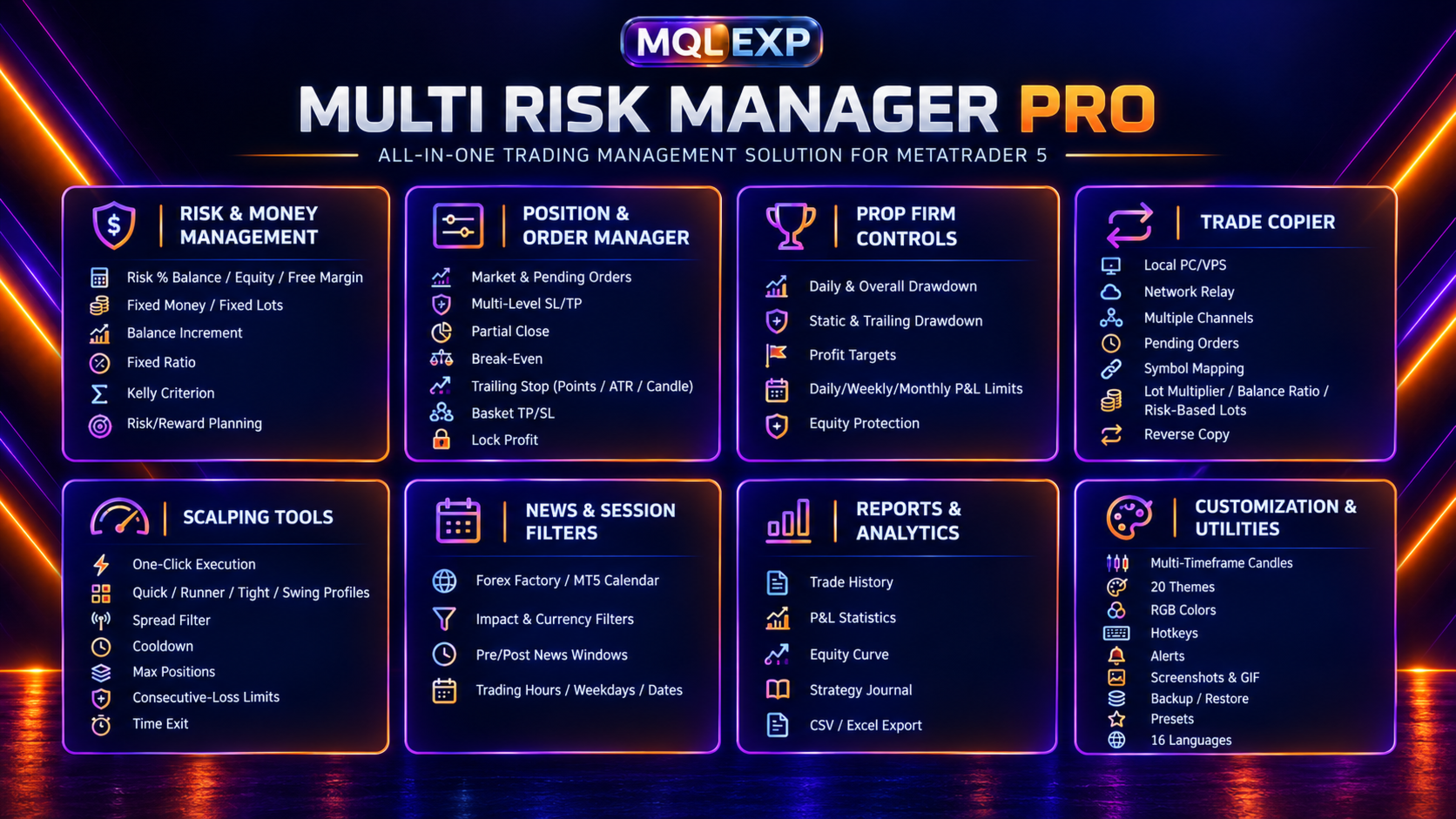
Multi Risk Manager Pro is an all-in-one Expert Advisor designed to help traders manage position sizing, open trades, account risk, trading sessions, and trade copying from a single customizable interface.
Whether you trade manually, use other Expert Advisors, manage multiple trading accounts, or operate under prop firm risk rules, Multi Risk Manager Pro provides a range of tools to organize and control your trading activity.
The product focuses on trade execution and management. It does not require a built-in trading strategy and does not guarantee profitable trading results.
$99 for the first 24 hours only
Public channel : https://www.mql5.com/en/channels/mqlexp
Note: If you have any problems running it, please message me.
Blog 1 : A Complete Trade Management Toolkit for MeteTrader 5 / 4
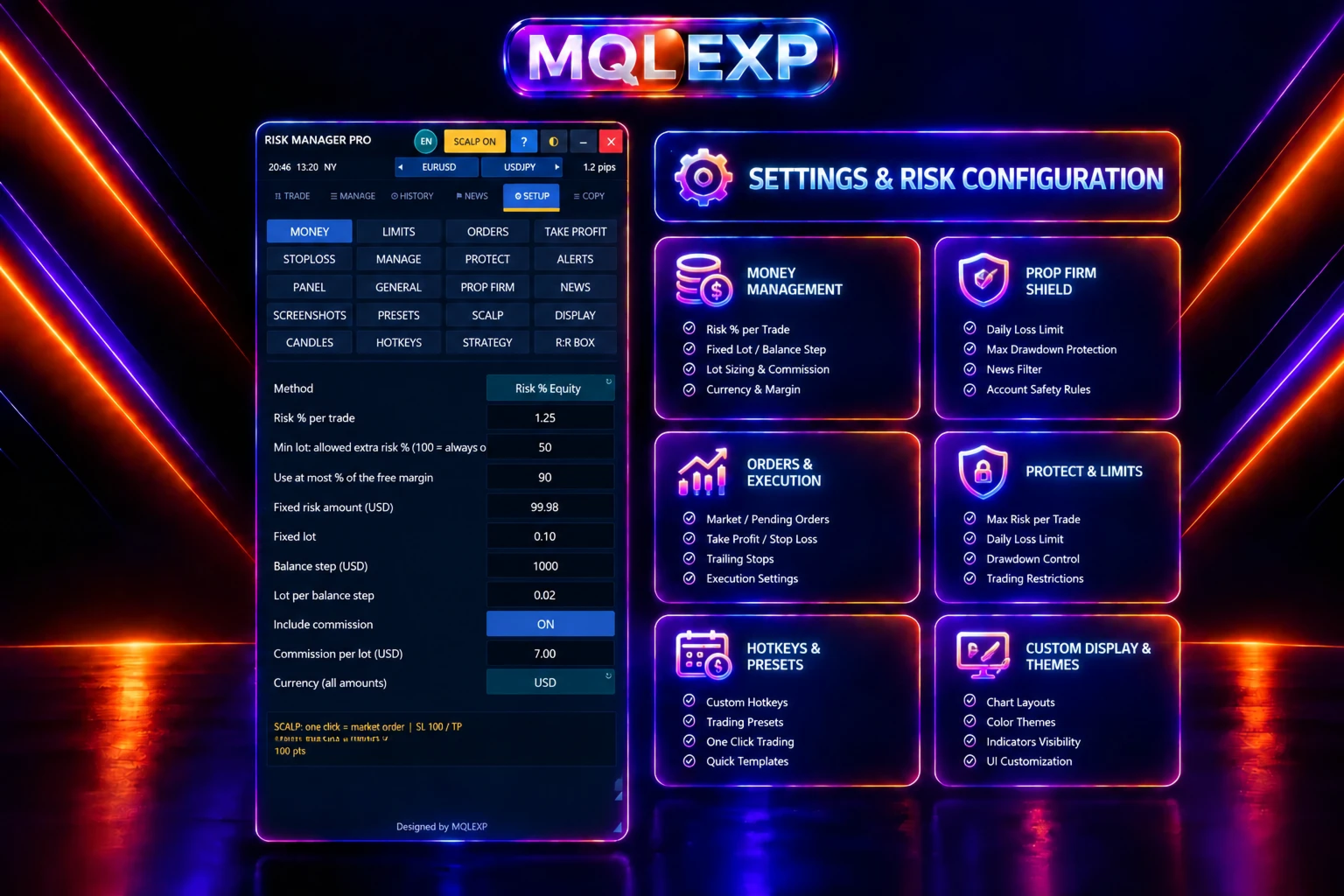
1. Advanced Risk and Money Management
Choose from multiple position-sizing methods to calculate trade volume according to your preferred risk model:
-
Risk percentage based on balance, equity, or free margin
-
Fixed monetary risk
-
Fixed lot size
-
Balance-increment position sizing
-
Fixed Ratio method
-
Kelly Criterion
Plan trades using risk-to-reward levels and account for broker volume and margin restrictions. These tools help you apply a consistent position-sizing approach, although actual risk may differ because of slippage, gaps, execution conditions, and other market factors.
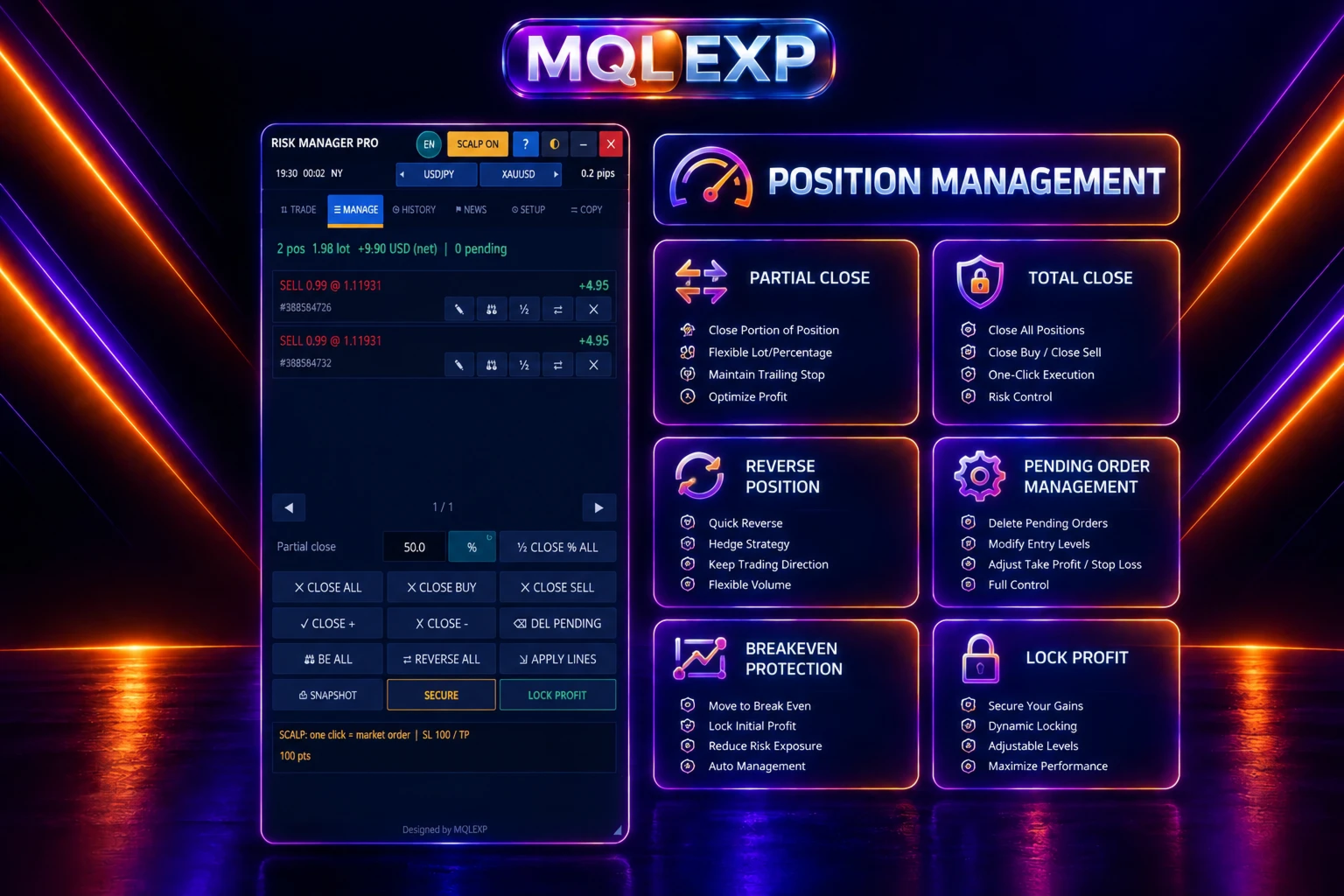
2. Position and Order Management
Manage trades and pending orders from one interface, with tools including:
-
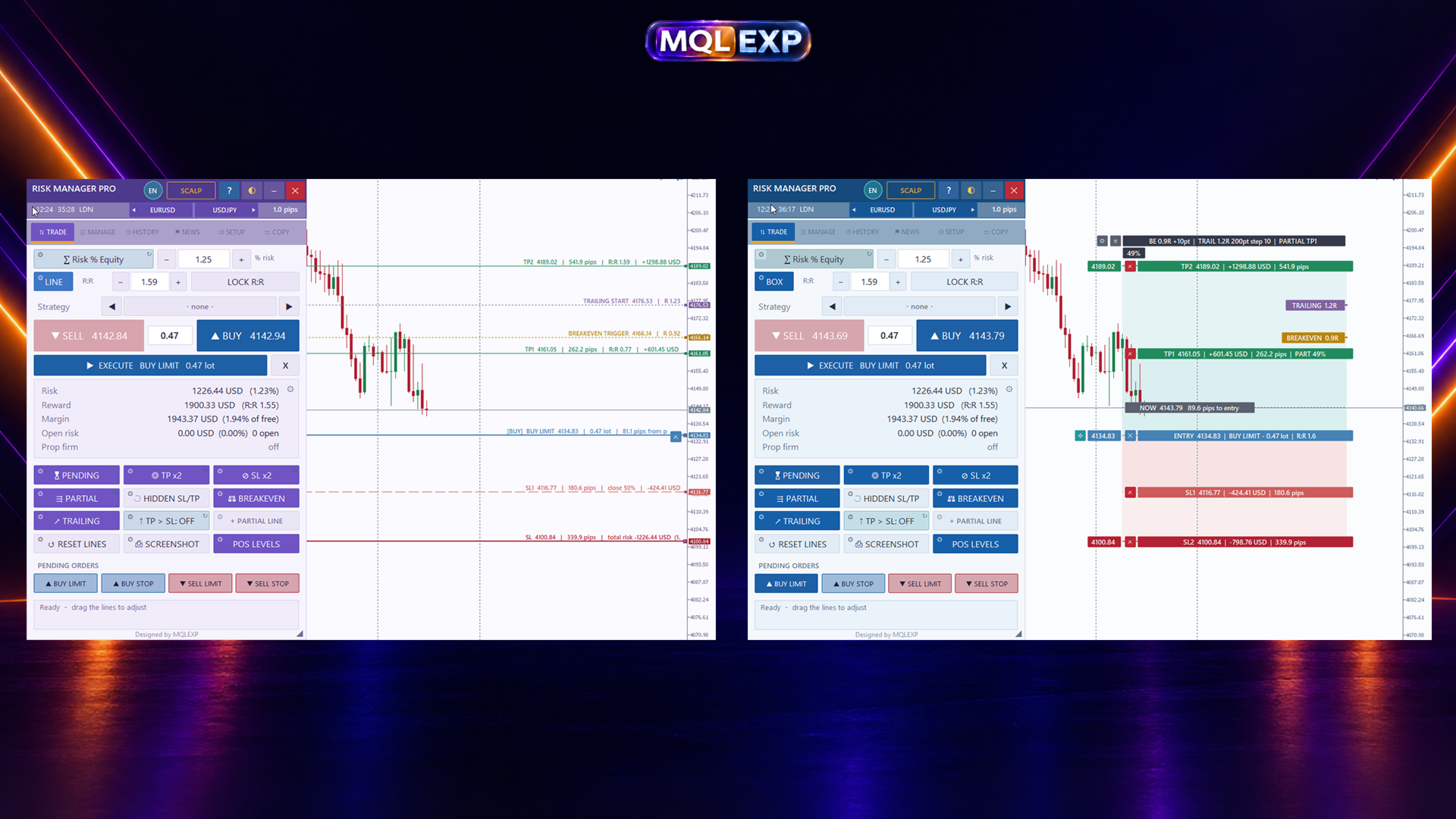
Market and pending order execution
-
Stop Loss and Take Profit management
-
Partial position closing
-
Break-even management
-
Point-based, ATR-based, and candle-based trailing stops
-
Multiple Take Profit levels and staged Stop Loss management
-
Basket Take Profit and Stop Loss
-
Lock Profit and other position-management actions
-
Order confirmation and execution controls
Some order types and execution features depend on broker support and account conditions.
Hidden Stop Loss and Take Profit levels are managed by the Expert Advisor rather than being placed as ordinary protective levels on the broker's server. These functions require the terminal and Expert Advisor to remain operational.
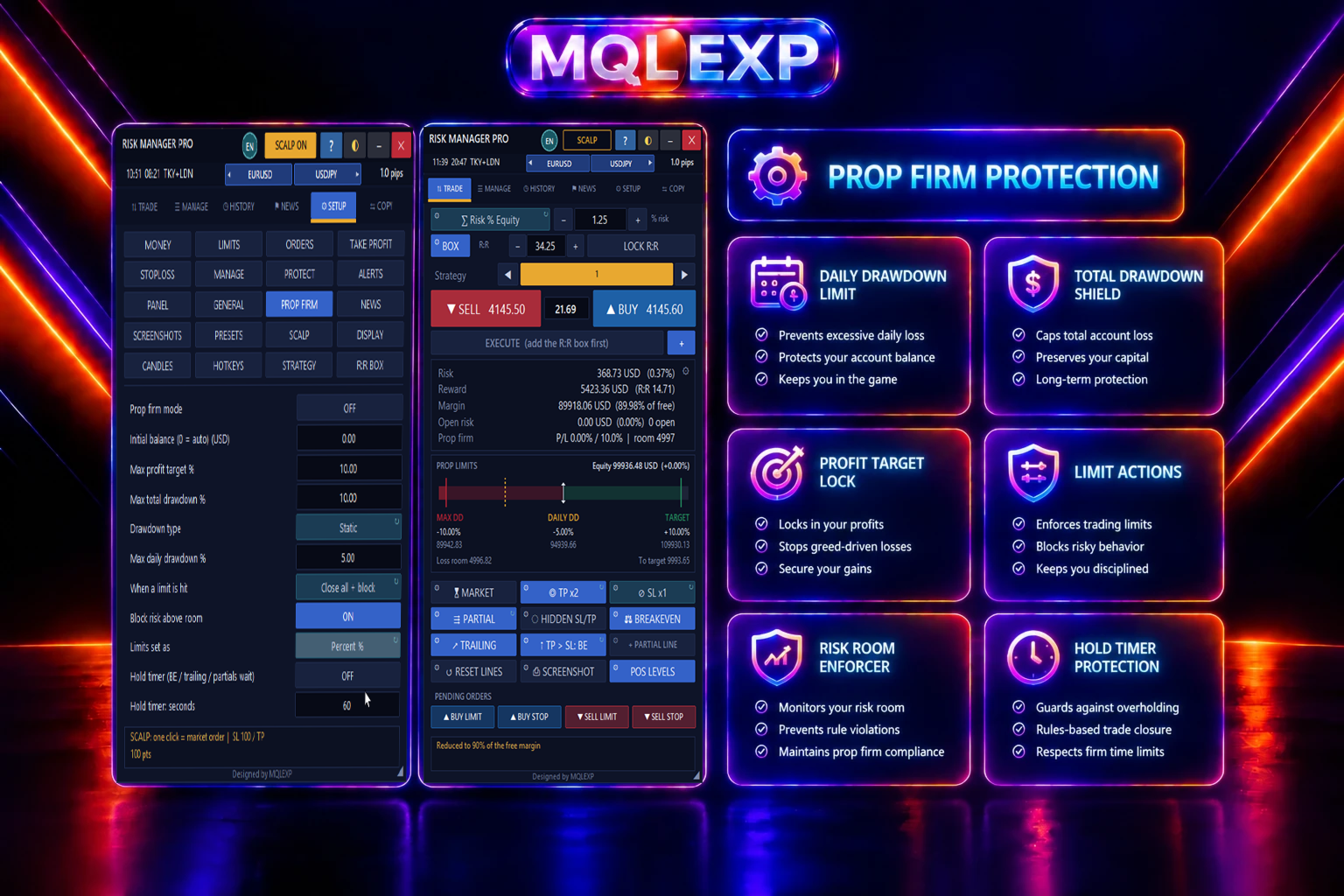
3. Prop Firm Risk Controls
Configure account-level restrictions to help monitor common prop firm risk limits:
-
Daily and overall drawdown thresholds
-
Static and trailing drawdown controls
-
Profit targets
-
Restrictions on opening new trades
-
Optional closing of eligible positions when configured limits are reached
-
Daily, weekly, and monthly profit or loss limits
These controls can support a structured risk-management workflow. They do not guarantee compliance with every prop firm's rules. Each firm's calculation method, time zone, equity rules, and restrictions should be checked individually.
Protection coverage may depend on the selected feature and whether trades are managed by this Expert Advisor or by other tools.
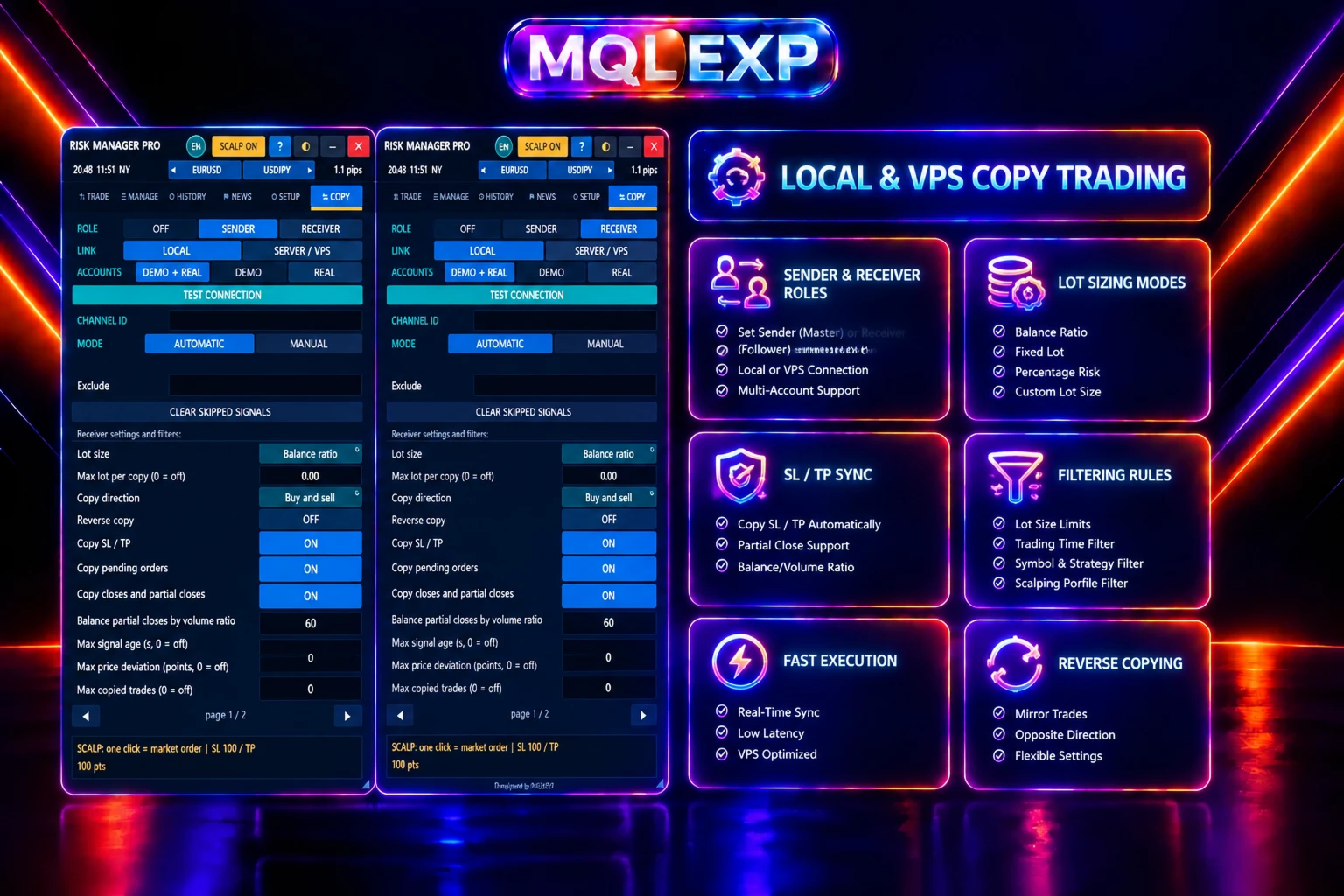
4. Local and Network Trade Copier
Copy trades between MetaTrader terminals using either a local connection or a network relay server.
Available copier features include:
-
Local copying between terminals on the same computer or VPS
-
Network copying between separate machines
-
Multiple channel IDs and sender/receiver configurations
-
Market and pending order copying
-
Synchronization of eligible order modifications and closures
-
Fixed-lot and sender-lot modes
-
Lot multipliers, balance-ratio sizing, and risk-based sizing
-
Symbol mapping
-
Buy-only, sell-only, and reverse-copy options
-
Trade filters and volume restrictions
Local copying requires the participating terminals to run on the same computer or VPS. Network copying requires appropriate relay configuration and network connectivity. The relay connection does not provide built-in TLS encryption, so users should consider their network security requirements before using it.
Always test the copier with your intended broker, symbols, account types, and lot-sizing settings before relying on it for live trading.
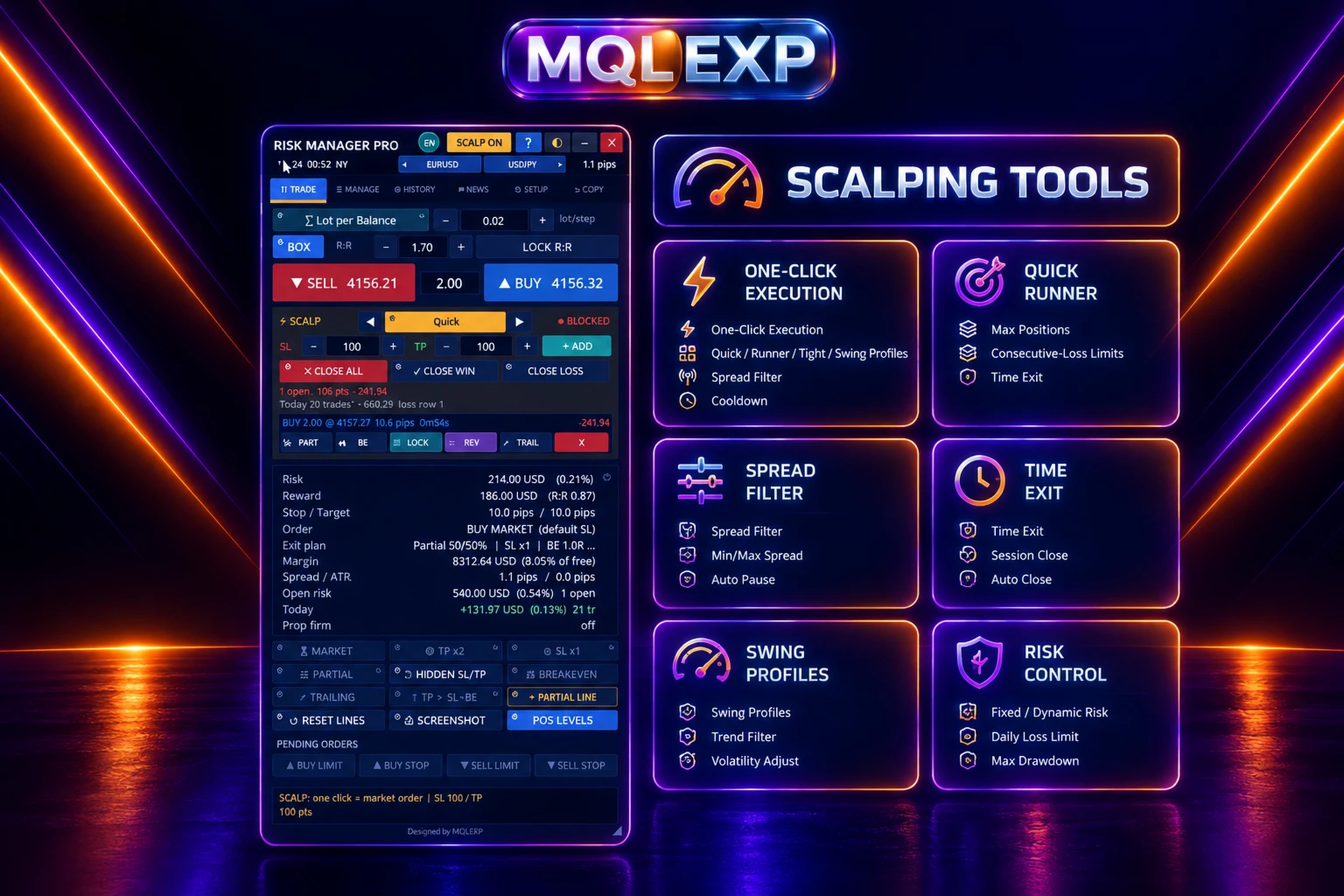
5. Scalping and Trade Execution Tools
Use the scalping module to manage fast trade execution and predefined exit rules.
Features include:
-
One-click market execution
-
Configurable Quick, Runner, Tight, and Swing profiles
-
Break-even and trailing-stop management
-
Partial closing and time-based exits
-
Spread filtering
-
Entry cooldown settings
-
Maximum position limits
-
Consecutive-loss restrictions
-
Daily profit and loss limits
The available controls help organize an execution workflow. They do not generate a universal trading strategy or guarantee that a scalping approach will be profitable.
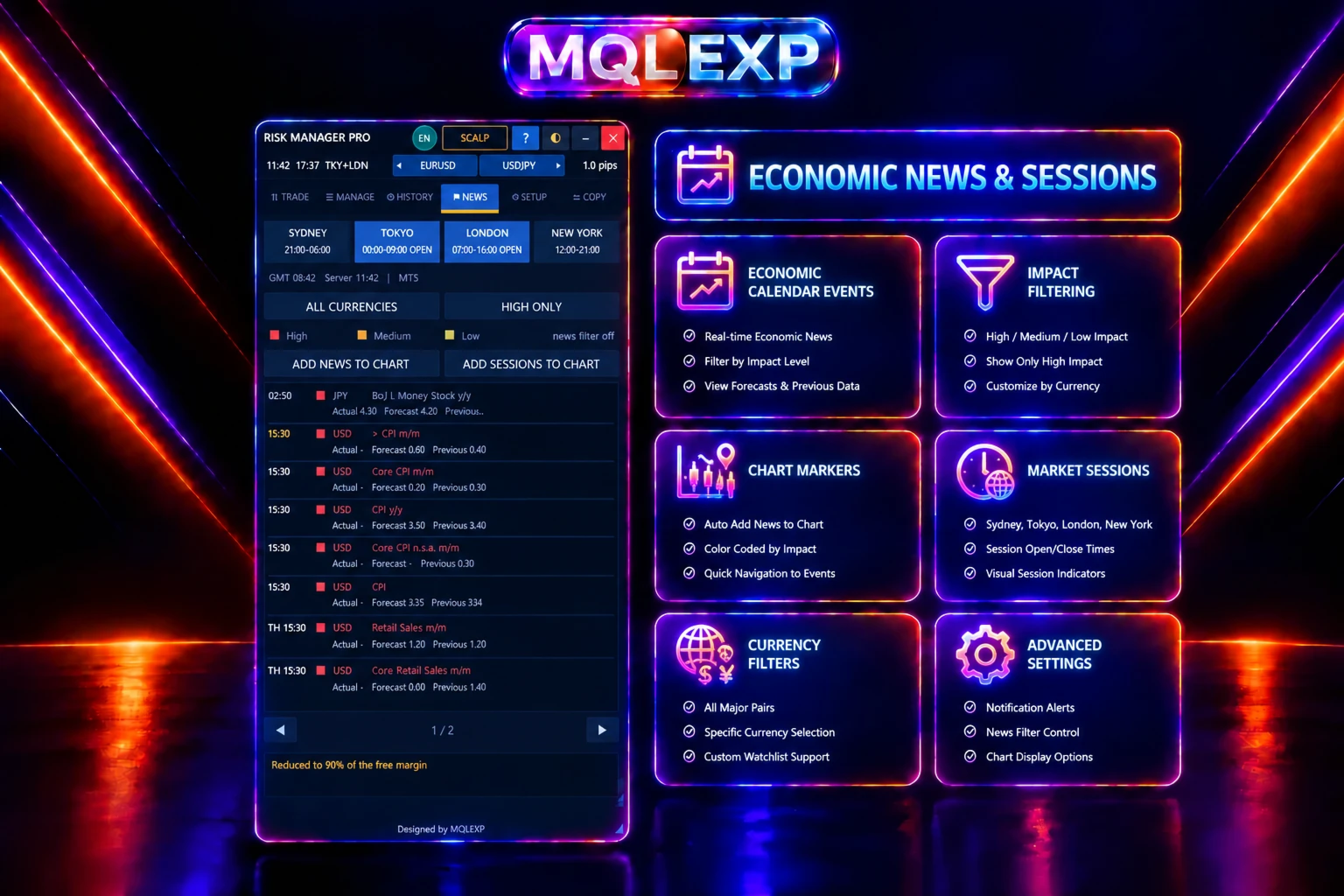
6. News Filters and Trading Restrictions
Configure trading restrictions around economic events and selected trading periods.
Depending on the selected calendar source and available data, the news module supports:
-
Forex Factory calendar integration
-
The MetaTrader 5 economic calendar
-
Currency and impact filters
-
Pre-event and post-event time windows
-
News alerts and entry restrictions
-
Optional closing of eligible positions
Forex Factory integration requires the appropriate WebRequest permissions in MetaTrader 5. Calendar availability and data quality may vary.
News-related closing actions have scope limitations and should not be assumed to cover every symbol, pending order, or trade managed by another Expert Advisor.
Additional account controls include trading-time restrictions, weekday and date filters, maximum open-risk settings, loss cooldowns, and equity protection tools.
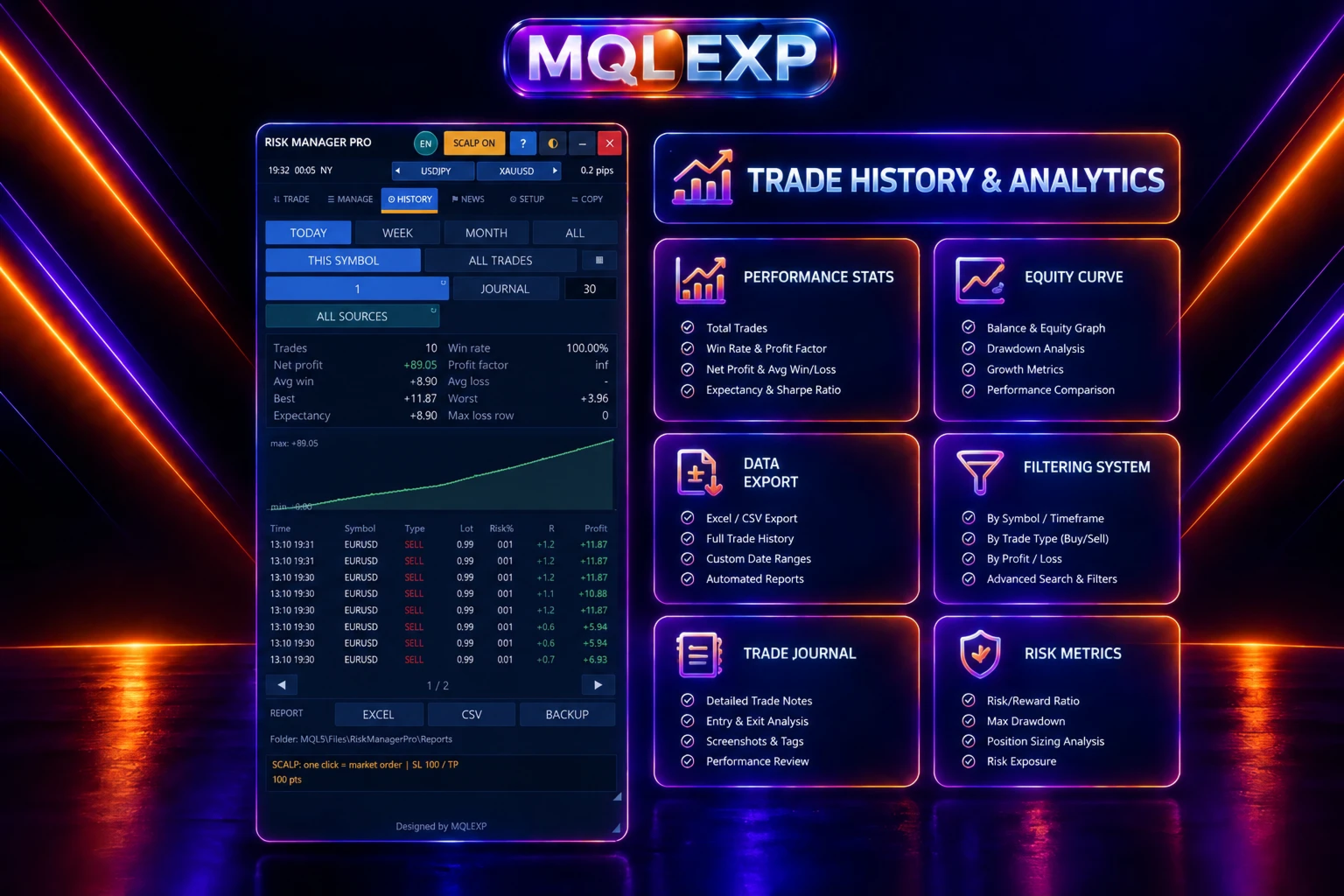
7. Trading History and Reports
Review trading activity with built-in history and reporting tools.
Available information includes:
-
Profit and loss statistics
-
Trade volume and duration
-
Commissions and swaps
-
Filters by date, symbol, magic number, strategy, and trade source
-
Cumulative profit and loss
-
Equity curve
-
Trading journal
-
CSV and Excel-compatible exports
These tools help you review trading activity and maintain records for your own analysis.
8. Customizable Interface
Multi Risk Manager Pro includes a multi-tab interface with dedicated sections for trading, management, history, news, settings, and copying.
Interface features include:
-
Multiple visual themes
-
Custom RGB colors
-
Configurable chart controls and hotkeys
-
Alerts and optional MetaTrader push or email notifications
-
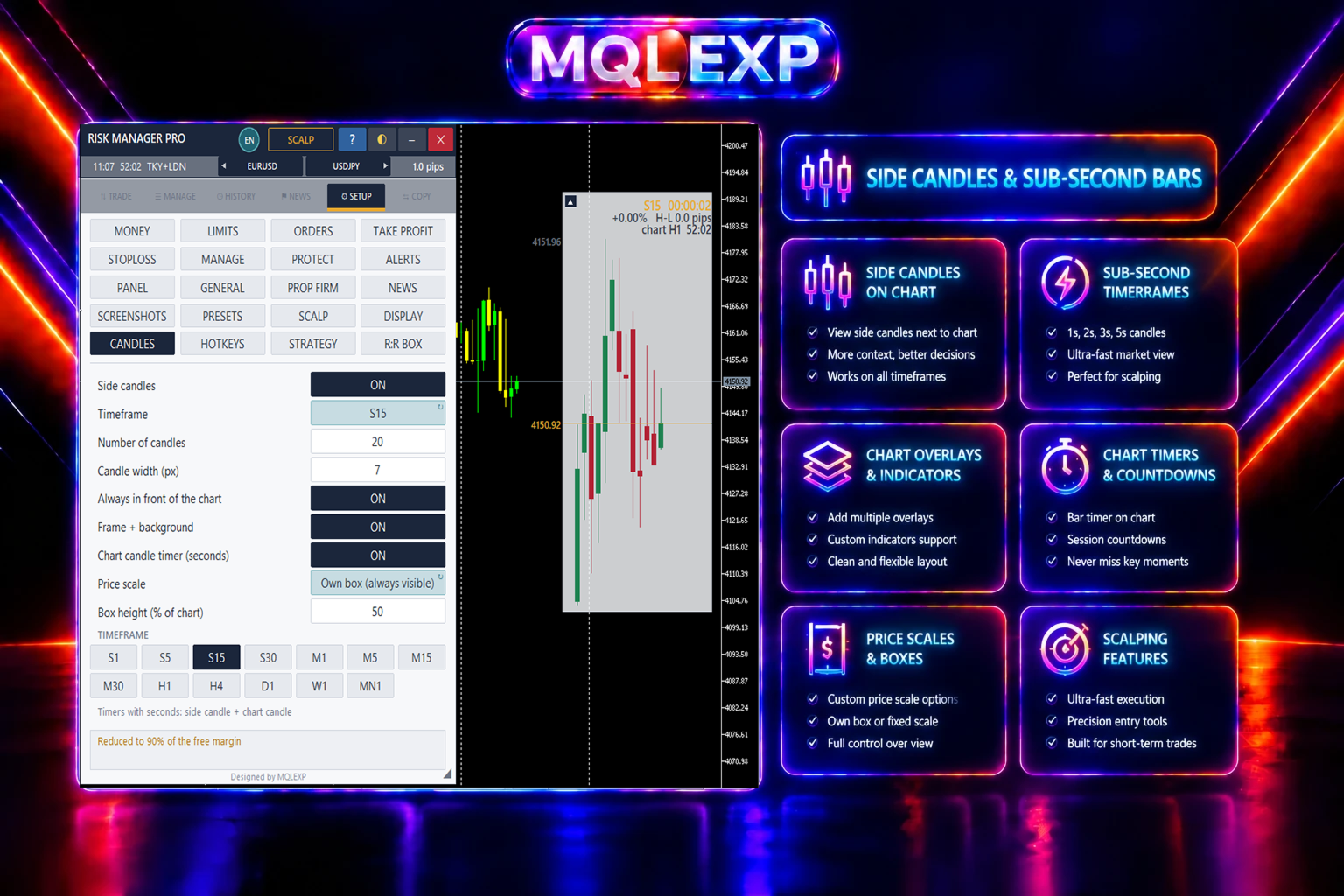
Multi-timeframe side candles
-
Candle countdown and price information
-
Screenshot tools and animated GIF capture
-
Settings backup and restoration
-
Presets and scalping profiles
The interface offers multiple language options. Some messages, reports, and interface elements may remain in English, and right-to-left languages may not use a fully right-to-left layout.
Compatibility and Important Notes
-
Platform: MetaTrader 5
-
Program type: Expert Advisor
-
Account support: Netting and hedging, subject to broker and feature-specific restrictions
-
Certain order types and management operations depend on broker support.
-
Hidden protective levels and some staged trade-management actions require the terminal and Expert Advisor to remain active.
-
Features involving external calendars, notifications, and network copying may require additional configuration.
-
Test the product in a demo environment before using it on a live account.
Who Is This Product For?
Multi Risk Manager Pro may be useful for:
-
Manual traders who want centralized position management
-
Traders who need configurable risk and lot-sizing methods
-
Traders who use prop firm accounts and want additional risk controls
-
Users who copy trades between MetaTrader 5 terminals
-
Traders who need scalping execution and exit-management tools
-
Users who want trading history, reporting, and account-protection features in one interface
Important Risk Disclosure
Trading leveraged financial instruments involves substantial risk. Risk-management tools can help structure trading decisions, but they cannot eliminate market risk or guarantee a particular outcome. Users are responsible for checking their broker's trading conditions, testing the software, and verifying that their configuration meets their own requirements.
Multi Risk Manager Pro is a trade management and execution utility, not a guarantee of profitability.