Multi Risk Manager Pro

  • 유틸리티
  • Rahman Pavaleh
    Rahman Pavaleh
    MQLEXP | Algorithmic Trading & MT5 Solutions
    We build professional Expert Advisors, indicators, trading tools, and automated trading solutions for MetaTrader 5.
    Our work combines MQL5, MT5, and Python to turn trading ideas into practical software for systematic and automated trading.
  • 버전: 1.2
  • 업데이트됨: 5 11월 2026
  • 활성화: 10

Multi Risk Manager Pro

Risk management, trade execution, position control and connected trading tools for MetaTrader 5.

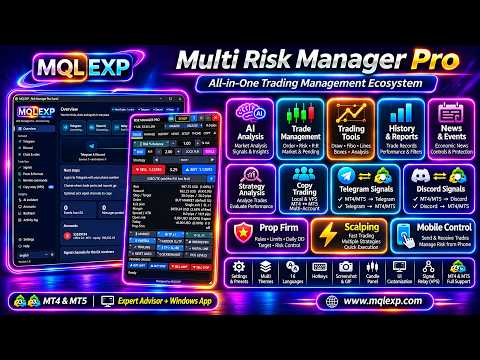
Multi Risk Manager Pro helps you calculate position size, prepare trades on the chart, manage open positions and review trading activity from one customizable interface.

Its eight modules—TRADE, MANAGE, HISTORY, NEWS, SETUP, COPY, AI and PHONE—bring together visual risk-to-reward planning, automated exit management, prop firm controls, economic news, trade copying and mobile-trade management.

A separate Windows companion extends the workflow with Telegram and Discord connections, authorized remote commands, AI-assisted reviews and historical signal backtesting.

The product is an execution and management utility. Trading decisions come from your own actions, configured copying or authorized instructions. The AI assistant provides analysis and does not independently execute trades.

Purchase this product on Black Friday and receive 1 free Expert Advisor of your choice.

Public channel : https://www.mql5.com/en/channels/mqlexp

Note: If you have any problems running it, please message me.


Blogs Discription Link
1  A Complete Trade Management Toolkit for MetaTrader 5 / 4
 https://www.mql5.com/en/blogs/post/777677
2   How to Use the 8 Money Management Methods in MetaTrader 5 / 4  https://www.mql5.com/en/blogs/post/777683
3   How to Use the Risk-to-Reward Box in MetaTrader 5 / 4  https://www.mql5.com/en/blogs/post/777775
4   How to Place and Manage Market and Pending Orders in MT5 / 4  https://www.mql5.com/en/blogs/post/777776
5   Take Profit, Stop Loss and Partial Exit Management in MT5 / 4  https://www.mql5.com/en/blogs/post/777958
6   Break-Even, Trailing Stop, Lock Profit and Secure  https://www.mql5.com/en/blogs/post/777960
7   Daily Drawdown, Equity Limits and Profit Targets  https://www.mql5.com/en/blogs/post/778117
8   Copy Trades Between MT5 / 4 Terminals, VPS and Remote Accounts  https://www.mql5.com/en/blogs/post/778118
9   Forex Factory, MT5 Economic Calendar and Trading Restrictions  https://www.mql5.com/en/blogs/post/778120
10   Visualizing Multiple Timeframes in MT5 / 4  https://www.mql5.com/en/blogs/post/778343
11   Trade History, Performance Reports and Strategy Journaling in Multi Risk Manager Pro  https://www.mql5.com/en/blogs/post/778344
12   Themes, Languages, Hotkeys and Alerts  https://www.mql5.com/en/blogs/post/778345
13   Daily Limits, Consecutive Losses, Equity Stop and Trading Sessions  https://www.mql5.com/en/blogs/post/778519
14   Scalping Mode, Confirmation, Slippage and Broker Compatibility  https://www.mql5.com/en/blogs/post/778520
15   Partial Close, Reverse, Close By and Hidden SL/TP  https://www.mql5.com/en/blogs/post/778627
16   First-Time Setup, Settings, Presets and Backups  https://www.mql5.com/en/blogs/post/778630
17   Scalping Mode - One-Click Trading, Automatic Break-Even, Trailing Stop and Time-Based Exits  https://www.mql5.com/en/blogs/post/778632
18   The Complete Guide to Chart-Based Position Management, Smart Alerts and Advanced MT5 / 4 Tools  https://www.mql5.com/en/blogs/post/778642
19   Multi Risk Manager Pro Windows App for MT4 and MT5: Download, Setup and Privacy  https://www.mql5.com/en/blogs/post/779394
20   How to Send MT4 and MT5 Trade Updates to Telegram or Discord with Multi Risk Manager Pro  https://www.mql5.com/en/blogs/post/779395
21   How to Copy Telegram and Discord Signals to MT4 or MT5 with Your Own Risk Settings  https://www.mql5.com/en/blogs/post/779396
22   How to Monitor and Manage MT4 and MT5 Accounts from Telegram or Discord with Multi Risk Manager Pro  https://www.mql5.com/en/blogs/post/779397
23   How to Use the AI Trading Journal and Review Trade Plans in MT4 and MT5 with Multi Risk Manager Pro  https://www.mql5.com/en/blogs/post/779398
24   How to Manage Mobile Trades in MT4 and MT5 with the PHONE Module  https://www.mql5.com/en/blogs/post/779400
25  How to Use Chart Drawing Tools in MT4 and MT5 with Multi Risk Manager Pro  https://www.mql5.com/en/blogs/post/779401
26   How to Backtest Telegram and Discord Trading Signals with Multi Risk Manager Pro and Risk Lab  https://www.mql5.com/en/blogs/post/779403
27   How to Use the AI Tab in Multi Risk Manager Pro for MT4 and MT5  https://www.mql5.com/en/blogs/post/779404
    

1. Advanced Risk and Money Management

Choose from multiple position-sizing methods to calculate trade volume according to your preferred risk model:

  • Risk percentage based on balance, equity, or free margin

  • Fixed monetary risk

  • Fixed lot size

  • Balance-increment position sizing

  • Fixed Ratio method

  • Kelly Criterion

Plan trades using risk-to-reward levels and account for broker volume and margin restrictions. These tools help you apply a consistent position-sizing approach, although actual risk may differ because of slippage, gaps, execution conditions, and other market factors.

2. Position and Order Management

Manage trades and pending orders from one interface, with tools including:

  • Market and pending order execution

  • Stop Loss and Take Profit management

  • Partial position closing

  • Break-even management

  • Point-based, ATR-based, and candle-based trailing stops

  • Multiple Take Profit levels and staged Stop Loss management

  • Basket Take Profit and Stop Loss

  • Lock Profit and other position-management actions

  • Order confirmation and execution controls

Some order types and execution features depend on broker support and account conditions.

Hidden Stop Loss and Take Profit levels are managed by the Expert Advisor rather than being placed as ordinary protective levels on the broker's server. These functions require the terminal and Expert Advisor to remain operational.

3. Prop Firm Risk Controls

Configure account-level restrictions to help monitor common prop firm risk limits:

  • Daily and overall drawdown thresholds

  • Static and trailing drawdown controls

  • Profit targets

  • Restrictions on opening new trades

  • Optional closing of eligible positions when configured limits are reached

  • Daily, weekly, and monthly profit or loss limits

These controls can support a structured risk-management workflow. They do not guarantee compliance with every prop firm's rules. Each firm's calculation method, time zone, equity rules, and restrictions should be checked individually.

Protection coverage may depend on the selected feature and whether trades are managed by this Expert Advisor or by other tools.


4. Trade Copying and Telegram / Discord Connections - LOCAL / SERVER VPS

Connect trading accounts through sender and receiver configurations. Copy between compatible MT4 and MT5 builds using LOCAL connections on the same computer or SERVER / VPS connections through a configured relay.

Receiver controls include:

  • Sender-volume, lot-multiplier, balance-ratio, fixed-lot and risk-based sizing.
  • Symbol mapping for different broker naming conventions.
  • Buy-only, sell-only and reverse-copy options.
  • Market and supported pending-order copying.
  • Synchronization of eligible modifications, partial closes and closures.
  • Trade filters, volume restrictions and separate options for panel limits, protection and news filtering.


The Windows companion adds Telegram and Discord workflows:

  • Publish eligible trade updates, reports and selected chart images.
  • Parse supported incoming signal messages for the EA receiver.
  • Configure message formats, destinations and signal sources.
  • Process supported follow-up instructions, subject to the parser and receiver settings.


LOCAL requires participating terminals on the same machine. SERVER / VPS requires a reachable relay and matching connection settings. The relay does not provide built-in TLS encryption.

Telegram and Discord functions require the Windows companion and the appropriate service credentials and permissions. Discord webhooks support posting; reading channels requires a suitable bot connection.

Verify symbol mapping, resulting volume and management behavior on demo accounts before live copying.

5. Scalping and Trade Execution Tools

Use the scalping module to manage fast trade execution and predefined exit rules.

Features include:

  • One-click market execution

  • Configurable Quick, Runner, Tight, and Swing profiles

  • Break-even and trailing-stop management

  • Partial closing and time-based exits

  • Spread filtering

  • Entry cooldown settings

  • Maximum position limits

  • Consecutive-loss restrictions

  • Daily profit and loss limits

The available controls help organize an execution workflow. They do not generate a universal trading strategy or guarantee that a scalping approach will be profitable.

6. News Filters and Trading Restrictions

Configure trading restrictions around economic events and selected trading periods.

Depending on the selected calendar source and available data, the news module supports:

  • Forex Factory calendar integration

  • The MetaTrader 5 economic calendar

  • Currency and impact filters

  • Pre-event and post-event time windows

  • News alerts and entry restrictions

  • Optional closing of eligible positions

Forex Factory integration requires the appropriate WebRequest permissions in MetaTrader 5. Calendar availability and data quality may vary.

News-related closing actions have scope limitations and should not be assumed to cover every symbol, pending order, or trade managed by another Expert Advisor.

Additional account controls include trading-time restrictions, weekday and date filters, maximum open-risk settings, loss cooldowns, and equity protection tools.

7. Trading History and Reports

Review trading activity with built-in history and reporting tools.

Available information includes:

  • Profit and loss statistics

  • Trade volume and duration

  • Commissions and swaps

  • Filters by date, symbol, magic number, strategy, and trade source

  • Cumulative profit and loss

  • Equity curve

  • Trading journal

  • CSV and Excel-compatible exports

These tools help you review trading activity and maintain records for your own analysis.

With the Windows companion, selected reports can also be sent to configured Telegram or Discord destinations. AI review tools can help examine journal patterns, recent trades, strategy behavior and weekly performance.

Account reports describe recorded trading activity. Historical signal backtests are a separate simulated dataset and should not be presented as executed account results.

8. Interface, Chart Tools and Workspace Customization

Organize your workflow across eight tabs: TRADE, MANAGE, HISTORY, NEWS, SETUP, COPY, AI and PHONE.

Customize the workspace with:

  • Multiple visual themes and configurable colors.
  • Panel sizing, chart controls and hotkeys.
  • Presets, scalp profiles and settings backup tools.
  • Multi-timeframe side candles and candle-time information.
  • Screenshot tools and animated GIF capture.
  • Alerts and optional MetaTrader push or email notifications.
  • Multiple interface languages.


The integrated drawing toolbar adds lines, Fibonacci and Gann tools, shapes, patterns, annotations and measurement tools directly to the MetaTrader chart. Use these alongside the R box to document and review your trade ideas.

Drawing objects are analysis tools; they do not submit orders. The toolbar works inside MetaTrader and does not require a TradingView connection.

Translation coverage and text rendering can vary between individual controls and platform builds.


9. AI - Assistant Trading Reviews

Use the AI tab to investigate trading activity and review plans with the help of a configured AI provider.

Available review topics include:

  • Trading journal and performance evaluation.
  • Strategy patterns, psychology and trading discipline.
  • Open-position risk and exposure.
  • Economic news and market context.
  • Trade-plan checks before execution.
  • Last-trade and weekly reviews.
  • Signal-channel analysis.
  • Chart-image analysis.
  • Daily briefings and prop firm rule reviews.


You can also ask your own trading questions.

AI processing runs in the Windows companion. It requires a configured provider, model and API key. Chart-image analysis requires a model that supports image input. Provider availability and any API usage charges are separate.

AI responses may be incomplete or incorrect. They do not execute trades, enforce account limits or guarantee compliance with prop firm rules.


10.PHONE — Manage Mobile and Web Trades

The PHONE module monitors or manages eligible positions opened through MetaTrader mobile or web on the same trading account.

Choose between ignoring these trades, receiving notifications or applying panel management. Configure stop-loss, take-profit, breakeven, trailing and partial-close behavior according to your workflow.

Optional money management can adjust volume after the trade has opened. It may reduce existing exposure or add a same-direction trade after the required protective levels are available. Added volume uses the available market price and remains subject to broker restrictions.


PHONE is a desktop EA feature, not a separate mobile application. The desktop terminal and EA must remain connected and running.


11.Windows Companion and Remote Commands

The separate Windows companion connects the EA to external communication and analysis services.

Its workspace includes Telegram, Discord, chat roles, signal parsing, message templates, remote commands, copy-relay controls, account information, AI tools, backtesting and activity logs.

Authorized Telegram or Discord commands can request account status, positions, reports and chart images, or perform supported trading and management actions when the required permissions are enabled.

Select the intended account and configure permitted users, control chats and confirmation settings before enabling trading commands. Message delivery alone does not confirm that the broker executed an action.

The companion is provided separately as a Windows executable. Core panel functions operate in MetaTrader; connected social and AI workflows require the companion app to remain running alongside the compatible EA.


12.Historical Signal Backtesting and Risk Lab

The Windows companion can evaluate supported historical Telegram and Discord signals against available price data.

Configure the message sample, parsing rules, price source and simulation assumptions. Review individual simulated trades, management actions, trading costs and missing-data cases alongside the summary results.

Supported price-data workflows include terminal-exported bars and CSV data, with additional sources depending on configuration.

Risk Lab explores simulated drawdown, return ranges and simplified challenge scenarios using resampled historical outcomes. Results depend on the input sample, selected assumptions and model limitations.

These tools evaluate historical scenarios. They do not reproduce every broker execution condition or every prop firm's rules, and their results do not guarantee future performance.


13.TOOLS — Advanced Chart Drawing and Analysis

Analyze market structure and annotate trade ideas directly inside MetaTrader. Open TOOLS from the TRADE tab to access a drawing toolbar alongside your risk calculator and trade-planning controls.

The toolbar includes:

  • Lines: trend lines, rays, horizontal and vertical levels, and arrows.
  • Fibonacci tools: retracement, expansion, channels, time zones, fans and arcs.
  • Gann tools: lines, fans and boxes.
  • Shapes: rectangles, triangles, ellipses, freehand drawing and highlighting.
  • Pattern annotations: Elliott waves, ABCD, XABCD and head-and-shoulders structures.
  • Text and markers: notes, price labels, callouts and directional markers.
  • Measurement tools: price ranges, date ranges and combined price/time measurements.
  • Volume-related tools: Anchored VWAP, fixed-range volume profile and anchored volume profile.


Customize supported colors, line styles, labels and levels, and save named styles for repeated use. Magnet snapping, drawing visibility, locking, undo and redo help organize the chart.

Use drawings to mark your analysis, then prepare executable entry, Stop Loss and Take Profit levels separately with the R box or trade lines.

These tools operate inside MetaTrader and do not connect to TradingView. Pattern drawings are manual annotations, not automatic pattern detection or trading signals. Volume-related displays depend on the data available for the selected symbol.


Compatibility and Important Notes

  • This listing is for the MetaTrader 5 Expert Advisor. MetaTrader 4 uses a separate compatible build.
  • Netting and hedging behavior depends on the feature, account configuration and broker restrictions.
  • Hidden SL/TP, trailing stops and other EA-managed actions require the terminal and Expert Advisor to remain active.
  • PHONE management requires the desktop terminal to run on the same account used for mobile or web trading.
  • Telegram, Discord, remote commands and AI processing require the separate Windows companion and their respective connection settings.
  • Telegram user-account login requires API ID, API hash and account authentication. Bot-based functions use a bot token.
  • AI requires a configured provider and API credentials. Relevant account data, questions and selected chart images may be sent to that provider for processing.
  • External calendars and direct network connections may require WebRequest permissions.
  • Running the Windows companion remotely requires a Windows environment that supports the executable and the necessary network connections.
  • Test the intended workflows on demo accounts before live use. Verify account selection, position sizing, protective levels and the result of each management action.

Who Is This Product For?

Multi Risk Manager Pro may be useful for:

  • Manual traders who want centralized position management

  • Traders who need configurable risk and lot-sizing methods

  • Traders who use prop firm accounts and want additional risk controls

  • Users who copy trades between MetaTrader 5 terminals

  • Traders who need scalping execution and exit-management tools

  • Users who want trading history, reporting, and account-protection features in one interface

Important Risk Disclosure

Trading leveraged financial instruments involves substantial risk. Risk-management tools can help structure trading decisions, but they cannot eliminate market risk or guarantee a particular outcome. Users are responsible for checking their broker's trading conditions, testing the software, and verifying that their configuration meets their own requirements.

Multi Risk Manager Pro is a trade management and execution utility, not a guarantee of profitability.
추천 제품
News System Detector
Bukola Omolola Adesina
If you're unable to download the demo or get the demo working due to mql5 complications, you can message me on telegram  https://t.me/Motolani1 and I will send you a one week testing version.  THANK YOU FOR YOUR PATRONAGE. News Detector System . Stay ahead of market volatility with the News Detector System . This indicator automatically fetches and displays high-impact economic data directly on your MetaTrader 5 chart, ensuring you are never caught off guard by major news releases. By pulling d
Prism Breakout Pro
VALU VENTURES LTD
Prism Breaker Pro V2 – Multi-Symbol Portfolio Range Trading System Prism Breaker Pro V2 is a professional range breakout trading system featuring sophisticated portfolio management, multi-symbol support, and advanced risk controls. It is designed for traders seeking to capitalize on market range breakouts across multiple currency pairs simultaneously. Key Features Advanced Range Trading Strategies Simple Breakouts:   Clean price action breakout entries. Confirmed Breakouts:   Multi-filter valid
FREE
EA Pause Manager
David Enrique Barrera Moncayo
4.33 (6)
EA Pause Manager — Your Smart Risk Guard & Scheduler (MT5) What It Does Stops conflicting trades before they happen , based on active market positions and, optionally, pending orders. Pauses or resumes your EAs automatically based on: A simple leader rule : the first EA to trade becomes the leader and blocks the rest. A time schedule you define — now configurable per EA. For example, you can run one EA during the day session and another EA overnight. Optionally cleans up after simultaneous openi
Sync Crosshair
Mohammadreza Bahreyninejad Kermani
4.78 (9)
Sync Crosshair — Professional Multi-Chart Analysis Station for MT5 See everything, everywhere, at the same time. Sync Crosshair is a professional-grade indicator for MetaTrader 5 that synchronizes your crosshair across all charts where it is installed. Move your mouse on one chart, and every other chart follows instantly — same moment in time, perfectly aligned. Whether you analyze one instrument across different timeframes — such as Daily, H4, M15, and M1 — or monitor several correlated pair
FREE
BTC Miner Pro MT5
Rahman Pavaleh
5 (4)
BTC Miner Pro   EA works on Time and Price theory. As the price patterns change, there will be no difference in performance of the EA, which is why this system has long-term stability and performance. The EA finds important and valuable price and executes trades based on them. This system works 100% automatically. Suitable for BITCOIN or BTCUSD . Purchase this product on Black Friday and receive 1 free Expert Advisor of your choice. MT4 :  https://www.mql5.com/en/market/product/149981 Blog : 
Delving deep into the sphere of finance and trading strategies, I decided to conduct a series of experiments, exploring approaches based on reinforcement learning as well as those operating without it. Applying these methods, I managed to formulate a nuanced conclusion, pivotal for understanding the significance of unique strategies in contemporary trading.  
FREE
Copiador MT5
Luciana Andrea Maggiori
Copiador – La Mejor Herramienta para Copiar Operaciones en MetaTrader 4 Este no es un simple copiador de operaciones que   únicamente   permite copiar transacciones de forma local entre diferentes cuentas de MetaTrader 4 en cualquier dirección y cantidad. ¡Por supuesto que lo hace!   ¡Pero Copiador hace mucho más!     Descubre sus características y beneficios a continuación FUNCIONALIDADES DESTACADAS:   Copiado entre brokers diferentes : Puedes copiar operaciones desde una cuenta e
MT5 history exporter for accurate trade analysis and CSV export. Export trades to Excel from MetaTrader 5 with full performance metrics. Advanced MT5 trade analyzer with MAE, trade duration, and reconstruction. Usually platforms hide critical information about how your trades actually behave. History Downloader and Trade Analyzer solves this. It rebuilds your trades from raw deal history and exports a clean, structured dataset with accurate metrics MT5 does not provide. What You Get A fully s
GOLD Trending EA MT5 (M5) This Expert Advisor is designed for automated trading on XAUUSD (M5 timeframe). It uses a trend-following approach with defined entry conditions, profit management, and risk controls. The description provides full transparency: no results are hidden. Backtest data includes both profitable and losing periods to show realistic behavior. Backtest Results (2025 Full Year) These are results from the Strategy Tester using real-tick data (99.9% modeling quality). Backtest per
MEME GOlD V11
Khalifa Jameel Hasan Jasim Mohamed Almajed
Meme Gold is a fully automated two-sided grid EA built for gold (XAUUSD). It places buy-stop orders above the price and sell-stop orders below it, follows the move in either direction, and locks in profit in small baskets until it reaches its daily target. Then it stops trading until the next day. HOW IT WORKS - Two-sided grid: buy and sell stop orders at a fixed distance ($1.50 by default). - Basket profit taking: when open trades reach a small profit, a trailing exit closes the basket and a ne
Ritz Prime TradeCopier Pro – Institutional Cross-Broker Sync Engine Say goodbye to lagging copy trades, mismatched broker symbols, and missed Stop Losses.   Ritz Prime TradeCopier Pro  is an ultra-fast, high-frequency copy trading engine designed for professional portfolio managers and retail traders. Powered by a custom Bit-Banger JSON architecture and an advanced Global Variable (GV) mapping system, it seamlessly bridges multiple MetaTrader terminals on a single VPS/SERVER with true zero-lag p
EMA Trinity Pulse
Jonatan Gergo Schmal
EMA Trinity Pulse: Advanced Institutional-Grade Trend Alignment Engine Welcome to EMA Trinity Pulse , a state-of-the-art algorithmic trading system engineered for traders who demand precision, strict capital preservation, and uncompromising performance. Developed through thousands of hours of quantitative research, rigorous tick-data backtesting and live market validation. This EA represents the pinnacle of automated trading technology. Unlike generic grid or martingale systems that expose you
AO Trade
Ka Lok Louis Wong
AO Trade 시스템은 경매 또는 뉴스 시간을 기준으로 하여 다른 특정 주문 시간과 비교하여 시장 트렌드를 예측하기 위해 특별히 설계되었습니다. **EA에서 사용하는 모든 시간 매개 변수는 귀하의 터미널 시간을 기반으로 합니다. 다양한 브로커들은 서로 다른 GMT 시간대에서 작동할 수 있으며, 여름 시간 조정으로 인해 더욱 다양할 수 있습니다.** **구현하기 전에 귀하의 터미널에 맞는 시간 설정을 주의 깊게 확인하십시오.** 권장 설정: M1 시간대에서 사용 HK50 / DE40 / ustec / UK100 시간 체크 중에는 특정 체크 시간 분(1.2 체크 시간 분) 후에 가격 확인이 발생한다는 것을 알 수 있습니다. 이 설계는 의도적으로 이루어졌으며, 참조중인 바(bar)가 완료되도록하고, 주문 시간과의 정확한 비교를 위해 개방, 고점, 저점 및 종가 값을 활용할 수 있도록 합니다. 설정 -----------------1 타이머------------------- 1.1
AutoTrailer EA
Levon Odain Power
This EA automatically manages trailing stop-losses for all positions on the attached symbol using a visual control panel you interact with on the chart. Attaching the EA Load the EA onto the chart of the symbol you want it to manage (e.g., XAUUSD , EURUSD ). It only affects positions on that chart's symbol .   Using the Panel Controls When you attach the EA, a panel appears in the top-left corner: UI Element Functionality Trailing: ON/OFF  Click to enable or disable trailing logic Trailing Stop
실시간 신호(Live Signal): https://www.mql5.com/en/signals/2400100 EA 작동 방식: https://youtu.be/EV3Rilud3BQ MQL5 블로그: https://www.mql5.com/en/blogs/post/768117 MT4 버전: https://www.mql5.com/en/market/product/167977 MT5 버전: https://www.mql5.com/en/market/product/167978 Command Center [tambangEA] 전문가용 다중 통화쌍(Multi-Pair) 거래 터미널 대시보드 Command Center는 메타트레이더(MetaTrader)를 위한 다중 심볼 거래 대시보드이자 자동 실행 관리 도구입니다. 시장 스캐닝, 전략 신호, 거래 실행, 포지션 보호, 경제 뉴스 모니터링, 세션 정보, 계좌 리스크 관리 기능을 하나의 인터페이스로 통합했습니다. 이 제품은 수동 거래, 신호 기반 거
Precision Horizontal
Ogbemudia Henry Omorefe
Precision Horizontal is a focused charting utility for MetaTrader 5, designed to make placing and managing horizontal price levels faster, cleaner and less cumbersome. Place horizontal lines precisely, snap them directly to candle highs or lows, extend them toward the current market price, add price labels or custom text, and manage existing levels from a compact on-chart interface. Key Features Candle High/Low Snapping Automatically snap a horizontal line to the high or low of the selected cand
Meditation Seed: Meditation is a practice in which an individual uses a technique – such as mindfulness, or focusing the mind on a particular object, thought, or activity – to train attention and awareness, and achieve a mentally clear and emotionally calm and stable state.[1][2][3][4][web 1][web 2] Meditation is practiced in numerous religious traditions. The earliest records of meditation (dhyana) are found in the Upanishads, and meditation plays a salient role in the contemplative repertoire
FREE
Telegram to mt5 signal copier
Chukwuemeka Kingsley Anyanwu
5 (2)
Here is the translation into **Korean**: --- **모든 텔레그램 채널에서 신호를 복사하여 관리자 권한 없이 MT5에서 즉시 거래를 실행하세요!** 텔레그램에서 트레이딩 신호를 수신하고 이를 메타트레이더 5에서 즉시 실행되길 원하시나요? **Telegram to MT5 Signal Copier**는 텔레그램 신호 채널과 메타트레이더 5 사이의 강력한 브리지입니다. 특정 텔레그램 채널의 메시지를 모니터링하고 트레이딩 신호(심볼, 매수/매도 방향, 진입가, 손절가, 익절가 포함)를 자동으로 추출하여 즉시 실행합니다. 프리미엄 신호 제공자를 팔로우하든 자체 텔레그램 알림을 자동화하든, 이 도구는 트레이딩 워크플로우를 간소화하고 수동 작업을 줄이며 기회를 놓치는 것을 방지하는 데 도움을 드립니다. ️ **주요 기능:** 텔레그램 채널에 직접 연결 주요 거래 지시사항(매수/매도 또는 예약주문, 심볼, 진입가, SL, TP) 파싱 MQL
COPYLATOR – MT5 Trade Copier Key Highlights Multi-Sender / Multi-Receiver Trade Replication – supports one-to-many, many-to-one, and many-to-many configurations, with complete real-time copying of market orders, pending orders, SL, and TP. Advanced drawdown protection – closing, blocking, pending-order deletion, manual and automatic reset mechanisms. Automatic symbol mapping – finds correct symbols, alerts if missing, allows manual override. Hedging & Netting support – auto-detected, no manual s
Telegram EA Manager
Ebunoluwa Abimb Owodunni
All in one Multipurpose Telegram Trade Management , Manage and Copy Trades on the go From Telegram Pro Version MT5:  www.mql5.com/en/market/product/95742 Pro Version MT4:  www.mql5.com/en/market/product/85691 Execute Trades on mobile with fast execution When away from desktop MT5, or scalping the market with mobile device, or needed to copy trades from telegram groups while away, or doing some other activities, Telegram EA Manager is an effective tool to perform any trade operation with swift
FREE
Pair Drawdown Analyzer   is a powerful on-chart dashboard that gives you a complete real-time breakdown of every instrument in your account — profit, floating P&L, drawdown, lot exposure, and more — all in one organized, sortable table. Why you need this indicator:   Most traders manage multiple instruments but have no quick way to see which pair is dragging their account down. This indicator answers that question instantly. It tracks the deepest floating drawdown ever recorded per instrument an
The Gold Bot Father
Chibuzor Daniel Obasi
5 (1)
The Gold Bot Father V1.2 (포레스트 골드 트레이딩 봇) Gold Bot Father는 금 (XAUUSD) 거래를 위해 설계되고 최적화된 자동 매매 로봇입니다. 고급 계산을 활용하여 거래를 자동으로 열고 관리합니다. 이 EA는 매우 낮은 손실폭(down draw)으로 XAUUSD(금) 거래에서 우수한 성능을 보이며, 안정적인 수익을 위해 설계된 스마트 트레이딩 로직을 탑재하고 있습니다. 정밀한 추세 추종 전략으로 꾸준한 성장과 최소한의 손실을 목표로 합니다. 스윙 트레이더이든, 단기 매매 선호자이든 관계없이 이 EA는 현재 시간대를 기반으로 거래하면서 고차원 시간대를 분석하는 고급 알고리즘으로 시장 흐름에 적응합니다. 최적화된 손절매(SL) 및 이익실현(TP): 이 봇은 실시간 변동성 데이터를 활용하여 동적인 손절매와 이익실현 지점을 계산합니다. 이는 각 거래가 최대의 수익을 얻도록 하면서도 위험 노출을 최소화합니다. 동적 리스크 제어: EA는 시장 구조를
TerminatorTrades
Uriel Alfredo Evia Canche
"Terminator Trades " EA robot, built on the powerful MQ5 code,  is designed to simplify the process of closing your positions and pending orders. You can adjust if you want close all the trades or by specific symbols. With just a single click on a button, you can efficiently manage your current positions, ensuring that you never miss an opportunity to terminate a trade.  Close Trades , Delete Pending Orders with Terminator Trades. 
FREE
Sessions and News Panel
Claudiu-georgian Zavera
Sessions and News Panel An on-chart dashboard that shows the world's trading sessions and the economic calendar in real time, plus an optional News Guard that can protect your account around high-impact news. This is a utility / information panel. It does NOT open trades on its own and it is NOT a signal system. Its only trading action is the optional News Guard, which can cancel pending orders and/or close open positions around scheduled news - and only when you explicitly enable it. -------
FREE
A robot that real-time supervise your open position and close it once the price level touches (or is close to touch) a previously selected trendline. You don't have to constantly watch your open position and wait for the proper time to close it. It automatically does this entire process and gives you time to spot new market opportunities. It can be attached to multiple charts and assist multiple open positions at the same time. Setup steps D raw   a trendline on chart  (using your mouse) Allow
Risk Manager Optimum
Freedom Uzochukwu Nnadi
5 (1)
RiskManagerOptimum for MetaTrader 5 – Your Ultimate Trading Safety Net! RiskManagerOptimum is the most advanced and professional trade and account risk management Expert Advisor for MetaTrader 5. It does not open trades. It monitors and manages existing positions in real time to control risk, drawdown, and exposure across all symbols. The EA is designed for manual traders, algorithmic traders, and portfolio traders who require strict and automated risk control across Forex, metals, crypto, indi
MT5 to MT5 Trade Copier
Freedom Uzochukwu Nnadi
MT5 to MT5 Trade Copier: Unified Master-Slave Trade Replication for MetaTrader 5 Unlock seamless trade replication with the MT5 to MT5 Trade Copier, a powerful and versatile Expert Advisor (EA) for MetaTrader 5, now reengineered into a single, efficient solution. This updated version combines Master and Slave functionalities into one EA, allowing you to effortlessly switch between modes with a single parameter. Whether you are mirroring trades across accounts, managing client portfolios, or sca
Trade Replay Exit Optimizer 다른 청산 방식으로 자신의 거래를 백테스트하세요 진입은 괜찮을 수 있습니다. 문제는 청산(exit)이 조용히 수익을 갉아먹고 있을 수 있다는 것입니다. Trade Replay Exit Optimizer는 실제 MetaTrader 5 계좌 거래 내역을 읽어와 동일한 진입을 그대로 유지한 채 , 다른 청산 규칙으로 스트래티지 테스터에서 다시 재생합니다. 더 나은 스탑, 목표가, 트레일링 스탑 또는 시간 기반 청산이 실제로 결과를 개선했을지 마침내 확인할 수 있습니다. 구독도 필요 없고, 거래 데이터를 제3자에게 업로드하지도 않으며, 새로운 플랫폼을 배울 필요도 없습니다. 모든 것이 이미 사용 중인 MetaTrader 5 안에서, 본인의 브로커 데이터로 실행됩니다. MetaTrader 5 전용으로 개발되었습니다. 거래 내역에서 포지션 ID별로 모든 청산된 포지션을 재구성합니다. 거래량 가중 진입가와 청산가, 수수료, 스왑, 그리고 원래의
Introduction Broadcasts your MetaTrader 5 trades to a Telegram channel, group or chat: opens, pending orders, stop-loss and take-profit changes, breakeven, partial closes, and closes with the reason. Each trade posts as one thread of replies. Full description DocFX MT5 to Telegram Signal Provider sends your trades to Telegram as they happen. Attach it to any chart, give it a bot token and a channel, and from then on every action on the account is posted for you: entries, pending orders, stop c
JYPF Trade Panel is a professional, interactive trading assistant for MT5. It features dynamic 3-line synchronization (Entry/SL/TP) with "Instant Click-and-Drag" technology. Avoid mouse blockages with our cutting-edge translucent trend-zone visualization. Real-time floating profit/loss projections and Risk-to-Reward (R:R) ratios are calculated instantly on your chart. Complete with one-click break-even, 50% partial close, trailing pips, and global equity protection—the ultimate toolkit for scalp
FREE
이 제품의 구매자들이 또한 구매함
Trade Assistant MT5
Evgeniy Kravchenko
4.43 (216)
거래당 위험 계산, 라인을 사용한 손쉬운 신규 주문, 부분 청산 기능을 통한 주문 관리, 7가지 유형의 트레일링 스탑 및 기타 유용한 기능을 제공합니다. 추가 자료 및 지침 설치 지침   -   애플리케이션 지침   라인 기능       - 차트에 개시선, 손절매, 차익실현을 표시합니다. 이 기능을 사용하면 새로운 주문을 쉽게 하고 개봉 전에 추가 특성을 볼 수 있습니다. 위기 관리       -       위험 계산 기능은 설정된 위험과 손절매 주문의 크기를 고려하여 새 주문의 볼륨을 계산합니다. 이를 통해 손절매 크기를 설정하고 동시에 설정된 위험을 존중할 수 있습니다. 로트 계산 버튼 - 위험 계산을 활성화/비활성화합니다. 필요한 위험 값은 위험 필드에 0에서 100 사이의 백분율 또는 예금 통화로 설정됩니다. 설정 탭에서 위험 계산 옵션을 선택합니다. $ 통화, % 잔액, % 지분, % 자유 마진, % 사용자 정의, % AB 이전 일, % AB 이전 주, % AB 이전
Trade Manager EA에 오신 것을 환영합니다. 이 도구는 거래를 보다 직관적이고 정확하며 효율적으로 만들기 위해 설계된 궁극적인 리스크 관리 도구 입니다. 단순한 주문 실행 도구가 아닌, 원활한 거래 계획, 포지션 관리 및 리스크 제어를 위한 종합 솔루션입니다. 초보자부터 고급 트레이더, 빠른 실행이 필요한 스캘퍼에 이르기까지 Trade Manager EA는 외환, 지수, 상품, 암호화폐 등 다양한 시장에서 유연성을 제공합니다. Trade Manager EA를 사용하면 복잡한 계산은 이제 과거의 일이 됩니다. 시장을 분석하고 진입, 손절 및 익절 수준을 차트의 수평선으로 표시한 후 리스크를 설정하면, Trade Manager가 이상적인 포지션 크기를 즉시 계산하고 SL 및 TP 값을 실시간으로 표시합니다. 모든 거래가 간편하게 관리됩니다. 주요 기능: 포지션 크기 계산기 : 정의된 리스크에 따라 거래 크기를 즉시 결정합니다. 간단한 거래 계획 : 진입, 손절, 익절을 위한
Telegram to MT5 Multi-Channel Copier   는 Telegram 및 Discord 채널의 트레이딩 시그널을 MetaTrader 5로 자동 복사합니다. 봇도, 브라우저 확장도, 수동 복사도 필요 없습니다. Telegram이나 Discord에 시그널이 도착하면 EA가 몇 초 안에 터미널에서 주문을 실행합니다. 그리고 채널을 복사하기 전에, 내장 백테스터가 그 채널이 내 계좌에서 어떤 결과를 냈을지 보여줍니다. 제품은 두 가지 구성 요소로 이루어집니다: Telegram 채널을 수신하는 Windows 애플리케이션과, MT5 터미널에서 시그널을 실행하는 본 EA입니다. MT4 버전도 제공됩니다   여기 . 구매 전에 사용해 보세요:   애플리케이션은 무료로 다운로드할 수 있습니다. 본인의 채널을 연결하고 각 시그널이 어떻게 읽히는지 확인하세요. Backtest 탭과 실제 거래에는 구매하거나 임대한 EA가 필요합니다. 이 페이지의 무료 데모는 전략 테스터에서만 실행되며
Farmed Hedge Yield Farming | All Markets (Manual - Hybrid - Semi/Automated EA) VERIFIED TRADING RESULTS - Farmed Hedge Yield Axi Copy:  https://www.mql5.com/en/signals/2356376 - Farmed Hedge Yield Exn Copy:   https://www.mql5.com/en/signals/2356404 - Farmed Hedge Yield V Copy:  https://www.mql5.com/en/signals/2357156 IMPORTANT NOTICE: FarmedHedge is a MANUAL-FOCUSED TRADING UTILITY ,not a fully automated EA. Results shown on this Signal include manual trades and overall strategic management.
TradePanel MT5
Alfiya Fazylova
4.89 (176)
Trade Panel은 다기능 거래 도우미입니다. 이 애플리케이션에는 50개 이상의 수동 거래 기능이 포함되어 있으며 대부분의 거래 작업을 자동화할 수 있습니다. 앱 사용 설명서: https://www.mql5.com/en/blogs/post/756482 데모 계정용 앱 체험판: https://www.mql5.com/en/blogs/post/750865 앱 설치 방법: https://www.mql5.com/en/blogs/post/756239 시각 모드에서 앱 테스트 방법: https://www.mql5.com/en/blogs/post/770277 VPS MetaTrader에 앱 설치 방법: https://www.mql5.com/en/blogs/post/770190 거래. 한 번의 클릭으로 거래를 수행할 수 있습니다: 리스크 자동 계산과 함께 예약 주문 및 포지션 열기. 한 번의 클릭으로 여러 주문 및 포지션 열기. 주문 그리드 열기. 예약 주문 및 포지션을 그룹별로 닫기. 포지션
EA Overfitter
Stephen J Martret
5 (5)
That backtest looks great. But will it still be making money tomorrow, next week, next month? EA Overfitter re-runs your EA on 100 price histories it has never seen. One score tells you if the edge is real. A backtest tells you what an EA did on one price history — the one that happened to occur. What you cannot tell from it is how much of that result was the strategy and how much was the particular path. EA Overfitter answers that. It builds up to 100 synthetic price histories your EA has n
내 거래 규칙에 맞춰 Telegram 신호 복사 Telegram to MT5 Signal Trader 는 공개 및 비공개 Telegram 채널과 그룹의 텍스트 기반 거래 신호를 MetaTrader 5로 자동 복사합니다. 하나의 데스크톱 앱에서 여러 신호 제공자와 MT5 계좌를 관리하고, 제공자마다 위험 관리 및 거래 설정을 개별적으로 지정 할 수 있습니다. 신호 복사에는 Telegram 봇이나 API 설정이 필요하지 않습니다. 전화번호 또는 QR 코드로 본인의 Telegram 계정에 로그인한 후, 이미 가입한 채널이나 그룹을 선택하면 됩니다. 봇을 만들거나 Telegram API 토큰, API ID 또는 API 해시를 입력할 필요가 없습니다. 포지션 크기를 선택하고, 여러 익절 목표에 청산 물량을 배분하며, 손익분기점 이동과 트레일링 스톱을 자동화하세요. 제공자의 신호를 따르면서도 실제 거래 방식은 직접 설정할 수 있습니다. 이 제품은 MT5 Expert Advisor와 필수 Win
AI Agent Supervisor is NOT an Expert Advisor. AI Agent Supervisor   is a   multi-agent AI risk & portfolio supervisor   that watches every EA on your account and intervenes in real time.  WANT AN AI PORTFOLIO MANAGER WATCHING YOUR FLEET 24/7?   Run your fleet on the same brokers I do:   IC MARKETS , IC TRADING   .  Unlike the centralized stock market, Forex has no single, unified price feed.  Every broker sources liquidity from different providers, creating unique data streams. The Supervisor r
================================================================================ POC BREAKOUT - V20.72. Full Professional Grade Toolkit ================================================================================ POC Breakout is a full MetaTrader 5 trading dashboard for discretionary traders who want breakout signals, Point of Control (POC) context, volume profiles, order flow, market structure, news, alerts, and advanced trade planning in one professional workspace. Attached directly to you
News Trade EA MT5
Konstantin Kulikov
4.55 (11)
제가 몇 년 동안 사용하고 있는 유용한 로봇을 소개드립니다. 반자동뿐만 아니라 자동 모드로도 사용할 수 있습니다. >>> Chat <<< 본 프로그램에는 경제 캘린더의 뉴스별로 유연한 거래 설정이 포함되어 있습니다. 전략 테스터에서 확인할 수 없습니다. 진짜 작업뿐입니다. 최신 설정 아카이브 다운로드: https://www.mql5.com/en/blogs/post/747929 신호 모니터링: https://www.mql5.com/en/signals/author/test-standart 이 전문가를 위해 고유 설정 세트를 만들 때 블로그의 모든 매개변수에 대한 설명을 참조하십시오: https://www.mql5.com/en/blogs/post/748545 . 기본 설정 설명 작업은 한 차트에서 GBP(GBPUSD, EURGBP, GBPJPY, GBPCAD, GBPAUD, GBPCHF)와 쌍으로 이루어집니다. GBP는 가장 변동성이 큰 통화로서 거래 수행 시 거래를 성공적으로
The product will copy all telegram signal to MT5 ( which you are member) , also it can work as remote copier.  Easy to set up, copy order instant, can work with almost signal formats, image signal,  s upport to translate other language to English Work with all type of channel or group, even channel have "Restrict Saving Content", work with  multi channel, multi MT5 Work as remote copier: with signal have ticket number, it will copy exactly via ticket number. Support to backtest signal. How to s
EA Auditor
Stephen J Martret
5 (7)
EA Auditor is an independent analysis tool for traders evaluating Expert Advisors and trading signals on MetaTrader 5. It audits backtest reports, reviews posted developer signals, and cross-verifies the two against each other to help traders assess strategies before committing capital. The MQL5 market offers a wide range of Expert Advisors from many developers, with varying approaches, quality, and transparency. EA Auditor provides a consistent, data-driven framework for reviewing them, answer
Power Candles Strategy Scanner: 스스로 최적화하는 멀티 심볼 셋업 파인더 작은 움직임마다 울리는 스캐너는 결국 무시하게 됩니다. 분주한 캔들 마감 한 번에 알림이 연달아 쏟아지고, 정작 실제로 거래하는 단 하나의 셋업은 소음에 묻혀 버립니다. Power Candles Strategy Scanner 는 스스로 최적화하는 Power Candles 엔진을 Market Watch의 모든 심볼에서 실행하고, 당신이 직접 정한 필터를 통과한 것만 알려줍니다. 기준은 마지막 확정 캔들의 강도, 셋업의 손익비, 실시간 스프레드, 그리고 당신이 거래하는 자산군입니다. 심볼이 리스트에 들어오면 스캐너가 당신을 부릅니다. 필터로 걸러낸 것은 모두 조용히 남아 있고, 같은 캔들 마감에서 나온 모든 신호는 하나의 메시지로 도착합니다. 구매 전에 패널과 모든 필터를 확인하세요. 스크린샷, 전체 기능 투어, Power Candles와 함께 쓰는 워크플로: stein.investment
클릭하기 전에 리스크를 파악하고, 이후에는 거래를 관리하세요. 선을 드래그하고 BUY 또는 SELL을 클릭하면 랏 크기가 자동으로 계산됩니다. 그런 다음 손익분기, 부분 청산, 다중 목표 등으로 거래를 관리하세요. Mercurial Position Sizing PRO는 수동 트레이더를 위한 MT5 도구입니다. 잔고, 리스크 비율, 손절 거리를 기준으로 적절한 랏 크기를 계산하고, SL과 TP가 이미 설정된 상태로 주문을 실행합니다. 무료 버전의 모든 기능에 더해, 더 많은 통제를 원하는 트레이더를 위한 추가 도구가 포함되어 있습니다. 트레이더들이 가장 좋아하는 점 차트에는 선 두 개뿐. 클릭 한 번으로 거래. 복잡한 패널도, 핍 가치 수동 계산도 필요 없습니다. 사용 방법 1. EA를 차트에 적용하고 Algo Trading이 켜져 있는지 확인하세요. 2. 리스크 %를 설정하세요(예: 1%). 3. New Position을 클릭해 EA를 활성화하세요. 필요 없을 때는 대기 상태로
Prop Guardian Risk Manager MT5 – Drawdown, Risk & Hedge Protection for Prop Firm and Managed Accounts Prop Guardian Risk Manager is a professional risk-control utility for MetaTrader 5, designed for prop firm traders, money managers and anyone who wants strict account-level risk protection. It does not generate trading signals, strategy entries or trading decisions. Instead, it runs in the background, monitors your account risk and can automatically block new exposure, close managed positions or
다음 업데이트 — 버전 2.52 곧 출시! [신규] 시장 분석 및 트레이딩 워크플로를 향상시키기 위해 설계된 4가지 주요 신규 기능을 기대해 주세요. 트레이딩 요구 사항을 충족하도록 설계된 4가지 새로운 기능으로 시장 분석을 한 단계 더 발전시킵니다. 다음 기능을 소개합니다: 1. TRADE OVERVIEW DASHBOARD 2. CONFLUENCE AT ZONE 3. STRONG & WEAK HIGH/LOW 4. OTE 1. TRADE OVERVIEW DASHBOARD 시장 전체 상황을 더 쉽게 파악할 수 있도록 도와주는 대시보드입니다. 트레이딩 의사결정을 지원하는 가이드를 제공하며, 하나의 화면에서 시장을 분석하고 체계적으로 트레이딩을 계획할 수 있도록 도와줍니다. 멀티 타임프레임 시장 개요 (Multi-Timeframe Market Overview) 시장 방향과 가격 구조를 더욱 명확하게 파악 시장 상황을 빠르게 확인 체계적인 시장 분석 및 진입 계획을 위한 가이드 2. CO
REVDEN AI Desk: REVDEN의 시장 컨텍스트 위에서, 당신만의 AI와 나누는 하나의 대화로 트레이딩을 운영하세요 하나의 대화로 트레이딩을 운영한다고 상상해 보세요. REVDEN AI Desk 는 이를 MetaTrader 5로 가져옵니다. 당신만의 AI에게 시장을 어떻게 읽는지 물으면, AI는 당신이 거래하는 종목에 대한 REVDEN의 전체 컨텍스트, 즉 각 종목의 상태와 리스크 현황, 예정된 발표를 바탕으로 답합니다. AI의 제안에는 진입, 스톱, 타겟, 리스크가 담겨 있으며, 맞는 제안을 당신이 승인합니다. 규칙도 같은 방식으로 바뀝니다. 무엇을 바꿀지 적으면 AI가 새 룰북의 초안을 작성하고, 받아들일지 버릴지는 당신이 정합니다. 대화를 둘러싸고 시장 전체가 하나의 화면에 펼쳐집니다. 데스크와 설정 가이드를 확인하세요. 모든 화면, 모든 설정, 그리고 당신만의 AI와 함께하는 첫 단계: stein.investments/products/revden-ai-desk 당신의
Zentriq Trade Manager
Mark Frederick Siebert
Experience trading without friction. Zentriq Trade Manager is a modern, high-performance trade management utility engineered with a high-DPI canvas interface, anticipatory workflow design, and an integrated Macroeconomic News Filter. Designed for discretionary traders, scalpers, and prop firm traders who demand speed, precision, zero-clutter ergonomics, and automated news event protection. User Manual Get the most out of Zentriq Trade Manager with the complete user manual: Complete User Manual:
Unlimited Trade Copier Pro MT5 is a tool to copy trade remotely to multiple MT4, MT5 and cTrader accounts at different computers/locations over internet. This is an ideal solution for you if you are a signal provider and want to copy your trades to other receivers globally on your own rules. One provider can copy trades to multiple receivers and one receiver can get trade from multiple providers as well. The provider can even set the subscription expiry for each receiver, so that receiver will n
GRat Crypto
Ivan Titov
4.5 (2)
Trade on crypto exchanges in MT5 with no limits! GRat_Crypto is a tool for manual and automated trading , including ANY available EA, ANY  cryptocurrency  on most popular crypto exchanges in the familiar MT5 environment 24/7. Features 1. ALL instruments of the 9 most popular crypto exchanges are available: Binance, BingX, Bybit, Coinbase, CoinEx, Kraken,   KuCoin, MEXC and OKX . 2. The ability to place ANY type of order available in MT5, both market and pending, to modify orders and positions,
Grid Manual MT5
Alfiya Fazylova
4.74 (23)
"Grid Manual"은 주문 그리드 작업을 위한 거래 패널입니다. 이 유틸리티는 보편적이며 유연한 설정과 직관적인 인터페이스를 제공합니다. 그것은 손실을 평균화하는 방향뿐만 아니라 이익을 증가시키는 방향으로 주문 그리드와 함께 작동합니다. 거래자는 주문 그리드를 만들고 유지할 필요가 없으며 유틸리티에서 수행합니다. 거래자가 주문을 시작하는 것으로 충분하며 "Grid Manual"는 자동으로 그를 위한 주문 그리드를 생성하고 거래가 마감될 때까지 그와 동행할 것입니다. 전체 설명 및 데모 버전 여기 . 유틸리티의 주요 기능: 모바일 터미널을 포함하여 어떤 방식으로든 열린 주문과 함께 작동합니다. "제한" 및 "중지"의 두 가지 유형의 그리드와 함께 작동합니다. 고정 및 동적(ATR 표시기 기반)의 두 가지 유형의 그리드 간격 계산과 함께 작동합니다. 오픈 오더 그리드의 설정을 변경할 수 있습니다. 차트에서 각 주문 그리드의 손익분기점 수준을 표시합니다. 각 주문 그리드에 대한 이익
RETAILBERG FOOTPRINT CHART PRO — Order-Flow Workspace for MetaTrader 5 Version 7.00  |  Professional System  |  31 tools  |  One chart A full 150-page illustrated User Manual is included. Please read the full manual to understand this feature packed footprint chart elements and ui. https://www.mql5.com/en/blogs/post/777982 DEMO / STRATEGY TESTER — PLEASE READ FIRST
Trade Indicator Assistant   is a powerful MT5 utility designed to turn indicators into automated trading systems. Its main feature is the ability to automatically detect an indicator’s   BUY and SELL signal buffers , without requiring you to know the buffer numbers, search through indicator settings, or modify the indicator source code. Bonus Indicator:   After purchasing Trade Indicator Assistant, contact me to receive   Trade Signal Pro   completely free as a bonus indicator. [Download Demo V
Strategy Builder offers an incredible amount of functionality. It combines a trade panel with configurable automation (covert indicators into an EA), real-time statistics (profit & draw down) plus automatic optimization of SL, TP/exit, trading hours, indicator inputs. Multiple indicators can be combined into an single alert/trade signal and can include custom indicators, even if just have ex4 file or purchased from Market. The system is easily configured via a CONFIG button and associated pop-u
Bots Builder Pro MT5
Andrey Barinov
4.17 (6)
This is exactly what the name says. Visual strategy builder . One of a kind. Turn your trading strategies and ideas into Expert Advisors without writing single line of code. Generate mql source code files with a few clicks and get your fully functional Expert Advisors, which are ready for live execution, strategy tester and cloud optimization. There are very few options for those who have no programming skills and can not create their trading solutions in the MQL language. Now, with Bots Builde
Local Trade Copier EA 는 외부 소스에서 거래 신호를 실행해야 하거나 MAM 또는 PAMM 계정 없이 동시에 여러 계정을 관리해야 하는 개인 거래자 또는 계정 관리자를 위한 솔루션입니다. 최대 8개의 마스터 계정에서 무제한 슬레이브 계정으로 복사합니다. [ 설치 가이드 | 업데이트 가이드 | 문제 해결 | 자주하는 질문 | 모든 제품 ] 100% 자체 호스팅 설치 및 사용이 간편함 설치 프로그램, 구성 파일, 서버, 메모리 파이프 또는 DLL이 사용되지 않음 EA를 영원히 사용하기 위한 1000번의 활성화 로컬 실행, 네트워크 대기 시간 없음 필요한 모든 기능을 구현합니다. 최대 8개의 마스터 계정 및 무제한 슬레이브 계정 모든 브로커 및 DD/NDD/ECN/STP 실행과 함께 작동 다른 계정 통화를 사용하는 계정에서 작동 라이브 계정과 데모 계정 간에 구분 없이 작동 마스터 및 슬레이브 계정에서 기호 이름의 접미사 지원 매직 넘버 및 주문 댓글로 필터링 다른 거래
훌륭한 신호를 찾았지만 공급자의 로트가 너무 작습니까? 더 큰 위치 볼륨이 필요하지만 터미널 설정이 너무 좋지 않습니까? Signal Lot Manager는 필요한 볼륨의 중복 주문을 통해 공급자의 포지션 볼륨을 증가시킵니다. 주문을 복사하기 위한 로트 크기와 신호 이름을 설정하기만 하면 됩니다. Signal Lot Manager는 터미널에서 주문을 복제하기 위한 로트 승수 유틸리티입니다. 소스는 고문, 수동 거래, 별도의 거래 신호를 선택할 수 있습니다. 간단한 설정으로 다양한 기능을 제공할 뿐만 아니라 빠른 속도와 안정성을 제공합니다. Signal Lot Manager 설치 및 입력 가이드 EA에 대한 알림을 받으려면 MT4/MT5 터미널에 URL을 추가하십시오(스크린샷 참조). MT4 버전       https://www.mql5.com/en/market/product/34864 MT5 버전       https://www.mql5.com/en/market/product/416
DrawDown Limiter
Haidar Lionel Haj Ali
5 (23)
DrawDown Limiter v5.0 — 고급 계좌 보호 컨트롤러 DrawDown Limiter v5.0은 거래 계좌를 모니터링하고 설정된 리스크, 수익, 뉴스, 일정, 롤오버 또는 포지션 수 제한에 도달했을 때 자동으로 대응하도록 설계된 클라이언트 측 계좌 보호 컨트롤러입니다. 하나의 전용 차트에서 수동 거래, 자동화 전략, 여러 Expert Advisor, 대기 주문 및 오픈 포지션 을 모니터링할 수 있습니다. 전체 계좌를 보호하거나 Magic Number를 사용하여 특정 EA 또는 여러 EA 그룹만 모니터링하도록 설정할 수도 있습니다. DrawDown Limiter의 목적은 단순히 드로다운을 표시하는 것이 아닙니다. 설정한 거래 규칙을 적극적으로 적용 하고 보호 조건이 활성화되어 있는 동안 해당 규칙을 계속 시행하는 것이 목적입니다. DrawDown Limiter v5.0은 단순히 얼마나 손실이 발생하고 있는지만 모니터링하는 것이 아니라, 전략이 언제 계속 거래할 수 있는지,
Gamma Edge Pro MT5 — GexBot Classic API Integration Gamma Edge Pro brings institutional-grade Gamma Exposure (GEX) data directly onto your MetaTrader 5 chart — the same data used by professional options traders to anticipate price magnets, hedging flows, and dealer positioning. Powered by the GexBot Classic API, this indicator automatically maps options market data from US-listed instruments onto any MT5 CFD instrument — Forex pairs, Gold, indices, and more — with intelligent price conversion bu
EA Portfolio Control & Cloud Monitoring for MetaTrader 5 Your EAs manage trades. KONTROL_01 manages your EAs. A control system for traders running multiple Expert Advisors on the same account. Coordinate EA activity, manage trading risks and monitor your setup remotely. A detailed User Manual is available via DM after purchase. IN PRACTICE Multiple EAs. No coordination. Your EAs trade independently, unaware of each other's activity. KONTROL_01 coordinates them, limits simultaneous activity a

제작자의 제품 더 보기
Gold XauUsd Pro
Rahman Pavaleh
5 (1)
Gold XAUUSD Pro is a specialized Expert Advisor designed exclusively for Gold (XAUUSD) . The EA combines 8 analysis systems to evaluate market conditions and manage trades according to its trading logic, risk settings, and position-management rules. Gold XAUUSD Pro can be used on all timeframes , giving traders the flexibility to choose the timeframe that best matches their trading style and strategy. Purchase this product on Black Friday and receive 1 free Expert Advisor of your choice. Public

HFT Passing Prop EA MT5
Rahman Pavaleh
3.8 (10)
HFT Passing Prop EA MT5 – Automated Prop Firm Challenge Trading HFT Passing Prop EA MT5 by MQLEXP is a fully automated Expert Advisor for MetaTrader 5, designed for short-term, high-frequency-style scalping on prop firm evaluation and challenge accounts where this trading method is permitted. The trading robot focuses on automated US30 index trading, with its published backtesting performed on the M1 timeframe. It executes its trading logic according to market conditions and the configured sett
Assistant FVG EA is a fully automated system for traders who use FVGs for their trading. This system is at your side as a professional assistant to provide faster and more accurate trading. Just adjust it to your needs and it will do the work. Public channel :  https://www.mql5.com/en/channels/mqlexp Note : If you have any problems running it, please message me. This is only intended as an assistant, not a comprehensive trading system. Benefits : It supports   SL,   TP and Trailing Stop Timer
FREE
MT5 to Telegram and Discord Signal Provider is a MetaTrader 5 utility for sending trading signals, order notifications, chart screenshots, economic news and account performance reports to Telegram and Discord channels. The utility supports manual and automatic signal delivery. Traders can select which events to report, filter trading activity and customize the information included in each message. Signal and Trade Notifications Send trading signals manually or automatically to Telegram and Dis
FREE
BTC Miner Pro MT5
Rahman Pavaleh
5 (4)
BTC Miner Pro   EA works on Time and Price theory. As the price patterns change, there will be no difference in performance of the EA, which is why this system has long-term stability and performance. The EA finds important and valuable price and executes trades based on them. This system works 100% automatically. Suitable for BITCOIN or BTCUSD . Purchase this product on Black Friday and receive 1 free Expert Advisor of your choice. MT4 :  https://www.mql5.com/en/market/product/149981 Blog : 
HFT Passing Prop EA
Rahman Pavaleh
5 (1)
HFT Passing Prop EA MT4 – Automated Prop Firm Challenge Trading HFT Passing Prop EA MT4 by MQLEXP is a fully automated Expert Advisor for MetaTrader 4, designed for short-term, high-frequency-style scalping on prop firm evaluation and challenge accounts where this trading method is permitted. The trading robot focuses on automated US30 index trading, with its published backtesting performed on the M1 timeframe. It executes its trading logic according to market conditions and the configured sett
BTC Miner Pro   EA works on Time and Price theory. As the price patterns change, there will be no difference in performance of the EA, which is why this system has long-term stability and performance. The EA finds important and valuable price and executes trades based on them. This system works 100% automatically. Suitable for   BITCOIN   or   BTCUSD . Purchase this product on Black Friday and receive 1 free Expert Advisor of your choice. MT5 :  https://www.mql5.com/en/market/product/149982 B
Gold XAUUSD Pro is a specialized Expert Advisor designed exclusively for Gold (XAUUSD) . The EA combines 8 analysis systems to evaluate market conditions and manage trades according to its trading logic, risk settings, and position-management rules. Gold XAUUSD Pro can be used on all timeframes , giving traders the flexibility to choose the timeframe that best matches their trading style and strategy. Purchase this product on Black Friday and receive 1 free Expert Advisor of your choice. Public
Multi Risk Manager Pro Risk management, trade execution, position control and connected trading tools for MetaTrader 4. Multi Risk Manager Pro helps you calculate position size, prepare trades on the chart, manage open positions and review trading activity from one customizable interface. Its eight modules—TRADE, MANAGE, HISTORY, NEWS, SETUP, COPY, AI and PHONE—bring together visual risk-to-reward planning, automated exit management, prop firm controls, economic news, trade copying and mobile-t
Falcon X EA MT4
Rahman Pavaleh
Falcon X EA works on Time and Price theory. As the price patterns change, there will be no difference in performance of the EA, which is why this system has long-term stability and performance. The EA finds important and valuable price and executes trades based on them. This system works 100% automatically. Suitable for US30 index. Purchase this product on Black Friday and receive 1 free Expert Advisor of your choice. MT5 :   https://www.mql5.com/en/market/product/210782 Public channel :  htt
Falcon X EA
Rahman Pavaleh
Falcon X EA works on Time and Price theory. As the price patterns change, there will be no difference in performance of the EA, which is why this system has long-term stability and performance. The EA finds important and valuable price and executes trades based on them. This system works 100% automatically. Suitable for US30 index. Purchase this product on "Black Friday" and receive 1 free Expert Advisor of your choice. MT5 :   https://www.mql5.com/en/market/product/210783 Public channel :  h
필터:
리뷰 없음
리뷰 답변