Bearish An Bullish EA
- Experts
- Versão: 2.0
- Atualizado: 30 outubro 2026
- Ativações: 10

BULLISH EA MT5 BOT v2.00 – Dual-Speed Trading System
Developed by Lungile Mbanjwa
1. EA Overview
BULLISH EA MT5 BOT v2.00 is an automated trading system designed to identify BUY and SELL opportunities using Moving Average alignment across multiple timeframes.
The strategy combines MA5, MA10 and MA50 to identify market direction, while an additional H1 candle filter helps confirm the trading direction.
Version 2.00 introduces a Dual-Speed Signal Engine, combining the main M30 trading engine with a faster M5 signal engine. This allows the EA to monitor additional trading opportunities while the main engine is still within its configured delay period.
The objective is to identify market direction, filter signals through timeframe alignment and execute trades according to the user's configured trading rules.
2. Trading Strategy – MA5, MA10 & MA50
The EA uses three Simple Moving Averages (SMA):
-
MA5 – Short-term market direction.
-
MA10 – Medium-term market direction.
-
MA50 – Main trend direction.
BULLISH SIGNAL (BUY)
A bullish setup is identified when:
-
MA5 moves above MA10.
-
MA10 is above MA50.
-
The market shows bullish alignment.
-
The H1 candle confirms bullish direction when the filter is enabled.
BEARISH SIGNAL (SELL)
A bearish setup is identified when:
-
MA5 moves below MA10.
-
MA10 is below MA50.
-
The market shows bearish alignment.
-
The H1 candle confirms bearish direction when the filter is enabled.
3. Dual-Speed Signal Engine – M30 + M5
One of the main features of v2.00 is the ability to use two signal engines.
Main Engine – M30
The M30 timeframe is the primary trading engine. It identifies the main market direction using MA5, MA10 and MA50.
Fast Engine – M5
The M5 engine provides an additional opportunity to identify trading signals while the main M30 delay is still running.
The default settings are:
-
Main M30 delay: 30 minutes.
-
Fast M5 delay: 15 minutes.
-
Fast reversal: Enabled.
-
Fast signal can operate without M30 trend agreement when configured to do so.
This feature provides additional flexibility when market conditions change before the main delay expires.
4. H1 Candle Confirmation
The EA includes an optional H1 candle filter.
-
BUY signals require a bullish H1 candle.
-
SELL signals require a bearish H1 candle.
The default configuration uses the last closed H1 candle rather than the currently forming candle.
The main engine can require M30, M5 and H1 alignment before entering a trade. The fast engine uses M5 and H1 confirmation, with M30 alignment controlled by the user's settings.
5. Automated Trade Management
The EA includes configurable trade-management features:
-
Automatic Stop Loss.
-
Optional Take Profit.
-
Separate BUY and SELL Take Profit distances.
-
Optional market trailing stop.
-
Pending order support.
-
Separate pending-order Stop Loss and Take Profit.
-
Optional pending-order trailing.
-
Pending order expiration.
-
Automatic closing at configured session times.
-
Optional force-close schedule.
Users can select between three trading modes:
-
MARKET ONLY – Executes market orders.
-
PENDING ONLY – Uses pending orders.
-
BOTH – Combines market and pending orders.
6. Trading Sessions and Trade Limits
The EA supports two configurable trading sessions.
Default configuration:
-
First session: 06:00–13:00.
-
Second session: 17:00–20:00.
-
Second session can be configured for closing existing trades only.
-
Weekday trading controls.
-
Daily or weekly trade limits.
-
Configurable trade delays.
-
Direction tracking to prevent repeated entries in the same direction.
Trading times follow the MetaTrader 5 broker/server time.
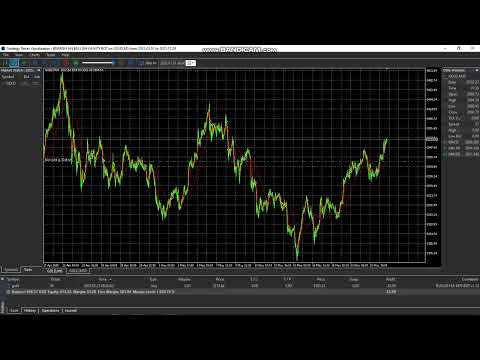
7. Smart Information Panel
The EA includes an on-chart information panel displaying useful trading information, including:
-
Account information.
-
Current trading status.
-
Active trading session.
-
M30 trend and signal.
-
M5 trend and signal.
-
H1 candle direction.
-
Timeframe alignment.
-
Active positions.
-
Floating profit or loss.
-
Stop Loss and Take Profit information.
-
Trade statistics.
-
Main and fast engine countdown timers.
Users can also customize which panel sections are displayed.
8. Recommended Usage
Before using the EA on a live account:
-
Download and test the demo version.
-
Use the MT5 Strategy Tester to evaluate historical performance.
-
Understand the MA strategy and timeframe alignment.
-
Configure your lot size according to your available capital and risk tolerance.
-
Test the EA on a demo account before considering live trading.
-
Monitor market conditions and review your trading results regularly.
9. Important Risk Disclaimer
Automated trading involves financial risk. The EA does not guarantee profits and cannot eliminate losses.
Market conditions can change, and multiple MA crossovers during ranging markets may produce challenging trading conditions.
Stop Loss, Take Profit, trading sessions, lot size and trade limits should be configured according to your own risk-management preferences.
Past performance does not guarantee future results.
Let the EA identify the signals. Let the strategy guide the entries. Stay disciplined with your risk management.
Developer: Lungile Mbanjwa
Development Assistance: ChatGPT and Grok
Join the Official Channel for Real-Time Behavior
Want to see how Bullish EA actually performs in live market conditions?
Join the official channel for:
- Real-time trade updates
- Daily performance results
- Current recommended settings
- Live account behavior
- Tips and future updates
→ Join here:
https://www.mql5.com/en/channels/01df52e1e42bdd01
Stay informed. Trade with structure.
Risk Warning
Trading financial markets involves significant risk. Past performance and backtesting results do not guarantee future results.
Users should properly test the EA using the Strategy Tester and forward/demo testing before considering live deployment.
Trade responsibly and use risk settings appropriate for your account.