

Implementação em MQL5 de módulos práticos de outras linguagens (Parte 02): criação de uma biblioteca REQUESTS como a do Python
 53
53
 0
0

Seções
- Introdução
- Execução de requisições web
- Diferentes requisições web em funções distintas
- Upload de arquivos
- Obtenção e download de arquivos da internet
- Gerenciamento de sessões e cookies
- Autenticação básica
- Manipulação de parâmetros de URL
- Conclusão
Introdução
A possibilidade de enviar requisições HTTP diretamente do MetaTrader 5 para a internet é um dos melhores recursos já disponibilizados na linguagem de programação MQL5. Graças a esse recurso, os traders podem interagir com sites externos, servidores, aplicativos de negociação e outros serviços.
Isso nos permite realizar praticamente qualquer tipo de tarefa diretamente na plataforma de negociação, como obter dados de fontes externas, enviar notificações de negociação a colegas e muito mais.
Tudo isso é possível graças à função WebRequest, disponível em MQL5, que permite realizar diversas operações por meio de HTTP, como:
- Enviar requisições POST para transmitir informações a servidores externos.
- Obter informações da internet por meio das conhecidas requisições GET.
- Enviar requisições PATCH para alterar informações no banco de dados de um servidor.
- Enviar requisições PUT para atualizar valores armazenados no banco de dados de um servidor.
Esses são apenas alguns exemplos de operações HTTP.
No entanto, a função WebRequest, por si só, pode ser complexa e pouco prática de usar.
Até mesmo o envio de uma requisição web simples para executar qualquer uma das operações mencionadas exige bastante esforço, pois é necessário lidar com métodos HTTP, cabeçalhos e diversos outros detalhes. Além disso, é preciso implementar manualmente o tratamento dos dados que você pretende enviar ou receber.

Se você já utilizou frameworks de desenvolvimento web ou módulos voltados a tarefas semelhantes em seus projetos de programação, provavelmente percebeu que a maioria dos frameworks de outras linguagens executa a maior parte das tarefas e operações básicas que a função WebRequest do MQL5 não realiza diretamente.
Um desses módulos é o requests, da linguagem de programação Python.
O módulo Requests, conhecido pelo lema HTTP for Humans (HTTP para humanos):
Ele é uma biblioteca HTTP simples e elegante que permite aos programadores enviar requisições pelo protocolo HTTP/1.1 com extrema facilidade.
Com essa biblioteca, os desenvolvedores Python não precisam adicionar manualmente parâmetros de requisição às URLs nem codificar dados de requisições PUT e POST usando form-encode, entre outras tarefas. Esses detalhes já foram cuidadosamente simplificados, tornando a biblioteca acessível até mesmo para desenvolvedores com menos experiência técnica.
Neste artigo, vamos apresentar a implementação de um módulo semelhante, com funções, sintaxe e recursos semelhantes. Espero que isso torne a execução de requisições web em MQL5 tão simples e prática quanto em Python.
Execução de requisições web
Essa é a principal funcionalidade do módulo requests. A função request permite enviar e receber dados pela internet em diferentes formatos.
Antes de implementar um método semelhante ao oferecido pelo módulo requests do Python, vamos examinar como essa função funciona.
A função request em Python tem a seguinte estrutura.
def request(
    method: str | bytes,
    url: str | bytes,
    *,
    params: _Params | None = ...,
    data: _Data | None = ...,
    headers: _HeadersMapping | None = ...,
    cookies: CookieJar | _TextMapping | None = ...,
    files: _Files | None = ...,
    auth: _Auth | None = ...,
    timeout: _Timeout | None = ...,
    allow_redirects: bool = ...,
    proxies: _TextMapping | None = ...,
    hooks: _HooksInput | None = ...,
    stream: bool | None = ...,
    verify: _Verify | None = ...,
    cert: _Cert | None = ...,
    json: Any | None = None
) -> Response
Essa função recebe vários argumentos para realizar uma requisição HTTP a um servidor web. Vamos começar definindo alguns parâmetros: método HTTP, URL, dados, cabeçalhos, timeout e parâmetros JSON.
CResponse CSession::request(const string method, //HTTP method GET, POST, etc
                             const string url, //endpoint url
                             const string data = "", //The data you want to send if the method is POST or PUT
                             const string headers = "", //HTTP headers
                             const int timeout = 5000, //Request timeout (milliseconds)
                             const bool is_json=true) //Checks whether the given data is in JSON format
  {
   char data_char[];
   char result[];
   string result_headers;
   string temp_data = data;

   CResponse response; //a structure containing various response fields

//--- Managing the headers

   string temp_headers = m_headers;
   if (headers != "") // If the user provided additional headers, append them
      temp_headers += headers;

//--- Updating the headers with the information received

   if(is_json) //If the information parsed is
     {
         //--- Convert dictionary to JSON string

         CJAVal js(NULL, jtUNDEF);
         bool b = js.Deserialize(data, CP_UTF8);

         string json;
         js.Serialize(json); //Get the serialized Json outcome
         temp_data = json; //Assign the resulting serialized Json to the temporary data array

         //--- Set "Content-Type: application/json"

         temp_headers = UpdateHeader(temp_headers, "Content-Type", "application/json");
         if (MQLInfoInteger(MQL_DEBUG))
           printf("%s: %s",__FUNCTION__,temp_headers);
     }
    else
      {
         temp_headers = UpdateHeader(temp_headers, headers);
         if (MQLInfoInteger(MQL_DEBUG))
           printf("%s: %s",__FUNCTION__,temp_headers);
      }

//--- Convert data to byte array (for POST, PUT, etc.)

   if (StringToCharArray(temp_data, data_char, 0, StringLen(temp_data), CP_UTF8)<0) //Convert the data in a string format to a uchar
      {
         printf("%s, Failed to convert data to a Char array. Error = %s",__FUNCTION__,ErrorDescription(GetLastError()));
         return response;
      }

//--- Perform the WebRequest

   uint start = GetTickCount(); //starting time of the request

   int status = WebRequest(method, url, temp_headers, timeout, data_char, result, result_headers); //trigger a webrequest function
   if(status == -1)
     {
      PrintFormat("WebRequest failed with error %s", ErrorDescription(GetLastError()));
      response.status_code = 0;
      return response;
     }

//--- Fill the response struct

   response.elapsed = (GetTickCount() - start);

   string results_string = CharArrayToString(result);
   response.text = results_string;

   CJAVal js;

   if (!js.Deserialize(result))
      if (MQLInfoInteger(MQL_DEBUG))
         printf("Failed to serialize data received from WebRequest");

   response.json = js;

   response.cookies = js["cookies"].ToStr();

   response.status_code = status;
   ArrayCopy(response.content, result);
   response.headers = result_headers;
   response.url = url;
   response.ok = (status >= 200 && status < 400);
   response.reason = WebStatusText(status); // a custom helper for translating status codes

   return response;
  }
A função request do Python oferece duas formas de enviar dados em uma requisição web, utilizando argumentos diferentes: data, para dados que não estejam no formato JSON, e json, para dados nesse formato.
Como ambos os argumentos servem para especificar os dados enviados na requisição, apenas um deles deve ser utilizado por vez. Assim, é possível enviar dados brutos, como HTML ou texto simples, ou dados no formato JSON.
Dessa forma, a função do Python identifica o tipo de dado fornecido (JSON ou outro formato) e ajusta os cabeçalhos levando em consideração os que foram definidos pelo usuário. Por exemplo, quando os dados estão no formato JSON, ela adiciona ou modifica o cabeçalho Content-Type: application/json.
Embora fosse possível utilizar os dois argumentos em uma função MQL5, considero essa abordagem confusa e desnecessariamente complexa. Por isso, o método da nossa classe MQL5 recebe apenas um argumento para o envio de dados, chamado data. Um argumento booleano chamado is_json permite identificar, dentro da função, se o conteúdo de data está no formato JSON ou em outro formato.
Quando is_json está definido como true, a função adiciona o cabeçalho Content-Type: application/json aos cabeçalhos recebidos ou atualiza seu valor, caso já exista. Antes disso, porém, os dados fornecidos no argumento data são serializados em um formato JSON válido para serem enviados pela internet.
//--- Updating the headers with the information received

   if(is_json) //If the information parsed is
     {
         //--- Convert dictionary to JSON string

         CJAVal js(NULL, jtUNDEF);
         bool b = js.Deserialize(data, CP_UTF8);

         string json;
         js.Serialize(json); //Get the serialized Json outcome
         temp_data = json; //Assign the resulting serialized Json to the temporary data array

         //--- Set "Content-Type: application/json"

         temp_headers = UpdateHeader(temp_headers, "Content-Type", "application/json");
         if (MQLInfoInteger(MQL_DEBUG))
           printf("%s: %s",__FUNCTION__,temp_headers);
     }
    else
      {
         temp_headers = UpdateHeader(temp_headers, headers);
         if (MQLInfoInteger(MQL_DEBUG))
           printf("%s: %s",__FUNCTION__,temp_headers);
      }
O método request disponibilizado pelo módulo requests do Python retorna um objeto de resposta HTTP com diversos atributos que fornecem informações sobre o status da requisição, os dados recebidos, os erros e outros detalhes.
import requests

r = requests.get('https://api.github.com/events')

# Print the raw response
print("Raw response:", r)

# Status code
print("Status Code:", r.status_code)

# Reason phrase
print("Reason:", r.reason)

# URL (final URL after redirects)
print("URL:", r.url)

# Headers (dictionary)
print("Headers:")

#... other responses
Para oferecer uma funcionalidade semelhante, precisamos de uma estrutura correspondente em nossa classe MQL5.
A seguir, apresentamos a classe CResponse, definida no arquivo requests.mqh.
struct CResponse
  {
   int               status_code; // HTTP status code (e.g., 200, 404)
   string            text;        // Raw response body as string

   CJAVal            json;        // Parses response as JSON
   uchar             content[];   // Raw bytes of the response
   string            headers;     // Dictionary of response headers
   string            cookies;     // Cookies set by the server
   string            url;         // Final URL after redirects
   bool              ok;          // True if status_code < 400
   uint              elapsed;     // Time taken for the response in ms
   string            reason;      // Text reason (e.g., "OK", "Not Found")
  };
Essa é a estrutura retornada pelo método request da classe CSession, que veremos em instantes.
Para facilitar a consulta, a tabela abaixo apresenta todas as variáveis da classe CResponse e as informações armazenadas em cada uma.
| Variável | Tipo de dado | Descrição |
|---|---|---|
| status_code | int | Código de status HTTP retornado pelo servidor (por exemplo, 200 = OK, 404 = Not Found etc.). |
| text | string | Resposta completa em uma string não processada (por exemplo, HTML, JSON ou texto). |
| json | CJAVal | Objeto JSON obtido pelo parsing do corpo da resposta, caso a serialização seja concluída com sucesso. |
| content[] | uchar | Array de bytes brutos contendo o corpo da resposta (útil para respostas com dados binários). |
| headers | string | Dicionário com os cabeçalhos da resposta HTTP. Pode ser convertido para o formato JSON, se necessário. |
| cookies | string | Cookies definidos pelo servidor (extraídos dos cabeçalhos Set-Cookie, quando presentes). |
| url | string | URL final após eventuais redirecionamentos. |
| ok | bool | Assume o valor true quando o código de status HTTP é inferior a 400, indicando que não houve erros do cliente nem do servidor. |
| elapsed | uint | Tempo necessário para executar a requisição, em milissegundos. |
| reason | string | Descrição textual do status HTTP, em formato legível. |
Veja abaixo como utilizar a função request.
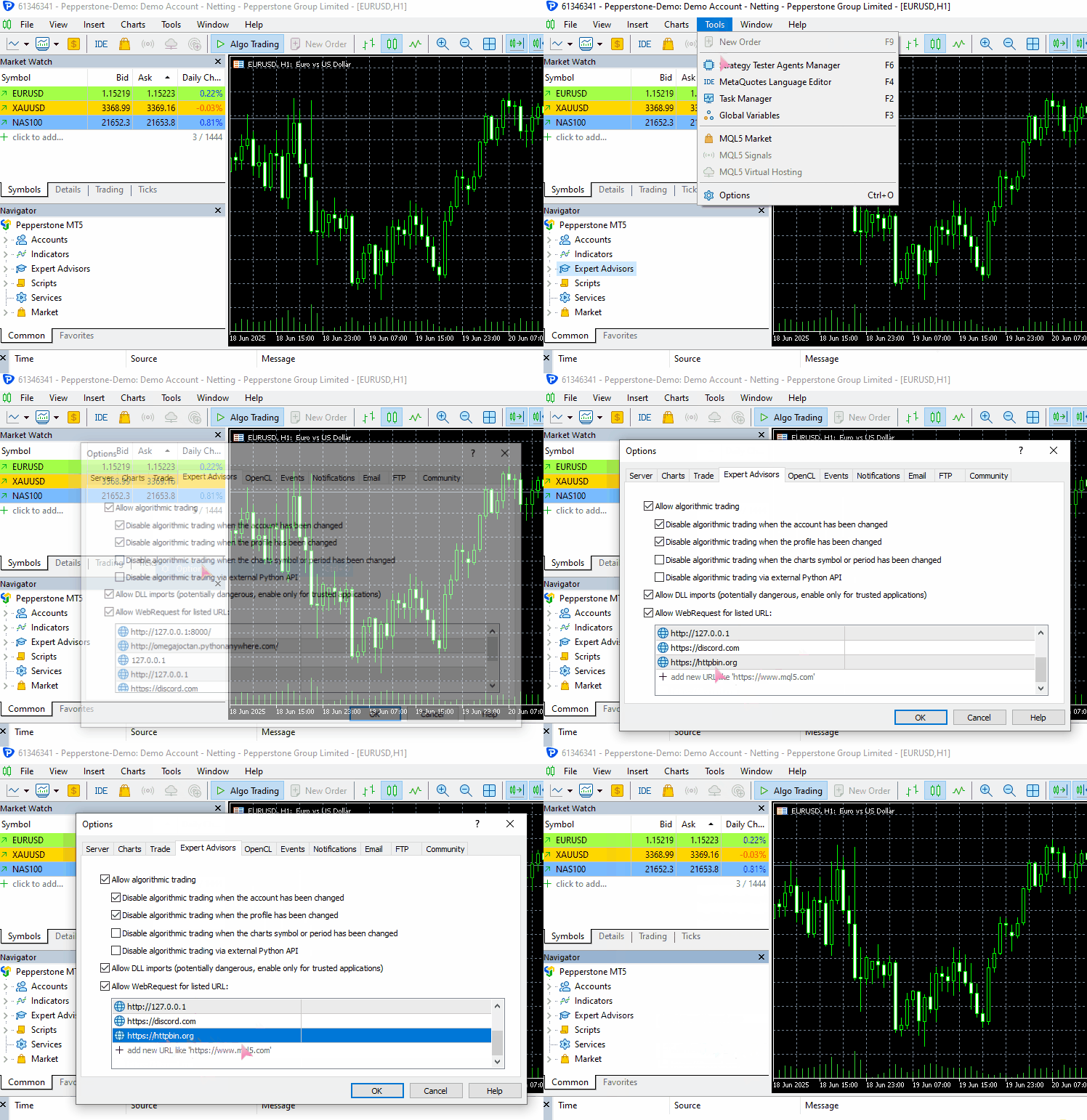
Para executar esse exemplo em seu computador, certifique-se de adicionar https://httpbin.org (URL de teste) à lista de URLs permitidas no MetaTrader 5.
(a) Envio de dados no formato JSON
#include <requests.mqh>
//+------------------------------------------------------------------+
//| Script program start function                                    |
//+------------------------------------------------------------------+
void OnStart()
  {
//---

     string json = "{\"username\": \"omega\", \"password\": \"secret123\"}";

     CResponse response = CSession::request("POST","https://httpbin.org/post", json, NULL, 5000, true);

      Print("Status Code: ", response.status_code);
      Print("Reason: ", response.reason);
      Print("URL: ", response.url);
      Print("OK: ", (string)response.ok);
      Print("Elapsed Time (ms): ", response.elapsed);

      Print("Headers:\n", response.headers);
      Print("Cookies: ", response.cookies);
      Print("Response: ",response.text);
      Print("JSON:\n", response.json["url"].ToStr());
 }
Resultados.
JF      0       08:10:33.226    Requests test (XAUUSD,D1)       CSession::request: Content-Type: application/json
GF      0       08:10:33.226    Requests test (XAUUSD,D1)
MI      0       08:10:34.578    Requests test (XAUUSD,D1)       Status Code: 200
PS      0       08:10:34.578    Requests test (XAUUSD,D1)       Reason: OK
LH      0       08:10:34.578    Requests test (XAUUSD,D1)       URL: https://httpbin.org/post
HP      0       08:10:34.578    Requests test (XAUUSD,D1)       OK: true
IF      0       08:10:34.578    Requests test (XAUUSD,D1)       Elapsed Time (ms): 1343
HO      0       08:10:34.578    Requests test (XAUUSD,D1)       Headers:
QE      0       08:10:34.578    Requests test (XAUUSD,D1)       Date: Fri, 04 Jul 2025 05:10:35 GMT
MG      0       08:10:34.578    Requests test (XAUUSD,D1)       Content-Type: application/json
HQ      0       08:10:34.578    Requests test (XAUUSD,D1)       Content-Length: 619
IH      0       08:10:34.578    Requests test (XAUUSD,D1)       Connection: keep-alive
JL      0       08:10:34.578    Requests test (XAUUSD,D1)       Server: gunicorn/19.9.0
QD      0       08:10:34.578    Requests test (XAUUSD,D1)       Access-Control-Allow-Origin: *
IO      0       08:10:34.578    Requests test (XAUUSD,D1)       Access-Control-Allow-Credentials: true
PI      0       08:10:34.578    Requests test (XAUUSD,D1)
GO      0       08:10:34.578    Requests test (XAUUSD,D1)       Cookies:
HH      0       08:10:34.578    Requests test (XAUUSD,D1)       Response: {
QL      0       08:10:34.578    Requests test (XAUUSD,D1)         "args": {},
FK      0       08:10:34.578    Requests test (XAUUSD,D1)         "data": "{\"username\":\"omega\",\"password\":\"secret123\"}",
MN      0       08:10:34.578    Requests test (XAUUSD,D1)         "files": {},
RH      0       08:10:34.578    Requests test (XAUUSD,D1)         "form": {},
OP      0       08:10:34.578    Requests test (XAUUSD,D1)         "headers": {
CH      0       08:10:34.578    Requests test (XAUUSD,D1)           "Accept": "*/*",
GM      0       08:10:34.578    Requests test (XAUUSD,D1)           "Accept-Encoding": "gzip, deflate",
HQ      0       08:10:34.578    Requests test (XAUUSD,D1)           "Accept-Language": "en;q=0.5",
GH      0       08:10:34.578    Requests test (XAUUSD,D1)           "Content-Length": "43",
IR      0       08:10:34.578    Requests test (XAUUSD,D1)           "Content-Type": "application/json",
EI      0       08:10:34.578    Requests test (XAUUSD,D1)           "Host": "httpbin.org",
NH      0       08:10:34.578    Requests test (XAUUSD,D1)           "User-Agent": "MetaTrader 5 Terminal/5.5120 (Windows NT 10.0.19045; x64)",
HK      0       08:10:34.578    Requests test (XAUUSD,D1)           "X-Amzn-Trace-Id": "Root=1-6867624b-422e528808290adf61a651a3"
IN      0       08:10:34.578    Requests test (XAUUSD,D1)         },
GD      0       08:10:34.578    Requests test (XAUUSD,D1)         "json": {
CN      0       08:10:34.578    Requests test (XAUUSD,D1)           "password": "secret123",
KD      0       08:10:34.578    Requests test (XAUUSD,D1)           "username": "omega"
QM      0       08:10:34.578    Requests test (XAUUSD,D1)         },
EJ      0       08:10:34.578    Requests test (XAUUSD,D1)         "origin": "197.250.227.26",
FQ      0       08:10:34.578    Requests test (XAUUSD,D1)         "url": "https://httpbin.org/post"
EG      0       08:10:34.578    Requests test (XAUUSD,D1)       }
PR      0       08:10:34.578    Requests test (XAUUSD,D1)
NF      0       08:10:34.578    Requests test (XAUUSD,D1)       JSON:
CR      0       08:10:34.578    Requests test (XAUUSD,D1)       https://httpbin.org/post
(b) Envio de dados que não estão no formato JSON
Vamos usar dados de formulário como exemplo.
#include <requests.mqh>
CSession requests;
//+------------------------------------------------------------------+
//| Script program start function                                    |
//+------------------------------------------------------------------+
void OnStart()
  {
//---

     string form_data = "username=omega&password=secret123"; //mimicking how the final form data is collected in the web

     CResponse response = CSession::post("https://httpbin.org/post", form_data, "Content-Type: application/x-www-form-urlencoded", 5000, false);

      Print("Status Code: ", response.status_code);
      Print("Reason: ", response.reason);
      Print("URL: ", response.url);
      Print("OK: ", (string)response.ok);
      Print("Elapsed Time (ms): ", response.elapsed);

      Print("Headers:\n", response.headers);
      Print("Cookies: ", response.cookies);
      Print("Response: ",response.text);
      Print("JSON:\n", response.json["url"].ToStr());
 }
Resultados.
DD      0       08:20:01.411    Requests test (XAUUSD,D1)       Status Code: 200
IN      0       08:20:01.411    Requests test (XAUUSD,D1)       Reason: OK
EG      0       08:20:01.411    Requests test (XAUUSD,D1)       URL: https://httpbin.org/post
QM      0       08:20:01.411    Requests test (XAUUSD,D1)       OK: true
RI      0       08:20:01.411    Requests test (XAUUSD,D1)       Elapsed Time (ms): 1547
QR      0       08:20:01.411    Requests test (XAUUSD,D1)       Headers:
EH      0       08:20:01.411    Requests test (XAUUSD,D1)       Date: Fri, 04 Jul 2025 05:20:02 GMT
DL      0       08:20:01.411    Requests test (XAUUSD,D1)       Content-Type: application/json
MD      0       08:20:01.411    Requests test (XAUUSD,D1)       Content-Length: 587
PM      0       08:20:01.411    Requests test (XAUUSD,D1)       Connection: keep-alive
OK      0       08:20:01.411    Requests test (XAUUSD,D1)       Server: gunicorn/19.9.0
HS      0       08:20:01.411    Requests test (XAUUSD,D1)       Access-Control-Allow-Origin: *
PD      0       08:20:01.411    Requests test (XAUUSD,D1)       Access-Control-Allow-Credentials: true
IF      0       08:20:01.411    Requests test (XAUUSD,D1)
RD      0       08:20:01.411    Requests test (XAUUSD,D1)       Cookies:
QM      0       08:20:01.411    Requests test (XAUUSD,D1)       Response: {
HK      0       08:20:01.411    Requests test (XAUUSD,D1)         "args": {},
OR      0       08:20:01.411    Requests test (XAUUSD,D1)         "data": "",
JE      0       08:20:01.411    Requests test (XAUUSD,D1)         "files": {},
RL      0       08:20:01.411    Requests test (XAUUSD,D1)         "form": {
DF      0       08:20:01.411    Requests test (XAUUSD,D1)           "password": "secret123",
PM      0       08:20:01.411    Requests test (XAUUSD,D1)           "username": "omega"
RE      0       08:20:01.411    Requests test (XAUUSD,D1)         },
PL      0       08:20:01.411    Requests test (XAUUSD,D1)         "headers": {
DE      0       08:20:01.411    Requests test (XAUUSD,D1)           "Accept": "*/*",
LP      0       08:20:01.411    Requests test (XAUUSD,D1)           "Accept-Encoding": "gzip, deflate",
CF      0       08:20:01.411    Requests test (XAUUSD,D1)           "Accept-Language": "en;q=0.5",
EK      0       08:20:01.411    Requests test (XAUUSD,D1)           "Content-Length": "33",
EL      0       08:20:01.411    Requests test (XAUUSD,D1)           "Content-Type": "application/x-www-form-urlencoded",
PH      0       08:20:01.411    Requests test (XAUUSD,D1)           "Host": "httpbin.org",
GO      0       08:20:01.411    Requests test (XAUUSD,D1)           "User-Agent": "MetaTrader 5 Terminal/5.5120 (Windows NT 10.0.19045; x64)",
FQ      0       08:20:01.411    Requests test (XAUUSD,D1)           "X-Amzn-Trace-Id": "Root=1-68676482-6439a0a071c275773681a193"
LM      0       08:20:01.411    Requests test (XAUUSD,D1)         },
JE      0       08:20:01.411    Requests test (XAUUSD,D1)         "json": null,
LM      0       08:20:01.411    Requests test (XAUUSD,D1)         "origin": "197.250.227.26",
KH      0       08:20:01.411    Requests test (XAUUSD,D1)         "url": "https://httpbin.org/post"
LN      0       08:20:01.411    Requests test (XAUUSD,D1)       }
IK      0       08:20:01.411    Requests test (XAUUSD,D1)
CO      0       08:20:01.411    Requests test (XAUUSD,D1)       JSON:
NK      0       08:20:01.411    Requests test (XAUUSD,D1)       https://httpbin.org/post
Ótimo! Conseguimos enviar dois tipos diferentes de dados usando a mesma função de requisição web.
Observe que, ao enviar dados que não estão no formato JSON (neste caso, dados de formulário), defino explicitamente o cabeçalho "Content-Type" no argumento headers da função request para indicar o tipo de conteúdo enviado.
Portanto, ao enviar dados que não estejam no formato JSON, não haverá serialização automática nem ajuste automático do cabeçalho HTTP correspondente. Nesse caso, é necessário definir explicitamente o cabeçalho Content-Type de acordo com o tipo de dado que você deseja enviar.
Para mais detalhes, consulte: https://beeceptor.com/docs/concepts/content-type/index.html
Agora, a função request é capaz de enviar requisições HTTP de todos os tipos, assim como a função nativa do MQL5. Na prática, ela funciona como uma extensão dessa função.
No entanto, essa flexibilidade também pode tornar seu uso complexo e sujeito a erros. Suponha que você queira enviar uma requisição GET para obter informações da internet.
Sabemos que não é apropriado enviar dados no corpo de uma requisição GET, pois ela não foi concebida para isso. Para reduzir a possibilidade de erros, o módulo requests do Python oferece várias funções de alto nível para diferentes tipos de requisições web, cada uma adaptada às características da operação correspondente.
Diferentes requisições web em funções distintas
Com base na função request implementada na seção anterior, podemos criar funções específicas para diferentes operações HTTP, como veremos a seguir.
(a) Função get
static CResponse         get(const string url, const string headers = "", const int timeout = 5000)
  {
    return request("GET", url, "", headers, timeout, false);
  }
Essa função envia uma requisição GET para a URL especificada. Ao chamá-la, nenhum dado é enviado no corpo da requisição, pois sua finalidade é apenas obter informações.
Exemplo de uso.
#include <requests.mqh>
//+------------------------------------------------------------------+
//| Script program start function                                    |
//+------------------------------------------------------------------+
void OnStart()
  {
//---

      CResponse response = CSession::get("https://httpbin.org/get");

      Print("Status Code: ", response.status_code);
      Print("Reason: ", response.reason);
      Print("URL: ", response.url);
      Print("OK: ", (string)response.ok);
      Print("Elapsed Time (ms): ", response.elapsed);

      Print("Headers:\n", response.headers);
      Print("Cookies: ", response.cookies);
      Print("Response: ",response.text);
      Print("JSON:\n", response.json["url"].ToStr());
  }
Resultados.
LM      0       09:50:48.904    Requests test (XAUUSD,D1)       Status Code: 200
QF      0       09:50:48.904    Requests test (XAUUSD,D1)       Reason: OK
GQ      0       09:50:48.904    Requests test (XAUUSD,D1)       URL: https://httpbin.org/get
CD      0       09:50:48.904    Requests test (XAUUSD,D1)       OK: true
EQ      0       09:50:48.904    Requests test (XAUUSD,D1)       Elapsed Time (ms): 1782
KJ      0       09:50:48.904    Requests test (XAUUSD,D1)       Headers:
JQ      0       09:50:48.904    Requests test (XAUUSD,D1)       Date: Fri, 04 Jul 2025 06:50:49 GMT
JD      0       09:50:48.904    Requests test (XAUUSD,D1)       Content-Type: application/json
NL      0       09:50:48.904    Requests test (XAUUSD,D1)       Content-Length: 379
NE      0       09:50:48.904    Requests test (XAUUSD,D1)       Connection: keep-alive
MS      0       09:50:48.904    Requests test (XAUUSD,D1)       Server: gunicorn/19.9.0
NH      0       09:50:48.904    Requests test (XAUUSD,D1)       Access-Control-Allow-Origin: *
FL      0       09:50:48.904    Requests test (XAUUSD,D1)       Access-Control-Allow-Credentials: true
KM      0       09:50:48.904    Requests test (XAUUSD,D1)
LL      0       09:50:48.904    Requests test (XAUUSD,D1)       Cookies:
CE      0       09:50:48.904    Requests test (XAUUSD,D1)       Response: {
FS      0       09:50:48.904    Requests test (XAUUSD,D1)         "args": {},
DJ      0       09:50:48.904    Requests test (XAUUSD,D1)         "headers": {
PR      0       09:50:48.904    Requests test (XAUUSD,D1)           "Accept": "*/*",
DF      0       09:50:48.904    Requests test (XAUUSD,D1)           "Accept-Encoding": "gzip, deflate",
KO      0       09:50:48.904    Requests test (XAUUSD,D1)           "Accept-Language": "en;q=0.5",
JL      0       09:50:48.904    Requests test (XAUUSD,D1)           "Host": "httpbin.org",
QK      0       09:50:48.904    Requests test (XAUUSD,D1)           "User-Agent": "MetaTrader 5 Terminal/5.5120 (Windows NT 10.0.19045; x64)",
JI      0       09:50:48.904    Requests test (XAUUSD,D1)           "X-Amzn-Trace-Id": "Root=1-686779c9-147d77346060e72a2fa2282f"
FH      0       09:50:48.904    Requests test (XAUUSD,D1)         },
RI      0       09:50:48.904    Requests test (XAUUSD,D1)         "origin": "197.250.227.26",
CJ      0       09:50:48.904    Requests test (XAUUSD,D1)         "url": "https://httpbin.org/get"
PR      0       09:50:48.904    Requests test (XAUUSD,D1)       }
QG      0       09:50:48.904    Requests test (XAUUSD,D1)
KK      0       09:50:48.904    Requests test (XAUUSD,D1)       JSON:
DQ      0       09:50:48.904    Requests test (XAUUSD,D1)       https://httpbin.org/get
Embora a função get permita definir cabeçalhos na requisição HTTP, não é possível controlar o tipo de conteúdo retornado pelo servidor apenas configurando o cabeçalho Content-Type.
(b) Função post
static CResponse         post(const string url, const string data = "", const string headers = "", const int timeout = 5000, const bool is_json=true)
  {
    return request("POST", url, data, headers, timeout, is_json);
  }
Essa função envia uma requisição POST para a URL especificada, com um conjunto opcional de dados. Assim como a função request, ela define automaticamente o cabeçalho Content-Type quando o argumento is_json está definido como true.
Exemplo de uso.
#include <requests.mqh>
//+------------------------------------------------------------------+
//| Script program start function                                    |
//+------------------------------------------------------------------+
void OnStart()
  {
//---

      string json = "{\"username\": \"omega\", \"password\": \"secret123\"}";
      CResponse response = CSession::post("https://httpbin.org/post",json);

      Print("Status Code: ", response.status_code);
      Print("Reason: ", response.reason);
      Print("URL: ", response.url);
      Print("OK: ", (string)response.ok);
      Print("Elapsed Time (ms): ", response.elapsed);

      Print("Headers:\n", response.headers);
      Print("Cookies: ", response.cookies);
      Print("Response: ",response.text);
      Print("JSON:\n", response.json["url"].ToStr());
 }
Resultados.
NK      0       15:32:13.093    Requests test (XAUUSD,D1)       Status Code: 200
OP      0       15:32:13.093    Requests test (XAUUSD,D1)       Reason: OK
KE      0       15:32:13.093    Requests test (XAUUSD,D1)       URL: https://httpbin.org/post
GR      0       15:32:13.093    Requests test (XAUUSD,D1)       OK: true
LD      0       15:32:13.093    Requests test (XAUUSD,D1)       Elapsed Time (ms): 1578
GL      0       15:32:13.093    Requests test (XAUUSD,D1)       Headers:
PK      0       15:32:13.093    Requests test (XAUUSD,D1)       Date: Fri, 04 Jul 2025 12:32:13 GMT
NR      0       15:32:13.093    Requests test (XAUUSD,D1)       Content-Type: application/json
GG      0       15:32:13.093    Requests test (XAUUSD,D1)       Content-Length: 619
JN      0       15:32:13.093    Requests test (XAUUSD,D1)       Connection: keep-alive
II      0       15:32:13.093    Requests test (XAUUSD,D1)       Server: gunicorn/19.9.0
RF      0       15:32:13.093    Requests test (XAUUSD,D1)       Access-Control-Allow-Origin: *
JR      0       15:32:13.093    Requests test (XAUUSD,D1)       Access-Control-Allow-Credentials: true
OK      0       15:32:13.093    Requests test (XAUUSD,D1)
HQ      0       15:32:13.093    Requests test (XAUUSD,D1)       Cookies:
GK      0       15:32:13.093    Requests test (XAUUSD,D1)       Response: {
RN      0       15:32:13.093    Requests test (XAUUSD,D1)         "args": {},
EN      0       15:32:13.093    Requests test (XAUUSD,D1)         "data": "{\"username\":\"omega\",\"password\":\"secret123\"}",
NL      0       15:32:13.093    Requests test (XAUUSD,D1)         "files": {},
QJ      0       15:32:13.093    Requests test (XAUUSD,D1)         "form": {},
PS      0       15:32:13.093    Requests test (XAUUSD,D1)         "headers": {
DJ      0       15:32:13.093    Requests test (XAUUSD,D1)           "Accept": "*/*",
HO      0       15:32:13.093    Requests test (XAUUSD,D1)           "Accept-Encoding": "gzip, deflate",
GG      0       15:32:13.093    Requests test (XAUUSD,D1)           "Accept-Language": "en;q=0.5",
HJ      0       15:32:13.093    Requests test (XAUUSD,D1)           "Content-Length": "43",
JM      0       15:32:13.093    Requests test (XAUUSD,D1)           "Content-Type": "application/json",
FK      0       15:32:13.093    Requests test (XAUUSD,D1)           "Host": "httpbin.org",
MN      0       15:32:13.093    Requests test (XAUUSD,D1)           "User-Agent": "MetaTrader 5 Terminal/5.5120 (Windows NT 10.0.19045; x64)",
IM      0       15:32:13.093    Requests test (XAUUSD,D1)           "X-Amzn-Trace-Id": "Root=1-6867c9cd-64a83cd77115a2575214fecd"
JS      0       15:32:13.093    Requests test (XAUUSD,D1)         },
HJ      0       15:32:13.093    Requests test (XAUUSD,D1)         "json": {
DL      0       15:32:13.093    Requests test (XAUUSD,D1)           "password": "secret123",
LK      0       15:32:13.093    Requests test (XAUUSD,D1)           "username": "omega"
RS      0       15:32:13.093    Requests test (XAUUSD,D1)         },
FG      0       15:32:13.093    Requests test (XAUUSD,D1)         "origin": "197.250.227.26",
EO      0       15:32:13.093    Requests test (XAUUSD,D1)         "url": "https://httpbin.org/post"
FE      0       15:32:13.093    Requests test (XAUUSD,D1)       }
OL      0       15:32:13.093    Requests test (XAUUSD,D1)
MD      0       15:32:13.093    Requests test (XAUUSD,D1)       JSON:
DD      0       15:32:13.093    Requests test (XAUUSD,D1)       https://httpbin.org/post
(c) Função put
Essa função envia uma requisição PUT para atualizar um recurso na URL especificada, utilizando os dados fornecidos.
static CResponse         put(const string url, const string data = "", const string headers = "", const int timeout = 5000, const bool is_json=true)
  {
    return request("PUT", url, data, headers, timeout, is_json);
  }
Exemplo de uso.
#include <requests.mqh>
//+------------------------------------------------------------------+
//| Script program start function                                    |
//+------------------------------------------------------------------+
void OnStart()
  {
//---

      string json = "{\"username\": \"omega\", \"password\": \"secret123\"}";
      CResponse response = CSession::put("https://httpbin.org/put",json);

      Print("Status Code: ", response.status_code);
      Print("Reason: ", response.reason);
      Print("URL: ", response.url);
      Print("OK: ", (string)response.ok);
      Print("Elapsed Time (ms): ", response.elapsed);

      Print("Headers:\n", response.headers);
      Print("Cookies: ", response.cookies);
      Print("Response: ",response.text);
      Print("JSON:\n", response.json["url"].ToStr());
 }
Resultados.
#include <requests.mqh>
//+------------------------------------------------------------------+
//| Script program start function                                    |
//+------------------------------------------------------------------+
void OnStart()
  {
//---

      string json = "{\"update\": true}";
      CResponse response = CSession::put("https://httpbin.org/put", json, "", 5000, true);

      Print("Reason: ", response.reason);
      Print("Response: ",response.text);
  }
Resultados.
MG      0       15:51:02.874    Requests test (XAUUSD,D1)       Reason: OK
EQ      0       15:51:02.874    Requests test (XAUUSD,D1)       Response: {
HG      0       15:51:02.874    Requests test (XAUUSD,D1)         "args": {},
JM      0       15:51:02.874    Requests test (XAUUSD,D1)         "data": "{\"update\":true}",
LJ      0       15:51:02.874    Requests test (XAUUSD,D1)         "files": {},
CM      0       15:51:02.874    Requests test (XAUUSD,D1)         "form": {},
FE      0       15:51:02.874    Requests test (XAUUSD,D1)         "headers": {
RO      0       15:51:02.874    Requests test (XAUUSD,D1)           "Accept": "*/*",
JI      0       15:51:02.874    Requests test (XAUUSD,D1)           "Accept-Encoding": "gzip, deflate",
QL      0       15:51:02.874    Requests test (XAUUSD,D1)           "Accept-Language": "en;q=0.5",
KE      0       15:51:02.874    Requests test (XAUUSD,D1)           "Content-Length": "15",
LG      0       15:51:02.874    Requests test (XAUUSD,D1)           "Content-Type": "application/json",
PL      0       15:51:02.874    Requests test (XAUUSD,D1)           "Host": "httpbin.org",
KD      0       15:51:02.874    Requests test (XAUUSD,D1)           "User-Agent": "MetaTrader 5 Terminal/5.5120 (Windows NT 10.0.19045; x64)",
KH      0       15:51:02.874    Requests test (XAUUSD,D1)           "X-Amzn-Trace-Id": "Root=1-6867ce36-76b6e4053cd661ec5e4faa1b"
HI      0       15:51:02.874    Requests test (XAUUSD,D1)         },
NG      0       15:51:02.874    Requests test (XAUUSD,D1)         "json": {
DQ      0       15:51:02.874    Requests test (XAUUSD,D1)           "update": true
PG      0       15:51:02.874    Requests test (XAUUSD,D1)         },
PS      0       15:51:02.874    Requests test (XAUUSD,D1)         "origin": "197.250.227.26",
HD      0       15:51:02.874    Requests test (XAUUSD,D1)         "url": "https://httpbin.org/put"
RH      0       15:51:02.874    Requests test (XAUUSD,D1)       }
CI      0       15:51:02.874    Requests test (XAUUSD,D1)
(d) Função patch
static CResponse         patch(const string url, const string data = "", const string headers = "", const int timeout = 5000, const bool is_json=true)
  {
    return request("PATCH", url, data, headers, timeout, is_json);
  }
Essa função envia uma requisição PATCH para atualizar parcialmente um recurso na URL especificada, utilizando os dados fornecidos.
Exemplo de uso.
#include <requests.mqh>
//+------------------------------------------------------------------+
//| Script program start function                                    |
//+------------------------------------------------------------------+
void OnStart()
  {
//---

      string json = "{\"patched\": 1}";
      CResponse response = CSession::patch("https://httpbin.org/patch", json, "", 5000, true);

      Print("Reason: ", response.reason);
      Print("Response: ",response.text);
  }
Resultados.
GR      0       16:33:45.258    Requests test (XAUUSD,D1)       Reason: OK
OF      0       16:33:45.258    Requests test (XAUUSD,D1)       Response: {
RR      0       16:33:45.258    Requests test (XAUUSD,D1)         "args": {},
GJ      0       16:33:45.258    Requests test (XAUUSD,D1)         "data": "{\"patched\":1}",
NL      0       16:33:45.258    Requests test (XAUUSD,D1)         "files": {},
IK      0       16:33:45.258    Requests test (XAUUSD,D1)         "form": {},
HS      0       16:33:45.258    Requests test (XAUUSD,D1)         "headers": {
LE      0       16:33:45.258    Requests test (XAUUSD,D1)           "Accept": "*/*",
HO      0       16:33:45.258    Requests test (XAUUSD,D1)           "Accept-Encoding": "gzip, deflate",
OF      0       16:33:45.258    Requests test (XAUUSD,D1)           "Accept-Language": "en;q=0.5",
CJ      0       16:33:45.258    Requests test (XAUUSD,D1)           "Content-Length": "13",
RM      0       16:33:45.258    Requests test (XAUUSD,D1)           "Content-Type": "application/json",
FK      0       16:33:45.258    Requests test (XAUUSD,D1)           "Host": "httpbin.org",
MN      0       16:33:45.258    Requests test (XAUUSD,D1)           "User-Agent": "MetaTrader 5 Terminal/5.5120 (Windows NT 10.0.19045; x64)",
GN      0       16:33:45.258    Requests test (XAUUSD,D1)           "X-Amzn-Trace-Id": "Root=1-6867d837-47b9eb772b7ec6300016aa79"
JS      0       16:33:45.258    Requests test (XAUUSD,D1)         },
HJ      0       16:33:45.258    Requests test (XAUUSD,D1)         "json": {
MR      0       16:33:45.258    Requests test (XAUUSD,D1)           "patched": 1
FH      0       16:33:45.258    Requests test (XAUUSD,D1)         },
RI      0       16:33:45.258    Requests test (XAUUSD,D1)         "origin": "197.250.227.26",
KK      0       16:33:45.258    Requests test (XAUUSD,D1)         "url": "https://httpbin.org/patch"
DS      0       16:33:45.258    Requests test (XAUUSD,D1)       }
(e) Função delete
static CResponse         delete_(const string url, const string headers = "", const int timeout = 5000, const bool is_json=true)
  {
    return request("DELETE", url, "", headers, timeout, is_json);
  }
Essa função envia uma requisição DELETE para excluir um recurso na URL especificada. O corpo da requisição não é utilizado.
Exemplo de uso.
#include <requests.mqh>
//+------------------------------------------------------------------+
//| Script program start function                                    |
//+------------------------------------------------------------------+
void OnStart()
  {
//---

      CResponse response = CSession::delete_("https://httpbin.org/delete", "", 5000, true);

      Print("Reason: ", response.reason);
      Print("Response: ",response.text);
 }
Resultados.
ML      0       16:43:03.046    Requests test (XAUUSD,D1)       Reason: OK
EL      0       16:43:03.046    Requests test (XAUUSD,D1)       Response: {
HH      0       16:43:03.046    Requests test (XAUUSD,D1)         "args": {},
OR      0       16:43:03.046    Requests test (XAUUSD,D1)         "data": "",
JD      0       16:43:03.046    Requests test (XAUUSD,D1)         "files": {},
ER      0       16:43:03.046    Requests test (XAUUSD,D1)         "form": {},
DK      0       16:43:03.046    Requests test (XAUUSD,D1)         "headers": {
PR      0       16:43:03.046    Requests test (XAUUSD,D1)           "Accept": "*/*",
LG      0       16:43:03.046    Requests test (XAUUSD,D1)           "Accept-Encoding": "gzip, deflate",
KO      0       16:43:03.046    Requests test (XAUUSD,D1)           "Accept-Language": "en;q=0.5",
QQ      0       16:43:03.046    Requests test (XAUUSD,D1)           "Content-Length": "0",
HE      0       16:43:03.046    Requests test (XAUUSD,D1)           "Content-Type": "application/json",
LS      0       16:43:03.046    Requests test (XAUUSD,D1)           "Host": "httpbin.org",
GF      0       16:43:03.046    Requests test (XAUUSD,D1)           "User-Agent": "MetaTrader 5 Terminal/5.5120 (Windows NT 10.0.19045; x64)",
JK      0       16:43:03.046    Requests test (XAUUSD,D1)           "X-Amzn-Trace-Id": "Root=1-6867da67-1926ebf246353ab24461aed9"
LK      0       16:43:03.046    Requests test (XAUUSD,D1)         },
FL      0       16:43:03.046    Requests test (XAUUSD,D1)         "json": null,
PG      0       16:43:03.046    Requests test (XAUUSD,D1)         "origin": "197.250.227.26",
PO      0       16:43:03.046    Requests test (XAUUSD,D1)         "url": "https://httpbin.org/delete"
HE      0       16:43:03.046    Requests test (XAUUSD,D1)       }
QL      0       16:43:03.046    Requests test (XAUUSD,D1)
Upload de arquivos
O módulo requests do Python simplifica bastante o envio e o recebimento de arquivos pela internet, diferentemente da função nativa de requisições web do MQL5.
A possibilidade de enviar arquivos pela internet é essencial para uma comunicação eficiente nos dias de hoje. Muitas vezes, precisamos compartilhar capturas de tela dos gráficos para mostrar nosso progresso nas negociações ou apresentar estratégias de negociação e sinais visuais diretamente nos gráficos do MetaTrader 5.
Esta é a parte mais complexa do nosso estudo sobre CSession-MQL5, pois precisamos considerar os diferentes tipos de arquivo que os usuários podem enviar e codificar corretamente os dados binários extraídos desses arquivos. Além disso, é necessário definir os cabeçalhos HTTP adequados para cada tipo de arquivo.
CResponse CSession::request(const string method,
                             const string url,
                             const string data,
                             const string &files[],
                             const string headers = "",
                             const int timeout = 5000,
                             const bool is_json=true)
 {
   char result[];
   string result_headers;
   string temp_headers = m_headers;
   string boundary = "----WebKitFormBoundary7MA4YWxkTrZu0gW"; //for setting boundaries between data types and files in the form data
   CArrayChar final_body; //Final body uchar array

   CResponse response; //a structure containing various response fields

   // Append user headers
   if (headers != "")
      temp_headers += headers;

   bool use_multipart = ArraySize(files) > 0; //Check if files are attached

//--- Create a multi part request

   if (use_multipart) // If multipart, assemble full body (JSON + files)
    {
      temp_headers = UpdateHeader(temp_headers, "Content-Type", "multipart/form-data; boundary=" + boundary + "\r\n"); //Update the headers

      //--- JSON part (or form data)
      if (StringLen(data) > 0)
      {
         string json_data = "";
         if (is_json) //if Json data is given alongside the files
          {
            CJAVal js(NULL, jtUNDEF);
            if (js.Deserialize(data, CP_UTF8))
               js.Serialize(json_data); //Serialize the JSON data
          }

         string json_part = "--" + boundary + "\r\n";
         json_part += "Content-Disposition: form-data; name=\"metadata\"\r\n";
         json_part += "Content-Type: application/json\r\n\r\n";
         json_part += json_data + "\r\n";

         char json_bytes[];
         StringToCharArray(json_part, json_bytes, 0, StringLen(json_part), CP_UTF8);

         final_body.AddArray(json_bytes);
      }

      //--- File parts
      for (uint i = 0; i < files.Size(); i++)
       {
         string filename = GetFileName(files[i]);

         char file_data[]; //for storing the file data in binary format

         int file_handle = FileOpen(filename, FILE_BIN | FILE_SHARE_READ); // Read the file in binary format
         if (file_handle == INVALID_HANDLE)
          {
            printf("func=%s line=%d, Failed to read the file '%s'. Error = %s",__FUNCTION__,__LINE__,filename,ErrorDescription(GetLastError()));
            continue; //skip to the next file if the current file is invalid
          }

         int fsize = (int)FileSize(file_handle);
         ArrayResize(file_data, fsize);
         if (FileReadArray(file_handle, file_data, 0, fsize)==0)
           {
              printf("func=%s line=%d, No data found in the file '%s'. Error = %s",__FUNCTION__,__LINE__,filename,ErrorDescription(GetLastError()));
              FileClose(file_handle);
              continue; //skip to the next file if the current file is invalid
           }

         FileClose(file_handle); //close the current file

         //--- Append files header and content type as detected to the request

         string file_part = "--" + boundary + "\r\n";
         file_part += StringFormat("Content-Disposition: form-data; name=\"file\"; filename=\"%s\"\r\n", filename);
         file_part += StringFormat("Content-Type: %s\r\n\r\n", GuessContentType(filename));

         char file_header[];
         StringToCharArray(file_part, file_header, 0, StringLen(file_part), CP_UTF8); //UTF-8 Encoding is a must

         final_body.AddArray(file_header); //Add the file header
         final_body.AddArray(file_data); //Add the file in binary format, the actual file

         //--- append the new line — critical for HTTP form parsing.

         final_body.Add('\r');
         final_body.Add('\n');
      }

      //--- Final boundary
      string closing = "--" + boundary + "--\r\n";
      char closing_part[];
      StringToCharArray(closing, closing_part);

      final_body.AddArray(closing_part);
    }
   else // no files attached
    {
      //--- If it's just JSON or plain form data
      string body_data = data;
      if (is_json)
       {
         CJAVal js(NULL, jtUNDEF);
         if (js.Deserialize(data, CP_UTF8))
            js.Serialize(body_data);

         temp_headers = UpdateHeader(temp_headers, "Content-Type", "application/json");
       }
      else
         temp_headers = UpdateHeader(temp_headers, headers);

      //---

      char array[];
      StringToCharArray(body_data, array, 0, StringLen(body_data), CP_UTF8); //Use UTF-8 similar requests in Python, This is very crucial
      final_body.AddArray(array);
    }

   char final_body_char_arr[];
   CArray2Array(final_body, final_body_char_arr);

   if (MQLInfoInteger(MQL_DEBUG))
     Print("Final body:\n",CharArrayToString(final_body_char_arr, 0 , final_body.Total(), CP_UTF8));

//--- Send the request

   uint start = GetTickCount(); //starting time of the request
   int status = WebRequest(method, url, temp_headers, timeout, final_body_char_arr, result, result_headers); //trigger a webrequest function

   if(status == -1)
     {
      PrintFormat("WebRequest failed with error %s", ErrorDescription(GetLastError()));
      response.status_code = 0;
      return response;
     }

//--- Fill the response struct

   response.elapsed = GetTickCount() - start;
   response.text = CharArrayToString(result);
   response.status_code = status;
   response.headers = result_headers;
   response.url = url;
   response.ok = (status >= 200 && status < 400);
   response.reason = WebStatusText(status);
   ArrayCopy(response.content, result);

//---

   CJAVal js;
   if (js.Deserialize(response.text))
      response.json = js;

   return response;
 }
Assim como a função request apresentada anteriormente, esta função permite enviar requisições HTTP, mas também consegue identificar os arquivos fornecidos pelo usuário como argumento e incorporá-los à requisição.
Quando o array de arquivos está vazio, ou seja, quando o usuário não fornece nenhum arquivo, a função executa uma requisição HTTP comum, como vimos anteriormente. Já quando recebe arquivos, ela atualiza o cabeçalho Content-Type para multipart/form-data, permitindo distinguir os diferentes tipos de conteúdo enviados na requisição.
temp_headers = UpdateHeader(temp_headers, "Content-Type", "multipart/form-data; boundary=" + boundary + "\r\n"); //Update the headers O array final_body reúne todos os dados (conteúdo e arquivos) em uma única variável de caracteres (char), conforme descrito no original, de forma semelhante ao envio realizado por um formulário web. Essa operação é executada em um laço que percorre o array com todos os arquivos que você deseja enviar ao servidor de uma só vez.
      //--- File parts
      for (uint i = 0; i < files.Size(); i++)
       {
         string filename = GetFileName(files[i]);

         char file_data[]; //for storing the file data in binary format

         int file_handle = FileOpen(filename, FILE_BIN | FILE_SHARE_READ); // Read the file in binary format
         if (file_handle == INVALID_HANDLE)
          {
            printf("func=%s line=%d, Failed to read the file '%s'. Error = %s",__FUNCTION__,__LINE__,filename,ErrorDescription(GetLastError()));
            continue; //skip to the next file if the current file is invalid
          }

         int fsize = (int)FileSize(file_handle);
         ArrayResize(file_data, fsize);
         if (FileReadArray(file_handle, file_data, 0, fsize)==0)
           {
              printf("func=%s line=%d, No data found in the file '%s'. Error = %s",__FUNCTION__,__LINE__,filename,ErrorDescription(GetLastError()));
              FileClose(file_handle);
              continue; //skip to the next file if the current file is invalid
           }

         FileClose(file_handle); //close the current file

         //--- Append files header and content type as detected to the request

         string file_part = "--" + boundary + "\r\n";
         file_part += StringFormat("Content-Disposition: form-data; name=\"file\"; filename=\"%s\"\r\n", filename);
         file_part += StringFormat("Content-Type: %s\r\n\r\n", GuessContentType(filename));

         char file_header[];
         StringToCharArray(file_part, file_header, 0, StringLen(file_part), CP_UTF8); //UTF-8 Encoding is a must

         final_body.AddArray(file_header); //Add the file header
         final_body.AddArray(file_data); //Add the file in binary format, the actual file

         //--- append the new line — critical for HTTP form parsing.

         final_body.Add('\r');
         final_body.Add('\n');
      }
Dessa forma, uma única função permite enviar ao servidor arquivos de diferentes tipos, como vídeos, imagens, documentos da Microsoft e outros formatos.
A função GuessContentType identifica o tipo de arquivo com base em sua extensão e retorna o Content-Type adequado para inclusão no cabeçalho da parte correspondente da requisição multipart/form-data.
string CSession::GuessContentType(string filename)
{
   StringToLower(filename); // Normalize for case-insensitivity

   if(StringFind(filename, ".txt")   >= 0) return "text/plain";
   if(StringFind(filename, ".json")  >= 0) return "application/json";
   if(StringFind(filename, ".xml")   >= 0) return "application/xml";
   //... other files

   //--- Images
   if(StringFind(filename, ".png")   >= 0) return "image/png";
   if(StringFind(filename, ".jpg")   >= 0 || StringFind(filename, ".jpeg") >= 0) return "image/jpeg";
   if(StringFind(filename, ".gif")   >= 0) return "image/gif";
   //...etc

   //--- Audio
   if(StringFind(filename, ".mp3")   >= 0) return "audio/mpeg";
   if(StringFind(filename, ".wav")   >= 0) return "audio/wav";
   if(StringFind(filename, ".ogg")   >= 0) return "audio/ogg";

   //--- Video
   if(StringFind(filename, ".mp4")   >= 0) return "video/mp4";
   if(StringFind(filename, ".avi")   >= 0) return "video/x-msvideo";
   if(StringFind(filename, ".mov")   >= 0) return "video/quicktime";
   if(StringFind(filename, ".webm")  >= 0) return "video/webm";
   if(StringFind(filename, ".mkv")   >= 0) return "video/x-matroska";

   //--- Applications
   if(StringFind(filename, ".pdf")   >= 0) return "application/pdf";
   if(StringFind(filename, ".zip")   >= 0) return "application/zip";
   //... etc

   //--- Microsoft Office
   if(StringFind(filename, ".doc")   >= 0) return "application/msword";
   if(StringFind(filename, ".docx")  >= 0) return "application/vnd.openxmlformats-officedocument.wordprocessingml.document";
   if(StringFind(filename, ".xls")   >= 0) return "application/vnd.ms-excel";
   //...etc

   return "application/octet-stream"; // Default fallback
}
Exemplo de uso.
Suponha que tenhamos uma imagem, uma captura de tela de um gráfico do MetaTrader 5, que desejamos enviar a um servidor.
Para facilitar o acesso a esses arquivos, certifique-se de que estejam no diretório de dados indicado por MQL5 DataPath.
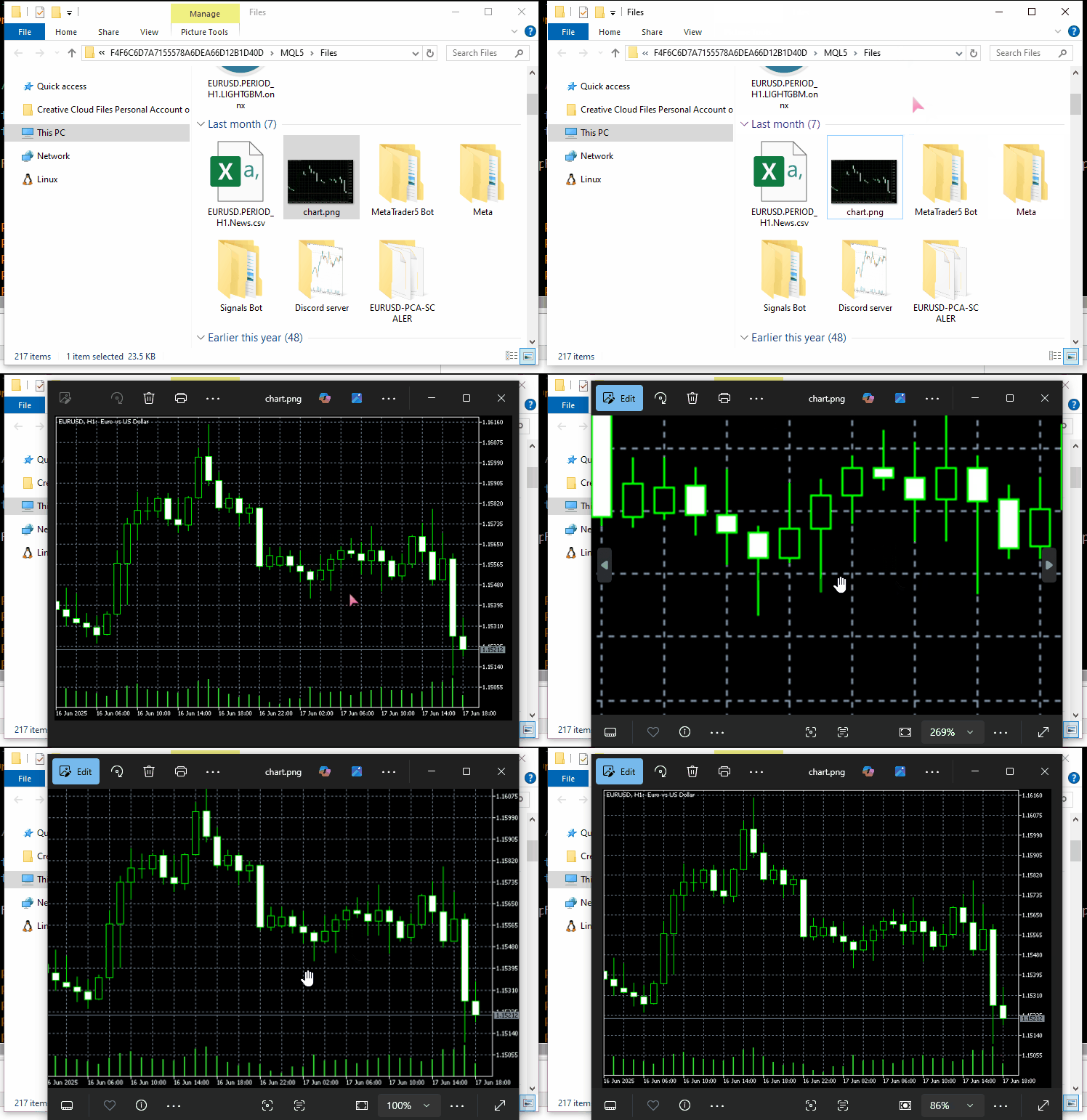
Vamos utilizar o servidor tempfiles.org como endpoint da nossa API.
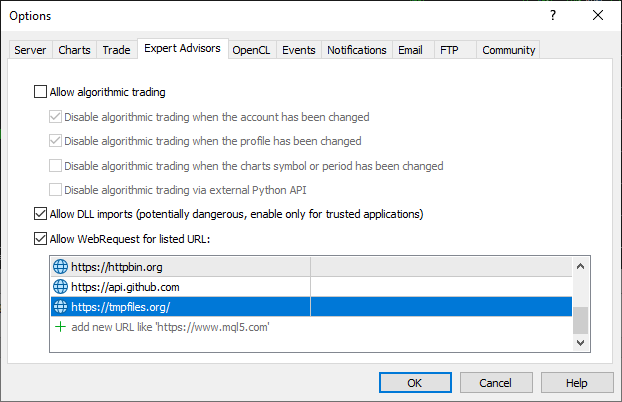
Reforço que, para esse exemplo funcionar, é necessário adicionar a URL tempfiles.org à lista de URLs permitidas no MetaTrader 5.
#include <requests.mqh>
//+------------------------------------------------------------------+
//| Script program start function                                    |
//+------------------------------------------------------------------+
void OnStart()
  {
//---

     string files[] = {"chart.jpg"};

     CResponse response = CSession::request("POST","https://tmpfiles.org/api/v1/upload","",files);

      Print("Status Code: ", response.status_code);
      Print("Reason: ", response.reason);
      Print("URL: ", response.url);
      Print("OK: ", (string)response.ok);
      Print("Elapsed Time (ms): ", response.elapsed);

      Print("Headers:\n", response.headers);
      Print("Cookies: ", response.cookies);
      Print("Response: ",response.text);
      Print("JSON:\n", response.json["url"].ToStr());
  }
Resultados.
CF      0       17:06:25.063    Requests test (XAUUSD,D1)       Status Code: 200
RL      0       17:06:25.063    Requests test (XAUUSD,D1)       Reason: OK
QM      0       17:06:25.063    Requests test (XAUUSD,D1)       URL: https://tmpfiles.org/api/v1/upload
FN      0       17:06:25.063    Requests test (XAUUSD,D1)       OK: true
OH      0       17:06:25.063    Requests test (XAUUSD,D1)       Elapsed Time (ms): 1594
FQ      0       17:06:25.063    Requests test (XAUUSD,D1)       Headers:
RN      0       17:06:25.063    Requests test (XAUUSD,D1)       Server: nginx/1.22.1
QO      0       17:06:25.063    Requests test (XAUUSD,D1)       Content-Type: application/json
KJ      0       17:06:25.063    Requests test (XAUUSD,D1)       Transfer-Encoding: chunked
CS      0       17:06:25.063    Requests test (XAUUSD,D1)       Connection: keep-alive
KE      0       17:06:25.063    Requests test (XAUUSD,D1)       Cache-Control: no-cache, private
RM      0       17:06:25.063    Requests test (XAUUSD,D1)       Date: Thu, 10 Jul 2025 14:06:25 GMT
DF      0       17:06:25.063    Requests test (XAUUSD,D1)       X-RateLimit-Limit: 60
GN      0       17:06:25.063    Requests test (XAUUSD,D1)       X-RateLimit-Remaining: 59
CN      0       17:06:25.063    Requests test (XAUUSD,D1)       Access-Control-Allow-Origin: *
NF      0       17:06:25.063    Requests test (XAUUSD,D1)
ED      0       17:06:25.063    Requests test (XAUUSD,D1)       Cookies:
RM      0       17:06:25.063    Requests test (XAUUSD,D1)       Response: {"status":"success","data":{"url":"http://tmpfiles.org/5459540/chart.png"}}
LS      0       17:06:25.063    Requests test (XAUUSD,D1)       JSON:
HJ      0       17:06:25.063    Requests test (XAUUSD,D1)
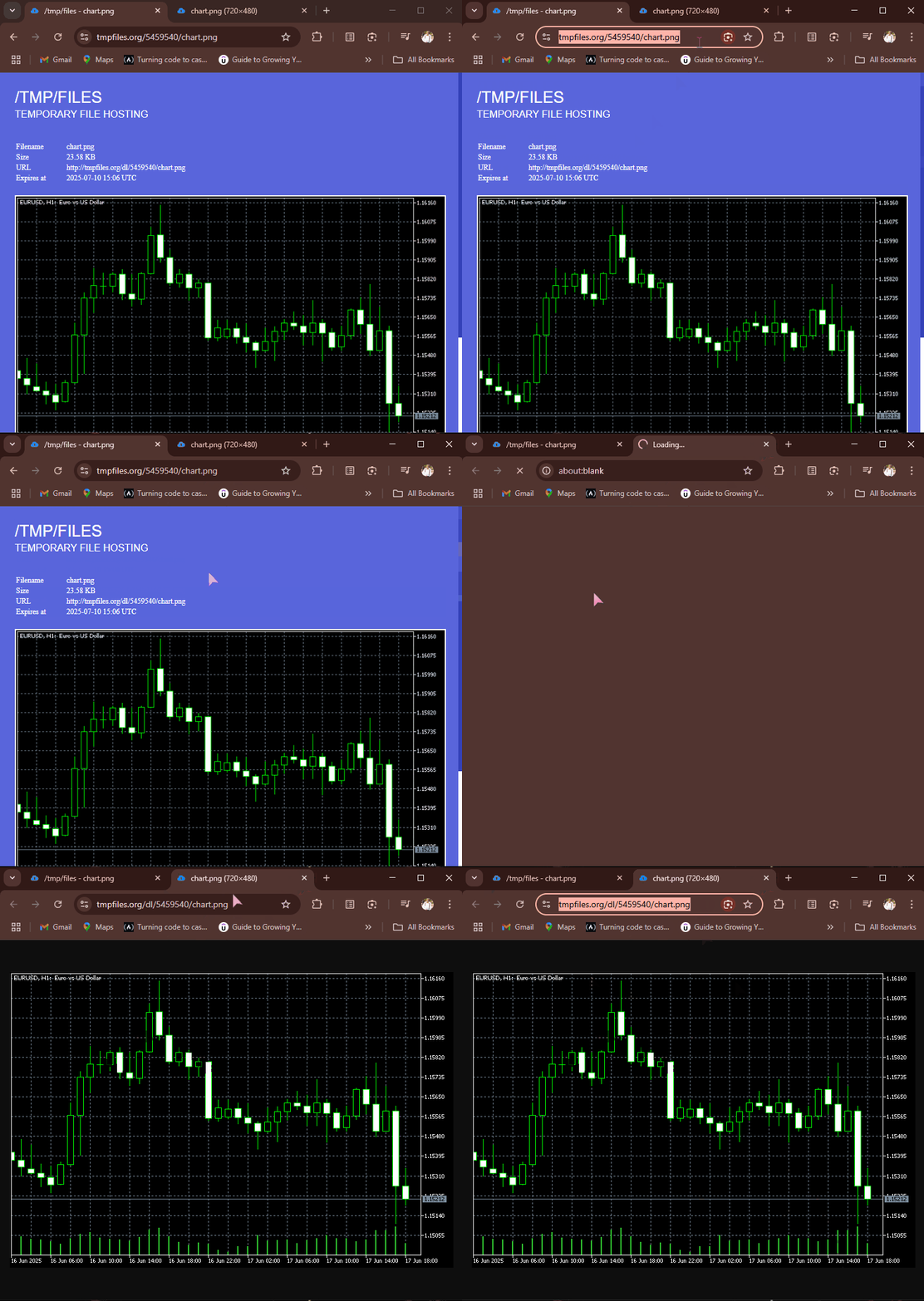
Após a execução bem-sucedida da requisição POST, o tempfiles.org retorna uma resposta JSON contendo a URL do endpoint onde o arquivo foi armazenado. Podemos acessar esse link e visualizar a imagem diretamente no navegador.
Obtenção e download de arquivos da internet
A internet também permite compartilhar informações e arquivos de diferentes tipos. A possibilidade de baixar arquivos diretamente pelo MQL5 é especialmente útil para obter dados em formatos como CSV e Excel, modelos de machine learning já treinados e seus parâmetros em diversos formatos binários, entre muitas outras aplicações.
A função get que implementamos já permite realizar essas operações, desde que seja informado o endpoint correto da API.
Por exemplo, vamos obter uma imagem do httpbin.org e salvá-la no diretório de dados do MQL5.
#include <requests.mqh>
CSession requests;
//+------------------------------------------------------------------+
//| Script program start function                                    |
//+------------------------------------------------------------------+
void OnStart()
  {
      //--- Get the image file from the web
      CResponse response = requests.get("https://httpbin.org/image/jpeg");
 }
Quando executada com sucesso, a função retorna o arquivo de imagem criptografado ou os dados correspondentes em formato binário.
Esses dados ficam disponíveis na variável CResponse::content.
void OnStart()
  {
      //--- Get the image file from the web
      CResponse response = requests.get("https://httpbin.org/image/jpeg");

      //--- Saving an image received in binary format stored in response.content

      int handle = FileOpen("image.jpg", FILE_WRITE|FILE_BIN|FILE_SHARE_WRITE); //Open a .jpg file for writting an image to it
      if (handle == INVALID_HANDLE) //Check the handle
         {
            printf("Failed to open an Image. Error=%s",ErrorDescription(GetLastError()));
            return;
         }

      if (FileWriteArray(handle, response.content)==0) //write all binary data to a image.jpg file
         {
            printf("Failed to write an Image. Error=%s",ErrorDescription(GetLastError()));
            return;
         }

      FileClose(handle);
  }
Resultados.
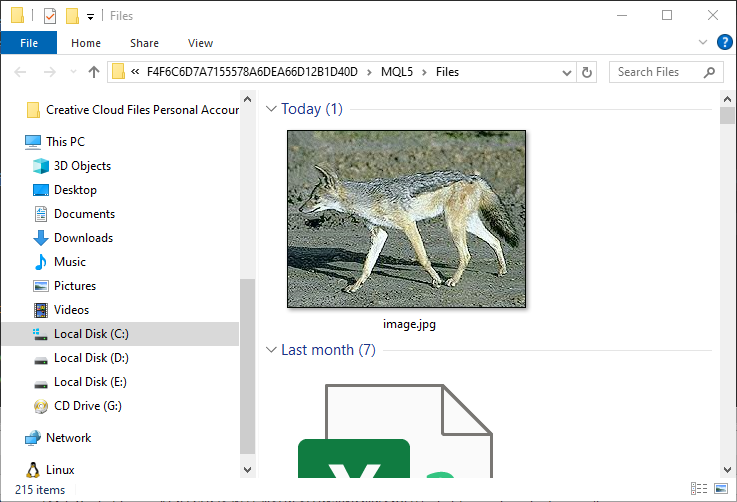
A imagem de uma raposa (ou seja lá que animal for) fica armazenada na pasta MQL5/Files.
Gerenciamento de sessões e cookies
Talvez você tenha notado que todas as funções da classe CSession são estáticas, o que a caracteriza como uma classe "estática".
class CSession
  {
protected:
   //.... other lines of code

public:

                            CSession(const string headers, const string cookies=""); // Provides headers cookies persistance
                           ~CSession(void);

   static void SetCookie(const string cookie)
      {
         if (StringLen(m_cookies) > 0)
            m_cookies += "; ";
         m_cookies += cookie;
      }

   static void ClearCookies()
      {
         m_cookies = "";
      }

   static void              SetBasicAuth(const string username, const string password);

   //---

   static CResponse         request(const string method, const string url, const string data, const string &files[], const string headers = "", const int timeout = 5000, const bool is_json=true);

   // High-level request helpers
   static CResponse         get(const string url, const string headers = "", const int timeout = 5000)
     {
       string files[];
       return request("GET", url, "", files, headers, timeout, false);
     }

     //... other functions
 }
O objetivo é permitir que os desenvolvedores utilizem a biblioteca requests parcialmente ou por completo, reproduzindo o funcionamento do módulo requests do Python.
(a) Uso da classe por meio de uma instância
#include <requests.mqh>
//+------------------------------------------------------------------+
//| Script program start function                                    |
//+------------------------------------------------------------------+
void OnStart()
  {
//---

     string headers = "Content-Type: application/json;";
     string cookies = "sessionid=abc123";

     CSession session(headers, cookies); //New session, class constructor calle with
     CResponse response = session.get("https://httpbin.org/cookies"); //receive cookies from the server

      Print("HTTP response");
      Print("--> Status Code: ", response.status_code);
      Print("--> Reason: ", response.reason);
      Print("--> URL: ", response.url);
      Print("--> OK: ", (string)response.ok);
      Print("--> Elapsed Time (ms): ", response.elapsed);

      Print("--> Headers:\n", response.headers);
      Print("--> Cookies: ", response.cookies);
      Print("--> Response text: ",response.text);
      Print("--> JSON:\n", response.json.ToStr());
}
Resultados.
DS      0       11:38:36.272    Requests test (XAUUSD,D1)       HTTP response
RI      0       11:38:36.272    Requests test (XAUUSD,D1)       --> Status Code: 200
KR      0       11:38:36.272    Requests test (XAUUSD,D1)       --> Reason: OK
NG      0       11:38:36.272    Requests test (XAUUSD,D1)       --> URL: https://httpbin.org/cookies
IF      0       11:38:36.272    Requests test (XAUUSD,D1)       --> OK: true
QQ      0       11:38:36.272    Requests test (XAUUSD,D1)       --> Elapsed Time (ms): 2141
IH      0       11:38:36.272    Requests test (XAUUSD,D1)       --> Headers:
FQ      0       11:38:36.272    Requests test (XAUUSD,D1)       Date: Sat, 12 Jul 2025 08:38:36 GMT
RE      0       11:38:36.272    Requests test (XAUUSD,D1)       Content-Type: application/json
FO      0       11:38:36.272    Requests test (XAUUSD,D1)       Content-Length: 49
DE      0       11:38:36.272    Requests test (XAUUSD,D1)       Connection: keep-alive
CR      0       11:38:36.272    Requests test (XAUUSD,D1)       Server: gunicorn/19.9.0
PK      0       11:38:36.272    Requests test (XAUUSD,D1)       Access-Control-Allow-Origin: *
HM      0       11:38:36.272    Requests test (XAUUSD,D1)       Access-Control-Allow-Credentials: true
QN      0       11:38:36.272    Requests test (XAUUSD,D1)
DL      0       11:38:36.272    Requests test (XAUUSD,D1)       --> Cookies:
LG      0       11:38:36.272    Requests test (XAUUSD,D1)       --> Response text: {
EP      0       11:38:36.272    Requests test (XAUUSD,D1)         "cookies": {
HJ      0       11:38:36.272    Requests test (XAUUSD,D1)           "sessionid": "abc123"
RN      0       11:38:36.272    Requests test (XAUUSD,D1)         }
DE      0       11:38:36.272    Requests test (XAUUSD,D1)       }
EM      0       11:38:36.272    Requests test (XAUUSD,D1)
MD      0       11:38:36.272    Requests test (XAUUSD,D1)       --> JSON:
GH      0       11:38:36.272    Requests test (XAUUSD,D1)
Ao criar uma instância da classe por meio de seu construtor, podemos fornecer cabeçalhos e cookies opcionais. Isso permite definir valores de cabeçalhos compartilhados e reutilizar os mesmos cookies em todas as requisições HTTP realizadas com essa instância. É o que chamamos de sessão HTTP.
(b) Uso individual das funções da classe
Também é possível realizar requisições HTTP simples sem manter uma sessão HTTP, definindo os cabeçalhos e cookies separadamente para cada nova requisição.
Veja a seguir como utilizar diretamente as funções da classe CSession, sem criar uma instância.
#include <requests.mqh>
//+------------------------------------------------------------------+
//| Script program start function                                    |
//+------------------------------------------------------------------+
void OnStart()
  {
//---

     CResponse response = CSession::get("https://httpbin.org/get"); //The get request

      Print("HTTP response");
      Print("--> Status Code: ", response.status_code);
      Print("--> Reason: ", response.reason);
      Print("--> URL: ", response.url);
      Print("--> OK: ", (string)response.ok);
      Print("--> Elapsed Time (ms): ", response.elapsed);

      Print("--> Headers:\n", response.headers);
      Print("--> Cookies: ", response.cookies);
      Print("--> Response text: ",response.text);
      Print("--> JSON:\n", response.json.ToStr());
 }
Autenticação básica
Todas as funções do módulo requests do Python permitem enviar credenciais de autenticação básica ao servidor.
import requests

response = requests.get("https://httpbin.org/headers", auth=("user", "pass"))
print(response.text)
Nossa classe MQL5 oferece uma funcionalidade semelhante, apresentada a seguir.
void CSession::SetBasicAuth(const string username, const string password)
  {
   string credentials = username + ":" + password;
   string encoded = Base64Encode(credentials); //Encode the credentials

   m_headers = UpdateHeader(m_headers, "Authorization", "Basic " + encoded); //Update HTTP headers with the authentication information
  }
Diferentemente do módulo requests do Python, que permite passar os parâmetros de autenticação diretamente às funções, nossa implementação em MQL5 utiliza uma abordagem um pouco diferente: os parâmetros de autenticação básica são fornecidos por meio de uma função específica.
A função SetBasicAuth atualiza os cabeçalhos da classe, adicionando as credenciais de autenticação. Esses valores ficam disponíveis para todas as funções chamadas posteriormente com a mesma instância da classe.
#include <requests.mqh>
//+------------------------------------------------------------------+
//| Script program start function                                    |
//+------------------------------------------------------------------+
void OnStart()
  {
//---

     CSession::SetBasicAuth("user", "pass");   //Sets authentication parameters to the HTTP header
     CResponse response = CSession::get("https://httpbin.org/headers"); //Get the headers from the server

      Print("HTTP response");
      Print("--> Headers:\n", response.headers);
      Print("--> Response text: ",response.text);
 }
Resultados.
IE      0       14:23:23.885    Requests test (XAUUSD,D1)       HTTP response
FQ      0       14:23:23.885    Requests test (XAUUSD,D1)       --> Headers:
KI      0       14:23:23.885    Requests test (XAUUSD,D1)       Date: Sat, 12 Jul 2025 11:23:23 GMT
MM      0       14:23:23.885    Requests test (XAUUSD,D1)       Content-Type: application/json
HK      0       14:23:23.885    Requests test (XAUUSD,D1)       Content-Length: 385
IR      0       14:23:23.885    Requests test (XAUUSD,D1)       Connection: keep-alive
JJ      0       14:23:23.885    Requests test (XAUUSD,D1)       Server: gunicorn/19.9.0
IS      0       14:23:23.885    Requests test (XAUUSD,D1)       Access-Control-Allow-Origin: *
QE      0       14:23:23.885    Requests test (XAUUSD,D1)       Access-Control-Allow-Credentials: true
HF      0       14:23:23.885    Requests test (XAUUSD,D1)
KG      0       14:23:23.885    Requests test (XAUUSD,D1)       --> Response text: {
KP      0       14:23:23.885    Requests test (XAUUSD,D1)         "headers": {
GH      0       14:23:23.885    Requests test (XAUUSD,D1)           "Accept": "*/*",
CM      0       14:23:23.885    Requests test (XAUUSD,D1)           "Accept-Encoding": "gzip, deflate",
DQ      0       14:23:23.885    Requests test (XAUUSD,D1)           "Accept-Language": "en;q=0.5",
NE      0       14:23:23.885    Requests test (XAUUSD,D1)           "Authorization": "Basic dXNlcjpwYXNz",
NS      0       14:23:23.885    Requests test (XAUUSD,D1)           "Cookie": "session=abc123;max-age=60;",
KL      0       14:23:23.885    Requests test (XAUUSD,D1)           "Host": "httpbin.org",
HK      0       14:23:23.885    Requests test (XAUUSD,D1)           "User-Agent": "MetaTrader 5 Terminal/5.5120 (Windows NT 10.0.19045; x64)",
NI      0       14:23:23.885    Requests test (XAUUSD,D1)           "X-Amzn-Trace-Id": "Root=1-687245ab-2065056c28f0024b71a6446f"
GH      0       14:23:23.885    Requests test (XAUUSD,D1)         }
IF      0       14:23:23.885    Requests test (XAUUSD,D1)       }
Manipulação de parâmetros de URL
Outro recurso interessante do módulo requests do Python é a capacidade de processar a URL fornecida e seus parâmetros antes de enviar a requisição web final.
import requests

response = requests.get("https://httpbin.org/get", params={"param1": "value1"})
print(response.url)
Resultados.
https://httpbin.org/get?param1=value1
Em nossa classe MQL5, adotamos uma abordagem um pouco diferente. Em vez de passar os parâmetros da URL a todas as funções, o que tornaria seu uso mais complexo, utilizamos uma função auxiliar específica para montar a URL final a partir do endereço original e dos parâmetros associados.
#include <requests.mqh>
//+------------------------------------------------------------------+
//| Script program start function                                    |
//+------------------------------------------------------------------+
void OnStart()
  {
//---
      string keys[]   = {"user", "id", "lang"};
      string values[] = {"omega", "123", "mql5 test"};

      string parent_url = "https://httpbin.org/get";
      string final_url =  CSession::BuildUrlWithParams(parent_url, keys, values); //builds a URL with the given parameters

      Print("final url: ",final_url);
 }
Resultados.
2025.07.12 15:41:57.924 Requests test (XAUUSD,D1) final url: https://httpbin.org/get?user=omega&id=123&lang=mql5+test Depois de montar a URL com os parâmetros correspondentes, você pode utilizá-la para enviar requisições HTTP a recursos web.
      CResponse response = CSession::get(final_url); //Get the headers from the server

      Print("HTTP response");
      Print("--> Headers:\n", response.headers);
      Print("--> Response text: ",response.text);
Resultados.
JK      0       15:42:00.398    Requests test (XAUUSD,D1)       --> Headers:
QP      0       15:42:00.398    Requests test (XAUUSD,D1)       Date: Sat, 12 Jul 2025 12:41:59 GMT
QK      0       15:42:00.398    Requests test (XAUUSD,D1)       Content-Type: application/json
PM      0       15:42:00.398    Requests test (XAUUSD,D1)       Content-Length: 525
ED      0       15:42:00.398    Requests test (XAUUSD,D1)       Connection: keep-alive
FP      0       15:42:00.398    Requests test (XAUUSD,D1)       Server: gunicorn/19.9.0
MH      0       15:42:00.398    Requests test (XAUUSD,D1)       Access-Control-Allow-Origin: *
EK      0       15:42:00.398    Requests test (XAUUSD,D1)       Access-Control-Allow-Credentials: true
LM      0       15:42:00.398    Requests test (XAUUSD,D1)
OI      0       15:42:00.398    Requests test (XAUUSD,D1)       --> Response text: {
RQ      0       15:42:00.398    Requests test (XAUUSD,D1)         "args": {
CR      0       15:42:00.398    Requests test (XAUUSD,D1)           "id": "123",
KF      0       15:42:00.398    Requests test (XAUUSD,D1)           "lang": "mql5 test",
HI      0       15:42:00.398    Requests test (XAUUSD,D1)           "user": "omega"
KP      0       15:42:00.398    Requests test (XAUUSD,D1)         },
MP      0       15:42:00.398    Requests test (XAUUSD,D1)         "headers": {
IH      0       15:42:00.398    Requests test (XAUUSD,D1)           "Accept": "*/*",
QL      0       15:42:00.398    Requests test (XAUUSD,D1)           "Accept-Encoding": "gzip, deflate",
JQ      0       15:42:00.398    Requests test (XAUUSD,D1)           "Accept-Language": "en;q=0.5",
NF      0       15:42:00.398    Requests test (XAUUSD,D1)           "Cookie": "session=abc123;max-age=60;",
KQ      0       15:42:00.398    Requests test (XAUUSD,D1)           "Host": "httpbin.org",
HP      0       15:42:00.398    Requests test (XAUUSD,D1)           "User-Agent": "MetaTrader 5 Terminal/5.5120 (Windows NT 10.0.19045; x64)",
ND      0       15:42:00.398    Requests test (XAUUSD,D1)           "X-Amzn-Trace-Id": "Root=1-68725817-67dc04cf43ac75b012094481"
KE      0       15:42:00.398    Requests test (XAUUSD,D1)         },
CQ      0       15:42:00.398    Requests test (XAUUSD,D1)         "origin": "197.250.227.235",
MD      0       15:42:00.398    Requests test (XAUUSD,D1)         "url": "https://httpbin.org/get?user=omega&id=123&lang=mql5+test"
IK      0       15:42:00.398    Requests test (XAUUSD,D1)       }
LN      0       15:42:00.398    Requests test (XAUUSD,D1)
Excelente! O servidor respondeu incluindo a chave args no texto JSON da resposta, confirmando que a URL foi montada corretamente com os parâmetros fornecidos.
Conclusão
Com tanto conhecimento gratuito disponível ao público e tantos recursos de código aberto acessíveis atualmente, programar não deveria ser uma tarefa tão difícil.
Depois de entender como funciona o módulo requests do Python, consegui implementar um módulo semelhante em MQL5 para simplificar o envio de requisições HTTP do MetaTrader 5 para servidores externos.
No entanto, embora a sintaxe e as chamadas de funções possam parecer semelhantes às do módulo requests do Python, nossa implementação em MQL5 ainda está longe de estar concluída. Precisamos testá-la cuidadosamente e aprimorá-la continuamente. Por isso, criei um repositório no Forge MQL5 (link: https://forge.mql5.io/omegajoctan/Requests).
Fique à vontade para contribuir com alterações no código e compartilhar suas ideias na seção de discussões.
Tudo de bom a todos.
Tabela de anexos
| Nome do arquivo | Descrição e utilização |
|---|---|
| Include\errordescription.mqh | Contém as descrições de todos os códigos de erro gerados pelo MQL5 e pelo MetaTrader 5. |
| Include\Jason.mqh | Biblioteca para serialização e desserialização de strings em um formato semelhante ao JSON. |
| Include\requests.mqh | Módulo principal, semelhante ao requests do Python. |
| Scripts\Requests test.mq5 | Script principal para testar todas as funções e métodos descritos neste artigo. |
Traduzido do Inglês pela MetaQuotes Ltd.
Artigo original: https://www.mql5.com/en/articles/18728
Aviso: Todos os direitos sobre esses materiais pertencem à MetaQuotes Ltd. É proibida a reimpressão total ou parcial.
Esse artigo foi escrito por um usuário do site e reflete seu ponto de vista pessoal. A MetaQuotes Ltd. não se responsabiliza pela precisão das informações apresentadas nem pelas possíveis consequências decorrentes do uso das soluções, estratégias ou recomendações descritas.

 Recursos do Assistente MQL5 que você precisa conhecer (Parte 75): Utilização do Awesome Oscillator e do canal Envelopes
 Ferramentas de negociação em MQL5 (Parte 4): Aprimorando o painel do scanner multitimeframe com posicionamento dinâmico e recursos de recolhimento e expansão
 Criação de EAs que se auto-otimizam em MQL5 (Parte 9): Cruzamento duplo de médias móveis
 Desenvolvimento de ferramentas para análise de Price Action (Parte 31): Módulo de reconhecimento de padrões de candles em Python (I): reconhecimento manual

- Aplicativos de negociação gratuitos
- 8 000+ sinais para cópia
- Notícias econômicas para análise dos mercados financeiros
Você concorda com a política do site e com os termos de uso