

Implementierung von praktischen Modulen aus anderen Sprachen in MQL5 (Teil 02): Aufbau der REQUESTS-Bibliothek, inspiriert von Python
 396
396
 0
0

Inhalt
- Einführung
- Eine Web-Request stellen
- Verschiedene Webanfragen in verschiedenen Funktionen
- Hochladen von Dateien ins Internet
- Empfangen und Herunterladen von Dateien aus dem Internet
- Umgang mit Sitzungen und Cookies
- Basis-Authentifizierung
- Umgang mit URL-Parametern
- Schlussfolgerung
Einführung
Die Möglichkeit, HTTP-Anfragen direkt von MetaTrader 5 aus an das Web zu senden, ist eines der besten Dinge, die der Programmiersprache MQL5 je widerfahren sind. Mit dieser Fähigkeit können Händler mit ihren externen Websites, Servern, Handelsanwendungen usw. kommunizieren.
Dadurch sind wir in der Lage, fast alles innerhalb der Handelsplattform zu tun, z. B. Daten aus externen Quellen abzurufen, Handelsbenachrichtigungen an unsere Kollegen zu senden und vieles mehr.
Diese Fähigkeit wurde durch die in MQL5 verfügbare Funktion WebRequest ermöglicht, mit der wir jede HTTP-Aktion durchführen können, wie z. B:
- Senden von „POST“-Anfragen zum Senden von Informationen an externe Server.
- Abrufen von Informationen aus dem Internet mit der berühmten „GET“-Anfrage.
- Senden von PATCH-Anfragen an das Web zur Änderung von Informationen aus der Datenbank des Servers.
- Senden von PUT-Anfragen an das Web zur Aktualisierung von Werten in der Datenbank des Servers.
Um nur einige HTTP-Aktionen zu nennen.
Diese einzige Funktion kann jedoch manchmal überwältigend sein, und sie ist nicht nutzerfreundlich.
Das Senden einer einfachen Webanforderung zur Durchführung einer der oben genannten Aktionen ist sehr aufwändig, zumal man sich um HTTP-Methoden, Header und vieles mehr kümmern muss. Ganz zu schweigen davon, dass Sie den Prozess der Verarbeitung der Daten, die Sie senden oder empfangen wollen, hart programmieren müssen.

Wenn Sie jemals ein Web-Framework oder Module für ähnliche Aufgaben in Ihrer Programmierkarriere verwendet haben, werden Sie vielleicht feststellen, dass die meisten Frameworks außerhalb von MQL5 die meisten grundlegenden Aufgaben und Operationen erledigen können, die diese WebRequest-Funktion in MQL5 nicht kann.
Eines der Module ist requests aus der Programmiersprache Python.
Das Modul Requests, genannt HTTP für Menschen,
ist eine einfache, aber elegante HTTP-Bibliothek, die es Programmierern ermöglicht, HTTP/1.1-Anfragen extrem einfach zu senden.
Mit dieser Bibliothek müssen Python-Entwickler keine Query-Strings manuell in URLs einfügen oder PUT- und POST-Daten in Form kodieren, und vieles mehr, da alles gut durchdacht und auch für „Nicht-Techniker“ vereinfacht ist.
In diesem Artikel werden wir ein ähnliches Modul mit ähnlichen Funktionen, einer ähnlichen Syntax und ähnlichen Möglichkeiten implementieren. In der Hoffnung, es einfach und bequem zu machen, Webabfragen in MQL5 wie in Python durchzuführen.
Eine Web-Anfrage stellen
Dies ist die Hauptfunktionalität des Anfragemoduls. Die Anforderungsfunktion ist diejenige, die Dinge und Informationen in verschiedenen Formaten aus dem Web sendet und empfängt.
Bevor wir eine ähnliche Methode nachahmen, die im Modul requests in Python angeboten wird, sehen wir uns diese Funktion erst einmal an.
Die Anfragemethode in Python sieht wie folgt aus.
def request(
    method: str | bytes,
    url: str | bytes,
    *,
    params: _Params | None = ...,
    data: _Data | None = ...,
    headers: _HeadersMapping | None = ...,
    cookies: CookieJar | _TextMapping | None = ...,
    files: _Files | None = ...,
    auth: _Auth | None = ...,
    timeout: _Timeout | None = ...,
    allow_redirects: bool = ...,
    proxies: _TextMapping | None = ...,
    hooks: _HooksInput | None = ...,
    stream: bool | None = ...,
    verify: _Verify | None = ...,
    cert: _Cert | None = ...,
    json: Any | None = None
) -> Response
Diese Funktion benötigt eine Reihe von Argumenten für die HTTP-Webanforderung. Beginnen wir mit dem Aufbau mit einigen wenigen Parametern: Die Parameter Methode, URL, Daten, Header, Timeout und json.
CResponse CSession::request(const string method, //HTTP method GET, POST, etc
                             const string url, //endpoint url
                             const string data = "", //The data you want to send if the method is POST or PUT
                             const string headers = "", //HTTP headers
                             const int timeout = 5000, //Request timeout (milliseconds)
                             const bool is_json=true) //Checks whether the given data is in JSON format
  {
   char data_char[];
   char result[];
   string result_headers;
   string temp_data = data;

   CResponse response; //a structure containing various response fields

//--- Managing the headers

   string temp_headers = m_headers;
   if (headers != "") // If the user provided additional headers, append them
      temp_headers += headers;

//--- Updating the headers with the information received

   if(is_json) //If the information parsed is
     {
         //--- Convert dictionary to JSON string

         CJAVal js(NULL, jtUNDEF);
         bool b = js.Deserialize(data, CP_UTF8);

         string json;
         js.Serialize(json); //Get the serialized Json outcome
         temp_data = json; //Assign the resulting serialized Json to the temporary data array

         //--- Set "Content-Type: application/json"

         temp_headers = UpdateHeader(temp_headers, "Content-Type", "application/json");
         if (MQLInfoInteger(MQL_DEBUG))
           printf("%s: %s",__FUNCTION__,temp_headers);
     }
    else
      {
         temp_headers = UpdateHeader(temp_headers, headers);
         if (MQLInfoInteger(MQL_DEBUG))
           printf("%s: %s",__FUNCTION__,temp_headers);
      }

//--- Convert data to byte array (for POST, PUT, etc.)

   if (StringToCharArray(temp_data, data_char, 0, StringLen(temp_data), CP_UTF8)<0) //Convert the data in a string format to a uchar
      {
         printf("%s, Failed to convert data to a Char array. Error = %s",__FUNCTION__,ErrorDescription(GetLastError()));
         return response;
      }

//--- Perform the WebRequest

   uint start = GetTickCount(); //starting time of the request

   int status = WebRequest(method, url, temp_headers, timeout, data_char, result, result_headers); //trigger a webrequest function
   if(status == -1)
     {
      PrintFormat("WebRequest failed with error %s", ErrorDescription(GetLastError()));
      response.status_code = 0;
      return response;
     }

//--- Fill the response struct

   response.elapsed = (GetTickCount() - start);

   string results_string = CharArrayToString(result);
   response.text = results_string;

   CJAVal js;

   if (!js.Deserialize(result))
      if (MQLInfoInteger(MQL_DEBUG))
         printf("Failed to serialize data received from WebRequest");

   response.json = js;

   response.cookies = js["cookies"].ToStr();

   response.status_code = status;
   ArrayCopy(response.content, result);
   response.headers = result_headers;
   response.url = url;
   response.ok = (status >= 200 && status < 400);
   response.reason = WebStatusText(status); // a custom helper for translating status codes

   return response;
  }
Die request-Funktion in Python gibt uns zwei Optionen für die Übergabe der Daten an eine Webanfrage mit zwei verschiedenen Argumenten; das data-Argument für die Übergabe aller Nicht-JSON-Daten und das json-Argument für die Übergabe der JSON-Daten.
Da beide Argumente die Informationen liefern, die in die Anfrage eingespeist werden sollen, und nur ein Argument für das Senden der Daten verwendet werden kann, d.h., Sie senden entweder Rohdaten (HTML, reiner Text usw.) oder JSON-formatierte Daten.
Die Funktion in Python erkennt also den Typ der gegebenen Daten (JSON oder anderweitig) und passt ihre Kopfzeilen entsprechend den vom Nutzer angegebenen Kopfzeilen an. So wird beispielsweise die Kopfzeile Content-Type: application/json angehängt oder geändert, wenn die JSON-Daten angegeben werden.
Wir könnten zwar auch beide Argumente in der MQL5-Funktion haben, aber ich finde die Idee so verwirrend und fügt unnötige Komplexität hinzu. Die Funktion in unserer MQL5-Klasse nimmt also nur ein Argument namens data für das Senden von Daten an das Web, das boolesche Argument namens is_json ist für die Unterscheidung der in der Variablen data empfangenen Informationen (zwischen JSON und anderen Typen) innerhalb der Funktion verantwortlich.
Wenn das Argument is_json auf true gesetzt ist, fügt die Funktion den empfangenen Header mit dem Wert(Content-Type: application/json) an oder ändert ihn. Zuvor werden jedoch die empfangenen Daten aus den Argumentdaten in das richtige JSON-Format serialisiert, bevor sie an das Web gesendet werden.
//--- Updating the headers with the information received

   if(is_json) //If the information parsed is
     {
         //--- Convert dictionary to JSON string

         CJAVal js(NULL, jtUNDEF);
         bool b = js.Deserialize(data, CP_UTF8);

         string json;
         js.Serialize(json); //Get the serialized Json outcome
         temp_data = json; //Assign the resulting serialized Json to the temporary data array

         //--- Set "Content-Type: application/json"

         temp_headers = UpdateHeader(temp_headers, "Content-Type", "application/json");
         if (MQLInfoInteger(MQL_DEBUG))
           printf("%s: %s",__FUNCTION__,temp_headers);
     }
    else
      {
         temp_headers = UpdateHeader(temp_headers, headers);
         if (MQLInfoInteger(MQL_DEBUG))
           printf("%s: %s",__FUNCTION__,temp_headers);
      }
Die Methode Request, die im Python-Modul Requests angeboten wird, gibt eine Vielzahl von Variablen entsprechend der HTTP Response zurück: die Informationen über den Status der Anfrage, empfangene Daten, Fehler und vieles mehr enthalten.
import requests

r = requests.get('https://api.github.com/events')

# Print the raw response
print("Raw response:", r)

# Status code
print("Status Code:", r.status_code)

# Reason phrase
print("Reason:", r.reason)

# URL (final URL after redirects)
print("URL:", r.url)

# Headers (dictionary)
print("Headers:")

#... other responses
Um dies zu erreichen, benötigen wir eine ähnliche Struktur in unserer MQL5-Klasse.
In der Datei requests.mqh befindet sich die Klasse CResponse.
struct CResponse
  {
   int               status_code; // HTTP status code (e.g., 200, 404)
   string            text;        // Raw response body as string

   CJAVal            json;        // Parses response as JSON
   uchar             content[];   // Raw bytes of the response
   string            headers;     // Dictionary of response headers
   string            cookies;     // Cookies set by the server
   string            url;         // Final URL after redirects
   bool              ok;          // True if status_code < 400
   uint              elapsed;     // Time taken for the response in ms
   string            reason;      // Text reason (e.g., "OK", "Not Found")
  };
Dies ist die Struktur, die die Funktion request innerhalb der Klasse CSession zurückgibt – wir werden sie in einer Sekunde besprechen.
Nachfolgend finden Sie eine tabellarische Liste aller Variablen und der Informationen, die sie innerhalb der Klasse CResponse-Klasse.
| Variabel | Datentyp | Beschreibung |
|---|---|---|
| status_code | int | HTTP-Statuscode, der vom Server zurückgegeben wird (z. B. 200=OK, 404 = Not Found, usw.) |
| text | string | Der vollständige Antwortkörper als Rohzeichenfolge (z. B. HTML, JSON oder Text) |
| json | CJAVal | Ein geparstes JSON-Objekt aus dem Antwortkörper, wenn der Serialisierungsprozess erfolgreich war. |
| content[] | uchar | Rohes Byte-Array des Antwortkörpers (nützlich für binäre Antworten). |
| headers | string | Ein Wörterbuch, das HTTP-Antwort-Header enthält. Diese kann bei Bedarf in JSON konvertiert werden. |
| cookies | string | Vom Server gesetzte Cookies (ggf. aus Set-cookie-Headern extrahiert). |
| url | string | Die endgültige URL nach allen Weiterleitungen. |
| ok | bool | Wird wahr , wenn der Statuscode < 400 ist, d.h. keine Client/Server-Fehler bei dem Vorgang aufgetreten sind. |
| elapsed | uint | Die Zeit in Millisekunden, die für den Abschluss der Anfrage benötigt wird |
| reason | string | HTTP-Statuscode im Textformat – für Menschen lesbar. |
Im Folgenden wird beschrieben, wie Sie die Abfragefunktion verwenden.
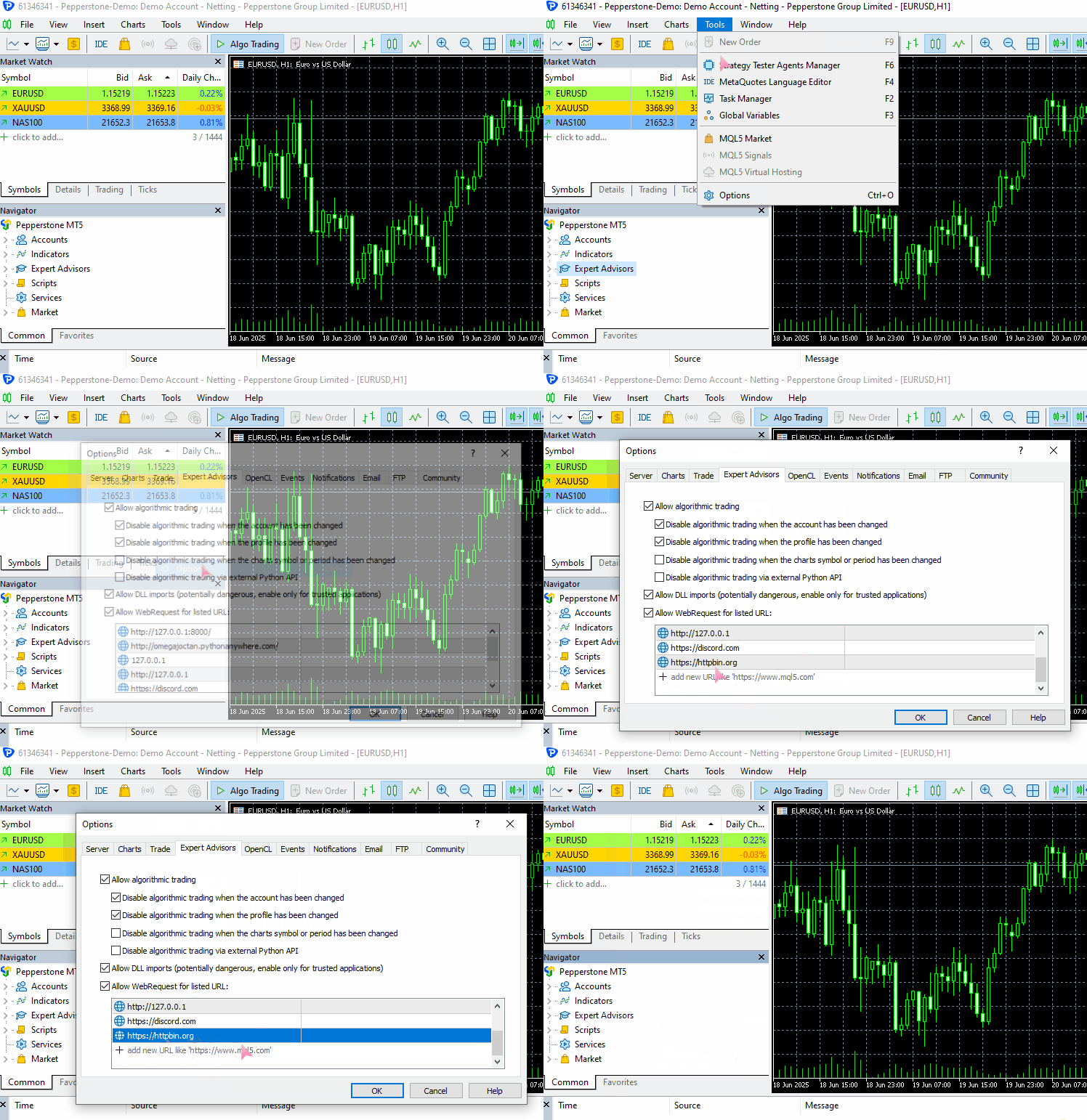
Damit dieses Beispiel auf Ihrem Rechner funktioniert, müssen Sie https://httpbin.org (eine Test-URL) in die Liste der zulässigen URLs in MetaTrader 5 aufnehmen.
(a): Versenden der JSON-Daten
#include <requests.mqh>
//+------------------------------------------------------------------+
//| Script program start function                                    |
//+------------------------------------------------------------------+
void OnStart()
  {
//---

     string json = "{\"username\": \"omega\", \"password\": \"secret123\"}";

     CResponse response = CSession::request("POST","https://httpbin.org/post", json, NULL, 5000, true);

      Print("Status Code: ", response.status_code);
      Print("Reason: ", response.reason);
      Print("URL: ", response.url);
      Print("OK: ", (string)response.ok);
      Print("Elapsed Time (ms): ", response.elapsed);

      Print("Headers:\n", response.headers);
      Print("Cookies: ", response.cookies);
      Print("Response: ",response.text);
      Print("JSON:\n", response.json["url"].ToStr());
 }
Ausgabe:
JF      0       08:10:33.226    Requests test (XAUUSD,D1)       CSession::request: Content-Type: application/json
GF      0       08:10:33.226    Requests test (XAUUSD,D1)
MI      0       08:10:34.578    Requests test (XAUUSD,D1)       Status Code: 200
PS      0       08:10:34.578    Requests test (XAUUSD,D1)       Reason: OK
LH      0       08:10:34.578    Requests test (XAUUSD,D1)       URL: https://httpbin.org/post
HP      0       08:10:34.578    Requests test (XAUUSD,D1)       OK: true
IF      0       08:10:34.578    Requests test (XAUUSD,D1)       Elapsed Time (ms): 1343
HO      0       08:10:34.578    Requests test (XAUUSD,D1)       Headers:
QE      0       08:10:34.578    Requests test (XAUUSD,D1)       Date: Fri, 04 Jul 2025 05:10:35 GMT
MG      0       08:10:34.578    Requests test (XAUUSD,D1)       Content-Type: application/json
HQ      0       08:10:34.578    Requests test (XAUUSD,D1)       Content-Length: 619
IH      0       08:10:34.578    Requests test (XAUUSD,D1)       Connection: keep-alive
JL      0       08:10:34.578    Requests test (XAUUSD,D1)       Server: gunicorn/19.9.0
QD      0       08:10:34.578    Requests test (XAUUSD,D1)       Access-Control-Allow-Origin: *
IO      0       08:10:34.578    Requests test (XAUUSD,D1)       Access-Control-Allow-Credentials: true
PI      0       08:10:34.578    Requests test (XAUUSD,D1)
GO      0       08:10:34.578    Requests test (XAUUSD,D1)       Cookies:
HH      0       08:10:34.578    Requests test (XAUUSD,D1)       Response: {
QL      0       08:10:34.578    Requests test (XAUUSD,D1)         "args": {},
FK      0       08:10:34.578    Requests test (XAUUSD,D1)         "data": "{\"username\":\"omega\",\"password\":\"secret123\"}",
MN      0       08:10:34.578    Requests test (XAUUSD,D1)         "files": {},
RH      0       08:10:34.578    Requests test (XAUUSD,D1)         "form": {},
OP      0       08:10:34.578    Requests test (XAUUSD,D1)         "headers": {
CH      0       08:10:34.578    Requests test (XAUUSD,D1)           "Accept": "*/*",
GM      0       08:10:34.578    Requests test (XAUUSD,D1)           "Accept-Encoding": "gzip, deflate",
HQ      0       08:10:34.578    Requests test (XAUUSD,D1)           "Accept-Language": "en;q=0.5",
GH      0       08:10:34.578    Requests test (XAUUSD,D1)           "Content-Length": "43",
IR      0       08:10:34.578    Requests test (XAUUSD,D1)           "Content-Type": "application/json",
EI      0       08:10:34.578    Requests test (XAUUSD,D1)           "Host": "httpbin.org",
NH      0       08:10:34.578    Requests test (XAUUSD,D1)           "User-Agent": "MetaTrader 5 Terminal/5.5120 (Windows NT 10.0.19045; x64)",
HK      0       08:10:34.578    Requests test (XAUUSD,D1)           "X-Amzn-Trace-Id": "Root=1-6867624b-422e528808290adf61a651a3"
IN      0       08:10:34.578    Requests test (XAUUSD,D1)         },
GD      0       08:10:34.578    Requests test (XAUUSD,D1)         "json": {
CN      0       08:10:34.578    Requests test (XAUUSD,D1)           "password": "secret123",
KD      0       08:10:34.578    Requests test (XAUUSD,D1)           "username": "omega"
QM      0       08:10:34.578    Requests test (XAUUSD,D1)         },
EJ      0       08:10:34.578    Requests test (XAUUSD,D1)         "origin": "197.250.227.26",
FQ      0       08:10:34.578    Requests test (XAUUSD,D1)         "url": "https://httpbin.org/post"
EG      0       08:10:34.578    Requests test (XAUUSD,D1)       }
PR      0       08:10:34.578    Requests test (XAUUSD,D1)
NF      0       08:10:34.578    Requests test (XAUUSD,D1)       JSON:
CR      0       08:10:34.578    Requests test (XAUUSD,D1)       https://httpbin.org/post
(b): Versenden der Nicht-JSON-Daten
Am Beispiel der Formulardaten.
#include <requests.mqh>
CSession requests;
//+------------------------------------------------------------------+
//| Script program start function                                    |
//+------------------------------------------------------------------+
void OnStart()
  {
//---

     string form_data = "username=omega&password=secret123"; //mimicking how the final form data is collected in the web

     CResponse response = CSession::post("https://httpbin.org/post", form_data, "Content-Type: application/x-www-form-urlencoded", 5000, false);

      Print("Status Code: ", response.status_code);
      Print("Reason: ", response.reason);
      Print("URL: ", response.url);
      Print("OK: ", (string)response.ok);
      Print("Elapsed Time (ms): ", response.elapsed);

      Print("Headers:\n", response.headers);
      Print("Cookies: ", response.cookies);
      Print("Response: ",response.text);
      Print("JSON:\n", response.json["url"].ToStr());
 }
Ausgabe:
DD      0       08:20:01.411    Requests test (XAUUSD,D1)       Status Code: 200
IN      0       08:20:01.411    Requests test (XAUUSD,D1)       Reason: OK
EG      0       08:20:01.411    Requests test (XAUUSD,D1)       URL: https://httpbin.org/post
QM      0       08:20:01.411    Requests test (XAUUSD,D1)       OK: true
RI      0       08:20:01.411    Requests test (XAUUSD,D1)       Elapsed Time (ms): 1547
QR      0       08:20:01.411    Requests test (XAUUSD,D1)       Headers:
EH      0       08:20:01.411    Requests test (XAUUSD,D1)       Date: Fri, 04 Jul 2025 05:20:02 GMT
DL      0       08:20:01.411    Requests test (XAUUSD,D1)       Content-Type: application/json
MD      0       08:20:01.411    Requests test (XAUUSD,D1)       Content-Length: 587
PM      0       08:20:01.411    Requests test (XAUUSD,D1)       Connection: keep-alive
OK      0       08:20:01.411    Requests test (XAUUSD,D1)       Server: gunicorn/19.9.0
HS      0       08:20:01.411    Requests test (XAUUSD,D1)       Access-Control-Allow-Origin: *
PD      0       08:20:01.411    Requests test (XAUUSD,D1)       Access-Control-Allow-Credentials: true
IF      0       08:20:01.411    Requests test (XAUUSD,D1)
RD      0       08:20:01.411    Requests test (XAUUSD,D1)       Cookies:
QM      0       08:20:01.411    Requests test (XAUUSD,D1)       Response: {
HK      0       08:20:01.411    Requests test (XAUUSD,D1)         "args": {},
OR      0       08:20:01.411    Requests test (XAUUSD,D1)         "data": "",
JE      0       08:20:01.411    Requests test (XAUUSD,D1)         "files": {},
RL      0       08:20:01.411    Requests test (XAUUSD,D1)         "form": {
DF      0       08:20:01.411    Requests test (XAUUSD,D1)           "password": "secret123",
PM      0       08:20:01.411    Requests test (XAUUSD,D1)           "username": "omega"
RE      0       08:20:01.411    Requests test (XAUUSD,D1)         },
PL      0       08:20:01.411    Requests test (XAUUSD,D1)         "headers": {
DE      0       08:20:01.411    Requests test (XAUUSD,D1)           "Accept": "*/*",
LP      0       08:20:01.411    Requests test (XAUUSD,D1)           "Accept-Encoding": "gzip, deflate",
CF      0       08:20:01.411    Requests test (XAUUSD,D1)           "Accept-Language": "en;q=0.5",
EK      0       08:20:01.411    Requests test (XAUUSD,D1)           "Content-Length": "33",
EL      0       08:20:01.411    Requests test (XAUUSD,D1)           "Content-Type": "application/x-www-form-urlencoded",
PH      0       08:20:01.411    Requests test (XAUUSD,D1)           "Host": "httpbin.org",
GO      0       08:20:01.411    Requests test (XAUUSD,D1)           "User-Agent": "MetaTrader 5 Terminal/5.5120 (Windows NT 10.0.19045; x64)",
FQ      0       08:20:01.411    Requests test (XAUUSD,D1)           "X-Amzn-Trace-Id": "Root=1-68676482-6439a0a071c275773681a193"
LM      0       08:20:01.411    Requests test (XAUUSD,D1)         },
JE      0       08:20:01.411    Requests test (XAUUSD,D1)         "json": null,
LM      0       08:20:01.411    Requests test (XAUUSD,D1)         "origin": "197.250.227.26",
KH      0       08:20:01.411    Requests test (XAUUSD,D1)         "url": "https://httpbin.org/post"
LN      0       08:20:01.411    Requests test (XAUUSD,D1)       }
IK      0       08:20:01.411    Requests test (XAUUSD,D1)
CO      0       08:20:01.411    Requests test (XAUUSD,D1)       JSON:
NK      0       08:20:01.411    Requests test (XAUUSD,D1)       https://httpbin.org/post
Fantastisch! Wir waren in der Lage, zwei verschiedene Datentypen über dieselbe Web-Anfrage-Funktion zu senden.
Beachten Sie, dass ich beim Senden des Nicht-JSON-Datentyps (in diesem Fall Formulardaten) im Header-Argument der Anforderungsfunktion explizit „Content-type“ eingestellt habe, um die Formulardaten zu berücksichtigen.
Wenn Sie also keine JSON-Daten senden, die automatisch serialisiert werden, und der richtige HTTP-Header automatisch aktualisiert wird, um diesen Datentyp aufzunehmen, müssen Sie den Content-Type explizit so einstellen, dass er die Art von Daten enthält, die Sie senden möchten.
Für weitere Informationen lesen Sie -> https://beeceptor.com/docs/concepts/content-type/index.html.
Diese Anforderungsfunktion ist in der Lage, alle Arten von HTTP-Anforderungen ähnlich der nativen MQL5-Funktion zu senden, dies ist eine Erweiterung davon.
Da diese Funktion so flexibel ist, wird sie unübersichtlich und fehleranfällig. Angenommen, Sie möchten eine GET-Anfrage senden, um Informationen aus dem Internet zu erhalten.
Wir alle wissen, dass es unangebracht ist, Daten mit der GET-Anfrage zu senden, weil sie dafür gar nicht gedacht ist. Um die Fehleranfälligkeit zu verringern, verfügt das Requests-Modul in Python über mehrere High-Level-Funktionen zum Senden verschiedener Arten von Webrequests, die die Anforderungen einer bestimmten Anfrage berücksichtigen.
Verschiedene Webanfragen in verschiedenen Funktionen
Auf der im vorigen Abschnitt implementierten Request-Funktion können wir mehrere Funktionen für verschiedene HTTP-Aktionen aufbauen:
(a): Die Funktion get
static CResponse         get(const string url, const string headers = "", const int timeout = 5000)
  {
    return request("GET", url, "", headers, timeout, false);
  }
Diese Funktion sendet eine GET-Anfrage an die angegebene URL. Beim Aufruf dieser Funktion werden keine Daten an die URL gesendet, da sie nur zum Empfang der Informationen gedacht ist.
Verwendung:
#include <requests.mqh>
//+------------------------------------------------------------------+
//| Script program start function                                    |
//+------------------------------------------------------------------+
void OnStart()
  {
//---

      CResponse response = CSession::get("https://httpbin.org/get");

      Print("Status Code: ", response.status_code);
      Print("Reason: ", response.reason);
      Print("URL: ", response.url);
      Print("OK: ", (string)response.ok);
      Print("Elapsed Time (ms): ", response.elapsed);

      Print("Headers:\n", response.headers);
      Print("Cookies: ", response.cookies);
      Print("Response: ",response.text);
      Print("JSON:\n", response.json["url"].ToStr());
  }
Ausgabe:
LM      0       09:50:48.904    Requests test (XAUUSD,D1)       Status Code: 200
QF      0       09:50:48.904    Requests test (XAUUSD,D1)       Reason: OK
GQ      0       09:50:48.904    Requests test (XAUUSD,D1)       URL: https://httpbin.org/get
CD      0       09:50:48.904    Requests test (XAUUSD,D1)       OK: true
EQ      0       09:50:48.904    Requests test (XAUUSD,D1)       Elapsed Time (ms): 1782
KJ      0       09:50:48.904    Requests test (XAUUSD,D1)       Headers:
JQ      0       09:50:48.904    Requests test (XAUUSD,D1)       Date: Fri, 04 Jul 2025 06:50:49 GMT
JD      0       09:50:48.904    Requests test (XAUUSD,D1)       Content-Type: application/json
NL      0       09:50:48.904    Requests test (XAUUSD,D1)       Content-Length: 379
NE      0       09:50:48.904    Requests test (XAUUSD,D1)       Connection: keep-alive
MS      0       09:50:48.904    Requests test (XAUUSD,D1)       Server: gunicorn/19.9.0
NH      0       09:50:48.904    Requests test (XAUUSD,D1)       Access-Control-Allow-Origin: *
FL      0       09:50:48.904    Requests test (XAUUSD,D1)       Access-Control-Allow-Credentials: true
KM      0       09:50:48.904    Requests test (XAUUSD,D1)
LL      0       09:50:48.904    Requests test (XAUUSD,D1)       Cookies:
CE      0       09:50:48.904    Requests test (XAUUSD,D1)       Response: {
FS      0       09:50:48.904    Requests test (XAUUSD,D1)         "args": {},
DJ      0       09:50:48.904    Requests test (XAUUSD,D1)         "headers": {
PR      0       09:50:48.904    Requests test (XAUUSD,D1)           "Accept": "*/*",
DF      0       09:50:48.904    Requests test (XAUUSD,D1)           "Accept-Encoding": "gzip, deflate",
KO      0       09:50:48.904    Requests test (XAUUSD,D1)           "Accept-Language": "en;q=0.5",
JL      0       09:50:48.904    Requests test (XAUUSD,D1)           "Host": "httpbin.org",
QK      0       09:50:48.904    Requests test (XAUUSD,D1)           "User-Agent": "MetaTrader 5 Terminal/5.5120 (Windows NT 10.0.19045; x64)",
JI      0       09:50:48.904    Requests test (XAUUSD,D1)           "X-Amzn-Trace-Id": "Root=1-686779c9-147d77346060e72a2fa2282f"
FH      0       09:50:48.904    Requests test (XAUUSD,D1)         },
RI      0       09:50:48.904    Requests test (XAUUSD,D1)         "origin": "197.250.227.26",
CJ      0       09:50:48.904    Requests test (XAUUSD,D1)         "url": "https://httpbin.org/get"
PR      0       09:50:48.904    Requests test (XAUUSD,D1)       }
QG      0       09:50:48.904    Requests test (XAUUSD,D1)
KK      0       09:50:48.904    Requests test (XAUUSD,D1)       JSON:
DQ      0       09:50:48.904    Requests test (XAUUSD,D1)       https://httpbin.org/get
Mit der Funktion get können Sie zwar die Kopfzeilen an die HTTP-Anforderung übergeben, aber Sie können den Typ des vom Server empfangenen Inhalts nicht kontrollieren, selbst wenn Sie Ihre Kopfzeilen auf einen bestimmten Inhaltstyp setzen.
(b): Die Funktion post
static CResponse         post(const string url, const string data = "", const string headers = "", const int timeout = 5000, const bool is_json=true)
  {
    return request("POST", url, data, headers, timeout, is_json);
  }
Diese Funktion sendet eine POST-Anfrage an die angegebene URL mit einer optionalen Daten-Nutzlast. Ähnlich wie die Funktion request setzt sie automatisch den Content-Type, wenn das Argument is_json auf true gesetzt ist.
Verwendung:
#include <requests.mqh>
//+------------------------------------------------------------------+
//| Script program start function                                    |
//+------------------------------------------------------------------+
void OnStart()
  {
//---

      string json = "{\"username\": \"omega\", \"password\": \"secret123\"}";
      CResponse response = CSession::post("https://httpbin.org/post",json);

      Print("Status Code: ", response.status_code);
      Print("Reason: ", response.reason);
      Print("URL: ", response.url);
      Print("OK: ", (string)response.ok);
      Print("Elapsed Time (ms): ", response.elapsed);

      Print("Headers:\n", response.headers);
      Print("Cookies: ", response.cookies);
      Print("Response: ",response.text);
      Print("JSON:\n", response.json["url"].ToStr());
 }
Ausgabe:
NK      0       15:32:13.093    Requests test (XAUUSD,D1)       Status Code: 200
OP      0       15:32:13.093    Requests test (XAUUSD,D1)       Reason: OK
KE      0       15:32:13.093    Requests test (XAUUSD,D1)       URL: https://httpbin.org/post
GR      0       15:32:13.093    Requests test (XAUUSD,D1)       OK: true
LD      0       15:32:13.093    Requests test (XAUUSD,D1)       Elapsed Time (ms): 1578
GL      0       15:32:13.093    Requests test (XAUUSD,D1)       Headers:
PK      0       15:32:13.093    Requests test (XAUUSD,D1)       Date: Fri, 04 Jul 2025 12:32:13 GMT
NR      0       15:32:13.093    Requests test (XAUUSD,D1)       Content-Type: application/json
GG      0       15:32:13.093    Requests test (XAUUSD,D1)       Content-Length: 619
JN      0       15:32:13.093    Requests test (XAUUSD,D1)       Connection: keep-alive
II      0       15:32:13.093    Requests test (XAUUSD,D1)       Server: gunicorn/19.9.0
RF      0       15:32:13.093    Requests test (XAUUSD,D1)       Access-Control-Allow-Origin: *
JR      0       15:32:13.093    Requests test (XAUUSD,D1)       Access-Control-Allow-Credentials: true
OK      0       15:32:13.093    Requests test (XAUUSD,D1)
HQ      0       15:32:13.093    Requests test (XAUUSD,D1)       Cookies:
GK      0       15:32:13.093    Requests test (XAUUSD,D1)       Response: {
RN      0       15:32:13.093    Requests test (XAUUSD,D1)         "args": {},
EN      0       15:32:13.093    Requests test (XAUUSD,D1)         "data": "{\"username\":\"omega\",\"password\":\"secret123\"}",
NL      0       15:32:13.093    Requests test (XAUUSD,D1)         "files": {},
QJ      0       15:32:13.093    Requests test (XAUUSD,D1)         "form": {},
PS      0       15:32:13.093    Requests test (XAUUSD,D1)         "headers": {
DJ      0       15:32:13.093    Requests test (XAUUSD,D1)           "Accept": "*/*",
HO      0       15:32:13.093    Requests test (XAUUSD,D1)           "Accept-Encoding": "gzip, deflate",
GG      0       15:32:13.093    Requests test (XAUUSD,D1)           "Accept-Language": "en;q=0.5",
HJ      0       15:32:13.093    Requests test (XAUUSD,D1)           "Content-Length": "43",
JM      0       15:32:13.093    Requests test (XAUUSD,D1)           "Content-Type": "application/json",
FK      0       15:32:13.093    Requests test (XAUUSD,D1)           "Host": "httpbin.org",
MN      0       15:32:13.093    Requests test (XAUUSD,D1)           "User-Agent": "MetaTrader 5 Terminal/5.5120 (Windows NT 10.0.19045; x64)",
IM      0       15:32:13.093    Requests test (XAUUSD,D1)           "X-Amzn-Trace-Id": "Root=1-6867c9cd-64a83cd77115a2575214fecd"
JS      0       15:32:13.093    Requests test (XAUUSD,D1)         },
HJ      0       15:32:13.093    Requests test (XAUUSD,D1)         "json": {
DL      0       15:32:13.093    Requests test (XAUUSD,D1)           "password": "secret123",
LK      0       15:32:13.093    Requests test (XAUUSD,D1)           "username": "omega"
RS      0       15:32:13.093    Requests test (XAUUSD,D1)         },
FG      0       15:32:13.093    Requests test (XAUUSD,D1)         "origin": "197.250.227.26",
EO      0       15:32:13.093    Requests test (XAUUSD,D1)         "url": "https://httpbin.org/post"
FE      0       15:32:13.093    Requests test (XAUUSD,D1)       }
OL      0       15:32:13.093    Requests test (XAUUSD,D1)
MD      0       15:32:13.093    Requests test (XAUUSD,D1)       JSON:
DD      0       15:32:13.093    Requests test (XAUUSD,D1)       https://httpbin.org/post
(c): Die Funktion put
Diese Funktion sendet eine PUT-Anfrage, um eine Ressource unter der URL mit den angegebenen Daten zu aktualisieren.
static CResponse         put(const string url, const string data = "", const string headers = "", const int timeout = 5000, const bool is_json=true)
  {
    return request("PUT", url, data, headers, timeout, is_json);
  }
Beispiel für die Verwendung:
#include <requests.mqh>
//+------------------------------------------------------------------+
//| Script program start function                                    |
//+------------------------------------------------------------------+
void OnStart()
  {
//---

      string json = "{\"username\": \"omega\", \"password\": \"secret123\"}";
      CResponse response = CSession::put("https://httpbin.org/put",json);

      Print("Status Code: ", response.status_code);
      Print("Reason: ", response.reason);
      Print("URL: ", response.url);
      Print("OK: ", (string)response.ok);
      Print("Elapsed Time (ms): ", response.elapsed);

      Print("Headers:\n", response.headers);
      Print("Cookies: ", response.cookies);
      Print("Response: ",response.text);
      Print("JSON:\n", response.json["url"].ToStr());
 }
Ausgabe:
#include <requests.mqh>
//+------------------------------------------------------------------+
//| Script program start function                                    |
//+------------------------------------------------------------------+
void OnStart()
  {
//---

      string json = "{\"update\": true}";
      CResponse response = CSession::put("https://httpbin.org/put", json, "", 5000, true);

      Print("Reason: ", response.reason);
      Print("Response: ",response.text);
  }
Ausgabe:
MG      0       15:51:02.874    Requests test (XAUUSD,D1)       Reason: OK
EQ      0       15:51:02.874    Requests test (XAUUSD,D1)       Response: {
HG      0       15:51:02.874    Requests test (XAUUSD,D1)         "args": {},
JM      0       15:51:02.874    Requests test (XAUUSD,D1)         "data": "{\"update\":true}",
LJ      0       15:51:02.874    Requests test (XAUUSD,D1)         "files": {},
CM      0       15:51:02.874    Requests test (XAUUSD,D1)         "form": {},
FE      0       15:51:02.874    Requests test (XAUUSD,D1)         "headers": {
RO      0       15:51:02.874    Requests test (XAUUSD,D1)           "Accept": "*/*",
JI      0       15:51:02.874    Requests test (XAUUSD,D1)           "Accept-Encoding": "gzip, deflate",
QL      0       15:51:02.874    Requests test (XAUUSD,D1)           "Accept-Language": "en;q=0.5",
KE      0       15:51:02.874    Requests test (XAUUSD,D1)           "Content-Length": "15",
LG      0       15:51:02.874    Requests test (XAUUSD,D1)           "Content-Type": "application/json",
PL      0       15:51:02.874    Requests test (XAUUSD,D1)           "Host": "httpbin.org",
KD      0       15:51:02.874    Requests test (XAUUSD,D1)           "User-Agent": "MetaTrader 5 Terminal/5.5120 (Windows NT 10.0.19045; x64)",
KH      0       15:51:02.874    Requests test (XAUUSD,D1)           "X-Amzn-Trace-Id": "Root=1-6867ce36-76b6e4053cd661ec5e4faa1b"
HI      0       15:51:02.874    Requests test (XAUUSD,D1)         },
NG      0       15:51:02.874    Requests test (XAUUSD,D1)         "json": {
DQ      0       15:51:02.874    Requests test (XAUUSD,D1)           "update": true
PG      0       15:51:02.874    Requests test (XAUUSD,D1)         },
PS      0       15:51:02.874    Requests test (XAUUSD,D1)         "origin": "197.250.227.26",
HD      0       15:51:02.874    Requests test (XAUUSD,D1)         "url": "https://httpbin.org/put"
RH      0       15:51:02.874    Requests test (XAUUSD,D1)       }
CI      0       15:51:02.874    Requests test (XAUUSD,D1)
(d): Die Funktion patch
static CResponse         patch(const string url, const string data = "", const string headers = "", const int timeout = 5000, const bool is_json=true)
  {
    return request("PATCH", url, data, headers, timeout, is_json);
  }
Diese Funktion sendet eine PATCH-Anfrage, um eine Ressource unter der URL mit den angegebenen Daten teilweise zu aktualisieren.
Beispiel für die Verwendung:
#include <requests.mqh>
//+------------------------------------------------------------------+
//| Script program start function                                    |
//+------------------------------------------------------------------+
void OnStart()
  {
//---

      string json = "{\"patched\": 1}";
      CResponse response = CSession::patch("https://httpbin.org/patch", json, "", 5000, true);

      Print("Reason: ", response.reason);
      Print("Response: ",response.text);
  }
Ausgabe:
GR      0       16:33:45.258    Requests test (XAUUSD,D1)       Reason: OK
OF      0       16:33:45.258    Requests test (XAUUSD,D1)       Response: {
RR      0       16:33:45.258    Requests test (XAUUSD,D1)         "args": {},
GJ      0       16:33:45.258    Requests test (XAUUSD,D1)         "data": "{\"patched\":1}",
NL      0       16:33:45.258    Requests test (XAUUSD,D1)         "files": {},
IK      0       16:33:45.258    Requests test (XAUUSD,D1)         "form": {},
HS      0       16:33:45.258    Requests test (XAUUSD,D1)         "headers": {
LE      0       16:33:45.258    Requests test (XAUUSD,D1)           "Accept": "*/*",
HO      0       16:33:45.258    Requests test (XAUUSD,D1)           "Accept-Encoding": "gzip, deflate",
OF      0       16:33:45.258    Requests test (XAUUSD,D1)           "Accept-Language": "en;q=0.5",
CJ      0       16:33:45.258    Requests test (XAUUSD,D1)           "Content-Length": "13",
RM      0       16:33:45.258    Requests test (XAUUSD,D1)           "Content-Type": "application/json",
FK      0       16:33:45.258    Requests test (XAUUSD,D1)           "Host": "httpbin.org",
MN      0       16:33:45.258    Requests test (XAUUSD,D1)           "User-Agent": "MetaTrader 5 Terminal/5.5120 (Windows NT 10.0.19045; x64)",
GN      0       16:33:45.258    Requests test (XAUUSD,D1)           "X-Amzn-Trace-Id": "Root=1-6867d837-47b9eb772b7ec6300016aa79"
JS      0       16:33:45.258    Requests test (XAUUSD,D1)         },
HJ      0       16:33:45.258    Requests test (XAUUSD,D1)         "json": {
MR      0       16:33:45.258    Requests test (XAUUSD,D1)           "patched": 1
FH      0       16:33:45.258    Requests test (XAUUSD,D1)         },
RI      0       16:33:45.258    Requests test (XAUUSD,D1)         "origin": "197.250.227.26",
KK      0       16:33:45.258    Requests test (XAUUSD,D1)         "url": "https://httpbin.org/patch"
DS      0       16:33:45.258    Requests test (XAUUSD,D1)       }
(e): Die Funktion delete
static CResponse         delete_(const string url, const string headers = "", const int timeout = 5000, const bool is_json=true)
  {
    return request("DELETE", url, "", headers, timeout, is_json);
  }
Diese Funktion sendet eine DELETE-Anforderung, um eine Ressource unter der angegebenen URL zu entfernen. Es werden keine Nutzdaten verwendet.
Beispiel für die Verwendung:
#include <requests.mqh>
//+------------------------------------------------------------------+
//| Script program start function                                    |
//+------------------------------------------------------------------+
void OnStart()
  {
//---

      CResponse response = CSession::delete_("https://httpbin.org/delete", "", 5000, true);

      Print("Reason: ", response.reason);
      Print("Response: ",response.text);
 }
Ausgabe:
ML      0       16:43:03.046    Requests test (XAUUSD,D1)       Reason: OK
EL      0       16:43:03.046    Requests test (XAUUSD,D1)       Response: {
HH      0       16:43:03.046    Requests test (XAUUSD,D1)         "args": {},
OR      0       16:43:03.046    Requests test (XAUUSD,D1)         "data": "",
JD      0       16:43:03.046    Requests test (XAUUSD,D1)         "files": {},
ER      0       16:43:03.046    Requests test (XAUUSD,D1)         "form": {},
DK      0       16:43:03.046    Requests test (XAUUSD,D1)         "headers": {
PR      0       16:43:03.046    Requests test (XAUUSD,D1)           "Accept": "*/*",
LG      0       16:43:03.046    Requests test (XAUUSD,D1)           "Accept-Encoding": "gzip, deflate",
KO      0       16:43:03.046    Requests test (XAUUSD,D1)           "Accept-Language": "en;q=0.5",
QQ      0       16:43:03.046    Requests test (XAUUSD,D1)           "Content-Length": "0",
HE      0       16:43:03.046    Requests test (XAUUSD,D1)           "Content-Type": "application/json",
LS      0       16:43:03.046    Requests test (XAUUSD,D1)           "Host": "httpbin.org",
GF      0       16:43:03.046    Requests test (XAUUSD,D1)           "User-Agent": "MetaTrader 5 Terminal/5.5120 (Windows NT 10.0.19045; x64)",
JK      0       16:43:03.046    Requests test (XAUUSD,D1)           "X-Amzn-Trace-Id": "Root=1-6867da67-1926ebf246353ab24461aed9"
LK      0       16:43:03.046    Requests test (XAUUSD,D1)         },
FL      0       16:43:03.046    Requests test (XAUUSD,D1)         "json": null,
PG      0       16:43:03.046    Requests test (XAUUSD,D1)         "origin": "197.250.227.26",
PO      0       16:43:03.046    Requests test (XAUUSD,D1)         "url": "https://httpbin.org/delete"
HE      0       16:43:03.046    Requests test (XAUUSD,D1)       }
QL      0       16:43:03.046    Requests test (XAUUSD,D1)
Hochladen von Dateien ins Internet
Das Modul Requests in Python macht es mühelos möglich, Dateien über das Internet zu teilen und zu empfangen, im Gegensatz zu der eingebauten Funktion für Web-Requests in MQL5.
Die Möglichkeit, Dateien über das Internet zu versenden, ist in der heutigen Welt eine Notwendigkeit für eine effektive Kommunikation. Wir möchten oft Chart-Screenshots senden, um unseren Handelsfortschritt zu zeigen und manchmal Handels-Setups und eine Art visueller Signale direkt aus dem MetaTrader 5-Chart zu demonstrieren.
Dies ist der kniffligste Teil unserer CSession-MQL5-Klasse, denn wir müssen auf die Dateitypen achten, die Nutzer ins Web hochladen können, und die richtige Kodierung auf die direkt aus den Dateien extrahierten binären Informationen anwenden. Ganz zu schweigen davon, dass wir für jeden Dateityp die richtige(n) HTTP-Kopfzeile(n) benötigen.
CResponse CSession::request(const string method,
                             const string url,
                             const string data,
                             const string &files[],
                             const string headers = "",
                             const int timeout = 5000,
                             const bool is_json=true)
 {
   char result[];
   string result_headers;
   string temp_headers = m_headers;
   string boundary = "----WebKitFormBoundary7MA4YWxkTrZu0gW"; //for setting boundaries between data types and files in the form data
   CArrayChar final_body; //Final body uchar array

   CResponse response; //a structure containing various response fields

   // Append user headers
   if (headers != "")
      temp_headers += headers;

   bool use_multipart = ArraySize(files) > 0; //Check if files are attached

//--- Create a multi part request

   if (use_multipart) // If multipart, assemble full body (JSON + files)
    {
      temp_headers = UpdateHeader(temp_headers, "Content-Type", "multipart/form-data; boundary=" + boundary + "\r\n"); //Update the headers

      //--- JSON part (or form data)
      if (StringLen(data) > 0)
      {
         string json_data = "";
         if (is_json) //if Json data is given alongside the files
          {
            CJAVal js(NULL, jtUNDEF);
            if (js.Deserialize(data, CP_UTF8))
               js.Serialize(json_data); //Serialize the JSON data
          }

         string json_part = "--" + boundary + "\r\n";
         json_part += "Content-Disposition: form-data; name=\"metadata\"\r\n";
         json_part += "Content-Type: application/json\r\n\r\n";
         json_part += json_data + "\r\n";

         char json_bytes[];
         StringToCharArray(json_part, json_bytes, 0, StringLen(json_part), CP_UTF8);

         final_body.AddArray(json_bytes);
      }

      //--- File parts
      for (uint i = 0; i < files.Size(); i++)
       {
         string filename = GetFileName(files[i]);

         char file_data[]; //for storing the file data in binary format

         int file_handle = FileOpen(filename, FILE_BIN | FILE_SHARE_READ); // Read the file in binary format
         if (file_handle == INVALID_HANDLE)
          {
            printf("func=%s line=%d, Failed to read the file '%s'. Error = %s",__FUNCTION__,__LINE__,filename,ErrorDescription(GetLastError()));
            continue; //skip to the next file if the current file is invalid
          }

         int fsize = (int)FileSize(file_handle);
         ArrayResize(file_data, fsize);
         if (FileReadArray(file_handle, file_data, 0, fsize)==0)
           {
              printf("func=%s line=%d, No data found in the file '%s'. Error = %s",__FUNCTION__,__LINE__,filename,ErrorDescription(GetLastError()));
              FileClose(file_handle);
              continue; //skip to the next file if the current file is invalid
           }

         FileClose(file_handle); //close the current file

         //--- Append files header and content type as detected to the request

         string file_part = "--" + boundary + "\r\n";
         file_part += StringFormat("Content-Disposition: form-data; name=\"file\"; filename=\"%s\"\r\n", filename);
         file_part += StringFormat("Content-Type: %s\r\n\r\n", GuessContentType(filename));

         char file_header[];
         StringToCharArray(file_part, file_header, 0, StringLen(file_part), CP_UTF8); //UTF-8 Encoding is a must

         final_body.AddArray(file_header); //Add the file header
         final_body.AddArray(file_data); //Add the file in binary format, the actual file

         //--- append the new line — critical for HTTP form parsing.

         final_body.Add('\r');
         final_body.Add('\n');
      }

      //--- Final boundary
      string closing = "--" + boundary + "--\r\n";
      char closing_part[];
      StringToCharArray(closing, closing_part);

      final_body.AddArray(closing_part);
    }
   else // no files attached
    {
      //--- If it's just JSON or plain form data
      string body_data = data;
      if (is_json)
       {
         CJAVal js(NULL, jtUNDEF);
         if (js.Deserialize(data, CP_UTF8))
            js.Serialize(body_data);

         temp_headers = UpdateHeader(temp_headers, "Content-Type", "application/json");
       }
      else
         temp_headers = UpdateHeader(temp_headers, headers);

      //---

      char array[];
      StringToCharArray(body_data, array, 0, StringLen(body_data), CP_UTF8); //Use UTF-8 similar requests in Python, This is very crucial
      final_body.AddArray(array);
    }

   char final_body_char_arr[];
   CArray2Array(final_body, final_body_char_arr);

   if (MQLInfoInteger(MQL_DEBUG))
     Print("Final body:\n",CharArrayToString(final_body_char_arr, 0 , final_body.Total(), CP_UTF8));

//--- Send the request

   uint start = GetTickCount(); //starting time of the request
   int status = WebRequest(method, url, temp_headers, timeout, final_body_char_arr, result, result_headers); //trigger a webrequest function

   if(status == -1)
     {
      PrintFormat("WebRequest failed with error %s", ErrorDescription(GetLastError()));
      response.status_code = 0;
      return response;
     }

//--- Fill the response struct

   response.elapsed = GetTickCount() - start;
   response.text = CharArrayToString(result);
   response.status_code = status;
   response.headers = result_headers;
   response.url = url;
   response.ok = (status >= 200 && status < 400);
   response.reason = WebStatusText(status);
   ArrayCopy(response.content, result);

//---

   CJAVal js;
   if (js.Deserialize(response.text))
      response.json = js;

   return response;
 }
Ähnlich wie die vorangegangene Anfragefunktion für die Durchführung von Webanfragen erfüllt diese Funktion eine ähnliche Aufgabe, ist aber in der Lage, die vom Nutzer im Funktionsargument angegebenen Dateien zu erkennen und sie in die HTTP-Anfrage einzubetten.
Wenn das Array files leer ist, d.h. der Nutzer gibt keine Dateien an. Die obige Funktion führt eine reguläre HTTP-Anfrage durch, wie zuvor beschrieben, aber wenn die Dateien empfangen werden, aktualisiert sie den HTTP-Header in einen multipart/form-data-Inhaltstyp, der es der HTTP-Anfrage ermöglicht, zwischen verschiedenen Informationen und Datentypen zu unterscheiden.
temp_headers = UpdateHeader(temp_headers, "Content-Type", "multipart/form-data; boundary=" + boundary + "\r\n"); //Update the headers Das Array final_body ist dafür zuständig, alle Daten (Inhalt und Dateien) in einer einzigen Array-Variablen (char) zusammenzufassen, ähnlich wie bei einem Formular im Internet. Dies geschieht in einer Schleife, die durch das Array files iteriert, das alle Dateien enthält, die Sie auf einmal an den Server senden möchten.
      //--- File parts
      for (uint i = 0; i < files.Size(); i++)
       {
         string filename = GetFileName(files[i]);

         char file_data[]; //for storing the file data in binary format

         int file_handle = FileOpen(filename, FILE_BIN | FILE_SHARE_READ); // Read the file in binary format
         if (file_handle == INVALID_HANDLE)
          {
            printf("func=%s line=%d, Failed to read the file '%s'. Error = %s",__FUNCTION__,__LINE__,filename,ErrorDescription(GetLastError()));
            continue; //skip to the next file if the current file is invalid
          }

         int fsize = (int)FileSize(file_handle);
         ArrayResize(file_data, fsize);
         if (FileReadArray(file_handle, file_data, 0, fsize)==0)
           {
              printf("func=%s line=%d, No data found in the file '%s'. Error = %s",__FUNCTION__,__LINE__,filename,ErrorDescription(GetLastError()));
              FileClose(file_handle);
              continue; //skip to the next file if the current file is invalid
           }

         FileClose(file_handle); //close the current file

         //--- Append files header and content type as detected to the request

         string file_part = "--" + boundary + "\r\n";
         file_part += StringFormat("Content-Disposition: form-data; name=\"file\"; filename=\"%s\"\r\n", filename);
         file_part += StringFormat("Content-Type: %s\r\n\r\n", GuessContentType(filename));

         char file_header[];
         StringToCharArray(file_part, file_header, 0, StringLen(file_part), CP_UTF8); //UTF-8 Encoding is a must

         final_body.AddArray(file_header); //Add the file header
         final_body.AddArray(file_data); //Add the file in binary format, the actual file

         //--- append the new line — critical for HTTP form parsing.

         final_body.Add('\r');
         final_body.Add('\n');
      }
Damit verschiedene Dateitypen (Videos, Bilder, Micosoft-Dokumente usw.) über diese eine Funktion an den Server gesendet werden können.
Die Funktion GuessContentType erkennt den angegebenen Dateityp anhand der Dateierweiterung und gibt den richtigen Inhaltstyp zurück, der dem HTTP-Multipart-Form-Header hinzugefügt werden muss.
string CSession::GuessContentType(string filename)
{
   StringToLower(filename); // Normalize for case-insensitivity

   if(StringFind(filename, ".txt")   >= 0) return "text/plain";
   if(StringFind(filename, ".json")  >= 0) return "application/json";
   if(StringFind(filename, ".xml")   >= 0) return "application/xml";
   //... other files

   //--- Images
   if(StringFind(filename, ".png")   >= 0) return "image/png";
   if(StringFind(filename, ".jpg")   >= 0 || StringFind(filename, ".jpeg") >= 0) return "image/jpeg";
   if(StringFind(filename, ".gif")   >= 0) return "image/gif";
   //...etc

   //--- Audio
   if(StringFind(filename, ".mp3")   >= 0) return "audio/mpeg";
   if(StringFind(filename, ".wav")   >= 0) return "audio/wav";
   if(StringFind(filename, ".ogg")   >= 0) return "audio/ogg";

   //--- Video
   if(StringFind(filename, ".mp4")   >= 0) return "video/mp4";
   if(StringFind(filename, ".avi")   >= 0) return "video/x-msvideo";
   if(StringFind(filename, ".mov")   >= 0) return "video/quicktime";
   if(StringFind(filename, ".webm")  >= 0) return "video/webm";
   if(StringFind(filename, ".mkv")   >= 0) return "video/x-matroska";

   //--- Applications
   if(StringFind(filename, ".pdf")   >= 0) return "application/pdf";
   if(StringFind(filename, ".zip")   >= 0) return "application/zip";
   //... etc

   //--- Microsoft Office
   if(StringFind(filename, ".doc")   >= 0) return "application/msword";
   if(StringFind(filename, ".docx")  >= 0) return "application/vnd.openxmlformats-officedocument.wordprocessingml.document";
   if(StringFind(filename, ".xls")   >= 0) return "application/vnd.ms-excel";
   //...etc

   return "application/octet-stream"; // Default fallback
}
Beispiel für die Verwendung:
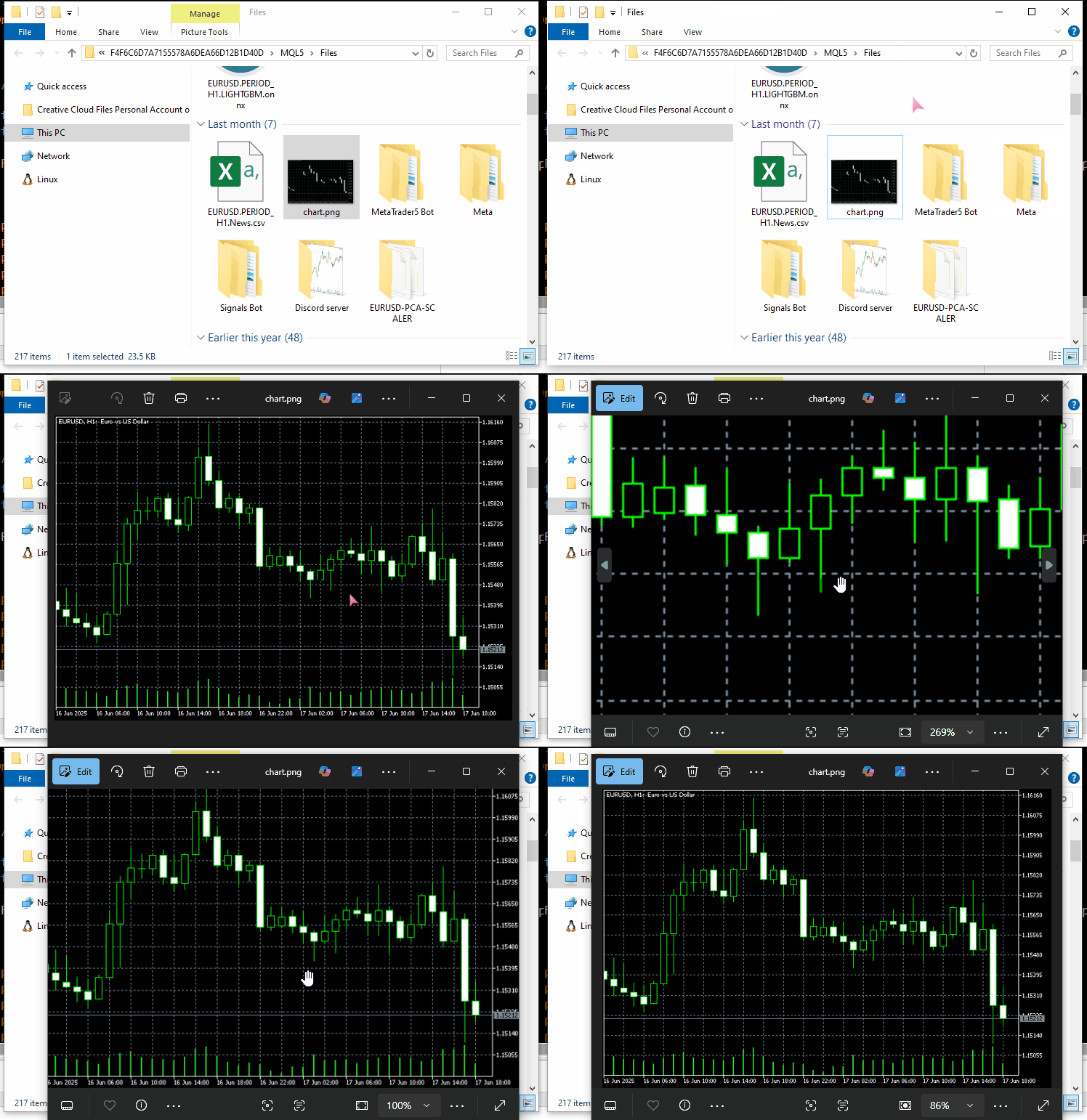
Angenommen, wir haben ein Bild – einen Screenshot aus dem MetaTrader 5-Chart – das wir an einen Server senden möchten.
Um mit diesen Dateien problemlos arbeiten zu können, müssen Sie sicherstellen, dass sie sich unter dem MQL5-Datenpfad befinden.
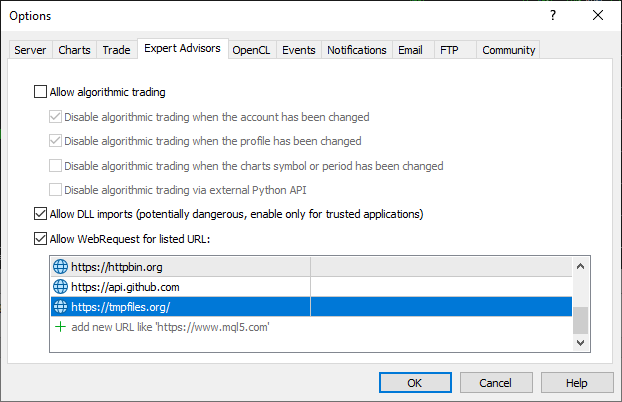
Verwendung von tempfiles.org Server als API-Endpunkt.
Damit dies funktioniert, müssen Sie die URL tempfiles.org in die Liste der zulässigen URLs im MetaTrader 5 aufnehmen;
#include <requests.mqh>
//+------------------------------------------------------------------+
//| Script program start function                                    |
//+------------------------------------------------------------------+
void OnStart()
  {
//---

     string files[] = {"chart.jpg"};

     CResponse response = CSession::request("POST","https://tmpfiles.org/api/v1/upload","",files);

      Print("Status Code: ", response.status_code);
      Print("Reason: ", response.reason);
      Print("URL: ", response.url);
      Print("OK: ", (string)response.ok);
      Print("Elapsed Time (ms): ", response.elapsed);

      Print("Headers:\n", response.headers);
      Print("Cookies: ", response.cookies);
      Print("Response: ",response.text);
      Print("JSON:\n", response.json["url"].ToStr());
  }
Ausgabe:
CF      0       17:06:25.063    Requests test (XAUUSD,D1)       Status Code: 200
RL      0       17:06:25.063    Requests test (XAUUSD,D1)       Reason: OK
QM      0       17:06:25.063    Requests test (XAUUSD,D1)       URL: https://tmpfiles.org/api/v1/upload
FN      0       17:06:25.063    Requests test (XAUUSD,D1)       OK: true
OH      0       17:06:25.063    Requests test (XAUUSD,D1)       Elapsed Time (ms): 1594
FQ      0       17:06:25.063    Requests test (XAUUSD,D1)       Headers:
RN      0       17:06:25.063    Requests test (XAUUSD,D1)       Server: nginx/1.22.1
QO      0       17:06:25.063    Requests test (XAUUSD,D1)       Content-Type: application/json
KJ      0       17:06:25.063    Requests test (XAUUSD,D1)       Transfer-Encoding: chunked
CS      0       17:06:25.063    Requests test (XAUUSD,D1)       Connection: keep-alive
KE      0       17:06:25.063    Requests test (XAUUSD,D1)       Cache-Control: no-cache, private
RM      0       17:06:25.063    Requests test (XAUUSD,D1)       Date: Thu, 10 Jul 2025 14:06:25 GMT
DF      0       17:06:25.063    Requests test (XAUUSD,D1)       X-RateLimit-Limit: 60
GN      0       17:06:25.063    Requests test (XAUUSD,D1)       X-RateLimit-Remaining: 59
CN      0       17:06:25.063    Requests test (XAUUSD,D1)       Access-Control-Allow-Origin: *
NF      0       17:06:25.063    Requests test (XAUUSD,D1)
ED      0       17:06:25.063    Requests test (XAUUSD,D1)       Cookies:
RM      0       17:06:25.063    Requests test (XAUUSD,D1)       Response: {"status":"success","data":{"url":"http://tmpfiles.org/5459540/chart.png"}}
LS      0       17:06:25.063    Requests test (XAUUSD,D1)       JSON:
HJ      0       17:06:25.063    Requests test (XAUUSD,D1)
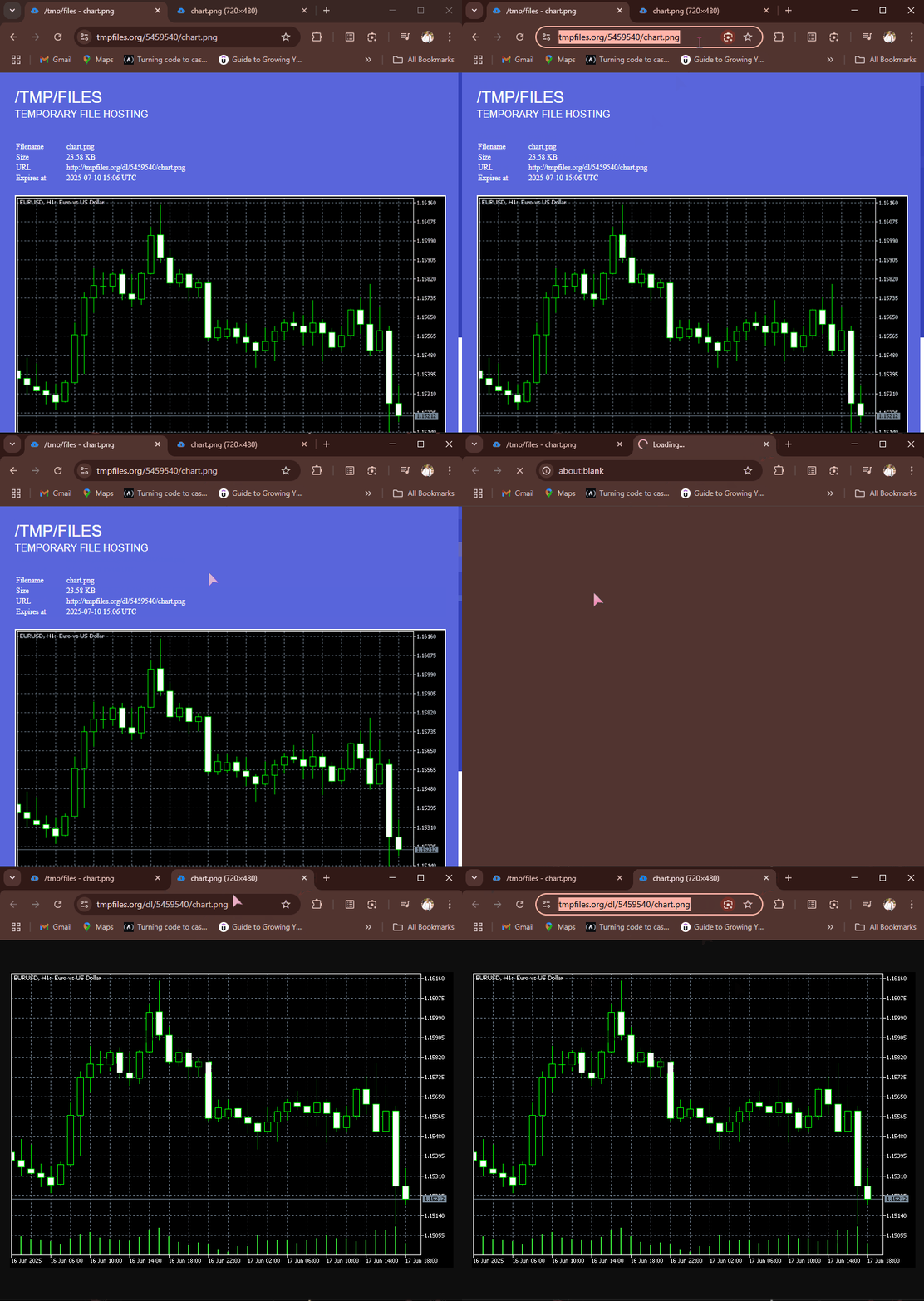
Bei einer erfolgreichen POST-Anfrage gibt tempfiles.org eine JSON-Antwort zurück, die einen URL-Endpunkt enthält, an dem die Datei gehostet wird. Wir können auf diesen Link gehen und die Bilddatei im Webbrowser betrachten.
Empfangen und Herunterladen von Dateien aus dem Internet
Auch hier ist das Internet für den Austausch verschiedener Informationen und Dateien gedacht. Die Möglichkeit, verschiedene Dateien in MQL5 zu empfangen, ist praktisch, da es hilft, Daten in CSV- und Excel-Formaten zu empfangen, trainierte maschinelle Lernmodelle und ihre Parameter in verschiedenen Binärformaten zu empfangen und vieles mehr.
Die implementierte Funktion get ist bereits in der Lage, dies zu tun, wenn der richtige API-Endpunkt angegeben wird.
Ein Beispiel: Wir holen ein Bild von httpbin.org und speichern es im MQL5-Datenpfad.
#include <requests.mqh>
CSession requests;
//+------------------------------------------------------------------+
//| Script program start function                                    |
//+------------------------------------------------------------------+
void OnStart()
  {
      //--- Get the image file from the web
      CResponse response = requests.get("https://httpbin.org/image/jpeg");
 }
Wenn diese Funktion erfolgreich ausgeführt wird, gibt sie die verschlüsselte Bilddatei/Daten (im Binärformat) zurück.
Diese Datei befindet sich in der Variablen CResponse::content.
void OnStart()
  {
      //--- Get the image file from the web
      CResponse response = requests.get("https://httpbin.org/image/jpeg");

      //--- Saving an image received in binary format stored in response.content

      int handle = FileOpen("image.jpg", FILE_WRITE|FILE_BIN|FILE_SHARE_WRITE); //Open a .jpg file for writting an image to it
      if (handle == INVALID_HANDLE) //Check the handle
         {
            printf("Failed to open an Image. Error=%s",ErrorDescription(GetLastError()));
            return;
         }

      if (FileWriteArray(handle, response.content)==0) //write all binary data to a image.jpg file
         {
            printf("Failed to write an Image. Error=%s",ErrorDescription(GetLastError()));
            return;
         }

      FileClose(handle);
  }
Ausgabe:
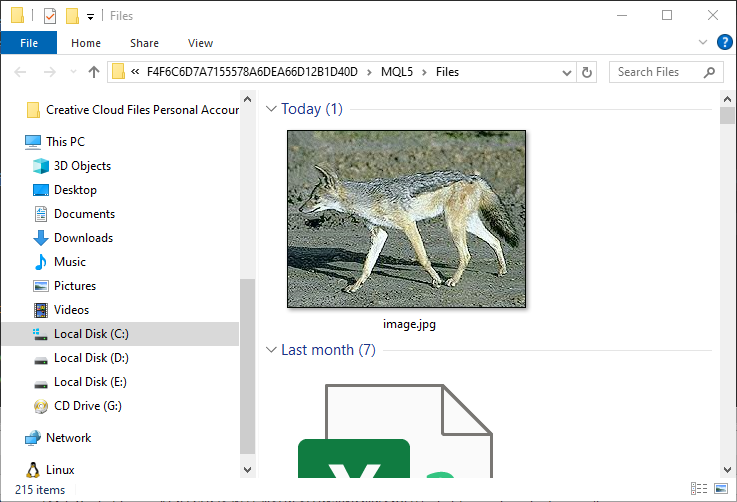
Ein Bild, das einen Fuchs (oder was auch immer das für ein Tier ist) enthält, wird im Ordner MQL5/Files gespeichert.
Behandlung von Sitzungen und Cookies
Sie haben vielleicht bemerkt, dass alle Funktionen in der Klasse CSession statisch sind, was diese Klasse zu einer „statischen Klasse“ macht.
class CSession
  {
protected:
   //.... other lines of code

public:

                            CSession(const string headers, const string cookies=""); // Provides headers cookies persistance
                           ~CSession(void);

   static void SetCookie(const string cookie)
      {
         if (StringLen(m_cookies) > 0)
            m_cookies += "; ";
         m_cookies += cookie;
      }

   static void ClearCookies()
      {
         m_cookies = "";
      }

   static void              SetBasicAuth(const string username, const string password);

   //---

   static CResponse         request(const string method, const string url, const string data, const string &files[], const string headers = "", const int timeout = 5000, const bool is_json=true);

   // High-level request helpers
   static CResponse         get(const string url, const string headers = "", const int timeout = 5000)
     {
       string files[];
       return request("GET", url, "", files, headers, timeout, false);
     }

     //... other functions
 }
Damit soll Entwicklern die Möglichkeit gegeben werden, die requests-Bibliothek entweder teilweise oder als Ganzes zu verwenden, um die Funktionsweise des requests-Moduls in Python nachzuahmen.
(a): Verwendung des gesamten Klassenobjekts
#include <requests.mqh>
//+------------------------------------------------------------------+
//| Script program start function                                    |
//+------------------------------------------------------------------+
void OnStart()
  {
//---

     string headers = "Content-Type: application/json;";
     string cookies = "sessionid=abc123";

     CSession session(headers, cookies); //New session, class constructor calle with
     CResponse response = session.get("https://httpbin.org/cookies"); //receive cookies from the server

      Print("HTTP response");
      Print("--> Status Code: ", response.status_code);
      Print("--> Reason: ", response.reason);
      Print("--> URL: ", response.url);
      Print("--> OK: ", (string)response.ok);
      Print("--> Elapsed Time (ms): ", response.elapsed);

      Print("--> Headers:\n", response.headers);
      Print("--> Cookies: ", response.cookies);
      Print("--> Response text: ",response.text);
      Print("--> JSON:\n", response.json.ToStr());
}
Ausgabe:
DS      0       11:38:36.272    Requests test (XAUUSD,D1)       HTTP response
RI      0       11:38:36.272    Requests test (XAUUSD,D1)       --> Status Code: 200
KR      0       11:38:36.272    Requests test (XAUUSD,D1)       --> Reason: OK
NG      0       11:38:36.272    Requests test (XAUUSD,D1)       --> URL: https://httpbin.org/cookies
IF      0       11:38:36.272    Requests test (XAUUSD,D1)       --> OK: true
QQ      0       11:38:36.272    Requests test (XAUUSD,D1)       --> Elapsed Time (ms): 2141
IH      0       11:38:36.272    Requests test (XAUUSD,D1)       --> Headers:
FQ      0       11:38:36.272    Requests test (XAUUSD,D1)       Date: Sat, 12 Jul 2025 08:38:36 GMT
RE      0       11:38:36.272    Requests test (XAUUSD,D1)       Content-Type: application/json
FO      0       11:38:36.272    Requests test (XAUUSD,D1)       Content-Length: 49
DE      0       11:38:36.272    Requests test (XAUUSD,D1)       Connection: keep-alive
CR      0       11:38:36.272    Requests test (XAUUSD,D1)       Server: gunicorn/19.9.0
PK      0       11:38:36.272    Requests test (XAUUSD,D1)       Access-Control-Allow-Origin: *
HM      0       11:38:36.272    Requests test (XAUUSD,D1)       Access-Control-Allow-Credentials: true
QN      0       11:38:36.272    Requests test (XAUUSD,D1)
DL      0       11:38:36.272    Requests test (XAUUSD,D1)       --> Cookies:
LG      0       11:38:36.272    Requests test (XAUUSD,D1)       --> Response text: {
EP      0       11:38:36.272    Requests test (XAUUSD,D1)         "cookies": {
HJ      0       11:38:36.272    Requests test (XAUUSD,D1)           "sessionid": "abc123"
RN      0       11:38:36.272    Requests test (XAUUSD,D1)         }
DE      0       11:38:36.272    Requests test (XAUUSD,D1)       }
EM      0       11:38:36.272    Requests test (XAUUSD,D1)
MD      0       11:38:36.272    Requests test (XAUUSD,D1)       --> JSON:
GH      0       11:38:36.272    Requests test (XAUUSD,D1)
Die Verwendung der gesamten Klasse durch den Aufruf des Klassenkonstruktors und die Übergabe des Headers und der Cookies (optional) ermöglicht es Ihnen, mit globalen Header-Werten zu arbeiten und dieselben Cookies für alle HTTP-Anfragen zu verwenden, die mit derselben Klasseninstanz gestellt werden, was wir eine HTTP-Sitzung nennen.
(b): Separate Verwendung von Funktionen aus der Klasse
Für einfache HTTP-Anfragen ohne HTTP-Sitzung, d. h. für die Verwaltung neuer HTTP-Header und Cookies bei jeder Anfrage.
Im Folgenden wird beschrieben, wie Sie die Funktionen der Klasse CSession direkt verwenden, ohne das Klassenobjekt zu instanziieren.
#include <requests.mqh>
//+------------------------------------------------------------------+
//| Script program start function                                    |
//+------------------------------------------------------------------+
void OnStart()
  {
//---

     CResponse response = CSession::get("https://httpbin.org/get"); //The get request

      Print("HTTP response");
      Print("--> Status Code: ", response.status_code);
      Print("--> Reason: ", response.reason);
      Print("--> URL: ", response.url);
      Print("--> OK: ", (string)response.ok);
      Print("--> Elapsed Time (ms): ", response.elapsed);

      Print("--> Headers:\n", response.headers);
      Print("--> Cookies: ", response.cookies);
      Print("--> Response text: ",response.text);
      Print("--> JSON:\n", response.json.ToStr());
 }
Grundlegende Authentifizierung
Alle in Python angebotenen Funktionen des Moduls requests bieten die Möglichkeit, Angaben für eine grundlegende (einfache) Authentifizierung an den Server zu senden.
import requests

response = requests.get("https://httpbin.org/headers", auth=("user", "pass"))
print(response.text)
Nachfolgend finden Sie eine ähnliche Funktionalität in unserer MQL5-Klasse.
void CSession::SetBasicAuth(const string username, const string password)
  {
   string credentials = username + ":" + password;
   string encoded = Base64Encode(credentials); //Encode the credentials

   m_headers = UpdateHeader(m_headers, "Authorization", "Basic " + encoded); //Update HTTP headers with the authentication information
  }
Anders als im Python-Modul, wo Entwickler diese Authentifizierungsparameter direkt in einer Funktion senden können, geht unsere MQL5-Klasse etwas anders vor, indem sie es den Nutzern ermöglicht, diese grundlegenden Authentifizierungsparameter in einer separaten Funktion zu senden.
Die Funktion SetBasicAuth aktualisiert die Kopfzeilen in der Klasse, indem sie die Berechtigungsnachweise hinzufügt; diese Werte stehen allen Funktionen zur Verfügung, die danach mit derselben Klasseninstanz aufgerufen werden.
#include <requests.mqh>
//+------------------------------------------------------------------+
//| Script program start function                                    |
//+------------------------------------------------------------------+
void OnStart()
  {
//---

     CSession::SetBasicAuth("user", "pass");   //Sets authentication parameters to the HTTP header
     CResponse response = CSession::get("https://httpbin.org/headers"); //Get the headers from the server

      Print("HTTP response");
      Print("--> Headers:\n", response.headers);
      Print("--> Response text: ",response.text);
 }
Ausgabe:
IE      0       14:23:23.885    Requests test (XAUUSD,D1)       HTTP response
FQ      0       14:23:23.885    Requests test (XAUUSD,D1)       --> Headers:
KI      0       14:23:23.885    Requests test (XAUUSD,D1)       Date: Sat, 12 Jul 2025 11:23:23 GMT
MM      0       14:23:23.885    Requests test (XAUUSD,D1)       Content-Type: application/json
HK      0       14:23:23.885    Requests test (XAUUSD,D1)       Content-Length: 385
IR      0       14:23:23.885    Requests test (XAUUSD,D1)       Connection: keep-alive
JJ      0       14:23:23.885    Requests test (XAUUSD,D1)       Server: gunicorn/19.9.0
IS      0       14:23:23.885    Requests test (XAUUSD,D1)       Access-Control-Allow-Origin: *
QE      0       14:23:23.885    Requests test (XAUUSD,D1)       Access-Control-Allow-Credentials: true
HF      0       14:23:23.885    Requests test (XAUUSD,D1)
KG      0       14:23:23.885    Requests test (XAUUSD,D1)       --> Response text: {
KP      0       14:23:23.885    Requests test (XAUUSD,D1)         "headers": {
GH      0       14:23:23.885    Requests test (XAUUSD,D1)           "Accept": "*/*",
CM      0       14:23:23.885    Requests test (XAUUSD,D1)           "Accept-Encoding": "gzip, deflate",
DQ      0       14:23:23.885    Requests test (XAUUSD,D1)           "Accept-Language": "en;q=0.5",
NE      0       14:23:23.885    Requests test (XAUUSD,D1)           "Authorization": "Basic dXNlcjpwYXNz",
NS      0       14:23:23.885    Requests test (XAUUSD,D1)           "Cookie": "session=abc123;max-age=60;",
KL      0       14:23:23.885    Requests test (XAUUSD,D1)           "Host": "httpbin.org",
HK      0       14:23:23.885    Requests test (XAUUSD,D1)           "User-Agent": "MetaTrader 5 Terminal/5.5120 (Windows NT 10.0.19045; x64)",
NI      0       14:23:23.885    Requests test (XAUUSD,D1)           "X-Amzn-Trace-Id": "Root=1-687245ab-2065056c28f0024b71a6446f"
GH      0       14:23:23.885    Requests test (XAUUSD,D1)         }
IF      0       14:23:23.885    Requests test (XAUUSD,D1)       }
Umgang mit URL-Parametern
Eine weitere coole Sache, die das Requests-Modul in Python macht, ist, dass es die empfangene URL und ihre Parameter verwaltet, bevor es die endgültige Web-Anfrage sendet.
import requests

response = requests.get("https://httpbin.org/get", params={"param1": "value1"})
print(response.url)
Ausgabe:
https://httpbin.org/get?param1=value1
In unserem MQL5-Kurs verfolgen wir einen etwas anderen Ansatz. Anstatt URL-Parameter an alle Funktionen zu übergeben, was diese verkompliziert, haben wir eine separate Dienstfunktion, die bei der Erstellung der endgültigen URL mit Parametern hilft, wenn die ursprüngliche URL und die zugehörigen Parameter gegeben sind.
#include <requests.mqh>
//+------------------------------------------------------------------+
//| Script program start function                                    |
//+------------------------------------------------------------------+
void OnStart()
  {
//---
      string keys[]   = {"user", "id", "lang"};
      string values[] = {"omega", "123", "mql5 test"};

      string parent_url = "https://httpbin.org/get";
      string final_url =  CSession::BuildUrlWithParams(parent_url, keys, values); //builds a URL with the given parameters

      Print("final url: ",final_url);
 }
Ausgabe:
2025.07.12 15:41:57.924 Requests test (XAUUSD,D1) final url: https://httpbin.org/get?user=omega&id=123&lang=mql5+test Nachdem Sie eine URL mit den zugehörigen Parametern erstellt haben, können Sie sie für HTTP-Webanfragen verwenden.
      CResponse response = CSession::get(final_url); //Get the headers from the server

      Print("HTTP response");
      Print("--> Headers:\n", response.headers);
      Print("--> Response text: ",response.text);
Ausgabe:
JK      0       15:42:00.398    Requests test (XAUUSD,D1)       --> Headers:
QP      0       15:42:00.398    Requests test (XAUUSD,D1)       Date: Sat, 12 Jul 2025 12:41:59 GMT
QK      0       15:42:00.398    Requests test (XAUUSD,D1)       Content-Type: application/json
PM      0       15:42:00.398    Requests test (XAUUSD,D1)       Content-Length: 525
ED      0       15:42:00.398    Requests test (XAUUSD,D1)       Connection: keep-alive
FP      0       15:42:00.398    Requests test (XAUUSD,D1)       Server: gunicorn/19.9.0
MH      0       15:42:00.398    Requests test (XAUUSD,D1)       Access-Control-Allow-Origin: *
EK      0       15:42:00.398    Requests test (XAUUSD,D1)       Access-Control-Allow-Credentials: true
LM      0       15:42:00.398    Requests test (XAUUSD,D1)
OI      0       15:42:00.398    Requests test (XAUUSD,D1)       --> Response text: {
RQ      0       15:42:00.398    Requests test (XAUUSD,D1)         "args": {
CR      0       15:42:00.398    Requests test (XAUUSD,D1)           "id": "123",
KF      0       15:42:00.398    Requests test (XAUUSD,D1)           "lang": "mql5 test",
HI      0       15:42:00.398    Requests test (XAUUSD,D1)           "user": "omega"
KP      0       15:42:00.398    Requests test (XAUUSD,D1)         },
MP      0       15:42:00.398    Requests test (XAUUSD,D1)         "headers": {
IH      0       15:42:00.398    Requests test (XAUUSD,D1)           "Accept": "*/*",
QL      0       15:42:00.398    Requests test (XAUUSD,D1)           "Accept-Encoding": "gzip, deflate",
JQ      0       15:42:00.398    Requests test (XAUUSD,D1)           "Accept-Language": "en;q=0.5",
NF      0       15:42:00.398    Requests test (XAUUSD,D1)           "Cookie": "session=abc123;max-age=60;",
KQ      0       15:42:00.398    Requests test (XAUUSD,D1)           "Host": "httpbin.org",
HP      0       15:42:00.398    Requests test (XAUUSD,D1)           "User-Agent": "MetaTrader 5 Terminal/5.5120 (Windows NT 10.0.19045; x64)",
ND      0       15:42:00.398    Requests test (XAUUSD,D1)           "X-Amzn-Trace-Id": "Root=1-68725817-67dc04cf43ac75b012094481"
KE      0       15:42:00.398    Requests test (XAUUSD,D1)         },
CQ      0       15:42:00.398    Requests test (XAUUSD,D1)         "origin": "197.250.227.235",
MD      0       15:42:00.398    Requests test (XAUUSD,D1)         "url": "https://httpbin.org/get?user=omega&id=123&lang=mql5+test"
IK      0       15:42:00.398    Requests test (XAUUSD,D1)       }
LN      0       15:42:00.398    Requests test (XAUUSD,D1)
Fantastisch! Der Server hat sogar mit dem Schlüssel args in unserem JSON-Antworttext geantwortet, was darauf hinweist, dass der Prozess der Erstellung einer URL mit den zugehörigen Parametern erfolgreich war.
Die Quintessenz
Mit all dem freien, quelloffenen Wissen und den Informationen, die der Öffentlichkeit zur Verfügung stehen. Kodierung sollte in der heutigen Welt nicht schwierig sein.
Nachdem ich gelernt hatte, wie das Modul Requests in Python funktioniert, war ich in der Lage, ein ähnliches Modul in MQL5 zu implementieren, um uns bei der Durchführung von HTTP-Anfragen an externe Server von MetaTrader 5 aus zu unterstützen.
Allerdings, während die Syntax und Funktionsaufrufe ähnlich wie die in der Anfragen-Modul in Python angeboten aussehen könnte, ist dieses MQL5-Modul bei weitem nicht vollständig; wir müssen es gründlich testen und gemeinsam weiter verbessern. Deshalb habe ich ein Repository auf Forge MQL5 erstellt -> https://forge.mql5.io/omegajoctan/Requests.
Zögern Sie also nicht, den Code von dort aus zu aktualisieren, und teilen Sie uns Ihre Meinung im Diskussionsbereich mit.
Peace out.
Tabelle der Anhänge
| Dateiname | Beschreibung & Verwendung |
|---|---|
| Include\errordescription.mqh | Enthält Beschreibungen aller von MQL5 und MetaTrader 5 erzeugten Fehlercodes. |
| Include\Jason.mqh | Die Bibliothek zur Serialisierung und Deserialisierung von Strings in einem JSON-ähnlichen Format. |
| Include\requests.mqh | Das Hauptmodul, das dem Requests-Modul von Python ähnelt. |
| Scripts\Requests test.mq5 | Das Hauptskript zum Testen aller in diesem Beitrag beschriebenen Funktionen und Methoden. |
Übersetzt aus dem Englischen von MetaQuotes Ltd.
Originalartikel: https://www.mql5.com/en/articles/18728
Warnung: Alle Rechte sind von MetaQuotes Ltd. vorbehalten. Kopieren oder Vervielfältigen untersagt.
Dieser Artikel wurde von einem Nutzer der Website verfasst und gibt dessen persönliche Meinung wieder. MetaQuotes Ltd übernimmt keine Verantwortung für die Richtigkeit der dargestellten Informationen oder für Folgen, die sich aus der Anwendung der beschriebenen Lösungen, Strategien oder Empfehlungen ergeben.

 Entwicklung eines Replay-Systems (Teil 77): Neuer Chart Trade (IV)
 Entwicklung des Price Action Analysis Toolkit (Teil 32): Python-Engine für Kerzenmuster (II) – Erkennung mit Ta-Lib
 Von der Grundstufe bis zur Mittelstufe: Definitionen (II)
 MQL5-Assistenz-Techniken, die Sie kennen sollten (Teil 74): Verwendung von Ichimoku-Mustern und ADX-Wilder mit überwachtem Lernen

- Freie Handelsapplikationen
- Über 8.000 Signale zum Kopieren
- Wirtschaftsnachrichten für die Lage an den Finanzmärkte
Sie stimmen der Website-Richtlinie und den Nutzungsbedingungen zu.