

Implementación de módulos prácticos de otros lenguajes en MQL5 (Parte 02): Desarrollo de la biblioteca REQUESTS inspirada en requests de Python
 182
182
 0
0

Contenido
- Introducción
- Realizar una solicitud web
- Diferentes solicitudes web en diferentes funciones
- Subir archivos a la web
- Recibir y descargar archivos de la web
- Gestión de sesiones y cookies
- Autenticación básica
- Manejo de parámetros de URL
- Conclusión
Introducción
La capacidad de enviar solicitudes HTTP a la web directamente desde MetaTrader 5 es una de las mejores cosas que le han sucedido al lenguaje de programación MQL5. Gracias a esta función, los operadores pueden comunicarse con sus sitios web externos, servidores, aplicaciones de trading, etc.
Esto nos permite hacer prácticamente de todo dentro de la plataforma de negociación, como obtener datos de fuentes externas, enviar notificaciones de operaciones a otros traders y mucho más.
Esta capacidad ha sido posible gracias a la función WebRequest disponible en MQL5, lo que nos permite realizar cualquier acción HTTP como:
- Envío de solicitudes "POST" para enviar información a servidores externos.
- Obtener información de la web mediante la famosa solicitud "GET".
- Envío de solicitudes "PATCH" a la web para modificar información de la base de datos del servidor.
- Envío de solicitudes "PUT" a la web para actualizar los valores presentes en la base de datos del servidor.
Por mencionar algunas acciones HTTP.
Sin embargo, esta única función puede resultar abrumadora en ocasiones y no es fácil de usar.
Enviar una simple solicitud web para realizar cualquiera de las acciones mencionadas anteriormente requiere bastante trabajo, sobre todo porque hay que gestionar los métodos HTTP, los encabezados y otros detalles. Sin mencionar que es necesario programar manualmente el proceso de manejo de los datos que se desean enviar o recibir.

Si alguna vez has utilizado un framework web o módulos para tareas similares en tu trayectoria como programador, es posible que hayas notado que la mayoría de los frameworks ajenos a MQL5 están equipados para manejar la mayoría de las tareas y operaciones básicas que esta función WebRequest en MQL5 no realiza.
Uno de los módulos es requests del lenguaje de programación Python.
El módulo «Requests», conocido como HTTP for Humans:
Es una biblioteca HTTP sencilla pero elegante que permite a los programadores enviar solicitudes HTTP/1.1 con suma facilidad.
Gracias a esta biblioteca, los desarrolladores de Python no necesitan agregar manualmente cadenas de consulta en las URL ni codificar como formulario los datos de PUT y POST, y mucho más, ya que todo está bien diseñado y simplificado incluso para los desarrolladores "no técnicos".
En este artículo, vamos a implementar un módulo similar con funciones, sintaxis y capacidades parecidas. Esperamos que realizar solicitudes web en MQL5 sea tan fácil y cómodo como en Python.
Realizar una solicitud web
Esta es la funcionalidad principal del módulo requests. La función request es la que envía y recibe datos e información en diferentes formatos desde la web.
Antes de imitar un método similar que ofrece el módulo requests en Python, echemos un vistazo primero a esta función.
El método de solicitud en Python se ve así:
def request(
    method: str | bytes,
    url: str | bytes,
    *,
    params: _Params | None = ...,
    data: _Data | None = ...,
    headers: _HeadersMapping | None = ...,
    cookies: CookieJar | _TextMapping | None = ...,
    files: _Files | None = ...,
    auth: _Auth | None = ...,
    timeout: _Timeout | None = ...,
    allow_redirects: bool = ...,
    proxies: _TextMapping | None = ...,
    hooks: _HooksInput | None = ...,
    stream: bool | None = ...,
    verify: _Verify | None = ...,
    cert: _Cert | None = ...,
    json: Any | None = None
) -> Response
Esta función requiere un par de argumentos para la solicitud web HTTP. Comencemos implementándola con algunos parámetros por ahora: el método, la URL, los datos, los encabezados, el tiempo de espera y los parámetros JSON.
CResponse CSession::request(const string method, //HTTP method GET, POST, etc
                             const string url, //endpoint url
                             const string data = "", //The data you want to send if the method is POST or PUT
                             const string headers = "", //HTTP headers
                             const int timeout = 5000, //Request timeout (milliseconds)
                             const bool is_json=true) //Checks whether the given data is in JSON format
  {
   char data_char[];
   char result[];
   string result_headers;
   string temp_data = data;

   CResponse response; //a structure containing various response fields

//--- Managing the headers

   string temp_headers = m_headers;
   if (headers != "") // If the user provided additional headers, append them
      temp_headers += headers;

//--- Updating the headers with the information received

   if(is_json) //If the information parsed is
     {
         //--- Convert dictionary to JSON string

         CJAVal js(NULL, jtUNDEF);
         bool b = js.Deserialize(data, CP_UTF8);

         string json;
         js.Serialize(json); //Get the serialized Json outcome
         temp_data = json; //Assign the resulting serialized Json to the temporary data array

         //--- Set "Content-Type: application/json"

         temp_headers = UpdateHeader(temp_headers, "Content-Type", "application/json");
         if (MQLInfoInteger(MQL_DEBUG))
           printf("%s: %s",__FUNCTION__,temp_headers);
     }
    else
      {
         temp_headers = UpdateHeader(temp_headers, headers);
         if (MQLInfoInteger(MQL_DEBUG))
           printf("%s: %s",__FUNCTION__,temp_headers);
      }

//--- Convert data to byte array (for POST, PUT, etc.)

   if (StringToCharArray(temp_data, data_char, 0, StringLen(temp_data), CP_UTF8)<0) //Convert the data in a string format to a uchar
      {
         printf("%s, Failed to convert data to a Char array. Error = %s",__FUNCTION__,ErrorDescription(GetLastError()));
         return response;
      }

//--- Perform the WebRequest

   uint start = GetTickCount(); //starting time of the request

   int status = WebRequest(method, url, temp_headers, timeout, data_char, result, result_headers); //trigger a webrequest function
   if(status == -1)
     {
      PrintFormat("WebRequest failed with error %s", ErrorDescription(GetLastError()));
      response.status_code = 0;
      return response;
     }

//--- Fill the response struct

   response.elapsed = (GetTickCount() - start);

   string results_string = CharArrayToString(result);
   response.text = results_string;

   CJAVal js;

   if (!js.Deserialize(result))
      if (MQLInfoInteger(MQL_DEBUG))
         printf("Failed to serialize data received from WebRequest");

   response.json = js;

   response.cookies = js["cookies"].ToStr();

   response.status_code = status;
   ArrayCopy(response.content, result);
   response.headers = result_headers;
   response.url = url;
   response.ok = (status >= 200 && status < 400);
   response.reason = WebStatusText(status); // a custom helper for translating status codes

   return response;
  }
La función `request` de Python nos ofrece dos opciones para pasar los datos a una solicitud web mediante dos argumentos diferentes: el argumento `data`, para pasar todos los datos que no sean JSON, y el argumento `json`, para pasar los datos JSON.
Dado que ambos argumentos proporcionan la información que se debe enviar a la solicitud, y solo se puede usar un argumento para enviar los datos, es decir, Puedes enviar datos sin procesar (HTML, texto plano, etc.) o datos con formato JSON..
Así pues, la función en Python detecta el tipo de datos proporcionados (JSON u otro) y ajusta sus encabezados de acuerdo con los encabezados proporcionados por el usuario. Por ejemplo, agrega o modifica el encabezado a Content-Type: application/json cuando se proporcionan datos JSON.
Si bien también podríamos tener ambos argumentos en la función MQL5, me parece una idea muy confusa y que añade una complejidad innecesaria. Así pues, la función de nuestra clase MQL5 solo admite un argumento denominado data para enviar datos a la web; el argumento booleano denominado is_json es el encargado de distinguir la información recibida en la variable denominada data (entre JSON y otros tipos) dentro de la función.
De nuevo, cuando el parámetro is_json se establece en true, la función añade o modifica los encabezados recibidos con el valor (Content-Type: application/json). Pero, antes de eso, los datos recibidos del argumento data se serializan al formato JSON adecuado antes de enviarlos a la web.
//--- Updating the headers with the information received

   if(is_json) //If the information parsed is
     {
         //--- Convert dictionary to JSON string

         CJAVal js(NULL, jtUNDEF);
         bool b = js.Deserialize(data, CP_UTF8);

         string json;
         js.Serialize(json); //Get the serialized Json outcome
         temp_data = json; //Assign the resulting serialized Json to the temporary data array

         //--- Set "Content-Type: application/json"

         temp_headers = UpdateHeader(temp_headers, "Content-Type", "application/json");
         if (MQLInfoInteger(MQL_DEBUG))
           printf("%s: %s",__FUNCTION__,temp_headers);
     }
    else
      {
         temp_headers = UpdateHeader(temp_headers, headers);
         if (MQLInfoInteger(MQL_DEBUG))
           printf("%s: %s",__FUNCTION__,temp_headers);
      }
El método `request`, que se ofrece en el módulo `requests` de Python, devuelve numerosas variables en función de la respuesta HTTP; estas contienen información sobre el estado de la solicitud, los datos recibidos, los errores y mucho más.
import requests

r = requests.get('https://api.github.com/events')

# Print the raw response
print("Raw response:", r)

# Status code
print("Status Code:", r.status_code)

# Reason phrase
print("Reason:", r.reason)

# URL (final URL after redirects)
print("URL:", r.url)

# Headers (dictionary)
print("Headers:")

#... other responses
Para lograr esto, necesitamos una estructura similar en nuestra clase MQL5.
Dentro del archivo requests.mqh, a continuación se muestra la clase CResponse.
struct CResponse
  {
   int               status_code; // HTTP status code (e.g., 200, 404)
   string            text;        // Raw response body as string

   CJAVal            json;        // Parses response as JSON
   uchar             content[];   // Raw bytes of the response
   string            headers;     // Dictionary of response headers
   string            cookies;     // Cookies set by the server
   string            url;         // Final URL after redirects
   bool              ok;          // True if status_code < 400
   uint              elapsed;     // Time taken for the response in ms
   string            reason;      // Text reason (e.g., "OK", "Not Found")
  };
Esta es la estructura que devuelve la función request dentro de la clase CSession — la comentaremos en un momento.
A título informativo, a continuación se muestra una tabla con todas las variables y la información que contienen dentro de la clase CResponse.
| Variable | Tipo de datos | Descripción |
|---|---|---|
| status_code | int | Código de estado HTTP devuelto por el servidor (por ejemplo, 200=OK, 404=No encontrado, etc.). |
| text | string | El cuerpo completo de la respuesta como una cadena de texto sin formato (por ejemplo, HTML, JSON o texto). |
| json | CJAVal | Un objeto JSON analizado a partir del cuerpo de la respuesta, si el proceso de serialización se ha realizado correctamente. |
| content[] | uchar | Matriz de bytes sin procesar del cuerpo de la respuesta (útil para respuestas binarias). |
| headers | string | Un diccionario que contiene encabezados de respuesta HTTP. Si lo desea, puede convertirlo a JSON. |
| cookies | string | Cookies establecidas por el servidor (extraídas de Set-cookie encabezados, si los hubiera). |
| url | string | La URL final después de cualquier redireccionamiento. |
| ok | bool | Adquiere el valor true si el código de estado es < 400, es decir, si no se ha producido ningún error de cliente o servidor durante el proceso. |
| elapsed | uint | El tiempo en milisegundos que se tarda en completar la solicitud. |
| reason | string | Código de estado HTTP en formato de texto legible para humanos. |
A continuación se explica cómo utilizar la función request.
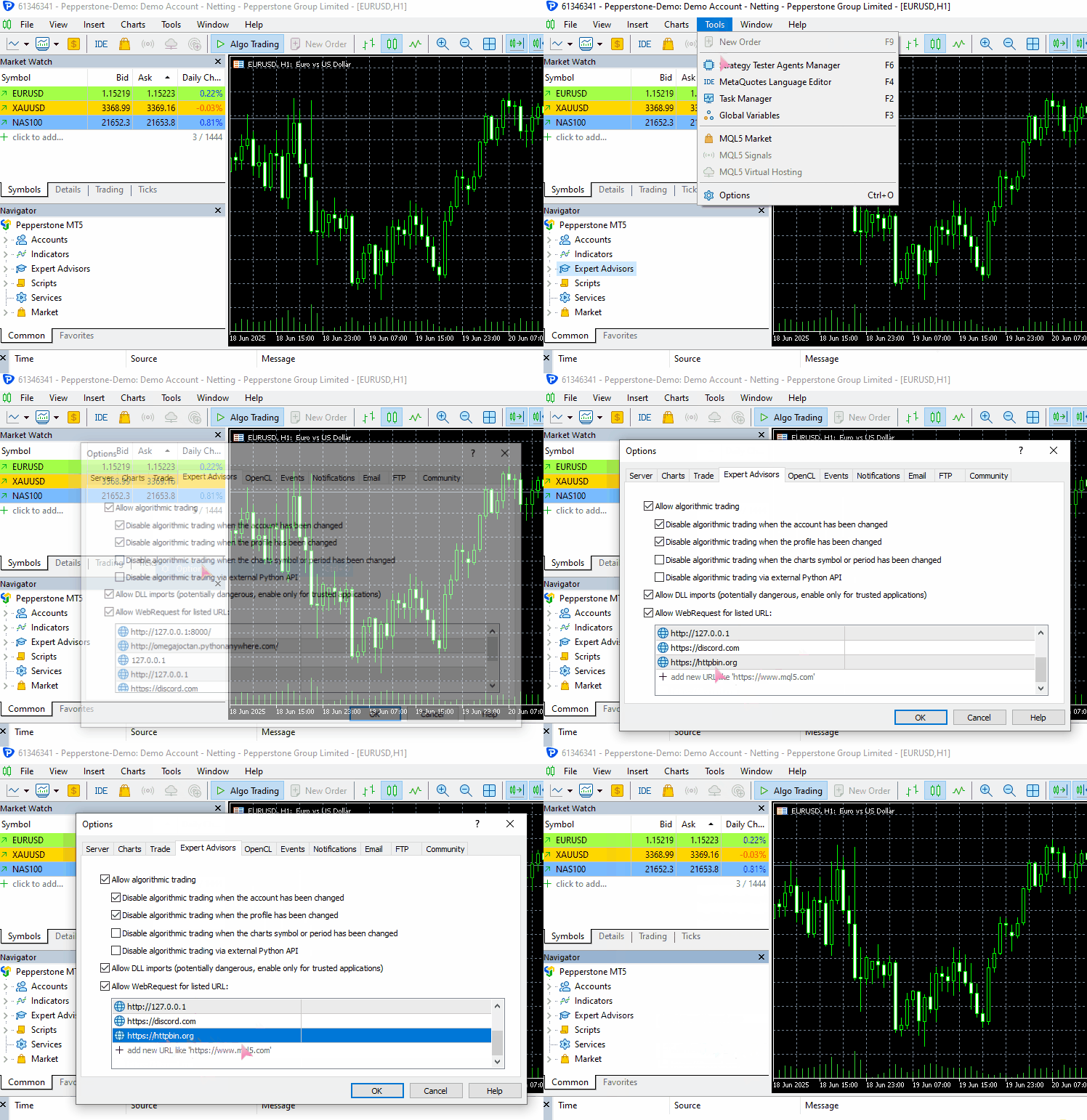
Para que este ejemplo funcione en tu ordenador, asegúrate de añadir https://httpbin.org (una URL de prueba) a la lista de URL permitidas en MetaTrader 5.
(a): Envío de los datos JSON
#include <requests.mqh>
//+------------------------------------------------------------------+
//| Script program start function                                    |
//+------------------------------------------------------------------+
void OnStart()
  {
//---

     string json = "{\"username\": \"omega\", \"password\": \"secret123\"}";

     CResponse response = CSession::request("POST","https://httpbin.org/post", json, NULL, 5000, true);

      Print("Status Code: ", response.status_code);
      Print("Reason: ", response.reason);
      Print("URL: ", response.url);
      Print("OK: ", (string)response.ok);
      Print("Elapsed Time (ms): ", response.elapsed);

      Print("Headers:\n", response.headers);
      Print("Cookies: ", response.cookies);
      Print("Response: ",response.text);
      Print("JSON:\n", response.json["url"].ToStr());
 }
Resultados:
JF      0       08:10:33.226    Requests test (XAUUSD,D1)       CSession::request: Content-Type: application/json
GF      0       08:10:33.226    Requests test (XAUUSD,D1)
MI      0       08:10:34.578    Requests test (XAUUSD,D1)       Status Code: 200
PS      0       08:10:34.578    Requests test (XAUUSD,D1)       Reason: OK
LH      0       08:10:34.578    Requests test (XAUUSD,D1)       URL: https://httpbin.org/post
HP      0       08:10:34.578    Requests test (XAUUSD,D1)       OK: true
IF      0       08:10:34.578    Requests test (XAUUSD,D1)       Elapsed Time (ms): 1343
HO      0       08:10:34.578    Requests test (XAUUSD,D1)       Headers:
QE      0       08:10:34.578    Requests test (XAUUSD,D1)       Date: Fri, 04 Jul 2025 05:10:35 GMT
MG      0       08:10:34.578    Requests test (XAUUSD,D1)       Content-Type: application/json
HQ      0       08:10:34.578    Requests test (XAUUSD,D1)       Content-Length: 619
IH      0       08:10:34.578    Requests test (XAUUSD,D1)       Connection: keep-alive
JL      0       08:10:34.578    Requests test (XAUUSD,D1)       Server: gunicorn/19.9.0
QD      0       08:10:34.578    Requests test (XAUUSD,D1)       Access-Control-Allow-Origin: *
IO      0       08:10:34.578    Requests test (XAUUSD,D1)       Access-Control-Allow-Credentials: true
PI      0       08:10:34.578    Requests test (XAUUSD,D1)
GO      0       08:10:34.578    Requests test (XAUUSD,D1)       Cookies:
HH      0       08:10:34.578    Requests test (XAUUSD,D1)       Response: {
QL      0       08:10:34.578    Requests test (XAUUSD,D1)         "args": {},
FK      0       08:10:34.578    Requests test (XAUUSD,D1)         "data": "{\"username\":\"omega\",\"password\":\"secret123\"}",
MN      0       08:10:34.578    Requests test (XAUUSD,D1)         "files": {},
RH      0       08:10:34.578    Requests test (XAUUSD,D1)         "form": {},
OP      0       08:10:34.578    Requests test (XAUUSD,D1)         "headers": {
CH      0       08:10:34.578    Requests test (XAUUSD,D1)           "Accept": "*/*",
GM      0       08:10:34.578    Requests test (XAUUSD,D1)           "Accept-Encoding": "gzip, deflate",
HQ      0       08:10:34.578    Requests test (XAUUSD,D1)           "Accept-Language": "en;q=0.5",
GH      0       08:10:34.578    Requests test (XAUUSD,D1)           "Content-Length": "43",
IR      0       08:10:34.578    Requests test (XAUUSD,D1)           "Content-Type": "application/json",
EI      0       08:10:34.578    Requests test (XAUUSD,D1)           "Host": "httpbin.org",
NH      0       08:10:34.578    Requests test (XAUUSD,D1)           "User-Agent": "MetaTrader 5 Terminal/5.5120 (Windows NT 10.0.19045; x64)",
HK      0       08:10:34.578    Requests test (XAUUSD,D1)           "X-Amzn-Trace-Id": "Root=1-6867624b-422e528808290adf61a651a3"
IN      0       08:10:34.578    Requests test (XAUUSD,D1)         },
GD      0       08:10:34.578    Requests test (XAUUSD,D1)         "json": {
CN      0       08:10:34.578    Requests test (XAUUSD,D1)           "password": "secret123",
KD      0       08:10:34.578    Requests test (XAUUSD,D1)           "username": "omega"
QM      0       08:10:34.578    Requests test (XAUUSD,D1)         },
EJ      0       08:10:34.578    Requests test (XAUUSD,D1)         "origin": "197.250.227.26",
FQ      0       08:10:34.578    Requests test (XAUUSD,D1)         "url": "https://httpbin.org/post"
EG      0       08:10:34.578    Requests test (XAUUSD,D1)       }
PR      0       08:10:34.578    Requests test (XAUUSD,D1)
NF      0       08:10:34.578    Requests test (XAUUSD,D1)       JSON:
CR      0       08:10:34.578    Requests test (XAUUSD,D1)       https://httpbin.org/post
(b): Envío de datos que no son JSON
Utilizando datos de formulario como ejemplo.
#include <requests.mqh>
CSession requests;
//+------------------------------------------------------------------+
//| Script program start function                                    |
//+------------------------------------------------------------------+
void OnStart()
  {
//---

     string form_data = "username=omega&password=secret123"; //mimicking how the final form data is collected in the web

     CResponse response = CSession::post("https://httpbin.org/post", form_data, "Content-Type: application/x-www-form-urlencoded", 5000, false);

      Print("Status Code: ", response.status_code);
      Print("Reason: ", response.reason);
      Print("URL: ", response.url);
      Print("OK: ", (string)response.ok);
      Print("Elapsed Time (ms): ", response.elapsed);

      Print("Headers:\n", response.headers);
      Print("Cookies: ", response.cookies);
      Print("Response: ",response.text);
      Print("JSON:\n", response.json["url"].ToStr());
 }
Resultados:
DD      0       08:20:01.411    Requests test (XAUUSD,D1)       Status Code: 200
IN      0       08:20:01.411    Requests test (XAUUSD,D1)       Reason: OK
EG      0       08:20:01.411    Requests test (XAUUSD,D1)       URL: https://httpbin.org/post
QM      0       08:20:01.411    Requests test (XAUUSD,D1)       OK: true
RI      0       08:20:01.411    Requests test (XAUUSD,D1)       Elapsed Time (ms): 1547
QR      0       08:20:01.411    Requests test (XAUUSD,D1)       Headers:
EH      0       08:20:01.411    Requests test (XAUUSD,D1)       Date: Fri, 04 Jul 2025 05:20:02 GMT
DL      0       08:20:01.411    Requests test (XAUUSD,D1)       Content-Type: application/json
MD      0       08:20:01.411    Requests test (XAUUSD,D1)       Content-Length: 587
PM      0       08:20:01.411    Requests test (XAUUSD,D1)       Connection: keep-alive
OK      0       08:20:01.411    Requests test (XAUUSD,D1)       Server: gunicorn/19.9.0
HS      0       08:20:01.411    Requests test (XAUUSD,D1)       Access-Control-Allow-Origin: *
PD      0       08:20:01.411    Requests test (XAUUSD,D1)       Access-Control-Allow-Credentials: true
IF      0       08:20:01.411    Requests test (XAUUSD,D1)
RD      0       08:20:01.411    Requests test (XAUUSD,D1)       Cookies:
QM      0       08:20:01.411    Requests test (XAUUSD,D1)       Response: {
HK      0       08:20:01.411    Requests test (XAUUSD,D1)         "args": {},
OR      0       08:20:01.411    Requests test (XAUUSD,D1)         "data": "",
JE      0       08:20:01.411    Requests test (XAUUSD,D1)         "files": {},
RL      0       08:20:01.411    Requests test (XAUUSD,D1)         "form": {
DF      0       08:20:01.411    Requests test (XAUUSD,D1)           "password": "secret123",
PM      0       08:20:01.411    Requests test (XAUUSD,D1)           "username": "omega"
RE      0       08:20:01.411    Requests test (XAUUSD,D1)         },
PL      0       08:20:01.411    Requests test (XAUUSD,D1)         "headers": {
DE      0       08:20:01.411    Requests test (XAUUSD,D1)           "Accept": "*/*",
LP      0       08:20:01.411    Requests test (XAUUSD,D1)           "Accept-Encoding": "gzip, deflate",
CF      0       08:20:01.411    Requests test (XAUUSD,D1)           "Accept-Language": "en;q=0.5",
EK      0       08:20:01.411    Requests test (XAUUSD,D1)           "Content-Length": "33",
EL      0       08:20:01.411    Requests test (XAUUSD,D1)           "Content-Type": "application/x-www-form-urlencoded",
PH      0       08:20:01.411    Requests test (XAUUSD,D1)           "Host": "httpbin.org",
GO      0       08:20:01.411    Requests test (XAUUSD,D1)           "User-Agent": "MetaTrader 5 Terminal/5.5120 (Windows NT 10.0.19045; x64)",
FQ      0       08:20:01.411    Requests test (XAUUSD,D1)           "X-Amzn-Trace-Id": "Root=1-68676482-6439a0a071c275773681a193"
LM      0       08:20:01.411    Requests test (XAUUSD,D1)         },
JE      0       08:20:01.411    Requests test (XAUUSD,D1)         "json": null,
LM      0       08:20:01.411    Requests test (XAUUSD,D1)         "origin": "197.250.227.26",
KH      0       08:20:01.411    Requests test (XAUUSD,D1)         "url": "https://httpbin.org/post"
LN      0       08:20:01.411    Requests test (XAUUSD,D1)       }
IK      0       08:20:01.411    Requests test (XAUUSD,D1)
CO      0       08:20:01.411    Requests test (XAUUSD,D1)       JSON:
NK      0       08:20:01.411    Requests test (XAUUSD,D1)       https://httpbin.org/post
¡Impresionante! Pudimos enviar dos tipos de datos distintos utilizando la misma función de solicitud web.
Observe que, al enviar el tipo de datos que no es JSON (datos de formulario en este caso), establecí explícitamente "Content-type" en el argumento headers de la función de solicitud para admitir datos de formulario.
Por lo tanto, a menos que envíe datos JSON que se serializan automáticamente y el encabezado HTTP correcto se actualiza automáticamente para adaptarse a este tipo de datos, debe configurar explícitamente el Content-type para que se ajuste al tipo de datos que desea enviar.
Para más información: https://beeceptor.com/docs/concepts/content-type/index.html
Ahora bien, esta función request es capaz de enviar todo tipo de solicitudes HTTP de forma similar a la función nativa de MQL5; se trata, a grandes rasgos, de una extensión de la misma.
Dada la gran flexibilidad de esta función, resulta abrumadora y propensa a errores. Supongamos que quieres enviar una solicitud GET para recibir cierta información de la web.
Todos sabemos que no es adecuado enviar datos con la solicitud GET, ya que, en principio, no está pensada para ello. Para reducir la posibilidad de errores, el módulo requests de Python cuenta con varias funciones de alto nivel para enviar distintos tipos de solicitudes web, teniendo en cuenta las necesidades de cada solicitud en particular.
Diferentes solicitudes web en diferentes funciones
Podemos crear varias funciones sobre la función de solicitud implementada en la sección anterior, para diferentes acciones HTTP, como se muestra a continuación:
(a): La función GET
static CResponse         get(const string url, const string headers = "", const int timeout = 5000)
  {
    return request("GET", url, "", headers, timeout, false);
  }
Esta función envía una solicitud GET a la URL especificada. Cuando se llama a esta función, no se envían datos a la URL, ya que su función es únicamente recibir la información.
Uso:
#include <requests.mqh>
//+------------------------------------------------------------------+
//| Script program start function                                    |
//+------------------------------------------------------------------+
void OnStart()
  {
//---

      CResponse response = CSession::get("https://httpbin.org/get");

      Print("Status Code: ", response.status_code);
      Print("Reason: ", response.reason);
      Print("URL: ", response.url);
      Print("OK: ", (string)response.ok);
      Print("Elapsed Time (ms): ", response.elapsed);

      Print("Headers:\n", response.headers);
      Print("Cookies: ", response.cookies);
      Print("Response: ",response.text);
      Print("JSON:\n", response.json["url"].ToStr());
  }
Resultados:
LM      0       09:50:48.904    Requests test (XAUUSD,D1)       Status Code: 200
QF      0       09:50:48.904    Requests test (XAUUSD,D1)       Reason: OK
GQ      0       09:50:48.904    Requests test (XAUUSD,D1)       URL: https://httpbin.org/get
CD      0       09:50:48.904    Requests test (XAUUSD,D1)       OK: true
EQ      0       09:50:48.904    Requests test (XAUUSD,D1)       Elapsed Time (ms): 1782
KJ      0       09:50:48.904    Requests test (XAUUSD,D1)       Headers:
JQ      0       09:50:48.904    Requests test (XAUUSD,D1)       Date: Fri, 04 Jul 2025 06:50:49 GMT
JD      0       09:50:48.904    Requests test (XAUUSD,D1)       Content-Type: application/json
NL      0       09:50:48.904    Requests test (XAUUSD,D1)       Content-Length: 379
NE      0       09:50:48.904    Requests test (XAUUSD,D1)       Connection: keep-alive
MS      0       09:50:48.904    Requests test (XAUUSD,D1)       Server: gunicorn/19.9.0
NH      0       09:50:48.904    Requests test (XAUUSD,D1)       Access-Control-Allow-Origin: *
FL      0       09:50:48.904    Requests test (XAUUSD,D1)       Access-Control-Allow-Credentials: true
KM      0       09:50:48.904    Requests test (XAUUSD,D1)
LL      0       09:50:48.904    Requests test (XAUUSD,D1)       Cookies:
CE      0       09:50:48.904    Requests test (XAUUSD,D1)       Response: {
FS      0       09:50:48.904    Requests test (XAUUSD,D1)         "args": {},
DJ      0       09:50:48.904    Requests test (XAUUSD,D1)         "headers": {
PR      0       09:50:48.904    Requests test (XAUUSD,D1)           "Accept": "*/*",
DF      0       09:50:48.904    Requests test (XAUUSD,D1)           "Accept-Encoding": "gzip, deflate",
KO      0       09:50:48.904    Requests test (XAUUSD,D1)           "Accept-Language": "en;q=0.5",
JL      0       09:50:48.904    Requests test (XAUUSD,D1)           "Host": "httpbin.org",
QK      0       09:50:48.904    Requests test (XAUUSD,D1)           "User-Agent": "MetaTrader 5 Terminal/5.5120 (Windows NT 10.0.19045; x64)",
JI      0       09:50:48.904    Requests test (XAUUSD,D1)           "X-Amzn-Trace-Id": "Root=1-686779c9-147d77346060e72a2fa2282f"
FH      0       09:50:48.904    Requests test (XAUUSD,D1)         },
RI      0       09:50:48.904    Requests test (XAUUSD,D1)         "origin": "197.250.227.26",
CJ      0       09:50:48.904    Requests test (XAUUSD,D1)         "url": "https://httpbin.org/get"
PR      0       09:50:48.904    Requests test (XAUUSD,D1)       }
QG      0       09:50:48.904    Requests test (XAUUSD,D1)
KK      0       09:50:48.904    Requests test (XAUUSD,D1)       JSON:
DQ      0       09:50:48.904    Requests test (XAUUSD,D1)       https://httpbin.org/get
Aunque la función «get» te permite enviar los encabezados en la solicitud HTTP, no puedes controlar el tipo de contenido que recibes del servidor, aunque configures tus encabezados con algún «Content-type.».
(b): La función POST
static CResponse         post(const string url, const string data = "", const string headers = "", const int timeout = 5000, const bool is_json=true)
  {
    return request("POST", url, data, headers, timeout, is_json);
  }
Esta función envía una solicitud POST a la URL indicada con una carga de datos opcional. Al igual que la función request, establece automáticamente Content-Type cuando el argumento is_json se establece en true.
Uso:
#include <requests.mqh>
//+------------------------------------------------------------------+
//| Script program start function                                    |
//+------------------------------------------------------------------+
void OnStart()
  {
//---

      string json = "{\"username\": \"omega\", \"password\": \"secret123\"}";
      CResponse response = CSession::post("https://httpbin.org/post",json);

      Print("Status Code: ", response.status_code);
      Print("Reason: ", response.reason);
      Print("URL: ", response.url);
      Print("OK: ", (string)response.ok);
      Print("Elapsed Time (ms): ", response.elapsed);

      Print("Headers:\n", response.headers);
      Print("Cookies: ", response.cookies);
      Print("Response: ",response.text);
      Print("JSON:\n", response.json["url"].ToStr());
 }
Resultados:
NK      0       15:32:13.093    Requests test (XAUUSD,D1)       Status Code: 200
OP      0       15:32:13.093    Requests test (XAUUSD,D1)       Reason: OK
KE      0       15:32:13.093    Requests test (XAUUSD,D1)       URL: https://httpbin.org/post
GR      0       15:32:13.093    Requests test (XAUUSD,D1)       OK: true
LD      0       15:32:13.093    Requests test (XAUUSD,D1)       Elapsed Time (ms): 1578
GL      0       15:32:13.093    Requests test (XAUUSD,D1)       Headers:
PK      0       15:32:13.093    Requests test (XAUUSD,D1)       Date: Fri, 04 Jul 2025 12:32:13 GMT
NR      0       15:32:13.093    Requests test (XAUUSD,D1)       Content-Type: application/json
GG      0       15:32:13.093    Requests test (XAUUSD,D1)       Content-Length: 619
JN      0       15:32:13.093    Requests test (XAUUSD,D1)       Connection: keep-alive
II      0       15:32:13.093    Requests test (XAUUSD,D1)       Server: gunicorn/19.9.0
RF      0       15:32:13.093    Requests test (XAUUSD,D1)       Access-Control-Allow-Origin: *
JR      0       15:32:13.093    Requests test (XAUUSD,D1)       Access-Control-Allow-Credentials: true
OK      0       15:32:13.093    Requests test (XAUUSD,D1)
HQ      0       15:32:13.093    Requests test (XAUUSD,D1)       Cookies:
GK      0       15:32:13.093    Requests test (XAUUSD,D1)       Response: {
RN      0       15:32:13.093    Requests test (XAUUSD,D1)         "args": {},
EN      0       15:32:13.093    Requests test (XAUUSD,D1)         "data": "{\"username\":\"omega\",\"password\":\"secret123\"}",
NL      0       15:32:13.093    Requests test (XAUUSD,D1)         "files": {},
QJ      0       15:32:13.093    Requests test (XAUUSD,D1)         "form": {},
PS      0       15:32:13.093    Requests test (XAUUSD,D1)         "headers": {
DJ      0       15:32:13.093    Requests test (XAUUSD,D1)           "Accept": "*/*",
HO      0       15:32:13.093    Requests test (XAUUSD,D1)           "Accept-Encoding": "gzip, deflate",
GG      0       15:32:13.093    Requests test (XAUUSD,D1)           "Accept-Language": "en;q=0.5",
HJ      0       15:32:13.093    Requests test (XAUUSD,D1)           "Content-Length": "43",
JM      0       15:32:13.093    Requests test (XAUUSD,D1)           "Content-Type": "application/json",
FK      0       15:32:13.093    Requests test (XAUUSD,D1)           "Host": "httpbin.org",
MN      0       15:32:13.093    Requests test (XAUUSD,D1)           "User-Agent": "MetaTrader 5 Terminal/5.5120 (Windows NT 10.0.19045; x64)",
IM      0       15:32:13.093    Requests test (XAUUSD,D1)           "X-Amzn-Trace-Id": "Root=1-6867c9cd-64a83cd77115a2575214fecd"
JS      0       15:32:13.093    Requests test (XAUUSD,D1)         },
HJ      0       15:32:13.093    Requests test (XAUUSD,D1)         "json": {
DL      0       15:32:13.093    Requests test (XAUUSD,D1)           "password": "secret123",
LK      0       15:32:13.093    Requests test (XAUUSD,D1)           "username": "omega"
RS      0       15:32:13.093    Requests test (XAUUSD,D1)         },
FG      0       15:32:13.093    Requests test (XAUUSD,D1)         "origin": "197.250.227.26",
EO      0       15:32:13.093    Requests test (XAUUSD,D1)         "url": "https://httpbin.org/post"
FE      0       15:32:13.093    Requests test (XAUUSD,D1)       }
OL      0       15:32:13.093    Requests test (XAUUSD,D1)
MD      0       15:32:13.093    Requests test (XAUUSD,D1)       JSON:
DD      0       15:32:13.093    Requests test (XAUUSD,D1)       https://httpbin.org/post
(c): La función PUT
Esta función envía una solicitud PUT para actualizar un recurso en la URL con los datos indicados.
static CResponse         put(const string url, const string data = "", const string headers = "", const int timeout = 5000, const bool is_json=true)
  {
    return request("PUT", url, data, headers, timeout, is_json);
  }
Ejemplo de uso:
#include <requests.mqh>
//+------------------------------------------------------------------+
//| Script program start function                                    |
//+------------------------------------------------------------------+
void OnStart()
  {
//---

      string json = "{\"username\": \"omega\", \"password\": \"secret123\"}";
      CResponse response = CSession::put("https://httpbin.org/put",json);

      Print("Status Code: ", response.status_code);
      Print("Reason: ", response.reason);
      Print("URL: ", response.url);
      Print("OK: ", (string)response.ok);
      Print("Elapsed Time (ms): ", response.elapsed);

      Print("Headers:\n", response.headers);
      Print("Cookies: ", response.cookies);
      Print("Response: ",response.text);
      Print("JSON:\n", response.json["url"].ToStr());
 }
Resultados:
#include <requests.mqh>
//+------------------------------------------------------------------+
//| Script program start function                                    |
//+------------------------------------------------------------------+
void OnStart()
  {
//---

      string json = "{\"update\": true}";
      CResponse response = CSession::put("https://httpbin.org/put", json, "", 5000, true);

      Print("Reason: ", response.reason);
      Print("Response: ",response.text);
  }
Resultados:
MG      0       15:51:02.874    Requests test (XAUUSD,D1)       Reason: OK
EQ      0       15:51:02.874    Requests test (XAUUSD,D1)       Response: {
HG      0       15:51:02.874    Requests test (XAUUSD,D1)         "args": {},
JM      0       15:51:02.874    Requests test (XAUUSD,D1)         "data": "{\"update\":true}",
LJ      0       15:51:02.874    Requests test (XAUUSD,D1)         "files": {},
CM      0       15:51:02.874    Requests test (XAUUSD,D1)         "form": {},
FE      0       15:51:02.874    Requests test (XAUUSD,D1)         "headers": {
RO      0       15:51:02.874    Requests test (XAUUSD,D1)           "Accept": "*/*",
JI      0       15:51:02.874    Requests test (XAUUSD,D1)           "Accept-Encoding": "gzip, deflate",
QL      0       15:51:02.874    Requests test (XAUUSD,D1)           "Accept-Language": "en;q=0.5",
KE      0       15:51:02.874    Requests test (XAUUSD,D1)           "Content-Length": "15",
LG      0       15:51:02.874    Requests test (XAUUSD,D1)           "Content-Type": "application/json",
PL      0       15:51:02.874    Requests test (XAUUSD,D1)           "Host": "httpbin.org",
KD      0       15:51:02.874    Requests test (XAUUSD,D1)           "User-Agent": "MetaTrader 5 Terminal/5.5120 (Windows NT 10.0.19045; x64)",
KH      0       15:51:02.874    Requests test (XAUUSD,D1)           "X-Amzn-Trace-Id": "Root=1-6867ce36-76b6e4053cd661ec5e4faa1b"
HI      0       15:51:02.874    Requests test (XAUUSD,D1)         },
NG      0       15:51:02.874    Requests test (XAUUSD,D1)         "json": {
DQ      0       15:51:02.874    Requests test (XAUUSD,D1)           "update": true
PG      0       15:51:02.874    Requests test (XAUUSD,D1)         },
PS      0       15:51:02.874    Requests test (XAUUSD,D1)         "origin": "197.250.227.26",
HD      0       15:51:02.874    Requests test (XAUUSD,D1)         "url": "https://httpbin.org/put"
RH      0       15:51:02.874    Requests test (XAUUSD,D1)       }
CI      0       15:51:02.874    Requests test (XAUUSD,D1)
(d): La función PATCH
static CResponse         patch(const string url, const string data = "", const string headers = "", const int timeout = 5000, const bool is_json=true)
  {
    return request("PATCH", url, data, headers, timeout, is_json);
  }
Esta función envía una solicitud PATCH para actualizar parcialmente un recurso en la URL con los datos proporcionados.
Ejemplo de uso:
#include <requests.mqh>
//+------------------------------------------------------------------+
//| Script program start function                                    |
//+------------------------------------------------------------------+
void OnStart()
  {
//---

      string json = "{\"patched\": 1}";
      CResponse response = CSession::patch("https://httpbin.org/patch", json, "", 5000, true);

      Print("Reason: ", response.reason);
      Print("Response: ",response.text);
  }
Resultados:
GR      0       16:33:45.258    Requests test (XAUUSD,D1)       Reason: OK
OF      0       16:33:45.258    Requests test (XAUUSD,D1)       Response: {
RR      0       16:33:45.258    Requests test (XAUUSD,D1)         "args": {},
GJ      0       16:33:45.258    Requests test (XAUUSD,D1)         "data": "{\"patched\":1}",
NL      0       16:33:45.258    Requests test (XAUUSD,D1)         "files": {},
IK      0       16:33:45.258    Requests test (XAUUSD,D1)         "form": {},
HS      0       16:33:45.258    Requests test (XAUUSD,D1)         "headers": {
LE      0       16:33:45.258    Requests test (XAUUSD,D1)           "Accept": "*/*",
HO      0       16:33:45.258    Requests test (XAUUSD,D1)           "Accept-Encoding": "gzip, deflate",
OF      0       16:33:45.258    Requests test (XAUUSD,D1)           "Accept-Language": "en;q=0.5",
CJ      0       16:33:45.258    Requests test (XAUUSD,D1)           "Content-Length": "13",
RM      0       16:33:45.258    Requests test (XAUUSD,D1)           "Content-Type": "application/json",
FK      0       16:33:45.258    Requests test (XAUUSD,D1)           "Host": "httpbin.org",
MN      0       16:33:45.258    Requests test (XAUUSD,D1)           "User-Agent": "MetaTrader 5 Terminal/5.5120 (Windows NT 10.0.19045; x64)",
GN      0       16:33:45.258    Requests test (XAUUSD,D1)           "X-Amzn-Trace-Id": "Root=1-6867d837-47b9eb772b7ec6300016aa79"
JS      0       16:33:45.258    Requests test (XAUUSD,D1)         },
HJ      0       16:33:45.258    Requests test (XAUUSD,D1)         "json": {
MR      0       16:33:45.258    Requests test (XAUUSD,D1)           "patched": 1
FH      0       16:33:45.258    Requests test (XAUUSD,D1)         },
RI      0       16:33:45.258    Requests test (XAUUSD,D1)         "origin": "197.250.227.26",
KK      0       16:33:45.258    Requests test (XAUUSD,D1)         "url": "https://httpbin.org/patch"
DS      0       16:33:45.258    Requests test (XAUUSD,D1)       }
(e): La función DELETE
static CResponse         delete_(const string url, const string headers = "", const int timeout = 5000, const bool is_json=true)
  {
    return request("DELETE", url, "", headers, timeout, is_json);
  }
Esta función envía una solicitud DELETE para eliminar un recurso en la URL especificada. No se utiliza ninguna carga útil de datos.
Ejemplo de uso:
#include <requests.mqh>
//+------------------------------------------------------------------+
//| Script program start function                                    |
//+------------------------------------------------------------------+
void OnStart()
  {
//---

      CResponse response = CSession::delete_("https://httpbin.org/delete", "", 5000, true);

      Print("Reason: ", response.reason);
      Print("Response: ",response.text);
 }
Resultados:
ML      0       16:43:03.046    Requests test (XAUUSD,D1)       Reason: OK
EL      0       16:43:03.046    Requests test (XAUUSD,D1)       Response: {
HH      0       16:43:03.046    Requests test (XAUUSD,D1)         "args": {},
OR      0       16:43:03.046    Requests test (XAUUSD,D1)         "data": "",
JD      0       16:43:03.046    Requests test (XAUUSD,D1)         "files": {},
ER      0       16:43:03.046    Requests test (XAUUSD,D1)         "form": {},
DK      0       16:43:03.046    Requests test (XAUUSD,D1)         "headers": {
PR      0       16:43:03.046    Requests test (XAUUSD,D1)           "Accept": "*/*",
LG      0       16:43:03.046    Requests test (XAUUSD,D1)           "Accept-Encoding": "gzip, deflate",
KO      0       16:43:03.046    Requests test (XAUUSD,D1)           "Accept-Language": "en;q=0.5",
QQ      0       16:43:03.046    Requests test (XAUUSD,D1)           "Content-Length": "0",
HE      0       16:43:03.046    Requests test (XAUUSD,D1)           "Content-Type": "application/json",
LS      0       16:43:03.046    Requests test (XAUUSD,D1)           "Host": "httpbin.org",
GF      0       16:43:03.046    Requests test (XAUUSD,D1)           "User-Agent": "MetaTrader 5 Terminal/5.5120 (Windows NT 10.0.19045; x64)",
JK      0       16:43:03.046    Requests test (XAUUSD,D1)           "X-Amzn-Trace-Id": "Root=1-6867da67-1926ebf246353ab24461aed9"
LK      0       16:43:03.046    Requests test (XAUUSD,D1)         },
FL      0       16:43:03.046    Requests test (XAUUSD,D1)         "json": null,
PG      0       16:43:03.046    Requests test (XAUUSD,D1)         "origin": "197.250.227.26",
PO      0       16:43:03.046    Requests test (XAUUSD,D1)         "url": "https://httpbin.org/delete"
HE      0       16:43:03.046    Requests test (XAUUSD,D1)       }
QL      0       16:43:03.046    Requests test (XAUUSD,D1)
Subir archivos a la web
El módulo requests de Python permite compartir y recibir archivos de Internet sin ningún esfuerzo, a diferencia de la función integrada para solicitudes web en MQL5.
La posibilidad de enviar archivos a través de Internet es imprescindible para una comunicación eficaz en el mundo actual. A menudo queremos enviar capturas de pantalla de los gráficos para mostrar nuestro progreso en el trading y, en ocasiones, para ilustrar configuraciones de trading y algún tipo de señal visual directamente desde el gráfico de MetaTrader 5.
Esta es la parte más complicada de nuestra clase CSession-MQL5, ya que debemos tener en cuenta los tipos de archivo que los usuarios pueden subir a la web y aplicar la codificación adecuada a la información binaria extraída directamente de los archivos. Por no hablar de que necesitamos los encabezados HTTP adecuados para cada tipo de archivo.
CResponse CSession::request(const string method,
                             const string url,
                             const string data,
                             const string &files[],
                             const string headers = "",
                             const int timeout = 5000,
                             const bool is_json=true)
 {
   char result[];
   string result_headers;
   string temp_headers = m_headers;
   string boundary = "----WebKitFormBoundary7MA4YWxkTrZu0gW"; //for setting boundaries between data types and files in the form data
   CArrayChar final_body; //Final body uchar array

   CResponse response; //a structure containing various response fields

   // Append user headers
   if (headers != "")
      temp_headers += headers;

   bool use_multipart = ArraySize(files) > 0; //Check if files are attached

//--- Create a multi part request

   if (use_multipart) // If multipart, assemble full body (JSON + files)
    {
      temp_headers = UpdateHeader(temp_headers, "Content-Type", "multipart/form-data; boundary=" + boundary + "\r\n"); //Update the headers

      //--- JSON part (or form data)
      if (StringLen(data) > 0)
      {
         string json_data = "";
         if (is_json) //if Json data is given alongside the files
          {
            CJAVal js(NULL, jtUNDEF);
            if (js.Deserialize(data, CP_UTF8))
               js.Serialize(json_data); //Serialize the JSON data
          }

         string json_part = "--" + boundary + "\r\n";
         json_part += "Content-Disposition: form-data; name=\"metadata\"\r\n";
         json_part += "Content-Type: application/json\r\n\r\n";
         json_part += json_data + "\r\n";

         char json_bytes[];
         StringToCharArray(json_part, json_bytes, 0, StringLen(json_part), CP_UTF8);

         final_body.AddArray(json_bytes);
      }

      //--- File parts
      for (uint i = 0; i < files.Size(); i++)
       {
         string filename = GetFileName(files[i]);

         char file_data[]; //for storing the file data in binary format

         int file_handle = FileOpen(filename, FILE_BIN | FILE_SHARE_READ); // Read the file in binary format
         if (file_handle == INVALID_HANDLE)
          {
            printf("func=%s line=%d, Failed to read the file '%s'. Error = %s",__FUNCTION__,__LINE__,filename,ErrorDescription(GetLastError()));
            continue; //skip to the next file if the current file is invalid
          }

         int fsize = (int)FileSize(file_handle);
         ArrayResize(file_data, fsize);
         if (FileReadArray(file_handle, file_data, 0, fsize)==0)
           {
              printf("func=%s line=%d, No data found in the file '%s'. Error = %s",__FUNCTION__,__LINE__,filename,ErrorDescription(GetLastError()));
              FileClose(file_handle);
              continue; //skip to the next file if the current file is invalid
           }

         FileClose(file_handle); //close the current file

         //--- Append files header and content type as detected to the request

         string file_part = "--" + boundary + "\r\n";
         file_part += StringFormat("Content-Disposition: form-data; name=\"file\"; filename=\"%s\"\r\n", filename);
         file_part += StringFormat("Content-Type: %s\r\n\r\n", GuessContentType(filename));

         char file_header[];
         StringToCharArray(file_part, file_header, 0, StringLen(file_part), CP_UTF8); //UTF-8 Encoding is a must

         final_body.AddArray(file_header); //Add the file header
         final_body.AddArray(file_data); //Add the file in binary format, the actual file

         //--- append the new line — critical for HTTP form parsing.

         final_body.Add('\r');
         final_body.Add('\n');
      }

      //--- Final boundary
      string closing = "--" + boundary + "--\r\n";
      char closing_part[];
      StringToCharArray(closing, closing_part);

      final_body.AddArray(closing_part);
    }
   else // no files attached
    {
      //--- If it's just JSON or plain form data
      string body_data = data;
      if (is_json)
       {
         CJAVal js(NULL, jtUNDEF);
         if (js.Deserialize(data, CP_UTF8))
            js.Serialize(body_data);

         temp_headers = UpdateHeader(temp_headers, "Content-Type", "application/json");
       }
      else
         temp_headers = UpdateHeader(temp_headers, headers);

      //---

      char array[];
      StringToCharArray(body_data, array, 0, StringLen(body_data), CP_UTF8); //Use UTF-8 similar requests in Python, This is very crucial
      final_body.AddArray(array);
    }

   char final_body_char_arr[];
   CArray2Array(final_body, final_body_char_arr);

   if (MQLInfoInteger(MQL_DEBUG))
     Print("Final body:\n",CharArrayToString(final_body_char_arr, 0 , final_body.Total(), CP_UTF8));

//--- Send the request

   uint start = GetTickCount(); //starting time of the request
   int status = WebRequest(method, url, temp_headers, timeout, final_body_char_arr, result, result_headers); //trigger a webrequest function

   if(status == -1)
     {
      PrintFormat("WebRequest failed with error %s", ErrorDescription(GetLastError()));
      response.status_code = 0;
      return response;
     }

//--- Fill the response struct

   response.elapsed = GetTickCount() - start;
   response.text = CharArrayToString(result);
   response.status_code = status;
   response.headers = result_headers;
   response.url = url;
   response.ok = (status >= 200 && status < 400);
   response.reason = WebStatusText(status);
   ArrayCopy(response.content, result);

//---

   CJAVal js;
   if (js.Deserialize(response.text))
      response.json = js;

   return response;
 }
Al igual que la función de solicitud anterior, destinada a realizar cualquier solicitud a la web, esta realiza una tarea similar, pero es capaz de detectar los archivos proporcionados por el usuario en el argumento de la función e incluirlos en la solicitud HTTP.
Cuando la matriz de archivos está vacía, es decir, el usuario no proporciona ningún archivo. La función anterior realiza una solicitud HTTP normal, tal y como se ha explicado anteriormente, pero, cuando se reciben los archivos, actualiza el encabezado HTTP con un tipo de contenido «multipart/form-data», lo que permite a la solicitud HTTP distinguir entre los diferentes tipos de información y datos proporcionados.
temp_headers = UpdateHeader(temp_headers, "Content-Type", "multipart/form-data; boundary=" + boundary + "\r\n"); //Update the headers La matriz final_body se encarga de agrupar todos los datos (contenido y archivos) en una única variable de matriz de caracteres (char), de forma similar a lo que hace un formulario en la web. Esto se realiza dentro de un bucle que itera a través del array de archivos, el cual contiene todos los archivos que deseas enviar al servidor a la vez.
      //--- File parts
      for (uint i = 0; i < files.Size(); i++)
       {
         string filename = GetFileName(files[i]);

         char file_data[]; //for storing the file data in binary format

         int file_handle = FileOpen(filename, FILE_BIN | FILE_SHARE_READ); // Read the file in binary format
         if (file_handle == INVALID_HANDLE)
          {
            printf("func=%s line=%d, Failed to read the file '%s'. Error = %s",__FUNCTION__,__LINE__,filename,ErrorDescription(GetLastError()));
            continue; //skip to the next file if the current file is invalid
          }

         int fsize = (int)FileSize(file_handle);
         ArrayResize(file_data, fsize);
         if (FileReadArray(file_handle, file_data, 0, fsize)==0)
           {
              printf("func=%s line=%d, No data found in the file '%s'. Error = %s",__FUNCTION__,__LINE__,filename,ErrorDescription(GetLastError()));
              FileClose(file_handle);
              continue; //skip to the next file if the current file is invalid
           }

         FileClose(file_handle); //close the current file

         //--- Append files header and content type as detected to the request

         string file_part = "--" + boundary + "\r\n";
         file_part += StringFormat("Content-Disposition: form-data; name=\"file\"; filename=\"%s\"\r\n", filename);
         file_part += StringFormat("Content-Type: %s\r\n\r\n", GuessContentType(filename));

         char file_header[];
         StringToCharArray(file_part, file_header, 0, StringLen(file_part), CP_UTF8); //UTF-8 Encoding is a must

         final_body.AddArray(file_header); //Add the file header
         final_body.AddArray(file_data); //Add the file in binary format, the actual file

         //--- append the new line — critical for HTTP form parsing.

         final_body.Add('\r');
         final_body.Add('\n');
      }
Para permitir que se envíen diferentes tipos de archivos (vídeos, imágenes, documentos de Microsoft, etc.) al servidor utilizando esta única función.
La función GuessContentType detecta el tipo de archivo indicado en función de su extensión y devuelve el tipo de contenido adecuado para añadirlo al encabezado «multipart-form» de HTTP.
string CSession::GuessContentType(string filename)
{
   StringToLower(filename); // Normalize for case-insensitivity

   if(StringFind(filename, ".txt")   >= 0) return "text/plain";
   if(StringFind(filename, ".json")  >= 0) return "application/json";
   if(StringFind(filename, ".xml")   >= 0) return "application/xml";
   //... other files

   //--- Images
   if(StringFind(filename, ".png")   >= 0) return "image/png";
   if(StringFind(filename, ".jpg")   >= 0 || StringFind(filename, ".jpeg") >= 0) return "image/jpeg";
   if(StringFind(filename, ".gif")   >= 0) return "image/gif";
   //...etc

   //--- Audio
   if(StringFind(filename, ".mp3")   >= 0) return "audio/mpeg";
   if(StringFind(filename, ".wav")   >= 0) return "audio/wav";
   if(StringFind(filename, ".ogg")   >= 0) return "audio/ogg";

   //--- Video
   if(StringFind(filename, ".mp4")   >= 0) return "video/mp4";
   if(StringFind(filename, ".avi")   >= 0) return "video/x-msvideo";
   if(StringFind(filename, ".mov")   >= 0) return "video/quicktime";
   if(StringFind(filename, ".webm")  >= 0) return "video/webm";
   if(StringFind(filename, ".mkv")   >= 0) return "video/x-matroska";

   //--- Applications
   if(StringFind(filename, ".pdf")   >= 0) return "application/pdf";
   if(StringFind(filename, ".zip")   >= 0) return "application/zip";
   //... etc

   //--- Microsoft Office
   if(StringFind(filename, ".doc")   >= 0) return "application/msword";
   if(StringFind(filename, ".docx")  >= 0) return "application/vnd.openxmlformats-officedocument.wordprocessingml.document";
   if(StringFind(filename, ".xls")   >= 0) return "application/vnd.ms-excel";
   //...etc

   return "application/octet-stream"; // Default fallback
}
Ejemplo de uso:
Supongamos que tenemos una imagen —una captura de pantalla del gráfico de MetaTrader 5— que queremos enviar a un servidor.
Para poder trabajar con estos archivos sin problemas, debes asegurarte de que se encuentren en la ruta MQL5 DataPath.
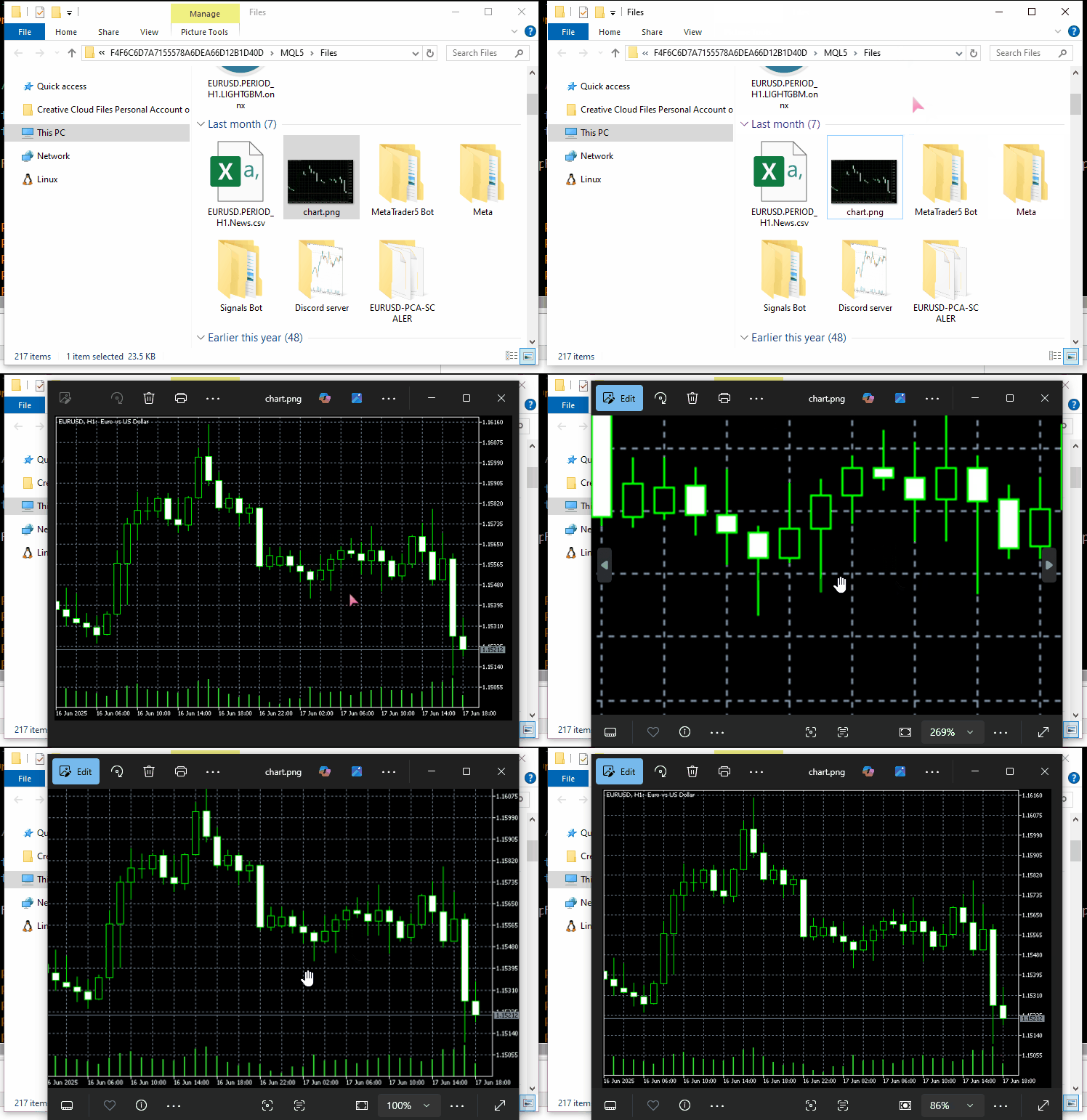
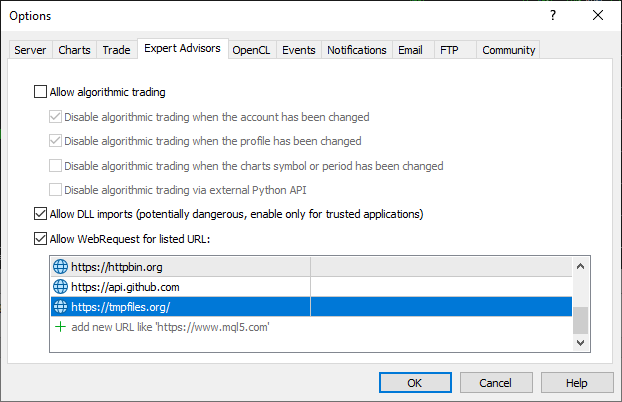
Utilizamos el servidor tempfiles.org como nuestro endpoint de la API.
Una vez más, para que esto funcione, asegúrate de añadir la URL tempfiles.org a la lista de URL permitidas en MetaTrader 5;
#include <requests.mqh>
//+------------------------------------------------------------------+
//| Script program start function                                    |
//+------------------------------------------------------------------+
void OnStart()
  {
//---

     string files[] = {"chart.jpg"};

     CResponse response = CSession::request("POST","https://tmpfiles.org/api/v1/upload","",files);

      Print("Status Code: ", response.status_code);
      Print("Reason: ", response.reason);
      Print("URL: ", response.url);
      Print("OK: ", (string)response.ok);
      Print("Elapsed Time (ms): ", response.elapsed);

      Print("Headers:\n", response.headers);
      Print("Cookies: ", response.cookies);
      Print("Response: ",response.text);
      Print("JSON:\n", response.json["url"].ToStr());
  }
Resultados:
CF      0       17:06:25.063    Requests test (XAUUSD,D1)       Status Code: 200
RL      0       17:06:25.063    Requests test (XAUUSD,D1)       Reason: OK
QM      0       17:06:25.063    Requests test (XAUUSD,D1)       URL: https://tmpfiles.org/api/v1/upload
FN      0       17:06:25.063    Requests test (XAUUSD,D1)       OK: true
OH      0       17:06:25.063    Requests test (XAUUSD,D1)       Elapsed Time (ms): 1594
FQ      0       17:06:25.063    Requests test (XAUUSD,D1)       Headers:
RN      0       17:06:25.063    Requests test (XAUUSD,D1)       Server: nginx/1.22.1
QO      0       17:06:25.063    Requests test (XAUUSD,D1)       Content-Type: application/json
KJ      0       17:06:25.063    Requests test (XAUUSD,D1)       Transfer-Encoding: chunked
CS      0       17:06:25.063    Requests test (XAUUSD,D1)       Connection: keep-alive
KE      0       17:06:25.063    Requests test (XAUUSD,D1)       Cache-Control: no-cache, private
RM      0       17:06:25.063    Requests test (XAUUSD,D1)       Date: Thu, 10 Jul 2025 14:06:25 GMT
DF      0       17:06:25.063    Requests test (XAUUSD,D1)       X-RateLimit-Limit: 60
GN      0       17:06:25.063    Requests test (XAUUSD,D1)       X-RateLimit-Remaining: 59
CN      0       17:06:25.063    Requests test (XAUUSD,D1)       Access-Control-Allow-Origin: *
NF      0       17:06:25.063    Requests test (XAUUSD,D1)
ED      0       17:06:25.063    Requests test (XAUUSD,D1)       Cookies:
RM      0       17:06:25.063    Requests test (XAUUSD,D1)       Response: {"status":"success","data":{"url":"http://tmpfiles.org/5459540/chart.png"}}
LS      0       17:06:25.063    Requests test (XAUUSD,D1)       JSON:
HJ      0       17:06:25.063    Requests test (XAUUSD,D1)
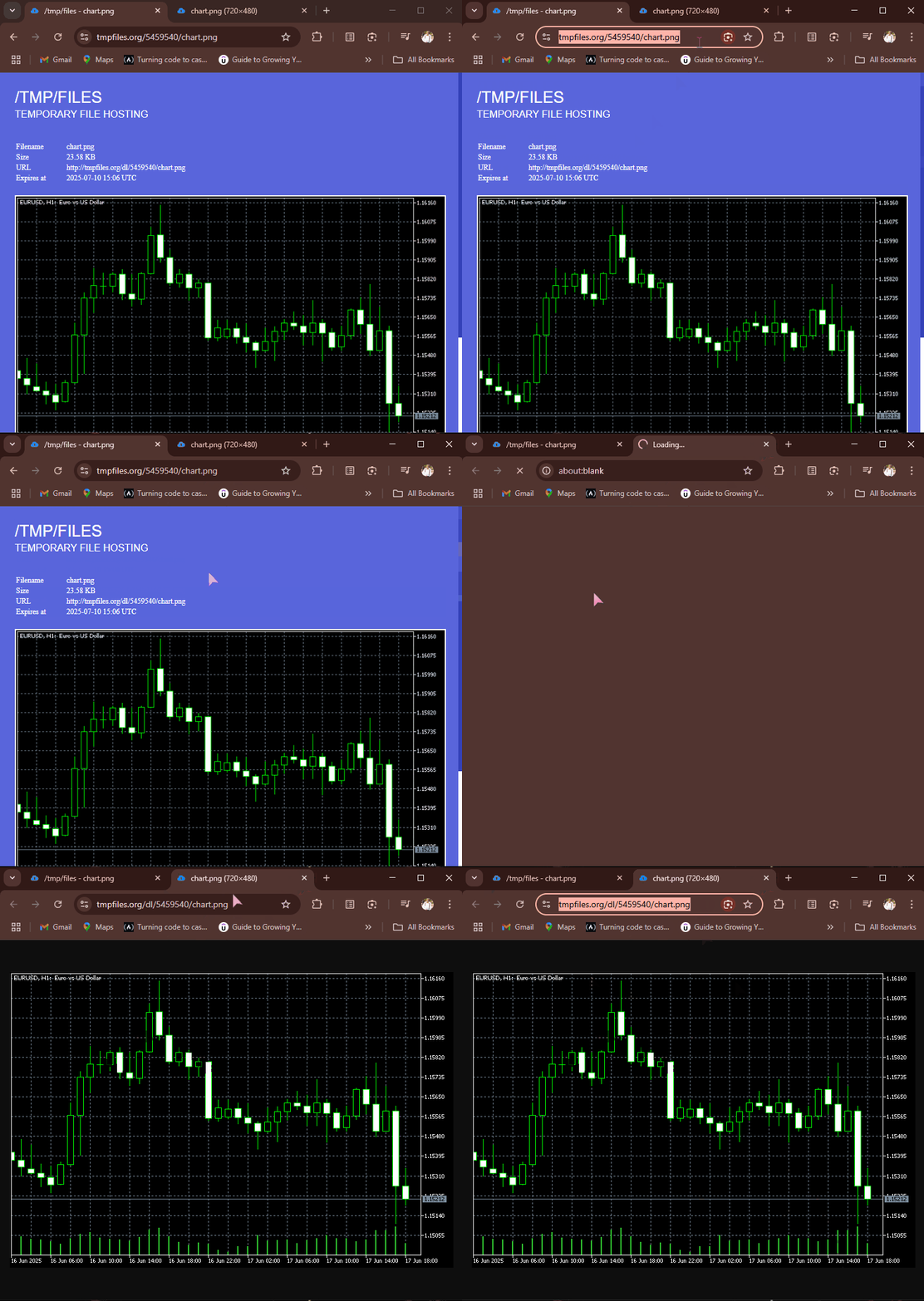
Tras una solicitud POST correcta, tempfiles.org devuelve una respuesta JSON que contiene una URL del punto final donde se aloja el archivo. Podemos acceder a este enlace y ver el archivo de imagen en el navegador web.
Recepción y descarga de archivos desde la web
Una vez más, Internet está pensado para compartir todo tipo de información y archivos, por lo que poder recibir distintos archivos en MQL5 resulta muy útil, ya que permite recibir datos en formatos CSV y Excel; recibir modelos de aprendizaje automático entrenados y sus parámetros en diferentes formatos binarios, y mucho más.
La función get implementada ya es capaz de hacer esto cuando se le proporciona el punto final de la API adecuado.
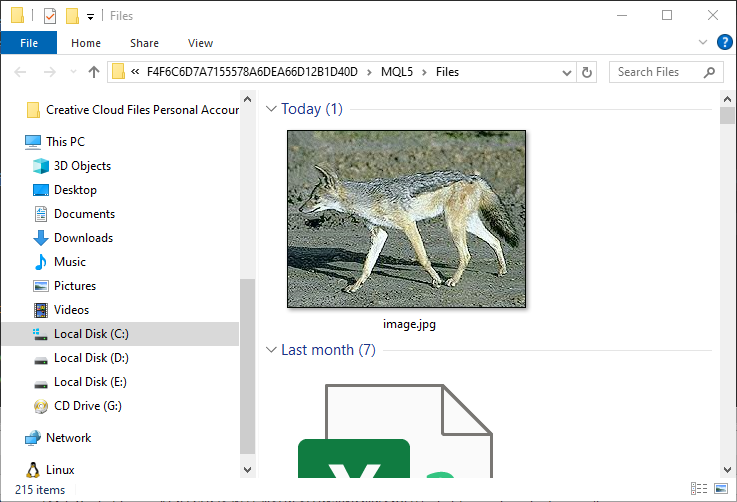
Por ejemplo: vamos a obtener una imagen de httpbin.org y a guardarla en la ruta de datos de MQL5.
#include <requests.mqh>
CSession requests;
//+------------------------------------------------------------------+
//| Script program start function                                    |
//+------------------------------------------------------------------+
void OnStart()
  {
      //--- Get the image file from the web
      CResponse response = requests.get("https://httpbin.org/image/jpeg");
 }
Cuando esta función se ejecuta correctamente, devuelve el archivo de imagen o sus datos en formato binario.
Este archivo se encuentra en la variable CResponse::content.
void OnStart()
  {
      //--- Get the image file from the web
      CResponse response = requests.get("https://httpbin.org/image/jpeg");

      //--- Saving an image received in binary format stored in response.content

      int handle = FileOpen("image.jpg", FILE_WRITE|FILE_BIN|FILE_SHARE_WRITE); //Open a .jpg file for writting an image to it
      if (handle == INVALID_HANDLE) //Check the handle
         {
            printf("Failed to open an Image. Error=%s",ErrorDescription(GetLastError()));
            return;
         }

      if (FileWriteArray(handle, response.content)==0) //write all binary data to a image.jpg file
         {
            printf("Failed to write an Image. Error=%s",ErrorDescription(GetLastError()));
            return;
         }

      FileClose(handle);
  }
Resultados:
Una imagen que muestra un zorro (o el animal que sea) se guarda en la carpeta MQL5/Files.
Gestión de sesiones y cookies
Quizá hayas observado que todas las funciones de la clase CSession son estáticas, lo que hace que esta clase funcione esencialmente como una clase con métodos estáticos.
class CSession
  {
protected:
   //.... other lines of code

public:

                            CSession(const string headers, const string cookies=""); // Provides headers cookies persistance
                           ~CSession(void);

   static void SetCookie(const string cookie)
      {
         if (StringLen(m_cookies) > 0)
            m_cookies += "; ";
         m_cookies += cookie;
      }

   static void ClearCookies()
      {
         m_cookies = "";
      }

   static void              SetBasicAuth(const string username, const string password);

   //---

   static CResponse         request(const string method, const string url, const string data, const string &files[], const string headers = "", const int timeout = 5000, const bool is_json=true);

   // High-level request helpers
   static CResponse         get(const string url, const string headers = "", const int timeout = 5000)
     {
       string files[];
       return request("GET", url, "", files, headers, timeout, false);
     }

     //... other functions
 }
El objetivo es ofrecer a los desarrolladores la opción de utilizar la biblioteca requests de forma parcial o en su totalidad para imitar el funcionamiento del módulo requests en Python.
(a): Usando una instancia de la clase
#include <requests.mqh>
//+------------------------------------------------------------------+
//| Script program start function                                    |
//+------------------------------------------------------------------+
void OnStart()
  {
//---

     string headers = "Content-Type: application/json;";
     string cookies = "sessionid=abc123";

     CSession session(headers, cookies); //New session, class constructor calle with
     CResponse response = session.get("https://httpbin.org/cookies"); //receive cookies from the server

      Print("HTTP response");
      Print("--> Status Code: ", response.status_code);
      Print("--> Reason: ", response.reason);
      Print("--> URL: ", response.url);
      Print("--> OK: ", (string)response.ok);
      Print("--> Elapsed Time (ms): ", response.elapsed);

      Print("--> Headers:\n", response.headers);
      Print("--> Cookies: ", response.cookies);
      Print("--> Response text: ",response.text);
      Print("--> JSON:\n", response.json.ToStr());
}
Resultados:
DS      0       11:38:36.272    Requests test (XAUUSD,D1)       HTTP response
RI      0       11:38:36.272    Requests test (XAUUSD,D1)       --> Status Code: 200
KR      0       11:38:36.272    Requests test (XAUUSD,D1)       --> Reason: OK
NG      0       11:38:36.272    Requests test (XAUUSD,D1)       --> URL: https://httpbin.org/cookies
IF      0       11:38:36.272    Requests test (XAUUSD,D1)       --> OK: true
QQ      0       11:38:36.272    Requests test (XAUUSD,D1)       --> Elapsed Time (ms): 2141
IH      0       11:38:36.272    Requests test (XAUUSD,D1)       --> Headers:
FQ      0       11:38:36.272    Requests test (XAUUSD,D1)       Date: Sat, 12 Jul 2025 08:38:36 GMT
RE      0       11:38:36.272    Requests test (XAUUSD,D1)       Content-Type: application/json
FO      0       11:38:36.272    Requests test (XAUUSD,D1)       Content-Length: 49
DE      0       11:38:36.272    Requests test (XAUUSD,D1)       Connection: keep-alive
CR      0       11:38:36.272    Requests test (XAUUSD,D1)       Server: gunicorn/19.9.0
PK      0       11:38:36.272    Requests test (XAUUSD,D1)       Access-Control-Allow-Origin: *
HM      0       11:38:36.272    Requests test (XAUUSD,D1)       Access-Control-Allow-Credentials: true
QN      0       11:38:36.272    Requests test (XAUUSD,D1)
DL      0       11:38:36.272    Requests test (XAUUSD,D1)       --> Cookies:
LG      0       11:38:36.272    Requests test (XAUUSD,D1)       --> Response text: {
EP      0       11:38:36.272    Requests test (XAUUSD,D1)         "cookies": {
HJ      0       11:38:36.272    Requests test (XAUUSD,D1)           "sessionid": "abc123"
RN      0       11:38:36.272    Requests test (XAUUSD,D1)         }
DE      0       11:38:36.272    Requests test (XAUUSD,D1)       }
EM      0       11:38:36.272    Requests test (XAUUSD,D1)
MD      0       11:38:36.272    Requests test (XAUUSD,D1)       --> JSON:
GH      0       11:38:36.272    Requests test (XAUUSD,D1)
Al utilizar la clase completa llamando al constructor de la clase y pasando el encabezado y las cookies (opcional), puedes reutilizar los mismos encabezados globales y utilizar las mismas cookies en todas las peticiones HTTP que se realicen utilizando la misma instancia de la clase; esto es lo que llamamos una sesión HTTP.
(b): Utilizar funciones de la clase por separado
Para realizar solicitudes HTTP sencillas sin estar en una sesión HTTP, es decir, para gestionar nuevos encabezados HTTP y cookies cada vez.
A continuación se muestra cómo usar directamente las funciones de la clase CSession sin instanciar el objeto de la clase.
#include <requests.mqh>
//+------------------------------------------------------------------+
//| Script program start function                                    |
//+------------------------------------------------------------------+
void OnStart()
  {
//---

     CResponse response = CSession::get("https://httpbin.org/get"); //The get request

      Print("HTTP response");
      Print("--> Status Code: ", response.status_code);
      Print("--> Reason: ", response.reason);
      Print("--> URL: ", response.url);
      Print("--> OK: ", (string)response.ok);
      Print("--> Elapsed Time (ms): ", response.elapsed);

      Print("--> Headers:\n", response.headers);
      Print("--> Cookies: ", response.cookies);
      Print("--> Response text: ",response.text);
      Print("--> JSON:\n", response.json.ToStr());
 }
Autenticación básica
Todas las funciones del módulo requests disponible en Python cuentan con una opción para enviar al servidor los datos necesarios para una autenticación básica (simple).
import requests

response = requests.get("https://httpbin.org/headers", auth=("user", "pass"))
print(response.text)
A continuación se muestra una funcionalidad similar en nuestra clase MQL5.
void CSession::SetBasicAuth(const string username, const string password)
  {
   string credentials = username + ":" + password;
   string encoded = Base64Encode(credentials); //Encode the credentials

   m_headers = UpdateHeader(m_headers, "Authorization", "Basic " + encoded); //Update HTTP headers with the authentication information
  }
A diferencia del módulo de Python, en el que los desarrolladores pueden enviar estos parámetros de autenticación directamente dentro de una función, nuestra clase MQL5 lo hace de forma ligeramente diferente, ya que permite a los usuarios enviar estos parámetros básicos de autenticación en una función independiente.
La función SetBasicAuth actualiza los encabezados de la clase añadiendo las credenciales de autorización; estos valores estarán disponibles para todas las funciones que se llamen posteriormente utilizando la misma instancia de la clase.
#include <requests.mqh>
//+------------------------------------------------------------------+
//| Script program start function                                    |
//+------------------------------------------------------------------+
void OnStart()
  {
//---

     CSession::SetBasicAuth("user", "pass");   //Sets authentication parameters to the HTTP header
     CResponse response = CSession::get("https://httpbin.org/headers"); //Get the headers from the server

      Print("HTTP response");
      Print("--> Headers:\n", response.headers);
      Print("--> Response text: ",response.text);
 }
Resultados:
IE      0       14:23:23.885    Requests test (XAUUSD,D1)       HTTP response
FQ      0       14:23:23.885    Requests test (XAUUSD,D1)       --> Headers:
KI      0       14:23:23.885    Requests test (XAUUSD,D1)       Date: Sat, 12 Jul 2025 11:23:23 GMT
MM      0       14:23:23.885    Requests test (XAUUSD,D1)       Content-Type: application/json
HK      0       14:23:23.885    Requests test (XAUUSD,D1)       Content-Length: 385
IR      0       14:23:23.885    Requests test (XAUUSD,D1)       Connection: keep-alive
JJ      0       14:23:23.885    Requests test (XAUUSD,D1)       Server: gunicorn/19.9.0
IS      0       14:23:23.885    Requests test (XAUUSD,D1)       Access-Control-Allow-Origin: *
QE      0       14:23:23.885    Requests test (XAUUSD,D1)       Access-Control-Allow-Credentials: true
HF      0       14:23:23.885    Requests test (XAUUSD,D1)
KG      0       14:23:23.885    Requests test (XAUUSD,D1)       --> Response text: {
KP      0       14:23:23.885    Requests test (XAUUSD,D1)         "headers": {
GH      0       14:23:23.885    Requests test (XAUUSD,D1)           "Accept": "*/*",
CM      0       14:23:23.885    Requests test (XAUUSD,D1)           "Accept-Encoding": "gzip, deflate",
DQ      0       14:23:23.885    Requests test (XAUUSD,D1)           "Accept-Language": "en;q=0.5",
NE      0       14:23:23.885    Requests test (XAUUSD,D1)           "Authorization": "Basic dXNlcjpwYXNz",
NS      0       14:23:23.885    Requests test (XAUUSD,D1)           "Cookie": "session=abc123;max-age=60;",
KL      0       14:23:23.885    Requests test (XAUUSD,D1)           "Host": "httpbin.org",
HK      0       14:23:23.885    Requests test (XAUUSD,D1)           "User-Agent": "MetaTrader 5 Terminal/5.5120 (Windows NT 10.0.19045; x64)",
NI      0       14:23:23.885    Requests test (XAUUSD,D1)           "X-Amzn-Trace-Id": "Root=1-687245ab-2065056c28f0024b71a6446f"
GH      0       14:23:23.885    Requests test (XAUUSD,D1)         }
IF      0       14:23:23.885    Requests test (XAUUSD,D1)       }
Cómo gestionar los parámetros de las URL
Otra cosa interesante que hace el módulo `requests` de Python es que gestiona la URL recibida y sus parámetros antes de enviar la solicitud web definitiva.
import requests

response = requests.get("https://httpbin.org/get", params={"param1": "value1"})
print(response.url)
Resultados:
https://httpbin.org/get?param1=value1
En nuestra clase de MQL5 adoptamos un enfoque ligeramente diferente. En lugar de pasar parámetros de URL a todas las funciones, lo que las complica, contamos con una función de utilidad independiente que ayuda a crear la URL final con los parámetros, a partir de la URL original y sus parámetros asociados.
#include <requests.mqh>
//+------------------------------------------------------------------+
//| Script program start function                                    |
//+------------------------------------------------------------------+
void OnStart()
  {
//---
      string keys[]   = {"user", "id", "lang"};
      string values[] = {"omega", "123", "mql5 test"};

      string parent_url = "https://httpbin.org/get";
      string final_url =  CSession::BuildUrlWithParams(parent_url, keys, values); //builds a URL with the given parameters

      Print("final url: ",final_url);
 }
Resultados:
2025.07.12 15:41:57.924 Requests test (XAUUSD,D1) final url: https://httpbin.org/get?user=omega&id=123&lang=mql5+test Una vez creada una URL con sus parámetros asociados, podrás utilizarla para realizar solicitudes web HTTP.
      CResponse response = CSession::get(final_url); //Get the headers from the server

      Print("HTTP response");
      Print("--> Headers:\n", response.headers);
      Print("--> Response text: ",response.text);
Resultados:
JK      0       15:42:00.398    Requests test (XAUUSD,D1)       --> Headers:
QP      0       15:42:00.398    Requests test (XAUUSD,D1)       Date: Sat, 12 Jul 2025 12:41:59 GMT
QK      0       15:42:00.398    Requests test (XAUUSD,D1)       Content-Type: application/json
PM      0       15:42:00.398    Requests test (XAUUSD,D1)       Content-Length: 525
ED      0       15:42:00.398    Requests test (XAUUSD,D1)       Connection: keep-alive
FP      0       15:42:00.398    Requests test (XAUUSD,D1)       Server: gunicorn/19.9.0
MH      0       15:42:00.398    Requests test (XAUUSD,D1)       Access-Control-Allow-Origin: *
EK      0       15:42:00.398    Requests test (XAUUSD,D1)       Access-Control-Allow-Credentials: true
LM      0       15:42:00.398    Requests test (XAUUSD,D1)
OI      0       15:42:00.398    Requests test (XAUUSD,D1)       --> Response text: {
RQ      0       15:42:00.398    Requests test (XAUUSD,D1)         "args": {
CR      0       15:42:00.398    Requests test (XAUUSD,D1)           "id": "123",
KF      0       15:42:00.398    Requests test (XAUUSD,D1)           "lang": "mql5 test",
HI      0       15:42:00.398    Requests test (XAUUSD,D1)           "user": "omega"
KP      0       15:42:00.398    Requests test (XAUUSD,D1)         },
MP      0       15:42:00.398    Requests test (XAUUSD,D1)         "headers": {
IH      0       15:42:00.398    Requests test (XAUUSD,D1)           "Accept": "*/*",
QL      0       15:42:00.398    Requests test (XAUUSD,D1)           "Accept-Encoding": "gzip, deflate",
JQ      0       15:42:00.398    Requests test (XAUUSD,D1)           "Accept-Language": "en;q=0.5",
NF      0       15:42:00.398    Requests test (XAUUSD,D1)           "Cookie": "session=abc123;max-age=60;",
KQ      0       15:42:00.398    Requests test (XAUUSD,D1)           "Host": "httpbin.org",
HP      0       15:42:00.398    Requests test (XAUUSD,D1)           "User-Agent": "MetaTrader 5 Terminal/5.5120 (Windows NT 10.0.19045; x64)",
ND      0       15:42:00.398    Requests test (XAUUSD,D1)           "X-Amzn-Trace-Id": "Root=1-68725817-67dc04cf43ac75b012094481"
KE      0       15:42:00.398    Requests test (XAUUSD,D1)         },
CQ      0       15:42:00.398    Requests test (XAUUSD,D1)         "origin": "197.250.227.235",
MD      0       15:42:00.398    Requests test (XAUUSD,D1)         "url": "https://httpbin.org/get?user=omega&id=123&lang=mql5+test"
IK      0       15:42:00.398    Requests test (XAUUSD,D1)       }
LN      0       15:42:00.398    Requests test (XAUUSD,D1)
¡Genial! El servidor incluso ha incluido la clave «args» en el texto JSON de nuestra respuesta, lo que indica que el proceso de creación de una URL con sus parámetros asociados se ha realizado con éxito.
Conclusión
Con todo el conocimiento y la información gratuitos y de código abierto a disposición del público. En el mundo actual, programar no debería ser difícil.
Tras aprender cómo funciona el módulo requests en Python, pude implementar un módulo similar en MQL5 para ayudarnos a realizar solicitudes HTTP a servidores externos desde MetaTrader 5.
Sin embargo, aunque la sintaxis y las llamadas a funciones puedan parecer similares a las que ofrece el módulo «requests» de Python, este módulo de MQL5 dista mucho de estar completo; tenemos que probarlo a fondo y seguir mejorándolo juntos, por eso he creado un repositorio en Forge MQL5, cuyo enlace es: https://forge.mql5.io/omegajoctan/Requests
Así que no dudes en actualizar el código desde allí y cuéntanos qué te parece en la sección de debate.
Un saludo.
Tabla de archivos adjuntos
| Nombre del archivo | Descripción y uso |
|---|---|
| Include\errordescription.mqh | Contiene descripciones de todos los códigos de error producidos por MQL5 y MetaTrader 5. |
| Include\Jason.mqh | Biblioteca para serializar y deserializar cadenas de texto en formato JSON. |
| Include\requests.mqh | El módulo principal, similar al módulo «requests» de Python. |
| Scripts\Requests test.mq5 | El script principal para probar todas las funciones y métodos descritos en esta publicación. |
Traducción del inglés realizada por MetaQuotes Ltd.
Artículo original: https://www.mql5.com/en/articles/18728
Advertencia: todos los derechos de estos materiales pertenecen a MetaQuotes Ltd. Queda totalmente prohibido el copiado total o parcial.
Este artículo ha sido escrito por un usuario del sitio web y refleja su punto de vista personal. MetaQuotes Ltd. no se responsabiliza de la exactitud de la información ofrecida, ni de las posibles consecuencias del uso de las soluciones, estrategias o recomendaciones descritas.

 Algoritmo del duelista — Duelist Algorithm
 Redes neuronales en el trading: descomposición en lugar de escalado (Final)
 Redes neuronales en el trading: Modelo de consultas temporales (TQNet)
 Herramientas de trading de MQL5 (Parte 4): Mejorando el panel del escáner multitemporal con posicionamiento dinámico y funciones de alternancia

- Aplicaciones de trading gratuitas
- 8 000+ señales para copiar
- Noticias económicas para analizar los mercados financieros
Usted acepta la política del sitio web y las condiciones de uso