
Point of Control Breakout Buy Sell Signal
- 유틸리티
- 버전: 20.72
- 업데이트됨: 9 6월 2026
- 활성화: 5

================================================================================
POC BREAKOUT - V20.72. Full Professional Grade Toolkit
================================================================================
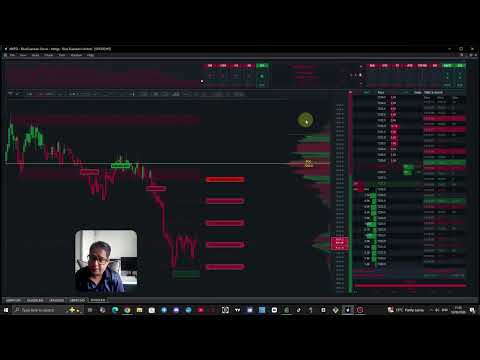
POC Breakout is a full MetaTrader 5 trading dashboard for discretionary traders who want breakout signals,
Point of Control (POC) context, volume profiles, order flow, market structure, news, alerts, and advanced trade planning in one professional workspace.
Attached directly to your chart, it replaces a stack of messy indicators with a unified, visual custom trading screen.
IMPORTANT- PLEASE READ THE USER GUIDE FULLY TO UNDERSTAND THE EA AND ITS FEATURES
https://www.mql5.com/en/blogs/post/771376
--------------------------------------------------------------------------------
PAIRS AND TIMEFRAME
--------------------------------------------------------------------------------
TIME FRAME - 5 MINUTES
INSTRUMENTS- XAUUSD, GBPJPY, DE40, NAS100, SP500, WTI
Recommended Take Profit Level 1.
User Manaul: Attached in the comments section - IMPORTANT
DEMO USERS - PLEASE SELECT EVERY TICK / REAL TICK WHEN TESTING AND YOU HAVE DOWNLOADED HISTORICAL DATA. IF YOU SEE A WAITING SCREEN AND IT IS NOT DOWNLOADING, IT MEANS YOU HAVE LOW HISTORICAL DATA. TRY 1 MIN AND 5 MIN FIRST ON 1 DAY DATA. ONE DAY DATA SHOULD BE THE NEWEST AND MOST CURRENT DATE. PLEASE WAIT UNTIL THE MARKET HAS ROLLED OVER PERIOD.
--------------------------------------------------------------------------------
1. TOP HEADER & MARKET SNAPSHOT AREA
--------------------------------------------------------------------------------
The top header provides an immediate, compact read of the market context before you analyze individual candles:
• Symbol, current price display, and daily change with directional theme coloring.
• Bullish / Bearish / Neutral session bias labels alongside separate MA100 and MA200 status reads.
• Cumulative delta read and session flow/pressure context.
• Master UI Layer Toggle: Top-left master switch to quickly hide or restore all main UI panels.
• Mini Session Chart: Built-in visual tracker showing if price is pushing, ranging, or pulling back.
• Higher Timeframe (HTF) Analysis: 5 trend boxes showing larger trend alignment to prevent trading directly into HTF resistance.
• Indicator Status Boxes: 8 sci-fi equalizer-style boxes detailing technical context (MA, VWAP, RSI, MACD, CCI, ATR, SuperTrend, ADX) for fast confirmation scanning without cluttering the screen.
--------------------------------------------------------------------------------
2. TOP TOOL STRIP & FLOATING PANELS
--------------------------------------------------------------------------------
A compact tool strip allows you to instantly open or minimize specialized floating analysis modules:
• Profile Tools: Quick access buttons for Volume Bars, Session Volume Profile, and Session TPO.
• Analyst Panels: Toggle buttons for Volume Profile Analyst, Intraday Analyst, Market Context, Market Structure, and Indicator Suite.
• Order Flow Suite: Dedicated buttons for Big-Order Flow, Pressure Gauge, Orderflow Pulse, and Trade Stats[cite: 10].
• Chart Overlays: Toggle controls for London ORB, Divergence tool, Trendlines, Price Alerts, and MA/VWAP overlays[cite: 10].
--------------------------------------------------------------------------------
3. MAIN CHART, CUSTOM CANDLES & BREAKOUT SIGNALS
--------------------------------------------------------------------------------
The main workspace replaces native MT5 clutter with a highly responsive, custom visual design:
• Custom Charting: Theme-aware candle colors, price badge (with optional pips display), and an integrated right-side price ladder with bid/ask line controls.
• Advanced Chart Controls: Candle count adjustments, range padding, right-side gaps, auto-range behaviors, and manual compression tools.
• Direct Breakout Signals: Prints clear BUY/SELL breakout labels on the chart alongside exact Entry, SL, and TP1/TP2/TP3 target ladders.
• Signal Engine Features: Features an adjustable Confluence Score requirement for strict filtering, optional repeat same-direction signals, and live candle delta. Signals persist across timeframe changes.
• Supply & Demand Zones: Displays dynamic supply/demand zones with configurable opacity, volume filtering, and ATR-based widths.
• Market Structure Overlays: Highlights swing structure, break-of-structure (BOS) reads, structural gaps, liquidity sweeps, and active market regimes (trending/ranging).
--------------------------------------------------------------------------------
4. VOLUME PROFILE & TPO AUCTION ANALYSIS - KEY FEATURE
--------------------------------------------------------------------------------
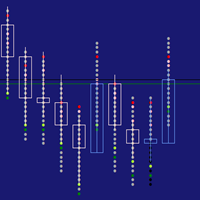
• Session Volume Profile: Tracks value distribution with stable levels for Point of Control (POC), Value Area High (VAH), and Value Area Low (VAL)[cite: 17]. Offers Total Volume, Delta, and Buy/Sell split view modes.
• Volume Profile Analyst Panel: Features a manual scanner that classifies profile shapes (P-shape, b-shape, B-shape/Double Distribution, D-shape/Balanced Auction). Includes a built-in Pattern Field Manual card, auction story text, trade guides, and metrics for aggression, absorption, or exhaustion.
• Session TPO Panel: Displays time-at-price distribution using customizable slot minutes to identify where time is being accepted.
--------------------------------------------------------------------------------
5. ORDER FLOW, DOM & TIME & SALES TAPE - KEY FEATURE
--------------------------------------------------------------------------------
• Depth of Market (DOM) Panel: Provides a live order-book view showing resting Bid/Ask sizes with flash states for recent activity, depletion, and refills.
• DOM Traded-Volume Columns: Features VPS (sell-side volume profile) and VPB (buy-side volume profile) columns, a separate Delta column, and Total Volume tracking to distinguish executed transactions from resting liquidity.
• Time & Sales: Real-time scrolling tape classifying aggressive Buy, Sell, and Neutral prints, fully compatible with the Strategy Tester.
• Large Flow Trackers: Prints big order text markers, whale order vertical beams, and heavy buying/selling cluster labels directly on the chart.
• Order Flow & Orderflow Pulse: Includes a bottom visual flow histogram (by age), DOM heatmaps, imbalances, and a floating single footprint candle panel highlighting short-term buyer/seller pressure build-ups.
• Cumulative Delta & Gauges: Tracks session-wide cumulative delta alongside a togglable bottom Bulls/Bears pressure gauge.
--------------------------------------------------------------------------------
6. SPECIALIZED ANALYST PANELS & TRADING TOOLS - KEY FEATURE
--------------------------------------------------------------------------------
• Signal Analyst Panel: Grades setups using an A-F rating system. Monitors print-time snapshots vs. live updates, retest quality, signal freshness, entry stretch, and alignment with VAH/VAL/VWAP.
• Intraday Analyst & HTF Levels: Displays path summaries, Multi-Stage intraday targets, invalidation lines, reversal potentials, and key higher-timeframe price references.
• London ORB Visual Tool: Displays an editable Opening Range Breakout box with a three-tier target layout, profit zones, customizable box size safety filters, and adjustable risk factors.
• Fundamentals / News Panel: An economic calendar directly on your chart. Lists upcoming events for broker-day, dims events past 3 hours, and automatically filters out old news.
• Trade Stats Panel: Backtests signal history on your current chart to reveal actual hit rates for TP1, TP2, and TP3 targets.
• Multi-Channel Alert System: Instant terminal alerts, optional audio WAV files, and mobile push notifications for new signals, SL hits, and individual TP targets with built-in retrace protection. Includes a draggable manual price alert line.
• Advanced Chart Tools: Interactive Trendline tools with angle adjustments and a Divergence tool for identifying regular bullish/bearish RSI deviations.
• MA / VWAP Tool: Interactive floating panel allowing users to overlay up to three customized Moving Averages and a session VWAP curve.
--------------------------------------------------------------------------------
7. RISK MANAGEMENT, TRADE PANELS & PROP FIRM FEATURE
--------------------------------------------------------------------------------
• Trade Manager 2: Comprehensive risk management panel. Supports manual lot entries or exact account risk percentage calculation. Tracks R-multiples, profit/loss visual gauges, trade duration age, partial close actions, and features automated break-even buttons alongside a startup spread guard[cite: 32].
• Custom Order Tool: Visually plan structured manual multi-target trades before execution. Features drag-to-place lines for entry, SL, and split-volume targets (TP1) with active risk/reward ratio previews.
• Prop Firm Guard Features: Protects challenge accounts via strict risk-limiting controls. Input starting balance, target targets, and maximum total/daily loss or profit thresholds. Includes an account-wide close helper that acts as an emergency buffer safeguard.
--------------------------------------------------------------------------------
8. VISUAL CUSTOMIZATION & STRATEGY TESTER
--------------------------------------------------------------------------------
• Tailored Aesthetics: Choose from 29 built-in color themes, 26 floating panel skins, dark/light modes, customizable typography (mono/standard), custom text sizes, grid layout densities, and precise UI positioning (X/Y coordinates).
• Strategy Tester Visual Mode: Fully functional inside the MT5 Strategy Tester. Generates DOM order book sequences and Time & Sales behavior when live broker data is absent, making it an excellent environment for paper trading and offline practice.
--------------------------------------------------------------------------------
BUYER NOTES & DISCLAIMER
--------------------------------------------------------------------------------
• This software functions strictly as an interactive dashboard and analytical assistant; all order execution parameters remain under direct user control.
• Order book quality and news availability depend directly on your specific MT5 broker's feed support. Always thoroughly test settings inside a demo account or the Strategy Tester prior to live capitalization.
RISK DISCLAIMER: POC Breakout Analyst is an analysis and dashboard tool first. Its BUY / SELL / WAIT outputs are signals,
not financial advice, and no signal, grade or confidence read is a guarantee of any particular outcome.
Trading leveraged instruments such as forex, indices, metals, energies and crypto carries a substantial risk of loss
and is not suitable for every investor. You can lose more than your initial deposit.
Past performance — whether live, demo or from the Strategy Tester — does not guarantee future results, and backtest behaviour
can differ materially from live trading due to spread, slippage, liquidity, latency and broker conditions.
You are solely responsible for your own trading decisions, risk and money management,
and for complying with the rules of your broker or prop firm.
Always test thoroughly in the Strategy Tester and on a demo account before committing real capital,
never risk money you cannot afford to lose,
and do not enable order entry until you fully understand the trade-management settings in Chapter 10.
If in doubt, seek advice from an independent, licensed financial professional.
By using this software you accept that the author and AJ Trading Tools accept
no liability for any loss or damage arising from its use.
================================================================================
SETTINGS, UPDATES AND CUSTOMER SERVICE
================================================================================
Please read the full Poc Breakout Manual for a thorough guide to setting it up and familiar yourself with the ui and what each component does.
Screen resolution is ideal for 1920 x 1080 but have presets for higher resolution and custom resolutions.
Hardware must be decent and a recent cpu and gpu for rendering and calculations.
Updates are frequent
For customer service, please reach out with any issue providing the order number, a screenshot and a summary of the issue.
IMPORTANT- IF YOU LOSE INTERNET/SHUT YOUR PC/LAPTOP, YOU MUST REATTACH THE EA FOR CALCULATIONS AGAIN.



















































highly recommended and really helpful.