TradePanel MT5

4.86

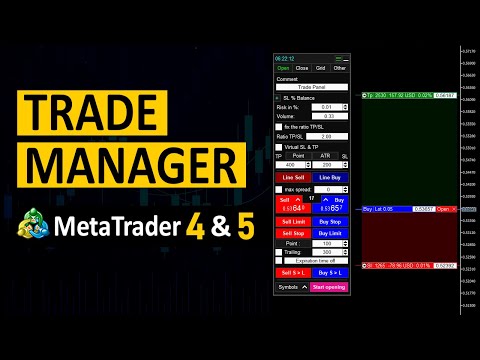
Trade Panel은 다기능 거래 보조원입니다. 이 애플리케이션에는 수동 거래를 위한 50개 이상의 거래 기능이 포함되어 있으며 대부분의 거래 작업을 자동화할 수 있습니다.

전략 테스터에서는 애플리케이션이 작동하지 않습니다. 구매하기 전에 데모 계정에서 데모 버전을 테스트할 수 있습니다. 데모 버전 여기.

전체 지침 여기.

거래.

한 번의 클릭으로 거래 작업을 수행할 수 있습니다:

  • 자동 위험 계산을 통해 지정가 주문 및 포지션을 엽니다.
  • 한 번의 클릭으로 여러 주문과 포지션을 열 수 있습니다.
  • 주문 그리드를 엽니다.
  • 그룹별 대기 주문 및 포지션을 마감합니다.
  • 포지션 반전(매수 청산 후 매도 개시 또는 매도 청산 후 매수 개시).
  • 포지션 고정(매수 포지션과 매도 포지션의 양을 동일하게 하는 추가 포지션 개설).
  • 한 번의 클릭으로 모든 포지션을 부분 청산합니다.
  • 모든 포지션의 이익실현과 손절매를 동일한 가격 수준으로 설정합니다.
  • 모든 포지션에 대한 손절매를 해당 포지션의 손익 분기점 수준으로 설정합니다.

주문 및 포지션 개시 시 다음 기능을 적용할 수 있습니다:

  • 계산된 거래량을 여러 주문 또는 포지션 간에 분배합니다(한 번의 클릭으로 여러 주문 및 포지션을 여는 경우).
  • 차트에서 미래 주문의 거래 수준을 시각화합니다.
  • 포지션을 열 때 허용되는 최대 스프레드 크기를 설정합니다.
  • 이익실현과 손절매 사이의 자동 비율.
  • 가상 손절매 및 이익 실현.
  • 현재 스프레드 규모에 따라 손절매 및 이익 실현 규모가 자동으로 증가합니다.
  • ATR 지표 판독값을 기반으로 이익 실현 및 손절매를 계산합니다.
  • 보류 주문의 만료일 설정.
  • 지정 주문 "추적"에 대한 설정(지정 주문은 지정된 거리에 따라 현재 가격을 따라 자동으로 이동됩니다).
  • 모바일 단말기(전화)에서 개설된 주문 및 포지션을 관리합니다.

위험 관리자 및 거래 보고서.

거래 내역을 분석할 수 있습니다:

  • 차트에 거래 내역을 표시합니다. 차트의 모든 포지션을 표시하도록 선택할 수 있습니다. 매수, 매도, 수익성 및 손실 포지션만 표시됩니다.
  • 현재 기호 또는 전체 계정에 대한 거래 보고서를 생성합니다.

거래 계좌의 위험을 통제할 수 있습니다:

  • 일별, 주별, 월별 수익을 표시합니다.
  • 일일, 주간, 월간 손실 한도를 설정합니다.
  • 일별, 주별, 월별 수익 한도를 설정합니다.
  • 일일 거래 수 제한을 설정합니다.

한도에 도달하면 다음을 수행할 수 있습니다.

  • 차트에 메시지를 표시하고, 휴대폰으로 알림을 보내거나 이메일을 보냅니다.
  • 모든 포지션과 대기 주문을 마감합니다.
  • 포지션 고정(매수 포지션과 매도 포지션의 양을 동일하게 하는 추가 포지션 개설).
  • 다음 날까지 터미널을 닫습니다.

OCO 주문.

OCO 주문을 생성할 수 있습니다.

OCO 주문은 상호 취소 기능으로 상호 연결된 두 개의 보류 주문입니다. 하나의 주문이 실행되면 두 번째 주문이 삭제됩니다.

주문 및 포지션 청산.

포지션의 총 이익 또는 손실이 지정된 값에 도달하면 패널을 사용하여 모든 보류 주문과 포지션을 종료할 수 있습니다.

  • 패널은 현재 기호 또는 전체 계정에 대한 주문과 포지션을 청산할 수 있습니다.
  • 트레이딩 패널은 매수+매도 포지션, 매수만 또는 매도 포지션의 이익을 고려할 수 있습니다.
  • 패널에서는 모든 포지션과 주문을 마감하거나 선택한 유형만 마감할 수 있습니다.

작업.

주문 및 포지션 개시 및 청산에 대한 보류 작업을 설정할 수 있습니다:

지정된 시간에 도달하거나 가격이 작업 라인에 닿거나 다른 작업이 활성화되면 작업이 활성화됩니다.

작업은 모든 유형의 주문 및 포지션을 개설하거나 마감할 수 있습니다.

트레일링 스톱 기능.

포지션에 대한 추적 중지 기능을 설정할 수 있습니다(특정 알고리즘에 따라 손절매를 이익 방향으로 이동).

  • 7가지 유형의 후행 정지.
  • '시작' 기능이 있습니다.
  • 가상 손절매를 사용할 수 있습니다.

손익분기 기능.

포지션에 대한 손익분기점 기능을 설정할 수 있습니다(주어진 이익에 도달하면 손절매를 포지션 개시 가격으로 이동):

  • 포지션당 손익분기점 수에는 제한이 없습니다.
  • 포지션 개시 가격에서 손절매 가격까지의 거리를 설정할 수 있습니다.
  • 가상 손절매를 사용할 수 있습니다.
  • 포인트, 손절매 비율, 이익 실현 비율, 가격 등 네 가지 측정 옵션 중 하나로 거리를 설정할 수 있습니다.

부분 폐쇄 기능.

포지션 부분 청산 기능을 설정할 수 있습니다(지정된 손익 달성을 전제로 포지션 일부 청산):

  • 포지션당 부분 청산 수준 수에는 제한이 없습니다.
  • 세 가지 측정 옵션(고정 로트 크기, 현재 로트 크기의 %, 초기 로트 크기의 %) 중 하나로 마감 볼륨을 설정할 수 있습니다.
  • 포인트, 손절매 비율, 이익 실현 비율, 가격 등 4가지 측정 옵션 중 하나로 거리를 설정할 수 있습니다.

알림.

가격이 특정 라인에 도달하거나 특정 시간에 도달할 때 트리거되는 알림을 설정할 수 있습니다.

경고는 차트와 이메일 또는 휴대폰으로 전송된 메시지에 표시될 수 있습니다.

차트 관리.

터미널 차트의 기호를 전환하고 기호별로 데이터를 분석할 수 있습니다.

  • 기호가 포함된 목록은 최대 4개까지 만들 수 있습니다. 기호 목록과 해당 이름은 사용자가 지정합니다.
  • 특징을 즐겨찾기로 선택할 수 있습니다.
  • 미결 주문 및 포지션이 있는 별도의 기호 목록입니다.
  • 기호가 있는 버튼은 어떤 색상으로든 강조표시될 수 있습니다.

정보 패널.

패널의 기호에 대한 현재 정보를 표시합니다.

  • 확산.
  • 바가 닫힐 때까지의 시간입니다.
  • 현재 기호에 대해 개설된 포지션에서 이익이 발생합니다.
  • 포지션 수 및 거래량.
  • ATR 표시기 판독값을 표시합니다.
  • ATR 표시기의 파워 리저브를 표시합니다.
  • 현재 기호에 열려 있는 포지션에 대한 손익분기 가격을 표시합니다.

직위 및 주문 관리.

주문 및 포지션 설정을 관리할 수 있습니다:

  • 손절매 및 이익 실현을 편집합니다.

  • 가상 손절매 및 이익 실현을 편집합니다.
  • 후행 중지 기능을 편집합니다.
  • 손익분기점 기능을 수정합니다.
  • 부분 닫기 기능을 수정합니다.
  • 포지션 전체 또는 부분 청산.
  • 지정된 시간에 또는 지정된 가격에 도달하면 대기 중인 주문을 자동으로 제거합니다.

주문 그리드를 관리합니다.

주문 그리드 설정을 관리할 수 있습니다:

  • 주문 그리드에서 손절매 및 이익 실현을 편집합니다.
  • 주문 그리드에 대한 가상 손절매 및 이익 실현을 편집합니다.
  • 주문 그리드에 대한 추적 중지 기능을 설정합니다.
  • 주문 그리드에 대한 손익분기점 기능을 설정합니다.
  • 주문 그리드의 전체 또는 부분 폐쇄.

#태그: 트레이딩 패널, 트레이딩 매니저, 트레이딩 보조자, 리스크 관리, 주문 관리, 추적 손절매, 손익분기점, 부분 청산, 수동 트레이딩, 가상 손절매, 가상 이익 실현, 보이지 않는 손절매, 보이지 않는 이익 실현, 위험 관리, 손실 방지, 계정 보호, 최대 손실, 주문 그리드.

리뷰 164
Ilya Krasheninnikov
373
Ilya Krasheninnikov 2025.10.31 15:21 
 

Thank you for a quality product and prompt support!

TOPRUN
29
TOPRUN 2025.09.20 03:02 
 

I downloaded it today and used it for the first time. It's very powerful. My English is not good, so I haven't tried out all the functions yet. Can you add Chinese? Also, after I open a position with virtual stop-loss and take-profit lines, can I change or cancel them?

Alexanderman Makutin
141
Alexanderman Makutin 2025.09.10 17:03 
 

Лучшая Панель для Трейдинга которую я видел (ИДЕАЛЬНАЯ). Здесь есть все и даже больше - Сетка, Моно вход, Риск Менеджмент, АТР, Средняя цена, Частичное закрытие, выставление ТП и СЛ одним нажатием, и это лишь малая часть от всех возможностей этой лучшей Панели. Спасибо)

추천 제품
BTC Trading Assistant EA Manual Trading Tool with Automated Risk Management This Expert Advisor assists manual cryptocurrency traders by automating risk management, position sizing, and profit protection while providing visual trade management through an intuitive interface. Brief Description BTC Trading Assistant EA is a utility tool designed for manual cryptocurrency traders. The EA calculates position sizes based on account risk, automatically sets stop loss and take profit levels, manages br
Lot by Risk MT5
Sergey Vasilev
4.92 (13)
위험 거래 패널에 의해 많은 수동 거래를 위해 설계되었습니다. 이 명령을 보낼 수있는 다른 수단이다. 패널의 첫 번째 특징은 제어 라인을 사용하여 편리하게 주문할 수 있다는 것입니다. 두번째 특징은 정지 손실 선의 면전에서 주어진 위험을 위한 거래 양의 계산입니다. 제어 라인은 단축키를 사용하여 설정됩니다: 이익을-기본적으로 티 키; 가격-기본적으로 피 키; 정지 손실-기본적으로 키; 당신은 거래 패널의 설정에서 키를 직접 구성 할 수 있습니다. 작동 알고리즘: 1)-우리는(이 모든 레벨을 배치 할 필요가 없습니다)원하는 장소에 레벨을 배치; 2)–위험 지정(선택 사항); 3)-녹색 주문 보내기 버튼을 클릭하십시오.; 4)–우리는 배치 될 순서를 기다리고 있습니다,또는 오류 메시지와 경고가 나타납니다; 5)-우리는 전문가 고문에 마법에 의해 연결된 현재 기호에 대한 모든 주문을 닫으려면,다음 닫기 주문 버튼을 클릭합니다. 주문 보내기 버튼을 여러 번 눌러서는 안
FREE
Talents ATR Scalper Utility (MT5) The Talents ATR Scalper Utility is a professional-grade trade execution and management tool built for MetaTrader 5. Inspired by the Biblical Parable of the Talents , this utility is designed to help traders multiply their potential with precision risk control, one-click simplicity, and advanced automation. Whether you’re scalping forex, gold, or indices, this tool delivers speed, consistency, and confidence. Key Features One-Click Trade Preview Click below price
Expert TP SL v04 - Professional Trading Assistant with AI Motivation System Advanced manual trading tool with automatic risk management, overtrading protection, and intelligent psychological support for disciplined trading. PRODUCT OVERVIEW Expert TP SL v04 is a comprehensive trading assistant designed for manual traders who want to maintain emotional discipline while automating risk calculations. This isn't just another order placement tool - it's a complete trading psychology system that pr
Lock Bot
Artem Alekseev
This utility is designed to automatically maintain a "locking" position and reopen it when necessary, which is suitable for position maintenance and protection strategies. A simple utility (hereinafter referred to as the bot) that implements a locking strategy with an infinitely reloadable locking trade. How the bot works: - When launched, select a buy or sell order with a specified TP - Set the SL parameter for the locking trade - The bot monitors the distance between the opening price of the f
Hello friends. I wrote this utility specifically for use in my profile with a large number of Expert Advisors and sets ("Joint_profiles_from_grid_sets"   https://www.mql5.com/en/blogs/post/747929 ). Now, in order to limit losses on the account, there is no need to change the "Close_positions_at_percentage_of_loss" parameter on each chart. Just open   one   additional chart, attach this utility and set the desired percentage for closing all trades on the account. The utility has the following fu
This tool will perform Trailing stop loss and Break even management for orders. Helps you limit or reduce the time spend watching orders on the screen, especially when you need to go to sleep. Just add this EA to 1 chart, you can manage all pairs. You can filter orders by comment, magic number, symbol and order ticket number. When Breakeven it can add shift/offset pips (to cover the commission...). You can try in strategy tester before purchase. The EA will add Buy and Sell alternately, so you
Crash5 EA ,I s a automatic robot that has the level of professional decision when to take a trade without any emotion. The bot will help in your scalping decision making with its own TP (take profit) and SL (stop loss) with the trail stop when in profit. This is a trend based spike catching ,looking on whats happening in real time charts no repainting of any signals. The robot helps in making decisions on the candle stick pattern opened and closed lat price with the help of RSI ,MACD and the EMA
Manus Pro
Itumeleng Mohlouwa Kgotso Tladi
MANUS PRO EA The Trading Revolution You've Been Waiting For Are you TIRED of watching other traders make consistent profits while your account bleeds red?   The financial markets don't wait for anyone – and neither should you. MANUS PRO isn't just another Expert Advisor... it's your   TICKET TO FINANCIAL FREEDOM . Why MANUS PRO is Different (And Why Everyone's Talking About It) FOR BEGINNERS: Your Trading Mentor That Never Sleeps Zero Learning Curve   – Install, activate, and watch it wo
Premium level Pro
Dmitriy Kashevich
Premium level is a unique indicator with more than 80% accuracy of correct predictions! This indicator has been tested for more than two months by the best Trading Specialists! The author's indicator you will not find anywhere else! From the screenshots you can see for yourself the accuracy of this tool! 1 is great for trading binary options with an expiration time of 1 candle. 2 works on all currency pairs, stocks, commodities, cryptocurrencies Instructions: As soon as the red arrow app
```html 트레이딩 콘솔로 편안한 거래하세요! 이 응용 프로그램은 전략 테스터에서 테스트할 수 없습니다. 아래에서 데모 버전 (데모 계정 용)을 다운로드하고 테스트하십시오. 데모 버전 다운로드 1. 거래 시 유용한 기능: (1) 경제 지표 표시 및 알림: 경제 지표 발표 몇 분 전에 알림, 푸시 알림, 이메일 등으로 통보됩니다. 알림이 발생하면 화면 일부가 깜박이며 쉽게 인지할 수 있습니다. 통화 또는 키워드로 경제 지표를 필터링하여 필요한 것만 알림으로 받을 수 있습니다. 경제 지표의 중요도에 따라 색상을 구분하여 표시합니다. (2) 시각화된 TP/SL 주문: 주문 시 이익과 손실을 Points, Pips, 금액으로 표시합니다. 주문 시 마우스 조작으로 "RR 값 고정", "개별적으로 변경"의 두 가지 방법으로 TP 값, SL 값을 지정할 수 있습니다. 주문 시 TP만 또는 SL만 주문할 수도 있습니다. 주문은 시장 주문 (자동 모드), 지정된 값으로의 중지 주문, 한계 주문
Capital Management EA – Smart Risk Management & Profit Optimization for MT5 Take control of your trading capital with smart, automated strategies — fully optimized for MetaTrader 5 (MT5). Looking to protect your capital and maximize profits through automated money management strategies ? Capital Management EA is the all-in-one Expert Advisor for MetaTrader 5 (MT5) that helps you trade smarter, not harder. Core Features: 5-in-1 Capital Management Strategies – Built-in versatility Gr
Kalifx Trade manager
Calvin Andile Mahlangu
KALI-FX Trade Manager – Advanced Exit & Risk Management Utility for MetaTrader 5 The KALI-FX Trade Manager is a compact utility designed to automate trade-exit and risk management with precision and consistency. It integrates breakeven control , trailing stop logic , partial closing , automatic SL/TP assignment , and   Equity Protection System — ensuring every position and the overall account are handled according to predefined safety parameters. This tool supports both manual and EA-initiated
King ElChart Manual Trade Panel
Mohammed Maher Al-sayed Mohammed Ahmed Saleh
King Chart – Manual Trading Panel for MetaTrader 5 Overview King Chart is a simple yet powerful manual trading panel built for traders who want speed, precision, and clarity. It enables quick order execution, clear lot control, and real-time account monitoring — all directly on your MT5 chart. Main Features Multi-Lot Trade Execution 3 Buy and 3 Sell buttons for instant execution Each button is tied to a custom lot size field Designed for flexible scaling in or out of trades Position Management
Trading Utility for Forex Currency Pairs Only not for Gold  Functions Auto Lot Calculation based on Risk Auto stoploss  Auto TakeProfit Breakeven Auto Close Half % Close in percentage with respect to the PIPs Pending Orders BuyLimit Sell Limit with distances BuyStop Sell Stop    with distances Trading Informations Risk in percentage For Multiple trades Combine Takeprofit and Combine Stoplosses
Margin Call Shield – Defend Your Margin on Your Terms Margin Call Shield is a tool for MetaTrader 5 traders who want to decide for themselves which open positions are closed during margin call situations before the platform does so automatically based on its internal rules. By default, the broker or platform decides which positions to close, often using undisclosed algorithms. Margin Call Shield lets you set this order according to your own strategy. Why Was Margin Call Shield Created? In a mar
Close Buttons Utility는 차트에서 직접 포지션과 보류 주문을 수동으로 관리할 수 있는 간편하고 유연한 MQL5 유틸리티입니다. 이 패널을 사용하면 현재 또는 선택한 종목 그룹에 대한 주문 및 포지션 그룹을 한 번의 클릭으로 종료할 수 있습니다. 모든 주문뿐만 아니라 지정된 매직 넘버 목록이나 수동 주문에도 사용할 수 있습니다. 패널은 최소화하거나 화면에서 이동할 수 있습니다. 밝고 어두운 테마, 사용자 지정 가능한 크기, 행 높이, 버튼 열 개수가 지원되며, 각 버튼에 원하는 단축키를 지정할 수 있습니다. 종목 및 매직 넘버(모두, 목록 또는 수동)별 필터링 기능을 통해 대량 거래에 필요한 포지션과 주문을 정확하게 선택할 수 있습니다. 장점 기술 패널: 차트에서 패널을 원하는 모서리로 드래그할 수 있습니다. 패널은 상단 부분을 당겨서 이동할 수 있으며, 최소화할 수도 있습니다. 간략한 개요: 모든 주요 데이터(포지션 수, 거래량, 손익)를 간결한 형태로 제공합니다
This Tradepanel is an Utility for Traders Who want ot use Basic MoneyManagement for Calculation of Lotsize and have Some automated Functions. Auto Stoploss and Auto Takeprofit are available.  BE AWARE: This Panel does not work in StrategyTester a Demo "Auto TradePanel Basic" Version is available to get an Overview.  The Tradepanel Calculates Lotsize based on RiskFaktor and checks if Marginrequirement is met . Each Position is Opened with a StopLoss, defined in percent. if a Position already exis
Grid Builder 5
Oleg Remizov
5 (1)
The   Grid Builder MT5   utility is designed for placing a grid of pending orders of any complexity and will be an excellent tool in the hands of a trader who trades grid trading strategies. The tool has numerous settings that allow you to quickly and easily build a grid of orders with the specified parameters. All types of pending orders are supported: Buy Stop; Buy Limit; Sell Stop; Sell Limit. The script also allows you to delete a previously placed grid of orders in one click. If the "Delete
Auto SLTP Maker MT5  is an assistant for all those who forget to set StopLoss and/or TakeProfit in deal parameters, or trade on a very fast market and fail to place them in time. This tool automatically tracks trades without StopLoss and/or TakeProfit and checks what level should be set in accordance with the settings. The tool works both with market and pending orders. The type of orders to work with can be set in the parameters. It can track either trades for the instrument it runs on, or all
Demo version T Position Size Calculator   doesn't work in the strategy tester. The Strategy Tester does not support the processing of ChartEvent. It does not support most of the panel's functionality. Contact me for any questions or ideas for improvement or in case of a bug found. Control and manage your trading like a professional trader with T Position Size Calculator. T Position Size Calculator – an MT5 Expert Adviser, is a user-friendly custom tools (Dialog Panel and Three Lines, Order Line
Inverted_Chart_EA Utility Expert Advisor Inverted_Chart_EA creates and maintains a mirror-inverted chart of any symbol and timeframe. It automatically generates a custom instrument (e.g. US30_INV ) and keeps its price history updated in real time, with bars mirrored around a chosen pivot. This utility gives traders a new way to analyze the market from a different perspective by flipping the chart upside down. Why use an inverted chart? Highlight hidden patterns – price formations that look ordin
!! BLACK FRIDAY !!  FOR LIFETIME !! ================== == 35$ ONLY !! == ================== BOOK YOURS NOW !! The Position Manager Contains A Lot of Functions such as; (How to Operate) 1. Adjustable Volume per Trade (You could change the volume as you wish per trade). 2. Adjustable Risk : Reward Ratio (1RR means sacrifice 1 Risk : 1 Reward, 1.5RR, 2RR etc. as you wish) 3. Adjustable Stop Loss Points (Calculated Points as Stop Loss and Automatically adjusted the Risk Reward Ratio) 4. Buy Button
TradePad
Ruslan Khasanov
5 (1)
TradePad는 수동 및 알고리즘 트레이딩을 위한 도구입니다. 여러 거래 상품에 대한 빠른 거래 작업과 포지션 제어를 위한 간단한 솔루션을 제공합니다. 주의, 이 애플리케이션은 전략 테스터에서 작동하지 않습니다! 데모 계정을 위한 애플리케이션의 평가판과 모든 도구에 대한 설명 애플리케이션 인터페이스는 고해상도 모니터에 맞게 조정되었으며 간단하고 직관적입니다. 편안한 작업을 위해 트레이더에게 다음과 같은 도구 세트가 제공됩니다. 거래 작업 관리, 메인 차트 기간 간 전환, TradePad 상품 간 전환을 위한 핫키 관리자; 포지션을 개설하거나 보류 주문을 설정할 때 하락 위험을 평가하고 잠재적 이익을 계산하기 위한 거래 수준 표시 도구; 여러 거래 심볼을 시각적으로 모니터링하고 알고리즘 트레이딩을 위한 거래 신호를 수신하기 위한 MultiCharts 도구. 편의를 위해 거래 쌍 세트를 구성하여 여러 시간대의 가격을 모니터링하고 다중 통화 거래를 수행할 수 있습니다. 확장된 HTML
Trade Manager EA에 오신 것을 환영합니다. 이 도구는 거래를 보다 직관적이고 정확하며 효율적으로 만들기 위해 설계된 궁극적인 리스크 관리 도구 입니다. 단순한 주문 실행 도구가 아닌, 원활한 거래 계획, 포지션 관리 및 리스크 제어를 위한 종합 솔루션입니다. 초보자부터 고급 트레이더, 빠른 실행이 필요한 스캘퍼에 이르기까지 Trade Manager EA는 외환, 지수, 상품, 암호화폐 등 다양한 시장에서 유연성을 제공합니다. Trade Manager EA를 사용하면 복잡한 계산은 이제 과거의 일이 됩니다. 시장을 분석하고 진입, 손절 및 익절 수준을 차트의 수평선으로 표시한 후 리스크를 설정하면, Trade Manager가 이상적인 포지션 크기를 즉시 계산하고 SL 및 TP 값을 실시간으로 표시합니다. 모든 거래가 간편하게 관리됩니다. 주요 기능: 포지션 크기 계산기 : 정의된 리스크에 따라 거래 크기를 즉시 결정합니다. 간단한 거래 계획 : 진입, 손절, 익절을 위한
Advanced MT5 Indicator: Precision-Powered with Pivot Points, MAs & Multi-Timeframe Logic Unlock the full potential of your trading strategy with this precision-engineered MetaTrader 5 indicator —an advanced tool that intelligently blends Pivot Points , Adaptive Moving Averages , and Multi-Timeframe Analysis to generate real-time Buy and Sell signals with high accuracy.    If you want to test on Real Market, Let me know. I will give the Demo file to run on Real Account.    Whether you're a scal
차트에 직접 메모를 작성하고 거래 시 관찰 내용을 활용하세요 심볼 간 리마인더 동기화 옵션을 사용하면 현재 시장 상태에 대한 중요한 정보를 기억할 수 있습니다 따라서 , 이 도구는 이전에 확인한 중요한 정보가 거래 중 누락되는 상황을 방지하는 데 도움을 줍니다 . 다기능 도구 : 66+ 기능, 이 도구 포함  |   질문이 있으면 연락주세요   |   MT4 버전 설정: 메모 동기화 방법 : 동일한 심볼 간 동기화; 각 차트에 고유한 메모; 모든 곳에 동일한 메모 ; 선택적으로 , 메모를 생성한 시간 프레임과 연결할 수 있습니다 ; 시각화 설정 : 텍스트 위치; 폰트: 색상, 스타일, 크기; 메모를 편집하려면 , 오른쪽 하단 모서리에 있는 버튼 [ e] 을 클릭하세요 : 입력 필드가 표시됩니다 . 프로그램 파일은 " Indicators " 디렉토리에 위치해야 합니다.
Daily PnL Notifier
Gabriel Paul Ange Perrin
Daily PnL Notifier – Get Telegram alerts when your daily profit or loss target is reached! Looking for a simple, fast, and reliable way to monitor your daily performance on MetaTrader 5? Daily PnL Notifier is the tool you need. ️ Key features : Sends an instant Telegram notification when your account hits a custom profit or loss threshold . Fully customizable : you set your own daily gain or loss limits. Ultra simple: minimal interface , no useless settings. Works on all accounts (demo or li
It Will Close Your All Trade   in Half of second  no matter you open 100 plus trade open it will close all trade half of second  . it good work for 1 -5 min scalping   this Ea have  many function see the pic i uploaded   there  . ea that have function close all trade , close all lossing trade , close all profit trade . also have lot system where you can put your  expected lot and buy sell button and it can close 100 trade in 1 second  
Imagine flying a real aircraft without ever stepping into a flight simulator. That's what trading is like. You have to simulate your strategy before you can take it to a live market. It is good if you can simulate things speedily before even stepping into any live market, or before coming up with an automated system.  People don't have all day to stare at a higher timeframe chart until the entry signal finally arrives. That's why I built this so that you can simulate your strategy with speed. Th
FREE
이 제품의 구매자들이 또한 구매함
EasyInsight AIO MT5
Alain Verleyen
4.9 (10)
EASY Insight AIO – 스마트하고 손쉬운 트레이딩을 위한 올인원 솔루션 개요 외환, 금, 암호화폐, 지수, 심지어 주식까지 — 전 시장을 몇 초 만에, 수동 차트 확인이나 복잡한 설치, 인디케이터 설정 없이 스캔할 수 있다고 상상해 보세요. EASY Insight AIO 는 AI 기반 트레이딩을 위한 궁극의 플러그 앤 플레이(Plug & Play) 데이터 내보내기 도구입니다. 단 하나의 깔끔한 CSV 파일로 전체 시장 스냅샷을 제공하며, ChatGPT, Claude, Gemini, Perplexity 등 다양한 AI 플랫폼에서 즉시 분석할 수 있습니다. 창 전환, 복잡함, 차트 오버레이는 더 이상 필요 없습니다. 자동으로 내보내지는 순수하고 구조화된 데이터 인사이트만으로, 반복적인 차트 감시 대신 데이터 기반의 스마트한 의사결정에 집중할 수 있습니다. 왜 EASY Insight AIO인가요? 진정한 올인원 • 별도의 설정, 인디케이터 설치, 차트 오버레이가 필요 없습
The product will copy all telegram signal to MT5 ( which you are member) , also it can work as remote copier.  Easy to set up, copy order instant, can work with almost signal formats, image signal,  s upport to translate other language to English Work with all type of channel or group, even channel have "Restrict Saving Content", work with  multi channel, multi MT5 Work as remote copier: with signal have ticket number, it will copy exactly via ticket number. Support to backtest signal. How to s
HINN Lazy Trader
ALGOFLOW OÜ
5 (2)
Lazy Trader is your personal risk management assistant that independently finds the best market entries, manages positions, and helps you extract maximum profit from every trading idea! It monitors charts from M1 to W1 , finds optimal entry points based on your parameters, and manages trades without your involvement: - Got an idea on the daily chart? No need to wait for lower timeframes to form a signal — Lazy Trader will check everything and open all necessary positions while you live your lif
What Exactly Is A Smart Trading Tool? Smart Trading Tool   was developed for fast and comfortable trading of the financial markets especially for   ORDER BLOCKS TRADERS .   It provides traders functionalities, such as: A Drawing Tool One-Click Trading Panel Automated Lot Sizes Calculation   based on your risk appetite & Money Management ( Watch this video , how this tool can help manage your risk per trade better!) Built in PRICE LEVELS (Fibonacci, Round Numbers, Daily hi-low, etc) Shows Trading
Custom Alerts AIO: 다중 시장을 동시에 모니터링 – 설정 없이 즉시 사용 가능 개요 Custom Alerts AIO 는 복잡한 설정 없이 즉시 사용할 수 있는 통합 시장 모니터링 도구입니다. FX Power, FX Volume, FX Dynamic, FX Levels, IX Power 등 필요한 모든 지표가 내장되어 있어 별도의 설치나 구성 없이 알림 기능을 바로 사용할 수 있습니다. 차트 그래픽 없이 작동하며, Forex, 금속, 지수, 암호화폐 등 주요 자산군을 모두 지원합니다. 주식(Symbols)은 별도로 입력하여 추가할 수 있으나, MetaTrader에서는 일반적으로 제한적으로만 사용됩니다. 1. 왜 Custom Alerts AIO를 선택해야 하나요? 추가 라이선스가 필요 없습니다 • 모든 Stein Investments 지표가 내장되어 있어 별도 구매가 필요 없습니다. • 즉시 알림 기능을 시작할 수 있어 빠르고 간편합니다. 모든 시장을 하나의 도구로
Telegram To MT5 Receiver
Levi Dane Benjamin
4.53 (15)
가입한 모든 채널에서 (개인 및 제한된 채널 포함) 시그널을 바로 MT5로 복사합니다.   이 도구는 사용자를 고려하여 설계되었으며 거래를 관리하고 모니터하는 데 필요한 많은 기능을 제공합니다. 이 제품은 사용하기 쉽고 시각적으로 매력적인 그래픽 인터페이스로 제공됩니다. 설정을 사용자 정의하고 제품을 몇 분 안에 사용할 수 있습니다! 사용자 가이드 + 데모  | MT4 버전 | 디스코드 버전 데모를 시도하려면 사용자 가이드로 이동하십시오. Telegram To MT5 수신기는 전략 테스터에서 작동하지 않습니다! Telegram To MT5 특징 여러 채널에서 동시에 신호를 복사합니다. 개인 및 제한된 채널에서 신호를 복사합니다. Bot 토큰이나 채팅 ID가 필요하지 않습니다.   (원하는 경우에는 사용할 수 있습니다) 위험 % 또는 고정된 로트로 거래합니다. 특정 심볼을 제외합니다. 모든 신호를 복사할지 또는 복사할 신호를 사용자 정의할지 선택할 수 있습니다. 모든 신호를 인
YuClusters
Yury Kulikov
4.93 (41)
Attention: You can view the program operation in the free version  YuClusters DEMO .  YuClusters is a professional market analysis system. The trader has unique opportunities to analyze the flow of orders, trade volumes, price movements using various charts, profiles, indicators, and graphical objects. YuClusters operates on data based on Time&Sales or ticks information, depending on what is available in the quotes of a financial instrument. YuClusters allows you to build graphs by combining da
The product will copy all  Discord  signal   to MT5   ( which you are member  ) , also it can work as remote copier.  Easy to set up. Work with almost signal formats, support to translate other language to English Work with multi channel, multi MT5. Work with Image signal. Copy order instant, auto detect symbol. Work as remote copier: with signal have ticket number, it will copy exactly via ticket number. How to setup and guide: Let read all details about setup and download Discord To MetaTrader
ManHedger MT5
Peter Mueller
4.8 (5)
THIS EA IS A SEMI-AUTO EA, IT NEEDS USER INPUT. Manual & Test Version Please DON'T BUY this product before TESTING  and watching my video about it. Contact me for user support or bug reports! MT4 Version  I do not guarantee any profits or financial success using this EA. With this Expert Advisor, you can: Implement your own Zone Recovery strategy to capitalize on trending markets. Create Grid trading strategies, to profit from ranging markets. Place orders easily and clearly. Display your trad
Unlimited Trade Copier Pro MT5 is a tool to copy trade remotely to multiple MT4, MT5 and cTrader accounts at different computers/locations over internet. This is an ideal solution for you if you are a signal provider and want to copy your trades to other receivers globally on your own rules. One provider can copy trades to multiple receivers and one receiver can get trade from multiple providers as well. The provider can even set the subscription expiry for each receiver, so that receiver will n
GRat Crypto
Ivan Titov
4.5 (2)
Trade on crypto exchanges in MT5! GRat_Crypto is a tool for manual and automated trading , including ANY available EA, ANY  cryptocurrency  on most popular crypto exchanges in the familiar MT5 environment 24/7. Features 1. ALL instruments of the 9 most popular crypto exchanges are available: Binance, BingX, Bybit, Coinbase, CoinEx, Kraken,   KuCoin, MEXC and OKX . 2. The ability to place ANY type of order available in MT5, both market and pending, to modify orders and positions, to delete order
Mentfx Mmanage mt5
Anton Jere Calmes
4.25 (8)
The added video will showcase all functionality, effectiveness, and uses of the trade manager. Drag and Drop Trade Manager. Draw your entry and have the tool calculate the rest. Advanced targeting and close portions of a trade directly available in tool (manage trades while you sleep). Market order or limit order on either side with factored spread. Just draw the entry, the tool does the rest. Hotkey setup to make it simple. Draw where you want to enter, and the stop loss, the tool calculates al
FTMO Protector 8
Vyacheslav Izvarin
PROTECT YOUR FTMO Account in a simplest way Must-Have Account Protector for any Prop-trading Account and Challenge MT4 / MT5 Expert Advisor that protects your Forex Prop Trading account from an unexpected drawdown! FTMO Protector  is a Tool that lets you manage trades and control your profit and loss across multiple Robots and currency pairs using a simple parameters and settings. Use as many EAs and Instruments you need, the Protector will: 1.   Calculate your midnight (01:00 System time) Balan
Mt5 To InterativeBrokers Copier allows you to copy deals from MT5 account to Interactive Brokers. With this, you can run your EA strategy on a MT5 Demo/Real Account, then copy all the deals to Interactive Brokers account real time. Features: 1. Copy or Invert-Copy deals Realtime from MT5 to IB Account. 2. Synchronizing positions of both accounts periodicaly, in case any missing copying. 3. You can choose only Buy position or Sell position. Symbols Setup: General Format:  {MT Symbol} -> {IB S
Remote Trade Copier is an advanced tool designed for efficiently copying trades between accounts in both local and remote modes. It allows for lightning-fast order replication from a master account to a slave account. In local mode, trades are copied instantly, while in remote mode, the copying process takes less than 1 second. MT4 Version (Only Local) MT5 Version (Only Local) MT4 Full Version (Local & Remote) Local mode refers to both MetaTrader platforms being installed on the same system,
Strategy Builder offers an incredible amount of functionality. It combines a trade panel with configurable automation (covert indicators into an EA), real-time statistics (profit & draw down) plus automatic optimization of SL, TP/exit, trading hours, indicator inputs. Multiple indicators can be combined into an single alert/trade signal and can include custom indicators, even if just have ex4 file or purchased from Market. The system is easily configured via a CONFIG button and associated pop-u
Trade Copier Pro MT5
Vu Trung Kien
3.67 (3)
Trade Copier Pro MT5 is a tool to copy trade remotely to multiple MT4, MT5 and cTradfer accounts at different computers/locations over internet. This is an ideal solution for you if you are a signal provider and want to copy your trades to other receivers globally on your own rules. One provider can copy trades to multiple receivers and one receiver can get trade from multiple providers as well. The provider can even set the subscription expiry for each receiver, so that receiver will not be abl
Layer Master: Professional Grid Trading Tool for MT5 Transform your grid trading with Layer Master - the most intuitive and powerful order management toolkit designed specifically for professional traders. MT4   Version:  https://www.mql5.com/en/market/product/79133 FREE - 7 Day Trial Version available. Please   contact  me to get your Free trial! Master Grid Trading with Precision Layer Master revolutionizes how you place and manage grid trades. With our visual interface, you can: Deploy hun
I present to your attention a powerful utility for predicting the future movement of an asset based on W.D. Ganna’s law of vibration. This utility analyzes the selected market model and provides codes for future possible market movement patterns. If you enter the selected code into the appropriate box, you will receive a forecast of the potential market movement. The utility has the ability to display several potential forecast models. The forecast is not yet tied to time and price and gives th
MT5용 바이낸스 거래 도구 1. 이 제품은 웹소켓 실시간 차트, 과거 차트, 그리고 MT5 터미널 재시작 시 자동 업데이트 기능을 제공하여 수동 개입 없이 원활하게 작동하여 바이낸스 거래를 원활하게 진행할 수 있도록 지원합니다. 현물 및 선물 거래, 실시간 차트 및 과거 데이터 제공 차트 기능: 1. 웹소켓(WSS)을 통한 실시간 OHLC 차트 2. API를 통한 과거 데이터 업데이트 3. MT5를 열 때마다 차트에 과거 데이터 자동 업데이트 4. M1부터 MN1까지 모든 시간대 지원 5. 사용 가능한 데이터: 시가 고점, 저점, 종가, 실제 거래량 및 틱 거래량 6. 전략 테스터를 사용하여 암호화폐 데이터를 기반으로 모든 전략을 EA(Expert Advisor)로 백테스트할 수 있습니다. 차트 및 과거 데이터 지침: 1. MT5 옵션에 URL을 추가합니다. 2. 모든 차트에 유틸리티를 로드하고 모드를 라이브로 선택한 후, 거래소(예: 바이낸스 현물)를 선택하고, 최초
Crypto Charting
Rajesh Kumar Nait
5 (4)
Crypto Charting for MT5 – MetaTrader 5용 암호화폐 차트 통합 도구 개요 Crypto Charting for MT5는 WebSocket을 통해 실시간 OHLC 차트 데이터를 제공합니다. 여러 거래소를 지원하며 MT5에서 자동으로 데이터가 동기화됩니다. 기능 WebSocket을 통한 실시간 차트 자동 역사 데이터 업데이트 네트워크 중단 시 예약된 동기화 모든 MT5 타임프레임 지원 OHLCV 데이터 지원 전략 테스터 지원 자동 재연결 기능 지원 거래소 Binance, Bybit, OKX, KuCoin, MEXC, Gate.io, Bitget, XT.com 추가 정보 Crypto Ticks 라는 별도 제품에서 틱 데이터와 오더북 정보를 제공합니다. 참고 사항 DLL 미사용, VPS 환경에 적합합니다. Strategy Tester에서는 WebRequest 기능이 작동하지 않습니다. 데모가 필요하신 경우 MQL5의 개인 메시지를 통해 문의하십시오. Full
Trading Chaos Expert
Gennadiy Stanilevych
5 (10)
This software has no equals in the world and represents a universal trade "console" covering trading signals, automated market entry, setting of Stop Loss and Take Profit, as well as Trailing Profit for multiple trades at the same time in a single open window. Intuitive control of the Expert Advisor in "three clicks" ensures a comprehensive use of all its functions on different computers, including tablets PCs. Interacting with additional signal indicators that mark the chart to give a real mark
50% off. Original price: $375 Reward Multiplier is a semi-automatic trade manager based on pyramid trading that opens additional orders with the running profit of your trades to maximize return exponentially without increasing the risk. Unlike other similar EAs, this tool shows potential profit/loss and reward to risk ratio before even entering the first trade! Download Demo here  (starting lot is fixed at 0.01) Guide + tips here MT4 version   here You only open the first order. When your trade
GT Trade Manager
Alexander Martin Koenig
This Utility is designed for price action strategies, trading flags and retests, such as Guerrilla Trading and similar strategies It allows to: place pending orders for retests (on the Retest line or x PIPs away from the retest line) place orders for flag formations calculate lotsizes based on account size, currency pair and risk percentage split trades and place multiple trades if lot size exceeds max lot size given by broker manage trades with a trailing SL/TP behind the most recent highs/lows
Советник, в первую очередь, ориентирован на помощь в ручной торговле. Так же, может сам открывать позиции.  Выставляемые советником TP и SL можно перетаскивать. Учитывает магики. Основные стратегии: 1. Базовая стратегия (MA+ATR+Patterns) Тренд: Скользящая средняя (MA) Фильтр волатильности: ATR с динамическим множителем Паттерны: Серии баров для определения разворотов Режимы: ONLY_BUY/ONLY_SELL/BOTH 2. Стратегия Боллинджера Три подрежима: Breakout - пробойные сигналы в тренде Reversal - развор
Botonera MT5
Jose Antonio Soto Mendoza
5 (1)
트레이딩 키보드 금융 시장에서 민첩하고 정확한 거래를 위한 고급 도구입니다. DAX, XAU/USD, 외환 및 기타 시장(스캘핑, 일중, 스윙 등)을 거래하는 트레이더를 위해 설계된 이 키패드는 한 번의 클릭으로 다양한 전문가용 설정을 통해 거래를 실행할 수 있도록 지원합니다. "일일 스캘핑 키패드"를 사용하면 한 번의 클릭으로 거래를 시작하고, 마감하고, 보호할 수 있어 M1/M5 거래에 시간 낭비 없이 이상적입니다. 헤지, 손익분기점, 총 마감, 빠른 랏 제어 버튼이 포함되어 있습니다. 소중한 시간을 낭비하고 싶지 않은 활동적인 트레이더를 위해 설계되었습니다. 주요 기능: 직접 및 예약 진입: 시장에서 매수 또는 매도 주문을 실행하거나, 매수/매도 제한가 또는 매수/매도 손절가를 사용하여 거래를 예약할 수 있습니다. 랏 크기 관리: 포지션 크기를 구성하고 헤지 전략을 자동화합니다. 자동 헤지: 지능형 헤지 시스템으로 위험을 최소화합니다. 강조 표시된 버튼: TSL(Tra
Wouldn't it be great if AI had a second look at your trading data — graphics, indicators, and beyond? Introducing AI Trading Station , a revolutionary utility seamlessly integrated with the MetaTrader platform. Powered by the advanced intelligence of OpenAI's ChatGPT, this complete solution covers every step of your trading journey, from data gathering to trade execution. The Complete Trading Process. Reinvented Data Gathering & Visualization: Collect and display vital market data on intuitive
CRT Pro Trading EA Ultimate v10 - 전문 패턴 스캐너 개요 CRT Pro Trading EA Ultimate v10은 Helios Technologies가 개발한 고급 멀티 심볼 Expert Advisor로, 지능형 추세 정렬을 갖춘 CRT(통합-조작-분배) 패턴을 감지하고 거래하는 데 특화되어 있습니다. 이 EA는 기관 거래 개념과 스마트 신호 관리를 결합하여 여러 시장에서 고확률 거래 기회를 제공합니다. 주요 기능 추세 정렬 신호 생성 스마트 추세 분석: 지배적인 시장 추세와 일치하는 신호만 생성 다중 타임프레임 확인: 상위 타임프레임 분석을 사용하여 낮은 확률 설정 필터링 적응형 신호 방향: 강세 추세 = 매수 신호만, 약세 추세 = 매도 신호만, 중립 추세 = 양방향 허용 다중 심볼 시장 스캐너 12개 이상의 상품 지원: EURUSD, GBPUSD, USDJPY, USDCHF, AUDUSD, USDCAD, EURGBP, XAUUSD, US30
The  Easy Strategy Builder (ESB)  is a " Do It Yourself " solution that allows you to create a wide range of the automated trading strategies without any line of codes. This is the world’s easiest method to automate your strategies that can be used in STP, ECN and FIFO brokers. No drag and drop is needed. Just by set conditions of your trading strategy and change settings on desired values and let it work in your account. ESB has hundreds of modules to define unlimited possibilities of strategi
FiboPlusWaves MT5
Sergey Malysh
5 (1)
FiboPlusWave Series products Ready-made trading system based on Elliott waves and Fibonacci retracement levels . It is simple and affordable. Display of the marking of Elliott waves (main or alternative option) on the chart. Construction of horizontal levels, support and resistance lines, a channel. Superposition of Fibonacci levels on waves 1, 3, 5, A Alert system (on-screen, E-Mail, Push notifications).    Features: without delving into the Elliott wave theory, you can immediately open one of
제작자의 제품 더 보기
Grid Manual MT5
Alfiya Fazylova
4.89 (19)
"Grid Manual"은 주문 그리드 작업을 위한 거래 패널입니다. 이 유틸리티는 보편적이며 유연한 설정과 직관적인 인터페이스를 제공합니다. 그것은 손실을 평균화하는 방향뿐만 아니라 이익을 증가시키는 방향으로 주문 그리드와 함께 작동합니다. 거래자는 주문 그리드를 만들고 유지할 필요가 없으며 유틸리티에서 수행합니다. 거래자가 주문을 시작하는 것으로 충분하며 "Grid Manual"는 자동으로 그를 위한 주문 그리드를 생성하고 거래가 마감될 때까지 그와 동행할 것입니다. 전체 설명 및 데모 버전 여기 . 유틸리티의 주요 기능: 모바일 터미널을 포함하여 어떤 방식으로든 열린 주문과 함께 작동합니다. "제한" 및 "중지"의 두 가지 유형의 그리드와 함께 작동합니다. 고정 및 동적(ATR 표시기 기반)의 두 가지 유형의 그리드 간격 계산과 함께 작동합니다. 오픈 오더 그리드의 설정을 변경할 수 있습니다. 차트에서 각 주문 그리드의 손익분기점 수준을 표시합니다. 각 주문 그리드에 대한 이익
Trade copier MT5
Alfiya Fazylova
4.56 (32)
Trade Copier는 거래 계정 간의 거래를 복사하고 동기화하도록 설계된 전문 유틸리티입니다. 복사는 공급자의 계정/단말기에서 동일한 컴퓨터 또는 vps에 설치된 수신자의 계정/단말기로 발생합니다. 구매하기 전에 데모 계정에서 데모 버전을 테스트할 수 있습니다. 데모 버전 여기 . 전체 지침 여기 . 주요 기능 및 이점: 복사기는 "МТ5> МТ5", "МТ4> МТ5", "МТ5> МТ4" 복사를 지원합니다. 복사기는 데모 계정 > 실 계정, 실 계정 > 데모 계정, 데모 계정 > 데모 계정 및 실제 계정 > 실 계정 복사를 지원합니다. 복사기는 읽기 전용 암호가 적용된 투자자 계정에서 복사를 지원합니다. 하나의 공급자 터미널은 여러 수신 터미널로 트랜잭션을 보낼 수 있고 하나의 수신 터미널은 여러 공급자 터미널에서 트랜잭션을 수신할 수 있습니다. 복사기는 귀하 또는 귀하의 고문이 거래하는 동일한 터미널에서 작동할 수 있습니다. 높은 복사 속도(0.5초 미만). 복사기에는 간편
TradePanel MT4
Alfiya Fazylova
4.84 (89)
Trade Panel은 다기능 거래 보조원입니다. 이 애플리케이션에는 수동 거래를 위한 50개 이상의 거래 기능이 포함되어 있으며 대부분의 거래 작업을 자동화할 수 있습니다. 전략 테스터에서는 애플리케이션이 작동하지 않습니다. 구매하기 전에 데모 계정에서 데모 버전을 테스트할 수 있습니다. 데모 버전 여기 . 전체 지침 여기 . 거래. 한 번의 클릭으로 거래 작업을 수행할 수 있습니다: 자동 위험 계산을 통해 지정가 주문 및 포지션을 엽니다. 한 번의 클릭으로 여러 주문과 포지션을 열 수 있습니다. 주문 그리드를 엽니다. 그룹별 대기 주문 및 포지션을 마감합니다. 포지션 반전(매수 청산 후 매도 개시 또는 매도 청산 후 매수 개시). 포지션 고정(매수 포지션과 매도 포지션의 양을 동일하게 하는 추가 포지션 개설). 한 번의 클릭으로 모든 포지션을 부분 청산합니다. 모든 포지션의 이익실현과 손절매를 동일한 가격 수준으로 설정합니다. 모든 포지션에 대한 손절매를 해당 포지션의 손익 분기
Trade copier MT4
Alfiya Fazylova
4.55 (31)
Trade Copier는 거래 계정 간의 거래를 복사하고 동기화하도록 설계된 전문 유틸리티입니다. 복사는 공급자의 계정/단말기에서 동일한 컴퓨터 또는 vps에 설치된 수신자의 계정/단말기로 발생합니다. 구매하기 전에 데모 계정에서 데모 버전을 테스트할 수 있습니다. 데모 버전 여기 . 전체 지침 여기 . 주요 기능 및 이점: 복사기는 "МТ4> МТ4", "МТ4> МТ5", "МТ5> МТ4" 복사를 지원합니다. 복사기는 데모 계정 > 실 계정, 실 계정 > 데모 계정, 데모 계정 > 데모 계정 및 실제 계정 > 실 계정 복사를 지원합니다. 복사기는 읽기 전용 암호가 적용된 투자자 계정에서 복사를 지원합니다. 하나의 공급자 터미널은 여러 수신 터미널로 트랜잭션을 보낼 수 있고 하나의 수신 터미널은 여러 공급자 터미널에서 트랜잭션을 수신할 수 있습니다. 복사기는 귀하 또는 귀하의 고문이 거래하는 동일한 터미널에서 작동할 수 있습니다. 높은 복사 속도(0.5초 미만). 복사기에는 간편
Grid Manual MT4
Alfiya Fazylova
4.71 (17)
"Grid Manual"은 주문 그리드 작업을 위한 거래 패널입니다. 이 유틸리티는 보편적이며 유연한 설정과 직관적인 인터페이스를 제공합니다. 그것은 손실을 평균화하는 방향뿐만 아니라 이익을 증가시키는 방향으로 주문 그리드와 함께 작동합니다. 거래자는 주문 그리드를 만들고 유지할 필요가 없으며 유틸리티에서 수행합니다. 거래자가 주문을 시작하는 것으로 충분하며 "Grid Manual"는 자동으로 그를 위한 주문 그리드를 생성하고 거래가 마감될 때까지 그와 동행할 것입니다. 전체 설명 및 데모 버전 여기 . 유틸리티의 주요 기능: 모바일 터미널을 포함하여 어떤 방식으로든 열린 주문과 함께 작동합니다. "제한" 및 "중지"의 두 가지 유형의 그리드와 함께 작동합니다. 고정 및 동적(ATR 표시기 기반)의 두 가지 유형의 그리드 간격 계산과 함께 작동합니다. 오픈 오더 그리드의 설정을 변경할 수 있습니다. 차트에서 각 주문 그리드의 손익분기점 수준을 표시합니다. 각 주문 그리드에 대한 이익
ChartSync MT5
Alfiya Fazylova
5 (2)
차트 동기화 표시기 - 터미널 창의 그래픽 개체를 동기화하도록 설계되었습니다. TradePanel 에 추가로 사용할 수 있습니다. 구매하기 전에 데모 계정에서 데모 버전을 테스트할 수 있습니다. 데모는 여기 에서 확인하세요. 객체를 다른 차트로 복사하려는 차트에 표시기를 설치하세요. 이 차트에 생성된 그래픽 개체는 표시기에 의해 동일한 기호가 있는 모든 차트에 자동으로 복사됩니다. 표시기는 그래픽 개체의 변경 사항도 복사합니다. 입력 매개변수: exception - 복사할 필요가 없는 그래픽 개체 이름의 접두사입니다. 여러 접두사를 ';'으로 구분하여 입력하여 지정할 수 있습니다. SyncVLINE - 수직선을 동기화합니다. SyncHLINE - 수평선. SyncTREND - 추세선. SyncTRENDBYANGLE - 각도별 추세선 SyncCYCLES - 순환 라인. SyncCHANNEL - 등거리 채널. SyncSTDDEVCHANNEL - 표준 편차 채널. SyncREGRESSIO
Trend Scanner MT5
Alfiya Fazylova
3.5 (2)
Trend Scanner is a trend indicator that helps to determine the current and forecast market direction using an advanced algorithm. Thanks to flexible alert settings, the indicator will promptly warn you about a trend reversal. The indicator is intuitive and easy to use, and will be an excellent filter in your trending trading strategies. The lines of this indicator are also an excellent dynamic level for stop loss, and is used as one of the types of trailing stop in Trading Panel . To fine-tune t
차트 동기화 표시기 - 터미널 창의 그래픽 개체를 동기화하도록 설계되었습니다. TradePanel 에 추가로 사용할 수 있습니다. 구매하기 전에 데모 계정에서 데모 버전을 테스트할 수 있습니다. 데모는 여기 에서 확인하세요. 객체를 다른 차트로 복사하려는 차트에 표시기를 설치하세요. 이 차트에 생성된 그래픽 개체는 표시기에 의해 동일한 기호가 있는 모든 차트에 자동으로 복사됩니다. 표시기는 그래픽 개체의 변경 사항도 복사합니다. 입력 매개변수: exception - 복사할 필요가 없는 그래픽 개체 이름의 접두사입니다. 여러 접두사를 ';'으로 구분하여 입력하여 지정할 수 있습니다. SyncVLINE - 수직선을 동기화합니다. SyncHLINE - 수평선. SyncTREND - 추세선. SyncTRENDBYANGLE - 각도별 추세선 SyncCYCLES - 순환 라인. SyncCHANNEL - 등거리 채널. SyncSTDDEVCHANNEL - 표준 편차 채널. SyncREGRESSIO
Trend Scanner MT4
Alfiya Fazylova
Trend Scanner is a trend indicator that helps to determine the current and forecast market direction using an advanced algorithm. Thanks to flexible alert settings, the indicator will promptly warn you about a trend reversal. The indicator is intuitive and easy to use, and will be an excellent filter in your trending trading strategies. The lines of this indicator are also an excellent dynamic level for stop loss, and is used as one of the types of trailing stop in Trading Panel . To fine-tune t
필터:
Ilya Krasheninnikov
373
Ilya Krasheninnikov 2025.10.31 15:21 
 

Thank you for a quality product and prompt support!

TOPRUN
29
TOPRUN 2025.09.20 03:02 
 

I downloaded it today and used it for the first time. It's very powerful. My English is not good, so I haven't tried out all the functions yet. Can you add Chinese? Also, after I open a position with virtual stop-loss and take-profit lines, can I change or cancel them?

Alfiya Fazylova
42677
개발자의 답변 Alfiya Fazylova 2025.09.20 06:20
Hello, the instructions in Chinese are here - https://www.mql5.com/zh/blogs/post/761102
The interface isn't available in Chinese at the moment, but I think I'll add it in a few updates.
You can move or delete virtual stop-loss and take-profit orders using their lines (the blue lines). Select the lines and move them to the desired price or delete them. You can also manage virtual stop-loss and take-profit orders from the order management panel - https://www.mql5.com/zh/blogs/post/761152#59
Alexanderman Makutin
141
Alexanderman Makutin 2025.09.10 17:03 
 

Лучшая Панель для Трейдинга которую я видел (ИДЕАЛЬНАЯ). Здесь есть все и даже больше - Сетка, Моно вход, Риск Менеджмент, АТР, Средняя цена, Частичное закрытие, выставление ТП и СЛ одним нажатием, и это лишь малая часть от всех возможностей этой лучшей Панели. Спасибо)

mat079
24
mat079 2025.08.28 08:59 
 

Hallo hat jemand auch das Problem das die TP nicht mehr ausgelöst werden ??? Es kommt das Singnal aber der Trade läuft weiter. Es hat vorher super funktionert aber seit zwei Tagen nicht mehr. Alles ander funktionert besstens der SL wird immer nach gezogen. An was kann das liegen???

Alfiya Fazylova
42677
개발자의 답변 Alfiya Fazylova 2025.08.28 13:53
Take-Profit wird vom Handelsserver ausgeführt. Wenn Ihre Position daher nicht durch Take-Profit geschlossen wird, sollten Sie dieses Problem mit Ihrem Broker klären.
Beladon
21
Beladon 2025.08.21 15:12 
 

Всем привет. При помощи данного продукта стало проще анализировать одновременно инструмент на разных тайм фреймах и открывать/закрывать/вести сделки. Можно сказать МТ5 с данными продуктом стал не хуже ТВ. Спасибо разработчикам. Также отмечу что оперативно отвечает разработчик.

andrej-KO
25
andrej-KO 2025.08.11 08:45 
 

사용자가 평가에 대한 코멘트를 남기지 않았습니다

unclumsy
19
unclumsy 2025.07.08 09:53 
 

TradePanel - маст хэв каждого трейдера, кто стремится облегчить себе работу с ордерами. Очень удобно сделана возможность визуального выставления ордеров и постановка задач. Автоматический расчет объема позиций, автоматическое соотношение риск-прибыль - облегчают работу перед выставлением ордеров. Единственное чего мне не хватило - это расширенных настроек расчета АТR (например, возможность фильтрации паранормальных баров).

Разработчикам спасибо! И успехов в развитии продукта.

R.Shink
19
R.Shink 2025.07.04 21:12 
 

Мне нравится это панель, она сразу решила много задач. Всё в одном месте, можно настроить её под себя. Я очень доволен

Timana7 Alex B
24
Timana7 Alex B 2025.06.13 15:24 
 

I am the beginner; I was recommended to purchase this product. Seems like I will be able to automate number of processes. Best customer support, all injuries responded very quickly. Thanks a lot.

Apostol013
19
Apostol013 2025.05.30 10:02 
 

Благодаря этой панели можно пользоваться mt5 с таким же комфортом и функционалом как у современных платформ, по типу traiding view. Если бы такие разработчики консультировали mt5 мир был бы другим))

lujiantao
31
lujiantao 2025.05.26 02:44 
 

尊敬的开发者,能否增加一个中文的翻译选择啊?非常感谢!

Alfiya Fazylova
42677
개발자의 답변 Alfiya Fazylova 2025.05.26 03:17
你好,好的,我以后会尝试添加中文。
ANDREAS KURT HANS MEYER
1535
ANDREAS KURT HANS MEYER 2025.05.23 13:24 
 

Very advanced and incredibly good tool for position management. An enormous number of options offer perfect handling of trading. The tool is constantly being developed and new functions added. I no longer want to trade without this tool. In my opinion, it is the best in its category. I am absolutely delighted.

Vladimir Finogentov
1016
Vladimir Finogentov 2025.05.22 10:12 
 

Пользуюсь приложением уже больше 3 лет. Забыл когда последний раз без него открывал сделки! Очень удобное приложение, рекомендую!

europost2010
19
europost2010 2025.05.22 09:18 
 

사용자가 평가에 대한 코멘트를 남기지 않았습니다

Sergey Timokhin
422
Sergey Timokhin 2025.05.10 13:57 
 

Alfiya is the best developer for MT programs! If something is unclear, she will explain everything in detail and make it super easy to understand. Thank you for the amazing product that keeps getting better. Definitely five stars! ⭐⭐⭐⭐⭐

kbracy
31
kbracy 2025.05.09 15:46 
 

How can I simply use a dollar amount for my risk reward?

Alfiya Fazylova
42677
개발자의 답변 Alfiya Fazylova 2025.05.09 20:21
Thanks for the review. Select the "SL Currence" option.
And before you put 3 stars, read the instructions, if you don't have time for this, then ask about it in the comments section.
Marcin Małolepszy
38
Marcin Małolepszy 2025.04.25 15:37 
 

It's the best software for MT5 trading.

Mikhail Shchepkin
169
Mikhail Shchepkin 2025.04.17 13:23 
 

Приобрел данный советник , считаю что не ошибся ! Все что нужно для трейдинг в одном месте. Продуманный функционал, много вариантов настройки под себя и удобство.Отдельное хочу поблагодарить Автора за быстрое реагирование и решение проблем по функционалу. Лучшее приложение!!! Покупайте , этот продукт стоит на много дороже!

Farma 8
190
Farma 8 2025.03.17 13:07 
 

very useful tool

[삭제] 2025.03.14 17:11 
 

사용자가 평가에 대한 코멘트를 남기지 않았습니다

리뷰 답변