Averaging Helper

5

平均化ヘルパー - この種の取引ヘルパー ツールは、次の 2 つのテクニックを使用して、以前は利益がなかったポジションを平均化するのに役立ちます。

  • 標準平均

  • トレンドに応じてポジションを開くヘッジ

このユーティリティは、買いと売りの両方の異なる方向の複数のオープンポジションを一度に整理する機能を備えています。例えば、売りポジションを1つ、買いポジションを1つオープンしたが、どちらも利益が出ていない場合、あるいは1つは利益が出ているものの利益が十分でない場合、この2つのポジションを平均化してプラスで取引を終了したい場合などです。これは、私の平均化支援ユーティリティが役立ちます。

平均化ヘルパー ユーティリティ - 次のポジションのサイズ、注文価格、ポジションを平均化する方向、指定した利益確定サイズでプラスでポジションをクローズする方向を自動的に計算できます。

このユーティリティでは、「買い」と「売り」ボタンを使ってポジションを開くこともできます。希望する利益確定額と開始ロットを指定するだけです。ユーティリティ自体は、最初に指定した利益確定額でポジションをクローズするか、ポジションを平均化し、平均化系列に設定した利益確定額を考慮して、平均価格でポジションをクローズしようとします。

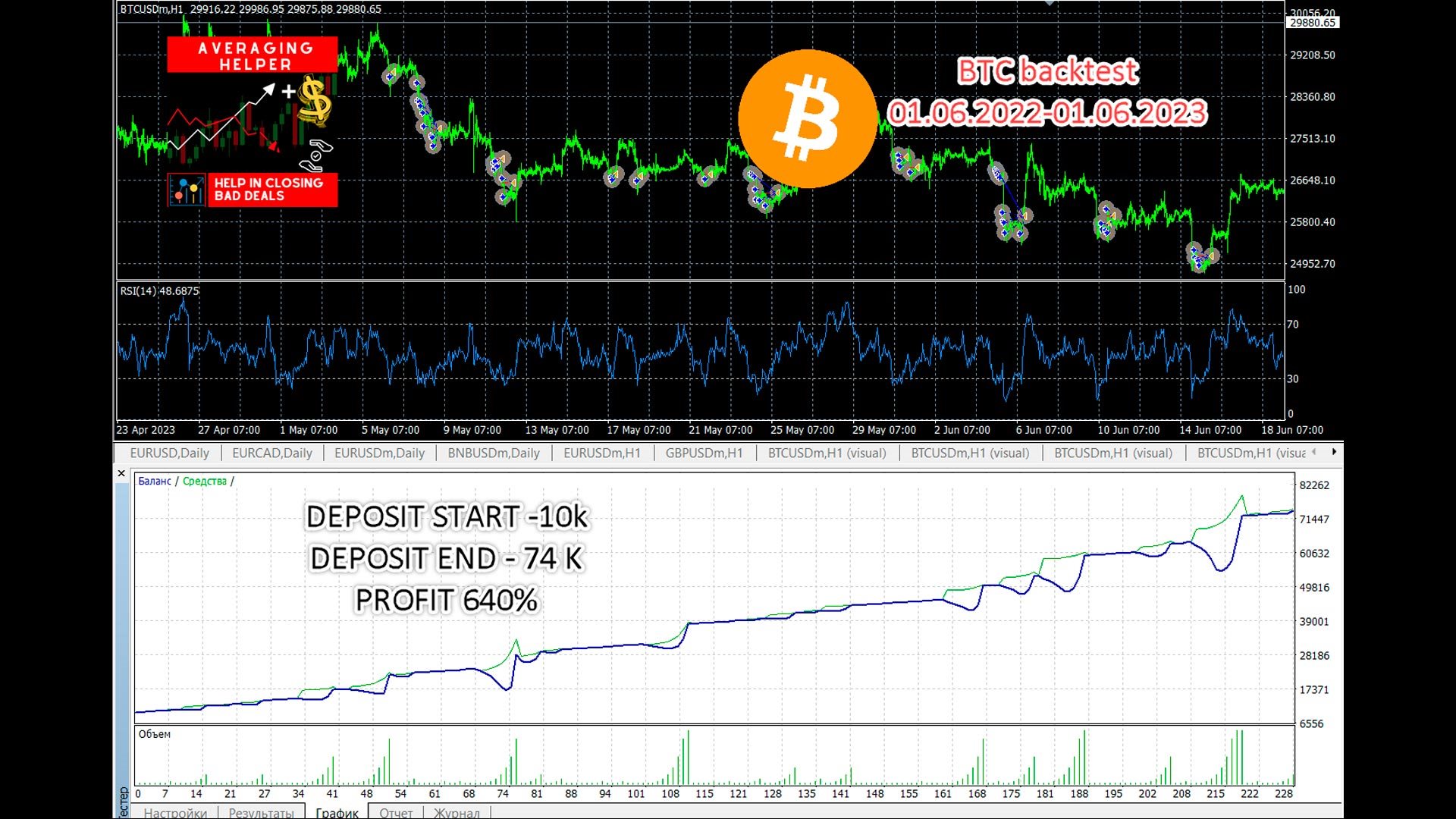
実際、このユーティリティは、平均化のロジックを理解し、リスクも認識している人にとって非常に便利なアシスタントとなるでしょう。95%のケースで、このテクニックは完全に自動的に利益を上げて取引を終了するのに役立ちます。

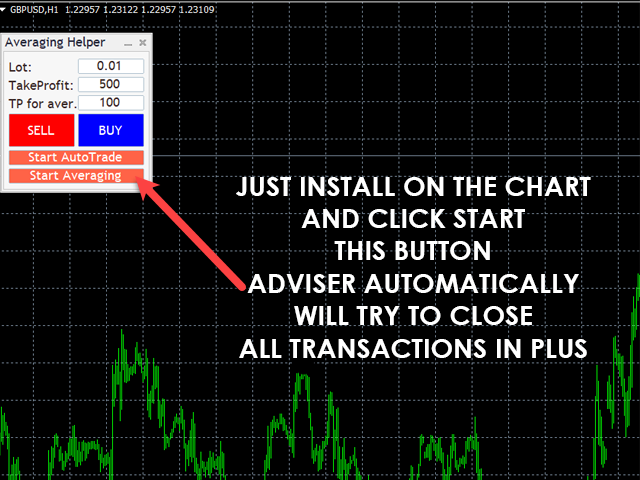
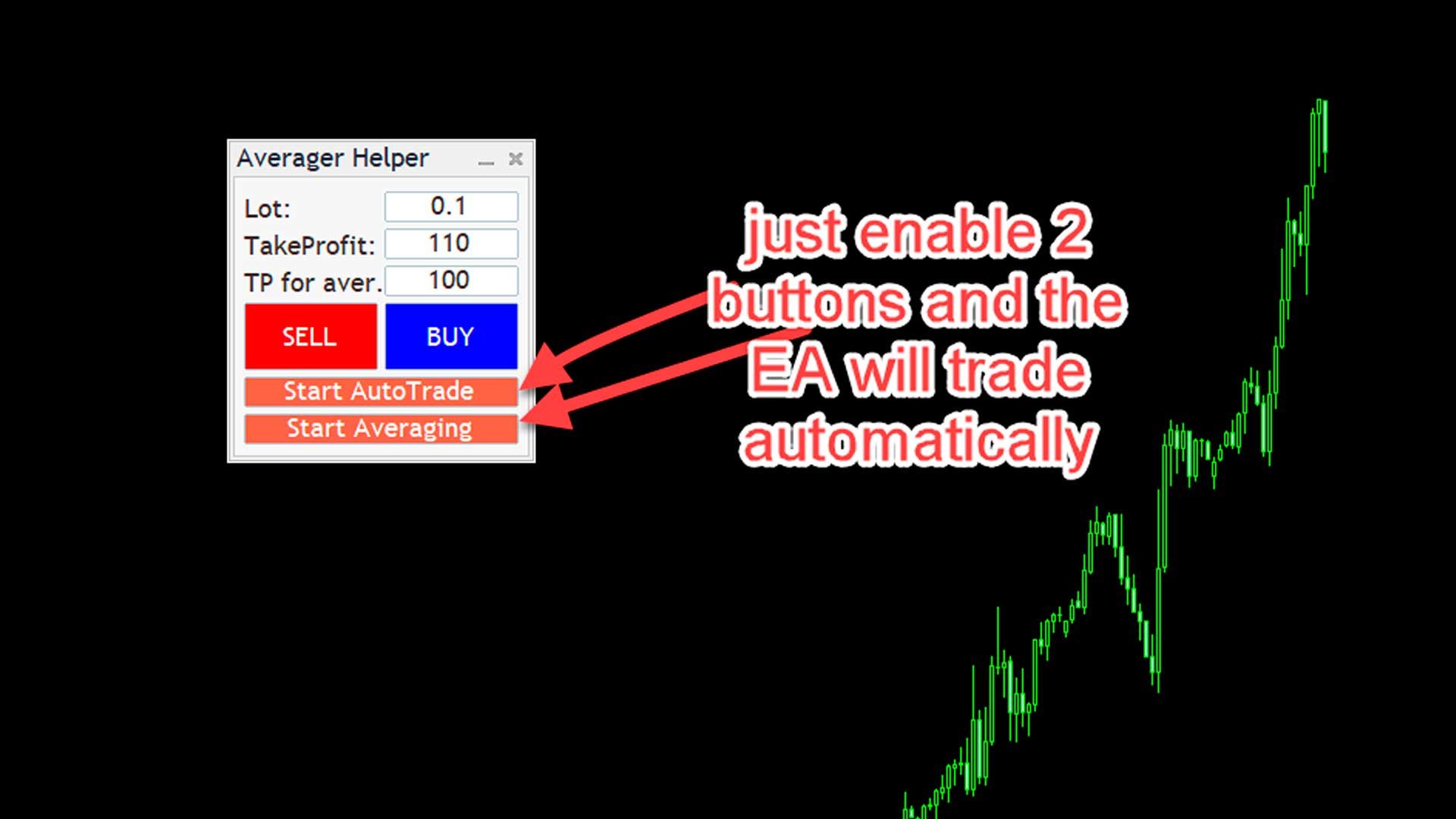
作業を開始するには、ユーティリティをチャートにドラッグし、平均化の TP サイズを設定して [平均化の開始] ボタンをクリックするだけです。ユーティリティは、チャート上のすべてのオープン取引を 1 回の利益確定で終了しようとします。


このユーティリティを使用する場合、最初に開いた取引のボリュームを大きくしないでください。また、資金のマージンを理解しておく必要があります。アドバイザーは、開いている取引と等しいボリュームで次の取引を開き、次のTPを構築し、価格が正しい方向に進まない場合は、平均化係数を乗じた同じボリュームロットを追加します。そのため、取引がクローズされるまでに数回かかる場合があります。そのため、使用する前にデモアカウントで最初に実験してください。また、ポジションにSLが設定されている場合、EAはそれをキャンセルし、設定で指定したすべてのポジションの最大損失%を設定します。単一のストップロスは、平均化ロジックを実行できないためキャンセルされます。

アドバイザーが損失取引を平均化して利益につなげるようにするには、チャートにドラッグして「平均化を開始」ボタンをクリックするだけです。

また、アドバイザーは独自に自動取引を行うこともできます。これを行うには、「自動取引の開始」ボタンと「平均化の開始」ボタンをオンにすると、アドバイザーが自動的に取引を締結します。

パネルには買いと売りのボタンがあり、これらのボタンを使用してチャートから直接取引を行うことができます。開始ロットとTFを設定します。取引が間違った方向に進んだ場合は、  平均化開始ボタン アドバイザーはプラスで決済しようとします。チャートから注文をオープンし、自動取引を行う場合、パスTPはパネルのテイクプロフィット設定から取得されます。

使い方が分からない場合は、私にプライベートメッセージを送ってください。お手伝いします。

商品が気に入って、役に立ったと思ったら、レビューを残してください。お礼として、役立つボーナスを差し上げます。

外部変数

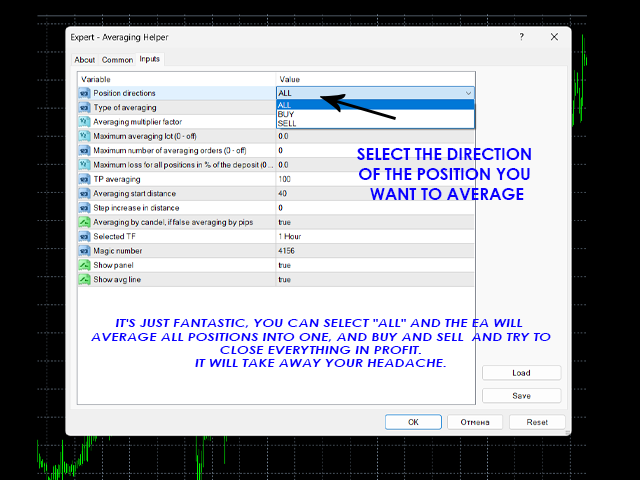
ポジション方向 - 解決する必要があるトランザクションの方向を選択します。「すべて」を選択した場合、アドバイザーはチャート上で開かれたすべてのトランザクションをプラスにしようとします。

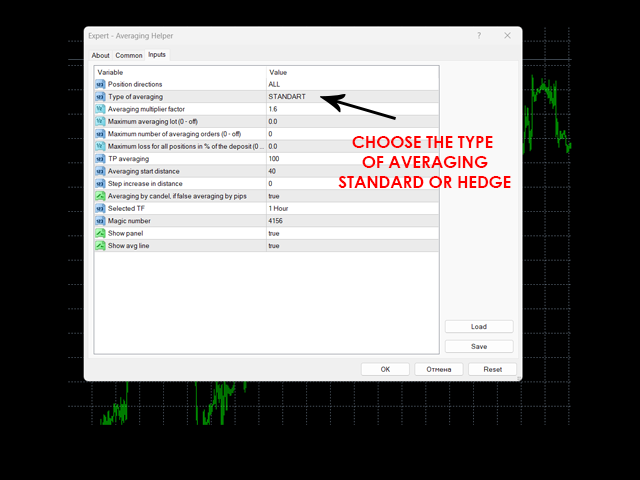
平均化の種類 - 標準/ヘッジ。ヘッジを選択した場合、EAはまず反対方向に取引をヘッジし、次にオープンポジションとは反対方向にポジションを追加します。例えば、売りポジションで損失が出た場合、EAは買いポジションを追加し、その後、売りポジションの初期損失をカバーするまで買いポジションを追加します。

平均化係数 - 後続注文のロット増加係数。値が高いほど取引を早く成立させることができますが、リスクも大きくなります。値が低いほどリスクは低くなりますが、取引が長引く可能性があります。最適値:1.45~1.6

最大平均ロット - 平均化のためにポジションを開くことができる最大ロット

平均化注文の最大数 - 平均化ニーの最大許容数( 6~10を推奨)

全ポジションの最大損失率 - 全注文の最大損失率

TP平均化 - 平均化のためのTPサイズ

平均化開始距離 - 位置の平均化を開始できる最小距離

距離のステップ増加 - 平均化注文間のステップ/ 平均化オプションの場合 "  この設定では「キャンデルによる平均化」を0に設定

キャンドルによる平均化、Falseの場合はピップによる平均化 - 選択したTFのキャンドルによる平均化を有効にする設定。注文間の距離とステップのサイズがFalseの場合、平均化はピップで計算されます。

選択されたTF - 平均化が行われるローソク足の時間枠。デフォルトの推奨オプションはH1です。

レビュー 2
Walery
89
Walery 2023.12.22 00:10 
 

Everyone should try this Utility. It will help you more than you imagine. I advise you to study everything related to Averaging and Hedging and train with small lots. Sergey made this product available to us. Thank you. Respect.

FunChiii
160
FunChiii 2023.12.21 00:00 
 

This EA is just an awsome help to have in trading, i can highly recommend it.

おすすめのプロダクト
Virtual Collider Manual   is a trading assistant with a built-in panel for manual trading. It automatically moves a position opened by a trader in profit using innovative adaptive grid algorithm of averaging and adaptive pyramiding Know-how of the grid algorithm of averaging and pyramiding of the   Virtual Collider Manual   trading robot is based on fully automatic adaptation of all characteristics of dynamically build order grid and pyramid with actual price movement with no need for adjusting
Evergreen Pivot Trader EA  The Evergreen Pivot Trader EA is a clean, smart, highly adaptive trading system built around classical daily pivot levels , enhanced with modern price-action logic. It captures both: Reversal trades (fakeouts at S/R levels) Trend continuation trades (break & retest setups) This makes it extremely flexible and suitable for a wide range of market conditions. How It Works Every new trading day, the EA calculates the core pivot levels: P (Central Pivot Point) S1 / S2
By :ForextraderEanow   Green Mower 10.0                                                                                                                                                                                                                                                                                                        This EA is Famous Grid Strategy that open grid of trades with the same size (not martingale)  and make PROFIT even when the Forex price moves in the WRONG Direction
H4 GBPUSD Trend Scalper is a trend signal scalper The EA trades according to the trend strategy using original built-in indicator for opening and closing orders. The external inputs for limiting trading on Fridays and Mondays are available. The purpose of the strategy is to use the current trend with the most benefit. According to the results of testing and working on demo and real accounts, the best results achieved by using the Н4 timeframe on the GBP/USD pair Works on MetaTrader 4 Build 971+
フィボナッチ グリッドに基づく半自動トレンド アドバイザー。 フィボナッチ グリッドを描画した後、アドバイザーは価格がトレンドに沿ってさらに移動するにつれて自動的にグリッドを拡張し、設定で選択されたレベルから価格ロールバックの注文を開きます。 ストップロスはフィボグリッドの100%に自動的に設定され、テイクプロフィットはフィボグリッドの10%に設定されます。 Fibo グリッドの次のレベルで注文を閉じるオプションを有効にすることもできます。 設定では、次の Fibo グリッド レベルを選択して注文を開くことができます。 38%、50%、61%、78%。 注文サイズは、選択した設定に従って設定されます。 1. 固定ロット デポジットの2.% 3. 損失​​額をドルで修正。 このアドバイザーは、MN から H1 までの時間枠で安定した有効性を示しています。 フィボナッチ グリッドを描画する範囲を決定するときは、波動が波の始まりと終わりにある 2 つの逆トレンド ローソク足と、それらの間に少なくとも 2 つのトレンド ローソク足で構成されていることを考慮する価値があります。
The Super scalper universal is a fully automated scalping Expert Advisor, which uses five indicators. Each open position is protected by a hidden stop order managed by an advanced modification algorithm. When searching for the suitable signals, the EA uses the integrated indicator in conjunction with the trend and time filters, as well as the volatility filter. It use dynamic position closure, which considers the location where the order had been opened and the subsequent price action. Profit is
| Fully-automated Smart Money Concept (ICT) inspired trading solution with multi-strategy capabilities | Built by a grid trader >> for grid traders.  This is MT4 version, click  here  for  Blue CARA MT5  (settings and logics are same in both versions)     Real monitoring signal  -->  Cara Gold Intro Blue CARA EA   ('CARA') - short for  C omprehensive  A lgorithmic R esponsive A dvisor is a next-gen  multi-currency    multi-timeframe  EA base on the widely known (and perhapse most popular) Inn
Max ScalperSpeed   is a fully automated expert advisor. This system has been developed to improve the efficiency of generating more returns. Rely on scalping trading strategies and recovery strategies with appropriate trading frequencies, and also able to work well in all market conditions, whether trend or sideways, able to trade full time in all conditions. Enable or disable news filtering according to user needs. Added a proportional lot size adjustment function, where users can choose to ad
Vizzion is a fully automated scalping Expert Advisor that can be run successfully using GBPJPY currency pair at H1 timeframe. Very Important This Expert Advisor can not run with any EAs in the same account. As part of the money management plan, it calculates and monitors the Margin Level % and assumes that all open trades are created by it. If you want an Expert Advisor that trades in a daily basis, this EA is not for you because using this requires a patience to wait for a few days or weeks on
MARKET MAKER EXPERT is an customizable advanced, fully automated Grid Trading Expert Advisor developed to trade on MULTIPAIR MODE ( EURUSD,USDJPY,USDCHF,USDCAD,EURCHF ), by spreading out risks. Expanding Grid is its speciality. It focuses on opening a large number of orders. The currency pairs have been chosen carefully to run this system. Once it analyze the market, it does a hedge order immediately, (so margin levels are not affected on the initial trade) Starts grid when the price move aga
This Expert Advisor trades based on trend lines, as well as on the basis of volume analysis. Volumes are calculated using minute bars, in order to determine if they were ascending or descending. The trend lines are drawn based on High and Lows in the trade history. There are also additional indicators. Buy or sell signals depend on all those factors. This allows the EA to enter the market with more accuracy and to perform more deals. Input parameters Lots - lot size (if 0, a lot is calculated b
Expert Advisor for MT4 Useful utility MUST have for all traders.  With 1 click button, you're able to close all your open positions. Its come with a warning pop up notification when you click to close all your trades, to avoid an accident press the button. Just press 'Yes' to confirm or 'No' to cancel it. The expert will close all your open positions no matter what pairs you currently open or directions. Just attach the expert on 1 of your chart, and you're good to go.
Impuls Pro MT4
Sergey Batudayev
5 (2)
EAの戦略はスウィングトレードに基づいており、iPumpインジケーターによって計算された鋭いインパルスの後のエントリーがあります。 前述のように、EAには自動サポートで手動取引を開始する機能があります。 -下降トレンドの場合↓価格が修正された後に取引を開始し、資産が買われ過ぎゾーンに入り、トレンドに沿って販売します。 -上昇トレンド↑の場合、価格が修正的に下落した後に取引を開始し、資産が売られ過ぎゾーンに分類され、トレンドに沿って購入します。 選択した資産で取引する場合、アドバイザーはトレンドを考慮し、現在のトレンドに従ってのみ取引を開始します。不採算の取引は、停止と平均化の両方を使用して閉じることができます。2番目のオプションは確かにより収益性が高く、リスクも高くなります。 利点 さまざまなTFのレベルを分析するための組み込みレベルインジケーター チャート上で手動で平均化のレベルを選択する機能 多くのピラミッド型注文を開くことによって利益を増やす能力(注文数は自分で制御できます) iPumpインジケーターのリバースシグナルに基づいて、TPを%で設定するためのより多くの基準 「ハンド
This system is very simple.. It uses a martingale grid hedging style strategy by increasing lot sizes and grid levels. The open order step and volume can be both fixed and dynamic. The EA is easily customizable. The EA does not use a stop loss and all positions close when the chart move back from trend and arrive last grid level. Recommended :   pairs : Side way pairs is very good for this system.                                 Time frame : not important.                                Deposit
Stepping-GBPUSD - works in fully automatic mode! No settings needed, you can use the default settings. The Expert Advisor works like a scalpel during sharp price movements. The bot was tested on real tick data with a real spread for a 19-year period from 2004 to 2023 (this is how much tick history is available on the servers of Swiss brokers). It also passed the Monte Carlo stability test using 5,000 cycles of simulation of random trade generation, as well as a simulated delay and slippage test
This Multicurrency Expert Advisor is a unique author's implementation of full automation of the classic trading strategy of trading in the direction of candles using the RSI and SCI indicators as filters. The Forex Multi Universal Direction Trading Expert Advisor  carries out full automatic trading simultaneously with 28 currency pairs on Forex around the clock. At the same time, in a convenient multifunctional multicurrency panel, the trader is also given the opportunity to independently open
PipFinite EA Trend PRO
Karlo Wilson Vendiola
4.43 (28)
The Official Automated Version of the Powerful Indicator PipFinite Trend PRO EA Trend PRO trades the signal of PipFinite Trend PRO and manages the trade depending on the user's preference. The EA includes many customizable features that can further enhance the Trend PRO trading strategy. Features like Entry and Exit Filters, Higher Timeframe Filter, Stoploss, Takeprofit, Breakeven, Trailing Stop, News Filter and MORE! The Innovative Solution EA Trend PRO was created to make your trading more
The Infinity Expert Advisor is a scalper. When the resistance and support levels are broken, trades are opened in the direction of the price movement. Open positions are managed by several algorithms based on the current market situation (fixed stop loss and take profit, trailing stop, holding positions in case of trend indication, etc.). Requirements for the broker The EA is sensitive to spread, slippages and execution quality. It is strongly recommended not to use the EA for currencies with s
Virtual Scalper - the most safe for your deposit the automated adviser. Not martingale. EA uses unique innovative algorithm of an input in the transaction, based on the virtual pending orders.  EA is adapted on trade on high-volatile market and economic news. Thus EA is not included into the transaction at raised spread. Minimum deposit for trade 100$ For trade the broker with low spread (from 0 - to 10 on a 5-sign) is used ECN. Pairs GBPUSD, EURUSD, USDJPY. Timeframe M1 - M5. Parametrs: Stoplos
This PORTFOLIO of 3 strategies has been developed, tested and traded live on DAX H1 timeframe. Multiple EAs traded together will lead to a BIGGER PROFITS and SMOOTHER EQUITY CURVE. 3 not correlated EAs logics for DAX H1 timeframe merged to a single strategy. Very SIMPLE STRATEGIES with only FEW PARAMETERS. Every trade has his own logic for STOP LOSS. To catch the profits every strategy uses different approach - some has TAKE PROFIT, some uses TIME BASED EXITS or PROFIT TRAILING. EA has been back
This PORTFOLIO of 3 strategies has been developed, tested and traded live on DAX M30 timeframe. Multiple EAs traded together will lead to a BIGGER PROFITS and SMOOTHER EQUITY CURVE. 3 not correlated EAs logics for DAX M30 timeframe merged to a single strategy. Very SIMPLE STRATEGIES with only FEW PARAMETERS.  Every trade has his own logic for STOP LOSS. To catch the profits every strategy uses different approach - some has TAKE PROFIT, some uses TIME BASED EXITS or PROFIT TRAILING. EA has been
Monkey EA is fully automatic Expert Advisor for trading on GBPUSD . It based on Exponential Moving Average and Bollinger Bands. Monkey EA has been tested from year 2003 to March 2021 . You can download the demo and test it yourself. My test used the real tick data with 99,90% accuracy. I made Monte Carlo test with 200 simulations used too. Monkey EA offers hight profit factor  and small drawndown . All trades are covers by TakeProfit  and StopLoss ! Doesn't use Martingale or other dangerous star
SPECIAL INTRODUCTORY PRICE!! MACD Momentum Pro is a professional, fully-customisable Expert Advisor that uses closed-bar MACD crossovers, confirms trend with HMA/WMA, and filters with ADX . It’s simple to run in the MetaTrader 4 Strategy Tester, so you can backtest, optimise, and find parameters that suit any symbol and timeframe. Packed with features ATR-based SL & TP – Adapts to volatility; no more one-size-fits-all levels. Currency or % risk – Set a fixed cash amount or a percent; lots auto-c
Time Scalper is a multi-currency Expert Advisor, which works on many symbols and M1 timeframe. The Expert Advisor does not use high-risk trading strategies like Martingale. EA works with Stoploss, Breakout, Pull back,Takeprofit, Next Trailing Stop with Neural Network Technology and Calculated through the last price every one minute not every tick. This made the decision that you do not have to worry about backtest results. For Customers Please write the author in private message to know which p
Green Hawk is a professional scalping expert. The strategy is based on smart scalping algorithms which trades in certain periods of the market. The system does not use risky strategies such as grid or martingale. Trading is done based on the return of the price in short periods. All trades are closed within hours. I will increase the price in the near future. Next Price: $700    The final price will be $2000. Selling only through the mql5 site Find out more here:  https://www.mql5.com/en/users/
The Fox
Hatem Koshok
1 (1)
The Fox EA is a fully automated EA that works on both Classical and ECN accounts on USDCHF pair and is programmed to trade using both level trading and hedging strategies. All you need is to set the risk percent and start trading. The screenshots section shows the back-test results. The minimum balance of $2000 is required for standard accounts or $20 for micro accounts. Parameters Lots = 0.01 Riskpercent = 0.5 (risk percent and its optimum at 0.5 for balance starting from $2000) Magic Number .
The DoubleEverest Expert Advisor is a pure, distilled idea. This automated EA follows its own unique mathematical algorithm. DoubleEverest : no indicators no martingale, locking, averaging, other risky money management techniques trades every day DoubleEverest catches the price in the European and American sessions. Considers the volatility and dynamics of the market. DoubleEverest places pending orders on the price extremes: of the past and current day, fractals, significant resistance and supp
The “ SG Opposit Grid ” EA works with Virtual TakeProfit(or real) - at the trader's choice. The EA looks for signals to enter the market along the trend on D1 and H1 . If the signals coincide, the EA on the working period ( М1 - М30 depends on the trader's choice) looks for a confirming pattern and opens a position in the direction of the trend. If, after opening a position, the price moves in a profitable direction, the position is closed upon reaching the virtual TProfit with a profit. If the
TradePilot
Hossein Khalil Alishir
TradePilot Expert Advisor (EA) for MetaTrader 4 TradePilot is a professional and user-friendly Expert Advisor (EA) for MetaTrader 4 (MT4) . It simplifies automated trading , risk management , and trade execution using a smart trading panel . Perfect for beginners and experienced traders looking for a reliable trade manager EA with automated lot size calculation . Key Advantages User-Friendly Trading Panel: Customizable panel with buttons and hotkeys. Smart Risk Management: Supports percen
このプロダクトを購入した人は以下も購入しています
Unlimited Trade Copier Pro is a tool to copy trade remotely to multiple MT4, MT5 and cTrader accounts at different computers/locations over internet. This is an ideal solution for you if you are a signal provider and want to copy your trades to other receivers globally on your own rules. One provider can copy trades to multiple receivers and one receiver can get trade from multiple providers as well. The provider can even set the subscription expiry for each receiver, so that receiver will not b
With this Expert Advisor, you can seamlessly integrate various channel, arrow, and reversal indicators. It offers the flexibility to use all popular channel trading strategies, while also providing powerful tools to customize your trading conditions and risk management system.   The Expert Advisor opens orders when the price crosses the channel boundaries. Multiple crossing conditions are available for customization: Price touches boundary on re-entry into the channel Price touches boundary on
Wouldn't it be great if AI had a second look at your trading data — graphics, indicators, and beyond? Introducing AI Trading Station , a revolutionary utility seamlessly integrated with the MetaTrader platform. Powered by the advanced intelligence of OpenAI's ChatGPT, this complete solution covers every step of your trading journey, from data gathering to trade execution. The Complete Trading Process. Reinvented Data Gathering & Visualization: Collect and display vital market data on intuitive
LIMITED OFFER - JUST FOR 2 DAYS | 50% BLACK FRIDAY DISCOUNT $640 -> $320 Your Smart Trading Assistant for the Forex Market Introducing a powerful MetaTrader tool designed to revolutionize the way you trade. This intelligent assistant goes beyond traditional indicators to provide a comprehensive, AI-driven market analysis — so you can trade with clarity and confidence. What It Does This advanced tool continuously monitors and analyzes a wide range of market data to deliver high-quality trading
Crystal Trade Manager PRO – MT4向け 高度リスク管理・トレードコントロールシステム 無料版: https://www.mql5.com/en/market/product/150632 概要 Crystal Trade Manager PRO(CTM)は、MetaTrader 4 のために設計された、プロフェッショナル向けのリスク管理および取引管理ユーティリティです。 厳密な執行、強力な資金保護、高度な自動化を必要とするトレーダーのために構築されています。 本システムは、リスク管理、エクイティ保護、日次制限、SL/TP の自動設定を行い、プロレベルの高速ワンクリック取引パネルを提供します。 Prop Firm チャレンジ、デイトレード、スキャルピング、資金運用者に最適です。 MT5版も利用可能です。 主な特徴 1. 高度なリスク・ドローダウン保護 日次ドローダウン上限を 1%〜70% の範囲で設定可能。 上限超過時、 全てのポジションを即時クローズ 。 オプションで 全ての保留注文(Pending Orders)を自動削除 。 日次ロックアウトモード:翌日



The advantage of using this EA This EA directly updates takeprofit and stop losses that are still empty in a manual order Parameters Multiplier: Multiplier value of the previous transaction Distance: Distance hedging from the previous order Takeprofit: take profit taken from the last price + the value of this column We recommend that you do not add more than one manual transaction in the same pair martingale hedging | manual hedging | hedging manual | hedging lot | best robot | best ea
The FFx Hidden Manager panel will help you to manage easily your orders directly on the chart. Below all features described: TP, SL and TrailingStop are hidden Each order has its own lines on chart Drag & Drop any line to change the TP/SL as per your need Option to move automatically the SL line at breakeven when TP #1 is reached Option to choose the TP/SL type (by pips or price) Option to choose the TrailingStop type (by pips, MA, Fractals, PSAR or ATR) Define which order(s) you want to manage
FFx Risk Calculator panel will help you to calculate very easily your trades size, SL or the risk directly on the chart. All features are described below: Option to select which parameter to calculate: Risk, Stop Loss or Lot Size The panel will show if the lot size is allowed according to the current account free margin Button to maximize/minimize the panel Drag and Drop the panel anywhere on the chart How to use it? Select the parameter you want to be calculated. It will be based on the 2 other
News Trader Pro is a unique robot that allows you to trade the news by your predefined strategy. It loads every piece of news from several popular Forex websites. You can choose any news and preset the strategy to trade it, and then News Trader Pro will trade that news by selected strategy automatically when the news comes. News release gives opportunity to have pips since the price usually has big move at that time. Now, with this tool, trading news becomes easier, more flexible and more exciti
The FFx Watcher PRO is a dashboard displaying on a single chart the current direction of up to 15 standard indicators and up to 9 timeframes. It has 2 different modes: 1. Watcher mode: Multi Indicators User is able to select up to 15 indicators to be displayed User is able to select up to 9 timeframes to be displayed 2. Watcher mode: Multi Pairs User is able to select any number of pairs/symbols User is able to select up to 9 timeframes to be displayed This mode uses one of the standard indicat
Copies transactions between MT4 terminals. Possibilities: quick copy start minimum processor load direct and reverse (reverse) copying. copying Take Profit and Stop Loss levels copying deferred and their changes copy transactions one to many copy trades many to one local copy only Attention: The product is designed for copying trades only within a single computer or VPS with access to the desktop. The product will not work on the built-in Virtual Hosting of the terminal. We will help you set up
エリオット波動カウンターは、エリオット波動を迅速かつユーザーフレンドリーに手動でマークアップするためのパネルです。マークの色とレベルを選択できます。最後のマークアップとツールによって作成されたマークアップ全体を削除する機能もあります。マークアップはワンクリックで作成されます。 5 回クリック - 5 つの波があります。エリオット波動カウンターは、エリオット波動の初心者にもプロのアナリストにも最適なツールです。 エリオット波動カウンターのインストールと入力ガイド 取得したい場合     EA 追加 URL (  http://autofxhub.com   ) MT5 端末に関する 通知 (スクリーンショットを参照)。 MT4 バージョン https://www.mql5.com/en/market/product/14016 MT5 バージョン https://www.mql5.com/en/market/product/15081 一般的な入力: 波の種類ボタン: このボタンを使用すると、ユーザーはチャートで強調表示する波のパターンの種類を選択できます。使用可能なオプションには、イン
If you wish to draw Support and Resistance lines, view: daily market opening, classical pivot levels, Fibonacci pivot levels, trend lines, Fibonacci levels, the remaining time to candle closing, and current spread. If you seek to place your orders with the exact lot that meets your desired stop loss risk. If you wish to do all this and more with just one click, then this is the perfect tool to use. This tool will allow you to feel more relaxed when deciding to open orders, as well as predicting
Unlimited Binary Options Copier Remote is a powerful tool to copy binary options trades remotely between multiple accounts at different locations over internet. This is an ideal solution for signal provider, who want to share his binary options trades with the others globally on his own rules. One provider can copy trades to unlimited receivers and one receiver can get trade from unlimited providers as well. The provider can set the subscription expiry for each receiver, so that receiver will no
Telegram Publisher Agent は、 トレーダーが Telegram チャネルおよびグループにリアルタイムでシグナルを送信できるようにするアドオンです。このツールは、カスタマイズ可能なメッセージ、チャートのスクリーンショット、その他の機能を備えており、トレーダーが取引の洞察や戦略をフォロワーと共有するのに役立ちます。このツールは、明暗のテーマ切り替えを備えた美しいデザインも備えており、ユーザーに美的で機能的な取引体験を提供します。 Telegram Publisher Agent は、すべての取引をチャネルおよびグループ内のシグナルとして公開するように設計されています。あなたがしなければならないことは、取引を提供することだけです。その後、ボタンをクリックするだけで、Telegram Publisher Agent が取引シグナルを取引チャネルまたはグループに送信するためのすべての面倒な作業を実行します。 Telegram パブリッシャーエージェント   インストールと入力ガイド EA に関する通知を受け取りたい場合は、URL  ( http://autofxhub.c
如果产品有任何问题或者您需要在此产品上添加功能,请联系我 Contact/message me if you encounter any issue using the product or need extra feature to add on the base version. There is Demo version of this panel Dashboard Babon Scalping System Demo in my product list, please try it out to get familiar with all functionalities for free, LINK . This system basically utilizes TDI, Heiken Ashi Trend, Price Trend on H1 time-frame and TMA on H1&H4 time-frame to generate the trend (big picture). Then the system will zoom in to genera
The Pairs Trade indicator is a utility for semi-automatic pair trading. It allows combining the charts of two arbitrary instruments, even if the schedules of their trading sessions are different. It displays a spread chart in the form of a histogram with an overlaying moving average. It calculates the swap that will be charged for the synthetic position (in the deposit currency). It is possible to set a level for automatic opening of a synthetic position on the spread chart (analogous to the 'se
The script displays info about the share's corporate reports and dividends. The data is downloaded from   investing.com : Report date Profit per share (EPS) Revenue Market capitalization Amount of dividends Date of payment of dividends Dividend income The product cannot be tested in the tester (since it is not possible to receive data from the Internet). Before launching:  Add 2   URL   https://ru.investing.com/earnings-calendar/Service/getCalendarFilteredData  and   https://ru.investing.com/di
This Stacker EA will: Automatically set Stop loss on a new order Automatically set Take profit on a new order Stack (or open up to 4 additional orders at the same time) when a new order is placed, the SL/TP can be preset individually for each order. Provides a transparent replacement for the standard 1-click trading buttons in MetaTrader 4 (1 click still works and SL/TP will automatically be set as well as Stacking). Automatically calculate lot order size according to preset risk management perc
FXFledgling Exit Tool is a complete risk management tool that analyzes both the open trades and the direction of the pair of open trades. As long as the suggested entry and lotsizing management presented here is followed strictly, you will have a high chance (but no guarantee) of surviving the trade. What It Does It is used as an exit tool. It helps the trader to manage any manual trade that he transacted. It does the following: Trail Stop Dynamic Stop Loss - a calculated stop-loss that changes
New opportunities for analyzing cryptocurrency in the usual MetaTrader 4. For example : We select the symbol of the cryptocurrency and attach any indicators, Expert Advisors or scripts. Startup Mode View cryptocurrency; Data collection. Capabilities Work as with a standard currency chart; Automatic update of open charts; Selection of individual cryptocurrency for updating; Selection of individual timeframes for updating; Work on the desired timeframes; Open charts do not affect the work of Cry
Notify Telegram is a utility that bridge your MetaTrader4 trading activities to your Telegram chat/channel. It will help you to monitor your MetaTrader4 actions such as placing trade, modifying order's TP/SL, closing trades etc and send a notification message to your dedicated Telegram chat/channel. It does not execute any trade on your MetaTrader4 account. It can be useful for monitoring EA performance or providing signal to your Telegram channel/group subscribed. Parameters Token ="" - enter
The  Easy Strategy Builder (ESB)  is a " Do It Yourself " solution that allows you to create a wide range of the automated trading strategies without any line of codes. This is the world’s easiest method to automate your strategies that can be used in STP, ECN and FIFO brokers. No drag and drop is needed. Just by set conditions of your trading strategy and change settings on desired values and let it work in your account. ESB has hundreds of modules to define unlimited possibilities of strategi
Telegram ChartSnap is an utility tool to bridge your MetaTrader 4 activities to your Telegram chat/group/channel. It will screen shot your MetaTrader 4 chart and send it to your dedicated Telegram chat/group/channel through a Telegram bot. The whole process will keep repeating based on a time cycle that predetermined by the user. It is a convenient tool for those who like to get access to their favorite system/dashboard that only available at MetaTrader Desktop. Beside that, trader can easily s
フィボナッチリトレースと拡張ラインツール DiNapoliポイント取引方法とゴールデンセクション取引を使用するトレーダーにとって理想的なMT4プラットフォームのフィボナッチリトレースと拡張ラインツール 主な特長: あなたはフィボナッチリトレースメントの複数のセットを直接描くことができ、重要なリターンポイント間の関係は一目瞭然です。 2.フィボナッチ拡張を描画することができます。 3.フィボナッチフォールドバックとラインの延長は、簡単な観察と数値表示のために左右に動かすことができます。 4.チャートは非常に爽やかな 5.数字キーでサイクルを切り替えることができます。 ファンクションキー: 1。 [戻るを押す、要求に応じて描画する、最大8つのグループにする 2。拡張]を描くには[押す] 3。 \を押すと、現在のサイクルの下にあるすべての拡張機能と折り畳みが削除されます 4。フォールドバックを移動して削除して展開する (1)最初のフォールドバックセットのF5行をクリックします。 一度クリックすると(黄色に変わります)、キーボードのDeleteキーを押すと、フォーカ
Советник риск-менеджер с огромным арсеналом возможностей защиты вашего депозита. Для инвесторов, которые решили передать капитал в доверительное управление. Когда у трейдера нет доступа к настройкам - нивелирует торговые риски. А также для трейдеров, которые осознали необходимость стороннего контроля за их торговлей для улучшения торговых результатов.  Для максимальных результатов - должен стоять на отдельном VPS сервере и у трейдера не должно быть возможности менять настройки в торговый период.
半自動取引のためのユーティリティ。ストップオーダー、ストップロス、テイクプロフィット、トレーリングストップをブローカーに見えないように設定するための動的レベルを適用します。 FIFO要件のある米国のブローカーを含むあらゆるブローカーとの連携に適しています。 アドバイザリンクのMT5バージョン 取引はボタンまたは線を使用して開くことができます。アドバイザが線に沿ってポジションを開くには、チャートに線を引き、名前を変更します。価格がそれを超えると、EAは対応するコマンドを実行します。 OPEN_SELL-売り注文を開きます CLOSE_SELL-すべての売り注文を閉じます OPEN_BUY-オープンバイオーダー CLOSE_BUY-すべての購入注文を閉じる コマンドが実行された後、コメント「OK」が書き込まれ、行はコマンドを1回だけ実行します。 チャートには、受け取った利益、現在のオープンポジション(注文数、ロット数、利益)、オープニング注文のボタン、実行速度、スリッページに関する情報が表示されます。 「i」ボタンをクリックすると、取引履歴が視覚的に表示されます。 オプシ
Grid Hero War Pad is a  GRAPHICAL MANUAL TRADER version of the original Grid Hero EA, designed and created for ADVANCED TRADERS who are experienced in plotting their own market entries. It is coded using ADVANCED GRAPHICAL INTERFACE programming, that combines the power of discretionary trading with Grid Hero algorithm in the form of a graphical console with button-click easy execution. It allows you to execute trades manually using Market Orders and Pending Orders, and then automatically uses th
The new version of  MirrorSoftware 2021  has been completely rewriten and optimized.  This version requires to be loaded only on a single chart because  it can detect all actions on every symbol and not only the actions of symbol where it is loaded. Even the  graphics and the configuration mode  have been completely redesigned. The MirrorSoftware is composed of two components (all components are required to work):  MirrorController  (free indicator): This component must be loaded into the MASTER
Скрипт открывает графики по всем инструментам находящимся в окне "Обзор рынка" и по желанию может задать для всех графиков один шаблон. Так-же можно удалить все графике открытые в терминале Мт4. В скрипте имеются следующие настройки: "Таймфрейм" по умолчанию M30;             (Можно поставить свой: M1, M5, M15, M30, H1, H4, D1, W1, MN.) "Задержка" по умолчанию "0";                  (Задержка перед открытием следующего графика в миллисекундах.) "Шаблон" по умолчанию "True";                (True=пр
作者のその他のプロダクト
GoldPro MT5
Sergey Batudayev
5 (4)
GoldPro (MT5) — クラシックとスキャルピングの2つのモードを選択できるXAUUSDエキスパートアドバイザー GoldPro は、構造、明確なリスク管理、さまざまな市場テンポで機能する EA を求めるトレーダー向けに構築された 、XAUUSD (ゴールド) の自動取引システムです。 1つのEA内で 、どのように取引するかを 選択できます。 1) クラシックモード - スイングとプルバックのための穏やかなロジック 反転/平均回帰行動(市場の「枯渇」ゾーンからのエントリー)と構造化されたポジション管理に重点を置いた古典的なアプローチ。 バスケット型マネジメント(一連のポジションを扱う) 厳密な制限(距離 / ステップ / ロット係数)によるオプションの平均化 複数の出口スタイル:固定目標、損益分岐点、トレーリングロジック スプレッドフィルター 取引スケジュール管理(平日 / 金曜日の締め切り / 週末のストップ) 取引方向オプション: 買い / 売り / 両方 / 季節性モード 2) スキャルピングモード - 日中チャンスのためのより高速なロジック 柔軟なエントリー プロファイ
TelegramからMT5へ: 究極のシグナルコピーソリューション Telegram to MT5 を使えば、取引がシンプルになります。DLL を必要とせず、Telegram のチャンネルやチャットから MetaTrader 5 プラットフォームに取引シグナルを直接コピーできる最新ツールです。この強力なソリューションは、正確なシグナル実行、豊富なカスタマイズオプション、時間の節約、そして効率性の向上を実現します。 [ Instructions and DEMO ] 主な特徴 直接的なTelegram API統合 電話番号とセキュアコードで認証します。 ユーザーフレンドリーな EXE ブリッジを通じてチャット ID を簡単に管理できます。 複数のチャネル/チャットを追加、削除、更新して、同時に信号をコピーします。 高度なフィルターによる信号解析 例外的な単語 (例: 「レポート」、「結果」) を含む不要な信号をスキップします。 柔軟な SL および TP 形式 (価格、ピップ、ポイント) をサポートします。 価格ではなくポイントを指定するシグナルのエントリ ポイントを自動的に計算します。
MT5のエキスパートアドバイザーリスクマネージャーは非常に重要であり、私の意見ではすべてのトレーダーにとって必要なプログラムです。 このエキスパートアドバイザーを使用すると、取引口座のリスクを管理することができます。リスクと利益の管理は、金銭的およびパーセンテージの両方で実行できます。 エキスパートアドバイザーが機能するには、それを通貨ペアチャートに添付し、許容可能なリスク値を預金通貨または現在の残高の%で設定するだけです。 [Instruction for Risk Manager parameters] アドバイザ機能 このリスクマネージャーは、リスクの管理を支援します。 -取引のために -1日あたり - 1週間 - ひと月ほど 制御することもできます 1)取引時の最大許容ロット 2)1日あたりの最大注文数 3)1日あたりの最大利益 4)エクイティを引き受ける利益を設定する それだけではありません。設定で自動設定を指定した場合、アドバイザーはデフォルトのSLとTPを設定することもできます。 アドバイザーは各イベントにアラートを添えて、注文を削除する理由を説明し
TelegramからMT4へ: 究極のシグナルコピーソリューション Telegram to MT4 は、DLLを必要とせず、TelegramのチャンネルやチャットからMetaTrader 4プラットフォームに取引シグナルを直接コピーできる最先端のユーティリティです。この堅牢なソリューションは、比類のない精度とカスタマイズオプションにより、シグナルのシームレスな実行を保証し、時間を節約し、効率性を向上させます。 [ Instructions and DEMO ] 主な特徴 直接的なTelegram API統合 電話番号とセキュアコードで認証します。 ユーザーフレンドリーな EXE ブリッジを使用して、チャット ID を簡単に取得および管理します。 複数のチャネル/チャットを追加、削除、更新して、同時に信号をコピーします。 高度なフィルターによる信号解析 カスタム例外語 (例: 「レポート」、「概要」) を含む不要な信号をスキップします。 柔軟な SL および TP 形式 (価格、ピップ、ポイント) をサポートします。 シグナルが価格ではなくポイントを指定する場合、エントリ ポイントを自動
MT4のエキスパートアドバイザーリスクマネージャーは非常に重要であり、私の意見ではすべてのトレーダーにとって必要なプログラムです。 このエキスパートアドバイザーを使用すると、取引口座のリスクを管理することができます。リスクと利益の管理は、金銭的およびパーセンテージの両方で実行できます。 エキスパートアドバイザーが機能するには、それを通貨ペアチャートに添付し、許容可能なリスク値を預金通貨または現在の残高の%で設定するだけです。 アドバイザ機能 このリスクマネージャーは、リスクの管理を支援します。 -取引のために -1日あたり - 1週間 - ひと月ほど 制御することもできます 1)取引時の最大許容ロット 2)1日あたりの最大注文数 3)1日あたりの最大利益 4)エクイティを引き受ける利益を設定する それだけではありません。設定で自動設定を指定した場合、アドバイザーはデフォルトのSLとTPを設定することもできます。 アドバイザーは各イベントにアラートを添えて、注文を削除する理由を説明します。たとえば、あなたが開封し、6番目の注文を開封し、1日あたり5つの注文のみを開封す
AI トレード アナライザーは、 インジケーター形式で実装されたインテリジェントな市場分析ツールです。このプログラムはチャート上のシグナルを視覚化し、テクニカル指標とニュースの背景に基づいてトレーダーが市場の状況を評価するのを支援します。 主な機能: 1. テクニカル分析: 人気の指標のサポート: EMA (ショート/ロング)、一目均衡表、ADX、RSI、MACD、ストキャスティクス、ATR、ボリンジャー バンド、ピボット ポイント、フィボナッチ。 トレンド、相違、主要レベルを特定します。 2. ニュースの背景を扱う: 指定されたパラメータ (時間枠、日付) に従って経済イベントを受信します。 マクロ経済データが市場に及ぼす可能性のある影響を考慮に入れる。 3. 自動化とカスタマイズ性: 潜在的なエントリ ポイント、SL、TP を計算して分析結論を形成します。 確立されたパラメータに従って情報を解釈する能力を使用して市場の状況を評価します。 4. 多言語サポート: 結果はロシア語、英語、ドイツ語、インドネシア語で表示できます。 5. 柔軟なインターフェース: ユーザーは、コントロール
スウィフトスカルパー   は、EUR/USDとGBP/USDを最適なM30時間枠で取引するのに最適な強力なエキスパートアドバイザーです。テクニカル指標やプライスアクションパターンなどの高度な分析手法を用いて、スキャルピングの機会を効果的に特定します。 SwiftScalperの主な機能: 適応性     : 変動の激しい市場環境で動作するように設計されており、最新のデータに基づいて効果的なシグナルを提供します。 正確な信号     : 包括的な分析を使用して最適なエントリーポイントとエグジットポイントを特定し、収益性の高い取引の可能性を高めます。 使いやすさ     : 簡単にセットアップして取引プラットフォームに統合できるため、トレーダーは技術的な詳細ではなく戦略に集中できます。 M30向けに最適化     : 短期取引に最適な M30 時間枠で動作するように特別に調整されています。 利点 アドバイザーは指定された取引ペア用に既に設定されています。インストールして実行するだけです。最小限の設定で済みます。 専用のリスク管理: 各取引のポイントで固定されたストップロス エクイティの最大
このユーティリティは、MT5からDiscordにシグナルを送信するために設計されています。数多くの独自の機能を備えており、取引シグナルの送信だけでなく、以下の機能も実行できます。 ターミナルからDiscordに直接メッセージを送信する カスタムテキストと一緒に絵文字を送信する MT5ターミナルからDiscordに直接テキストと画像を送信します これにより、ユーザーはシグナルを含むチャネルを維持し、取引と質の高いシグナルの発見に集中できるようになります。 Instructions for the utility 完全にカスタマイズ可能なメッセージ 信号メッセージは完全にカスタマイズできます。 独自のヘッダーとフッターを指定する メッセージの下部にリンクを挿入します アドバイザーまたは手動注文からのコメントを表示する 複数の言語をサポート このユーティリティは、メッセージに 14 の言語をサポートしています。 英語 スペイン語 ロシア ドイツ語 イタリア語 フランス語 ポルトガル語 トルコ語 マレー語 中国語 日本語 韓国語 アラブ ヒンディー語 翻訳は、特にあなたのチャンネルに送信され
トレーディングアドバイザー アイスキューブスキャルパー -       これはデイスキャルパーであり 、毎日大量の取引を行い、各取引で数ポイントを獲得します。 EA の戦略は、RSI インジケーターを使用してトレンドに合わせて取引することです。 EA は乗数ロットによる平均化を使用するため、EA を使用する前にこれを理解する必要がありますが、この戦略はバックテストとライブ取引の両方で良好なパフォーマンスを示しました。 購入する前に、必ず戦略テスターでアドバイザーの作業をテストしてください。 リスク管理   エキスパートアドバイザーでリスクを制御するには、平均化の注文の最大数と株式リスクを制限することができます。 アドバイザーがどのように機能するかを理解するために、無料のシグナルを購読すると、アドバイザーがどのように機能するか、およびその可能性を理解することができます。 MT4用Ice Cube Scalperバージョン 購入後は必ずご連絡ください。         設定に関してはいつでもお手伝いさせていただきます。 アドバイザーのオンライン監視 -           https://
HYT (Help Your Trading) は、主に次の 2 つのテクニックを使用して、損失ポジション を平均化 できるように設計されたツールです。 標準平均化。 トレンドの方向に沿ってポジションをオープンすることでヘッジします。 このツールを使用すると、買いと売りの両方において、異なる方向に開かれた複数のポジションを管理できます。 HYT は、次のポジションのサイズ、注文価格、平均化の方向、指定された利益確定レベルでのポジションのクローズを自動的に計算します。 また、希望する利益確定レベルと初期ロットを指定して、「購入」ボタンと「販売」ボタンを使用してポジションを開くオプションも提供します。 使用を開始する には、ツールをチャートにドラッグし、利益確定レベルを設定して、「平均化を開始」ボタンをクリックするだけです。 初期ポジションが大きすぎない ことを確認し、平均を下げるときにツールによってポジション サイズが拡大されるため、追加費用が発生することを覚悟してください。 HYTは 自動取引 も可能です。自動取引を有効にすると、ツールは指定されたパラメータに従ってポジションを開閉しま
The utility is designed to send signals from MT4 to Telegram. It has several unique features, allowing not only the sending of trade signals but also the following functionalities: Send messages directly from the terminal to Telegram Send emojis along with custom text Send text and images from Telegram All of these features enable users to manage a signal channel while focusing on trading and finding quality signals. Customizable Signal Messages You can fully customize the signal message: Specif
GoldPro
Sergey Batudayev
3.67 (3)
GoldPro (MT4) — クラシックとスキャルピングの2つのモードを選択できるXAUUSDエキスパートアドバイザー GoldPro は、構造、明確なリスク管理、さまざまな市場テンポで機能する EA を求めるトレーダー向けに構築された 、XAUUSD (ゴールド) の自動取引システムです。 1つのEA内で 、どのように取引するかを 選択できます。 1) クラシックモード - スイングとプルバックのための穏やかなロジック 反転/平均回帰行動(市場の「枯渇」ゾーンからのエントリー)と構造化されたポジション管理に重点を置いた古典的なアプローチ。 バスケット型マネジメント(一連のポジションを扱う) 厳密な制限(距離 / ステップ / ロット係数)によるオプションの平均化 複数の出口スタイル:固定目標、損益分岐点、トレーリングロジック スプレッドフィルター 取引スケジュール管理(平日 / 金曜日の締め切り / 週末のストップ) 取引方向オプション: 買い / 売り / 両方 / 季節性モード 2) スキャルピングモード - 日中チャンスのためのより高速なロジック 柔軟なエントリー プロファ
Coppy Master MT5 は、   MetaTrader 4 端末と MetaTrader 5 端末間で取引をコピーするためのツールです。両方向のコピーをサポートします: MT5 から MT4、MT4 から MT5、また同じタイプのアカウント間でも可能です。 正しく動作させるには、すべてのターミナルを 1 台のコンピューターまたは VPS で起動する必要があります。 [ Instruction  and Demo ]  MetaTrader 4 にコピーするには、製品の別のバージョンである Coppy Master MT4 が 必要です。 主な機能: 接続タイプ マスターモードとレシーバーモード。注文の送受信ロジックを柔軟に設定できます。 注文管理 成行注文と保留注文のコピー。取引の同期クローズ、部分クローズ、取引の反転、SL/TP の変更のサポート。 シンボルの操作 プレフィックスとサフィックスのサポート。個々の文字の除外/包含。アセットにカスタム名を割り当てる機能。 制限とリスク管理 1 日あたりの取引回数、1 日の最大損失、コピーを停止する残高レベルの制限。 音量
自動取引は、無限の設定や理論で混乱させるのではなく、資本を増やすのに役立ちます。 SPARK は 、精度とシンプルさを重視して初心者が自信を持って始められるように設計された、軽量でありながら効果的なエキスパート アドバイザーです。 SPARK が他と違うのはなぜですか? EUR/USD に重点を置きます:   EA は、最も流動性と安定性に優れた通貨ペアの 1 つである EUR/USD に特化して最適化されています。 流動性ブレイクアウトロジックに基づいて構築:   SPARK は、価格がブレイクアウトする可能性のある独自の流動性ゾーンを識別して反応し、高確率の取引を実現します。 設定のストレスは不要。EUR   /USDチャートに貼り付けて実行するだけです。すべて事前に設定されています。 自動保護:   EA はスリッページとスプレッド条件を管理して、不適切な取引エントリーを回避します。 一貫したロジック: 取引は動的なゾーン検出アルゴリズムによってフィルタリングされ、よりスマートかつタイムリーなエントリーが可能になります。 物語ではなく、実際の結果 過去の月間収益性: +3.98%
FREE
iPumpインジケーターは、3つのカテゴリーのインジケーターの利点を組み合わせた用途の広いインジケーターです。 複数のTFでの同時トレンド検出 抵抗とサポートのゾーンを定義する 買われ過ぎと売られ過ぎのゾーンの決定 インジケーター機能: トレンドの定義 この機能は、現在の市場の方向性を客観的に評価し、主観を避けたいすべてのトレーダーに必要です。ほんの一瞬で、最も重要な時間枠でトレンドの方向を比較することができ、これは明確で直感的になります。 サポートとレジスタンスレベルの決定 iPumpインジケーターを使用すると、数秒以内に資産の潜在的な価格障壁を評価できます。 また、インジケーターは目の前にあるレベルのタイプを示します。 テストレベル(抵抗/サポート) 逆転レベル 弱いレベル テストされていないレベル 買われ過ぎと売られ過ぎのゾーンの決定 このタスクでは、インジケーターに遅延や再描画のないシグナルオシレーターがあり、アセットの現在の状態を示します。このデータに基づいて、次のことができます。 購入するのが面白くなる時期を正確に知る 資産を売却することが興味深い場合のゾーン
EA Ice Cube Scalper
Sergey Batudayev
4.71 (21)
トレーディングアドバイザーアイスキューブスカルパー-     それはデイスカルパー であり、毎日多数の取引を行い、各取引でいくつかのポイントを取ります。 EAの戦略は、RSI指標を使用したトレンドとの取引に基づいています。 EAは乗数ロットによる平均化を使用します。EAを使用する前にこれを理解する必要がありますが、戦略はバックテストとライブ取引の両方でうまく機能しました。 購入する前に、必ずストラテジーテスターでアドバイザーの仕事をテストしてください。 Expert Advisorでリスクを管理するために、平均化する注文の最大数と株式リスクを制限できます。 アドバイザーがどのように機能するかを理解するために、無料のシグナルをサブスクライブして、アドバイザーがどのように機能し、その可能性を理解できるようにすることができます。 ご購入後、必ずご連絡ください。     私はいつも設定を手伝います。また、すべてのバイヤーにとって、 アドバイザーのオンライン監視-       https://www.mql5.com/en/signals/author/batudaev?orderby=gain
作業ロジック ストップアウトユーティリティは、ストップアウトレベルまで残っているポイント数を示すシンプルですが非常に便利なインジケーターです。 その利点は、多くのトレーダーが利益を追求して取引する際のリスクを故意に過大評価し、利用可能なマージンを最大限に使用するという事実にあります。この場合、ブローカーがあなたのポジションを強制的に閉じることができる場所を知ることは非常に重要です。 チャートにインジケーターを配置するだけで、買いまたは売りのオープンポジションに応じて、チャート上にこの取引の価格の境界マークが表示されます。 ポジションを開くまで、ラインはチャートに表示されません。 チャートに線が表示されない場合、これはユーティリティが機能しないことを意味するものではなく、おそらく取引のリスクが最小限であり、預金が大きい場合は、ストップアウトラインをはるかに高く探す必要があります/現在のリスクではストップアウトから遠く離れているため、トレードよりも低くなります。 ご不明な点がございましたら、ディスカッションセクションにご記入ください。幸せな取引。 Recommended Ro
作業ロジック この指標の重要性は、「燃料が機器に残っている」量を理解できるという事実にあります。状況を想像してみてください。あなたが半分放電したバッテリーを搭載した車に残した場合、平均して、この量のエネルギーは通常250 kmの車に十分であるため、必要に応じて700kmの距離を超えることはできません。そのため、商品ごとに一定の日次価格変動があり、統計的観察の結果、資産が1日あたり1 ATRを通過する時間の85%、2以上のATRを通過する時間の15%のみであることが明らかになりました。 例、毎日のATR EURUSD = 682ピップ。トレードに参加します。たとえば、TPが500ピップのレベルのブレイクアウトの場合、正しいTPサイズを設定したように見えますが、資産がすでに1日のATRの90%を通過していることを考慮していません。取引が開始された時間、したがって、楽器にはTPを受け取るのに十分なエネルギーがない可能性があります。楽器の残りのチャージが10%しかない場合は、TPを調整するか、取引にはまったく参加しません。 パワーリザーブインジケーターは、計測器が慣性を使い果たした量を%
EAの戦略はスウィングトレードに基づいており、iPumpインジケーターによって計算された鋭いインパルスの後のエントリーがあります。 前述のように、EAには自動サポートで手動取引を開始する機能があります。 -下降トレンドの場合↓価格が修正された後に取引を開始し、資産が買われ過ぎゾーンに入り、トレンドに沿って販売します。 -上昇トレンド↑の場合、価格が修正的に下落した後に取引を開始し、資産が売られ過ぎゾーンに分類され、トレンドに沿って購入します。 選択した資産で取引する場合、アドバイザーはトレンドを考慮し、現在のトレンドに従ってのみ取引を開始します。不採算の取引は、停止と平均化の両方を使用して閉じることができます。2番目のオプションは確かにより収益性が高く、リスクも高くなります。 利点 さまざまなTFのレベルを分析するための組み込みレベルインジケーター チャート上で手動で平均化のレベルを選択する機能 多くのピラミッド型注文を開くことによって利益を増やす能力(注文数は自分で制御できます) iPumpインジケーターのリバースシグナルに基づいて、TPを%で設定するためのより多くの基準 「ハン
このユーティリティは、MT4からDiscordにシグナルを送信するために設計されています。数多くの独自の機能を備えており、取引シグナルの送信だけでなく、以下の機能も実行できます。 ターミナルからDiscordに直接メッセージを送信する カスタムテキストと一緒に絵文字を送信する MT4ターミナルからDiscordに直接テキストと画像を送信します これにより、ユーザーはシグナルを含むチャネルを維持し、取引と質の高いシグナルの発見に集中できるようになります。 Instructions for the utility 完全にカスタマイズ可能なメッセージ 信号メッセージは完全にカスタマイズできます。 独自のヘッダーとフッターを指定する メッセージの下部にリンクを挿入します アドバイザーまたは手動注文からのコメントを表示する 複数の言語をサポート このユーティリティは、メッセージに 14 の言語をサポートしています。 英語 スペイン語 ロシア ドイツ語 イタリア語 フランス語 ポルトガル語 トルコ語 マレー語 中国語 日本語 韓国語 アラブ ヒンディー語 翻訳は、特にあなたのチャンネルに送信される
このスクリーナーを使用すると、選択した期間(時間枠)内に通常よりも買われ過ぎ(成長率)または売られ過ぎ(減少率)の資産を特定できます。 市場は法律によって支配されており、より安く購入し、より高価に販売しますが、自動スキャナーがないと、たとえば今週内に、通常よりも買われ過ぎまたは売られ過ぎの通貨/株を特定することは非常に困難です。現在の時間、または月。 数十または数百の機器が存在する可能性があり、すべてを手動で分析する時間がないことが物理的に可能な場合もあります。これらの問題は、Screenerを使用して簡単に解決できます。 スクリーナーができること スキャナーはどのTFでも使用できます スキャナーは、通貨、株式、暗号通貨、商品、インデックス、およびその他の機器で動作します 資産を特定するロジックは、市場の基本法則に基づいているため、普遍的です。 スクリーナーの助けを借りて、あなたはさまざまな戦略に従って作業することができます、最も一般的なものの1つはポンプとダンプです 各商品の平均値を明らかにする-SoftimoTradeScreenerは、選択したTFの資産の買われ過ぎと売られ過ぎ
Smart Grid Set EAは、グリッド上に指値注文を配置するための、柔軟で使いやすいエキスパートアドバイザーです。損益分岐ロジック、複数のトレーリングストップモード、手動グリッド配置、カスタマイズ可能なロットサイズ、そして直感的なチャートインターフェースをサポートしています。 グリッド戦略や平均化戦略を採用するトレーダーに最適です。 主な特徴 カスタマイズ可能なグリッドに 買いストップ注文 と 売りストップ 注文を配置します 各グリッドレベルごとに個別の区画サイズをサポート トレーリングストップを内蔵: クラシック、ローソク足の高値/安値、または移動平均 自動損益分岐機能 グリッドのカスタム開始価格を設定する機能 画面上のボタンによる手動グリッド起動 チャート上に直接ボタンと編集可能なフィールドを備えたビジュアルコントロールパネル 時間枠変更後の注文の再作成(オプション) コミュニティに参加する     MQL5 と Telegram で結果、質問、フィードバックを共有してください。 MQL5チャンネル Telegramチャンネル @AlgoTrader_Sergey 入力パラ
FREE
Close All Orders for MT4 script - closes absolutely all orders, whether pending or market ones. Orders are closed at the current profit/loss indicators at the time of closing. The script is suitable for moments when you need to quickly close all orders at the current indicators. The script is very easy to use, just drag the script onto the chart and it will do its job. Add me as a friend , I have many other useful products.
アドバイザーの説明 Smart Expert Advisorは、各トレーディングペアの設定を自動選択する自動グリッドトレーディングアドバイザーです。 Expert Advisorは、各通貨ペアの設定を自動的に選択するため、各ペアのパラメーターを定義する必要はありません。計算は、取引されている商品のボラティリティに基づいています。 取引時に、エントリーポイントの方向を設定できます。トレンドによるフィルターを有効にします。 戦略について EAはプルバックの動きをキャッチするロジックに基づいており、価格がロールバックするとEAは取引を開始します。価格が取引の方向に進むと、ピラミッドのグリッドが構築されます。価格が価格に反する場合は、アドバイザは平均化を使用します。 リスク管理 リスクコントロールを設定するには、最大DD設定を使用します。これは、ポジションへの入力に失敗した場合にグリッドを閉じる必要がある最大ドローダウン%を設定します。 誰もが自分の裁量でこの設定を設定します。実際には、私は資本の30%を展示しています。 リスクを超えたときにすべての注文を削除するには、M_DD後の注文の削除
パネルには、すべての初心者が処理できる最も直感的なインターフェイスがあります。 SLp列で-SLサイズをピップで指定する必要があります。値が灰色に変わり、同時にベイ/セルボタンも非アクティブになっている場合は、ブローカーによって設定される前に許可されていた値よりも小さいSL値を指定しています。 [TP%]列で、アカウント残高の%でTPを示します。設定では、この指標の計算内容に基づいて、資本、残高、または自由証拠金を選択できます。 R%列では、取引のリスク値を設定できます。 Insボタン。 -設定値ですぐに注文を開くことができます。無効になっている場合は、取引のパラメータをチャートに直接プリセットできます。 上部の左上隅にあるマイナス記号をクリックすると、グラフのパネルを最小化できます。 パネル名の下にある+ボタンと-ボタンを調整することで、パネル自体のサイズを拡大または縮小することもできます。 保留中の注文を開いてBUへの転送、トレーリングストップ、注文を開くためのさまざまな設定の保存、さまざまな手法での注文のサポートも必要な場合は、より機能的なEasyTradePad
EasyTradePad
Sergey Batudayev
5 (5)
EasyTradePad – MetaTrader 4用取引パネル EasyTradePadは 、手動および半自動取引のためのツールです。パネルでは、注文とポジションを迅速に管理できるほか、リスク管理の計算もワンクリックで行えます。 パネルの機能: 事前に定義されたリスク(%または預金通貨)で取引を開始および終了します SLとTPをポイント、パーセンテージ、または金額で設定します リスクと報酬の比率を自動計算 損切りを損益分岐点に移動する 部分的なポジションのクローズ トレーリングストップ(ポイントまたはローソク足の影による) ポジションの平均化とピラミッディング アクティブな取引のパラメータを変更する [   デモ ] [   説明 ] 追加機能: ピラミッド化 価格がテイクプロフィットに近づくにつれて、段階的に取引を追加します。新規取引ごとのリスクを軽減できます。追加する取引数は簡単に設定できます。 平均化 チャート上のカスタムレベルで追加注文を出すことができます。ポジションは平均エントリー価格で決済されます。 損益分岐点移転 価格が指定された利益幅に達した後、ストップロ
MetaTraderユーティリティMTI(メイントレーディング情報)–トレーダーの基本的なトレーディング情報を表示します。 平均および現在のスプレッドサイズ ショートポジションとロングポジションのスワップサイズ 1つの取引ロットに対して1ピップのコスト ストップレベルサイズ(保留中の注文を出すための最小距離) 現在の(赤)終了までの時間と次の(灰色)取引セッションの開始までの時間 現在の取引セッションが終了するまでの時間は赤で表示され、次のセッションが開始されるまでの時間は灰色で表示されます。色は、インジケーターのプロパティで個別に調整できます。 おすすめのロボットスキャルパー-       https://www.mql5.com/en/market/product/77108 表示は次の方法で実行されます。 欧州貿易セッション(EU旗) アメリカの貿易セッション(米国旗) オセアニア貿易セッション(オーストラリア国旗) アジア貿易セッション(日の丸) 取引セッションの終了と変更の時間を知ることは重要です。なぜなら、取引セッションの終了までに、多くのトレーダーはポジションを修正し、
Impuls Pro MT4
Sergey Batudayev
5 (2)
EAの戦略はスウィングトレードに基づいており、iPumpインジケーターによって計算された鋭いインパルスの後のエントリーがあります。 前述のように、EAには自動サポートで手動取引を開始する機能があります。 -下降トレンドの場合↓価格が修正された後に取引を開始し、資産が買われ過ぎゾーンに入り、トレンドに沿って販売します。 -上昇トレンド↑の場合、価格が修正的に下落した後に取引を開始し、資産が売られ過ぎゾーンに分類され、トレンドに沿って購入します。 選択した資産で取引する場合、アドバイザーはトレンドを考慮し、現在のトレンドに従ってのみ取引を開始します。不採算の取引は、停止と平均化の両方を使用して閉じることができます。2番目のオプションは確かにより収益性が高く、リスクも高くなります。 利点 さまざまなTFのレベルを分析するための組み込みレベルインジケーター チャート上で手動で平均化のレベルを選択する機能 多くのピラミッド型注文を開くことによって利益を増やす能力(注文数は自分で制御できます) iPumpインジケーターのリバースシグナルに基づいて、TPを%で設定するためのより多くの基準 「ハンド
作業ロジック ストップアウトユーティリティは、ストップアウトレベルまで残っているポイント数を示すシンプルですが非常に便利なインジケーターです。 その利点は、多くのトレーダーが利益を追求して取引する際のリスクを故意に過大評価し、利用可能な証拠金を最大限に使用するという事実にあります。この場合、ブローカーがあなたのポジションを強制的に閉じることができる場所を知ることは非常に重要です。 チャートにインジケーターを配置するだけで、買いまたは売りのオープンポジションに応じて、チャート上にこの取引の価格の境界マークが表示されます。 ポジションを開くまで、ラインはチャートに表示されません。 おすすめのロボットスキャルパー-       https://www.mql5.com/en/market/product/77108 変数 フォントサイズ-ラベルのフォントサイズ エッジインデント-エッジからインデントします 線の色-線の色 テキストの色-テキストの色
戦略ロジック Pump and Dump Expert Advisorは、トレーダーがトレーダーのために作成した完全に自動化されたトレーディングアドバイザーです。 戦略は「より安く購入し、より高価に販売する」です。価格が大幅に上昇/下降した後、注文が開始されます。 ポンプアンドダンプ戦略の基本的な意味は、価格が下がると資産を安く購入し、価格が上がると資産を高く売ることです。 市場での急激な価格変動の後、反対方向に大幅な価格ロールバックが発生し、いわゆる「ヘアピン」が描画され、EAが力強い成長または価格の下落の瞬間を捉え、に基づいて市場に参入することにお気づきかもしれません。これらの信号。ビデオとスクリーンショットで詳しく説明します。 アドバイザの戦略は、iPumpインジケーターを使用した%価格変動の分析に基づいて資産の買われ過ぎ/売られ過ぎゾーンを識別するアルゴリズムに基づいています。インジケーターは資産の買われ過ぎ/売られ過ぎレベルを評価し、これに基づいてアドバイザーは取引された商品の最適な売買ゾーン、そして市場に参入します。 利点 アカウントドローダウンの最大許容レベルを最初
フィルタ:
Walery
89
Walery 2023.12.22 00:10 
 

Everyone should try this Utility. It will help you more than you imagine. I advise you to study everything related to Averaging and Hedging and train with small lots. Sergey made this product available to us. Thank you. Respect.

FunChiii
160
FunChiii 2023.12.21 00:00 
 

This EA is just an awsome help to have in trading, i can highly recommend it.

レビューに返信