Equity Guard AI

Equity Guard AI

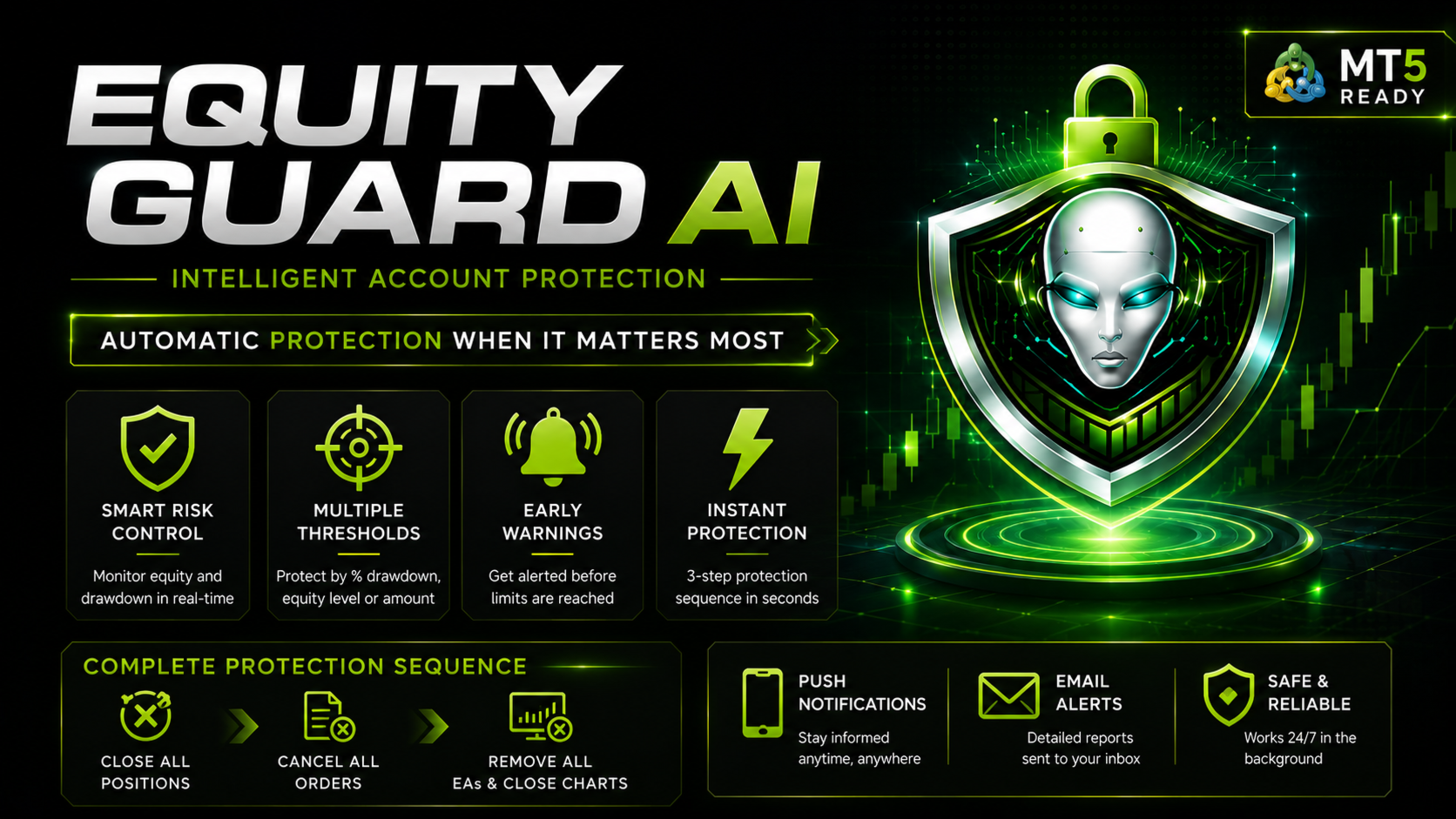
Professional account protection system that closes trades and removes EAs when drawdown limits are breached.Equity Guard is a professional account protection utility designed to safeguard your trading capital. This tool monitors your account equity and drawdown in real-time, automatically executing protective measures when predefined risk thresholds are exceeded. Perfect for prop firm traders, FTMO challenges, and personal accounts.

Equity Guard AI installtion Guide     Download Demo here and Test 

How It Works

Equity Guard continuously monitors three key metrics:

Drawdown percentage from peak equity

Minimum equity threshold

Maximum drawdown amount in account currency


When any configured threshold is breached, the system executes a three-step protection sequence:
1. Closes all open positions immediately
2. Cancels all pending orders
3. Closes all charts, removing all Expert Advisors from the terminal

This comprehensive approach ensures complete trading activity cessation, protecting your account from further losses.

Key Features

Real-Time Monitoring
The utility tracks account balance, equity, and drawdown percentage continuously. The modern dashboard displays all critical metrics at a glance with color-coded status indicators.

Multiple Protection Thresholds
Configure protection based on your risk tolerance:
Maximum drawdown percentage (recommended 15-20% for prop accounts)
Minimum equity amount in account currency
Maximum drawdown amount in dollars or account currency

Early Warning System
Receive alerts before protection triggers. The default warning activates at 80% of your threshold, giving you time to take manual action if desired.

Comprehensive Alert System

Stay informed through multiple channels:

Terminal popup alerts

Mobile push notifications (enabled by default)

Email notifications (optional)

Protection Sequence
When a threshold is breached:
Step 1: Close All Positions The system attempts to close all open trades with a retry mechanism (up to 3 attempts) to ensure complete closure even during high volatility.
Step 2: Cancel All Orders All pending orders are removed to prevent new positions from opening.
Step 3: Chart Shutdown All charts are closed, automatically removing all Expert Advisors from your terminal. This prevents any EA from opening new trades.
The entire sequence executes in seconds with detailed logging of every action.

Input Parameters

Protection Thresholds
- Maximum Drawdown Percent: Set drawdown limit as percentage of peak equity (0 to disable)
- Minimum Equity Amount: Set minimum equity threshold in account currency (0 to disable)
- Maximum Drawdown Amount: Set maximum loss in account currency (0 to disable)

Alert Settings
- Enable Alerts: Terminal popup notifications
- Enable Push Notifications: Mobile alerts (requires MetaQuotes ID setup)
- Enable Email Alerts: Email notifications (requires email configuration)
- Warning Percent: Early warning threshold percentage (default 80%)

Dashboard Information

The modern dashboard displays:
- Current account balance
- Real-time equity (color-coded: green for profit, red for loss)
- Drawdown percentage (color-coded by risk level)
- Drawdown amount in account currency
- Protection status (Active, Warning, or Triggered)
- Visual threshold indicator

Usage Instructions

Installation
1. Attach Equity Guard to any chart (H1 or H4 recommended)
2. Configure your protection thresholds in input parameters
3. Enable desired alert methods
4. Click OK to activate protection

For Mobile Push Notifications
1. Open MetaTrader 5 mobile app
2. Go to Settings, Chat and Notifications
3. Enable Push Notifications and note your MetaQuotes ID
4. In MT5 desktop: Tools, Options, Notifications
5. Enter your MetaQuotes ID and test

Recommended Settings
- Maximum Drawdown Percent: 15-20% for FTMO/prop firms, 25-30% for personal accounts
- Warning Percent: 80% (alerts at 12-16% if maximum is 20%)
- Enable all alert types for maximum notification coverage

Prodotti consigliati
Trading Pal MT5
Tan Bao Shen Chen
Why choose Trading Pal EA: This is a EA utility that auto-manage your   positions ' Stop-Loss (SL) and Take-Profits (TP) dynamically. When opening a single   position , it is easy to set the SL and TP manually. But when dealing with multiple   positions , it can be very tedious or   overwhelming   to fill in so many SL and TP values consistently, especially in a short span of time, like in scalping. Over time and after many such trades, trading itself can become a chore. That is where this EA c
Un grafico. Controllo totale. Smetti di perdere tempo a gestire oggetti, colori e impostazioni su ogni grafico separatamente. Con       Chart Sync Manager   , puoi       sincronizza, copia e controlla tutti i tuoi grafici MetaTrader       all'istante, utilizzando un solo pannello e poche scorciatoie. Disegna una volta, aggiorna ovunque. Apri e chiudi i grafici con un solo clic. Mantieni pulito il tuo spazio di lavoro con       gestione degli oggetti basata sui simboli   . E non perdere mai detta
Danko DTC Panel
Ricardo Almeida Branco
Do not buy before seeing the Danko Trend Color product, as this panel is a way to view a summary of this indicator on various timeframes. The Danko DTC Panel utility allows you to look at the trend in up to 5 timeframes. When clicking on the timeframe texts, a new window will open with the indicator plotted on the screen so you can see the complete chart. The width of the panel, with the amount of candles you want to see, is customizable, see the images below. Ao clicar nos textos dos timeframe
Synchronizer
PATRICK PAARSCH
This Expert Advisor monitors all open positions across all symbols in MetaTrader 5. Whenever a Stop Loss (SL) or Take Profit (TP) is manually set or adjusted on any position, the EA automatically applies that value to all other open positions , regardless of symbol or order type (Buy/Sell). This ensures consistent and synchronized SL and TP levels across your account. Perfect for mobile trading via tablet or smartphone!
MT5 for Telegram Signals
Sergey Batudayev
5 (10)
The utility is designed to send signals from MT4 to Telegram. It has several unique features, allowing not only the sending of trade signals but also the following functionalities: Send messages directly from the terminal to Telegram Send emojis along with custom text Send text and images from Telegram All of these features enable users to manage a signal channel while focusing on trading and finding quality signals. Customizable Signal Messages You can fully customize the signal message: Specif
Bneu News Filter Pro
Marvinson Salavia Caballero
## Full Product Description **Bneu News Filter Pro** is a trading utility Expert Advisor for MetaTrader 5 designed to monitor economic calendar events and manage trading activity during high-impact news releases. The utility provides automatic position protection, real-time spread monitoring, and optional news trading functionality through a visual panel interface. ### Main Functionality **Economic Calendar Integration:** - Automatic retrieval of economic calendar events from MetaTrader 5 bu
Pending Orders Grid Complete System opens any combination of Buy Stop, Sell Stop, Buy Limit and Sell Limit pending orders and closes all existing pending orders. You will be able to Drag-and-Drop the Script on the chart and it will pick up the start price for the first position in the grid from the "Drop" point. Usually it should be in the area of Support/Resistance lines. Input Parameters Before placing all pending orders, the input window is opened allowing you to modify all input parameters:
Pending Orders Grid Complete System   opens any combination of Buy Stop, Sell Stop, Buy Limit and Sell Limit pending orders and closes all existing pending orders. Only one time of the pending order at the same time!!! You will have a possibility to put a legitimate   Open Price   for the first position in the grid. Usually it should in the area of Support/Resistance lines. You just need to drop this script on the chart of a desired currency pair. Input Parameters Before placing all pending ord
ReverseTune
Konstantin Chernov
A script for quick reversing positions and/or orders. If you need to reverse a position with the same volume, open an opposite position of a different volume or change the type of existing orders (for example, Buy Limit -> Sell Limit, Buy Stop -> Sell Limit, etc.) with the same or different take profit/stop loss, this script will make all the routine for you! Allow AutoTrading before running the script. Usage: Run the script on a chart. Input Parameters: Language of messages displayed (EN, RU, D
GS trade report
Aleksander Gladkov
5 (1)
3 in 1 : Report + monitoring + sending messages (Telegram, ...) to optimize trading and use of advisors. Monitoring: Panel on the chart Sending messages to Telegram Sending messages to Email Sending Notifications Sending pop-up messages Sound notifications when the established Profit/Loss levels are exceeded Monitoring is activated by pressing the Start button. Profit for the period by currency pairs, hours and Magic number for the current account. Forms four tables: by symbols, by magic number
Trade Dashboard MT5
Fatemeh Ameri
4.94 (119)
Tired of complex order placement and manual calculations? Trade Dashboard is your solution. With its user-friendly interface, placing orders becomes effortless, by a single click, you can open trades, set stop loss and take profit levels, manage trade lot size, and calculate risk to reward ratios, allowing you to only focus on your strategy. Say goodbye to manual calculations and streamline your trading experience with Trade Dashboard. Download  Demo Version  right now. You can find  Details of
Copy Telegram to MT5
Volodymyr Hrybachov
Copying trading signals from the Telegram channel to MetaTrader. The utility will help you easily and simply copy transactions from your Telegram channel or chat to the MetaTrader trading terminal almost instantly MT4 version - https://www.mql5.com/en/market/product/62381 Template for signals in the Telegram channel, chat (can be changed in the parameters) SYMBOL = EURUSD, TYPE = SELL, PRICE = 0.00000, LOT = 0.01, STOPLOSS = 0.00000, TAKEPROFIT = 0.00000, The utility is easy to use, everyone
Salve commercianti! Sono il tuo assistente commerciale. Permettetemi di dirvi la mia competenza: 1. Sono bravo nella gestione delle tue posizioni, indipendentemente da quale estremità hai posto un ordine, posso aiutarti per la prima volta ad aggiungere una linea di stop loss ragionevole e lo stop loss mobile. 2. Posso aiutarti a evitare l’ascesa e la caduta e a sradicare le debolezze umane dalle radici dei principi. 3. Ti invierò un messaggio di notifica al tuo client MT5 mobile al miglior punt
ICT PD Arrays Trader
Aesen Noah Remolacio Perez
Attention All ICT Students! This indispensable tool is a must-have addition to your trading arsenal... Introducing the ICT PD Arrays Trader: Empower your trading with this innovative utility designed to enhance and simplify your ICT trading strategy and maximize your potential profits.  How does it work? It's simple yet highly effective. Begin by placing a rectangle on your trading chart and assigning it a name like 'ict' or any preferred identifier. This allows the system to accurately ident
UTrailingMT5
Viktor Shpakovskiy
L'EA per il trading manuale per gestire le posizioni aperte e gli ordini pendenti. Il trailing stop integrato ha cinque modalità e sette strumenti. C'è uno stop loss virtuale e un take profit virtuale, che possono essere spostati liberamente sul grafico. Con l'aiuto del simulatore di trading integrato, puoi verificare come funziona l'EA nel tester di strategia. La guida a UTrailingMT5 può essere trovata nella sezione "Commenti". Nel tester MT5, il movimento manuale delle linee virtuali SL e TP s
MT5 to Telegram Signals
Diego Arribas Lopez
3 (2)
[ MT4 Version ] [ Discord Signals ]  MT5 to Telegram Signals Connect your broker account with Telegram and stop missing important notifications.  Would you like to receive Telegram   notifications? Are you looking for a simple way to share trade signals with your followers? Do you need to start documenting your trades with an automated trading diary? This utility is simple to use and supports a wide variety of settings: Pick your desired Telegram   group and enter the bot token and the chat id G
Operational Management MT5
Leonardo Gabriel Caceres
Operative Management Pro – Advanced Trading Utility Operative Management Pro is a smart visual tool for traders who want to analyze and simulate their trades before placing them on the market. This panel displays in real-time the most important parameters of the current symbol: Current price and minimum lot size Required margin Spread cost in USD and pips Take Profit and Stop Loss value in USD Automatic risk and reward calculation With just a click on the chart, you can simulate BUY or SELL t
Overview: The WWImportExportGV  is a versatile and efficient utility designed for MetaTrader 5 (MT5) users to manage global variables effortlessly. With this tool, traders can easily export all global variables from their terminal to a CSV file or import them into another terminal, ensuring seamless synchronization between trading environments. Features: Export Mode: Automatically extracts all global variables from the current MT5 terminal and saves them to a CSV file. This file can be shared o
FREE
OrderManager MT5
Lukas Roth
4.84 (25)
Presentazione del   OrderManager : un rivoluzionario strumento per MT5 Gestisci le tue operazioni come un professionista con il nuovissimo utility Order Manager per MetaTrader 5. Progettato pensando alla semplicità e alla facilità d'uso, Order Manager ti permette di definire e visualizzare senza sforzo il rischio associato a ogni operazione, consentendoti di prendere decisioni informate e ottimizzare la tua strategia di trading. Per ulteriori informazioni sull'OrderManager, si prega di consultar
Smart Charts
Fyodor Korotkov
Hello, boys and girls! Script allows you either to quickly save opened charts and then close all charts opened by visual tester mode or just faster close all charts. Feel free to take a look at video manual about how to use this script on my YouTube channel. Also, feel free to join my telegram channel , where time to time I publish some exclusive stuffs. Feel free to leave feedback and thoughts how to improve this script - I'd highly appreciate that. All the best.
Exp Crassula
Aleksey Luppey
The Exp Crassula expert Advisor can start working with a minimum Deposit of $ 20. it is possible to enable automatic lot increase (calculated from the result of the last transaction.) The expert is working around the clock in fully automatic mode. The expert showed good results on the history of the EURUSD H1 pair. You can enable it on other timeframes and currency pairs by first testing and selecting the minimum size for the calculation in paragraphs parameter. it is recommended to use from 5
SMT Trade Planner e un calcolatore di rischio professionale e pannello di esecuzione ordini direttamente sul grafico MetaTrader. Calcola la dimensione del lotto, mostra linee visuali di entrata, Stop Loss e Take Profit trascinabili sul grafico, valida il trade contro regole di rischio configurabili e permette l'esecuzione con un clic.   Come funziona Allega il Trade Planner a qualsiasi grafico. Il pannello mostra le informazioni del conto e pulsanti di selezione rapida del rischio. Tre linee ori
Equity Drawdown Manager
Desai Tushar Dnyaneshwar
Expert Advisor for MetaTrader % Platform – Equity & Drawdown Management This Expert Advisor (EA) for the MetaTrader % platform is designed to manage account equity and control drawdown levels with precision and flexibility. Core Functionality: Drawdown Control: The EA continuously monitors the account’s equity and automatically takes action when a specified drawdown level is reached. ️ Customizable Input: Users can easily set their own drawdown limit as a percentage of the account equity thr
One Click Trader  is a tool designed for MetaTrader 4 platform, which enables you to take your trading to the next level. It enables you to open, manage and close your trades in simple an efficient way by just one click of your mouse button. "-"   ,  "+"  change OCT window size  Up arrow minimizes the OCT panel Down arrow maximizes the OCT panel Right arrow displays the next panel with additional features Left arrow hides the panel with additional features Red  SELL  button enables you to open s
A grid advisor with a system for "Resolving" a basket of unprofitable orders, a news filter, a filter for open positions on other trading instruments and the function of sending trading signals to your Telegram channel. The Expert Advisor can be used to restore unprofitable positions on the account as a utility to bring trades to breakeven that you opened with your hands or other Expert Advisors. Works inside a linear regression channel, input on several conditions. The signal uses the direct
Trade Guardian Manager
Cedric Tallefourtane
Trade Guardian Risk Manager is a MT5 utility Expert Advisor dedicated to risk control and equity protection. Many know how to trade. Few know when to stop. Trade Guardian formalizes discipline and mechanically enforces your limits when emotions or over-exposure take over. Risk management utility No trading logic — Does NOT open trades : does not open positions, does not provide signals, contains no strategy, and does not guarantee results. Operating principle — Equity Monitoring + rule enf
Adaptive ATR Trailing Stop (MT5) Overview Adaptive ATR Trailing Stop is a utility Expert Advisor for MetaTrader 5 that manages stop loss levels for existing open positions. It uses the Average True Range (ATR) to calculate a volatility-based trailing distance. This EA does not open trades. It only modifies the Stop Loss (SL) of existing positions and keeps the current Take Profit (TP) unchanged. How it works - The EA runs on every tick of the chart where it is attached. - For each open posit
FREE
The Hammer
Ibrahim Fathallah Abdel Halim Abdel Khaleq
The Hammer Purpose: This EA identifies potential trend reversals using candlestick patterns (Hammer, Bullish/Bearish Engulfing) combined with RSI confirmation. It automatically opens and manages trades based on predefined risk management parameters. Ideal for traders looking for a fully automated reversal trading strategy with robust risk management. Test the EA in a demo account before live trading. Minimum account balance 3000 USD Designed for EUR/USD - 3Hr chart Use default settings
Position Size Tool
Filipp Pavlov
5 (1)
Position Size Tool is an on-chart trading tool that lets you manage trades entirely with your mouse and hotkeys — switch between preset risk percentages, place orders with instant position sizing, see live SL/TP distances and risk/reward, and close positions partially with a click. Download Demo version  Demo is limited to EURUSD pair on demo account on 1 hour timeframe. Key Features: Market/pending orders by mouse & hotkeys with auto risk-based sizing. Change risk % with A/S hotkeys. Change aut

Trade Control Panel
Jerry Jilun Anak Liban
Trade Control Panel Function Normal One Click Function Close All Close All Profit Close All Loss Close All Pending Order Close All Sell Close All Buy Advance One Click Function 1.  Close Partial Lot Sell by Percent It will help you partial close for all open position by desire percent you wanted. No longer partial close one by one for every open position Manual input for desire percent 2. Close Partial Lot Buy by Percent It will help you partial close for all open position by desire percent
Gli utenti di questo prodotto hanno anche acquistato
Trade Assistant MT5
Evgeniy Kravchenko
4.42 (208)
It helps to calculate the risk per trade, the easy installation of a new order, order management with partial closing functions, trailing stop of 7 types and other useful functions. Additional materials and instructions Installation instructions - Application instructions - Trial version of the application for a demo account Line function -   shows on the chart the Opening line, Stop Loss, Take Profit. With this function it is easy to set a new order and see its additional characteristics bef
Forex Trade Manager MT5
InvestSoft
4.97 (625)
Benvenuto a Trade Manager EA, lo strumento definitivo per la gestione del rischio , progettato per rendere il trading più intuitivo, preciso ed efficiente. Non è solo uno strumento per l'esecuzione degli ordini, ma una soluzione completa per la pianificazione delle operazioni, la gestione delle posizioni e il controllo del rischio. Che tu sia un principiante, un trader avanzato o uno scalper che necessita di esecuzioni rapide, Trade Manager EA si adatta alle tue esigenze, offrendo flessibilità s
Local Trade Copier EA MT5
Juvenille Emperor Limited
4.96 (130)
Sperimenta una copia di trading eccezionalmente veloce con il   Local Trade Copier EA MT5 . Con la sua facile configurazione in 1 minuto, questo copiatore di trading ti consente di copiare i trades tra diversi terminali di MetaTrader sullo stesso computer Windows o su Windows VPS con velocità di copia ultra veloci inferiori a 0.5 secondi. Che tu sia un trader principiante o professionista,   Local Trade Copier EA MT5   offre una vasta gamma di opzioni per personalizzarlo alle tue esigenze speci
TradePanel MT5
Alfiya Fazylova
4.86 (148)
Trade Panel è un assistente commerciale multifunzionale. L'applicazione contiene più di 50 funzioni di trading per il trading manuale e consente di automatizzare la maggior parte delle operazioni di trading. Attenzione, l'applicazione non funziona nel tester di strategia. Prima dell'acquisto, puoi testare la versione demo su un conto demo. Versione demo qui . Istruzioni complete qui . Commercio. Ti consente di eseguire operazioni di trading con un clic: Apri ordini e posizioni pendenti con calco
Versione Beta Telegram to MT5 Signal Trader è quasi pronto per il rilascio ufficiale in versione alpha. Alcune funzionalità sono ancora in fase di sviluppo e potresti riscontrare piccoli bug. Se riscontri problemi, ti preghiamo di segnalarli, il tuo feedback aiuta a migliorare il software per tutti. Telegram to MT5 Signal Trader è uno strumento potente che copia automaticamente segnali di trading da canali o gruppi Telegram al tuo account MetaTrader 5 . Supporta canali pubblici e privati e cons
FarmedHedge Pair Trading Dashboard
Tanapisit Tepawarapruek
5 (2)
VERIFIED TRADING RESULTS - Farmed Hedge Yield Axi Copy:  https://www.mql5.com/en/signals/2356376 - Farmed Hedge Yield Exn Copy:   https://www.mql5.com/en/signals/2356404 - Farmed Hedge Yield V Copy:  https://www.mql5.com/en/signals/2357156 Contact me via private message to receive the User Manual and Setup. * Thai Lauguage Support Available Farmed Hedge Yield Farming - Professional Pair Trading Dashboard (Manual - Hybrid - Semi/Automated EA) VERSION 3 - WILD HARVEST UPDATE Trading Approac
Trade Manager DashPlus
Henry Lyubomir Wallace
5 (13)
DashPlus è uno strumento avanzato di gestione delle operazioni progettato per migliorare l'efficienza e l'efficacia del trading sulla piattaforma MetaTrader 5. Offre una suite completa di funzionalità, tra cui calcolo del rischio, gestione degli ordini, sistemi di griglia avanzati, strumenti basati su grafici e analisi delle prestazioni. Caratteristiche Principali 1. Griglia di Recupero Implementa un sistema di griglia flessibile e di media per gestire le operazioni in condizioni di mercato avve
Smart Stop Manager MT5
Daniel Stein
4.33 (3)
Smart Stop Manager – Esecuzione automatica dello stop-loss con precisione professionale Panoramica Smart Stop Manager è il livello di esecuzione della linea Smart Stop, progettato per i trader che richiedono una gestione dello stop-loss strutturata, affidabile e completamente automatizzata su più posizioni aperte. Monitora continuamente tutte le operazioni attive, calcola il livello di stop ottimale utilizzando la logica di struttura di mercato Smart Stop e aggiorna gli stop automaticamente se
Trade copier MT5
Alfiya Fazylova
4.63 (38)
Trade Copier è un'utilità professionale progettata per copiare e sincronizzare le transazioni tra conti di trading. La copiatura avviene dal conto/terminale del fornitore al conto/terminale del destinatario, che sono installati sullo stesso computer o vps. Prima di acquistare, puoi testare la versione demo su un account demo. Versione demo qui . Istruzioni complete qui . Funzionalità e vantaggi principali: Supporta la copia degli ordini: MT5> MT5, MT4> MT5, MT5> MT4, inclusi i conti di compensaz
The News Filter MT5
Leolouiski Gan
4.74 (19)
Questo prodotto filtra tutti gli esperti consulenti e i grafici manuali durante il periodo delle notizie, così non dovrai preoccuparti di improvvisi picchi di prezzo che potrebbero distruggere le tue impostazioni di trading manuali o le negoziazioni effettuate da altri esperti consulenti. Questo prodotto viene fornito anche con un sistema completo di gestione degli ordini che può gestire le tue posizioni aperte e gli ordini in sospeso prima della pubblicazione di qualsiasi notizia. Una volta che
The product will copy all telegram signal to MT5 ( which you are member) , also it can work as remote copier.  Easy to set up, copy order instant, can work with almost signal formats, image signal,  s upport to translate other language to English Work with all type of channel or group, even channel have "Restrict Saving Content", work with  multi channel, multi MT5 Work as remote copier: with signal have ticket number, it will copy exactly via ticket number. Support to backtest signal. How to s
Ultimate Extractor
Clifton Creath
5 (9)
Ultimate Extractor - Professional Trading Analytics for MT5 *****this is the local HTML version of Ultimate Extractor. Check out Ultimate Extractor Cloud on mql5 for the Cloud version****** Ultimate Extractor transforms your MetaTrader 5 trading history into actionable insights with comprehensive analytics, interactive charts, and real-time performance tracking. What It Does Automatically analyzes your MT5 trading history across all Expert Advisors and generates detailed HTML reports with inte
Timeless Charts
Samuel Manoel De Souza
5 (3)
Timeless Charts è una soluzione di grafici avanzata, progettata per i trader professionisti che necessitano di grafici personalizzati / timeframe personalizzati – inclusi grafici a secondi / timeframe a secondi, grafici Renko / barre Renko, grafici a cluster / footprint e strumenti avanzati simili a quelli disponibili nelle piattaforme più popolari. A differenza dei tradizionali grafici offline o dei semplici indicatori personalizzati, questa soluzione crea barre completamente personalizzate con
HINN MagicEntry Extra
ALGOFLOW OÜ
4.71 (14)
HINN MAGIC ENTRY – the ultimate tool for entry and position management! Place orders by selecting a level directly on the chart! full description   ::  demo-version  :: 60-sec-video-description Key features: - Market, limit, and pending orders - Automatic lot size calculation - Automatic spread and commission accounting - Unlimited partitial take-profits  - Breakeven and trailing stop-loss and take-profit  functions - Invalidation leves - Intuitive, adaptive, and customizable interface - Works
Copy Cat More Trade Copier MT5 (Gatto Copiatore MT5) è un copiatore di trade locale e un framework completo di gestione del rischio ed esecuzione progettato per le sfide di trading odierne. Dalle sfide delle prop firm alla gestione di portafogli personali, si adatta a ogni situazione con una combinazione di esecuzione robusta, protezione del capitale, configurazione flessibile e gestione avanzata dei trade. Il copiatore funziona sia in modalità Master (mittente) che Slave (ricevente), con sincro
Smart Stop Scanner – Analisi multi-asset degli stop-loss basata sulla reale struttura di mercato Panoramica Smart Stop Scanner offre un monitoraggio professionale dei livelli di stop-loss su più mercati. Il sistema identifica automaticamente le zone di stop più rilevanti basandosi sulla reale struttura di mercato, sulle rotture significative e sulla logica del price action, presentando tutte le informazioni in un pannello chiaro, coerente e ottimizzato per schermi ad alta risoluzione (DPI-awar
Seconds Chart MT5
Boris Sedov
4.59 (17)
Seconds Chart — uno strumento unico per creare grafici in secondi su MetaTrader 5 . Con Seconds Chart , puoi generare grafici con timeframe definiti in secondi, ottenendo una flessibilità e una precisione d'analisi ideali, non disponibili nei grafici standard in minuti o ore. Ad esempio, il timeframe S15 indica un grafico con candele di 15 secondi. Puoi utilizzare qualsiasi indicatore e Expert Advisor con supporto per simboli personalizzati. Lavorare con loro è comodo quanto operare sui grafici
Telegram to MT5 Coppy
Sergey Batudayev
5 (8)
Da Telegram a MT5:   la soluzione definitiva per la copia del segnale Semplifica il tuo trading con Telegram su MT5, il moderno strumento che copia i segnali di trading direttamente dai canali e dalle chat di Telegram sulla tua piattaforma MetaTrader 5, senza bisogno di DLL. Questa potente soluzione garantisce un'esecuzione precisa dei segnali, ampie opzioni di personalizzazione, fa risparmiare tempo e aumenta la tua efficienza. [ Instructions and DEMO ] Caratteristiche principali Integrazione d
VirtualTradePad One Click Trading Panel
Vladislav Andruschenko
4.59 (73)
Pannello di trading per il trading in 1 clic.   Lavorare con posizioni e ordini!   Trading dal grafico o dalla tastiera. Con il nostro pannello di trading, puoi eseguire operazioni con un solo clic direttamente dal grafico ed eseguire operazioni di trading 30 volte più velocemente rispetto al controllo MetaTrader standard. I calcoli automatici di parametri e funzioni rendono il trading più veloce e conveniente per i trader. Suggerimenti grafici, etichette informative e informazioni complete sugl
Trade Assistant 38 in 1
Makarii Gubaydullin
4.91 (23)
Strumento multifunzionale: Calcolatore di Lotto, Ordini Grid, Rapporto R/R, Gestore di Trade, Zone di Domanda e Offerta, Price Action e molto altro Versione Demo   |   Manuale Utente L'Assistente di Trading   non funziona nel tester di strategie : puoi scaricare la   Versione Demo QUI  per testare l' utilità . Contattami   per qualsiasi domanda  / idee di miglioramento / in caso di bug riscontrato Se hai bisogno di una versione MT4, è disponibile qui Semplifica, accelera e automatizza il tuo  
MT5 to Telegram Signal Provider è un'utilità facile da usare e completamente personalizzabile che consente l'invio di segnali specificati a una chat, canale o gruppo Telegram, rendendo il tuo account un fornitore di segnali. A differenza della maggior parte dei prodotti concorrenti, non utilizza importazioni DLL. [ Dimostrativo ] [ Manuale ] [ Versione MT4 ] [ Versione Discord ] [ Canale Telegram ]  New: [ Telegram To MT5 ] Configurazione Una guida utente passo-passo è disponibile. Nessuna cono
Exp COPYLOT CLIENT for MT5
Vladislav Andruschenko
3.82 (34)
Trade copyr per MT5 è un trade copyr per la piattaforma МetaТrader 5   . Copia le negoziazioni forex   tra       eventuali conti   MT5   -   MT5, MT4   -   MT5 per la versione COPYLOT MT5 (o MT4   -   MT4 MT5   -   MT4 per la versione COPYLOT MT4) Fotocopiatrice affidabile! Versione MT4 Descrizione completa   +DEMO +PDF Come comprare Come installare     Come ottenere i file di registro     Come testare e ottimizzare     Tutti i prodotti di Expforex Puoi anche copiare le operazioni nel termina
EA Portfolio Analyzer
Jimmy Peter Eriksson
Guida all'installazione:    clicca qui! Analizzare più consulenti esperti insieme Confronta i risultati EA per numero magico Traccia la redditività e i ribassi Filtra i risultati per intervallo di date Curva di equità visiva e metriche dettagliate Pronto all'uso in meno di un minuto Analizzatore di portafoglio EA EA Portfolio Analyzer è uno   strumento di analisi professionale   progettato per monitorare   in tempo reale le prestazioni di più Expert Advisor   in modo chiaro e strutturato. Quand
Unlimited Trade Copier Pro MT5 is a tool to copy trade remotely to multiple MT4, MT5 and cTrader accounts at different computers/locations over internet. This is an ideal solution for you if you are a signal provider and want to copy your trades to other receivers globally on your own rules. One provider can copy trades to multiple receivers and one receiver can get trade from multiple providers as well. The provider can even set the subscription expiry for each receiver, so that receiver will n
Trade Manager DaneTrades
Levi Dane Benjamin
4.36 (28)
Trade Manager per aiutarti a entrare e uscire rapidamente dalle operazioni calcolando automaticamente il tuo rischio. Incluse funzionalità che ti aiutano a prevenire l'eccessivo trading, il vendetta trading e il trading emotivo. Le operazioni possono essere gestite automaticamente e i parametri di performance del conto possono essere visualizzati in un grafico. Queste caratteristiche rendono questo pannello ideale per tutti i trader manuali e aiuta a migliorare la piattaforma MetaTrader 5. Suppo
Risk Manager for MT5
Sergey Batudayev
4.35 (17)
Expert Advisor Risk Manager per MT5 è un programma molto importante e secondo me necessario per ogni trader. Con questo Expert Advisor sarai in grado di controllare il rischio nel tuo conto di trading. Il controllo del rischio e del profitto può essere effettuato sia in termini monetari che in termini percentuali. Affinché l'Expert Advisor funzioni, è sufficiente allegarlo al grafico della coppia di valute e impostare i valori di rischio accettabili nella valuta del deposito o in % del saldo
Custom Alerts AIO: Monitora tutti i mercati — senza alcuna configurazione Panoramica Custom Alerts AIO è una soluzione di monitoraggio dei mercati pronta all’uso che non richiede alcuna configurazione. Tutti gli indicatori necessari — FX Power, FX Volume, FX Dynamic, FX Levels, IX Power — sono integrati internamente. Non vengono mostrati grafici, rendendolo ideale per generare alert in tempo reale in modo discreto ed efficiente. Supporta tutte le classi di asset offerte dal tuo broker: Forex,
HINN Lazy Trader
ALGOFLOW OÜ
5 (2)
The core idea: using the user interface, you configure the parameters the chart must meet before entering a position (or positions), choose which entry models to use, and set the rules for when trading and planning should end. Lazy Trader takes over all the routine chart watching and execution.  Lazy Trader  handles the rest. full description What can it do? - Understands Larry Williams market structure - Understands swing market structure by Michael Huddleston (ICT) / Linda Raschke - Can w
Equity Protect Pro: Il tuo esperto di protezione del conto completo per un trading senza preoccupazioni Se stai cercando funzionalità come protezione del conto, protezione del capitale proprio, protezione del portafoglio, protezione multi-strategia, protezione dei profitti, raccolta dei profitti, sicurezza del trading, programmi di controllo del rischio, controllo automatico del rischio, liquidazione automatica, liquidazione condizionale, liquidazione programmata, liquidazione dinamica, trailin
Risk Manager Pro MT5
Roman Zhitnik
5 (8)
The Expert Advisor is a comprehensive risk manager helping users to control their trading activities. With this tool being a safeguard you can easily configure various risk parameters. When any limit is exceeded, the risk manager can force close opened positions, close other EAs, and even close the terminal to prevent emotional trading that doesn't correspond to your trading strategy. Risk Manager Settings Account Protection Check min equity limit to close all (account currency) - check the min
Altri dall’autore
Spike Phantom
Niccyril Chirindo
1 (1)
Spike Phantom   is a specialized indicator for PainX and GainX synthetic indices that generates trading signals with automatic alert notifications. Features The indicator analyzes market conditions using proprietary algorithms and displays buy/sell arrows directly on the chart. It works specifically with PainX and GainX indices on M5 timeframe. Signal generation combines multiple technical analysis methods to identify potential trading opportunities. The system provides two TP levels and SL cal
Quantum Trend Scanner
Niccyril Chirindo
5 (1)
QUANTUM TREND SCANNER Professional Multi-Timeframe Trend Analysis Dashboard Quantum Trend Scanner is an advanced technical indicator designed to analyze market trends across multiple timeframes and currency pairs simultaneously. The indicator provides traders with comprehensive market insights through three integrated analytical panels. Quantum Trend Scanner Guide is Here  What It Does The indicator monitors 30 currency pairs across 9 timeframes (M1, M5, M15, M30, H1, H4, D1, W1, MN1) and pre
Mega Spikes Max
Niccyril Chirindo
1 (2)
Mega Spikes Max is a specialized indicator for Boom and Crash synthetic indices that generates trading signals with automatic alert notifications. Features The indicator analyzes market conditions using proprietary algorithms and displays buy/sell arrows directly on the chart. It works specifically with Boom and Crash indices on M5 timeframe. Signal generation combines multiple technical analysis methods to identify potential trading opportunities. The system provides two TP levels and SL calcu
CRT Bomb Pro
Niccyril Chirindo
CRT Bomb Indicator - MT5 Full Version The CRT Bomb is a professional trading indicator that detects high-probability 3-candle reversal patterns (CRT - Candle Reversal Technique) across all timeframes and symbols.   VPS is recomended so that you dont miss any CRT setups as they form , for entries you can use your manual analysis for confirmation like FVG, OBS etc Works on all Pairs ,Metals & Indices Key Features: Identifies impulse-trap-reversal candle structures Provides visual arrows and patter
Sahwira Trade Manager - Advanced Forex Trading Panel for MT5 Boost Your Trading Efficiency with Precision and Control Elevate your trading experience with Sahwira Trade Manager, a powerful and user-friendly Expert Advisor (EA) designed for MetaTrader 5 (MT5). Whether you're a beginner or a seasoned forex trader, this advanced trade management tool offers a sleek, customizable dashboard to execute market and pending orders, manage risk, and monitor your account performance in real-time—all from
AI Daily Trend
Niccyril Chirindo
AI Trading Dashboard - Retracement Signal Indicator for BOOM & CRASH Plaese Leave  Review OVERVIEW Technical analysis indicator for BOOM, CRASH synthetic indices. Monitors daily trends and identifies retracement entry points based on configurable parameters. KEY FEATURES Signal Generation • BUY signals on BOOM indices during uptrend pullbacks • SELL signals on CRASH  indices during downtrend bounces • Adjustable retracement threshold (default: 10 pips, can set to 20-30+ pips) • Signal cooldow
Gold Crash
Niccyril Chirindo
GOLD CRASH - Gold Scalping Indicator for M1/M5 Gold Crash is a professional non-repainting scalping indicator specifically designed for XAUUSD trading on M1 and M5 timeframes. Features a modern dashboard with real-time gold trend analysis and precise entry signals. Key Features Non-Repainting - Signals confirmed on bar close only, never change Gold Optimized - Settings fine-tuned specifically for XAUUSD volatility Multi-Timeframe Analysis - M1/M5 with M15 higher timeframe confirmation Smart Fil
Trade Mirror Pro
Niccyril Chirindo
"Trade Mirror Pro - Multi Terminal Position Copier Trade Mirror Pro - Professional Multi-Terminal Trade Copying Solution Trade Mirror Pro provides reliable position copying between multiple MT5 terminals using file-based communication. No DLL imports required, ensuring compatibility with all MT5 installations including VPS and restricted environments. Key Features: Master/Slave architecture supporting unlimited slave terminals Real-time position opening, modification, and closing synchronization
SMART TRADE COPIER MT5 - LOCAL TRADE REPLICATOR Copy trades instantly between multiple MT5 accounts on the same computer or VPS. Fast, reliable local copying system. WHAT IT DOES Replicates all trading activity from one master account to unlimited slave accounts running on the same machine. Copies: Market orders (Buy/Sell) Pending orders (all types) TP/SL modifications Trade closures and deletions KEY FEATURES Smart Symbol Matching Handles different broker suffixes (.a, .z, .m, .ecn, etc.) Works
Filtro:
Nessuna recensione
Rispondi alla recensione