Equity Guard AI

5

Equity Guard AI

Professional account protection system that closes trades and removes EAs when drawdown limits are breached.Equity Guard is a professional account protection utility designed to safeguard your trading capital. This tool monitors your account equity and drawdown in real-time, automatically executing protective measures when predefined risk thresholds are exceeded. Perfect for prop firm traders, FTMO challenges, and personal accounts.

How It Works

Equity Guard continuously monitors three key metrics:

Drawdown percentage from peak equity

Minimum equity threshold

Maximum drawdown amount in account currency


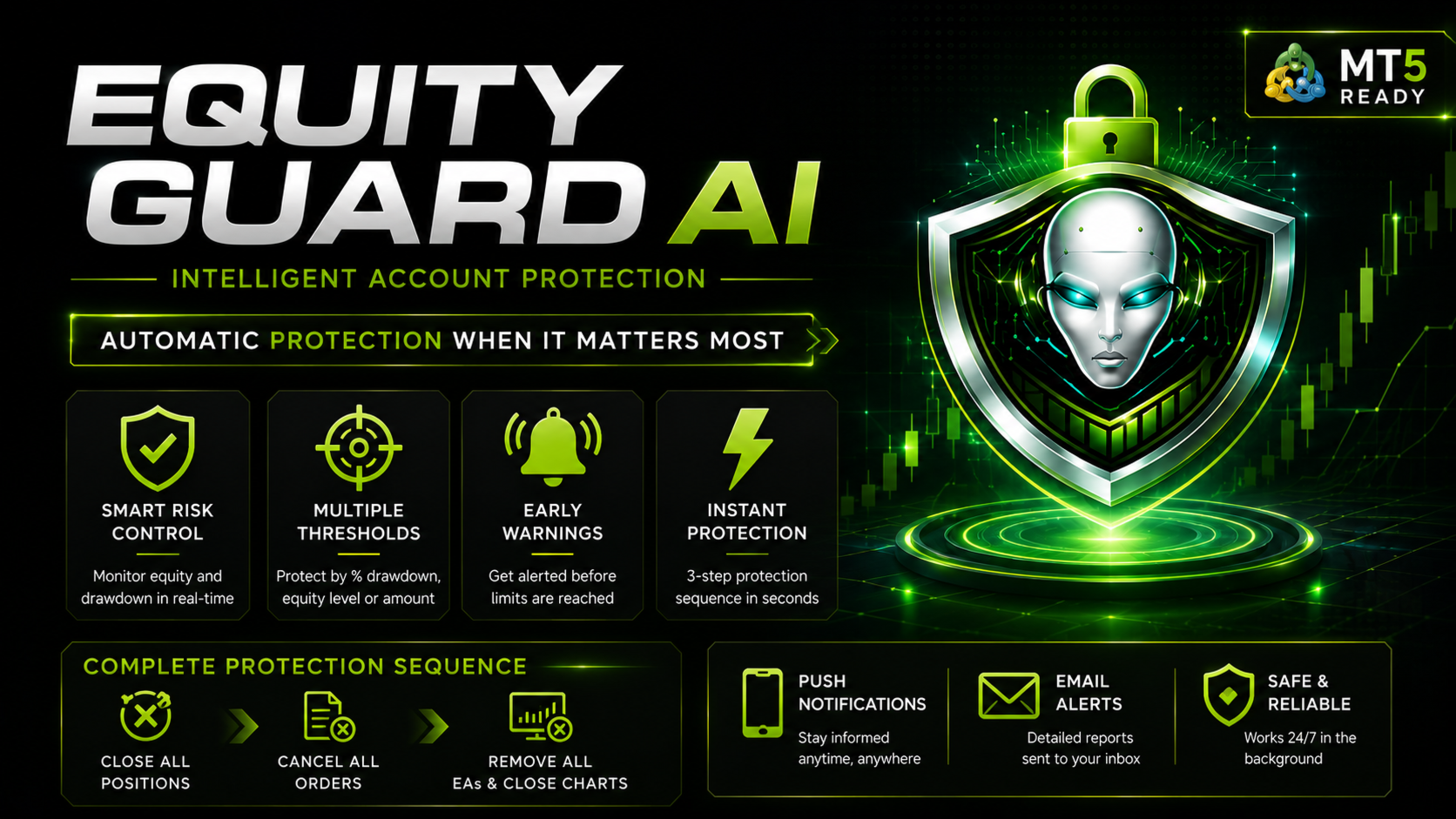
When any configured threshold is breached, the system executes a three-step protection sequence:
1. Closes all open positions immediately
2. Cancels all pending orders
3. Closes all charts, removing all Expert Advisors from the terminal

This comprehensive approach ensures complete trading activity cessation, protecting your account from further losses.

Key Features

Real-Time Monitoring
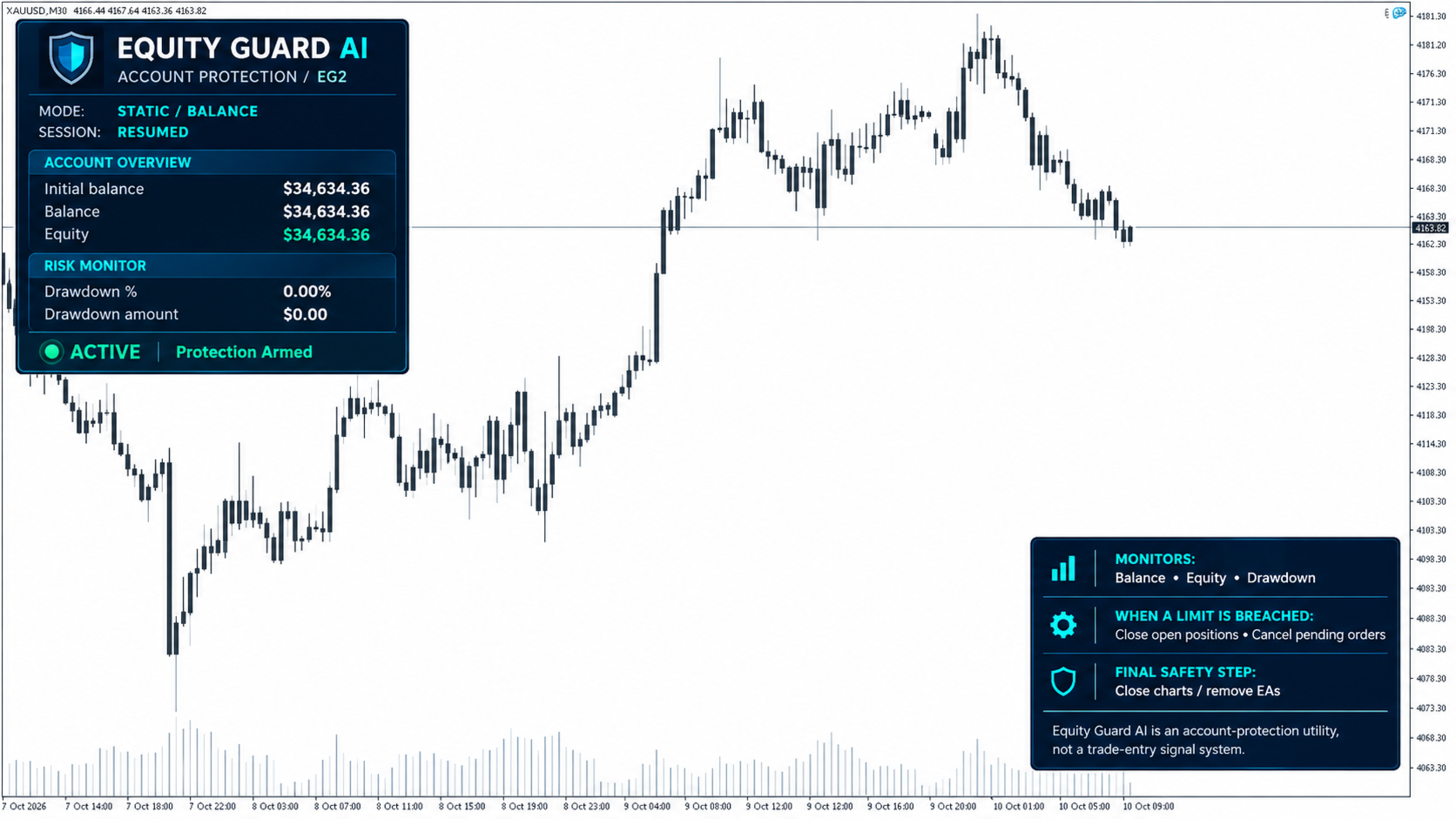
The utility tracks account balance, equity, and drawdown percentage continuously. The modern dashboard displays all critical metrics at a glance with color-coded status indicators.

Multiple Protection Thresholds
Configure protection based on your risk tolerance:
Maximum drawdown percentage (recommended 15-20% for prop accounts)
Minimum equity amount in account currency
Maximum drawdown amount in dollars or account currency

Early Warning System
Receive alerts before protection triggers. The default warning activates at 80% of your threshold, giving you time to take manual action if desired.

Comprehensive Alert System

Stay informed through multiple channels:

Terminal popup alerts

Mobile push notifications (enabled by default)

Email notifications (optional)

Protection Sequence
When a threshold is breached:
Step 1: Close All Positions The system attempts to close all open trades with a retry mechanism (up to 3 attempts) to ensure complete closure even during high volatility.
Step 2: Cancel All Orders All pending orders are removed to prevent new positions from opening.
Step 3: Chart Shutdown All charts are closed, automatically removing all Expert Advisors from your terminal. This prevents any EA from opening new trades.
The entire sequence executes in seconds with detailed logging of every action.

Input Parameters

Protection Thresholds
- Maximum Drawdown Percent: Set drawdown limit as percentage of peak equity (0 to disable)
- Minimum Equity Amount: Set minimum equity threshold in account currency (0 to disable)
- Maximum Drawdown Amount: Set maximum loss in account currency (0 to disable)

Alert Settings
- Enable Alerts: Terminal popup notifications
- Enable Push Notifications: Mobile alerts (requires MetaQuotes ID setup)
- Enable Email Alerts: Email notifications (requires email configuration)
- Warning Percent: Early warning threshold percentage (default 80%)

Dashboard Information

The modern dashboard displays:
- Current account balance
- Real-time equity (color-coded: green for profit, red for loss)
- Drawdown percentage (color-coded by risk level)
- Drawdown amount in account currency
- Protection status (Active, Warning, or Triggered)
- Visual threshold indicator

Usage Instructions

Installation
1. Attach Equity Guard to any chart (H1 or H4 recommended)
2. Configure your protection thresholds in input parameters
3. Enable desired alert methods
4. Click OK to activate protection

For Mobile Push Notifications
1. Open MetaTrader 5 mobile app
2. Go to Settings, Chat and Notifications
3. Enable Push Notifications and note your MetaQuotes ID
4. In MT5 desktop: Tools, Options, Notifications
5. Enter your MetaQuotes ID and test

Recommended Settings
- Maximum Drawdown Percent: 15-20% for FTMO/prop firms, 25-30% for personal accounts
- Warning Percent: 80% (alerts at 12-16% if maximum is 20%)
- Enable all alert types for maximum notification coverage

Отзывы 1
William Anthony Reeves
146
William Anthony Reeves 2026.06.22 14:29 

a very hand utility for those who are too quick to re-open trades after losses. it closes your trades and closes your charts and provides enough time to possibly prevent re-entry

Рекомендуем также
Risk Panel - Click to Trade Risk Panel - Click to Trade is a manual trade execution utility for MetaTrader 5. It provides a chart-based interface for preparing and placing buy and sell orders with risk-based position sizing. Features Adjustable risk percentage based on account equity. ATR-based stop-loss calculation. Take-profit calculation using a configurable risk-to-reward ratio. Buy and Sell trade controls. Order placement through a dedicated trade button. Spread limit and trade deviation se
SQ Tactic Tracker
Devie Arevalo Montemayor
5 (3)
SQ TACTIC TRACKER — Multi-Bot Performance & Risk Dashboard for MT5 KNOW YOUR EDGE. DON'T GUESS IT. Every bot, every symbol, every session, every open position — decoded on one chart. Your equity curve tells you IF you're making money. It never tells you WHERE it comes from, WHEN you actually win, WHICH bot is quietly bleeding the account, or WHAT you're exposed to right now. SQ Tactic Tracker puts your entire trading account on a single chart and answers those questions at a glance — live. It
Одна диаграмма. Полный контроль. Перестаньте тратить время на управление объектами, цветами и настройками для каждой диаграммы отдельно.       Chart Sync Manager   , вы можете       синхронизируйте, копируйте и управляйте всеми вашими графиками MetaTrader       мгновенно — с помощью всего одной панели и нескольких сочетаний клавиш. Нарисуйте один раз и обновляйте везде. Открывайте и закрывайте диаграммы одним щелчком. Поддерживайте чистоту рабочего пространства с помощью       Управление объекта
Why choose Trading Pal EA: This is a EA utility that auto-manage your   positions ' Stop-Loss (SL) and Take-Profits (TP) dynamically. When opening a single   position , it is easy to set the SL and TP manually. But when dealing with multiple   positions , it can be very tedious or   overwhelming   to fill in so many SL and TP values consistently, especially in a short span of time, like in scalping. Over time and after many such trades, trading itself can become a chore. That is where this EA c
Утилита разработана для отправки сигнала из МТ4 в Телеграм. Она имеет ряд уникальных особенностей, позволяя не только отправлять торговые сигналы, но и выполнять следующие функции: Отправка сообщений прямо с терминала в Телеграм Отправка смайликов вместе с кастомным текстом Отправка текста и картинки из Телеграм Все это позволяет пользователю вести канал с сигналами, сосредоточившись на торговле и поиске качественных сигналов. [ DEMO и   Инструкция к утилите] Полностью кастомизируемые сообщения
Pending Orders Grid Complete System   opens any combination of Buy Stop, Sell Stop, Buy Limit and Sell Limit pending orders and closes all existing pending orders. Only one time of the pending order at the same time!!! You will have a possibility to put a legitimate   Open Price   for the first position in the grid. Usually it should in the area of Support/Resistance lines. You just need to drop this script on the chart of a desired currency pair. Input Parameters Before placing all pending ord
GS trade report
Aleksander Gladkov
5 (1)
3 in 1 : Отчет+мониторинг+отправка сообщений (Телеграм,...) для оптимизации торговли и использования советников. Мониторинг: Панель на графике Отправка сообщений в Телеграм Отправка сообщений на Email Отправка Notifications Отправка всплывающих сообщений Подача звуковых сообщений при превышения установленных уровней Прибыли/Убытка Мониторинг включается по нажатию кнопки Start. Прибыль за период по валютным парам, часам и Magic number для текущего счета. Формирует четыре таблицы: по символам
Данная завершенная система сетки отложенных ордеров открывает любую комбинацию отложенных ордеров (Buy Stop, Sell Stop, Buy Limit и Sell Limit) и закрывает все существующие отложенные ордера. Вы сможете перемещать скрипт по графику. Он подхватит начальную цену для первой позиции в сетке с той точки, на которой вы его оставите. Обычно такая точка располагается в области линий поддержки/сопротивления. Входные параметры Перед выставлением отложенных ордеров открывается окно входных параметров, в к
Global Account Risk Manager applies account-level risk rules to a MetaTrader 5 account. It watches every open position and pending order on the account and closes everything when a limit that you define is reached. It does not open trades and it does not generate signals. It is intended for traders who run several Expert Advisors, or EAs together with manual trades, and want one place to set rules for the whole account instead of configuring each EA separately. Works on any chart Attach it t
DD Guardian Bot — User Guide Requirements MetaTrader 5 (any broker) A Telegram account Step 1 — Create your Telegram Bot Open Telegram and search for @BotFather Send /newbot and follow the prompts to set a name and username BotFather will reply with a Bot Token — copy and save it Send any message to your new bot (e.g. /start ) so it can detect your Chat ID Open the following URL in a browser to find your Chat ID: https://api.telegram.org/bot&lt ;YOUR_TOKEN>/getUpdates Look for "chat":{"id": 12
IMPORTANT: After purchasing this product, please send me a private message to receive the installation guide, setup instructions, and direct product support. ZyloFx Prop Guard Manager MT5 is a professional account protection utility for MetaTrader 5, designed for traders who need disciplined control over daily and overall drawdown. This Expert Advisor does not open trades, does not provide entry signals, and does not use any trading strategy. Its purpose is to work as a protective layer on you
Danko DTC Panel
Ricardo Almeida Branco
Do not buy before seeing the Danko Trend Color product, as this panel is a way to view a summary of this indicator on various timeframes. The Danko DTC Panel utility allows you to look at the trend in up to 5 timeframes. When clicking on the timeframe texts, a new window will open with the indicator plotted on the screen so you can see the complete chart. The width of the panel, with the amount of candles you want to see, is customizable, see the images below. Ao clicar nos textos dos timeframe
ReverseTune
Konstantin Chernov
Скрипт для быстрого переворота позиции и/или ордеров. Если Вам необходимо перевернуть позицию с равным лотом, выставить встречную позицию объемом, отличным от существующего, или заменить ордера другим типом (например, Buy Limit -> Sell Limit, Buy Stop -> Sell Limit и т.д.) с сохранением или выставлением новых значенийстоп лосс и/или тейк профит, то этот скрипт избавит Вас от рутинных действий! Разрешите авто-торговлю перед запуском скрипта. Использование: Запустите скрипт на графике. Входные пар
Equity Shield 2
Algori Systems FZ-LLC
Equity Shield 2 for MT5 Equity Shield 2 monitors your account limits while you trade. Set daily drawdown, maximum drawdown, daily profit and account profit targets, then track your remaining room live from one on-chart panel. When an enabled limit is reached, Equity Shield 2 can close your open positions and alert you. Built for prop firm challenges and traders who want an additional layer of account protection. Account protection Monitor up to four account limits: Daily drawdown Maximum accoun
All In One Trade Manager is a trade manager and one-click trading panel for manual traders on MetaTrader 5. It works as a trading assistant, risk manager and position size calculator in one dashboard. It brings together everything below in one panel: order entry with risk sizing automatic trade management advanced order types account protection statistics Its entry checks run in the background and tell you, before you click BUY or SELL, when something speaks against the trade. Also available
Operative Management Pro – Advanced Trading Utility Operative Management Pro is a smart visual tool for traders who want to analyze and simulate their trades before placing them on the market. This panel displays in real-time the most important parameters of the current symbol: Current price and minimum lot size Required margin Spread cost in USD and pips Take Profit and Stop Loss value in USD Automatic risk and reward calculation With just a click on the chart, you can simulate BUY or SELL t
TradesManger
Ali Abdalrasool Ai-sayyd Sobai
Ultimate Manager is the ultimate Expert Advisor (EA) for MetaTrader5, empowering traders with seamless control over every aspect of their trades. This powerful tool manages lot sizes, stop losses, trailing stops, trade durations, and trailing activation thresholds with precision. Featuring intuitive buttons, you can execute two trades simultaneously, close all positions, close buys only, close sells only, or close profitable trades in an instant. Designed for efficiency and risk management, Ulti
Trade Panel HotKey – MT5 Scalping Utility Fast Trade Panel HotKey is a lightweight MT5 trading utility designed for traders who need to open, manage, and close positions as quickly as possible . The main purpose of this tool is to reduce the time between a trading decision and execution. Instead of moving the mouse, opening order windows, or manually modifying multiple positions, most important actions can be performed instantly through customizable keyboard hotkeys or directly from the compact
Bneu Prop Firm Challenge Manager Pro A trading utility for MetaTrader 5 designed to assist traders participating in proprietary trading firm evaluation challenges. The utility monitors account metrics, tracks challenge progress, and provides protection features to help maintain compliance with challenge rules. MAIN FEATURES Prop Firm Presets: - Pre-configured rule sets for common proprietary trading firms - FTMO, MyForexFunds, The5ers, FundedNext presets included - Custom preset for manual
Adaptive ATR Trailing Stop
Seref Oliver Joisten
4.5 (2)
Adaptive ATR Trailing Stop (MT5) Overview Adaptive ATR Trailing Stop is a utility Expert Advisor for MetaTrader 5 that manages stop loss levels for existing open positions. It uses the Average True Range (ATR) to calculate a volatility-based trailing distance. This EA does not open trades. It only modifies the Stop Loss (SL) of existing positions and keeps the current Take Profit (TP) unchanged. How it works - The EA runs on every tick of the chart where it is attached. - For each open posit
FREE
ICT PD Arrays Trader
Aesen Noah Remolacio Perez
Attention All ICT Students! This indispensable tool is a must-have addition to your trading arsenal... Introducing the ICT PD Arrays Trader: Empower your trading with this innovative utility designed to enhance and simplify your ICT trading strategy and maximize your potential profits.  How does it work? It's simple yet highly effective. Begin by placing a rectangle on your trading chart and assigning it a name like 'ict' or any preferred identifier. This allows the system to accurately ident
Добрый день, уважаемые трейдеры! Я ваш помощник в торговле. Кратко скажу, а затем расскажу о моих сильных сторонах: Я специализируюсь на управлении вашим портфелем, и независимо от того, с какой стороны вы открываете ордер, я могу немедленно добавить для вас разумные стоп-лоссы и скользящие стопы. 2. Я могу помочь вам избежать спекуляции и поспешных действий, устраняя с корня слабость человеческой природы, которая не позволяет придерживаться принципов. 3. Я отправлю вам уведомление на MT5 - кли
One Click Trader  is a tool designed for MetaTrader 4 platform, which enables you to take your trading to the next level. It enables you to open, manage and close your trades in simple an efficient way by just one click of your mouse button. "-"   ,  "+"  change OCT window size  Up arrow minimizes the OCT panel Down arrow maximizes the OCT panel Right arrow displays the next panel with additional features Left arrow hides the panel with additional features Red  SELL  button enables you to open s
Pro Trade Manager Panel объединяет весь ручной трейдинг на одной панели на графике MetaTrader 5: планируйте сделку визуально, панель сама рассчитает объём по вашему риску, отправит ордера, а затем поможет управлять ими и защитить счёт. Работает на Forex, металлах, индексах и других символах. ВИЗУАЛЬНОЕ ПЛАНИРОВАНИЕ СДЕЛКИ Прямоугольники входа, Stop Loss и Take Profit на графике: перетаскивайте, чтобы изменить. 1, 2 или 3 уровня Take Profit (разделение лота). Опция Step SL: SL переносится на вход
OrderManager MT5
Lukas Roth
4.83 (30)
Представляем   OrderManager : Революционный инструмент для MT5 Управляйте своими сделками как профессионал с новейшим инструментом Order Manager для MetaTrader 5. Разработанный с учетом простоты и удобства использования, Order Manager позволяет вам легко определять и визуализировать риски, связанные с каждой сделкой, что позволяет принимать обоснованные решения и оптимизировать вашу торговую стратегию. Для получения дополнительной информации о OrderManager, пожалуйста, обратитесь к руководству.
Telegram Trade Notifier for MT5 is a professional notification system that sends instant messages to your Telegram group or channel every time a trade is opened or closed on your MT5 account. MAIN FEATURES Sends notifications for every trade open and close Compatible with Telegram Groups, Channels, and Topics (threads) ️ Customizable scan frequency and filters Persistent memory (no duplicate messages after restart) Ignores trade history — sends only new events ️ 100% safe: no DLLs
Trade Guardian Risk Manager is a MT5 utility Expert Advisor dedicated to risk control and equity protection. Many know how to trade. Few know when to stop. Trade Guardian formalizes discipline and mechanically enforces your limits when emotions or over-exposure take over. Risk management utility No trading logic — Does NOT open trades : does not open positions, does not provide signals, contains no strategy, and does not guarantee results. Operating principle — Equity Monitoring + rule enf
Open Trade MT5
Frank William Jr Colbert
A basic entry and position management EA that opens trades on multiple currency pairs at specific times. It includes its own internal trailing stop and take-profit logic, as well as integrated "end-of-day" and "Friday" profit-close features from the other scripts. Features: Opens trades on user-defined `PairsSet1` through `Set6` at specific `TradeTime` inputs. Configurable position sizing (`Lots`), Stop Loss, and Take Profit. Includes its own `TrailOrders` function that trails both SL and TP b
Crow Mt5 to Telegram
Cristobal Hidalgo Soriano
13 Crow MT5 to Telegram Notification Hub Professional MetaTrader 5 to Telegram Communication Tool 13 Crow MT5 to Telegram Notification Hub is a powerful utility designed to connect MetaTrader 5 directly with Telegram, allowing traders, signal providers, educators and trading communities to receive real-time notifications from MT5. The tool automatically monitors trading activity and sends instant updates to your Telegram account, private group or channel. Unlike traditional trading robots, this
Pattern Screener Pro scans every symbol in your Market Watch on the timeframes you choose and lists the chart and candlestick patterns it finds in a panel on the chart. Click a result to switch the chart to that symbol and see the pattern drawn. Chart patterns Double top and double bottom Triple top and triple bottom Head and shoulders, inverse head and shoulders Ascending, descending and symmetrical triangles Rising and falling wedges Bull and bear flags Candlestick patterns Bullish and bearish
С этим продуктом покупают
Trade Assistant MT5
Evgeniy Kravchenko
4.43 (216)
Помогает рассчитать риск на сделку, простая установка нового ордера с помощью линий, управление ордерами с функциями частичного закрытия, 7 типов трейлинг-стопа и другие полезные функции. Дополнительные материалы и инструкции Инструкция по установке - Инструкция к приложению Функция Линии   - отображает на графике линию открытия, стоп-лосс, тейк-профит. С помощью этой функции легко установить новый ордер и увидеть его дополнительные характеристики перед открытием. Управление риском   -   функ
Добро пожаловать в Trade Manager EA — лучший инструмент для управления рисками, предназначенный для упрощения, точности и эффективности торговли. Это не просто инструмент для размещения ордеров; это комплексное решение для удобного планирования торгов, управления позициями и усиленного контроля над рисками. Независимо от того, начинающий вы трейдер, опытный специалист или скальпер, нуждающийся в быстром исполнении, Trade Manager EA адаптируется к вашим потребностям и работает с любыми активами:
Telegram to MT5 Multi-Channel Copier   автоматически копирует торговые сигналы из ваших Telegram- и Discord -каналов прямо в MetaTrader 5. Без ботов, без браузерных расширений, без ручного копирования. Сигнал приходит в Telegram или Discord — и советник открывает сделку в вашем терминале за считанные секунды. А перед тем как копировать канал, встроенный бэктестер покажет, что этот канал сделал бы на вашем счёте. Продукт состоит из двух компонентов: приложения для Windows, которое слушает ваши Te
Farmed Hedge Yield Farming | All Markets (Manual - Hybrid - Semi/Automated EA) VERIFIED TRADING RESULTS - Farmed Hedge Yield Axi Copy:  https://www.mql5.com/en/signals/2356376 - Farmed Hedge Yield Exn Copy:   https://www.mql5.com/en/signals/2356404 - Farmed Hedge Yield V Copy:  https://www.mql5.com/en/signals/2357156 IMPORTANT NOTICE: FarmedHedge is a MANUAL-FOCUSED TRADING UTILITY ,not a fully automated EA. Results shown on this Signal include manual trades and overall strategic management.
Копируйте сигналы из Telegram по своим торговым правилам Telegram to MT5 Signal Trader автоматически копирует текстовые торговые сигналы из открытых и закрытых каналов и групп Telegram в MetaTrader 5. Управляйте несколькими поставщиками сигналов и счетами MT5 из одного приложения для компьютера, задавая индивидуальные параметры риска и торговли для каждого поставщика . Для копирования не нужны бот Telegram и настройка API. Просто войдите в свой аккаунт Telegram по номеру телефона или QR-коду и в
TradePanel MT5
Alfiya Fazylova
4.88 (170)
Trade Panel — это многофункциональный торговый помощник. Приложение содержит более 50 торговых функций для ручной торговли и позволяет автоматизировать большинство торговых операций. Инструкция к приложению: https://www.mql5.com/ru/blogs/post/756476 Пробная версия приложения для демо-счета: https://www.mql5.com/ru/blogs/post/750864 Как установить приложение: https://www.mql5.com/ru/blogs/post/750096 Как тестировать приложение в визуальном режиме: https://www.mql5.com/ru/blogs/post/770274 Как уст
================================================================================ POC BREAKOUT - V20.72. Full Professional Grade Toolkit ================================================================================ POC Breakout is a full MetaTrader 5 trading dashboard for discretionary traders who want breakout signals, Point of Control (POC) context, volume profiles, order flow, market structure, news, alerts, and advanced trade planning in one professional workspace. Attached directly to you
MT5 to Telegram Signal Provider — это простой в использовании полностью настраиваемый инструмент, который позволяет отправлять определённые сигналы в чат, канал или группу Telegram, превращая вашу учётную запись в провайдера сигналов . В отличие от большинства конкурирующих продуктов, он не использует импорт DLL. [ Демо ]   [ Руководство ] [ Версия MT4 ] [ Версия для Discord ] [ Канал в Telegram ]  New: [ Telegram To MT5 ] Настройка Доступно пошаговое руководство пользователя . Никаких знаний A
News Trade EA MT5
Konstantin Kulikov
4.55 (11)
Представляю полезного робота, которым пользуюсь сам уже несколько лет. Может использоваться как в полуавтоматическом, так и в полностью автоматическом режиме. >>> Chat <<< Программа содержит гибкие настройки торговли на новостях экономического календаря. В тестере стратегий проверить нельзя. Только реальная работа. В настройках терминала необходимо добавить новостной сайт в список разрешенных URL. Кликните Сервис > Настройки > Советники. Поставьте галочку в "Разрешить WebRequest для следующих U
The Patch
Mian Rameez Ali
The Patch It never opens a trade. It walks behind the ones that did. Every open position, every pending order — checked twice a second for the one thing that's easy to forget: a stop, a target. Found bare, it doesn't ask. It writes the missing number in, measured in points from wherever the position began, and moves on to the next. No strategy, no opinion on direction. Just the quiet assumption that nothing should ever sit on the market unprotected — not because someone decided it shouldn't,
Следующее обновление — версия 2.52 уже скоро! [НОВОЕ] Приготовьтесь к 4 новым важным функциям, призванным улучшить ваш анализ рынка и торговый процесс. Мы выводим анализ рынка на новый уровень с помощью 4 новых функций, разработанных с учётом ваших потребностей в трейдинге. Представляем: 1. TRADE OVERVIEW DASHBOARD 2. CONFLUENCE AT ZONE 3. STRONG & WEAK HIGH/LOW 4. OTE 1. TRADE OVERVIEW DASHBOARD Панель, которая помогает легче понимать общую картину рынка, предоставляя рекомендации для поддержк
Anchor Trade Manager
Kalinskie Gilliam
5 (8)
Your EAs cannot see each other, but Anchor can. Anchor gives you one place to coordinate your EAs, manage risk, and decide when trading is allowed. It works alongside the trading bots you already use without any changes to them. The Problem One EA opens a trade. Then another starts trading. The next thing you know, you wake up to multiple grids built across your account. Each EA may be doing exactly what it was designed to do, but together they can place far more risk on your account than you in
Trader Evolution
Siarhei Vashchylka
5 (7)
"Trader Evolution" - Утилита, предназначенная для трейдеров, которые используют в своей работе волновой и технический анализ. Одна вкладка утилиты способна управлять капиталом и открывать ордера, а другая - помогать в построении волн Эллиотта, уровней поддержки и сопротивления, а также линий тренда. Инструкция/Мануал ( Обязательно читайте перед приобретением ) | Версия для МТ4 Преимущества 1. Торговля в несколько кликов. В панели доступны немедленные и отложенные ордера 2. Управление капиталом
Grid Manual MT5
Alfiya Fazylova
4.73 (22)
Grid Manual — это торговая панель для работы с сеточными стратегиями. Утилита универсальная, имеет гибкие настройки и понятный интерфейс. Работает с сеткой ордеров не только в сторону усреднения убытков, но и в сторону наращивания прибыли. Трейдеру не нужно создавать и сопровождать сетку ордеров, это сделает утилита. Достаточно открыть ордер и Grid manual автоматически создаст ему сетку ордеров и будет сопровождать его до самого закрытия. Полная инструкция и демо-версия здесь . Основные особенно
The product will copy all telegram signal to MT5 ( which you are member) , also it can work as remote copier.  Easy to set up, copy order instant, can work with almost signal formats, image signal,  s upport to translate other language to English Work with all type of channel or group, even channel have "Restrict Saving Content", work with  multi channel, multi MT5 Work as remote copier: with signal have ticket number, it will copy exactly via ticket number. Support to backtest signal. How to s
RETAILBERG FOOTPRINT CHART PRO — Order-Flow Workspace for MetaTrader 5 Version 7.00  |  Professional System  |  31 tools  |  One chart A full 150-page illustrated User Manual is included. Please read the full manual to understand this feature packed footprint chart elements and ui. https://www.mql5.com/en/blogs/post/777982 DEMO / STRATEGY TESTER — PLEASE READ FIRST
Floor Watch
Syed Tauqeer Hussain Shah
Floor Watch One number, watched every thirty seconds: how far equity has fallen since the day began — or since its highest point, if it's told to trail the peak instead of the open. Cross the line and it doesn't argue. Every open position closes, every pending order vanishes, and anything that slips through afterward gets shut the moment it appears. Not asked. Removed. The floor holds until the clock turns 5 AM Pakistan time — then, and only then, does the day start over. One rule. No except
Power Candles Strategy Scanner — самооптимизирующийся инструмент для поиска настроек по нескольким инструментам Power Candles Strategy Scanner использует тот же самооптимизирующийся движок, что и индикатор Power Candles — для всех символов в вашем Market Watch, одновременно. На одной панели отображается информация о том, какие символы в данный момент являются статистически торгуемыми, какая стратегия выигрывает на каждом из них, оптимальная пара Stop Loss / Take Profit, а также отправляется увед
EA Auditor
Stephen J Martret
5 (6)
EA Auditor is an independent analysis tool for traders evaluating Expert Advisors and trading signals on MetaTrader 5. It audits backtest reports, reviews posted developer signals, and cross-verifies the two against each other to help traders assess strategies before committing capital. The MQL5 market offers a wide range of Expert Advisors from many developers, with varying approaches, quality, and transparency. EA Auditor provides a consistent, data-driven framework for reviewing them, answer
MT5 Professional Copy Trading System (Версия MT5) MT5 Professional Copy Trading System — это промышленный сверхбыстрый LOCAL копировщик сделок , разработанный для профессиональных трейдеров, поставщиков сигналов и институционального управления несколькими счетами. В отличие от типичных розничных или облачных решений, данная система построена на LOCAL-архитектуре, оптимизированной для работы нескольких терминалов в одной среде Windows. Промышленная LOCAL-архитектура LOCAL-дизайн позволяет термин
Trade Manager DaneTrades
Levi Dane Benjamin
4.13 (31)
Trade Manager, который поможет вам быстро входить и выходить из сделок, автоматически рассчитывая риск. Включает функции, которые помогут предотвратить чрезмерную торговлю, торговлю из мести и эмоциональную торговлю. Сделками можно управлять автоматически, а показатели эффективности счета можно визуализировать в виде графика. Эти функции делают эту панель идеальной для всех трейдеров, занимающихся ручной торговлей, и помогают улучшить платформу MetaTrader 5. Многоязычная поддержка. Версия для МТ
Trade Manager DashPlus
Henry Lyubomir Wallace
4.85 (13)
DashPlus – это продвинутое средство для управления торговлей, разработанное для повышения эффективности и результативности торговли на платформе MetaTrader 5. Оно предлагает широкий набор функций, включая расчет рисков, управление ордерами, продвинутые системы сеток, инструменты на основе графиков и аналитику производительности. Основные функции Восстановительная Сетка Внедряет систему усреднения и гибкую сетку для управления сделками в неблагоприятных рыночных условиях. Позволяет стратегически
YuClusters
Yury Kulikov
4.93 (43)
Внимание: Ознакомиться с работой программы можно с помощью бесплатной версии  YuClusters DEMO . YuClusters это профессиональная система анализа рынка. Для трейдера открываются уникальные возможности анализа потока ордеров, объемов торговли, движения цены используя различные графики, профили, индикаторы, графические объекты. YuClusters оперирует данными на основе ленты сделок или тиковой информации, в зависимости от того, что доступно в котировках финансового инструмента.  YuClusters позволяет с
Одна покупка — все мои индикаторы и торговые роботы (EA) для MT4 и MT5, уже доступные и выпущенные в будущем, без дополнительной оплаты. После покупки свяжитесь со мной, чтобы узнать, как их получить. Планируется повышать цену на 50$ после каждых 10 покупок, до 999$. Действует цена Market на момент оформления покупки. Сохраните индикатор, которому доверяете. Автоматизируйте работу с ним. Ваш сигнал. Ваши правила. Ваше исполнение. У вас уже есть надежный индикатор MT5, но приходится следить за г
DrawDown Limiter
Haidar Lionel Haj Ali
5 (23)
DrawDown Limiter v5.0 — Расширенный контроллер защиты торгового счёта DrawDown Limiter v5.0 — это клиентский контроллер защиты торгового счёта, предназначенный для мониторинга вашей торговли и автоматической реакции при достижении настроенных лимитов риска, прибыли, новостей, расписания, ролловера или количества позиций. Он может контролировать ручные сделки, автоматические стратегии, несколько советников, отложенные ордера и открытые позиции с одного отдельного графика. Он может защищать весь т
EA Portfolio Control & Cloud Monitoring for MetaTrader 5 Your EAs manage trades. KONTROL_01 manages your EAs. A control system for traders running multiple Expert Advisors on the same account. Coordinate EA activity, manage trading risks and monitor your setup remotely. A detailed User Manual is available via DM after purchase. IN PRACTICE Multiple EAs. No coordination. Your EAs trade independently, unaware of each other's activity. KONTROL_01 coordinates them, limits simultaneous activity a
Prop Guardian Risk Manager MT5 – Drawdown, Risk & Hedge Protection for Prop Firm and Managed Accounts Prop Guardian Risk Manager is a professional risk-control utility for MetaTrader 5, designed for prop firm traders, money managers and anyone who wants strict account-level risk protection. It does not generate trading signals, strategy entries or trading decisions. Instead, it runs in the background, monitors your account risk and can automatically block new exposure, close managed positions or
Master Your Trading Discipline   Stop losing your hard-earned gains to overtrading and emotional decisions. The Discipline Tool is your ultimate trading assistant, ensuring strict risk management in real-time. Key Protection Features: Advanced Drawdown Defense : Automatically halts trading if your daily drawdown exceeds a preset threshold (percentage or dollar amount). Real-Time Equity Lock : Safeguard profits by referencing peak equity, ensuring drawdown stays within control. Hard Profit Target
Dealer's Panel No signal decides anything here — a hand does. One click, and the panel calculates what's underneath: lot size from risk, target from a 30-step balance ladder that remembers exactly how far an account has climbed. Toggle between market and pending without touching an input field. Set a stop, and the take-profit can write itself — a fixed share of the balance, translated into price with no arithmetic left for the trader to get wrong. One trade live at a time; it won't let a seco
EA Overfitter
Stephen J Martret
5 (1)
Бэктест выглядит отлично. Но будет ли советник зарабатывать завтра, через неделю, через месяц? EA Overfitter прогоняет вашего советника по 100 историям цены, которых он никогда не видел. Одна оценка показывает, реально ли преимущество. Бэктест показывает, что советник сделал на одной истории цены — на той, которая случайно произошла. Из него невозможно понять, какая часть результата была заслугой стратегии, а какая — конкретного пути цены. EA Overfitter отвечает на этот вопрос. Он строит до 10
Другие продукты этого автора
Mega Spikes Max
Niccyril Chirindo
2.33 (3)
Лучший инструмент для ловли стрелы и ударов шипов, как профессионал !!! Вы хотите стать трейдером с постоянным бумом и крахом Это расширенный индикатор, используемый для предварительного обнаружения всплесков индексов бума и падения. Он предупреждает о входах с высокой вероятностью с удивительной вероятностью успеха. Мы рекомендуем использовать виртуальный частный сервер для круглосуточного получения уведомлений по электронной почте или телефону. Как торговать с Mega Spikes Max 1.4? Когда н
Spike Phantom
Niccyril Chirindo
1 (1)
Spike Phantom Spike Phantom is a specialized indicator for PainX and GainX synthetic indices that generates trading signals with automatic alert notifications. Features The indicator analyzes market conditions using proprietary algorithms and displays buy/sell arrows directly on the chart. It works specifically with PainX and GainX indices on M5 timeframe. Signal generation combines multiple technical analysis methods to identify potential trading opportunities. The system provides two TP leve
SMART TRADE COPIER MT5 - LOCAL TRADE REPLICATOR Copy trades instantly between multiple MT5 accounts on the same computer or VPS. Fast, reliable local copying system. WHAT IT DOES Replicates all trading activity from one master account to unlimited slave accounts running on the same machine. Copies: Market orders (Buy/Sell) Pending orders (all types) TP/SL modifications Trade closures and deletions KEY FEATURES Smart Symbol Matching Handles different broker suffixes (.a, .z, .m, .ecn, etc.) Works
QUANTUM TREND SCANNER Professional Multi-Timeframe Trend Analysis Dashboard Quantum Trend Scanner is an advanced technical indicator designed to analyze market trends across multiple timeframes and currency pairs simultaneously. The indicator provides traders with comprehensive market insights through three integrated analytical panels. Quantum Trend Scanner Guide is Here  What It Does The indicator monitors 30 currency pairs across 9 timeframes (M1, M5, M15, M30, H1, H4, D1, W1, MN1) and pre
Фильтр:
William Anthony Reeves
146
William Anthony Reeves 2026.06.22 14:29 

a very hand utility for those who are too quick to re-open trades after losses. it closes your trades and closes your charts and provides enough time to possibly prevent re-entry

Niccyril Chirindo
5518
Ответ разработчика Niccyril Chirindo 2026.10.12 12:31
Thank you Boss
Ответ на отзыв