

Evaluación visual y ajuste comercial en MetaTrader 5
 581
581
 16
16

Contenido
- Introducción
- Guardamos la historia comercial en un archivo
- Analizamos en el simulador la historia comercial desde un archivo
- Ajustamos las órdenes stop
- Conclusión
Introducción
Imaginemos una situación: en cualquier cuenta durante bastante tiempo se da un comercio más o menos activo en diferentes instrumentos por parte de diferentes asesores expertos e incluso manualmente. Y ahora, pasado un tiempo, queremos ver los resultados del trabajo. Naturalmente, podemos consultar los informes estándar sobre transacciones en el terminal pulsando la combinación de teclas Alt+E. O podemos cargar los iconos de transacciones en el gráfico y ver las entradas y salidas de las posiciones. Pero, ¿y si queremos ver en dinámica cómo se ha negociado, dónde y cómo se han abierto y cerrado las posiciones? O por ejemplo, visualizar por separado para cada símbolo, o para todos a la vez, la apertura y el cierre de posiciones, a qué niveles se han colocado las órdenes stop y si su tamaño está justificado. ¿Y si nos preguntamos "qué pasaría si..." (y aquí hay muchas opciones: otros stops, utilizar diferentes algoritmos y criterios, utilizar posiciones finales, o mover los stops hasta el punto de equilibrio, etc.); y luego probamos todos nuestros "si" con un resultado claramente visible? ¿Cómo habría cambiado el comercio si?...
Pues resulta que ya está todo preparado para abordar estas cuestiones. Todo lo que deberemos hacer es cargar la historia de la cuenta en un archivo, es decir, todas las transacciones ejecutadas, y luego ejecutar el asesor experto en el simulador de estrategias, que leerá las transacciones del archivo y abrirá/cerrará posiciones en el simulador de estrategias del terminal cliente. Con un asesor experto de este tipo, podemos añadirle código para cambiar las condiciones de salida de las posiciones y comparar cómo ha cambiado el comercio con ello, y qué habría pasado si...
¿Qué ganamos nosotros? Otra herramienta para encontrar los mejores resultados y hacer ajustes en las transacciones ya realizadas en la cuenta durante algún tiempo. Las pruebas visuales nos permitirán ver en dinámica si las posiciones se han abierto correctamente en tal o cual instrumento, y si se han cerrado en el momento adecuado, etc. Y lo principal es que podremos simplemente añadir un nuevo algoritmo al código del asesor experto, probarlo, obtener resultados y hacer ajustes a los asesor expertos que trabajan en esta cuenta.
Implementaremos la siguiente lógica de comportamiento del asesor experto:
- si el asesor experto se inicia en el gráfico de cualquier instrumento, recopilará la historia comercial completa en la cuenta actual, guardará todas las transacciones en un archivo y no hará nada más;
- si el asesor experto se ejecuta en el simulador, leerá la historia de transacciones registradas en el archivo y, mientras pasa la prueba, repetirá todas las transacciones del archivo, abriendo y cerrando posiciones.
Por lo tanto, el asesor experto primero preparará un archivo con la historia de transacciones (cuando se ejecuta en un gráfico), y luego ejecutará las transacciones desde el archivo, repitiendo completamente la negociación en la cuenta (al ejecutarse en el simulador de estrategias).
A continuación, realizaremos mejoras en el asesor experto para poder establecer diferentes tamaños de StopLoss y TakeProfit para las posiciones abiertas en el simulador.
Guardamos la historia comercial en un archivo
En el directorio del terminal \MQL5\Experts\ crearemos la nueva carpeta TradingByHistoryDeals, y en ella, un nuevo archivo del asesor con el nombre TradingByHistoryDeals.mq5.
El asesor experto deberá ser capaz de elegir el símbolo y el número mágico utilizados para realizar las pruebas. Si varios asesores expertos operan en la cuenta para varios símbolos o números mágicos, podremos elegir en los ajustes qué símbolo o número mágico nos interesa, o todos a la vez.
//+------------------------------------------------------------------+
//|                                        TradingByHistoryDeals.mq5 |
//|                                  Copyright 2024, MetaQuotes Ltd. |
//|                                             https://www.mql5.com |
//+------------------------------------------------------------------+
#property copyright "Copyright 2024, MetaQuotes Ltd."
#property link      "https://www.mql5.com"
#property version   "1.00"

//+------------------------------------------------------------------+
//| Expert                                                           |
//+------------------------------------------------------------------+
//--- input parameters
input    string   InpTestedSymbol   =  "";      /* The symbol being tested in the tester        */
input    long     InpTestedMagic    =  -1;      /* The magic number being tested in the tester  */
sinput   bool     InpShowDataInLog  =  false;   /* Show collected data in the log               */
Los valores por defecto para el símbolo y número mágico serán la línea vacía y -1. Con estos valores, el asesor experto no filtrará la historia de transacciones ni por el símbolo ni por el número mágico: se comprobará la historia comercial completa. La tercera línea indicará al asesor experto que muestre (o no) en el diario de registro las descripciones de todas las transacciones guardadas en el archivo, para que podamos comprobar visualmente la corrección de los datos guardados.
Cada transacción supone un conjunto de diferentes parámetros descritos por diferentes propiedades de transacción. Así que lo más sencillo será escribir todas las propiedades de la transacción en una estructura. Para escribir un gran número de transacciones en un archivo, deberemos utilizar un array de estructuras. Y luego guardar este array en un archivo. MQL5 lo tiene todo para ello. La lógica para guardar la historia de transacciones en un archivo será la siguiente:
- iteramos las transacciones históricas;
- obtenemos la siguiente transacción y escribimos sus datos en la estructura;
- la estructura de transacciones creada se guardará en el array de transacciones;
- al final del ciclo, guardamos el array de estructuras preparado en un archivo.
Escribiremos todos los códigos adicionales (estructuras, clases, enumeraciones) en un archivo separado. Lo llamaremos según el nombre de la futura clase de objeto comercial del símbolo.
En la misma carpeta crearemos un nuevo archivo de inclusión llamado SymbolTrade.mqh.
Luego escribiremos directamente una macrosustitución para el nombre del directorio en el que se escribirá el archivo de la historia, el nombre del archivo y la ruta al mismo, y conectaremos al archivo creado todos los archivos necesarios para el desarrollo de la Biblioteca Estándar:
//+------------------------------------------------------------------+
//|                                                  SymbolTrade.mqh |
//|                                  Copyright 2024, MetaQuotes Ltd. |
//|                                             https://www.mql5.com |
//+------------------------------------------------------------------+
#property copyright "Copyright 2024, MetaQuotes Ltd."
#property link      "https://www.mql5.com"
#property version   "1.00"

#define   DIRECTORY  "TradingByHistoryDeals"
#define   FILE_NAME  "HistoryDealsData.bin"
#define   PATH       DIRECTORY+"\\"+FILE_NAME

#include <Arrays\ArrayObj.mqh>
#include <Trade\Trade.mqh>
A continuación, escribiremos la estructura de la transacción:
//+------------------------------------------------------------------+
//|  Deal structure. Used to create a deal history file              |
//+------------------------------------------------------------------+
struct SDeal
  {
   ulong             ticket;                 // Deal ticket
   long              order;                  // Order the deal is based on
   long              pos_id;                 // Position ID
   long              time_msc;               // Time in milliseconds
   datetime          time;                   // Time
   double            volume;                 // Volume
   double            price;                  // Price
   double            profit;                 // Profit
   double            commission;             // Deal commission
   double            swap;                   // Accumulated swap at closing
   double            fee;                    // Payment for the deal is accrued immediately after the deal is completed
   double            sl;                     // Stop Loss level
   double            tp;                     // Take Profit level
   ENUM_DEAL_TYPE    type;                   // Type
   ENUM_DEAL_ENTRY   entry;                  // Position change method
   ENUM_DEAL_REASON  reason;                 // Deal reason or source
   long              magic;                  // EA ID
   int               digits;                 // Symbol digits
   ushort            symbol[16];             // Symbol
   ushort            comment[64];            // Deal comment
   ushort            external_id[256];       // Deal ID in an external trading system (on the exchange)

//--- Set string properties
   bool              SetSymbol(const string deal_symbol)          { return(::StringToShortArray(deal_symbol, symbol)==deal_symbol.Length());                }
   bool              SetComment(const string deal_comment)        { return(::StringToShortArray(deal_comment, comment)==deal_comment.Length());             }
   bool              SetExternalID(const string deal_external_id) { return(::StringToShortArray(deal_external_id, external_id)==deal_external_id.Length()); }

//--- Return string properties
   string            Symbol(void)                                 { return(::ShortArrayToString(symbol));                                                   }
   string            Comment(void)                                { return(::ShortArrayToString(comment));                                                  }
   string            ExternalID(void)                             { return(::ShortArrayToString(external_id));                                              }
  };
Como vamos a guardar estructuras de las transacciones en un archivo, y solo las estructuras de tipos simples pueden escribirse en un archivo (véase FileWriteArray()), entonces deberemos sustituir todas las variables string por arrays ushort y crear métodos para escribir y retornar las propiedades string de la estructura.
La estructura creada solo será necesaria para guardar la historia de transacciones en un archivo y leer la historia registrada desde el mismo. En el propio asesor experto se creará una lista de objetos en la que se almacenarán los objetos de la clase transacción. Para buscar la transacción requerida en la lista y clasificar el array, será necesario especificar la propiedad de la transacción según la cual se buscará en la lista. Para buscar una transacción, deberemos clasificar la lista de objetos según la propiedad buscada.
Vamos a escribir ahora una enumeración de todas las propiedades del objeto de transacción para realizar búsquedas:
//--- Deal sorting types
enum ENUM_DEAL_SORT_MODE
  {
   SORT_MODE_DEAL_TICKET = 0,          // Mode of comparing/sorting by a deal ticket
   SORT_MODE_DEAL_ORDER,               // Mode of comparing/sorting by the order a deal is based on
   SORT_MODE_DEAL_TIME,                // Mode of comparing/sorting by a deal time
   SORT_MODE_DEAL_TIME_MSC,            // Mode of comparing/sorting by a deal time in milliseconds
   SORT_MODE_DEAL_TYPE,                // Mode of comparing/sorting by a deal type
   SORT_MODE_DEAL_ENTRY,               // Mode of comparing/sorting by a deal direction
   SORT_MODE_DEAL_MAGIC,               // Mode of comparing/sorting by a deal magic number
   SORT_MODE_DEAL_REASON,              // Mode of comparing/sorting by a deal reason or source
   SORT_MODE_DEAL_POSITION_ID,         // Mode of comparing/sorting by a position ID
   SORT_MODE_DEAL_VOLUME,              // Mode of comparing/sorting by a deal volume
   SORT_MODE_DEAL_PRICE,               // Mode of comparing/sorting by a deal price
   SORT_MODE_DEAL_COMMISSION,          // Mode of comparing/sorting by commission
   SORT_MODE_DEAL_SWAP,                // Mode of comparing/sorting by accumulated swap on close
   SORT_MODE_DEAL_PROFIT,              // Mode of comparing/sorting by a deal financial result
   SORT_MODE_DEAL_FEE,                 // Mode of comparing/sorting by a deal fee
   SORT_MODE_DEAL_SL,                  // Mode of comparing/sorting by Stop Loss level
   SORT_MODE_DEAL_TP,                  // Mode of comparing/sorting by Take Profit level
   SORT_MODE_DEAL_SYMBOL,              // Mode of comparing/sorting by a name of a traded symbol
   SORT_MODE_DEAL_COMMENT,             // Mode of comparing/sorting by a deal comment
   SORT_MODE_DEAL_EXTERNAL_ID,         // Mode of comparing/sorting by a deal ID in an external trading system
   SORT_MODE_DEAL_TICKET_TESTER,       // Mode of comparing/sorting by a deal ticket in the tester
   SORT_MODE_DEAL_POS_ID_TESTER,       // Mode of comparing/sorting by a position ID in the tester
  };
Aquí, además de las propiedades de transacción estándar, habrá dos más: el ticket de transacción en el simulador y el ID de la posición en el simulador. La cuestión es que vamos a operar en el simulador sobre la base de transacciones reales, y las posiciones abiertas en el simulador y, en consecuencia, las transacciones sobre la base de las cuales se han abierto las posiciones, tienen un ticket y un ID completamente diferentes en el simulador. Para que podamos comparar una transacción real con una transacción en el simulador (así como el ID), tendremos que guardar el ticket y el ID de la posición en el simulador en las propiedades del objeto de transacción, y utilizar estos datos guardados para comparar una transacción en el simulador con una transacción real en la historia.
Vamos a dejar este archivo por ahora y pasar al archivo de asesor experto creado un poco antes. Ahora vamos a añadir un array de estructuras, donde añadiremos las estructuras de todas las transacciones de la historia:
//--- input parameters
input    string   InpTestedSymbol   =  "";      /* The symbol being tested in the tester        */
input    long     InpTestedMagic    =  -1;      /* The magic number being tested in the tester  */
sinput   bool     InpShowDataInLog  =  false;   /* Show collected data in the log               */

//--- global variables
SDeal          ExtArrayDeals[]={};
Y luego escribiremos las funciones para trabajar con transacciones históricas.
Función que guarda la historia de transacciones en un array:
//+------------------------------------------------------------------+
//| Save deals from history into the array                           |
//+------------------------------------------------------------------+
int SaveDealsToArray(SDeal &array[], bool logs=false)
  {
//--- deal structure
   SDeal deal={};

//--- request the deal history in the interval from the very beginning to the current moment
   if(!HistorySelect(0, TimeCurrent()))
     {
      Print("HistorySelect() failed. Error ", GetLastError());
      return 0;
     }

//--- total number of deals in the list
   int total=HistoryDealsTotal();

//--- handle each deal
   for(int i=0; i<total; i++)
     {
      //--- get the ticket of the next deal (the deal is automatically selected to get its properties)
      ulong ticket=HistoryDealGetTicket(i);
      if(ticket==0)
         continue;

      //--- save only balance and trading deals
      ENUM_DEAL_TYPE deal_type=(ENUM_DEAL_TYPE)HistoryDealGetInteger(ticket, DEAL_TYPE);
      if(deal_type!=DEAL_TYPE_BUY && deal_type!=DEAL_TYPE_SELL && deal_type!=DEAL_TYPE_BALANCE)
         continue;

      //--- save the deal properties in the structure
      deal.ticket=ticket;
      deal.type=deal_type;
      deal.order=HistoryDealGetInteger(ticket, DEAL_ORDER);
      deal.entry=(ENUM_DEAL_ENTRY)HistoryDealGetInteger(ticket, DEAL_ENTRY);
      deal.reason=(ENUM_DEAL_REASON)HistoryDealGetInteger(ticket, DEAL_REASON);
      deal.time=(datetime)HistoryDealGetInteger(ticket, DEAL_TIME);
      deal.time_msc=HistoryDealGetInteger(ticket, DEAL_TIME_MSC);
      deal.pos_id=HistoryDealGetInteger(ticket, DEAL_POSITION_ID);
      deal.volume=HistoryDealGetDouble(ticket, DEAL_VOLUME);
      deal.price=HistoryDealGetDouble(ticket, DEAL_PRICE);
      deal.profit=HistoryDealGetDouble(ticket, DEAL_PROFIT);
      deal.commission=HistoryDealGetDouble(ticket, DEAL_COMMISSION);
      deal.swap=HistoryDealGetDouble(ticket, DEAL_SWAP);
      deal.fee=HistoryDealGetDouble(ticket, DEAL_FEE);
      deal.sl=HistoryDealGetDouble(ticket, DEAL_SL);
      deal.tp=HistoryDealGetDouble(ticket, DEAL_TP);
      deal.magic=HistoryDealGetInteger(ticket, DEAL_MAGIC);
      deal.SetSymbol(HistoryDealGetString(ticket, DEAL_SYMBOL));
      deal.SetComment(HistoryDealGetString(ticket, DEAL_COMMENT));
      deal.SetExternalID(HistoryDealGetString(ticket, DEAL_EXTERNAL_ID));
      deal.digits=(int)SymbolInfoInteger(deal.Symbol(), SYMBOL_DIGITS);

      //--- increase the array and
      int size=(int)array.Size();
      ResetLastError();
      if(ArrayResize(array, size+1, total)!=size+1)
        {
         Print("ArrayResize() failed. Error ", GetLastError());
         continue;
        }
      //--- save the deal in the array
      array[size]=deal;
      //--- if allowed, display the description of the saved deal to the journal
      if(logs)
         DealPrint(deal, i);
     }
//--- return the number of deals stored in the array
   return (int)array.Size();
  }
El código de la función se comenta con todo detalle. Después seleccionaremos la historia completa de transacciones desde el principio hasta el momento actual, obtendremos cada transacción histórica subsiguiente, guardaremos sus propiedades en los campos de la estructura y guardaremos la variable de la estructura en el array. Al final del ciclo a través de la historia de tratos, retornaremos el tamaño del array de transacciones obtenido. Para supervisar el progreso del registro de transacciones en el array, podemos imprimir cada transacción procesada en el diario de registro. Para ello, al llamar a la función, deberemos indicar la bandera logs en los parámetros formales de la función igual a true.
Función que imprime en el diario de registro todas las transacciones del array de transacciones:
//+------------------------------------------------------------------+
//| Display deals from the array to the journal                      |
//+------------------------------------------------------------------+
void DealsArrayPrint(SDeal &array[])
  {
   int total=(int)array.Size();
//--- if an empty array is passed, report this and return 'false'
   if(total==0)
     {
      PrintFormat("%s: Error! Empty deals array passed",__FUNCTION__);
      return;
     }
//--- In a loop through the deal array, print out a description of each deal
   for(int i=0; i<total; i++)
     {
      DealPrint(array[i], i);
     }
  }
Para mostrar la descripción de una transacción en el registro, crearemos algunas funciones.
Función que retorna la descripción del tipo de transacción:
//+------------------------------------------------------------------+
//| Return the deal type description                                 |
//+------------------------------------------------------------------+
string DealTypeDescription(const ENUM_DEAL_TYPE type)
  {
   switch(type)
     {
      case DEAL_TYPE_BUY                     :  return "Buy";
      case DEAL_TYPE_SELL                    :  return "Sell";
      case DEAL_TYPE_BALANCE                 :  return "Balance";
      case DEAL_TYPE_CREDIT                  :  return "Credit";
      case DEAL_TYPE_CHARGE                  :  return "Additional charge";
      case DEAL_TYPE_CORRECTION              :  return "Correction";
      case DEAL_TYPE_BONUS                   :  return "Bonus";
      case DEAL_TYPE_COMMISSION              :  return "Additional commission";
      case DEAL_TYPE_COMMISSION_DAILY        :  return "Daily commission";
      case DEAL_TYPE_COMMISSION_MONTHLY      :  return "Monthly commission";
      case DEAL_TYPE_COMMISSION_AGENT_DAILY  :  return "Daily agent commission";
      case DEAL_TYPE_COMMISSION_AGENT_MONTHLY:  return "Monthly agent commission";
      case DEAL_TYPE_INTEREST                :  return "Interest rate";
      case DEAL_TYPE_BUY_CANCELED            :  return "Canceled buy deal";
      case DEAL_TYPE_SELL_CANCELED           :  return "Canceled sell deal";
      case DEAL_DIVIDEND                     :  return "Dividend operations";
      case DEAL_DIVIDEND_FRANKED             :  return "Franked (non-taxable) dividend operations";
      case DEAL_TAX                          :  return "Tax charges";
      default                                :  return "Unknown deal type: "+(string)type;
     }
  }
Dependiendo del tipo de transacción transmitido a la función, se mostrará la línea correspondiente.
Función que retorna una descripción de cómo se ha cambiado la posición:
//+------------------------------------------------------------------+
//| Return position change method                                    |
//+------------------------------------------------------------------+
string DealEntryDescription(const ENUM_DEAL_ENTRY entry)
  {
   switch(entry)
     {
      case DEAL_ENTRY_IN      :  return "Entry In";
      case DEAL_ENTRY_OUT     :  return "Entry Out";
      case DEAL_ENTRY_INOUT   :  return "Entry InOut";
      case DEAL_ENTRY_OUT_BY  :  return "Entry OutBy";
      default                 :  return "Unknown entry: "+(string)entry;
     }
  }
Dependiendo del método de cambio de posición transmitido a la función, se mostrará la línea correspondiente.
Función que devuelve una descripción de la transacción:
//+------------------------------------------------------------------+
//| Return deal description                                          |
//+------------------------------------------------------------------+
string DealDescription(SDeal &deal, const int index)
  {
   string indexs=StringFormat("% 5d", index);
   if(deal.type!=DEAL_TYPE_BALANCE)
      return(StringFormat("%s: deal #%I64u %s, type %s, Position #%I64d %s (magic %I64d), Price %.*f at %s, sl %.*f, tp %.*f",
                          indexs, deal.ticket, DealEntryDescription(deal.entry), DealTypeDescription(deal.type),
                          deal.pos_id, deal.Symbol(), deal.magic, deal.digits, deal.price,
                          TimeToString(deal.time, TIME_DATE|TIME_MINUTES|TIME_SECONDS), deal.digits, deal.sl, deal.digits, deal.tp));
   else
      return(StringFormat("%s: deal #%I64u %s, type %s %.2f %s at %s",
                          indexs, deal.ticket, DealEntryDescription(deal.entry), DealTypeDescription(deal.type),
                          deal.profit, AccountInfoString(ACCOUNT_CURRENCY), TimeToString(deal.time)));
  }
Si se trata de una transacción de balance, la descripción aparecerá como sigue
0: deal #190715988 Entry In, type Balance 3000.00 USD at 2024.09.13 21:48
De lo contrario, la descripción de la transacción se mostrará en un formato diferente:
1: deal #190724678 Entry In, type Buy, Position #225824633 USDCHF (magic 600), Price 0.84940 at 2024.09.13 23:49:03, sl 0.84811, tp 0.84983
Función que imprime la descripción de una transacción en el diario:
//+------------------------------------------------------------------+
//| Print deal data in the journal                                   |
//+------------------------------------------------------------------+
void DealPrint(SDeal &deal, const int index)
  {
   Print(DealDescription(deal, index));
  }
Aquí todo está claro: simplemente imprimiremos la línea obtenida de la función DealDescription().
Luego escribiremos las funciones para escribir y leer un array de transacciones en un archivo/desde un archivo.
Función que abre un archivo para la escritura:
//+------------------------------------------------------------------+
//| Open a file for writing, return a handle                         |
//+------------------------------------------------------------------+
bool FileOpenToWrite(int &handle)
  {
   ResetLastError();
   handle=FileOpen(PATH, FILE_WRITE|FILE_BIN|FILE_COMMON);
   if(handle==INVALID_HANDLE)
     {
      PrintFormat("%s: FileOpen() failed. Error %d",__FUNCTION__, GetLastError());
      return false;
     }
//--- successful
   return true;
  }
Función que abre un archivo para su lectura:
//+------------------------------------------------------------------+
//| Open a file for reading, return a handle                         |
//+------------------------------------------------------------------+
bool FileOpenToRead(int &handle)
  {
   ResetLastError();
   handle=FileOpen(PATH, FILE_READ|FILE_BIN|FILE_COMMON);
   if(handle==INVALID_HANDLE)
     {
      PrintFormat("%s: FileOpen() failed. Error %d",__FUNCTION__, GetLastError());
      return false;
     }
//--- successful
   return true;
  }
Las funciones abren un archivo para lectura/escritura. En los parámetros formales, transmitiremos por referencia una variable en la que se escribirá el manejador del archivo. Estos retornarán true en caso de apertura exitosa del archivo y false en caso de error.
Función que guarda en un archivo los datos de una transacción de un array:
//+------------------------------------------------------------------+
//| Save deal data from the array to the file                        |
//+------------------------------------------------------------------+
bool FileWriteDealsFromArray(SDeal &array[], ulong &file_size)
  {
//--- if an empty array is passed, report this and return 'false'
   if(array.Size()==0)
     {
      PrintFormat("%s: Error! Empty deals array passed",__FUNCTION__);
      return false;
     }

//--- open the file for writing, get its handle
   int handle=INVALID_HANDLE;
   if(!FileOpenToWrite(handle))
      return false;

//--- move the file pointer to the end of the file
   bool res=true;
   ResetLastError();
   res&=FileSeek(handle, 0, SEEK_END);
   if(!res)
      PrintFormat("%s: FileSeek(SEEK_END) failed. Error %d",__FUNCTION__, GetLastError());

//--- write the array data to the end of the file
   file_size=0;
   res&=(FileWriteArray(handle, array)==array.Size());
   if(!res)
      PrintFormat("%s: FileWriteArray() failed. Error ",__FUNCTION__, GetLastError());
   else
      file_size=FileSize(handle);

//--- close the file
   FileClose(handle);
   return res;
  }
A la función se le transmitirá un array de estructuras que deberán guardarse en un archivo. La variable para obtener el tamaño del archivo creado se transmitirá por referencia en los parámetros formales de la función. A continuación abriremos el archivo, desplazaremos el puntero del archivo al final del mismo y escribiremos los datos del array de estructuras en el archivo a partir del puntero. Una vez finalizada la escritura, el archivo se cerrará.
Tras guardar el array de estructuras de transacciones en un archivo, podremos volver a leer todas las transacciones en el array desde este archivo y utilizarlo para crear listas de transacciones y trabajar con ellas en el simulador.
Función que carga a un array los datos de una transacción desde un archivo:
//+------------------------------------------------------------------+
//| Load the deal data from the file into the array                  |
//+------------------------------------------------------------------+
bool FileReadDealsToArray(SDeal &array[], ulong &file_size)
  {
//--- open the file for reading, get its handle
   int handle=INVALID_HANDLE;
   if(!FileOpenToRead(handle))
      return false;

//--- move the file pointer to the end of the file
   bool res=true;
   ResetLastError();

//--- read data from the file into the array
   file_size=0;
   res=(FileReadArray(handle, array)>0);
   if(!res)
      PrintFormat("%s: FileWriteArray() failed. Error ",__FUNCTION__, GetLastError());
   else
      file_size=FileSize(handle);

//--- close the file
   FileClose(handle);
   return res;
  }
Basándonos en las funciones creadas anteriormente, escribiremos una función para leer la historia de transacciones y escribirlas en un archivo.
Función que prepara un archivo con las transacciones de la historia:
//+------------------------------------------------------------------+
//| Prepare a file with history deals                                |
//+------------------------------------------------------------------+
bool PreparesDealsHistoryFile(SDeal &deals_array[])
  {
//--- save all the account deals in the deal array
   int total=SaveDealsToArray(deals_array);
   if(total==0)
      return false;

//--- write the deal array data to the file
   ulong file_size=0;
   if(!FileWriteDealsFromArray(deals_array, file_size))
      return false;

//--- print in the journal how many deals were read and saved to the file, the path to the file and its size
   PrintFormat("%u deals were saved in an array and written to a \"%s\" file of %I64u bytes in size",
               deals_array.Size(), "TERMINAL_COMMONDATA_PATH\\Files\\"+ PATH, file_size);

//--- now, to perform a check, we will read the data from the file into the array
   ArrayResize(deals_array, 0, total);
   if(!FileReadDealsToArray(deals_array, file_size))
      return false;

//--- print in the journal how many bytes were read from the file and the number of deals received in the array
   PrintFormat("%I64u bytes were read from the file \"%s\" and written to the deals array. A total of %u deals were received", file_size, FILE_NAME, deals_array.Size());
   return true;
  }
Partiendo de los comentarios en el código, toda la lógica aquí está clara. La función se iniciará en el manejador OnInit() y preparará un archivo con transacciones para seguir trabajando con él:
//+------------------------------------------------------------------+
//| Expert initialization function                                   |
//+------------------------------------------------------------------+
int OnInit()
  {
//--- If the EA is not running in the tester
   if(!MQLInfoInteger(MQL_TESTER))
     {
      //--- prepare a file with all historical deals
      if(!PreparesDealsHistoryFile(ExtArrayDeals))
         return(INIT_FAILED);

      //--- print all deals in the journal after loading them from the file
      if(InpShowDataInLog)
         DealsArrayPrint(ExtArrayDeals);

      //--- get the first balance deal, create the message text and display it using Alert
      SDeal    deal=ExtArrayDeals[0];
      long     leverage=AccountInfoInteger(ACCOUNT_LEVERAGE);
      double   start_money=deal.profit;
      datetime first_time=deal.time;
      string   start_time=TimeToString(deal.time, TIME_DATE);
      string   message=StringFormat("Now you can run testing\nInterval: %s - current date\nInitial deposit: %.2f, leverage 1:%I64u", start_time, start_money, leverage);

      //--- notify via alert of the recommended parameters of the strategy tester for starting the test
      Alert(message);
     }

//--- All is successful
   return(INIT_SUCCEEDED);
  }
Además de guardar todas las transacciones históricas en un archivo, aquí se mostrará una alerta con un mensaje sobre los ajustes recomendados del simulador: el balance inicial, el apalancamiento y la hora de inicio de la prueba correspondiente a la fecha de la primera transacción de balance. Por ejemplo, así:
Alert: Now you can run testing
Interval: 2024.09.13 - current date
Initial deposit: 3000.00, leverage 1:500
Estos ajustes en el simulador ofrecerán unos resultados finales lo más próximos posibles a los obtenidos en la realidad.
La estructura de la transacción escrita en el archivo \MQL5\Experts\TradingByHistoryDeals\SymbolTrade.mqh ha sido pensada solo para guardar la historia de transacciones en un archivo y para leer la historia guardada desde el archivo. Para seguir trabajando, necesitaremos crear una clase de transacción cuyos objetos se almacenarán en listas, mientras que las propias listas se encontrarán en los objetos de la clase comercial para el simulador. A su vez, los objetos comerciales también serán objetos de una clase que se almacenará en su propia lista. Cada objeto comercial se definirá por su pertenencia a un determinado símbolo: cuantos más símbolos intervengan en una transacción, más objetos comerciales habrá. Los propios objetos de transacción solo contendrán una lista de transacciones para su símbolo y sus objetos de la clase CTrade de la biblioteca estándar. Esto permitirá ajustar cada objeto comercial de la clase CTrade según las condiciones del símbolo negociado.
Escribiremos la clase de transacción en el archivo \MQL5\Expertos\TradingByHistoryDeals\SymbolTrade.mqh.
//+------------------------------------------------------------------+
//| Deal class. Used for trading in the strategy tester              |
//+------------------------------------------------------------------+
class CDeal : public CObject
  {
protected:
//--- Integer properties
   ulong             m_ticket;            // Deal ticket. Unique number assigned to each deal
   long              m_order;             // Deal order number
   datetime          m_time;              // Deal execution time
   long              m_time_msc;          // Deal execution time in milliseconds since 01.01.1970
   ENUM_DEAL_TYPE    m_type;              // Deal type
   ENUM_DEAL_ENTRY   m_entry;             // Deal entry - entry in, entry out, reverse
   long              m_magic;             // Magic number for a deal (see ORDER_MAGIC)
   ENUM_DEAL_REASON  m_reason;            // Deal execution reason or source
   long              m_pos_id;            // The ID of the position opened, modified or closed by the deal

//--- Real properties
   double            m_volume;            // Deal volume
   double            m_price;             // Deal price
   double            m_commission;        // Deal commission
   double            m_swap;              // Accumulated swap when closing
   double            m_profit;            // Deal financial result
   double            m_fee;               // Fee for making a deal charged immediately after performing a deal
   double            m_sl;                // Stop Loss level
   double            m_tp;                // Take Profit level

//--- String properties
   string            m_symbol;            // Name of the symbol for which the deal is executed
   string            m_comment;           // Deal comment
   string            m_external_id;       // Deal ID in an external trading system (on the exchange)

//--- Additional properties
   int               m_digits;            // Symbol digits
   double            m_point;             // Symbol point
   ulong             m_ticket_tester;     // Position ticket in the tester
   long              m_pos_id_tester;     // Position ID in the tester

public:
//--- Set deal propertie
   void              SetTicket(const ulong ticket)             { this.m_ticket=ticket;          }
   void              SetOrder(const long order)                { this.m_order=order;            }
   void              SetTime(const datetime time)              { this.m_time=time;              }
   void              SetTimeMsc(const long value)              { this.m_time_msc=value;         }
   void              SetType(const ENUM_DEAL_TYPE type)        { this.m_type=type;              }
   void              SetEntry(const ENUM_DEAL_ENTRY entry)     { this.m_entry=entry;            }
   void              SetMagic(const long magic)                { this.m_magic=magic;            }
   void              SetReason(const ENUM_DEAL_REASON reason)  { this.m_reason=reason;          }
   void              SetPositionID(const long id)              { this.m_pos_id=id;              }
   void              SetVolume(const double volume)            { this.m_volume=volume;          }
   void              SetPrice(const double price)              { this.m_price=price;            }
   void              SetCommission(const double commission)    { this.m_commission=commission;  }
   void              SetSwap(const double swap)                { this.m_swap=swap;              }
   void              SetProfit(const double profit)            { this.m_profit=profit;          }
   void              SetFee(const double fee)                  { this.m_fee=fee;                }
   void              SetSL(const double sl)                    { this.m_sl=sl;                  }
   void              SetTP(const double tp)                    { this.m_tp=tp;                  }
   void              SetSymbol(const string symbol)            { this.m_symbol=symbol;          }
   void              SetComment(const string comment)          { this.m_comment=comment;        }
   void              SetExternalID(const string ext_id)        { this.m_external_id=ext_id;     }
   void              SetTicketTester(const ulong ticket)       { this.m_ticket_tester=ticket;   }
   void              SetPosIDTester(const long pos_id)         { this.m_pos_id_tester=pos_id;   }

//--- Return deal properties
   ulong             Ticket(void)                        const { return this.m_ticket;          }
   long              Order(void)                         const { return this.m_order;           }
   datetime          Time(void)                          const { return this.m_time;            }
   long              TimeMsc(void)                       const { return this.m_time_msc;        }
   ENUM_DEAL_TYPE    TypeDeal(void)                      const { return this.m_type;            }
   ENUM_DEAL_ENTRY   Entry(void)                         const { return this.m_entry;           }
   long              Magic(void)                         const { return this.m_magic;           }
   ENUM_DEAL_REASON  Reason(void)                        const { return this.m_reason;          }
   long              PositionID(void)                    const { return this.m_pos_id;          }
   double            Volume(void)                        const { return this.m_volume;          }
   double            Price(void)                         const { return this.m_price;           }
   double            Commission(void)                    const { return this.m_commission;      }
   double            Swap(void)                          const { return this.m_swap;            }
   double            Profit(void)                        const { return this.m_profit;          }
   double            Fee(void)                           const { return this.m_fee;             }
   double            SL(void)                            const { return this.m_sl;              }
   double            TP(void)                            const { return this.m_tp;              }
   string            Symbol(void)                        const { return this.m_symbol;          }
   string            Comment(void)                       const { return this.m_comment;         }
   string            ExternalID(void)                    const { return this.m_external_id;     }

   int               Digits(void)                        const { return this.m_digits;          }
   double            Point(void)                         const { return this.m_point;           }
   ulong             TicketTester(void)                  const { return this.m_ticket_tester;   }
   long              PosIDTester(void)                   const { return this.m_pos_id_tester;   }

//--- Compare two objects by the property specified in 'mode'
   virtual int       Compare(const CObject *node, const int mode=0) const
                       {
                        const CDeal *obj=node;
                        switch(mode)
                          {
                           case SORT_MODE_DEAL_TICKET          :  return(this.Ticket() > obj.Ticket()          ?  1  :  this.Ticket() < obj.Ticket()           ? -1  :  0);
                           case SORT_MODE_DEAL_ORDER           :  return(this.Order() > obj.Order()            ?  1  :  this.Order() < obj.Order()             ? -1  :  0);
                           case SORT_MODE_DEAL_TIME            :  return(this.Time() > obj.Time()              ?  1  :  this.Time() < obj.Time()               ? -1  :  0);
                           case SORT_MODE_DEAL_TIME_MSC        :  return(this.TimeMsc() > obj.TimeMsc()        ?  1  :  this.TimeMsc() < obj.TimeMsc()         ? -1  :  0);
                           case SORT_MODE_DEAL_TYPE            :  return(this.TypeDeal() > obj.TypeDeal()      ?  1  :  this.TypeDeal() < obj.TypeDeal()       ? -1  :  0);
                           case SORT_MODE_DEAL_ENTRY           :  return(this.Entry() > obj.Entry()            ?  1  :  this.Entry() < obj.Entry()             ? -1  :  0);
                           case SORT_MODE_DEAL_MAGIC           :  return(this.Magic() > obj.Magic()            ?  1  :  this.Magic() < obj.Magic()             ? -1  :  0);
                           case SORT_MODE_DEAL_REASON          :  return(this.Reason() > obj.Reason()          ?  1  :  this.Reason() < obj.Reason()           ? -1  :  0);
                           case SORT_MODE_DEAL_POSITION_ID     :  return(this.PositionID() > obj.PositionID()  ?  1  :  this.PositionID() < obj.PositionID()   ? -1  :  0);
                           case SORT_MODE_DEAL_VOLUME          :  return(this.Volume() > obj.Volume()          ?  1  :  this.Volume() < obj.Volume()           ? -1  :  0);
                           case SORT_MODE_DEAL_PRICE           :  return(this.Price() > obj.Price()            ?  1  :  this.Price() < obj.Price()             ? -1  :  0);
                           case SORT_MODE_DEAL_COMMISSION      :  return(this.Commission() > obj.Commission()  ?  1  :  this.Commission() < obj.Commission()   ? -1  :  0);
                           case SORT_MODE_DEAL_SWAP            :  return(this.Swap() > obj.Swap()              ?  1  :  this.Swap() < obj.Swap()               ? -1  :  0);
                           case SORT_MODE_DEAL_PROFIT          :  return(this.Profit() > obj.Profit()          ?  1  :  this.Profit() < obj.Profit()           ? -1  :  0);
                           case SORT_MODE_DEAL_FEE             :  return(this.Fee() > obj.Fee()                ?  1  :  this.Fee() < obj.Fee()                 ? -1  :  0);
                           case SORT_MODE_DEAL_SL              :  return(this.SL() > obj.SL()                  ?  1  :  this.SL() < obj.SL()                   ? -1  :  0);
                           case SORT_MODE_DEAL_TP              :  return(this.TP() > obj.TP()                  ?  1  :  this.TP() < obj.TP()                   ? -1  :  0);
                           case SORT_MODE_DEAL_SYMBOL          :  return(this.Symbol() > obj.Symbol()          ?  1  :  this.Symbol() < obj.Symbol()           ? -1  :  0);
                           case SORT_MODE_DEAL_COMMENT         :  return(this.Comment() > obj.Comment()        ?  1  :  this.Comment() < obj.Comment()         ? -1  :  0);
                           case SORT_MODE_DEAL_EXTERNAL_ID     :  return(this.ExternalID()  >obj.ExternalID()  ?  1  :  this.ExternalID()  <obj.ExternalID()   ? -1  :  0);
                           case SORT_MODE_DEAL_TICKET_TESTER   :  return(this.TicketTester()>obj.TicketTester()?  1  :  this.TicketTester()<obj.TicketTester() ? -1  :  0);
                           case SORT_MODE_DEAL_POS_ID_TESTER   :  return(this.PosIDTester() >obj.PosIDTester() ?  1  :  this.PosIDTester() <obj.PosIDTester()  ? -1  :  0);
                           default                             :  return(WRONG_VALUE);
                          }
                       }

//--- Constructors/destructor
                     CDeal(const ulong ticket, const string symbol) : m_ticket(ticket), m_symbol(symbol), m_ticket_tester(0), m_pos_id_tester(0)
                       { this.m_digits=(int)::SymbolInfoInteger(symbol, SYMBOL_DIGITS); this.m_point=::SymbolInfoDouble(symbol, SYMBOL_POINT); }
                     CDeal(void) {}
                    ~CDeal(void) {}
  };
La clase prácticamente repetirá la estructura de transacción creada anteriormente. Además de las propiedades de la transacción, hemos añadido propiedades adicionales: Digits y Point del símbolo en el que se ha ejecutado la transacción. Esto simplificará la muestra de la descripción de la transacción, ya que estos datos se establecen en el constructor de la transacción justo al crear el objeto, lo cual evita la necesidad de obtener estas propiedades para cada transacción (si son necesarias) al acceder a ella.
Aquí también crearemos el método virtual Compare() para comparar dos objetos transacción: se utilizará al clasificar las listas de transacciones para encontrar la transacción requerida por la propiedad especificada.
Ahora vamos a crear la clase comercial del símbolo. La clase almacenará la lista de transacciones realizadas sobre el símbolo escrito en las propiedades del objeto, y desde ella estas transacciones serán solicitadas por el simulador para copiarlas. En general, esta clase supondrá la base para copiar las transacciones ejecutadas en la cuenta según símbolo en el simulador de estrategias:
//+------------------------------------------------------------------+
//|  Class for trading by symbol                                     |
//+------------------------------------------------------------------+
CDeal DealTmp; // Temporary deal object for searching by properties

class CSymbolTrade : public CObject
  {
private:
   int               m_index_next_deal;                  // Index of the next deal that has not yet been handled
   int               m_deals_processed;                  // Number of handled deals
protected:
   MqlTick           m_tick;                             // Tick structure
   CArrayObj         m_list_deals;                       // List of deals carried out by symbol
   CTrade            m_trade;                            // Trading class
   string            m_symbol;                           // Symbol name
public:
//--- Return the list of deals
   CArrayObj        *GetListDeals(void)                  { return(&this.m_list_deals);       }

//--- Set a symbol
   void              SetSymbol(const string symbol)      { this.m_symbol=symbol;             }

//--- (1) Set and (2) returns the number of handled deals
   void              SetNumProcessedDeals(const int num) { this.m_deals_processed=num;       }
   int               NumProcessedDeals(void)       const { return this.m_deals_processed;    }

//--- Add a deal to the deal array
   bool              AddDeal(CDeal *deal);

//--- Return the deal (1) by time in seconds, (2) by index in the list,
//--- (3) opening deal by position ID, (4) current deal in the list
   CDeal            *GetDealByTime(const datetime time);
   CDeal            *GetDealByIndex(const int index);
   CDeal            *GetDealInByPosID(const long pos_id);
   CDeal            *GetDealCurrent(void);

//--- Return (1) the number of deals in the list, (2) the index of the current deal in the list
   int               DealsTotal(void)              const { return this.m_list_deals.Total(); }
   int               DealCurrentIndex(void)        const { return this.m_index_next_deal;    }

//--- Return (1) symbol and (2) object description
   string            Symbol(void)                  const { return this.m_symbol;             }
   string            Description(void) const
                       {
                        return ::StringFormat("%s trade object. Total deals: %d", this.Symbol(), this.DealsTotal() );
                       }

//--- Return the current (1) Bid and (2) Ask price, time in (3) seconds, (4) milliseconds
   double            Bid(void);
   double            Ask(void);
   datetime          Time(void);
   long              TimeMsc(void);

//--- Open (1) long, (2) short position, (3) close a position by ticket
   ulong             Buy(const double volume, const ulong magic, const double sl, const double tp, const string comment);
   ulong             Sell(const double volume, const ulong magic, const double sl, const double tp, const string comment);
   bool              ClosePos(const ulong ticket);

//--- Return the result of comparing the current time with the specified one
   bool              CheckTime(const datetime time)      { return(this.Time()>=time);        }
//--- Sets the index of the next deal
   void              SetNextDealIndex(void)              { this.m_index_next_deal++;         }

//--- OnTester handler. Returns the number of deals processed by the tester.
   double            OnTester(void)
                       {
                        ::PrintFormat("Symbol %s: Total deals: %d, number of processed deals: %d", this.Symbol(), this.DealsTotal(), this.NumProcessedDeals());
                        return this.m_deals_processed;
                       }

//--- Compares two objects to each other (comparison by symbol only)
   virtual int       Compare(const CObject *node, const int mode=0) const
                       {
                        const CSymbolTrade *obj=node;
                        return(this.Symbol()>obj.Symbol() ? 1 : this.Symbol()<obj.Symbol() ? -1 : 0);
                       }
//--- Constructors/destructor
                     CSymbolTrade(void) : m_index_next_deal(0), m_deals_processed(0) {}
                     CSymbolTrade(const string symbol) : m_symbol(symbol), m_index_next_deal(0), m_deals_processed(0)
                       {
                        this.m_trade.SetMarginMode();
                        this.m_trade.SetTypeFillingBySymbol(this.m_symbol);
                       }
                    ~CSymbolTrade(void) {}
  };
Veamos algunos métodos.
- SetNumProcessedDeals() y NumProcessedDeals() establecen y devuelven el número de transacciones históricas ya procesadas por el simulador a partir de la lista de transacciones recibidas del archivo. Los métodos son necesarios para controlar que el procesamiento de las transacciones históricas sea correcto y obtener las estadísticas finales del número de transacciones procesadas por el simulador;
- GetDealCurrent() devuelve el puntero a la transacción histórica actual que debe procesar el simulador y la etiqueta como procesada;
- DealCurrentIndex() devuelve el índice de la transacción histórica seleccionada para ser procesada por el simulador en el momento actual;
- SetNextDealIndex() establece el índice de la siguiente transacción que procesará el simulador una vez finalizado el procesamiento de la transacción histórica actual. Como todas las transacciones históricas de la lista están clasificadas por tiempo en milisegundos, este será el ajuste del índice de la siguiente transacción después de que el simulador termine de procesar la anterior. Así, seleccionaremos secuencialmente todas las transacciones de la historia que serán procesadas por el simulador en el momento que llegue la hora registrada en las propiedades de la transacción actualmente seleccionada;
- CheckTime() comprueba el momento en el que llega en el simulador la hora registrada en las propiedades de la transacción histórica actual. La lógica es la siguiente: hay una transacción seleccionada que debe procesarse en el simulador. Mientras la hora en el simulador sea menor que la hora registrada en la transacción, no haremos nada, simplemente pasaremos al siguiente tick. Tan pronto como la hora en el simulador sea igual o mayor que la hora en la transacción seleccionada actualmente (la hora en el simulador puede no coincidir con la hora en la transacción, por lo que se comprobará que la hora sea "mayor que"), la transacción será procesada por el simulador dependiendo de su tipo y de la forma en que la posición es modificada por la transacción. A continuación, esta transacción se etiquetará como procesada, se establecerá el índice de la siguiente transacción y el proceso de tiempo de espera controlado por este método proseguirá, pero para la siguiente transacción:
- Luego el manejador estándar OnTester() del asesor experto llamará al manejador OnTester(), mostrará en el diario de registro el nombre del símbolo, el número de transacciones históricas y procesadas por el simulador, y retornará el número de transacciones procesadas por el símbolo del objeto de transacción;
La clase tiene dos constructores, uno por defecto y otro paramétrico.
En el constructor paramétrico, en los parámetros formales, se transmitirá el nombre del símbolo del objeto comercial que se establece al crearse este; en el objeto comercial de la clase CTrade se establecerán el modo de cálculo del margen de acuerdo con los ajustes de la cuenta actual, y el tipo de orden por ejecución, de acuerdo con los ajustes del símbolo del objeto comercial
//--- Constructors/destructor
                     CSymbolTrade(void) : m_index_next_deal(0), m_deals_processed(0) {}
                     CSymbolTrade(const string symbol) : m_symbol(symbol), m_index_next_deal(0), m_deals_processed(0)
                       {
                        this.m_trade.SetMarginMode();
                        this.m_trade.SetTypeFillingBySymbol(this.m_symbol);
                       }
Método que añade una transacción al array de transacciones:
//+------------------------------------------------------------------+
//| CSymbolTrade::Add a trade to the trades array                    |
//+------------------------------------------------------------------+
bool CSymbolTrade::AddDeal(CDeal *deal)
  {
//--- If the list already contains a deal with the deal ticket passed to the method, return 'true'
   this.m_list_deals.Sort(SORT_MODE_DEAL_TICKET);
   if(this.m_list_deals.Search(deal)>WRONG_VALUE)
      return true;

//--- Add a pointer to the deal to the list in sorting order by time in milliseconds
   this.m_list_deals.Sort(SORT_MODE_DEAL_TIME_MSC);
   if(!this.m_list_deals.InsertSort(deal))
     {
      ::PrintFormat("%s: Failed to add deal", __FUNCTION__);
      return false;
     }
//--- All is successful
   return true;
  }
Al método se le transmitirá el puntero al objeto de transacción. Si en la lista ya hay una transacción con ese ticket, simplemente se retornará true. En caso contrario, la lista se clasificará según la hora de las transacciones en milisegundos, y la transacción se añadirá a la lista en el orden de clasificación según la hora en ms.
Método que retorna el puntero a un objeto de transacción según el tiempo en segundos:
//+------------------------------------------------------------------+
//| CSymbolTrade::Return the deal object by time in seconds          |
//+------------------------------------------------------------------+
CDeal* CSymbolTrade::GetDealByTime(const datetime time)
  {
   DealTmp.SetTime(time);
   this.m_list_deals.Sort(SORT_MODE_DEAL_TIME_MSC);
   int index=this.m_list_deals.Search(&DealTmp);
   return this.m_list_deals.At(index);
  }
Al método se le transmitirá la hora buscada. Para el objeto de transacción temporal, estableceremos la hora transmitida al método; la lista se clasificará según el tiempo en milisegundos, y se buscará el índice de la transacción con una hora igual a la hora transmitida al método (establecida en el objeto temporal). A continuación, se devolverá el puntero a la transacción de la lista en el índice encontrado. Si la transacción con esa hora no está en la lista, el índice será igual a -1, y se devolverá NULL desde la lista.
Curiosamente, la transacción se buscará según la hora en segundos, pero clasificaremos la lista según el tiempo en milisegundos. Las pruebas han demostrado que si la lista se clasifica también en segundos, algunas transacciones no se encuentran en ella, aunque sin duda están ahí. Lo más probable es que esto se deba al hecho de que hay múltiples transacciones en un segundo con el tiempo en milisegundos. Y se retorna un puntero a una transacción procesada anteriormente, ya que varias transacciones tienen el mismo tiempo en segundos.
Método que retorna el puntero a una transacción de apertura según el identificador de la posición:
//+------------------------------------------------------------------+
//|CSymbolTrade::Return the opening trade by position ID             |
//+------------------------------------------------------------------+
CDeal *CSymbolTrade::GetDealInByPosID(const long pos_id)
  {
   int total=this.m_list_deals.Total();
   for(int i=0; i<total; i++)
     {
      CDeal *deal=this.m_list_deals.At(i);
      if(deal==NULL || deal.PositionID()!=pos_id)
         continue;
      if(deal.Entry()==DEAL_ENTRY_IN)
         return deal;
     }
   return NULL;
  }
Al método se transmitirá el identificador de la posición cuya transacción de apertura deba encontrarse. A continuación, en un ciclo a través de la lista de transacciones, obtendremos la transacción cuyo identificador de posición sea igual al transmitido al método y devolveremos el puntero a la transacción cuyo método de cambio de posición sea igual a "Entrada en el mercado" (DEAL_ENTRY_IN).
Método que devuelve el puntero al objeto de transacción según el índice de la lista:
//+------------------------------------------------------------------+
//| CSymbolTrade::Return the deal object by index in the list        |
//+------------------------------------------------------------------+
CDeal *CSymbolTrade::GetDealByIndex(const int index)
  {
   return this.m_list_deals.At(index);
  }
Simplemente devolveremos el puntero al objeto de la lista según el índice transmitido al método. Si el índice es incorrecto, se devolverá NULL.
Método que devuelve el puntero a la transacción a la que apunta el índice de la transacción actual:
//+------------------------------------------------------------------+
//| Return the deal pointed to by the current deal index             |
//+------------------------------------------------------------------+
CDeal *CSymbolTrade::GetDealCurrent(void)
  {
   this.m_list_deals.Sort(SORT_MODE_DEAL_TIME_MSC);
   return this.GetDealByIndex(this.m_index_next_deal);
  }
La lista de transacciones se clasificará según el tiempo en milisegundos, y se devolverá el puntero a la transacción cuyo índice se escribe en la variable de clase m_index_next_deal.
Método que devuelve el precio Bid actual:
//+------------------------------------------------------------------+
//| CSymbolTrade::Return the current Bid price                       |
//+------------------------------------------------------------------+
double CSymbolTrade::Bid(void)
  {
   ::ResetLastError();
   if(!::SymbolInfoTick(this.m_symbol, this.m_tick))
     {
      ::PrintFormat("%s: SymbolInfoTick() failed. Error %d",__FUNCTION__, ::GetLastError());
      return 0;
     }
   return this.m_tick.bid;
  }
Obtenemos los datos del último tick en la estructura de precios m_tick y devolvemos desde ella el precio Bid.
Método que devuelve el precio Ask actual:
//+------------------------------------------------------------------+
//| CSymbolTrade::Return the current Ask price                       |
//+------------------------------------------------------------------+
double CSymbolTrade::Ask(void)
  {
   ::ResetLastError();
   if(!::SymbolInfoTick(this.m_symbol, this.m_tick))
     {
      ::PrintFormat("%s: SymbolInfoTick() failed. Error %d",__FUNCTION__, ::GetLastError());
      return 0;
     }
   return this.m_tick.ask;
  }
Obtenemos los datos del último tick en la estructura de precios m_tick y devolvemos el precio Ask a partir de ella.
Método que devuelve la hora actual en segundos:
//+------------------------------------------------------------------+
//| CSymbolTrade::Return the current time in seconds                 |
//+------------------------------------------------------------------+
datetime CSymbolTrade::Time(void)
  {
   ::ResetLastError();
   if(!::SymbolInfoTick(this.m_symbol, this.m_tick))
     {
      ::PrintFormat("%s: SymbolInfoTick() failed. Error %d",__FUNCTION__, ::GetLastError());
      return 0;
     }
   return this.m_tick.time;
  }
Obtenemos los datos del último tick en la estructura de precios m_tick y devolvemos la hora a partir de ella.
Método que devuelve la hora actual en milisegundos:
//+------------------------------------------------------------------+
//| CSymbolTrade::Return the current time in milliseconds            |
//+------------------------------------------------------------------+
long CSymbolTrade::TimeMsc(void)
  {
   ::ResetLastError();
   if(!::SymbolInfoTick(this.m_symbol, this.m_tick))
     {
      ::PrintFormat("%s: SymbolInfoTick() failed. Error %d",__FUNCTION__, ::GetLastError());
      return 0;
     }
   return this.m_tick.time_msc;
  }
Obtenemos los datos del último tick en la estructura de precios m_tick y devolvemos el tiempo en milisegundos a partir de ella.
Método que abre una posición larga:
//+------------------------------------------------------------------+
//| CSymbolTrade::Open a long position                               |
//+------------------------------------------------------------------+
ulong CSymbolTrade::Buy(const double volume, const ulong magic, const double sl, const double tp, const string comment)
  {
   this.m_trade.SetExpertMagicNumber(magic);
   if(!this.m_trade.Buy(volume, this.m_symbol, 0, sl, tp, comment))
     {
      return 0;
     }
   return this.m_trade.ResultOrder();
  }
Luego transmitiremos al método los parámetros de la posición larga que se va a abrir; en el objeto comercial, estableceremos el número mágico de la posición requerida y enviaremos una orden para abrir una posición larga con los parámetros especificados. Si se da un error al abrir una posición, se retornará cero; en caso de éxito, se retornará el ticket de la orden en base a la cual se ha abierto la posición.
Método que abre una posición corta:
//+------------------------------------------------------------------+
//| CSymbolTrade::Open a short position                              |
//+------------------------------------------------------------------+
ulong CSymbolTrade::Sell(const double volume, const ulong magic, const double sl, const double tp, const string comment)
  {
   this.m_trade.SetExpertMagicNumber(magic);
   if(!this.m_trade.Sell(volume, this.m_symbol, 0, sl, tp, comment))
     {
      return 0;
     }
   return this.m_trade.ResultOrder();
  }
Será similar al método anterior, pero se abrirá una posición corta.
Método que cierra una posición según el ticket:
//+------------------------------------------------------------------+
//| CSymbolTrade::Close position by ticket                           |
//+------------------------------------------------------------------+
bool CSymbolTrade::ClosePos(const ulong ticket)
  {
   return this.m_trade.PositionClose(ticket);
  }
Retornará el resultado de la llamada al método PositionClose() de un objeto comercial de la clase CTrade.
La clase comercial del símbolo ya está lista. Ahora vamos a implementarla en el asesor experto para trabajar con transacciones históricas guardadas en el archivo.
Analizaremos en el simulador la historia comercial desde un archivo
Primero pasaremos al archivo del asesor experto \MQL5\Experts\TradingByHistoryDeals\TradingByHistoryDeals.mq5 e insertaremos un objeto temporal de la recién creada clase comercial del símbolo: será necesario para buscar el objeto requerido en la lista donde se almacenarán los punteros a dichos objetos:
//+------------------------------------------------------------------+
//| Expert                                                           |
//+------------------------------------------------------------------+
//--- input parameters
input    string   InpTestedSymbol   =  "";      /* The symbol being tested in the tester        */
input    long     InpTestedMagic    =  -1;      /* The magic number being tested in the tester  */
sinput   bool     InpShowDataInLog  =  false;   /* Show collected data in the log               */

//--- global variables
CSymbolTrade   SymbTradeTmp;
SDeal          ExtArrayDeals[]={};
CArrayObj      ExtListSymbols;
Tenemos un array de transacciones históricas a partir del cual podremos crear una lista de objetos comerciales, dentro de la cual habrá listas de transacciones pertenecientes al símbolo del objeto. El array de transacciones almacenará las estructuras que describen las transacciones. Como el objeto comercial contendrá listas de objetos de transacción, necesitaremos crear una función que cree un nuevo objeto de transacción y rellene las propiedades de la transacción a partir de los campos de la estructura que describe la transacción:
//+------------------------------------------------------------------+
//| Create a deal object from the structure                          |
//+------------------------------------------------------------------+
CDeal *CreateDeal(SDeal &deal_str)
  {
//--- If failed to create an object, inform of the error in the journal and return NULL
   CDeal *deal=new CDeal(deal_str.ticket, deal_str.Symbol());
   if(deal==NULL)
     {
      PrintFormat("%s: Error. Failed to create deal object");
      return NULL;
     }
//--- fill in the deal properties from the structure fields
   deal.SetOrder(deal_str.order);               // Order the deal was based on
   deal.SetPositionID(deal_str.pos_id);         // Position ID
   deal.SetTimeMsc(deal_str.time_msc);          // Time in milliseconds
   deal.SetTime(deal_str.time);                 // Time
   deal.SetVolume(deal_str.volume);             // Volume
   deal.SetPrice(deal_str.price);               // Price
   deal.SetProfit(deal_str.profit);             // Profit
   deal.SetCommission(deal_str.commission);     // Deal commission
   deal.SetSwap(deal_str.swap);                 // Accumulated swap when closing
   deal.SetFee(deal_str.fee);                   // Fee for making a deal charged immediately after performing a deal
   deal.SetSL(deal_str.sl);                     // Stop Loss level
   deal.SetTP(deal_str.tp);                     // Take Profit level
   deal.SetType(deal_str.type);                 // Type
   deal.SetEntry(deal_str.entry);               // Position change method
   deal.SetReason(deal_str.reason);             // Deal execution reason or source
   deal.SetMagic(deal_str.magic);               // EA ID
   deal.SetComment(deal_str.Comment());         // Deal comment
   deal.SetExternalID(deal_str.ExternalID());   // Deal ID in an external trading system (on the exchange)
//--- Return the pointer to a created object
   return deal;
  }
Acto seguido, transmitiremos a la función la estructura de la transacción, crearemos un nuevo objeto de transacción y rellenaremos sus propiedades con los valores de los campos de la estructura.
La función retornará el puntero al objeto recién creado. Si se produce un error al crear el objeto, se devolverá NULL.
Ahora escribiremos una función que creará una lista de objetos comerciales de los símbolos:
//+------------------------------------------------------------------+
//| Create an array of used symbols                                  |
//+------------------------------------------------------------------+
bool CreateListSymbolTrades(SDeal &array_deals[], CArrayObj *list_symbols)
  {
   bool res=true;                      // result
   int total=(int)array_deals.Size();  // total number of deals in the array

//--- if the deal array is empty, return 'false'
   if(total==0)
     {
      PrintFormat("%s: Error! Empty deals array passed",__FUNCTION__);
      return false;
     }

//--- in a loop through the deal array
   CSymbolTrade *SymbolTrade=NULL;
   for(int i=0; i<total; i++)
     {
      //--- get the next deal and, if it is neither buy nor sell, move on to the next one
      SDeal deal_str=array_deals[i];
      if(deal_str.type!=DEAL_TYPE_BUY && deal_str.type!=DEAL_TYPE_SELL)
         continue;

      //--- find a trading object in the list whose symbol is equal to the deal symbol
      string symbol=deal_str.Symbol();
      SymbTradeTmp.SetSymbol(symbol);
      list_symbols.Sort();
      int index=list_symbols.Search(&SymbTradeTmp);

      //--- if the index of the desired object in the list is -1, there is no such object in the list
      if(index==WRONG_VALUE)
        {
         //--- we create a new trading symbol object and, if creation fails,
         //--- add 'false' to the result and move on to the next deal
         SymbolTrade=new CSymbolTrade(symbol);
         if(SymbolTrade==NULL)
           {
            res &=false;
            continue;
           }
         //--- if failed to add a symbol trading object to the list,
         //--- delete the newly created object, add 'false' to the result
         //--- and we move on to the next deal
         if(!list_symbols.Add(SymbolTrade))
           {
            delete SymbolTrade;
            res &=false;
            continue;
           }
        }
      //--- otherwise, if the trading object already exists in the list, we get it by index
      else
        {
         SymbolTrade=list_symbols.At(index);
         if(SymbolTrade==NULL)
            continue;
        }

      //--- if the current deal is not yet in the list of deals of the symbol trading object
      if(SymbolTrade.GetDealByTime(deal_str.time)==NULL)
        {
         //--- create a deal object according to its sample structure
         CDeal *deal=CreateDeal(deal_str);
         if(deal==NULL)
           {
            res &=false;
            continue;
           }
         //--- add the result of adding the deal object to the list of deals of a symbol trading object to the result value
         res &=SymbolTrade.AddDeal(deal);
        }
     }
//--- return the final result of creating trading objects and adding deals to their lists
   return res;
  }
La lógica de la función se detalla en los comentarios. Después analizaremos cada transacción subsiguiente en un ciclo a través de la lista de transacciones históricas. Comprobaremos su símbolo y, si aún no existe ningún objeto comercial para este símbolo, crearemos un nuevo objeto comercial y lo guardaremos en la lista. Si ya existe uno, simplemente obtendremos de la lista el puntero al objeto comercial del símbolo de la transacción. A continuación, comprobaremos de la misma manera la presencia de dicha transacción en la lista de transacciones del objeto comercial y la añadiremos a la lista si está ausente. Como resultado de pasar en un ciclo por todas las transacciones históricas, obtendremos una lista de objetos comerciales por símbolos que contendrá listas de transacciones pertenecientes al símbolo del objeto.
La lista de objetos comerciales podrá visualizarse en el diario usando la función:
//+------------------------------------------------------------------+
//| Display a list of symbol trading objects in the journal          |
//+------------------------------------------------------------------+
void SymbolsArrayPrint(CArrayObj *list_symbols)
  {
   int total=list_symbols.Total();
   if(total==0)
      return;
   Print("Symbols used in trading:");
   for(int i=0; i<total; i++)
     {
      string index=StringFormat("% 3d", i+1);
      CSymbolTrade *obj=list_symbols.At(i);
      if(obj==NULL)
         continue;
      PrintFormat("%s. %s",index, obj.Description());
     }
  }
En un ciclo a través de la lista de objetos comerciales de los símbolos obtendremos el siguiente objeto y mostraremos su descripción en el diario. En el diario se verá más o menos así:
Symbols used in trading:
  1. AUDUSD trade object. Total deals: 218
  2. EURJPY trade object. Total deals: 116
  3. EURUSD trade object. Total deals: 524
  4. GBPUSD trade object. Total deals: 352
  5. NZDUSD trade object. Total deals: 178
  6. USDCAD trade object. Total deals: 22
  7. USDCHF trade object. Total deals: 250
  8. USDJPY trade object. Total deals: 142
  9. XAUUSD trade object. Total deals: 118
Ahora ya tenemos un objeto de la clase de transacción. Luego añadiremos una función que devolverá una descripción de la transacción:
//+------------------------------------------------------------------+
//| Return deal description                                          |
//+------------------------------------------------------------------+
string DealDescription(CDeal *deal, const int index)
  {
   string indexs=StringFormat("% 5d", index);
   if(deal.TypeDeal()!=DEAL_TYPE_BALANCE)
      return(StringFormat("%s: deal #%I64u %s, type %s, Position #%I64d %s (magic %I64d), Price %.*f at %s, sl %.*f, tp %.*f",
                          indexs, deal.Ticket(), DealEntryDescription(deal.Entry()), DealTypeDescription(deal.TypeDeal()),
                          deal.PositionID(), deal.Symbol(), deal.Magic(), deal.Digits(), deal.Price(),
                          TimeToString(deal.Time(), TIME_DATE|TIME_MINUTES|TIME_SECONDS), deal.Digits(), deal.SL(), deal.Digits(), deal.TP()));
   else
      return(StringFormat("%s: deal #%I64u %s, type %s %.2f %s at %s",
                          indexs, deal.Ticket(), DealEntryDescription(deal.Entry()), DealTypeDescription(deal.TypeDeal()),
                          deal.Profit(), AccountInfoString(ACCOUNT_CURRENCY), TimeToString(deal.Time())));
  }
Esta función repetirá por entero la lógica de la propia función exacta que devuelve una descripción de la estructura de la transacción. Pero aquí transmitiremos a la función el puntero al objeto de transacción en lugar de la estructura de la transacción.
Vamos a dar forma ahora al manejador OnInit() hasta su conclusión lógica.
Para ello, añadiremos el procesamiento del inicio del asesor experto en el simulador; luego crearemos una lista de objetos comerciales y la dirección de cada símbolo utilizado en el comercio para cargar su historia y abrir las ventanas de los gráficos de estos símbolos en el simulador:
//+------------------------------------------------------------------+
//| Expert initialization function                                   |
//+------------------------------------------------------------------+
int OnInit()
  {
//--- If the EA is not running in the tester
   if(!MQLInfoInteger(MQL_TESTER))
     {
      //--- prepare a file with all historical deals
      if(!PreparesDealsHistoryFile(ExtArrayDeals))
         return(INIT_FAILED);

      //--- print all deals in the journal after loading them from the file
      if(InpShowDataInLog)
         DealsArrayPrint(ExtArrayDeals);

      //--- get the first balance deal, create the message text and display it using Alert
      SDeal    deal=ExtArrayDeals[0];
      long     leverage=AccountInfoInteger(ACCOUNT_LEVERAGE);
      double   start_money=deal.profit;
      datetime first_time=deal.time;
      string   start_time=TimeToString(deal.time, TIME_DATE);
      string   message=StringFormat("Now you can run testing\nInterval: %s - current date\nInitial deposit: %.2f, leverage 1:%I64u", start_time, start_money, leverage);

      //--- notify via alert of the recommended parameters of the strategy tester for starting the test
      Alert(message);
     }
//--- The EA has been launched in the tester
   else
     {
      //--- read data from the file into the array
      ulong file_size=0;
      ArrayResize(ExtArrayDeals, 0);
      if(!FileReadDealsToArray(ExtArrayDeals, file_size))
        {
         PrintFormat("Failed to read file \"%s\". Error %d", FILE_NAME, GetLastError());
         return(INIT_FAILED);
        }

      //--- report the number of bytes read from the file and writing the deals array in the journal.
      PrintFormat("%I64u bytes were read from the file \"%s\" and written to the deals array. A total of %u deals were received", file_size, FILE_NAME, ExtArrayDeals.Size());
     }

//--- Create a list of trading objects by symbols from the array of historical deals
   if(!CreateListSymbolTrades(ExtArrayDeals, &ExtListSymbols))
     {
      Print("Errors found while creating symbol list");
      return(INIT_FAILED);
     }
//--- Print the created list of deals in the journal
   SymbolsArrayPrint(&ExtListSymbols);

//--- Access each symbol to start downloading historical data
//--- and opening charts of traded symbols in the strategy tester
   datetime array[];
   int total=ExtListSymbols.Total();

   for(int i=0; i<total; i++)
     {
      CSymbolTrade *obj=ExtListSymbols.At(i);
      if(obj==NULL)
         continue;
      CopyTime(obj.Symbol(), PERIOD_CURRENT, 0, 1, array);
     }

//--- All is successful
   return(INIT_SUCCEEDED);
  }
En el manejador OnDeinit(), el asesor experto eliminará los arrays y listas creadas:
//+------------------------------------------------------------------+
//| Expert deinitialization function                                 |
//+------------------------------------------------------------------+
void OnDeinit(const int reason)
  {
//--- clear the created lists and arrays
   ExtListSymbols.Clear();
   ArrayFree(ExtArrayDeals);
  }
En el manejador OnTick() del asesor experto, en el simulador, procesaremos la lista de transacciones del archivo:
//+------------------------------------------------------------------+
//| Expert tick function                                             |
//+------------------------------------------------------------------+
void OnTick()
  {
//--- work only in the strategy tester
   if(!MQLInfoInteger(MQL_TESTER))
      return;

//---  Handle the list of deals from the file in the tester
   TradeByHistory(InpTestedSymbol, InpTestedMagic);
  }
Veamos más detenidamente esta función. En general, la lógica de procesamiento de las transacciones históricas se imaginó originalmente de la siguiente manera:
- obtenemos la hora de un tick,
- obtenemos la transacción con esa hora,
- procesamos la transacción en el simulador.
A primera vista, el esquema, aparentemente sencillo y lógico, fracasó por completo cuando se puso en práctica. Lo que ocurre es que en el simulador, la hora del tick no siempre coincide con la hora de la transacción. Incluso tomando el tiempo en milisegundos. Y al realizar las pruebas con todos los ticks, basadas en ticks reales tomados del mismo servidor, se perdían las transacciones. Conocemos la hora del tick, sabemos con certeza que hay una transacción a esta hora, pero el simulador no lo ve: no existe ningún tick con la misma hora que la transacción. Pero hay un tick con una hora anterior y un tick con una hora posterior al momento de la transacción. Como consecuencia, la lógica puede construirse no sobre ticks con su hora, sino sobre transacciones:
- Las transacciones se clasificarán en la lista según la hora de su aparición en milisegundos. Ahora estableceremos el índice de la primera transacción como el índice de la transacción actual,
- luego seleccionaremos una transacción según el índice de la transacción actual y obtendremos su hora;
- y esperaremos un tick con esa hora:
- si la hora del tick es menor que la hora de la transacción, esperaremos al siguiente tick,
- si la hora del tick es igual o mayor que la hora de la transacción, procesaremos la transacción, registraremos en ella el hecho de que ya ha sido procesada, y estableceremos el índice de la siguiente transacción como el índice de la actual;
- hasta que finalice la prueba, repetiremos desde el paso 2.
Este esquema nos permitirá esperar el momento de cada transacción posterior y ejecutarla en el simulador. Al mismo tiempo, no prestaremos atención al precio de la transacción: nos limitaremos a copiar las transacciones a medida que se produzcan. Incluso si la hora de tick en el simulador ya es un poco más tarde que en el comercio real, no pasará nada. La clave está en copiar las transacciones. El hecho de que la transacción ya haya sido procesada por el simulador supondrá un valor distinto a cero en la propiedad "ticket de la posición en el simulador" de la transacción. Si este valor es igual a cero, significará que esta transacción aún no se ha procesado en el simulador. Tras darse la ejecución de esta transacción en el simulador, en esta propiedad suya se introducirá el ticket de la posición a la que pertenece esta transacción en el simulador.
Ahora escribiremos una función que implementará la lógica descrita anteriormente:
//+------------------------------------------------------------------+
//| Trading by history                                               |
//+------------------------------------------------------------------+
void TradeByHistory(const string symbol="", const long magic=-1)
  {
   datetime time=0;
   int total=ExtListSymbols.Total();   // number of trading objects in the list

//--- in a loop by all symbol trading objects
   for(int i=0; i<total; i++)
     {
      //--- get another trading object
      CSymbolTrade *obj=ExtListSymbols.At(i);
      if(obj==NULL)
         continue;

      //--- get the current deal pointed to by the deal list index
      CDeal *deal=obj.GetDealCurrent();
      if(deal==NULL)
         continue;

      //--- sort the deal by magic number and symbol
      if((magic>-1 && deal.Magic()!=magic) || (symbol!="" && deal.Symbol()!=symbol))
         continue;

      //--- sort the deal by type (only buy/sell deals)
      ENUM_DEAL_TYPE type=deal.TypeDeal();
      if(type!=DEAL_TYPE_BUY && type!=DEAL_TYPE_SELL)
         continue;

      //--- if this is a deal already handled in the tester, move on to the next one
      if(deal.TicketTester()>0)
         continue;

      //--- if the deal time has not yet arrived, move to the next trading object of the next symbol
      if(!obj.CheckTime(deal.Time()))
         continue;

      //--- in case of a market entry deal
      ENUM_DEAL_ENTRY entry=deal.Entry();
      if(entry==DEAL_ENTRY_IN)
        {
         //--- open a position by deal type
         double sl=0;
         double tp=0;
         ulong ticket=(type==DEAL_TYPE_BUY  ? obj.Buy(deal.Volume(), deal.Magic(), sl, tp, deal.Comment()) :
                       type==DEAL_TYPE_SELL ? obj.Sell(deal.Volume(),deal.Magic(), sl, tp, deal.Comment()) : 0);

         //--- if a position is opened (we received its ticket)
         if(ticket>0)
           {
            //--- increase the number of deals handled by the tester and write the deal ticket in the tester to the properties of the deal object
            obj.SetNumProcessedDeals(obj.NumProcessedDeals()+1);
            deal.SetTicketTester(ticket);
            //--- get the position ID in the tester and write it to the properties of the deal object
            long pos_id_tester=0;
            if(HistoryDealSelect(ticket))
              {
               pos_id_tester=HistoryDealGetInteger(ticket, DEAL_POSITION_ID);
               deal.SetPosIDTester(pos_id_tester);
              }
           }
        }

      //--- in case of a market exit deal
      if(entry==DEAL_ENTRY_OUT || entry==DEAL_ENTRY_INOUT || entry==DEAL_ENTRY_OUT_BY)
        {
         //--- get a deal a newly opened position is based on
         CDeal *deal_in=obj.GetDealInByPosID(deal.PositionID());
         if(deal_in==NULL)
            continue;

         //--- get the position ticket in the tester from the properties of the opening deal
         //--- if the ticket is zero, then most likely the position in the tester is already closed
         ulong ticket_tester=deal_in.TicketTester();
         if(ticket_tester==0)
           {
            PrintFormat("Could not get position ticket, apparently position #%I64d (#%I64d) is already closed \n", deal.PositionID(), deal_in.PosIDTester());
            obj.SetNextDealIndex();
            continue;
           }
         //--- if the position is closed by ticket
         if(obj.ClosePos(ticket_tester))
           {
            //--- increase the number of deals handled by the tester and write the deal ticket in the tester to the properties of the deal object
            obj.SetNumProcessedDeals(obj.NumProcessedDeals()+1);
            deal.SetTicketTester(ticket_tester);
           }
        }
      //--- if a ticket is now set in the deal object, then the deal has been successfully handled -
      //--- set the deal index in the list to the next deal
      if(deal.TicketTester()>0)
        {
         obj.SetNextDealIndex();
        }
     }
  }
Este código copiará completamente la transacción original realizada en la cuenta cuyas transacciones están registradas en el archivo. Todas las posiciones se abrirán sin órdenes stop. Es decir, los valores de StopLoss y TakeProfit no se copiarán de las transacciones reales en los métodos de apertura de posiciones. Esto facilitará el seguimiento de las transacciones, ya que las transacciones de cierre también estarán en la lista, y el simulador las calculará independientemente de cómo se haya cerrado la posición: por StopLoss o TakeProfit.
Vamos a compilar el asesor experto y a ejecutarlo en un gráfico. Como resultado, el archivo HistoryDealsData.bin se creará en la carpeta común de los terminales cliente, en una ruta como "C:\Users\UserName\AppData\Roaming\MetaQuotes\Terminal\Common\Files", en la subcarpeta TradingByHistoryDeals, mostrándose a continuación en el gráfico una alerta con un mensaje sobre la configuración deseada del simulador:
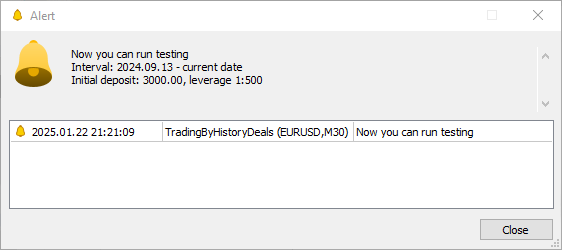
Ahora vamos a ejecutar el asesor experto en el simulador seleccionando el rango de fechas especificado, el depósito inicial y el apalancamiento en la configuración del simulador:
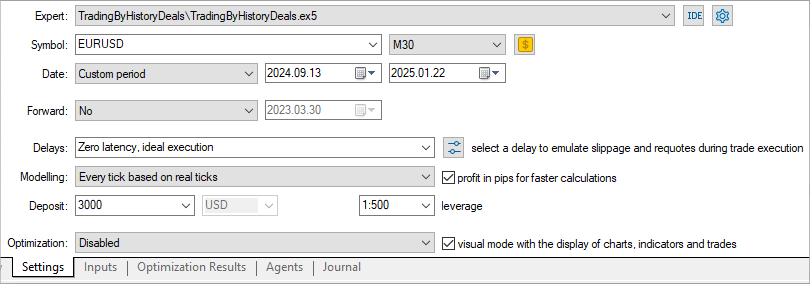
Haremos la prueba con todos los símbolos y números mágicos negociados:
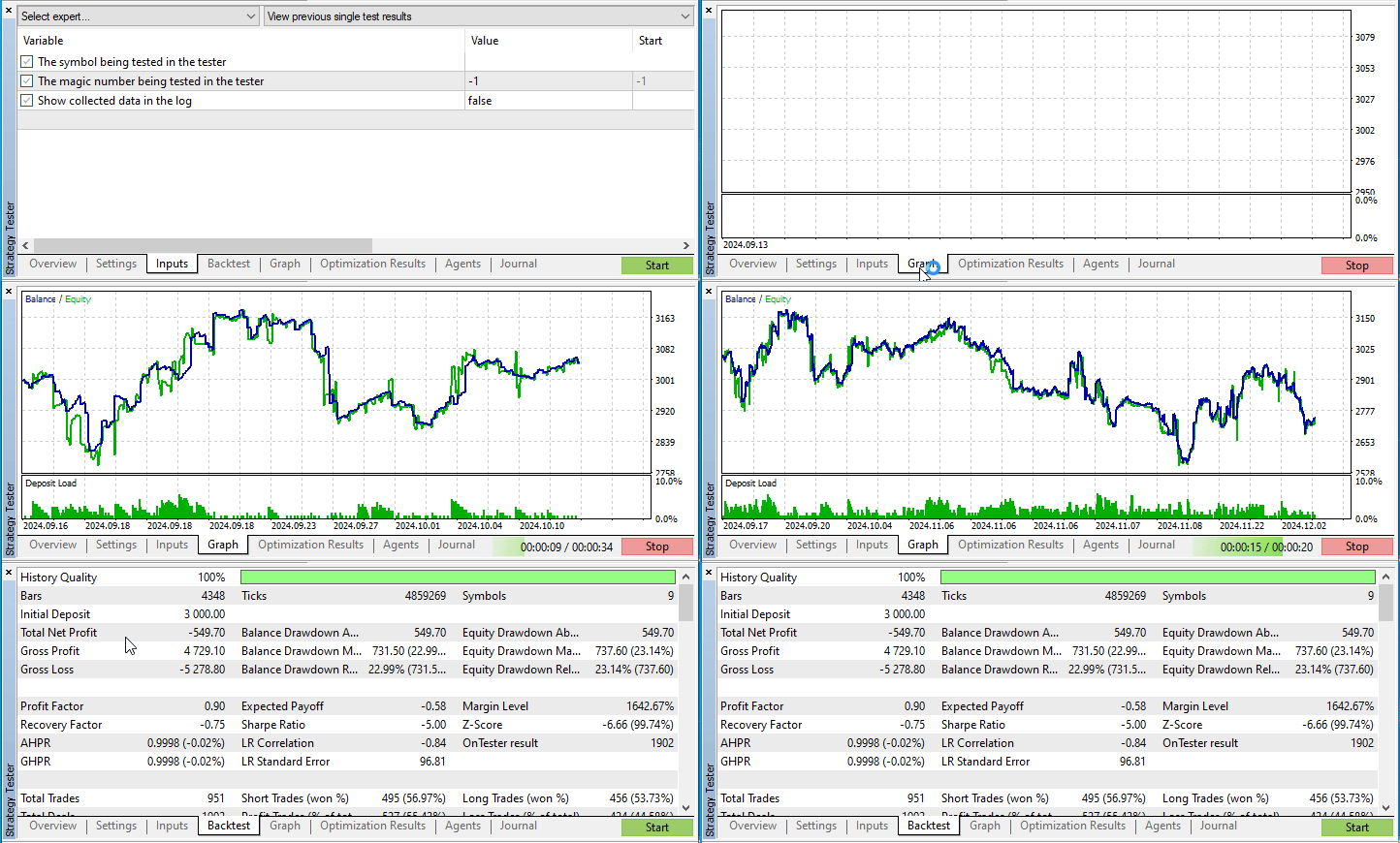
Resulta que todas las negociaciones nos han aportado menos 550 dólares. Me pregunto qué habría sucedido de establecer órdenes stop diferentes.
Vamos a comprobarlo.
Ajustamos las órdenes stop
Vamos a guardar el asesor experto en la misma carpeta \MQL5\Experts\TradingByHistoryDeals\ con el nuevo nombre TradingByHistoryDeals_SLTP.mq5.
A continuación, añadiremos la enumeración de los métodos de prueba y dividiremos los parámetros de entrada en grupos, añadiendo un grupo para el establecimiento de los parámetros de las órdenes stop, así como dos nuevas variables de nivel global para transmitir a través de ellas los valores de StopLoss y TakeProfit a los objetos comerciales:
//+------------------------------------------------------------------+
//|                                   TradingByHistoryDeals_SLTP.mq5 |
//|                                  Copyright 2024, MetaQuotes Ltd. |
//|                                             https://www.mql5.com |
//+------------------------------------------------------------------+
#property copyright "Copyright 2024, MetaQuotes Ltd."
#property link      "https://www.mql5.com"
#property version   "1.00"

#include "SymbolTrade.mqh"

enum ENUM_TESTING_MODE
  {
   TESTING_MODE_ORIGIN,    /* Original trading                          */
   TESTING_MODE_SLTP,      /* Specified StopLoss and TakeProfit values  */
  };

//+------------------------------------------------------------------+
//| Expert                                                           |
//+------------------------------------------------------------------+
//--- input parameters
input    group             "Strategy parameters"
input    string            InpTestedSymbol   =  "";                  /* The symbol being tested in the tester        */
input    long              InpTestedMagic    =  -1;                  /* The magic number being tested in the tester  */
sinput   bool              InpShowDataInLog  =  false;               /* Show collected data in the log               */

input    group             "Stops parameters"
input    ENUM_TESTING_MODE InpTestingMode    =  TESTING_MODE_ORIGIN; /* Testing Mode                                 */
input    int               InpStopLoss       =  300;                 /* StopLoss in points                           */
input    int               InpTakeProfit     =  500;                 /* TakeProfit in points                         */

//--- global variables
CSymbolTrade   SymbTradeTmp;
SDeal          ExtArrayDeals[]={};
CArrayObj      ExtListSymbols;
int            ExtStopLoss;
int            ExtTakeProfit;
En el manejador OnInit(), ajustaremos y escribiremos en variables los valores de las órdenes stop establecidos por los parámetros de entrada:
int OnInit()
  {
//--- Adjust the stops
   ExtStopLoss  =(InpStopLoss<1   ? 0 : InpStopLoss);
   ExtTakeProfit=(InpTakeProfit<1 ? 0 : InpTakeProfit);

//--- If the EA is not running in the tester
Además, añadiremos funciones que calcularán los valores correctos para los precios de StopLoss y TakeProfit relativos al StopLevel establecido para el símbolo:
//+------------------------------------------------------------------+
//| Return correct StopLoss relative to StopLevel                    |
//+------------------------------------------------------------------+
double CorrectStopLoss(const string symbol_name, const ENUM_ORDER_TYPE order_type, const int stop_loss, const int spread_multiplier=2)
  {
   if(stop_loss==0 || (order_type!=ORDER_TYPE_BUY && order_type!=ORDER_TYPE_SELL))
      return 0;
   int lv=StopLevel(symbol_name, spread_multiplier), dg=(int)SymbolInfoInteger(symbol_name, SYMBOL_DIGITS);
   double pt=SymbolInfoDouble(symbol_name, SYMBOL_POINT);
   double price=(order_type==ORDER_TYPE_BUY ? SymbolInfoDouble(symbol_name, SYMBOL_BID) : SymbolInfoDouble(symbol_name, SYMBOL_ASK));
   return
     (order_type==ORDER_TYPE_BUY ?
      NormalizeDouble(fmin(price-lv*pt, price-stop_loss*pt), dg) :
      NormalizeDouble(fmax(price+lv*pt, price+stop_loss*pt), dg)
     );
  }
//+------------------------------------------------------------------+
//| Return correct TakeProfit relative to StopLevel                  |
//+------------------------------------------------------------------+
double CorrectTakeProfit(const string symbol_name, const ENUM_ORDER_TYPE order_type, const int take_profit, const int spread_multiplier=2)
  {
   if(take_profit==0 || (order_type!=ORDER_TYPE_BUY && order_type!=ORDER_TYPE_SELL))
      return 0;
   int lv=StopLevel(symbol_name, spread_multiplier), dg=(int)SymbolInfoInteger(symbol_name, SYMBOL_DIGITS);
   double pt=SymbolInfoDouble(symbol_name, SYMBOL_POINT);
   double price=(order_type==ORDER_TYPE_BUY ? SymbolInfoDouble(symbol_name, SYMBOL_BID) : SymbolInfoDouble(symbol_name, SYMBOL_ASK));
   return
     (order_type==ORDER_TYPE_BUY ?
      NormalizeDouble(fmax(price+lv*pt, price+take_profit*pt), dg) :
      NormalizeDouble(fmin(price-lv*pt, price-take_profit*pt), dg)
     );
  }
//+------------------------------------------------------------------+
//| Return StopLevel in points                                       |
//+------------------------------------------------------------------+
int StopLevel(const string symbol_name, const int spread_multiplier)
  {
   int spread=(int)SymbolInfoInteger(symbol_name, SYMBOL_SPREAD);
   int stop_level=(int)SymbolInfoInteger(symbol_name, SYMBOL_TRADE_STOPS_LEVEL);
   return(stop_level==0 ? spread*spread_multiplier : stop_level);
  }
Para establecer los niveles StopLoss y TakeProfit, el precio de la orden stop no deberá estar más cerca del precio actual a una distancia StopLevel. Si el StopLevel para un símbolo tiene un valor cero, entonces se utilizará un tamaño de StopLevel igual a dos (a veces tres) tamaños de dispersión establecidos para el símbolo. Estas funciones utilizarán un multiplicador doble de spread. Este valor se pasará en los parámetros formales de la función, y tendrá un valor por defecto de 2. Si es necesario cambiar el valor del multiplicador, deberemos transmitir un valor requerido diferente a las funciones al llamarlas. Las funciones devolverán los precios correctos para StopLoss y TakeProfit.
En la función TradeByHistory() escribiremos nuevos bloques de código, donde se tendrá en cuenta el modo comercial en el simulador y se establecerán los valores de StopLoss y TakeProfit en caso de que se seleccione la prueba con los valores de órdenes stop especificados. En el bloque de cierre de posiciones, estas deberán cerrarse solo cuando el tipo de prueba sea "comercio original". Si se selecciona la comprobación con los valores StopLoss y TakeProfit especificados, las transacciones de cierre deberán ignorarse: el propio simulador cerrará las posiciones de acuerdo con los valores StopLoss y TakeProfit establecidos. Lo único que deberemos hacer cuando al negociar con órdenes stop si se da el procesamiento de transacciones de cierre es marcarlas como procesadas y pasar a la siguiente transacción.
//+------------------------------------------------------------------+
//| Trading by history                                               |
//+------------------------------------------------------------------+
void TradeByHistory(const string symbol="", const long magic=-1)
  {
   datetime time=0;
   int total=ExtListSymbols.Total();   // number of trading objects in the list

//--- in a loop by all symbol trading objects
   for(int i=0; i<total; i++)
     {
      //--- get another trading object
      CSymbolTrade *obj=ExtListSymbols.At(i);
      if(obj==NULL)
         continue;

      //--- get the current deal pointed to by the deal list index
      CDeal *deal=obj.GetDealCurrent();
      if(deal==NULL)
         continue;

      //--- sort the deal by magic number and symbol
      if((magic>-1 && deal.Magic()!=magic) || (symbol!="" && deal.Symbol()!=symbol))
         continue;

      //--- sort the deal by type (only buy/sell deals)
      ENUM_DEAL_TYPE type=deal.TypeDeal();
      if(type!=DEAL_TYPE_BUY && type!=DEAL_TYPE_SELL)
         continue;

      //--- if this is a deal already handled in the tester, move on to the next one
      if(deal.TicketTester()>0)
         continue;

      //--- if the deal time has not yet arrived, move to the next trading object of the next symbol
      if(!obj.CheckTime(deal.Time()))
         continue;

      //--- in case of a market entry deal
      ENUM_DEAL_ENTRY entry=deal.Entry();
      if(entry==DEAL_ENTRY_IN)
        {
         //--- set the sizes of stop orders depending on the stop setting method
         double sl=0;
         double tp=0;
         if(InpTestingMode==TESTING_MODE_SLTP)
           {
            ENUM_ORDER_TYPE order_type=(deal.TypeDeal()==DEAL_TYPE_BUY ? ORDER_TYPE_BUY : ORDER_TYPE_SELL);
            sl=CorrectStopLoss(deal.Symbol(), order_type, ExtStopLoss);
            tp=CorrectTakeProfit(deal.Symbol(), order_type, ExtTakeProfit);
           }
         //--- open a position by deal type
         ulong ticket=(type==DEAL_TYPE_BUY  ? obj.Buy(deal.Volume(), deal.Magic(), sl, tp, deal.Comment()) :
                       type==DEAL_TYPE_SELL ? obj.Sell(deal.Volume(),deal.Magic(), sl, tp, deal.Comment()) : 0);

         //--- if a position is opened (we received its ticket)
         if(ticket>0)
           {
            //--- increase the number of deals handled by the tester and write the deal ticket in the tester to the properties of the deal object
            obj.SetNumProcessedDeals(obj.NumProcessedDeals()+1);
            deal.SetTicketTester(ticket);
            //--- get the position ID in the tester and write it to the properties of the deal object
            long pos_id_tester=0;
            if(HistoryDealSelect(ticket))
              {
               pos_id_tester=HistoryDealGetInteger(ticket, DEAL_POSITION_ID);
               deal.SetPosIDTester(pos_id_tester);
              }
           }
        }

      //--- in case of a market exit deal
      if(entry==DEAL_ENTRY_OUT || entry==DEAL_ENTRY_INOUT || entry==DEAL_ENTRY_OUT_BY)
        {
         //--- get a deal a newly opened position is based on
         CDeal *deal_in=obj.GetDealInByPosID(deal.PositionID());
         if(deal_in==NULL)
            continue;

         //--- get the position ticket in the tester from the properties of the opening deal
         //--- if the ticket is zero, then most likely the position in the tester is already closed
         ulong ticket_tester=deal_in.TicketTester();
         if(ticket_tester==0)
           {
            PrintFormat("Could not get position ticket, apparently position #%I64d (#%I64d) is already closed \n", deal.PositionID(), deal_in.PosIDTester());
            obj.SetNextDealIndex();
            continue;
           }
         //--- if we reproduce the original trading history in the tester,
         if(InpTestingMode==TESTING_MODE_ORIGIN)
           {
            //--- if the position is closed by ticket
            if(obj.ClosePos(ticket_tester))
              {
               //--- increase the number of deals handled by the tester and write the deal ticket in the tester to the properties of the deal object
               obj.SetNumProcessedDeals(obj.NumProcessedDeals()+1);
               deal.SetTicketTester(ticket_tester);
              }
           }
         //--- otherwise, in the tester we work with stop orders placed according to different algorithms, and closing deals are skipped
         //--- accordingly, simply increase the number of deals handled by the tester and write the deal ticket in the tester to the properties of the deal object
         else
           {
            obj.SetNumProcessedDeals(obj.NumProcessedDeals()+1);
            deal.SetTicketTester(ticket_tester);
           }
        }
      //--- if a ticket is now set in the deal object, then the deal has been successfully handled -
      //--- set the deal index in the list to the next deal
      if(deal.TicketTester()>0)
        {
         obj.SetNextDealIndex();
        }
     }
  }
En el manejador OnTester() del asesor experto calcularemos y devolveremos el número total de transacciones procesadas en el simulador:
//+------------------------------------------------------------------+
//| Tester function                                                  |
//+------------------------------------------------------------------+
double OnTester(void)
  {
//--- calculate and return the total number of deals handled in the tester
   double ret=0.0;
   int total=ExtListSymbols.Total();
   for(int i=0; i<total; i++)
     {
      CSymbolTrade *obj=ExtListSymbols.At(i);
      if(obj!=NULL)
         ret+=obj.OnTester();
     }
   return(ret);
  }
Además, aquí, para cada objeto comercial de símbolo, se llamará a su propio manejador OnTester(), que imprimirá sus propios datos en el diario de registro. Al final de la prueba, obtendremos estos mensajes en el registro del simulador:
2025.01.22 23:49:15.951 Core 1  2025.01.21 23:54:59   Symbol AUDUSD: Total deals: 218, number of processed deals: 216
2025.01.22 23:49:15.951 Core 1  2025.01.21 23:54:59   Symbol EURJPY: Total deals: 116, number of processed deals: 114
2025.01.22 23:49:15.951 Core 1  2025.01.21 23:54:59   Symbol EURUSD: Total deals: 524, number of processed deals: 518
2025.01.22 23:49:15.951 Core 1  2025.01.21 23:54:59   Symbol GBPUSD: Total deals: 352, number of processed deals: 350
2025.01.22 23:49:15.951 Core 1  2025.01.21 23:54:59   Symbol NZDUSD: Total deals: 178, number of processed deals: 176
2025.01.22 23:49:15.951 Core 1  2025.01.21 23:54:59   Symbol USDCAD: Total deals: 22, number of processed deals: 22
2025.01.22 23:49:15.951 Core 1  2025.01.21 23:54:59   Symbol USDCHF: Total deals: 250, number of processed deals: 246
2025.01.22 23:49:15.951 Core 1  2025.01.21 23:54:59   Symbol USDJPY: Total deals: 142, number of processed deals: 142
2025.01.22 23:49:15.951 Core 1  2025.01.21 23:54:59   Symbol XAUUSD: Total deals: 118, number of processed deals: 118
2025.01.22 23:49:15.951 Core 1  final balance 3591.70 pips
2025.01.22 23:49:15.951 Core 1  OnTester result 1902
Vamos a compilar el asesor experto y a ejecutarlo con la misma configuración de prueba, pero especificando el tipo de prueba como "Specified StopLoss and TakeProfit values", estableciendo los tamaños de StopLoss y TakeProfit en 100 y 500 puntos respectivamente:
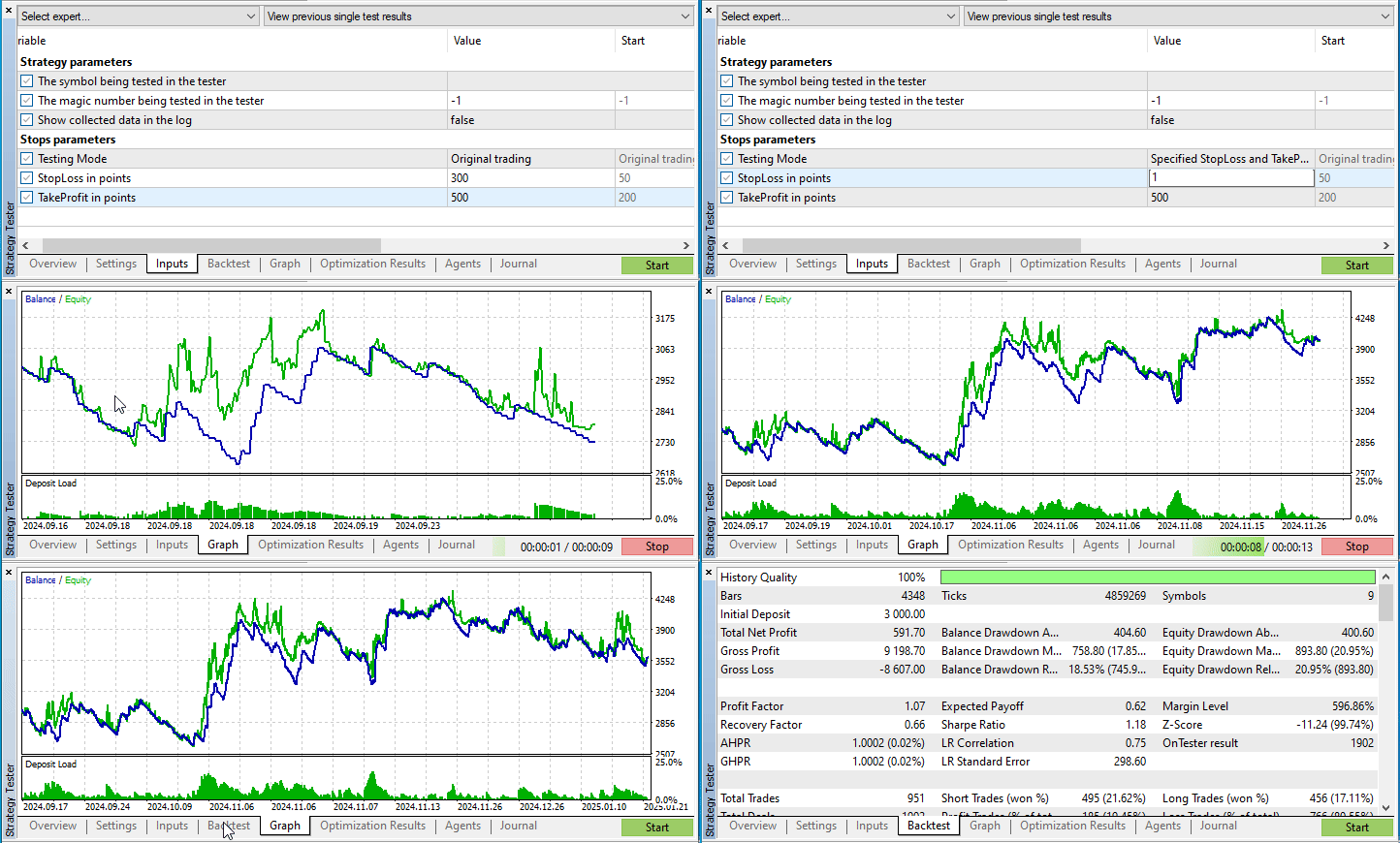
En la última prueba, al probar el comercio original, hemos obtenido unas pérdidas de 550 dólares. Ahora, sustituyendo el StopLoss de todas las posiciones por un valor de 100 pips y el TakeProfit por 500 pips, hemos obtenido un beneficio de 590 pips. Y eso con solo cambiar las órdenes stop sin mirar las particularidades de los diferentes símbolos negociados. Si elegimos diferentes tamaños de órdenes stop para cada uno de los símbolos negociados, es muy posible que el gráfico de prueba quede nivelado.
Conclusión
Hoy hemos hecho un pequeño experimento con una historia comercial del estilo "Qué pasaría si...". Creo que este tipo de experimentos pueden originar decisiones interesantes para cambiar la forma de comerciar. En el próximo artículo realizaremos otro experimento de este tipo: incluiremos varios trailings de posición. Será interesante.
Adjuntos al artículo encontrará los archivos de todos los asesor expertos y clases discutidos hoy. Podrá descargarlos, estudiarlos y experimentar por sí mismo con sus cuentas comerciales. Podrá descomprimir directamente la carpeta con el archivo en su directorio MQL5 del terminal de cliente: todos los archivos se colocarán en las subcarpetas requeridas.
Programas utilizados en el artículo:
| # | Nombre | Tipo | Descripción |
|---|---|---|---|
| 1 | SymbolTrade.mqh | Biblioteca de clases | Biblioteca de clases de estructuras y transacciones, clase de símbolos comerciales |
| 2 | TradingByHistoryDeals.mq5 | Asesor | Asesor experto para ver las transacciones y operaciones ejecutadas en la cuenta en el simulador |
| 3 | TradingByHistoryDeals_SLTP.mq5 | Asesor | Asesor experto para ver y cambiar el StopLoss y el TakeProfit en el simulador de transacciones y operaciones realizadas en la cuenta. |
| 4 | MQL5.zip | Archivo | Archivo con los ficheros presentados anteriormente para desempaquetar en el directorio MQL5 del terminal cliente. |
Traducción del ruso hecha por MetaQuotes Ltd.
Artículo original: https://www.mql5.com/ru/articles/16952
Advertencia: todos los derechos de estos materiales pertenecen a MetaQuotes Ltd. Queda totalmente prohibido el copiado total o parcial.
Este artículo ha sido escrito por un usuario del sitio web y refleja su punto de vista personal. MetaQuotes Ltd. no se responsabiliza de la exactitud de la información ofrecida, ni de las posibles consecuencias del uso de las soluciones, estrategias o recomendaciones descritas.

 Operar con el Calendario Económico MQL5 (Parte 3): Añadiendo filtros de divisa, importancia y tiempo
 Aprendizaje automático y Data Science (Parte 32): Mantener actualizados los modelos de IA, aprendizaje en línea
 Características del Wizard MQL5 que debe conocer (Parte 50): Awesome Oscillator
 Redes neuronales en el trading: Aprendizaje contextual aumentado por memoria (MacroHFT)

- Aplicaciones de trading gratuitas
- 8 000+ señales para copiar
- Noticias económicas para analizar los mercados financieros
Usted acepta la política del sitio web y las condiciones de uso
¿Cuál es el error?
Si el archivo es más pequeño que el array antes de la lectura, el tamaño del array no cambiará.
Puedes encontrarte con un error similar al utilizar ArrayCopy.Estás ignorando una buena característica
¿Cuál es la ventaja?
¿Cuál es la ventaja?
Concisión y rapidez de ejecución (totalmente del lado de MQ).
Muestre las estructuras estándar de autoimpresión y autorrelleno, por favor.
En brevedad y rapidez de ejecución (totalmente del lado de MQ).