R Multiple Trade Manager MT5

See the true risk, including spread and commission, before you send. Then manage the trade in R-multiples, not in points.

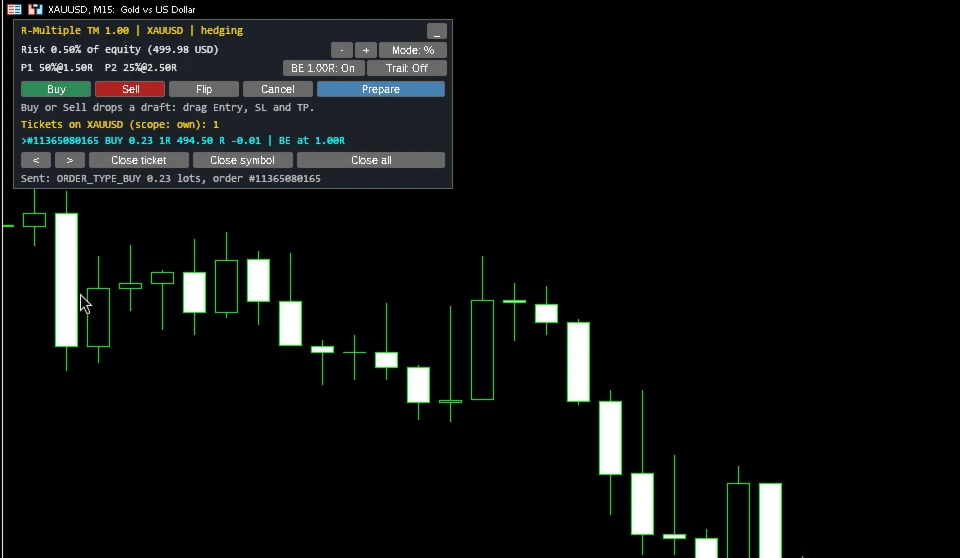
R Multiple Trade Manager MT5 sizes the lot from a stop you drag on the chart, using the broker's own contract data, and shows a confirm ticket with the risk, margin and any blocker before anything is sent. After the fill it manages each trade by its original risk: breakeven, two partial closes, an optional trailing stop and an optional time exit.

It does not generate signals and never opens a trade without a confirmed ticket.

What it does

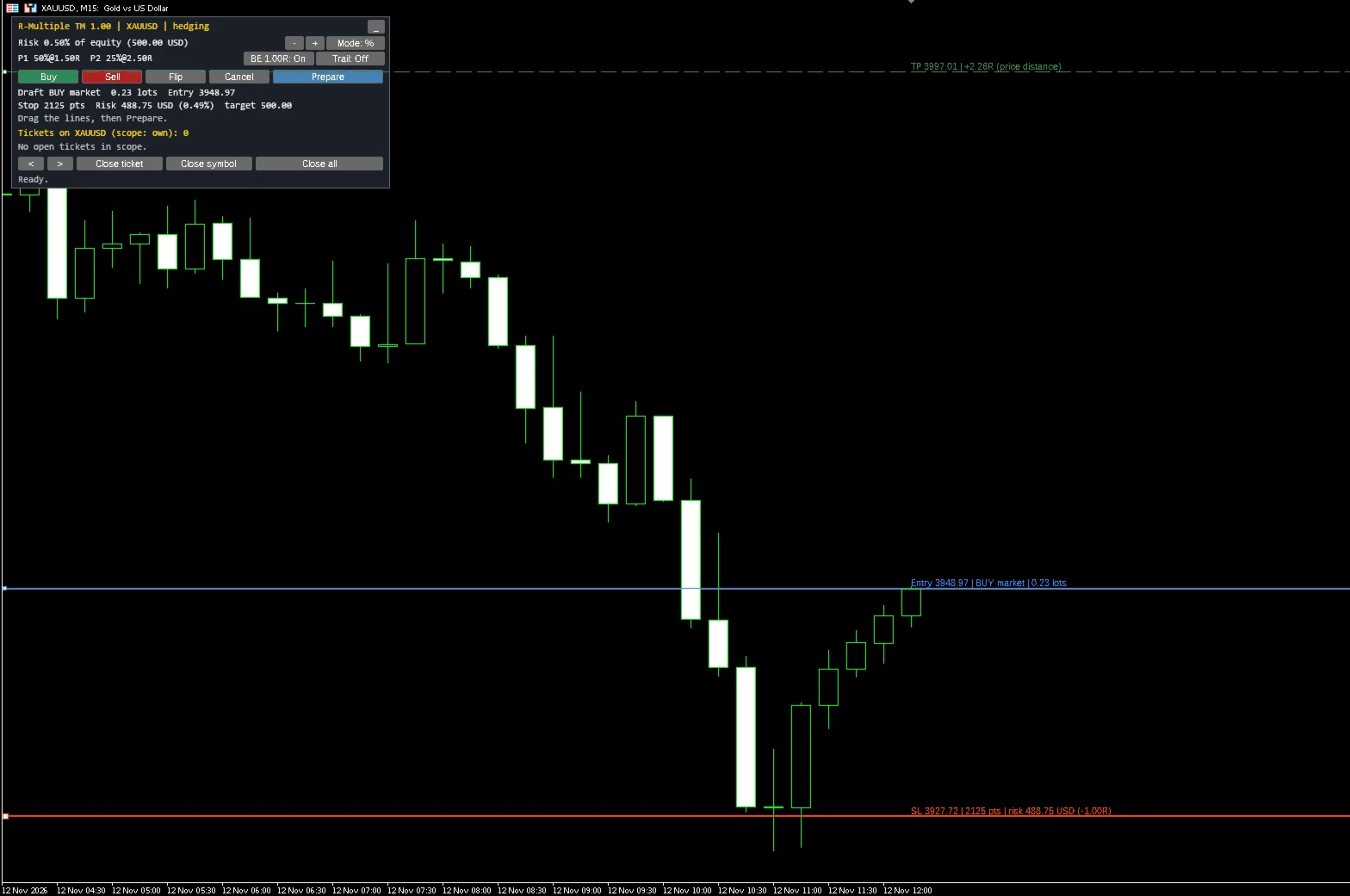
1. Press Buy or Sell. Entry, stop-loss and take-profit lines appear on the chart. The stop starts at a default distance (an ATR multiple of the last closed bar, or fixed points) and the take-profit at a set multiple of the risk.
2. Drag the lines. The lot size and the risk update as you drag. Drag Entry away from the market to place a limit or stop order instead; the type follows from the side and the price.
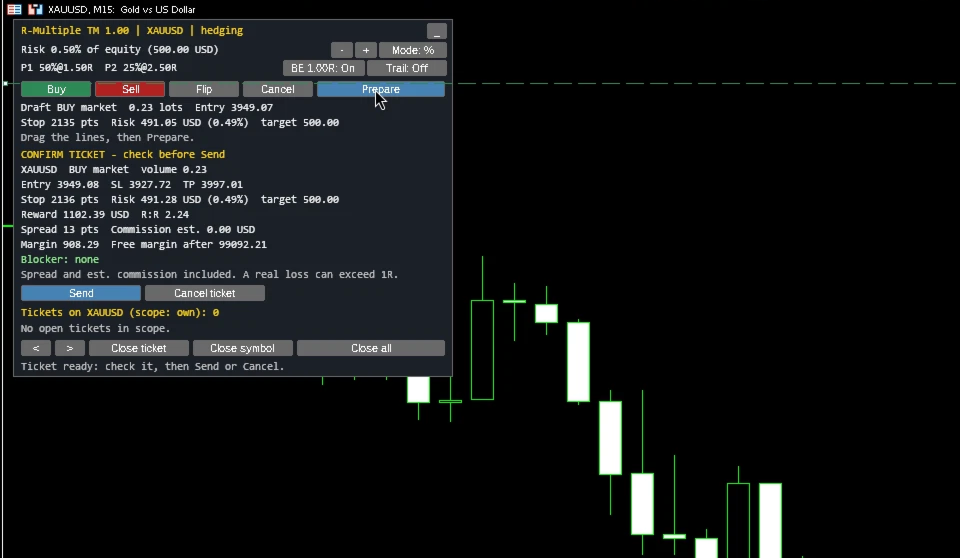
3. Press Prepare. The confirm ticket shows the symbol, side, order type, volume, entry, stop-loss, take-profit, stop distance, risk in money and in percent of equity, the target risk, reward and R:R, spread, estimated commission, margin required, free margin after the order, and any reason the order cannot be sent.
4. Press Send, or Cancel. There is no one-click trading.

How the risk is calculated (1R)

1R is the money lost if the stop-loss is hit at its price, plus commission. The loss is calculated by MetaTrader's own OrderCalcProfit with the broker's contract data, from the fill price to the stop. For a buy, the fill is the Ask and the stop is triggered on the Bid, so the spread is already included. Because the broker's contract data is used, the same calculation works for forex, gold and silver, index CFDs and crypto symbols.

The lot size is the largest volume, rounded down to the broker's volume step, whose 1R is not above your target (a percent of equity or a fixed amount). It is never rounded up. If even the minimum lot would risk more than the target, Send is blocked and the ticket says so.

Commission before the fill is an estimate: either the average from your recent deals on that symbol, or a value you enter. After the fill, 1R is fixed from the actual deal price and the actual commission. If the actual 1R is larger than planned by more than a set factor (for example after slippage), you get a warning; the trade is not closed automatically. Swap is not part of 1R.

Management after the fill

Each ticket keeps its own 1R, fixed at the fill. R levels are always multiples of that amount, also after partial closes. Rules are checked on every tick and once per second, in this order:

- Time exit (optional): closes the rest of the position after a set number of minutes.
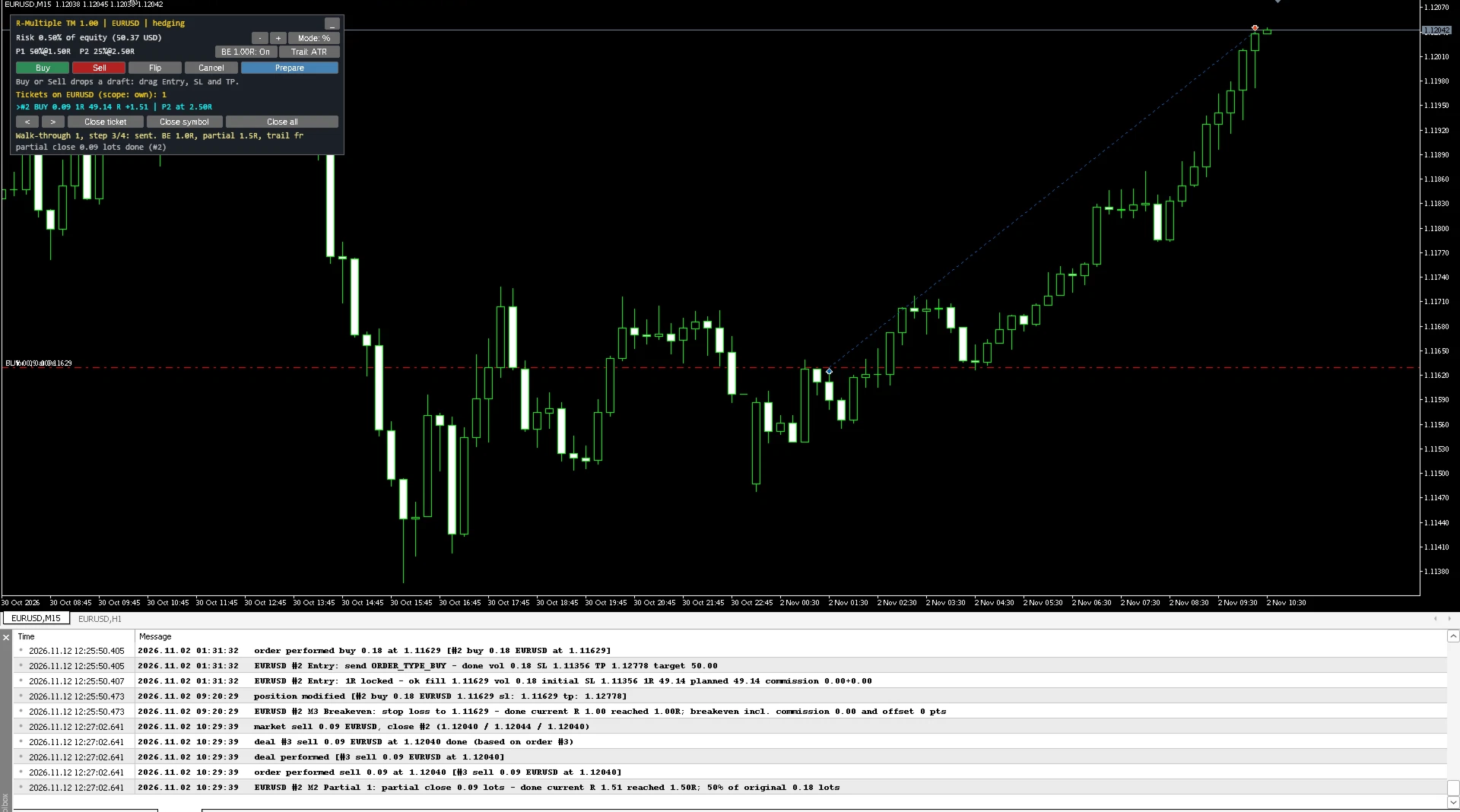
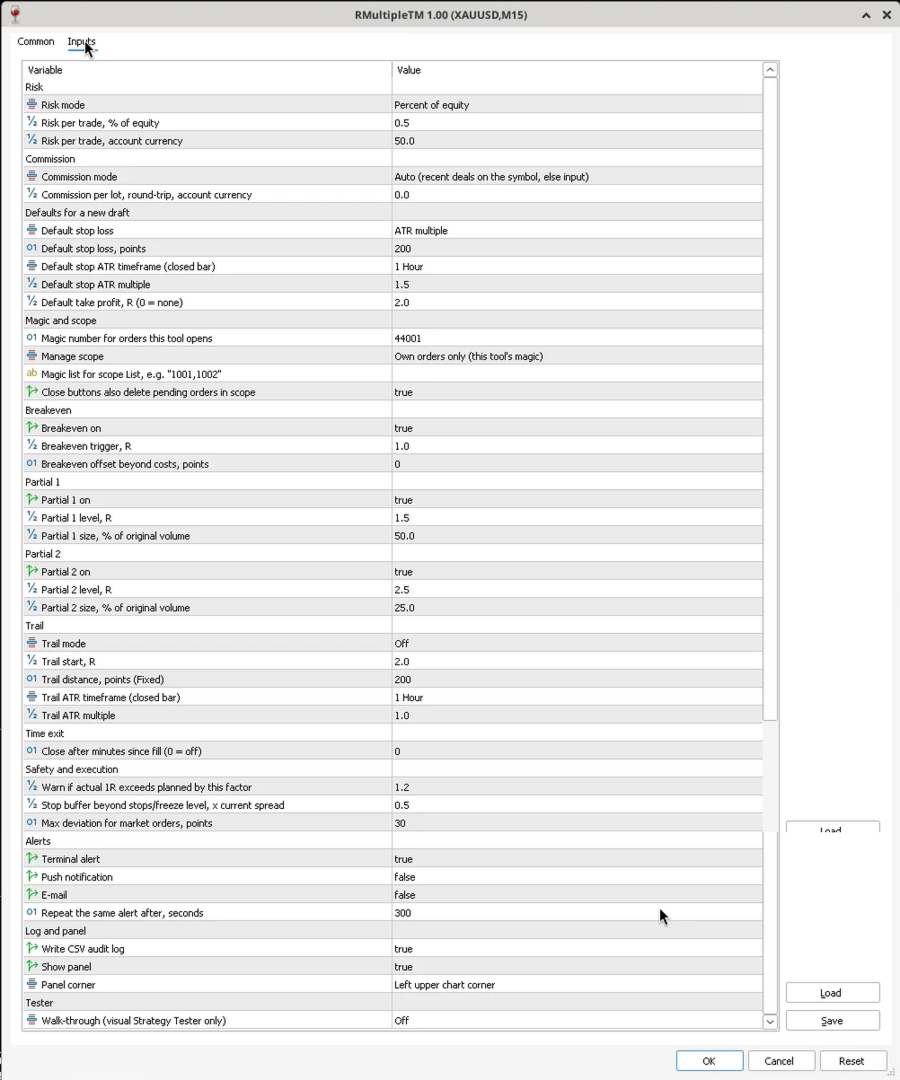
- Partial 1 and Partial 2: close a set percentage of the original volume at set R levels (defaults: 50% at 1.5R, 25% at 2.5R). Volumes are rounded down to the volume step and never leave less than the minimum lot.
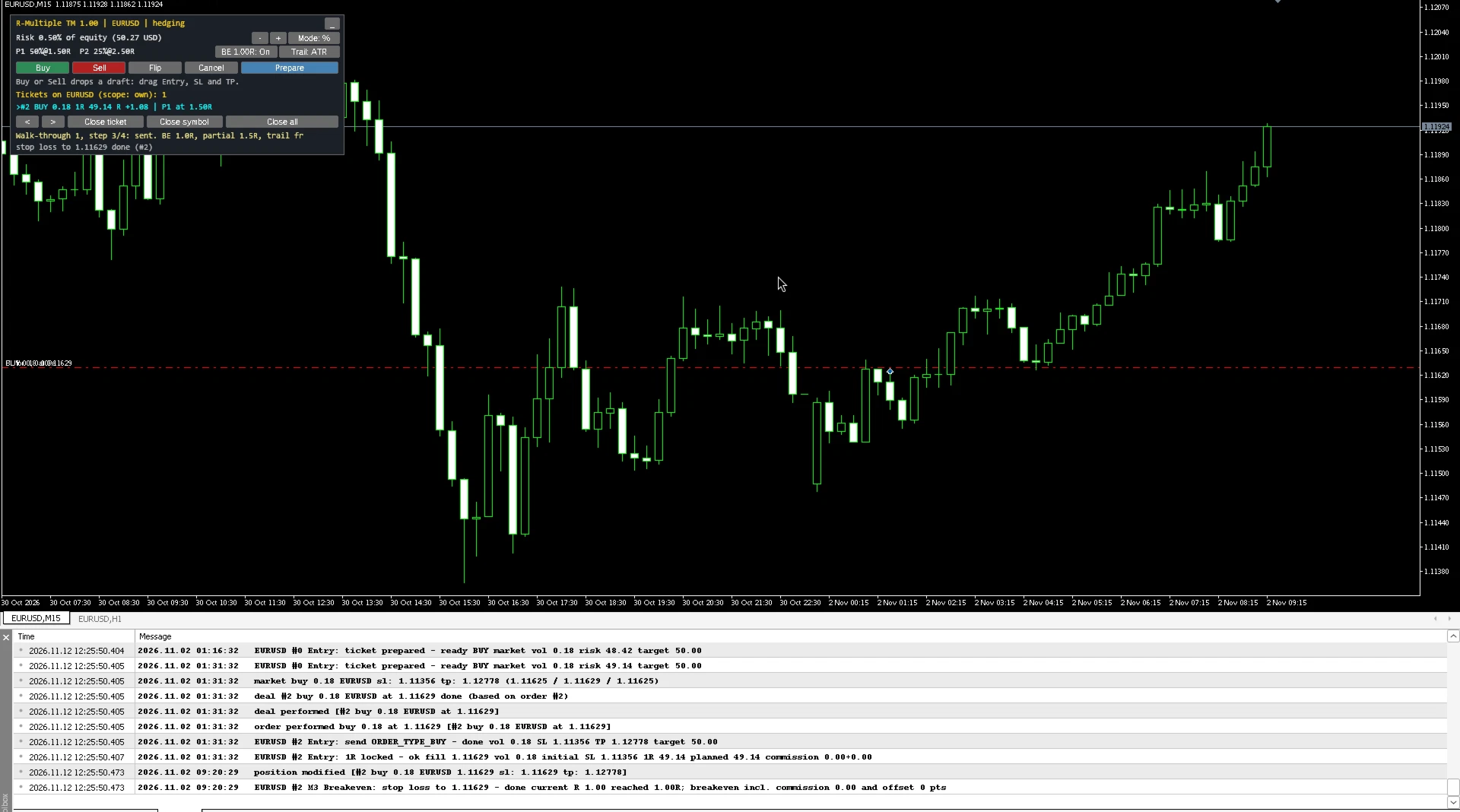
- Breakeven (default at 1.0R): moves the stop-loss to the price that covers the remaining commission, plus an optional offset. If that level is too close to the market for the broker, the closest allowed level on the profit side is used, or the step is skipped and logged.
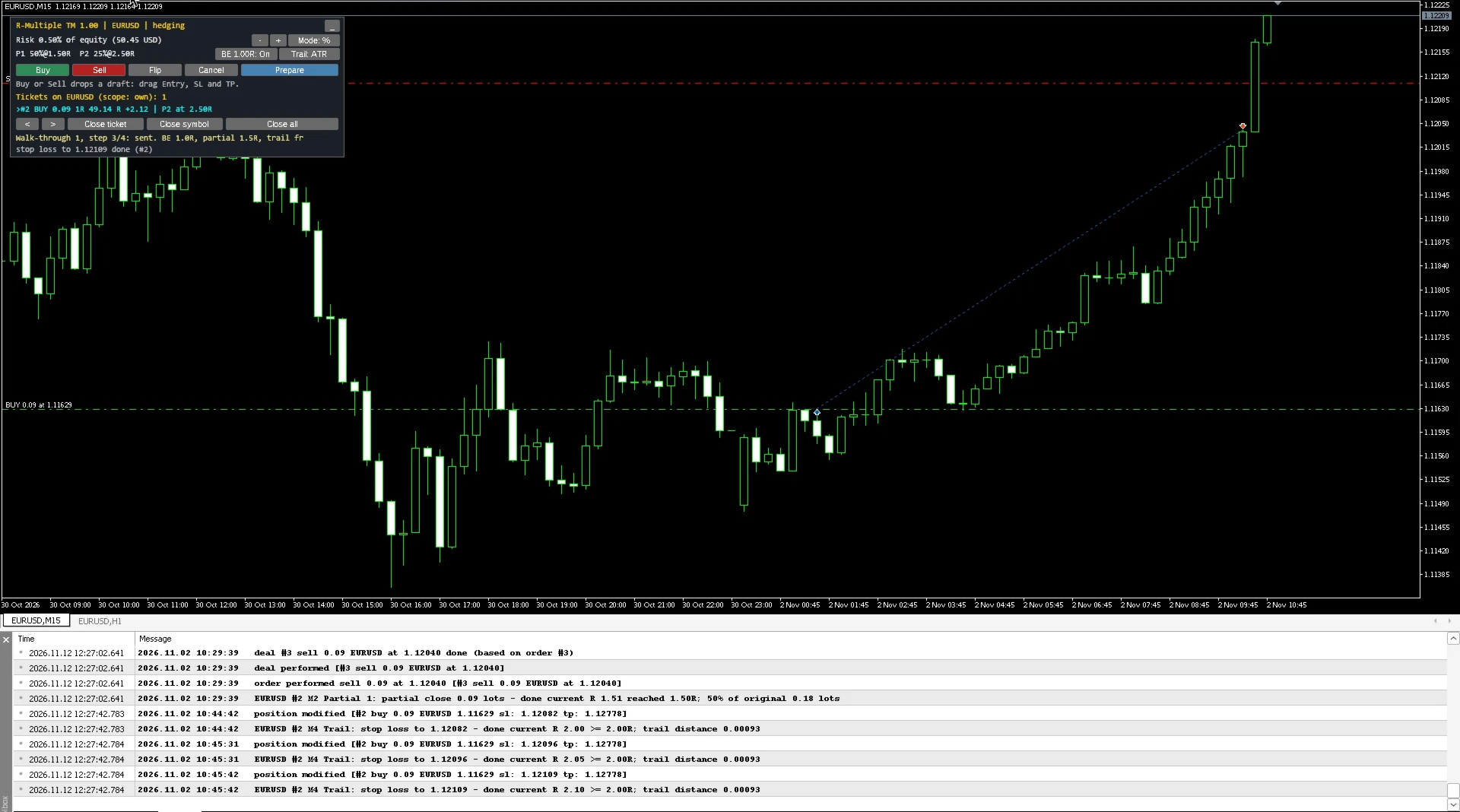
- Trailing stop (off by default): fixed points or an ATR multiple of the last closed bar, starting at a set R. It only tightens the stop-loss.

Every stop-loss and take-profit is placed at the broker. There are no hidden or virtual stops, so the broker keeps the stop if the terminal disconnects.

The panel also has Close ticket, Close symbol and Close all buttons. Each one needs a second click to confirm. They act only on orders this utility opened, or on the magic numbers you choose to include (manual trades, or a list of magic numbers). Pending orders in that scope can be deleted with the same buttons.

Other details

- Hedging accounts: full support, one 1R and one set of rules per ticket.
- Netting accounts: basic support. A new order is sized the same way. Automatic breakeven, partial closes, trailing and time exit run on the net position only when this utility opened it and no other volume was added later. Otherwise the panel can still close the position, and an order that would reduce or reverse an opposite position is blocked on the ticket.
- Pending orders: after sending, the volume is fixed, but stop-loss and take-profit can still be dragged until the order fills.
- Stops level, freeze level and a spread buffer are checked before every order and every change. An invalid level blocks the order or skips the change; it is never forced.
- Requotes and price changes are retried up to three times. A closed market or disabled trading is retried later with a growing delay, never in a tight loop.
- Each rule is recorded per ticket, in terminal global variables and a small file, and checked against the deal history on start, so a restart does not repeat a partial close or a breakeven move.
- Panel settings (risk, breakeven on/off, trailing mode) are saved per symbol and restored on the next start.
- Every action is written to a daily CSV log in the MQL5\Files folder.
- Alerts use only the terminal: pop-up, push notification and e-mail, with a cooldown.
- No DLL, no web requests. The panel can be minimised.

What it does not do

- It does not generate signals or open trades on its own.
- It is not an account-wide risk guard: there is no daily loss lock across the account, no open-risk budget across several Expert Advisors, and no news filter.
- No trade copying, no grid, martingale or averaging functions, no Telegram or other outside services.
- It does not improve the results of any strategy and makes no promise of profit.

Limits you should know

- A real loss can be larger than 1R: gaps, fast markets, slippage, requotes and disconnects can fill the stop at a worse price.
- Commission before the fill is an estimate until the deal is known.
- The utility manages trades only while the terminal is running with it attached. One copy manages the trades of its own chart symbol; attach one copy per symbol you trade.
- When a rental expires, MetaTrader 5 removes the utility from the chart and management stops. Stop-losses and take-profits already at the broker stay in place.

How to try it in the Strategy Tester

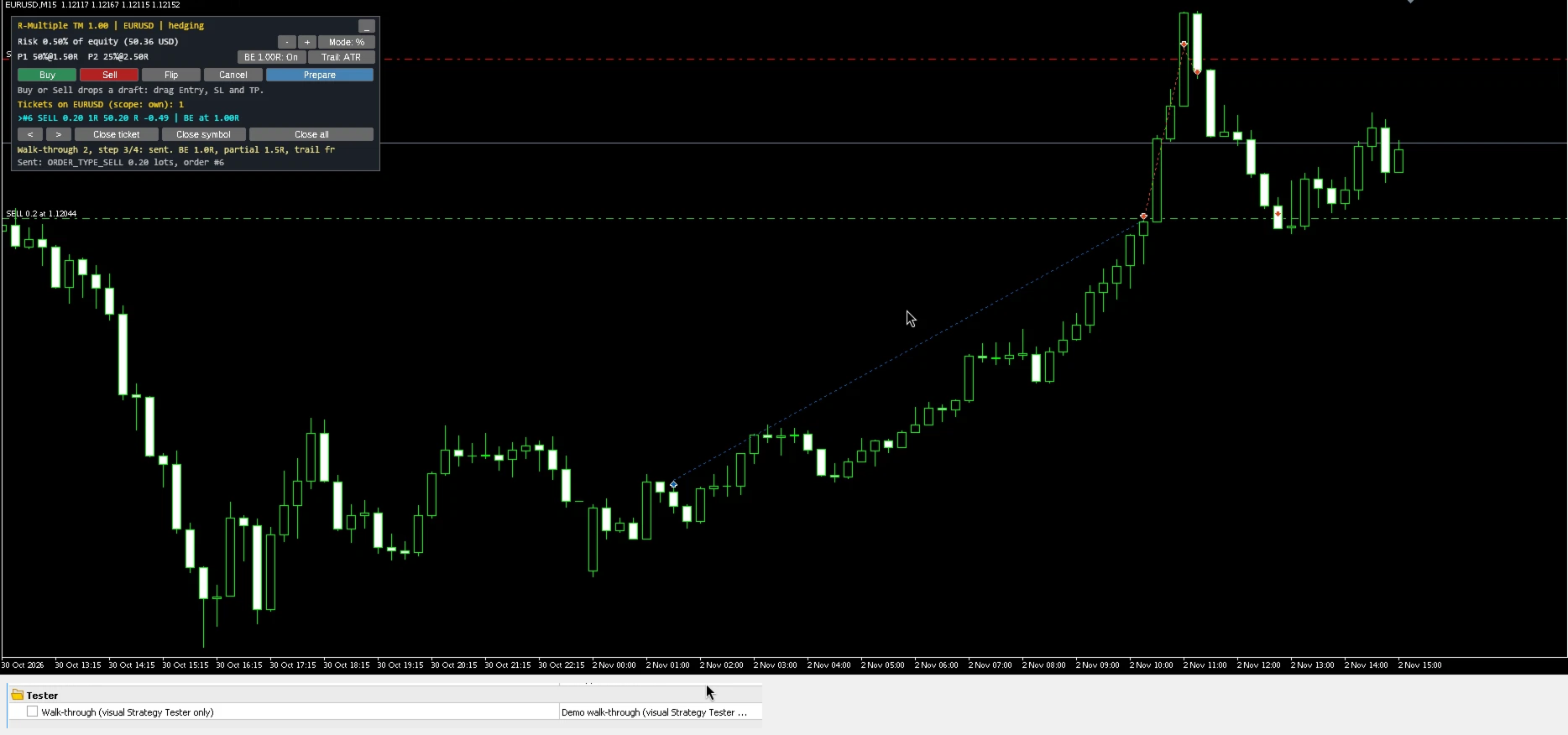
Set "Walk-through" to Demo and run the Strategy Tester in visual mode. The utility then shows the same steps on the tested symbol: the lines and live sizing, the confirm ticket, a simulated confirm, the order, breakeven at 1.0R, a partial close at 1.5R and a trailing stop from 2.0R (the walk-through switches the trailing stop on so you can see it). It checks the margin before each test order and skips the step if margin is short. The walk-through runs only in visual testing. It never runs on a live or demo chart, and it does nothing in non-visual testing.

Recommended setup

1. Attach to the chart of the symbol you want to trade and allow Algo Trading.
2. Set your risk: percent of equity (default 0.50%) or a fixed amount.
3. If your broker charges commission and the account has no recent deals on that symbol yet, enter the round-trip commission per lot.
4. Keep "Manage scope" on Own unless you also want manual trades or other magic numbers managed.
5. Try the walk-through in the Strategy Tester, then use it on a demo account before a live account.

Support

Questions and bug reports through the product comments or MQL5 private messages. Please include the CSV log lines of the trade in question.
Recommended products
Top Trade Manager for MT5 - Trade Panel, Position Size Calculator and Risk Manager Top Trade Manager is a complete trade manager for MetaTrader 5 : a trade panel, position size calculator and risk manager in one. Drag your entry, stop loss and take profit on the chart and the lot size, risk and reward are calculated instantly. Then manage the trade with partial close , break even , trailing stop and hidden stop loss and take profit , follow the economic news calendar , and mark up your chart wit
Grid Trading EA is a semi-automated one-click trading EA for both Normal Trading and Grid/Martingale Trading . Normal Trading Simply click Buy or Sell directly from the chart. The EA will automatically manage trades by: Setting Stop Loss and Take Profit Managing Trailing Stop Grid / Martingale Trading (For Hedging Account Type Only) When Grid Trading mode is enabled, the EA will automatically open additional grid orders at specified distances while increasing the lot size based on your settings.
Trade Manager DaneTrades
Levi Dane Benjamin
4.13 (31)
DaneTrades Trade Manager is a professional trade panel for MetaTrader 5, designed for fast, accurate execution with built‑in risk control. Place market or pending orders directly from the chart while the panel automatically calculates position size from your chosen risk, helping you stay consistent and avoid emotional decision‑making. The Trade Manager is built for manual traders who want structure: clear risk/reward planning, automation for repeatable management, and safeguards that help reduc
ZenTrade Manager MT5
Ian Paolo Lumba Castro
ZenTrade Manager MT5 Stop Computing. Start Trading. Are you tired of missing perfect entries because you were busy calculating pip distances, lot sizes, or monetary risk? Do you overthink your Stop Loss and Take Profit levels, only to watch the market reverse while you're adjusting lines? ZenTrade Manager MT5 removes the mental load of order management, allowing you to focus 100% on what matters: Reading the Market. You handle the high-level analysis and decide when to enter; ZenTrade handles t
This tool will perform Trailing stop loss and Break even management for orders. Helps you limit or reduce the time spend watching orders on the screen, especially when you need to go to sleep. Just add this EA to 1 chart, you can manage all pairs. You can filter orders by comment, magic number, symbol and order ticket number. When Breakeven it can add shift/offset pips (to cover the commission...). You can try in strategy tester before purchase. The EA will add Buy and Sell alternately, so you
Forex Trade Manager Pro MT5 Trade Manager MT5 is a comprehensive trade management utility for MetaTrader 5 that gives you complete control over every aspect of your position from the moment you plan a trade to the moment you close it. It is built for traders who take risk seriously, from the beginner building discipline to the professional scalper who needs instant execution across multiple positions. The tool attaches to any chart and presents a clean, compact panel. You mark your intended entr
Nebula Trading Manager
Sina Mohammadamin Shahriari Moghadam
This expert advisor named   TradeManager   provides a manual trading management panel in MetaTrader 5 that allows precise control over open positions. It is designed for traders who want dynamic management of Stop Loss (SL), Take Profit (TP), Break Even (BE), and Partial Close functionality. Key Features: Dynamic Trade Management : Manually set or drag-and-drop SL, TP, and BE levels. Supports partial closing at different profit levels (1:1, 1:1.5, 1:2). Automated Drawing : Automatically draw
Advance Trade Manager
Jose Rodrgues Chaves
ADVANCE TRADE MANAGER A complete, tabbed trade-management dashboard for MetaTrader 5 that puts every routine trade operation on one compact panel. No more hunting through menus — open, protect, scale and manage positions from a single interface. The panel is a pure GUI overlay . It never touches your existing chart objects, indicators, arrows or manual lines. All chart objects it creates use the dedicated EGF_Z_ (zones) prefix, and trigger lines use the panel's own object names — so nothing else
Visual Risk Manager Panel
Ludovic Marc Marie Moncla
Visual Risk Manager Panel is a trade panel for MetaTrader 5 that puts risk first. You decide how much you accept to lose on a trade, as a percentage of your account or as an amount of money, and the panel computes the lot size, draws the trade on the chart and manages it for you. Main features Risk in % or in cash. The lot is calculated automatically from your risk and from the stop loss distance. A fixed lot mode is also available: the stop loss is then placed where the loss equals your risk. T
DDKiller Pro
Njaratahiry Michael Randrianiaina
Stop Blowing Your Account. Once and For All. DDKiller Pro is the MT5 risk guardian that runs silently on your chart and shuts down trading the moment you hit a limit — whether you're grinding a prop firm challenge or managing your own CFD account. The problem every trader knows: You set your rules. You break them anyway. One revenge trade. One overleveraged position. One session that erases a month of gains. DDKiller Pro removes that decision from your hands entirely. What it does: The second yo
no Trade operation, Robot Set auto SL to every manually Trade from a Phone Automatic Phone TradeManager Need just Set on 1 Symbol Auto BE Trigger is added that immediately sets a stop-loss for every () But does NOT calculate position size based on risk, allows the fixed  SL to   adjusted dynamically drag on Chart or Menu. It protects capital around the clock, reduces emotional mistakes, and ensures consistent risk management.
FREE
Automatic Trade Calculation Panel   One-Klick-Trading Automatic calculation of Lot sice Atuomatic calulation of Stop-Loss and TakeProfit Up to 3 partial closings Trailingstop (Stop-Loss moves automatically)   The lot size is calculated by the previously determined risk (e.g. 1.0% of the account size) and the distance of the Stop Loss from the entry point. The distance from the Stop Loss to the entry point results from the ATR indicator multiplied by a freely selectable factor. The Stop Loss and
JMM Trade Panel MT5
Sarah Joyce Walker
JMM Trade Panel MT5 JMM Trade Panel MT5 is a practical chart- based trading utility for MetaTrader 5. Execute Buy and Sell orders directly from the chart, adjust the displayed lot size quickly, monitor basket performance, and manage trades using configurable Magic Number and symbol- management rules. Full   User   Manual: DOWNLOAD Key Features On- chart Buy, Sell, and Close All buttons. Close all trades managed by the EA with one click. Optional management of all open trades regardless of Magi
Smart Risk Manager
Abderrahmane Benali
5 (1)
Smart Risk Manager – Master Your Trades with Precision and Confidence Take complete control of your manual trading with Smart Risk Manager , a professional all-in-one trade and risk management Expert Advisor for MetaTrader 5 . Designed for traders who value speed, precision, and capital protection, it simplifies every step of trade execution while ensuring your risk remains under control. Whether you trade Forex, Gold, Indices, or Cryptocurrencies , Smart Risk Manager helps you execute trades w
Advanced 1-Click Risk Panel is a precise and lightning-fast risk management utility for MetaTrader 5. It automatically calculates your exact position size based on chart drag-and-drop Stop Loss line and account risk percentage. Key Features Dynamic SL Line & Dynamic Lot: Simply drag the horizontal SL line on your chart—the panel dynamically calculates your exact lot size instantly. 1-Click Execution: Place instant BUY/SELL orders with automated Stop Loss and Take Profit based on your predefin
Your stop is already on the MT5 chart. What lot size keeps your loss within the risk you chose? Easy Trade Executor (ETE) shows the lot, loss at the stop, profit at take profit and required margin. After entry, you set the rules: move to breakeven, Close 50% or start a trailing stop. The panel carries out each action according to your rules. Open it and go from sizing the lot to closing the trade in a few clicks on your MT5 chart. See the lot and key order numbers before you click Send Lot from
How to Use the  Features           MT4 VERSION   TRADE COPIER Select Role: On the account sending trades, choose Sender (Master Account) . On the account receiving trades, choose Copier (Receiver Account) . Lot Size Mode: Same Lot Size as Master: Ignores multipliers, copies exactly what the Master has. Multiply Master Lot Size: Uses the "Lot Multiplier" field (e.g., Master 0.10, Multiplier 2.0 = Copier 0.20). Use Fixed Lot Size: Ignores Master's volume entirely, uses the "Fixed Lot Size" field f
Equity Master Stop v2 MT5
Frank William Jr Colbert
Trading tool combining a sophisticated equity stop-loss, dynamic take-profit management (Breakeven & Trailing), and symbol-group-based closing logic. It is a complete risk management and trade supervision tool. Features: All features of `Equity Master Stop v1` (floating profit/loss limits, exit protection, skip hours). Take-Profit Override: Can force a TP on any order to lock in a `MAX_FLOATING_PROFIT`. Step Breakeven: Locks in increasing amounts of profit as a trade moves favorably (e.g., aft
Ultimate Pro Trading Panel — All-In-One Manual & Grid Trading Dashboard Pro Trading Panel   is an all-in-one on-chart control panel that gives discretionary and semi-automated traders a complete toolkit for entries, exits, risk management, and grid trading — without leaving the chart. Every function is visual, draggable, and updates in real time. If you want to test this utility feel free to download the basic preview version of this tool here:  https://www.mql5.com/en/market/product/181435 Who
AZ Trade Recovery Assistant MT5 combines manual trading flexibility with intelligent automated management.This advanced on-chart panel isn’t just for trade execution — it’s a complete trade management assistant. You can open or close positions instantly, adjust lot size, manage trailing stops, and modify Take Profit or Stop Loss — all directly from the panel. It’s built for traders who want full control of their trades with smart automation running in the background. What truly makes this assist
Precision Trade Manager Precision Trade Manager is a professional trade and risk management utility designed for MetaTrader 5. It provides traders with a convenient on-chart control panel for managing positions, calculating risk, protecting the trading account and performing common trade management operations from one interface. The utility does not generate trading signals or use a trading strategy. It is designed to help traders manage their own manual positions efficiently and consistentl
Blues Protector
Andtle Austin Dube
Boost your forex profits with Blues Protector, an advanced MQL5 Expert Advisor designed for MetaTrader 5. This automated trading bot dynamically manages your stop-loss levels to secure gains and reduce risks. Blues Protector EA - User Manual   (For MT5 - Ready-to-Use EX5 File)   1. What This EA Does    The Blues Protector EA automatically secures your profits by smartly adjusting stop-loss levels when your trade reaches a predefined profit level. It works silently in the background, protecting
Zirk Trading Management Zirk Trading Management is a powerful trade management utility for MetaTrader that helps traders execute trades with consistent risk management. It is designed to simplify position sizing by automatically calculating the correct lot size based on your chosen risk percentage and stop-loss distance. Instead of manually calculating lot sizes, simply set your desired account risk (e.g., 1%), place your stop loss, and the utility instantly determines the appropriate trade volu
FREE
SLTPSetter
Raphael Djangmah Osro Agbo
SLTPSetter - StopLoss Take Profit Setter HOW DOES IT WORK? Risk and account management is a very critical aspect of trading. Before entering a position, you must be fully aware how much you will be willing to loss both in percentage and value. This is where SLTPSetter gets you covered.  All you need to do is attach the indicator on the chart and PRESS BUY OR SELL automatically, all parameters needed for placing the trades will be provided at the top left corner of the screen. Feel free to adjust
XBOOT BOLETA PRO Professional Manual Trading Panel for MetaTrader 5 XBOOT Boleta Pro is a complete trading panel designed for traders who execute manual trades and want greater speed, organization, and control during every trading session. More than a standard Buy and Sell panel, XBOOT Boleta Pro combines powerful trading tools into a single interface, helping traders analyze the market, manage risk, execute orders, and monitor trading performance without leaving the chart. Its purpose is to sim
GGP Trade Copier MT5
Mohammadmahmood Pirayeh
GGP Trade Copier  EA is an automatic trading bot that can help traders automatically replicate the trading strategies and operations from one trading terminal to others by experiencing exceptionally fast trade copying system. Its easy-to-use setup allows you to copy trades between multiple MetaTrader terminals on the same Windows computer or Windows VPS with lightning-fast copying speeds of under 0.5 seconds. The software supports multiple trading varieties, including Forex, commodities, stocks
Trade Manager Pro Guardian
Tochukwu Joseph Unaegbu
Trade Manager Pro A complete discretionary trade-management cockpit for MetaTrader 5 — direction-aware position planning, prop-firm rule enforcement, a live correlation heat map, a pre-trade checklist gate, and one-click execution, all in a single on-chart panel. Overview Trade Manager Pro is not a signal-generating "black box" EA. It does not predict market direction and makes no profitability promises. Instead, it is a risk and execution management tool built for discretionary traders — partic
INTRODUCTORY LAUNCH OFFER: $139 • Exclusive introductory price for the first 10 copies only. • Price will be permanently adjusted to $279 after the first 10 activations. • Next price step: $199 -> Final price: $279. Fortress Risk Manager is an institutional-grade, all-in-one Capital Protection and Risk Management Cockpit built natively for MetaTrader 5. Engineered specifically for prop firm challenge accounts, funded trader programs, and discipl
Open Risk Budget Cap
Md Nasar Uddin Redoy
Open Risk Budget Cap enforces a total open stop-loss risk budget across your account. It does not choose direction and does not open discretionary trades on a live chart. Attach it to one chart; the symbol and timeframe do not matter. What it measures Every open position and every pending order is priced to its stop-loss in account currency using OrderCalcProfit. Positions or orders without a stop-loss are counted and shown on the panel as "without stop-loss". They are excluded from the budget
Recovery Assistant Pro for MT5 Manual Recovery Trading Assistant Recovery Assistant Pro is a Manual Trading Assistant EA for Recovery trade calculations and management. Helps calculate the appropriate Lot Size. Designed to calculate Recovery trade parameters based on floating loss and the selected Target USD. Simplifies Recovery calculations that would otherwise require manual calculation. The trading panel provides direct access to the main Recovery functions from the chart. Includes a Recov
Buyers of this product also purchase
Trade Assistant MT5
Evgeniy Kravchenko
4.43 (216)
It helps to calculate the risk per trade, the easy installation of a new order, order management with partial closing functions, trailing stop of 7 types and other useful functions. Additional materials and instructions Installation instructions - Application instructions Line function -   shows on the chart the Opening line, Stop Loss, Take Profit. With this function it is easy to set a new order and see its additional characteristics before opening.   Risk management  - The risk calculation
Forex Trade Manager MT5
InvestSoft
4.98 (689)
Trade Manager MT5 is an advanced position size calculator and trade management tool for MetaTrader 5, designed to help traders plan trades faster, control risk more precisely, and manage open positions directly from the chart. It combines order placement, risk based lot calculation, Stop Loss and Take Profit management, Break Even, Trailing Stop, Partial Close, Equity Protection, and external trade management in one panel. Whether you trade forex, indices, metals, commodities, crypto, or future
FarmedHedge Pair Trading Dashboard
Tanapisit Tepawarapruek
5 (7)
Farmed Hedge Yield Farming | All Markets (Manual - Hybrid - Semi/Automated EA) VERIFIED TRADING RESULTS - Farmed Hedge Yield Axi Copy:  https://www.mql5.com/en/signals/2356376 - Farmed Hedge Yield Exn Copy:   https://www.mql5.com/en/signals/2356404 - Farmed Hedge Yield V Copy:  https://www.mql5.com/en/signals/2357156 IMPORTANT NOTICE: FarmedHedge is a MANUAL-FOCUSED TRADING UTILITY ,not a fully automated EA. Results shown on this Signal include manual trades and overall strategic management.
Telegram to MT5 MultiChannel Copier
Sergio Marquez Uroz
4.68 (22)
Telegram to MT5 Multi-Channel Copier   automatically copies trading signals from your Telegram and Discord channels straight to MetaTrader 5. No bots, no browser extensions, no manual copying. A signal arrives in Telegram or Discord and the EA opens the trade in your terminal within seconds. And before you copy a channel, the built-in backtester shows you what that channel would have done in your account. The product has two components: a Windows application that listens to your Telegram channel
Local Trade Copier EA MT5
Juvenille Emperor Limited
4.94 (150)
Local Trade Copier EA MT5 is a fast and flexible trade copier for copying and managing trades between multiple MetaTrader 5 accounts on the same Windows computer or Windows VPS. It combines local trade synchronization with Receiver-side controls for lot sizing, risk management, trade filtering, symbol mapping, trade management and account protection. Set up your Transmitter and Receiver terminals in about 1 minute and copy manual or EA trades between accounts at the same or different brokers. U

TradePanel MT5
Alfiya Fazylova
4.89 (174)
Trade Panel is a multi-functional trading assistant. The app contains over 50 trading functions for manual trading and allows you to automate most trading tasks. Application instructions: https://www.mql5.com/en/blogs/post/756482 Trial version of the application for a demo account: https://www.mql5.com/en/blogs/post/750865 How to install the application: https://www.mql5.com/en/blogs/post/756239 How to test the application in visual mode: https://www.mql5.com/en/blogs/post/770277 How to install
Copy Telegram signals with your own trading rules Telegram to MT5 Signal Trader automatically copies text-based trading signals from public and private Telegram channels and groups into MetaTrader 5. Manage multiple providers and MT5 accounts from one desktop app, with individual risk and trade settings for each provider . No Telegram bot or API setup needed for copying. Simply sign in with your own Telegram account by phone or QR code and select the channels or groups you have already joined. Y
EA Overfitter
Stephen J Martret
5 (4)
That backtest looks great. But will it still be making money tomorrow, next week, next month? EA Overfitter re-runs your EA on 100 price histories it has never seen. One score tells you if the edge is real. A backtest tells you what an EA did on one price history — the one that happened to occur. What you cannot tell from it is how much of that result was the strategy and how much was the particular path. EA Overfitter answers that. It builds up to 100 synthetic price histories your EA has n
Exp COPYLOT CLIENT for MT5
Vladislav Andruschenko
3.97 (35)
Professional Trade Copier for MetaTrader 5 Fast, professional, and reliable trade copier for MetaTrader . COPYLOT allows you to copy Forex trades between MT4 and MT5 terminals with support for Hedge and Netting accounts. COPYLOT MT5 version supports: - MT5 Hedge to MT5 Hedge - MT5 Hedge to MT5 Netting - MT5 Netting to MT5 Hedge - MT5 Netting to MT5 Netting - MT4 to MT5 Hedge - MT4 to MT5 Netting MT4 version Full Description +DEMO +PDF How To Buy How To Install How to get Log Files H
The product will copy all telegram signal to MT5 ( which you are member) , also it can work as remote copier.  Easy to set up, copy order instant, can work with almost signal formats, image signal,  s upport to translate other language to English Work with all type of channel or group, even channel have "Restrict Saving Content", work with  multi channel, multi MT5 Work as remote copier: with signal have ticket number, it will copy exactly via ticket number. Support to backtest signal. How to s
News Trade EA MT5
Konstantin Kulikov
4.55 (11)
Present to you the useful robot that I have been using for several years. It can be used in both semi-automatic mode and fully automatic mode. >>> Chat <<< The program contains flexible settings for trading on the news of the economic calendar. It cannot be checked in the strategy tester. Only real work. Download the latest archive of settings: https://www.mql5.com/en/blogs/post/747929 Signals monitoring: https://www.mql5.com/en/signals/author/test-standart When creating your own sets of setti
================================================================================ POC BREAKOUT - V20.72. Full Professional Grade Toolkit ================================================================================ POC Breakout is a full MetaTrader 5 trading dashboard for discretionary traders who want breakout signals, Point of Control (POC) context, volume profiles, order flow, market structure, news, alerts, and advanced trade planning in one professional workspace. Attached directly to you
Welcome to Entry In The Zone with SMC Multi Timeframe  —  COMPLETE SMC ANALYSIS SYSTEM — ALL IN ONE INDICATOR  Entry In The Zone with SMC Multi Timeframe  An indicator designed for market analysis based on Smart Money Concepts (SMC), displaying Market Structure, Key Zones (Order Blocks, Supply & Demand Zones, and Fair Value Gaps), Liquidity, and real-time BUY / SELL signals. It supports both Single-Timeframe and Multi-Timeframe analysis, along with the Confluence at Zone feature, which helps you
EA Auditor
Stephen J Martret
5 (7)
EA Auditor is an independent analysis tool for traders evaluating Expert Advisors and trading signals on MetaTrader 5. It audits backtest reports, reviews posted developer signals, and cross-verifies the two against each other to help traders assess strategies before committing capital. The MQL5 market offers a wide range of Expert Advisors from many developers, with varying approaches, quality, and transparency. EA Auditor provides a consistent, data-driven framework for reviewing them, answer
AW Shepherd Safety MT5
AW Trading Software Limited
5 (5)
AW Shepherd Safety EA is an Expert Advisor for managing open positions. The trader opens the first order from the panel, and from there the EA runs the basket on its own: it adds recovery orders with a trend filter, closes a side on TakeProfit, trailing or stop, and shows the close levels on the chart. Buys and sells are managed separately, and both sides can be open at the same time. A recovery order opens not just on a price step but once Parabolic SAR, two MAs or candle color show a reversal
News Filter EA
Rashed Samir
5 (2)
News Filter EA: Advanced Algo Trading Assistant News Filter EA is an advanced algo trading assistant designed to enhance your trading experience. By using the News Filter EA , you can integrate a Forex economic news filter into your existing expert advisor, even if you do not have access to its source code. In addition to the news filter, you can also specify trading days and hours for your expert. The News Filter EA also includes risk management  and equity protection features. MT4 Version Ma
MT5 to Telegram Signal Provider turns your trading account into a signal provider. Every trade action, whether manual, by EA or from your phone, is instantly sent as a message to Telegram. You can fully customize the format or use a ready-made template for quick setup. [ Demo ] [ Manual ] [ MT4 Version ] [ Discord Version ]     New: [ Telegram To MT5 ] Setup A step by step user guide is available. Key Features Ability to customize order details sent to subscribers You can create a tiered subs
RETAILBERG FOOTPRINT CHART PRO — Order-Flow Workspace for MetaTrader 5 Version 7.00  |  Professional System  |  31 tools  |  One chart A full 150-page illustrated User Manual is included. Please read the full manual to understand this feature packed footprint chart elements and ui. https://www.mql5.com/en/blogs/post/777982 DEMO / STRATEGY TESTER — PLEASE READ FIRST
Timeless Charts
Samuel Manoel De Souza
5 (9)
Timeless Charts is an all-in-one trading utility for professional traders. It combines custom chart types such as Seconds Charts and Renko with advanced order flow analysis using Footprints , Clusters , Volume Profiles , VWAP studies, and anchored analysis tools for deeper market insight. Trading and position management are handled directly from the chart through an integrated trade management panel , while Market Replay and Virtual Accounts provide environments for practicing trading skills and
VirtualTradePad PRO SE MT5 — professional trading control center for MetaTrader 5 VirtualTradePad PRO SE is a premium chart-based trading panel and trade-management workspace for MetaTrader 5 . It is designed for traders who want faster execution, clearer position control, structured trade management, visual level planning and a professional workflow directly from the chart. This is not only a BUY / SELL panel. PRO SE combines manual trading, pending orders, position management, partial exits, b
Trader Evolution
Siarhei Vashchylka
5 (7)
" Trader Evolution " - A utility designed for traders who use wave and technical analysis in their work. One tab of the utility is capable of money management and opening orders, and the other can help in making Elliott wave and technical analysis. Manual (Be sure to read before purchasing) | Version for MT4 Advantages 1. Trading in a few clicks. Immediate and pending orders are available in the panel 2. Money management. The program automatically selects the appropriate lot size 3. Simplifies
AW Trade Manager
AW Trading Software Limited
AW Trade Manager is a trade panel for MetaTrader 5 with a risk/reward tool on the chart. A trade is planned with Entry, Stop Loss and Take Profit lines dragged with the mouse: plates show price, distance and money, zones show profit and loss, and the volume is calculated from the risk. Before sending, the confirmation window shows the whole trade with risk, margin and the rules of the position. Manual and instruction -> HERE / Free LIVE Demo -> HERE To manage a position after the entry the panel
VirtualTradePad One Click Trading Panel
Vladislav Andruschenko
4.59 (74)
Trading Panel for MetaTrader 5 — professional one-click trading from chart and keyboard A powerful trading panel for active manual trading, designed to open, manage, and close trades far faster and more efficiently than the standard MetaTrader interface. This panel is built for traders who want full control over positions, pending orders, profit management, and trading execution inside one professional workspace. This is not just another utility. It is a complete trading cockpit for MetaTrader
On-Chart Trade Assistant & Risk Management Panel Ergotick Trade Manager gives you a complete set of trading tools directly on your MetaTrader 5 chart: a trade panel with lot size calculator, visual R:R tool, and daily loss limit protection; a separate statistics panel that tracks your performance and past trades; and an economic calendar you can toggle with one click. Built for scalpers, day traders, and prop firm traders. Ergotick Trade Manager is fast , light on resources , and stable , so it
RS Trade Copier - the ultra-fast local trade copier with a real graphical interface. Stop typing account numbers manually. No more 200+ cryptic inputs. A reliable and flexible tool for copying trading operations between multiple MT5 and MT4 terminals. It suits experienced traders, signal providers, and individual investors. It enables trade synchronization from one or multiple Providers to one or multiple Clients with high precision and minimal latency. It supports simple automatic configuration
Master Your Trading Discipline   Stop losing your hard-earned gains to overtrading and emotional decisions. The Discipline Tool is your ultimate trading assistant, ensuring strict risk management in real-time. Key Protection Features: Advanced Drawdown Defense : Automatically halts trading if your daily drawdown exceeds a preset threshold (percentage or dollar amount). Real-Time Equity Lock : Safeguard profits by referencing peak equity, ensuring drawdown stays within control. Hard Profit Target
Trade Dashboard MT5
Fatemeh Ameri
4.94 (135)
Trade Dashboard simplifies how you open, manage, and control your trades, with built-in lot size calculation. It allows you to execute trades, manage risk, and control positions directly on the chart, with tools such as partial close, breakeven, and trailing stop. Designed to reduce manual work and help you stay focused on your trading decisions. A demo version is available for testing. Detailed explanations of features are provided within the MQL5 platform. Installation instructions are include
Dealer Panel
Mian Rameez Ali
Dealer's Panel No signal decides anything here — a hand does. One click, and the panel calculates what's underneath: lot size from risk, target from a 30-step balance ladder that remembers exactly how far an account has climbed. Toggle between market and pending without touching an input field. Set a stop, and the take-profit can write itself — a fixed share of the balance, translated into price with no arithmetic left for the trader to get wrong. One trade live at a time; it won't let a seco
Astro Trade MT5
Indra Maulana
5 (8)
25% discount on the release of the tool: only for the next 3 buyers Send a message to receive a demo version. AstroTrade Trading Assistant AstroTrade is a comprehensive multi-functional trading utility developed for the MetaTrader 5 platform. It integrates essential tools for trade execution, risk management, and technical monitoring into a single unified interface. The application is designed to assist traders in managing their daily operations through a visual and structured environment. Vi
Bneu Prop Firm Pass System
Marvinson Salavia Caballero
5 (1)
BNEU PROP FIRM PASS SYSTEM v2.37 PRODUCT OVERVIEW Bneu Prop Firm Pass System is a professional risk management and account protection utility for MetaTrader 5. Attach to any chart and configure your account rules. The system monitors daily loss, maximum drawdown, profit target, trading days, open risk, margin usage, news events, pending orders, weekend restrictions, and rollover restrictions from one dashboard. It includes a 5-tab premium dashboard, prop firm presets, custom rules, Risk Sentine
More from author
GoldSilver Edge
Ellin Tsantidis
GoldSilver Edge is a rules-based trend-pullback Expert Advisor for Gold (XAUUSD) and Silver (XAGUSD) on MetaTrader 5. It trades with the higher-timeframe trend, waits for a pullback, and manages every position with volatility-based stops and strict risk controls. No martingale. No grid. No averaging down. Every trade is opened with a stop loss and take profit. How it works Trend filter (H1): EMA 50 and EMA 200 define the direction. The EA only buys in an uptrend and only sells in a downtrend. Pu
GoldSilver Context is a MetaTrader 5 indicator for Gold (XAUUSD) and Silver (XAGUSD). It shows market context for both metals on one chart: whether conditions look like a trend or a range, how gold and silver are moving together, where the gold/silver ratio sits versus its recent history, and when the spread is unusually wide. It does not place orders. It does not draw buy or sell arrows. It is not an Expert Advisor. How it works • The indicator reads gold and silver together, even when you atta
Each Expert Advisor on an account controls only its own risk. Nothing controls the total. EA Fleet Guard MT5 runs on one chart, reads every position and pending order on the account, and checks them against limits you set: a daily loss limit, an open-risk budget, a no-stop-loss rule, a burst limit for runaway EAs, exposure caps and an optional weekend window. Every decision is written to a CSV log. It does not open trades on your account and does not generate trading signals. What it does EA
Filter:
No reviews
Reply to review